

Page 1
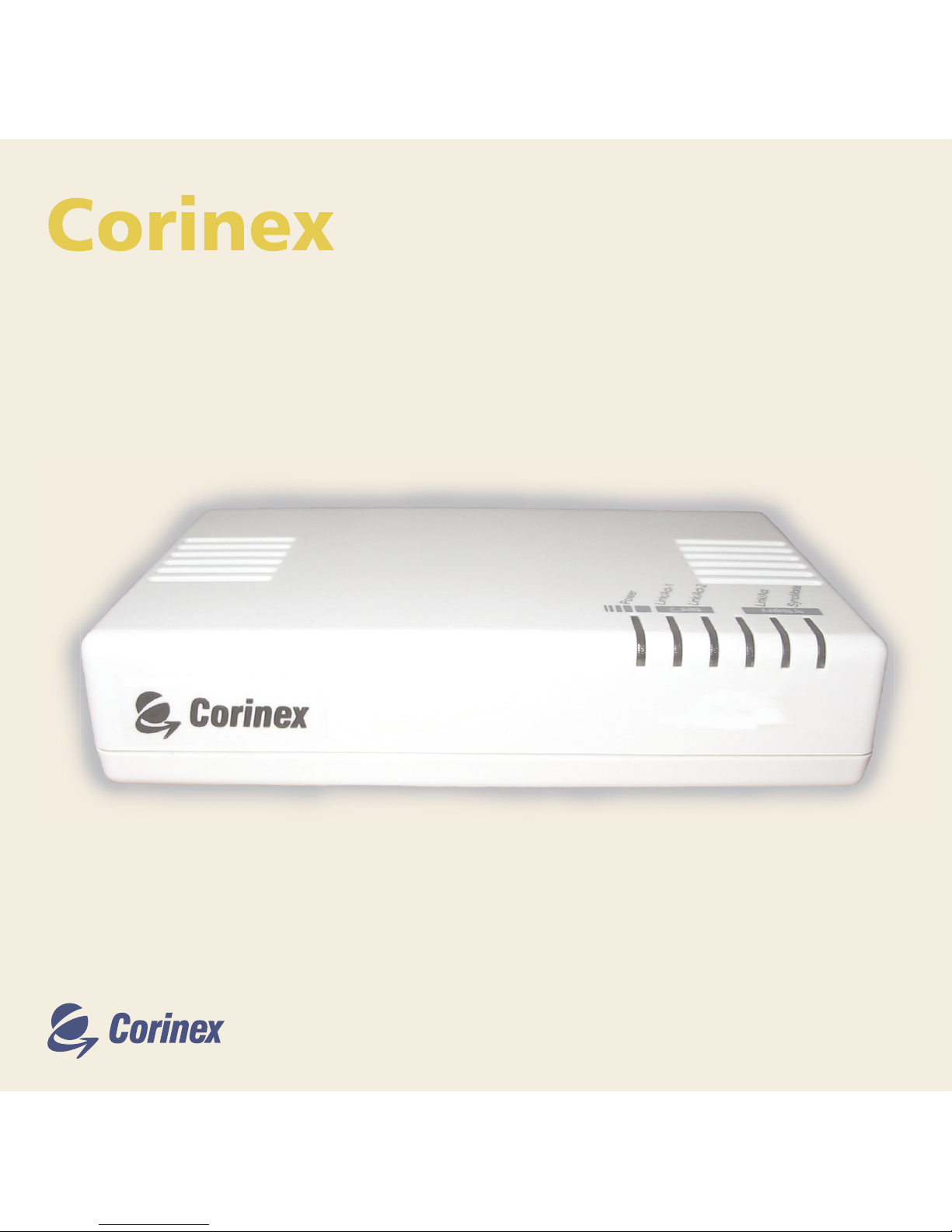
AV CableLAN Adapter
User Guide
AV CableLAN Adapter
Page 2
1
Copyright
Corinex AV CableLAN Adapter
This document, as well as the software described in it, is furnished under license and may be used or copied
only in accordance with the terms of the license. The content of this document is furnished for informational
use only, it is subject to change without notice, and it does not represent a commitment on the part of Corinex
Communications Corp.
Corinex Communications Corp. assumes no responsibility or liability for any errors or inaccuracies that may
appear in this document.
It is our policy to enhance our products as new technologies, hardware components, software and firmware
become available; therefore, the information contained in this document is subject to change without
notice.
Some features, functions, and operations described in this document may not be included and sold in certain
countries due to government regulations or marketing policies.
The use of the product or its features described in this document may be restricted or regulated by law in some
countries. If you are unsure which restrictions or regulations apply, you should consult your regional Corinex
office or the authorized reseller.
Published by:
Corinex Communications Corp.
# 670-789 West Pender Street
Vancouver, B.C.
Canada V6C 1H2
Tel.: +1 604 692 0520
Fax: +1 604 694 0061
Corinex is a registered trademark of Corinex Communications Corp.
Apple, MAC OS X are either registered trademarks or trademarks of Apple Computer, Inc. in the U.S.A. and/or
other countries.
Microsoft, MS-DOS, MS, Windows are either registered trademarks or trademarks of Microsoft Corporation
in the U.S.A. and/or other countries.
All products or company names mentioned herein may be the trademarks of their respective owners.
Copyright (c) 2001-2004 by Corinex Communications Corp.
NOTE: This equipment has been tested and found to comply with the limits for a Class B information
technology equipment. These limits are designed to provide reasonable protection against harmful
interference in a residential installation. This equipment generates, uses and can radiate radio
frequency energy and, if not installed and used in accordance with the instructions, may cause
harmful interference to radio communications. However, there is no guarantee that interference will
not occur in a particular installation. If this equipment does cause harmful interference, the end user
is advised to take adequate measures.
2004-11-05 ver.1,1
Page 3
2
Content
Corinex AV CableLAN Adapter
Content
Copyright ........................................................................................................... 1
Content .............................................................................................................. 2
1 Introduction ....................................................................................................... 3
1.1 Overview ............................................................................................................ 3
1.2 About this Manual .............................................................................................
3
2 Installation Guide ............................................................................................... 4
2.1 What this Package Contains .............................................................................. 4
2.2 System Requirements .......................................................................................... 4
2.3 Physical Description ............................................................................................
5
2.4 Installing the AV CableLAN Adapter .....................................................................
6
2.5 Testing the Setup ...............................................................................................
7
3 User Guide .......................................................................................................... 8
3.1 Applications ........................................................................................................ 8
3.2 AV CableLAN Adapter Specifications ................................................................... 9
4 Troubleshooting Guide ..................................................................................... 10
Page 4
3
Introduction
Corinex AV CableLAN Adapter
Introduction
1.1 Overview
The
Corinex AV CableLAN Adapter
is a network interface adapter using the coaxial cables
in premises as a medium for communication. After successful installation, the indoor AV
CableLAN network behaves like a traditional LAN for computers. The
Corinex AV CableLAN
Adapter
supports up to 128 Mbps network speed.
The product keeps network maintenance cost low and eliminates usage barriers while there
is no need for additional wiring. It is highly integrated and requires no external electronic
components, except the power supply.
1.2 About this Manual
This Owner‘s Manual is intended to provide sufficient information to help you understand
how to successfully install the
Corinex AV CableLAN Adapter
to meet your networking needs.
With the information in this manual, you should be able to:
• Analyze your network efficiency
• Plan the configuration of
Corinex AV CableLAN Adapter
options
• Install and configure your
Corinex AV CableLAN Adapter
according to your plan
• Verify and optimize your
Corinex AV CableLAN Adapter’s
performance
1
Page 5
4
Installation Guide
Corinex AV CableLAN Adapter
Installation Guide
2.1 What this Package Contains
When you receive your
Corinex AV CableLAN Adapter
, check to be sure that your package
contains:
• Corinex AV CableLAN Adapter
• AC power adapter
• Ethernet cable
• Coaxial cable (F-Type / RG-59U)
• Printed manual
We are constantly innovating our products. For the latest hardware/software changes,
downloads and additional information on your device, please visit www.corinex.com.
We also advise you to visit our Corinex Authorized Powerline Partners Program web page
(cappp.corinex.com), as you can find there valuable information about complex applications
and installations, along with the partners in your area, who are providing installation
services.
2.2 System Requirements
• IBM compatible PC or a Macintosh
• One available 10/100 Mbps Ethernet port for connection
• Windows 98/ME/2000/NT/XP, Mac OS X or Linux operating system
2
Page 6
5
Installation Guide
Corinex AV CableLAN Adapter
2.3 Physical Description
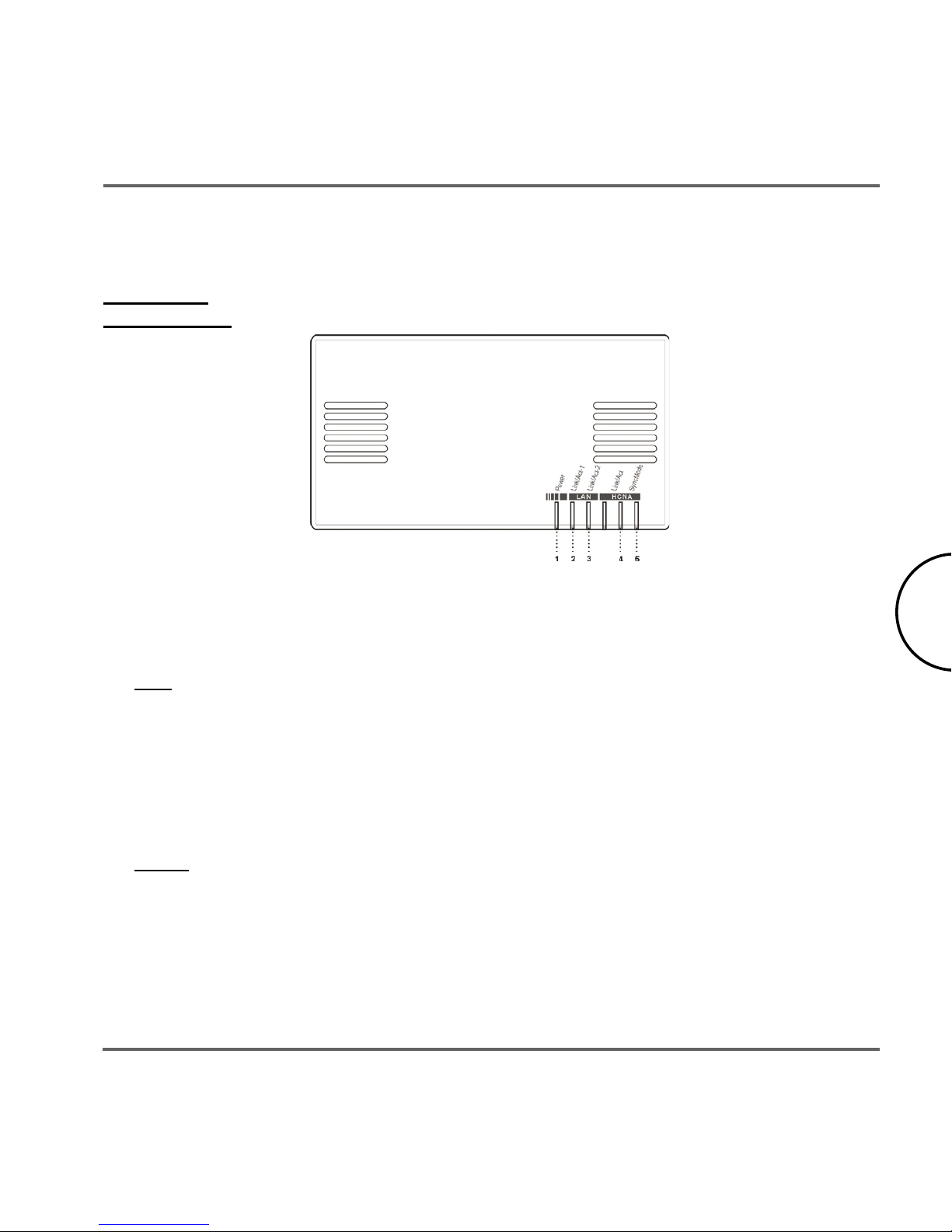
Front Panel
LED Definition
(LEDs from left to right)
Power: Green On: Power On
Off: Power Off
LAN
Link/Act-1: Green On: Link on LAN1
Off: No Link on LAN1
Blinking: Receiving/transmitting data
Link/Act-2: Green On: Link on LAN2
Off: No Link on LAN2
Blinking: Receiving/transmitting data
HCNA
Link/Act: Green On: Link on coaxial cable
Off: No Link on coaxial cable
Blinking: Receiving/transmitting data
SyncMode: Green On: Synchronous Mode
Off : Asynchronous Mode
Page 7
6
Installation Guide
Corinex AV CableLAN Adapter
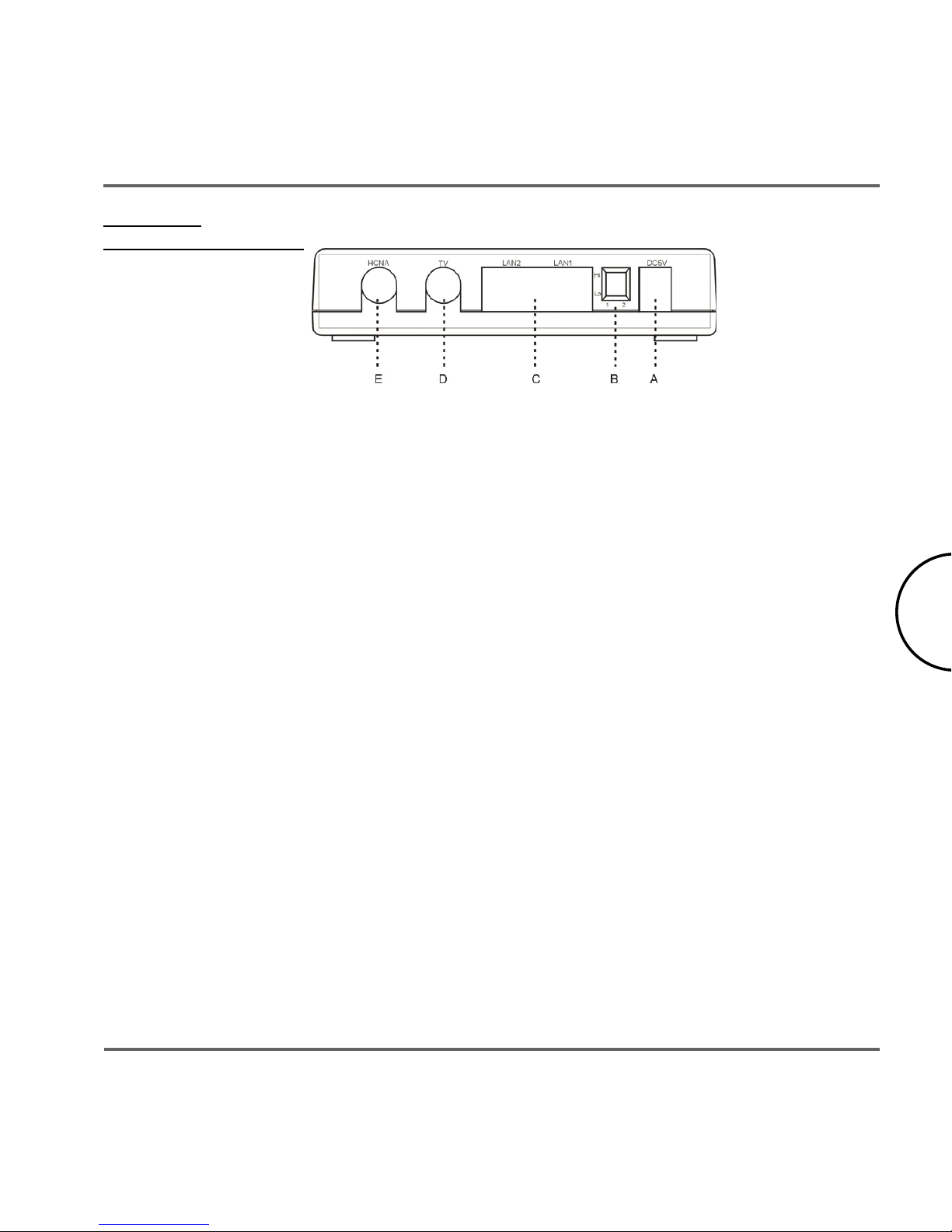
Rear Panel
Connectors Definition
(Connectors from left to right)
HCNA – F-Type: Connects to another Corinex AV CableLAN device, or to the coax
outlet on the wall.
TV – F-Type: Connects to a TV.
LAN – 2x RJ-45: Connects to an Ethernet port on FTTH/xDSL modem or switch
for Internet access.
DIP Switches: 2 switches for settings of master/slave operation mode
Power inlet – 5V DC: Connects to the AC power adapter.
2.4 Installing the Corinex AV CableLAN Adapter
To connect the
Corinex AV CableLAN Adapter
to your computer, follow the steps listed
below.
1. Plug the supplied coaxial cable to the HCNA port of your device and connect it to
the TV socket on the wall. If there was a TV connected to the socket on the wall,
please connect it to the TV port of the device.
2. Plug the supplied Ethernet cable to one of the LAN ports of your device and
connect it to the Ethernet slot of your computer.
3. Connect the power adapter cable to the 5V DC power inlet of your device and
plug the power adapter into an AC socket.
The
Corinex AV CableLAN Adapter
is equipped with an automatic switch enabling an
Ethernet slot or card on the computer to be connected to the adapter via a standard cable or
Page 8
7
Installation Guide
Corinex AV CableLAN Adapter
2.5 Testing the Setup
To verify that the connection is working correctly, use the standard Ping utility. In Windows,
click on menu Start -> Run, then write the command ping IPADDRESS -t, where IPADDRESS
is the IP address of the computer to which the AV CableLAN Adapter is connected to, e.g.
ping 192.168.4.1 -t (This command will be stopped by pressing keys CTRL+C).
• Ping the IP address of the computer to which the AV CableLAN Adapter
is connected. If this fails, there is a problem with the Ethernet network card or
with the TCP/IP protocol.
• Repeat the same process with the other computers on the cable network.
• If all computers can ping themselves, try pinging another computer on the cable
network. If this fails, there is a problem with connections on the cable. Try to
check the connection to the cable network or use a different socket.
• If the setup does not work refer to the troubleshooting guide, but first, try
unplugging the AV CableLAN device and reboot the computer as this sometimes
fixes the problem.
NOTE: In a Corinex AV CableLAN network, you can have up to 62 devices. One of
them has to be switched to master mode, others to the slave mode. For setting up
a master device, please set the switch 1 to the “Lo” position. For all other devices,
please set the switch 1 to the “Hi” position”. After this setting, power cycle the
devices to enable the new functionality.
Page 9
8
User Guide
Corinex AV CableLAN Adapter
User Guide
3.1 Applications
The
Corinex AV CableLAN Adapter
introduces a new and innovative solution for high speed
communications, using the coaxial cables within premises as a medium for communication.
This unique technology offers users a wide range of networking options by using digital
AV CableLAN technology enabling up to 128 Mbps of “traffic” between nodes within the
network.
• Enables users to connect individual PCs or other devices with Ethernet
communications links into a local area network through the coaxial wires (cable)
network
• Enables PC file and application sharing
• Enables peripheral and printer sharing through the cable network
• Enables shared broadband Internet access
• Enables sharing the bandwidth for multimedia payloads including voice, data,
audio and video
• Enables gaming competition within the reach of the coaxial network
• Eliminates the requirement for special data cable wiring
• A real cost-effective and reliable solution for high speed communications in any
home or small office
You can combine this type of adapters with the full line of Corinex AV products. This manual
has been prepared for
Corinex AV CableLAN Adapter
for use in combination with PCs or
laptop computers.
3
Page 10
9
User Guide
Corinex AV CableLAN Adapter
3.2 AV CableLAN Adapter Specifications
The following table lists the product specifications for the
Corinex AV CableLAN Adapter.
Standard compliance IEEE802.3
IEEE802.3u
HomePNA 3.0
Ports 2 x F-Type
2 x RJ-45
Data rate Up to 128 Mbps
Cabling type Ethernet cable
Coaxial cable
LED status lights POWER
Link/Activity1 (Ethernet)
Link/Activity2 (Ethernet)
Link/Activity (Coaxial cable)
SyncMode (Coaxial cable)
Unit dimensions 75mm L x 117mm W x 34mm H
Power
5V DC by supplied 110V (US) or 220V (Euro)
AC
AC plug type
US, UK or Euro
Safety, EMI USA: UL, FCC 15B
Europe: CE
Operating temperature 32°F to 104°F (0°C to 40°C)
Storage Temperature
-4°F to 158°F (-20° to 70°C)
Operating Humidity 10% to 85% non-condensing
Storage Humidity 5% to 90% non-condensing
Page 11
10
Troubleshooting Guide
Corinex AV CableLAN Adapter
Troubleshooting Guide
The
Corinex AV CableLAN Adapter
has been designed to be a reliable and easy to use network
connection device. Please refer to the list below to aid in troubleshooting.
The POWER LED is off.
1. Verify the connection of the power cable to the device’s power inlet.
2. Make sure that the power adapter is properly plugged into the electrical socket.
3. Try to use another socket.
The LAN (Ethernet) Link/Act LED is off.
1. Make sure that the Ethernet cable is correctly plugged into the Ethernet port.
2. The Ethernet-enabled device, to which the adapter is connected, should be
powered on and properly configured.
3. Try to use another Ethernet cable.
The HCNA Link/Act LED is off.
1. Make sure that the coaxial cable is correctly plugged into the HCNA port.
2. The HCNA device, to which the adapter is connected, should be powered on and
properly configured.
3. Try to use another coaxial cable.
4. Ensure that all devices which should communicate, are on the same coaxial cable
and there is no one-way signal amplifier in the way.
The HCNA SyncMode LED is off.
1. Make sure if the bridge beside xDSL Modem is set as “Master” by setting the Bit-1
of DIP Switch as “Lo” before POWER ON. Other devices should be set as “Slave”
– Bit-1 as “Hi”.
2. “SyncMode” LED, on the Master will be always ON. “SyncMode” on a Slave will
be OFF unless there is a Master detected on the coaxial cable.
3. The Ethernet or HCNA device to which you are connected should be powered on
and properly configured.
4
Page 12

11
Troubleshooting Guide
Corinex AV CableLAN Adapter
If you still have trouble, please visit www.corinex.com and go to the appropriate section
with the information to your product. You will find there news, manuals and software
updates, as well as frequently asked questions (FAQ). If this doesn’t help, you can
contact the Corinex “help desk” by sending an e-mail using the web contact form at
www.corinex.com. Please try to:
• describe your problem
• report the devices types and manufacturing numbers of your network
adapters
• if possible, describe your network topology together with network
settings of all networking devices in your network.
 Loading...