

Page 1

1
5F, NISOP, 301#, HanZhongMen Street, Gulou District, Nanjing, Jiangsu, China | www.corewise.cn
1
1
Smart Financial Terminal CPOS800
Smart Financial
Terminal
User Manual
Page 2

2
5F, NISOP, 301#, HanZhongMen Street, Gulou District, Nanjing, Jiangsu, China | www.corewise.cn
2
2
Smart Financial Terminal CPOS800
Introduction
Before using this product, please carefully read the information below!
Security cautions
1. This pos terminal only can be used with dedicated battery and power
adapter which Corewise offer, otherwise may cause damage to the product
and the battery.
2. Do not throw the battery into the fire, do not short circuit, break up nor heat
the battery, otherwise may cause the battery leakage, damage or even
explosion.
3. Be sure to remove the battery from the machine if long time no use.
4. Do not open the paper cover when printing or just finished printing, do not
touch the printer engine by hand or any part of the body, in order to avoid
burns caused by high temperature.
Other cautions
Maintenance
Regularly use dry cloth to wipe the dust on the surface of the terminal.
Packing and Shipping
In long-distance transportation, the terminal has to be protected with
packaging box, sprayed directly by snow, rain,liquid or mechanical damage in
the transportation is not allowed.
Storage
Surroundings: ventilation, dry, no sharp temperature change, no magnetic field
around, no acid,alkali nor other harmful gas in the air.
Page 3
3
5F, NISOP, 301#, HanZhongMen Street, Gulou District, Nanjing, Jiangsu, China | www.corewise.cn
3
3
Smart Financial Terminal CPOS800
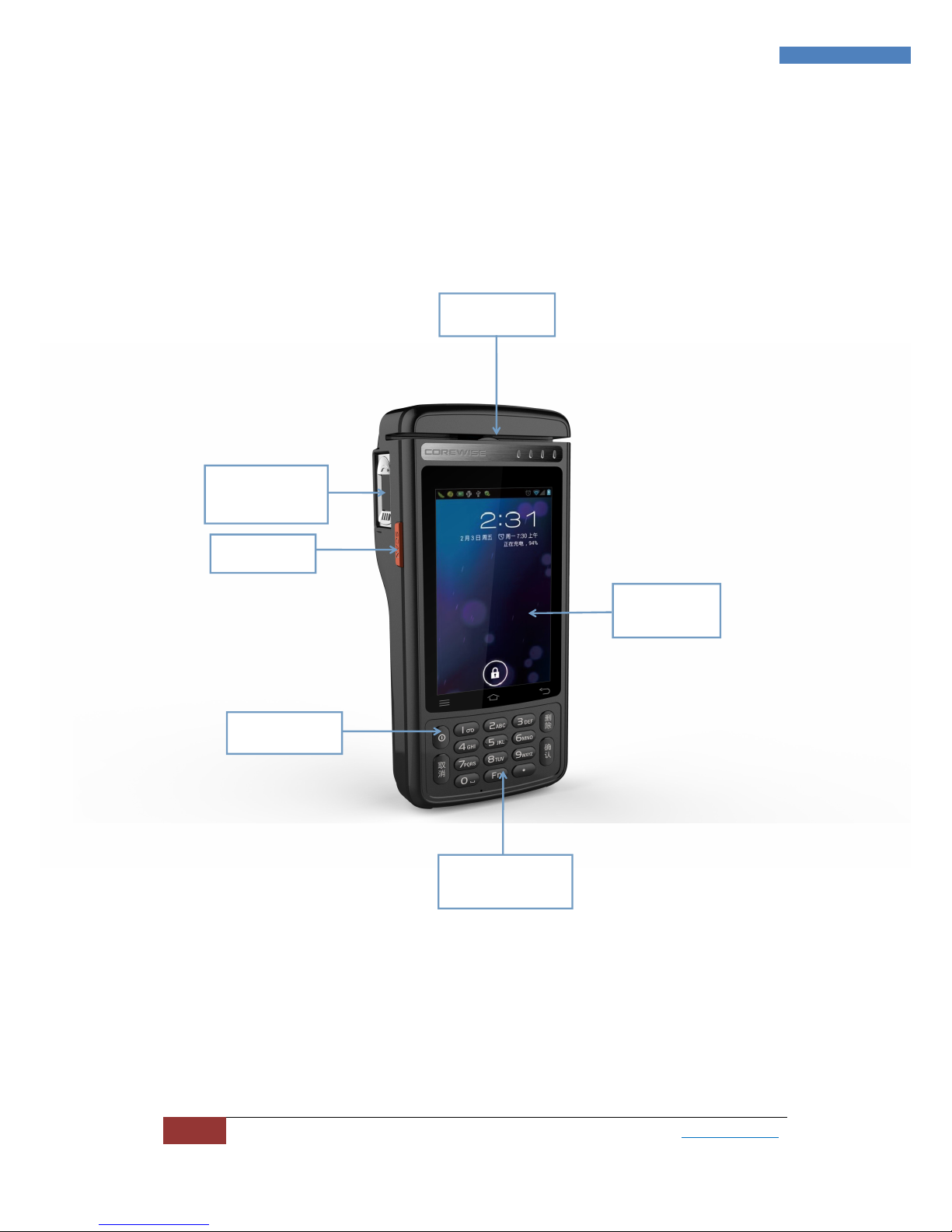
Chapter I Product Appearance
键盘区
电源键
显示区
扫描键
指纹区
磁条卡区
MSR Area
Fingerprint
Area
Scan Key
Power Key
Keyboard
Area
Display
Area
Page 4

4
5F, NISOP, 301#, HanZhongMen Street, Gulou District, Nanjing, Jiangsu, China | www.corewise.cn
4
4
Smart Financial Terminal CPOS800
Chapter II Performance
1. Specific technical parameters
1.1 Operating Functions
* stands for optional functions
Operating system: Android 6.0
CPU: 1.2G Quad core
Display: 4 inch TFT LCD
Touch Screen: Capacitive
Display resolution: 480x800
Rear camera: 8mp,autofocus,with flash
Contact IC card: compatible with ISO 7816-3 ,PBOC3.0 and EMV LEVEL1&2
Contactless IC card: ISO/IEC 14443 Type A&B,MiFare card
supported,conform to qPBOC,paypass and payWave.
Magnetic Stripe Card: supported
Printer: thermal printer, paper width 58mm, paper diameter 30mm, printing
speed 40mm/s
*Fingerprint: Capacitive, 508dpi, time<1s, 508dpi
*Bar code: 1D/2D supported
Satellite position: GPS and GLONASS supported, precision within 10m
*UHF RFID: ISO18000-6C supported
1.2 Connecting Slots(client)
Expansion slot in the host
1 T-Flash card slot(up to 32G)
1 SIM card slot
1 PSAM card slot
1.3 Communication and Connection
USB Interface:Micro USB
WIFI:IEEE 802.11b/g/n
Bluetooth:BT4.0 LE
1.4 Accessories
Battery:Polymer battery
2. Physical parameters
Weight:420g
Dimension:180x75x33/46mm
Keys:17
3. Environmental parameters
Operating temperature:-20℃~70℃
Operating humidity:5%~90%RH
Storage temperature:-40℃~70℃
Storage humidity:20%~93%RH(40℃)
Atmospheric pressure:86Kpa~110Kpa
Page 5
5
5F, NISOP, 301#, HanZhongMen Street, Gulou District, Nanjing, Jiangsu, China | www.corewise.cn
5
5
Smart Financial Terminal CPOS800
Chapter III Use Method
1. Preparations before use
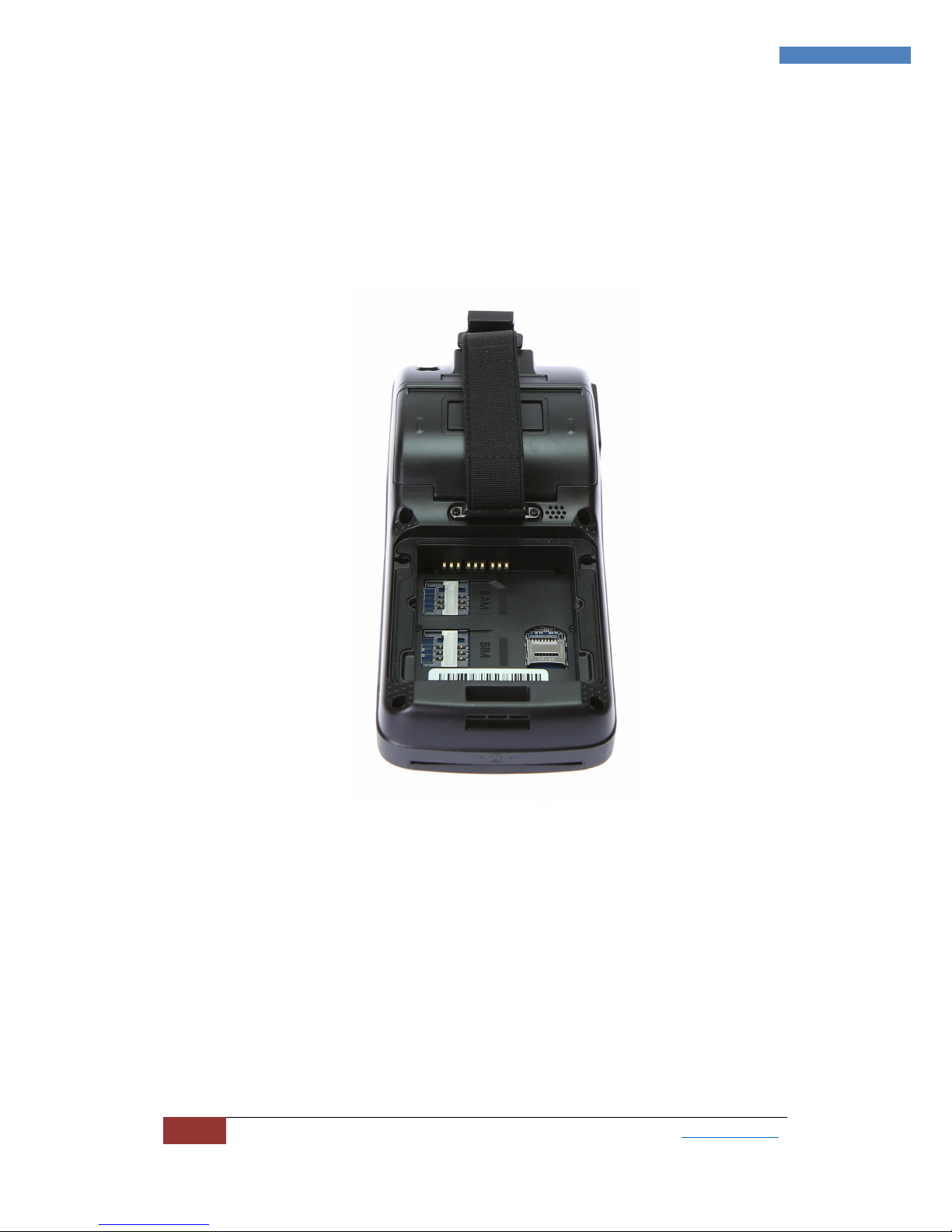
1.1 Battery and terminal installation
a. Open the back cover, install the battery
b.Press power on/off button
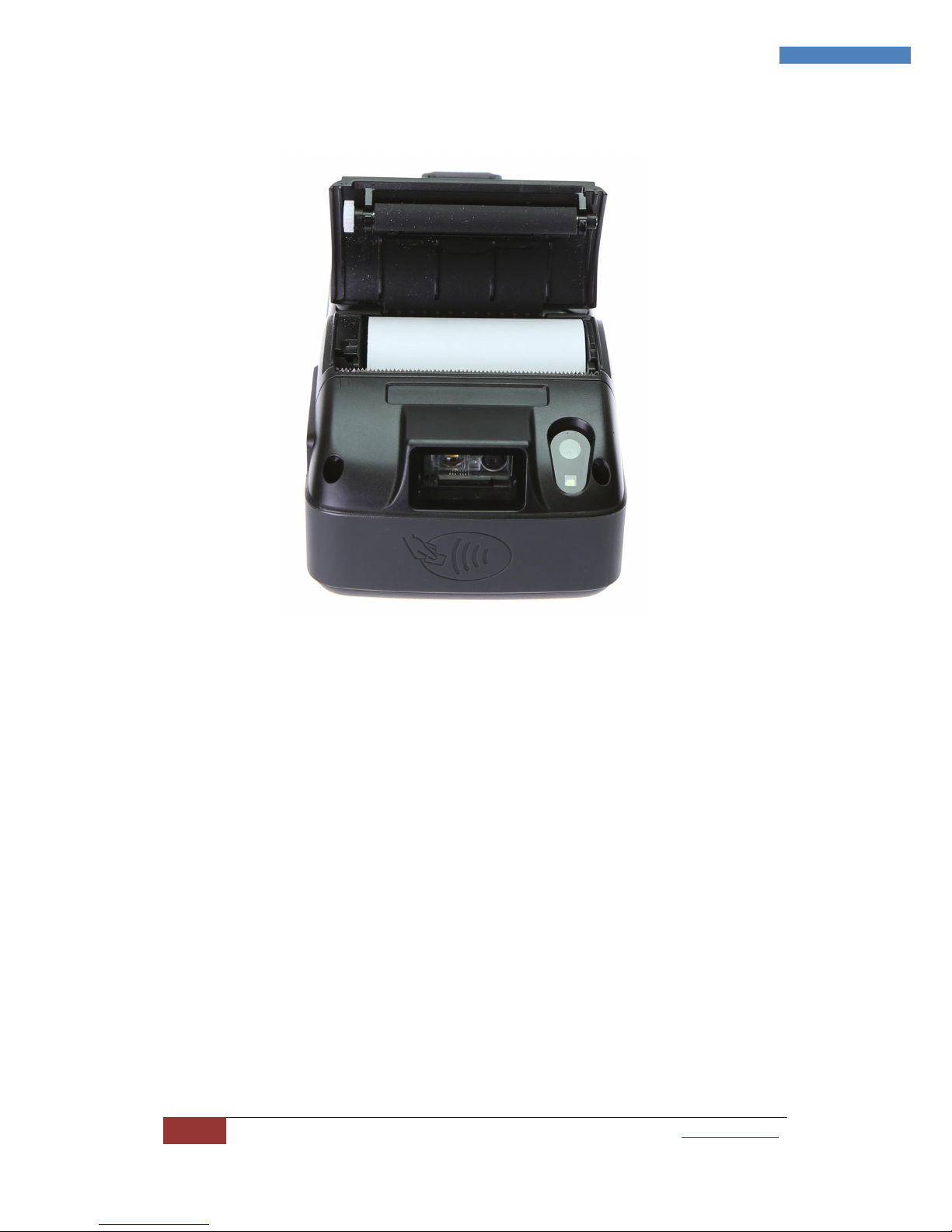
1.2 Install the paper roll
a. Open the printer cover and install the paper roll.
Page 6
6
5F, NISOP, 301#, HanZhongMen Street, Gulou District, Nanjing, Jiangsu, China | www.corewise.cn
6
6
Smart Financial Terminal CPOS800
b.Test the printer paper function normal or not.
2. DEMO instructions of basic functions
2.1 Printer
Enter the DEMO, input the content to be printed, select to print.
2.2 Magnetic Stripe Card Reader
a.Enter the DEMO, select Magnetic Card;
b.Please follow the picture below, put the magnetic stripe card into the card
reading area, then through the application software you used to read the card.
Page 7
7
5F, NISOP, 301#, HanZhongMen Street, Gulou District, Nanjing, Jiangsu, China | www.corewise.cn
7
7
Smart Financial Terminal CPOS800
2.3 Contact IC card
a.Enter the DEMO, select Contact CPU Card;
b.Please follow the picture below, put the IC card into the card reading
area, then through the application software you used to read the card.
Do the contact IC card operations according to the picture.
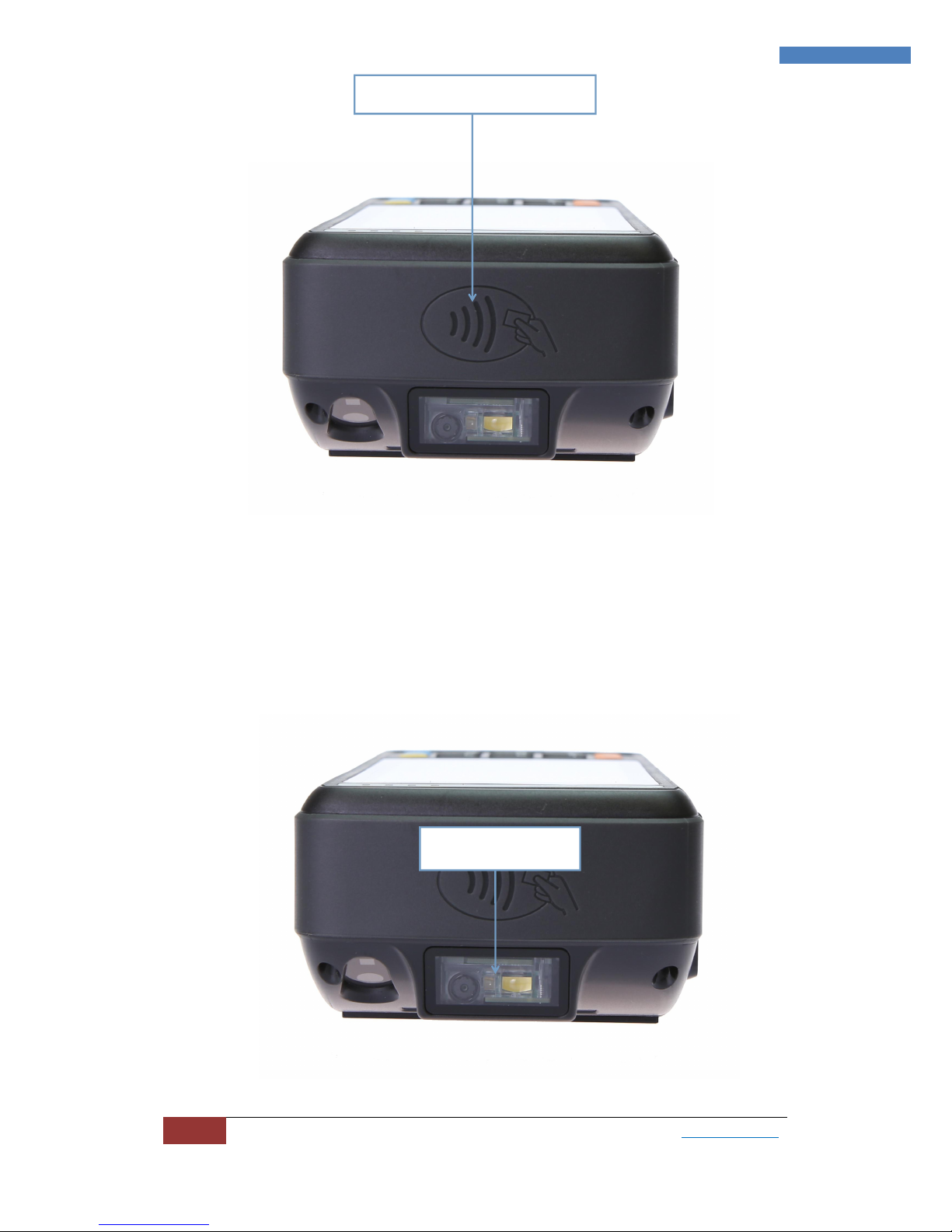
2.4 Contactless IC card
a. Enter the DEMO, select Non Contact CPU Card;
b. Please follow the picture below, put the contactless IC card into the card
reading area, then through the application software you used to read the card.
Magnetic track
Contact IC card slot
Page 8
8
5F, NISOP, 301#, HanZhongMen Street, Gulou District, Nanjing, Jiangsu, China | www.corewise.cn
8
8
Smart Financial Terminal CPOS800
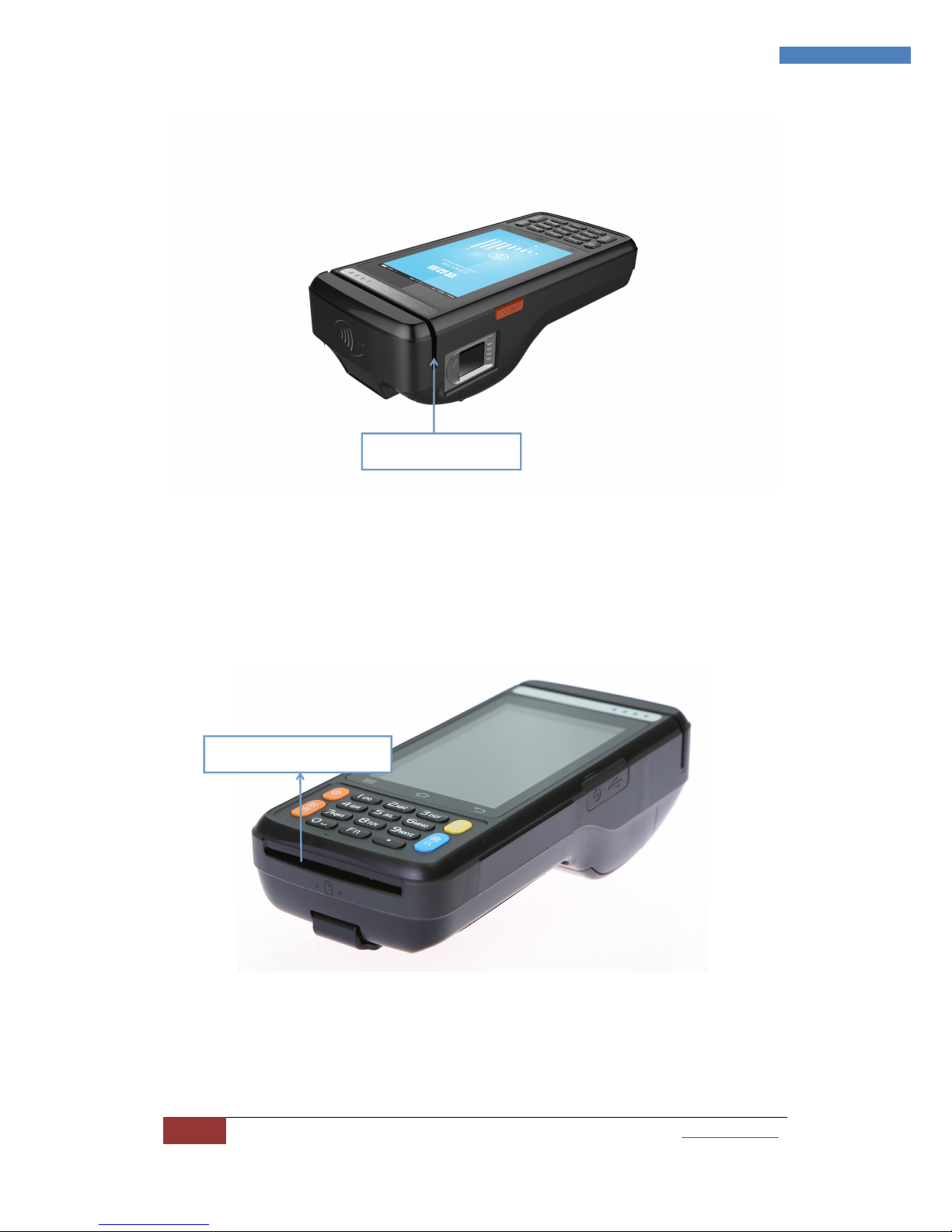
2.5 1D/2D bar code
a.Enter the DEMO, select bar code;
b.Scanning head as shown in the picture below, start to scan in the DEMO
or by the side scanning key
.
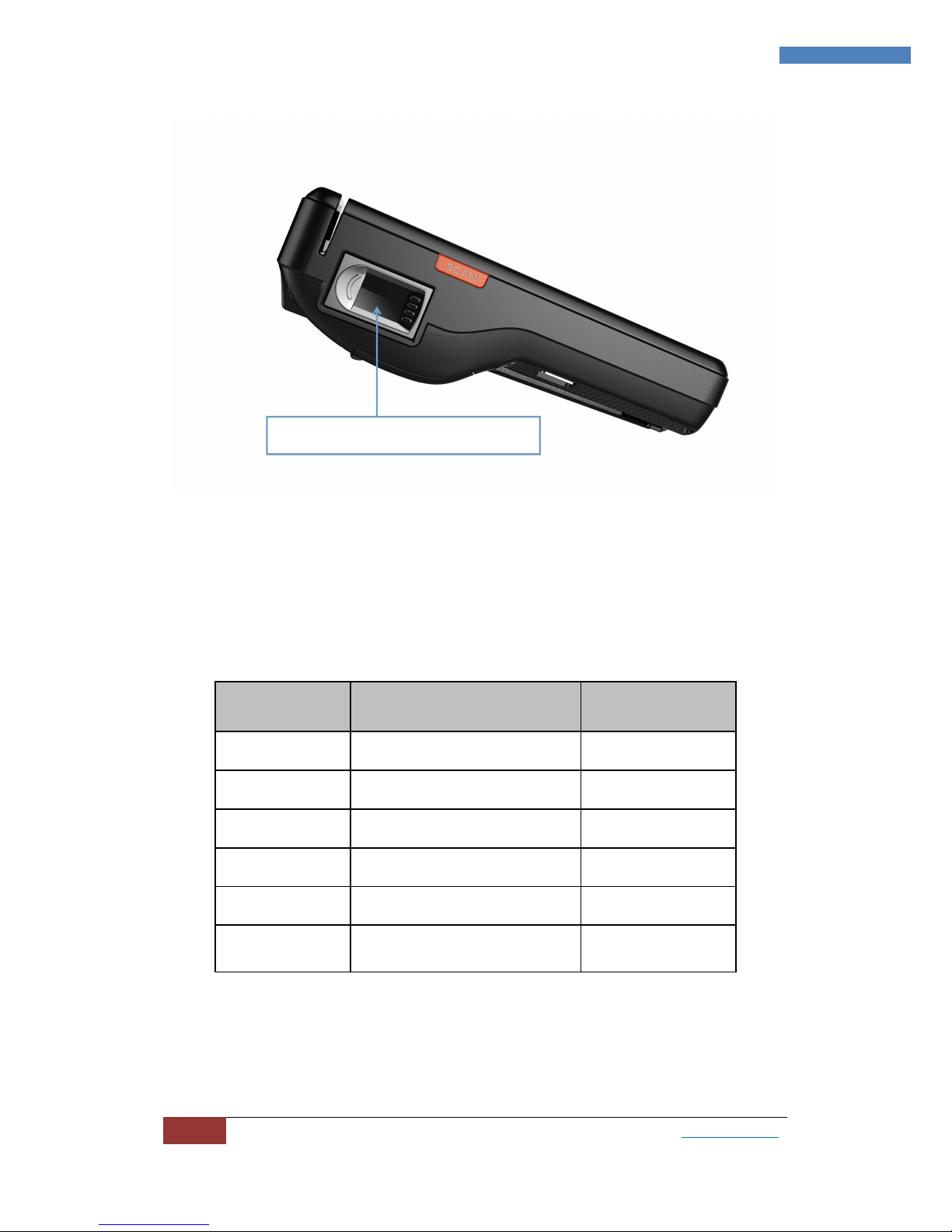
2.6 Fingerprint
As shown in the picture below, put the finger in the area, start to collect it.
Contactless IC card area
Scanning head
Page 9
9
5F, NISOP, 301#, HanZhongMen Street, Gulou District, Nanjing, Jiangsu, China | www.corewise.cn
9
9
Smart Financial Terminal CPOS800
Chapter IV Packing List
Serial Nº
Component
Quantity
1
Host
1
2
Charger
1
3
Battery
1
4
Cable
1
5
User manual
1
6
Certificate of Approval/
Warranty Card
1
Fingerprint identification area
 Loading...