

Page 1
A370 User Manual
http://www.corewise.cn
2014
1
USER MANUAL
A370
Nanjing Corewise Smart Technology Inc.
Support
Hotline: 0086-13851413726, 13851629242
Skype: xiafan_max (software), cruise.xiao (hardware)
E-mail: [email protected]
Page 2

A370 User Manual
http://www.corewise.cn
2014
2
Profile Picture
Indicator Light is used to show the device in a certain status, from left to right:
(a) Charging Indicator: red in charging and green for charge saturation;
(b) Power Indicator: blue for power-on status;
(c) Fingerprint Indicator: blue indicator blinks for fingerprint processing;
(d) ID Card Indicator: blue indicator blinks for RFID card processing.
Technical Specifications
Page 3
A370 User Manual
http://www.corewise.cn
2014
3
Dimensions
220 x 132 x 23(mm) (8.7" x 5.2" x 0.9")
Weight
0.5Kg (1.1lbs) with battery
3G
GSM/GPRS/EDGE 850/900/1800/1900Mhz
WCDMA 2100Mhz
CPU
Qualcomm MSM 8225 Dual Core 1.2GHz
Internal Memory
1GB RAM, 4GB ROM
External Storage
T-Flash/Micro SD card, up to 32 GB
Operating System
Google Android 4.0.4
Display
TFT LCD 7 inch, sunlight readable, capacitive touch
screen with resolution: 1024 x 600
Camera
Front 1.3M, rear 5.0M, LED, auto focus
Network Interface
Integrated WLAN 802.11 b/g, integrated Bluetooth
2.1 EDR
GPS
Supported, 10m
USB
Mini USB 10-pin, OTG supported
UART & RS232
Supported
Battery
DC 3.7V, 8000mAh
Features
Waterproof/Dustproof
IP65
Shockproof
1.0M falling
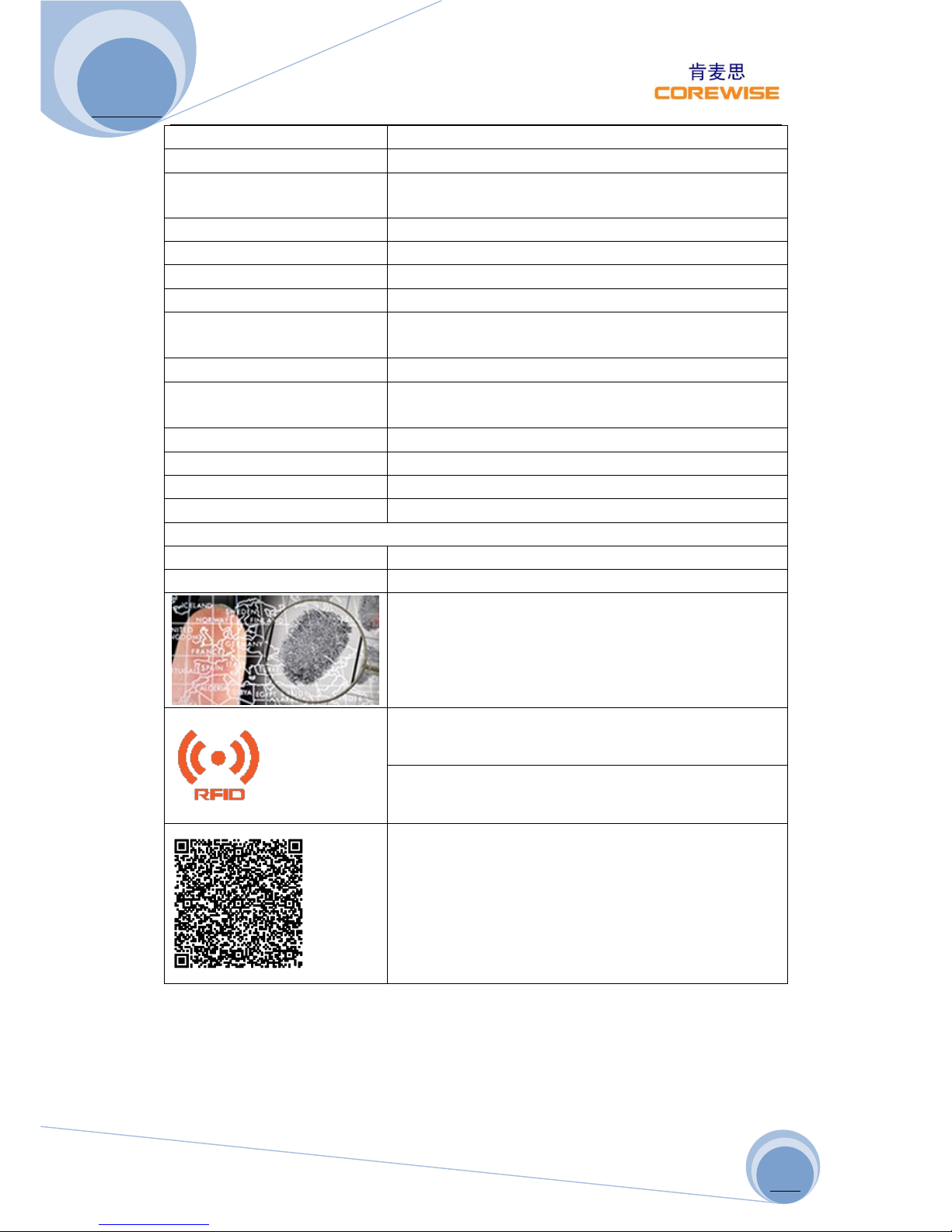
Build-in fingerprint sensor, capacitive touch screen,
508 DPI
HF RFID 13.56Mhz, ISO/IEC 14443 A, ISO/IEC 14443 B,
ISO 15693
UHF RFID 915Mhz, ISO18000-6C, 0~6m
1D Bar Codes Supported:
UPC/EAN, Bookland EAN, UCC Coupon Code, ISSN
EAN Code 128, GS1-128, ISBT 128, Code 39, Trioptic
Code 39, Code 32, Code 93, Code 11,Interleaved
2of5, Discrete 2of5, Codabar ,MSI, Chinese 2of5,
Matrix 2of5, Inverse 1D ,Korean 3of5, GS1 DataBar,
Composite Codes
Page 4
A370 User Manual
http://www.corewise.cn
2014
4
2D Bar Codes Supported:
PDF417, MicroPDF417, Data Matrix, Data Matrix
Inverse, Maxicode, QR Code, Micro QR, QR Inverse,
Aztec, Aztec Inverse, US Postnet, US Planet, US
Postal, Japan Postal, Australian Postal, Netherlands
KIX Code, USPS 4CB/One Code/Intelligent Mail,
UPU FICS Postal
Ruggedness
Operating
Temperature
-20°C (-4°F) to +70°C (158°F),
<0.5°C / min; 24 hr cycle x 3
cycles
MIL-STD-810G, Methods 501.5,
502.5
Storage
Temperature
-40°C (-40°F) to 70°C(158°F),
<0.5°C / min; 24 hr cycle x 7
cycles
MIL-STD-810G, Methods 501.5,
502.5
Relative Humidity
90% @ 40°C (104°F), 3 x 24
hr cycles
MIL-STD-810G, Method 507.5
Dust Protection
IP6x (dust)
IEC 60529 /AC2:2007
Water Protection
IPx5 (water)
IEC 60529 /AC2:2007
Vibration
Fig 514.6E-1 & 514.6E-2.
MIL-STD-810G-514.6,
Procedure I Cat. 24,
Drop Test
120CM(47”) drop, 2»
plywood over concrete, each
edge, face and corner; 26
drops total (@ ambient
temp)
MIL-STD-810G, Method
516.6,Procedure IV
Regulatory
CE, CCC, SONCAP, PC, ROHS, ISO9000
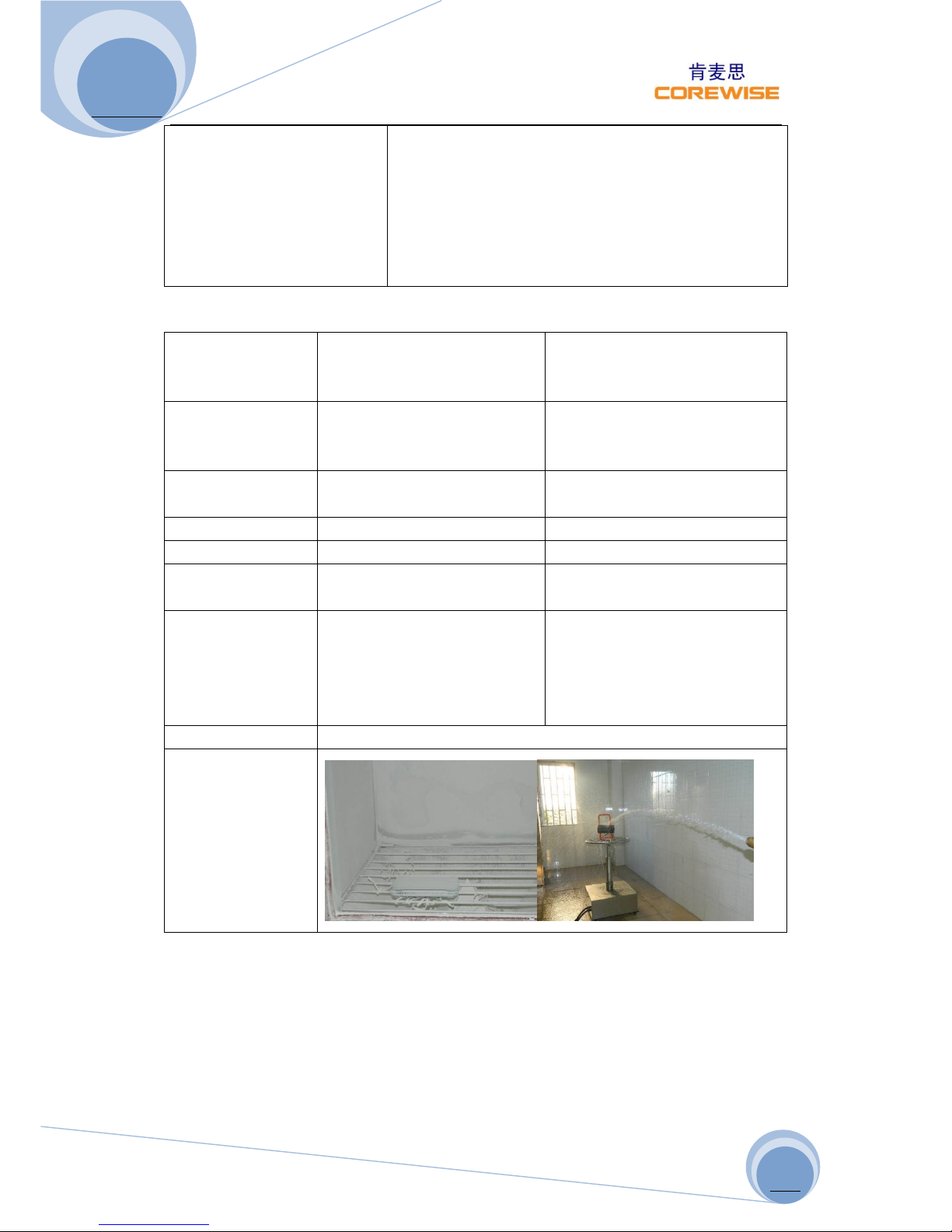
IP65 Testing
Page 5
A370 User Manual
http://www.corewise.cn
2014
5
Structure
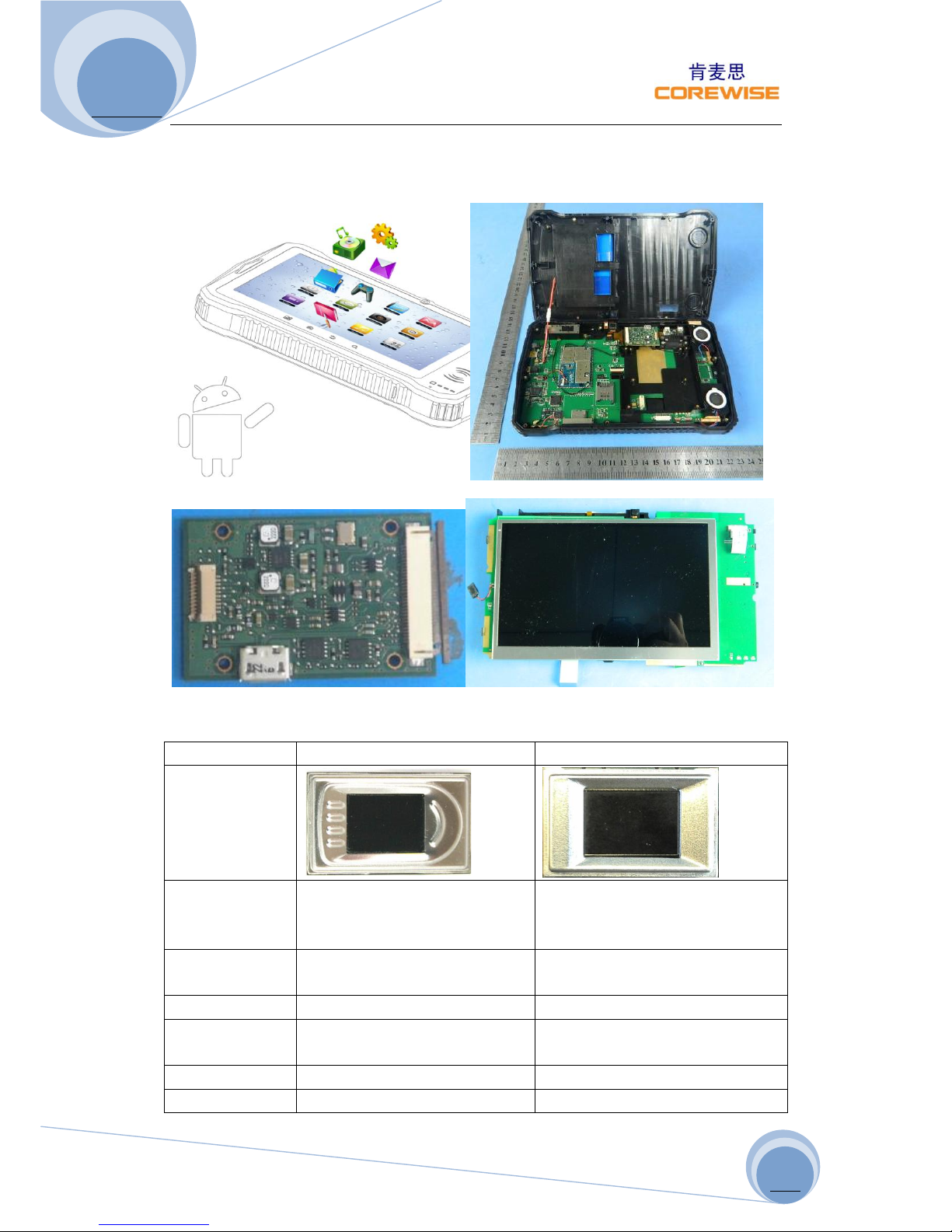
Fingerprint Sensor
TCS2SS
TCS1ST
Picture
Vendor
AuthenTec Inc. (On 27 July
2012, AuthenTec was acquired
by Apple Inc.
AuthenTec Inc. (On 27 July 2012,
AuthenTec was acquired
by Apple Inc.
Size
10.4*14.4mm array (imaging
area)
12.8*18.0mm array (imaging
area)
Type
Capacitive touch chip
Capacitive touch chip
DPI
208*288pixel array, 508DPI,
8bits per pixel
256*360pixel array, 508DPI,
8bits per pixel
Lifetime
4M finger placements
4M finger placements
Imaging Mode
<=20mA @ 5.0V
<=20mA @ 5.0V
Page 6
A370 User Manual
http://www.corewise.cn
2014
6
Standard IM
Supply
4.4V to 5.5V
4.4V to 5.5V
EIM Modes
Supply
4.5V to 4.6V
4.5V to 4.6V
Operating
Temperature
-30 ºC to +85 ºC
-30 ºC to +85 ºC
Storage
Temperature
-40 ºC to +85 ºC
-40 ºC to +85 ºC
Compliant
RoHS, FIPS 201
RoHS, FIPS 201
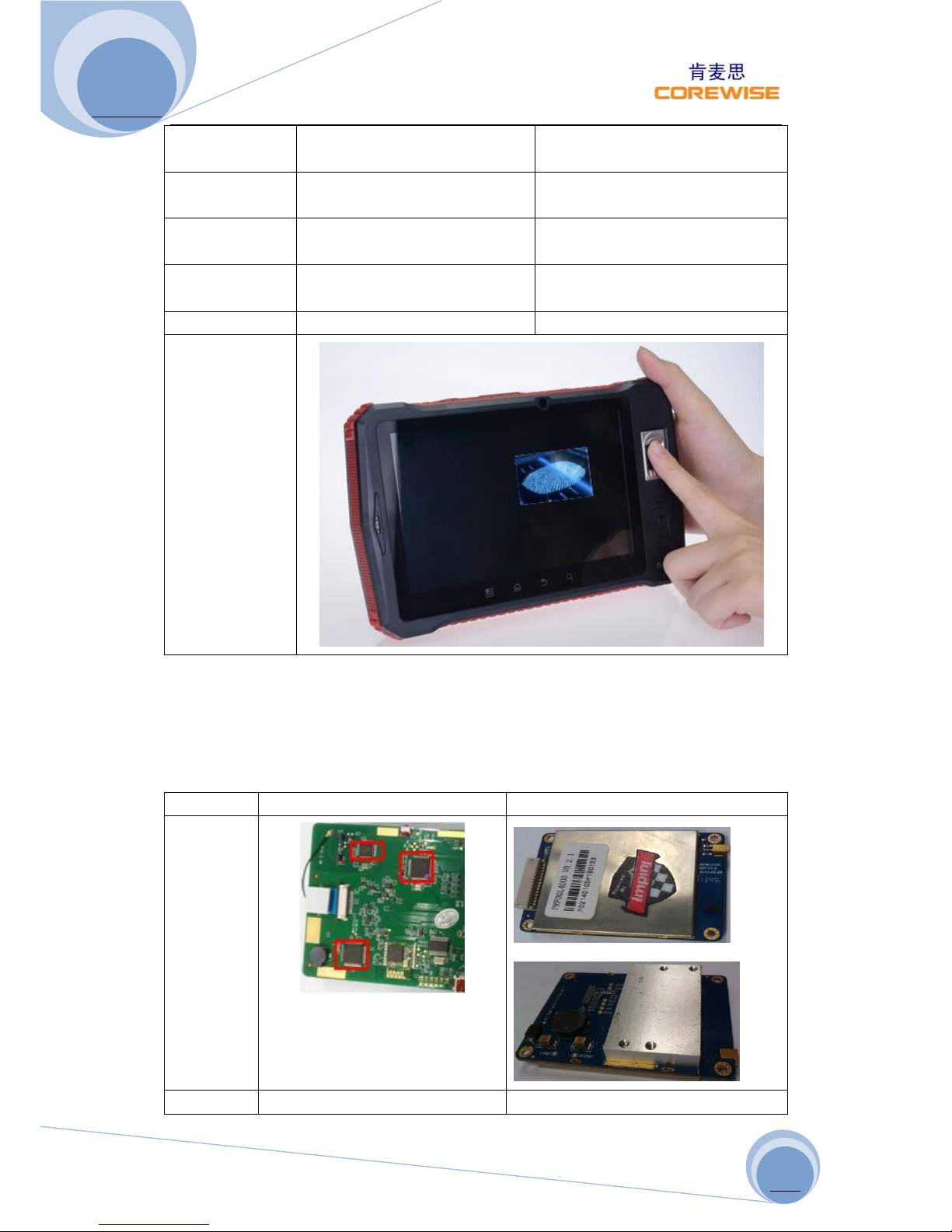
Demo
Caution: The sensor surface is hard and extremely robust and will withstand years of
normal wear-and-tear. However, do not subject the sensor to sharp or hard objects
since this might cause permanent damage. Cleaning should be done with a lint-free
cotton textile. Do not subject the sensor surface to mechanical force.
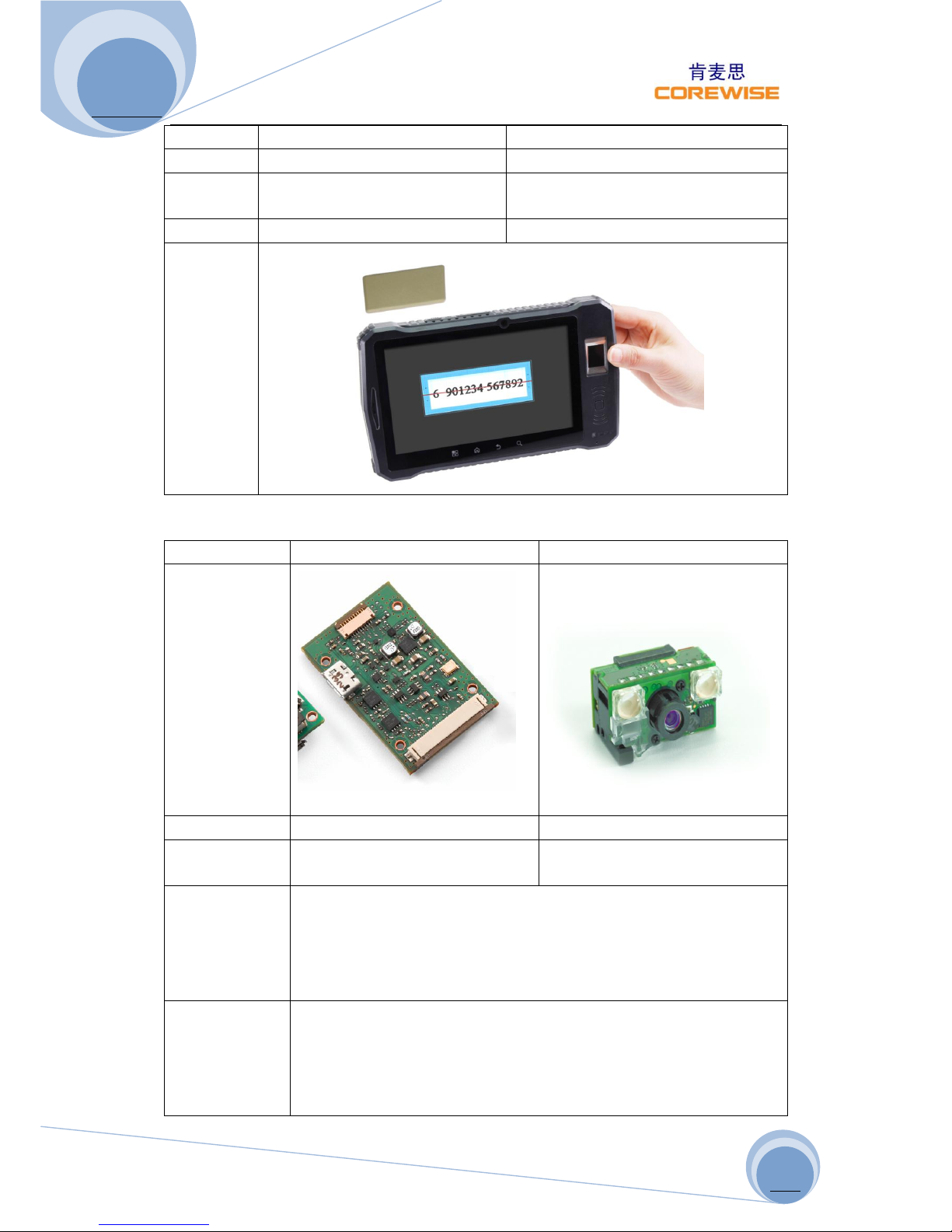
RFID (Radio-Frequency Identification)
High Frequency (HF)
Ultra-High Frequency (UHF)
Picture
Bands
13.56Mhz(HF)
865-868 MHz (Europe)
Page 7
A370 User Manual
http://www.corewise.cn
2014
7
902-928 MHz (North America)
Range
10cm-1m
1-10m
Standards
ISO/IEC 14443 Type A, ISO/IEC
14443 Type B, ISO/IEC 15693
ISO18000-6C
Vendor
Corewise
Impinj R2000
Demo
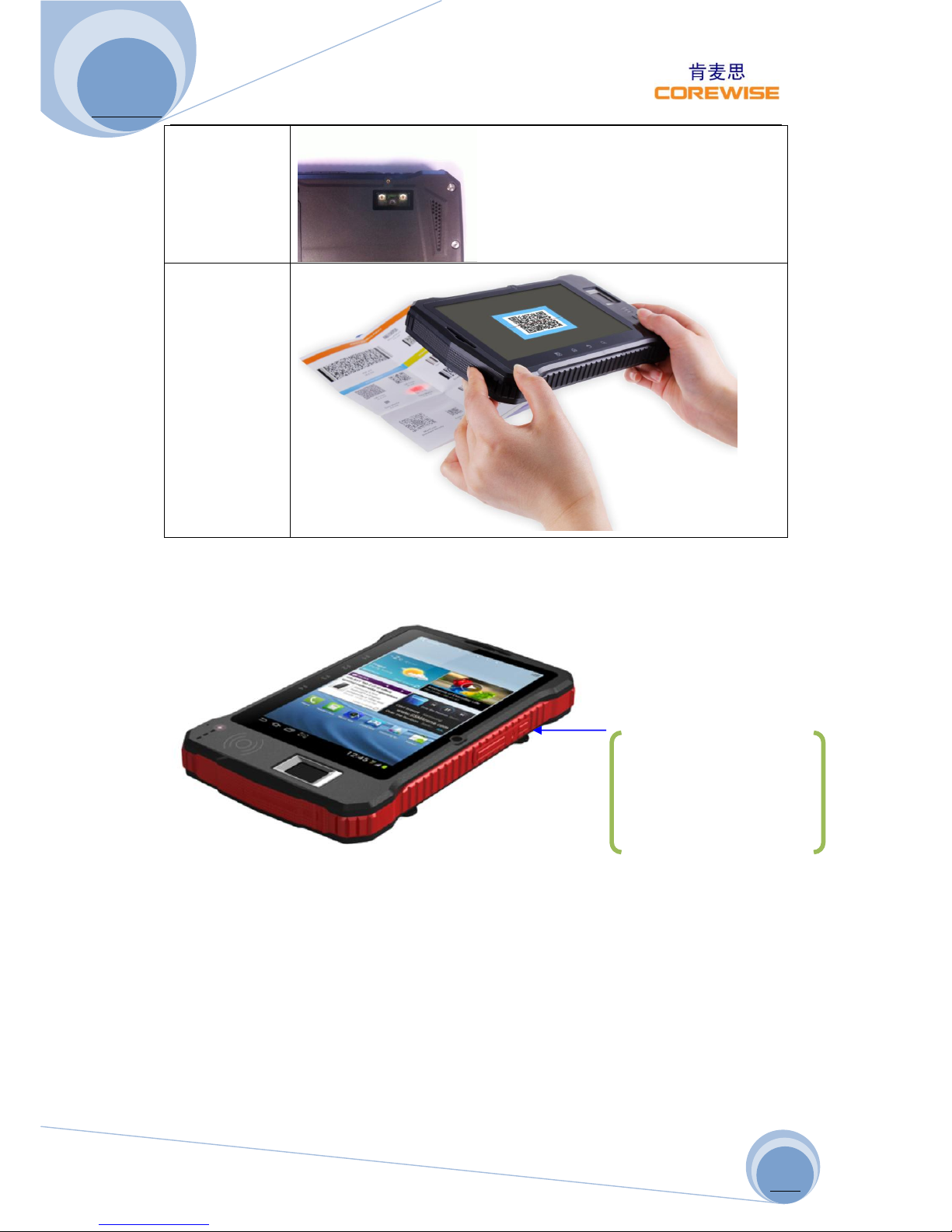
Barcode Scanner
Option 1
Option 2
Picture
Module
PL3307
SE4500
Vendor
Chinese Manufacturer
Symbol (acquired by Motorola
in 2005)
1D Barcode
UPC/EAN, Bookland EAN, UCC Coupon Code, ISSN EAN Code 128,
GS1-128, ISBT 128, Code 39, Trioptic Code 39, Code 32, Code 93,
Code 11,Interleaved 2of5, Discrete 2of5, Codabar ,MSI, Chinese
2of5, Matrix 2of5, Inverse 1D ,Korean 3of5, GS1 DataBar,
Composite Codes
2D Barcode
PDF417, MicroPDF417, Data Matrix, Data Matrix Inverse,
Maxicode, QR Code, Micro QR, QR Inverse, Aztec, Aztec Inverse, US
Postnet, US Planet, US Postal, Japan Postal, Australian Postal,
Netherlands KIX Code, USPS 4CB/One Code/Intelligent Mail, UPU
FICS Postal
Page 8
A370 User Manual
http://www.corewise.cn
2014
8
Rear View
(exterior)
Demo
Demos
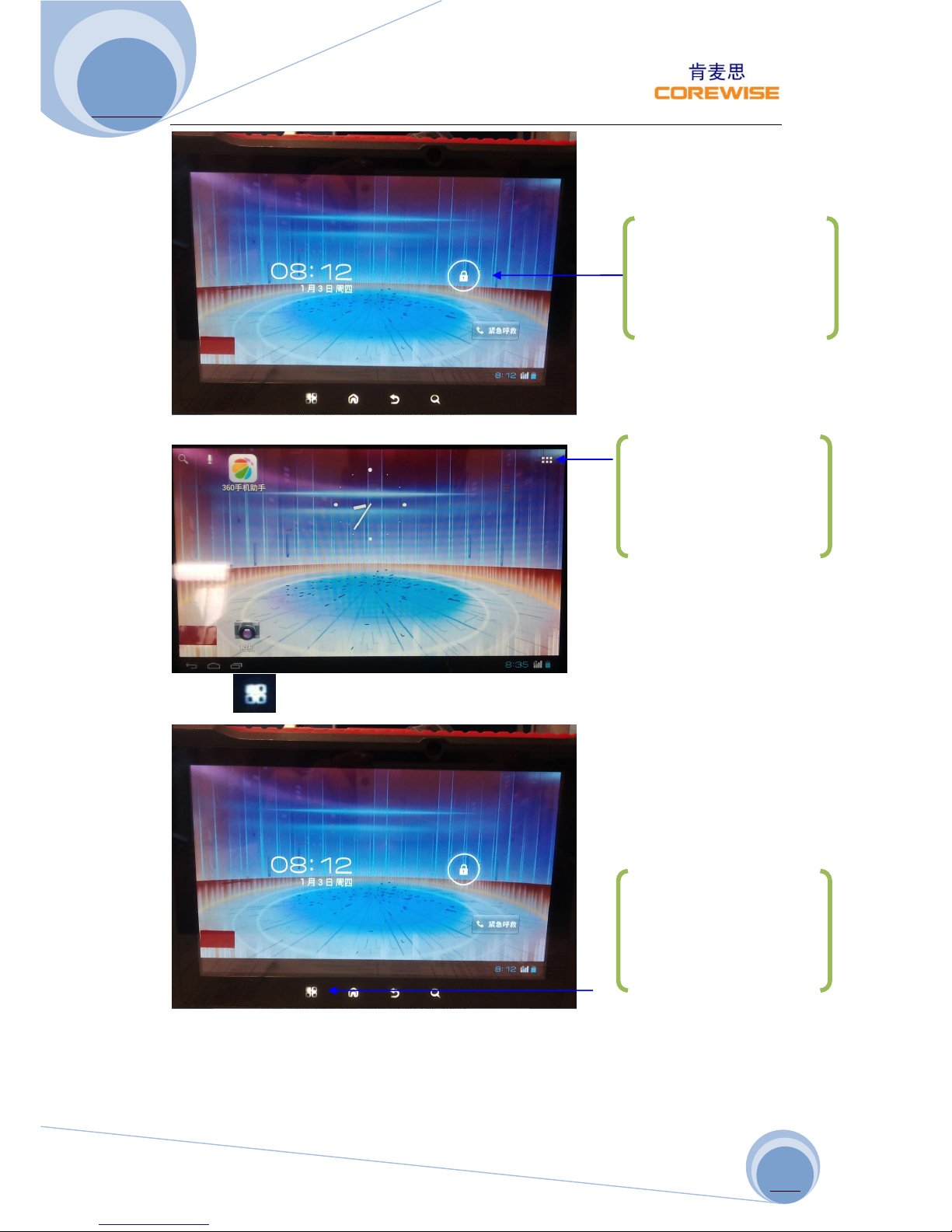
Step 1: Power on the Device
Step 2: Unlock the Screen
Slightly press the “power
on” button for 3 seconds
to power on the device
Page 9
A370 User Manual
http://www.corewise.cn
2014
9
Step 3: Enter into Main Menu/System Settings
Or click icon on the left below of the screen
Slightly press the lock icon
and move to screen right
edge to unlock the screen
Click this icon to enter into
main menu
Click this icon to enter into
system settings directly
Page 10
A370 User Manual
http://www.corewise.cn
2014
10
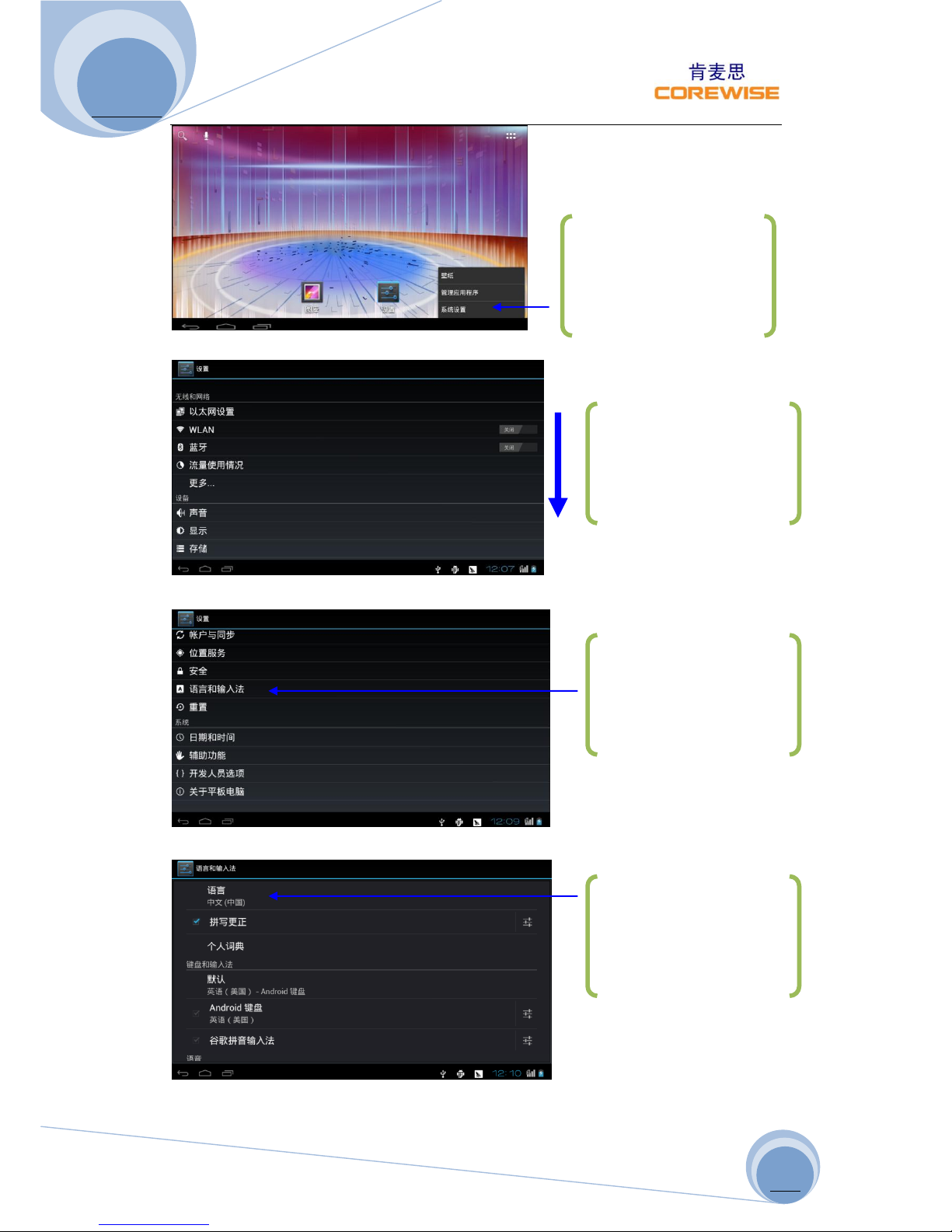
Step 4: System Language Changing
Select “语言和输入法” to change language
Select “语言” to change languages
Select “
系统设置“
to
enter into system settings
Use your finger tip to scroll
down this screen
Select “语言和输入法” to
change languages
Select “语言” to change
languages
Page 11
A370 User Manual
http://www.corewise.cn
2014
11
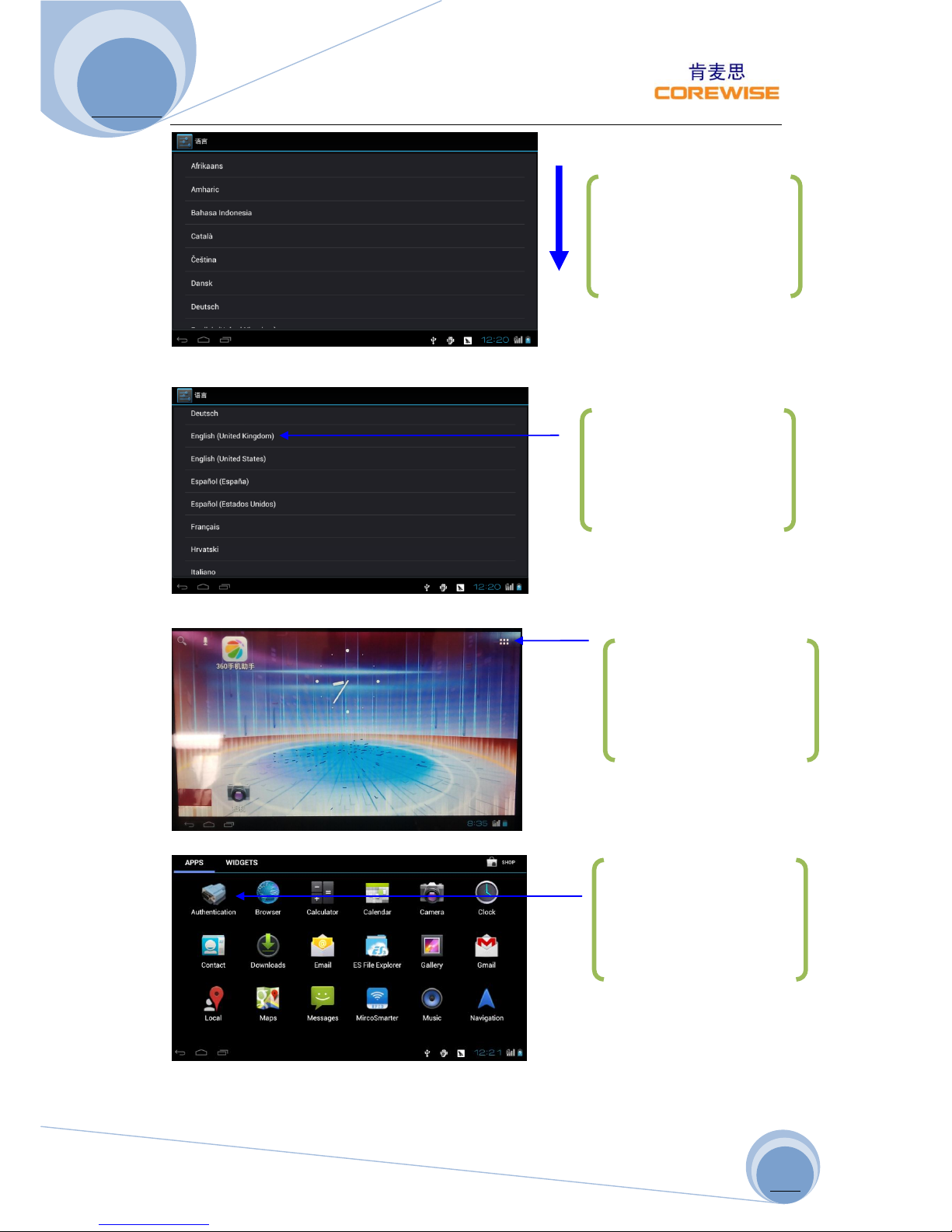
Select “English (United Kingdom)” for instance
Step 5: Fingerprint Function Demo
Select “Authentication” Icon to enter into Demo
Baud rate selection
Use your finger tip to scroll
down this screen
Select “English (United
Kingdom” for instance
Click this icon to enter into
main menu
Select “Authentication”
Icon to enter into Demo
Page 12
A370 User Manual
http://www.corewise.cn
2014
12
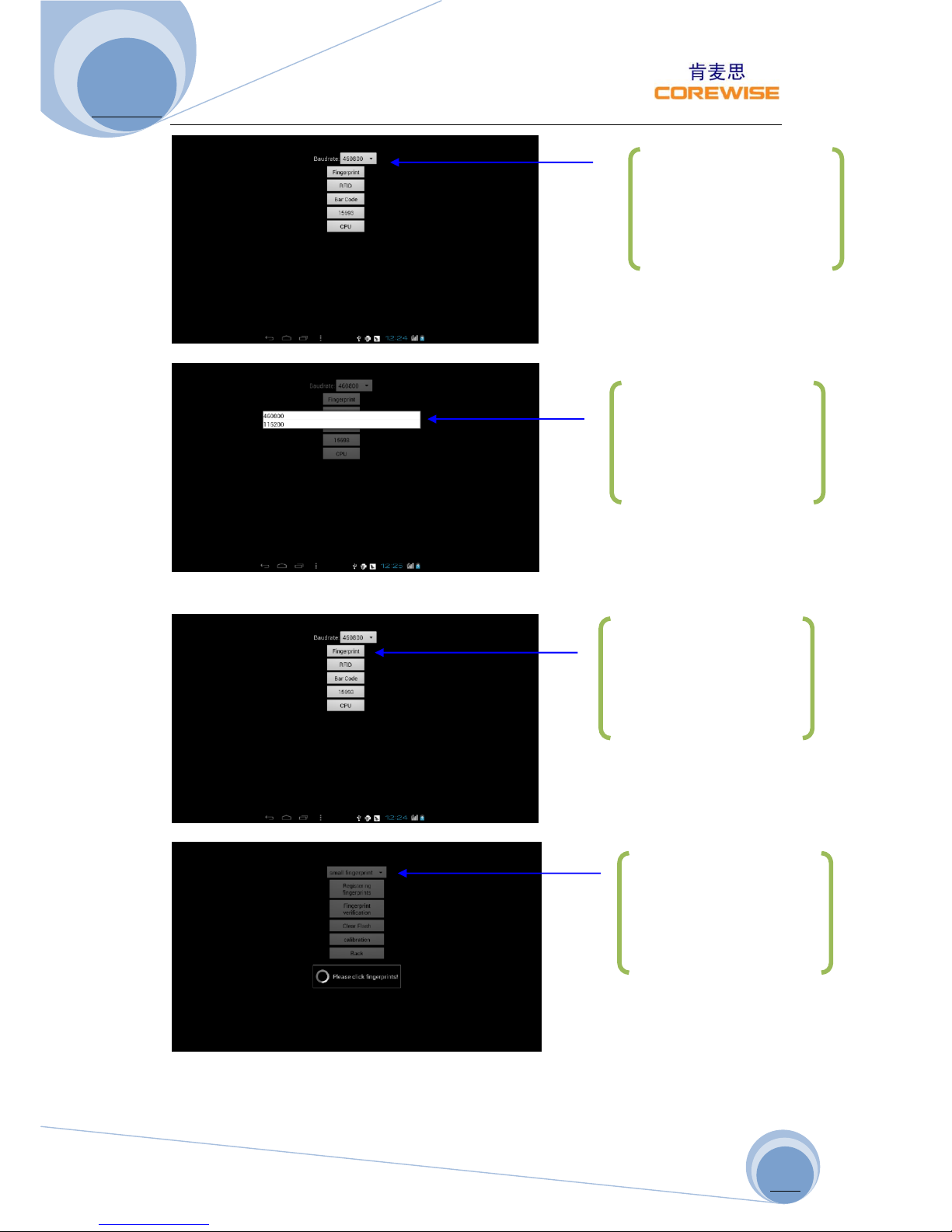
Then click “Fingerprint” to define fingerprint settings
Click dropdown option to
define baud rate, normally
“460800” for int’l market
by default
In case “460800” does not
work fine, try “115200”
for a trial
Click “Fingerprint” to
define fingerprint settings
Click pull-down menu to
define fingerprint settings
Page 13
A370 User Manual
http://www.corewise.cn
2014
13
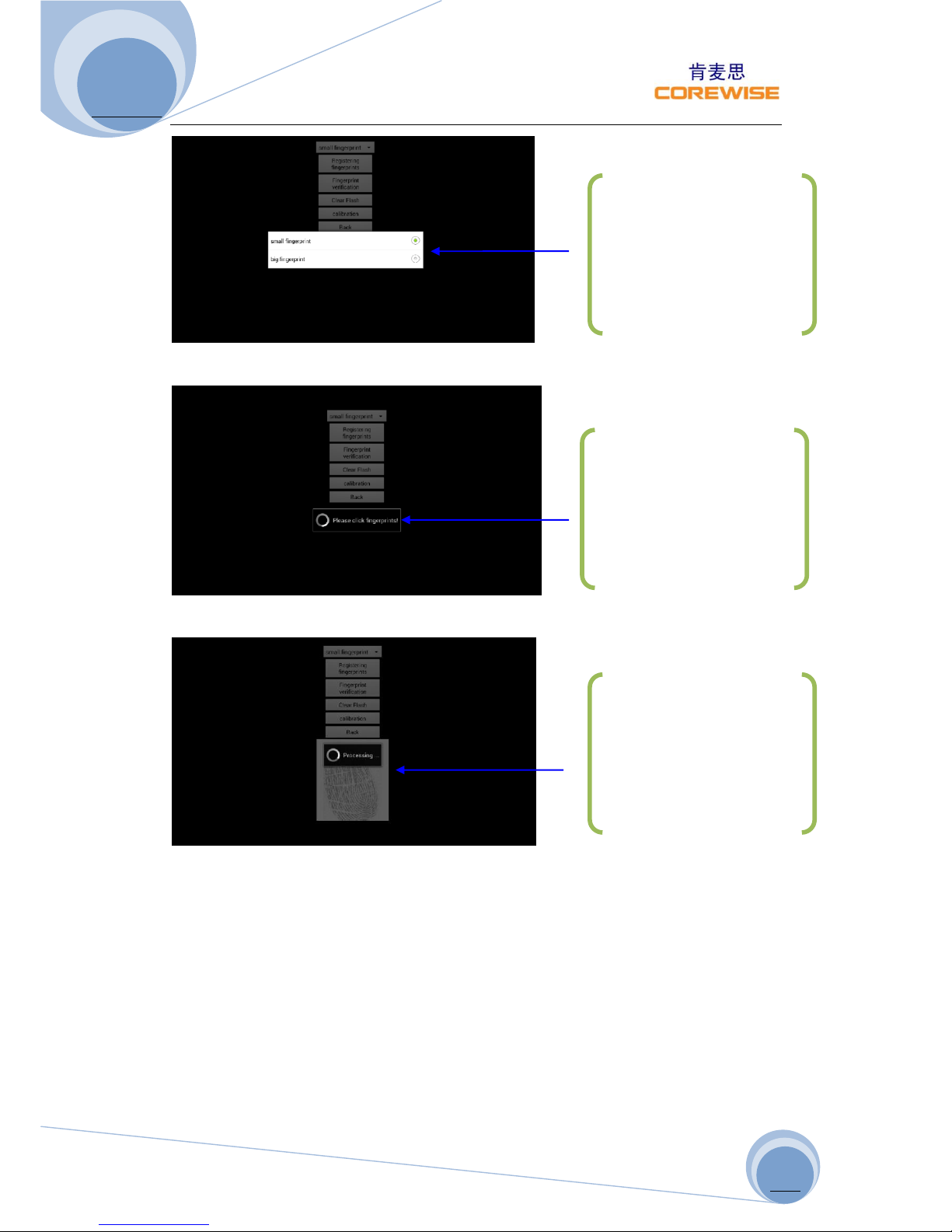
Click “Registering fingerprints” to register a fingerprint image/impression
Press the sensor for two times until successfully registration
Choose “small fingerprint”
or “big fingerprint” depends
on sensor area. Please refer
to Fingerprint Sensor
section for differences
Gently press on the sensor,
finger tips better to touch
metal frame
Press the sensor for two
times until successful
registration
Page 14
A370 User Manual
http://www.corewise.cn
2014
14
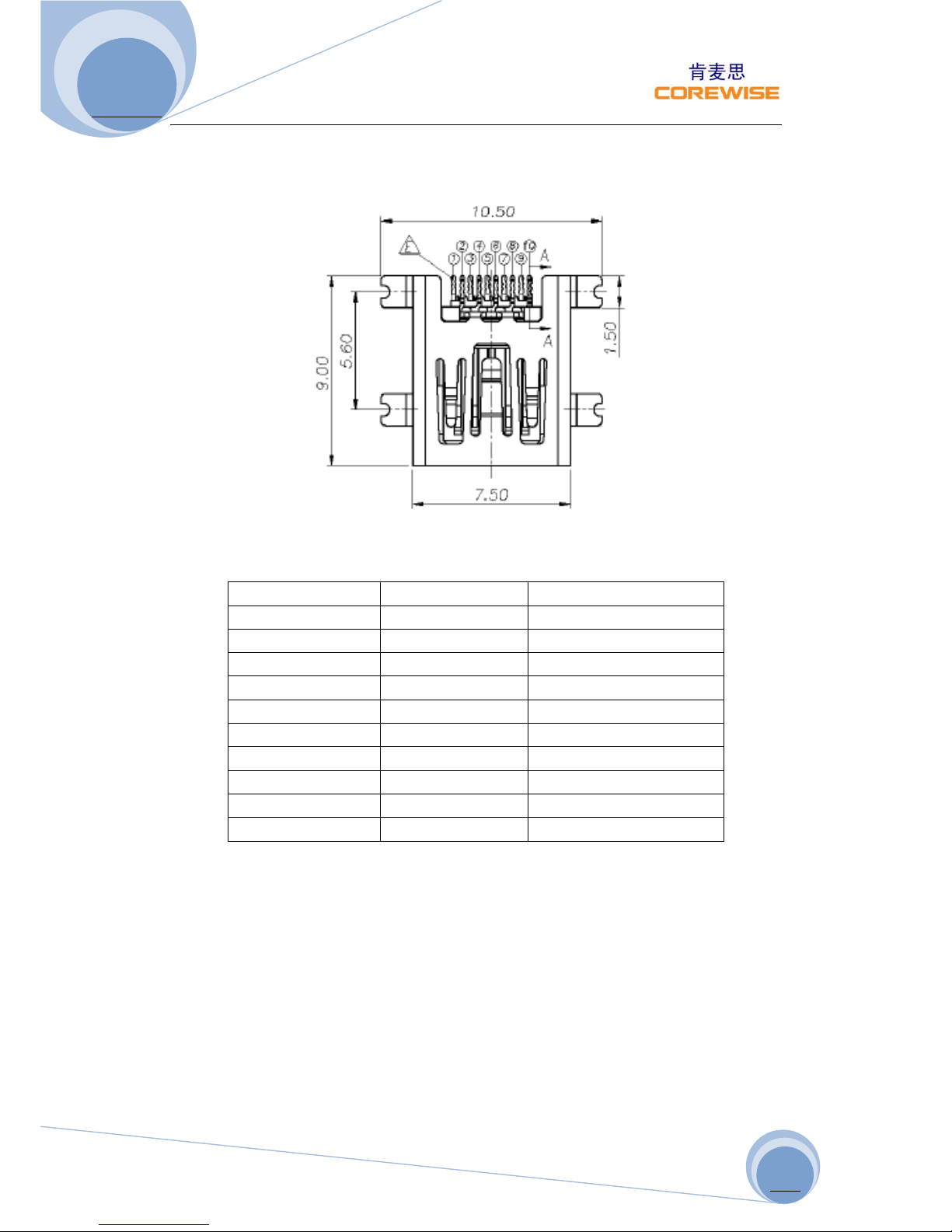
IO UART Port
Main board: LCN UAF04-10376-1500
PIN SN:
Mini USB Pin SN
Pin Name
Remarks
1
2
VCHG/VUSB
System Power
3 4 5 6 7
UART1_RXD
A370 UART Receiving
8
9
UART1_TXD
A370 UART Transmitting
10
GND
Grounding
To use UART1, you need to send “D&C00040107” via UART0 to enable UART1 to
work. UART1 works at 115200bps (8-bit digits), data in ASCII format. Working flow is
as following:
APPUART0 UART1 device need to be connected
Other device UART1 UART0APP
Page 15
A370 User Manual
http://www.corewise.cn
2014
15
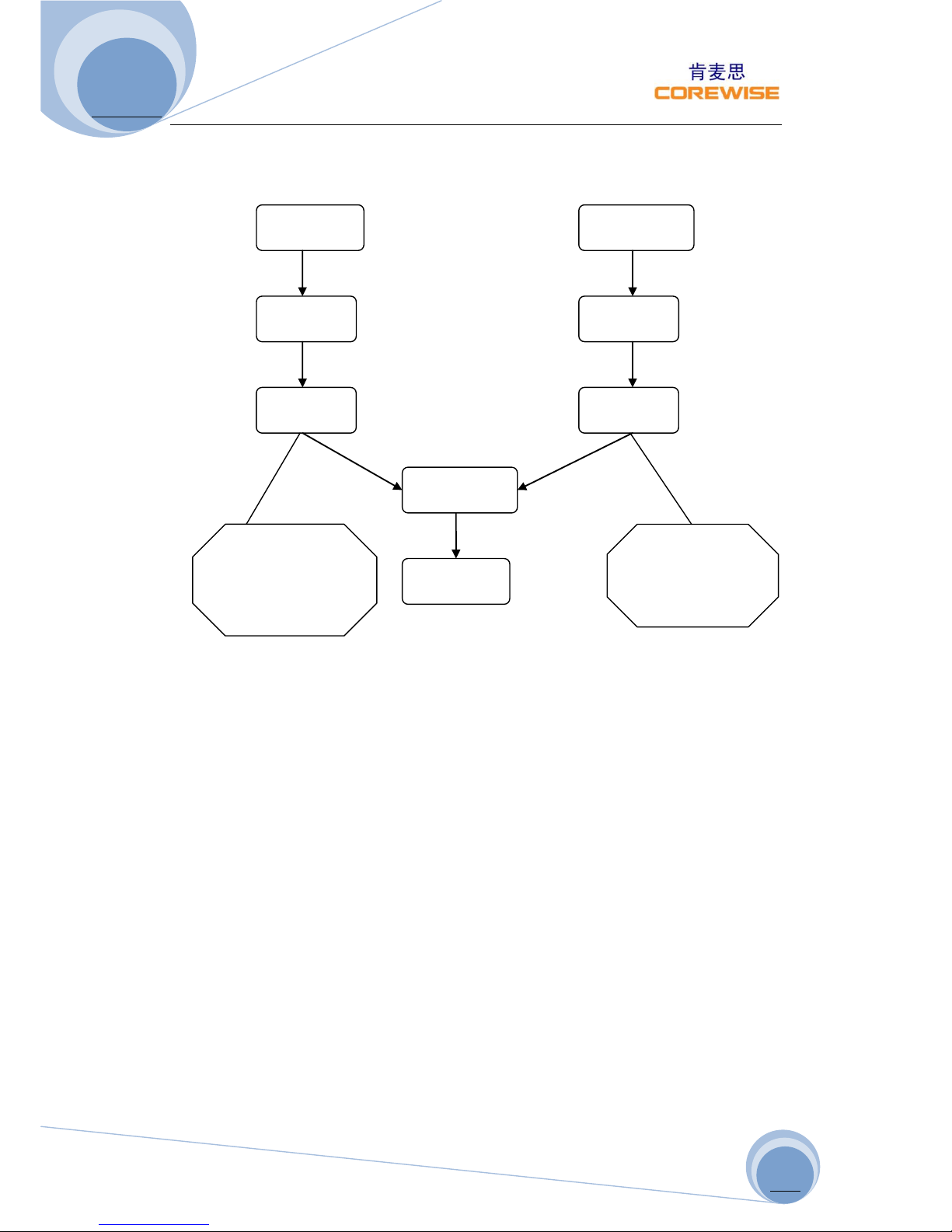
Fingerprint Registration Workflow
Note:
Process 1:PSGetImage->PSUpImage->PSGenChar1
Process 2:PSGetImage->PSUpImage->PSGenChar2
PSGetImag
PSGetImage
PSUpImag
PSUpImag
PSGenCha
PSGenCha
PSRegModel
PSUpChar
Notice:paramete
r assignment
Charbuffer2
Notice:parameter
assignment
charbuffer1
Page 16
A370 User Manual
http://www.corewise.cn
2014
16
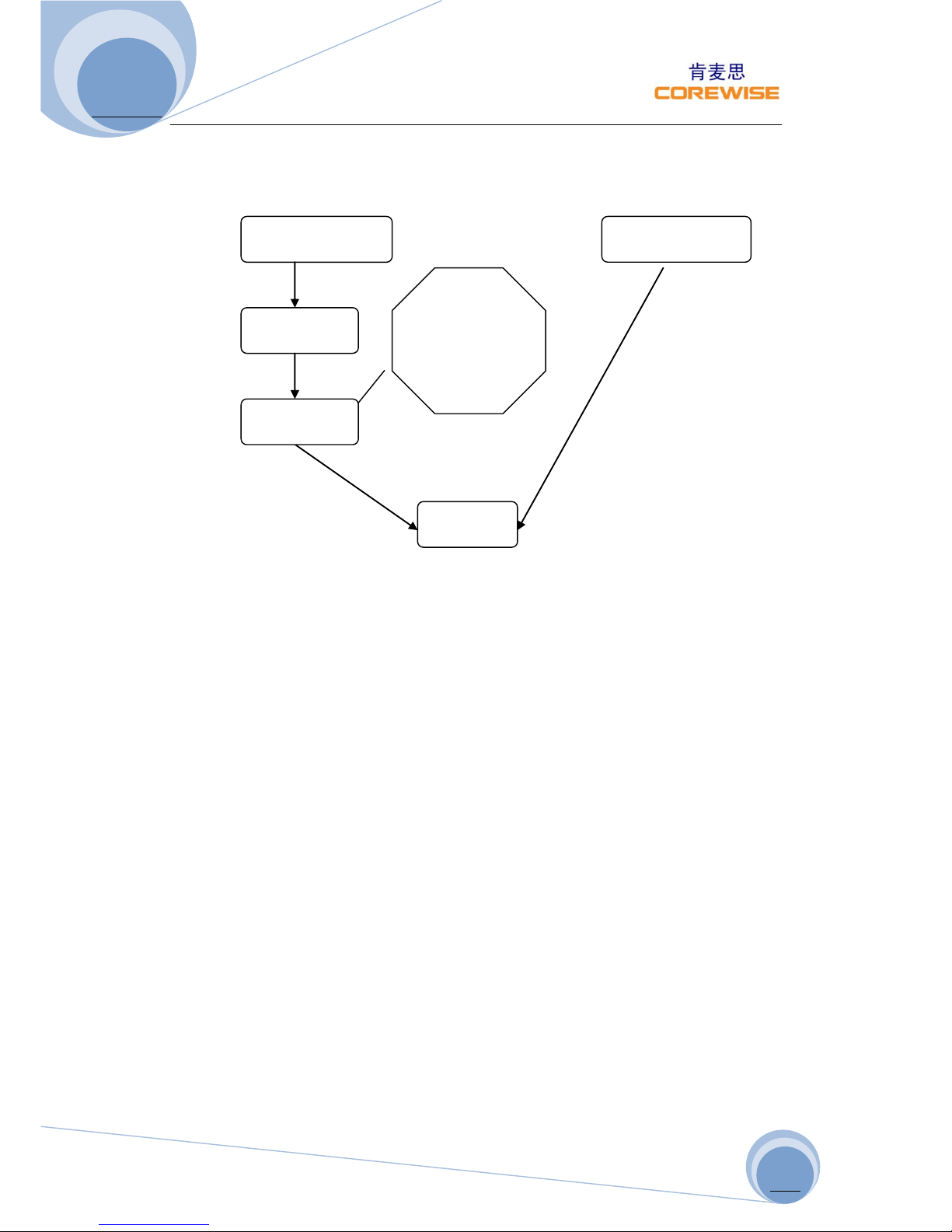
Fingerprint Verification Workflow
Fingerprint API: detailed notes see android_serialport_api.FingerprintAPI
Note: Fingerprint API class fingerprint method of operation are blocked Process 1:
PSGetImage->PSUpImage->PSGenChar
Process 2:PSDownChar Download the template data from the fingerprint enrollment
functional flow chart in the PSUpChar method returns data.
The two processes regardless of the order, you can first perform a
re-implementation process two processes can also be contrary
PSUpImageThis step can be omitted, this method is to upload the fingerprint image
data
PSGetImage: Input fingerprint image
PSUpImage: The image of the fingerprint image buffer ImageBuffer data uploaded to
the host computer
PSGenChar: Fingerprint image according to the image data buffer in the specified
characteristic value generated CharBuffer
PSRegModel:According CharBuffer1 and CharBuffer2 the feature value data stored
in CharBuffer1 template synthesis and CharBuffer2 in (two CharBuffer the same
data)
PSUpChar: CharBuffer in the specified characteristic value or template data
uploaded to the host computer
PSDownChar:The characteristic values or templates to download data to a specified
CharBuffer1 or CharBuffer2 in (default CharBuffer2)
Notice:para
meter
assignment
charbuffer1
PSGetImage
PSUpImage
PSGenChar
PSDownChar
PSMatch
Page 17

A370 User Manual
http://www.corewise.cn
2014
17
PSMatch: Compared CharBuffer1 and CharBuffer2 whether the data is the same one
fingerprint
Buffer and fingerprint
Chip with a 72 k bytes of image buffer and two 512 bytes (256 words) the
characteristics of the file size
Buffer, name called: ImageBuffer CharBuffer1, CharBuffer2. Users can refer to
To read and write any buffer. CharBuffer1 or CharBuffer2 both common feature can
be used to store files also
Can be used to store file template features. Upload or download the image through
the UART port to speed things up, only to like
Element four bytes of high, the two pixels synthetic one byte transfer. Through the
USB port is the 8 bit pixels.
Fingerprint database is changed in accordance with the articulated the FLASH
capacity is different, the system automatically. The fingerprint template according to
the order
Store number, serial number is defined as: 0 to n-1, N refers to the fingerprint
database is). Users can only according to the serial number to access content of
fingerprint.
Characteristics and the template
Fingerprint characteristics of the file size of 256 bytes, including feature point
information and general information; Template size of 512 bytes,
Is the sum of two same fingerprint characteristics。
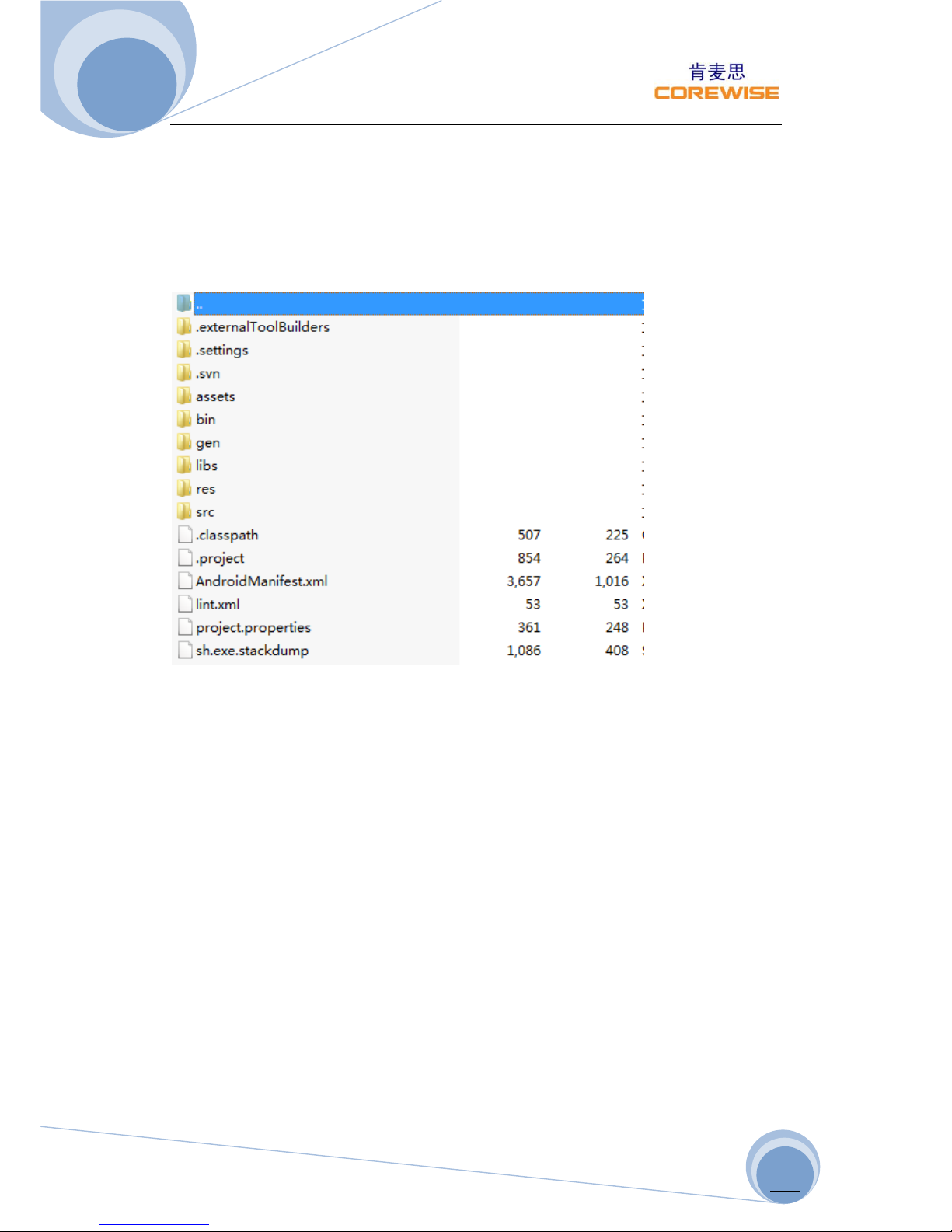
Note: about the project need to use the jars and jni calls. So documents are under
demo libs directory.
SerialPortManager:public void openSerialPort():Need access to fingerprint, need to
open the serial port, then carries on the related operations
public void closeSerialPort():When the program exit or don't have to fingerprint
information, this method is called to close a serial port
Free SDK for Further Development
Nanjing Corewise Smart Technology Inc. is basically a hardware manufacturer,
producing various smart terminals. There handheld devices are semi-finished
products, which are technically ready for miscellaneous applications in Windows
Mobile OS or Google Android OS, however request further development on basis of
our hardware.
Google Android downloadable apps or tailor-made software can work in conjunction
with our powerful terminals to create most controllable and versatile solutions to
bring human, financial, material resources as well as vehicles under absolute control
Page 18
A370 User Manual
http://www.corewise.cn
2014
18
Best support will be provided by Corewise to help our buyers to code & program
software on basis of our products. We offer free SDK to the purchasers for their
purpose; programmers can take whatever they want from the software kit for
secondary development.
For any technical issues, our technical software engineers can support online via
Skype or emails to enable our purchases to make full use of the machine.
Packaging & Transportation
Maintain: Please use a soft and dry cloth to wipe and clean the device gently
regularly, especially display screen.
Packaging and Transportation: For long-distance transportation, packaging must be
done with protective measures. Do NOT allow rain, snow or liquid to be poured
directly on the device during transportation, as this may result in mechanical
damage.
Storage Ambience: ventilated, dry and free of sharp temperature changes, without
affecting the surrounding magnetic field, no acid, alkali or other harmful gases in the
air.
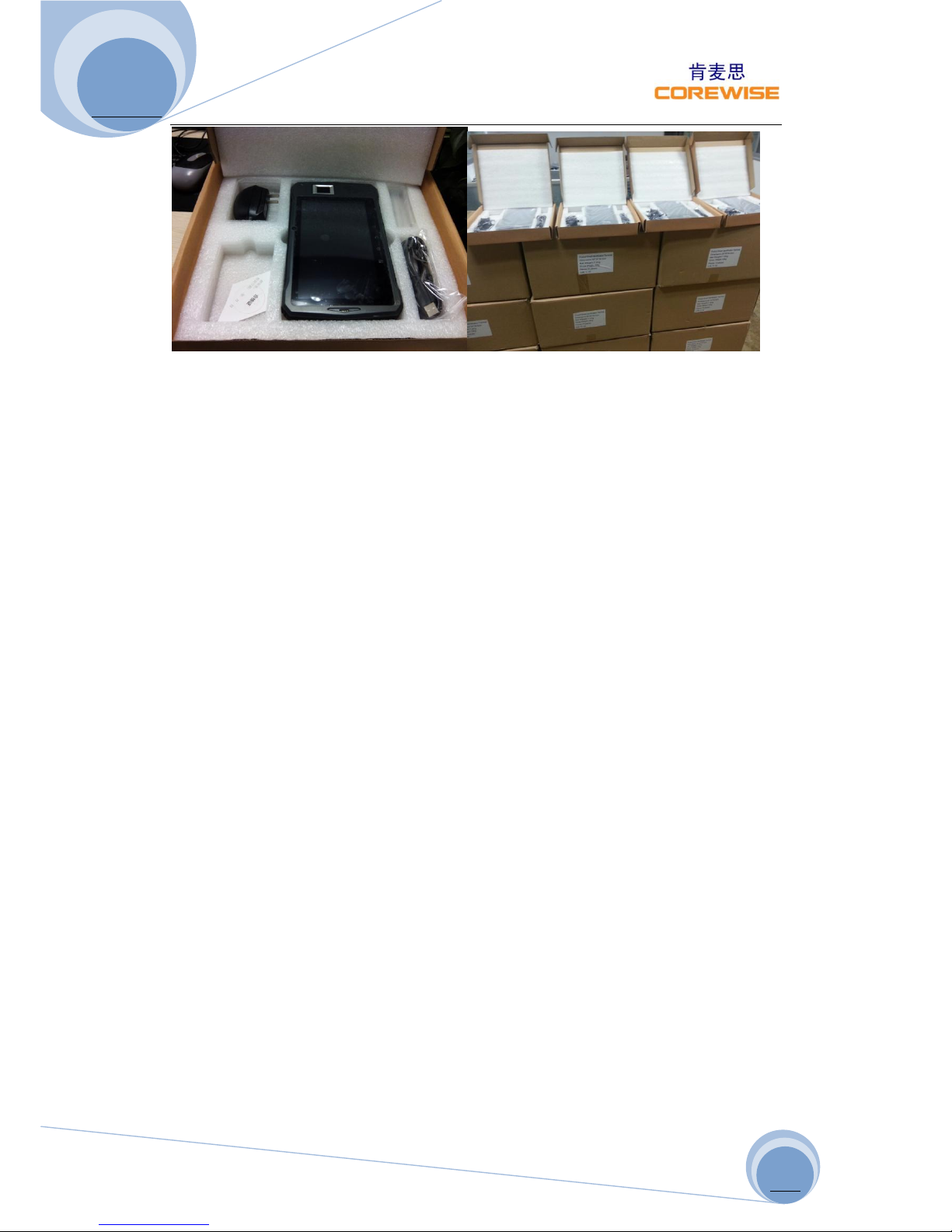
Packing List:
Tablet PC: 1pc
Charger: 1 Set
Battery (built-in):1pc
Data Cable: 1pc
User Manual 1pc
Page 19
A370 User Manual
http://www.corewise.cn
2014
19
 Loading...