

Page 1

Universal Digital Charger UDC-20
INSTRUCTION MANUAL
SPECIFICATION
Nicad / NiMh – 1 to 14 cells
LiPo / LiLo – 1 to 5 cells
Lead Acid (Pb) – 6v, 12v
Input Voltage – DC11-18v
Charge Rate – 0.1 to 5 Amp
Balance Charge Rate – 200mAh/Cell
Max Power – 50W
SAFTY NOTES
Please follow the safety notes below. Otherwise the charger and battery could cause
considerable damage to property or person if used incorrectly.
1. Never leave the charger unsupervised when it is connected to its power supply. If any
malfunction is observed stop and refer to the manual.
2. Keep charger away from dust, damp, rain, heat, direct sunlight and vibration.
3. The circuit of this charger is designed to be powered by a 12v DC only.
4. The charger and battery that it is charging should always be used on a heat resistant,
non-inflammable surface. NEVER USE ON A CAR SEAT, CARPET OR SIMILAR.
5. Never use near inflammable materials.
6. Be sure to understand the information of the battery to be charged accurately. If the
program is set up incorrectly the battery can be severely damaged.
7. To avoid short circuits between the charger leads, always connect the 12v cable first
and only then to the battery to be charged. Reverse this sequence when
disconnecting.
8. DO NOT connect more than one battery at any time.
9. DO NOT attempt to charge any of the following;
♦ A battery pack that consists of different types of cell (including different
manufacturers).
♦ A battery pack which is already fully charged or just slightly discharged.
♦ Non-rechargeable batteries.
♦ Batteries that require a different charge technique from NiCad, NiMH, Li-Poly
or Pb.
♦ A faulty or damaged battery.
♦ A battery with an integral charge circuit or a protection circuit.
♦ Batteries installed in a device, or which are electrically linked to other
components.
♦ Batteries that are not expressly stated by the manufacturer to be suitable for the
currents the charger delivers during the charge process.
10. Please check the following before charging;
♦ Select the appropriate program which is suitable for the type of battery.
♦ Set up adequate current for charging.
♦ Lithium battery packs can be comprised with parallel and series cells mixed.
Check the composition carefully before charging.
♦ Be sure all connections are firm and safe.
Page 2
Universal Digital Charger UDC-20
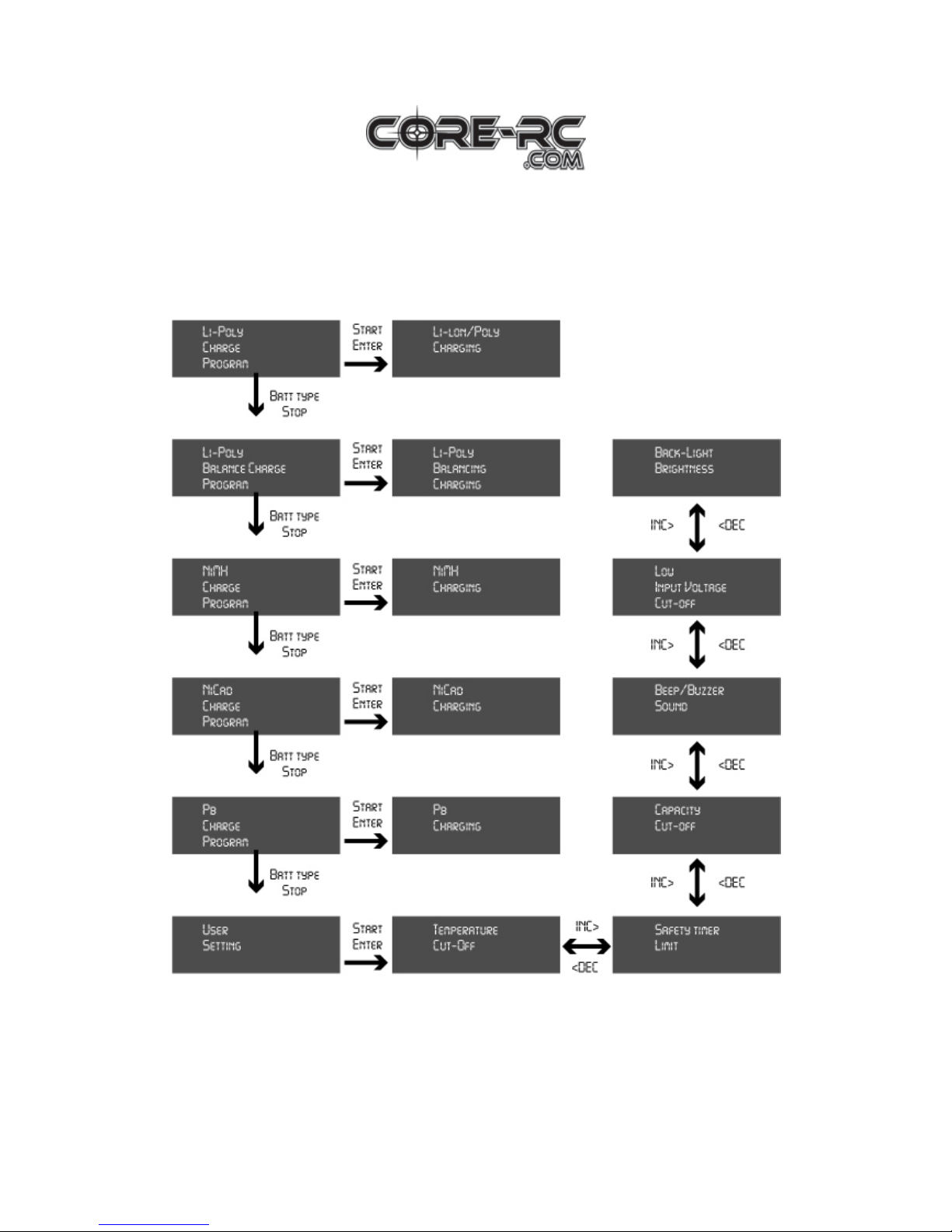
Program Flow Chart
Page 3
Universal Digital Charger UDC-20
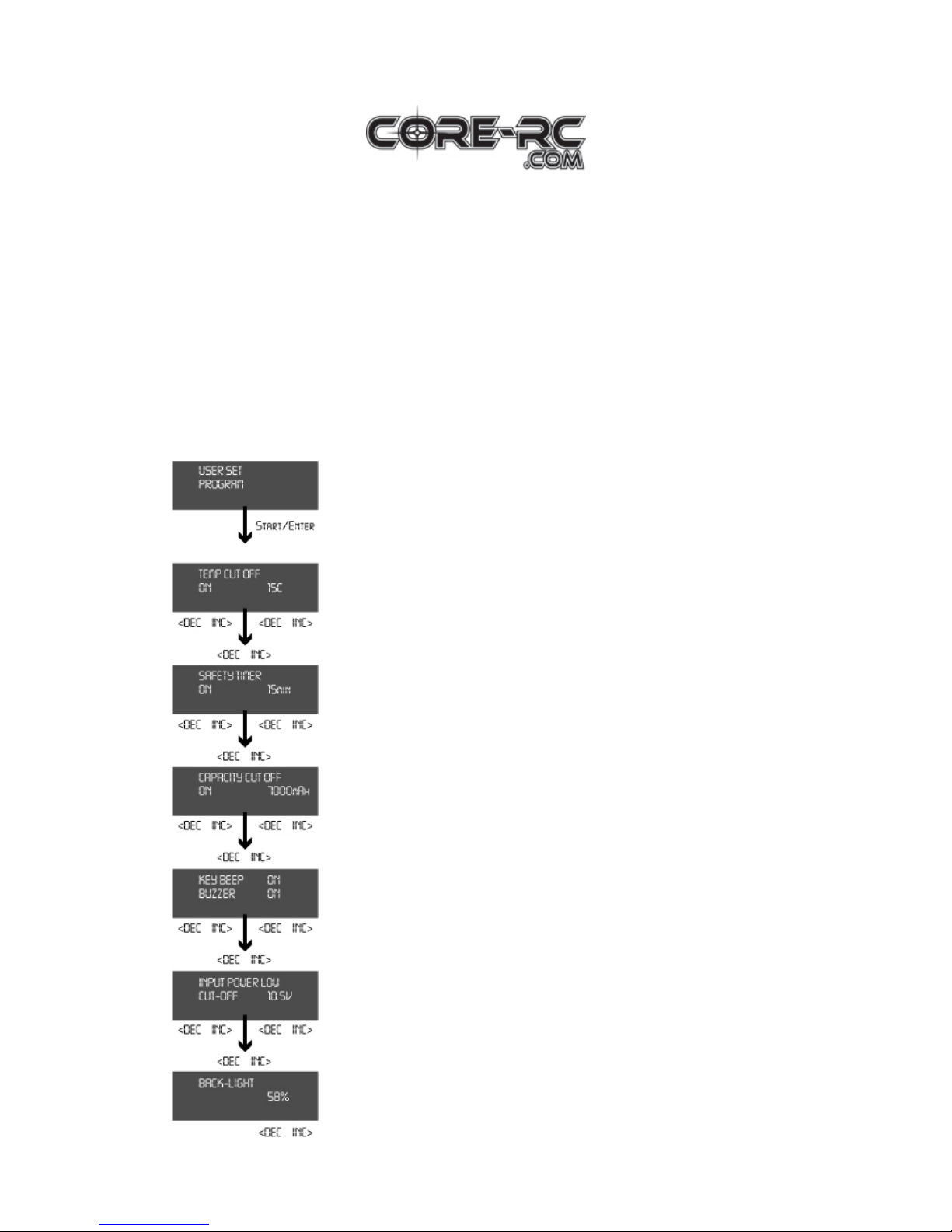
Initial Parameter Set Up
The CORE R/C UDC-20 will be operated with the default value of the essential user
settings when it is connected to a 12v battery for the first time. The screen displays the
following information in sequence and the user can change the value of each
parameter on each screen. When you are ready to alter the parameter value in the
program, press the Start/Enter button to make it blink, then change the value with the
DEC or INC buttons. The value will be stored by pressing the Start/Enter button
once.
This informs you of its designation.
An optional feature using a temperature probe contacting the
surface of the battery, the temperature cut-off can be on or off.
If it is on, set the maximum temperature at which the charger
should allow the battery to reach when charging. Once the
battery reaches this temperature the charge process will stop.
When you start a charge process, the integral safety timer
automatically starts running at the same time. This is
programmed to prevent overcharging of the battery, if it proves
to be faulty, or if the termination circuit cannot detect if the
battery is full. The value for the safety timer should be
generous enough to allow a full charge.
This program sets the maximum charge capacity that will be
supplied to the battery during charge. If the delta peak voltage
is not detected nor the safety timer has expired for any reason,
this feature will automatically stop charging at the selected
capacity value.
The beep sounds at every time a button is pressed to confirm
your action. The beep or melody will sound at various times
during operation to alert different mode changes. These audible
sounds can be turned on or off.
This program monitors the voltage of the input battery. If the
voltage drops below the value you have set the operation is
stopped. This protects the input battery.
You can adjust the brightness of the LCD panel.
Page 4

Universal Digital Charger UDC-20
Programming for the Li-Po Battery
These programs are only suitable for charging LI-PO batteries. These batteries need to
use a different charge technique. It is termed a constant voltage (CV) and constant
current (CC) method. The charge current varies according to the battery capacity, and
is usually C/2 rate (half capacity as a charge current). The final voltage of the charge
process is also very important; it should be 4.2v/cell for the nominal voltage of
3.7v/cell. If the final voltage exceeds by more than 1% during charge the battery will
explode. The charge current and nominal voltage as for cell count set on the charge
program must always be correct for the battery to be changed. When you are ready to
alter the parameter value with the DEC or INC buttons. The value will be stored by
pressing the Start/Enter button once.
ound
e
The value on the left side of the second line sets the
charge current and the value on the right side of the
second line sets the voltage of the battery pack. After
setting the current and voltage press the Start/Enter
button for more than 3 seconds to start the process.
(Charge current: 0.1 to 5A. Voltage: 1 to 5 series).
This shows the number of cells you set up and the
processor detects. “R:” shows the number of cells f
by the charger and “S:” is the number of cells selected
by you at the previous screen. If both numbers are
identical you can start charging by pressing the
Start/Enter button. If not, press the Batt/Stop button to
go back to the previous screen. Then carefully check th
number of cells of the battery pack to charge again.
The screen shows the present situation during the
charge process. To stop charging press the Batt
Type/Stop button once.
We recommend using the AUTO VOLTAGE setting. In this mode the number of
LiPo cells flashes for one minute until the charger confirms the battery voltage
matches this setting. If all is ok the charge process begins at the current selected.
Page 5
Universal Digital Charger UDC-20
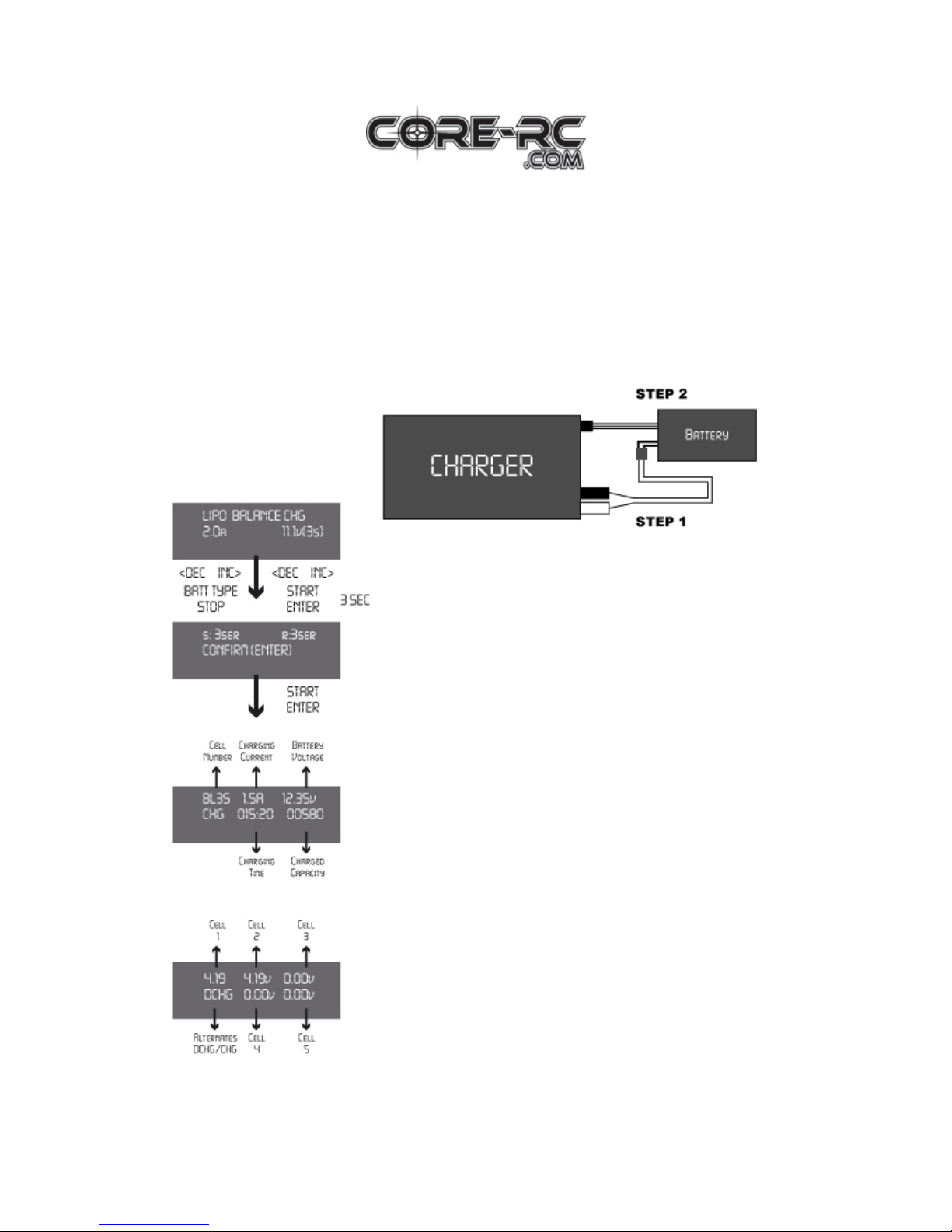
Programming for the Li-Po Battery (Balancing)
How to connect:
Step 1: Put the DC power cable into the input of the charger, and then connect
the DC cable to the power connector of the battery.
Step 2: Put the balance connector of the battery into the balance socket of the
charger.
The value on the left side of the second line sets the
charge current and the value on the right side of the
second line sets the voltage of the pack. After setting
the current and voltage press the Start/Enter button for
more than 3 seconds to start the process. (Charge
current: 0.1 to 5A, voltage: 1 to 5 series).
This shows the number of cells you set up and the
number the processor detects. “R:” shows the number
of cells found by the charger and “S:” is the number of
cells selected by you at the previous screen. If both
numbers are identical you can start charging by pressing
the Start/Enter button. If not, press the Batt type/Stop
button to go back to the previous screen. Then carefully
check the number of cells of the battery pack to charge
again.
The screen shows the present situation during the
charge process. To stop charging press the Batt
type/Stop button once.
Voltage inquiry of individual cells
When you press the INC button, the screen will show
the present voltage of Cell No’s 1-5. When you press
the DEC button, the screen will show Input Voltage.
Press it again and it will show temperature settings.
Page 6
Universal Digital Charger UDC-20
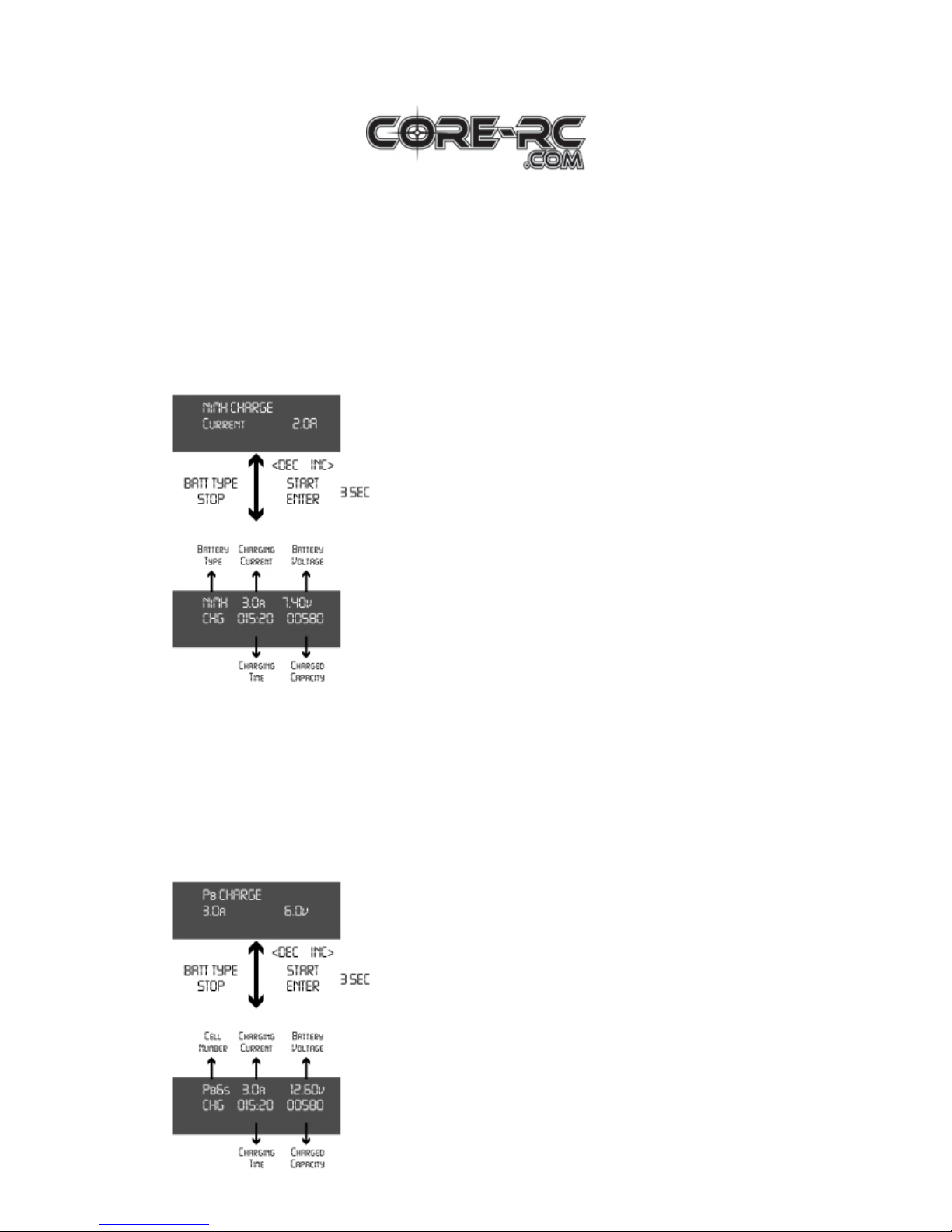
Programming for the NiMH/NiCd Battery
These programs are for charging NiMH/NiCd battery commonly used for R/C
models. To change current, press the Start/Enter button to make it blink, then change
the value using the DEC or INC button. The value will be stored by pressing the
Start/Enter button once. To start charging, press the Start/Enter button for more than 3
seconds.
This program simply charges the battery using the
current set. The charge current ranges from 0.1A to 5A.
The screen displays the current state of charging. To
stop the process, press the Batt/Stop button once. The
audible sound indicates you have ended the process.
Programming for a Lead Acid (Pb) Battery
These programs are for charging a Pb battery with a nominal voltage from 2 to 12volt.
Pb batteries are totally different from NiCad or NiMH batteries. They can only deliver
lower current compared to their capacity, and similar restrictions apply when
charging. So the optimal charge current will 1/10
th
of the capacity. Pb batteries must
not be charged rapidly. Always follow the instructions supplied by the battery
manufacturer.
Set up the charge current on the left and the nominal
voltage of the battery on the right. The charge current
ranges from 0.1A to 5.0A and the voltage should match
with the battery you are charging. Start the charge
process by pressing the Start/Enter button for more than
3 seconds.
The screen displays the state of the charging process.
To stop the charging process, press the Batt type/Stop
button once. The audible sound indicates you have
stopped charging.
Page 7
Universal Digital Charger UDC-20
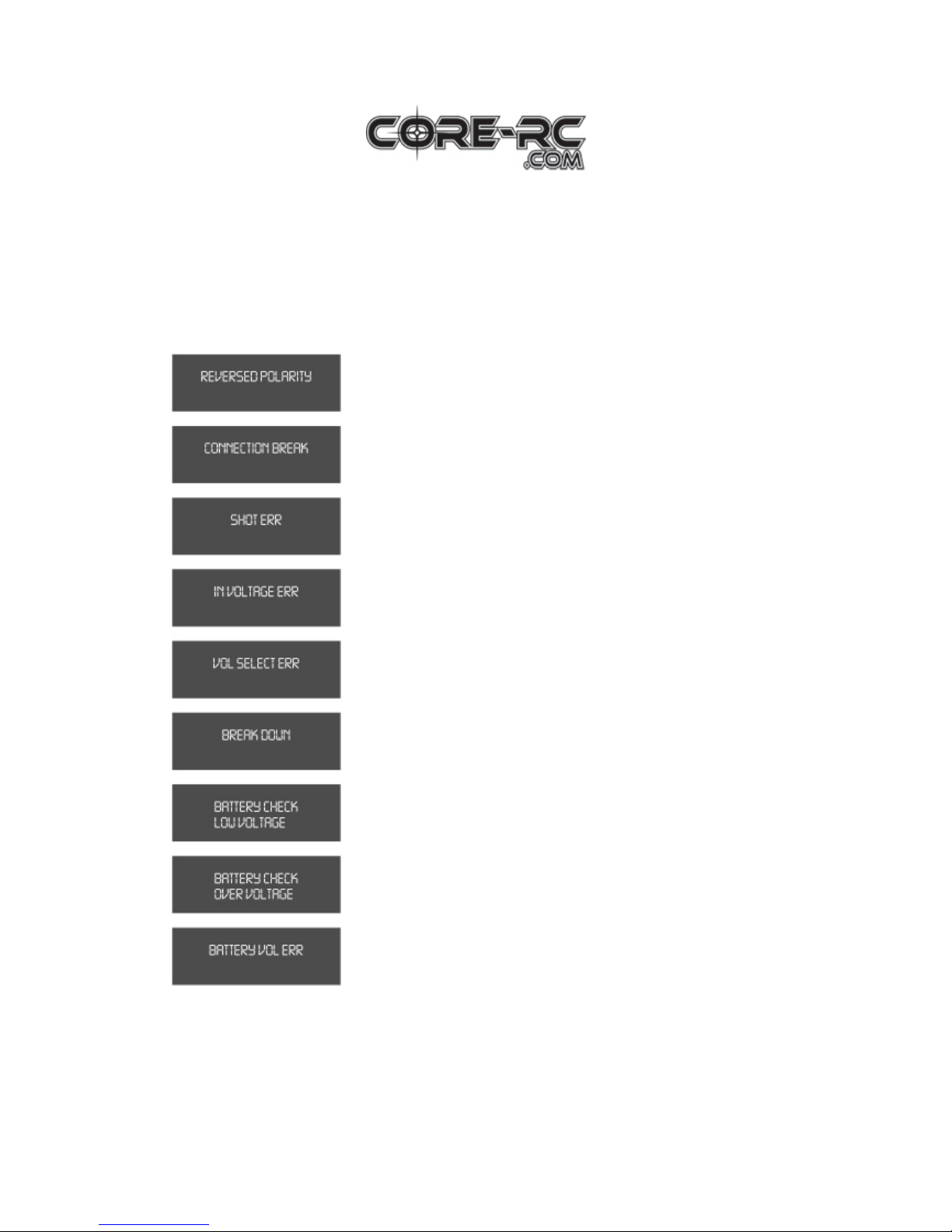
Warning and Error Messages
These programs are for charging NiMH/NiCd battery commonly used for R/C
models. To change current, press the Start/Enter button to make it blink, then change
the value using the DEC or INC button. The value will be stored by
The output is connected to a battery with incorrect polarity.
Bad connection between battery and output. Or voluntarily
disconnecting the charge lead during charging.
There was a shot-circuit at output.
The voltage of input is lower than the limit.
The voltage of the Lithium battery pack was selected
incorrectly.
There has been a malfunction in the unit.
The processor has detected that the voltage is too low
during charging.
The processor has detected that the voltage is too high
during charging.
The voltage of one of the cells in the Li-Po battery is over
the limit.
Page 8

Universal Digital Charger UDC-20
Repair and Warranty
All products from CORE R/C are manufactured to the highest quality standards. CORE R/C
guarantees this product to be free from defects in materials or workmanship for 30 days from
the original purchase date verified by a sales receipt. This limited warranty does not cover
defects, which are a result of normal wear, misuse or improper maintenance. This applies
among other things on:
• Cut off/changed original input, and/or output wires.
• Mechanical damage of the case.
• Humidity/Water inside the case.
• Mechanical damage of electronic components/PCB.
• Solder on the PCB.
By sending in this product, you assign CORE R/C to repair the product. The original sales
receipt must be included or no warranty can be granted. As we have no control over the use of
this product we cannot accept any liability for any damages resulting from using this product.
Therefore using this product is at the owners’ risk. The limited warranty liability shall be
limited to repairing the unit to its original specifications. In no case shall the liability exceed
the original cost of the unit. By using this product the user accepts all resulting liability.
All specifications should be seen as guide values. Due to ongoing technical improvements,
which are done in the interest of the product. CORE R/C accepts no responsibility for the
accuracy of these specifications.
Exclusively distributed by:
Schumacher Racing Products Ltd.
73 Tenter Road
Moulton Park
Northampton
NN3 6AX
United Kingdom
T: +44(0) 1604 790770
F: +44(0) 1604 790209
E:
Schumacher USA Inc
6302 Benjamin Road
Suite 404
Tampa
Florida
33634
USA
T: +1 (0) 813 8899691
F: +1 (0) 813 889 9593
 Loading...