

Page 1
S2 and S4 series
Network Analyzer
Programming Manual.
SCPI Commands.
Software version 19.1
2019
Page 2

S2VNA and S4VNA SCPI Programming Manual
2
TABLE OF CONTENTS
1 Introduction ............................................................................................................................................................ 13
1.1 Programming Manual Scope ...................................................................................................................... 14
1.2 Related Documents ....................................................................................................................................... 14
1.3 References ........................................................................................................................................................ 15
2 Connection Setup ................................................................................................................................................. 16
2.1 Overview ........................................................................................................................................................... 16
2.2 Analyzer Setting ............................................................................................................................................. 16
2.3 Client Setting .................................................................................................................................................. 17
2.4 VISA Library ..................................................................................................................................................... 18
2.5 Network and Local Configuration ............................................................................................................ 18
2.6 Connecting Multiple Analyzers to Single Computer ......................................................................... 19
2.7 Differences in Use of HiSLIP and Socket Protocols ........................................................................... 20
2.7.1 Terminal Character in Messages to Analyzer ................................................................................. 21
2.7.2 Terminal Character in Analyzer Responses ..................................................................................... 22
2.7.3 Interrupted Error ....................................................................................................................................... 22
2.7.4 IEEE488.2 Status Reporting System .................................................................................................. 23
2.7.5 Transfer of Binary Data .......................................................................................................................... 23
3 SCPI Overview ....................................................................................................................................................... 24
3.1 Messages .......................................................................................................................................................... 24
3.2 Command Tree ............................................................................................................................................... 24
3.3 Subsystems ...................................................................................................................................................... 25
3.4 Optional Subsystems .................................................................................................................................... 26
3.5 Long and Short Formats .............................................................................................................................. 26
3.6 Case Sensitivity .............................................................................................................................................. 26
3.7 Parameters ....................................................................................................................................................... 26
3.7.1 Numeric Values ......................................................................................................................................... 27
3.7.1.1 Multiplier Prefixes .............................................................................................................................. 27
3.7.1.2 Notations ............................................................................................................................................... 28
3.7.2 Booleans ...................................................................................................................................................... 28
3.7.3 Character Data ........................................................................................................................................... 28
3.7.4 String Parameters..................................................................................................................................... 29
3.7.5 Numeric Lists ............................................................................................................................................. 29
3.8 Query Commands ........................................................................................................................................... 29
3.9 Numeric Suffixes ............................................................................................................................................ 29
3.10 Compound Commands ........................................................................................................................... 30
3.11 IEEE488.2 Common Commands Overview ...................................................................................... 30
4 Remote Commands .............................................................................................................................................. 32
4.1 Conventions ..................................................................................................................................................... 32
4.1.1 Syntax........................................................................................................................................................... 32
4.1.2 Identifiers .................................................................................................................................................... 33
4.2 IEEE488.2 Common Commands................................................................................................................ 34
*CLS .......................................................................................................................................................................... 34
*ESE .......................................................................................................................................................................... 34
*ESR? ........................................................................................................................................................................ 35
*IDN? ........................................................................................................................................................................ 35
*OPC ......................................................................................................................................................................... 36
*OPC? ....................................................................................................................................................................... 36
*RST .......................................................................................................................................................................... 37
*SRE .......................................................................................................................................................................... 37
*STB? ........................................................................................................................................................................ 38
*TRG ......................................................................................................................................................................... 38
*WAI.......................................................................................................................................................................... 39
4.3 Network Analyzer Commands ................................................................................................................... 40
ABOR ........................................................................................................................................................................ 40
CALC:FSIM:BAL:CZC:BPOR:Z0 .......................................................................................................................... 41
Page 3

S2VNA and S4VNA SCPI Programming Manual
3
CALC:FSIM:BAL:CZC:STAT ................................................................................................................................. 42
CALC:FSIM:BAL:DEV ............................................................................................................................................ 43
CALC:FSIM:BAL:DMC:BPOR:PAR:C .................................................................................................................. 44
CALC:FSIM:BAL:DMC:BPOR:PAR:G ................................................................................................................. 45
CALC:FSIM:BAL:DMC:BPOR:PAR:L .................................................................................................................. 46
CALC:FSIM:BAL:DMC:BPOR:PAR:R.................................................................................................................. 47
CALC:FSIM:BAL:DMC:BPOR:TYPE ................................................................................................................... 48
CALC:FSIM:BAL:DMC:BPOR:USER:FIL............................................................................................................ 49
CALC:FSIM:BAL:DMC:STAT ............................................................................................................................... 50
CALC:FSIM:BAL:DZC:BPOR:Z0 ......................................................................................................................... 51
CALC:FSIM:BAL:DZC:STAT ................................................................................................................................ 52
CALC:FSIM:BAL:PAR:BAL ................................................................................................................................... 53
CALC:FSIM:BAL:PAR:BBAL ................................................................................................................................ 54
CALC:FSIM:BAL:PAR:SBAL ................................................................................................................................. 55
CALC:FSIM:BAL:PAR:SSB ................................................................................................................................... 56
CALC:FSIM:BAL:PAR:STAT ................................................................................................................................. 57
CALC:FSIM:BAL:TOP:BAL ................................................................................................................................... 57
CALC:FSIM:BAL:TOP:BBAL ................................................................................................................................ 58
CALC:FSIM:BAL:TOP:SBAL ................................................................................................................................ 59
CALC:FSIM:BAL:TOP:SSB ................................................................................................................................... 60
CALC:FSIM:BAL:TOP:PROP:STAT .................................................................................................................... 61
CALC:FSIM:EMB:NETW:FIL ................................................................................................................................ 61
CALC:FSIM:EMB:NETW:TYPE ............................................................................................................................ 62
CALC:FSIM:EMB:STAT ......................................................................................................................................... 62
CALC:FSIM:EMB:TOP:A:PORT ........................................................................................................................... 63
CALC:FSIM:EMB:TOP:B:PORT ........................................................................................................................... 64
CALC:FSIM:EMB:TOP:C:PORT ........................................................................................................................... 65
CALC:FSIM:EMB:TYPE ......................................................................................................................................... 66
CALC:FSIM:SEND:DEEM:STAT .......................................................................................................................... 66
CALC:FSIM:SEND:DEEM:PORT:STAT .............................................................................................................. 67
CALC:FSIM:SEND:DEEM:PORT:USER:FIL ...................................................................................................... 67
CALC:FSIM:SEND:PMC:STAT ............................................................................................................................ 68
CALC:FSIM:SEND:PMC:PORT:STAT ................................................................................................................ 68
CALC:FSIM:SEND:PMC:PORT:USER:FIL ......................................................................................................... 69
CALC:FSIM:SEND:ZCON:PORT:Z0 ................................................................................................................... 70
CALC:FSIM:SEND:ZCON:STAT .......................................................................................................................... 71
CALC:FSIM:STAT .................................................................................................................................................. 71
CALC:PAR:COUN ................................................................................................................................................... 72
CALC:PAR:DEF ....................................................................................................................................................... 73
CALC:PAR:SEL ....................................................................................................................................................... 74
CALC:PAR:SPOR .................................................................................................................................................... 74
CALC:CONV ............................................................................................................................................................ 75
CALC:CONV:FUNC ................................................................................................................................................ 76
CALC:CORR:EDEL:TIME ...................................................................................................................................... 77
CALC:CORR:OFFS:PHAS ..................................................................................................................................... 78
CALC:CORR:STAT? ............................................................................................................................................... 79
CALC:DATA:FDAT ................................................................................................................................................. 80
CALC:TRAC:DATA:FDAT ..................................................................................................................................... 80
CALC:DATA:FMEM ............................................................................................................................................... 81
CALC:TRAC:DATA:FMEM .................................................................................................................................... 81
CALC:DATA:SDAT ................................................................................................................................................. 82
CALC:TRAC:DATA:SDAT ..................................................................................................................................... 82
CALC:DATA:SMEM ............................................................................................................................................... 83
CALC:TRAC:DATA:SMEM .................................................................................................................................... 83
CALC:DATA:XAX? ................................................................................................................................................. 84
CALC:TRAC:DATA:XAX? ..................................................................................................................................... 84
Page 4

S2VNA and S4VNA SCPI Programming Manual
4
CALC:FILT:TIME .................................................................................................................................................... 85
CALC:FILT:TIME:CENT ........................................................................................................................................ 86
CALC:FILT:TIME:SHAP ........................................................................................................................................ 87
CALC:FILT:TIME:SPAN ........................................................................................................................................ 88
CALC:FILT:TIME:STAR ........................................................................................................................................ 89
CALC:FILT:TIME:STAT......................................................................................................................................... 90
CALC:FILT:TIME:STOP ........................................................................................................................................ 91
CALC:FORM ............................................................................................................................................................ 92
CALC:FUNC:DATA? .............................................................................................................................................. 93
CALC:FUNC:DOM .................................................................................................................................................. 94
CALC:FUNC:DOM:COUP ..................................................................................................................................... 95
CALC:FUNC:DOM:STAR ...................................................................................................................................... 96
CALC:FUNC:DOM:STOP ...................................................................................................................................... 97
CALC:FUNC:EXEC ................................................................................................................................................. 97
CALC:FUNC:PEXC ................................................................................................................................................. 98
CALC:FUNC:POIN? ............................................................................................................................................... 99
CALC:FUNC:PPOL ............................................................................................................................................... 100
CALC:FUNC:TARG ............................................................................................................................................... 101
CALC:FUNC:TTR.................................................................................................................................................. 102
CALC:FUNC:TYPE ............................................................................................................................................... 103
CALC:LIM .............................................................................................................................................................. 104
CALC:LIM:DATA .................................................................................................................................................. 105
CALC:LIM:DISP .................................................................................................................................................... 106
CALC:LIM:FAIL? .................................................................................................................................................. 106
CALC:LIM:OFFS:AMPL ...................................................................................................................................... 107
CALC:LIM:OFFS:MARK ...................................................................................................................................... 107
CALC:LIM:OFFS:STIM ........................................................................................................................................ 108
CALC:LIM:REP:ALL? ........................................................................................................................................... 109
CALC:LIM:REP:POIN? ........................................................................................................................................ 110
CALC:LIM:REP? ................................................................................................................................................... 110
CALC:MARK .......................................................................................................................................................... 111
CALC:MARK:ACT ................................................................................................................................................. 112
CALC:MARK:BWID .............................................................................................................................................. 112
CALC:MARK:BWID:DATA? ................................................................................................................................ 113
CALC:MARK:BWID:REF ..................................................................................................................................... 114
CALC:MARK:BWID:THR .................................................................................................................................... 115
CALC:MARK:BWID:TYPE................................................................................................................................... 116
CALC:MARK:COUN ............................................................................................................................................. 117
CALC:MARK:COUP ............................................................................................................................................. 118
CALC:MARK:DATA? ............................................................................................................................................ 119
CALC:MARK:DISC ............................................................................................................................................... 120
CALC:MARK:FUNC:DOM ................................................................................................................................... 121
CALC:MARK:FUNC:DOM:COUP ...................................................................................................................... 122
CALC:MARK:FUNC:DOM:STAR ....................................................................................................................... 123
CALC:MARK:FUNC:DOM:STOP ....................................................................................................................... 124
CALC:MARK:FUNC:EXEC .................................................................................................................................. 125
CALC:MARK:FUNC:PEXC .................................................................................................................................. 126
CALC:MARK:FUNC:PPOL .................................................................................................................................. 127
CALC:MARK:FUNC:TARG .................................................................................................................................. 128
CALC:MARK:FUNC:TRAC .................................................................................................................................. 129
CALC:MARK:FUNC:TTR ..................................................................................................................................... 130
CALC:MARK:FUNC:TYPE .................................................................................................................................. 131
CALC:MARK:MATH:FLAT:DATA? ................................................................................................................... 132
CALC:MARK:MATH:FLAT:STAT ...................................................................................................................... 133
CALC:MARK:MATH:FLAT:DOM:STAR ........................................................................................................... 133
CALC:MARK:MATH:FLAT:DOM:STOP ........................................................................................................... 134
Page 5

S2VNA and S4VNA SCPI Programming Manual
5
CALC:MARK:REF ................................................................................................................................................. 134
CALC:MARK:SET ................................................................................................................................................. 135
CALC:MARK:X ...................................................................................................................................................... 136
CALC:MARK:Y? .................................................................................................................................................... 137
CALC:MATH:FUNC ............................................................................................................................................. 138
CALC:MATH:MEM ............................................................................................................................................... 138
CALC:MST ............................................................................................................................................................. 139
CALC:MST:DATA? ............................................................................................................................................... 140
CALC:MST:DOM .................................................................................................................................................. 141
CALC:MST:DOM:STAR ....................................................................................................................................... 142
CALC:MST:DOM:STOP ...................................................................................................................................... 143
CALC:RLIM ........................................................................................................................................................... 143
CALC:RLIM:DATA ............................................................................................................................................... 144
CALC:RLIM:DISP:LINE ....................................................................................................................................... 145
CALC:RLIM:DISP:SEL ......................................................................................................................................... 145
CALC:RLIM:DISP:VAL ........................................................................................................................................ 146
CALC:RLIM:FAIL? ................................................................................................................................................ 146
CALC:RLIM:REP? ................................................................................................................................................. 147
CALC:SMO ............................................................................................................................................................ 148
CALC:SMO:APER ................................................................................................................................................. 149
CALC:TRAN:TIME ............................................................................................................................................... 150
CALC:TRAN:TIME:CENT .................................................................................................................................... 151
CALC:TRAN:TIME:IMP:WIDT ........................................................................................................................... 152
CALC:TRAN:TIME:KBES .................................................................................................................................... 153
CALC:TRAN:TIME:LPFR .................................................................................................................................... 153
CALC:TRAN:TIME:SPAN.................................................................................................................................... 154
CALC:TRAN:TIME:STAR .................................................................................................................................... 155
CALC:TRAN:TIME:STOP .................................................................................................................................... 156
CALC:TRAN:TIME:STAT .................................................................................................................................... 157
CALC:TRAN:TIME:STEP:RTIM ......................................................................................................................... 158
CALC:TRAN:TIME:STIM .................................................................................................................................... 159
CALC:TRAN:TIME:REFL:TYPE ......................................................................................................................... 160
CALC:TRAN:TIME:UNIT .................................................................................................................................... 161
DISP:COL:BACK .................................................................................................................................................. 162
DISP:COL:GRAT................................................................................................................................................... 163
DISP:COL:RES ...................................................................................................................................................... 163
DISP:COL:TRAC:DATA ....................................................................................................................................... 164
DISP:COL:TRAC:MEM ........................................................................................................................................ 165
DISP:ENAB ............................................................................................................................................................ 165
DISP:FSIG .............................................................................................................................................................. 166
DISP:IMAG ............................................................................................................................................................ 166
DISP:HIDE ............................................................................................................................................................. 167
DISP:MAX ............................................................................................................................................................. 167
DISP:SHOW .......................................................................................................................................................... 168
DISP:SPL ............................................................................................................................................................... 168
DISP:UPD .............................................................................................................................................................. 169
DISP:WIND:ACT .................................................................................................................................................. 169
DISP:WIND:ANN:MARK:ALIG .......................................................................................................................... 170
DISP:WIND:ANN:MARK:SING .......................................................................................................................... 171
DISP:WIND:MAX ................................................................................................................................................. 171
DISP:WIND:SPL ................................................................................................................................................... 172
DISP:WIND:TITL ................................................................................................................................................. 173
DISP:WIND:TITL:DATA ..................................................................................................................................... 173
DISP:WIND:TRAC:ANN:MARK:POS:X............................................................................................................ 174
DISP:WIND:TRAC:ANN:MARK:POS:Y ............................................................................................................ 175
DISP:WIND:TRAC:MEM ..................................................................................................................................... 176
Page 6

S2VNA and S4VNA SCPI Programming Manual
6
DISP:WIND:TRAC:STAT .................................................................................................................................... 177
DISP:WIND:TRAC:Y:AUTO................................................................................................................................ 177
DISP:WIND:TRAC:Y:PDIV ................................................................................................................................. 178
DISP:WIND:TRAC:Y:RLEV ................................................................................................................................. 179
DISP:WIND:TRAC:Y:RPOS ................................................................................................................................ 180
DISP:WIND:X:SPAC ............................................................................................................................................ 181
DISP:WIND:Y:DIV ................................................................................................................................................ 182
FORM:BORD ........................................................................................................................................................ 183
FORM:DATA ......................................................................................................................................................... 184
HCOP...................................................................................................................................................................... 185
HCOP:ABOR ......................................................................................................................................................... 185
HCOP:DATE:STAM ............................................................................................................................................. 185
HCOP:IMAG .......................................................................................................................................................... 186
HCOP:PAIN ........................................................................................................................................................... 186
INIT ......................................................................................................................................................................... 187
INIT:CONT ............................................................................................................................................................ 188
MMEM:CAT? ......................................................................................................................................................... 189
MMEM:COPY ........................................................................................................................................................ 189
MMEM:DEL ........................................................................................................................................................... 190
MMEM:LOAD ....................................................................................................................................................... 190
MMEM:LOAD:CHAN ........................................................................................................................................... 191
MMEM:LOAD:CKIT ............................................................................................................................................. 191
MMEM:LOAD:LIM ............................................................................................................................................... 192
MMEM:LOAD:PLOS ............................................................................................................................................ 192
MMEM:LOAD:RLIM ............................................................................................................................................ 193
MMEM:LOAD:SEGM ........................................................................................................................................... 193
MMEM:LOAD:SNP .............................................................................................................................................. 194
MMEM:LOAD:SNP:TRAC:MEM ........................................................................................................................ 194
MMEM:MDIR ........................................................................................................................................................ 195
MMEM:STOR ........................................................................................................................................................ 195
MMEM:STOR:CHAN ........................................................................................................................................... 196
MMEM:STOR:CHAN:CLE .................................................................................................................................. 196
MMEM:STOR:CKIT ............................................................................................................................................. 197
MMEM:STOR:FDAT ............................................................................................................................................ 197
MMEM:STOR:IMAG ............................................................................................................................................ 198
MMEM:STOR:LIM ............................................................................................................................................... 198
MMEM:STOR:PLOS ............................................................................................................................................ 199
MMEM:STOR:RLIM ............................................................................................................................................ 200
MMEM:STOR:SEGM ........................................................................................................................................... 200
MMEM:STOR:SNP .............................................................................................................................................. 201
MMEM:STOR:SNP:FORM ................................................................................................................................. 201
MMEM:STOR:SNP:TYPE:S1P ........................................................................................................................... 202
MMEM:STOR:SNP:TYPE:S2P ........................................................................................................................... 202
MMEM:STOR:SNP:TYPE:S3P ........................................................................................................................... 203
MMEM:STOR:SNP:TYPE:S4P ........................................................................................................................... 203
MMEM:STOR:STYP ............................................................................................................................................ 204
MMEM:TRAN? ..................................................................................................................................................... 205
OUTP ...................................................................................................................................................................... 205
SENS:AVER ........................................................................................................................................................... 206
SENS:AVER:CLE .................................................................................................................................................. 206
SENS:AVER:COUN .............................................................................................................................................. 207
SENS:BAND .......................................................................................................................................................... 208
SENS:BWID ........................................................................................................................................................... 208
SENS:CORR:CLE .................................................................................................................................................. 208
SENS:CORR:COEF .............................................................................................................................................. 209
SENS:CORR:COEF:METH:ERES ...................................................................................................................... 210
Page 7

S2VNA and S4VNA SCPI Programming Manual
7
SENS:CORR:COEF:METH:OPEN ..................................................................................................................... 210
SENS:CORR:COEF:METH:SHOR ..................................................................................................................... 211
SENS:CORR:COEF:METH:SOLT1 ................................................................................................................... 211
SENS:CORR:COEF:METH:SOLT2 ................................................................................................................... 212
SENS:CORR:COEF:METH:SOLT3 ................................................................................................................... 212
SENS:CORR:COEF:METH:SOLT4 ................................................................................................................... 213
SENS:CORR:COEF:METH:THRU ..................................................................................................................... 213
SENS:CORR:COEF:SAVE ................................................................................................................................... 214
SENS:CORR:COLL:ADAP:DEL .......................................................................................................................... 215
SENS:CORR:COLL:ADAP:LENG ....................................................................................................................... 216
SENS:CORR:COLL:ADAP:UNIT ....................................................................................................................... 217
SENS:CORR:COLL:ADAP:MED ........................................................................................................................ 218
SENS:CORR:COLL:ADAP:PERM ...................................................................................................................... 219
SENS:CORR:COLL:ADAP:WAV:CUT ............................................................................................................... 220
SENS:CORR:COLL:METH:ADAP:REM ............................................................................................................ 220
SENS:CORR:COLL:CKIT .................................................................................................................................... 221
SENS:CORR:COLL:CKIT:DESC......................................................................................................................... 221
SENS:CORR:COLL:CKIT:LAB ........................................................................................................................... 222
SENS:CORR:COLL:CKIT:ORD:LOAD .............................................................................................................. 222
SENS:CORR:COLL:CKIT:ORD:OPEN .............................................................................................................. 223
SENS:CORR:COLL:CKIT:ORD:SEL .................................................................................................................. 223
SENS:CORR:COLL:CKIT:ORD:SHOR .............................................................................................................. 224
SENS:CORR:COLL:CKIT:ORD:THRU .............................................................................................................. 225
SENS:CORR:COLL:CKIT:ORD:TRLL ............................................................................................................... 226
SENS:CORR:COLL:CKIT:ORD:TRLT ............................................................................................................... 227
SENS:CORR:COLL:CKIT:ORD:TRLR ............................................................................................................... 228
SENS:CORR:COLL:CKIT:RES ........................................................................................................................... 228
SENS:CORR:COLL:CKIT:STAN:ARB ............................................................................................................... 229
SENS:CORR:COLL:CKIT:STAN:C0 .................................................................................................................. 230
SENS:CORR:COLL:CKIT:STAN:C1 .................................................................................................................. 231
SENS:CORR:COLL:CKIT:STAN:C2 .................................................................................................................. 232
SENS:CORR:COLL:CKIT:STAN:C3 .................................................................................................................. 233
SENS:CORR:COLL:CKIT:STAN:DEL ............................................................................................................... 234
SENS:CORR:COLL:CKIT:STAN:FMAX ............................................................................................................ 235
SENS:CORR:COLL:CKIT:STAN:FMIN ............................................................................................................. 236
SENS:CORR:COLL:CKIT:STAN:L0 .................................................................................................................. 237
SENS:CORR:COLL:CKIT:STAN:L1 .................................................................................................................. 238
SENS:CORR:COLL:CKIT:STAN:L2 .................................................................................................................. 239
SENS:CORR:COLL:CKIT:STAN:L3 .................................................................................................................. 240
SENS:CORR:COLL:CKIT:STAN:LAB ............................................................................................................... 240
SENS:CORR:COLL:CKIT:STAN:LOSS ............................................................................................................. 241
SENS:CORR:COLL:CKIT:STAN:TYPE ............................................................................................................. 242
SENS:CORR:COLL:CKIT:STAN:Z0 .................................................................................................................. 243
SENS:CORR:COLL:CLE ...................................................................................................................................... 243
SENS:CORR:COLL:ECAL:INF? ......................................................................................................................... 244
SENS:CORR:COLL:ECAL:ORI:EXEC ................................................................................................................ 244
SENS:CORR:COLL:ECAL:ORI:STAT ................................................................................................................ 245
SENS:CORR:COLL:ECAL:PATH ....................................................................................................................... 245
SENS:CORR:COLL:ECAL:SOLT1 ..................................................................................................................... 246
SENS:CORR:COLL:ECAL:SOLT2 ..................................................................................................................... 246
SENS:CORR:COLL:ECAL:SOLT3 ..................................................................................................................... 247
SENS:CORR:COLL:ECAL:SOLT4 ..................................................................................................................... 247
SENS:CORR:COLL:ECAL:UCH.......................................................................................................................... 248
SENS:CORR:COLL:ECAL:UTHR:STAT ............................................................................................................ 249
SENS:CORR:COLL:DATA:ISOL ........................................................................................................................ 250
SENS:CORR:COLL:DATA:LOAD ...................................................................................................................... 251
Page 8

S2VNA and S4VNA SCPI Programming Manual
8
SENS:CORR:COLL:DATA:OPEN ...................................................................................................................... 252
SENS:CORR:COLL:DATA: SHOR ..................................................................................................................... 253
SENS:CORR:COLL:DATA:THRU:MATC ......................................................................................................... 254
SENS:CORR:COLL:DATA:THRU:TRAN .......................................................................................................... 255
SENS:CORR:COLL:ISOL .................................................................................................................................... 256
SENS:CORR:COLL:LOAD .................................................................................................................................. 257
SENS:CORR:COLL:OPEN .................................................................................................................................. 258
SENS:CORR:COLL:SHOR .................................................................................................................................. 259
SENS:CORR:COLL:THRU .................................................................................................................................. 260
SENS:CORR:COLL:TRLL ................................................................................................................................... 261
SENS:CORR:COLL:TRLT ................................................................................................................................... 262
SENS:CORR:COLL:TRLR ................................................................................................................................... 262
SENS:CORR:COLL:SUBC ................................................................................................................................... 263
SENS:CORR:COLL:METH:ERES....................................................................................................................... 263
SENS:CORR:COLL:METH:OPEN ..................................................................................................................... 264
SENS:CORR:COLL:METH: SHOR .................................................................................................................... 264
SENS:CORR:COLL:METH:SOLT1 .................................................................................................................... 265
SENS:CORR:COLL:METH:SOLT2 .................................................................................................................... 265
SENS:CORR:COLL:METH:SOLT3 .................................................................................................................... 266
SENS:CORR:COLL:METH:SOLT4 .................................................................................................................... 266
SENS:CORR:COLL:METH:THRU ..................................................................................................................... 267
SENS:CORR:COLL:METH:TRL2 ...................................................................................................................... 267
SENS:CORR:COLL:METH:TRL3 ...................................................................................................................... 268
SENS:CORR:COLL:METH:TRL4 ...................................................................................................................... 268
SENS:CORR:COLL:METH:TYPE? .................................................................................................................... 269
SENS:CORR:COLL:SAVE ................................................................................................................................... 270
SENS:CORR:COLL:SIMP:SAVE ........................................................................................................................ 271
SENS:CORR:COLL:THRU:ADD:DEL ............................................................................................................... 272
SENS:CORR:COLL:THRU:ADD:LENG ............................................................................................................ 273
SENS:CORR:COLL:THRU:ADD:UNIT ............................................................................................................. 274
SENS:CORR:COLL:THRU:ADD:MED .............................................................................................................. 275
SENS:CORR:COLL:THRU:ADD:PERM ............................................................................................................ 276
SENS:CORR:COLL:THRU:ADD:WAV:CUT ..................................................................................................... 277
SENS:CORR:COLL:THRU:ADD:FULL2:COMP ............................................................................................. 278
SENS:CORR:COLL:THRU:ADD:FULL3:PORT .............................................................................................. 279
SENS:CORR:COLL:THRU:ADD:FULL3:ACQ ................................................................................................. 279
SENS:CORR:COLL:THRU:ADD:FULL3:COMP ............................................................................................. 280
SENS:CORR:COLL:THRU:ADD:FULL4:ACQ ................................................................................................. 280
SENS:CORR:COLL:THRU:ADD:FULL4:COMP ............................................................................................. 281
SENS:CORR:EXT:AUTO:CONF ........................................................................................................................ 282
SENS:CORR:EXT:AUTO:DCOF......................................................................................................................... 283
SENS:CORR:EXT:AUTO:LOSS ......................................................................................................................... 283
SENS:CORR:EXT:AUTO:MEAS ........................................................................................................................ 284
SENS:CORR:EXT:AUTO:PORT ......................................................................................................................... 285
SENS:CORR:EXT:AUTO:RES ............................................................................................................................ 285
SENS:CORR:EXT:AUTO:STAR ......................................................................................................................... 286
SENS:CORR:EXT:AUTO:STOP ......................................................................................................................... 287
SENS:CORR:EXT ................................................................................................................................................. 288
SENS:CORR:EXT:PORT:FREQ ......................................................................................................................... 289
SENS:CORR:EXT:PORT:INCL ........................................................................................................................... 290
SENS:CORR:EXT:PORT:LDC ............................................................................................................................ 291
SENS:CORR:EXT:PORT:LOSS .......................................................................................................................... 292
SENS:CORR:EXT:PORT:TIME .......................................................................................................................... 293
SENS:CORR:INF? ................................................................................................................................................ 294
SENS:CORR:IMP .................................................................................................................................................. 294
SENS:CORR:OFFS:CLE ...................................................................................................................................... 295
Page 9

S2VNA and S4VNA SCPI Programming Manual
9
SENS:CORR:OFFS:COLL:CLE ........................................................................................................................... 295
SENS:CORR:OFFS:COLL:LOAD ....................................................................................................................... 296
SENS:CORR:OFFS:COLL:METH:SMIX2 ........................................................................................................ 297
SENS:CORR:OFFS:COLL:OPEN ....................................................................................................................... 297
SENS:CORR:OFFS:COLL:PMETer ................................................................................................................... 298
SENS:CORR:OFFS:COLL:SHOR ....................................................................................................................... 299
SENS:CORR:OFFS:COLL:THRU ....................................................................................................................... 300
SENS:CORR:OFFS:COLL:SAVE ........................................................................................................................ 301
SENS:CORR:REC ................................................................................................................................................. 302
SENS:CORR:REC:COLL:ACQ ............................................................................................................................ 302
SENS:CORR:REC:COLL:RCH:ACQ ................................................................................................................... 303
SENS:CORR:REC:COLL:TCH:ACQ ................................................................................................................... 303
SENS:CORR:REC:OFFS:AMPL ......................................................................................................................... 304
SENS:CORR:STAT ............................................................................................................................................... 305
SENS:CORR:TRAN:TIME:FREQ ....................................................................................................................... 305
SENS:CORR:TRAN:TIME:LOSS ....................................................................................................................... 306
SENS:CORR:TRAN:TIME:RVEL ........................................................................................................................ 306
SENS:CORR:TRAN:TIME:STAT ........................................................................................................................ 307
SENS:CORR:TRIG:FREE..................................................................................................................................... 308
SENS:CORR:TYPE? ............................................................................................................................................. 309
SENS:DATA:CORR? ............................................................................................................................................ 310
SENS:DATA:RAWD? ........................................................................................................................................... 311
SENS:FREQ ........................................................................................................................................................... 312
SENS:FREQ:DATA? ............................................................................................................................................. 313
SENS:FREQ:CENT ............................................................................................................................................... 314
SENS:FREQ:SPAN ............................................................................................................................................... 315
SENS:FREQ:STAR ............................................................................................................................................... 316
SENS:FREQ: STOP .............................................................................................................................................. 317
SENS:OFFS ........................................................................................................................................................... 318
SENS:OFFS:PORT:DATA? ................................................................................................................................. 318
SENS:OFFS:PORT:DIV ....................................................................................................................................... 319
SENS:OFFS:PORT:MULT .................................................................................................................................. 320
SENS:OFFS:PORT:OFFS .................................................................................................................................... 321
SENS:OFFS:PORT:STAR ................................................................................................................................... 322
SENS:OFFS:PORT:STOP ................................................................................................................................... 323
SENS:OFFS:REC:DATA? .................................................................................................................................... 324
SENS:OFFS:REC:DIV .......................................................................................................................................... 325
SENS:OFFS:REC:MULT...................................................................................................................................... 326
SENS:OFFS:REC:OFFS ....................................................................................................................................... 327
SENS:OFFS:REC:STAR ....................................................................................................................................... 328
SENS:OFFS:REC:STOP ...................................................................................................................................... 329
SENS:OFFS:SOUR:DATA? ................................................................................................................................. 330
SENS:OFFS:SOUR:DIV ....................................................................................................................................... 331
SENS:OFFS:SOUR:MULT .................................................................................................................................. 332
SENS:OFFS:SOUR:OFFS ................................................................................................................................... 333
SENS:OFFS:SOUR:STAR ................................................................................................................................... 334
SENS:OFFS:SOUR:STOP ................................................................................................................................... 335
SENS:OFFS:TYPE ................................................................................................................................................ 336
SENS:ROSC:SOUR .............................................................................................................................................. 337
SENS:SEGM:DATA .............................................................................................................................................. 338
SENS:SWE:POIN ................................................................................................................................................. 339
SENS:SWE:POIN:TIME ...................................................................................................................................... 340
SENS:SWE:TYPE ................................................................................................................................................. 341
SENS:VOLT:DC:RANG:UPP .............................................................................................................................. 342
SERV:CHAN:ACT? ............................................................................................................................................... 342
SERV:CHAN:COUN? ........................................................................................................................................... 343
Page 10

S2VNA and S4VNA SCPI Programming Manual
10
SERV:CHAN:TRAC:ACT? ................................................................................................................................... 343
SERV:CHAN:TRAC:COUN? ............................................................................................................................... 343
SERV:PORT:COUN? ............................................................................................................................................ 344
SERV:SWE:FREQ:MAX? ..................................................................................................................................... 344
SERV:SWE:FREQ:MIN? ...................................................................................................................................... 344
SERV:SWE:POIN? ................................................................................................................................................ 345
SOUR:AUX ............................................................................................................................................................ 345
SOUR:AUX:FREQ:DIV ........................................................................................................................................ 346
SOUR:AUX:FREQ:MULT .................................................................................................................................... 347
SOUR:AUX:FREQ:OFFS ..................................................................................................................................... 348
SOUR:AUX:FREQ:STAR ..................................................................................................................................... 349
SOUR:AUX:FREQ:STOP .................................................................................................................................... 350
SOUR:AUX:PORT ................................................................................................................................................ 351
SOUR:AUX:POW ................................................................................................................................................. 352
SOUR:POW ........................................................................................................................................................... 353
SOUR:POW:CENT ............................................................................................................................................... 354
SOUR:POW:PORT ............................................................................................................................................... 355
SOUR:POW:PORT:CORR ................................................................................................................................... 356
SOUR:POW:PORT:CORR:COLL ....................................................................................................................... 356
SOUR:POW:PORT:CORR:COLL:TABL:LOSS:DATA .................................................................................... 357
SOUR:POW:PORT:CORR:COLL:TABL:LOSS ................................................................................................ 358
SOUR:POW:PORT:CORR:DATA ....................................................................................................................... 359
SOUR:POW:PORT:COUP................................................................................................................................... 360
SOUR:POW:SLOP ............................................................................................................................................... 361
SOUR:POW:SLOP:STAT .................................................................................................................................... 362
SOUR:POW:SPAN ............................................................................................................................................... 363
SOUR:POW:STAR................................................................................................................................................ 364
SOUR:POW:STOP ............................................................................................................................................... 365
STAT:OPER? ......................................................................................................................................................... 365
STAT:OPER:COND? ............................................................................................................................................ 366
STAT:OPER:ENAB ............................................................................................................................................... 366
STAT:OPER:NTR ................................................................................................................................................. 367
STAT:OPER:PTR .................................................................................................................................................. 367
STAT:PRES ........................................................................................................................................................... 368
STAT:QUES:COND? ............................................................................................................................................ 368
STAT:QUES:ENAB ............................................................................................................................................... 369
STAT:QUES:LIM:CHAN:COND? ....................................................................................................................... 369
STAT:QUES:LIM:CHAN:ENAB.......................................................................................................................... 370
STAT:QUES:LIM:CHAN:NTR ............................................................................................................................ 370
STAT:QUES:LIM:CHAN:PTR ............................................................................................................................. 371
STAT:QUES:LIM:CHAN?.................................................................................................................................... 371
STAT:QUES:LIM:COND? ................................................................................................................................... 372
STAT:QUES:LIM:ENAB ...................................................................................................................................... 372
STAT:QUES:LIM:NTR ......................................................................................................................................... 373
STAT:QUES:LIM:PTR ......................................................................................................................................... 373
STAT:QUES:LIM? ................................................................................................................................................ 374
STAT:QUES:NTR ................................................................................................................................................. 374
STAT:QUES:PTR .................................................................................................................................................. 375
STAT:QUES:RLIM:CHAN:COND? .................................................................................................................... 375
STAT:QUES:RLIM:CHAN:ENAB ....................................................................................................................... 376
STAT:QUES:RLIM:CHAN:NTR ......................................................................................................................... 376
STAT:QUES:RLIM:CHAN:PTR .......................................................................................................................... 377
STAT:QUES:RLIM:CHAN? ................................................................................................................................. 377
STAT:QUES:RLIM:COND? ................................................................................................................................ 378
STAT:QUES:RLIM:ENAB ................................................................................................................................... 378
STAT:QUES:RLIM:NTR ...................................................................................................................................... 379
Page 11

S2VNA and S4VNA SCPI Programming Manual
11
STAT:QUES:RLIM:PTR ...................................................................................................................................... 379
STAT:QUES:RLIM? ............................................................................................................................................. 380
STAT:QUES? ......................................................................................................................................................... 380
SYST:BEEP:COMP:IMM ..................................................................................................................................... 380
SYST:BEEP:COMP:STAT ................................................................................................................................... 381
SYST:BEEP:WARN:IMM ..................................................................................................................................... 381
SYST:BEEP:WARN:STAT ................................................................................................................................... 382
SYST:COMM:ECAL:TEMP:SENS? .................................................................................................................... 382
SYST:COMM:ECAL:IMP ..................................................................................................................................... 383
SYST:COMM:ECAL:THRU ................................................................................................................................. 383
SYST:COMM:ECAL:CHEC .................................................................................................................................. 384
SYST:CORR ........................................................................................................................................................... 384
SYST:CYCL:TIME:MEAS? .................................................................................................................................. 385
SYST:DATE ........................................................................................................................................................... 385
SYST:ERR? ............................................................................................................................................................ 386
SYST:FREQ:EXT:RFP:POW ............................................................................................................................... 386
SYST:FREQ:EXT:RFP:PSL ................................................................................................................................. 387
SYST:FREQ:EXT:LOP:POW .............................................................................................................................. 388
SYST:FREQ:EXT:LOP:PSL ................................................................................................................................. 389
SYST:FREQ:EXT:TYPE ....................................................................................................................................... 390
SYST:FREQ:EXT:PORT:CONN? ....................................................................................................................... 391
SYST:FREQ:EXT:PORT:SER? ........................................................................................................................... 391
SYST:LOC .............................................................................................................................................................. 392
SYST:PORT:SWIT:DEL ....................................................................................................................................... 392
SYST:PRES ............................................................................................................................................................ 393
SYST:READy? ....................................................................................................................................................... 393
SYST:REM ............................................................................................................................................................. 394
SYST:RWL ............................................................................................................................................................. 394
SYST:HIDE ............................................................................................................................................................ 395
SYST:SHOW ......................................................................................................................................................... 395
SYST:TEMP:SENS? ............................................................................................................................................. 395
SYST:TIME ............................................................................................................................................................ 396
SYST:TERM .......................................................................................................................................................... 396
TRIG........................................................................................................................................................................ 397
TRIG:AVER ............................................................................................................................................................ 398
TRIG:EXT:DEL ...................................................................................................................................................... 399
TRIG:EXT:SLOP ................................................................................................................................................... 400
TRIG:EXT:POS ..................................................................................................................................................... 401
TRIG:OUTP:FUNC ............................................................................................................................................... 402
TRIG:OUTP:POL .................................................................................................................................................. 403
TRIG:OUTP:STAT ................................................................................................................................................ 403
TRIG:POIN ............................................................................................................................................................ 404
TRIG:SING ............................................................................................................................................................. 405
TRIG:SCOP ............................................................................................................................................................ 406
TRIG:SOUR ........................................................................................................................................................... 407
TRIG:STAT? .......................................................................................................................................................... 408
TRIG:WAIT ............................................................................................................................................................ 408
5 Programming Tips ............................................................................................................................................. 409
5.1 Program Sweep Initiation and Waiting ................................................................................................ 409
5.2 External Trigger ........................................................................................................................................... 410
5.3 Waiting for Calibration Commands ...................................................................................................... 411
5.4 VISA Timeout Considerations .................................................................................................................. 411
5.5 Receiving Data Arrays in Text Form ...................................................................................................... 412
5.6 Receiving Data Arrays in Binary Form .................................................................................................. 412
Appendix 1. IEE488.2 Status Reporting System................................................................................................ 414
Appendix 2. Error Codes ............................................................................................................................................ 420
Page 12

S2VNA and S4VNA SCPI Programming Manual
12
Appendix 3. Programming Examples .................................................................................................................... 423
Page 13

S2VNA and S4VNA SCPI Programming Manual
13
1 Introduction
This Manual contains information about the CMT Network Analyzer remote control
and its data communication, carried out by means of user program through a
computer network.
This manual describes the analyzer command system and the network protocols
used to deliver the commands. The commands sent to and the responses read
from the analyzer are text messages conforming to the SCPI (Standard Commands
for Programmable Instruments) specification. The text messages are delivered
over computer networks using HiSLIP or TCP/IP Socket network protocols.
HiSLIP (High-Speed LAN Instrument Protocol) — a network protocol intended for
remote control of measuring and testing equipment, is based on the TCP/IP
network protocol. HiSLIP is developed by the consortium IVI Foundation as the
successor to GPIB1 and VXI-112 protocols. The user program, as a rule, relies on the
implementation of the HiSLIP protocol in the VISA library.
TCP/IP Socket is a general-purpose network protocol. The user program can
connect to the analyzer using the TCP/IP Socket protocol both directly and
through the VISA library.
VISA (Virtual Instrument Software Architecture) is a widely used software inputoutput interface in the field of testing and measurement for controlling devices
from a personal computer. It is a library of functions for C / C ++, C #, Visual Basic,
MATLAB, LabVIEW and others. The VISA library unifies access to all measuring
instruments, regardless of the protocol and equipment used. The VISA library is
installed on the client side, that is, on the computer where the user program is
executed. The VISA library is available on the websites of many companies for free
download. There are versions for Linux, Mac OS, Windows.
Section 2 of the manual describes how to establish a network connection between
the user program and the analyzer using the HiSLIP or TCP/IP Socket protocol. It
shows the differences between the HiSLIP and TCP/IP Socket protocols in terms of
writing user programs.
Sections 3 and 4 of the manual describe general information about SCPI and the
analyzer command system, respectively.
Section 5 of the manual focuses on recommendations about programming in some
specific situations.
Appendixies 1 through 3 contain information about the IEE488.2 Status Reporting
System, Error Codes, and Sample Programs.
1
GPIB is a bus interface that connects measurement and test equipmet to a computer.
2
VXI-11 is a network protocol for remote control of measurement and test equipmet.
Page 14

S2VNA and S4VNA SCPI Programming Manual
14
Note. Analyzers support an alternative remote control technology based on COM.
Its description is contained in a separate manual.
1.1 Programming Manual Scope
This programmer's manual covers the 2-port and 4-port models of the CMT
network analyzers listed below.
The 2-port network analyzers controlled by the S2VNA softwar are:
Planar 304/1
Planar 804/1
Planar 814/1
S5048
S5065
S5085
S7530
S5180
C1209
C1220
C2220
C2209
C4209
C4220
The 4-port network analyzers controlled by the S4VNA software are:
Planar 808/1
С1409
C1420
C2409
C4409
1.2 Related Documents
Before reading this Manual, familiarize yourself with Analyzer Operating Manual.
Page 15

S2VNA and S4VNA SCPI Programming Manual
15
1.3 References
IEEE Standard 488.2–1992, IEEE Standard Codes, Formats, Protocols and Common
Commands for Use with ANSI/IEEE Std 488.1–1987. IEEE, New York, NY, 1992.
Standard Commands for Programmable Instruments (SCPI),
http://www.ivifoundation.org/specifications
High-Speed LAN Instrument Protocol (HiSLIP),
http://www.ivifoundation.org/specifications
VISA specifications, http://www.ivifoundation.org/specifications
Page 16

S2VNA and S4VNA SCPI Programming Manual
16
2 Connection Setup
2.1 Overview
To enable remote control of the analyzer, the user must enable the HiSLIP server
or Socket server in the settings of the analyzer's program. After that the analyzer’s
program waits for connection from the user program (client).
HiSLIP server and Socket server use various network protocols based on TCP/IP
protocol. HiSLIP is a specialized protocol developed for measuring and test
equipment. TCP/IP Socket is a general-purpose protocol.
It is possible to simultaneously enable both HiSLIP and Socket servers in the
analyzer program. In this case, the client determines the connection protocol.
When using the VISA library, the client selects the protocol by specifying it in the
address string of the analyzer.
After a connection has been established on the initiative of the client, the latter
can send text commands and read the results of the measurements. The command
set is the same for both protocols and is described in sections 3 and 4.
The VISA library hides the details of protocol implementation from the user and
provides an uniform I/O interface. Nevertheless, there are some minor differences
in programming methods using the HiSLIP and TCP/IP Socket protocols, which are
described later in Section 2.7.
Usually the user program and the analyzer program run on different computers
connected by the local network. However, it is possible that the user and analyzer
program runs on the same computer. In the latter case, the client specifies the IP
address of the analyzer's computer – 127.0.0.1 or the network name of the
analyzer's computer – localhost.
Multiple analyzer programs can be executed on the same computer (when several
USB analyzer blocks are connected). In this case, remote control of each analyzer
is possible. For this purpose, the user must specify a unique TCP/IP port number in
the settings of each analyzer program.
One analyzer program does not limit the number of simultaneously connected
clients. Clients themselves are responsible for the absence of conflicts in the
remote control of the analyzer. The HiSLIP protocol supports the exclusive or
shared lock of the analyzer by the client. For more details about locks, see the
VISA manual.
2.2 Analyzer Setting
Page 17
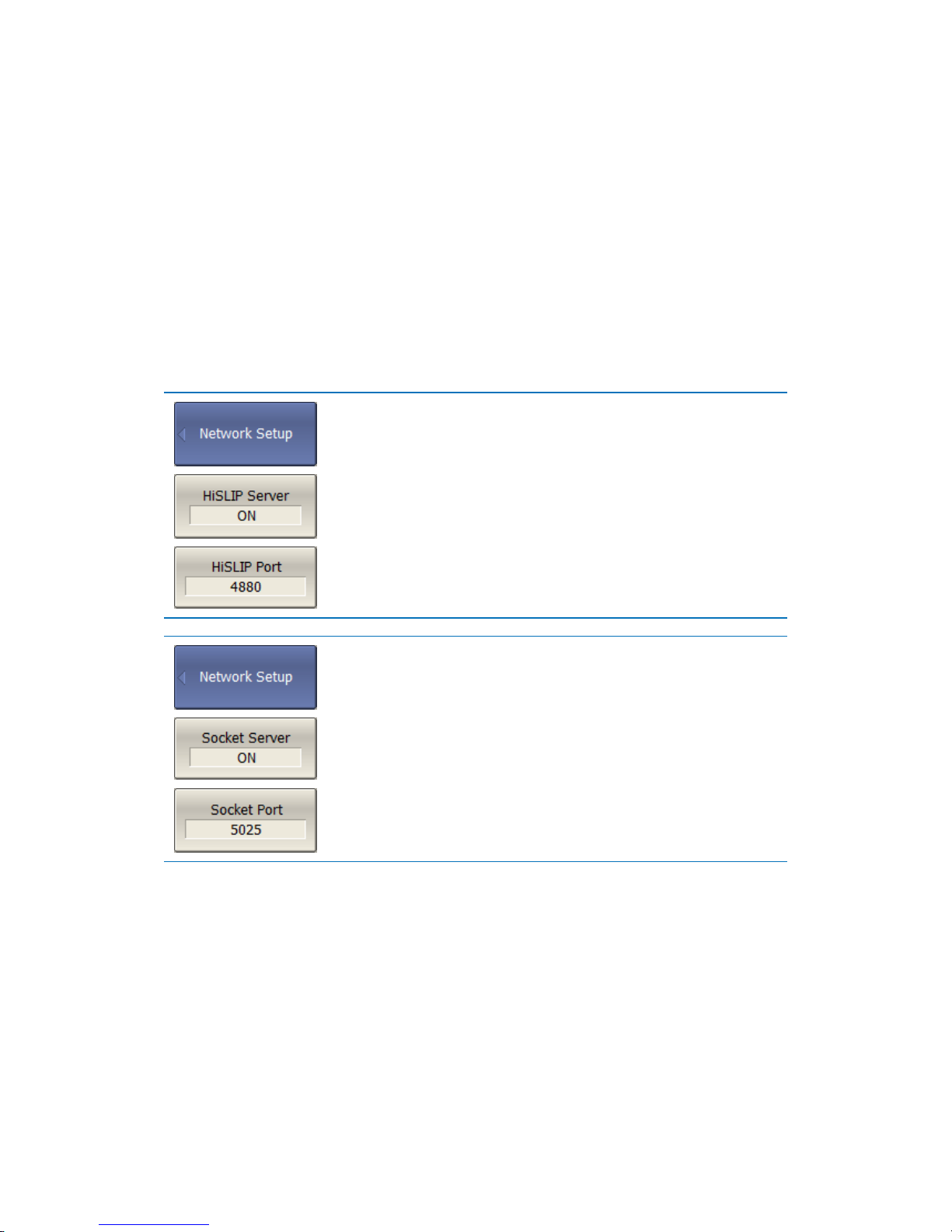
S2VNA and S4VNA SCPI Programming Manual
17
For remote access to the analyzer it is necessary to make the following settings in
its program:
Enable HiSLIP server and/or Socket server;
Configure the TCP/IP port number (optional).
Configuring the TCP/IP port number is necessary in the only case where several
analyzer programs are simultaneously executed on the same computer, and these
programs require remote remote control. In other cases, you should leave the
default TCP/IP port number: for the HiSLIP server - 4880, and for the Socket server
– 5025.
To enable remote control of the analyzer using the
HiSLIP protocol, press the following softkeys:
System > Misc Setup > Network Setup > HiSLIP Server
[ON/OFF].
To change the TCP/IP port number of the HiSLIP
server, use the following softkeys:
System > Misc Setup > Network Setup > HiSLIP Port.
To enable remote control of the analyzer using the
Socket protocol, press the following softkeys:
System > Misc Setup > Network Setup > Socket Server
[ON/OFF].
To change the TCP/IP port number of the Socket
server, use the following softkeys:
System > Misc Setup > Network Setup > Socket Port.
2.3 Client Setting
If the client is a user program that works through the VISA library, the easiest way
to configure the network connection with the Analyzer is using a special graphical
utility from VISA package (for example, NI-MAX, Keysight Connection Expert).
According to the manual for the above utilities, add a new network device,
specifying the network name or IP address of the Analyzer's computer, and the
protocol. As a result of successful connection to the Analyzer, the VISA address of
Page 18
S2VNA and S4VNA SCPI Programming Manual
18
the analyzer will be automatically generated and displayed. The VISA address of
the Analyzer is used later in the user program in order to open the connection.
The format of the VISA address for the HiSLIP and Socket protocols:
HiSLIP
TCPIP[board]::host address[::HiSLIP device name[,HiSLIP port]][::INSTR]
Socket
TCPIP[board]::host address::port::SOCKET
Examples of VISA address for HiSLIP and Socket protocols:
HiSLIP
TCPIP0::192.168.0.1::hislip0::INSTR
TCPIP0::localhost::hislip0::INSTR
Socket
TCPIP0::192.168.0.1::5025::SOCKET
TCPIP0::localhost::5025::SOCKET
If the client is a user program that does not use the VISA library, then only the
TCP/IP Socket protocol is available to it. In this case, the user program establishes
a connection using the IP address of the analyzer's Socket server.
The format of the IP address of the analyzer's Socket server:
Socket
host address:port
Examples of the IP address of the analyzer's Socket server:
Socket
192.168.0.1:5025
localhost:5025
2.4 VISA Library
Using the VISA (Virtual Instrument Software Architecture) library is most common
approach. The VISA library is a widely used software input-output interface in the
field of testing and measurement for controlling devices from a personal
computer. It is a library of functions for C/C ++, C #, Visual Basic, MATLAB,
LabVIEW and others.
The VISA Library unifies access to all measuring instruments, regardless of the
protocol and equipment used.
The VISA library is installed on the client side, that is, on the computer where the
user program is executed. The VISA library is available on the websites of many
companies for free download. There are versions for Linux, Mac OS, Windows
2.5 Network and Local Configuration
Page 19
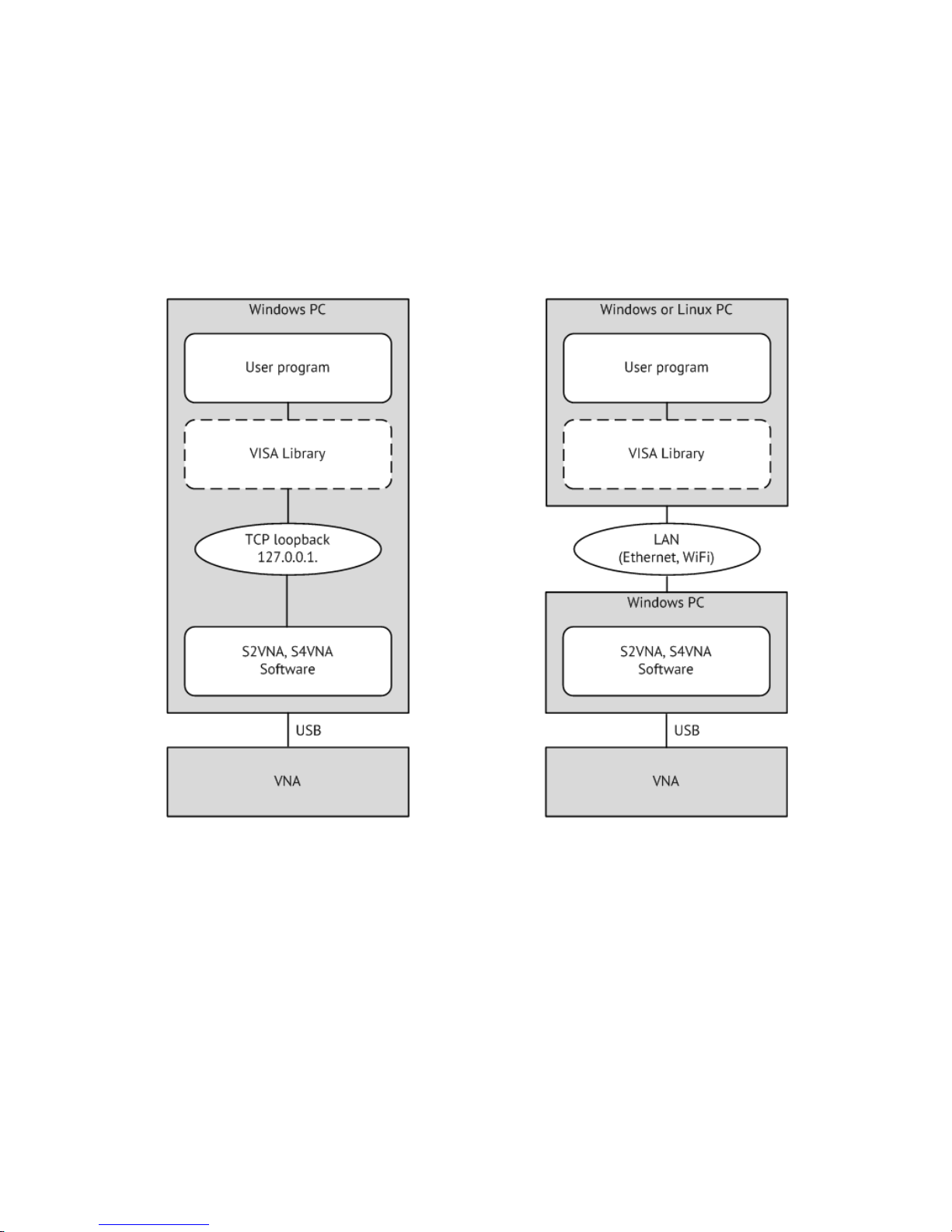
S2VNA and S4VNA SCPI Programming Manual
19
A network configuration involves executing a user program and analyzer program
on different computers connected by a local area network.
The local configuration involves executing the user program and the analyzer
program on the single computer.
The figure shows the local configuration on the left and the network configuration
on the right.
The local configuration is possible due to to the standard TCP/IP stack function –
TCP loopback. The TCP loopback function allows network applications to
communicate in a standard way within a single computer. The most widely used IP
address in the TCP loopback mechanism is 127.0.0.1. Instead of the numeric
address 127.0.0.1, it is possible to use the symbolic name localhost.
Note: The network configuration does not restrict the client in choosing the OS.
The local configuration limits the client in choosing the OS – only Windows.
2.6 Connecting Multiple Analyzers to Single Computer
Page 20
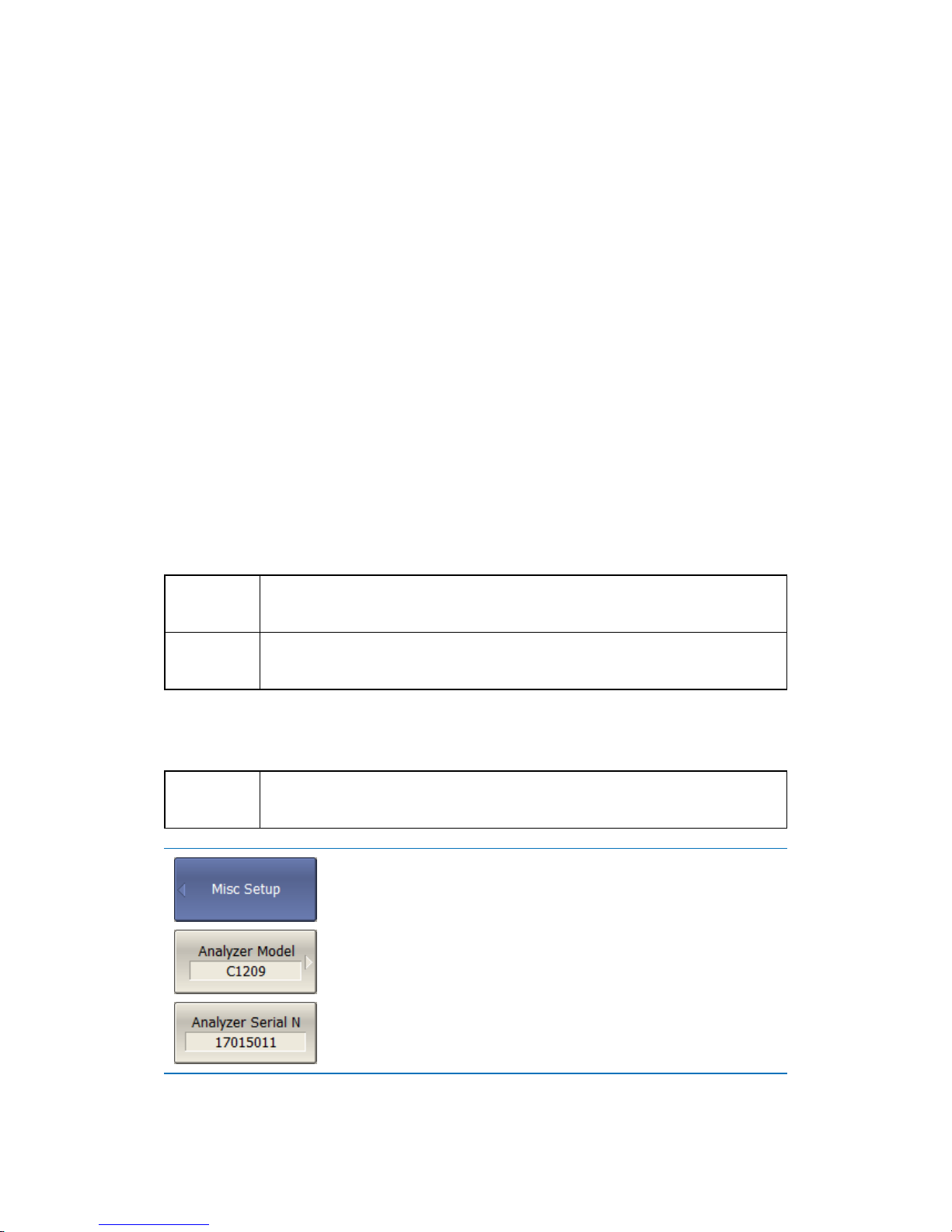
S2VNA and S4VNA SCPI Programming Manual
20
This section describes in detail how to configure the remote control of the
multiple analyzer programs executed simultaneously on a single computer
(provided several USB analyzer hardware units connected to the single computer).
It is recommended that you create a separate folder for each analyzer with
the software. This allows you to save individual settings for each analyzer.
It is recommended that each copy of the software be linked to a specific
hardware unit by its serial number or model (see at the end of this section).
Assign a unique TCP/IP port number for each copy of the software for the
HiSLIP or Socket protocol used. For example, if HiSLIP is used, assign port
4880 to the first analyzer, 4881 to the second, and so on. When assigning a
port number, the user must ensure that the port number is not used by
other programs.
Use the analyzer's address in the user program with the mandatory
indication of the TCP/IP port number assigned to the analyzer, as in the
examples given.
Examples of the VISA address for the HiSLIP and Socket protocols with the
indication of the TCP/IP port:
HiSLIP
TCPIP0::192.168.0.1::hislip0,4880::INSTR
TCPIP0::192.168.0.1::hislip0,4881::INSTR
Socket
TCPIP0::192.168.0.1::5025::SOCKET
TCPIP0::192.168.0.1::5026::SOCKET
Examples of the TCP/IP address of the analyzer's Socket server with the indication
of the port:
Socket
192.168.0.1:5025
192.168.0.1:5026
To link the analyzer program to the analyzer model,
press the softkeys:
System > Misc Setup > Analyzer Model
To link the analyzer program to the analyzer serial
number, press the softkeys:
System > Misc Setup > Analyzer Serial N
2.7 Differences in Use of HiSLIP and Socket Protocols
Page 21

S2VNA and S4VNA SCPI Programming Manual
21
This section describes the differences in the methods of writing user programs due
to the use of different HiSLIP and TCP/IP Socket protocols. It is assumed that the
user program works through the VISA library.
The list of differences in a brief form is given below. Then a detailed description of
each item is given.
1. The terminal character <newline> in the commands sent to the analyzer.
2. The terminal character <newline> in the analyzer's responses.
3. Determine the interrupted violation of the messages exchange protocol of
IEEE488.2.
4. Support for the IEEE488.2 Status Reporting System.
5. Support the transfer of binary data.
2.7.1 Terminal Character in Messages to Analyzer
The user program sends variable-length text messages to the analyzer. The end of
the message, according to IEEE488.2, is transmitted either by protocol means (not
by a symbol), or by the symbol <newline> ('\n', 0x0A, 10), or both methods
together.
The HiSLIP has a mechanism for transmitting the end of the message by protocol
means, while the Socket protocol does not. This makes the following requirements
for programs sending commands to analyzer:
Programs using the Socket protocol shall send a <newline> character at the
end of the message;
Programs using the HiSLIP protocol may send the <newline> symbol at the
end of the message.
Note for the graphical language LabVIEW when using the Socket protocol: to be able
to enter the symbol <newline> at the end of the message, you need to right-click
on the string constant and enable '\' Codes Display. The <newline> character is
entered as '\n'.
Note for the textual languages: it is recommended to use to the symbol <newline> at
the end of the message regarless of the protocol used.
Page 22
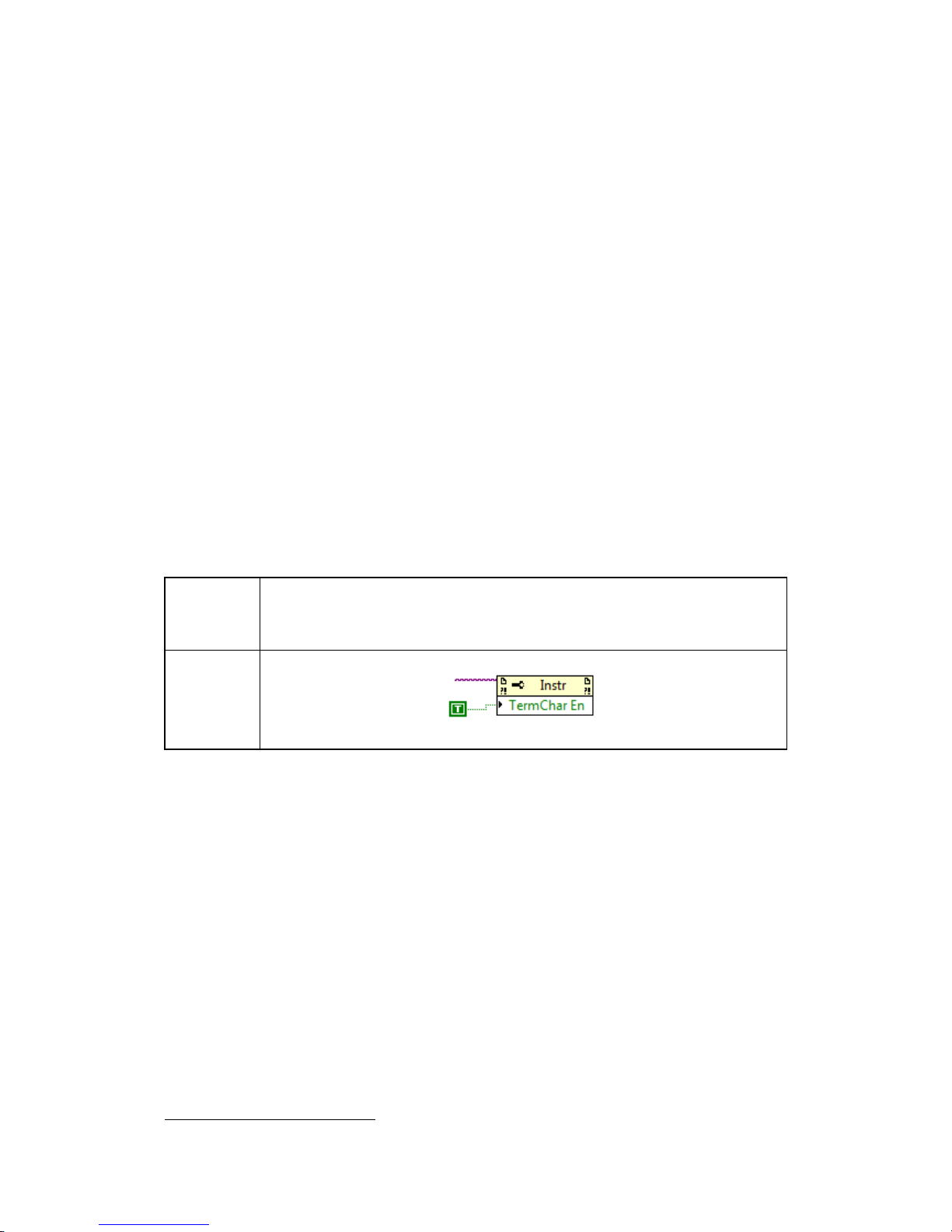
S2VNA and S4VNA SCPI Programming Manual
22
2.7.2 Terminal Character in Analyzer Responses
When using the HiSLIP protocol, the analyzer terminates messages with the
symbol <newline> + the protocol defined end of message (not symbolic).
When using the Socket protocol, the analyzer terminates messages only with the
<newline> symbol, since the Socket protocol does not have the protocol defined
end of message.
Depending on the protocol used, you need to make the following settings for the
VISA library so that it correctly determines the end of the message from the
analyzer:
When using the HiSLIP protocol – no settings are required, the VISA library
functions normally with default settings;
When using the Socket protocol, the user program must set the attribute
VI_ATTR_TERMCHAR_EN to TRUE (completion of the read operation when
the <newline> character is received).
Examples of setting up the VISA library using the Socket protocol:
C/C++
viSetAttribute(instr, VI_ATTR_TERMCHAR_EN, VI_TRUE);
LabVIEW
2.7.3 Interrupted Error
The HiSLIP protocol meets the requirements of the IEEE Std 488.2 message
exchange protocol to detect an interrupted error3. The interrupted error indicates
that the Analyzer received an incoming message (command or query) before the
client accepted a response from the previous request. In other words, the client is
required to read the result of each query before sending the next query or
command. If the client fails to do so, the protocol generates an error message and
the response from the previous query is cleared by the protocol.
The Socket protocol does not detect the interrupted error. Multiple queries can be
sent to the analyzer without a read operation between them. Answers from
3
The analyzer implements the synchronized mode of the HiSLIP protocol.
VISA resource name
Page 23

S2VNA and S4VNA SCPI Programming Manual
23
queries will be returned in the order in which they were sent. The client himself
determines from which request a specific answer has been received.
2.7.4 IEEE488.2 Status Reporting System
The HiSLIP protocol fully supports the analyzer's IEEE488.2 Status Reporting
System described in the appendix, while the Socket protocol supports it only
partially. The Socket protocol does not support the following functions:
The MAV (message available) bit in the Status Byte;
SRQ (service request) generation - request from the analyzer, implemented
by callback functions in the VISA library;
Read the Status Byte using the dedicated function – viReadSTB.
2.7.5 Transfer of Binary Data
By default, data from the analyzer is sent in text form. To increase the speed of
the exchange, the user has the option to enable binary data transfer. The transfer
of binary data is enabled by the FORMat:DATA command and is effective for
commands that transfer large data ammounts. A list of such commands is given in
the description of the FORMat:DATA command.
The HiSLIP protocol supports the transfer of binary data, since it provides the
protocol defined end of message (not symbolic).
The Socket protocol does not support the transfer of binary data, since it use the
<newline> byte as the end of the message, which can occur in binary data.
Page 24
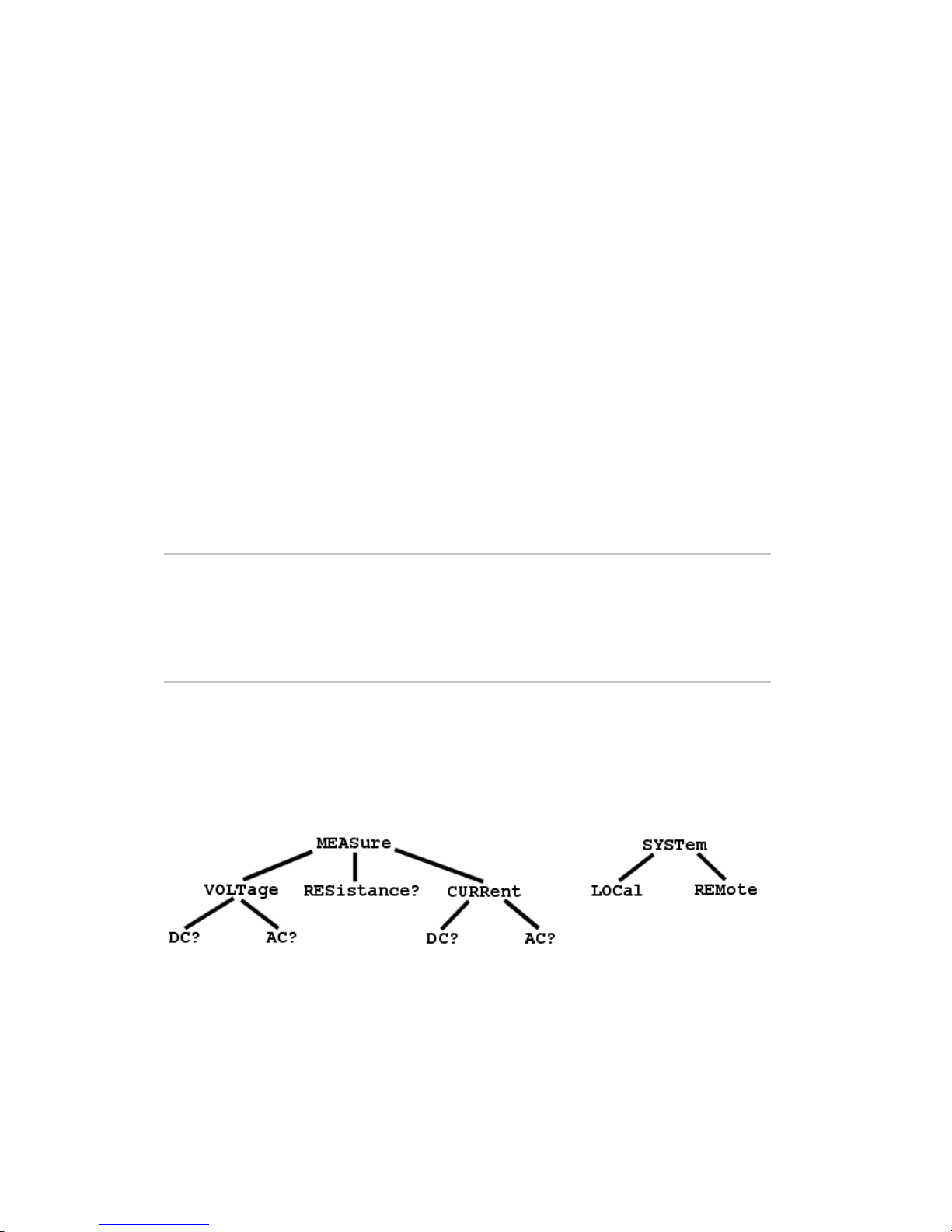
S2VNA and S4VNA SCPI Programming Manual
24
3 SCPI Overview
The analyzer implements a set of commands based on the standard SCPI-1999
(Standard Commands for Programmable Instruments). This is a set of instructions
oriented to the exchange of symbolic messages.
SCPI was developed by the SCPI Consortium (currently supported by the IVI
Foundation). The main details of the SCPI standard are described below. More
information about the SCPI standard can be downloaded from the IVI Foundation
website.
3.1 Messages
The SCPI is text message oriented protocol. The commands are sent as character
messages. One message can contain one or several commands. The answer from
instrument is read out as a text message by default. Optionaly an instrument can
be programmed to output a binary data.
Note
The Analyzer supports the binary data output when
using HiSLIP protocol.
The Analyzer does not support the binary data
output when using TCP/IP Socket protocol.
3.2 Command Tree
The SCPI commands are organized in a tree structure. For example:
Page 25

S2VNA and S4VNA SCPI Programming Manual
25
Each tree structure forms a functional system. The base of the tree is called root,
e.g. MEASure and SYSTem. Each functional system can have subsystems of lower
level. The final nodes are called leaves. The entire sequence from root to the leaf
makes up the command. For example, part of SOURCe functional system looks as
follows:
:SOURce
:POWer
:CENTer
:STARt
:SPAN
:STOP
[:LEVel]
:SLOPe
[:DATA]
:STATe
This SOURce branch has several levels, where CENTer, STARt, SPAN, STOP, DATA,
STATe are the leaves, which represent the following six commands:
:SOURce:POWer:CENTer
:SOURce:POWer:STARt
:SOURce:POWer:SPAN
:SOURce:POWer:STOP
:SOURce:POWer[:LEVel]:SLOPe[:DATA]
:SOURce:POWer[:LEVel]:SLOPe:STATe
The tree can contain subsystems and leaves with the same names if they belong
to different branches, e.g. CENTer leaf is on the tips of different branches:
:SOURce :SENSe
:POWer :FREQuency
:CENTer :CENTer
3.3 Subsystems
A colon (':') separates the subsystems. The subsystems, which follow the colon are
of a lower level. For example, in command:
:SOURce:POWer:STARt
the start power STARt is a part of POWer subsystem, which is a part of SOURce
subsystem. The stop power is also a part of :SOURce:POWer subsystem. It is
specified by:
:SOURce:POWer:STOP
The first colon in the line can be omitted, for example:
SOURce:POWer:STOP
Page 26

S2VNA and S4VNA SCPI Programming Manual
26
3.4 Optional Subsystems
Some subsystems can be specified as optional, if omission of such a subsystem
will not lead to ambiguity. This means that the subsystem can be omitted in
command line. The optional subsystems are bracketed ("[]"). For example, if full
command specification is written as:
SOURce:POWer[:LEVel]:SLOPe[:DATA]
subsystems LEVel and DATA are optional. Therefore the both commands are valid:
SOURce:POWer:LEVel:SLOPe:DATA
SOURce:POWer:SLOPe
3.5 Long and Short Formats
Each keyword in a command specification has a long format and a short format.
The short format of a command is indicated by capital letters. For example, a
command specification:
SENSe:FREQuency:CENTer
can be written as:
SENS:FREQ:CENT
SENS:FREQ:CENTer
Only long or short form of each keyword is acceptable. For example, the following
specification is incorrect:
:SENS:FREQuen:CEN
3.6 Case Sensitivity
The commands are not case sensitive. Upper case and lower case letters are only
used to indicate the long and short formats of a command specification. For
example, the following commands are equivalent:
SENS:FREQ:STAR
sens:freq:star
3.7 Parameters
The commands can have parameters. The parameters are separated from the
command by a space. If a command has several parameters, they are separated by
commas (',').
Page 27

S2VNA and S4VNA SCPI Programming Manual
27
3.7.1 Numeric Values
The numeric values are integer or real numbers. These parameters can have
measurement units. For example:
SENS:FREQ 1000000000
SENS:FREQ 1000 MHz
SENS:FREQ 1 GHz
SENS:FREQ 1E9
3.7.1.1 Multiplier Prefixes
The SCPI standard allows specification of the numeric values with multiplier prefix
to the measurement units.
Prefix
Multiplier
A
1e–18
F
1e–15
P
1e–12
N
1e–9
U
18–6
M
1e–3
K
1e3
MA
1e6
G
1e9
T
1e12
PE
1e15
EX
1e18
There are two exceptions to the above designation: prefix M in combination with
HZ or OHM means 1e6 (Mega), and not 1e–3 (milli), i.e. MHZ means Megahertz,
same as MAHZ.
Page 28
S2VNA and S4VNA SCPI Programming Manual
28
3.7.1.2 Notations
The SCPI standard allows numeric value specification in different notations.
Decimal notation is used by default. To use other notations, specify the numeric
values in the following way:
Notation
Prefix
Example
Binary
#B
#B11001010 = 202
10
Octal
#Q
#Q107 = 71
10
Hexadecimal
#H
#H10FF = 4351
10
3.7.2 Booleans
The booleans can assume two values: logical yes and logical no (ON and OFF), and
specified in command as:
ON or 1 – logical yes
OFF or 0 – logical no
For example:
DISPlay:ENABle OFF
DISPlay:ENABle 0
3.7.3 Character Data
The SCPI standard allows specification of parameters as character data, as in the
following command:
TRIGger:SOURce {BUS|IMMediate|EXTernal}
the possible values of the character data – "BUS", "IMMediate", "EXTernal".
The character data have long and short format, and the formats are specified in
accordance with the same rules as described in Section 3.5.
Apart from that, the character data can be combined with numerical parameters.
For example:
SENSe:FREQuency:STARt {MINimum|MAXimum|<value>}
The following specifications are acceptable:
Page 29

S2VNA and S4VNA SCPI Programming Manual
29
SENSe:FREQuency:STARt MIN
SENSe:FREQuency:STARt maximum
SENSe:FREQuency:STARt 1000000
3.7.4 String Parameters
In some cases, the Analyzer can accept parameters made of character strings. Such
strings are enclosed with single quotes (') or double quotes ("). For example, the
file name in the state saving command:
MMEMory:STORe "state01.sta"
3.7.5 Numeric Lists
The numeric lists (<numeric list>) are used to specify a variable number of
numerical parameters, for example:
CALC:LIMit:DATA 2,1,1E9,3E9,0,0,2,1E9,3E9,–3,–3
3.8 Query Commands
The query commands read out the parameter values from the Analyzer. After a
query command has been sent, the response should return via remote control
interface.
The query commands has a question mark ('?') in the end of the command. Many
of the commands have two forms. The form with a question mark writes the
parameter, the form without a question mark reads out the parameter. For
expample:
SENSe:FREQuency:STARt 1MHz
SENSe:FREQuency:STARt?
3.9 Numeric Suffixes
The Analyzer contains several items of the same type, such as 16 channels, each of
which in turn contains 16 traces, etc. A numeric suffix is used to denote the item
number in a command. The suffix is added to the keyword of the item (channel,
trace, etc). For expample, in the following specification the channel number <Ch>
and trace number <Tr> indicate the channel and trace, to which this command is
addressed:
CALCulate<Ch>:PARameter<Tr>:DEFine
Page 30

S2VNA and S4VNA SCPI Programming Manual
30
According to this specification, the command referred to the trace 2 of the channel
1 will be written as follows:
CALC1:PAR2:DEF
The numeric suffix can be omitted. In this case, it is 1 by default. For example, the
following commands are equivalent:
CALC:PAR:DEF
CALC1:PAR1:DEF
3.10 Compound Commands
It is possible to enter more than one command in the same command line. The
commands in the line are separated by a semicolon (';'). The specification of the
first command is valid for the following command, except for the last leaf before
the semicolon. For expample:
SENS:FREQ:STAR 1 MHZ;STOP 2MHZ
If you need to start the next command from the highest level of the structure, this
command should start from a colon (':'):
SENS:FREQ:STAR 1 MHZ;:CALC:PAR:DEF S21
3.11 IEEE488.2 Common Commands Overview
A SCPI compatible Analyzer must support a set of common commands of
IEEE488.2 standard. These commands start with an asterix ('*'). The list of such
commands see below:
*CLS
*ESE
*ESE?
*ESR?
*IDN?
*OPC
*OPC?
*RST
*SRE
*SRE?
*STB?
*TRG
*WAI
These commands are used for resetting, state queries, etc.
Page 31

S2VNA and S4VNA SCPI Programming Manual
31
Page 32

S2VNA and S4VNA SCPI Programming Manual
32
4 Remote Commands
4.1 Conventions
The following conventions are used throughout the Manual.
4.1.1 Syntax
The following symbols are used in command syntax:
<> identifiers enclosed in angular brackets indicated that a particular
type of data must be specified
[] part enclosed in square brackets can be omitted
{} part enclosed in curly brackets indicates that you must select one
of the items in this part. Individual items are separated by a
vertical bar "|"
Space space separates commands from parameters
, comma separates adjacent parameters
… ellipses indicates that parameters in that part are omitted
Page 33

S2VNA and S4VNA SCPI Programming Manual
33
4.1.2 Identifiers
Identifier
Parameter
Description
<numeric>
Number
{<integer>|<real>}
<frequency>
Frequency
<numeric>{[HZ]|KHZ|MHZ|GHZ}
<power>
Power
<numeric>{[DBM]|DBMW|DBW|KW|W|MW|UW|NW}
<time>
Time
<numeric>{[S]|MS|US|NS|PS|FS}
<phase>
Phase
<numeric>{[DEG]|MADEG|KDEG|MDEG|UDEG}
<stimulus>
Stimulus
{<frequency>|<power>|<time>}
<numeric
list>
Numeric List
<numeric 1>,<numeric 2>,...<numeric N>
<bool>
Boolean
parameter
{0|1|ON|OFF}
<char>
Character
parameter
Predefined set of character strings
without quotes
<port>
Port Number
<integer>
<string>
String parameter
Quoted string
Page 34

S2VNA and S4VNA SCPI Programming Manual
34
4.2 IEEE488.2 Common Commands
*CLS
*CLS
Description
Clears the following:
• Error Queue
• Status Byte Register
• Standard Event Status Register
• Operation Status Event Register
• Questionable Status Event Register
• Questionable Limit Status Event Register
• Questionable Limit Channel Status Event Register
(no query)
Target
Status Reporting System
Equivalent Softkeys
None
*ESE
*ESE
<numeric>
*ESE?
Description
Sets or reads out the value of the Standard Event Status Enable
Register.
(command/query)
Target
Status Reporting System
Parameter
<numeric> 0 to 255
Query Response
<numeric>
Preset Value
0
Equivalent Softkeys
None
Page 35

S2VNA and S4VNA SCPI Programming Manual
35
*ESR?
*ESR?
Description
Reads out the value of the Standard Event Status Register.
Executing this command clears the register value.
(query only)
Target
Status Reporting System
Query Response
<numeric>
Equivalent Softkeys
None
*IDN?
*IDN?
Description
Reads out the Analyzer identification string.
(query only)
Target
Analyzer
Query Response
The identification string in format: <manufacturer>, <model>, <serial
number>, <software version>/<hardware version>.
For example: CMT, C1209, 08080188, 16.2/01
Equivalent Softkeys
None
Page 36

S2VNA and S4VNA SCPI Programming Manual
36
*OPC
*OPC
Description
Sets the OPC bit (bit 0) of the Standard Event Status Register at the
completion of all pending operations.
The pending operation caused by the command TRIG:SING only.
(no query)
Target
Status Reporting System
Equivalent Softkeys
None
*OPC?
*OPC?
Description
Reads out the "1" at the completion of all pending operations. The
query blocks the execution of the user program until execution of
all previous instructions.
The query *OPC? can be used for waiting for the end of a sweep
initiated by the command TRIG:SING.
(query only)
Target
Analyzer
Query Response
1
Related Commands
TRIG:SING
Equivalent Softkeys
None
Page 37

S2VNA and S4VNA SCPI Programming Manual
37
*RST
*RST
Description
Restores the default settings of the Analyzer.
There is difference from presetting the Analyzer with SYST:PRES
command – in this case all channels are set to Hold.
(no query)
Target
Analyzer
Related Commands
SYSTem:PRESet
Equivalent Softkeys
None
*SRE
*SRE
<numeric>
*SRE?
Description
Sets or reads out the value of the Service Request Enable Register
(command/query)
Target
Status Reporting System
Parameter
<numeric> 0 to 255
Query Response
<numeric>
Preset Value
0
Equivalent Softkeys
None
Page 38
S2VNA and S4VNA SCPI Programming Manual
38
*STB?
*STB?
Description
Reads out the value of the Status Byte Register
(query only)
Target
Status Reporting System
Query Response
<numeric>
Equivalent Softkeys
None
*TRG
*TRG
Description
Generates a trigger signal and initiates a sweep under the
following conditions.
6. Trigger source is set to the BUS (set by the command
TRIG:SOUR BUS), otherwise an error occurs and the
command is ignored.
7. Analyzer must be in the trigger waiting state, otherwise (the
analyzer is in the measurement state or hold state) an error
occurs and the command is ignored.
The command is completed immediately after the generation of
the trigger signal.
(no query)
Target
Analyzer
Related Commands
TRIG:SOUR
Equivalent Softkeys
None
Page 39

S2VNA and S4VNA SCPI Programming Manual
39
*WAI
*WAI
Description
Delays the execution by the analyzer of the next command till the
completion of the command TRIG:SING.
In absence of a pending command TRIG:SING the command *WAI is
equivalent to an empty operation.
A query that follows the command *WAI blocks the execution of
the user program till the completion of the command TRIG:SING,
similarly to the query *OPC?.
(no query)
Target
Analyzer
Related Commands
TRIG:SING
Equivalent Softkeys
None
Page 40

S2VNA and S4VNA SCPI Programming Manual
40
4.3 Network Analyzer Commands
ABOR
ABORt
Description
Aborts the sweep. The channels in the Single trigger initiation
mode transit to the Hold state. The channels in the Continuous
trigger initiation mode transit to the trigger waiting state, if the
trigger source is set to Internal, the channel immediately starts a
new sweep.
(no query)
Related Commands
INIT:CONT
Equivalent Softkeys
Stimulus > Trigger > Restart
Page 41

S2VNA and S4VNA SCPI Programming Manual
41
CALC:FSIM:BAL:CZC:BPOR:Z0
CALCulate<Ch>:FSIMulator:BALun:CZConversion:BPORt<
Bpt
>:Z0[:R]
<numeric>
CALCulate<Ch>:FSIMulator:BALun:CZConversion:BPORt<
Bpt
>:Z0[:R]?
Description
Sets or reads out the impedance value for the common impedance
conversion function of the balanced port. The impedance is real.
The default impedance value equals to 25 Ω.
(command/query)
Target
Balanced Port <Bpt> of channel <Ch>,
<Ch>={[1]|2|...16}
<Bpt>={[1]|2}, 1 or 2 for the Bal-Bal topology, always 1 for the SE-Bal,
SE-SE-Bal and Bal topology.
Parameter
<numeric> the new value of the common impedance of the balanced
port from 1 mΩ to 10 MΩ.
Unit
Ω (Ohm)
Out of Range
Sets the value of the limit, which is closer to the specified value.
Query Response
<numeric>
Preset Value
25 Ω
Equivalent Softkeys
Analysis > Fixture Simulator > Cmn ZConversion > Bal Port n
Page 42

S2VNA and S4VNA SCPI Programming Manual
42
CALC:FSIM:BAL:CZC:STAT
CALCulate
<Ch>
:FSIMulator:BALun:CZConversion:STATe {OFF|ON|0|1}
CALCulate
<Ch>
:FSIMulator:BALun:CZConversion:STATe?
Description
Turns ON/OFF the common impedance conversion function of the
balanced port.
(command/query)
Target
The channel <Ch>={[1]|2|...16}
Parameter
{ON|1} : ON
{OFF|0} : OFF
Query Response
{0|1}
Preset Value
0
Equivalent Softkeys
Analysis > Fixture Simulator > Cmn ZConversion > Cmn ZConversion
[On/Off]
Page 43

S2VNA and S4VNA SCPI Programming Manual
43
CALC:FSIM:BAL:DEV
CALCulate
<Ch>
:FSIMulator:BALun:DEVice
<char>
CALCulate
<Ch>
:FSIMulator:BALun:DEVice?
Description
Selects the type of balanced device of the balance-unbalance
fixture simulation function
(command/query, S4 only).
Target
The channel <Ch>={[1]|2|...16}
Parameter
<char> Specifies type of the balanced device:
SBALanced : Unbalance-Balance (3 ports)
BBALanced : Balance-Balance (4 ports)
SSBalanced : Unbalance-Unbalance-Balance (4 ports)
BALanced : Balance (2 ports)
Query Response
{SBAL|BBAL|SSB|BAL}
Preset Value
BBAL
Equivalent Softkeys
Analysis > Fixture Simulator > Topology > Device > {SE-Bal | Bal-Bal | SESE-Bal | Bal }
Page 44

S2VNA and S4VNA SCPI Programming Manual
44
CALC:FSIM:BAL:DMC:BPOR:PAR:C
CALCulate<Ch>:FSIMulator:BALun:DMCircuit:BPORt<
Bpt
>:PARameters:C
<numeric>
CALCulate<Ch>:FSIMulator:BALun:DMCircuit:BPORt<
Bpt
>:PARameters:C?
Description
Sets or reads out the capacitance value of the C element of the
differential matching circuit.
(command/query)
Target
Balanced Port <Bpt> of channel <Ch>,
<Ch>={[1]|2|...16}
<Bpt>={[1]|2}, 1 or 2 for the Bal-Bal topology, always 1 for the SE-Bal,
SE-SE-Bal and Bal topology.
Parameter
<numeric> the capacitance value of the C element of the differential
matching circuit from 1e–18 to 1e18.
Unit
F (Farad)
Out of Range
Sets the value of the limit, which is closer to the specified value.
Query Response
<numeric>
Preset Value
0
Equivalent Softkeys
Analysis > Fixture Simulator > Diff Matching > Bal Port n > C
Page 45

S2VNA and S4VNA SCPI Programming Manual
45
CALC:FSIM:BAL:DMC:BPOR:PAR:G
CALCulate<Ch>:FSIMulator:BALun:DMCircuit:BPORt<
Bpt
>:PARameters:G
<numeric>
CALCulate<Ch>:FSIMulator:BALun:DMCircuit:BPORt<
Bpt
>:PARameters:G?
Description
Sets or reads out the conductance value of the G element of the
differential matching circuit.
(command/query)
Target
Balanced Port <Bpt> of channel <Ch>,
<Ch>={[1]|2|...16}
<Bpt>={[1]|2}, 1 or 2 for the Bal-Bal topology, always 1 for the SE-Bal,
SE-SE-Bal and Bal topology.
Parameter
<numeric> the conducitance value of the G element of the differential
matching circuit from 1e–18 to 1e18.
Unit
S (Siemens)
Out of Range
Sets the value of the limit, which is closer to the specified value.
Query Response
<numeric>
Preset Value
0
Equivalent Softkeys
Analysis > Fixture Simulator > Diff Matching > Bal Port n > G
Page 46

S2VNA and S4VNA SCPI Programming Manual
46
CALC:FSIM:BAL:DMC:BPOR:PAR:L
CALCulate<Ch>:FSIMulator:BALun:DMCircuit:BPORt<
Bpt
>:PARameters:L
<numeric>
CALCulate<Ch>:FSIMulator:BALun:DMCircuit:BPORt<
Bpt
>:PARameters:L?
Description
Sets or reads out the inductance value of the L element of the
differential matching circuit.
(command/query)
Target
Balanced Port <Bpt> of channel <Ch>,
<Ch>={[1]|2|...16}
<Bpt>={[1]|2}, 1 or 2 for the Bal-Bal topology, always 1 for the SE-Bal,
SE-SE-Bal and Bal topology.
Parameter
<numeric> the inducitance value of the L element of the differential
matching circuit from 1e–18 to 1e18.
Unit
S (Henry)
Out of Range
Sets the value of the limit, which is closer to the specified value.
Query Response
<numeric>
Preset Value
0
Note
If both elements L and R are equal to zero, then L and R elements are
omited in the sheme. If any element L or R is not zero, then zero value of
the rest element means short circuit.
Equivalent Softkeys
Analysis > Fixture Simulator > Diff Matching > Bal Port n > L
Page 47

S2VNA and S4VNA SCPI Programming Manual
47
CALC:FSIM:BAL:DMC:BPOR:PAR:R
CALCulate<Ch>:FSIMulator:BALun:DMCircuit:BPORt<
Bpt
>:PARameters:R
<numeric>
CALCulate<Ch>:FSIMulator:BALun:DMCircuit:BPORt<
Bpt
>:PARameters:R?
Description
Sets or reads out the resistance value of the R element of the
differential matching circuit.
(command/query)
Target
Balanced Port <Bpt> of channel <Ch>,
<Ch>={[1]|2|...16}
<Bpt>={[1]|2}, 1 or 2 for the Bal-Bal topology, always 1 for the SE-Bal,
SE-SE-Bal and Bal topology.
Parameter
<numeric> the resistance value of the R element of the differential
matching circuit from 1e–18 to 1e18.
Unit
Ω (Ohm)
Out of Range
Sets the value of the limit, which is closer to the specified value.
Query Response
<numeric>
Preset Value
0
Note
If both elements L and R are equal to zero, then L and R elements are
omited in the sheme. If any element L or R is not zero, then zero value of
the rest element means short circuit.
Equivalent Softkeys
Analysis > Fixture Simulator > Diff Matching > Bal Port n > R
Page 48

S2VNA and S4VNA SCPI Programming Manual
48
CALC:FSIM:BAL:DMC:BPOR:TYPE
CALCulate<Ch>:FSIMulator:BALun:DMCircuit:BPORt<
Bpt
>:TYPE
<char>
CALCulate<Ch>:FSIMulator:BALun:DMCircuit:BPORt<
Bpt
>:TYPE?
Description
Selects the type of the differential matching circuit for the
specified balanced port number Bpt of the channel Ch.
(command/query)
Target
Balanced Port <Bpt> of channel <Ch>,
<Ch>={[1]|2|...16}
<Bpt>={[1]|2}, 1 or 2 for the Bal-Bal topology, always 1 for the SE-Bal,
SE-SE-Bal and Bal topology
Parameter
<char> Specifies the differential matching circuit:
NONE : No-circuit
PLPC : Shunt L – Shunt C
USER : User defined circuit by touchstone file
Query Response
{NONE|PLPC|USER}
Preset Value
NONE
Related Commands
CALC:FSIM:BAL:DEV
Equivalent Softkeys
Analysis > Fixture Simulator > > Diff Matching > Bal Port n > {None |
Shunt L - Shunt C | User }
Page 49

S2VNA and S4VNA SCPI Programming Manual
49
CALC:FSIM:BAL:DMC:BPOR:USER:FIL
CALCulate<Ch>:FSIMulator:BALun:DMCircuit:BPORt<
Bpt
>:USER:FILename
<string>
CALCulate<Ch>:FSIMulator:BALun:DMCircuit:BPORt<
Bpt
>:USER:FILename?
Description
Specifies a file defining the 2-port network which is used in the
differential matching circuit, for the specified balanced port
number Bpt of the channel Ch. The *.s2p file contains the circuit S–
parameters in Touchstone format.
(command/query)
Target
Balanced Port <Bpt> of channel <Ch>,
<Ch>={[1]|2|...16}
<Bpt>={[1]|2}, 1 or 2 for the Bal-Bal topology, always 1 for the SE-Bal,
SE-SE-Bal and Bal topology
Parameter
<srting>, up to 256 characters
Notes
If the full path of the file is not specified, the \FixtireSim subdirectory of
the application directory will be searched for the file.
Related Commands
CALC:FSIM:BAL:DMC:BPOR:TYPE
Equivalent Softkeys
Analysis > Fixture Simulator > > Diff Matching > Bal Port n > User File
Page 50

S2VNA and S4VNA SCPI Programming Manual
50
CALC:FSIM:BAL:DMC:STAT
CALCulate
<Ch>
:FSIMulator:BALun:DMCircuit:STATe {OFF|ON|0|1}
CALCulate
<Ch>
:FSIMulator:BALun:DMCircuit:STATe?
Description
Turns ON/OFF the differential matching circuit function.
(command/query)
Target
The channel <Ch>={[1]|2|...16}
Parameter
{ON|1} : ON
{OFF|0} : OFF
Query Response
{0|1}
Preset Value
0
Equivalent Softkeys
Analysis > Fixture Simulator > Diff Matching > Diff Matching
Page 51

S2VNA and S4VNA SCPI Programming Manual
51
CALC:FSIM:BAL:DZC:BPOR:Z0
CALCulate<Ch>:FSIMulator:BALun:DZConversion:BPORt<
Bpt
>:Z0[:R]
<numeric>
CALCulate<Ch>:FSIMulator:BALun:DZConversion:BPORt<
Bpt
>:Z0[:R]?
Description
Sets or reads out the impedance value for the differential
impedance conversion function of the balanced port. The
impedance is real. The default impedance value equals to 100 Ω.
(command/query)
Target
Balanced Port <Bpt> of channel <Ch>,
<Ch>={[1]|2|...16}
<Bpt>={[1]|2}, 1 or 2 for the Bal-Bal topology, always 1 for the SE-Bal,
SE-SE-Bal and Bal topology.
Parameter
<numeric> the new value of the differential impedance of the balanced
port from 1 mΩ to 10 MΩ.
Unit
Ω (Ohm)
Out of Range
Sets the value of the limit, which is closer to the specified value.
Query Response
<numeric>
Preset Value
100 Ω
Equivalent Softkeys
Analysis > Fixture Simulator > Diff ZConversion > Bal Port n
Page 52

S2VNA and S4VNA SCPI Programming Manual
52
CALC:FSIM:BAL:DZC:STAT
CALCulate
<Ch>
:FSIMulator:BALun:DZConversion:STATe {OFF|ON|0|1}
CALCulate
<Ch>
:FSIMulator:BALun:DZConversion:STATe?
Description
Turns ON/OFF the differential impedance conversion function of
the balanced port.
(command/query)
Target
The channel <Ch>={[1]|2|...16}
Parameter
{ON|1} : ON
{OFF|0} : OFF
Query Response
{0|1}
Preset Value
0
Equivalent Softkeys
Analysis > Fixture Simulator > Diff ZConversion > Diff ZConversion
[On/Off]
Page 53

S2VNA and S4VNA SCPI Programming Manual
53
CALC:FSIM:BAL:PAR:BAL
CALCulate
<Ch>
:FSIMulator:BALun:PARameter
<Tr>
:BALanced[:DEFine]
<char>
CALCulate
<Ch>
:FSIMulator:BALun:PARameter
<Tr>
:BALanced[:DEFine]?
Description
Selects the measurement parameter of the fixture simulation
function when the device type is BALanced.
(command/query)
Target
Trace <Tr> of channel <Ch>,
<Tr>={[1]|2|...16}
<Ch>={[1]|2|...16}
Parameter
<char> Specifies the measurement parameter:
SDD11
SCD11
SDC11
SCC11
Query Response
{SDD11|SCD11|SDC11|SCC11}
Preset Value
SDD11
Related Commands
CALC:FSIM:BAL:DEV
Equivalent Softkeys
Analysis > Fixture Simulator > Measurement > {Sdd11|Scd11|Sdc11|
Scc11 }
Page 54

S2VNA and S4VNA SCPI Programming Manual
54
CALC:FSIM:BAL:PAR:BBAL
CALCulate
<Ch>
:FSIMulator:BALun:PARameter
<Tr>
:BBALanced[:DEFine]
<char>
CALCulate
<Ch>
:FSIMulator:BALun:PARameter
<Tr>
:BBALanced[:DEFine]?
Description
Selects the measurement parameter of the fixture simulation
function when the device type is BBALanced.
(command/query)
Target
Trace <Tr> of channel <Ch>,
<Tr>={[1]|2|...16}
<Ch>={[1]|2|...16}
Parameter
<char> Specifies the measurement parameter:
SDD11
SDD21
SDD12
SDD22
SCD11
SCD21
SCD12
SCD22
SDC11
SDC21
SDC12
SDC22
SCC11
SCC21
SCC12
SCC22
IMB1 : Imbalance1
IMB2 : Imbalance1
CMRR : Sdd21/Scc21
Query Response
{SDD11|SDD21|SDD12|SDD22|SCD11|SCD21|SCD12|SCD22|SDC11|SDC21|
SDC12|SDC22|SCC11|SCC21|SCC12|SCC22|IMB1|IMB2|CMRR}
Preset Value
SDD11
Related Commands
CALC:FSIM:BAL:DEV
Equivalent Softkeys
Analysis > Fixture Simulator > Measurement > {Sdd11|… CMRR }
Page 55

S2VNA and S4VNA SCPI Programming Manual
55
CALC:FSIM:BAL:PAR:SBAL
CALCulate
<Ch>
:FSIMulator:BALun:PARameter
<Tr>
:SBALanced[:DEFine]
<char>
CALCulate
<Ch>
:FSIMulator:BALun:PARameter
<Tr>
:SBALanced[:DEFine]?
Description
Selects the measurement parameter of the fixture simulation
function when the device type is SBALanced.
(command/query)
Target
Trace <Tr> of channel <Ch>,
<Tr>={[1]|2|...16}
<Ch>={[1]|2|...16}
Parameter
<char> Specifies the measurement parameter:
SSS11
SDS21
SSD12
SCS21
SSC12
SDD22
SCD22
SDC22
SCC22
IMB : Imbalance
CMRR1 : Sds21/Scs21
CMRR2 : Ssd12/Ssc12
Query Response
{SSS11|SDS21|SSD12|SCS21|SSC12|SDD22|SCD22|SDC22|SCC22|
IMB|CMRR1|CMRR2}
Preset Value
SSS11
Related Commands
CALC:FSIM:BAL:DEV
Equivalent Softkeys
Analysis > Fixture Simulator > Measurement > {Sss11|… CMRR2 }
Page 56

S2VNA and S4VNA SCPI Programming Manual
56
CALC:FSIM:BAL:PAR:SSB
CALCulate
<Ch>
:FSIMulator:BALun:PARameter
<Tr>
:SSBalanced[:DEFine]
<char>
CALCulate
<Ch>
:FSIMulator:BALun:PARameter
<Tr>
:SSBalanced[:DEFine]?
Description
Selects the measurement parameter of the fixture simulation
function when the device type is SSBalanced.
(command/query)
Target
Trace <Tr> of channel <Ch>,
<Tr>={[1]|2|...16}
<Ch>={[1]|2|...16}
Parameter
<char> Specifies the measurement parameter:
SSS11
SSS21
SSS12
SSS22
SDS31
SDS32
SSD13
SSD23
SCS31
SCS32
SSC13
SSC23
SDD33
SCD33
SDC33
SCC33
IMB1 : Imbalance1
IMB2 : Imbalance2
IMB3 : Imbalance3
IMB4 : Imbalance4
CMRR1 : Sds31/Scs31
CMRR2 : Sds32/Scs32
Query Response
{SSS11|SSS21|SSS12|SSS22|SDS31|SDS32|SSD13|SSD23|SCS31|SCS32|
SSC13|SSC23|SDD33|SCD33|SDC33|SCC33|IMB1|IMB2|IMB3|IMB4|CMRR1|
CMRR2}
Preset Value
SSS11
Equivalent Softkeys
Analysis > Fixture Simulator > Measurement > {Sss11|… CMRR2 }
Page 57

S2VNA and S4VNA SCPI Programming Manual
57
CALC:FSIM:BAL:PAR:STAT
CALCulate
<Ch>
:FSIMulator:BALun:PARameter
<Tr>
:STATe {OFF|ON|0|1}
CALCulate
<Ch>
:FSIMulator:BALun:PARameter
<Tr>
:STATe?
Description
Turns ON/OFF the BalUn function for the specified trace.
(command/query)
Target
Trace <Tr> of channel <Ch>,
<Tr>={[1]|2|...16}
<Ch>={[1]|2|...16}
Parameter
{ON|1} : ON
{OFF|0} : OFF
Query Response
{0|1}
Preset Value
0
Equivalent Softkeys
Analysis > Fixture Simulator > BalUn
CALC:FSIM:BAL:TOP:BAL
CALCulate
<Ch>
:FSIMulator:BALun:TOPology:BALanced[:PPORts]
<port1>,<port2>
CALCulate
<Ch>
:FSIMulator:BALun:TOPology:BALanced[:PPORts]?
Description
Sets or reads out the ports assigned to the balanced device when
its type is "BALance".
(command/query)
Target
The channel <Ch>={[1]|2|...16}
Parameters
<port1> First port number
<port2> Second port number
Query Response
<port1>, <port2>
Preset Value
1,2
Related Commands
CALC:FSIM:BAL:DEV
Equivalent Softkeys
Analysis > Fixture Simulator > Topology > Port 1 (bal)
Page 58

S2VNA and S4VNA SCPI Programming Manual
58
CALC:FSIM:BAL:TOP:BBAL
CALCulate
<Ch>
:FSIMulator:BALun:TOPology:BBALanced[:PPORts]
<port1>,<port2>
,
<port3>,<port4>
CALCulate
<Ch>
:FSIMulator:BALun:TOPology:BBALanced[:PPORts]?
Description
Sets or reads out the ports assigned to the balanced device when
its type is "BBALance".
(command/query)
Target
The channel <Ch>={[1]|2|...16}
Parameters
<port1> First port number
<port2> Second port number
<port3> Third port number
<port4> Fourth port number
Query Response
<port1>, <port2>, <port3>, <port4>
Preset Value
1,2,3,4
Related Commands
CALC:FSIM:BAL:DEV
Equivalent Softkeys
Analysis > Fixture Simulator > Topology > Port 1 (bal), Port 2 (bal)
Page 59

S2VNA and S4VNA SCPI Programming Manual
59
CALC:FSIM:BAL:TOP:SBAL
CALCulate
<Ch>
:FSIMulator:BALun:TOPology:SBALanced[:PPORts]
<port1>,<port2>
,
<port3>
CALCulate
<Ch>
:FSIMulator:BALun:TOPology:SBALanced[:PPORts]?
Description
Sets or reads out the ports assigned to the balanced device when
its type is "SBALance".
(command/query)
Target
The channel <Ch>={[1]|2|...16}
Parameters
<port1> First port number
<port2> Second port number
<port3> Third port number
Query Response
<port1>, <port2>, <port3>
Preset Value
1,2,3
Related Commands
CALC:FSIM:BAL:DEV
Equivalent Softkeys
Analysis > Fixture Simulator > Topology > Port 1 (se) , Port 2 (bal)
Page 60

S2VNA and S4VNA SCPI Programming Manual
60
CALC:FSIM:BAL:TOP:SSB
CALCulate
<Ch>
:FSIMulator:BALun:TOPology:SSBalanced[:PPORts]
<port1>,<port2>
,
<port3>,<port4>
CALCulate
<Ch>
:FSIMulator:BALun:TOPology:SSBalanced[:PPORts]?
Description
Sets or reads out the ports assigned to the balanced device when
its type is "SSBalance".
(command/query)
Target
The channel <Ch>={[1]|2|...16}
Parameters
<port1> First port number
<port2> Second port number
<port3> Third port number
<port4> Fourth port number
Query Response
<port1>, <port2>, <port3>, <port4>
Preset Value
1,2,3,4
Related Commands
CALC:FSIM:BAL:DEV
Equivalent Softkeys
Analysis > Fixture Simulator > Topology > Port 1 (se), Port 2 (se), Port 3
(bal)
Page 61
S2VNA and S4VNA SCPI Programming Manual
61
CALC:FSIM:BAL:TOP:PROP:STAT
CALCulate
<Ch>
:FSIMulator:BALun:TOPology:PROPerty:STATe {OFF|ON|0|1}
CALCulate
<Ch>
:FSIMulator:BALun:TOPology:PROPerty:STATe?
Description
Turns ON/OFF the BalUn property indication on the screen.
(command/query)
Target
The channel <Ch>={[1]|2|...16}
Parameter
{ON|1} : ON
{OFF|0} : OFF
Query Response
{0|1}
Preset Value
0
Equivalent Softkeys
Analysis > Fixture Simulator > Topology > Property
CALC:FSIM:EMB:NETW:FIL
CALCulate
<Ch>
:FSIMulator:EMBed:NETWork
<Nk>
:FILename
<string>
CALCulate
<Ch>
:FSIMulator:EMBed:NETWork
<Nk>
:FILename?
Description
Sets or reads out the name of 4-port touchstone file (*.s4p) of the
4-port network embedding/de-embedding feature.
The file contains the circuit S–parameters in Touchstone format.
(command/query)
Target
The channel <Ch>={[1]|2|...16},
The Network <Nk>={[1]|2}
Parameter
<srting>, up to 256 characters
Notes
If the full path of the file is not specified, the \FixtireSim subdirectory of
the application directory will be searched for the file.
Equivalent Softkeys
Analysis > Fixture Simulator > De–Embedding S4P > File (ntwk1), File
(ntwk2)
Page 62
S2VNA and S4VNA SCPI Programming Manual
62
CALC:FSIM:EMB:NETW:TYPE
CALCulate
<Ch>
:FSIMulator:EMBed:NETWork
<Nk>
:TYPE
<char>
CALCulate
<Ch>
:FSIMulator:EMBed:NETWork
<Nk>
:TYPE?
Description
Selects the processing type of the 4-port network embedding/deembedding feature.
(command/query, S4 only)
Target
The channel <Ch>={[1]|2|...16},
The Network <Nk>={[1]|2}
Parameter
<char> Specifies processing type:
NONE : No processing
EMBed : Embedding
DEEMbed : De-Embedding
Query Response
{NONE|EMB|DEEM}
Preset Value
NONE
Equivalent Softkeys
Analysis > Fixture Simulator > De–Embedding S4P > Type (ntwk1), Type
(ntwk2) > {None| Embed| De-Embed}
CALC:FSIM:EMB:STAT
CALCulate
<Ch>
:FSIMulator:EMBed:STATe {OFF|ON|0|1}
CALCulate
<Ch>
:FSIMulator:EMBed:STATe?
Description
Turns ON/OFF the 4-port network embedding/de-embedding
feature (command/query, S4 only).
Target
The channel <Ch>={[1]|2|...16}
Parameter
{ON|1} : ON
{OFF|0} : OFF
Query Response
{0|1}
Preset Value
0
Equivalent Softkeys
Analysis > Fixture Simulator > De–Embedding S4P > De–Embedding S4P
Page 63

S2VNA and S4VNA SCPI Programming Manual
63
CALC:FSIM:EMB:TOP:A:PORT
CALCulate
<Ch>
:FSIMulator:EMBed:TOPology:A:PORTs
<port1>,<port2>
CALCulate
<Ch>
:FSIMulator:EMBed:TOPology:A:PORTs?
Description
Sets or reads out the test port assignment when the Topology is
set to A, for the 4-port network embedding/de-embedding feature.
(command/query)
Target
The channel <Ch>={[1]|2|...16}
Parameters
<port1> First port number
<port2> Second port number
Query Response
<port1>, <port2>
Preset Value
1,2
Related Commands
CALC:FSIM:EMB:TYPE
Equivalent Softkeys
Analysis > Fixture Simulator > De–Embedding S4P > Ports
Page 64

S2VNA and S4VNA SCPI Programming Manual
64
CALC:FSIM:EMB:TOP:B:PORT
CALCulate
<Ch>
:FSIMulator:EMBed:TOPology:B:PORTs
<port1>,<port2>,<port3>
CALCulate
<Ch>
:FSIMulator:EMBed:TOPology:B:PORTs?
Description
Sets or reads out the test port assignment when the Topology is
set to B, for the 4-port network embedding/de-embedding feature.
(command/query)
Target
The channel <Ch>={[1]|2|...16}
Parameters
<port1> First port number
<port2> Second port number
<port3> Third port number
Query Response
<port1>, <port2>, <port3>
Preset Value
1,2,3
Related Commands
CALC:FSIM:EMB:TYPE
Equivalent Softkeys
Analysis > Fixture Simulator > De–Embedding S4P > Ports
Page 65

S2VNA and S4VNA SCPI Programming Manual
65
CALC:FSIM:EMB:TOP:C:PORT
CALCulate
<Ch>
:FSIMulator:EMBed:TOPology:C:PORTs
<port1>,<port2>,<port3>
,
<port4>
CALCulate
<Ch>
:FSIMulator:EMBed:TOPology:C:PORTs?
Description
Sets or reads out the test port assignment when the Topology is
set to B, for the 4-port network embedding/de-embedding feature.
(command/query)
Target
The channel <Ch>={[1]|2|...16}
Parameters
<port1> First port number
<port2> Second port number
<port3> Third port number
<port4> Fourth port number
Query Response
<port1>, <port2>, <port3>, <port4>
Preset Value
1,2,3,4
Related Commands
CALC:FSIM:EMB:TYPE
Equivalent Softkeys
Analysis > Fixture Simulator > De–Embedding S4P > Ports
Page 66

S2VNA and S4VNA SCPI Programming Manual
66
CALC:FSIM:EMB:TYPE
CALCulate
<Ch>
:FSIMulator:EMBed:TYPE
<char>
CALCulate
<Ch>
:FSIMulator:EMBed:TYPE?
Description
Selects the Topology for the 4-port network embedding/deembedding feature.
(command/query, S4 only)
Target
The channel <Ch>={[1]|2|...16}
Parameter
<char> Specifies Topology:
A : Topology A
B : Topology B
C : Topology C
Query Response
{A|B|C}
Preset Value
A
Equivalent Softkeys
Analysis > Fixture Simulator > De–Embedding S4P > Topology > {A| B| C}
CALC:FSIM:SEND:DEEM:STAT
CALCulate
<Ch>
:FSIMulator:SENDed:DEEMbed:STATe {OFF|ON|0|1}
CALCulate
<Ch>
:FSIMulator:SENDed:DEEMbed:STATe?
Description
Turns ON/OFF the 2-port network de–embedding function.
(command/query)
Target
The channel <Ch>={[1]|2|...16}
Parameter
{ON|1} : ON
{OFF|0} : OFF
Query Response
{0|1}
Preset Value
0
Equivalent Softkeys
Analysis > Fixture Simulator > De–Embedding > De–Embedding
Page 67

S2VNA and S4VNA SCPI Programming Manual
67
CALC:FSIM:SEND:DEEM:PORT:STAT
CALCulate
<Ch>
:FSIMulator:SENDed:DEEMbed:PORT
<Pt>
:STATe {OFF|ON|0|1}
CALCulate
<Ch>
:FSIMulator:SENDed:DEEMbed:PORT
<Pt>
:STATe?
Description
Turns ON/OFF the 2-port network de–embedding function for
specified port.
(command/query)
Target
Port <Pt> of channel <Ch>,
<Ch>={[1]|2|...16}
<Pt>={[1]|2} for S2VNA or {[1]|2|3|4} for S4VNA
Parameter
{ON|1} : ON
{OFF|0} : OFF
Query Response
{0|1}
Preset Value
0
Equivalent Softkeys
Analysis > Fixture Simulator > De–Embedding > Port n
CALC:FSIM:SEND:DEEM:PORT:USER:FIL
CALCulate
<Ch>
:FSIMulator:SENDed:DEEMbed:PORT
<Pt>
:USER:FILename
<string>
CALCulate
<Ch>
:FSIMulator:SENDed:DEEMbed:PORT
<Pt>
:USER:FILename?
Description
Sets or reads out the name of *.s2p file of the de–embedded circuit
of the 2-port network de–embedding function. The file contains
the circuit S–parameters in Touchstone format.
(command/query)
Target
Port <Pt> of channel <Ch>,
<Ch>={[1]|2|...16}
<Pt>={[1]|2} for S2VNA or {[1]|2|3|4} for S4VNA
Parameter
<srting>, up to 256 characters
Notes
If the full path of the file is not specified, the \FixtireSim subdirectory of
the application directory will be searched for the file.
Equivalent Softkeys
Analysis > Fixture Simulator > De–Embedding > S–parameters File
Page 68
S2VNA and S4VNA SCPI Programming Manual
68
CALC:FSIM:SEND:PMC:STAT
CALCulate
<Ch>
:FSIMulator:SENDed:PMCircuit:STATe {OFF|ON|0|1}
CALCulate
<Ch>
:FSIMulator:SENDed:PMCircuit:STATe?
Description
Turns ON/OFF the 2-port network embedding function.
(command/query)
Target
The channel <Ch>={[1]|2|...16}
Parameter
{ON|1} : ON
{OFF|0} : OFF
Query Response
{0|1}
Preset Value
0
Equivalent Softkeys
Analysis > Fixture Simulator > Embedding > Embedding
CALC:FSIM:SEND:PMC:PORT:STAT
CALCulate
<Ch>
:FSIMulator:SENDed:PMCircuit:PORT
<Pt>
:STATe {OFF|ON|0|1}
CALCulate
<Ch>
:FSIMulator:SENDed:PMCircuit:PORT
<Pt>
:STATe?
Description
Turns ON/OFF the 2-port network embedding function for each
port.
(command/query)
Target
Port <Pt> of channel <Ch>,
<Ch>={[1]|2|...16}
<Pt>={[1]|2} for S2VNA or {[1]|2|3|4} for S4VNA
Parameter
{ON|1} : ON
{OFF|0} : OFF
Query Response
{0|1}
Preset Value
0
Equivalent Softkeys
Analysis > Fixture Simulator > Embedding > Port n
Page 69

S2VNA and S4VNA SCPI Programming Manual
69
CALC:FSIM:SEND:PMC:PORT:USER:FIL
CALCulate
<Ch>
:FSIMulator:SENDed:PMCircuit:PORT
<Pt>
:USER:FILename
<string>
CALCulate
<Ch>
:FSIMulator:SENDed:PMCircuit:PORT
<Pt>
:USER:FILename?
Description
Sets or reads out the name of *.s2p file of the embedded circuit of
the 2-port network embedding function. The file contains the
circuit S–parameters in Touchstone format.
(command/query)
Target
Port <Pt> of channel <Ch>,
<Ch>={[1]|2|...16}
<Pt>={[1]|2} for S2VNA or {[1]|2|3|4} for S4VNA
Parameter
<string>, up to 256 characters
Notes
If the full path of the file is not specified, the \FixtireSim subdirectory of
the application directory will be searched for the file.
Equivalent Softkeys
Analysis > Fixture Simulator > Embedding > S–parameters File
Page 70

S2VNA and S4VNA SCPI Programming Manual
70
CALC:FSIM:SEND:ZCON:PORT:Z0
CALCulate
<Ch>
:FSIMulator:SENDed:ZCONversion:PORT
<Pt>
:Z0[:R]
<numeric>
CALCulate
<Ch>
:FSIMulator:SENDed:ZCONversion:PORT
<Pt>
:Z0[:R]?
Description
Sets or reads out the value of the impedance for port impedance
conversion function.
(command/query)
Target
Port <Pt> of channel <Ch>,
<Ch>={[1]|2|...16}
<Pt>={[1]|2} for S2VNA or {[1]|2|3|4} for S4VNA
Parameter
<numeric> the impedance value from 1e–6 to 1e6
Unit
Ω (Ohm)
Out of Range
Sets the value of the limit, which is closer to the specified value.
Query Response
<numeric>
Preset Value
50
Equivalent Softkeys
Analysis > Fixture Simulator > Port Z Conversion > Port n Z0
Page 71
S2VNA and S4VNA SCPI Programming Manual
71
CALC:FSIM:SEND:ZCON:STAT
CALCulate
<Ch>
:FSIMulator:SENDed:ZCONversion:STATe {OFF|ON|0|1}
CALCulate
<Ch>
:FSIMulator:SENDed:ZCONversion:STATe?
Description
Turns ON/OFF the port impedance conversion function.
(command/query)
Target
The channel <Ch>={[1]|2|...16}
Parameter
{ON|1} : ON
{OFF|0} : OFF
Query Response
{0|1}
Preset Value
0
Equivalent Softkeys
Analysis > Fixture Simulator > Port Z Conversion > Port Z Conversion
CALC:FSIM:STAT
CALCulate
<Ch>
:FSIMulator:STATe {OFF|ON|0|1}
CALCulate
<Ch>
:FSIMulator:STATe?
Description
Turns ON/OFF the fixture simulation function.
(command/query)
Target
The channel <Ch>={[1]|2|...16}
Parameter
{ON|1} : ON
{OFF|0} : OFF
Query Response
{0|1}
Preset Value
0
Equivalent Softkeys
Analysis > Fixture Simulator > Fixture Simulator
Page 72

S2VNA and S4VNA SCPI Programming Manual
72
CALC:PAR:COUN
CALCulate
<Ch>
:PARameter:COUNt
<numeric>
CALCulate
<Ch>
:PARameter:COUNt?
Description
Sets or reads out the number of traces in the channel.
(command/query)
Target
The channel <Ch>={[1]|2|...16}
Parameter
<numeric> The number of the traces in the channel from 1 to 16
Out of Range
Sets the value of the limit, which is closer to the specified value.
Query Response
<numeric>
Preset Value
1
Equivalent Softkeys
Display > Num of Traces
Page 73

S2VNA and S4VNA SCPI Programming Manual
73
CALC:PAR:DEF
CALCulate
<Ch>
:PARameter
<Tr>
:DEFine
<char>
CALCulate
<Ch>
:PARameter
<Tr>
:DEFine?
Description
Selects the measurement parameter of the trace.
(command/query)
Target
Trace <Tr> of channel <Ch>,
<Tr>={[1]|2|...16}
<Ch>={[1]|2|...16}
Parameter
<char> Specifies parameter:
S11, S12, S13, S14, : S – parameter
S21, S22, S23, S24,
S31, S32, S33, S34,
S41, S42, S43, S44
A, B, C, D or : Test receiver
T1, T2, T3, T4
R1, R2, R3, R4 : Reference receiver
AUX1, AUX2 or : DC Voltage
V1, V2
Query Response
{S11|S12|S13|S14|S21|S22|S23|S24|S31|S32|S33|S34|S41|S42|S43|
S44|R1(n)|R2(n)|R3(n)|R4(n)|A(n)|B(n)|C(n)|D(n)|V1(n)|V2(n)},
Where n is the stimulus port number;
Preset Value
Depends on the trace number.
Equivalent Softkeys
Measurement > S11 | S21 | S12 | S22 …
Measurement > Absolute
Page 74
S2VNA and S4VNA SCPI Programming Manual
74
CALC:PAR:SEL
CALCulate
<Ch>
:PARameter
<Tr>
:SELect
Description
Selects the active trace in channel.
(no query)
Target
Trace <Tr> of channel <Ch>,
<Tr>={[1]|2|...16}
<Ch>={[1]|2|...16}
Notes
If the trace number is greater than the number of the traces displayed in
the channel, an error occurs and the command is ignored.
Related Commands
CALC:PAR:COUN
Equivalent Softkeys
Display > Active Trace/Channel > Active Trace
CALC:PAR:SPOR
CALCulate
<Ch>
:PARameter
<Tr>
:SPORt
<port>
CALCulate
<Ch>
:PARameter
<Tr>
:SPORt?
Description
Sets or reads out the number of the stimulus port, when
performing absolute measurements.
(command/query)
Target
Trace <Tr> of channel <Ch>,
<Tr>={[1]|2|...16}
<Ch>={[1]|2|...16}
Parameter
<port> the number of the stimulus port
Out of Range
Error occurs. The command is ignored.
Query Response
<port>
Preset Value
1
Equivalent Softkeys
Measurement > Absolute > { A(1) | B(1) | R1(1) | A(2) | B(2) | R2(2) }
Page 75

S2VNA and S4VNA SCPI Programming Manual
75
CALC:CONV
CALCulate
<Ch>
[:SELected]:CONVersion[:STATe] {OFF|ON|0|1}
CALCulate
<Ch>
[:SELected]:CONVersion[:STATe]?
Description
Turns ON/OFF the S–parameter conversion function.
(command/query)
Target
The active trace of channel <Ch>,
<Ch>={[1]|2|...16}
Parameter
{ON|1} : ON
{OFF|0} : OFF
Query Response
{0|1}
Preset Value
0
Equivalent Softkeys
Analysis > Conversion > Conversion
Page 76

S2VNA and S4VNA SCPI Programming Manual
76
CALC:CONV:FUNC
CALCulate
<Ch>
[:SELected]:CONVersion:FUNCtion
<char>
CALCulate
<Ch>
[:SELected]:CONVersion:FUNCtion?
Description
Sets or reads out the S–parameter conversion function type.
(command/query)
Target
The active trace of channel <Ch>,
<Ch>={[1]|2|...16}
Parameter
<char> Specifies parameter:
ZREFlection : Reflection equivalent impedance
ZTRansmit : Transmission equivalent impedance
YREFlection : Reflection equivalent admittance
YTRansmit : Transmission equivalent admittance
INVersion : Inverse S–parameter
ZTSHunt : Shunt equivalent impedance
YTSHunt : Shunt equivalent admittance
CONJugation : S–parameter conjugate
Query Response
{ZREF|ZTR|YREF|YTR|INV|ZTSH|YTSH|CONJ}
Preset Value
ZREF
Equivalent Softkeys
Analysis > Conversion > { Zr | Zt | Yr | Yt | 1/S | Z Trans–Shunt |
Y Trans–Shunt | Conjugation }
Page 77

S2VNA and S4VNA SCPI Programming Manual
77
CALC:CORR:EDEL:TIME
CALCulate
<Ch>
[:SELected]:CORRection:EDELay:TIME
<time>
CALCulate
<Ch>
[:SELected]:CORRection:EDELay:TIME?
Description
Sets or reads out the value of the electrical delay.
(command/query)
Target
The active trace of channel <Ch>,
<Ch>={[1]|2|...16}
Parameter
<time> the electrical delay value from –10 to 10
Unit
s (second)
Out of Range
Sets the value of the limit, which is closer to the specified value.
Query Response
<numeric>
Preset Value
0
Equivalent Softkeys
Scale > Electrical Delay
Page 78

S2VNA and S4VNA SCPI Programming Manual
78
CALC:CORR:OFFS:PHAS
CALCulate
<Ch>
[:SELected]:CORRection:OFFSet:PHASe
<phase>
CALCulate
<Ch>
[:SELected]:CORRection:OFFSet:PHASe?
Description
Sets or reads out the value of the phase offset.
(command/query)
Target
The active trace of channel <Ch>,
<Ch>={[1]|2|...16}
Parameter
<phase> the phase offset value from –360 to 360
Unit
° (degree)
Out of Range
Sets the value of the limit, which is closer to the specified value.
Query Response
<numeric>
Preset Value
0
Equivalent Softkeys
Scale > Phase Offset
Page 79

S2VNA and S4VNA SCPI Programming Manual
79
CALC:CORR:STAT?
CALCulate
<Ch>
[:SELected]:CORRection:STATus?
Description
Reads out the interpolation/extrapolation status of the error
correction.
(query only)
Target
The active trace of channel <Ch>,
<Ch>={[1]|2|...16}
Query Response
Trace represents S-parameter:
NONE : Correction not applied
COR : Correction applied exactly
C? : Correction interpolated
C! : Correction extrarpolated
Trace represents absolute parameter:
NONE : Correction not applied
RC : Correction applied exactly
RC? : Correction interpolated
RC! : Correction extrarpolated
Equivalent Softkeys
None
Page 80

S2VNA and S4VNA SCPI Programming Manual
80
CALC:DATA:FDAT
CALCulate
<Ch>
[:SELected]:DATA:FDATa
<numeric list>
CALCulate
<Ch>
[:SELected]:DATA:FDATa?
CALC:TRAC:DATA:FDAT
CALCulate
<Ch>
:TRACe
<Tr>
:DATA:FDATa
<numeric list>
CALCulate
<Ch>
:TRACe
<Tr>
:DATA:FDATa?
Description
Reads out or writes the formatted data array.
The formatted data array is the data, whose processing is
completed including the formatting as the last step. Such data
represent the data trace values as they are shown on the screen.
The array size is 2N, where N is the number of measurement
points.
For the n–th point, where n from 1 to N:
<numeric 2n–1> real number in rectangular format, real part in
polar and Smith chart formats;
<numeric 2n> 0 in rectangular format, imaginary part in polar
and Smith chart formats.
(Command/Query)
Target
CALCulate<Ch>[:SELected]:DATA:FDATa - the active trace of channel,
CALCulate<Ch>:TRACe<Tr>:DATA:FDATa - the trace <Tr> of channel,
<Ch>={[1]|2|...16}
<Tr>={[1]|2|...16}
Query Response
<numeric 1>, <numeric 2>, …<numeric 2N>
Notes
When data is being written it is recommended to hold the sweep before
and update the screen after write.
Related Commands
CALC:FORM
Equivalent Softkeys
None
Page 81

S2VNA and S4VNA SCPI Programming Manual
81
CALC:DATA:FMEM
CALCulate
<Ch>
[:SELected]:DATA:FMEMory
<numeric list>
CALCulate
<Ch>
[:SELected]:DATA:FMEMory?
CALC:TRAC:DATA:FMEM
CALCulate
<Ch>
:TRACe
<Tr>
:DATA:FMEMory
<numeric list>
CALCulate
<Ch>
:TRACe
<Tr>
:DATA:FMEMory?
Description
Reads out or writes the formatted memory array.
The formatted memory array is the data, whose processing is
completed including the formatting as the last step. Such data
represent the memory trace values as they are shown on the
screen.
The array size is 2N, where N is the number of measurement
points.
For the n–th point, where n from 1 to N:
<numeric 2n–1> real number in rectangular format, real part in
polar and Smith chart formats;
<numeric 2n> 0 in rectangular format, imaginary part in polar
and Smith chart formats.
(Command/Query)
Target
CALCulate<Ch>[:SELected]:DATA:FMEMory - the active trace of channel,
CALCulate<Ch>:TRACe<Tr>:DATA:FMEMory - the trace <Tr> of channel,
<Ch>={[1]|2|...16}
<Tr>={[1]|2|...16}
Query Response
<numeric 1>, <numeric 2>, …<numeric 2N>
Related Commands
CALC:MATH:MEM
CALC:FORM
Equivalent Softkeys
None
Page 82

S2VNA and S4VNA SCPI Programming Manual
82
CALC:DATA:SDAT
CALCulate
<Ch>
[:SELected]:DATA:SDATa
<numeric list>
CALCulate
<Ch>
[:SELected]:DATA:SDATa?
CALC:TRAC:DATA:SDAT
CALCulate
<Ch>
:TRACe
<Tr>
:DATA:SDATa
<numeric list>
CALCulate
<Ch>
:TRACe
<Tr>
:DATA:SDATa?
Description
Reads out or writes the corrected data array.
The corrected data array is the data, whose processing is
completed excluding the formatting as the last step. Such data
represent S–parameter complex values.
The array size is 2N, where N is the number of measurement
points.
For the n–th point, where n from 1 to N:
<numeric 2n–1> the real part of corrected measurement;
<numeric 2n> the imaginary part of corrected measurement.
(Command/Query)
Target
CALCulate<Ch>[:SELected]:DATA:SDATa - the active trace of channel,
CALCulate<Ch>:TRACe<Tr>:DATA:SDATa - the trace <Tr> of channel,
<Ch>={[1]|2|...16}
<Tr>={[1]|2|...16}
Query Response
<numeric 1>, <numeric 2>, …<numeric 2N>
Notes
When data is being written it is recommended to hold the sweep before
and update the screen after write.
Equivalent Softkeys
None
Page 83

S2VNA and S4VNA SCPI Programming Manual
83
CALC:DATA:SMEM
CALCulate
<Ch>
[:SELected]:DATA:SMEMory
<numeric list>
CALCulate
<Ch>
[:SELected]:DATA:SMEMory?
CALC:TRAC:DATA:SMEM
CALCulate
<Ch>
:TRACe
<Tr>
:DATA:SMEMory
<numeric list>
CALCulate
<Ch>
:TRACe
<Tr>
:DATA:SMEMory?
Description
Reads out or writes the corrected memory array.
The corrected memory array is the data, whose processing is
completed excluding the formatting as the last step. Such data
represent S–parameter complex values.
The array size is 2N, where N is the number of measurement
points.
For the n–th point, where n from 1 to N:
<numeric 2n–1> the real part of corrected measurement memory;
<numeric 2n> the imaginary part of corrected measurement
memory.
(Command/Query)
Target
CALCulate<Ch>[:SELected]:DATA:SMEMory - the active trace of channel,
CALCulate<Ch>:TRACe<Tr>:DATA:SMEMory - the trace <Tr> of channel,
<Ch>={[1]|2|...16}
<Tr>={[1]|2|...16}
Query Response
<numeric 1>, <numeric 2>, …<numeric 2N>
Related Commands
CALC:MATH:MEM
Equivalent Softkeys
None
Page 84

S2VNA and S4VNA SCPI Programming Manual
84
CALC:DATA:XAX?
CALCulate
<Ch>
[:SELected]:DATA:XAXis?
CALC:TRAC:DATA:XAX?
CALCulate
<Ch>
:TRACe
<Tr>
:DATA:XAXis?
Description
Reads out the X-axis values array.
The X-axis values array is the frequency, power or time values
array depending on the trace setup. The array contains real values.
The array size is N, where N is the number of measurement points.
For the n–th point, where n from 1 to N:
<numeric n> the X-axis value;
(Query only)
Target
CALCulate<Ch>[:SELected]:DATA:XAXis? - the active trace of channel,
CALCulate<Ch>:TRACe<Tr>:DATA:XAXis? - the trace <Tr> of channel,
<Ch>={[1]|2|...16}
<Tr>={[1]|2|...16}
Query Response
<numeric 1>, <numeric 2>, …<numeric N>
Related Commands
SENS:SWE:TYPE
CALC:TRAN:TIME:STAT
Equivalent Softkeys
None
Page 85

S2VNA and S4VNA SCPI Programming Manual
85
CALC:FILT:TIME
CALCulate
<Ch>
[:SELected]:FILTer[:GATE]:TIME[:TYPE]
<char>
CALCulate
<Ch>
[:SELected]:FILTer[:GATE]:TIME[:TYPE]?
Description
Sets or reads out the gate type of the gating function.
(command/query)
Target
The active trace of channel <Ch>,
<Ch>={[1]|2|...16}
Parameter
<char> Specifies the gate type:
BPASs : Bandpass type
NOTCh : Notch type
Query Response
{BPAS|NOTC}
Preset Value
BPAS
Equivalent Softkeys
Analysis > Gating > Type
Page 86

S2VNA and S4VNA SCPI Programming Manual
86
CALC:FILT:TIME:CENT
CALCulate
<Ch>
[:SELected]:FILTer[:GATE]:TIME:CENTer
<time>
CALCulate
<Ch>
[:SELected]:FILTer[:GATE]:TIME:CENTer?
Description
Sets or reads out the gate center value of the gating function.
(command/query)
Target
The active trace of channel <Ch>,
<Ch>={[1]|2|...16}
Parameter
<time> the center value of the gate, the range varies depending on the
frequency span and the number of points
Unit
s (second)
Out of Range
Sets the value of the limit, which is closer to the specified value.
Query Response
<numeric>
Preset Value
0
Equivalent Softkeys
Analysis > Gating > Center
Page 87

S2VNA and S4VNA SCPI Programming Manual
87
CALC:FILT:TIME:SHAP
CALCulate
<Ch>
[:SELected]:FILTer[:GATE]:TIME:SHAPe
<char>
CALCulate
<Ch>
[:SELected]:FILTer[:GATE]:TIME:SHAPe?
Description
Sets or reads out the gate shape of the gating function.
(command/query)
Target
The active trace of channel <Ch>,
<Ch>={[1]|2|...16}
Parameter
<char> Specifies the gate shape:
MAXimum : Maximum shape
WIDE : Wide shape
NORMal : Normal shape
MINimum : Minimum shape
Query Response
{MAX|WIDE|NORM|MIN}
Preset Value
NORM
Equivalent Softkeys
Analysis > Gating > Shape > { Maximum | Wide | Normal | Minimum }
Page 88

S2VNA and S4VNA SCPI Programming Manual
88
CALC:FILT:TIME:SPAN
CALCulate
<Ch>
[:SELected]:FILTer[:GATE]:TIME:SPAN
<time>
CALCulate
<Ch>
[:SELected]:FILTer[:GATE]:TIME:SPAN?
Description
Sets or reads out the gate span value of the gating function.
(command/query)
Target
The active trace of channel <Ch>,
<Ch>={[1]|2|...16}
Parameter
<time> the span value of the gate, the range varies depending on the
frequency span and the number of points
Unit
s (second)
Out of Range
Sets the value of the limit, which is closer to the specified value.
Query Response
<numeric>
Preset Value
2e–8
Equivalent Softkeys
Analysis > Gating > Span
Page 89

S2VNA and S4VNA SCPI Programming Manual
89
CALC:FILT:TIME:STAR
CALCulate
<Ch>
[:SELected]:FILTer[:GATE]:TIME:STARt
<time>
CALCulate
<Ch>
[:SELected]:FILTer[:GATE]:TIME:STARt?
Description
Sets or reads out the gate start value of the gating function.
(command/query)
Target
The active trace of channel <Ch>,
<Ch>={[1]|2|...16}
Parameter
<time> the start value of the gate, the range varies depending on the
frequency span and the number of points
Unit
s (second)
Out of Range
Sets the value of the limit, which is closer to the specified value.
Query Response
<numeric>
Preset Value
–1e–8
Equivalent Softkeys
Analysis > Gating > Start
Page 90

S2VNA and S4VNA SCPI Programming Manual
90
CALC:FILT:TIME:STAT
CALCulate
<Ch>
[:SELected]:FILTer[:GATE]:TIME:STATe {OFF|ON|0|1}
CALCulate
<Ch>
[:SELected]:FILTer[:GATE]:TIME:STATe?
Description
Turns ON/OFF the gating function.
(command/query)
Target
The active trace of channel <Ch>,
<Ch>={[1]|2|...16}
Parameter
{ON|1} : ON
{OFF|0} : OFF
Query Response
{0|1}
Preset Value
0
Equivalent Softkeys
Analysis > Gating > Gating
Page 91

S2VNA and S4VNA SCPI Programming Manual
91
CALC:FILT:TIME:STOP
CALCulate
<Ch>
[:SELected]:FILTer[:GATE]:TIME:STOP
<time>
CALCulate
<Ch>
[:SELected]:FILTer[:GATE]:TIME:STOP?
Description
Sets or reads out the gate stop value of the gating function.
(command/query)
Target
The active trace of channel <Ch>,
<Ch>={[1]|2|...16}
Parameter
<time> the stop value of the gate, the range varies depending on the
frequency span and the number of points
Unit
s (second)
Out of Range
Sets the value of the limit, which is closer to the specified value.
Query Response
<numeric>
Preset Value
+1e–8
Equivalent Softkeys
Analysis > Gating > Stop
Page 92

S2VNA and S4VNA SCPI Programming Manual
92
CALC:FORM
CALCulate
<Ch>
[:SELected]:FORMat
<char>
CALCulate
<Ch>
[:SELected]:FORMat?
Description
Sets or reads out the trace format.
(command/query)
Target
The active trace of channel <Ch>,
<Ch>={[1]|2|...16}
Parameter
<char> Specifies the trace format:
MLOGarithmic : Logarithmic magnitude
PHASe : Phase
GDELay : Group delay time
SLINear : Smith chart format (Lin)
SLOGarithmic : Smith chart format (Log)
SCOMplex : Smith chart format (Real/Imag)
SMITh : Smith chart format (R + jX)
SADMittance : Smith chart format (G + jB)
PLINear : Polar format (Lin)
PLOGarithmic : Polar format (Log)
POLar : Polar format (Real/Imag)
MLINear : Linear magnitude
SWR : Voltage standing wave ratio
REAL : Real part
IMAGinary : Imaginary part
UPHase : Expanded phase
Query Response
{MLOG|PHAS|GDEL|SLIN|SLOG|SCOM|SMIT|SADM|PLIN|PLOG|
POL|MLIN|SWR|REAL|IMAG|UPH}
Preset Value
MLOG
Equivalent Softkeys
Format > { Log Mag | Phase | Group Delay | Lin Mag | SWR | Real | Imag |
Phase > 180 }
Format > Smith > { Log/Phase | Lin/Phase | Real/Imag | R+jX | G+jB }
Format > Polar > { Log/Phase | Ling/Phase | Real/Imag }
Page 93

S2VNA and S4VNA SCPI Programming Manual
93
CALC:FUNC:DATA?
CALCulate
<Ch>
[:SELected]:FUNCtion:DATA?
Description
Reads out the data array, which is the CALC:FUNC:EXEC command
analysis result.
The array size is 2N, where N is the number of points.
For the n–th point, where n from 1 to N:
<numeric 2n–1> the response value in n–th measurement point;
<numeric 2n> the stimulus value in n–th measurement point.
Always set to 0 for the analysis of mean value,
standard deviation, and peak–to–peak value.
(query only)
Target
The active trace of channel <Ch>,
<Ch>={[1]|2|...16}
Query Response
<numeric 1>, <numeric 2>, …<numeric 2N>
Related Commands
CALC:FUNC:EXEC
CALC:FUNC:POIN?
Equivalent Softkeys
None
Page 94

S2VNA and S4VNA SCPI Programming Manual
94
CALC:FUNC:DOM
CALCulate
<Ch>
[:SELected]:FUNCtion:DOMain[:STATe] {OFF|ON|0|1}
CALCulate
<Ch>
[:SELected]:FUNCtion:DOMain[:STATe]?
Description
Specify whether an arbitrary range or the entire sweep range is used
when the CALC:FUNC:EXEC command is executed.
(command/query)
Target
All traces of channel <Ch> (if the coupling is set to ON by the
CALC:FUNC:DOM:COUP command), the active trace of channel <Ch> (if
otherwise),
<Ch>={[1]|2|...16}
Parameter
Select the following :
{ON|1} : Arbitrary range
{OFF|0} : Entire sweep range
Query Response
{0|1}
Preset Value
0
Related Commands
CALC:FUNC:EXEC
CALC:FUNC:DOM:COUP
Equivalent Softkeys
None
Page 95

S2VNA and S4VNA SCPI Programming Manual
95
CALC:FUNC:DOM:COUP
CALCulate
<Ch>
[:SELected]:FUNCtion:DOMain:COUPle {OFF|ON|0|1}
CALCulate
<Ch>
[:SELected]:FUNCtion:DOMain:COUPle?
Description
If the arbitrary range turned ON by the CALC:FUNC:DOM:STAT
command, specifies whether all traces of channel use the same range
(coupling) or each trace uses individual range when the
CALC:FUNC:EXEC command is executed.
(command/query)
Target
All traces of channel <Ch>,
<Ch>={[1]|2|...16}
Parameter
{ON|1} : ON
{OFF|0} : OFF
Query Response
{0|1}
Preset Value
1
Related Commands
CALC:FUNC:EXEC
Equivalent Softkeys
None
Page 96

S2VNA and S4VNA SCPI Programming Manual
96
CALC:FUNC:DOM:STAR
CALCulate
<Ch>
[:SELected]:FUNCtion:DOMain:STARt
<stimulus>
CALCulate
<Ch>
[:SELected]:FUNCtion:DOMain:STARt?
Description
Sets the start value of the analysis range of the CALC:FUNC:EXEC
command.
(command/query)
Target
All traces of channel <Ch> (if the coupling is set to ON by the
CALC:FUNC:DOM:COUP command), the active trace of channel <Ch> (if
otherwise),
<Ch>={[1]|2|...16}
Parameter
<stimulus> the start value of analysis range
Unit
{ Hz |s |dBm }
Query Response
<numeric>
Preset Value
0
Related Commands
CALC:FUNC:DOM
Equivalent Softkeys
None
Page 97
S2VNA and S4VNA SCPI Programming Manual
97
CALC:FUNC:DOM:STOP
CALCulate
<Ch>
[:SELected]:FUNCtion:DOMain:STOP
<stimulus>
CALCulate
<Ch>
[:SELected]:FUNCtion:DOMain:STOP?
Description
Sets the stop value of the analysis range of the CALC:FUNC:EXEC
command.
(command/query)
Target
All traces of channel <Ch> (if the coupling is set to ON by the
CALC:FUNC:DOM:COUP command), the active trace of channel <Ch> (if
otherwise),
<Ch>={[1]|2|...16}
Parameter
<stimulus> the stop value of analysis range
Unit
{ Hz |s |dBm }
Query Response
<numeric>
Preset Value
0
Related Commands
CALC:FUNC:DOM
Equivalent Softkeys
None
CALC:FUNC:EXEC
CALCulate
<Ch>
[:SELected]:FUNCtion:EXECute
Description
Executes the analysis specified by the CALC:FUNC:TYPE command.
The analysis result can be read out by the CALC:FUNC:DATA?
command.
(no query)
Target
The active trace of channel <Ch>,
<Ch>={[1]|2|...16}
Related Commands
CALC:FUNC:TYPE
CALC:FUNC:DATA?
Equivalent Softkeys
None
Page 98

S2VNA and S4VNA SCPI Programming Manual
98
CALC:FUNC:PEXC
CALCulate
<Ch>
[:SELected]:FUNCtion:PEXCursion
<numeric>
CALCulate
<Ch>
[:SELected]:FUNCtion:PEXCursion?
Description
Sets the lower limit for the peak excursion value when executing
the peak search with the CALC:FUNC:EXEC command.
(command/query)
Target
The active trace of channel <Ch>,
<Ch>={[1]|2|...16}
Parameter
<numeric> the lower limit of the peak excursion value, varies depending
on the data format
Unit
{ dB |° |s }
Query Response
<numeric>
Preset Value
3.0
Related Commands
CALC:FUNC:EXEC
Equivalent Softkeys
None
Page 99

S2VNA and S4VNA SCPI Programming Manual
99
CALC:FUNC:POIN?
CALCulate
<Ch>
[:SELected]:FUNCtion:POINts?
Description
Reads out the number of points (data pairs) of the analysis result
by the CALC:FUNC:EXEC command.
Always reads out 1, when the search is executed for the maximum,
minimum, mean, standard deviation, peak, and peak–to–peak
values. The actual number of points is read out, when the search is
executed for all peak or all targets.
(query only)
Target
The active trace of channel <Ch>,
<Ch>={[1]|2|...16}
Query Response
<numeric>
Related Commands
CALC:FUNC:EXEC
Equivalent Softkeys
None
Page 100

S2VNA and S4VNA SCPI Programming Manual
100
CALC:FUNC:PPOL
CALCulate
<Ch>
[:SELected]:FUNCtion:PPOLarity
<char>
CALCulate
<Ch>
[:SELected]:FUNCtion:PPOLarity?
Description
Selects the polarity when performing the peak search with the
CALC:FUNC:EXEC command.
(command/query)
Target
The active trace of channel <Ch>,
<Ch>={[1]|2|...16}
Parameter
<char> Specifies the polarity:
POSitive : Positive peaks
NEGative : Negative peaks
BOTH : Both positive peaks and negative peaks
Query Response
{POS|NEG|BOTH}
Preset Value
POS
Related Commands
CALC:FUNC:EXEC
Equivalent Softkeys
None
 Loading...