

Page 1
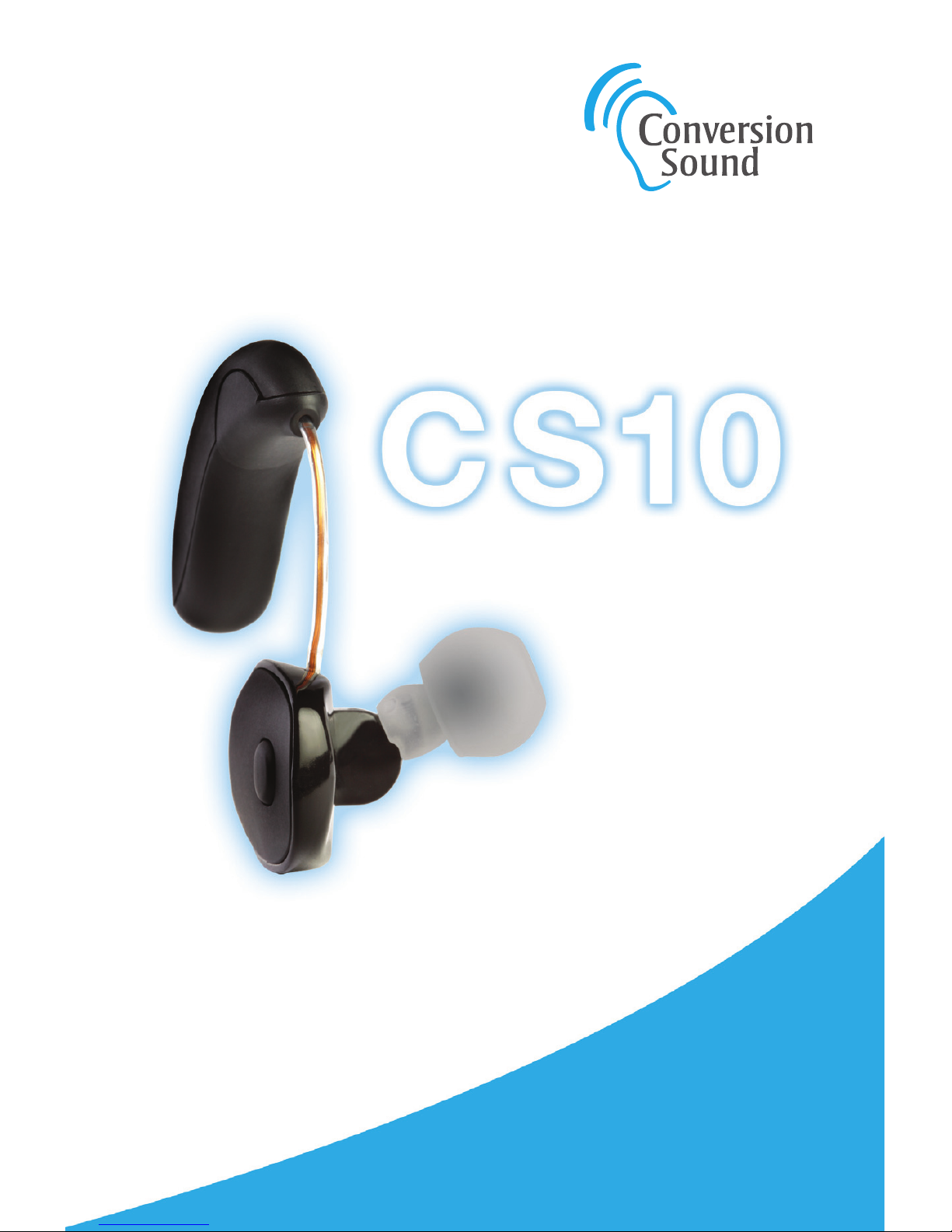
NEVER MISS
ANOTHER WORD.
USER GUIDE
B
LUETOOTH
P
ERSONAL
S
OUND
A
MPLIFIER
Page 2
Thank you for purchasing the CS10.
CONTENTSTHANK YOU
Getting Started . . . . . . . . . . . . . . . . . . . . . . . . . . . . 4
Earpiece . . . . . . . . . . . . . . . . . . . . . . . . . . . . . . . . . . 5
Charging Kit . . . . . . . . . . . . . . . . . . . . . . . . . . . . . . . 6
Charging batteries
. . . . . . . . . . . . . . . . . . . . . . . . 7
Using Your CS10 . . . . . . . . . . . . . . . . . . . . . . . . . . . 8
Personal fit
. . . . . . . . . . . . . . . . . . . . . . . . . . . . . . . 8
Attach a battery to the CS10
. . . . . . . . . . . . . . . . . 9
Placing the CS10 on your ear
. . . . . . . . . . . . . . . 10
Adjusting the volume
. . . . . . . . . . . . . . . . . . . . . . 11
Selecting a profile
. . . . . . . . . . . . . . . . . . . . . . . . 11
Environmental situations
. . . . . . . . . . . . . . . . . . . 12
Getting used to your CS10
. . . . . . . . . . . . . . . . . . 13
Pairing with Bluetooth devices
. . . . . . . . . . . . . . 14
Answering phone calls
. . . . . . . . . . . . . . . . . . . . . 15
Advanced customization
. . . . . . . . . . . . . . . . . . . 15
Care and Cleaning . . . . . . . . . . . . . . . . . . . . . . . . 16
Troubleshooting . . . . . . . . . . . . . . . . . . . . . . . . . . 18
Warranty . . . . . . . . . . . . . . . . . . . . . . . . . . . . . . . . . 19
Important Information . . . . . . . . . . . . . . . . . . . . . 20
3
This Bluetooth Personal Sound Amplifier offers
tremendous flexibility and customization
in terms of fit and sound settings, allowing
you to hear better in circumstances like
business meetings,
family gatherings,
or outdoor events.
Page 3
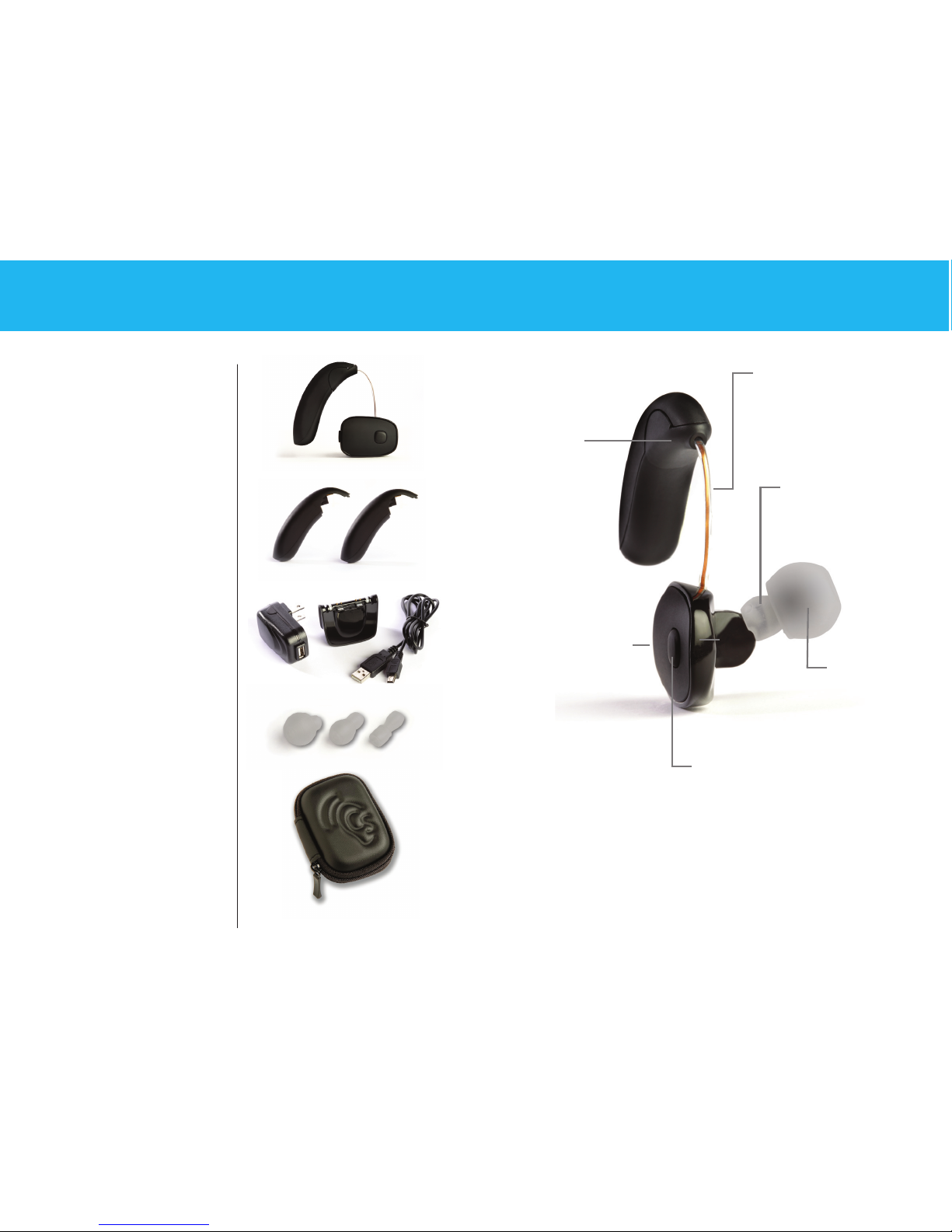
Volume button
located on the
face of the
earpiece allows
user to increase or
decrease level in
3 dB increments.
Program button
located on the
back edge of
earpiece switches
between three
preset amplification
profiles. Once profile
is selected, allows
user to switch
between optimized
environmental settings.
Battery wire
in adjustable tube
provides comfortable fit
regardless of ear size.
Ear tip
fits in your
ear like
standard
ear buds.
The smallest
ear tip comes
attached to
the CS10.
Battery
terminal
has magnetic
connectors for
quick and easy
battery
installation.
Nozzle provides
secure base for
mounting ear tips.
EARPIECEGETTING STARTED
4 5
• CS10 Earpiece
• Two rechargeable
batteries
• Battery
charging kit
• Three ear tips
(small, medium,
large)
• Earpiece
cleaning tool
• Carrying case
Your CS10
Bluetooth
Personal Sound
Amplifier
includes the
following parts:
Page 4
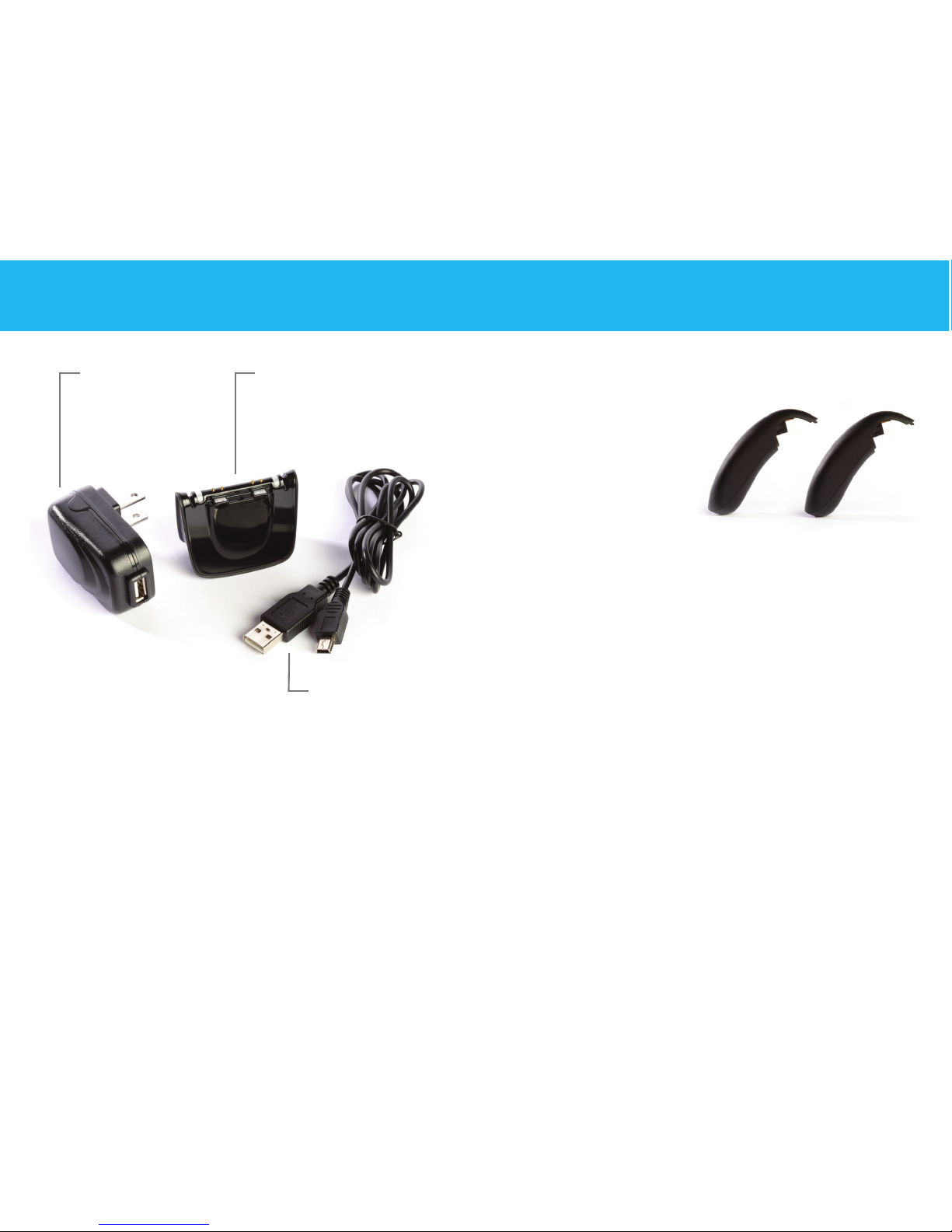
To charge the batteries:
1. Assemble the
charging kit by
plugging the small
end of the cable into
the charger base,
and plugging the
large end into the
charger power supply.
Note: The large end of the charging cord can also be
plugged into a standard USB connector on your computer.
2. Plug the power supply into a standard AC outlet. The
lights on top of the charger will glow blue to confirm
power is reaching the charging stations.
3. Connect the batteries to the two charging points on the
charger by aligning the magnets. Once the battery is in
place, the indicator light will change color. A red light
indicates the battery is being charged. The light will turn
green when the battery is charged and is ready to use.
CHARGING KIT
Charger cable
mini-USB to USB
Charger base has two
battery charging stations
with independent LED
indication lights.
Charger
power supply
(wall plug)
6 7
Charging Batteries
While your batteries may have a small charge when you
unpack them, we recommend fully charging the batteries
before you start using your CS10. It will take up to 2 ½ hours
to fully charge your batteries. Fully charged, each battery
will power the CS10 for up to 13 hours of normal listening.
Page 5

Personal fit
1. The CS10 comes
with three different
sized ear tips: small
(pre-attached to
earpiece nozzle), medium, and large. If the small tip is
not snug in your ear, detach the ear tip from the nozzle
and try the medium or large tip.
2. Align the nub on the ear tip with the mark on the
earpiece. Proper alignment is necessary to provide the
most secure mounting of the ear tip.
3. Slide the ear tip all the way onto the earpiece nozzle.
The end of the sleeve should come into contact with
the base of the nozzle.
4. The battery wire can be adjusted to maximize the
comfort of your CS10. Grasping the body of the
earpiece in one hand, gently pull or push the battery
wire with your other hand to achieve the desired
length. Be careful not to pull too hard as you could
dislodge the tube and break the wire connections.
USING YOUR CS10
Attach a battery to the CS10
1. Align the contacts and magnets of a charged battery
with the battery terminals and magnets on the earpiece.
2. Once the battery snaps into place, the unit is on. It is
normal to have a slight delay of a few seconds as the
unit powers up. To turn the unit off, simply disconnect
the battery.
3. The CS10 provides an audible low battery indication.
When you hear five tones played in sequence
(low, high, low, high, low) it is time to change batteries.
8 9
Page 6
Placing the CS10 on your ear
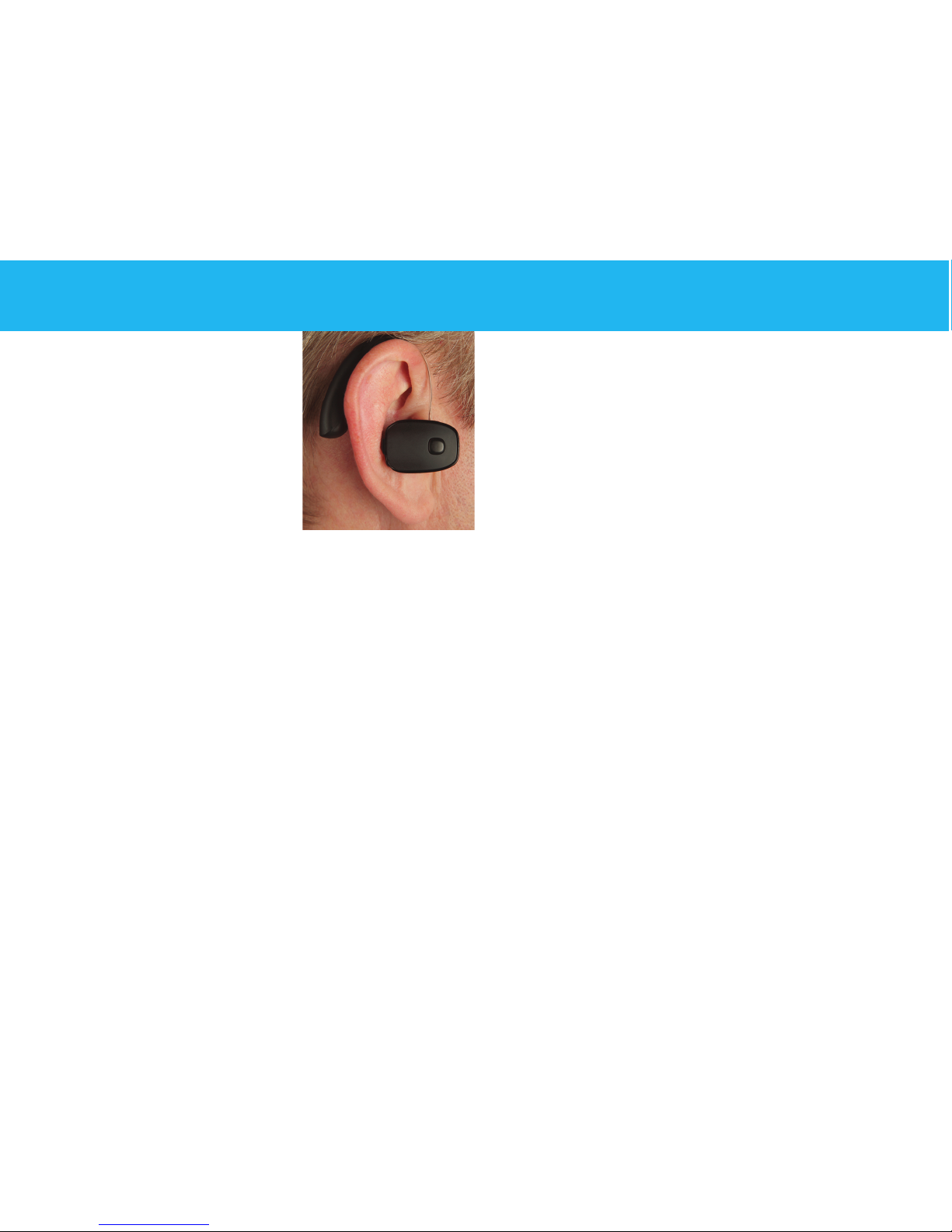
1. Place the battery behind your
ear, hanging the battery wire
over your ear.
2. If you wear eyeglasses, position
the battery between the earpiece
of your glasses and your ear.
Be aware that removing or adjusting your glasses may
create a distracting noise in your CS10.
3. Insert the ear tip straight into your ear gently, wiggling
slightly to ensure a good fit. The ideal fit is snug, but
not tight.
4. Listen to the recorded audio guide to gain familiarity
with the CS10’s controls. This guide will automatically
start to play approximately 15 seconds after the battery
is attached.
Note: To defeat the audio guide press and hold the
volume and program buttons. You can reactivate the
audio guide by resetting the device to its original factory
settings. To reset the device press the buttons in the
following sequence: program, program, volume, volume,
program. Resetting the device will delete any CS10
settings that have been customized.
USING YOUR CS10
Adjusting the volume
Press the volume button to increase the volume. You will
hear three tones in ascending pitch to indicate the new level.
Push and hold the volume button to decrease the volume.
You will hear three tones in descending pitch to indicate the
new level.
Selecting a profile
The CS10 comes programmed with three preset profiles with
modified levels and shaped frequency responses based on
the most typical amplification needs.
Press the program button to toggle between the three
preset profiles.
Preset 1
– (Factory default setting.) Boost in high
frequency range. You will hear “Preset 1” when returning
to this preset.
Preset 2
– More boost in high frequency range compared
to Preset 1 along with mild boost in mid-range frequencies. You will hear “Preset 2” after selecting this preset.
Preset 3
– Equal high and mid-range frequency boost as
Preset 2, but with an increase in low frequency range as
well. You will hear “Preset 3” after selecting this preset.
10 11
Page 7

USING YOUR CS10
Go to a relatively quite environment and listen to a sound
source with each of the three presets for some time.
You should readjust the volume to a comfortable level
each time after selecting a new preset. Audition the three
presets over the course of a few days in common listening
situations like conversations and watching television.
Once you have selected a preset profile, press and hold the
program button for ten seconds to make it you baseline
profile. Once this is done, the program button will now allow
you to toggle between environmental settings designed to
optimize the performance of the CS10 in specific situations.
Environmental situations
Baseline Profile
– You will hear one confirmation
beep when returning to your baseline profile.
Restaurant Mode
– You will hear two quick
confirmation beeps when entering the CS10’s
Restaurant Mode. Restaurant Mode incorporates
a directional microphone to provide more rejection
of unwanted sounds in noisy environments.
Entertainment Mode
– You will hear three quick
confirmation beeps when entering the CS10’s
Entertainment Mode. Entertainment Mode provides
increased low frequency response for more a more
natural sound at music or theatrical events.
To return the program button to its original preset selection
mode, press and hold the program button for ten seconds.
Getting used to your CS10
It may take some time to get used to wearing your CS10.
You will hear many sounds in a clarity you are not used to
hearing. Ambient and environmental sounds like shuffling
papers, or cutlery and dishes may be distracting at first.
Over the course of about two weeks you will become
acclimatized to the new palate of sounds you are
experiencing.
12 13
Page 8

Pairing with Bluetooth devices
Pairing your CS10 to a Bluetooth device like smartphones
and computers is a simple one-time operation. Your CS10
will seek and attempt to pair with Bluetooth devices for 3
minutes each time the battery is attached. After that time,
if no devices have been detected, the unit will stop trying
to pair and the Bluetooth transmission will be turned off.
1. Be certain the Bluetooth function is turned on for any
device you wish to pair with. (See device instructions
for specific details.)
2. Attach a charged battery to the CS10.
3. Watch device you are trying to pair with for CS10
to be detected. CS10 should appear on the screen.
If asked for a pin, enter “0000”.
4. Select the CS10 from list of Bluetooth devices to
ensure pairing.
Note: For best results the CS10 should be within 10
feet of the Bluetooth device.
USING YOUR CS10
Answering phone calls
1. To answer a telephone call, press the CS10 volume
button. On some phones, you may need to select the
CS10 when answering a call.
2. During phone calls, the volume button can be used
to control the volume of the call. Press to increase
volume, push and hold to decrease volume.
3. To hang up, press the CS10 program button or end
the call with the phone’s controls.
4. Do not push the program button during a call.
The call could be terminated.
Note: For best results, place phone on same side of
body as CS10.
Advanced customization
For even more options to personalize the performance
of your CS10 please visit
www.conversionsound.com/apps
.
There you can download smartphone or computer
applications will allow you to further adjust settings
within your CS10 via Bluetooth link.
14 15
Page 9

CARE AND CLEANING
To maintain optimal performance of your CS10, please
adhere to the following precautions:
• DO NOT get water or other liquids on or in the
earpiece.
• DO NOT wear the CS10 while swimming, showering,
out in heavy rain, or in a moist environment.
• DO NOT use solvents or liquids on the CS10.
• DO NOT sleep with the CS10 on.
• DO NOT leave the CS10 or charger in direct sunlight
or excessive heat.
• Remove the CS10 when applying cosmetics, perfume,
aftershave, hairspray, lotion, or any other product that
might get into the earpiece.
• Remove the CS10 during strenuous physical activities,
like working out.
• Keep the CS10 and charger clean and dry.
A cleaning tool is included with your CS10. It is
recommended that you use the wire loop at the end
of this tool to remove any wax buildup from the ear tip
and nozzle at least once per week. Clean the outside
surfaces of the CS10 periodically by wiping with a soft
dry cloth. Never use solvents or liquids to clean any
part of the CS10.
Additional ear tips and replacement batteries can be
purchased online at
www.conversionsound.com
or by calling 1-855-792-0117.
16 17
Page 10

No sound coming from CS10
• Be certain battery is attached properly
• Confirm the battery is charged
• Remove any wax that may be blocking the ear tip
or nozzle
Sound is muffled or garbled
• Check that the ear tip is mounted to nozzle correctly
• Remove any wax that may be blocking the ear tip
or nozzle
• Try a different preset or environmental setting
• If using as Bluetooth headset, be certain you are
within 10 feet of the device
Battery is not charging
• Be certain battery is properly mounted to charging
station
• Be certain the charger kit is completely assembled
• Be certain the charger is connected to a power
source
CS10 is not pairing with my phone
• Be certain Bluetooth is turned on in the phone
• Pair the device within the 3 minutes of powering
up the CS10
• Ensure that CS10 is selected as active device on
the phone
• Use CS10 within 10 feet of phone
TROUBLESHOOTING
18 19
W ARRANTY
Conversion Sound warrants this product to be free
from defects for a period of one year from the date of
purchase. At its option Conversion Sound will repair or
replace the defective product and promptly return it to
you, or refund the purchase price. You should retain proof
of purchase to validate the purchase date and return it
with any warranty claim.
If you feel this product is defective within the warranty
period, call 1-855-792-0117 in the United States. Outside
the United States, please contact your authorized
Conversion Sound distributor.
Page 11

IMPORTANT INFORMATION
Caution: To reduce the risk of electric shock, do not remove cover.
No user serviceable parts inside. Refer servicing to qualified personnel.
Warning: To reduce the risk of fire or electric shock, do not expose
this product to rain or moisture. The apparatus shall not be exposed to
dripping or splashing. No objects filled with liquids, such as vases
shall be placed on the apparatus.
Important Safety Instructions
1. Read these instructions.
2. Keep these instructions.
3. Heed all warnings.
4. Follow all instructions.
5. Do not sue this apparatus near water.
6. Clean only with dry cloth.
7. Do not block any ventilation openings. Install in accordance
with manufacturer’s instructions.
8. Do not install near any heat sources such as radiators, heat
registers, stoves, or other apparatus (including amplifiers) that
produce heat.
9. Protect the power cord from being walked on or pinched
particularly at plugs, convenience receptacles, and the point
where they exit from the apparatus.
10. Unplug this apparatus during lightning storms or when unused
for long periods of time.
11. Refer all servicing to qualified service personnel. Servicing is
required when the apparatus has been damaged in any way,
such as power-supply cord or plug is damaged, liquid has been
spilled or objects have fallen into the apparatus, the apparatus
has been exposed to rain or moisture, does not operate
normally, or has been dropped.
20 21
FCC Information
This device complies with Part 15 of the FCC Rules. Operation is
subject to the following two conditions: (1) This device may not cause
harmful interference and (2) this device must accept any interference
received, including interference that may cause undesired operation.
This equipment has been tested and found to comply with the limits
for a Class B digital device, pursuant to Part 15 of the FCC Rules. These
limits are designed to provide reasonable protection against harmful
interference in a residential installation. This equipment generates,
uses, and can radiate radio frequency energy and, if not installed
and used in accordance with the instructions, may cause harmful
interference to radio communications. However, there is no guarantee
that interference will not occur in a particular installation. If this
equipment does cause harmful interference to radio or television
reception, which can be determined by turning the equipment off and
on, the user is encouraged to try to correct the interference by one or
more of the following measures:
• Reorient or relocate the receiving antenna.
• Increase the separation between the equipment and the receiver.
• Connect the equipment into an outlet on a circuit different than
that to which the receiver is connected.
• Consult the dealer or an experienced radio/TV technician for help.
Users are not permitted to modify or make changes to the device in any
way. Changes or modifications not expressly approved by Conversion
Sound, Inc. could void the user’s authority to operate the equipment.
Page 12

IMPORTANT INFORMATION
Industry Canada Regulatory Information
Operation of this device is subject to the following two conditions:
(1) This device may not cause interference and (2) This device must
accept any interference, including interference that may cause
undesired operation of the device. See RSS-GEN 7.1.5.
FDA Note on Personal Sound Amplifiers (PSAPs)
PSAPs are intended to amplify environmental sound for non-hearing
impaired consumers. They are not intended to compensate for hearing
impairment. Examples of situations in which PSAPs typically are used
include hunting (listening for prey), bird watching, listening to lectures
with a distant speaker, and listening to soft sounds that would be
difficult to hear (e.g., distant conversations, performances). Because
PSAPs are not intended to diagnose, treat, cure or mitigate disease
and do not alter the structure or function of the body, they are not
devices as defined in the Food, Drug and Cosmetic Act. As such,
there is no regulatory classification, product code, or definition for
these products. Furthermore, there are not requirements for
registration of manufacturers and listing of these products with FDA.
However, PSAPs are subject to applicable provisions of the Radiation
Control for Health and Safety Act of 1968, under which FDA regulates
electronic products that emit sonic vibrations, such as sound amplification equipment. (See also 21 CFR 1000.15.) Manufacturers of PSAPs
must report defects and adverse events and take other measures described in 21 CFR Part 1003. Manufacturers of PSAPs must also comply
with requirements to repurchase, repair, or replace electronic products
required under 21 CFR Part 1004.
Bluetooth
The Bluetooth®word mark and logos are owned by the Bluetooth
SIG, Inc. and any use of such marks by Conversion Sound is under
license. Other trademarks and trade names are those of their
respective owners.
General Warnings
If you have or think you may have any one of the following symptoms,
do not use this product until you have consulted a physician:
• History of excessive wax build-up
• Pain or discomfort in the ear
• Fluid or drainage from the ear within the past 90 days
• Ear canal blockage, a lasting ear infection, or a plugged up
fullness feeling
• Visible deformity of the ear
• Sudden, rapid progressing, or fluctuating hearing loss within
the past 90 days
• Chronic difficulty hearing
• Ringing in only one ear
• Hearing loss only in one ear that worsened in the past 90 days
• Spells of acute or chronic dizziness
Keep all parts of the CS10 earpiece and charger kit away from children
under the age of 3. These components contain small parts that may
present a choking hazard.
22 23
Page 13
FCC Information to User
This equipment has been tested and found to comply with the limits for a Class B digital
device, pursuant to Part 15 of the FCC Rules. These limits are designed to provide
reasonable protection against harmful interference in a residential installation. This
equipment generates, uses and can radiate radio frequency energy and, if not installed
and used in accordance with the instructions, may cause harmful interference to radio
communications. However, there is no guarantee that interference will not occur in a
particular installation. If this equipment does cause harmful interference to radio or
television reception, which can be determined by turning the equipment off and on, the
user is encouraged to try to correct the interference by one of the following measures:
• Reorient or relocate the receiving antenna.
• Increase the separation between the equipment and receiver.
• Connect the equipment into an outlet on a circuit different from that to which the
receiver is con-nected.
• Consult the dealer or an experienced radio/TV technician for help.
Caution
Modifications not expressly approved by the party responsible for compliance could void
the user’s authority to operate the equipment.
FCC Compliance Information : This device complies with Part 15 of the FCC Rules.
Operation is subject to the following two conditions: (1) This device may not cause
harmful interference, and (2) this device must accept any interference received, including
interference that may cause undesired operation
IMPORTANT NOTE:
IMPORTANT Safety Instruction:
1) Read these instructions.
2) Keep these instructions.
3) Heed all warnings.
4) Follow all instructions.
5) Do not use this equipment near water.
6) Do not using near any heat sources such as radiators, heat resisters, stove, or other
equipment that produce heat.
Page 14

Information to user.
The users manual or instruction manual for an intentional or unintentional radiator shall
caution the user that changes or modifications not expressly approved by the party
responsible for compliance could void the user's authority to operate the equipment. In
cases where the manual is provided only in a form other than paper, such as on a
computer disk or over the Internet, the information required by this section may be
included in the manual in that alternative form, provided the user can reasonably be
expected to have the capability to access information in that form.
Samsin innotec Co., Ltd.
252-23, Sarihyun-Dong, Ilsandong-gu, Goyang-City, Kyonggi-Do, Korea
TEL : +82-31-900-9862 / FAX : +82-31-900-9813 / E-mail : [email protected]
Page 15

CONTACT INFORMATION
Manufacturer Address : 252-23, Sarihyun-Dong, Ilsandong-gu, Goyang-City, Kyonggi-Do, Korea
To locate in-country Samsin innotec Co., Ltd., distributors of the Personal Sound Amplifier,
please refer to the Samsin innotec Co., Ltd.Website http://www. www.ssinno.com
These distributor(s) represent local contacts for this product.
CORPORATE HEADQUARTERS:
Samsin innotec Co., Ltd.
252-23, Sarihyun-Dong, Ilsandong-gu, Goyang-City, Kyonggi-Do, Korea
Tel: +82-31-900-9862
Fax: +82-31-900-9813
Web: http:// www.ssinno.com
This device complies with Industry Canada license-exempt RSS standard(s).
Operation is Subject to the following two condition: (1) this device may not cause interference
,and (2) this device must accept any interference, including interference that may cause undesired
operation of the device.
Page 16

EUROPEAN UNION “DECLARATION OF CONFORMITY”
DECLARATION OF CONFORMITY
Samsin innotec Co., Ltd.
252-23, Sarihyun-Dong, Ilsandong-gu, Goyang-City, Kyonggi-Do, Korea
declare under our sole responsibility that the product(s)
Personal Sound Amplifier – CS10
to which this declaration relate(s) is in conformance with the following standards:
EN 301 489-1 V1.9.2:2011
EN 301 489-17 V2.1.1 :2009
EN60950-1:2006
EN 300 328 V1.8.0:2011
following the provisions of the 1999/5/EC Directives.
Page 17

Conversion Sound
960 N Northwest Highway
Park Ridge, IL 60068-2358
855-792-0117
ConversionSound.com
 Loading...