

Page 1
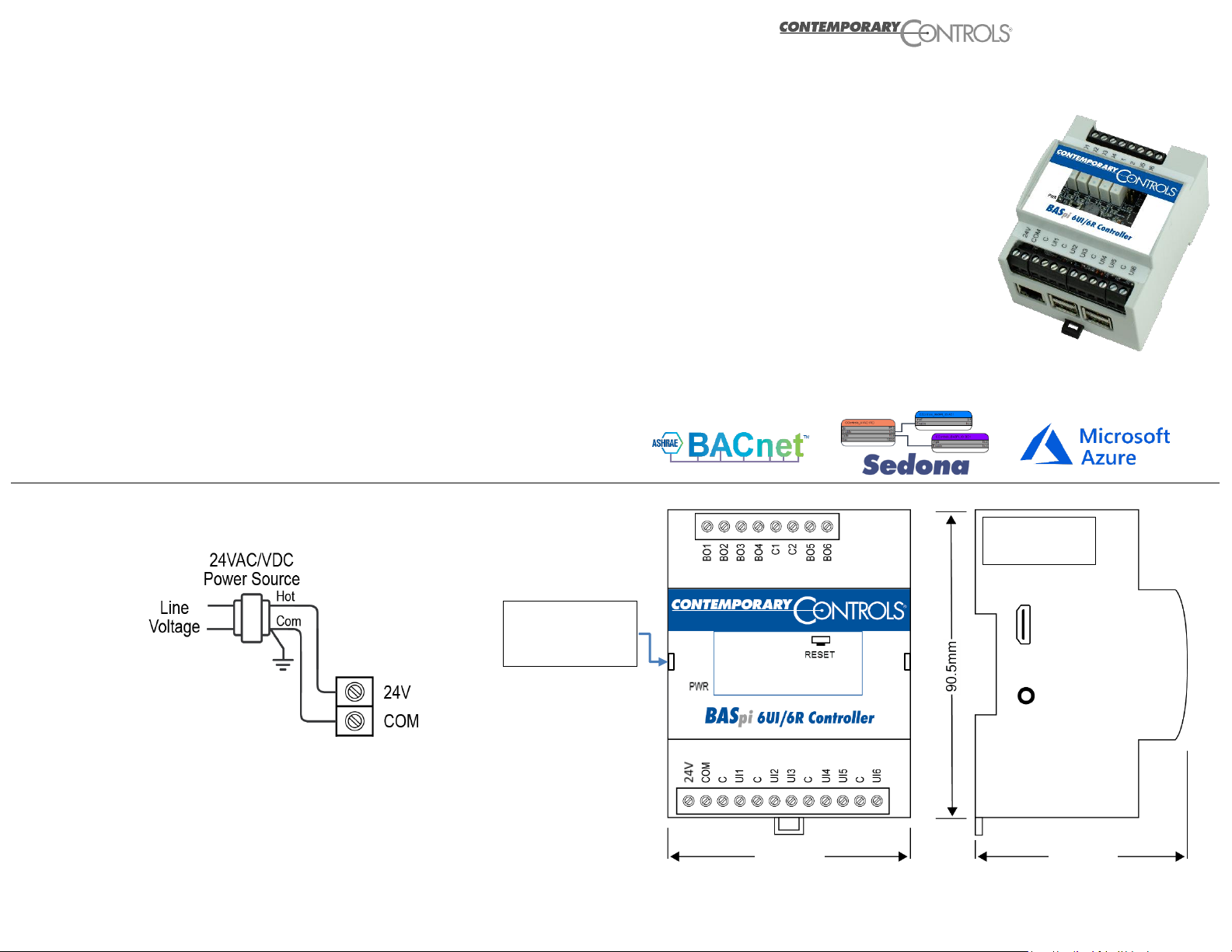
NOTE: Serial label covers the micro USB port which cannot be used to power the
BASpi-Edge. Do not remove the serial label or BASpi-Edge warranty will be voided.
The BASpi-Edge series are hardened controllers with enhanced features and data
processing at the Edge functionality, powered by Raspberry Pi. Housed in a compact
DIN rail mounted enclosure with 24 VAC/VDC power input and a resilient pSLC 8 GB
micro SD card gives them performance and convenience advantages, making them
suitable for a wide array of applications. BACnet client/server communication over
Ethernet or Wi-Fi and Sedona function block programmable control logic and data
processing at the Edge come standard. BASpi-Edge is fully web page configurable
with quick and easy cloud connectivity to Azure IoT Central (SaaS) cloud solution.
Additional features such as email alarms/notifications, schedules with holidays/
exceptions, weather web service, as well as graphical dashboards served over
Ethernet, Wi-Fi, or directly out of the resident HDMI port make the BASpi-Edge ideal
for standalone or BACnet supervised automation applications. By leveraging open IoT
protocols such as MQTT, proven security mechanisms such as Transport Layer
Security (TLS), and robust and easy to use software as a service cloud solutions
(SaaS) such as Azure IoT Central, BASpi-Edge controllers can easily and securely
connect to the cloud, effectively making any attached equipment a cloud connected
asset. Cloud connectivity is optional, but it provides excellent global asset
management and supervision capabilities in multi-site building applications, or multibranch store or retail chains.
Electrical
INPUT DC AC
Voltage: 24 V 24 V
Power: 7 W 12.5 VA
Frequency: N/A 47-63 Hz
Environmental
Operating temperature: 0°C to 55°C
Storage temperature: –40°C to +85°C
Relative humidity: 10–95%, non-condensing
Functional Ethernet/Wi-Fi
Protocols supported BACnet/IP, SOX, HTTP, MQTT, TLS, REST, SSH, SFTP
Data Rate 10/100Mbps (Raspberry Pi 3)
BASpi-Edge is 24 VAC/VDC powered through its 2-pin screw terminal while drawing
no more than 7 W or 12.5 VA of power. The recommended conductor size is 16–18
AWG or up to 2x 1.5 mm wires.
WARNING: Internally, this device utilizes a half-wave rectifier and therefore can only
share the same AC power source with other half-wave rectified devices. Sharing AC
power with full-wave rectified devices is NOT recommended. Devices powered from a
common AC source could be damaged if a mix of half-wave and full-wave rectified
devices exists. BASpi-Edge cannot be powered by a 5 VDC power source through the
Raspberry Pi micro USB input. Only use 24 VAC/VDC through the 2-pin screw
terminal. The USB ports cannot be used to power auxiliary devices, refer to BASpiEdge User Manual for USB port applications.
BASpi-Edge 6/6
12-Point Cloud Connected BACnet Controller Installation Guide
Installation
Serial Label
DO NOT REMOVE
HDMI PORT
used for graphical
dashboard display
Top cover removal slit
Use small flathead
screwdriver to remove and
access RESET switch
72mm
62mm
Page 2
Mounting Wiring Diagram
Web Configuration
BASpi-Edge is web page configurable and accessible from any PC with recent versions of most standard web browsers installed. To configure it initially, connect it to your
Windows PC using an Ethernet cable and set the PC’s IP address and subnet mask to the same subnet as the BASpi-Edge. Factory programmed:
IP Address: 192.168.92.68 Web server (HTTP) port: 80 (does not need to be typed in the browser address field)
Netmask: 255.255.255.0 Username: admin
Gateway: 192.168.92.1 Password: admin
ATTENTION: The default login password must be changed before the BASpi-Edge can be used or its system configuration altered. The password
must be at least 8 characters long and it must contain at least one letter and one number. This ensures authorized access to the BASpi-Edge only.
Reset IP address and login credentials: In the case that you cannot login to your BASpi-Edge, remove the clear top cover with label from the small side slit by using a
small screwdriver in order to access the RESET momentary switch (pictured in diagram above). Press and hold the switch for 10 seconds. Do not remove power. The unit will
enter Recovery Mode and will be accessible at its default IP address and login credentials in 30 sec. Your previous configuration will be shown in the System Configuration
page and could be changed or reused. Click Submit to apply settings. Click Restart Controller button to get back to normal operation.
Contemporary Control Systems, Inc. reserves the right to make changes in the specifications of the product described within this manual at any time without notice and without obligation of Contemporary Control Systems, Inc.
to notify any person of such revision or change.
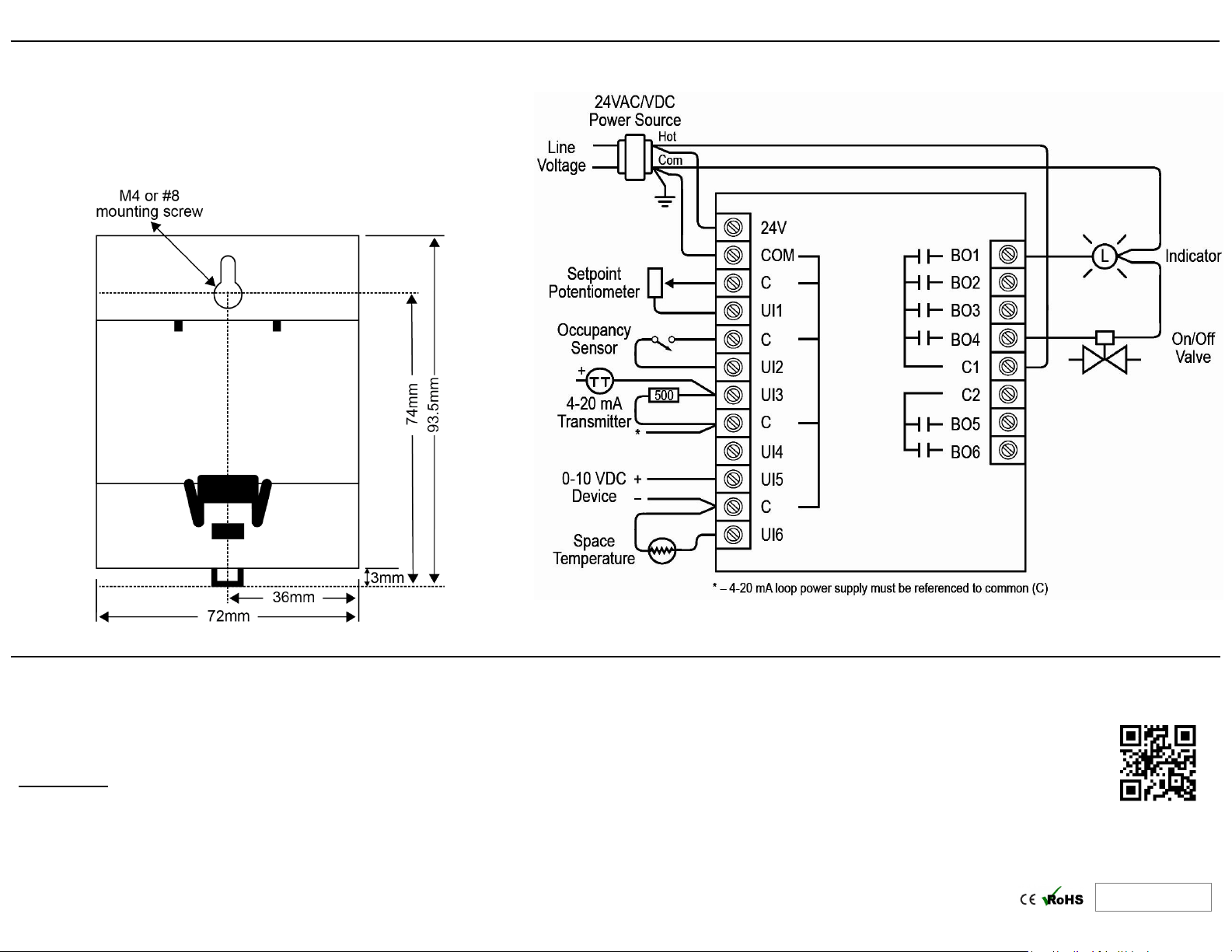
BASpi-Edge is DIN rail or panel mounted. Only mount vertically with
respect to Earth. Do not mount horizontally. To DIN rail mount, simply
align and press against the DIN rail. To dismount, use a small screwdriver
to pry the DIN rail mount release tab down and pull the unit off the panel.
To panel mount, align the mounting hole on the back of the unit to the
screw on the panel (M4 or #8 screw) and slide down.
TD181400-0IA
 Loading...