

Page 1
www.cns-enocean.com
cns-enocean Batteryless CO2 Sensor User Guide
Control Network Solutions, (CNS) creates market disruptive SMART web based
solutions for building and lighting controls.
“Energy harvesting wireless solutions based upon open
interoperable device international standards properly applied to
smart building controls, offer highly energy efficient, low operating
cost and sustainable solutions”
Introduction
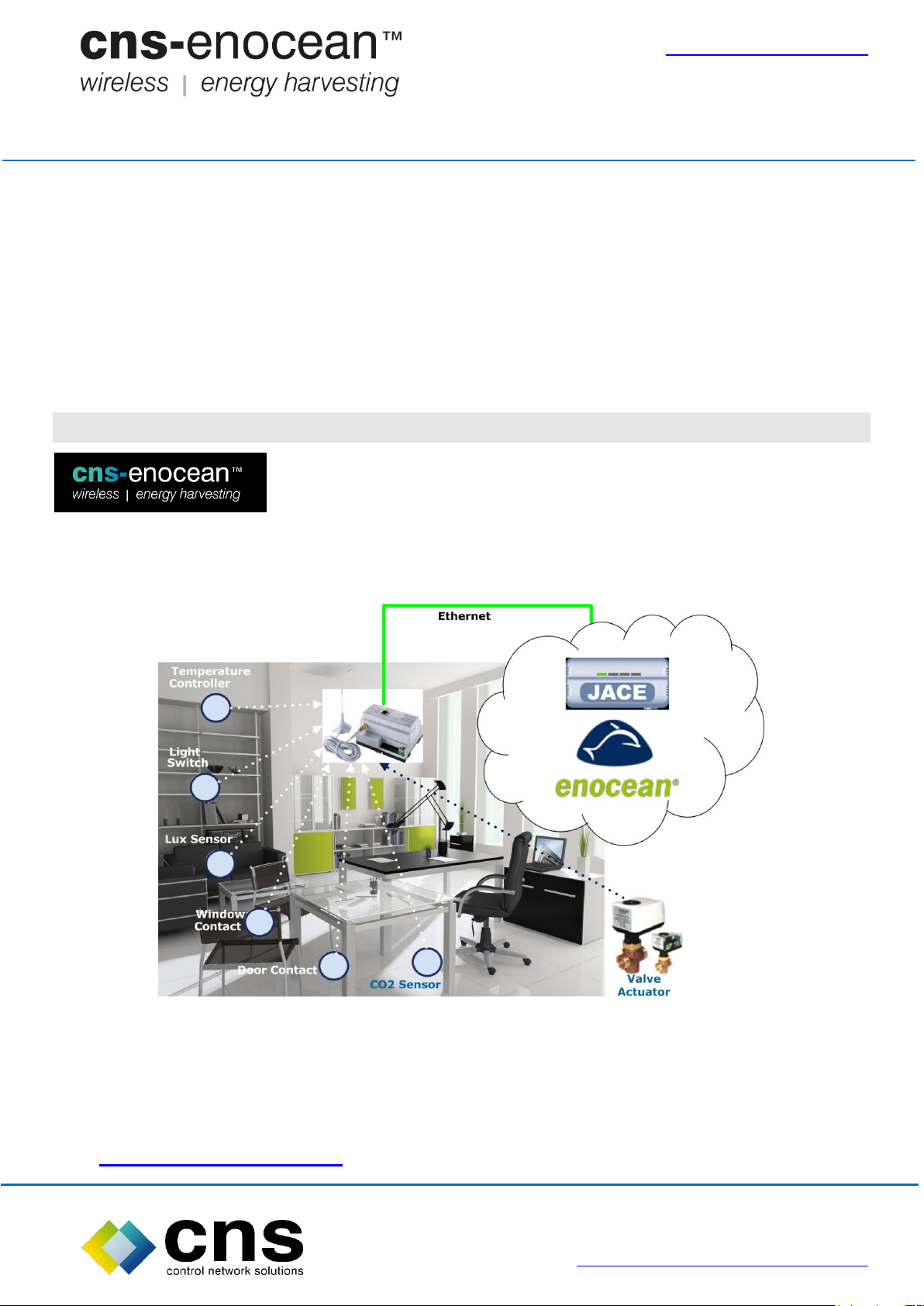
cns-enocean™ for Niagara, is a web based solution, globally
available today, that enables the simple commissioning and
operation of networks of EnOcean® wireless energy harvesting
devices through Ethernet connected wireless interfaces, via any suitable Niagara or Web
Supervisor™ platform.
This enables Niagara Community and System Integrator Partners to leverage their
existing Niagara tools, skills and knowledge to offer advanced wireless energy
harvesting switching and sensing solutions to their customers: For further information
visit www.cns-enocean.com.
Page 1 of 8 Rev 1.1
Website: www.control-network-solutions.co.uk
Page 2
www.cns-enocean.com
cns-enocean Batteryless CO2 Sensor User Guide
EnOcean Batteryless CO2 Sensor
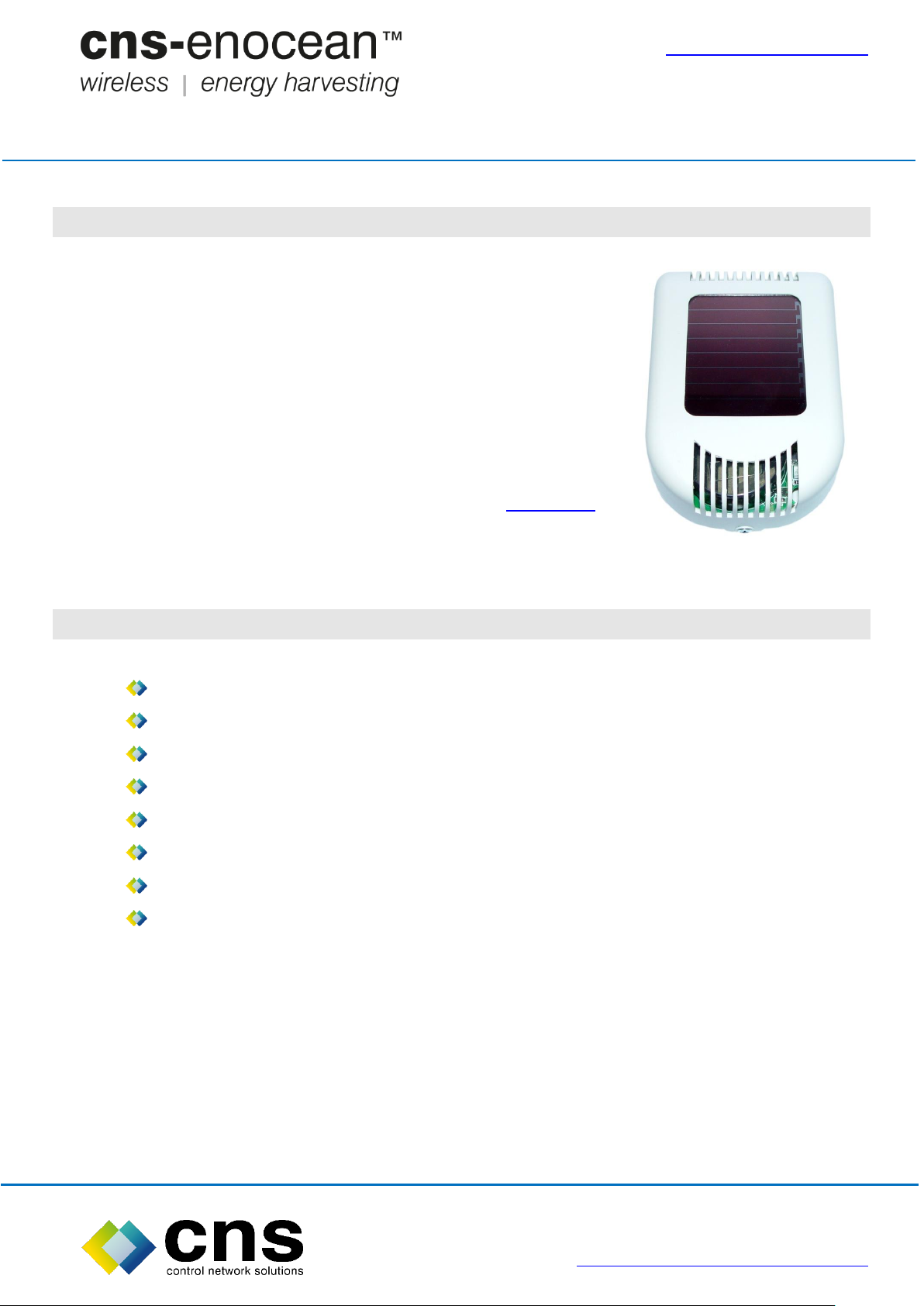
This world first CO2 sensor is the totally maintenance free,
requires no batteries and is powered by harvesting energy
from ambient indoor light making it straightforward and low
cost to install. The sensor supports the open EnOcean
standard (ISO/IEC 14543-3-10) facilitating seamless
connection with Niagara building management systems using
the Niagara Enocean Ethernet driver from CNS, click here for
details.
EnOcean Batteryless CO2 Sensor Features
Low cost, totally wire free installation, energy harvesting solar powered
Can operate for up to 14 hours in total darkness
Learn button for integration with EnOcean networks
Fully EnOcean compliant, (EnOcean® Equipment Profiles): A5-09-04
Uses proven CO2 sensing technology
Peel and stick sensor deployment
Temperature Range option from 0⁰C to 40⁰C
Maintenance free operation for up to 10 years
This CO2 sensor is totally wire free and operates in total darkness for up to 14 hours.
The CO2 sensor sample rate is automatically varied between 9 and 2 sample per
hour) according to the available light level or fixed at 6, 4 or 2 times per hour.
It automatically self-calibrates and requires no maintenance.
Page 2 of 8 Rev 1.1
Website: www.control-network-solutions.co.uk
Page 3
www.cns-enocean.com
cns-enocean Batteryless CO2 Sensor User Guide
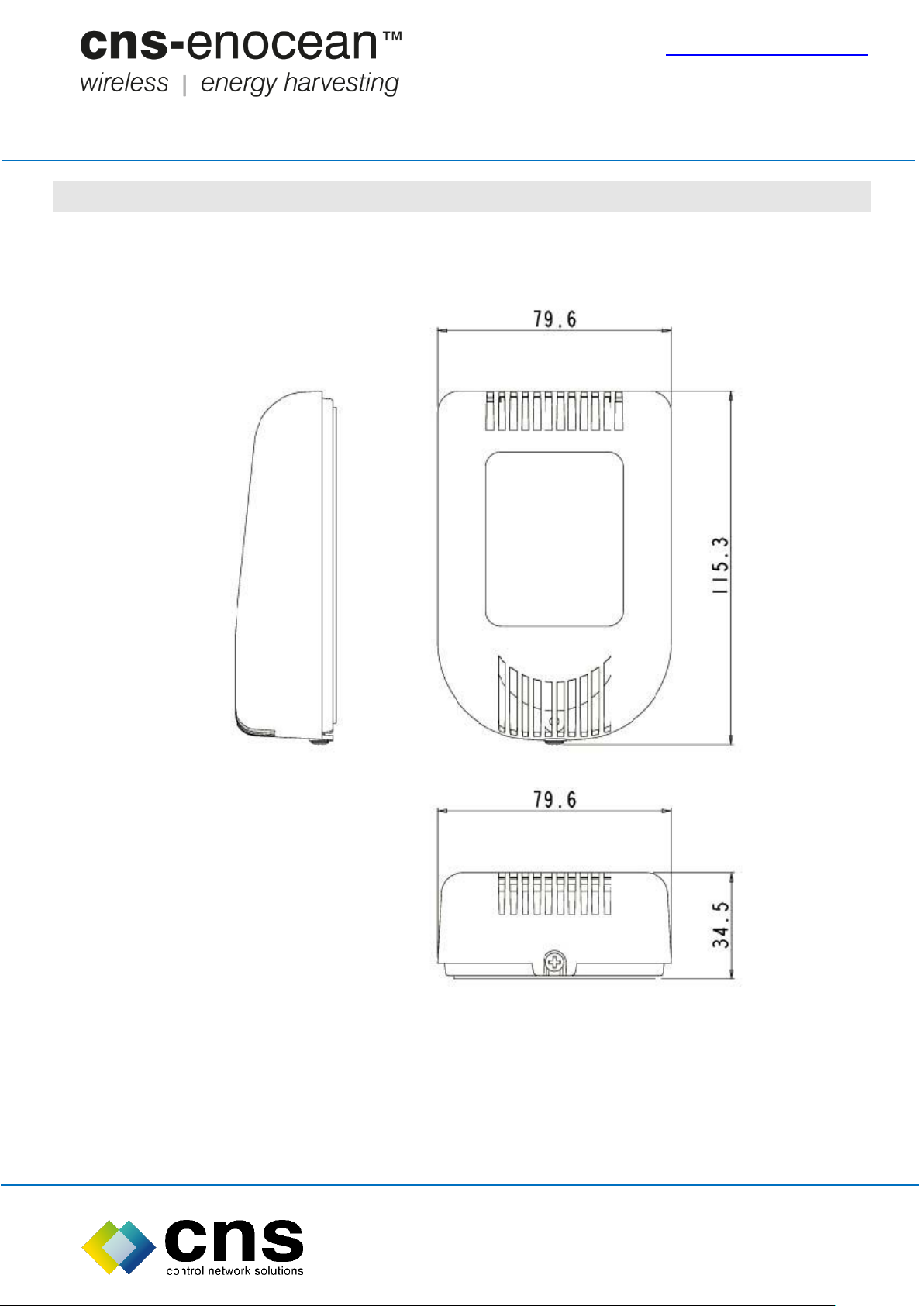
EnOcean Batteryless CO2 Sensor Dimensions, mm
Page 3 of 8 Rev 1.1
Website: www.control-network-solutions.co.uk
Page 4
www.cns-enocean.com
cns-enocean Batteryless CO2 Sensor User Guide
Product Installation
It is recommended the CO2 sensor is installed in an environment where:
1. The local CO2 level is representative of the complete area being measured i.e. do
not place the unit close to a frequently opened window or A/C unit.
2. A source of either natural or artificial light is available during the hours when the
building is occupied (due to the unit being solar powered).
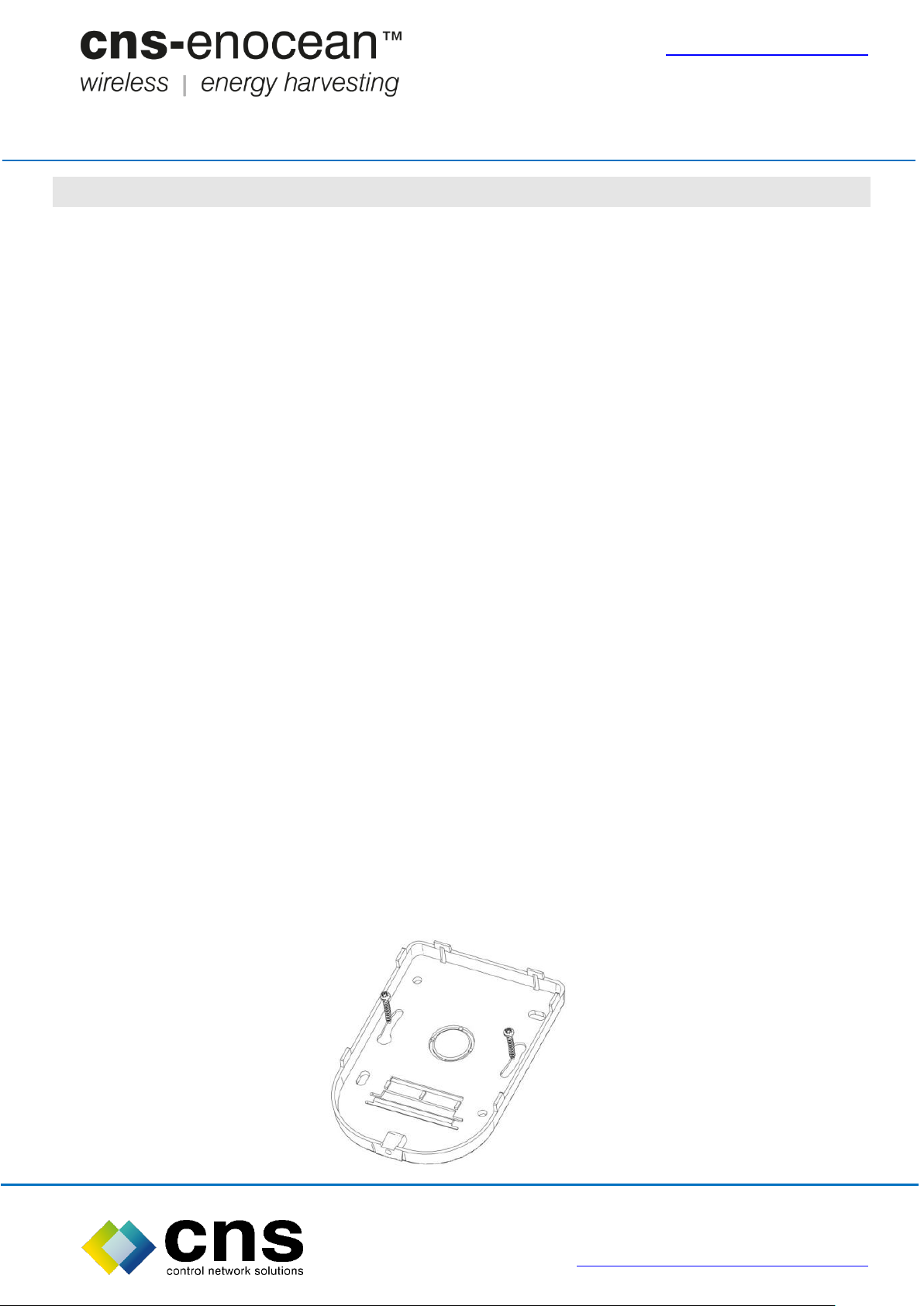
Installation of back-plate:
The CO2 sensor is designed to be wall mounted. For ease of installation it is supplied
with a back-plate that can be mounted on the wall prior to installation of the CO2 sensor
itself.
The back-plate can be wall mounted either using the screws and rawl-plugs provided,
or alternatively it can be mounted over an existing ‘pattress’ box using the appropriate
machine screws. (Not provided).
Installation of unit on back-plate:
BEFORE FINALLY FIXING THE SENSOR ON THE BACKPLATE, ENSURE THE UNIT
HAS BEEN SET UP AND COMMISSIONED AS PER THE PRODUCT OPERATION
SECTION.
The CO2 Sensor will latch onto the previously mounted back-plate via the latches on
the top of the unit.
Once latched, the securing screw at the bottom of the back-plate can be tightened.
Page 4 of 8 Rev 1.1
Website: www.control-network-solutions.co.uk
Page 5

www.cns-enocean.com
Light Status
Energy Supply
Sampling Rate
DIP Switch
1
Ambient light
good
(Powered from solar
cell)
3 mins
On
Ambient light
poor
(Powered from battery)
3 mins
On
Ambient light
good
(Powered from solar
cell)
3 mins
Off
Ambient light
poor
(Powered from battery)
Dynamic (9
minutes)
Off
cns-enocean Batteryless CO2 Sensor User Guide
Product Operation
The CO2 Sensor needs to be commissioned before use. There are 4 stages to the
commissioning process.
1. Selection of Sampling Rate
As the unit is designed to harvest energy from ambient light, it may be favourable
(where applicable) to reduce the unit’s sampling frequency in prolonged low level light
conditions. This can be set by configuring DIP switch 1 as below.
Page 5 of 8 Rev 1.1
Website: www.control-network-solutions.co.uk
Page 6
www.cns-enocean.com
Operating Mode (Calibration)
DIP Switch 2
Dip Switch 3
Learn Button
Sensor auto calibrates every 8
days
ON
OFF
N/A
Sensor uses factory calibration
level (450ppm)
OFF
OFF
N/A
Sensor uses recalibrated
background level on completion
OFF
ON
Pressed
cns-enocean Batteryless CO2 Sensor User Guide
2. Calibration
The CO2 sensor has been factory calibrated prior to supply. Like all CO2 sensors, it does
need to update its calibration status periodically. In normal environments, background
CO2 levels are typically 450ppm.
Auto Calibration ON/OFF
Auto calibration ON calibrates the reported background level of CO2 against the lowest
measured values of CO2 taken over an 8 day period. Auto calibration is the preferred
operating mode of the CO2 sensor, however to maintain accuracy, there must be periods
of low room occupancy (only background CO2 present) during the 8 day period.
Manual Calibration
When auto calibration is not used, it may be beneficial to recalibrate the unit’s
background CO2 level of 450ppm.
To recalibrate the default level of 450ppm, set DIP Switch 3 to ON and depress the learn
key for 5 seconds. The unit’s LED will flash once per second for 300 seconds. During
this time, take the unit into an unoccupied environment. After the 300 seconds, the
unit will take 120 CO2 measurements in a 60 second period (the LED will flash quickly
during this period). Once the LED has stopped flashing, the unit is recalibrated. Return
DIP switch 3 to the OFF position. Moving DIP switch 3 back to OFF during the procedure
will abort the calibration.
Page 6 of 8 Rev 1.1
Website: www.control-network-solutions.co.uk
Page 7
www.cns-enocean.com
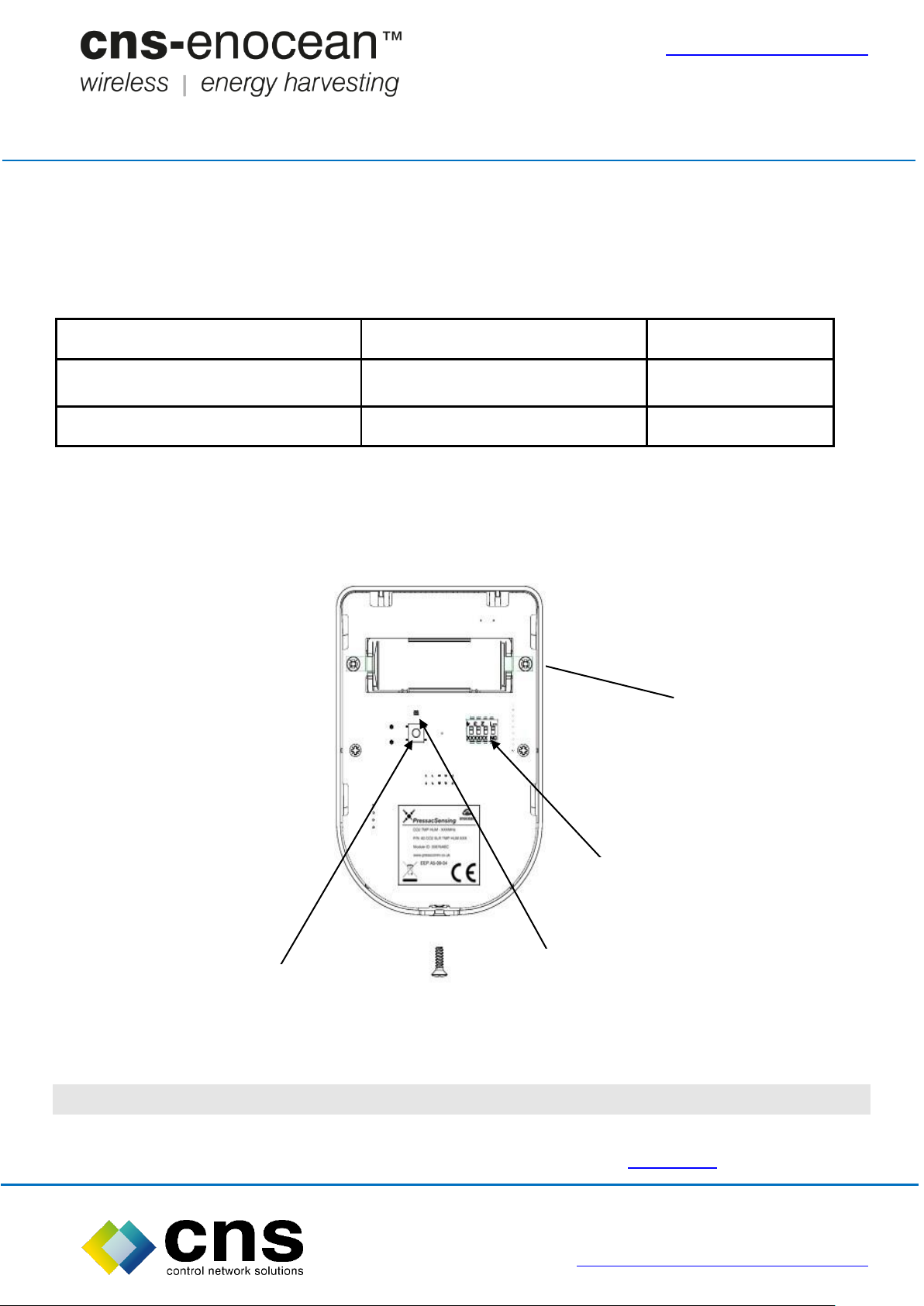
Battery
Unit Status
Dip Switch 4
Not connected
Solar powered only
OFF
Connected
Solar + battery powered
ON
Battery
LED
Learn Button
DIP Switch
cns-enocean Batteryless CO2 Sensor User Guide
3. Connection of battery
The unit is pre-installed with a non-rechargeable 3.6v Lithium “A” type battery. To
enable commissioning and provide battery back-up operation in continuously low level
light conditions, the battery must be connected by switching DIP Switch 4 on.
4. Commissioning
Please refer to cns-enocean Connectivity Kit User Manual.
EnOcean Wireless Information
EnOcean Wireless Systems Range Planning application note, click here.
Page 7 of 8 Rev 1.1
Website: www.control-network-solutions.co.uk
Page 8

www.cns-enocean.com
cns-enocean Batteryless CO2 Sensor User Guide
CNS can also supply additional cns-enocean compatible EnOcean wireless energy
harvesting products click here for more details.
Contact Details
Control Network Solutions Ltd
Studio 7, Intec 2, Intec Business Park, Wade Road
BASINGSTOKE, Hampshire, RG24 8NE, England
Tel: +44 (0) 1256 818700
Fax: +44 (0) 1256 812520
Email: [email protected]
Web: www.control-network-solutions.co.uk
Web: www.cns-enocean.com
Twitter: twitter.com/cns_enocean
LinkedIN: cns-enocean™ for Niagara AX™
cns-enocean, CNS-Enocean and Enocean4AX, are the trademarks of Control Network Solutions EnOcean wireless control family
of products and solutions for Tridium’s Niagara Framework platforms. Tridium, Niagara4, Niagara AX, JACE, Vykon and Niagara
AX Framework are the registered trademarks of Tridium Inc. EnOcean is the registered trademark of EnOcean GmbH.
No part of this publication may be reproduced or transmitted in any form or by any means, electronic, mechanical, photocopying,
recording, in part or in whole, without written prior permission of Control Network Solutions Ltd. We reserve the right to make
changes without notice to any products herein as part of its continued product development and improvements. We do not assume
any liability arising out of the application or use of any product or circuit described herein.
Page 8 of 8 Rev 1.1
Website: www.control-network-solutions.co.uk
 Loading...