

Page 1
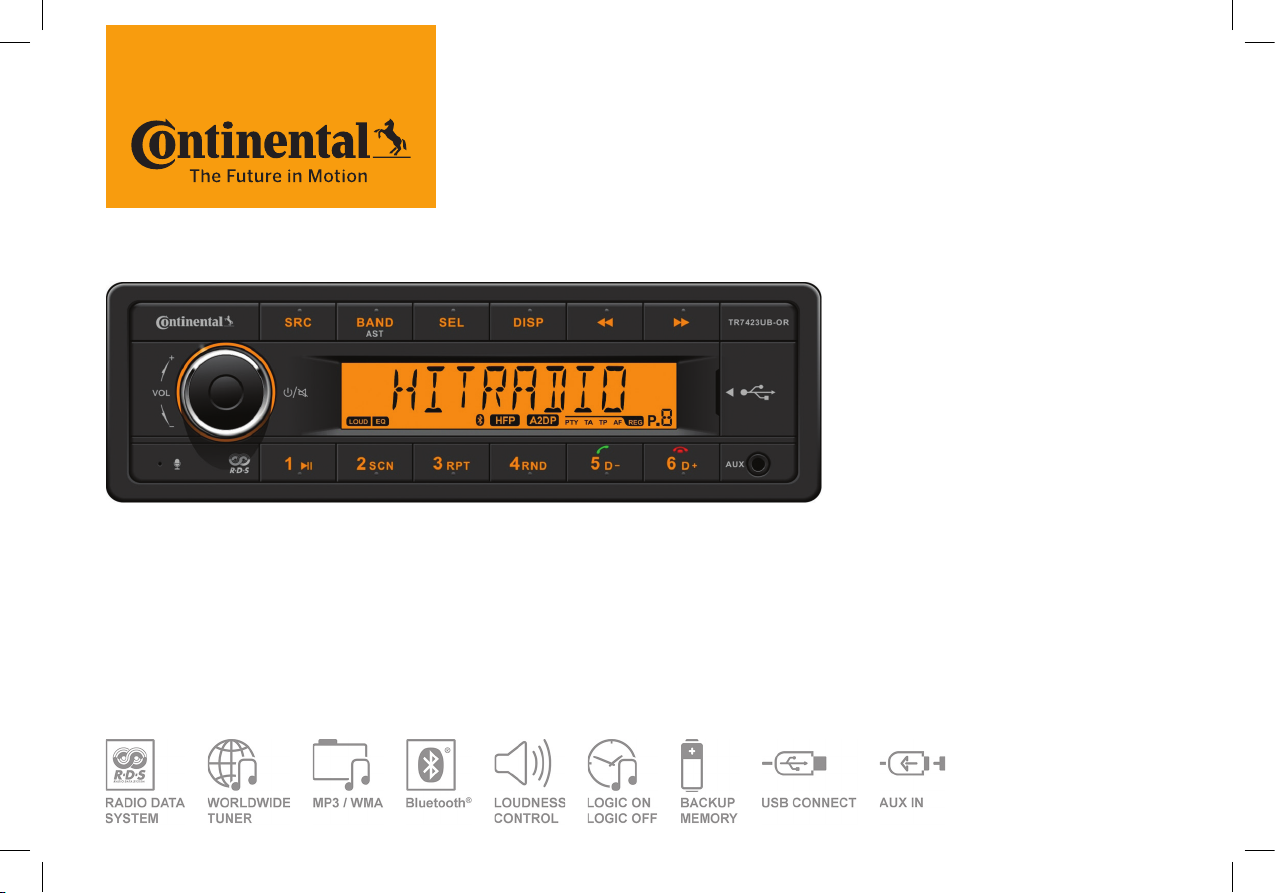
TR7423UB-OR
RADIO / USB MP3 / WMA / Bluetooth® 24V
OWNER’S MANUAL
TR7423UB-OR_EN.indd 1 28/05/15 15:50
Page 2
Safety Information
Thank you for purchasing this product,
please read the manual carefully before
operating, and reserve it for future reference.
PRECAUTIONS
• Only in a 24-volt DC negative-ground
electrical system.
• Disconnect the vehicle's negative battery
terminal while mounting and connecting
the unit.
• When replacing the fuse, be sure to use
one with an identical amperage rating.
Using a fuse with a higher amperage
rating may cause serious damage to the
unit.
• Make sure that pins or other foreign
objects do not get inside the unit, they
may cause malfunctions, or create safety
hazards such as electrical shock.
• If you have parked the car for a long
time in hot or cold weather, wait until the
temperature in the car becomes normal
before operating the unit.
• Keep the volume at a level at which you
can hear outside warning sounds (horns
sirens, etc.).
CAUTION
• DO NOT open covers and do not
repair by yourself. Ask the dealer or an
experienced technician for help.
Specications Contents
General
Power supply: 24 V DC (18V-32V)
Maximum power output: 4 x 15 W
Suitable speaker impedance: 4 ohm
Fuse spec: 10 A
Weight: 0.9 kg
Dimensions (WxDxH): 188x131x58.5 mm
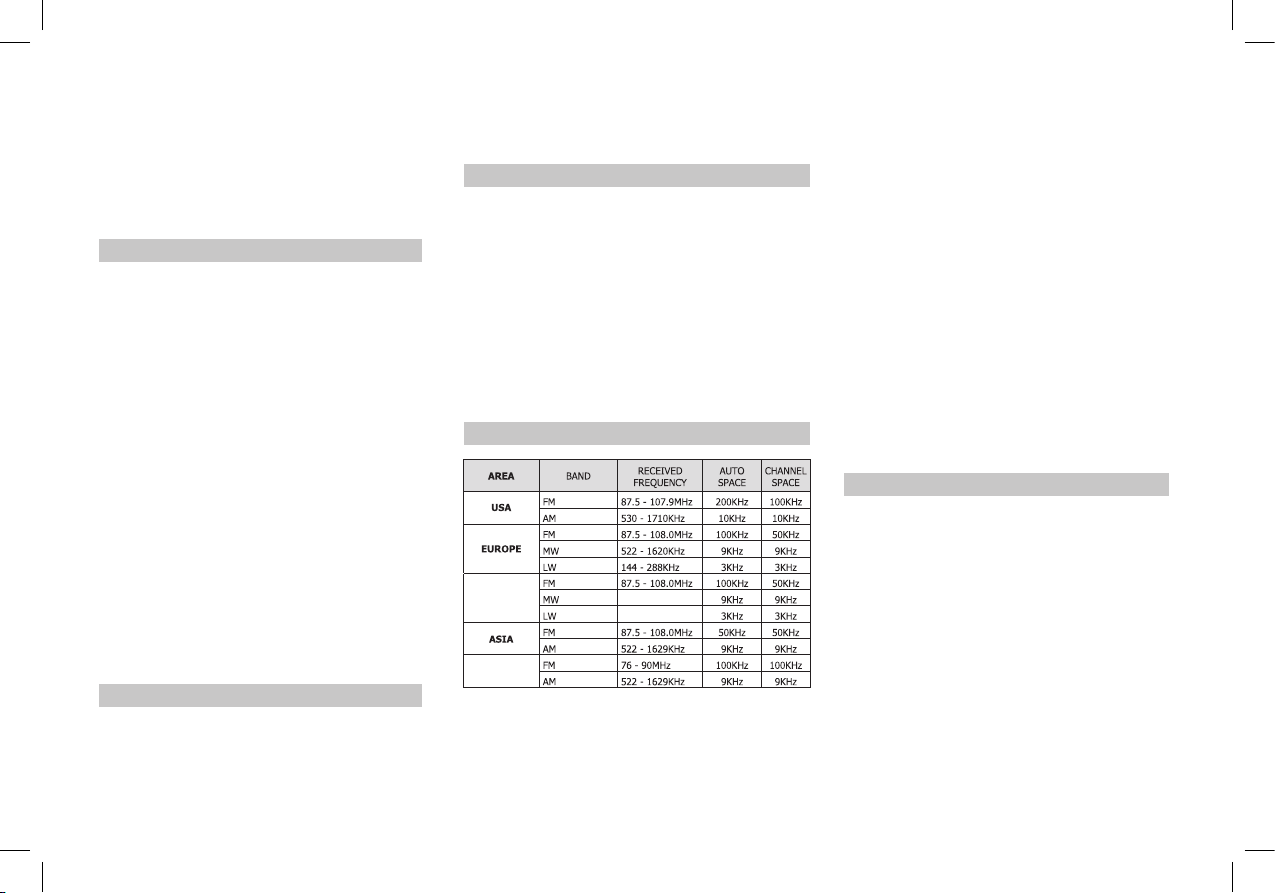
Frequency Table
NORTH
AFRICA
JAPAN
531- 1602KHz
153 - 252KHz
Safety Information .................... .................. 2
Specications
Panel Controls
Button Tips
System Setting Item List .............................. 5
Bluetooth Functions .................................... 6
USB function Summarization
............................................................ 7
FCC
Electrical connectons.................................. 8
Troubleshooting
BEFORE OPERATION
• Do not raise the volume level too much,
as this will block outside sounds, making
driving dangerous.
• Stop the car before performing any
complicated operation.
Note:
1 According to models with different wiring
harness to connect the definition of the
specific content, please refer to the model
label.
2 Specifications and the design are
subject to change without notice due to
improvements in technology.
2
............................................. 2
............................................ 3
................................................. 4
...................... 6
.......................................... 9
TR7423UB-OR_EN.indd 2 28/05/15 15:50
Page 3
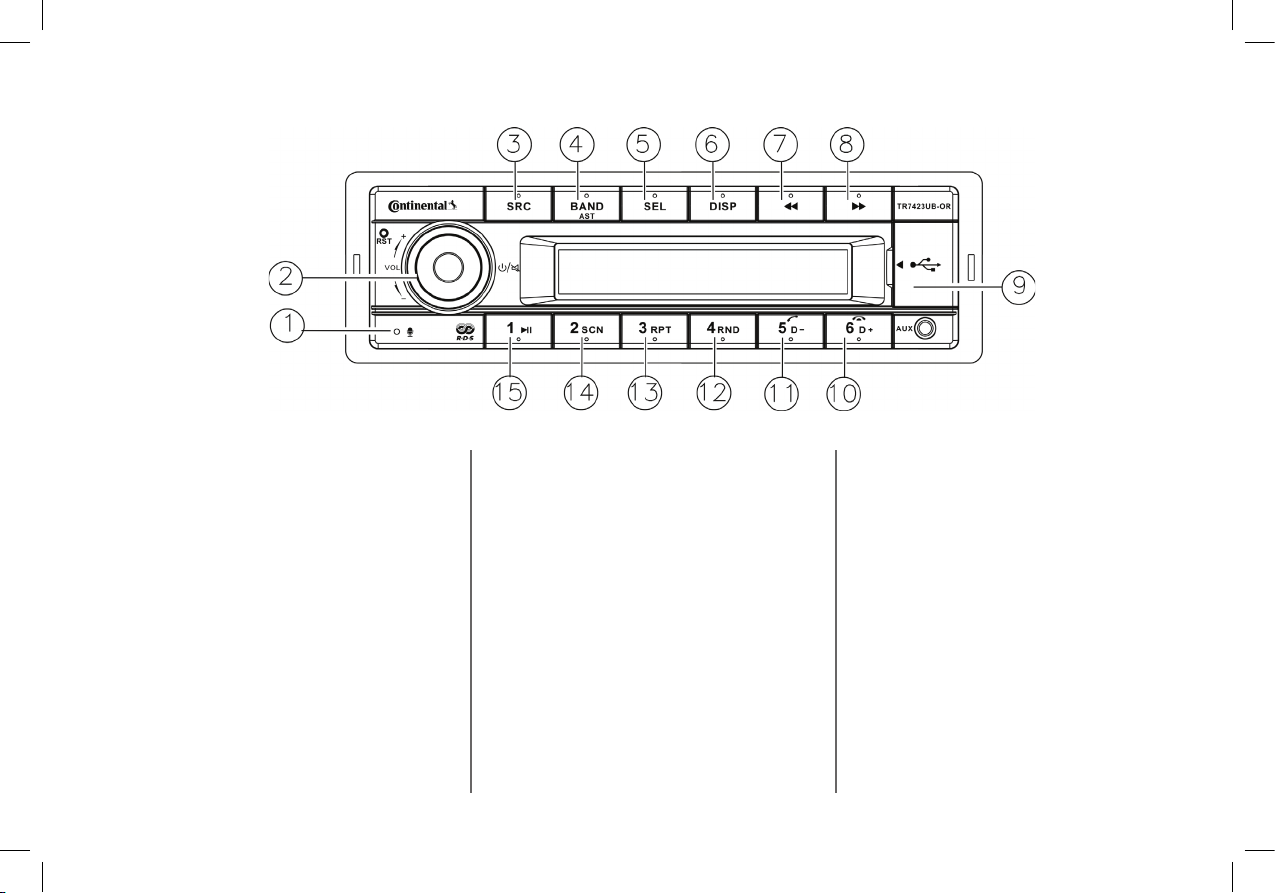
Panel Controls
(1). - Microphone
(2). - Power on/off,
- Mute,
when on,hold it more than 2 seconds to
power off.
- Rotate the VOL knob to adjust volume.
(3). - Source
Radio,
USB (when USB inserted),
AUX IN,
A2DP,
Hold it more than 2 seconds to select PTY
mode.
(4). - Band switch:
FM1 -> FM2 -> FM3 -> MW1 -> MW2->
LW
- Hold it Automatically search station and
store the signal strongly station to 1-6
Preset.
(5). - Press SEL and rotate VOL knob to
select EQ preset mode:
EQ OFF-POP-CLASSIC-ROCK-JAZZ
- Press to enter,when selecting the PTY
mode,
- Press SEL and rotate VOL knob to ajust
the time,when on the CLOCK mode.
(6). - Display system clock
- Hold it to setting clock
- Radio mode:
display PTY info/system clock/current
channel,
- MP3 mode:
Turn and turn about folder name/le name/
ID3 TAG/Clock
(7). - Radio mode
- Auto search the station from high to low
- MP3 mode
3
Select the previous track
(8). - Radio mode
Auto search the station from low
to high
- MP3 mode
Select the next track
(9). - USB slot
(10). - MP3 folder ahead/Hang up
(11). - MP3 folder back/Contact mode/
Dial/Call transfer
(12). - MP3 random play
(13). - MP3 repeat play
(14). - Program intro play (10 sec.)
(15). - Play/pause
(10-15).
- 1-6 radio preset
Press to tune in a preset station.
Hold for more than 2 seconds to
store current station.
TR7423UB-OR_EN.indd 3 28/05/15 15:50
Page 4
Button Tips
4
MP3 Playback
Track skip
Press the
next track.
Hold it to enter fast forward or reverse back
mode.
MP3 track fast search
Press the [5D-]/[6D+] button to select MP3
folder back/ahead.
/ button to go to the previous or
Set Clock
If RDS clock (CT) doesn’t work, you can adjust
manually the Clock time.
Long press the [DISP] button to set the time.
Select [CLOCK] with the search buttons
[ / ].
Press [SEL] button and rotate [VOL] knob to
adjust the minutes.
Press [SEL] button and rotate [VOL] knob to
adjust the hours.
Press the [SEL] button to exit the clock setting.
System setting
On the non time display menu:
Hold it [DISP] and press [ / ] button to enter
the system setup menu,
CLOCK TA TA RETURN AF REG CT
DX/LO ST/MONO AUTO ANS AUTO
CON F 12H/24H MIC SEL REGION
SWRC (ON/OFF) LOGIC(ON/OFF)
SCROLL(ON/OFF)
Wait for 1s and rotate the knob to set the system.
TA setting: Rotate [VOL] knob toset ON/OFF.
TA RETURN: On the FM mode, set the TA time
space Info of auto search with RDS.
Setting for “LONG”, Auto search the TA time
space for 180 sec,Setting for “SHORT”, auto
search the TA time space for 45 sec.
Region setting to select AMERICAN, EUROPE,
ASIA, JAPAN.
Press [SEL] button,and then press the [
button to choose EQ/BAS/TRE/BAL/FAD/LOUD
function, rotate the konb to adjust.
/ ]
Tune
Radio seek automatically
Press the
from high to low or from low to high.
Radio tune by step
Hold it more than 2 second, switch to the manual
mode, press the button step search the station
from high to low or from low to high.
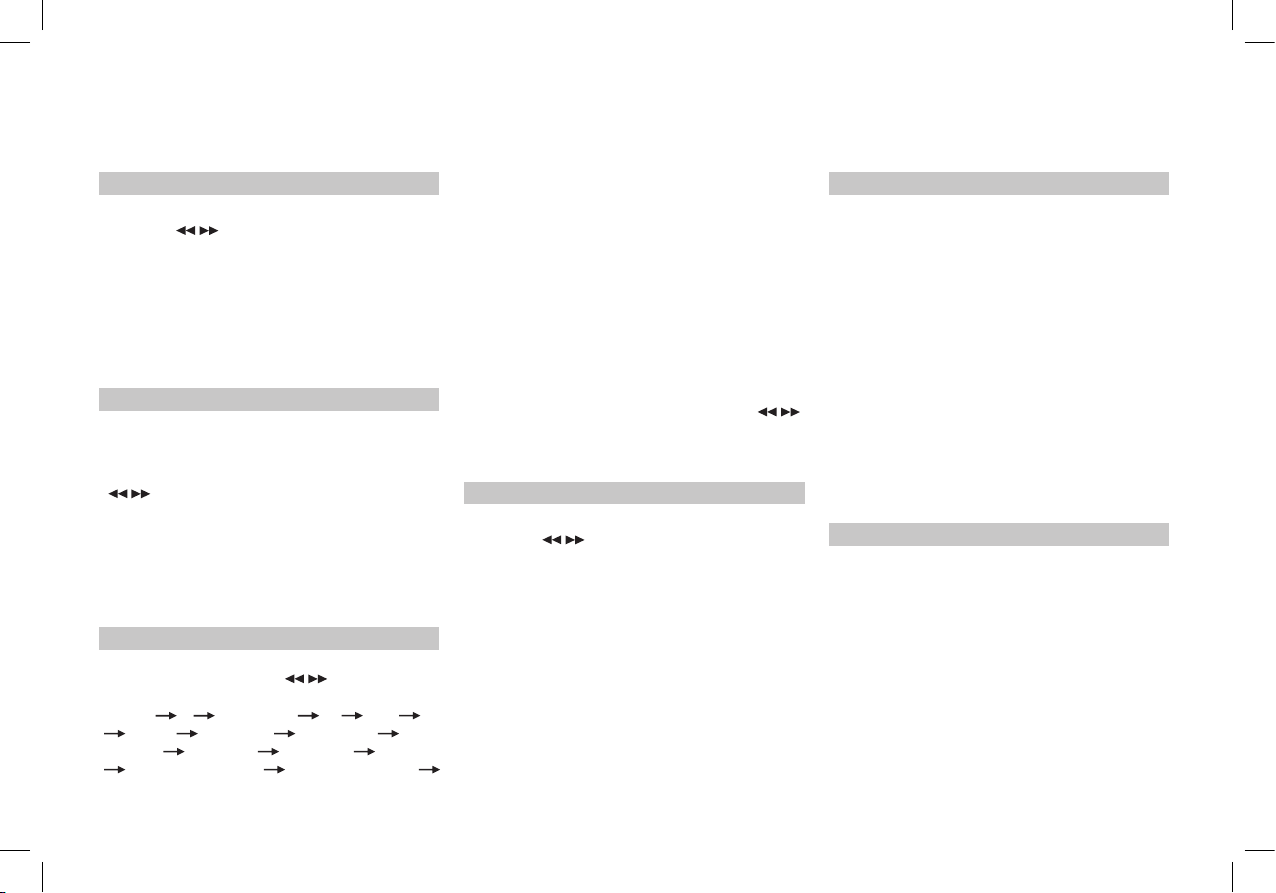
Manual Memory Store
At FM1/FM2/FM3/MW1/MW2/LW mode, press
and hold button 1-6 to store current station
in memory. You can store 36 stations in total.
(18 FM/ 18 AM).
/ button auto search the station
RDS
Press the [DISP] button to set AF/TA/REG,
rotate the [VOL] knob to open or close AF/TA
function.
Hold the [SRC] button to PTY function, rotate
the [VOL] knob,display NEWS and POP
program type.
When display NEWS, rotate the konb to select
opposite preset
NEWS-AFFAIRS-INFO-SPORT-EDUCATEDRAMA-CULTURE-SCIENCE-VARIED-POP
M-ROCK M-EASY M-LIGHT M-CLASSICS
M-OTHER M-WEATHER -FINANCECHILDREN-SOCIAL -RELIGION-PHONE INTRAVEL-LEISURE-JAZZ-COUNTRY-NATION
M-OLDIES-FOLK M-DOCUMENT-TESTALARM
Logic ON/Logic OFF
Logic ON to limit the use of the set to one hour
when the car ignition is switched off.Logic OFF
to prevent the set from turning on, when the car
ignition is switched off.
TR7423UB-OR_EN.indd 4 28/05/15 15:50
Page 5
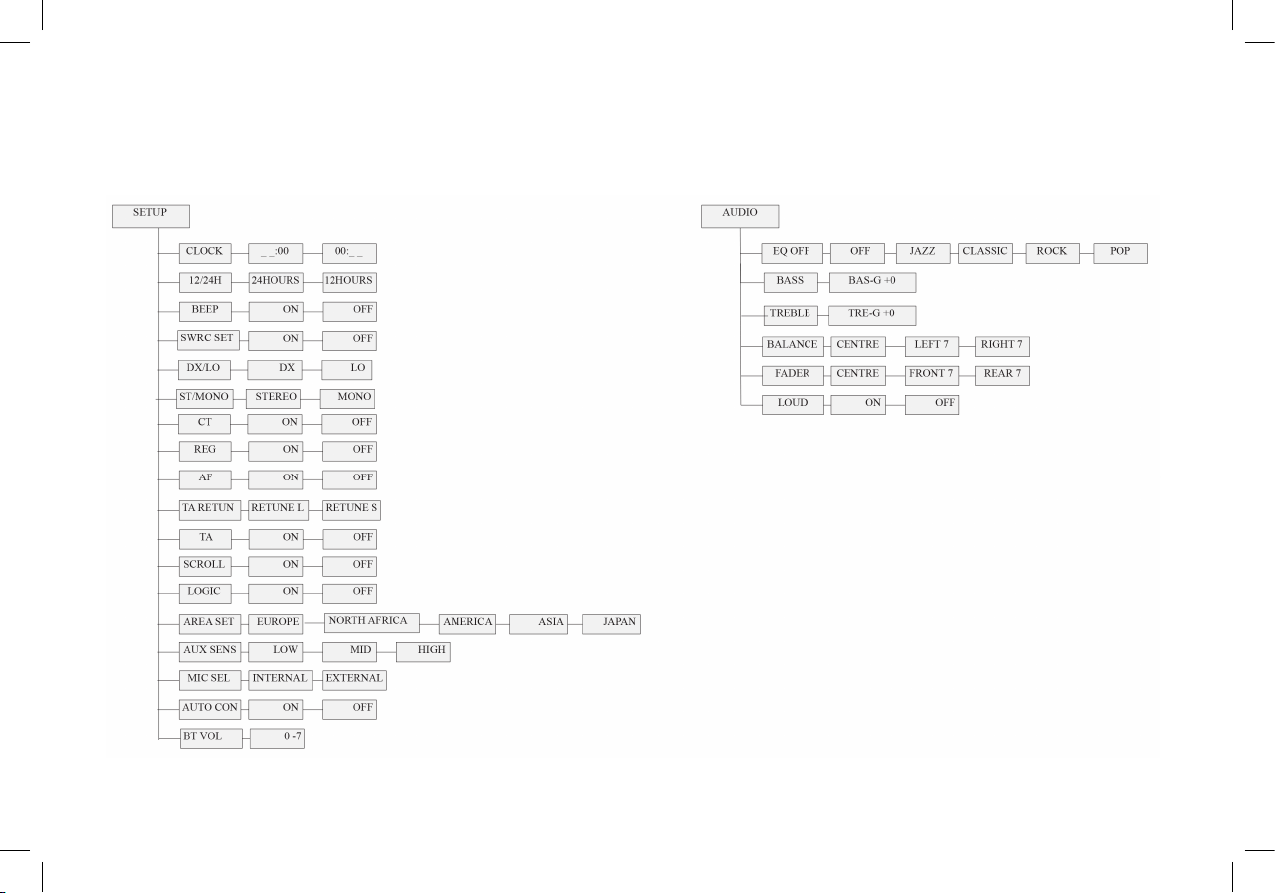
System Setting Item List
5
TR7423UB-OR_EN.indd 5 28/05/15 15:50
Page 6
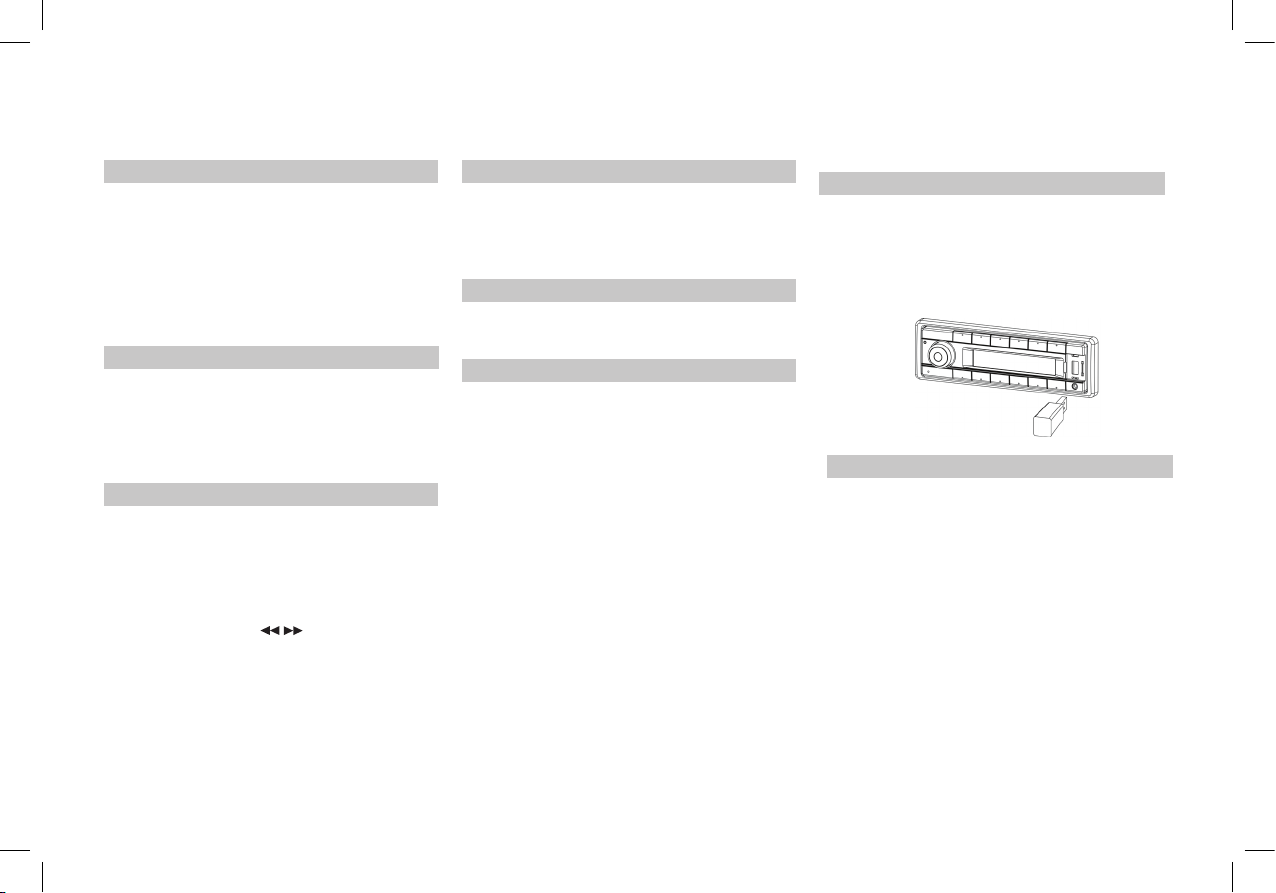
Bluetooth Functions
Pairing
1. Open the smartphone's BT function,
2. The smartphone searches the bluetooth
equipment.
3. Enter the pairing code(1234) to pair.
Press [6D-] button more than 2 sec,the moblie
phone and the unit disconnect .
BT mode selecting
Press [SRC] button to choose BT mode.
Press [DISP] button to display the A2DP
information.
Dialing
1. Phone dialing
Mobile phone dialing, LCD screen displays
dialing information.
2. Unit dialing
Press [SRC] button swicth to A2DP(BT) mode,
press [5 D+] to choose the DIAL ON function,
press [SEL] button / [ / ] button and rotate
the knob to input dialing numbers,
press [5 D+] button to dial.
Voice switch
In the process of the phone,touch the icon to
swith call voice in mobile phones.or press the
[5D+] button to switch to DIAL ON/PLS PAIR/
BT MUSIC.
HANG UP/ON
Press [5D+] button to answer a call,
Press [6D-] button to hang up.
A2DP mode
On A2DP music playing mode,press [1] button
to choose pause/play mode.
6
USB Function Summarization
Loading/Take out USB equipment
1. Insert a USB device into the connector and
the unit will begin to play automatically.
2. To stop playback of USB device, push the
SRC button to non USB mode and then
remove the USB device.
USB functions (ash memory type)
1. USB ash memory 2 in 1 support
2. FAT 12/FAT 16/FAT 32 format supported.
3. USB 1.1 support, USB 2.0 support (For 2.0,
speed performance is as USB 1.1)
4. WMA les supported
5. Maximum number of MP3 files FAT 32
format supported is 65535 les. (Maximum
number of MP3 files NTFS supported is
1000 les.)
Maximum number of folders is 999.
6. Maximum USB capacity support is cap at
8 GB and best performance with songs
not more than 500, and not exceeding 30
folders.
7. Not all USB devices are compatible with
the unit.
TR7423UB-OR_EN.indd 6 28/05/15 15:50
Page 7

FCC
FCC STATEMENT
1. This device complies with Part 15 of the
FCC Rules. Operation is subject to the
following two conditions:
(1) This device may not cause harmful
interference.
(2) This device must accept any interference
received, including interference that may
cause undesired operation.
2. Changes or modifications not expressly
approved by the party responsible for
compliance could void the user's authority to
operate the equipment.
7
television reception, which can be determined
by turning the equipment off and on, the user
is encouraged to try to correct the interference
by one or more of the following measures:
Reorient or relocate the receiving antenna.
Increase the separation between the
equipment and receiver.
Connect the equipment into an outlet on a
circuit different from that to which the receiver
is connected.
Consult the dealer or an experienced radio/
TV technician for help.
NOTE: This equipment has been tested and
found to comply with the limits for a Class
B digital device, pursuant to Part 15 of the
FCC Rules. These limits are designed to
provide reasonable protection against harmful
interference in a residential installation.
This equipment generates uses and can
radiate radio frequency energy and, if not
installed and used in accordance with the
instructions, may cause harmful interference
to radio communications. However, there is
no guarantee that interference will not occur
in a particular installation. If this equipment
does cause harmful interference to radio or
TR7423UB-OR_EN.indd 7 28/05/15 15:50
FCC Radiation Exposure Statement
This equipment complies with FCC radiation
exposure limits set forth for an uncontrolled
environment. This equipment should be
installed and operated with minimum distance
20cm between the radiator & your body
Page 8
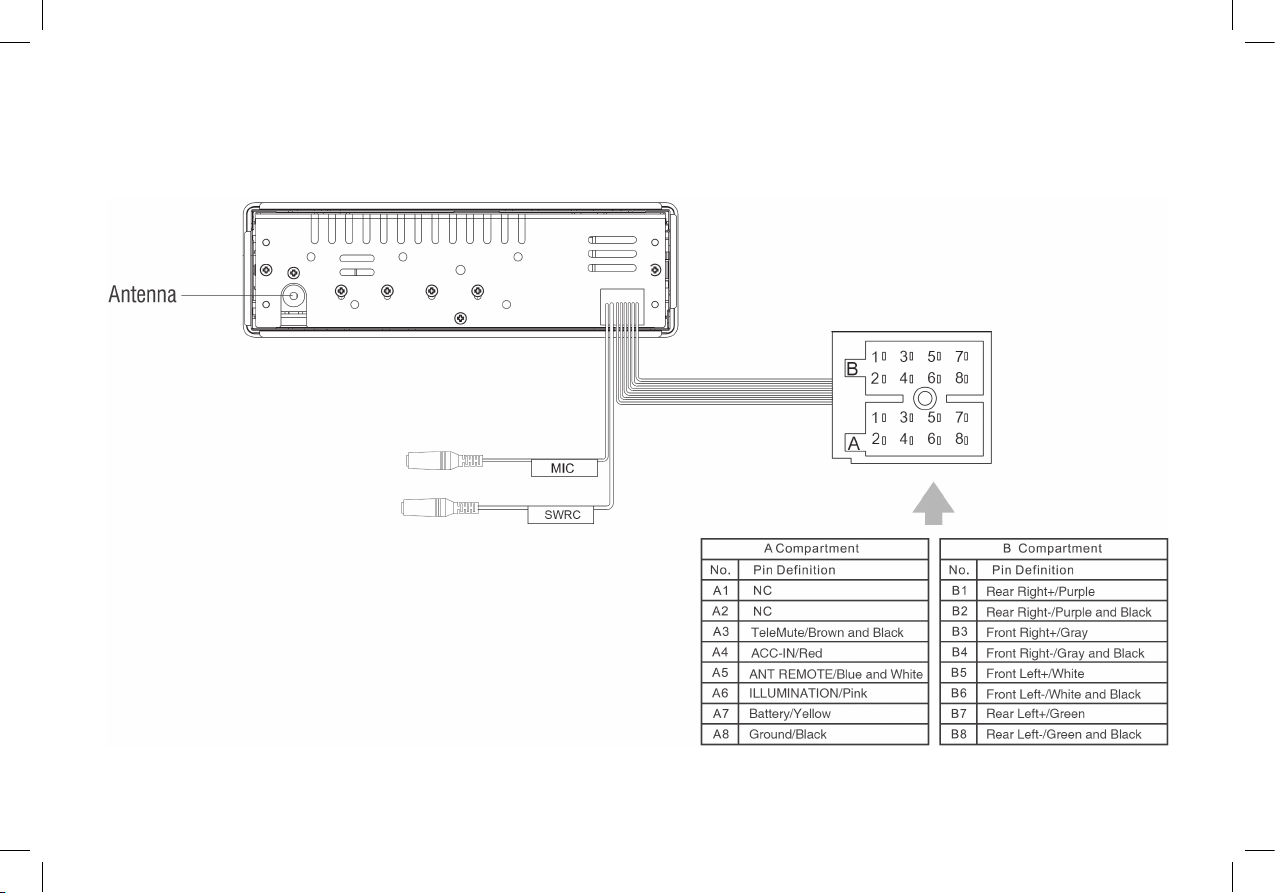
Electrical Connections
8
TR7423UB-OR_EN.indd 8 28/05/15 15:50
Page 9
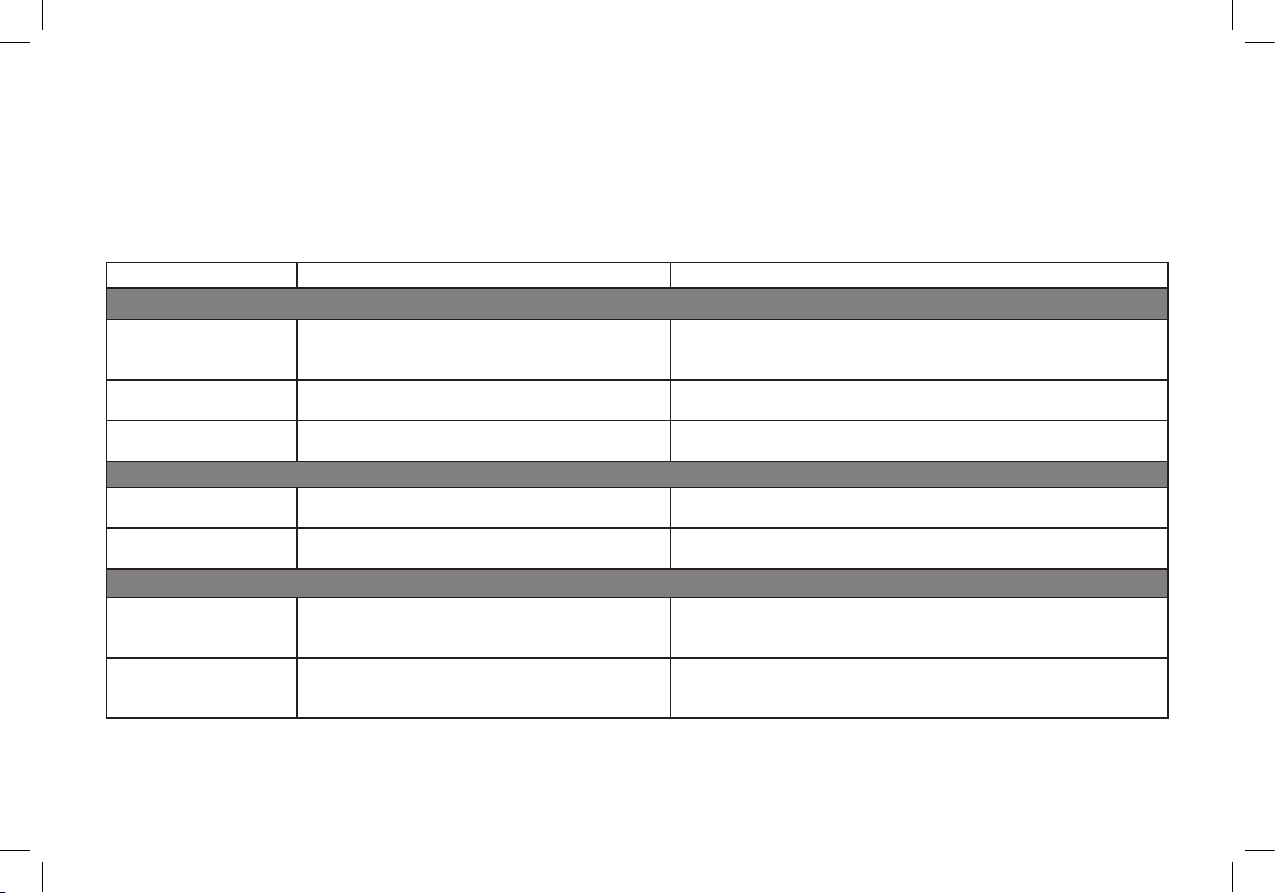
TROUBLESHOOTING
The following checklist can help you solve some problems which you may encounter when using the unit. Before consulting it, check the connections
and follow the instructions in the user manual. Do not use the unit in abnormal condition, for example without sound, or with smoke or foul smell can
cause re or electric shock, immediately stop using it and call the store where you purchased it.
Problem Possible cause Solution
General
The unit will not switch
on.
No sound Volume is set at minimum or the mute function is
The unit or screen does
not work normally.
Mode TUNER
Unable to receive
stations.
Poor quality reception of
radio station.
Mode USB
Unable to insert USB
device
Car ignition is not on.
Cable is not properly connected.
Fuse is burnt.
on.
The unit system is unstable. Press the RESET button.
The antenna is not connected properly. Connect the antenna properly.
The antenna is not fully extended or it is broken. Fully extend the antenna and if broken, replace it with a new one.
The USB device has been inserted the wrong way
round.
Turn your car key in the ignition.
Check cable connection.
Replace fuse with a new fuse of the same capacity.
Check the volume or switch the mute function off.
Insert it the other way around.
9
The USB device cannot
be read.
TR7423UB-OR_EN.indd 9 28/05/15 15:50
NTFS format is not supported. Check that the le system is in FAT or FAT32 format. Due to different
formats, some models of storage devices or MP3 players may not be
read.
Page 10
Continental Trading GmbH
Soderner Str. 9
65824 Schwalbach
Germany
Support & Download
www.vdo.com
TR7423UB-OR_EN.indd 10 28/05/15 15:50
 Loading...