

Page 1
WASH, BEAM AND FLASH ANIMATION EFFECT
USER GUIDE
10650- Version 1 / 03-2017
Page 2
TRIPTIC - Wash, Beam and Flash animation effect
Page 2
English
1 - Safety information
This symbol signals an important safety precaution.
The CAUTION symbol signals a risk of product deterioration.
The WARNING symbol signals a risk to the user’s physical integrity.
The product may also be damaged.
Important safety information
Symbols used
Any maintenance procedure must be performed by a CONTEST
authorised technical service. Basic cleaning operations must thoroughly follow our safety instructions.
This product contains non-isolated electrical components. Do not
undertake any maintenance operation when it is switched on as it
may result in electric shock.
This unit is intended for indoor use only. Do not use it in a wet,
or extremely cold/hot locations. Failure to follow these safety instructions could result in fire, electric shock, injury, or damage to
this product or other property.
WARNING : This unit contains no user-serviceable parts. Do not
open the housing or attempt any maintenance by yourself. In the
unlikely even your unit may require service, please contact your
nearest dealer.
In order to avoid any electrical malfunction, please do not use any
multi-socket, power cord extension or connecting system without
making sure they are perfectly isolated and present no defect.
Recycling your device
• As HITMUSIC is really involved in the environmental cause,
we only commercialise clean, ROHS compliant products.
• When this product reaches its end of life, take it to a
collection point designated by local authorities. The separate
collection and recycling of your product at the time of disposal
will help conserve natural resources and ensure that it is
recycled in a manner that protects human health and the
environment.
Instructions and recommendations
10 - Electric power supply :
This product can only be operated according to a very specific voltage. These
information are specified on the label located at the rear of the product.
11 - Power cords protection:
Power-supply cords should be routed so that they are not likely to be walked on or
pinched by items placed upon or against them, paying particular attention to cords at
lugs, convenience receptacles and the point where they exit from the fixture.
12 - Cleaning precautions :
Unplug the product before attempting any cleaning operation. This product should be
cleaned only with accessories recommended by the manufacturer. Use a damp cloth
to clean the surface. Do not wash this product.
13 - Long periods of non use :
Disconnect the unit’s main power during long periods of non use.
14 - Liquids or objects penetration :
Do not let any object penetrate this product as it may result in electric shock or fire.
Never spill any liquid on this product as it may infiltrate the electronic components
and result in electric shock or fire.
15 - This product should be serviced when :
Please contact the qualified service personnel if :
- The power cord or the plug has been damaged.
- Objects have fallen or liquid has been spilled into the appliance.
- The appliance has been exposed to rain or water.
- The product does not appear to operate normally.
- The product has been damaged.
16 - Inspection/maintenance :
Please do not attempt any inspection or maintenance by yourself. Refer all servicing
to qualified personnel.
17 - Operating environment :
Ambient temperature and humidity: +5 - +35°C, relative humidity must be less than
85% (when cooling vents are not obstructed).
Do not operate this product in a non-ventilated, very humid or warm place.
1 - Please read carefully :
We strongly recommend to read carefully and understand the safety instructions before
attempting to operate this unit.
2 - Please keep this manual :
We strongly recommend to keep this manual with the unit for future reference.
3 - Operate carefully this product :
We strongly recommend to take into consideration every safety instruction.
4 - Follow the instructions:
Please carefully follow each safety instruction to avoid any physical harm or property
damage.
5 - Avoid water and wet locations :
Do not use this product in rain, or near washbasins or other wet locations.
6 - Installation :
We strongly encourage you to only use a fixation system or support recommended
by the manufacturer or supplied with this product. Carefully follow the installation
instructions and use the adequate tools.
Always ensure this unit is firmly fixed to avoid vibration and slipping while operating
as it may result in physical injury.
7 - Ceiling or wall installation :
Please contact your local dealer before attempting any ceiling or wall installation.
8 - Ventilation :
The cooling vents ensure a safe use of this product, and avoid any overheating risk.
Do not obstruct or cover these vents as it may result in overheating and potential
physical injury or product damage. This product should never been operated in a
closed non-ventilated area such as a flight case or a rack, unless cooling vents are
provided for the purpose .
9 - Heat exposure :
Sustained contact or proximity with warm surfaces may cause overheating and product
damages. Please keep this product away from any heat source such as a heaters,
amplifiers, hot plates, etc...
Warning
This product is equipped with Class 2 LEDs.
Please avoid looking directly at the beam as it may cause
severe eye injuries.
Page 3
TRIPTIC - Wash, Beam and Flash animation effect
Page 3
English
2 - Technical specifications
Light sources
› Wash with 3x3 4W RGBUV LEDs
› Beam with 3 x 4-in-1 RGBA LEDs, including 8 red LEDs, 8
amber LEDs, 6 blue LEDs and 6 green LEDs of 75mW each, for
a total of 84 LEDs dedicated to Beam effect
› Flash Pixel with 12 x 0.5W white LEDs
› Low temperature, low power consumption, can be operated
non-stop for many hours
Control
› Standard DMX-512
› 1, 3, 10 or 19 DMX channels
› Built-in music-sensitive programs (internal mic)
› Drop-down display for mode selection and assignation
› Infrared remote control for mode selection, speed and Black-
out
› Microphone sensitivity control knob
› Additional characteristics
› DMX input and output via 3-pin XLR
› Power input and output via IEC socket
› Black metal housing
› Suspension bracket
› Power consumption: 61 W maximum
› Power supply: 100/230V, AC - 50/60Hz
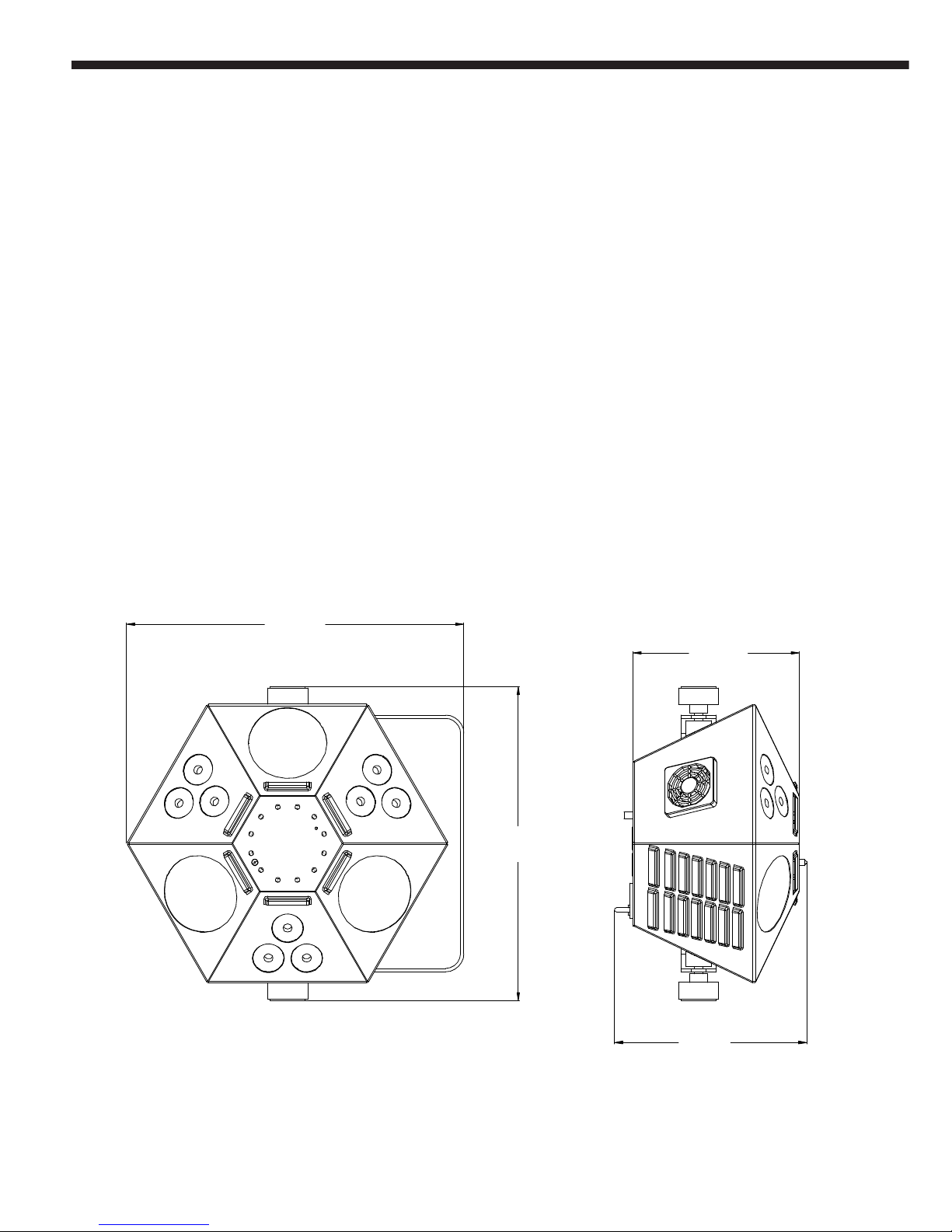
› Dimensions: 335 x 312 x 191 mm
› Net weight: 2,8 Kg
Package contents:
The package must contain the following articles:
› The projector
› The user guide
› One IEC / 2 poles + earth power cord
335
312
165
191
Page 4
TRIPTIC - Wash, Beam and Flash animation effect
Page 4
English
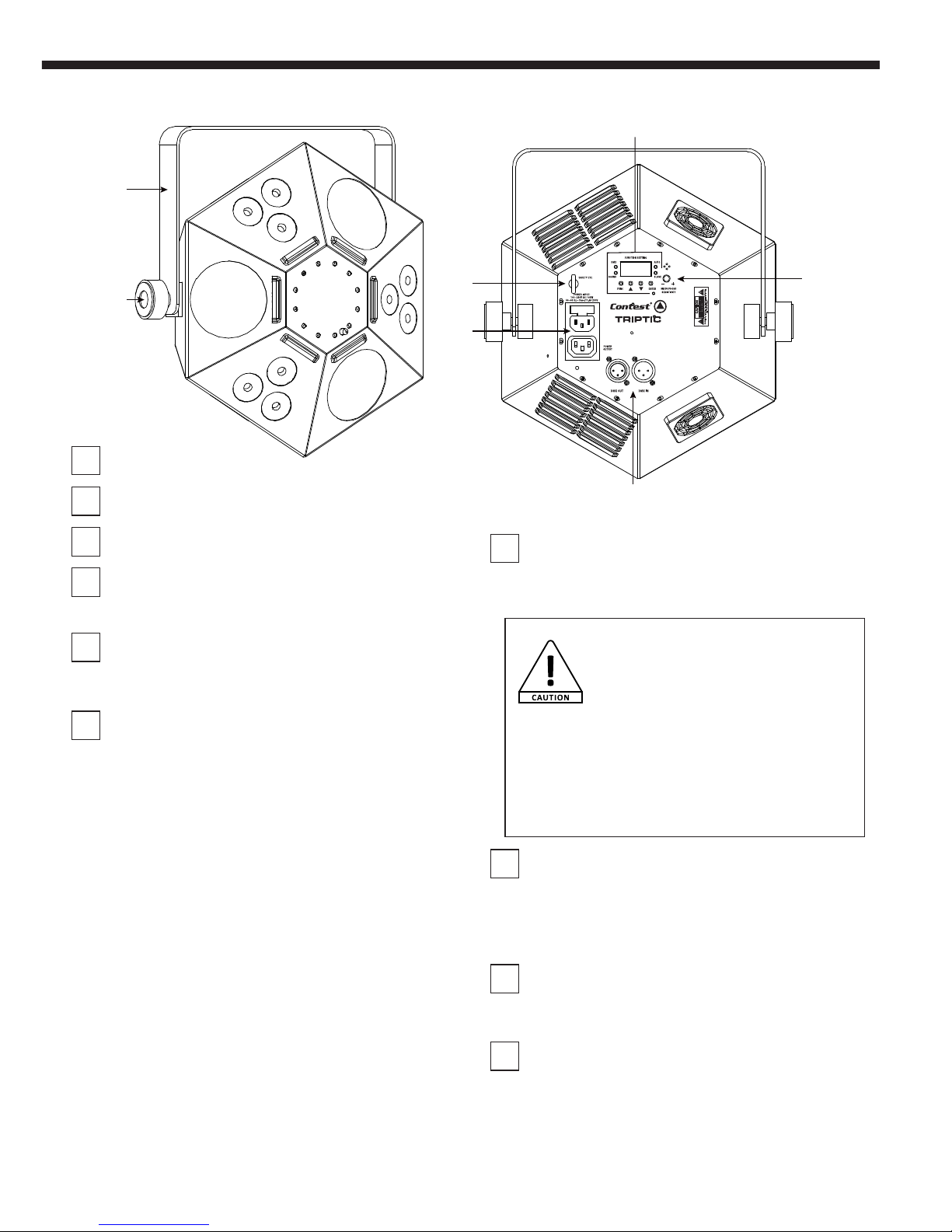
1
Beam effect zone
2
PAR effect zone
3
Flash effect zone
4
Suspension bracket
Allows you to suspend your projector.
5
Tightening wheel for suspension bracket
Allows to adjust the position of the projector and lock it in this
position.
6
Display, menu buttons and LED indicators
Display
Allows you to intuitively configure your device. Please refer to
next paragraph for more details about the menu functions. The
backlight can be turned off via the Backlight function from the
menu.
FUNC Button
Allows you to access the menu and select a function.
ENTER Button
Allows you to enter sub-menus and apply changes with the UP
and DOWN buttons.
UP and DOWN buttons
Allows you to increase or decrease parameter values and
browse through menus.
DMX LED
Flashes regularly when DMX mode is activated.
SOUND LED
Lights up for each sound impulse when music-sensitive mode
is activated.
AUTO LED
Lights up when your TRIPTIC is in automatic mode.
SLAVE LED
Lights up when your TRIPTIC is in slave mode.
3 - Overview
1
1
1
2
2
2
3
4
7
6
8
9
10
5
7
Safety ring
Allows to use a second safety cable. Double safety systems are
mandatory for usage in public places.
CAUTION!
Please make sure the tightening wheel is
securely fastened.
Using a safety cable is mandatory.
When using this device in public places,
current legislation requires that each devices features a
double fixation system to ensure its stability. This system
must hold up to 10 times times the weight of the device,
meaning you will be required to use a cable able to hold
30 kilos to support your TRIPTIC.
8
Power input/output
Input: allows you to connect your projector to the mains via 2
poles + terre / Powercon© IN cord
Please make sure the voltage of your workplace matches this
projector.
9
DMX input and output
Allows you to receive a DMX signal from a controller or master
unit and trasmit it to other units.
10
Control knob
Alows you to control the microphone sensitivity.
Page 5
TRIPTIC - Wash, Beam and Flash animation effect
Page 5
English
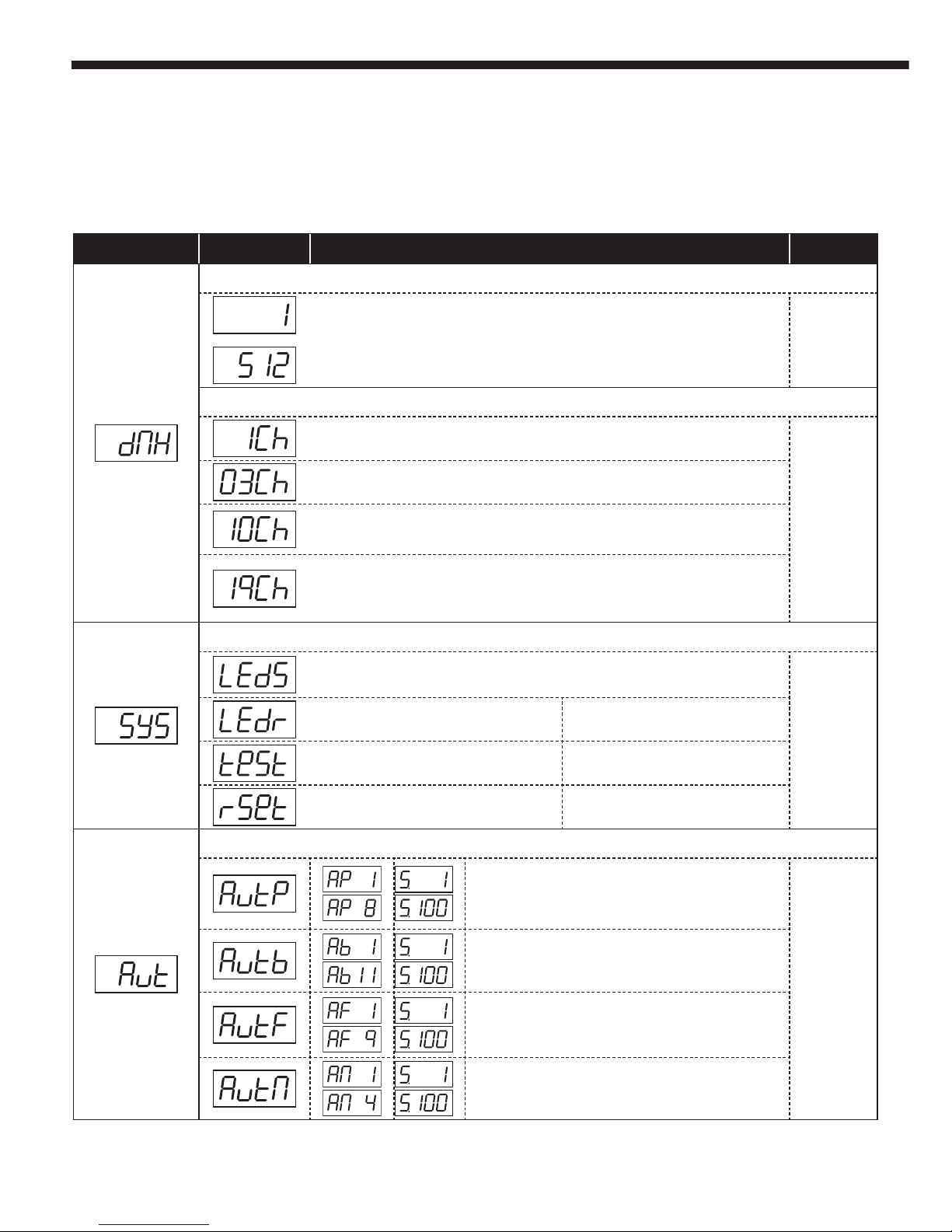
4 - Internal menu
MENU UP and DOWN Action ENTER
DMX Address
DMX address selection
Press ENTER then adjust the address with the UP and DOWN buttons
Saves changes
DMX Modes
1 channel: Sequences selection in automatic or music-sensitive mode
Saves changes
3 channels: Mode selection / Program selection for each mode / Automatic modes speed
10 channels: Red / Green / Blue / UV / Dimmer / PAR programs selection / PAR speed and
music-sensitive mode / Beam programs selection / Beam Strobe and programs speed /
Strobe
19 channels: Shade of each panel in PAR mode / Dimmer of each panel in PAR mode / PAR
programs selection / PAR speed and music-sensitive mode / Beam programs selection /
Beam Strobe and programs speed/ Flash programs selection / Flash speed and musicsensitive mode
System Menu
Power-saving mode:
-oFF : The displays remains lit
-on : The displays automatically turns off after a 30-second period of inactivity
Saves changes
Rotates the display
Test mode: Tests each function
Resets all functions
Automatic mode
PAR mode automatic programs:
-Programs 1 to 8 selection
-Adjustable speed from 1 to 100
Saves changes
Beam mode auto programs:
-Programs 1 to 11 selection
-Adjustable speed from 1 to 100
Flash mode auto programs:
-Programs 1 to 9 selection
-Adjustable speed from 1 to 100
Mix mode auto programs:
-Programs 1 to 4 selection
-Adjustable speed from 1 to 100
4.1 - Menu tree and function
Upon activation, the projector will initialise each function.
You will then be able to access menus by pressing ENTER.
The menu tree is described below.
Page 6
TRIPTIC - Wash, Beam and Flash animation effect
Page 6
English
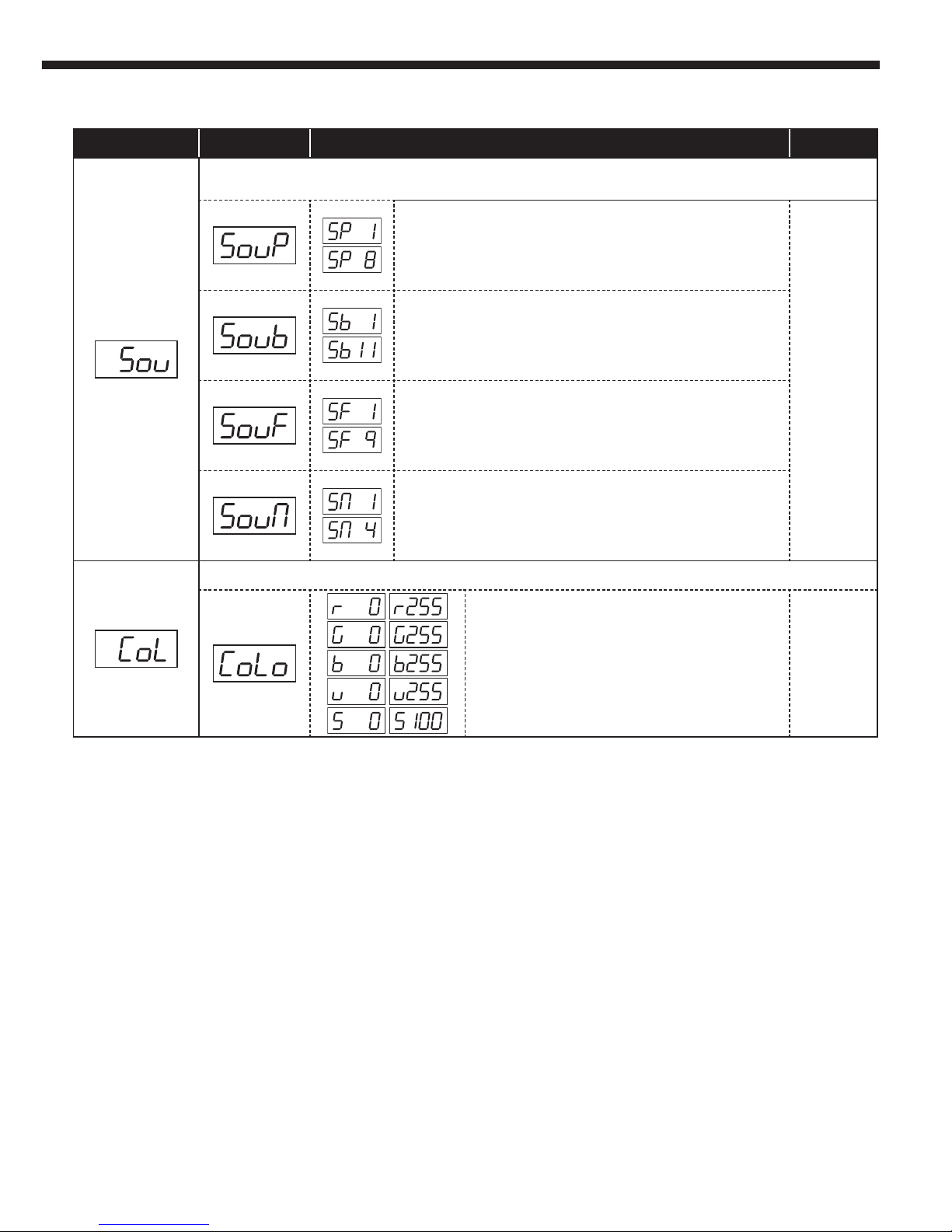
4.1 - Menu tree and function (last and final part)
MENU UP and DOWN Action ENTER
Music-sensitive mode (microphone sensitivty can be adjusted via the knob at the rear of the
projector)
PAR mode music-sensitive programs:
-Pograms 1 to 8 selection
-Adjustable speed from 1 to 100
Saves changes
Beam mode music-sensitive programs:
-Pograms 1 to 11 selection
-Adjustable speed from 1 to 100
Flash mode music-sensitive programs:
-Pograms 1 to 9 selection
-Adjustable speed from 1 to 100
Mix mode music-sensitive programs:
-Pograms 1 to 4 selection
-Adjustable speed from 1 to 100
Colour menu (does only affect PAR mode colours)
Each level of Red, Green, Blue and UV from 0 to 255.
Strobe speed from 0 to 100.
Saves changes
Page 7
TRIPTIC - Wash, Beam and Flash animation effect
Page 7
English
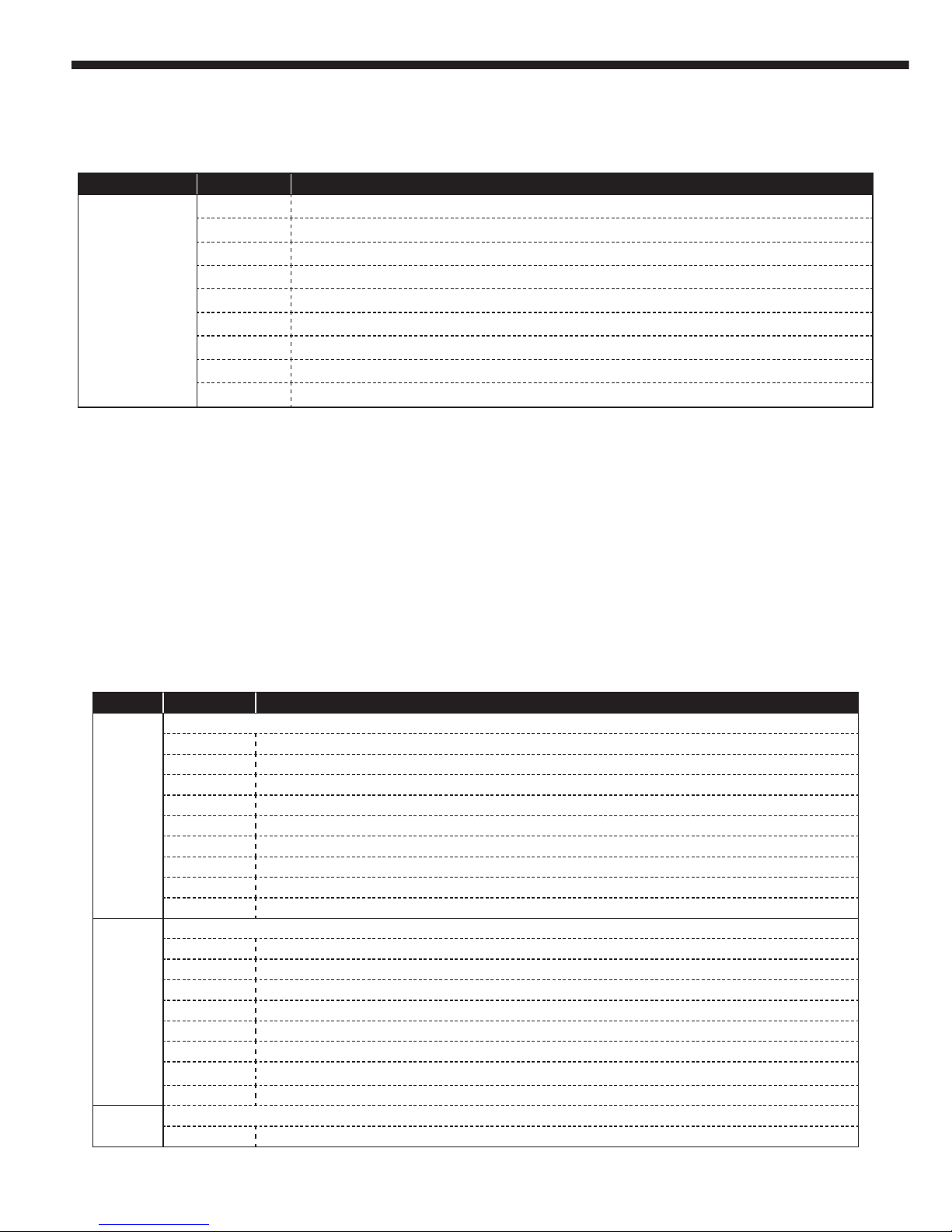
Channel Values Action
1
Modes
000 - 028 Black-Out
029 - 056 PAR mode automatic programs
057 - 084 Beam mode automatic programs
085 - 112 Flash mode automatic programs
113 - 140 Mi mode automatic programs
141 - 168 PAR mode music-sensitive programs
169 - 196 Beam mode music-sensitive programs
197 - 224 Flash mode music-sensitive programs
225 - 255 Mix mode music-sensitive programs
2
Programs
Voir 5.2.1 PAR mode automatic programs if channel 1 is between 029 and 056
Voir 5.2.2 Beam mode automatic programs if channel 1 is between 057 and 084
Voir 5.2.3 Flash mode automatic programs if channel 1 is between 085 and 112
Voir 5.2.4 Mix mode automatic programs if channel 1 is between 113 and 140
Voir 5.2.1 PAR mode music-sensitive programs if channel 1 is between 141 and 168
Voir 5.2.2 Beam mode music-sensitive programs if channel 1 is between 169 and 196
Voir 5.2.3 Flash mode music-sensitive programs if channel 1 is between 197 and 224
Voir 5.2.4 Mix mode music-sensitive programs if channel 1 is between 1 entre 225 and 255
3
Automatic programs speed
000 - 255 Increasing speed
5.2 - Mode 3 canaux
5.1 - 1-channel mode
5 - DMX modes
Channel Values Action
1
000 - 009 Black-Out
010 - 060 Program AP08 (sequence including programs from AP01 to AP07) at increasing speed
061 - 111 Program Ab11 (sequence including programs from Ab01 to Ab10) at increasing speed
112 - 162 Program AF09 (sequence including programs from AF01 to AF08) at increasing speed
163 - 214 Program AM04 (sequence including programs from AM01 to AM03 at increasing speed
215 - 224 Program SP08 (sequence including SP01 to SP07) in music-sensitive mode
225 - 234 Program Sb11 (sequence including Sb01 to Sb10) in music-sensitive mode
235 - 244 Program SF09 (sequence including SF01 to SF07) in music-sensitive mode
245 - 255 Program SM04 (sequence including SM01 to SM03) in music-sensitive mode
Note :
- AP programs are automatic programs of the PAR mode
- Ab programs are automatic programs of the Beam mode
- AF programs are automatic programs of the Flash mode
- AM programs are a mix including automatic programs from the 3 functions PAR, Beam and Flash: Mix mode
-
- SP programs are music-sensitive programs of the PAR mode
- Sb programs are music-sensitive programs of the Beam mode
- SF programs are music-sensitive programs of the Flash mode
- SM programs are a mix including music-sensitive programs from the 3 functions PAR, Beam and Flash : Mix mode
Page 8
TRIPTIC - Wash, Beam and Flash animation effect
Page 8
English
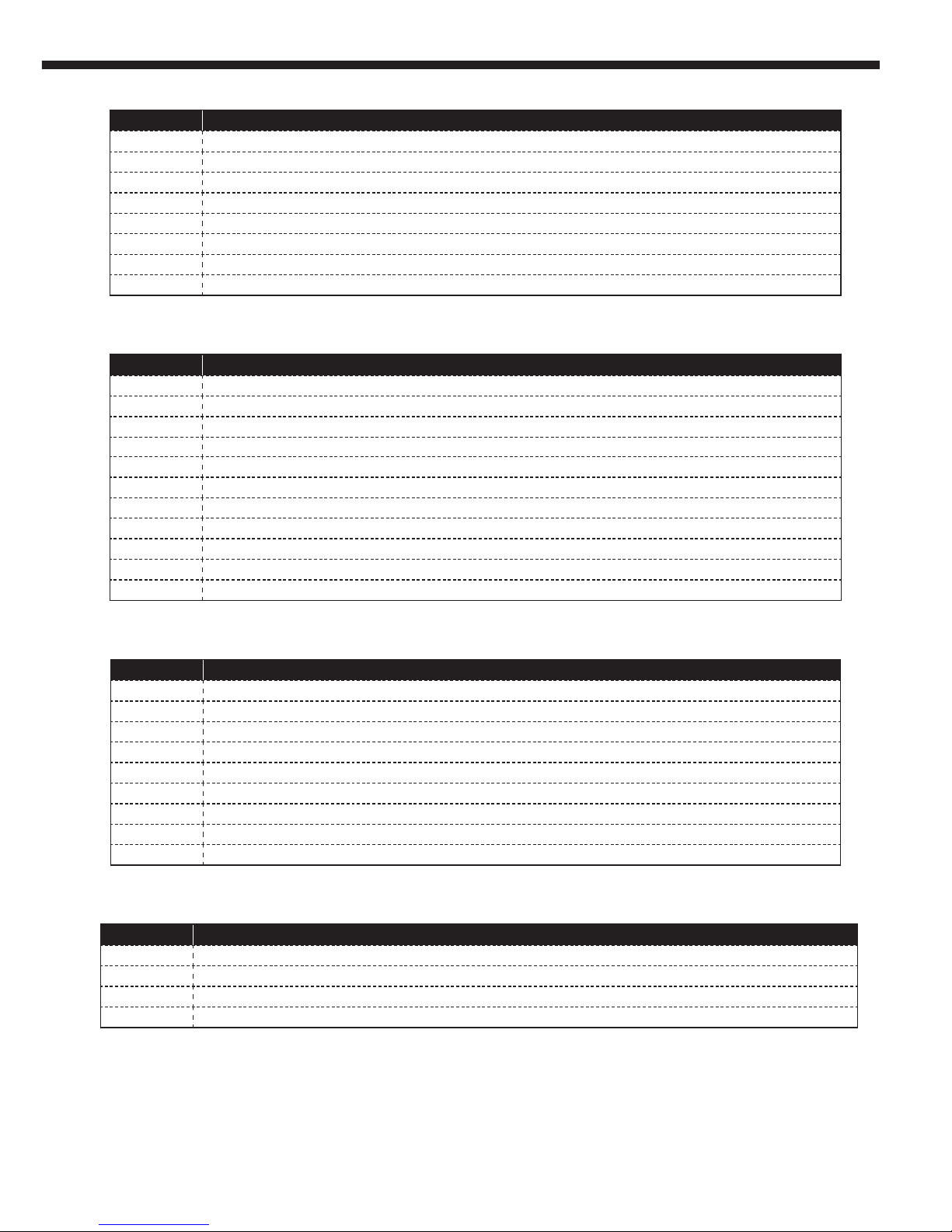
Values Action
000 - 040 AP1/SP1 : PAR1 music-sensitive or automatic mode
041 - 071 AP2/SP2 : PAR2 music-sensitive or automatic mode
072 - 102 AP3/SP3 : PAR3 music-sensitive or automatic mode
103 - 133 AP4/SP4 : PAR4 music-sensitive or automatic mode
134 - 164 AP5/SP5 : PAR5 music-sensitive or automatic mode
165 - 195 AP6/SP6 : PAR6 music-sensitive or automatic mode
196 - 226 AP7/SP7 : PAR7 music-sensitive or automatic mode
227 - 255 AP8/SP8 : Automatic or music-sensitive sequence including PAR1 to PAR7 modes
5.2.1 - PAR mode programs
Values Action
000 - 023 Ab1/Sb1 : Beam 1 music-sensitive or automatic mode
024 - 046 Ab2/Sb2 : Beam 2 music-sensitive or automatic mode
047 - 069 Ab3/Sb3 : Beam 3 music-sensitive or automatic mode
070 - 092 Ab4/Sb4 : Beam 4 music-sensitive or automatic mode
093 - 115 Ab5/Sb5 : Beam 5 music-sensitive or automatic mode
116 - 138 Ab6/Sb6 : Beam 6 music-sensitive or automatic mode
139 - 161 Ab7/Sb7 : Beam 7 music-sensitive or automatic mode
162 - 184 Ab8/Sb8 : Beam 8 music-sensitive or automatic mode
185 - 207 Ab9/Sb9 : Beam 9 music-sensitive or automatic mode
208 - 230 Ab10/Sb10 : Beam 10 music-sensitive or automatic mode
231 - 255 Ab11/Sb11 : Automatic or music-sensitive sequence including Beam 1 to Beam 1 modes
5.2.2 - Beam mode programs
Values Action
000 - 028 AF1/SF1 : Flash 1 automatic or music-sensitive mode
029 - 056 AF2/SF2 : Flash 2 automatic or music-sensitive mode
057 - 084 AF3/SF3 : Flash 3 automatic or music-sensitive mode
085 - 112 AF4/SF4 : Flash 4 automatic or music-sensitive mode
113 - 140 AF5/SF5 : Flash 5 automatic or music-sensitive mode
141 - 168 AF6/SF6 : Flash 6 automatic or music-sensitive mode
169 - 196 AF7/SF7 : Flash 7 automatic or music-sensitive mode
197 - 224 AF8/SF8 : Flash 8 automatic or music-sensitive mode
225 - 255 AF9/SF9 : Sequence including Flash 1 to Flash 7 programs in automatic or music-sensitive mode
5.2.3 - Flash mode programs
Values Action
000 - 063 AM1/SM1 : Mix 1 automatic or music-sensitive mode
064 - 126 AM2/SM2 : Mix 2 automatic or music-sensitive mode
127 - 189 AM3/SM3 : Mix 3 automatic or music-sensitive mode
190 - 255 AM4/SM4 : Sequence including Flash 1 to Flash 7 programs in automatic or music-sensitive mode
5.2.4 -Mix mode programs
Page 9
TRIPTIC - Wash, Beam and Flash animation effect
Page 9
English
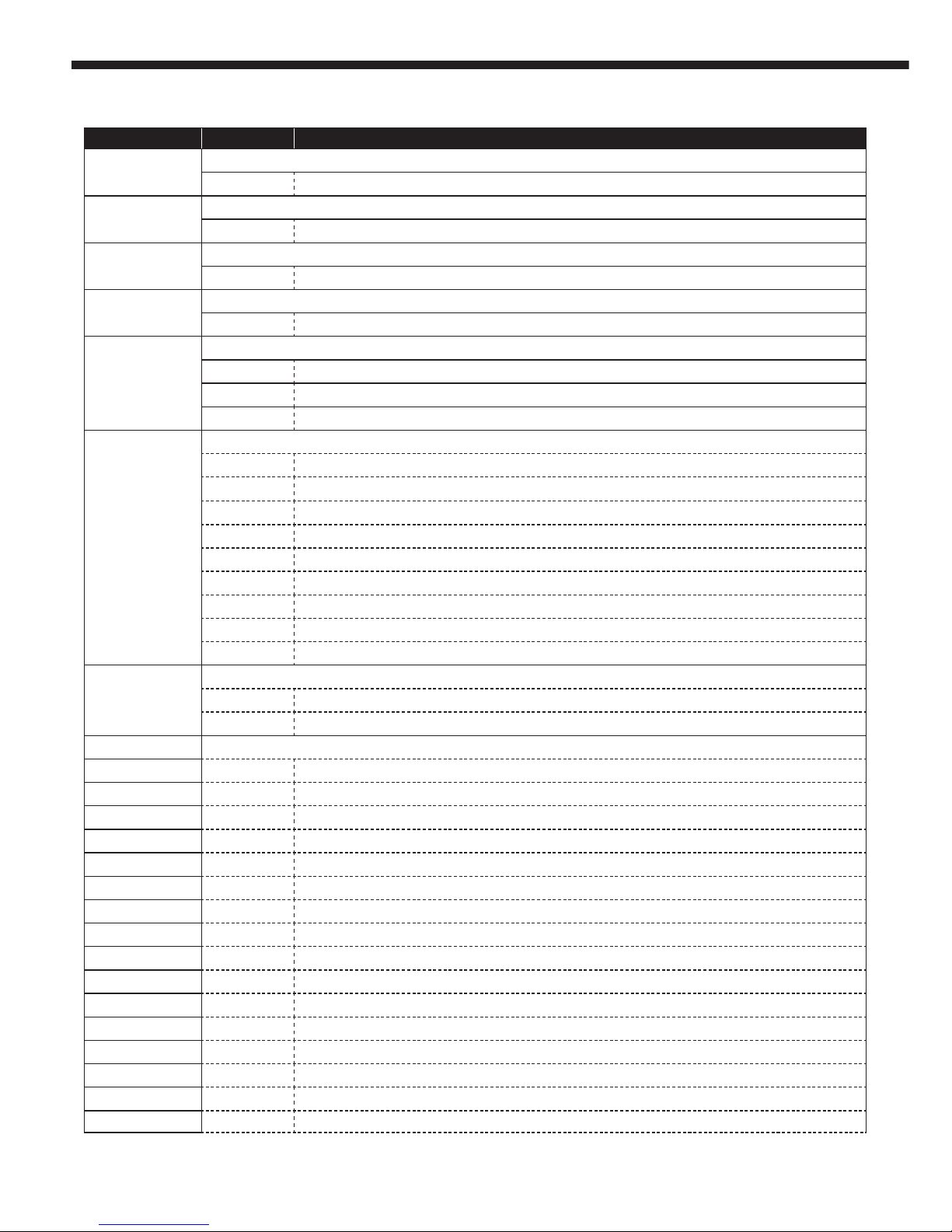
5.3 - 10-channel mode
Channels Values Action
1
PAR Red LEDs mode
000 - 255 Red from 0 to 100%
2
PAR Green LEDs mode
000 - 255 Green from 0 to 100%
3
PAR Blue LEDs mode
000 - 255 Blue from 0 to 100%
4
PAR UV LEDs mode
000 - 255 UV from 0 to 100%
5
Dimmer
000 - 189 Dimmer from 0 to 100%
190 - 250 Slow to fast strobe
251 - 255 Full power
6
PAR programs
000 - 009 Black-Out
010 - 040 AP1/SP1 : PAR1 automatic or music-sensitive mode
041 - 071 AP2/SP2 : PAR2 automatic or music-sensitive mode
072 - 102 AP3/SP3 : PAR3 automatic or music-sensitive mode
103 - 133 AP4/SP4 : PAR4 automatic or music-sensitive mode
134 - 164 AP5/SP5 : PAR5 automatic or music-sensitive mode
165 - 195 AP6/SP6 : PAR6 automatic or music-sensitive mode
196 - 226 AP7/SP7 :PAR7 automatic or music-sensitive mode
227 - 255 AP8/SP8 : Sequence including PAR1 to PAR7 in automatic or music-sensitive mode
7
AP programs speed and AP programs music-sensitive mode
000 - 250 UV from 0 to 100%
251 - 251 PAR programs in music-sensitive mode
8
Beam programs
000 - 009 Blackout
010 - 014 Red
015 - 019 Green
020 - 024 Blue
025 - 029 Amber
030 - 034 Red/Green
035 - 039 Red/Blue
040 - 044 Red/Amber
045 - 049 Green/Blue
050 - 054 Green/Amber
055 - 059 Blue/Amber
060 - 064 Red/Green/Blue
065 - 069 Red/Green/Amber
070 - 074 Red/Blue/Amber
075 - 079 Green/Blue/Amber
080 - 084 Red/Green/Blue/Amber
Page 10
TRIPTIC - Wash, Beam and Flash animation effect
Page 10
English
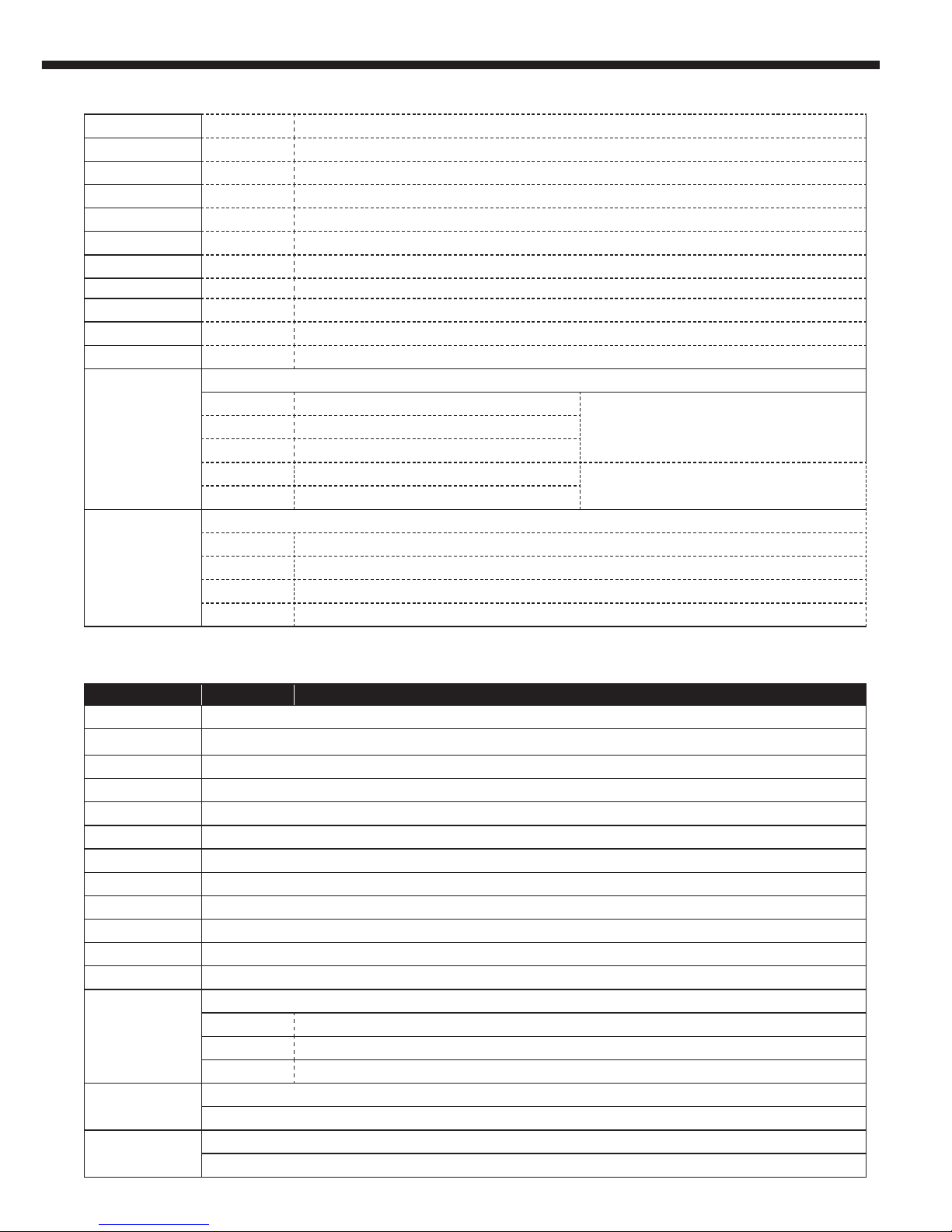
085 - 099 Ab1/Sb1 :Beam 1 automatic or music-sensitive mode
100 - 114 Ab2/Sb2 : Beam 2 automatic or music-sensitive mode
115 - 129 Ab3/Sb3 : Beam 3 aautomatic or music-sensitive mode
130 - 144 Ab4/Sb4 : Beam 4 automatic or music-sensitive mode
145 - 159 Ab5/Sb5 : Beam 5 automatic or music-sensitive mode
160 - 174 Ab6/Sb6 : Beam 6 automatic or music-sensitive mode
175 - 189 Ab7/Sb7 : Beam 7 automatic or music-sensitive mode
190 - 204 Ab8/Sb8 : Beam 8 automatic or music-sensitive mode
205 - 219 Ab9/Sb9 : Beam 9 automatic or music-sensitive mode
220 - 234 Ab10/Sb10 : Beam 10 automatic or music-sensitive mode
235 - 255 Ab11/Sb11 : Beam 1 to Beam 10 programs in auto or music-sensitive mode
9
Beam programs speed and strobe
000 - 005 No strobe
If channel 1 is set between 010 and 084006 - 250 Slow to fast strobe
251 - 255 Music-sensitive strobe
000 - 250 Beam programs at increasing speed
If channel 1 is set between 085 and 255
255 - 255 Beam programs in music-sensitive mode
10
Strobe
000 - 005 No function
006 - 010 Full power
011 - 250 Slow to fast strobe
251 - 255 Music-sensitive strobe
5.3 - 10-channel mode (final part)
5.4 - 19-channel mode
Channels Values Action
1
PAR 1 Red LEDs : Red from 0 to 100%
2
PAR 1 Green LEDs: Green from 0 to 100%
3
PAR 1 Blue LEDs: Blue from 0 to 100%
4
PAR 1 UV LEDs: UV from 0 to 100%
5
PAR 2 Red LEDs : Red from 0 to 100%
6
PAR 2 Green LEDs : Green from 0 to 100%
7
PAR 2 Blue LEDs : Blue from 0 to 100%
8
PAR 2 UV LEDs : UV from 0 to 100%
9
PAR 3 Red LEDs : Red from 0 to 100%
10
PAR 3 Green LEDs : Green from 0 to 100%
11
PAR 3 Blue LEDs Blue : Blue from 0 to 100%
12
PAR 3 UV LEDs UV : UV from 0 to 100%
13
PAR 1 to 3 dimmer
000 - 189 Dimmer from 0 to 100%
190 - 250 Slow to fast strobe
251 - 255 Full power
14
PAR programs
Identical to channel 6 in 10-channel mode
15
AP programs speed and SP programs music-sensitive mode
Identical to channel 7 in 10-channel mode
Page 11
TRIPTIC - Wash, Beam and Flash animation effect
Page 11
English
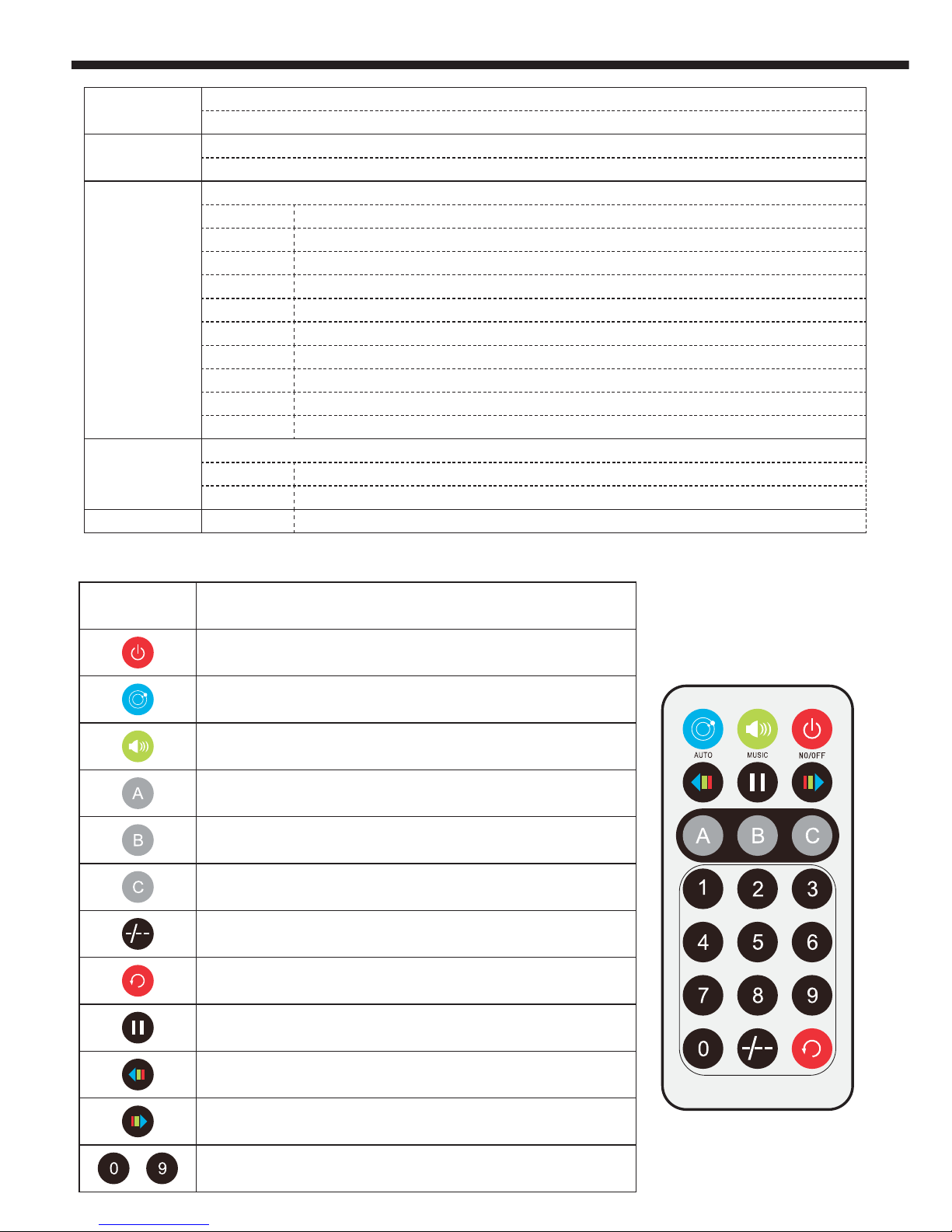
16
Beam programs
Identical to channel 8 in 10-channel mode
17
Beam programs speed and strobe
Identical to channel 9 in 10-channel mode
18
Flash programs
000 - 009 Blackout
010 - 036 AF9/SF9 : Sequence including Flash 1 to 7 in automatic or music-sensitive mode
037 - 063 AF1/SF1 : Flash 1 in music-sensitive or automatic mode
064 - 090 AF2/SF2 : Flash 2 in music-sensitive or automatic mode
091 - 117 AF3/SF3 : Flash 3 in music-sensitive or automatic mode
118 - 144 AF4/SF4 : Flash 4 in music-sensitive or automatic mode
145 - 171 AF5/SF5 : Flash 5 in music-sensitive or automatic mode
172 - 198 AF6/SF6 : Flash 6 in music-sensitive or automatic mode
199 - 225 AF7/SF7 : Flash 7 in music-sensitive or automatic mode
226 - 255 AF8/SF8 : Flash 7 in music-sensitive or automatic mode
19
Flash programs speed and music-sensitive mode
000 - 250 Flash programs at increasing speed
251 - 255 Flash programs in music-sensitive mode
Buttons
Action
Activates or deactivates Black-out
Mix programs selection in automatic mode
Mix programs selection in music-sensitive mode
PAR programs selection in automatic mode
Beam programs selection in automatic mode
Flash programs selection in automatic mode
No function
Switches between automatic and music-sensitive modes
Pause
PAR mode colour selection
Beam mode colour selection
>
Automatic modes speed settings
6 - Remote control
Page 12

Because CONTEST® takes the utmost care in its products to make sure you only get the best possible quality, our
products are subjects to modifications without prior notice. That is why technical specifications and the products
physical configuration might differ from the illustrations.
Make sure you get the latest news and updates about the CONTEST
®
products on www.contest-lighting.com
CONTEST® is a trademark of HITMUSIC S.A. - Zone Cahors sud - 46230 FONTANES - FRANCE
 Loading...