

Page 1
USER GUIDE
10667 - Version 1 / 02-2017
Page 2
English
RADIUS515 - 4° Beam effect with 5 x 15W 4-in-1 RGBW LEDs
Page 2
1 - Safety information
This symbol signals an important safety precaution.
The CAUTION symbol signals a risk of product deterioration.
The WARNING symbol signals a risk to the user’s physical integrity.
The product may also be damaged.
Important safety information
Symbols used
Any maintenance procedure must be performed by a CONTEST
authorised technical service. Basic cleaning operations must thoroughly follow our safety instructions.
This product contains non-isolated electrical components. Do not
undertake any maintenance operation when it is switched on as it
may result in electric shock.
This unit is intended for indoor use only. Do not use it in a wet,
or extremely cold/hot locations. Failure to follow these safety instructions could result in fire, electric shock, injury, or damage to
this product or other property.
WARNING : This unit contains no user-serviceable parts. Do not
open the housing or attempt any maintenance by yourself. In the
unlikely even your unit may require service, please contact your
nearest dealer.
In order to avoid any electrical malfunction, please do not use any
multi-socket, power cord extension or connecting system without
making sure they are perfectly isolated and present no defect.
Recycling your device
• As HITMUSIC is really involved in the environmental cause,
we only commercialise clean, ROHS compliant products.
• When this product reaches its end of life, take it to a
collection point designated by local authorities. The separate
collection and recycling of your product at the time of disposal
will help conserve natural resources and ensure that it is
recycled in a manner that protects human health and the
environment.
Instructions and recommendations
10 - Electric power supply :
This product can only be operated according to a very specific voltage. These
information are specified on the label located at the rear of the product.
11 - Power cords protection:
Power-supply cords should be routed so that they are not likely to be walked on or
pinched by items placed upon or against them, paying particular attention to cords at
lugs, convenience receptacles and the point where they exit from the fixture.
12 - Cleaning precautions :
Unplug the product before attempting any cleaning operation. This product should be
cleaned only with accessories recommended by the manufacturer. Use a damp cloth
to clean the surface. Do not wash this product.
13 - Long periods of non use :
Disconnect the unit’s main power during long periods of non use.
14 - Liquids or objects penetration :
Do not let any object penetrate this product as it may result in electric shock or fire.
Never spill any liquid on this product as it may infiltrate the electronic components
and result in electric shock or fire.
15 - This product should be serviced when :
Please contact the qualified service personnel if :
- The power cord or the plug has been damaged.
- Objects have fallen or liquid has been spilled into the appliance.
- The appliance has been exposed to rain or water.
- The product does not appear to operate normally.
- The product has been damaged.
16 - Inspection/maintenance :
Please do not attempt any inspection or maintenance by yourself. Refer all servicing
to qualified personnel.
17 - Operating environment :
Ambient temperature and humidity: +5 - +35°C, relative humidity must be less than
85% (when cooling vents are not obstructed).
Do not operate this product in a non-ventilated, very humid or warm place.
1 - Please read carefully :
We strongly recommend to read carefully and understand the safety instructions before
attempting to operate this unit.
2 - Please keep this manual :
We strongly recommend to keep this manual with the unit for future reference.
3 - Operate carefully this product :
We strongly recommend to take into consideration every safety instruction.
4 - Follow the instructions:
Please carefully follow each safety instruction to avoid any physical harm or property
damage.
5 - Avoid water and wet locations :
Do not use this product in rain, or near washbasins or other wet locations.
6 - Installation :
We strongly encourage you to only use a fixation system or support recommended
by the manufacturer or supplied with this product. Carefully follow the installation
instructions and use the adequate tools.
Always ensure this unit is firmly fixed to avoid vibration and slipping while operating
as it may result in physical injury.
7 - Ceiling or wall installation :
Please contact your local dealer before attempting any ceiling or wall installation.
8 - Ventilation :
The cooling vents ensure a safe use of this product, and avoid any overheating risk.
Do not obstruct or cover these vents as it may result in overheating and potential
physical injury or product damage. This product should never been operated in a
closed non-ventilated area such as a flight case or a rack, unless cooling vents are
provided for the purpose .
9 - Heat exposure :
Sustained contact or proximity with warm surfaces may cause overheating and product
damages. Please keep this product away from any heat source such as a heaters,
amplifiers, hot plates, etc...
Warning
This product is equipped with Class 2 LEDs.
Please avoid looking directly at the beam as it may cause
severe eye injuries.
Page 3

English
RADIUS515 - 4° Beam effect with 5 x 15W 4-in-1 RGBW LEDs
Page 3
Source lumineuse
• 5 x 15W RGBW LEDs
• 4-colours-in-1: Red, Green, Blue and White within the same source
• Expected lifespan of 50.000 hours
• Low temperature, low power consumption, can be operated non-stop for many hours
Colours
• Colour macro
• Colour presets
Effects
• Adjustable strobe from 1 - 20 flashes per second, random strombe and pulse effect
• Adjustable electronic dimmer from 0 - 100%
Controls
• Standard DMX-512
• 1, 2, 10, 22 or 26 DMX channels
• Built-in program accessible via DMX
• Built-in music-sensitive or automatic programs
• LCD drop-down display for choosing modes and assignation
Optical
• Beam angle: 4°
Additional characteristics
• Power consumption: 80W max.
• Power supply: AC 100/230V - 50/60Hz
• Double suspension bracket
• Dimensions: 525 x 280 x 250 mm
• Net weight: 5,870 Kg
2 - Introduction
3 - Technical specifications
Thank you for choosing our RADIUS515 projector. You are now in possession of a high-quality, powerful and intelligent projector,
which will use all its features to highlight your parties, animations, concerts...
NOTE :
The internal software can be updated via DMX and specific tools.
This update can only be performed by a qualified technician.
Page 4
English
RADIUS515 - 4° Beam effect with 5 x 15W 4-in-1 RGBW LEDs
Page 4
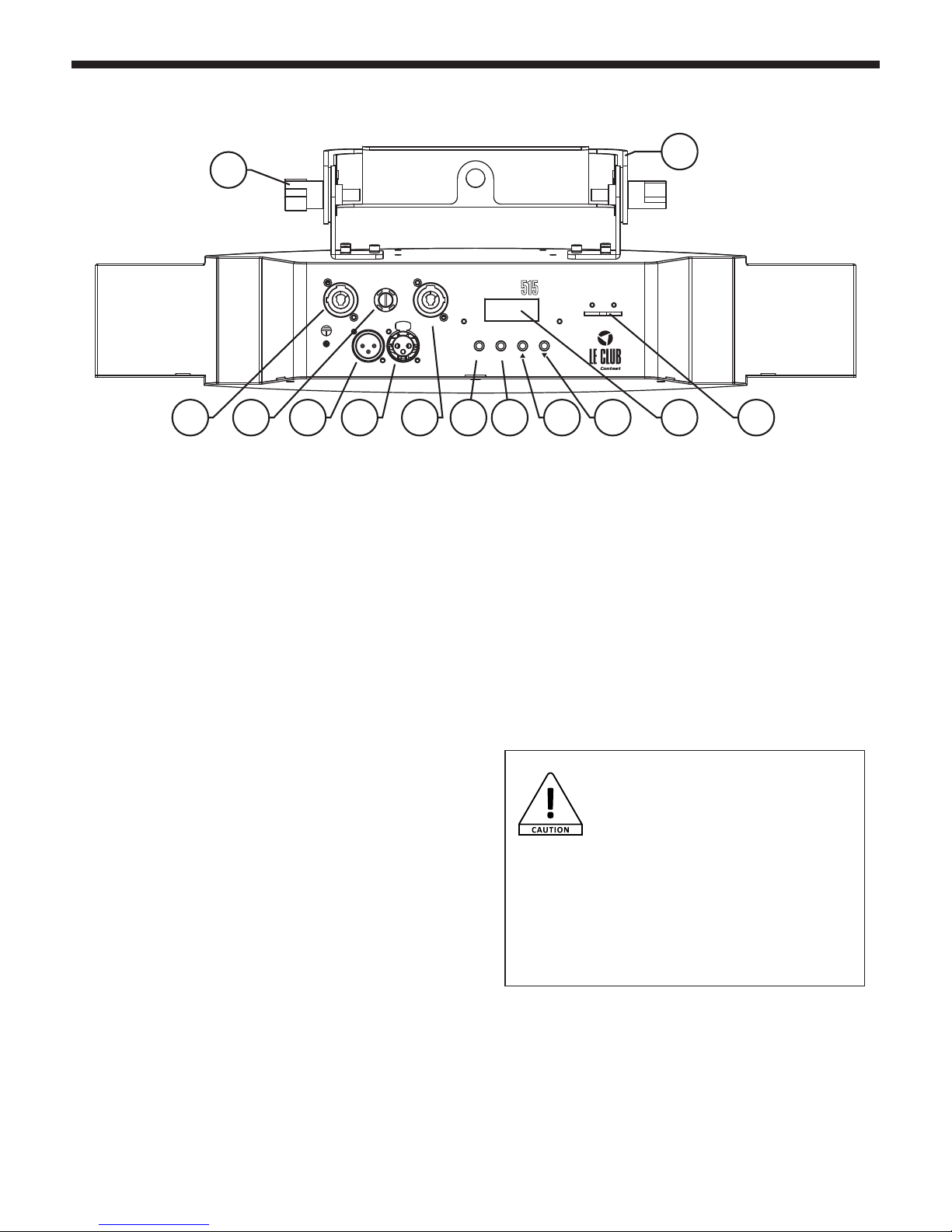
4 - Description
1 - Double suspension bracket
Allows you to suspend your projector or handle it on the ground
2 - Tightening wheel for suspension bracket
Allows to adjust the position of the projector and lock it in this
position.
3 - Power input
POWERCON© IN plug
4 - Fuse
If need to change the fuse, please make sure the new fuse has
the exact same characteristics as the old one.
5 - DMX Input via 3-pin XLR socket
3-pin XLR sockets hardwired as follows:
Pin 1 = GND
Pin 2 = DATA Pin 3 = DATA +
6 - DMX Output via 3-pin XLR socket
3-pin XLR sockets hardwired as follows:
Pin 1 = GND
Pin 2 = DATA Pin 3 = DATA +
7 - Power output
POWERCON© IN plug
8 - MODE Button
Allows you to enter menus or go back the menu tree.
Allows you to browse through menus and modify values.
9 - ENTER Button
Allows you to select functions and confirm chosen values.
Radius
SAFETY EYE
POWER IN POWER OUT
DMX IN DMX OUT
MODE ENTER
2
3
10 11 12 13
4 5 6 7 8 9
1
10 - UP button
Allows you to browse through menus and modify values.
11 - DOWN button
Allows you to browse through menus and modify values.
12 - DOWN button
Allows you to browse through menus and modify values.
13 - Safety ring
Allows to use a second safety cable. Double safety systems are
mandatory for usage in public places.
CAUTION!
Please make sure the tightening wheel is
securely fastened.
Using a safety cable is mandatory.
When using this device in public places,
current legislation requires that each devices features a
double fixation system to ensure its stability. This system
must hold up to 10 times times the weight of the device,
meaning you will be required to use a cable able to hold
60 kilos to support your RADIUS515.
Page 5
English
RADIUS515 - 4° Beam effect with 5 x 15W 4-in-1 RGBW LEDs
Page 5
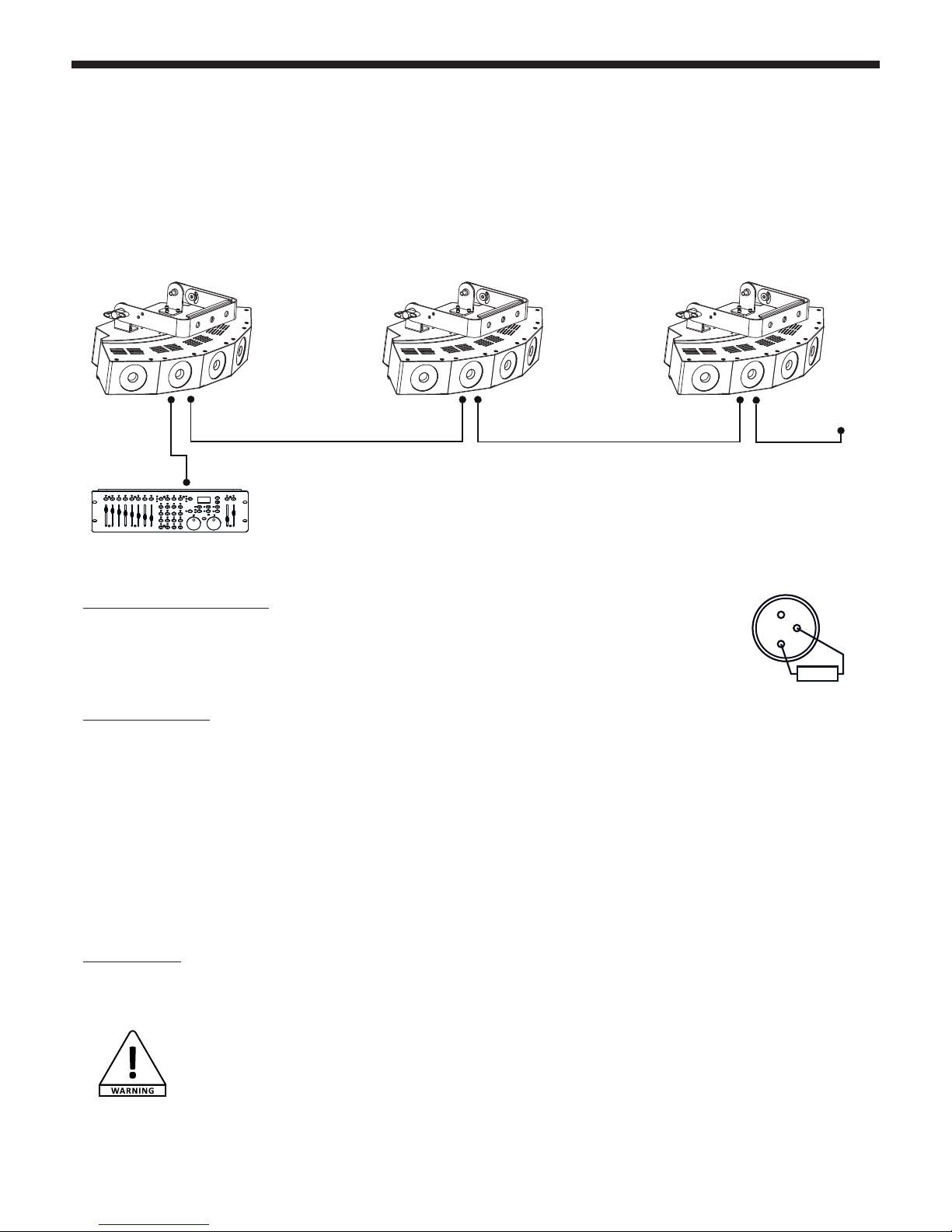
Using a DMX line termination :
When long runs of cable are used (more than 100m), you may need to use a terminator on the last unit to
avoid erratic behavior. A terminator is a 110-120 ohm 1/4 watt resistor which is connected between pins 2
and 3 of a male XLR connector. This unit is inserted in the female XLR connector of the last unit in your daisy
chain to terminate the line.
Adressing the units :
Every unit must have a DMX address in order to respond to DMX signals. The address corresponds to the channel number on which the
unit receives an incoming DMX signal sent by the DMX remote control. The DMX addressing can be performed by programming the
channel number via the display located on the base of the unit.
You can either assign the same address to your units so they all react to the same signal, or assign a unique address per unit to control
them independently.
In the example above, RADIUS515 uses 12 channels.
You must skip 12 channels between each address you assign.
The address of the first unit will be 1, the second unit will be13 (1+12), the third unit will be 25 (13+12) and so on.
NB : Once switched on, the RADIUS515 automatically detects any incoming DMX signal, and the display indicates"A.001" (the unit DMX
address). If the unit does not receive any DMX signal, the display will flash. In such a case, please make sure the cable is properly plugged
into the DMX input of your moving head, your remote control is switched on and the cables used are not defective.
Daisy chaining :
The POWERCON© input/output system allows you to daisy chain several RADIUS515 units.
Warning:
You cannot use the same chain to supply more than 43 RADIUS515 at 220V.
When using a 20th projector, please use a new power source
5 - Cabling, addressing and daisy chaining
Connecting the DMX remote control :
Connect the female plug of your XLR cable to your DMX remote control XLR output, then connect your cable male output to the
moving head. Daisy chain your moving heads with XLR cables.
1
2
R
3
120 Ω 1/4W
DMX controller
DMX line termi-
nation
Unit 1
Address 1
Unit 2
Address 13
Unit 3
Address 25
Page 6
English
RADIUS515 - 4° Beam effect with 5 x 15W 4-in-1 RGBW LEDs
Page 6
6 - Menu
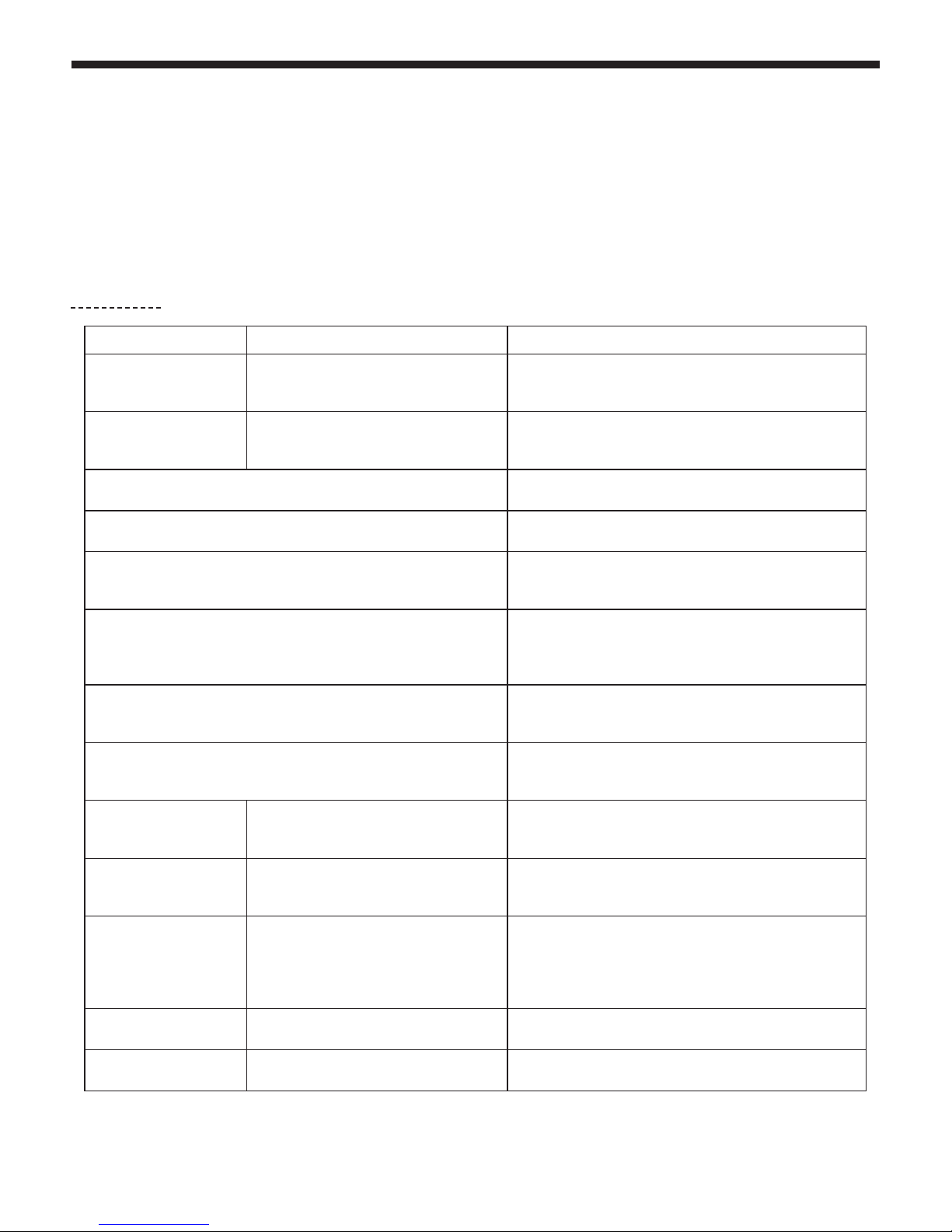
The RADIUS515 features many menus allowing you to configure its every move and function.
Press MODE / ESC to access the main menu.
Use the navigation keys to browse through submenus. Then press ENTER to access a submenu.
Use the UP and DOWN navigation keys to change values.
Press ENTER to save changes.
Press MODE /ESC again to leave a submenu.
Please note : Values in bold are the default values.
Menus Values Description
DMX Addr
XXX
001-512
DMX Address configuration.
The moving head automatically activates the DMX mode
once the DMX address has been configured.
DMX Mode
XXCH
CHANNEL
01, 02, 10, 22, 26
DMX Mode selection.
5 modes : 1, 2, 12, 22 or 28 DMX channels
More details about DMX modes in chapter 7.
SLAVE MODE Activates slave m ode
01.STATIC
CL:R F:255
Fixed colours
02.DREAM
SP00-99F000-255
Cross-fade sequence including preset colours.
SP : Sequence speed.
F : Strobe speed
03.METEOR
SP01-99F000-255
Step sequence including colour presets.
Please refer to DMX values for more details about these colours.
SP : Sequence speed.
F : Strobe speed.
04.FADE
SP01-99F000-255
Cross-fade sequence of all LEDs, including preset colours.
SP : Sequence speed.
F : Strobe speed
5.CHANG
SP01-99F000-255
Cross-fade sequence of all LEDs, including preset colours.
SP : Sequence speed.
F : Strobe speed
DimCurve
XXXXXXXX
DimCurve
Standard / Stage / TV / Architectural / Theatre
Please refer to chapter 6.2 for more detailsa bout dimmer curve
modes.
Manual
R:XXX
Manual
R:XXX / G:XXX / B:XXX / W:XXX /STR:XXX
Allows you to configure manually:
- Each colour (R,G, B and W) for all LEDs
- Strobe for all LEDs
NO DMX
XXX
NO DMX
HOLD / Blackout / Sound
Allows you to determine the behaviour of your projector in case
of DMX signal interruption:
• Blackout: The projector blacks out
• Hold: The projector holds onto the last information received
• Sound: The projector enters music-sensitive mode
PIX FLIP
FLIPX
PIX FLIP
FLIP1 / FLIP2
Allows you to revert sequences
Macros
XX
Macros
00 / 63
Allows you to select one out of the 63 available macros
6.1 Menu tree
Page 7
English
RADIUS515 - 4° Beam effect with 5 x 15W 4-in-1 RGBW LEDs
Page 7
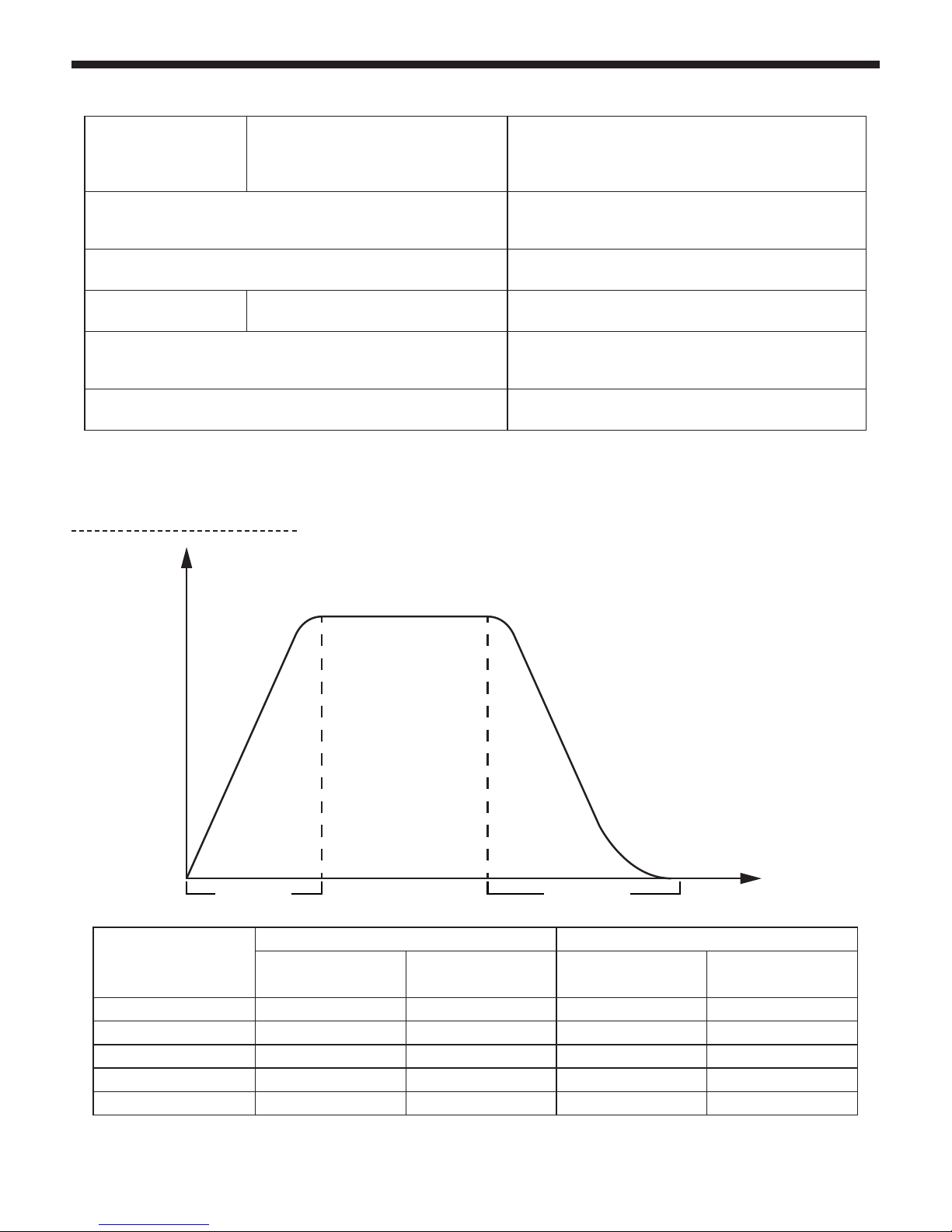
Dimmer modes
De 0 à 255 avec un fade time de 0 seconde De 0 à 255 avec un fade time de 1 seconde
Temps de montée en
milliseconde
Temps de descente en
milliseconde
Temps de montée en
milliseconde
Temps de descente en
milliseconde
Standard 0000
Scene 780 1100 1540 1660
Television 1180 1520 1660 1940
Architectural 1380 1730 2040 2120
Theatre 1580 1940 2230 2280
6.2 More about the dimmer curves
SoundMod
Sens: XX
SoundMod
Sens:00 /31
Activates the music-sensitive mode.
Sound sensitivity relies on Sens values:
- Sens:00 : Microphone deactivated
- Sens:31 : Maximum sensitivity
TempUnit
°C / F
Allows you to set the temperature unit:
°C : Celsius degrees
F : Fahrhenheit degrees
Temp.
XXX°C / XXX F
Displays the internal temperature
Whitebal
LEDX
Whitebal
LED1 / LED2 / LED3 / LED4 / LED5
Allows you to calibrate the colour of each LED.
R,G,B and W levels can be configured for each LED.
AutoLock
ON / OFF
Allows you to lock menu commands after a 3-second period of
inactivity.
Press the MENU button for more than 3 seconds to unlock it.
DFSE
ON / OFF
Resets back to factory settings
100%
50%
10%
0
0
Rise time Fall time
t (ms)
Page 8
English
RADIUS515 - 4° Beam effect with 5 x 15W 4-in-1 RGBW LEDs
Page 8
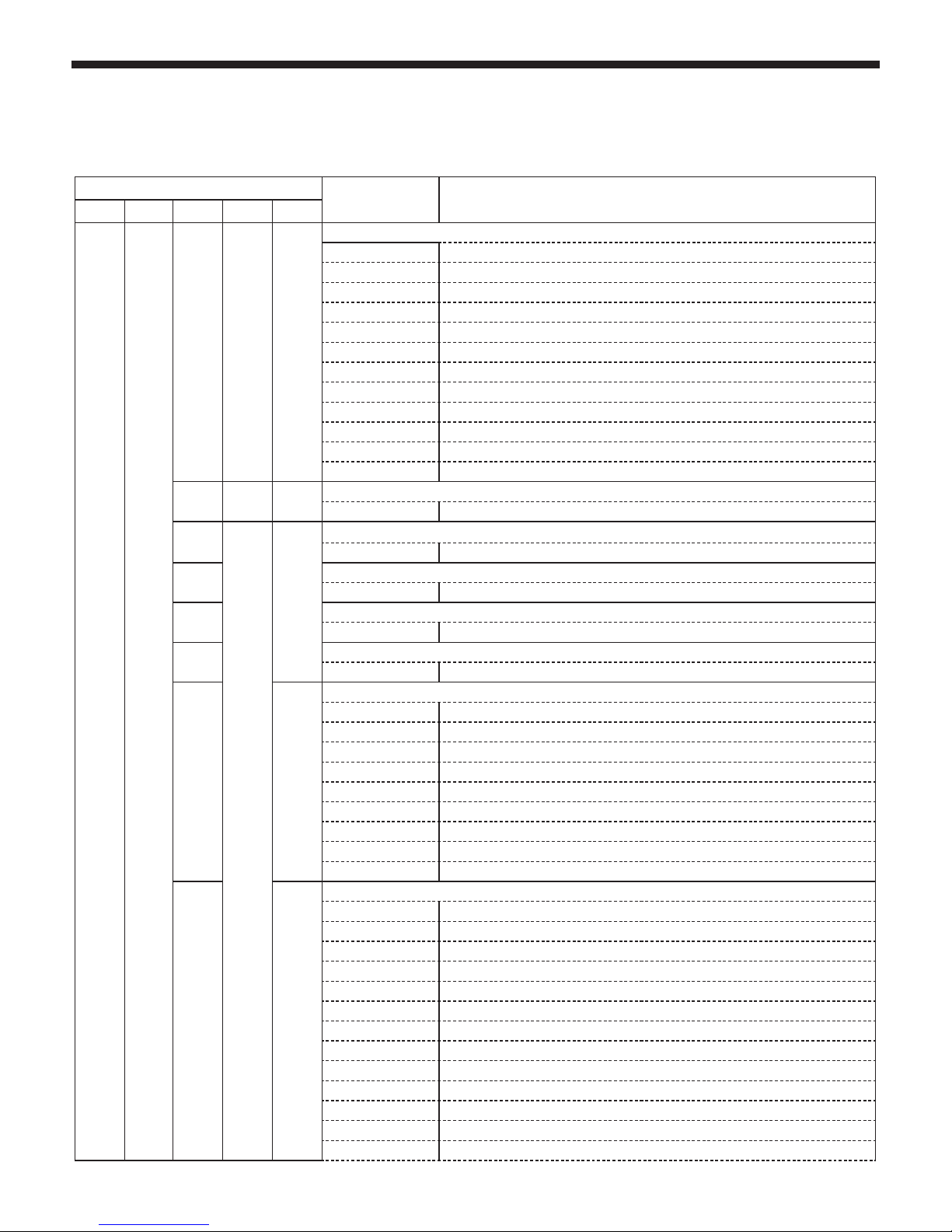
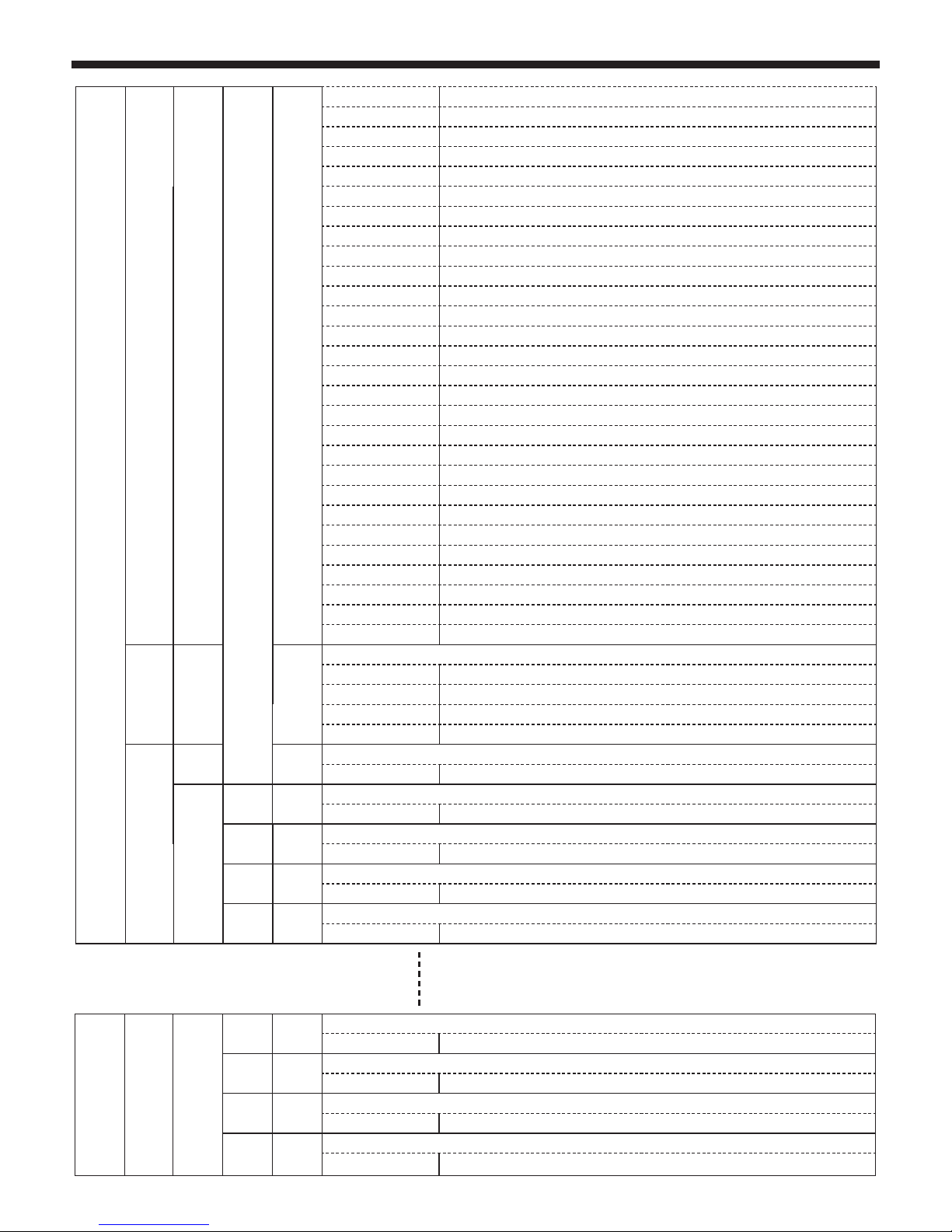
Your RADIUS515S projector features 5 DMX modes:
The following chart indicates the DMX values and functions of each mode.
7 - DMX channels and functions
Modes / Channels
DMX Values Functions and effects
1 CH 2CH 10CH 22CH 26CH
111
Shutter et Strobe
000 - 007 LEDs off
008 - 014 No function, LEDs on
015 - 054 Slow to fast strobe
055 - 061 No function, LEDs on
062 - 101 Slow to fast pulse effect
102 - 108 No function, LEDs on
109 - 148 Slow to fast random strobe
149 - 155 No function, LEDs on
156 - 195 Slow to fast pulse effect on each LED in random strobe mode
196 - 202 No function, LEDs on
203 - 242 Random strobe mode on each LED
243 - 255 No function, LEDs on
222
Main dimmer
000 - 255 Dimmer from 0 to 100%
3
All Red LEDs
000 - 255 000 : Black out - 255 : red 100%
4
All Green LEDs
000 - 255 000 : Black out - 255 : green 100%
5
All Blue LEDs
000 - 255 000 : Black out - 255 : blue 100%
6
All White LEDs
000 - 255 000 : Black out - 255 : white 100%
73
Colour macros
000 - 007 No function
008 - 039 Red to Yellow sequence
040 - 071 Yellow to Green sequence
072 - 103 Green to Cyan sequence
104 - 135 Cyan to Blue sequence
136 - 167 Blue to Magenta sequence
168 - 199 Magenta to Red sequence
200 - 231 Red to White sequence
232 - 255 Slow to fast Rainbow sequence
84
Colour presets and sequences
000-004 No function
005-009 White 2700°K
010-014 White 3200°K
015-019 White 4300°K
020-024 White 5600°K
025-029 White 6500°K
030-034 White 8000°K
035-039 Yellow
040-044 Magenta
045-049 Cyan
050-054 Salmon
055-059 Turquoise
060-064 Light Green
Page 9
English
RADIUS515 - 4° Beam effect with 5 x 15W 4-in-1 RGBW LEDs
Page 9
8
(conti-
nuation)
4
(conti-
nua-
tion)
065-069 Metal Blue
070-074 Orange
075-079 Straw
080-084 Light Lavender
085-089 Pink
090-094 Green
095-099 Red
100-104 Blue
105-109 White
110-114 Rainbow effect 1
115-119 Rainbow effect 2
120-124 Rainbow effect 3
125-129 Rainbow effect 4
130-134 Rainbow effect 5
135-139 Rainbow effect 6
140-144 Rainbow effect 7
145-149 Rainbow effect 8
150-154 Rainbow effect 9
155-159 Rainbow effect 10
160-164 Rainbow effect 11
165-169 Rainbow effect 12
170-174 Rainbow effect 13
175-179 Rainbow effect 14
180-184 Rainbow effect 15
185-189 Rainbow effect 16
190-194 Rainbow effect 17
195-199 Rainbow effect 18
200-255 Rainbow effect 19
29 5
Sequences speed
000 - 120 Clockwise increasing speed
121 - 125 Stop
126 - 246 Counterclockwise increasing speed
247 - 255 Music-sensitive mode
10 6
Crossfade speed
000 - 255 No crossfade to slow crossfade
37
Red LED 1
000 - 255 000 : Black out - 255 : red 100%
48
Green LED 1
000 - 255 000 : Black out - 255 : green 100%
59
Blue LED 1
000 - 255 000 : Black out - 255 : blue 100%
610
White LED 1
000 - 255 000 : Black out - 255 : white 100%
19 23
Red LED 5
000 - 255 000 : Black out - 255 : red 100%
20 24
Green LED 5
000 - 255 000 : Black out - 255 : green 100%
21 25
Blue LED 5
000 - 255 000 : Black out - 255 : blue 100%
22 26
White LED 5
000 - 255 000 : Black out - 255 : white 100%
Page 10

English
RADIUS515 - 4° Beam effect with 5 x 15W 4-in-1 RGBW LEDs
Page 10
11
Preset colours and sequences
000 - 009 No function
010 - 012 Yellow
013 - 015 Magenta
016 - 018 Cyan
019 - 021 Metal Blue
022 - 024 Orange
025 - 027 Pink
028 - 030 Red
031 - 033 Green
034 - 036 Blue
037 - 039 White
040 - 045 Rainbow effect 1
046 - 051 Rainbow effect 2
052 - 057 Rainbow effect 3
058 - 063 Rainbow effect 4
064 - 069 Rainbow effect 5
070 - 075 Rainbow effect 6
076 - 081 Rainbow effect 7
082 - 087 Rainbow effect 8
088 - 093 Rainbow effect 9
094 - 099 Rainbow effect 10
100 - 105 Rainbow effect 11
106 - 111 Rainbow effect 12
112 - 117 Rainbow effect 13
118 - 124 Rainbow effect 14
125 - 129 Rainbow effect 15
130 - 135 Rainbow effect 16
136 - 141 Rainbow effect 17
142 - 147 Rainbow effect 18
148 - 153 Rainbow effect 19
154 - 159 Automatic program 1
160 - 165 Automatic program 2
166 - 171 Automatic program 3
172 - 177 Automatic program 4
178 - 183 Automatic program 5
184 - 189 Automatic program 6
190 - 197 Automatic program 7
198 - 201 Automatic program 8
202 - 207 Automatic program 9
208 -213 Automatic program 10
214 - 219 Automatic program 11
220 - 225 Automatic program 12
226 - 231 Automatic program 13
232 - 237 Automatic program 14
238 - 243 Automatic program 15
244 - 255 Automatic programs 1 to 15 in music-sensitive mode
Page 11
English
RADIUS515 - 4° Beam effect with 5 x 15W 4-in-1 RGBW LEDs
Page 11
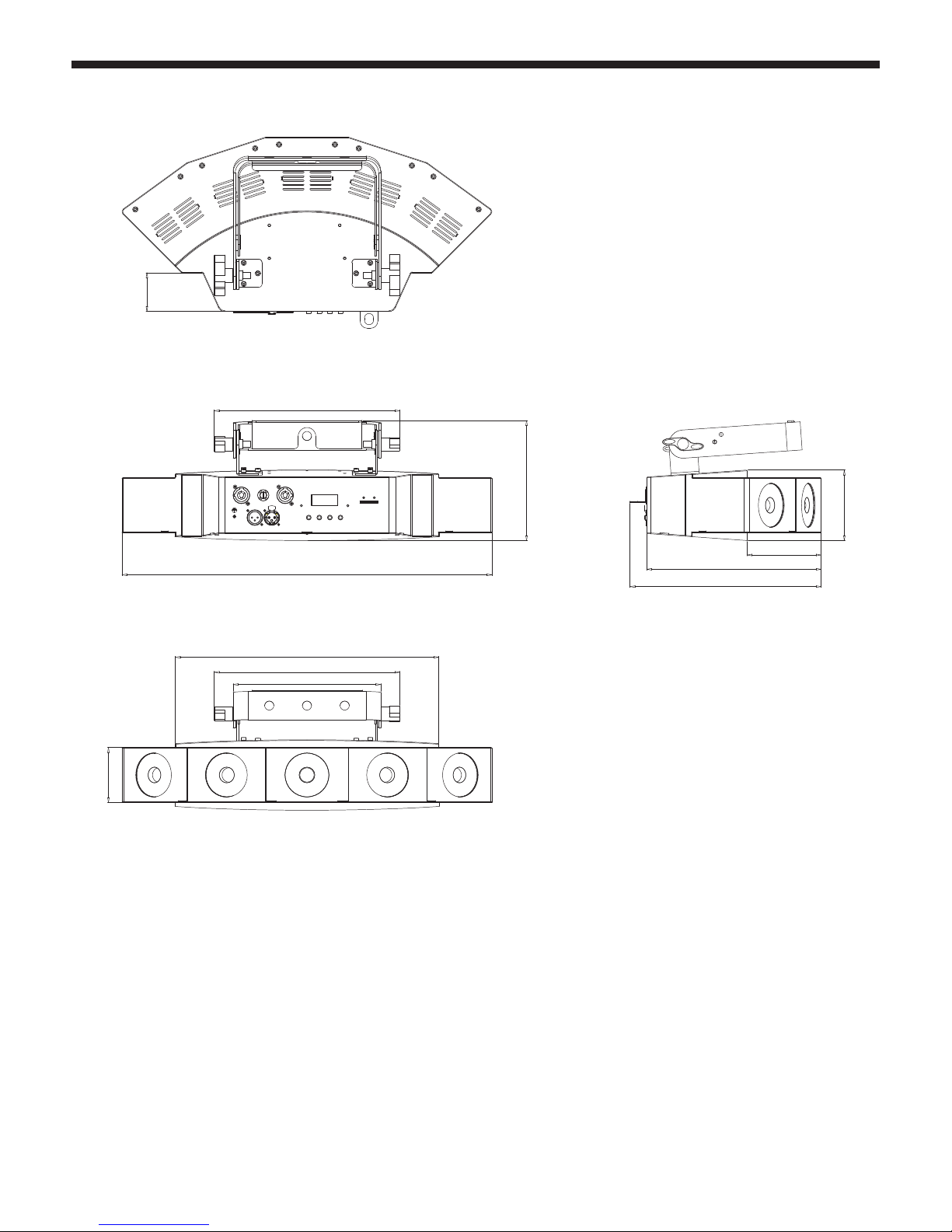
8 - Dimensions
524.98mm [20.67in]
100mm [3.94in]
247.38mm [9.74in]
271.18mm [10.68in]
105.38mm [4.15in]
263.5mm [10.37in]
170.26mm [6.70in]
78mm [3.07in]
373.94mm [14.72in]
209.5mm [8.25in]
263.5mm [10.37in]
55mm [2.17in]
Page 12

Because CONTEST® takes the utmost care in its products to make sure you only get the best possible quality, our
products are subjects to modifications without prior notice. That is why technical specifications and the products
physical configuration might differ from the illustrations.
Make sure you get the latest news and updates about the CONTEST® products on www.contest-lighting.com
CONTEST® is a trademark of HITMUSIC S.A.S - Zone Cahors sud - 46230 FONTANES - FRANCE
 Loading...