

Page 1
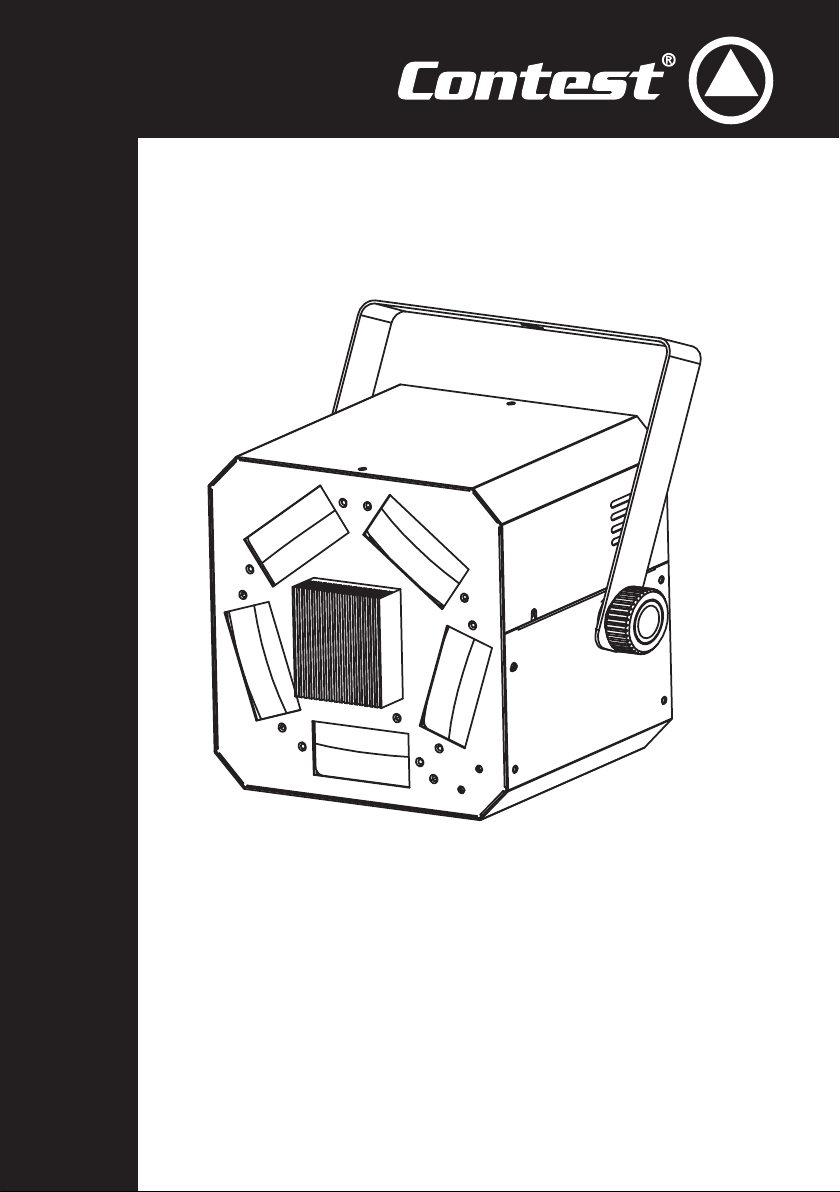
LED GUN
10W RGBW LED MULTI-BEAM ANIMATION EFFECTS
USER GUIDE
9541 - July 2014 - Version 2
Page 2

English
LED-GUN - 10W RGBW LED Multi-beam animation effects
Page 2
Page 3
LED-GUN - 10W RGBW LED Multi-beam animation effects
1 - Safety information
Important safety information
English
This unit is intended for indoor use only. Do not use it in a wet,
or extremely cold/hot locations. Failure to follow these safety instructions could result in fire, electric shock, injury, or damage to
this product or other property.
Any maintenance procedure must be performed by a CONTEST
authorised technical service. Basic cleaning operations must thoroughly follow our safety instructions.
This product contains non-isolated electrical components. Do not
undertake any maintenance operation when it is switched on as
it may result in electric shock.
WARNING : This unit contains no user-serviceable parts. Do not open the
housing or attempt any maintenance by yourself. In the unlikely even your unit
may require service, please contact your nearest dealer.
Warning
This product is equipped with Class 2 LEDs.
Please avoid looking directly at the beam as it may
cause severe eye injuries.
Recycling your device
• As HITMUSIC is really involved in the environmental cause, we only commercialise clean, ROHS compliant products.
• When this product reaches its end of life, take it to a collection point designated by local authorities. The separate collection and recycling of your
product at the time of disposal will help conserve natural resources and ensure that it is recycled in a manner that protects human health and the
environment.
Risk of electric shock
In order to avoid any electrical malfunction,
please do not use any multi-socket, power cord
extension or connecting system without making
sure they are perfectly isolated and present no
defect.e.
Symbols used
This symbol signals an important safety
precaution.
Note : The legislation requires that every device set up in a public space features a double
fixation bracket. This security system must hold 10 times the weight of the device.
The CAUTION symbol signals a risk of product deterioration.
The WARNING symbol signals a risk to the user’s physical integrity.
The product may also be damaged.
Page 3
Page 4
English
Instructions and recommendations
LED-GUN - 10W RGBW LED Multi-beam animation effects
1 - Please read carefully :
We strongly recommend to read carefully and understand
the safety instructions before attempting to operate this unit.
2 - Please keep this manual :
We strongly recommend to keep this manual with the unit for
future reference.
3 - Operate carefully this product :
We strongly recommend to take into consideration every
safety instruction.
4 - Follow the instructions:
Please carefully follow each safety instruction to avoid any
physical harm or property damage.
5 - Avoid water and wet locations :
Do not use this product in rain, or near washbasins or other
wet locations.
6 - Installation :
vibration and slipping while operating as it may result in
physical injury.
7 - Ceiling or wall installation :
Please contact your local dealer before attempting any ceiling
or wall installation.
8 - Ventilation :
The cooling vents ensure a safe use of this product, and avoid
any overheating risk.
Do not obstruct or cover these vents as it may result in
overheating and potential physical injury or product damage.
This product should never been operated in a closed nonventilated area such as a flight case or a rack, unless cooling
vents are provided for the purpose .
9 - Heat exposure :
Sustained contact or proximity with warm surfaces may cause
overheating and product damages. Please keep this product
away from any heat source such as a heaters, amplifiers, hot
plates, etc...
10 - Electric power supply :
11 - Power cords protection:
and the point where they exit from the fixture.
We strongly encourage you to only use a
fixation system or support recommended by
the manufacturer or supplied with this product.
Carefully follow the installation instructions and
use the adequate tools.
Always ensure this unit is firmly fixed to avoid
This product can only be operated according to
a very specific voltage. These information are
specified on the label located at the rear of the
product.
Power-supply cords should be routed so that they
are not likely to be walked on or pinched by items
placed upon or against them, paying particular
attention to cords at lugs, convenience receptacles
12 - Cleaning precautions :
13 - Long periods of non use :
14 - Liquids or objects penetration :
electric shock or fire.
15 - This product should be serviced when :
16 - Inspection/maintenance :
Please do not attempt any inspection or maintenance by
yourself. Refer all servicing to qualified personnel.
17 - Operating environment :
Unplug the product before attempting any cleaning
operation. This product should be cleaned only with
accessories recommended by the manufacturer.
Use a damp cloth to clean the surface. Do not
wash this product.
Disconnect the unit’s main power during long
periods of non use.
Do not let any object penetrate this product as it
may result in electric shock or fire.
Never spill any liquid on this product as it may
infiltrate the electronic components and result in
Please contact the qualified service personnel if :
- The power cord or the plug has been damaged.
- Objects have fallen or liquid has been spilled into
the appliance.
- The appliance has been exposed to rain or water.
- The product does not appear to operate normally.
- The product has been damaged.
Ambient temperature and humidity: +5 - +35°C,
relative humidity must be less than 85% (when
cooling vents are not obstructed).
Do not operate this product in a non-ventilated,
very humid or warm place..
Page 4
Page 5

LED-GUN - 10W RGBW LED Multi-beam animation effects
2 - Introduction
Thank you for purchasing the LED-GUN.
It features a new, revolutionary TRI technology producing incredible colours.
Its high-quality optical system creates laser-like, colour full effects.
The LED-GUN has an important lifespan, extended by its 1.8° stepper motor.
This technology allows fluid and precise movements even in music-sensitive mode.
3 - Specifications and installation
3.1 - Technical specifications
• Light source: RGBW CREE LED
• LED: 10W
• Advanced LED technology (lifespan of 30 000 hours approximately)
• 57 incredibly sharp beams
• Low temperature, low power consumption, can be operated non-stop for many hours
• Modes:
- DMX
- Automatic
- Music-sensitive
- Compatible with the Easy-2 remote control
• 1 or 3 DMX channels: Dimmer/strobe, colours, rotation
• Master / Slave (Music-sensitive or automatic)
• Beamwidth: 60°
• Cooling fan
• Power supply: 100~240V, 50/60Hz
• Power consumption: 25,3 Watts
• Dimensions: 271 x 176 x 213 mm
• Net weight: 4 kg
English
3.2 - Installation
The LED-GUN was designed to be attached to structures or on the ground, via an adapted support.
We strongly recommend to use a double hanging system with safety cable in case of failure of the main suspension
bracket. The safety cable must be able to bear 10 times the weight of the LED-GUN.
The installation must be performed by a qualified technician.
Please make sure that no one can reach the projector once it is set up.
4 - Getting started
4.1 - Initialisation
Your LED-GUN is not equipped with any power switch.
As a result, your device is ready to go as soon as it is connected to an electrical outlet.
Once powered up, your LED-GUN will perform an initialisation before being fully operational.
If dipswitches are in automatic mode, it will launch its internal programmation by itself, however if a DMX signal is
detected via the DMX input it will await DMX information.
Page 5
Page 6
English
4.2 - Description
LED-GUN - 10W RGBW LED Multi-beam animation effects
1
2
Mic
3
Only for
Easy-2
Controller
DMX In
4
DMX Out
5
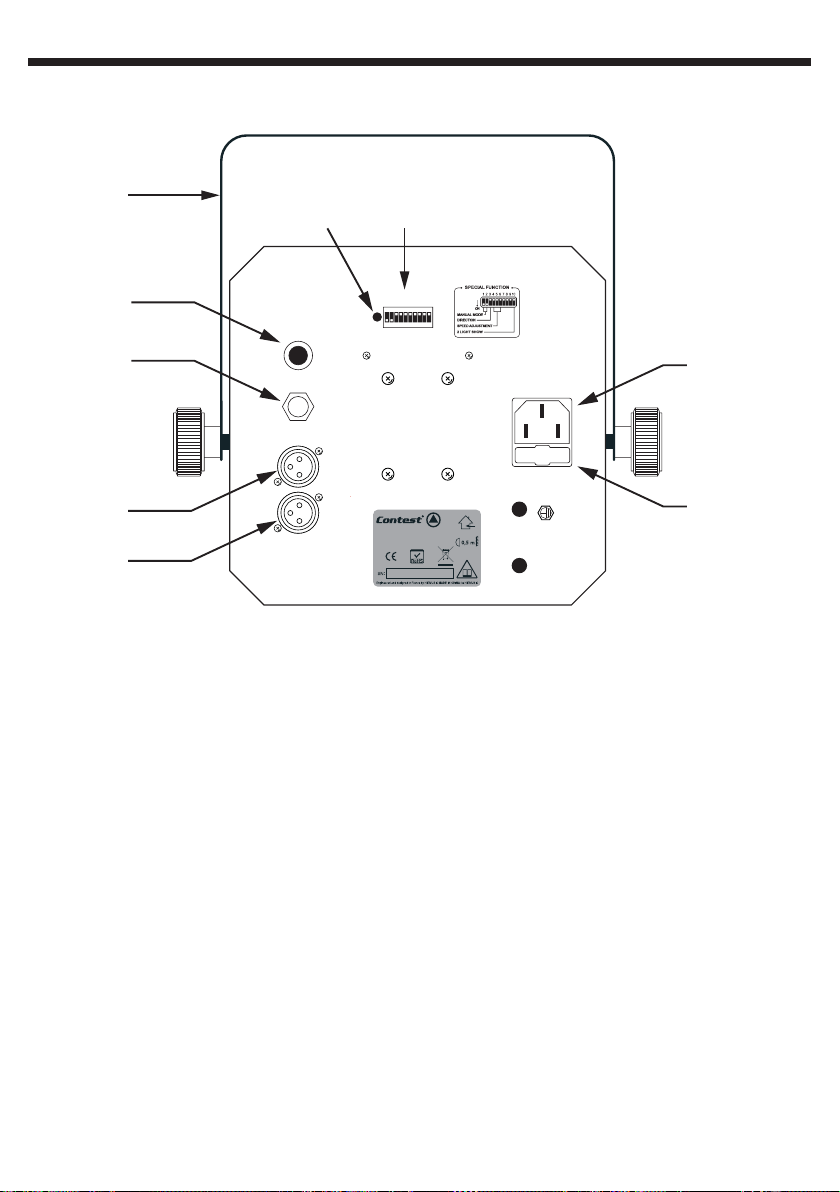
1 - Hanging bracket
Allows you to fix your device to structures.
It is mandatory to use a safety cable when
setting up your device in public places.
2 - Microphone
Allows music-sensitive modes.
3 - Remote control input
Allows you to connect your EASY-2 remote
control.
Only this remote control is compatible with
the LED-GUN, please do not try to connect
other remote controls as it may cause severe
damages to the internal components of your
device.
4 - DMX Output
Allows you to daisy-chain more units.
5 - DMX Input
Allows you to receive an incoming signal from
a controller or Master unit.
89
DMX Adress Select
124
8
163264
Model : LED-GUN
Code : 9541
Power : 230V - 50Hz - 12,5W max.
Fuse : T2A - 250V
128
256
Option
Power Input
230V - 50Hz
Fuse
T2A - 250V
7
6
6 - Fuse
Protects your LED-GUN. If need to replace
this fuse, please make sure the new one is a
2A, 5 x 20 mm fuse.
Do not use a more powerful fuse as the LEDGUN internal wiring was not designed to resist
to more important loads.
7 - Power input
Connect here the supplied power cord.
8 - Dipswitches
Allow you to configure the behaviour of your
device in Auto mode or set the initial DMX
address.
Please refer to paragraph 4.4, 4.6 and 4.8 for
more details.
9 - LED
This LED indicates the status of your device:
- In auto mode, it lights up for each sound
impulse.
- In DMX mode, it regularly and constantly
flashes.
Page 6
Page 7
LED-GUN - 10W RGBW LED Multi-beam animation effects
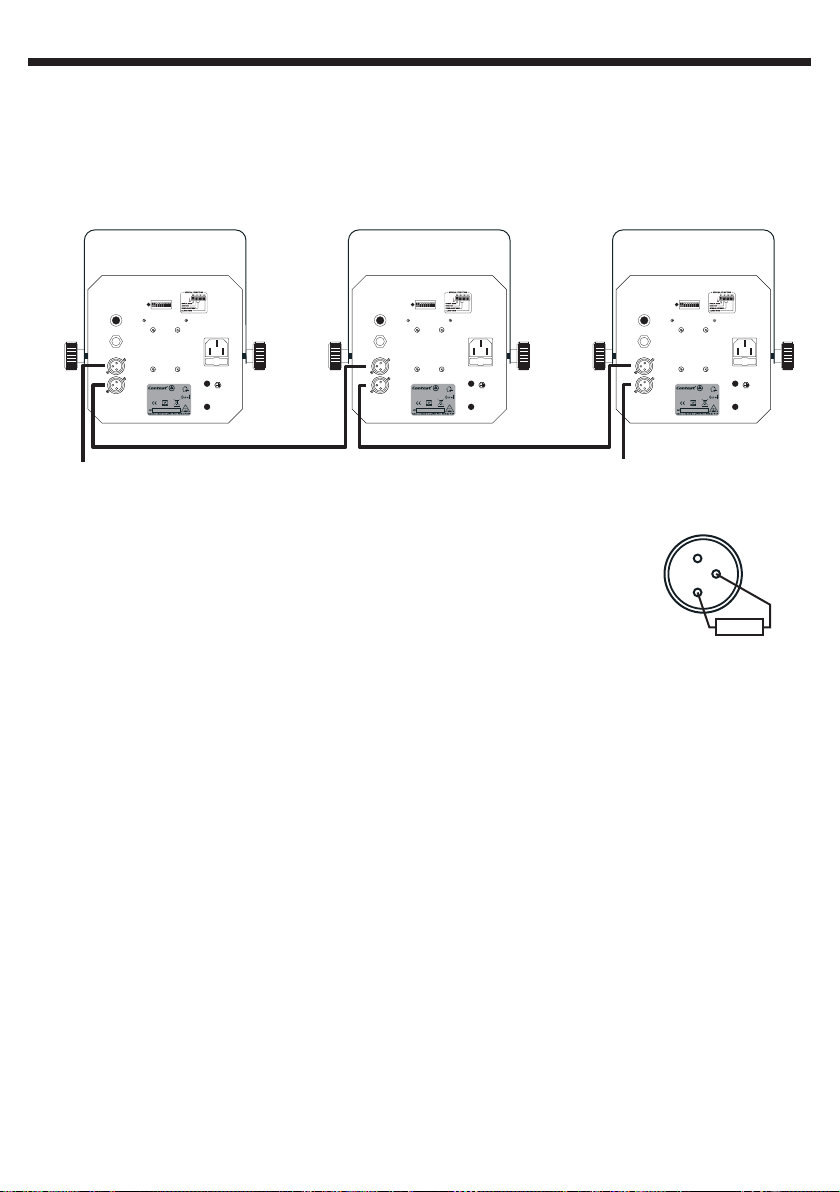
4.3 - Connections
Connect the your device to an electrical outlet.
In Master / Slave mode, connect the slave units to the DMX output of the Master device.
The DMX input of your master device must not be connected.
In DMX mode, connect the DMX remote control to the input of your first device, then daisy-chain the
other units.
English
DMX Adress Select
124
8
163264
Mic
128
256
Model : LED-GUN
Code : 9541
Power : 230V - 50Hz - 12,5W max.
Fuse : T2A - 250V
Option
Power Input
230V - 50Hz
Fuse
T2A - 250V
Only for
Easy-2
Controller
DMX In
DMX Out
Entrée DMX Sortie DMX
DMX input
DMX Adress Select
124
8
163264
Mic
128
256
Model : LED-GUN
Code : 9541
Power : 230V - 50Hz - 12,5W max.
Fuse : T2A - 250V
Option
Power Input
230V - 50Hz
Fuse
T2A - 250V
Only for
Easy-2
Controller
DMX In
DMX Out
DMX Adress Select
124
8
163264
Mic
128
256
Model : LED-GUN
Code : 9541
Power : 230V - 50Hz - 12,5W max.
Fuse : T2A - 250V
Option
Only for
Easy-2
Controller
DMX In
DMX Out
DMX output
- You will be required to acquire a 5-pin to 3-pin adapter when using a 5-pin XLR
remote control.
- If setting up a large DMX circuit (more than 100m), we strongly recommend to use
an end termination (120 Ohms resistor placed between pins 2 and 3 of your XLR
1
3
2
socket), as described by the drawing opposite.
:
4.4 - = Master / Slave mode
Connect the DMX IN to DMX OUT of your devices in order for the first unit to control the others. Its
internal microphone will synchronise the animations of all devices.
This function allows you to create precise lighting effects.
The master unit is easy to spot as it is the only one not connected via its DMX input.
The Master / Slave function overrides all dipswitches but requires the dipswitch 1 of the Master unit to
be activated.
Power Input
230V - 50Hz
Fuse
T2A - 250V
R
Activating the Master / Slave mode:
- The master unit must have dipswitch 1 positioned onto ON, while all others are OFF.
- The slave units must have dipswitch 1 positioned onto OFF, the position of their other dipswitches
does not matter.
Reversing the Slave units movements:
When dipswitch 10 is positioned onto OFF, the slave unit will mimic the Master unit movements.
However, when dipswitch 10 is positioned onto ON, the slave unit is in reversed mode, meaning its
colours remain synchronised to the Master unit, but its movements are reversed.
Dipswitch 10 must be reversed in DMX mode.
Page 7
Page 8
English
LED-GUN - 10W RGBW LED Multi-beam animation effects
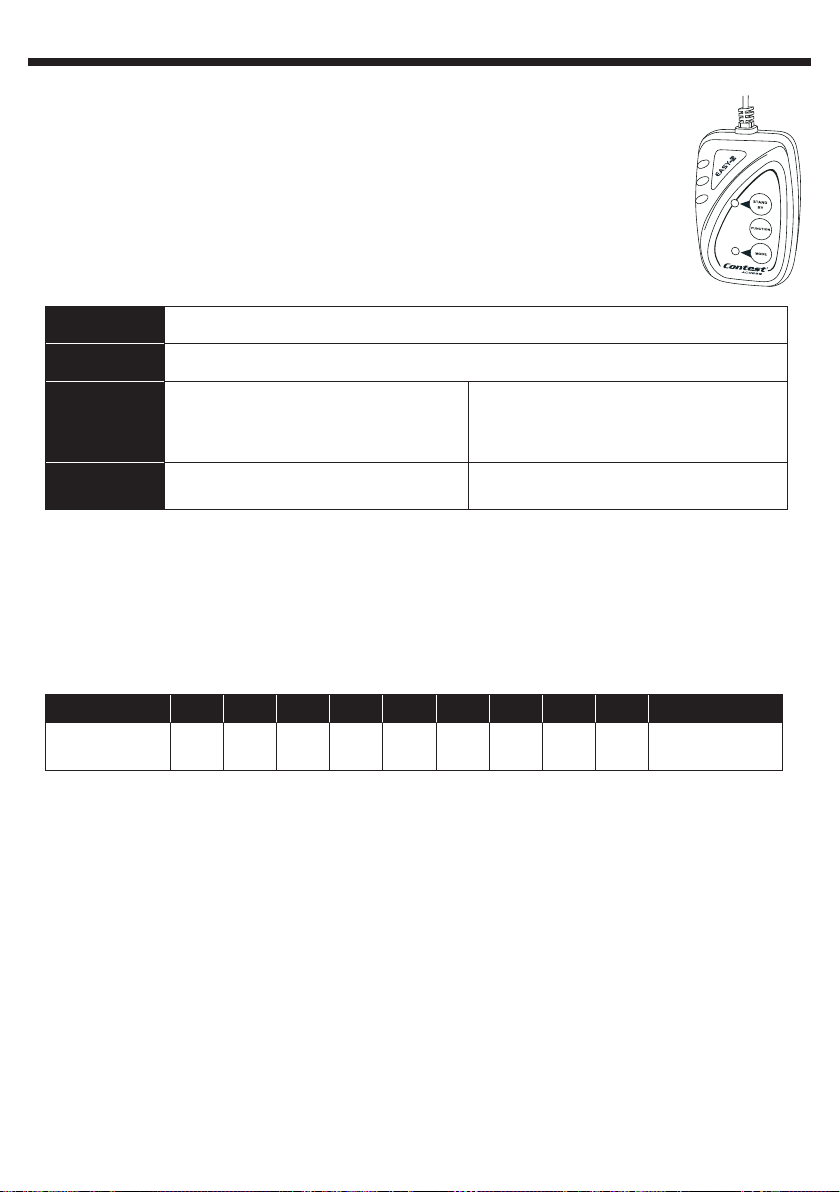
4.5 - Using the EASY-2 remote control (optional)
The EASY-2 remote control is straightforward and easy to install. It is able to control several
units synchronised with the Master/Slave mode.
Plug your remote control into the Master projector Jack 6.35 chassis called «Remote control», and
daisy-chain the additional units via the XLR plugs, as you would for a regular DMX cabling. This
remote control gives you access to the following functions: black-out, strobe, and show selection,
show speed.
Button Action
STAND - BY
FUNCTION
MODE
Black-out: LED OFF
1 : Synchronised strobe
2 : 2-colour strobe
3 : Music-sensitive strobe
Strobe mode
The remote control LED is OFF
Rotation speed from 1 to 8
Rotation mode
The remote control LED is ON
4.6 - Using the DMX mode
When using a DMX remote control, your devices must be connected via their XLR socket.
Each device must have a DMX address to be able to receive information sent via the DMX remote
control. The address can be set anywhere between 0 - 511.
Dipswitches #1 #2 #3 #4 #5 #6 #7 #8 #9 #10
Decimal value
Examples:
Address 5: Activate dipswitches #1 and #3 (Values 1+4=5)
Address 9: Activate dipswitches #1 and #4 ( Values 1+8=9)
If two units are supposed to act in the exact same way, you can assign the same address for both.
1 2 4 8 16 32 64 128 256
DMX mode
selection
Page 8
Page 9
LED-GUN - 10W RGBW LED Multi-beam animation effects
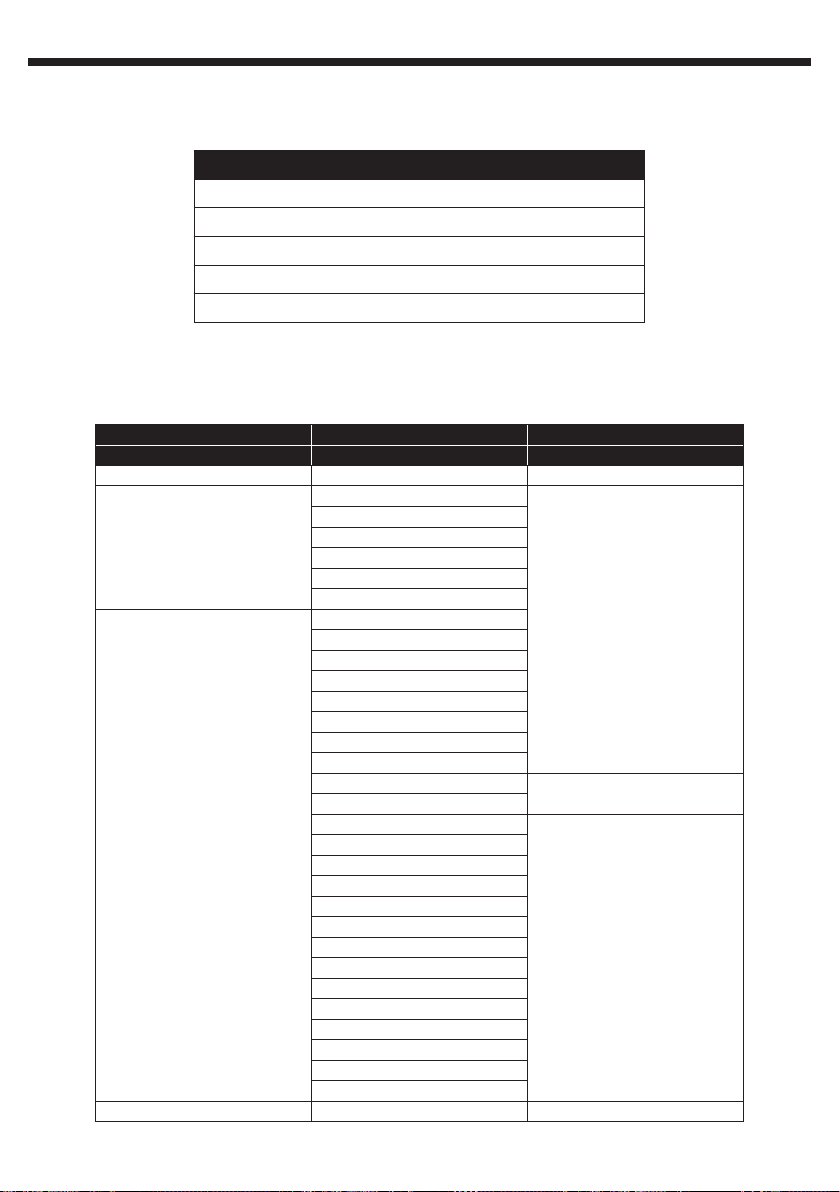
4.7 - DMX Values
4.7.1 - 1-channel mode
CHANNEL 1
250 - 255: Music-sensitive mode
140 - 249: Counterclockwise, slow to fast rotation
125 - 139: No rotation
015 - 124: Clockwise, fast to slow rotation
000 - 014: OFF
4.7.2 - 3-channel mode
CHANNEL 1 CHANNEL 2 CHANNEL 3
Dimmer / Strobe Colours Rotation
248 - 255: Open 248 - 255 : Colour 32 246 - 255: Stop
240 - 247 : Colour 31
232 - 239 : Colour 30
200 - 247:
Slow to fast strobe
008 - 199:
Dimmer from 0 to 100 %
000 - 007 : OFF 000 - 007 : Colour 1 000 - 009 : Stop
224 - 231 : Colour 29
216 - 223 : Colour 28
208 - 215 : Colour 27
200 - 207 : Colour 26
192 - 199 : Colour 25
184 - 191 : Colour 24
176 - 183 : Colour 23
168 - 175 : Colour 22
160 - 167 : Colour 21
152 - 159 : Colour 20
144 - 151 : Colour 19
136 - 143 : Colour 18
128 - 135 : Colour 17
120 - 127 : Colour 16
112 - 119 : Colour 15
104 - 111 : Colour 14
096 - 103 : Colour 13
088 - 095 : Colour 12
080 - 087 : Colour 11
073 - 079 : Colour 10
064 - 072 : Colour 9
056 - 063 : Colour 8
048 - 055 : Colour 7
040 - 047 : Colour 6
032 - 039 : Colour 5
024 - 031 : Colour 4
016 - 023 : Colour 3
008 - 015 : Colour 2
English
135 - 245:
Counterclockwise, slow to
fast rotation
121 - 134: Stop
010 - 120:
Clockwise, fast to slow
rotation
Page 9
Page 10
English
LED-GUN - 10W RGBW LED Multi-beam animation effects
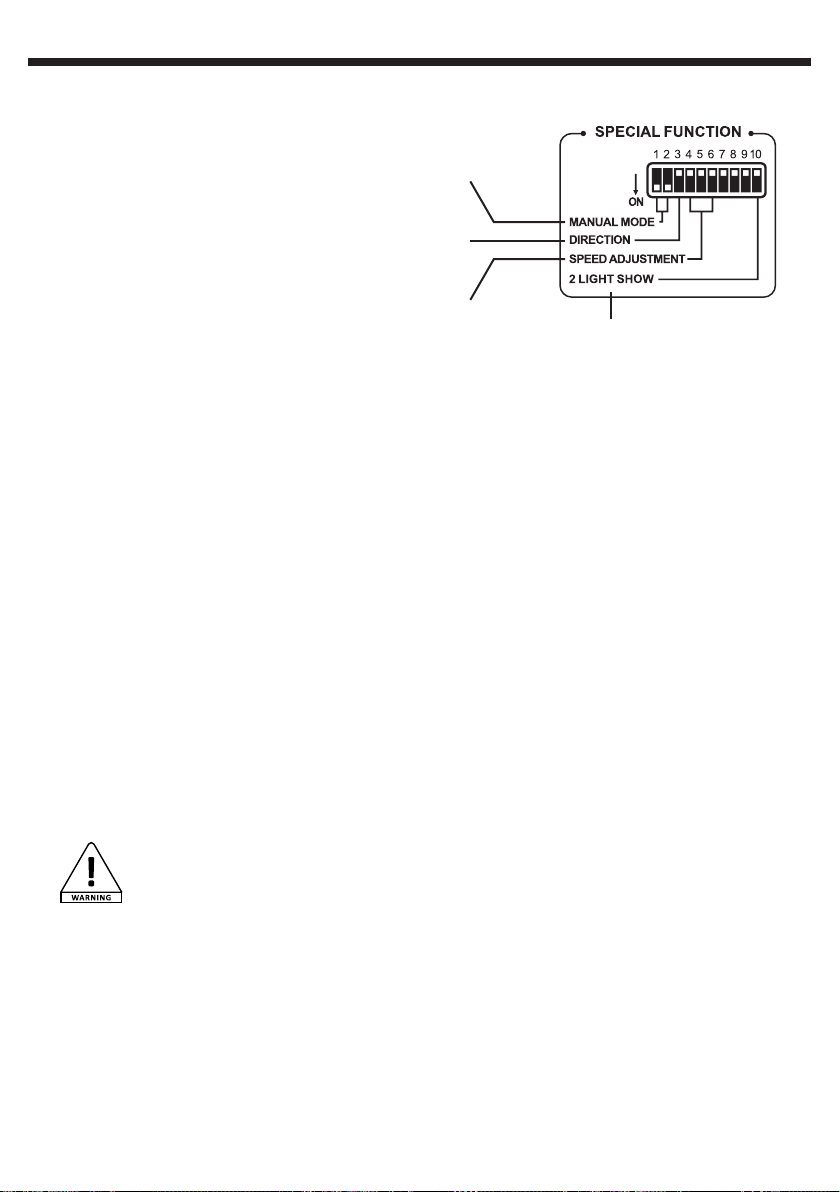
4.8 - Using dipswitches
The drawing opposite describes the different modes
accessible via dipswitches.
1 - SPECIAL FUNCTIONS:
Position dip 1 onto ON to activate the automatic
mode.
- When dip 1 is ON, and dipswitches 3,4 5 and
6 are OFF: your LED-GUN is in music-sensitive
mode.
- When dip 1 is ON and one of the dip 3, 4, 5 and
6 are ON: your LED-GUN is in AUTO mode.
- When dips 1 and 2 are ON, your LED-GUN is in
manual mode. Dips 4, 5 and 6 then allow you to
adjust the speed.
2 - DIRECTION:
Position dip 3 onto ON to reverse the mirrors rotation.
3 - SPEED ADJUSTMENT:
Dips 4, 5 and 6 allow you to adjust shows speed when you are in AUTO mode. Turn off these three
dips to get the lowest speed, turn them on to get the fastest one. Intermediate combinations allow
different speeds.
4 - 2 LIGHT SHOW:
In Master / Slave mode, turn dip 10 ON to activate the 2 light show, reversing the mirrors movements
of the slave units while keep colours synchronised with the Master unit.
1
2
3
4
5 - Maintenant and cleaning
Regularly cleaning lenses and mirrors will guarantee an optimal light output.
These cleaning procedures must be performed as often as possible, especially if your LED-GUN is
installed in dusty environments, or smoke machines are used nearby.
- Use a standard glass cleaner to clean mirrors and lenses.
- Use a soft cloth to dry the humid areas.
- We strongly recommend to clean the lenses every 20 uses, while cleaning the mirrors each 30
uses.
WARNING! As dangerous electrical parts are accessible within the housing, it is crucial to
disconnect your LED-GUN before performing cleaning procedures.
Page 10
Page 11
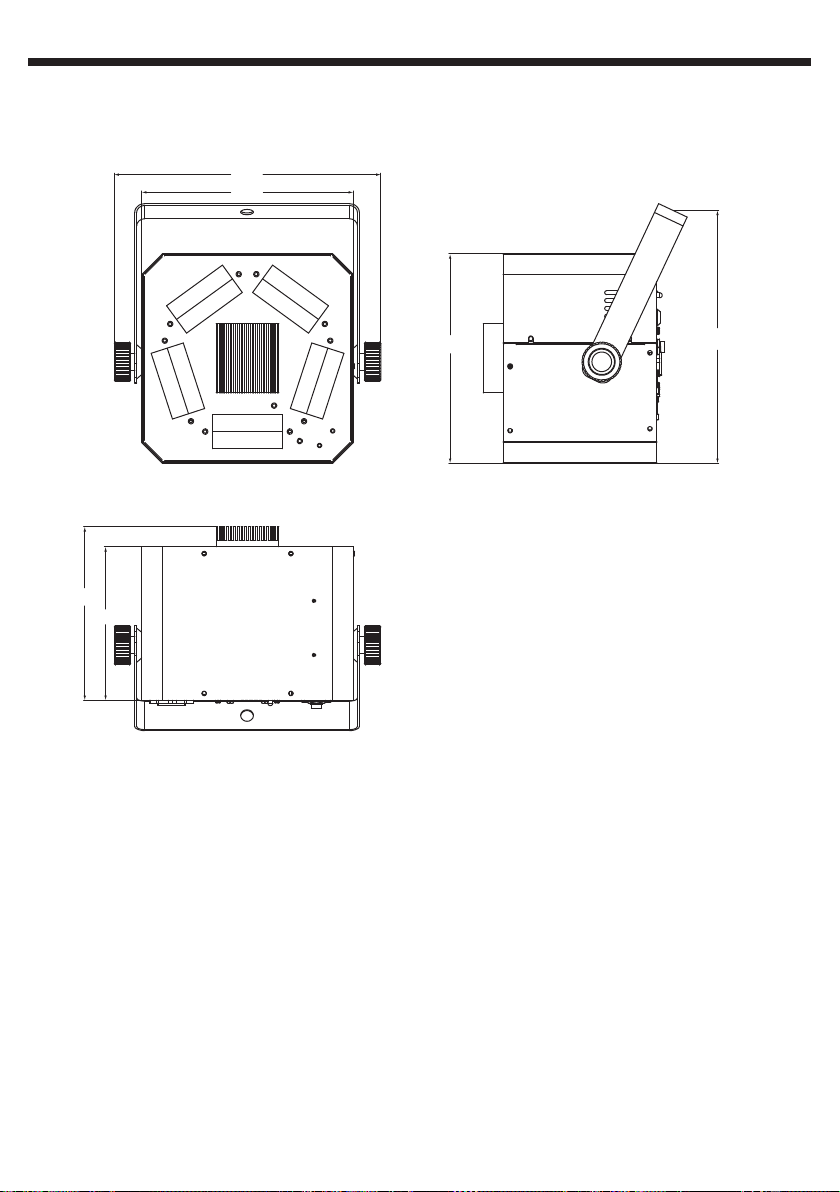
LED-GUN - 10W RGBW LED Multi-beam animation effects
6 - Dimensions
271
215
English
176
156
213
257
Page 11
Page 12

Because CONTEST® takes the utmost care in its products to make sure you only get the best possible quality, our products are
subjects to modifications without prior notice. That is why technical specifications and the products physical configuration might differ
from the illustrations.
Make sure you get the latest news and updates about the CONTEST® products on www.contest-lighting.com
CONTEST® is a trademark of HITMUSIC S.A. - Zone Cahors sud - 46230 FONTANES - FRANCE
 Loading...