

Page 1
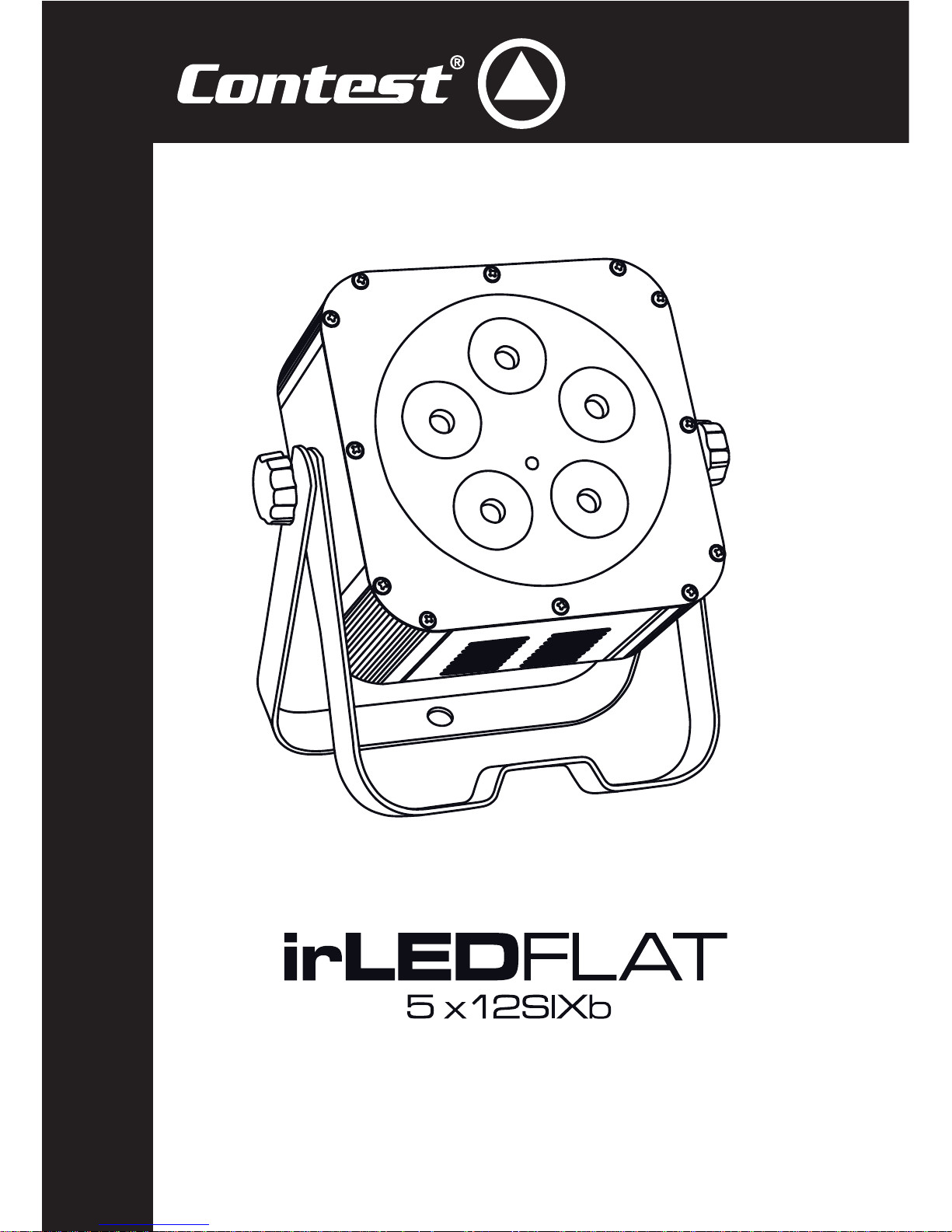
USER GUIDE
10142 - December 2013 Version 1.0
5 RGBWA-UV LEDS COMPACT PROJECTOR WITH INFRARED REMOTE CONTROL
Page 2
English
irLEDFLAT-5x12SIXb - 5 RGBWA-UV LEDs compact projector with infrared remote control
Page 2
1 - Safety information
This symbol signals an important safety precaution.
The CAUTION symbol signals a risk of product deterioration.
The WARNING symbol signals a risk to the user’s physical integrity.
The product may also be damaged.
Important safety information
Symbols used
Any maintenance procedure must be performed by a CONTEST
authorised technical service. Basic cleaning operations must thoroughly follow our safety instructions.
This product contains non-isolated electrical components. Do not
undertake any maintenance operation when it is switched on as it
may result in electric shock.
This unit is intended for indoor use only. Do not use it in a wet,
or extremely cold/hot locations. Failure to follow these safety instructions could result in fire, electric shock, injury, or damage to
this product or other property.
WARNING : This unit contains no user-serviceable parts. Do not
open the housing or attempt any maintenance by yourself. In the
unlikely even your unit may require service, please contact your
nearest dealer.
In order to avoid any electrical malfunction, please do not use any
multi-socket, power cord extension or connecting system without
making sure they are perfectly isolated and present no defect.
Recycling your device
• As HITMUSIC is really involved in the environmental cause,
we only commercialise clean, ROHS compliant products.
• When this product reaches its end of life, take it to a
collection point designated by local authorities. The separate
collection and recycling of your product at the time of disposal
will help conserve natural resources and ensure that it is
recycled in a manner that protects human health and the
environment.
Instructions and recommendations
9 - Heat exposure :
Sustained contact or proximity with warm surfaces may cause overheating and product
damages. Please keep this product away from any heat source such as a heaters,
amplifiers, hot plates, etc...
10 - Electric power supply :
This product can only be operated according to a very specific voltage. These
information are specified on the label located at the rear of the product.
11 - Power cords protection:
Power-supply cords should be routed so that they are not likely to be walked on or
pinched by items placed upon or against them, paying particular attention to cords at
lugs, convenience receptacles and the point where they exit from the fixture.
12 - Cleaning precautions :
Unplug the product before attempting any cleaning operation. This product should be
cleaned only with accessories recommended by the manufacturer. Use a damp cloth
to clean the surface. Do not wash this product.
13 - Long periods of non use :
Disconnect the unit’s main power during long periods of non use.
14 - Liquids or objects penetration :
Do not let any object penetrate this product as it may result in electric shock or fire.
Never spill any liquid on this product as it may infiltrate the electronic components
and result in electric shock or fire.
15 - This product should be serviced when :
Please contact the qualified service personnel if :
- The power cord or the plug has been damaged.
- Objects have fallen or liquid has been spilled into the appliance.
- The appliance has been exposed to rain or water.
- The product does not appear to operate normally.
- The product has been damaged.
16 - Inspection/maintenance :
Please do not attempt any inspection or maintenance by yourself. Refer all servicing
to qualified personnel.
17 - Operating environment :
Ambient temperature and humidity: +5 - +35°C, relative humidity must be less than
85% (when cooling vents are not obstructed).
Do not operate this product in a non-ventilated, very humid or warm place.
1 - Please read carefully :
We strongly recommend to read carefully and understand the safety instructions before
attempting to operate this unit.
2 - Please keep this manual :
We strongly recommend to keep this manual with the unit for future reference.
3 - Operate carefully this product :
We strongly recommend to take into consideration every safety instruction.
4 - Follow the instructions:
Please carefully follow each safety instruction to avoid any physical harm or property
damage.
5 - Avoid water and wet locations :
Do not use this product in rain, or near washbasins or other wet locations.
6 - Installation :
We strongly encourage you to only use a fixation system or support recommended
by the manufacturer or supplied with this product. Carefully follow the installation
instructions and use the adequate tools.
Always ensure this unit is firmly fixed to avoid vibration and slipping while operating
as it may result in physical injury.
7 - Ceiling or wall installation :
Please contact your local dealer before attempting any ceiling or wall installation.
8 - Ventilation :
The cooling vents ensure a safe use of this product, and avoid any overheating risk.
Do not obstruct or cover these vents as it may result in overheating and potential
physical injury or product damage. This product should never been operated in a
closed non-ventilated area such as a flight case or a rack, unless cooling vents are
provided for the purpose .
Warning
This product is equipped with Class 2 LEDs.
Please avoid looking directly at the beam as it may cause
severe eye injuries.
Page 3

English
irLEDFLAT-5x12SIXb - 5 RGBWA-UV LEDs compact projector with infrared remote control
Page 3
2 - Introduction
3 - Technical specifications
• Its strengths:
- 6-in-1 LEDs
- Brightness
- Natural colours and light, exclusive UV shades
- Manual, music-sensitive and DMX modes, customisable user
programs, built-in programs.
- 6-colour remote control supplied
- Infrared sensor (front) + infrared repeater system with 1m cable
- Power input/output
• Functions:
- Built-in command panel with digital drop-down display for :
- DMX addressing
- Choosing the number of channels: 2 - 9
- Choosing the built-in programs
- Choosing the preset colours
- Master/Slave mode
- Music-sensitive mode and choosing the mic sensitivity
- Edit and play your own 20-step program
- New infrared remote control giving you access to every remote
function
This projectors is equipped with 5 super-powerful RGBWA+UV LEDs with high-performance individual lenses.
In addition to primary colours (such as blue, red, green...) the white shades and Amber create warm and brightful colours. On top of that, UV
light is used to enhance white shades, turning them into an intense phoshorescent white. And when UV light is added to stronger colours it
emphasizes their contrast, deepen their shade and you obtain a whole new palette of exclusive colours.
The irLEDFLAT-5x12SIXb is supplied with an infrared remote control to access colour control, built-in programs, DMX settings and a lot more.
It also has a new double mounting bracket revolutionising ground handling. Thanks to the automatic abutment point, tightening the projector
is independent from the mounting bracket blocking. You can now manipulate and adjust the projector with an optimal stability.
• Package contents:
The package must contain the following products :
- A projector
- A user guide
- A double mounting bracket
- An infrared remote control
- A 2-pole + earth power cord
- An infrared repeater system with 1m cabl
• Optical:
- 5x12W 6-in-1 (RGBAW+UV) LEDs - 30,000 hours
- Beamwidth : 40°
• Connectors :
- DMX IN and OUT via 3-pin XLR,
- POWER IN/OUT via an IEC socket
• Power supply: 110/240 V 50/60 Hz
• Power consumption : 80 W
• Finish : Black
•
Dimensions
: 240 x 265 x 110 mm
• Weight : 2.8 kg
Page 4
English
irLEDFLAT-5x12SIXb - 5 RGBWA-UV LEDs compact projector with infrared remote control
Page 4
4 - Description
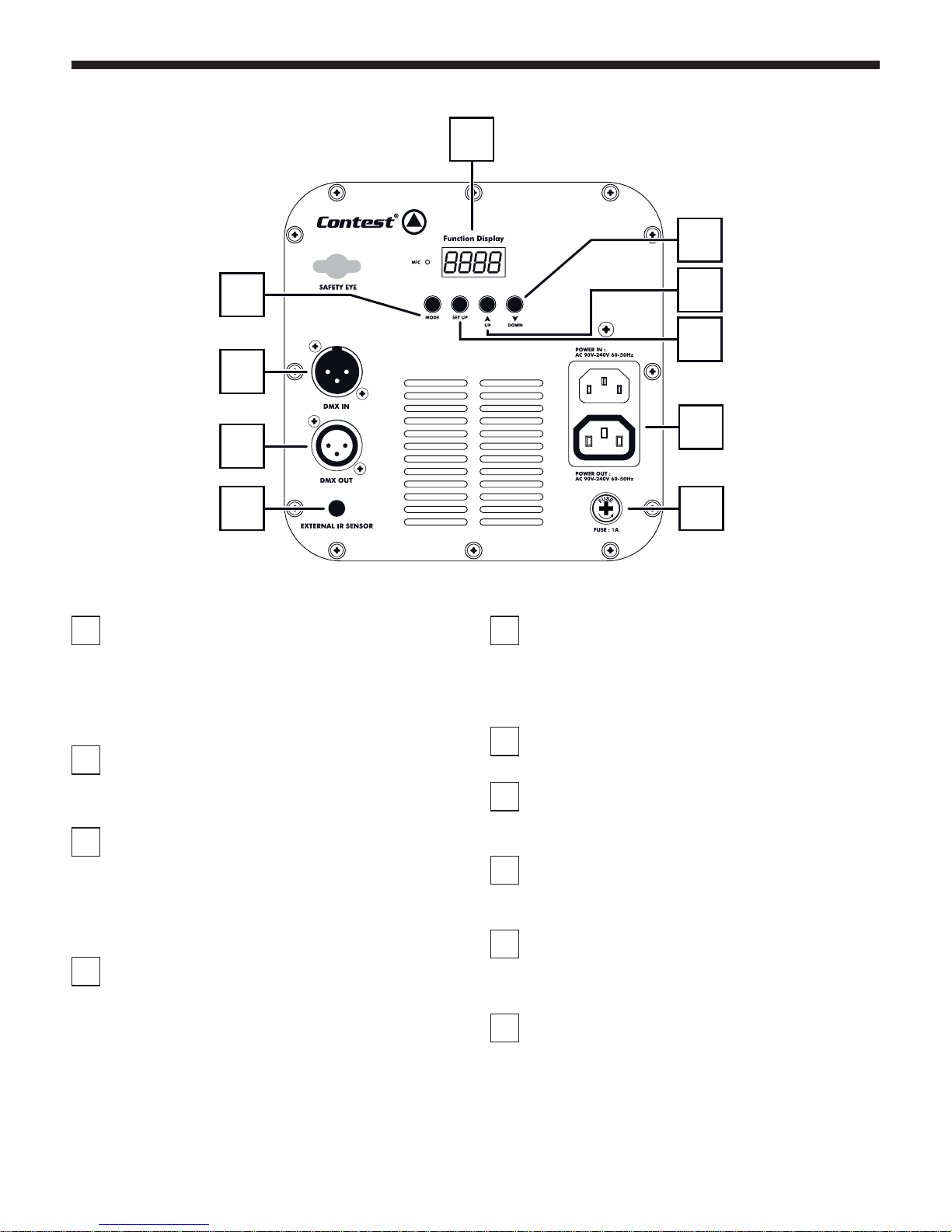
1
Power input/output socket
Allows you to connect the projector to an electrical outlet and
to link several projectors together via a Male/Female IEC cord.
Please make sure the voltage is in adequation with the product
indications.
Caution : Do NOT go over 700W on the same power source.
2
Fuse
If need to replace the fuse, please make sure the new fuse has
exactly the same characteristics as the original one.
3
DMX input
3-pin female XLR plug hardwired as follows :
- Mass: 1
- Negative signal: 2
- Positive signal: 3
.
4
DMX output
3-pin male XLR plug hardwired as follows :
- Mass: 1
- Negative signal: 2
- Positive signal: 3
5
Display
This intuitive display allows you to configure your projector.
Please refer to the next paragraphs for more details about the
projector configuration.
6
MODE button
Allows you to access menus and select a function.
7
SETUP button
Allows you to configure the parameters of the functions chosen
with the MODE button.
8
UP button
Press UP to increase the adjustable values or browse the submenus.
9
DOWN button
Press DOWN to decrease the adjustable values or browse the
sub-menus.
10
Infrared receiver input
This Jack 3.5 plug allows you to connect the infrared repeater
system.
This receiver can be used when the front sensor of the projector
is too far to receive the remote control commands.
5
6
8
7
9
3
4
10
1
2
Page 5
English
irLEDFLAT-5x12SIXb - 5 RGBWA-UV LEDs compact projector with infrared remote control
Page 5
5 - Menus and functions
Access the internal menu by pressing MODE.
To access a submenu, press MODE again.
Press SETUP to configure the selected function.
Simultaneously press MODE and UP if you want the display to stay lit all the time.
If you want the display to lit off when the menu remains inactive for more than 20 seconds, press simultaneously MODE and DOWN.
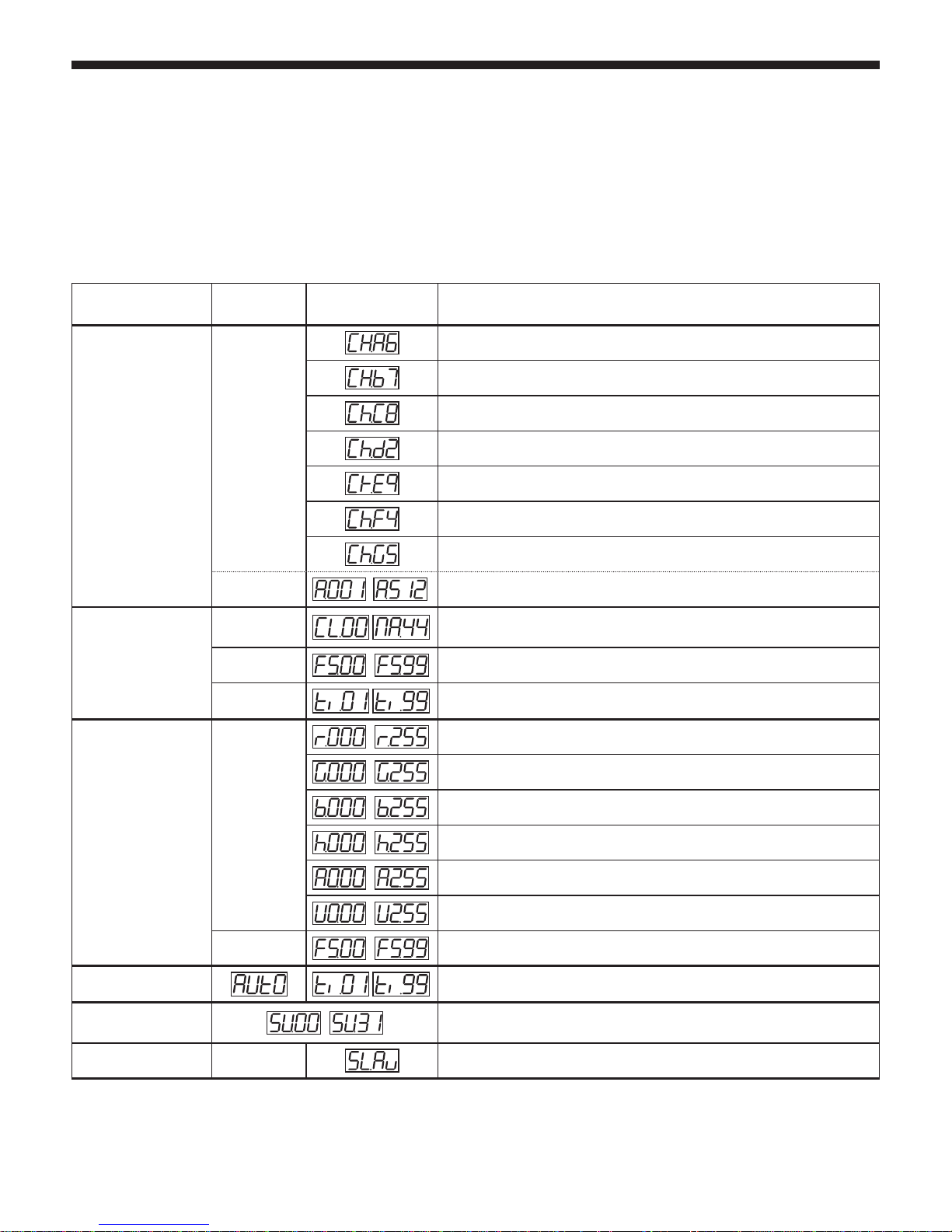
The irLEDFLAT SIX projectors feature several DMX modes to be fully compatible with different remote controls and projectors. Use the MODE button
the choose a DMX mode. They are listed in the table below.
Mode SETUP UP and DOWN Action
DMX modes
6 channels : RVBWA Dimmers
7 channels : RVBWAU Dimmers / Main dimmer and strobe
8 channels : RVBWAU Dimmers / Dimmer / Strobe
2 channels : Macros and fixed colours / Dimmer, Speed and Sound
9 channels : RVBWAU Dimmers / Dimmer, Speed and Sound / Strobe
4 channels : RVB Dimmers / Main dimmer and Strobe
5 channels : RVBW Dimmers / Main dimmer and Strobe
Address DMX addressing
Fixed colours and
programs
Colours
Black-out, Colours 1 to 30 and 14 macros
Strobe
Strobe speed : FS.00 = No strobe ; FS.99 = Full speed
Speed Macros speed
RVBWAU Dimmers
Red: 0 - 100%
Green: 0 - 100%
Blue: 0 - 100%
White: 0 - 100%
Amber: 0 - 100%
Ultra-violet: 0 - 100%
Strobe speed : FS.00 = No strobe ; FS.99 = Full speed
Automatic mode Vitesse du strobe : FS.00 = Pas de strobe ; FS.99 = Vitesse maximale
Music-sensitive mode
Réglage de la sensibilité micro : SU.00 = sensibilité minimale ; SU.31 =
sensibilité maximale
Slave mode
Active le mode esclave
Page 6
English
irLEDFLAT-5x12SIXb - 5 RGBWA-UV LEDs compact projector with infrared remote control
Page 6
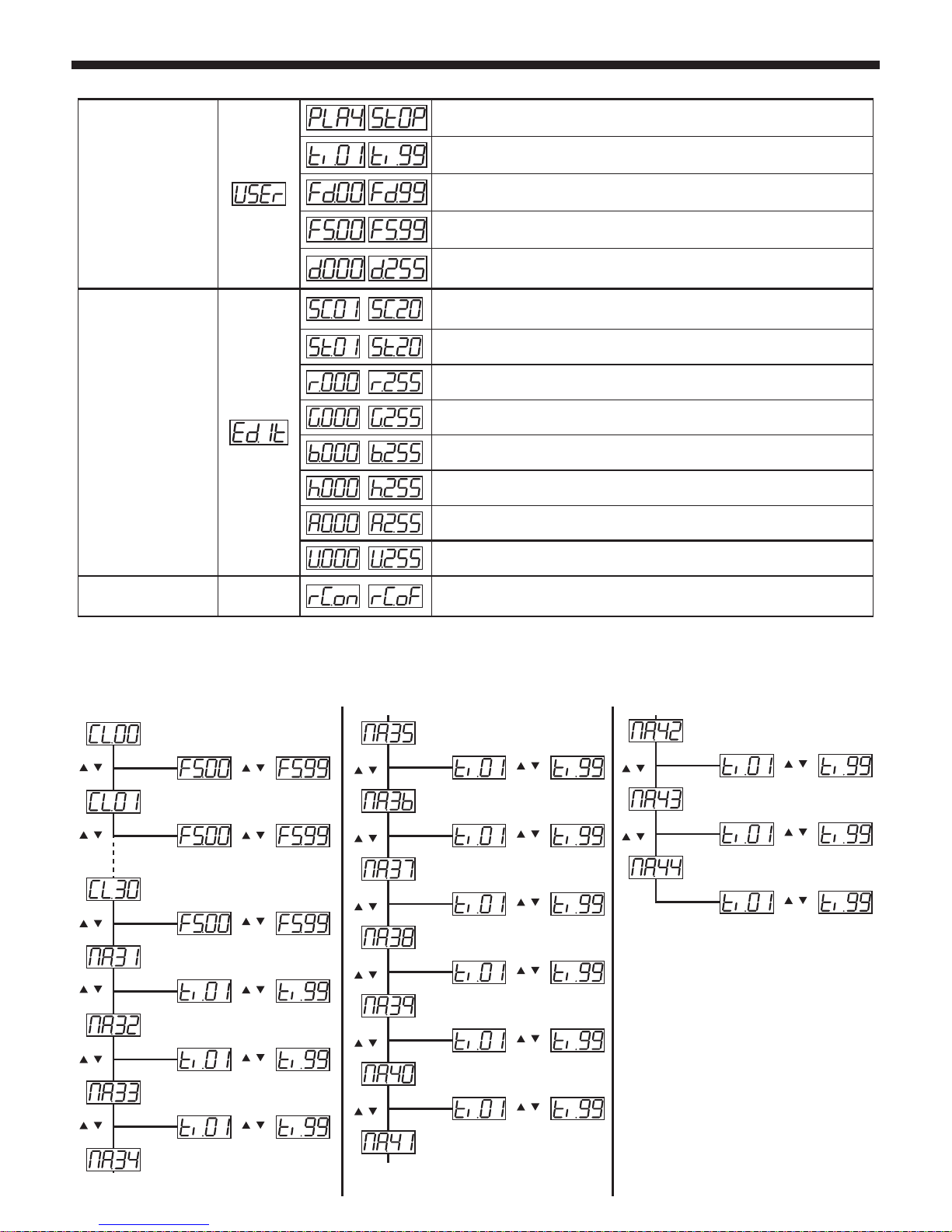
User program
Starts the user program
Allows you to set the duration of the user program
Configures the fade out time of every step of the program
Allows you to set the flash rate of every step of the program
Allows you to configure the max output (dimmer) of every step of
the program
User program
edition
Allows you to configure the number of steps of your user program.
20 steps max.
Selects the steps you want to create/modify
Red level settings for the selected step
Green level settings for the selected step
Blue level settings for the selected step
White level settings for the selected step
Amber level settings for the selected step
UV level settings for the selected step
Infrared remote
control
Activates or deactivates the use of an infrared remote control to
control the projector.
More details about the fixed colours and sequences menu
UP
DOWN
UP
DOWN
UP
DOWN
DOWN
UP
UP
DOWN
UP
DOWN
UP
DOWN
UP
DOWN
UP
DOWN
UP
DOWN
UP
DOWN
UP
DOWN
Black-out
SET UP
SET UP
SET UP
SET UP
SET UP
SET UP
Colour 1
Colour 30
All RGB colour in step
All RGB colour in fade
Fade from Orange to Red
Fade from Green to Blue
UP
DOWN
SET UP
All RGBW colours in step
UP
DOWN
Fade from Magentat to Blue
UP
DOWN
SET UP
UP
DOWN
Fade from Warm White to Cold White
UP
DOWN
SET UP
UP
DOWN
All RGBW colours in fade
UP
DOWN
SET UP
UP
DOWN
Light colours fade 1
UP
DOWN
SET UP
UP
DOWN
Light colours fade 2
UP
DOWN
SET UP
UP
DOWN
Amber fade 1
Amber fade 2
UP
DOWN
SET UP
UP
DOWN
UV fade 1
UP
DOWN
SET UP
UP
DOWN
UV fade 2
SET UP
UP
DOWN
Page 7
English
irLEDFLAT-5x12SIXb - 5 RGBWA-UV LEDs compact projector with infrared remote control
Page 7
6 - The various DMX modes
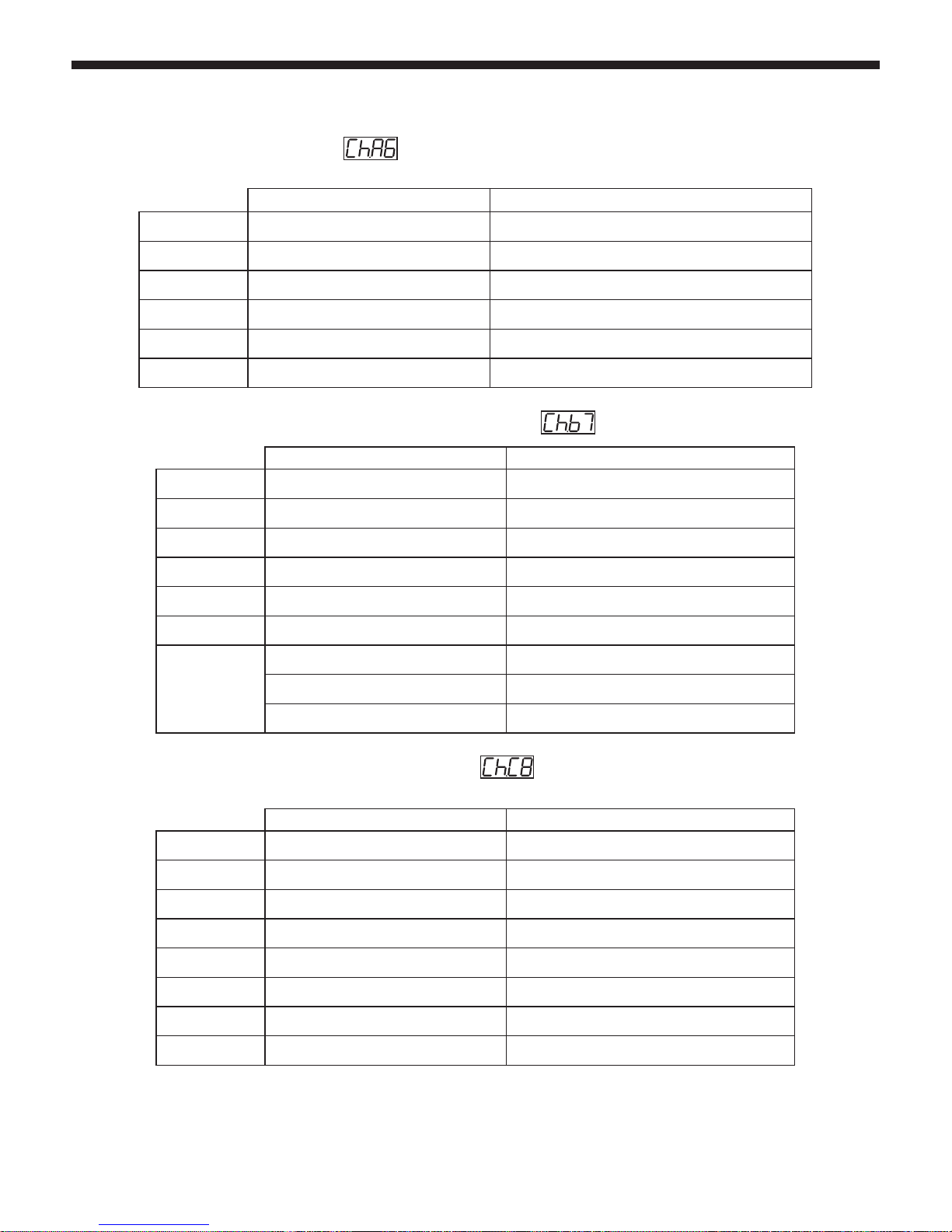
6.1 - 6-channel mode = RVBWAUV =
6.2 - 7-channel mode = RVBWAUV / Main dimmer and Strobe =
6.3 - 8-channel mode = RVBWAUV / Dimmer / Strobe =
DMX values Effects
CHANNEL 1
000 - 255
Red from 0 - 100%
CHANNEL 2
000 - 255
Green from 0 - 100%
CHANNEL 3
000 - 255
Blue from 0 - 100%
CHANNEL 4
000 - 255
White from 0 - 100%
CHANNEL 5
000 - 255
Ambre de 0 à 100%
CHANNEL 6
000 - 255
UV from 0 - 100%
CHANNEL 7
000 - 189
Main dimmer from 0 - 100%
190 - 250
Slow to fast strobe
251 - 255
Full power
DMX values Effects
CHANNEL 1
000 - 255
Red from 0 - 100%
CHANNEL 2
000 - 255
Green from 0 - 100%
CHANNEL 3
000 - 255
Blue from 0 - 100%
CHANNEL 4
000 - 255
White from 0 - 100%
CHANNEL 5
000 - 255
Ambre de 0 à 100%
CHANNEL 6
000 - 255
UV from 0 - 100%
CHANNEL 7
000 - 255
Main dimmer from 0 - 100%
CHANNEL 8
000 - 255
Slow to fast strobe
DMX values Effects
CHANNEL 1 000 - 255
Red from 0 - 100%
CHANNEL 2 000 - 255
Green from 0 - 100%
CHANNEL 3 000 - 255
Blue from 0 - 100%
CHANNEL 4 000 - 255
White from 0 - 100%
CHANNEL 5 000 - 255
Amber from 0 - 100%
CHANNEL 6 000 - 255
UV from 0 - 100%
Page 8
English
irLEDFLAT-5x12SIXb - 5 RGBWA-UV LEDs compact projector with infrared remote control
Page 8
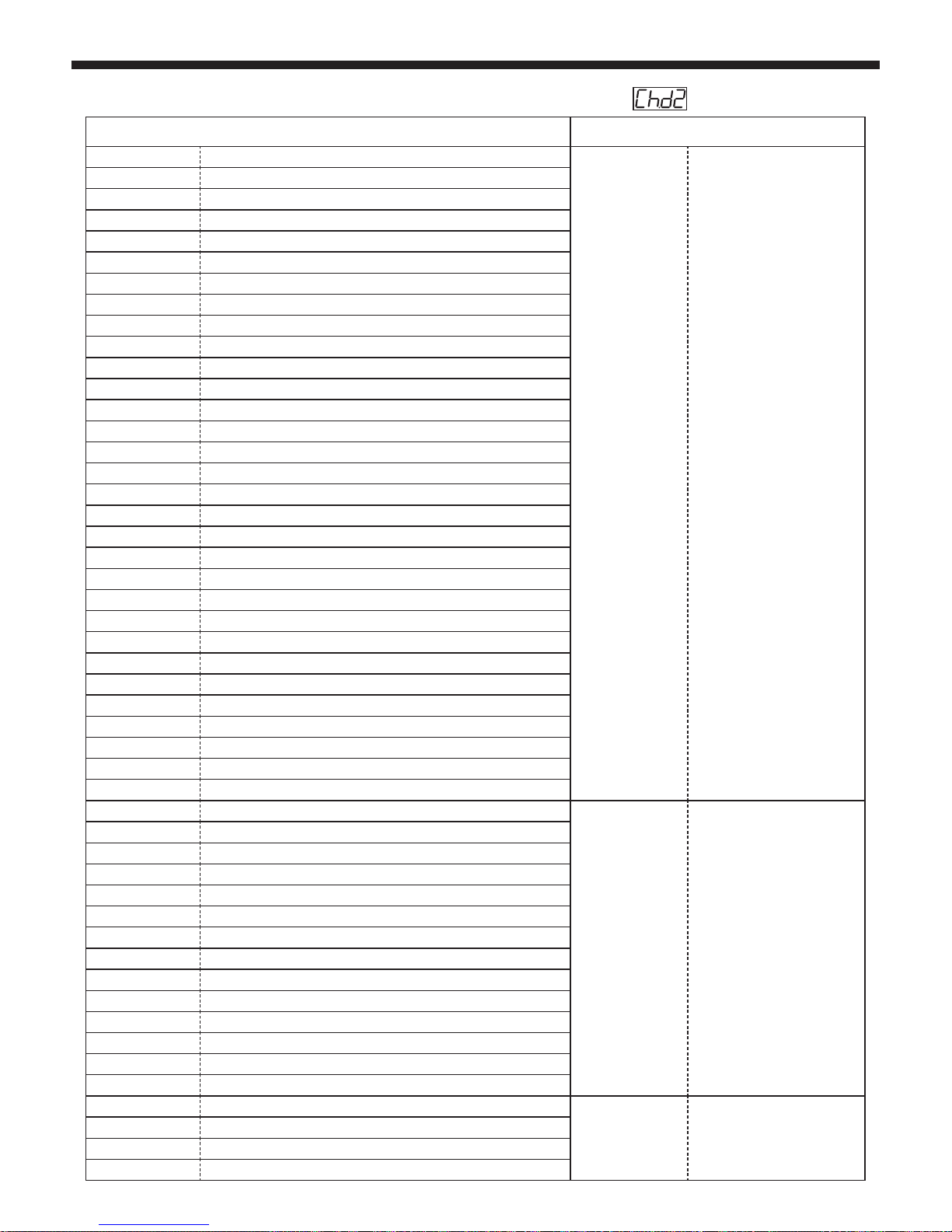
6.4 - 2-channel mode : Fixed colours, Macros / Dimmer, Speed and Sound =
CHANNEL 1 CHANNEL 2
000 - 005
Off
000 - 255
Dimmer : 0 - 100%
006 - 010
Red
011 - 015
Orange
016 - 020
Yellow
021 - 025
Green
026 - 030
Cyan
031 - 035
Blue
036 - 040
Pink
041 - 045
Magenta
046 - 050
Cold White
051 - 055
Warm White
056 - 060
Full White
061 - 065
Light Pink
066 - 070
Light Apricot
071 - 075
Light Ocre
076 - 080
Green Pearl
081 - 085
Grey Pearl
086 - 090
Green Veronese
091 - 095
Blue Lagon
096 - 100
Sky Blue
101 - 105
Light Blue
106 - 110
Cerulean Blue
111 - 115
Fluo
116 - 120
Candy
121 - 125
Amber
126 - 130
Sunset
131 - 135
Ultra violet
136 - 140
Ultra Green
141 - 145
Ultra blue
146 - 150
Ultra Pink
151 - 155
Ultra Light
156 - 160
Macro 1
000 - 255
Macros speed
0 to 100%
161 - 165
Macro 2
166 - 170
Macro 3
171 - 175
Macro 4
176 - 180
Macro 5
181 - 185
Macro 6
186 - 190
Macro 7
191 - 195
Macro 8
196 - 200
Macro 9
201 - 205
Macro 10
206 - 210
Macro 11
211 - 215
Macro 12
216 - 220
Macro 13
221 - 225
Macro 14
226 - 233
Music-sensitive Macro 1 (colour sequencing)
000 - 255
Mic sensitivity
234 - 241
Music-sensitive Macro 7 (colour sequencing)
242 - 249
Music-sensitive Macro 11 (colour sequencing)
250 - 255
Music-sensitive Macro 14 (colour sequencing)
Page 9
English
irLEDFLAT-5x12SIXb - 5 RGBWA-UV LEDs compact projector with infrared remote control
Page 9
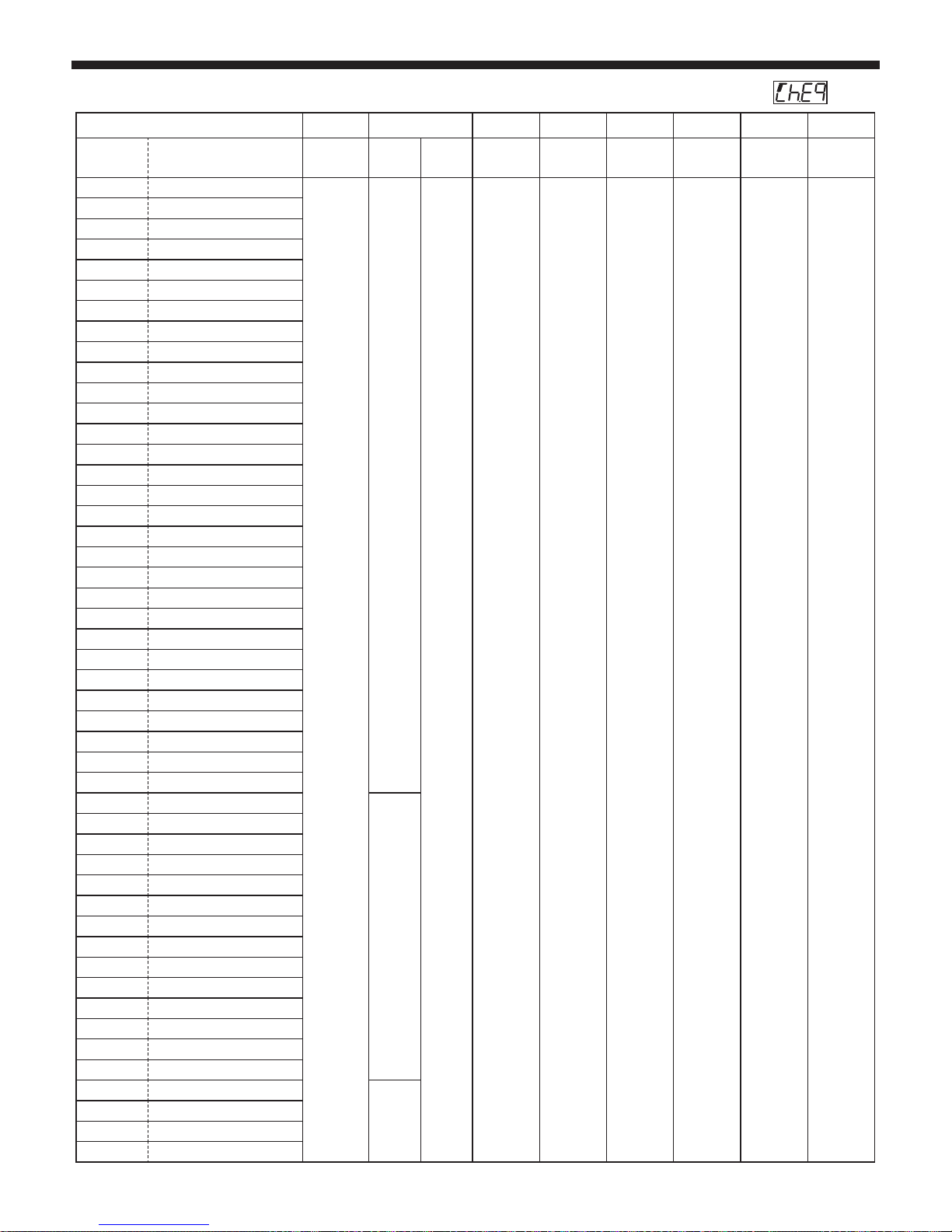
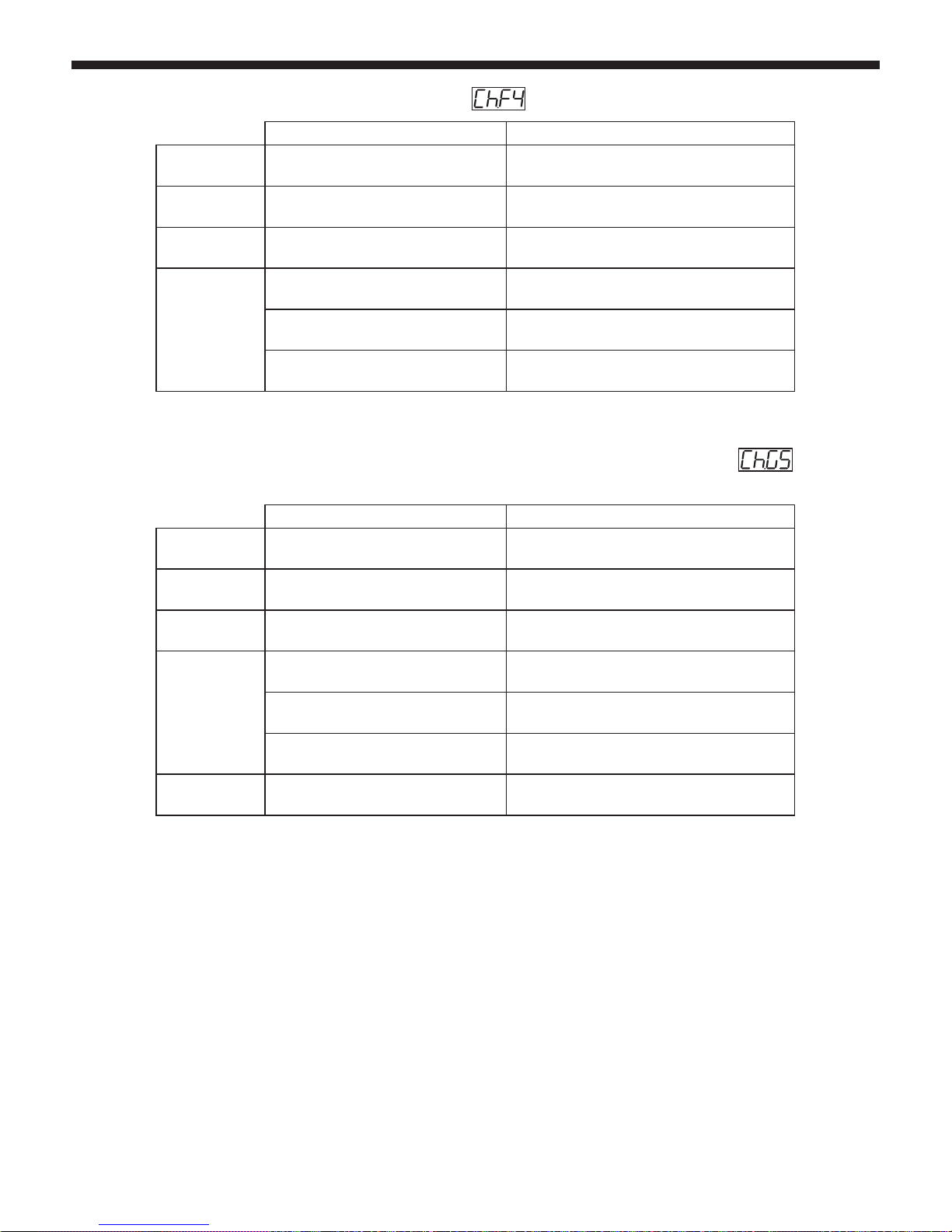
6.5 - 9-channel mode = RGBWA Dimmers+UV/Fixed colours,Macros/Dimmer,Speed, Sound/Strobe =
CH 9 CH 8 CH7 CH6 CH5 CH4 CH3 CH2 CH1
000 - 005
Off
if CH 9
> 5
if CH 9
> 5UV(000 - 255)
Amber
(000 - 255)
White
(000 - 255)
Blue
(000 - 255)
Green
(000 - 255)
Red
(000 - 255)
006 - 010
Red
000 - 255 : strobe speed
000 - 255 = Dimmer : 0 - 100%
Dimmer : 0 - 100%
No function
No function
No function
No function
No function
No function
011 - 015
Orange
016 - 020
Yellow
021 - 025
Green
026 - 030
Cyan
031 - 035
Blue
036 - 040
Pink
041 - 045
Magenta
046 - 050
Cold White RGBW
051 - 055
Warm White RGB
056 - 060
Full White RGBW
061 - 065
Light Pink
066 - 070
Light Apricot
071 - 075
Light Ocre
076 - 080
Green Pearl
081 - 085
Grey Pearl
086 - 090
Green Veronese
091 - 095
Blue Lagon
096 - 100
Sky Blue
101 - 105
Light Blue
106 - 110
Cerulean Blue
111 - 115
Fluo
116 - 120
Candy
121 - 125
Amber
126 - 130
Sunset
131 - 135
Ultra violet
136 - 140
Ultra Green
141 - 145
Ultra blue
146 - 150
Ultra Pink
151 - 155
Ultra Light
156 - 160
Macro 1
000 - 255 = macros speed 0 - 100%
161 - 165
Macro 2
166 - 170
Macro 3
171 - 175
Macro 4
176 - 180
Macro 5
181 - 185
Macro 6
186 - 190
Macro 7
191 - 195
Macro 8
196 - 200
Macro 9
201 - 205
Macro 10
206 - 210
Macro 11
211 - 215
Macro 12
216 - 220
Macro 13
221 - 225
Macro 14
226 - 233
Music-sensitive Macro 1
000 - 255 =
mic sensibility
234 - 241
Music-sensitive Macro 2
242 - 249
Music-sensitive Macro 3
250 - 255
Music-sensitive Macro 4
Page 10
English
irLEDFLAT-5x12SIXb - 5 RGBWA-UV LEDs compact projector with infrared remote control
Page 10
6.6 - 4-channel mode = RGB (pure RGB compatible) =
6.7 - 5-channel mode = RGB + W (Pure RGB compatible, with White on the last channel) =
Values Effects
CHANNEL 1 000 - 255
Red from 0 - 100%
CHANNEL 2 000 - 255
Green from 0 - 100%
CHANNEL 3 000 - 255
Blue from 0 - 100%
CHANNEL 4
000 - 189
Main dimmer from 0 - 100%
190 - 250
Slow to fast strobe
251 - 255
Full power
Values Effects
CHANNEL 1 000 - 255
Red from 0 - 100%
CHANNEL 2 000 - 255
Green from 0 - 100%
CHANNEL 3 000 - 255
Blue from 0 - 100%
CHANNEL 4
000 - 189
Main dimmer from 0 - 100%
190 - 250
Slow to fast strobe
251 - 255
Full power
CHANNEL 5 000 - 255
White from 0 - 100%
Page 11
English
irLEDFLAT-5x12SIXb - 5 RGBWA-UV LEDs compact projector with infrared remote control
Page 11
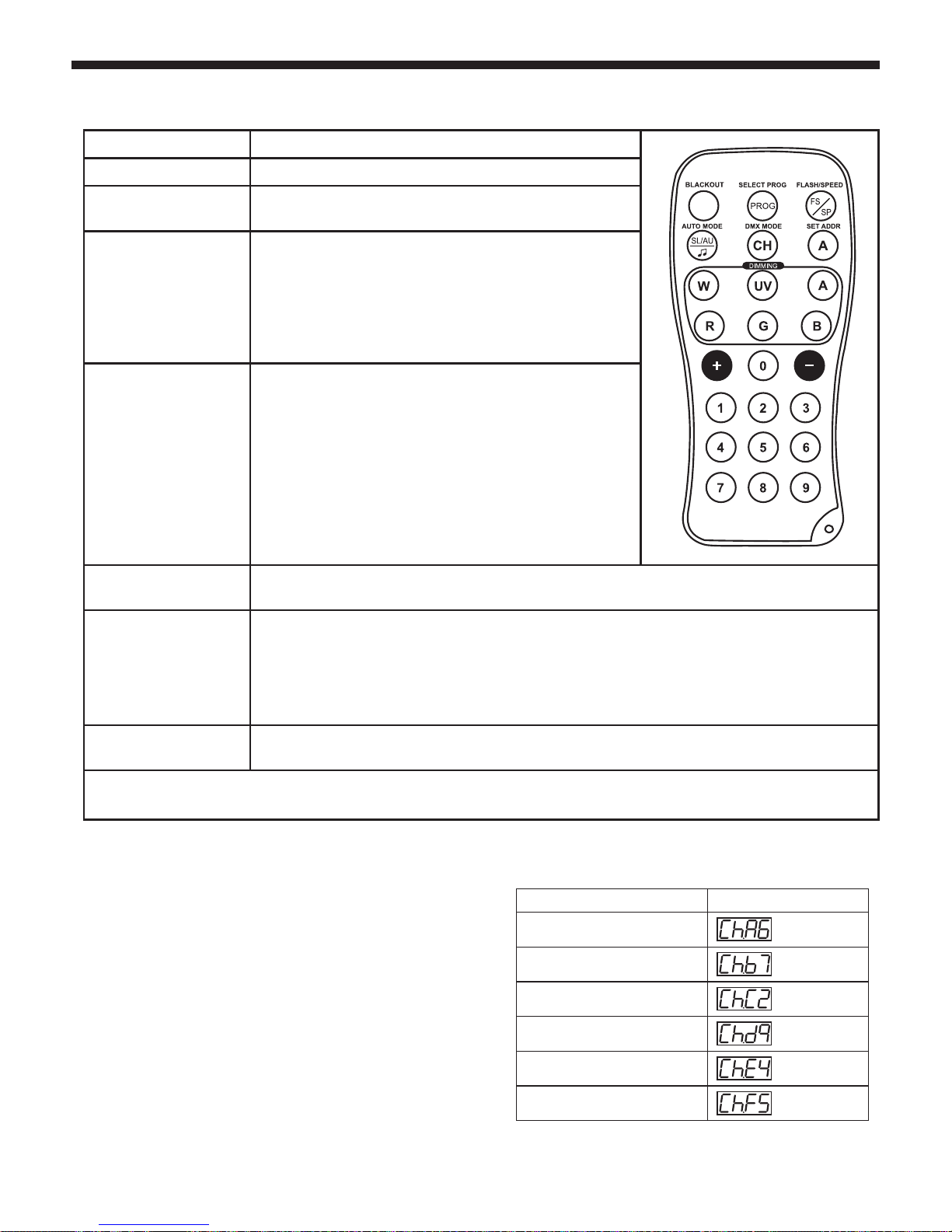
7 - Infrared remote control
Button Action
BlackOut
Projector OFF
Select Prog
Gives you access to the 30 static colours, and to macros. Use the
number keys 0 to 9, then use the + and - keys.
FLASH / SPEED
The action of this key depends on the mode of the projector :
- If the projector is using a macro or is in auto mode, this key acts
on the speed. Use the + and - keys to configure the speed.
- If the projector is in manual mode or uses a static colour, this
button acts on the strobe.
Use the + and - buttons to configure the strobe speed.
SLAVE / AUTO / SOUND
1 - First pressure: Activates the slave mode (The red LEDs are
flashing).
2 - Second pressure: Activates the autom ode The green LEDs are
flashing). The projector starts a 1-14 macro sequence.
Use the FLASH/SPEED button and the + and - buttons to configure
the speed.
3 - Third pressure: Activates the music-sensitive mode (Blue LEDs
flashing).
Use the + and - buttons to configure the mic sensitivity.
DMX MODE
Allows you to choose a DMX mode.
Use the + and - buttons to switch from one mode to another.
SET ADDR
Allows you to configure the DMX address of the projector.
For instance, to configure the address 245 :
- Press SET ADDR, all the LEDs are flashing to indicate the process beginning.
- Press 2, the green LEDs of your projectors lit up to indicate the hundreds digit has been saved.
- Press 4, the blue LEDs of your projector lit up to indicate the tenths digit has been saved.
- Then press 5. All the LEDs will flash to confirm you the address has been saved properly.
RGBWAU
These buttons allow you to manually configure the value of each colour.
Select a colour with one of these buttons, then press the + and - buttons to change their level.
NOTE : The display will indicate the projector status for each action via the remote control.
LED ON DMX mode
Red
6 channels
7 channels
2 channels
9 channels
4 channels
5 channels
Green
Blue
White
Red and Blue
Red and Amber
When changing of DMX mode via the DMX
MODE button or with the projectors menu
buttons, the LEDs will lit in a different colour
for each DMX mode.
The following table indicates the relations
between colours and DMX modes.
Page 12

Because CONTEST® takes the utmost care in its products to make sure you only get the best possible quality, our
products are subjects to modifications without prior notice. That is why technical specifications and the products
physical configuration might differ from the illustrations.
Make sure you get the latest news and updates about the CONTEST® products on www.contest-lighting.com
CONTEST® is a trademark of HITMUSIC S.A. - Zone Cahors sud - 46230 FONTANES - FRANCE
 Loading...