

Page 1
english p3
français p11
español p19
nederlandse p27
deutsch p35
italiano p43
http://www.scatmat.com
CECE
MANUAL
REV9.qxd 2/21/05 7:02 PM Page 1
Page 2
pressure guage
9v
Alkaline
3 3
Owner’s Manual
• Cautionary Reminders (p. 3)
• Assembly Guide (p. 4)
• Setting Sensitivity (p. 6)
• Adjusting Water Coverage (p. 7)
• Troubleshooting (p. 9)
Manuel de l’Utilisateur
• Des Rappels d’Avertissements (p.11)
• Guide D’Assemblage (p.12)
• Ajustement de Sensibilité (p.14)
• Ajustement de Couverture de l’Eau (p.15)
• Dèpannage (p.17)
Manual del Usuario
• Precauciones (p. 19)
• Guía de ensamblado (p. 20)
• Regulando la sensibilidad del sistema ( p. 22)
• Ajustando la cobertura del agua (p. 23)
• Resolución de problemas (p.25)
Benutzer Handbuch
• Vorsichtshinweise (p. 35)
• Montageanleitung (p. 36)
• Einstellung der Empfindlichkeit (p. 38)
• Einstellung der Wasserabdeckung (p. 39)
• Problemlösungen (p. 41)
Gebruikshandleiding
• Waarschuwingen (blz. 27)
• Montagegids (blz. 28)
• Instellen van de Gevoeligheid (blz. 30)
• Afregelen van het Waterbereik (blz.31)
• Foutopsporing (blz. 33)
Manuale Utente
• Indicatori di pericolo (p. 43)
• Giuda assemblaggio (p. 44)
• Impostazione della sensibilità (p. 46)
• Copertura regolazione acqua (p. 47)
• Ricerca ed eliminazione di guasti (p. 49)
Thank you for purchasing this Contech product.
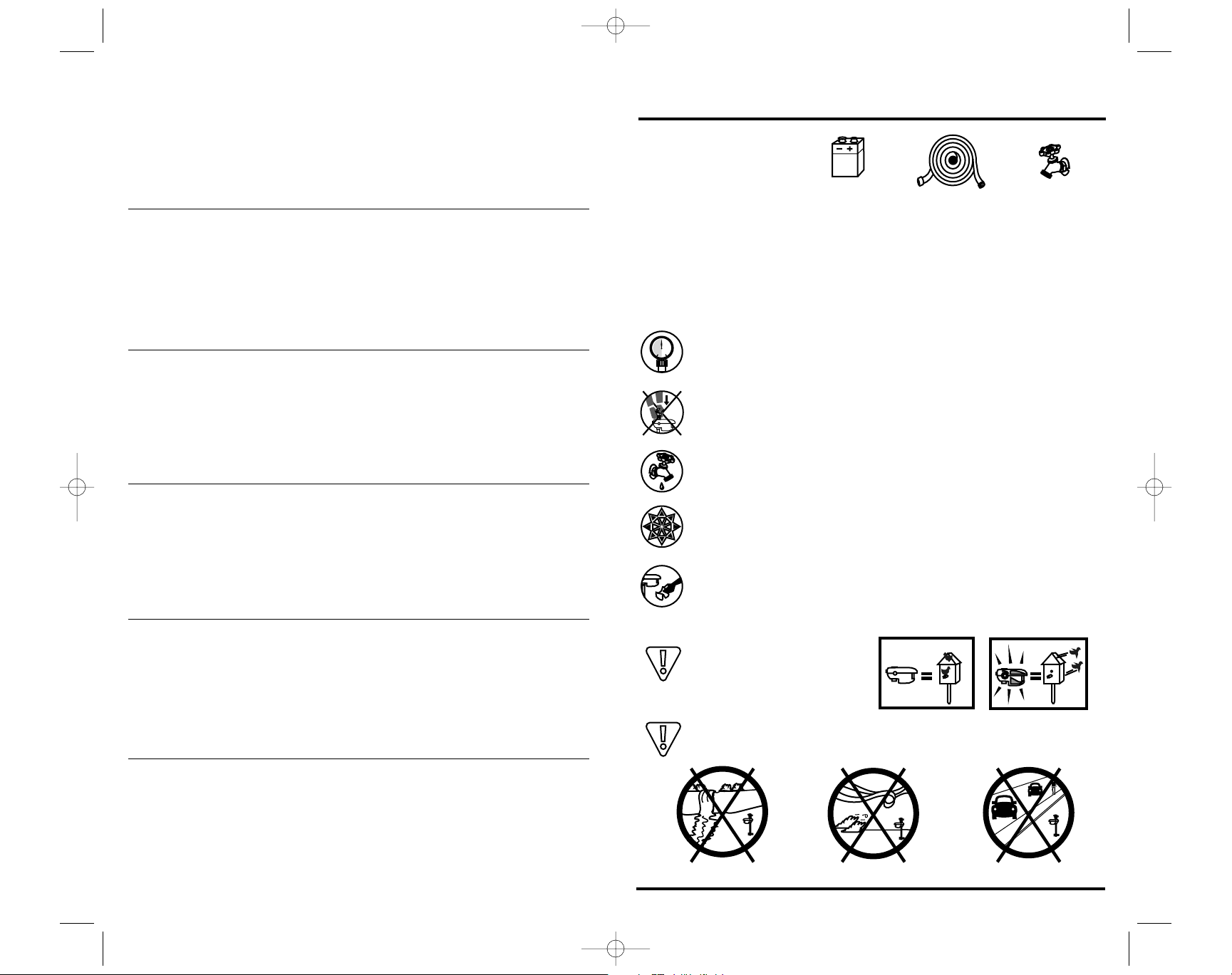
What you will need
Cautionary Reminders
Malfunctioning sprinklers carry an inherent risk of causing water damage to
your property. Mitigate your risks by limiting the amount of water available
to the unit (open valve 3/4 turn),employing good quality hoses and
ensuring your water pressure is within the normal operating range of the
unit.
Intended to operate between 30 and 80 psi (2-5.5 Bar).Install a
pressure-reducing valve on tap if your water pressure exceeds 80 psi.
Opening your tap part way does NOT change the water pressure.
When pushing the stake into the ground, use the footstep at the hose
connection point. Do not push down or apply weight on the sensor
housing.
Before disconnecting the unit or the hose, always turn water off and
activate the unit with your hand to reduce line pressure in the hose.
To prevent damage from freezing water, take the Scarecrow inside
and remove the battery before the first winter frost.
Dust, dirt or hard water build-up on the white lens will limit sensitivity.
Keep the lens clean by wiping gently with a damp cloth.
The eye on the Scarecrow
decal may frighten small birds.
To minimize false triggering, avoid pointing at moving water, windy
areas and moving vehicles.
REV9.qxd 2/21/05 7:02 PM Page 2
Page 3
5 5
9v
OPEN
0
SPRINKLER HEAD
SENSITIVITY KNOB
STAKE
FOOT REST and HOSE
ATTACHMENT POINT
GARDEN HOSE
FLOW THROUGH
BATTERY COVER
LENS
SENSOR HOUSING
4
4
Scarecrow Assembly Guide
If you encounter any problems while assembling your Scarecrow, please
refer to the Troubleshooting section, or call us at 1.800.767.8658 or
1.250.652.0755 or email [email protected].
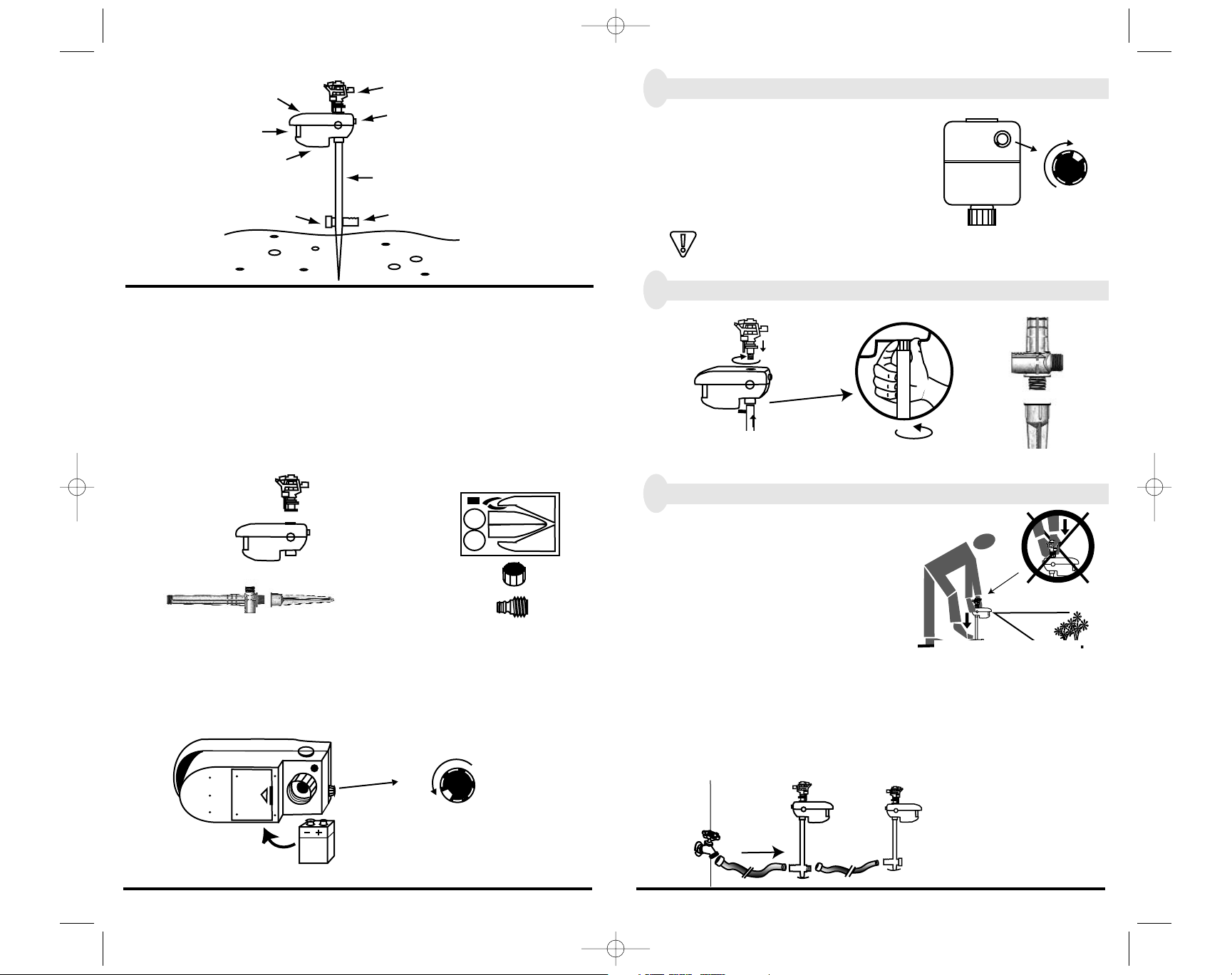
1. Examine the contents of the Scarecrow package.
Your Scarecrow package includes:
OPTIONS: Scarecrow’s beak and eye decals may be applied now.
The Quick Connect coupling is only for use with hoses that have quick connects.
2. Open battery cover and install 9 volt battery.
The battery cover is located under the sensor housing.
Sensitivity Knob
Reset/off
A.
Owner’s manual with warranty registration and survey
B. Sprinkler
C. Sensor housing
D. Stake Top
E. Stake Bottom
F. Scarecrow Decal Sheet (Optional)
G. Flow through cap
H. Quick Connect
coupling (Optional)
3. Check Scarecrow operation. (Dry test).
First,turn the sensitivity knob to 4 or 5.
Next, wave your hand in front of the sensor
lens. You should easily hear the Scarecrow’s
internal water valve click open,then click
closed 3 seconds later. There is an 8 second
reset interval after the valve closes when the
sensor does not detect motion.
If you hear no clicking, try a new battery and try hooking your Scarecrow up
to water. If the problem persists, call the factory toll-free at 1.800.767.8658 /
1.250.652.0755 for assistance or email: [email protected]
4. Assemble stake and attach sprinkler head and stake to housing.
5. Connect hose and position the Scarecrow.
Aim the Scarecrow towards the area you
want to protect. Push the spike into the
ground by stepping on the footrest.
Do not push on the sensor housing or
sprinkler head. If the ground is too
hard or otherwise unsuitable for the
plastic stake, try placing the Scarecrow in a flower pot filled with a
weighted material like sand or gravel
Multiple Connections
If you have more than one Scarecrow you can hook them up in series by
removing the flow through cap and connecting them as shown below.
These fittings should only be hand tightened.
Sensitivity knob
REV9.qxd 2/21/05 7:02 PM Page 4
RESET/OFF
5
CRO-200
Page 4
7 7
5
6 6
Setting Sensitivity
If you can hear the Scarecrow’s clicks from 10 meters (35 feet)
away, you do not need to turn on the water for this section. In a noisy
area where the audible clicks cannot be heard each time you move,please
turn the water on for setup purposes.If you decide to turn the water on for
your setup process,just point the water spray to one side to avoid getting wet.
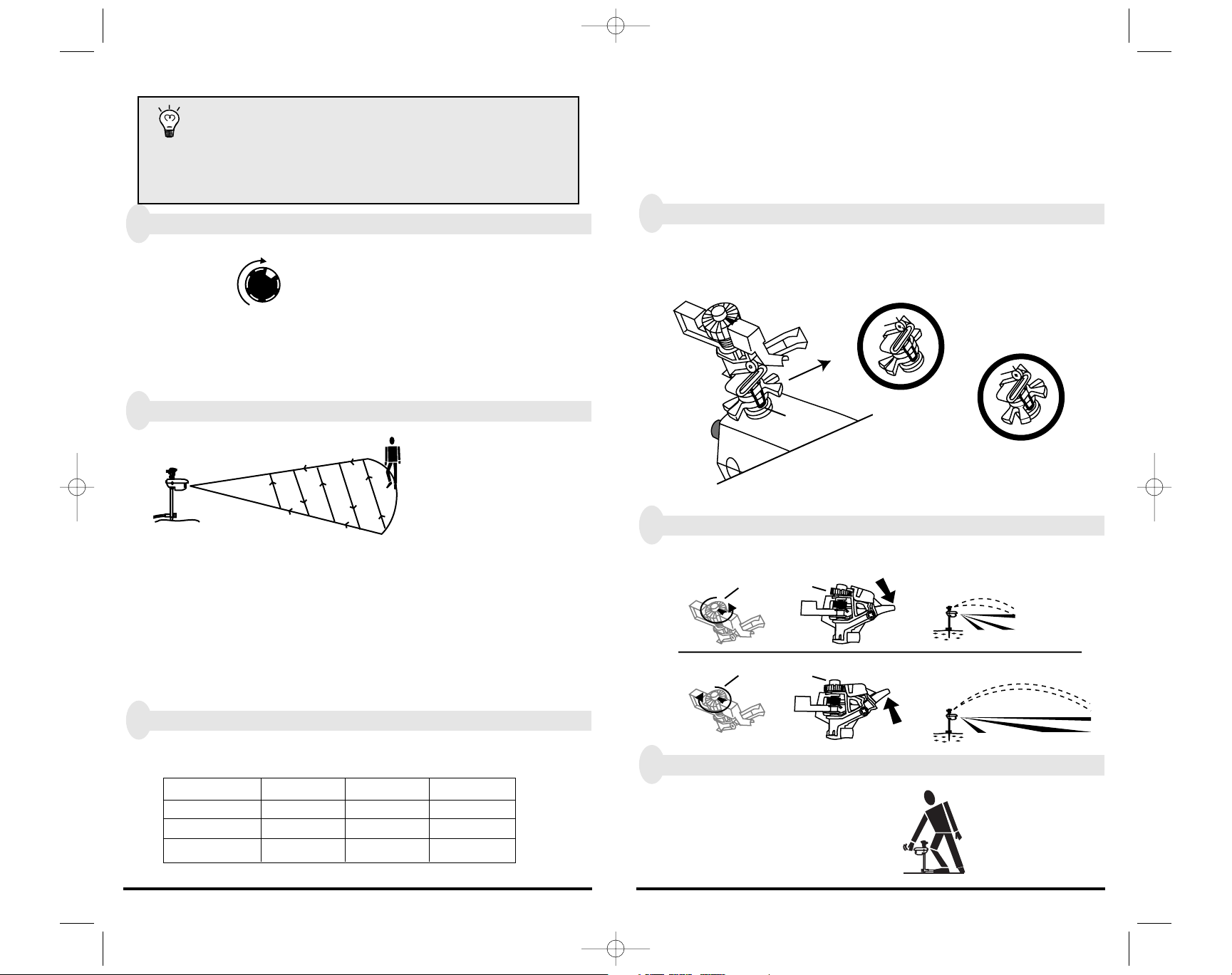
1. Turn the sensitivity knob on.
Set the sensitivity knob high enough to see to target animal
when it is within reach of the 10 meter (35 foot) water spray, but not
beyond that point. It is not beneficial to sense animals or moving
objects outside the area you wish to protect.
2. Confirm sensing area.
The Scarecrow is most sensitive to
movement across the field of view.
Motion towards or away from the
sensor may not always trigger
the unit.
Start outside your desired coverage area and work your way inwards.
The Scarecrow’s sprinkler will activate once it detects you. Make minor
adjustments until you feel the Scarecrow will only trigger when
movement is detected inside the you wish to protect. After the 3 second
pulse of water,remain still for approximately 8 seconds after each
activation, while the Scarecrow resets itself. Repeat this process until you
have a good idea of the Scarecrow’s area of coverage at this setting.
3. Increase or decrease the Scarecrow’s sensitivity
Suggested sensitivity settings
Distance at which you wish to detect animal.
Animal Size 10 ft. 20 ft. 30 ft.
Small 6-7 7-9 *
Medium 3-4 5-6 7-9
Large 2-3 4-5 6-9
* Some small animals might not be seen at this distance.
Adjusting Water Coverage.
After you have set the Scarecrow’s sensitivity and positioned it securely
with its lens aimed at the desired area, use this section to help you adjust
the arc and distance of the Scarecrow’s water spray.
Make sure the water is turned OFF, then follow the steps below.
1. Position stem tabs to adjust sprinkler travel.
Position the stem tabs so the metal wire clip travels between these tabs
and faces the area to be sprayed. Stem tabs determine the arc range of
the Scarecrow from 0 to 300 degrees.
2. Adjust the distance of water spray
Raise or lower the water deflector dial to control the distance of the
water spray.
3. Turn the water ON and test from behind.
The Scarecrow should activate.
Adjust the arc and distance to
suit your needs.
Sensitivity Knob
RESET / OFF
pace here
Narrow tabs produce narrow arc.
Metal wire clip
Wide tabs produce wide arc.
Minimum
Water deflector dial
Spout down reduces spray distance
Maximum
Water deflector dial
Spout up increase spray distance.
REV9.qxd 2/21/05 7:02 PM Page 6
Page 5
9 9
35 FEET
45 FEET
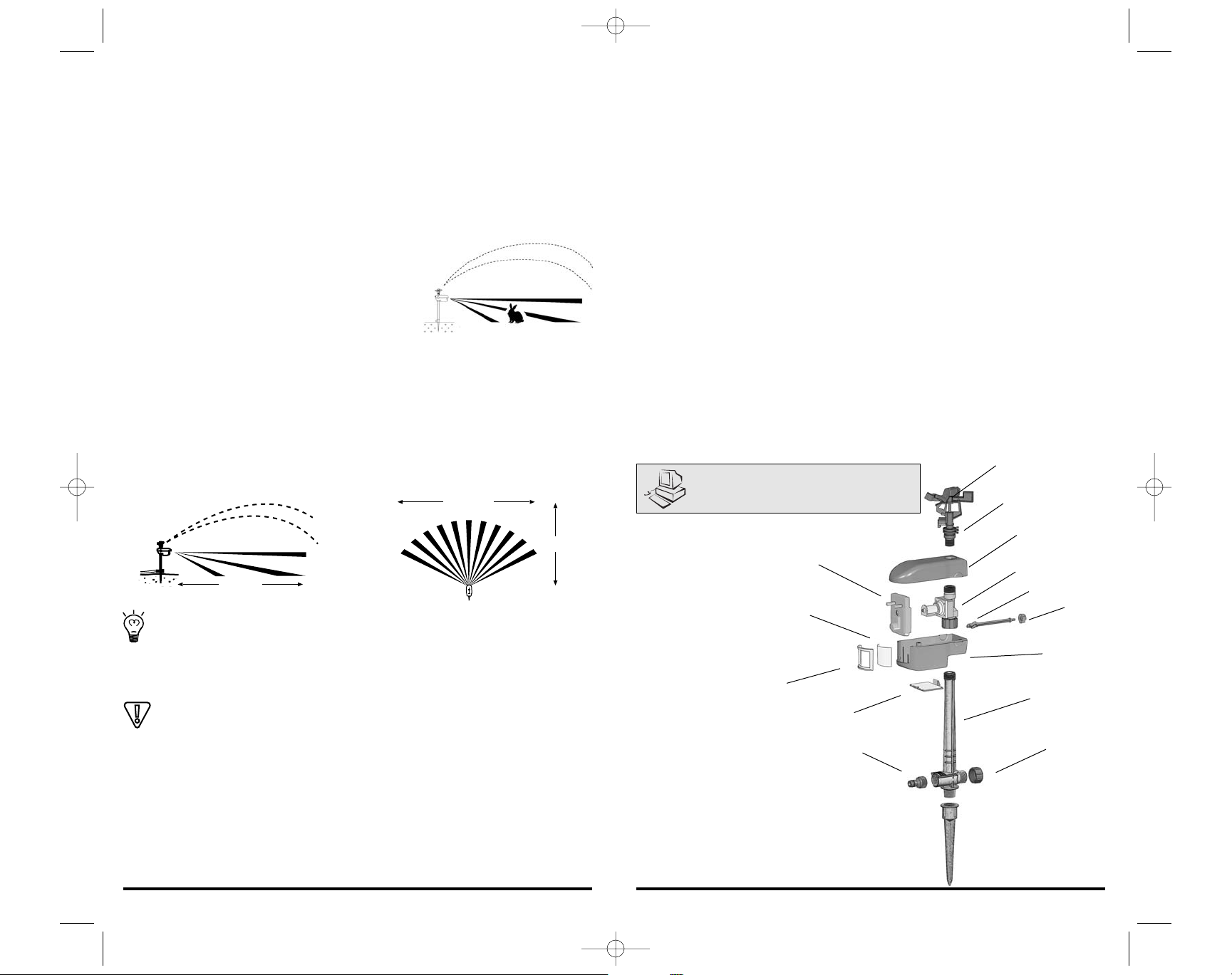
Top View
35 FEET
8 8
How the Scarecrow Works
The Scarecrow protects any open area of the garden or yard that receives the
unwanted attention of animals. Its sprinkler directs water accurately up to 10
m (35 feet), protecting a 90 square meter (1000 sq. ft.) area. The Scarecrow can
see large animals farther away than it can small animals.
The Scarecrow uses a passive infrared sensor to see the temperature difference
between an animal and the background. However, if the animal and the
background are similar temperatures the Scarecrow will have difficulty
detecting movement.
When an animal or person moves into the field of
view,the Scarecrow notices the change and opens
an electronic valve to release a 3 second burst of
water through the sprinkler. The Scarecrow then
pauses for 8 seconds before resuming sensing. This pause creates an element
of randomness and unpredictability preventing animals from becoming used
to the device.
Sensing Area
The sensing area consists of several dozen alleyways through which an animal
must cross to be detected.
Animals like rabbits, cats and squirrels may cross under the sensor
alleys. The sensor will eventually see them. Larger animals and people
are seen the easiest.
The chart on page 4 shows suggested settings for various animals.
Sensitivity Auto Adjust
Nuisance or false triggering shortens battery life. When this happens the
Scarecrow will automatically reduce it’s sensitivity within five minutes
(except for a 1 hour period when the battery is first connected or sensor knob
is adjusted.) False activations are most noticeable during windy conditions.
Troubleshooting
If you encounter a problem no covered here, or if these suggestions don’t
solve your problem, please refer to the detailed Troubleshooting section of our
website at www.scarecrowinfo.com or email us at [email protected] or
call us at 1.800.767.8658 / 1.250.652.0755
The Scarecrow seems to have erratic sensitivity.
This could be due to the Scarecrow’s auto adjust circuit. Turn the sensitivity
knob to the OFF (0) position for two seconds. This resets the auto adjust
circuit. If this does not work, ensure the Scarecrow’s lens is clean by wiping it
with a soft damp cloth.
The Scarecrow does not ‘see’animals.
Re-aim the Scarecrow. Refer to figure 2 on page 6 of this manual. If this does
not work, ensure the Scarecrow’s lens is clean by wiping it with a soft damp
cloth.
The Scarecrow only ‘spits’water or makes a “pinging”sound..
This indicates the battery is low or your water pressure is too high. Replace the
battery or add a pressure reducer to the water supply.
The Scarecrow leaks water through its sprinkler.
Debris is lodged in its fittings. Remove the sprinkler head and stake. Backflush
water through the valve in the sensor head to dislodge the debris.
Detection Range
Side View
www.scarecrowinfo.com
A
B
N
M
L
K
J
D
I
H
G
F
E
C
REV9.qxd 2/21/05 7:02 PM Page 8
Page 6
11 11
Veuillez lire les présentes instructions avant toute utilisation.
Merci d’avoir acheté ce produit Contech.
Ce qu’il vous faut :
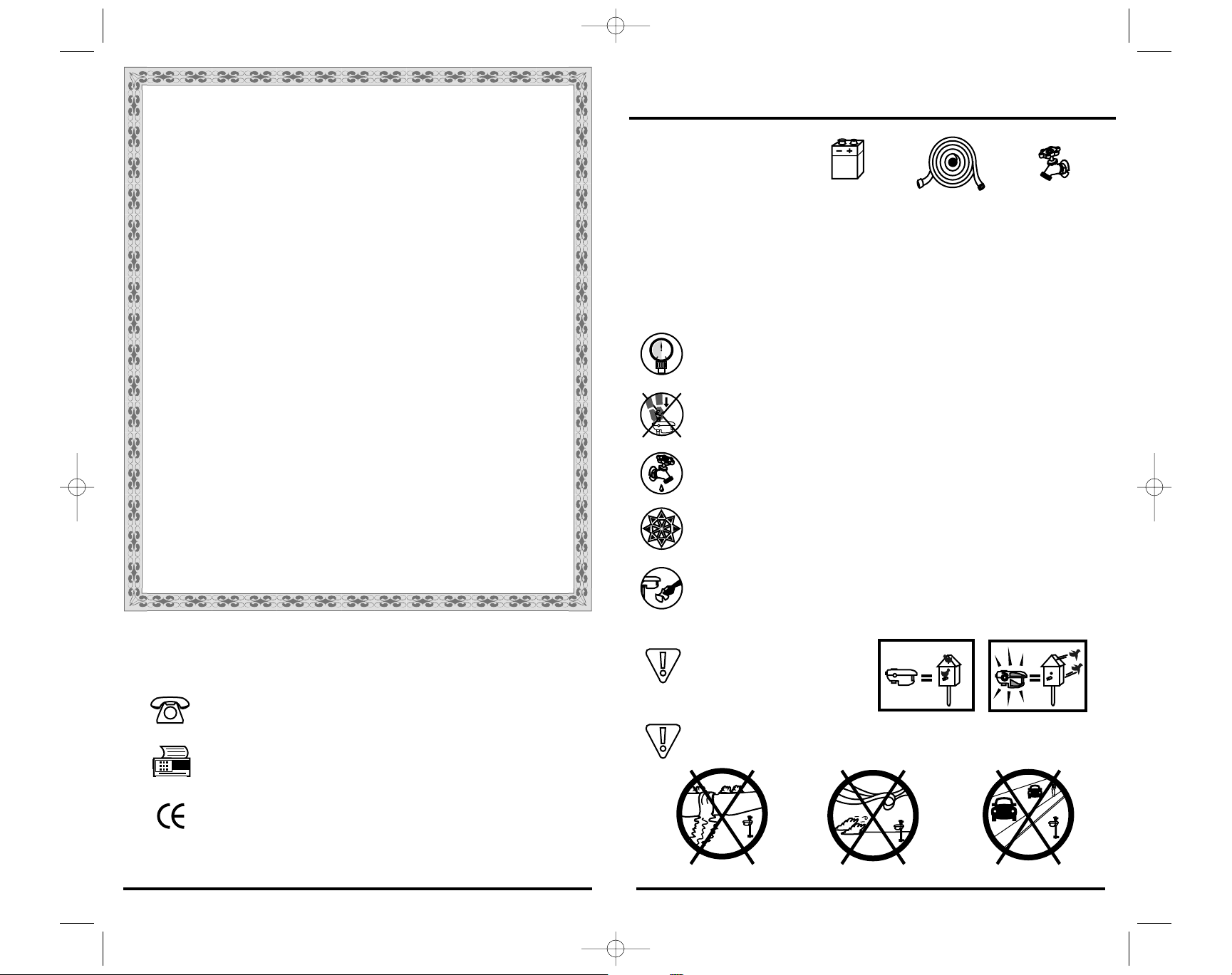
Rappels des précautions
Les anomalies de fonctionnement des arroseurs risquent de provoquer
des dégâts d'eau à votre propriété. Minimisez vos risques en limitant la
quantité d’eau disponible pour votre appareil (ouvrez la vanne du tuyau
de trois quarts de tour au maximum),
Pression de fonctionnement entre 30 et 80 psi (entre 2 et 5,5 bars).
Installez une vanne de réduction de pression sur le robinet si votre
pression d’eau dépasse 80 psi. Ouvrir votre robinet à moitié ne
changera PAS la pression de l'eau.
Lorsque vous enfoncez le pieu dans le sol,utilisez la crapaudine au
point de raccord des tuyaux. Ne pas vous appuyer ou mettre du poids
sur le boîtier du capteur.
Avant de débrancher l’appareil ou le tuyau, coupez toujours l’arrivée
d’eau et activez l’appareil à la main pour réduire la pression de
canalisation dans le tuyau.
Pour empêcher les dommages causés par l'eau gelée,mettez le
Scarecrow à l'intérieur et enlevez la pile avant le premier gel d'hiver.
Toute accumulation de poussière, d’impuretés ou de calcaire sur la
lentille blanche limite la sensibilité. Maintenez la propreté de la lentille
en la nettoyant délicatement avec un tissu humide.
L’œil sur l’autocollant Scarecrow
peut effrayer les petits oiseaux.
Pour minimiser un déclenchement intempestif, évitez de pointer
vers de l'eau motrice,des zones exposées au vent et des véhicules
en mouvement.
Alcaline
10 10 11 11
Scarecrow Guarantee
All Contech Electronics, Inc. products are backed by a 30-day money back
guarantee. If your Scarecrow does not meet your expectations,return it to
where it was purchased,in new condition within 30 days of receipt for a full
refund of the purchase price.
Scarecrow 2 Year Warranty
Contech Electronics, Inc. warrants to the original purchase of its products that
the product will be free from defects in material and workmanship for a period
of two (2) years.This warranty does not cover damage caused by or
attributable to acts of God, abuse, misuse, improper maintenance,or damage
caused in transportation.
Contech Electronics, Inc. is not responsible or liable for indirect, special, or
consequential damages arising out of or in connection with, the use of this
product, or damages with respect to any economic loss, loss of property,or
loss of revenues or profit.
Except as provided herein,Contech Electronics,Inc.makes no express
warranties, and denies any implied warranty or merchantability or fitness for
a particular purpose. Charges will be rendered for repairs to the product after
the expiration of the aforesaid warranty period.This warranty may not be
transferred.
To activate your warranty,please return the warranty registration portion of
these instruction by fax or mail.We welcome your comments and experiences
with the Scarecrow on our website at http://www.scatmat.com
Return Policy
We want you to be pleased.If something isn’t right, call us toll free at
800-767-8658. If we can help you over the phone we will,and if not we will
give you a return authorization number and shipping instructions.When we
receive your package we will repair, replace or promptly issue a refund at your
option if purchased directly from Contech. Unauthorized returns will not be
accepted.Refunds can only be made by the retailer transacting your purchase.
Please call before sending any package.
Questions?
Fax your question toll free, visit our Web site online at www.scatmat.com
or call us between 8:00 and 4:30 Pacific Standard Time.
Contech Electronics, Inc. 6582 Bryn Rd Victoria, BC Canada
Customer Service: (250) 652-0755 or 800-767-8658
Fax:(250) 652-5351 or 800-876-1666
NOTE! The Scarecrow may false trigger under certain
high frequency electromagnetic interference conditions.
Copyright© 1999 Contech Electronics Inc.Content may not be reproduced without the
express written permission of Contech Electronics Inc.Stylized Scarecrow and Contech
logo are registered trademarks of Contech Electronics Inc.All rights reserved
.
REV9.qxd 2/21/05 7:02 PM Page 10
9v
Alkaline
pressure guage
Page 7

Contech Electronics, Inc.
P.O. Box 115 Saanichton, BC Canada V8M 2C3
Customer Service: (250) 652-0755 or 800-767-8658
Fax: (250) 652-5351 or 800-876-1666
RICROINST.REV 1.00 01/2000/03/2002
REV9.qxd 2/21/05 7:03 PM Page 52
 Loading...