

Page 1
Cyber-20
SAFETY INSTRUCTION
To avoid personal injury or damage to equipment, please
ensure that you read this manual in its entirety before
attempting to operate the equipment. Please retain this
manual for future reference.
TO PREVENT THE RISK OF ELECTRIC SHOCK, DO NOT
UNDER ANY CIRCUMSTANCES REMOVE ANY PARTS OF
THE EQUIPMENT COVER. THERE ARE NO USER
SERVICEABLE PARTS INSIDE. ALL SERVICING MUST BE
CARRIED OUT BY QUALIFIED SERVICE PERSONNEL.
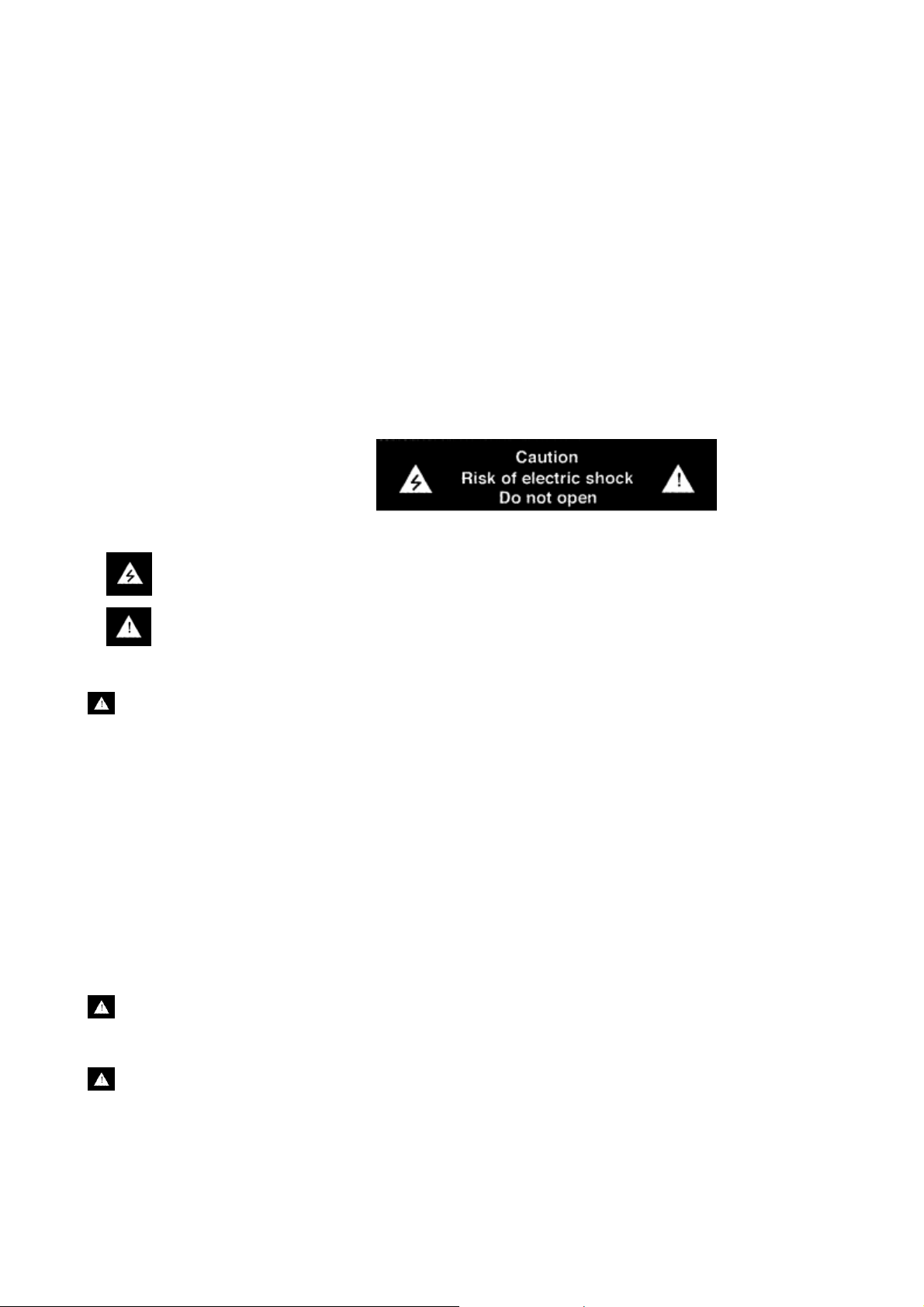
This icon marks a presence of un-insulated “dangerous voltage” within the product's enclosure
that may be of sufficient magnitude to constitute a risk of electric shock to persons.
This icon marks important operating, maintenance and service information that should be
read to prevent possible personal injury
WARNINGS
Do Not Disassemble
Do not attempt to service the equipment beyond that described in this manual. Touching the
equipment’s internal parts could result in severe personal injury. All other servicing or
problems as listed below should be referred to qualified Consonance service technicians:
• The power supply cord or plug has been damaged
• Objects have fallen or liquid has been spilled into the equipment
• The equipment does not appear to function normally or exhibits a marked change in
performance
• The equipment has been dropped or the enclosure damaged
Do not under any circumstances allow anyone to modify your Consonance equipment without
first checking with Opera Audio, your dealer, or your distributor. Unauthorized modifications
will invalidate your guarantee.
Power Source
The equipment should be connected to a power supply only of the type described in this
manual or as marked on the equipment.
Grounding or Polarization
Power supply cords should be routed so that they are not likely to be walked on or pinched by
items placed upon or against them, paying particular attention to cords and plugs, convenience
receptacles, and the point where they exit from the amplifier.
Page 2

Ventilation
The equipment should be situated so that its location or position does not interfere with its
proper ventilation.
1. The equipment must not be placed on bed, sofa, or similar surfaces, that may block the
ventilation openings,
2. The equipment must not be placed in a built-in installation, such as a bookcase or cabinet
that may impede the flow of air.
3. The equipment should be situated away from heat sources such as radiators, heat register,
stoves, or other electronic appliances that produce heat. This equipment is not intended for
commercial use.
Water and Moisture
The equipment should not be used near water, e.g., near a bathtub, washbowl, kitchen sink,
laundry tub, in a wet basement, or near a swimming pool etc. Similarly, do not placed objects
filled with liquid, such as vases on top of the equipment.
Lighting
Consonance hi-fi system can be damaged by lightning. Power amplifiers are particularly at risk
and therefore should be turned off when there is risk of lightning strike. For complete protection
all mains plugs and any aerial cables should be disconnected when not in use.
Power Lines
In case of connecting a tuner, an outdoor antenna should be located away from power lines. If
an outside antenna is connected to the system, be sure the antenna is grounded so as to
provide some protection against voltage surges and built up of static charges.
Cleaning
Never clean with furniture polish, benzene, or volatile liquids. Dust periodically with a clean,
soft paint brush. Fingerprints can be removed with a moist polishing cloth.
Page 3

Table of Contents
SAFETY INSTRUCTION
1. INTRODUCTION 2
2. UNPACKING & SET-UP 2
3 OPERATING TIPS 3
4. GENERAL WARNINGS 4
5. TROUBLESHOOTING GUIDE 4
6. TECHNICAL SPECIFICATION 5
7. WARRANTY 6
Page 4

Introduction
Thank you for the purchase of the Cyber-20 high-end tube amplifiers. Opera Audio welcomes
you to the growing number of discerning audiophiles who own Opera Audio pro ducts. This
manual has been prepared to help you to maximize your en joyment of the p erformance and
features of your new Consonance equipment. Please study this manual carefully and become
acquainted with all the features, operation and capabilities of your new Consonance
equipment. Should you have any questions, or desire information on other Opera Audio
products, please contact your local Oper a d ea l er.
Unpacking & Set-up
Unpacking
Before any Opera Audio product leaves the factory it is carefully inspected for physical
imperfections as a routine part of Opera Audio's stringent systematic quality control. After you
have unpacked the equipment, carefully insp ect for any physical damage. Save the sh ipping
carton and packing materials as they are essential for future use to reduce the possibility of
transportation damage.
Set-up
1. Check Equipment Voltage
Ensure that the operating voltage of the amplifier, check the shipping carton label and/or
owners manual, conforms to the delivery voltage of your local power supply (i.e. 240V /
230V / 220V / 115V / 100V AC dependent on country).
2. Positioning the Equipment
The amplifier may generate consider able heat during normal operation. Please ens ure that
the unit is far away from effect of any domestic heat source and adequate air circulation
around the unit is provided to maintain cool operation. For air circulation, leave enough space
around the unit (at least 3 cm on the top and 3 c m on the sides and leave enough spa ce on
the back for the power cord and interconnect cables). If the equipment is going to be mounted
in an enclosed cabinet, it is recommended that the rear of the cabinet has vents to allow air to
circulate around the unit. With these considera tions im plemented, the equip ment sh ould then
provide exceptional performance as intended. However, the usual protection o f equipment
from excessive dust and moisture s hould always be observed. All the equipment made by
Opera Audio has been carefully designed wit h high quality components so that Long-term
undiminished performance is operated in accordance with the instructions provided.
3. Install Vacuum Tubes
Locate the EL84 and ECC82 vacuum tube s an d insert them into their sockets according to
the print on top lid. Pay attention on the proper tube orientation please and be sure to hold the
tube by its base when inserting and removing. This will minimize the chance of breaking the
glue between the socket and the glass.
4. Connect Signal Cables
2
Page 5

Connect the input source to the amplif ier’s right and left channel RCA jacks. Refer to rear
chassis drawing for connection location. These j acks are labeled with colored washers: re d
for right and black for left.
Operating Tips
A. Power cord, plugs and sockets
The power cord should be routed so that it is not likel y to be stepped on or pinch ed by items
placed upon or against it. All the plugs and sockets supplied with your Consonance
equipment have been chosen because they mark the best possible connection for their
purpose. A poor contact will degrade the signal substantially, plugs and sockets should look
clean and free from corrosion. The easiest wa y to clean the m is to switch off the equipment,
pull the plugs out of their sockets, and push them back in again. Special contact cleaners and
contact enhancers should not be used a s they tend to deposit a film, whic h is very d ifficult to
remove and may degrade the sound.
B. Switching on and off
Source components and power suppli e s fo r CD pla y ers, tuners, preamplifiers and cros sovers
should be switched on before s witching on t he amplifier (s). Always s witch the am plifier(s) off
and wait about 5 minute for its powe r supply capacitors to discharge before connecting or
disconnecting any leads. Always use the power switch on the equipment instead of the mains
outlet switch.
C. Running in
Your Consonance equipme nt will take a considerable time to run- in before it performs at it s
best. The duration varies, but under some conditions you will find that the sound continues to
improve for as much as five weeks. Better and more consistent performance will be achieved
if the system is left switched on for long periods. However, pleas e t ak e not e that all electronic
equipment can be damaged by lightning and should not be left on for long periods
unattended.
D. Power supply
Where fused plugs are used various amp fuses should be fitted. Fuses of a lower rating will
fail after a period of use. A hi-fi system usually shares a main circuit with other household
equipment some of which can c ause dis torti on of th e mains wavef orm. I n some Consona nce
equipments such distortion can lead to a me chanical hum f rom the transf ormers. The hum is
not transmitted through the speak ers and has no ef fect on t he perf orma nc e of the s yst em but
is purely local to the transformer. A separate fused mains cir cui t (like th at re serv ed fo r e lectr ic
cookers) will have lower impedance, supply cleaner power, and consequently improve
system performance. Do not wire voltage dependent resistors or noise suppressors into
mains plugs. They degrade the mains supply and the sound.
E. Positioning
Power supplies and amplifiers sh ould be located at a reasonable distanc e away from other
equipments in the system. Adequate spacing will prevent the generation of transformer
resonance which in turns causing audible hum to be heard from the loudspeakers. The
minimum recommended distance is 300mm (12 inches), and that allowed by the standard
interconnect lead being maximum.
Many of the Consonance equipments, due to stringent requirements for ultimate sonic
reproduction, are extremely heavy in weight. If you are placing the equipments on equipment
3
Page 6

rack or table please ensure that the frame is structural sound for supporting the total weight of
the equipments.
General Warnings
Every piece of Consonance equipmen t is designed to produce the finest sound quality that
can be achieved, by avoiding compromise wherever possible. This can lead to circumstances
that may be unfamiliar to the equipment owner. The material that follows contains advice
specifically related to Consonance equipment as well as more gen eral war ning abo ut th e use
of domestic audio products.
Please read it carefully:
The transformers in Consonance amplifiers and power supplies may sometimes make a
mechanical noise caused by distortion of the mains wavef orm. Con sonan ce t ransfor mers are
large in size and have heavy gauge secondary win dings making them relatively sensit ive to
such distortion. A separate mains circuit for your hi-fi system may reduce the effect while also
giving an overall improvement in sound quality. It may be nec e ssary however to take account
of mechanical transformer noise when placing yo ur eq uipm en t.
In some circumstances, depending on where you live and the grounding arrangements in
your home, you may experience radio frequency interference. Controls on broadcasting in
some territories allow very high levels of radio fr equency radiation and both the choice and
exact placement of equipment may be critical. If there is a known probl em in your locality it is
advisable to arrange for a home demonstrat ion before purc hase to ensure that your selected
Consonance equipment can be operated normally. Susceptibility to radio frequency
interference is related to the wide internal bandwidth necessary for high sound quality.
Systems incorporating moving coil phono prea mplifiers and active cros sovers are more likely
to suffer.
Troubleshooting Guide
From time to time you may experience problems in obtaining optimum equipment
performance. Following is list of frequently encount e red pr o ble m s .
Problem Solution
Power indicator and filaments do
not light
Check the fuse and make sure the amplifier is
plugged into a working power outlet
Sound out of one speaker only Turn volume control fully counter-clockwise and
reverse input connectors. If sound changes from
one speaker to the other, chec k source or replace
inter-connect wires. If the sound is still coming out
of the same speaker only, check speakers on
another piece of equipment for proper operation.
Static, noise, or hum Turn the potentiometers Individually clockwise or
counter-clockwise until the hum reduces to the
lowest level on each channel
Equipment problem could also be c aused by fault i n any pa rt of the system or its ins tallation.
As Legal consumer protect ion varies from co untry to coun try, you should a lways firs t consult
the local dealer for any technical problems that you may experience. Please contact your
4
Page 7
local distributor or Opera Audio a t the address in the back of this manual for any difficult ies
that cannot be resolved.
Certain Consonance equipment is made in special versions for different territories as a result
it is impracticable to arrange international guarantees. Please establish appropriate
guarantee arrangements wit h your ow n dea l er at th e time of sale. We are a l ways availab le to
offer help and advice. It is essential that repairs and updates are only carried out by
authorized Consonance dea ler or Opera Audio factory. As many Consonance c omponents
are custom made and specially matched, the replacement parts must be ordered through
Opera Audio or its representative. Our dealer will have all relevant information about the
service in your area and will ensure that you equipment is serviced without delay.
If for some reason, there are no service facilities available in your area, please ship the
equipment to the address listed at the back of the manual.
Please note that you are responsible for all shipping charges, insurance, and re-importation to
your country, and duty ar r a n gem ents.
When shipping a product back to fact ory for service, always include the following:
• Sales slip or other proof of purchase if repair is claimed under war ra n t y.
• A proforma invoice with value of the goods, stating that the amplifier is returned to
china for repair.
• An accompanying letter describing faults, symptoms or problems with the
amplifier.
• Always ship the amplifier in its original carton and packaging material to prevent
damage in transit.
Opera Audio will not accept responsibility
for any damage caused in transit, no
matter whatever caus ed.
6.Technical Specification
FUNCTION
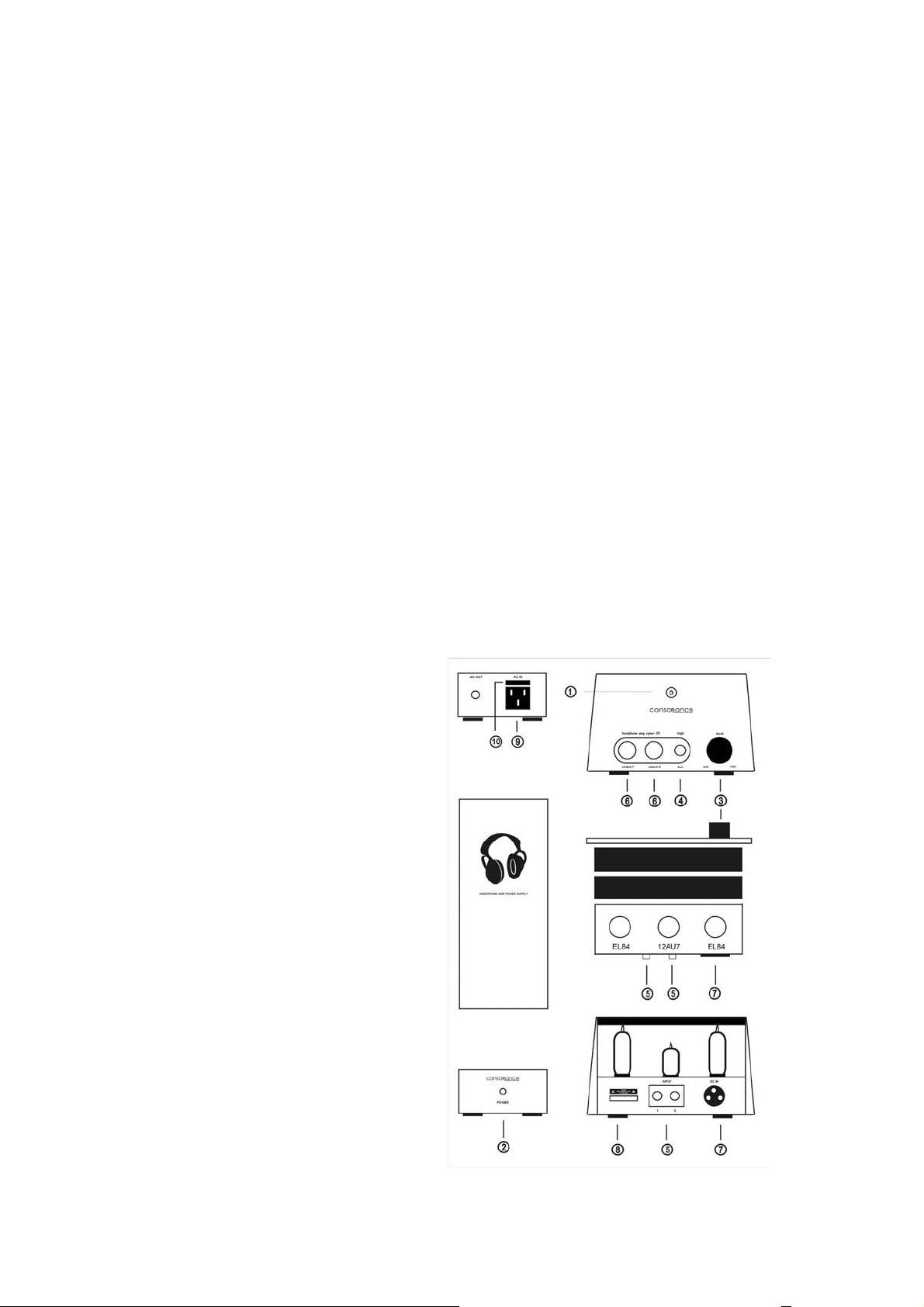
① Power indicator
② Power switch
③ Volume control
④ High/low gain switch
⑤ Input jacks
⑥ Headphone jacks
⑦ Interconnected power plug
⑧ Serials number
⑨ Power plug
⑩ Fuse
5
Page 8

CONTROL FUNCTIONS:
OUTPUT IMPEDANCE:
OUTPUT POWER at 1 kHz:
BANDWIDTH at -3dB:
SIGNAL/NOISE:
INPUT INTERFACES:
INPUT IMPEDANCE:
INPUT SENSITIVITY for RATED OUTPUT:
OUTPUT INTERFACES:
CONSUMPTION:
VACUUM TUBE:
DIMENSION:
WEIGHT:
SPECIFICATIONS SUBJECT TO CHANGE WITHOUT NOTICE.
90dB
26W
EL84x2, ECC82x1
190 (L) x 145 (W) x 112(H) mm
9kg (packed)
Volume, Gain (low/high) Switch, Power On/Off
(low) 10-200 ohms,(high) 200-600 ohms
1W x2 RMS
20Hz - 40kHz (1W)
1 group (RCA)
50k
2 groups (6.5mm Mic Jack)
900mV
6
Page 9
Warranty
Opera audio guarantees each product manufactured by us to be free from defects in
materials and workmanship under norm al us e. Our obligation unde r this war rant y is limited to
making good at our factory any part or parts thereof which shall, within 1 year after delivery to
the original purchaser, be ret urned to us with transportation c harges prepaid, and which an
examination shall disclose to have b een thus defective; this warranty being expressly in lieu
of all other warranties expressed or implied and of all other obligations or liabilities on our part.
This warranty shall not apply to any Opera audio product which shall have been rep aired or
altered outside of our factory in any way so as to affect its stability, nor which has been
subject to misuse, negligence or accident. Warranties of the vacuum tubes are by the
respective manufacturers , usually 90 days.
Please mail or e-mail the Registration Card to the add ress a s fol lows:
The Opera Audio Co., Ltd.
No.2 JianXianQiaoLu
ChaoYang District
Beijing, China
Tel: 86 10 64377091
Fax: 86 10 64377465
[email protected]
www.opera-consonance.com
Registration Card
Name
Address
City
State
Zip
Email
Telephone
Model
Serial Number
Purchase Date
Dealer
7
Page 10

8
 Loading...