

Page 1

START GUIDE ER75i & ER75s
Start Guide
Safety instruction
Please take care to following instructions:
The router must be used in compliance with international and national law and in com-
pliance with any special or additional restrictions regulating using of the Conel router in
different applications and environment.
To avoid possible health injury or/and damage to appliance or/and not-respecting relevant
provisions and standards, using only the original accessories is recommended. Unauthorized device or accessories modification or using accessories that have not been approved
may result in router damage or/and in violating of regulations. Unauthorized device or
accessories modification or using accessories that have not been approved may result in
warranty termination.
The router must not be opened.
Caution! The SIM card could be swallowed by small children.
Voltage at the power connector of the router must not be exceeded.
Do not expose the router to extreme ambient conditions. Protect the router against dust,
moisture, and high temperature.
It is recommended not to use the router at petrol stations. We remind observing locale
restrictions concerning using radio-based devices for example at petrol stations, in
chemical plants, while working with explosives etc.
Switch off the router while travelling by plane. Router operation aboard airplane may
affect or interfere the mobile network and might be unlawful. Not respecting airplane
staff instructions may result in suspension or total cancellation of telephone services for
the respective client or/and may result in legal sanctions.
While using the router close to personal medical devices, such as cardiac pacemakers or
hearing aids, you must proceed with heightened caution.
Operating router too close to TV sets, radio receivers and personal computers, the
telephones etc. may cause interference.
It is recommended to create copy or backup of all the important settings stored in mem-
ory of router.
Product disposal instructions
The WEEE (Waste Electrical and Electronic Equipment: 2002/96/EC) directive has been
introduced to ensure that electrical/electronic products are recycled using the best available
recovery techniques to minimize the impact on the environment. This product contains high
quality materials and components which can be recycled. At the end of its life this product
MUST NOT be mixed with other commercial waste for disposal. Check with the terms and
conditions of your supplier for disposal information.
1
Page 2
START GUIDE ER75i & ER75s
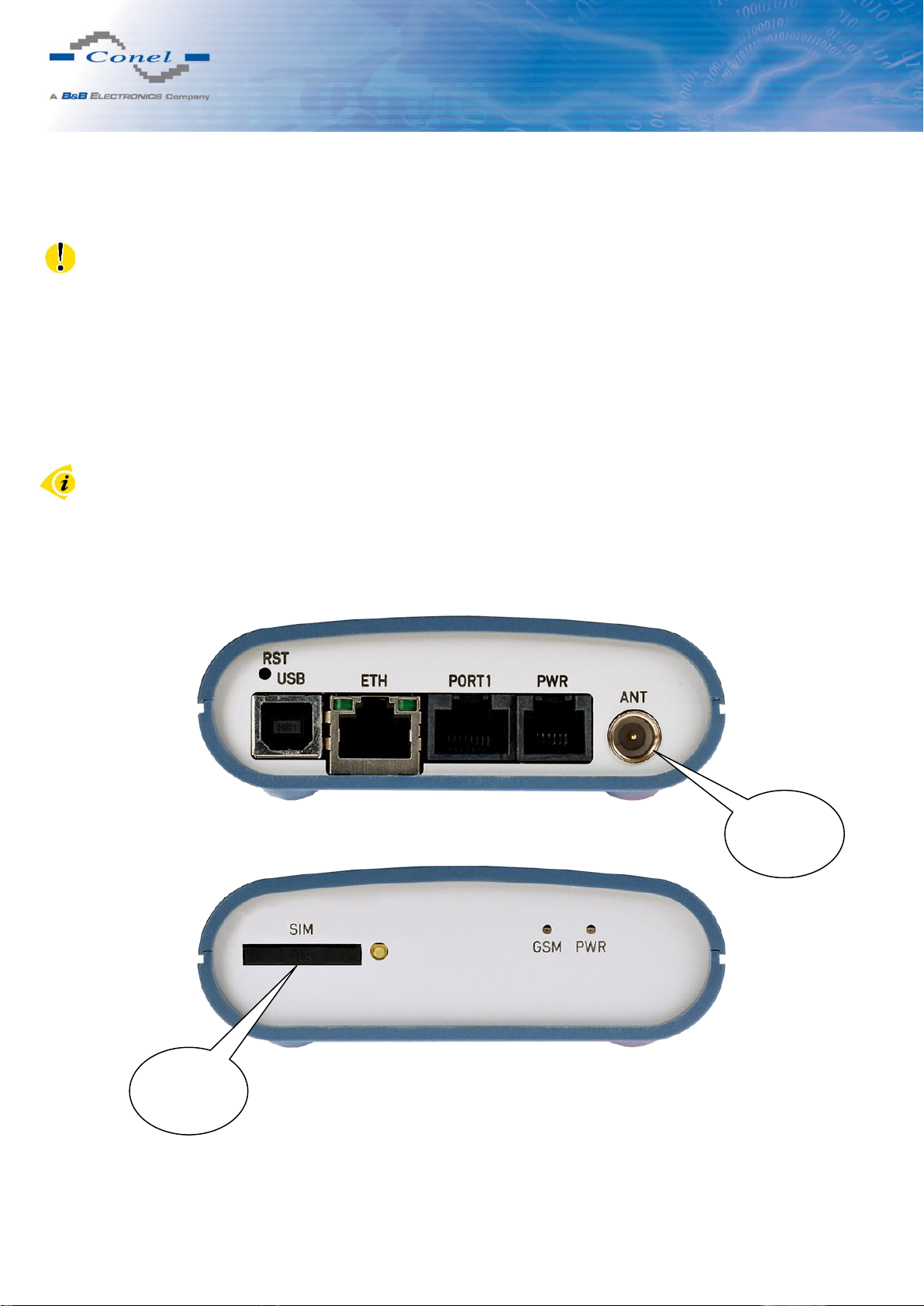
Antenna
connector
SIM card
reader
First use
Before putting the router into operation it is necessary to connect all the components
that are required to run your applications.
The router cannot be operated without connected antenna, inserted SIM card and
connected power supply. If there is no connected antenna during operation of the router,
the router may be damaged!
Antenna connection
Use FME connector for antenna connection. Main antenna is connected by screwing
at ANT connector (see figure below).
Inserting SIM card
The SIM card reader for 3 V and 1.8 V SIM cards is located at the front panel of Conel
router. To initiate router operation it is necessary to insert an activated SIM card with
unblocked PIN to the SIM card reader.
Slide out SIM card holder by pressing the small yellow button right from the SIM card
socket. Insert SIM card into holder and push the holder into the reader (see figure below).
2
Page 3
START GUIDE ER75i & ER75s
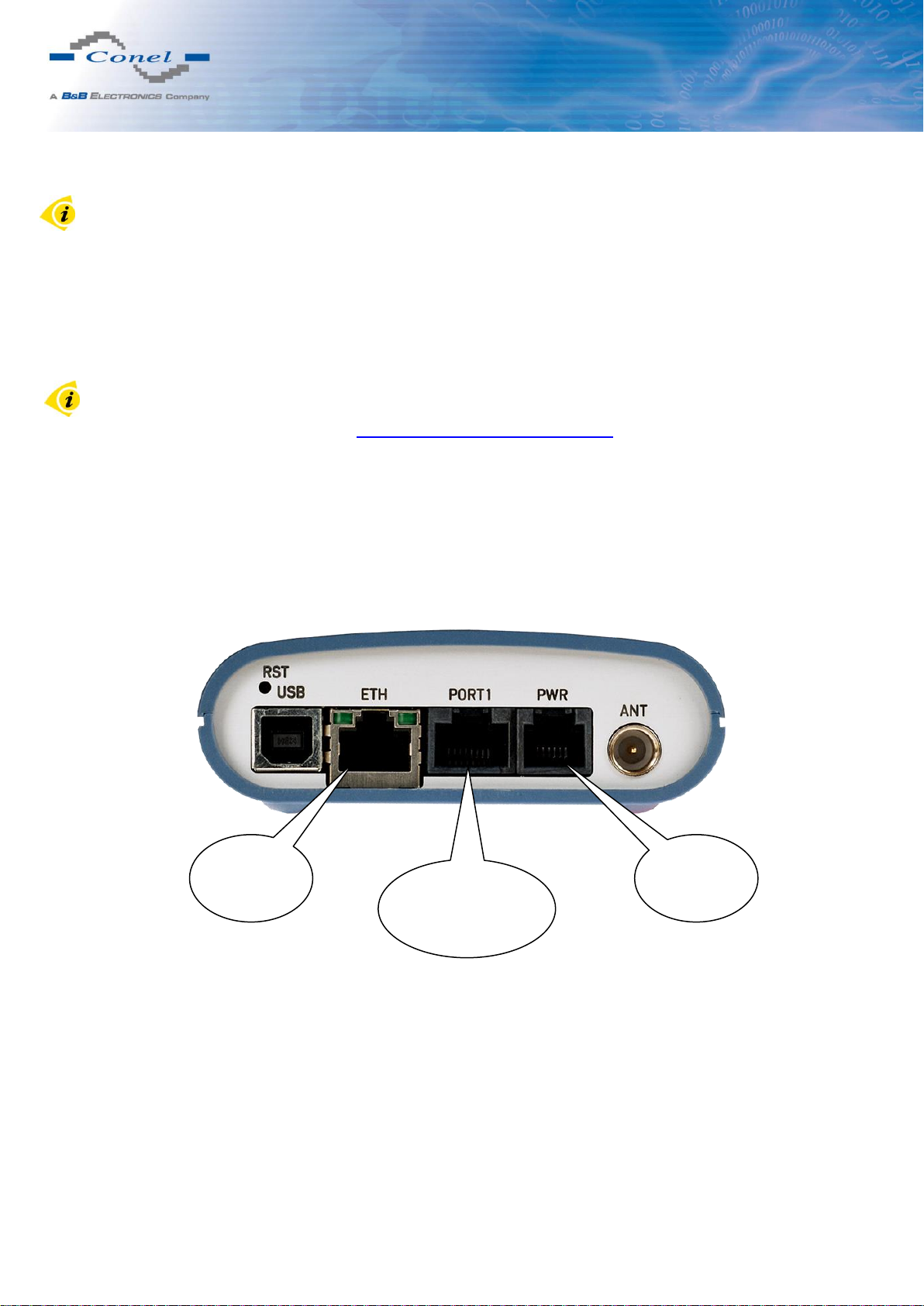
Power
connector
Ethernet
connector
Connector for
expansion port
Power cable connection
The router requires DC power supply from +10 to +30 V DC. The router has a built-in
protection against reverse polarity without signaling.
Connect power cable to PWR connector on the front panel of the (see figure below).
Ethernet cable connection
Ethernet cable is connected to ETH connector (see figure below). Ethernet cable is
used for configuration and communication with router.
If expansion port is assembled, cable is connected to port PORT1. Wiring of pins for
expansion port is described in manual of corresponding expansion port. These manual can
be found on the Conel website: http://www.conel.com/download. Please, use the following
login information:
Username: ConelFreeDownload
Password: coneldownload
3
Page 4
START GUIDE ER75i & ER75s
Configuration settings over web browser
Status monitoring, configuration and administration of router can be done through
web interface available after inserting IP address of router into web browser. Default router
IP address is 192.168.1.1. Configuration is allowed for user "root" with initial password
"root".
Detailed router configuration description via Telnet and web interface can be found
in user manual on the Conel website http://www.conel.com/download. Please, use the following login information:
Username: ConelFreeDownload
Password: coneldownload
Configuration settings over Telnet
Status monitoring, configuration and administration of router can be done through
Telnet interface after inserting IP address of router into Telnet interface. Then you can configure router by Telnet commands. Default router IP address is 192.168.1.1. Configuration is
allowed for user "root" with initial password "root".
Detailed router configuration description via Telnet and web interface can be found
in user manual on the Conel website http://www.conel.com/download. Please, use the following login information:
Username: ConelFreeDownload
Password: coneldownload
Restoring and backup of router configuration
The moment PWR LED starts blinking it is possible to restore initial settings of router by
pressing RST button on the front panel. After pressing this button configuration is restored and
reset is done shortly afterwards (green LED will be on).
We recommend backup router configuration (see user manual) before reset because
after router reset is current configuration overwritten by default one.
User manual and manual for each expansion port can be found on the Conel website
http://www.conel.com/download. Please, use the following login information:
Username: ConelFreeDownload
Password: coneldownload
After the first login we strongly recommend to change default password due
to security reasons.
Conel declares that ER75i and ER75s products are in compliance with the essential
requirements and other relevant provisions of direction 1995/5/ES.
Declaration of conformity was issued and it is possible to get it on the Conel website or at
producer.
4
 Loading...