

Page 1
CBP6324DN-HD
CVP9324DN-HD
Colour Mono Dome Camera
USER MANUAL
Page 2

Remark: Changes or modifications not expressly approved by the manufacturer can
cause the camera to be damaged and become inoperable. This may invalidate the
user warranty.
CAUTION
1. This installation should be made by a qualified service person and should abide to all local
codes.
2. Avoid installation on a surface subjected to frequent vibration or shocks.
3. Do not operate the camera beyond its temperature range or power source ratings.
4. Should any damage or suspected damage occur, shutdown the power source, unplug and
contact your service provider.
5. Do not install the camera under unstable lighting conditions. Severe lighting change or
flicker can cause the camera to work improperly.
6. Never use the camera close to a gas or oil leak.
7. Do not disassemble the camera.
8. Never keep the camera face to strong light directly.
9. Ensure all removable covers are replaced to protect the inner components.
10. Do not install near devices which emit a strong electro-magnetic field.
11. Use a dry or damp cloth only for cleaning.
12. Internal dome only - Do not drop the camera or subject the unit to physical shocks.
PLEASE FOLLOW THE ABOVE CAUTIONS – FAILURE TO DO SO MAY
INVALIDATE THE WARRANTY OR CAUSE SERIOUS INJURY.
Page 3
PACKING CONTENTS
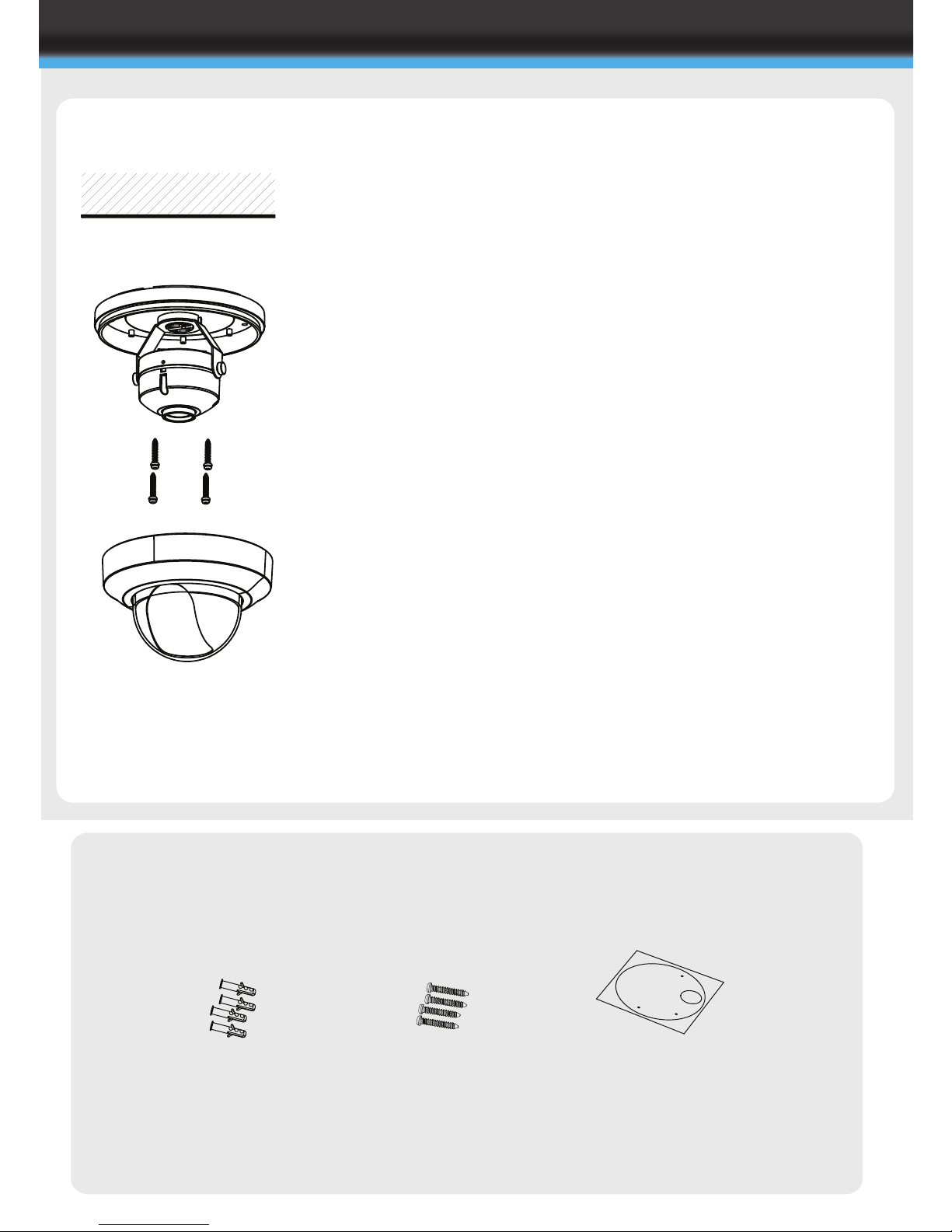
CBP6324DN-HD
Important: Ensure all cautionary procedures are
observed during installation.
It is recommended the camera is tested during the most
demanding environmental conditions such as low light
or bright sunlight to ensure continuity of effective CCTV
monitoring.
l Using the supplied fitting screws, securely attach the
camera to the drilled surface
l Adjust the tri-axis gimbal zoom/focus to give the
required image of the area to be monitored.
l Replace the dome cover by pushing firmly in place
onto the base
l Carefully clean the dome surface with a soft lint
free cloth
l Remove the camera unit carefully from the box
reserving the accessory contents in a safe place
l Use the supplied mounting template to mark the
space for drilling
l Remove the dome cover using a suitable coin or
screwdriver
FIXING TO A WALL
CBP6324DN-HD
INTERNAL DOME INSTALLATION
Ceiling
Wall Plugs
X4
Mounting Template
X1
Fitting Screws
X4
Page 4
Important: Ensure all cautionary procedures are
observed during installation.
It is recommended the camera is tested during the most
demanding environmental conditions such as low light
or bright sunlight to ensure continuity of effective CCTV
monitoring.
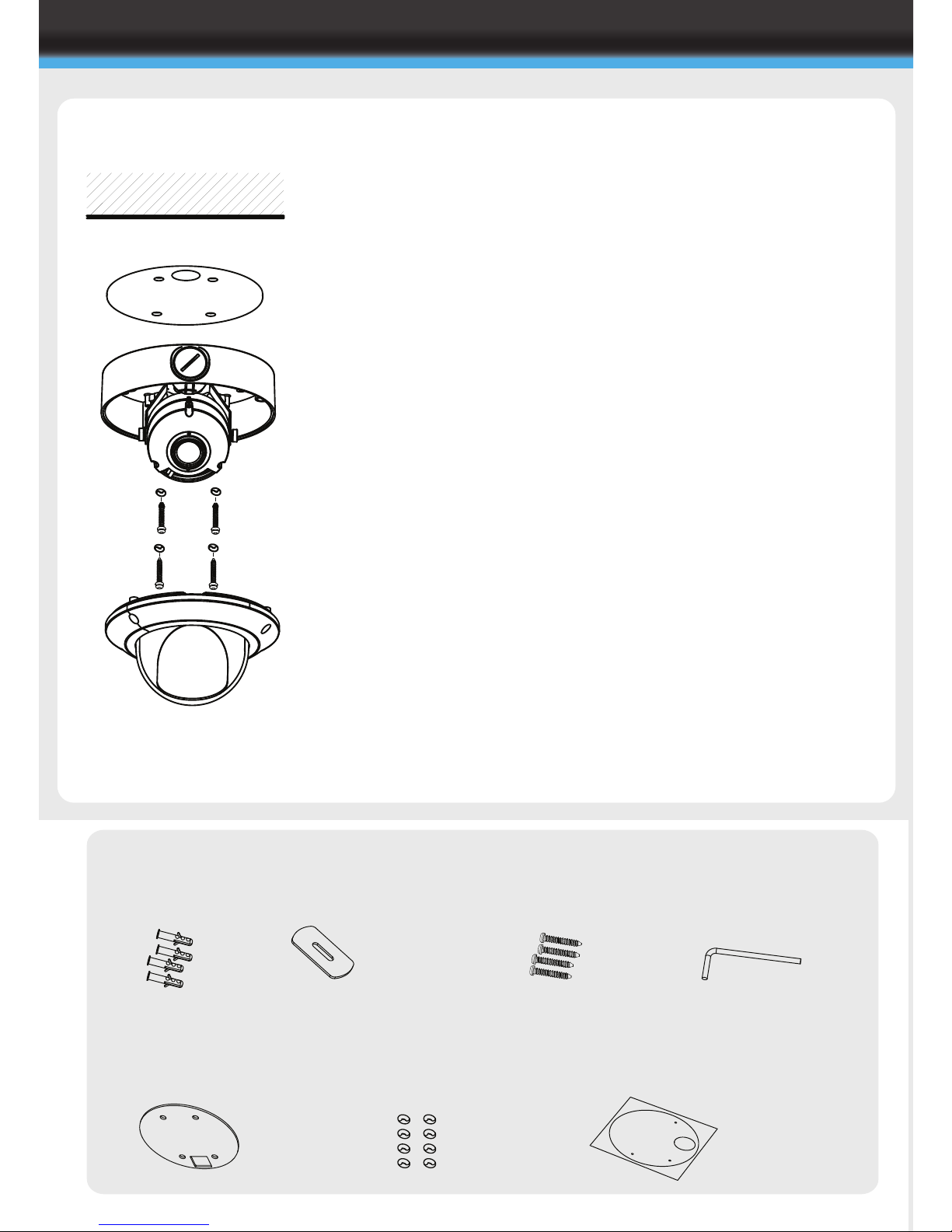
l Attach the weatherproof sealing pad to the base of
the dome with the sticky side against the camera
l Using the supplied fitting screws, securely attach the
camera to the drilled surface
Please note: To ensure correct weatherproof you
must use the enclosed fitting screws and
weatherproof washers
l Adjust the tri-axis gimbal zoom/focus to give the
required image of the area to be monitored.
l Replace the dome cover and tighten the dome cover
screws using the supplied dome cover screw driver
l Carefully clean the dome surface with a soft lint
free cloth
l Remove the camera unit carefully from the box
reserving the accessory contents in a safe place
l Use the supplied mounting template to mark the
space for drilling
l Remove the dome cover using the supplied dome
cover allen key
FIXING TO A WALL
CVP9324DN-HD
VANDAL RESISTANT DOME INSTALLATION
PACKING CONTENTS
Wall Plugs
X4
Conduet hole cover
opener
X1
Mounting Template
X1
Fitting Screws
X4
Dome Cover
Allen Key
X1
Weatherproof
sealing washers
X8
Weatherproof
sealing pad
X1
Ceiling
CVP9324DN-HD
Page 5
CONNECTION
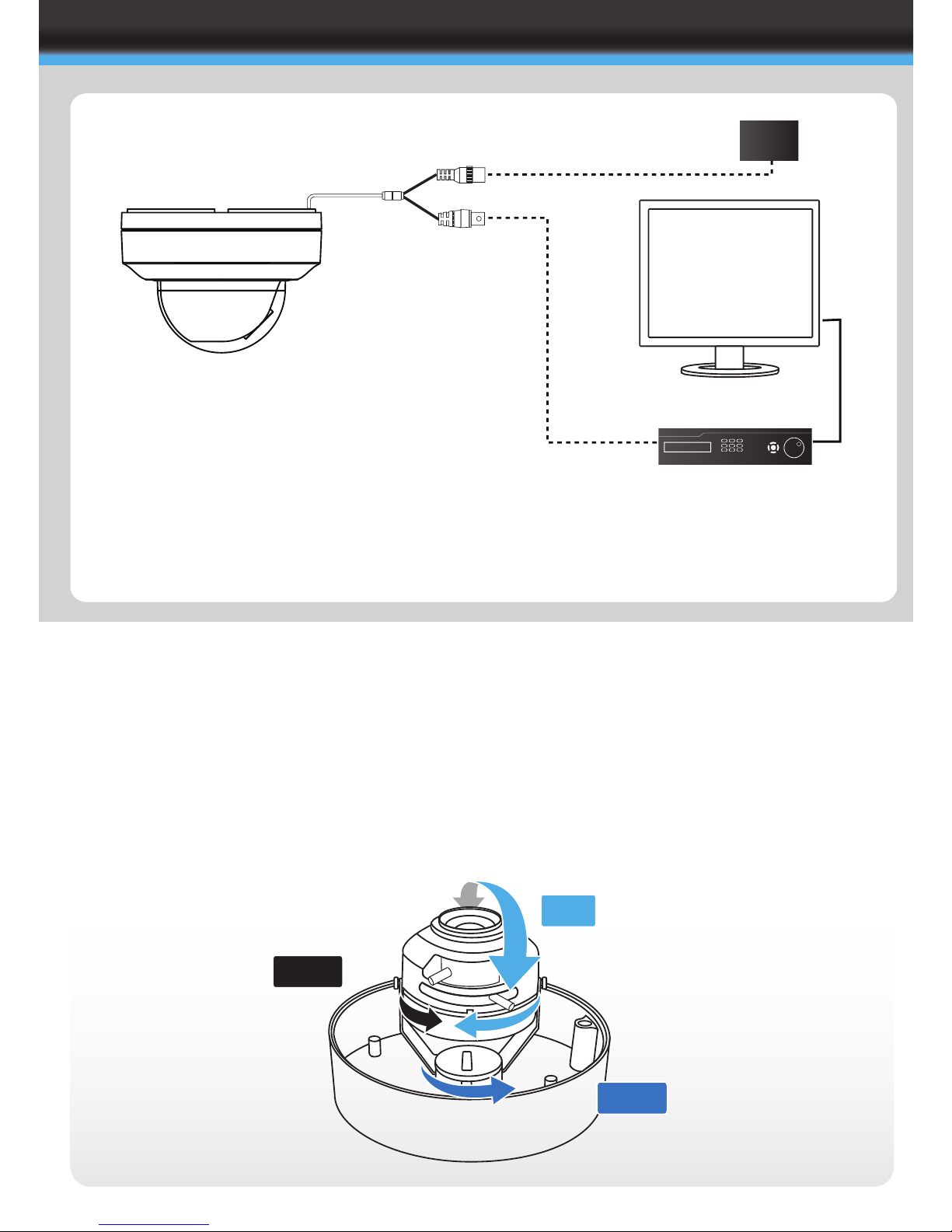
l Connect the video out port to your coaxial video
cable running to the HD-SDI Recorder
l Check the power supply is of the correct level
and connect your power supply into the power
port on the Camera.
l View the picture on a monitoring device to
check the power and video connection is
working properly.
PSU
Troubleshooting
l Ensure all power and cable connections are correct with the Camera and DVR.
l If all power and cable connections are correct and the camera picture can not be
produced then contact your supplier for technical support.
Tri-Axis Gimbal
Example shows vandal resistant dome casing
360º
90º
360º
HDMI Cable
Coaxial Cable
HD-SDI DVR
Power connector
HD-SDI BNC Connector
Page 6
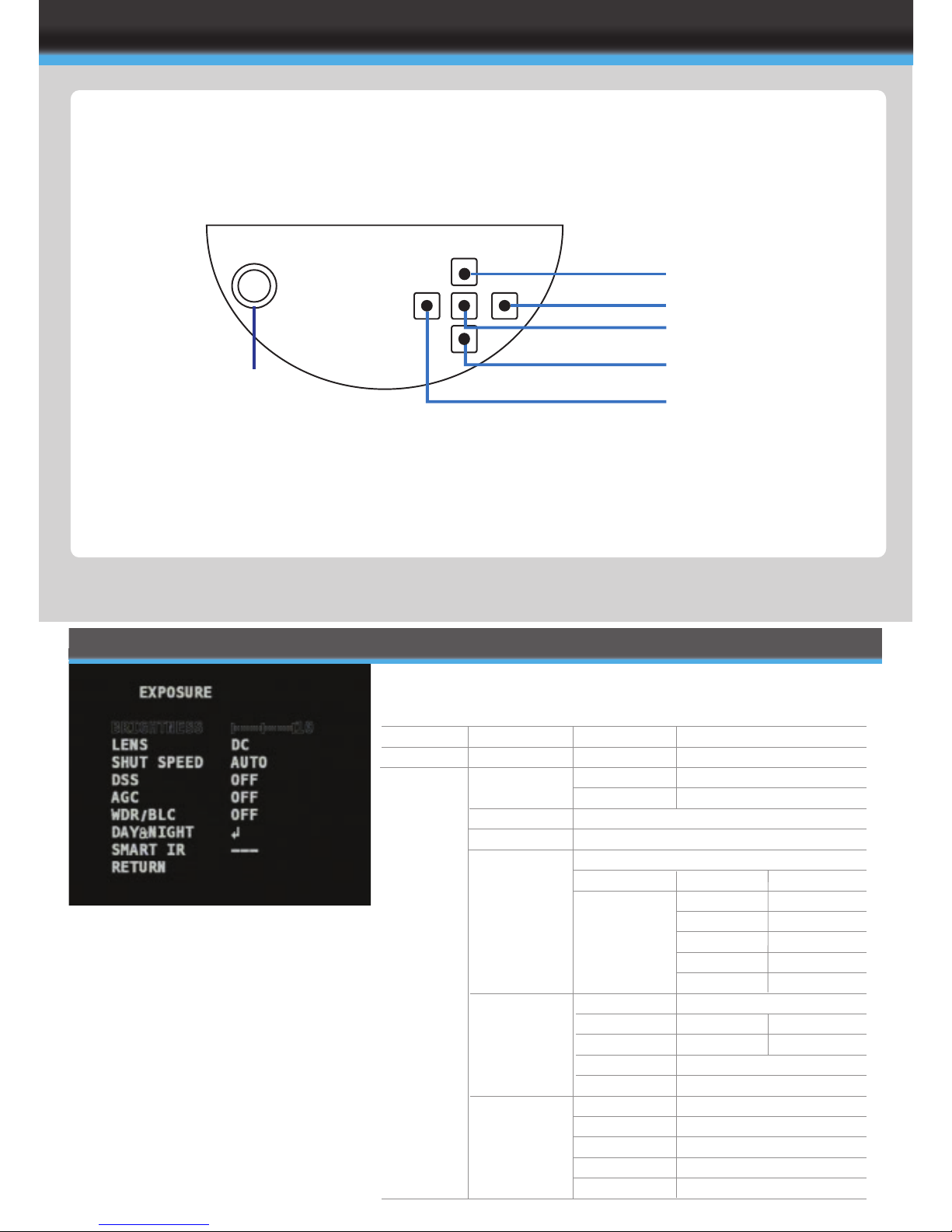
OSD
OSD Controller
RCA SERVICE VIDEO
OUTPUT (4:3 Video Format)
UP
RIGHT
MENU / ENTER
DOWN
LEFT
*Please note: The Service Video Out is standard definition
This is an analogue Video Output only, used for setting up via a test monitor.
BRIGHTNESS
LENS
SHUT SPEED
DSS
AGC
WDR / BLC
DAY & NIGHT
SMART IR
EXPOSURE
IR CDS
D&N/Colour
(Red text)
IR SMART
(Blue Text)
Please note: depending on which "Model" is selected, varies the
options in the sub menus.
0 ~ 20
DC / MANUAL
AUTO
MANUAL
OFF / X2 / X3 / X4
ON / OFF
OFF
WDR
BLC
MODE
DELAY
BURST
THRS
GAP
LED OSD
LED POS-X
LED POS-Y
LED SIZ-X
LED SIZ-Y
1/30 ~ 1/60000
0 ~ 3
BLC OSD
BLC POS-X
BLC POS-Y
BLC SIZ-X
BLC SIZ-Y
AUTO / DAY / NIGHT / EXT
0 ~ 255s
ON / OFF
LOW / MIDDLE / HIGH
LOW / MIDDLE / HIGH
OFF / ON
0 ~ 20
0 ~ 20
0 ~ 20
0 ~ 20
OFF / ON
0 ~ 20
0 ~ 20
0 ~ 20
0 ~ 20
EXPOSURE
Page 7
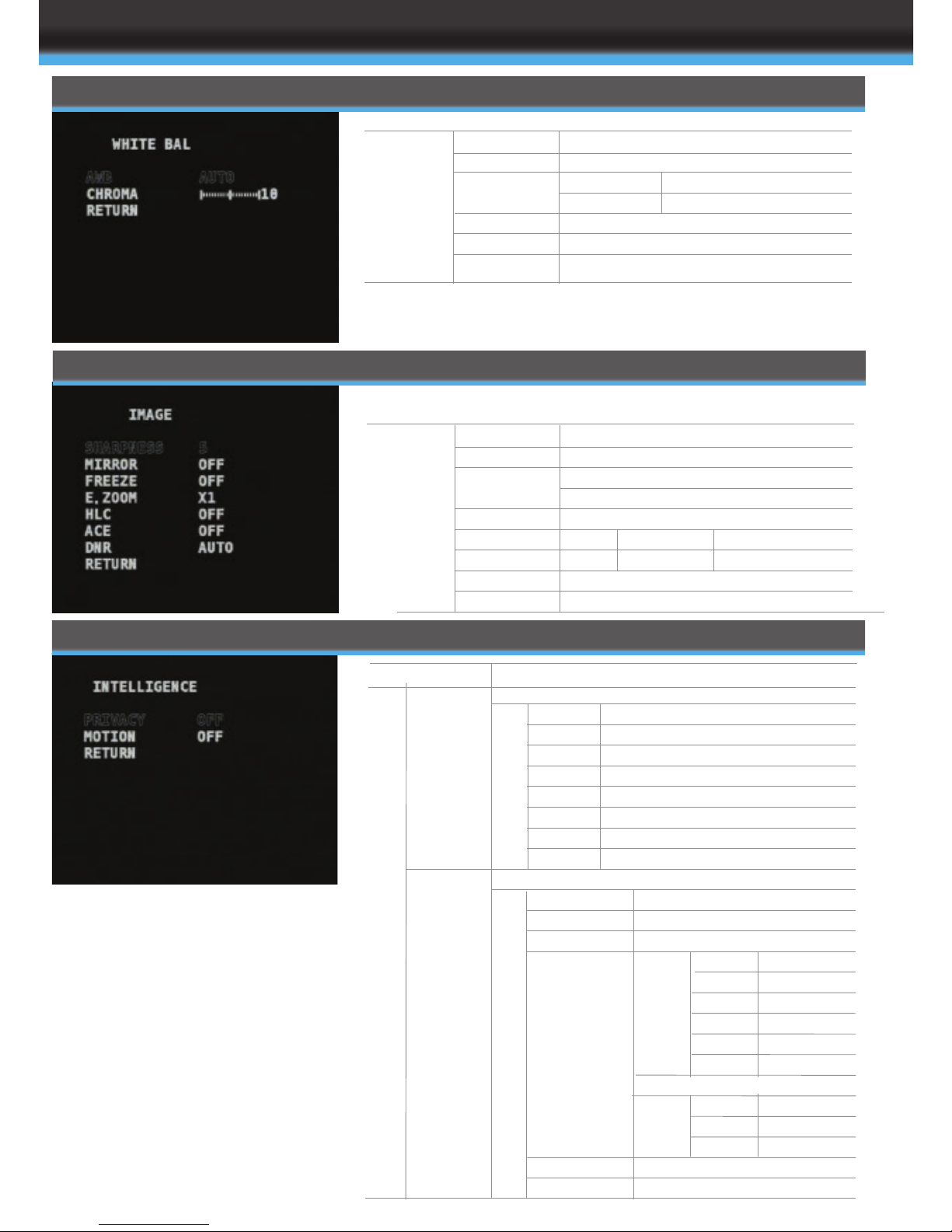
IMAGE
SHARPNESS
IMAGE
FREEZE
E. ZOOM
HLC
ACE
DNR
IMAGE 0 ~ 10
OFF / H / V / H&V
OFF / ON
X1 ~ X32
OFF
ON
OFF / ON
AUTO OFF / LOW / MIDDLE / HIGH
0 ~ 20
SELECT COLOUR
LEVEL
COLOUR
AUTO
PRESET
MANUAL
INDOOR
OUTDOOR
CHROMA
AWB
PUSH TO APPLY
RED GAIN
BLUE GAIN
0 ~ 20
0 ~ 20
0 ~ 20
WHITE BALANCE
INTELLIGENCE
INTELLIGENCE
PRIVACY
MOTION
OFF
ON
OFF
ON
MASK
MODE
X-POS
Y-POS
X-SIZ
Y-SIZ
COLOUR
TRANS
0 ~ 31
OFF / ON
ADJUST
ADJUST
ADJUST
ADJUST
SELECT COLOUR
0 ~ 4
AREA
MODE
X-POS
Y-POS
X-SIZ
Y-SIZ
ADJUST
ADJUST
ADJUST
ADJUST
WHOLE
EACH
RESOLUTION
SENSITIVITY
AREA
SMART ZOOM
INTERVAL
DWELL
0 ~ 255S
0 ~ 255S
0 ~ 2
OFF / ON
0 ~ 8S
0 ~ 8S
0 ~ 8S
0 ~ 4
0 ~ 20
OFF
ON
IN / OUT
DWELL
WAIT
Page 8
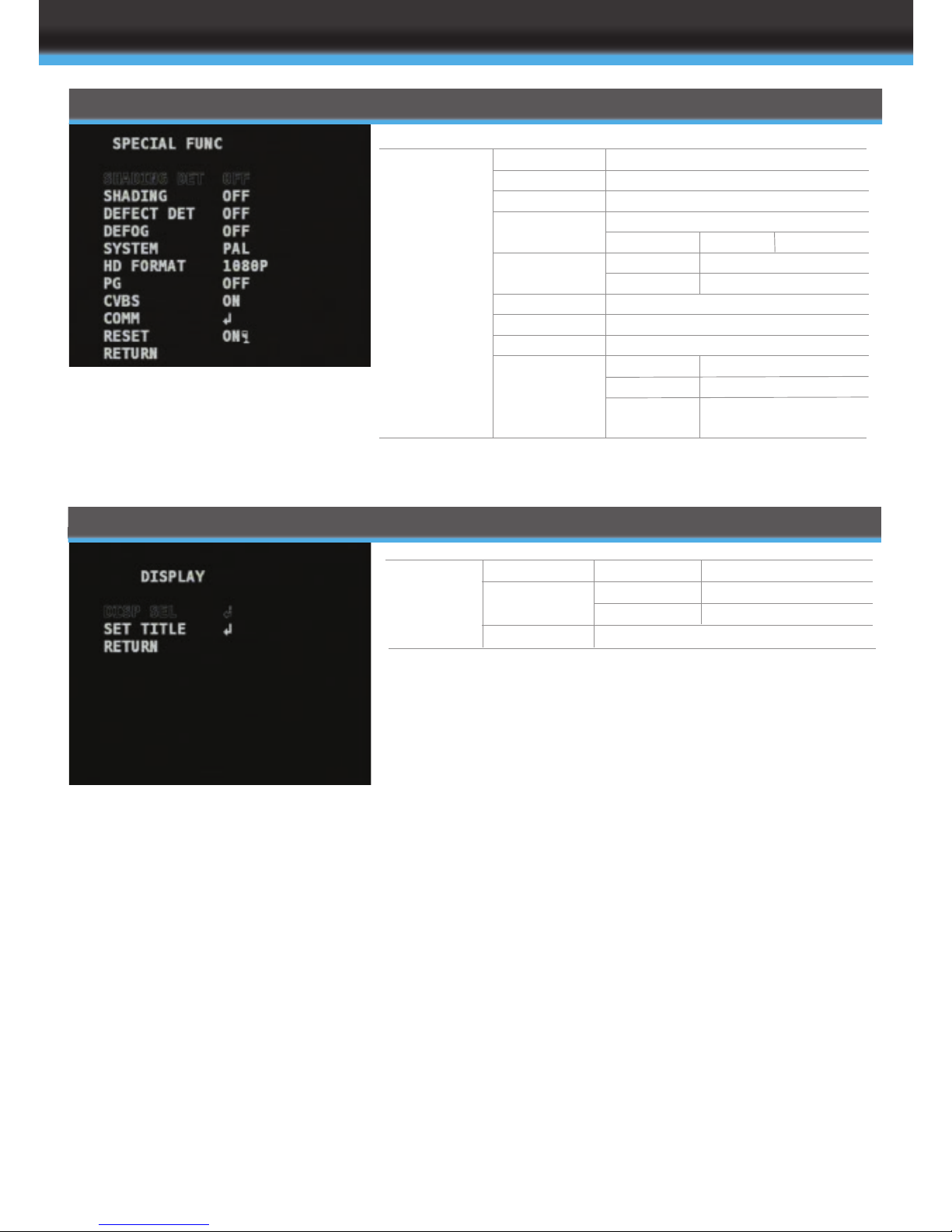
SPECIAL FUNCTIONS
SPECIAL FUNC SHADING DET
SHADING
DEFECT DET
DEFOG
SYSTEM
HD FORMAT
PG
CVBS
COMM
OFF / ON
OFF / ON
OFF / ON
OFF
ON
NTSC
PAL
1080P / 720P
OFF / ON
OFF / ON
ID
BAUDRATE
PROTOCOL
LEVEL
30fps
25fps
1 ~ 255
2400 ~ 115200
PELCO-D / PELCO-P /
UPDATE
0 ~ 10
DISPLAY
DISP SEL
SET TITLE
DISPLAY ID
TITLE
EZOOM
OPENS KEYBOARD
OFF / ON
OFF / ON
OFF / ON
Page 9
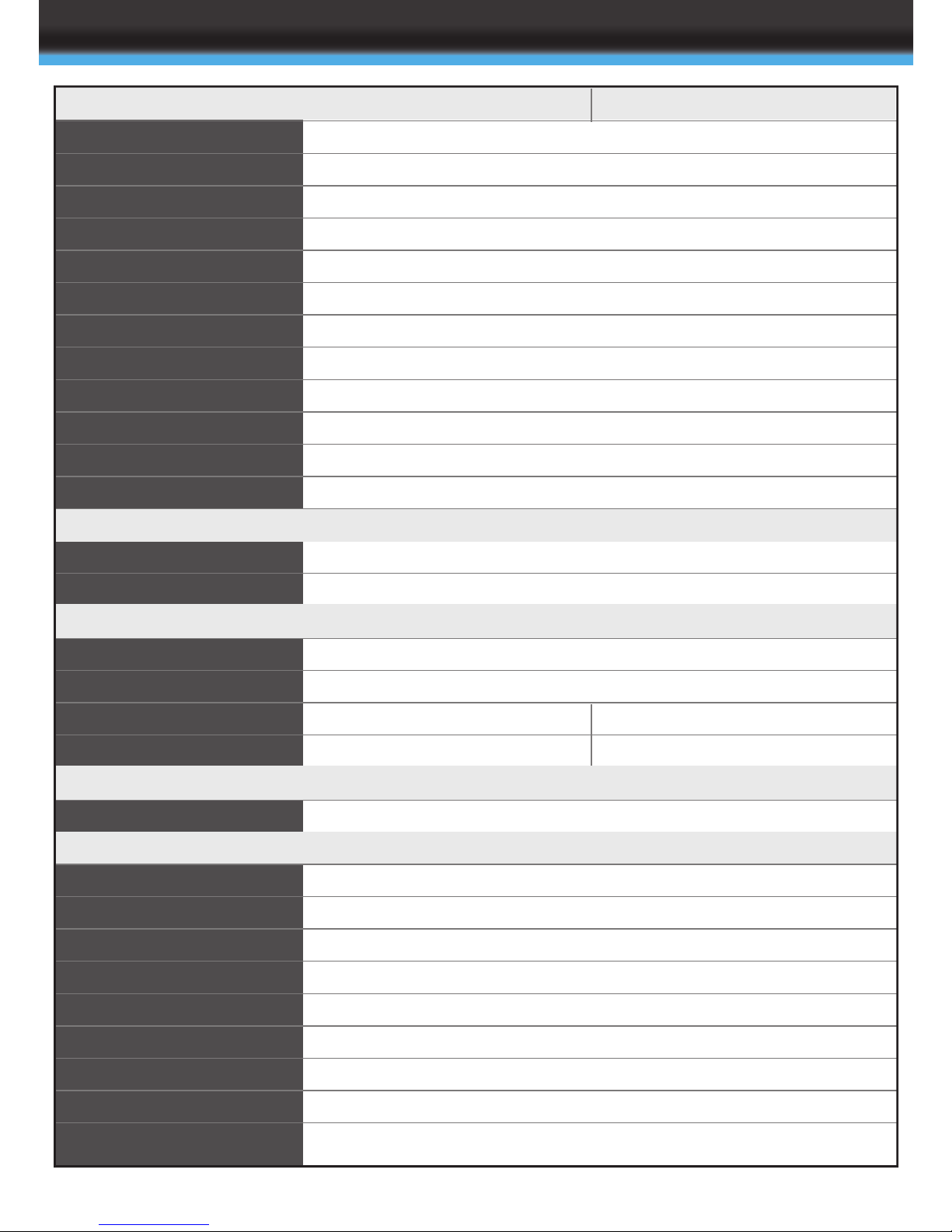
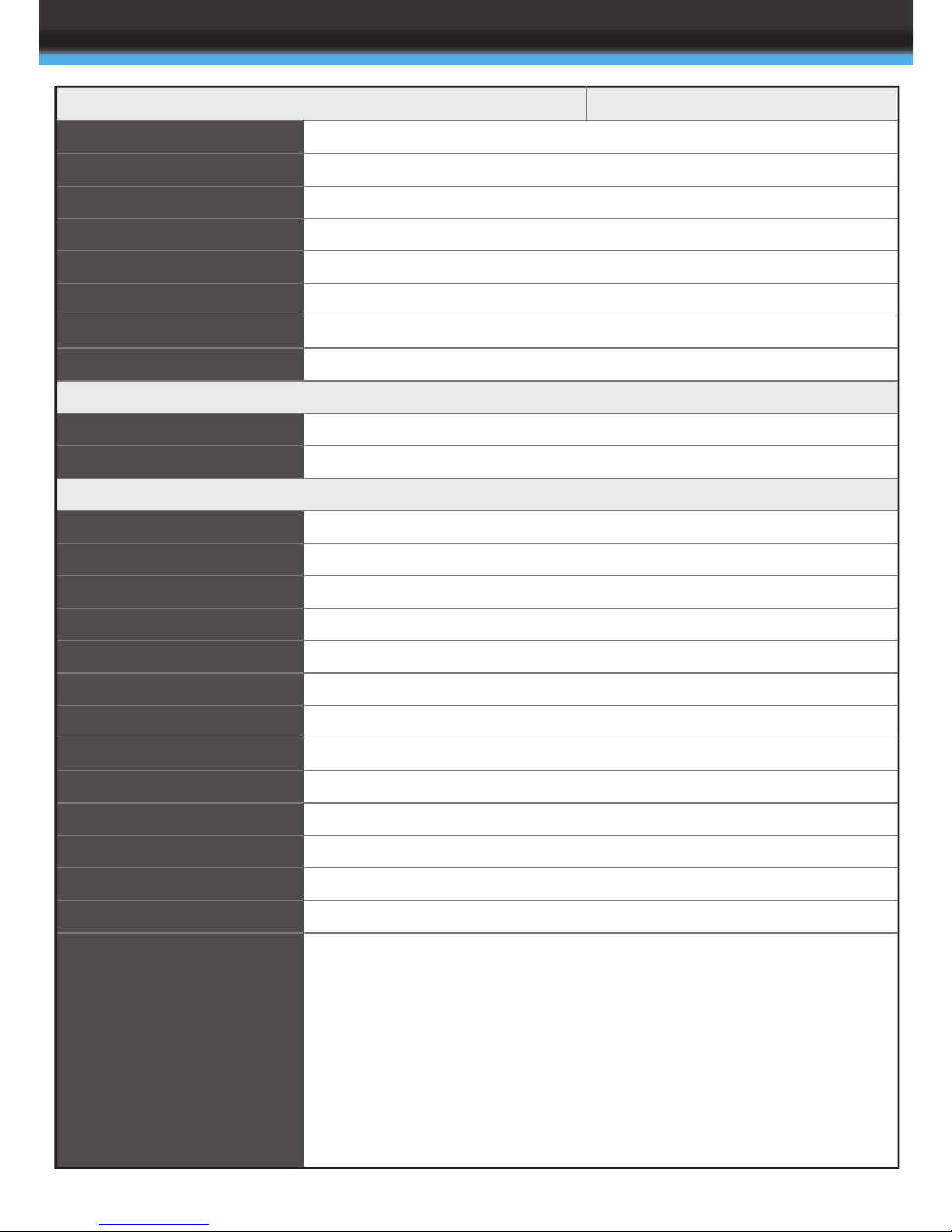
SPECIFICATION
Design and specification are subject to change without notice.
MODEL
IMAGE SENSOR
TOTAL PIXELS
ACTIVE PIXELS
SCANNING SYSTEM
RESOLUTION
MIN. ILLUMINATION
VIDEO OUTPUT
S/N RATIO
ELECTRICAL
POWER SOURCE
POWER CONSUMPTION
GENERAL
OPERATING TEMPERATURE
STORAGE TEMPERATURE
DIMENSION
WEIGHT
FUNCTION
MENU
EXPOSURE
BRIGHTNESS
LENS
SHUT SPEED
DSS
AGC
WDR/BLC
DAY&NIGHT
SMART IR
WHITE BAL
1/3" Panasonic CMOS
2010(H) x 1108(V) = 2,227,080 (pixel)
1944(H) x 1092(V) = 2,122,848 (pixel)
2.8~10mm Varifocal Lens
Progressive
Digital ; 1920x1080p(1080p/30fps) , 1280x720p(720p/60fps)
Analogue : 700TVL
Color : 1.0 lux , BW : 0.5lux
Color DSS : 0.002 lux , BW DSS : 0.001 lux
HD-SDI
Analog : NTSC, PAL(without WDR)
more than 50dB (AGC off)
DC12V±10% / AC24V±10%
DC: 300mA(Max) AC: 250mA (Max)
-10ºC ~ +50ºC (Humidity : 0%RH ~ 80%RH)
-20ºC ~ +60ºC (Humidity : 0%RH ~ 90%RH)
D&N / COLOUR / IR SMART / IR CDS
0 ~ 20 steps
DC / Manual
Auto / Manual ( 1/30(1/25) ~ 1/60000 )
Off / x2 / x3 / x4
Off / On
Off / WDR / BLC
Auto / Day / Night / Ext
Off / On
Auto / Preset / Manual / Indoor / Outdoor
CBP6324DN-HD CVP9324DN-HD
148.35x10⁵ (DxH)
950g
148x106 (DxH)
650g
Page 10
SPECIFICATION
Design and specification are subject to change without notice.
0 ~ 10 steps
Off / H / V / H&V
Off / On
x1 ~ x32
Off / On
Off / On
Off / On
Off / Low / Middle / High / Auto
Off / On (32 points)
Off / On (4 points)
Off / On
Off / On
Off / On
NTSC / PAL
1080P / 720P
Off / On
Off / On
ID (1 ~ 255)
BAUDRATE ( 2400 / 4800 / 9600 / 19200 / 38400 / 57600/115200 )
PROTOCOL (PELCO-P / PELCO-D / UPDATE)
On ( Default )
English
0 ~ 9 , A ~ Z , a ~ z
IMAGE
SHARPNESS
MIRROR
FREEZE
E.ZOOM
HLC
ACE
DEFOG
DNR
INTELLIGENCE
PRIVACY
MOTION
SPECIAL FUNC
SHADING DET
SHADING
DEFECT DET
SYSTEM
HD FORMAT
PG
CVBS
COMM
RESET
LANGUAGE
OSD TEXT
CBP6324DN-HD CVP9324DN-HD
Page 11
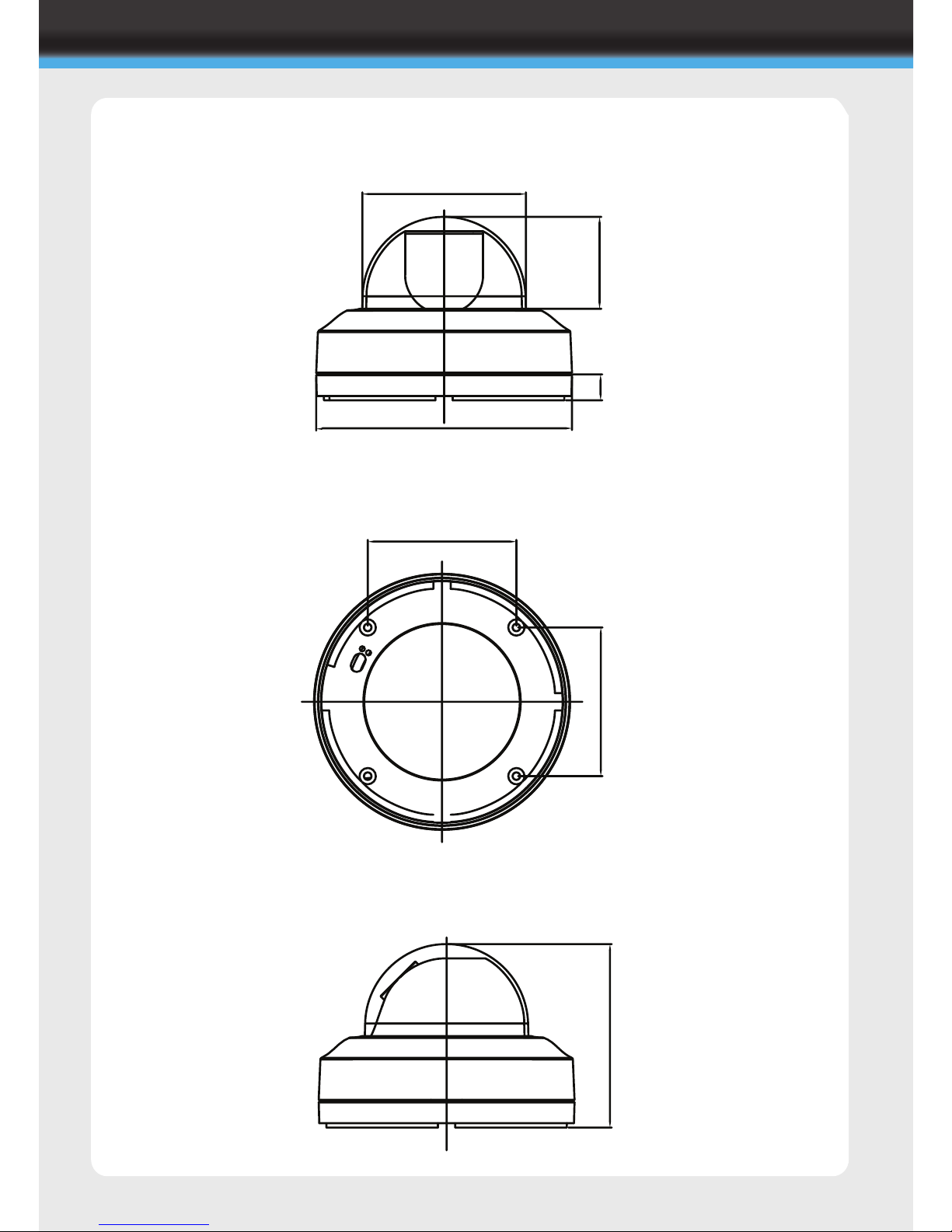
DIMENSIONS
CBP6324DN-HD
86.00
86.00
94.64
53.18
15.00
147.97
106.10
Page 12
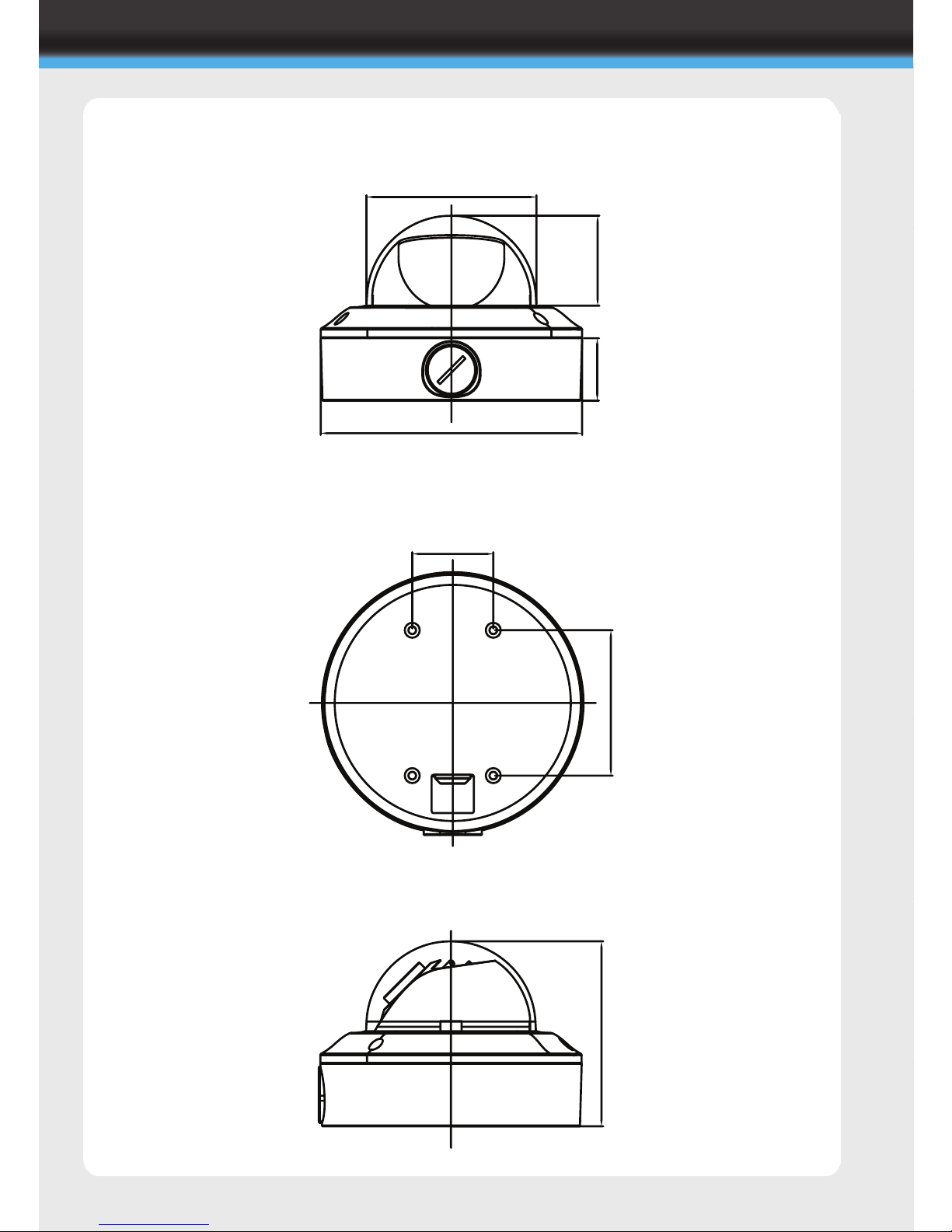
DIMENSIONS
94.64
51.0135.48
148.39
46.00
82.50
105.00
CVP9324DN-HD
Page 13
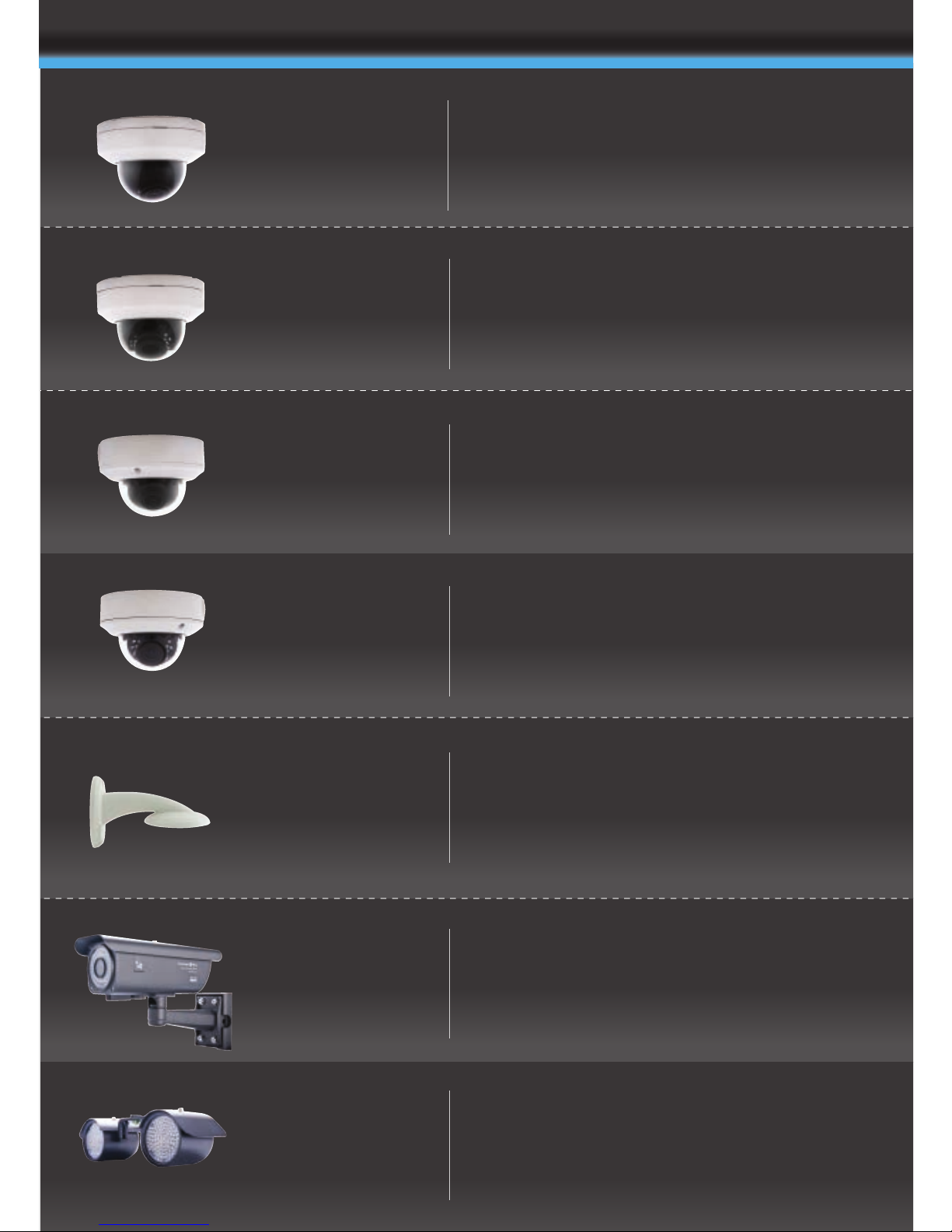
1080p/720p 2.8~10mm Varifocal lens,
True Day Night (ICR), SVO, 148(ø) x 106mm,
12V DC / 24V AC
1080p/720p 2.8~10mm Varifocal lens,
True Day Night (ICR), SVO, IR LED
148.35(ø)x105mm, 12V DC / 24V AC, VR
1080p/720p 2.8~10mm Varifocal lens,
True Day Night (ICR), SVO, IR LED,
319 x 219 x 100mm, 12V DC / 24V AC, VR
Vandal Resistant
Fixed Dome Bracket
Internal
Vandal Resistant
Vandal Resistant
Infrared
Internal
Infrared
CBP6324DN-HD
CVP9324DN-HD
1080p/720p 2.8~10mm Varifocal lens,
True Day Night (ICR), SVO,
148.35(ø)x105mm, 12V DC / 24V AC
CVP9324DNIR-HD
CVP-BRK
One bracket fits all external ARC CVP
domes
1080p/720p 2.8~10mm Varifocal lens,
True Day Night (ICR), SVO, IR LED
148(ø) x 106mm, 12V DC / 24V AC
CBP6324DNIR-HD
Weatherproof
IR Camera
Bolt-on Twin
IR Lamps
AIR4526-HD
AIR-IR
Additional AIR for AIR4526-HD
Extend the IR range up to 80m with AIR-IR.
HD CAMERA RANGE
Page 14
 Loading...