

Page 1

(MT series remote control intelligent turntable manual) 1
MT Series Remote Control Intelligent Turntable
Manual
Shenzhen Comxim Technologies Co., Ltd.
2015-09-19
Page 2

Page 3

(MT series remote control intelligent turntable manual) 1
Catalog
MT SERIES REMOTE CONTROL INTELLIGENT TURNTABLE MANUAL .......................................... 1
CATALOG .............................................................................................................................. I
1. PRODUCT DESCRIPTION ....................................................................................... 1
2. FUNCTION SELECTION TABLE .............................................................................. 1
3. MAIN CHARACTERISTICS ...................................................................................... 2
3.1 TURNTABLE FEATURE LIST(ONLY MT370BSL* AND MT600BSL* SUPPORT ALL SPEC.) ........................... 2
4. POST (POWER-ON SELF-TEST) ....................................................................... 3
5. BUZZER AND FEEDBACK....................................................................................... 3
6. INFRARED REMOTE CONTROLLER ...................................................................... 3
REMOTE CONTROL KEY INSTRUCTIONS: ...................................................................................................... 3
7. ANDRIOD APP(MTXXXBLXXX AND MTXXXBSLXXX) ................................... 6
7.1 CONNECTED TO MT SERIES TURNTABLE ............................................................................................... 6
7.2 MT370B* TURNTABLE APP APPLICATION GUIDE ................................................................................ 9
7.2.1 Intermittent mode.............................................................................................................. 9
7.2.2 continuous mode.............................................................................................................. 11
7.2.3 touch mode....................................................................................................................... 12
7.2.4 gesture mode ................................................................................................................... 12
7.3 MENU FUNCTIONS .......................................................................................................................... 13
7.3.1 Refresh help ...................................................................................................................... 13
7.3.2 Update APP....................................................................................................................... 13
8. PC WINDOWS SOFTWARE ................................................................................... 15
8.1 SOFTWARE INTRODUCTION............................................................................................................ 15
8.2 CONNECTING EQUIPMENT ............................................................................................................... 15
8.3 FUNCTION INTRODUCTION ............................................................................................................... 17
8.4 BLUETOOTH ADAPTER DRIVER INSTALLATION AND ADDING EQUIPMENT .................................................. 17
8.4.1 Bluetooth adapter driver installation ............................................................................. 17
8.4.2 Add Bluetooth device ....................................................................................................... 18
8.5 UPDATE ........................................................................................................................................ 22
9. WORKING CONDITION .......................................................................................... 23
9.1 POWER SUPPLY: .......................................................................................................................... 23
Page 4

(MT series remote control intelligent turntable manual)3
9.2 WORKING TEMPERATURE AND HUMIDITY: ...................................................................................... 23
9.3 STORAGE TEMPERATURE AND HUMIDITY: ........................................................................................ 23
9.4 DIMENSIONS AND WEIGHT:........................................................................................................... 23
10. PRODUCT APPLICATION INTRODUCTION..................................................... 23
10.1 THE TURNTABLE CAN BE APPLIED TO MODEL AND ARTICLE 360 DEGREE DISPLAY.................................... 23
10.2 TURNTABLE WITH SHUTTER FUNCTION FOR 360 DEGREE PHOTOGRAPHY(ONLY FOR MT370BSL*SERIES
AND MT600BSL* SERIES) ......................................................................................................................... 24
10.3 SOFTWARE AND MANUAL DOWNLOAD: ........................................................................................ 25
11. FAQ .................................................................................................................... 25
II Shenzhen Comxim Technologies Co., Ltd. Copyright 2015
Page 5
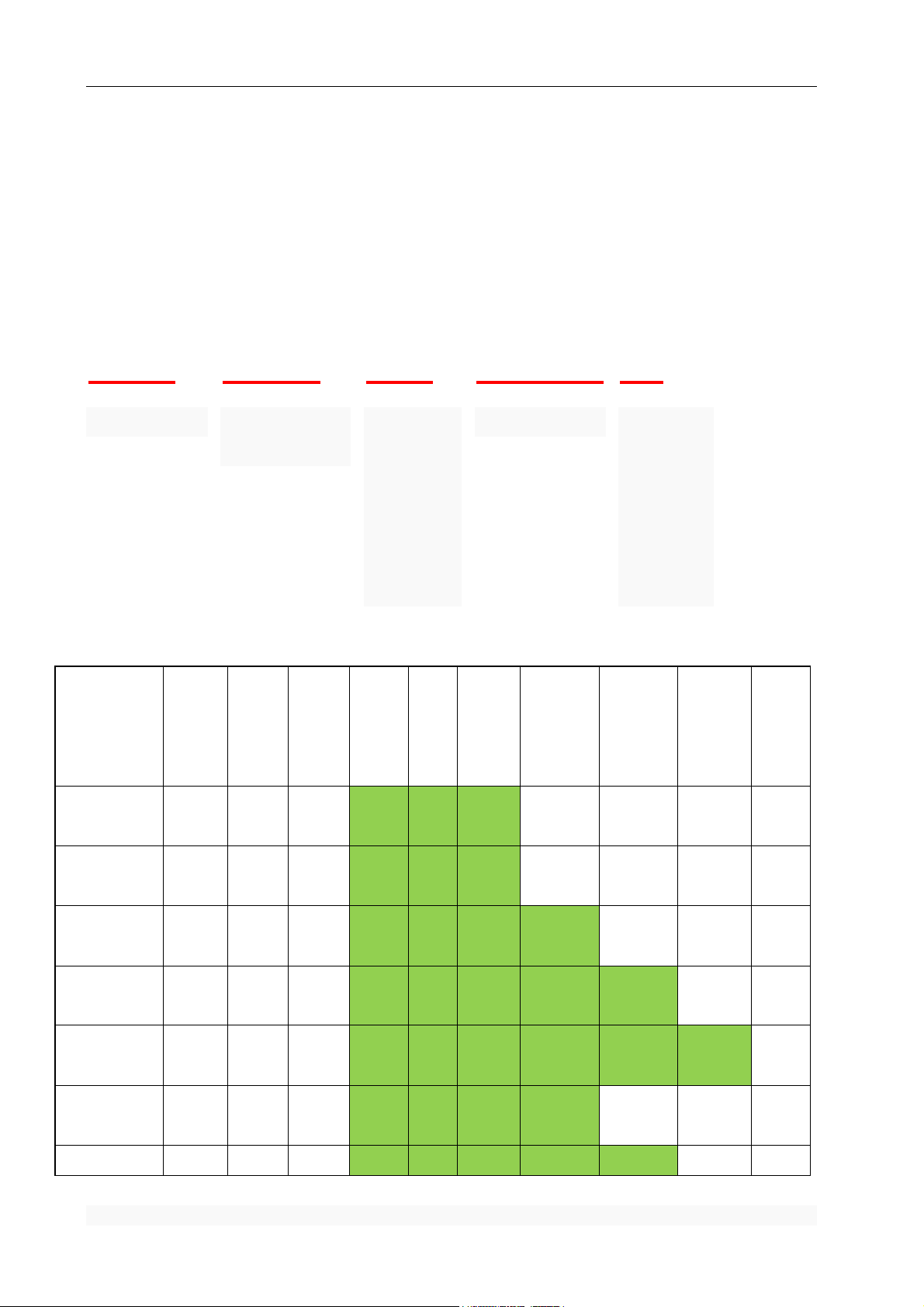
(MT series remote control intelligent turntable manual) 4
MT
370
BS
L100
H
Turntable Series
Turntable
Diameter ( mm )
B:With
Bluetooth
interface
S:With
Shutter
interface
Load ( Kg )
International
Version
Identification
H:
International
Version
Product
model
Diameter
(mm)
Flexibility
Load
(KG)¹
Speed
Range
(S/Ring)
Adjust
speed
Gear
Brake
Uniform
Speed
Remote
control
Angle
adjustment
Android,
Computer
Angle
adjustment
Control
camera
Automatic
shutter
Net
weight
(KG)
MT370L80x
370 .8
80
15~48
12
Level
Yes
Yes
No
No
No
5.5KG
MT370L100x
370 .8
100
30~70
12
Level
Yes
Yes
No
No
No
5.5KG
MT370L80
370.8
80
15~48
12
Level
Yes
Yes
Yes
No
No
5.5KG
MT370BL80
370.8
80
15~48
12
Level
Yes
Yes
Yes
Yes
No
5.5KG
MT370BSL80
370.8
80
15~48
12
Level
Yes
Yes
Yes
Yes
Yes
5.5KG
MT370L100
370.8
100
30~70
12
Level
Yes
Yes
Yes
No
No
5.5KG
MT370BL100
370.8
100
30~70
12
Yes
Yes
Yes
Yes
No
5.5KG
1. Product description
MT series turntable is a company and individual users of the Shenzhen Health Technology Co., Ltd.
launched a remote intelligent turntable, with infrared remote control, PC Windows software, Andriod mobile
phone App. The series turntable is widely used in the electric business and advertising industry, such as 360
degree object display, 360 panoramic shooting, 3D photography, 3D scanning, 3D holographic image, etc..
MT series of table type naming rules are as follows:
2. Function Selection Table
Shenzhen Comxim Technologies Co., Ltd. Copyright 2015 1
Page 6

(MT series remote control intelligent turntable manual)3
Level
MT370BSL100
370.8
100
30~70
12
Level
Yes
Yes
Yes
Yes
Yes
5.5KG
MT600L250
600.00
250
18~120
34
Level
Yes
Yes
Yes
28KG
MT600BL350
600.00
350
18~120
34Level
Yes
Yes
Yes
Yes
28KG
MT600BSL300
600.00
350
18~120
34
Level
Yes
Yes
Yes
Yes
Yes
28KG
Note:
1. "Yes" indicates support for this feature, "No" indicates that the feature is not supported.
2.The above form is unknown, before buying, welcome to consult us, lest cause misunderstanding.
3.If you need to change the turntable in accordance with their own ideas to go to some of the features, but also please contact us. (extra
charge)
4."1" column indicates the test conditions for flexible load test, such as the standing test, Bucket test Etc.
(On the rigid load, the starting load is less than that of the flexible load, the rotating load is equal to the flexible load, the rigid load such as
the metal, stone, etc.).The load test is no more than the rotary table diameter.
5.The turntable uses a large range of frequency conversion speed regulation, the part of the low frequency (individual Gear) has a trace of
low frequency noise (very small, very small), is a normal phenomenon, does not affect the use, and does not affect health, please rest
assured that use.
3. Main Characteristics
3.1 TurnTable feature List(only MT370BSL* and MT600BSL* Support all
Spec.)
Diameter: 37.8cm.(MT370) or 60CM(MT600)
Height: 8cm(MT370) or 15cm(MT600)
Mark: the sign in the center (MT370)
Color: color support (porcelain white, black pearl, sky blue), default white. (MT370)
Load:MT370BSL100 maximum 100KG / MT600BSL300 maximum 300KG
Speed: remote control 12 gear , Equipped with 31 key remote control (MT370)
MT370BSL60 speed range:15 sec/loop ~ 48 sec/loop,3 sec a level.
MT370BSL100 speed range:30 sec/loop ~70 sec/loop.3.6 sec a level.
Speed: remote control 12 gear , Equipped with 31 key remote control (MT600)
MT600BSL300 speed range:18sec/loop ~120 sec/loop. 3 sec a level.
2 Shenzhen Comxim Technologies Co., Ltd. Copyright 2015
Page 7

(MT series remote control intelligent turntable manual)5
Remote control
appearance
Key
Picture
Key Name
Key Function
Alert Sounds
Direction of rotation: remote adjustment direction (left and right)
Intelligence: support for setting the starting position and return to
the starting position, support for any rotation angle and stop.
Rotation mode: support continuous rotation and Step by step mode
(pause time can be set).
Computer control: computer control speed and angle and shooting
(Equipped with USB Bluetooth adapter)
Mobile control: mobile APP control speed and angle and shooting,
etc. (currently supports Android).
Synchronous shutter: support for the shutter output, and camera
linkage, support the timing shutter.
4. POST (Power-on Self-Test)
Turn on the power switch, the turntable automatically executes the self-test program, the success of the test
marks:" Beep, Beep, Beep," 3 sound or the indicator lights up red.(MT370Lxx series indicator light is always on,
MTXXXBLxxs or MTXXXBSLxxs indicator is flashing, when connected to a computer or mobile phone becomes
always lit)
5. Buzzer and Feedback
The MT series rotary table is used by the buzzer to sing, which is prompted by the turntable status or the
command feedback:
POST after the completion of the tweet.
When using the controller (infrared remote control, Andriod App, PC Windows software) on the
turntable, the turntable buzzer will do the corresponding tweet, prompting the user to receive the
control commands:
1) if the turntable is correctly received the key commands, the status of the buzzer is based on the
key before and after the buzzer sound 1 or 2;
2) if the button is pressed, the buzzer does not tweet, which indicates that the key information is
not properly received, or the model turntable does not support the function.
MTxxxBSL and above models, in each automatic send out the shutter signal before the buzzer short
sound 2.
6. Infrared remote controller
Remote control key instructions:
Note: the turntable received a key signal will be issued a tweet.
Shenzhen Comxim Technologies Co., Ltd. Copyright 2015 3
Page 8
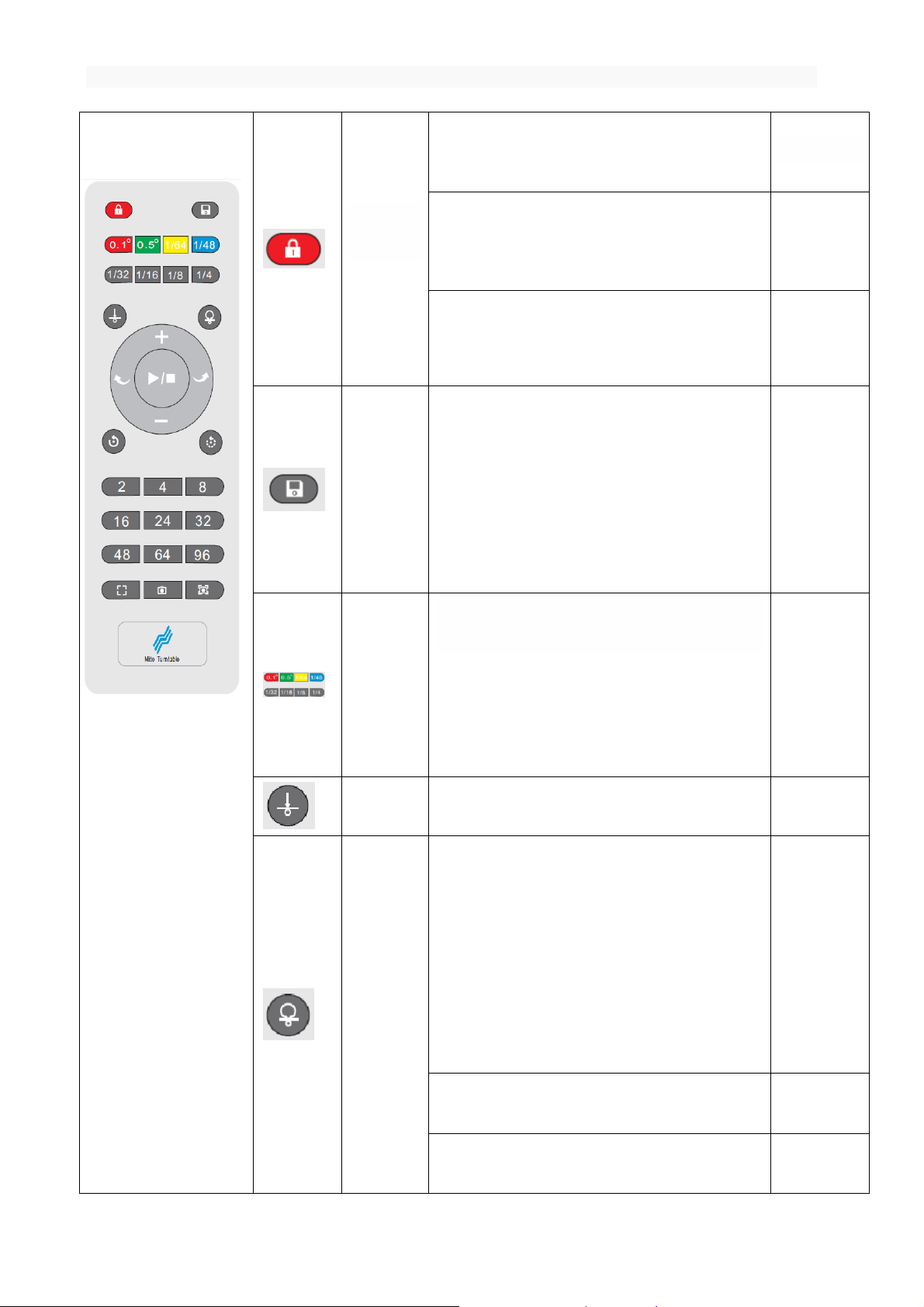
(MT series remote control intelligent turntable manual)3
Remote
lock key
Function: reduce the interference between the
equipment when using multiple turntable.
-
If the remote control key is currently unlocked,
the remote control key lock(In addition to the key,
the other key is invalid)
2 beep
If the current state is locked, the remote
control button to unlock.(Restore all key functions)
1 beep
Save Key
Function: Save current settings
The current configuration parameters
(including rotation angle, pause time, repeat
number, speed, rotation mode, rotation direction)
are stored in the internal storage. Once again, the
turntable rotates in accordance with the save
settings.
1 beep
Rotation
angle
shortcut key
Function : Press the key in this group, rotate
the rotary angle.
Press 0.5,the turntable is around 0.5
degrees.
Press 1/32, the turntable is around 360*1/32
(11.25 degrees)
1 beep
Set origin
Function:Press this key, the turntable stops and
Remember the current position is the origin.
2 beep
Back to the
origin
Function:Automatic return to the origin
of the setting.
If the turntable is not at the origin,
return to the origin of the setting,
For example: in the 360 degree camera
scene, through the "set origin " and "back to
the origin", do not need to manually adjust the
shooting objects in the turntable position.
1 beep
If the turntable is currently doing the
back action, the key is ignored.
2 beep
If the turntable at the origin, the key is
ignored.
2 beep
4 Shenzhen Comxim Technologies Co., Ltd. Copyright 2015
Page 9

(MT series remote control intelligent turntable manual)5
Start /
stop
If the current state of the turntable is
stopped, the turntable rotation is started.
1 beep
If the current state of the turntable is
rotated, the turntable is stopped.
2 beep
Speed
improvemen
t
If the speed of the turntable has not
fastest speed gear, plus 1 level.
1 beep
If the speed of the turntable is the
fastest, the key is ignored.
2 beep
Speed
reduction
If the rotation speed of the turntable has
not reached the slowest speed, the speed will
Speed decrease 1 level.
1 beep
If the speed of the turntable is the
slowest, the key is ignored.
2 beep
Rotate
left
key
If the current state of the turntable is not
left, then set the turntable to the left, and
start the turntable rotation.
1 beep
If the current state of the turntable has
been turn to left, start the turntable
rotation.
2 beep
Rotate
Right
key
If the current state of the turntable is not
right, then set the turntable to the right, and
start the turntable rotation.
1 beep
If the current state of the turntable has
been turn to right, start the turntable
rotation.
2 beep
Continuous
rotation
key
Function: start the turntable unlimited
continuous rotation.
2 beep
Intermitte
nt
rotation
key
Function:start the turntable intermittent
rotation
Press this key to Start the turntable
intermittent rotation the angle of rotation by
the recent rotation angle shortcut key decision,
can also be determined by the number of recent
photo(Equal circle shortcut key), the angle of
the rotation set, suspended for 4 seconds,
1 beep
Shenzhen Comxim Technologies Co., Ltd. Copyright 2015 5
Page 10
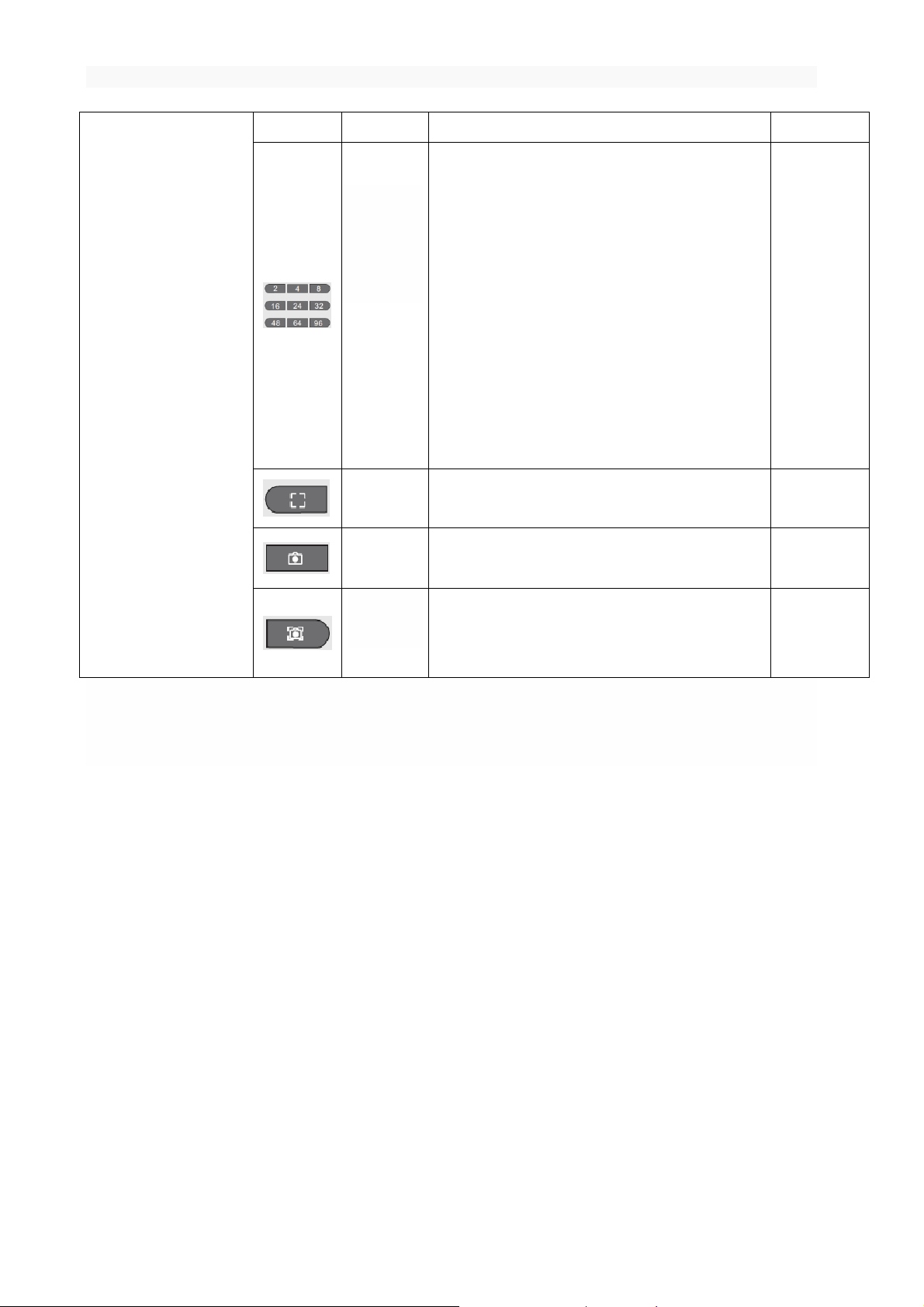
(MT series remote control intelligent turntable manual)3
unlimited repeat.
Multi angle
shooting
shortcut
keys
(Equal
circle
shortcut
key)
Function: Press this key to control the turntable to
suspend n times Within a circle. ( n = 2, n = 4, n =
8 „„)
For example: press the key in this group (e.g. 8
keys), the turntable rotates every time 1/8
circle, 45 degrees (=360 *1/8), Suspended one
time , Suspended time 4 seconds (MT370BSLxx
series is automatically sent out the shutter
signal to take a photo), repeat 8 times that a
circle automatically back to the starting
position.
1 beep
Focus key
Function: Press this key to send out the focus
signal (MT370BSLxx version support).
1 beep
Photo key
Function: Press this key to send take a photo
signal (MT370BSLxx version support).
1 beep
Focus
+ Photo Key
Function: Press this key to send focus + take a
photo signal (MT370BSLxx version support).
2 beep
Note : Press the "rotation angle shortcut key" to rotate the turntable immediately; Press " Multi angle
shooting shortcut keys ", the buzzer 1 beep, but the turntable does not immediately turn, but suspended for
4 seconds, after the suspension of rotation;
If you press "start / stop button", "turn left", "turn right" may be immediately rotating, it is possible
to pause for 4 seconds and then rotate, How the turntable rotates, it is decided by the last state (such
as the most recent press " Multi angle shooting shortcut keys ", then suspended 4 seconds to send the shutter
signal, otherwise the turntable is not suspended but immediately rotating).
-- Shenzhen ComXim Technologies Co., Ltd. reserve the right to explain the above specifications.--
7. Andriod App(MTxxxBLXXX and MTxxxBSLXXX)
7.1 Connected to MT series turntable
Step 1 :Turn on the MT series product power switch, the device with the function of the Bluetooth will have
the light flashing, and the representative can
be connected with the control end.
6 Shenzhen Comxim Technologies Co., Ltd. Copyright 2015
Page 11
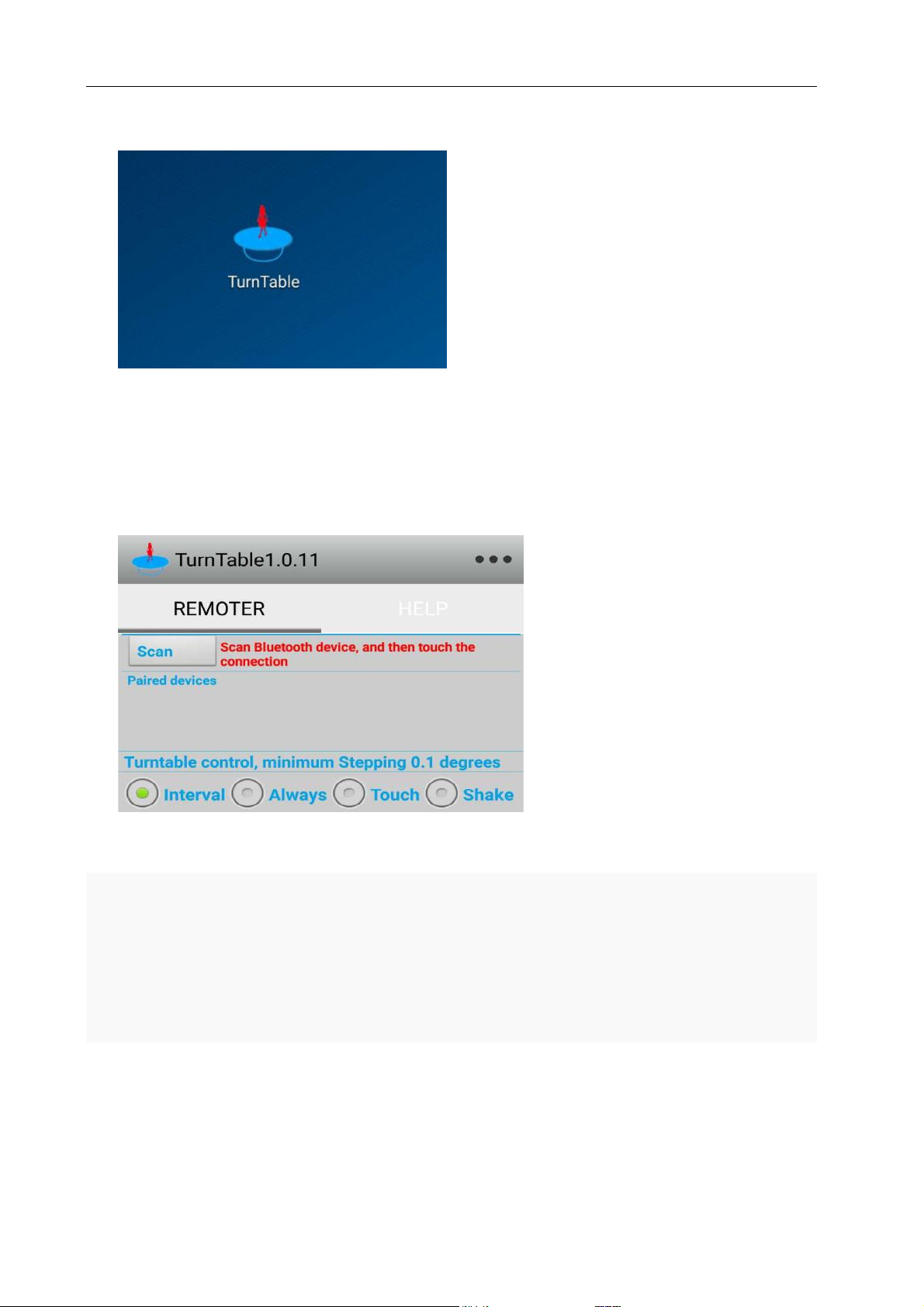
(MT series remote control intelligent turntable manual)5
Figure1 TurnTable Icon
Step 2 :As shown in Figure1and Figure2,In the Android mobile phone find Turntable Icon. And start
Turntable app, touch "Scan" button in the upper left corner, the app will automatically search MT series Bluetooth
devices.
Figure2 Scan “MT370B*” devices
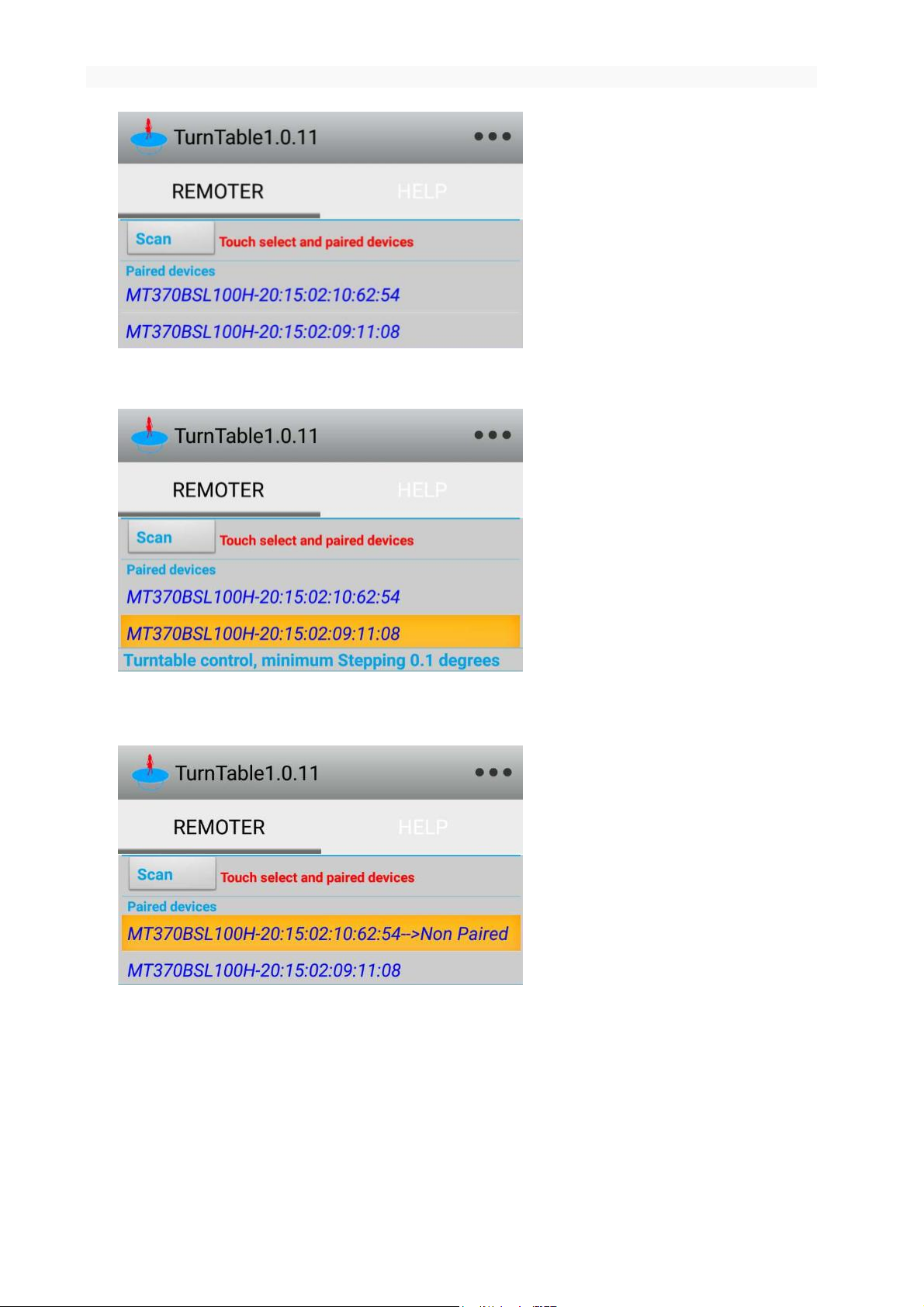
Step 3 :As shown in Figure3,When you find a Bluetooth device, you can set up a connection with the
Bluetooth device in the Figure4. Note: the first time when the link will show the XXXX is Non Paired, as
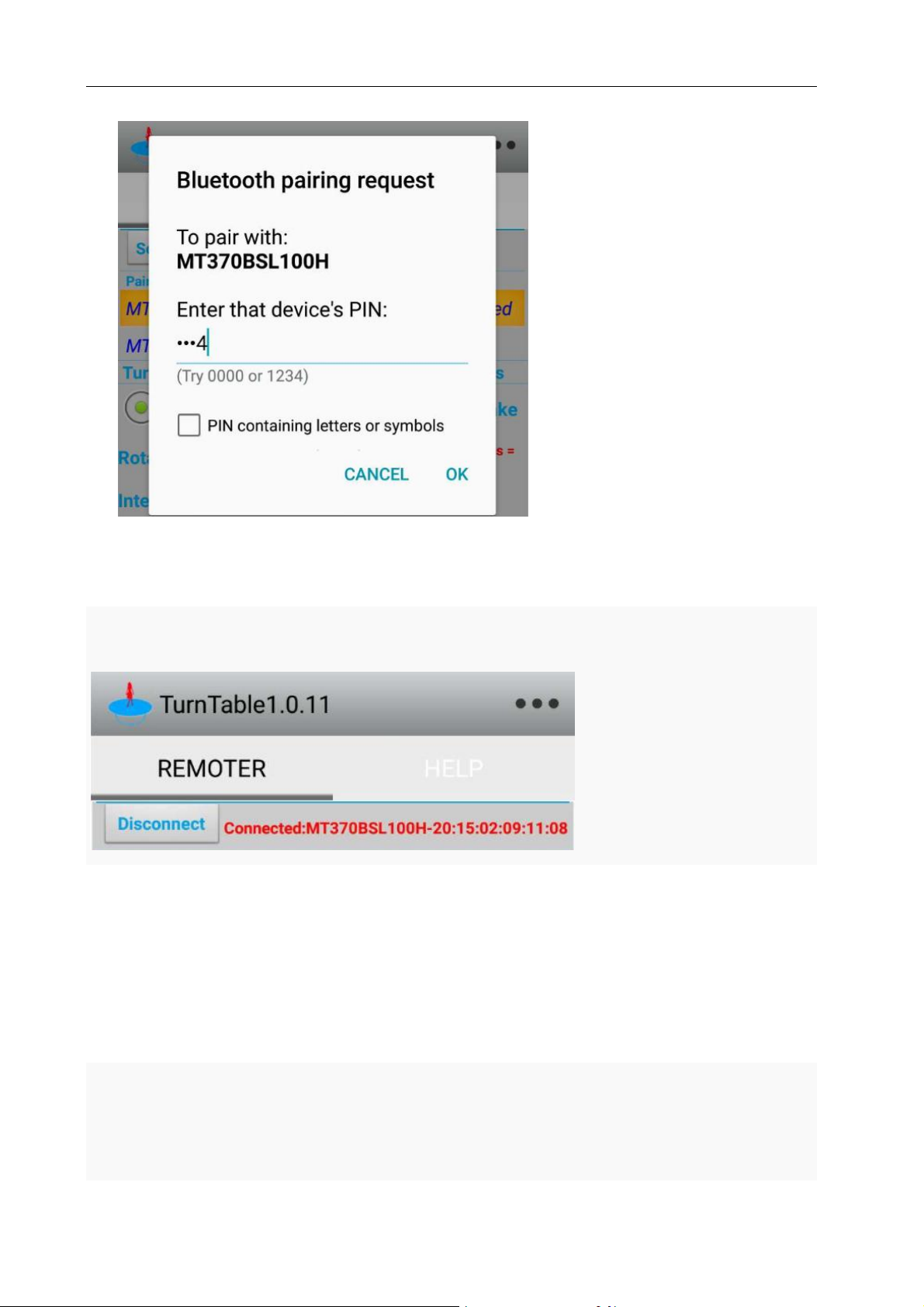
shown in Figure 5. When the connection is required to enter a password, the password is "1234" or
"0000" (without the quotes). As shown in Figure Figure6
Shenzhen Comxim Technologies Co., Ltd. Copyright 2015 7
Page 12
(MT series remote control intelligent turntable manual)3
Figure3 Find Paired MT370B* devices
Figure4 Touch And connection devices
Figure 5 Find No Paired MT370B* devices
8 Shenzhen Comxim Technologies Co., Ltd. Copyright 2015
Page 13
(MT series remote control intelligent turntable manual)5
Figure 6 Touch connection requires a password “1234”
As shown in Figure Figure7 “Connected:MTxxx-XX:XX:XX:XX:XX:XX”, Has been connected successfully.
Figure 7 Connected to MT370B*
7.2 MT370B* turntable APP Application Guide
7.2.1 Intermittent mode
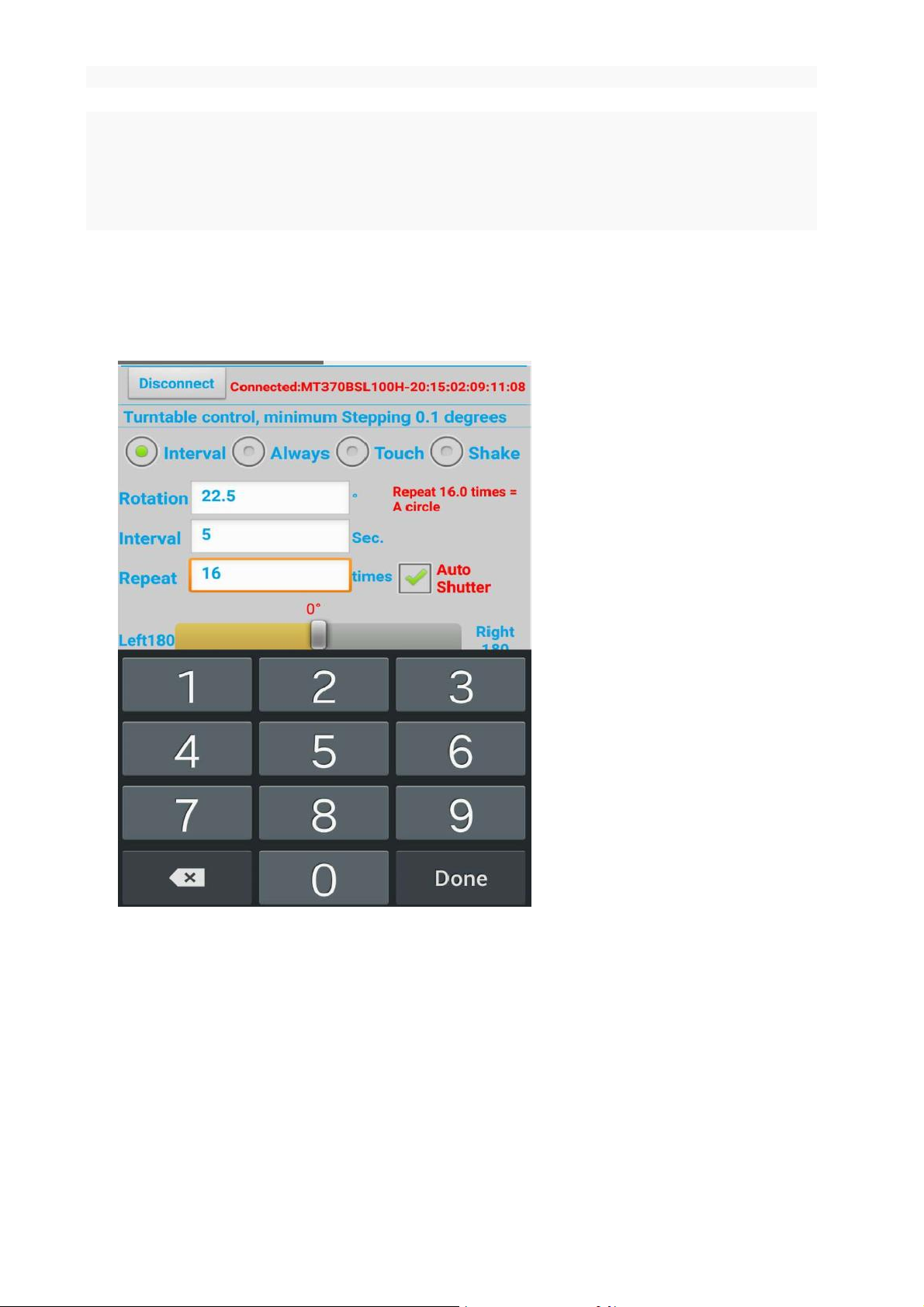
As shown in Figure Figure8,Set the mode switch to an interval (mode), set the rotation angle of 22.5
degrees, set the time to 5 seconds and repeat 16 times to complete a circle. After setting
up, press left or right to start the turntable intermittent to turn left or turn right. The
turntable rotates 22.5 degrees every time, pause for 5 seconds, and then continue to rotate
Shenzhen Comxim Technologies Co., Ltd. Copyright 2015 9
Page 14
(MT series remote control intelligent turntable manual)3
the next 22.5 degrees. Repeat 16 times, 22.5 degrees per rotation at a time(16*22.5° = 360°).
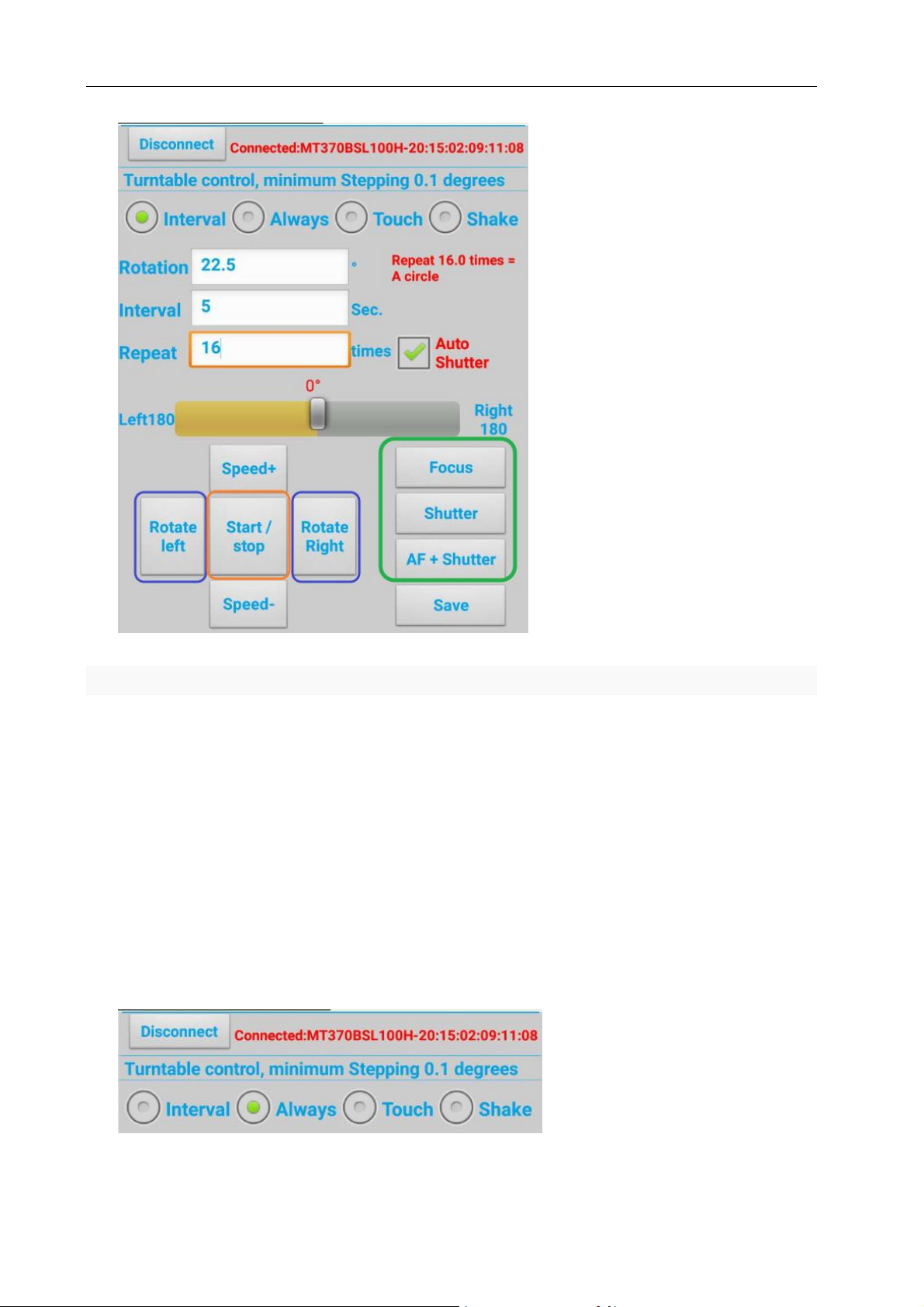
The method is often used to produce 16 frames of GIF animation. As shown in Figure 9, you can
press the start / stop to stop this operation in the process of rotation, such as the turntable
that has been stopped, then press start / stop, and then repeat a circle (16*22.5 = 360).
If your device has automatic shutter function (model :MT370BSL* or MT600BSL* ). Then the default
check "automatic shutter", when the rotation of the turntable is suspended, it automatically sends out the
shutter signal. If need to be suspended during the turntable control camera to take pictures, only need to use
the shutter line connecting the turntable and the camera.
Figure 8 Set 16 stops per circle, pause for 5 seconds.
10 Shenzhen Comxim Technologies Co., Ltd. Copyright 2015
Page 15
(MT series remote control intelligent turntable manual)5
Figure 9 Turn left or right turn
As shown in Figure 9, you can also connect the camera to the turntable shutter interface, and use the
phone to control the camera to take photos with the turntable.
7.2.2 continuous mode
As shown in Figure 10, switch to continuous mode, touch the left and right buttons, turn left or turn right.
During the rotation of the turntable, the speed of the rotary table is changed according to the Acceleration
button or deceleration button. Press the Save button and save the current setting value, and the next power
on , use the save value to rotate.
Shenzhen Comxim Technologies Co., Ltd. Copyright 2015 11
Page 16
(MT series remote control intelligent turntable manual)3
Figure 10 Continuous rotation mode
7.2.3 touch mode
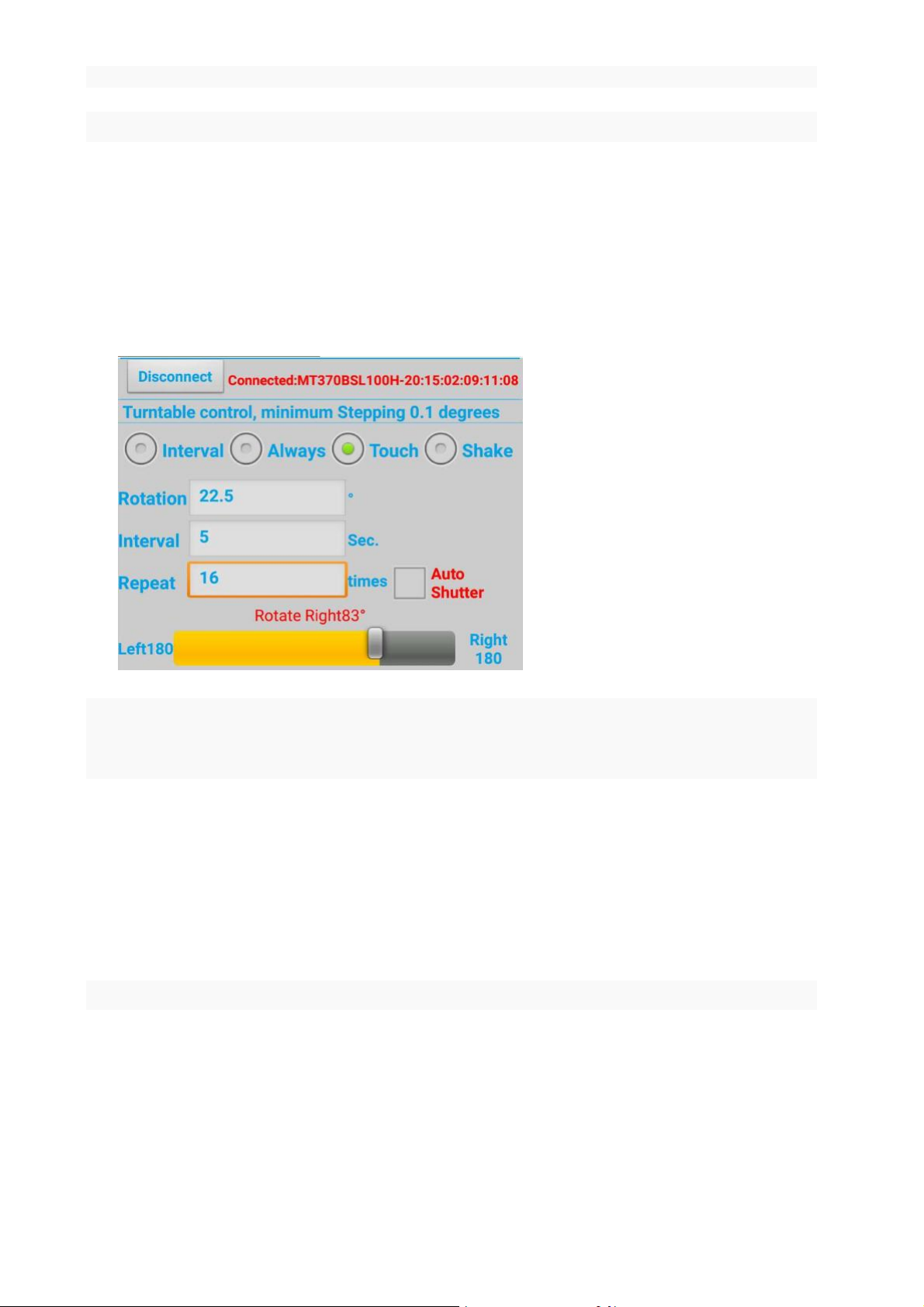
As shown in Figure 11, switch to the touch mode (if the turntable is rotating in the other mode, the
turntable is on standby). Press the touch progress bar, and drag to the required position. If the turntable is
stopped, the turntable is rotated from the current position to the drag position. As shown in Figure 11,turn 83
degrees from the current position.
Figure 11 Touch mode to drag the scroll bar control turntable
7.2.4 gesture mode
As shown in Figure 12, gesture mode if the turntable is rotating in the other mode after the switch, the
turntable is on standby. In the rotation of the text box input to turn the angle, shake the phone to the left or to
the right. As shown in Figure 12,turn left or right turn 21 degrees from the current position.
12 Shenzhen Comxim Technologies Co., Ltd. Copyright 2015
Page 17
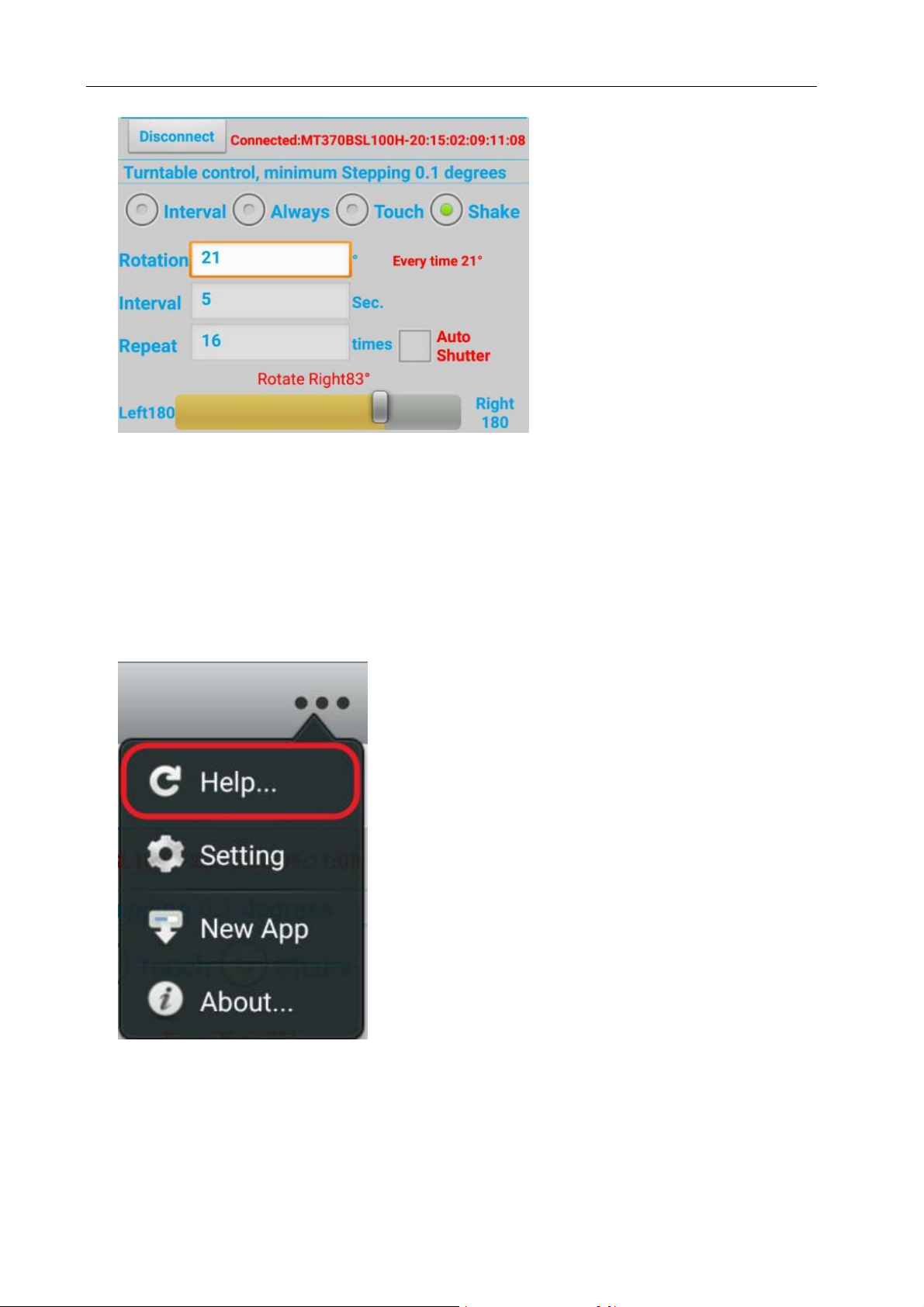
Figure 12 shaking rotating 21 degrees
7.3 menu functions
(MT series remote control intelligent turntable manual)5
7.3.1 Refresh help
As shown in Figure 13, the online update help file
Figure 13 online update help file
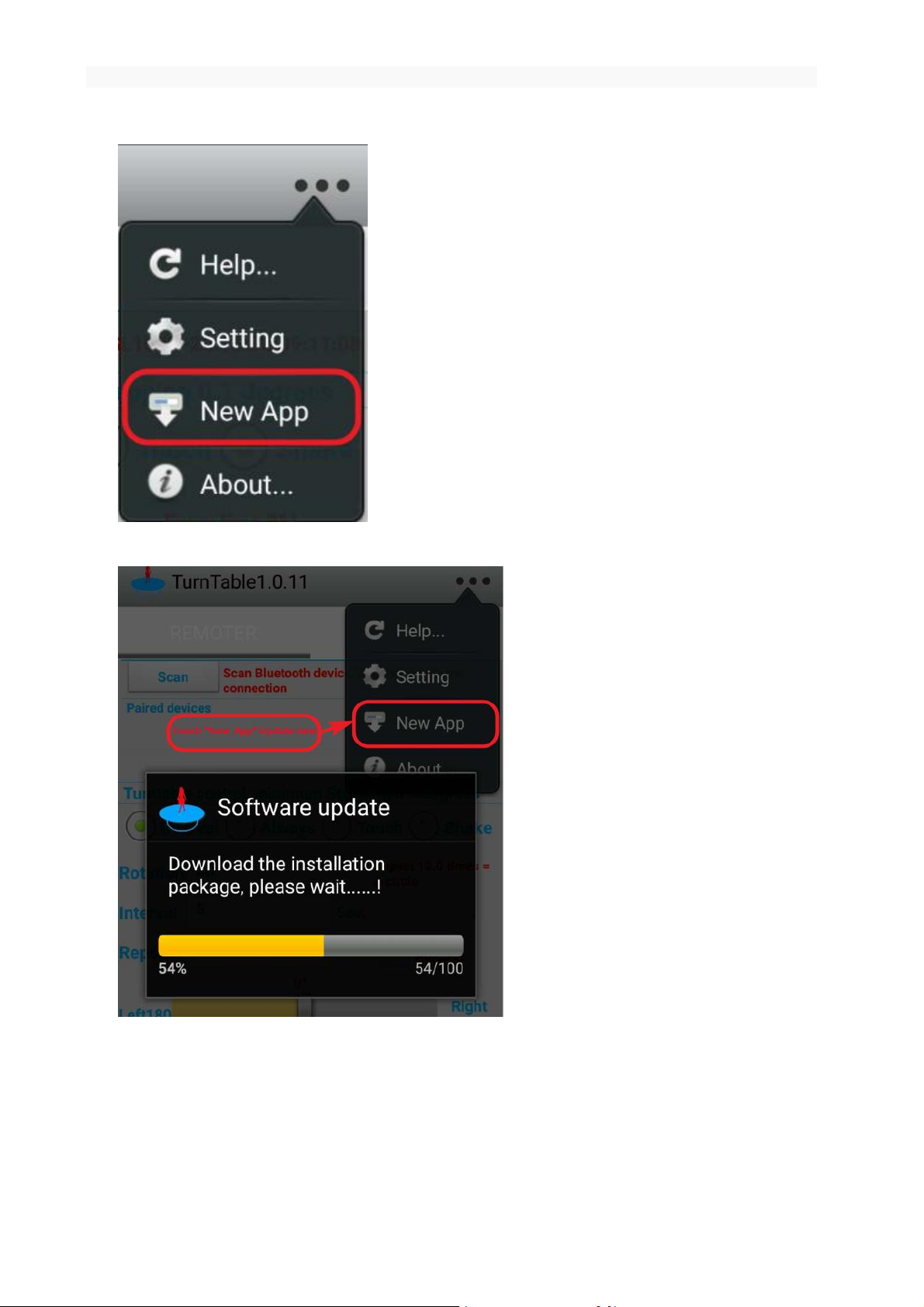
7.3.2 Update APP
Click New App , you can update the software, after the completion of the update automatically installed,
Shenzhen Comxim Technologies Co., Ltd. Copyright 2015 13
Page 18
(MT series remote control intelligent turntable manual)3
please check the phone has enough power, and connected to the Internet.
Figure 14 Update New APP
Figure 15 Update New APP , support more function
14 Shenzhen Comxim Technologies Co., Ltd. Copyright 2015
Page 19
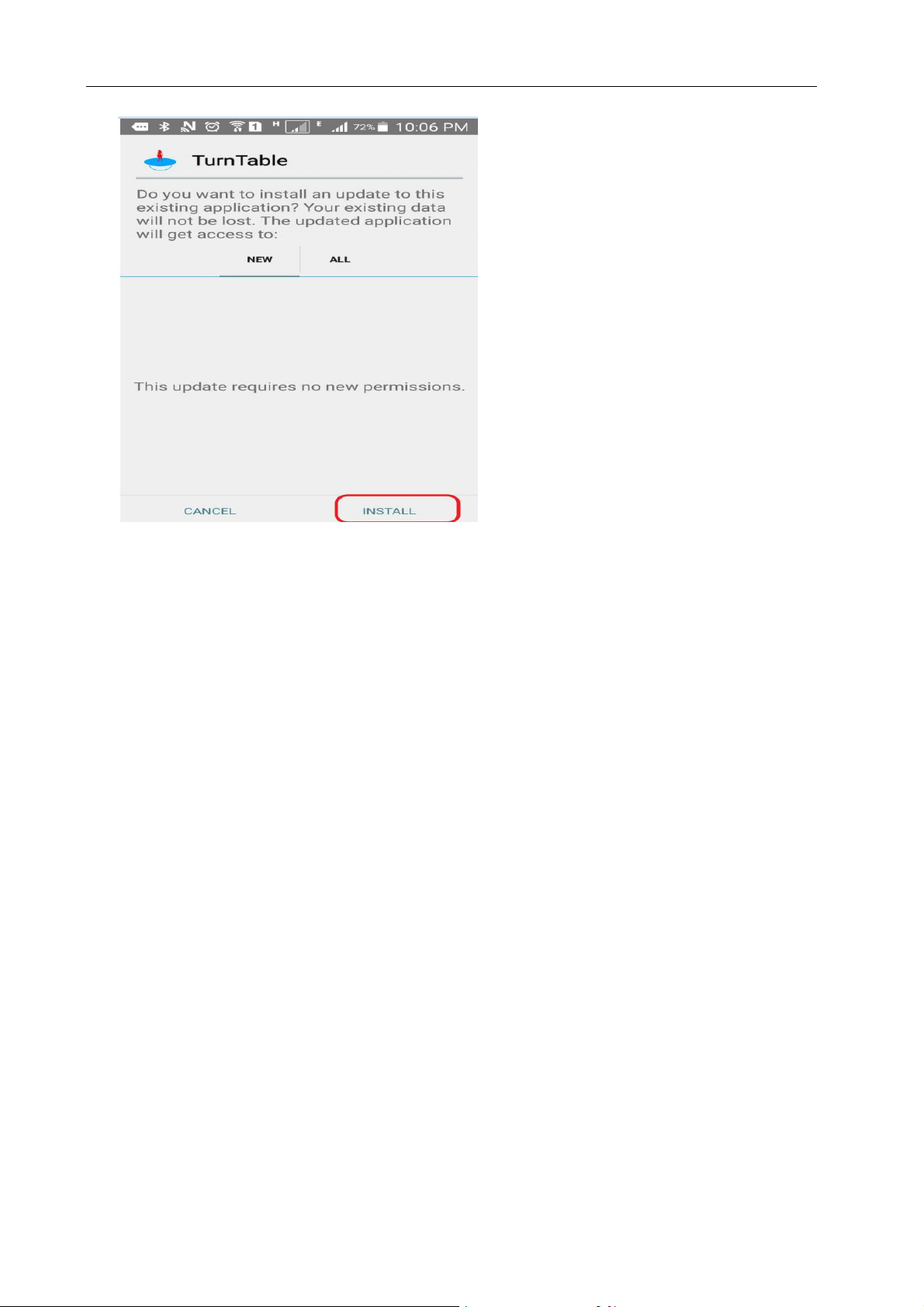
Figure 16 Install New APP , support more function
(MT series remote control intelligent turntable manual)5
8. PC Windows software
8.1 Software introduction
Through the PC Windows software, can achieve the turntable control, PC Windows software control
turntable can achieve infrared remote control all functions, and can realize the function of some infrared
remote control can not complete.
System requirements:
Hardware: a computer with a Bluetooth enabled computer, or a USB interface, which can be used with a
Bluetooth adapter.
Operating system: XP/2003 Server/Vista/2008 Server Windows, 7/8/10 Windows operating system.
8.2 Connecting equipment
Note: if the first use of this software, or have not yet been installed to drive and add a Bluetooth device, please first
in accordance with the 8.4 Bluetooth adapter driver installation section is shown to complete the driver installation and
Bluetooth devices (turntable) add, and remember the device corresponding to the virtual serial port number(Comx),
the device can only be added once, the next can be directly connected with the virtual serial port.
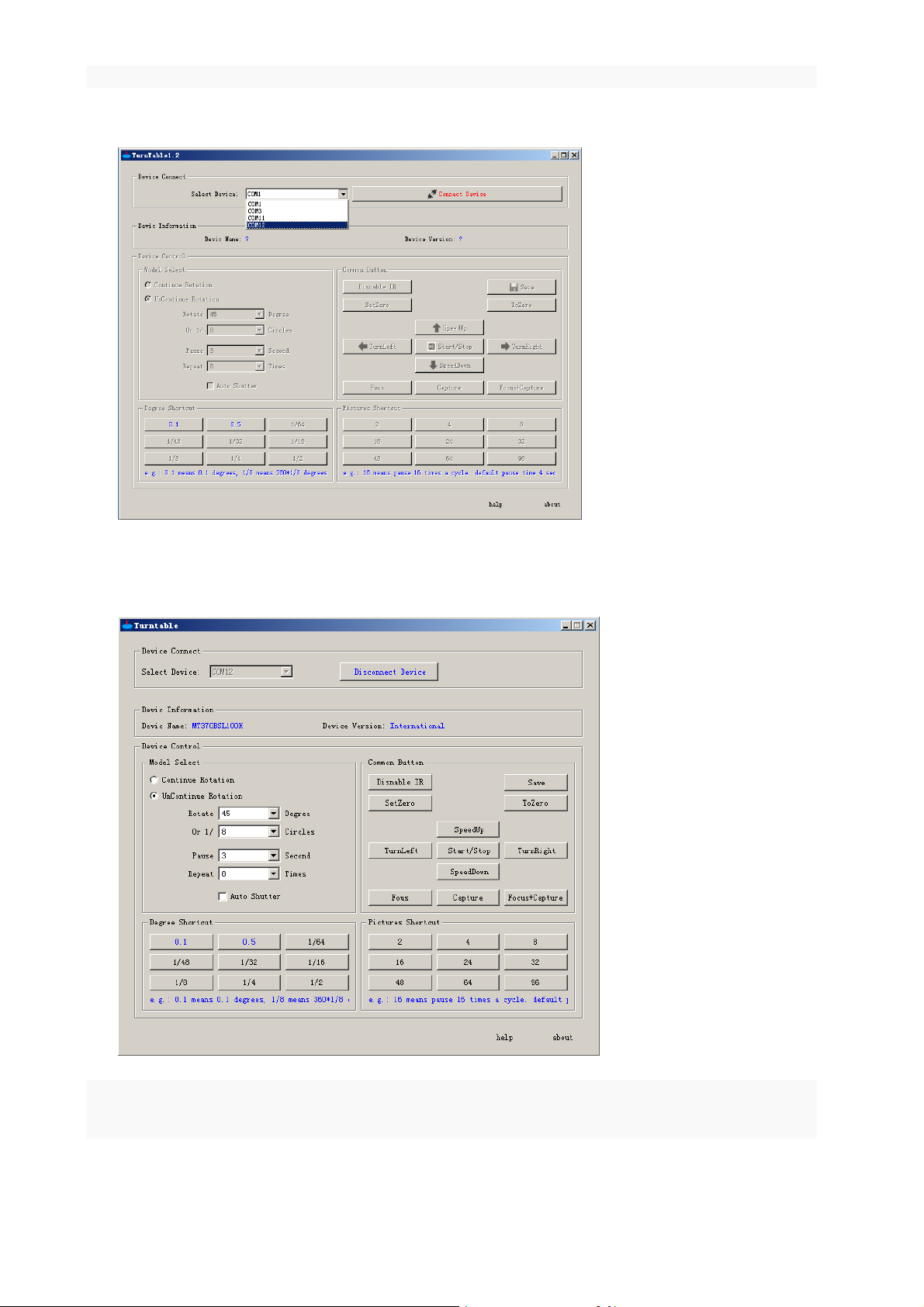
Start the PC Windows software TurnTable, select the device virtual serial port number, as shown in the figure
below (this option COM17, if not know the turntable corresponding virtual serial port number, in accordance
Shenzhen Comxim Technologies Co., Ltd. Copyright 2015 15
Page 20
(MT series remote control intelligent turntable manual)3
with the method of query virtual serial port number 8.4.1 query):
Click the connect device button to appear as follows (this example uses the turntable model for the
MT370BSL100, the Chinese mainland version):
Notice:After the success of the Bluetooth connection, the turntable beep 1, while the power supply / Bluetooth indicator to stop
flashing light.
16 Shenzhen Comxim Technologies Co., Ltd. Copyright 2015
Page 21

(MT series remote control intelligent turntable manual)5
8.3 Function introduction
PC Windows software control turntable to achieve full infrared remote control
function, and to achieve the function of the part of the infrared remote control can not be
completed, Button function is similar to infrared remote control, detailed reference 6
infrared remote control.
Below is the PC Windows software and infrared remote control connection
difference:
Disable infrared remote control:Press the disable infrared remote control button
(Change to ), At this time, the operation of the infrared remote control buttons
turntable no response. The function of the disable infrared remote control key is to eliminate the interference
of the infrared remote control and the operation of the error.
Intermittent rotary button: The PC Windows software is more flexible and convenient, it can set the
rotation of any degree, intermittent arbitrary seconds, repeat any time, and the infrared remote control only
the angle of the key, and so on.
Multi angle shooting shortcut keys: Automatic shutter is automatically selected (automatic shutter enable),
the user can also be removed; while the infrared remote control in the sub circle of the fast button, automatic
shutter enable. The automatic shutter enable is, the turntable first suspended the shutter signal for the
camera to shoot the first photo, and then rotate.
For example: press the key in this group (e.g. 8 keys), the turntable rotates every time 1/8 circle,
45 degrees (=360 *1/8), Suspended one time , Suspended time 4 seconds (MT370BSLxx series is
automatically sent out the shutter signal to take a photo), repeat 8 times that a circle automatically
back to the starting position.
Start / stop key, turn left, turn right:Start / stop button, left key, a right key: were re issued the interface the
new mode configuration information, and according to the infrared remote control button will not modify
rotary current mode configuration information.
8.4 Bluetooth adapter driver installation and adding equipment
8.4.1 Bluetooth adapter driver installation
Note: if the computer comes with a Bluetooth, skip this section directly from the 8.4.2 Bluetooth
device to add chapter to start; if the computer does not bring a Bluetooth, you need to use the
Bluetooth adapter inserted into the computer USB interface.( We provide a USB Bluetooth adapter)
Shenzhen Comxim Technologies Co., Ltd. Copyright 2015 17
Page 22
(MT series remote control intelligent turntable manual)3
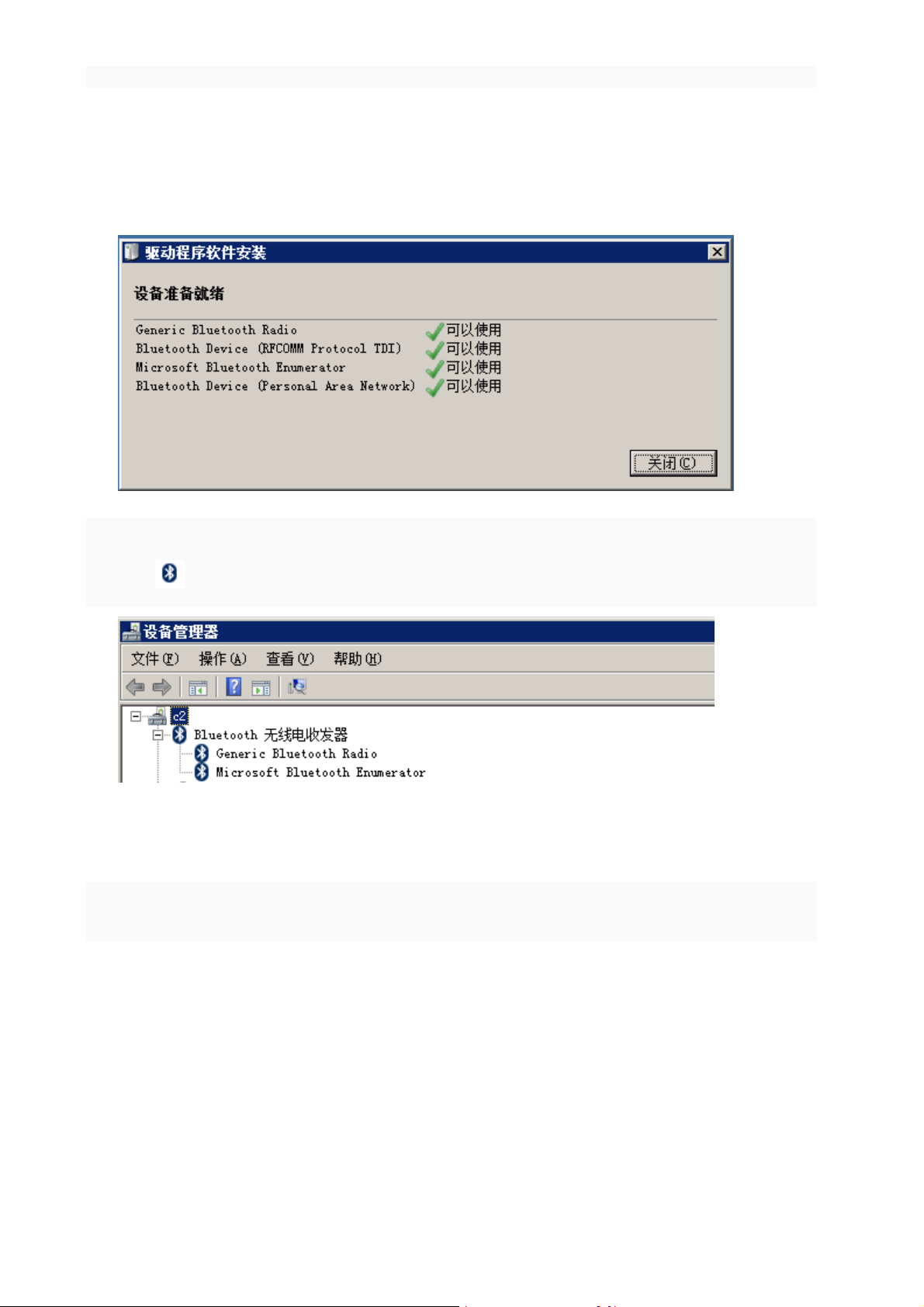
1. Below the Windows 7 operating system, about the Bluetooth driver installation method. Operation steps are
as follows:
2. Insert the Bluetooth adapter into the USB PC interface, and a USB interface can be automatically completed
by the insertion system:
After the driver is installed,appears the Bluetooth logo in the lower right corner of the Windows
desktop ,It can also be confirmed by the device manager.
8.4.2 Add Bluetooth device
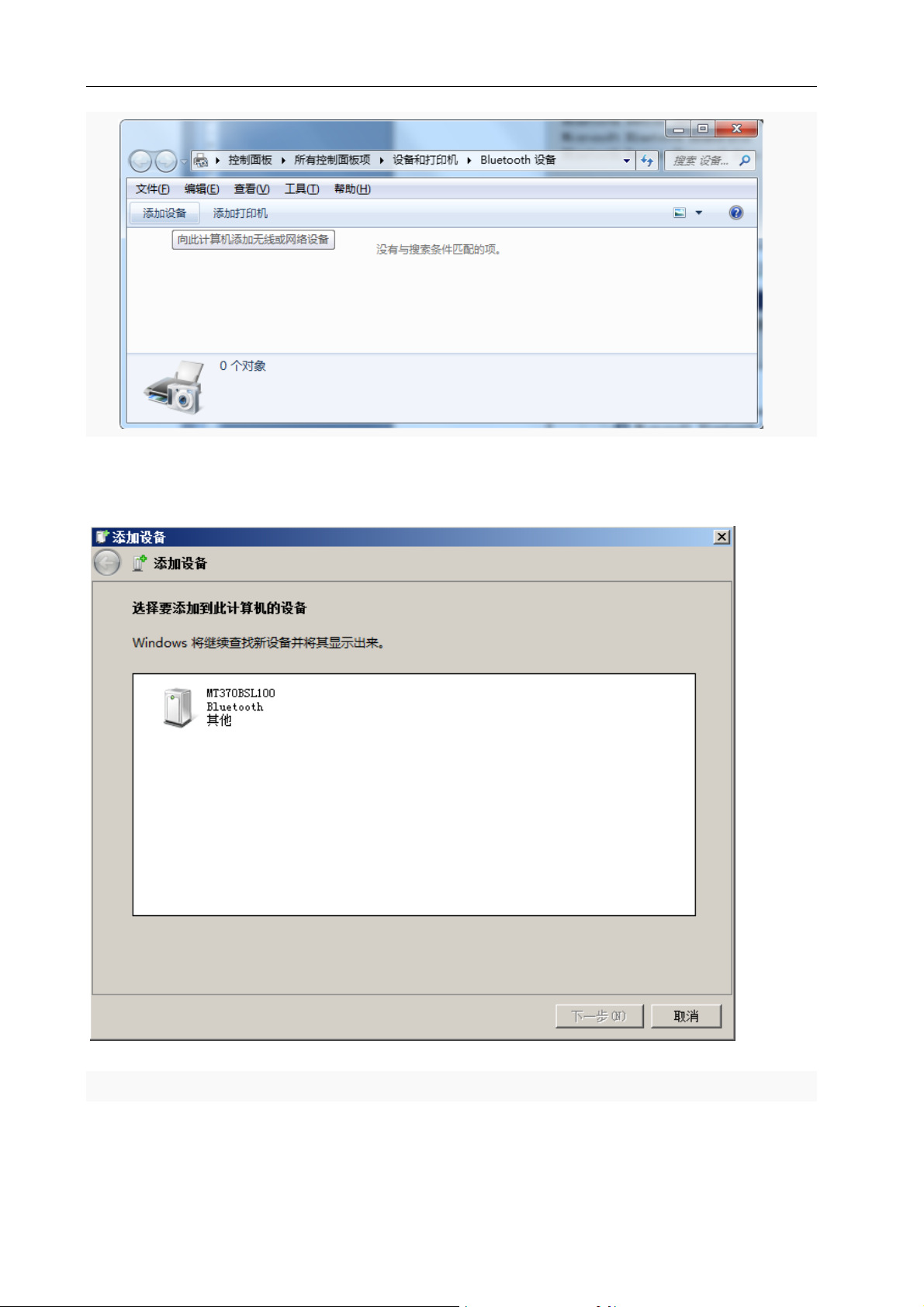
Turn on the turntable power switch,Open the Windows control panel, all control panel items, devices and
printers:
18 Shenzhen Comxim Technologies Co., Ltd. Copyright 2015
Page 23
(MT series remote control intelligent turntable manual)5
Click the add device button to appear as follows, and search to the turntable (MT370BSL100):
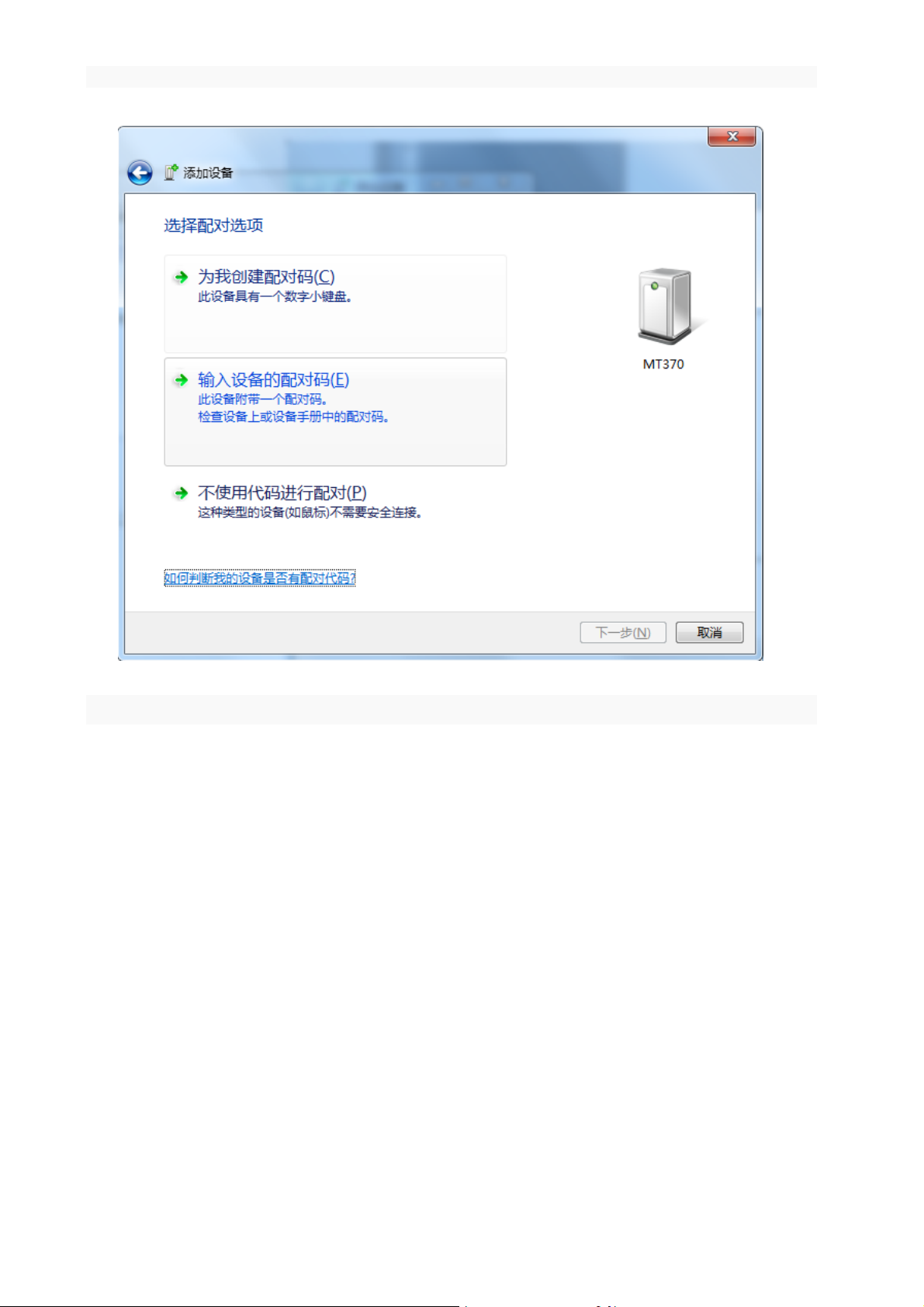
Select MT370BSL100, and click Next button, appear:
Shenzhen Comxim Technologies Co., Ltd. Copyright 2015 19
Page 24
(MT series remote control intelligent turntable manual)3
Select the second item, the matching code dialog box appears:
20 Shenzhen Comxim Technologies Co., Ltd. Copyright 2015
Page 25
(MT series remote control intelligent turntable manual)5
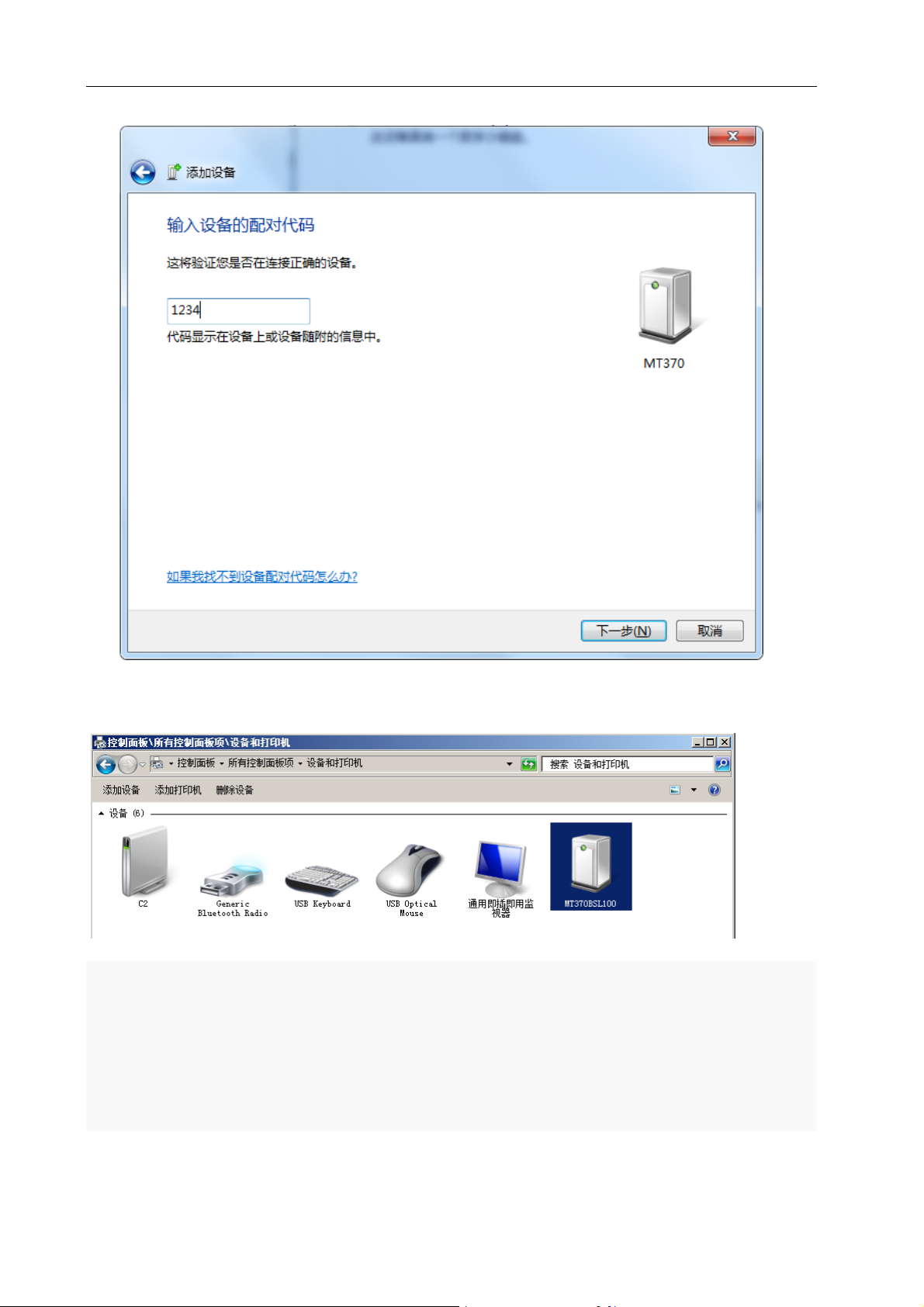
Enter the password 1234, click next, wait for the system to add the device, and add
the MT370BSL100 to the list of devices that have been added to the device.
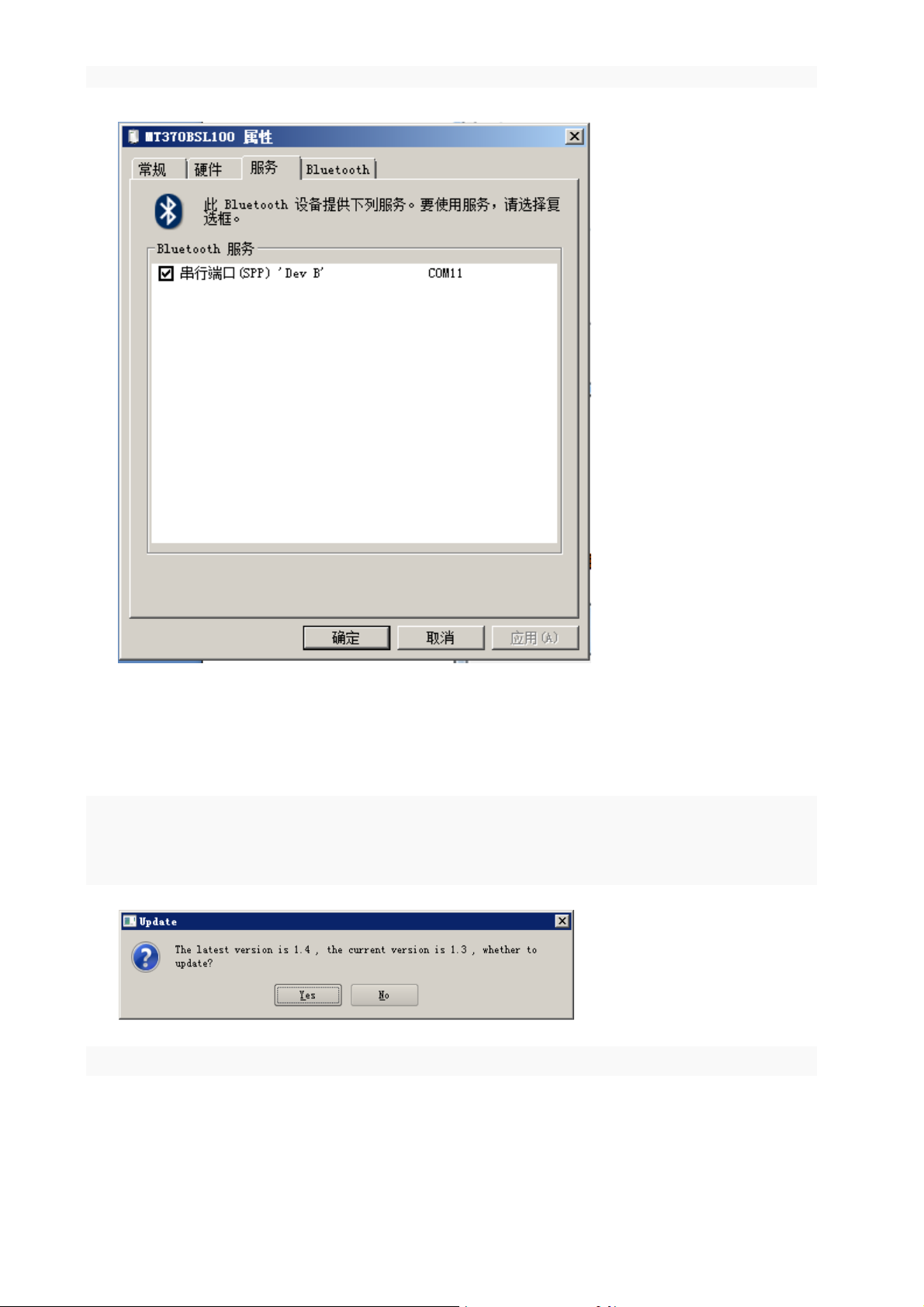
8.4.1 query virtual serial number
Double click the MT370BSL100 device, in the pop-up window interface to select the
service tab, you can see the Bluetooth adapter in the Windows system on a virtual serial
port, the system automatically assigned the serial number is COM11 (remember this
serial number, subsequent device connection is required):
Shenzhen Comxim Technologies Co., Ltd. Copyright 2015 21
Page 26
(MT series remote control intelligent turntable manual)3
8.5 Update
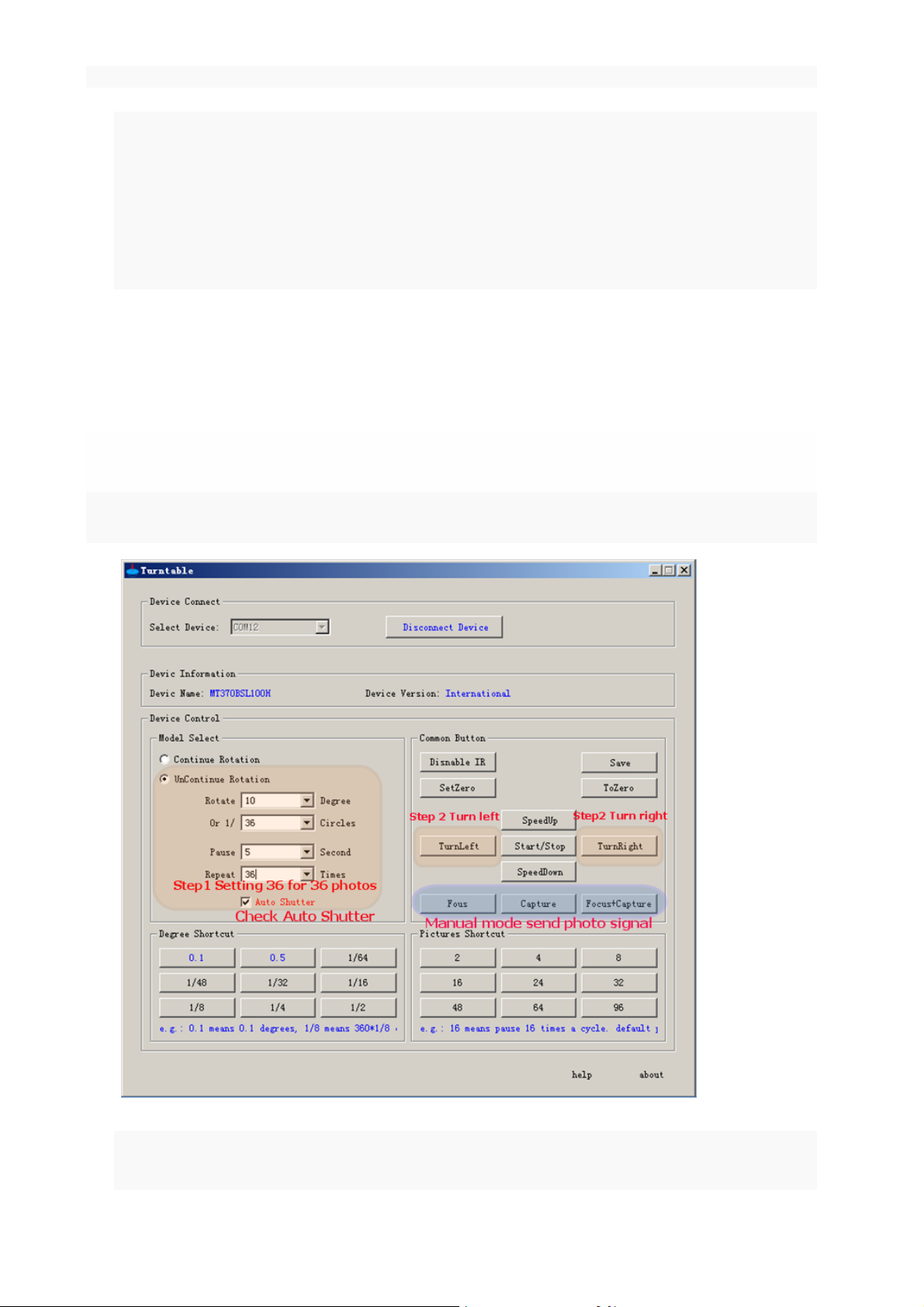
When the PC Windows software detected a new version of the server, the software
can automatically detect a new version and prompt the user to update, the software will
pop up as follows.
Click Yes to complete the software automatically update.
22 Shenzhen Comxim Technologies Co., Ltd. Copyright 2015
Page 27

9. Working condition
9.1 Power Supply:
AC220V converter DC24V power adapter.
9.2 Working temperature and humidity:
Ambient temperature:0~50℃
Relative humidity:<90%
9.3 Storage temperature and humidity:
Ambient temperature: -10~70℃
(MT series remote control intelligent turntable manual)5
Relative humidity:<70%
9.4 Dimensions and weight:
See 2 feature selection section.
10. Product application Introduction
10.1 The turntable can be applied to model and article 360 degree display
It is widely used in models and products 360 degree display, and can let the model and goods to
display, attract customers attention. This equipment is an effective tool for small jewelry, antiques,
models, but also allows customers to control the rotation speed and direction of the turntable through
remote control or Andriod App, the purpose is to narrow the distance between products and
consumers, increasing interactive experience.
Specific steps are as follows:
Step1. Connect the power supply and turn on the power switch.
Step2. if the power after the turntable has been turned, you can stop the rotation of the turntable
through the software or through the infrared remote control, App Andriod control turntable to stop
rotating.
Shenzhen Comxim Technologies Co., Ltd. Copyright 2015 23
Page 28
(MT series remote control intelligent turntable manual)3
Step3. The model stands in the center of the turntable, or will be displayed at the center of the
turntable.
Step4. You can also control the rotating direction, speed, and rotation mode of the rotary table
through the infrared remote control App Andriod. In order to increase the degree of participation
and interactive experience, you can let the audience through the remote control or App mobile
phone Andriod to control the required rotation.
10.2 Turntable with shutter function for 360 degree photography(only for
MT370BSL*Series and MT600BSL* Series)
MT370BSLxx turntable can achieve the suspension, and the suspension of the time automatically send out the
shutter signal, control the camera to take pictures, to achieve timing, multi angle shooting.
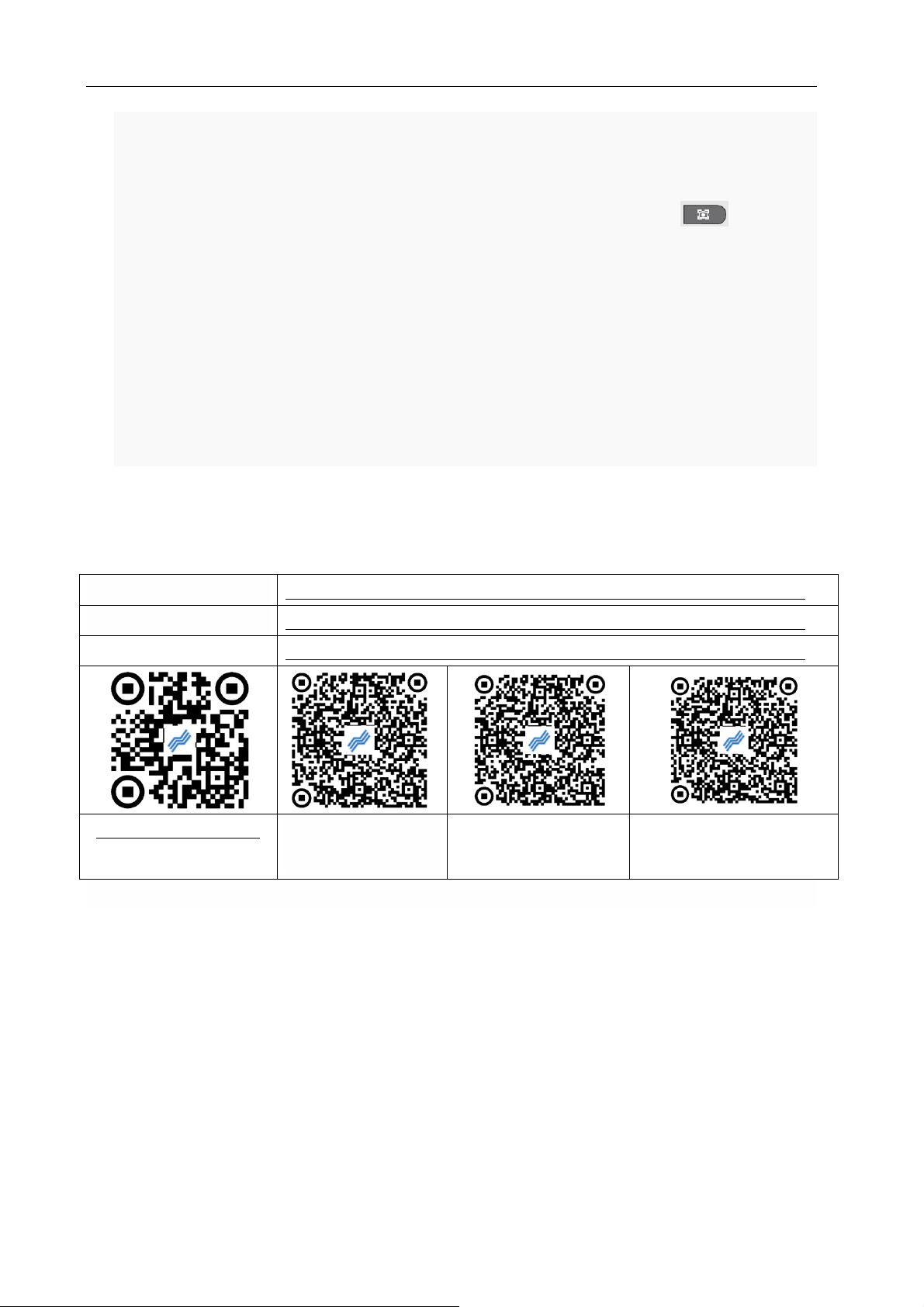
Below is an example for 36 photos:
Step1. connection: select the appropriate shutter line, and use the shutter line connected to the smart
turntable and camera.
24 Shenzhen Comxim Technologies Co., Ltd. Copyright 2015
Page 29
(MT series remote control intelligent turntable manual)5
Detailed instruction
http://www.comxim.com/Download/ViewDoc?DocId=20141213_160935_6815
PC Software
http://www.comxim.com/Download/ViewDoc?DocId=20141213_154443_3166
Android APP:
http://www.comxim.com/Download/ViewDoc?DocId=20141213_151405_5233
http://www.comxim.com
Scan: Detailed
instruction QR code
Scan: PC Software
QR code
Scan: Android APP
QR code
Step2. To test turntable control camera (the first use is necessary):To start the smart turntable (Reference
documentation: How to connect the computer to the turntable), adjust the speed of their own needs, open
the camera, manual adjustment of the camera focus, to ensure that the focus is accurate, (Be sure to focus,
the camera focus mode is set to M, Not use AF) Then press the remote control “ ”button, If the
camera can take pictures, it is normal to prove the connection. Note:need to control the camera, you must
check the software interface, automatic shutter".
Step3. Set the turntable intermittent rotation: set the time of the suspension and the number of suspended.
With the shortcut button set, the default pause time is 4 seconds. As shown in the "1 setting", the 36 mode is
set: 10 degrees each time, pause 4 seconds each time, 36 times to complete a circle shot.
Step4. To start taking pictures: press left turn (or right) start the turntable, the turntable can rotate
intermittently, pause and send the shutter signal when the pause. If you want to stop, press the start / stop
button to stop.
10.3 Software and manual download:
11. FAQ
1. Q:After power on of the turntable no response (buzzer not beep, power source / Bluetooth indicator
light is not bright).
A: 1) power module external AC220V socket is there electricity? Replace power outlet try.
2)The power module is connected with the turntable correctly?
2. Q:After the turntable is turned on, the normal tweet but is not rotated, or only a very small angle is
rotated.
A: May be the turntable to save the intermittent rotation, and the rotation angle is small, and the
suspension time is very long, repeat number isToo little,so that the user is difficult to detect the turntable turn
Shenzhen Comxim Technologies Co., Ltd. Copyright 2015 25
Page 30

(MT series remote control intelligent turntable manual)3
a 0.5 degree. If so, according to the continuous rotation controller button can normally rotate turntable.
3. Q:After the boot, the turntable has continued to beep, do not stop
A: POST(Power-on Self-Test) Fail, please contact the manufacturer
4. Q:Infrared remote control is ineffective or the turntable non response (normal turntable in response to
remote control command, 1~2 buzzer sound).
A: The remote control is aimed at the turntable, and within the appropriate distance?
Is the turntable on the power?
Check remote control battery.
5. Q:PC Windows software can not be connected or unable to control the turntable.
A: Whether the turntable has been powered up?
Does the turntable support Bluetooth? (support for Bluetooth requires MTxxxB* and MTxxxBS*).
Is the Bluetooth adapter inserted into the USB PC interface?
Does the computer have the right to add a Bluetooth device (turntable), or Windows software is
properly selected to set the corresponding COM port?
Note: the Bluetooth connection is successful, and the power supply / Bluetooth indicator light
stops flashing.
6. Q: Andriod App can not connect or unable to control the turntable.
A: Whether the turntable has been powered up?
Does the turntable support Bluetooth? (support for Bluetooth requires MTxxxB* and MTxxxBS*).
Does the computer have the right to add a Bluetooth device (turntable), or Windows software is
properly selected to set the corresponding COM port?
Note: the Bluetooth connection is successful, and the power supply / Bluetooth indicator light stops
flashing.
Andriod App is the correct selection of the device (turntable)?
Note: the Bluetooth connection is successful, and the power supply / Bluetooth indicator light stops
flashing.
7. Q :How to understand the difference between the model and the function of the MT series turntable ?
A:Take the MT370L100 * turntable as an example, this model is the lowest, and the other type of the
turntable contains the full function of the lowest configuration model, i.e.:
MT370L100 < MT370BL100(Support for Bluetooth, support software control)< MT370BSL100(Support automatic
shutter,Support automatic camera function)< MT370BSL100H (Support for international multi language)
8. Q:Press the shutter button, the turntable has no response.
A:The shutter button is limited to the MTxxxBS and above models, which supports the shutter function.
No response to the turntable, which is not supported by the shutter function.
26 Shenzhen Comxim Technologies Co., Ltd. Copyright 2015
Page 31
(MT series remote control intelligent turntable manual)5
9. Q:When using infrared remote control, what is the time of the rotary table is suspended?
A:The infrared remote controller can only modify the rotation angle, repeat number, do not modify the
suspension time, so the turntable to suspend the time to keep the internal value of the turntable unchanged.
So what is the time value of the internal suspension of the turntable? Is divided into two cases:
1) Primary power: 4 seconds, (MTxxxL* series no software changes, always only this case).
2) App or PC software to modify the pause time, the modified value will be saved as a pause time.
10. Q: Andriond mobile phone App or PC software buttons are normal, but the infrared remote control
buttons turntable no response?
A: there are two cases:
1) 1) infrared remote control lock key had been set to lock state, again press the key to unlock.
2) 2) The PC Windows software lock button “ ” is locked, and Press this button again to
release the unlock
11. Q:Android what are the requirements?
A:Andriond 4 and above, support bluetooth.
12. Q: What language does the PC software and Android APP support?
A:Currently supports simplified Chinese, english.
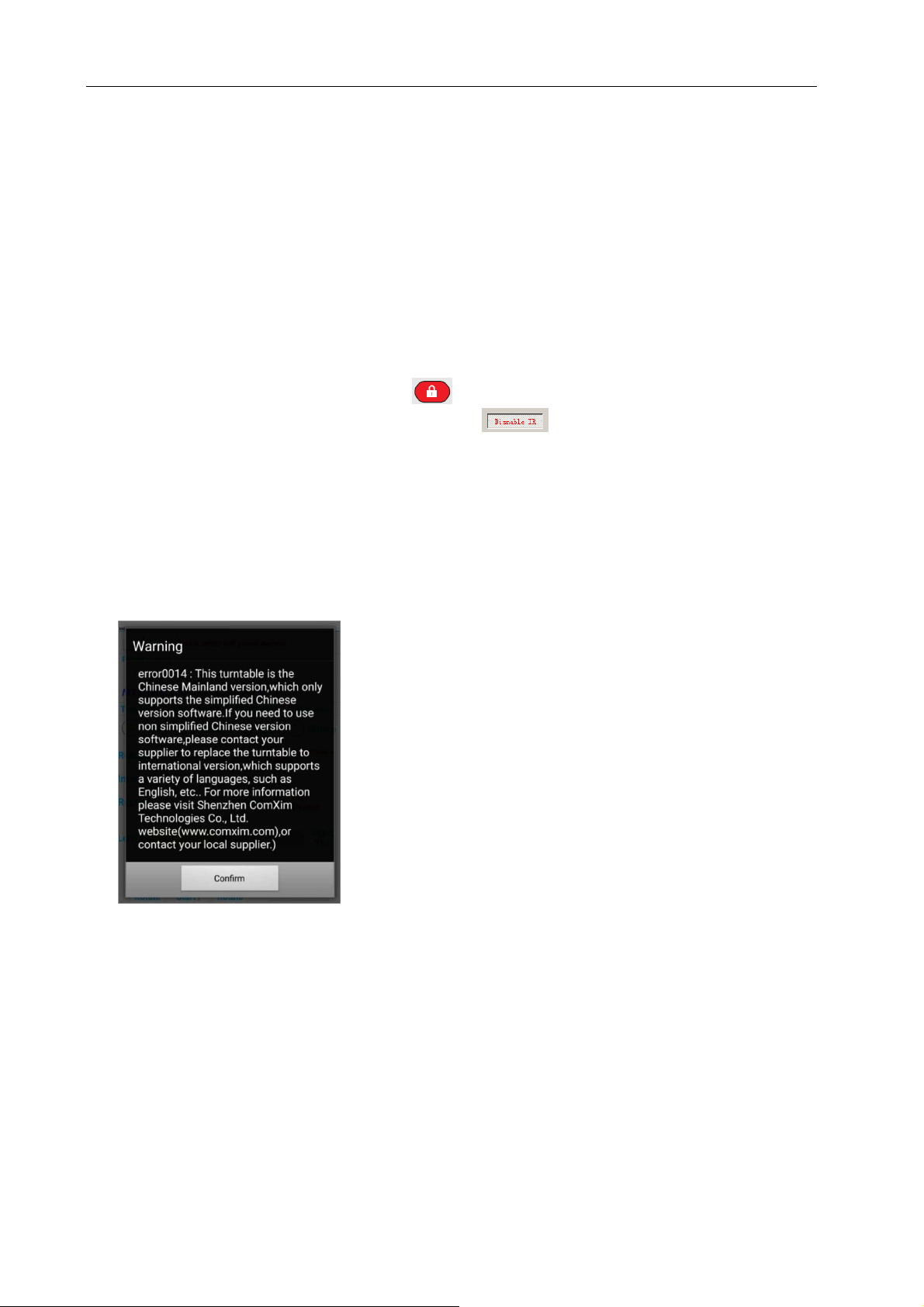
13. Q:What is the reason for the appearance of error0014?
A:This is because the turntable hardware version and software version does not match.
14. Q:MT370BSL series turntable took 96 photos, why less than 96 photos?
A:The reason is that some of the camera's slow reaction: 96 shots, turntable rotation time is very short,
the default interval waiting time is 4 seconds is also shorter, take a picture, the camera is still in a preview of a
picture of the state, did not immediately enter the next shot ready state. Such a turntable to send a shutter
signal camera will not take pictures. Two solutions: 1 set interval time 6 seconds. 2 or put the camera
preview off.
15. Q:When the software is connected to the turntable, the following error occurred, what is the reason?
Shenzhen Comxim Technologies Co., Ltd. Copyright 2015 27
Page 32

(MT series remote control intelligent turntable manual)3
A:Software version and turntable hardware version does not match, may be the international version of
the software (such as the English version) connected to the Chinese version of the turntable, because the
Chinese version of the turntable only supports simplified Chinese version of the software, please switch to the
simplified Chinese version of the software can be normal use; if you need to use other language versions of
the software (such as English), please contact your supplier to change the international version.
16. Q:Operating system version requirements?
A:Windows XP/2003 Server/Vista/2008 Server Windows (7/8/10).
17. Q:Support for the Bluetooth function of the turntable, support what version of Bluetooth?
A:Bluetooth version of the phone or computer for version 4 or version 2 can be supported, we provide
the adapter is Bluetooth version 2.
18. Q:The computer has its own Bluetooth, does not use the turntable with the Bluetooth adapter can be?
A:Can be used
28 Shenzhen Comxim Technologies Co., Ltd. Copyright 2015
 Loading...