

Page 1

CONTENTS
1. CHECK PHONE COMPATIBILITY…………………………………………3
2. CHARGE BLUETOOTH HEADSET………………………………………..3
3. READ THE GLOSSARY…………………………………………………….4
4. PAIRING TO YOUR BLUETOOTH PHONE………………………………4
5. ENHANCED FEATURES………............................................................. 5
6. TURNING HEADSET ON/OFF……………………………………………. 6
7. CHOOSING WEARING PREFERENCE…………………………………..7
8. MAKING A CALL…………………………………………………………….8
9. ENDING A CALL…………………………………………………………….8
10. ANSWERING A CALL………………………………………………………8
11. CALL WAITING……………………………………………………………...9
12. FREQUENTLY ASKED QUESTIONS…………………………………….9
13. STORAGE OF HEADSET………………………………………………...10
14. CERTIFICATION AND SAFETY APPROVALS…………………………11
15. WARRANTY AND PARTS REPLACEMENT……………………………12
16. CORRECT DISPOSAL OF THIS PRODUCT…………………………...13
17. GLOSSARY………………………………………………………………...14
1
Page 2
Thank you
1
Check phone compatibility
Thank you for purchasing the Samsung Bluetooth Headset WEP170, we hope
you will be delighted with its operation.
Please read the instruction manual to get started and to make best use of the
headset’s many features.
! Drive Safely
Using a mobile phone while driving creates a distraction to the driver which may
increase the likelihood of an accident.
When using the phone while driving, keep conversations short and do not make
notes or read documents. Before answering calls consider your circumstances.
Pull off the road and park before making or answering calls when driving
conditions require (e.g. bad weather, high traffic density, and presence of children
in the car, difficult junctions or maneuvers.)
Remember, driving comes first, not the call!
Abide by local laws.
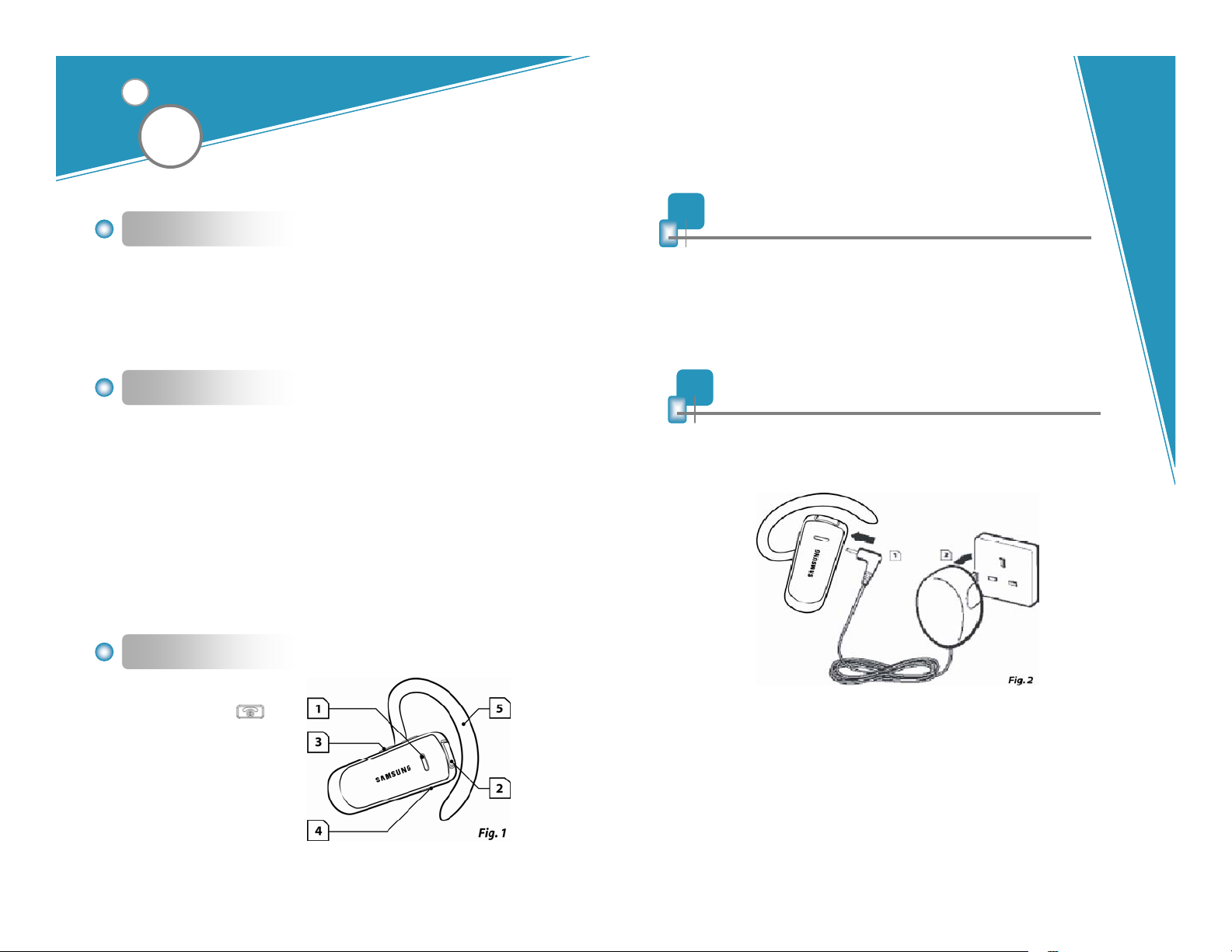
Headset Overview
1. Blue Indicator Light
2. Multi-Function Button
3. Volume Up/Down Button
4. Charging socket
5. Ear hook( Adjustable )
The Samsung Bluetooth headset WEP170 is compatible with most
Bluetooth1 (see Glossary) phones that are compliant with Bluetooth version
1.1 or higher specification and support the headset and/or hands-free
profile(s)2. Ensure that your phone has Bluetooth capability by visiting your
phone manufacturer’s web site.
2
Charge Bluetooth headset
Samsung Bluetooth headset WEP170 uses a rechargeable battery that must
be charged fully before you use the headset for the first time.
1. Plug the AC charging adaptor into the headset’s charging socket.
2. Plug the AC adaptor into the electrical outlet.
3. Charge your headset until the red light turns off and the blue light turns on.
4. The unit will be fully charged in approximately 2 hours.
5. Remove AC charging adaptor from the headset. You are now ready to “pair”
the headset to your mobile phone. If the headset has already been paired to
your phone, then you can begin using it.
2
3
Page 3
3
Read the glossary
Read the glossary at the end of this document to familiarize yourself with important
terms used in this User Manual.
Once headset is fully charged, continue with these instructions.
4
Pairing to your Bluetooth phone
Pairing3 will create a unique and encrypted wireless link between two
Bluetooth enabled devices such as your Bluetooth phone and Bluetooth
headset.
1. Ensure the headset is off (see
Turning headset on/off section).
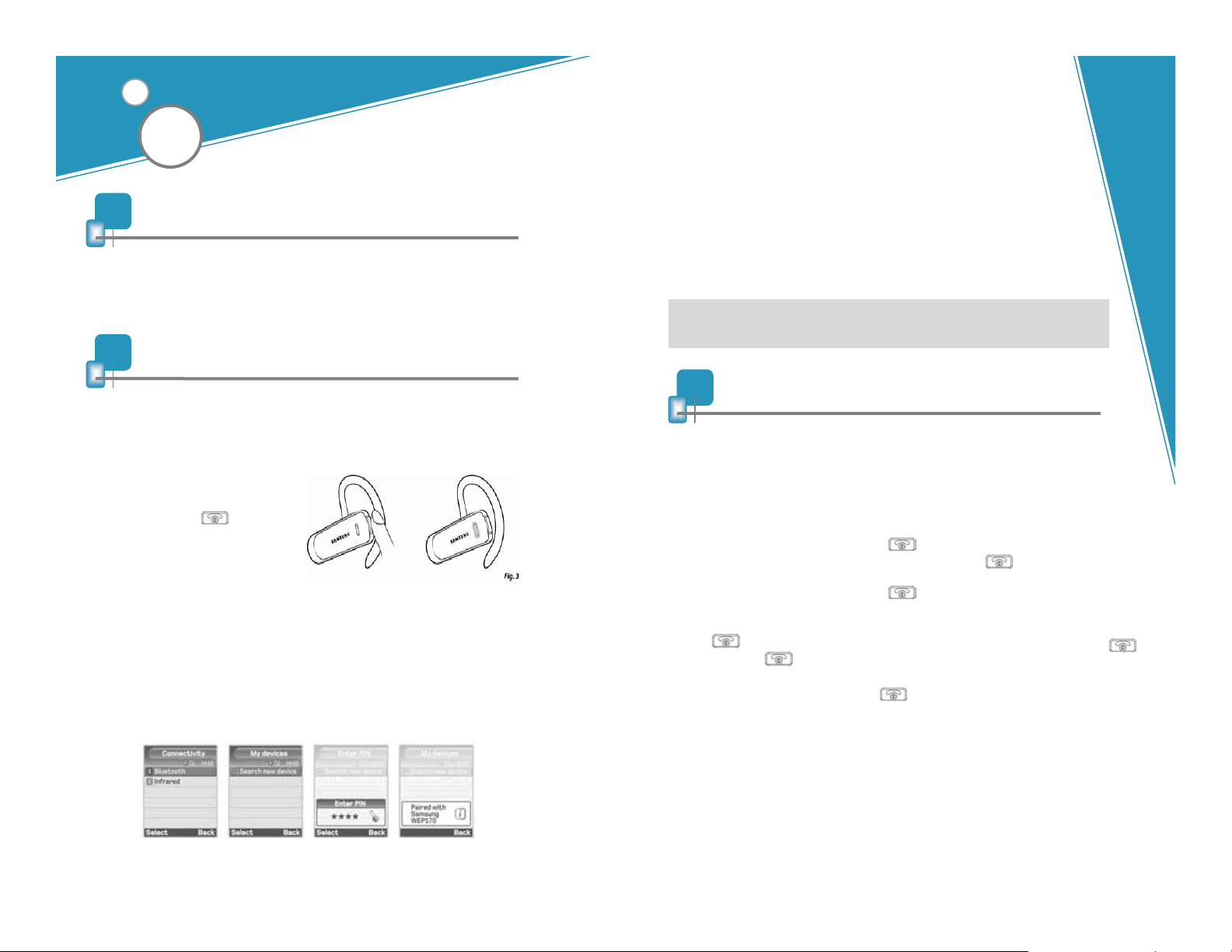
2. Press and hold until you
see the blue indicator light on
constantly (8 seconds or more),
then release* (see Fig. 3).
3. Set your Bluetooth phone to “discover” the headset by following
your phone’s instruction guide. Typically, the steps involve going to
a “setup”, “connect”, or “Bluetooth” menu on your phone and then
selecting the option to “discover” a Bluetooth device.
4. Your phone will find the “Samsung WEP170” headset and ask if you want to
pair with it. Confirm this by pressing “yes”or “ok”.
5. Enter passkey or PIN4 = 0000 (4 zeros), then press “yes” or “ok”.
!IMPORTANT: If pairing was successful, the blue indicator light will
flash 10 times rapidly before going back to flashing every 3 seconds. If
unsuccessful, the light will continue to be on for up to 2 minutes and
you’ll need to re-attempt pairing (see steps 3–5 above).
* If you have a Bluetooth phone that supports the hands-free Bluetooth
profile, see Enhanced features section for alternative pairing instructions.
5
Enhanced features (for Bluetooth phones with hands-free profiles)
Enhanced features are available for phones that support the hands-free Bluetooth profile.
Check your phone’s instruction guide or con tact the phone manufacturer if you arenot sure
if your phone supports the hands-free Bluetooth profile.
Once pairing is done, the following headset features will be available when on (idle):
z Last number redial (when not on a call)
While the headset is on, press and hold for 1 second, release. The call history will be
displayed on the phone. Select the number and then press once to begin dialling.
z Rejecting an incoming call (when not on a call)
When your phone rings, press and hold for 1 second,release.
z Call-waiting (swapping between 2 calls)
When your phone notifies you of another incoming call whileyou’re on a call, press and
hold release to pick up call and put the first call on hold. To swap to the first call,
press and hold for 1 second, release.
z Putting a call on hold
While you’re on a call, press and hold for 1 second, release. Repeat to retrieve the
call..
4 5
Page 4
6
Turning headset on/off
Turning
headset
on
Turning
headset
off
1 to 2 seconds until you see
a burst of 3 flashes on the
blue indicator light, then
release.
more than 3 seconds until
you see a burst of 3 flashes
on the blue indicator light,
then release.
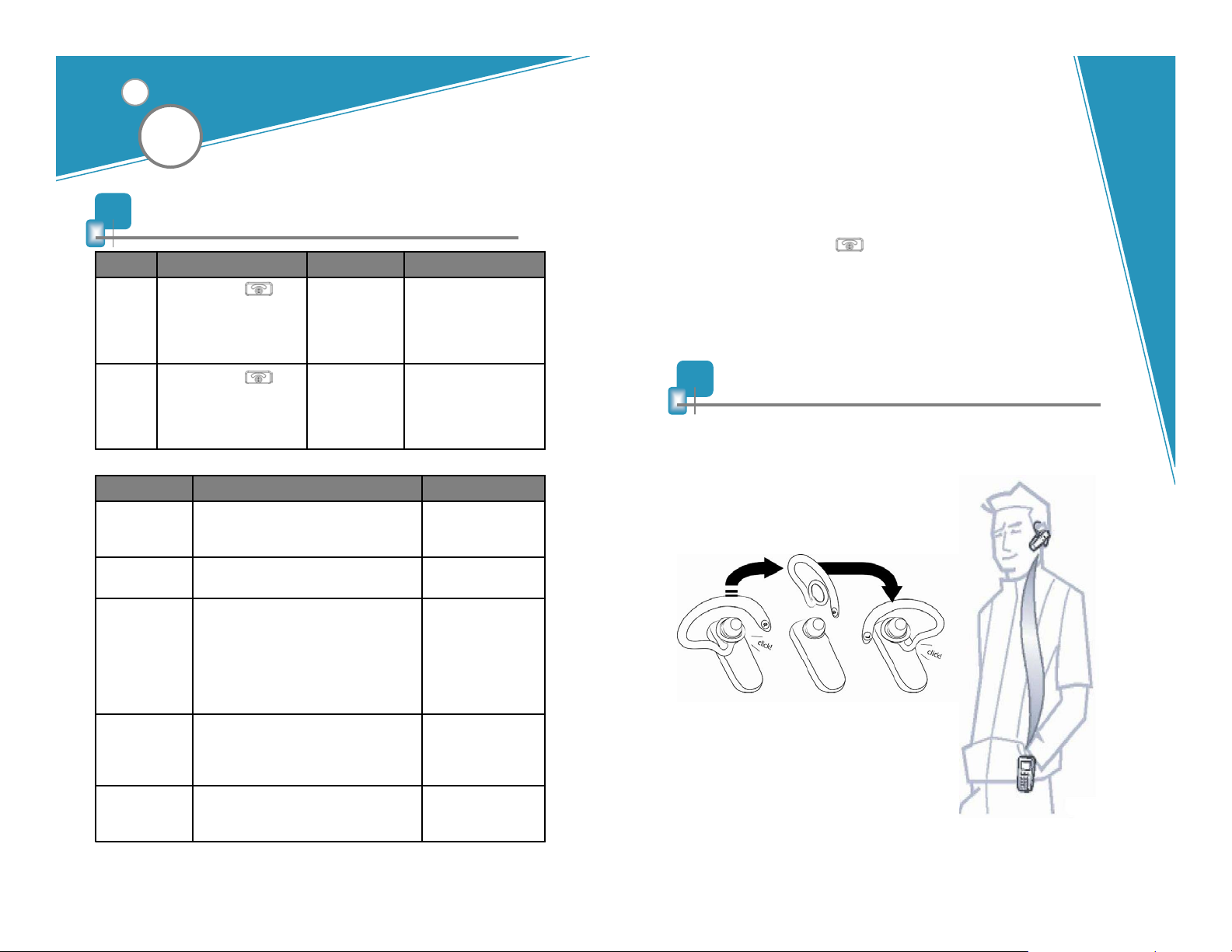
Status Indications
constantly
flashes
Flashes every 8
seconds
seconds
instead of Blue
flash
6
Single tonePress and hold for
2 tonesPress and hold for
NothingBlue on
1 single high tone10 rapid Blue
-Play in-band ring tones when connected with
Bluetooth supported mobile phone.
-Play headset default ring tone when
connected with supported mobile phone’s
ringer is set to silent mode.
-Play out-band ring tone when connected
with non-supported mobile phone.
NothingFlashes every 3
5 rapid high tones every 20 secondsRed flashes
What you seeWhat you hearWhat you do
The blue indicator light
will flash 4 times while the
power is on
The blue indicator light
will flash for2-3 times and
stop.
StatusWhat you hearWhat you see
Pairing Mode
-Pairing in progress
for up to 2 minutes.
Pairing Mode
-Pairing is successful.
Connected Mode
-Call in progress.
-Up to 8 hours of talk
time*.
Standby Mode
-Waiting for call.
-Up to 200 hours of
standby time*.
Low Battery
About 10 minutes of
talk time left.
5
6
*Depending on phone type and usage.
! Important: Do not hold the button down for more than 3 seconds
when turning the headset on or else it may go into pairing mode, and the
blue indicator light will turn on continuously. If that happens, turn off the
headset, wait 3 to 5 seconds, and repeat process for turning the headset
on.
7
Choosing wearing preference
Samsung Bluetooth headset WEP170 is ready to
wear on the right ear as indicated on the ear hook
( R ). If you prefer the left, gently un-clip the ear
hook, turn over and clip on the ear hook with the
side showing ( L ).
For optimal performance, wear Samsung
WEP170 and your Bluetooth phone on
the same side of your body. In general,
you will get better performance when
there are no obstructions (including parts
of your body) between the headset and
the phone.
7
Page 5
8
Making a call
11
Call Waiting*
If headset is off, turn it on now (see Turning headset on/off section).
Using phone’s keypad
1. Dial number on keypad.
2. Press phone’s “send” key.
Using voice-activated dialing (after you’ve set up voice tags on your
phone)
1. Press and release once.
2. You’ll then hear the voice-activation tone; say the name of the person you
wish to call.
NOTE: Record voice tag from headset for better reception.
9
Ending a call
z Press and release once.
OR
z End call from phone’s keypad.
10
Answering a call
z After you hear the ring tone or headset default tone, press and release
once.
OR
z Answer the call with your phone’s keypad. You may then need to transfer
the call to the headset by pressing and releasing once (depending on your
phone model).
z (Recommended) Use standard method from your phone’s keypad which
typically involves pressing the “send”button.
OR
z Long press and release once to answer the incoming call and toggle
between the two calls. (some phones do not support this headset feature)
! IMPORTANT: Do not hold the button down too long when making, ending, or
answering a call. This should only be a quick tap (1 second or less), so you don’t
turn off the headset by accident.
* See Enhanced features section for alternative call-waiting instructions for
phones that support the hands-free profile.
12
Frequently asked questions
1. How far away from my phone will my Samsung WEP170 work?
The operating range is typically up to 30 feet (10 metres).
2. Will Samsung WEP170 work with my cordless phone at home?
Samsung WEP170 is not designed for use with cordless phones.
3. Will Samsung WEP170 work with laptops, PCs, and PDAs?
Samsung WEP170 will work with devices that are compliant with
Bluetooth version 1.1 or higher specifications and support the headset
and/or hands-free profile(s).
8
9
Page 6
4. Will anything cause interference with my conversation when I’m using my
Samsung WEP170?
Appliances such as cordless phones and wireless networking equipment may
cause interference with your conversation, usually adding a crackling noise. To
reduce any interference, keep the headset away from other devices that use or
produce radio waves.
5. Will my Samsung WEP170 interfere with my car’s electronics, radio,
or computer?
Samsung WEP170 produces significantly less power than a typical mobile phone.
It also only emits signals that are in compliance with the international Bluetooth
standard. Therefore, you should not expect any interference with standard
consumer-grade electronics equipment.
6. Can other Bluetooth phone users hear my conversation?
When you pair your headset to your Bluetooth phone, you are creating a private
link between only these two Bluetooth devices. The wireless Bluetooth technology
used in your headset is not easily monitored by third parties because Bluetooth
wireless signals are significantly lower in radio frequency power than those
produced by a typical mobile phone.
7. How do I take care of Samsung WEP170 ?
To clean the headset, use a clean, soft cloth that is slightly damp.
14
Certification and safety approvals
Declaration of Conformity (R&TTE)
z For the following product: Bluetooth Headset Samsung WEP170
z Manufactured at: Cal-comp Electronics (SuZhou) co. Ltd
No 18 Jiangxing Road Wu Jiang, Electronic
Development Zone. 215200 People Republic of China to which this
declaration relates, is in conformity with the following standards and/or
other normative documents.
z Safety : EN 60950-1:2001
z EMC : EN 301 489-01 v1.4.1 (2002-08)/ EN 301 489-17 v1.2.1 (2002-08)
z Network : EN 300 328-2 v1.4.1
We hereby declare that [all essential radio test suites have been
carried out and that] the above named product is in conformity to
all the essential requirements of Directive 1999/5/EC.
13
Storage of headset
1. Always store the Samsung WEP170 with power off and safely protected.
2. Avoid storage at high temperatures (above 60°C / 134°F) –such as in a hot
vehicle or in direct sunlight. (Storage at high temperatures can degrade
performance and reduce battery life).
3. Do not expose the headset or any of its supplied parts to rain or other liquids.
Samsung
Electronics Co.Ltd.
416,Maetan3Dong,YeongtongGu
SuwonCity,GyeonggiDo,Korea
2005. 06. 14
Jong-Myung Park / Manager
10 11
Page 7
FCC
This device complies with part 15 of the FCC Rules. Operation issubject to the
following two conditions:
(1) This device may not cause harmful interference, and (2) this device must accept
any interference received, including interference that may cause undesired operation.
Users are not permitted to make changes or modify the device in any way. Changes
or modifications not expressly approved by Samsung will void the user’s authority to
operate the equipment. See 47 CFR Sec15.21.
This equipment has been tested and found to comply with the limits for a Class B
digital device, pursuant to part 15 of the FCC Rules. These limits are designed to
provide reasonable protection against harmful interference in a residential installation.
This equipment generates, uses and can radiate radio frequency energy and, if not
installed and used in accordance with the instructions, may cause harmful
interference to radio communications. However, there is no guarantee that
interference will not occur in a particular installation. If this equipment does cause
harmful interference to radio or television reception, which canbe determined by
turning the equipment off and on, the user is encouraged to try to correct the
interference by one or more of the following measures:
z Reorient or relocate the receiving antenna
z Increase the separation between the equipment and receiver
z Connect the equipment into an outlet on a circuit different from that to which the
receiver is connected
z Consult the dealer or an experienced radio/TV technician for help
z The user must place the base 8” (20cm) or more from any personnel in order to
comply with FCC RF exposure requirements.
Bluetooth
The Bluetooth
®
word mark and logos are owned by the Bluetooth SIG, Inc. Other
trademarks and trade names are those of their respective owners.
15
Warranty and parts replacement
Samsung warrants this product as free of defects in material, design and
workmanship for the period of one year from the origin al dat e ofpurchase.
If during the period of warranty this product proves defective under normal use
and service you should return the product to the retailer from whom it was
originally purchased or qualified service center. The liability of Samsung and its
appointed maintenance company is limited to the cost of repair and/or
replacement of the unit under warranty.
z The warranty is limited to the original purchaser
z A copy of your receipt or other proof of purchase is required for a proper
warranty service
z The warranty is void if the serial number, date code label or product label is
removed, or if the product has been subject to physical abuse, improper
installation, modification, or repair by unauthorised third parties
z The responsibility of Samsung products shall be limited to the repair or
replacement of the product at its sole discretion
z Specifically exempt from any warranty are limited-life consumable
components such as batteries and other accessories
z Samsung is not liable to for any incidental or consequential damages
arising from the use or misuse of any Samsung product
z This warranty gives you specific rights and you may have otherrights
which vary from area to area
z Unless otherwise instructed in the User Guide, the user may not,
under any circumstances, attempt to perform service, adjustments or
repairs on the unit, whether in or out of warranty. It must be returned
to the purchase point, factory or authorised service agency for all
such work
z Samsung will not assume any responsibility for any loss or damage
incurred in shipping. All repair work on Samsung products by
unauthorised third parties voids any warranty
12
13
Page 8
16
Correct Disposal of This Product
17
Glossary
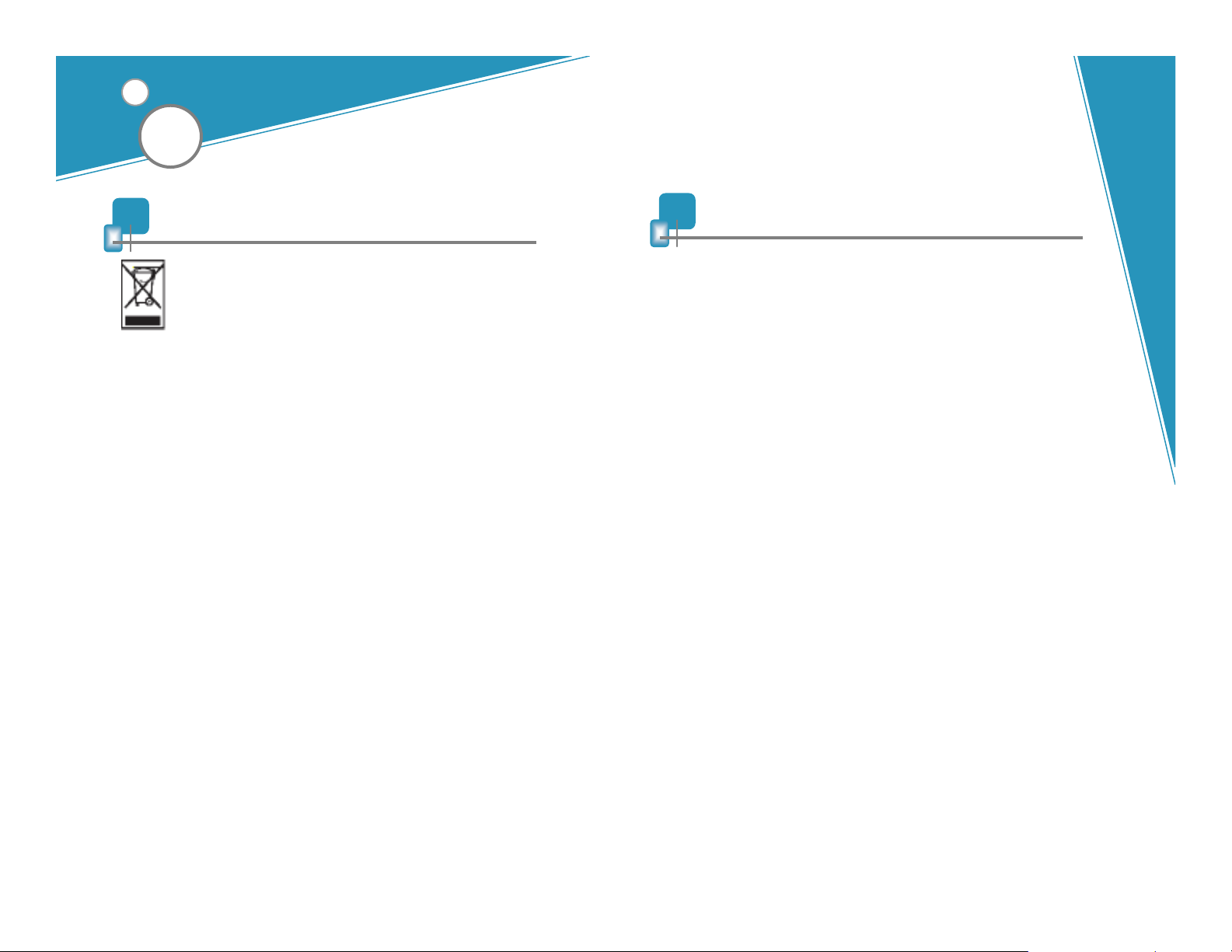
(Waste Electrical & Electronic Equipment)
This marking shown on the product or its literature, indicates that it
should not be disposed with other household wastes at the end of
its working life.
To prevent possible harm to the environment or human health
from uncontrolled waste disposal, please separate this from other
types of wastes and recycle it responsibly to promote the
sustainable reuse of material resources.
Household users should contact either t he retailer where they
purchased this product, or their local government office, for details
of where and how they can take this item for environmentally safe
recycling.
Business users should contact their supplier and check the terms
and conditions of the purchase contract. This product should not
be mixed with other commercial wastes for disposal.
1 Bluetooth is a radio technology developed to connect devices, such as mobile
phones and headsets, without wires or cords over a short distance of
approximately 10 metres. More information is available at www.bluetooth.com
2 Bluetooth profiles are protocols through which Bluetooth devices communicate
with other devices. Bluetooth phones support different sets of profiles – most
support the headset profile but some support the hands-free profile and others
support both profiles. In order to support a certain profile, a phone manufacturer
has to implement certain mandatory features within the phone’s software.
3 Pairing creates a unique and encrypted communication link between two
Bluetooth-enabled devices and allows them to communicate with each other.
Bluetooth devices will not work if the devices have not been paired with each
other.
4 Passkey or PIN is a secret code that needs to be entered on the phone in order
to pair the mobile phone with headset. When you have already paired your
mobile phone with headset, the phone and headset will recognize each other
and the phone will bypass the discovery and authentication process and
automatically accept the transmission.
5 Connected Mode is when the headset has an active call in progress. Headset
will go from standby mode into connected mode when you receive a call or
when you make a call. When headset is in connected mode, the blue light will
flash every eight seconds.
14
6 Standby Mode is when the headset is passively waiting for a call. When you
“end” the call on your mobile phone, headset will go into standby mode. When
headset is in standby mode, the blue light will flash every three seconds.
 Loading...