

Page 1
COMPUTHERM
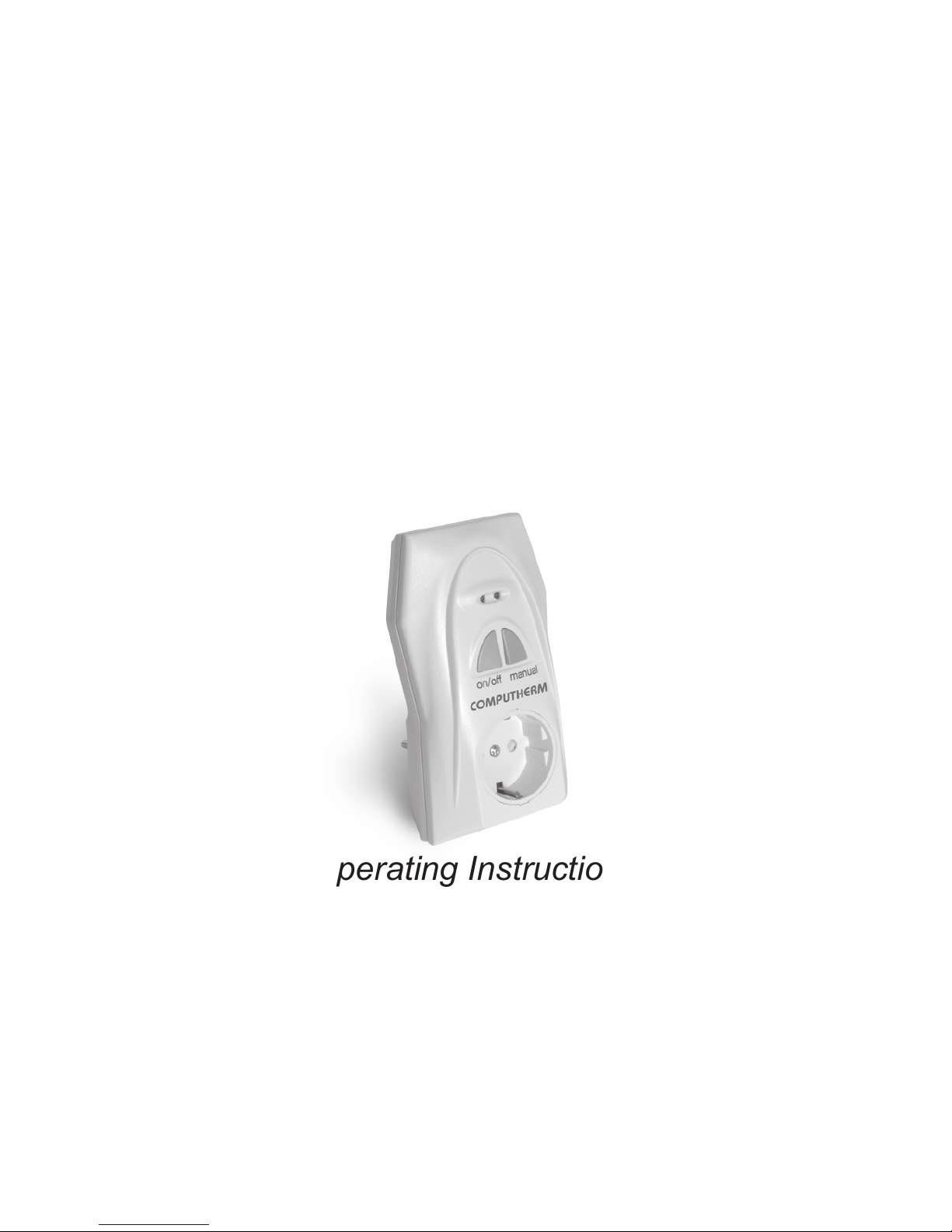
Q1RX
Wireless (Radio-Frequency)
Thermostat-Controlled Socket
Operating Instructions
Page 2

1. GENERAL DESCRIPTION OF THE SOCKET
The
COMPUTHERM
Q1RX socket has been developed for
thermostats
COMPUTHERM
Q3RF, Q7RF and Q8RF, and can be
used in addition to/instead of their receiver units. The device is
able to control boilers or any other electrical devices operating on
230V (e.g. fan heaters, pumps, zone valves, etc.). Easy installation
and operation, no assembly required. In response to the ON
command of
COMPUTHERM
Q3RF, Q7RF and Q8RF wireless
thermostats, a supply voltage of 230V appears on the output
socket of device Q1R X connected to the network, while the OFF
command disconnects the device from the network.
2
Page 3

2. PUTTING THE SOCKET INTO OPERATION
Warning! Modifying the socket can cause electric shock or product
failure.
Plug the
COMPUTHERM
Q1R X device into a power socket near the
location of the device to be controlled. A few seconds after the LED
lights of the device ash once, the device becomes ready for operation.
After this, you can start tuning the socket and the thermostat (or the
socket, the receiver of the thermostat and the thermostat) together.
3. TUNING THE SOCKET AND THE THERMOSTAT
TOGETHER
ATTENTION! If you wish to use the
COMPUTHERM
Q1RX socket
in addition to the receiver unit of the thermostat, then the socket,
the receiver of the thermostat and the thermostat should be tuned
3
Page 4

together at the same time, so that they can operate simultaneously.
Press the “on/off” button of the socket (for approximately 10
seconds) until the green LED light starts ashing. If you also wish
to use the receiver unit of the thermostat, then start the tuning
process on that receiver unit too, as described in its manual, so
that its green LED light (or red LED light in case of the receiver of
the Q8RF thermostat) starts ashing. After this, tune the devices
together according to the manual of the thermostat. If the LED lights
stop ashing, then the devices are tuned together.
4. TRANSMISSION DISTANCE INSPECTION
With the help of the “TEST” button you can check whether the
thermostat and the socket are within the transmission distance of
the radio-frequency connection. To perform the test, press the “TEST”
4
Page 5

button for approximately 2 seconds. Following this, the thermostat will
send, alternating every 5 seconds, switch-on and switch-off control
signals for 2 minutes (the signal appears and disappears alternately
on the display). When detecting the ON and OFF control signals, the
red LED light on the socket switches on and off, respectively. When it
fails to receive the signals sent by the thermostat, then it is outside the
transmission distance of the wireless (radio-frequency) transmitter,
thus they have to be placed closer to each other.
5. MANUAL CONTROL OF THE SOCKET
Pressing the “MANUAL” button separates the thermostat from
the socket. In this case, the device (e.g. pump) connected to
the socket can only be turned on and off manually, without any
5
Page 6

temperature inspection. The continuously illuminated green LED
indicates “MANUAL” mode. Pressing the “on/off” button turns on
or off the connected device. (The red LED is illuminated when the
device is turned on). By pressing the “MANUAL” button again, the
socket quits manual control and resumes automatic (thermostat-
controlled) operation (the green LED goes out).
6. AVOIDING EXTERNAL IMPACTS
Virtually no external devices (a radio, cell phone, etc.) will exert any
inuence on the operation of the device. Should you experience
any operating trouble, please retune the system as described in
Section 3.
6
Page 7

7. TECHNICAL DATA
• Power consumption: 6W
• Power supply voltage: 230V AC, 50Hz
• Output voltage: 230V AC, 50Hz
• Loadability: 10A (3A inductive load)
• Weight: 150g
• Storage temperate: -10ºC ‒ +40ºC
Page 8
The
COMPUTHERM
Q1RX type wireless thermostat-
controlled socket complies with the requirements of standards
EU EMC 2004/108/EC; LVD 2006/95/EC;
RoHS 2011/65/EU and R&TTE 1999/5/EC.
Manufacturer: QUANTRAX Kft.
Fülemüle u. 34., Szeged, H-6726, Hungary
Tel: +36 62 424 133 • Fax: +36 62 424 672
Email: [email protected]
Web: www.quantrax.hu • www.computherm-hungary.hu
 Loading...