

Page 1
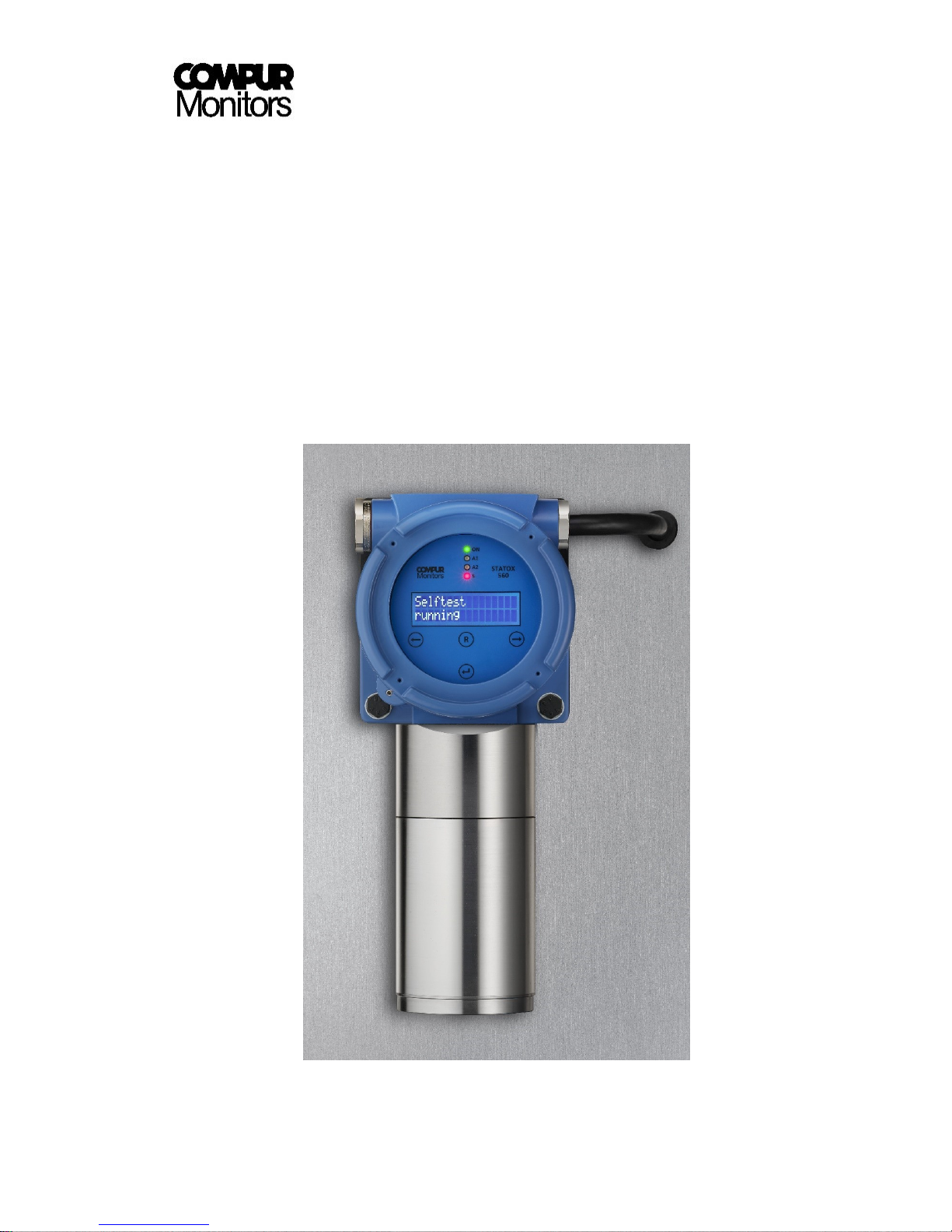
Operators Manual
Statox 560
Page 2

Statox 560
Page 2 of 66 Issue 2/2017
Content
1 Safety Advice ............................................................................................................................... 4
2 Product description ..................................................................................................................... 5
3 Installation and Connection ......................................................................................................... 6
3.1 Maximum distance to the power supply .............................................................................................. 6
3.2 Mounting .............................................................................................................................................. 7
3.3 Statox 560 Cable Tail Version Connection ............................................................................................ 9
3.4 Statox 560 connecting the eXLink-Plug .............................................................................................. 10
3.5 Connecting Statox 560 to a Statox 502 Control Module .................................................................... 12
3.6 Connecting the Remote Self-test ........................................................................................................ 13
3.7 Connection to the Open-Drain switching outputs .............................................................................. 14
3.8 Stand-alone operation ........................................................................................................................ 14
4 Product characteristics .............................................................................................................. 15
4.1 Housing ............................................................................................................................................... 15
4.2 Keys ..................................................................................................................................................... 15
4.3 LEDs ..................................................................................................................................................... 16
4.4 Display ................................................................................................................................................. 16
4.5 Sensor module .................................................................................................................................... 17
5 Getting started and menu navigation ........................................................................................ 17
5.1 Start - Up, Connecting the Sensor Module ......................................................................................... 18
5.2 Menus ................................................................................................................................................. 21
5.2.1 General ..................................................................................................................................... 21
5.2.2 Accessing the Service Menu ..................................................................................................... 22
5.3 Menu overview ................................................................................................................................... 22
5.3.1 Prooftest ................................................................................................................................... 24
5.3.2 Self-test ..................................................................................................................................... 25
5.3.2.1 Submneu Self-Test - Info ................................................................................................ 26
5.3.2.2 Submenu Self-test - Manual Start .................................................................................. 27
5.3.2.3 Submenu Self-test – Start time ..................................................................................... 28
5.3.2.4 Submenu Self-test - Monitoring ..................................................................................... 29
5.3.3 Calibration ................................................................................................................................ 30
5.3.4 Change Sensor – Sensor Module / Sensor / Generator Cell Replacement .............................. 33
5.3.4.1 Sensor module replacement .......................................................................................... 33
5.3.4.2 Sensor and Generator Cell replacement: ....................................................................... 34
5.3.5 Errors Info ................................................................................................................................. 37
5.3.6 Alarm History ............................................................................................................................ 37
5.3.7 Sensor Info ................................................................................................................................ 38
5.3.8 Temperature ............................................................................................................................. 39
5.3.9 Firmware................................................................................................................................... 39
5.3.10 Alarm Relays ............................................................................................................................. 39
5.3.11 Real Time Clock......................................................................................................................... 41
5.3.12 Service Output .......................................................................................................................... 42
5.3.13 Function Test ............................................................................................................................ 43
5.3.14 Maintenance Request .............................................................................................................. 45
6 System Status and Error Messages ............................................................................................ 46
6.1 System Status ...................................................................................................................................... 46
6.2 Error messages.................................................................................................................................... 47
7 Maintenance and Cleaning ........................................................................................................ 49
Page 3

Statox 560
Issue 2/2017 Page 3 of 66
7.1
Routine treatment ............................................................................................................................... 49
7.2 Replacing the pump ............................................................................................................................. 49
8 Accessories and spare parts ....................................................................................................... 50
9 Functional Safety ....................................................................................................................... 51
9.1 Safety Functions .................................................................................................................................. 51
9.2 Diagnostic Time and Measuring Cycle ................................................................................................. 51
9.3 Installation and Parameter Settings .................................................................................................... 52
9.4 Schedule Maintenance ........................................................................................................................ 52
9.5 Repair and Spare Parts ........................................................................................................................ 52
9.6 Failure Rates and Safe Failure Fraction ............................................................................................... 53
9.7 Average Probability of Failure on Demand ......................................................................................... 53
9.8 Classification of the Safety Integrity Level (SIL) ................................................................................... 54
9.9
Livetime ............................................................................................................................................... 54
10 General Technical Data .............................................................................................................. 55
11 Sensor-specific data ................................................................................................................... 56
11.1 Statox 560 Sensor Module COCl2 0.5 ppm 562920 ........................................................................... 56
11.2 Statox 560 Sensor Module COCl2 1 ppm 562922 ............................................................................... 57
11.3 Statox 560 Sensor Module COCl2 50 ppm 562924 ............................................................................. 58
11.4 Statox 560 Sensor Module HCN 20 ppm 562930 ............................................................................... 59
11.5 Statox 560 Sensor Module HCN 100 ppm 562934 ............................................................................. 60
11.6 Statox 560 Sensor Module Cl2 5 ppm 562910 ................................................................................... 61
11.7 Statox 560 Sensor Module Cl2 10 ppm 562912 ................................................................................. 62
11.8 Statox 560 Sensor Module H2S 100 ppm 562928 ............................................................................... 63
11.9 Statox 560 Sensor Module CO 300 ppm 562916 ................................................................................ 64
12 Declaration of conformity .......................................................................................................... 65
Page 4
Statox 560
Page 4 of 66 Issue 2/2017
1 Safety Advice
Read and observe this manual carefully. Store it in safe place.
The Statox 560 is only allowed to operate under the given ambient conditions (see Technical Data,
chapter 10).
In particular the regulations with regards to the protection regulations for instance DIN EN 60079-
14 must be observed.
Installation must be performed by trained and authorized personnel. Only original Compur
Monitors parts may be used.
The Statox 560 must not be connected to mains! The supply voltage is 24 (16-30) VDC.
All outputs of the Statox 560 may only be operated with 30 VDC.
Damaged or modified sensor heads must not be used.
The Ex d housing must not be opened!
When operated in hazardous atmosphere, the sensor head must be connected to the exLink
counterpart or to a certified connection box.
Disregarding these recommendations may compromise the protection and result in a danger for
personnel and material.
These signs mark important information:
DANGER
Indicates direct danger for man and material.
HINT
Important Information.
!
!
Page 5
Statox 560
Issue 2/2017 Page 5 of 66
2 Product description
The Statox 560 sensor head is explosion proof group II category 2. It is designed to comply with the
requirements for installation in zone 1 and zone 2. The Statox 560 sensor head can be operated as a stand -
alone unit, or as a 4-20 mA transmitter. It is a detector for toxic gases and can be operated outdoors or
indoors. Extensive self – diagnosis algorithms and the relevant hardware comply with the requirements for
SIL 2 applications.
The daily self-test with internally generated test gas guaranties maximum safety and availability.
The Statox 560 sensor head can be operated by magnetic pin through the window of the flame proof
housing. The actual concentration is shown on the display and will be transmitted as 4 – 20 mA signal. The
system status (alarms, system failure, and maintenance request) is shown on the LEDs and signalized via
the current output. External alarm devices can be connected to 4 open drain outputs via relays.
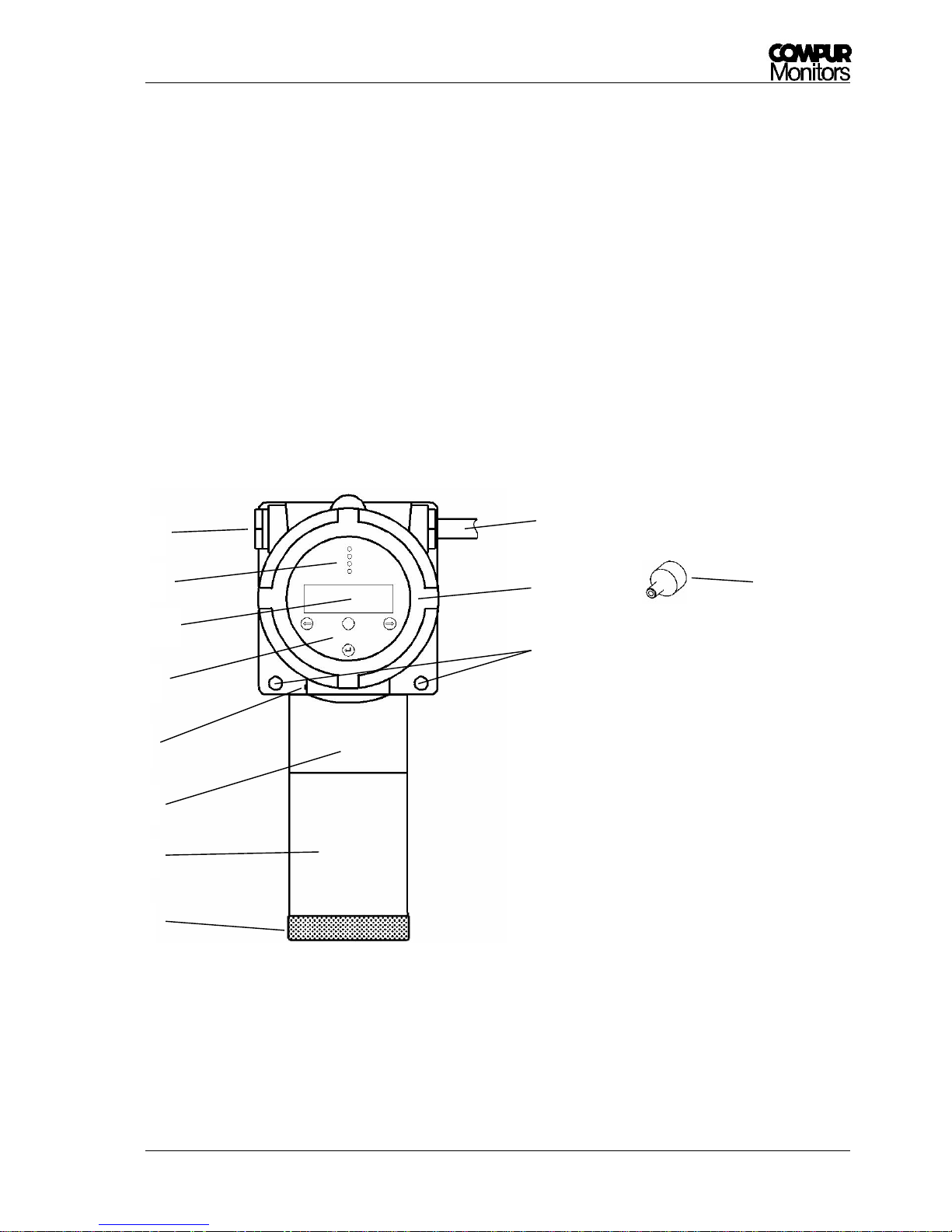
Picture 1: Sensor head Statox 560
4
11
10
9
8
3
1
5
7
6
1 Protective cap
2 Protection cylinder
3 Ex i Part
4 Grounding terminal
5 Control panel
6 LCD
7 LEDs
8 Blind plug
9 Cable tail or eXLink-plug
10 Ex d Housing
11 Drill holes for fastening
12 Magnetic pin
2
12
Page 6

Statox 560
Page 6 of 66 Issue 2/2017
3 Installation and Connection
Compur Monitors recommends to use fine mashed cable 0.75 mm² for instance type Oelflex 415 CP.
3.1 Maximum distance to the power supply
The maximum cable length depends on the gas to be measured (different power requirements of the
different gas generators) and the cable lead diameter. These requirements are based on 24 VDC power
supply and optimum contact resistance.
Diameter or
AWG-No.
Maximum distance to power supply [m]
COCl2
HCN, H2S, Cl2, CO
24-AWG
96
314
0,25 mm²
107
351
0,5 mm²
214
700
20-AWG
242
793
19-AWG
306
1000
0,75 mm²
321
1049
18-AWG
385
1261
1 mm²
427
1399
16-AWG
613
2006
1,5 mm²
627
2051
14-AWG
975
3190
2,5 mm²
1044
3418
Table 1: Maximum distance to power supply depending on the gas to be measured at 20 °C
Observe these maximum cable length for error-free operation!
!
Page 7

Statox 560
Issue 2/2017 Page 7 of 66
3.2 Mounting
Install the Statox 560 close to a potential leakage or between a potential leakage and a workplace. In
particular observe the following parameters:
Air stream (wind, ventilation, thermal effects)
Properties of the target gas (specific weight)
Protection from direct sunlight, splash water, dust, dirt etc.
Easy accessibility for maintenance and programming
Leaving the stainless steel protective cylinder and the protective cap on the instrument protects it from
pollution. Install the Statox 560 sensor head in upright position to the wall. Use two M8 screws and suitable
washers. Maximum 15 ° deviation from the upright position is acceptable. See below the dimensions
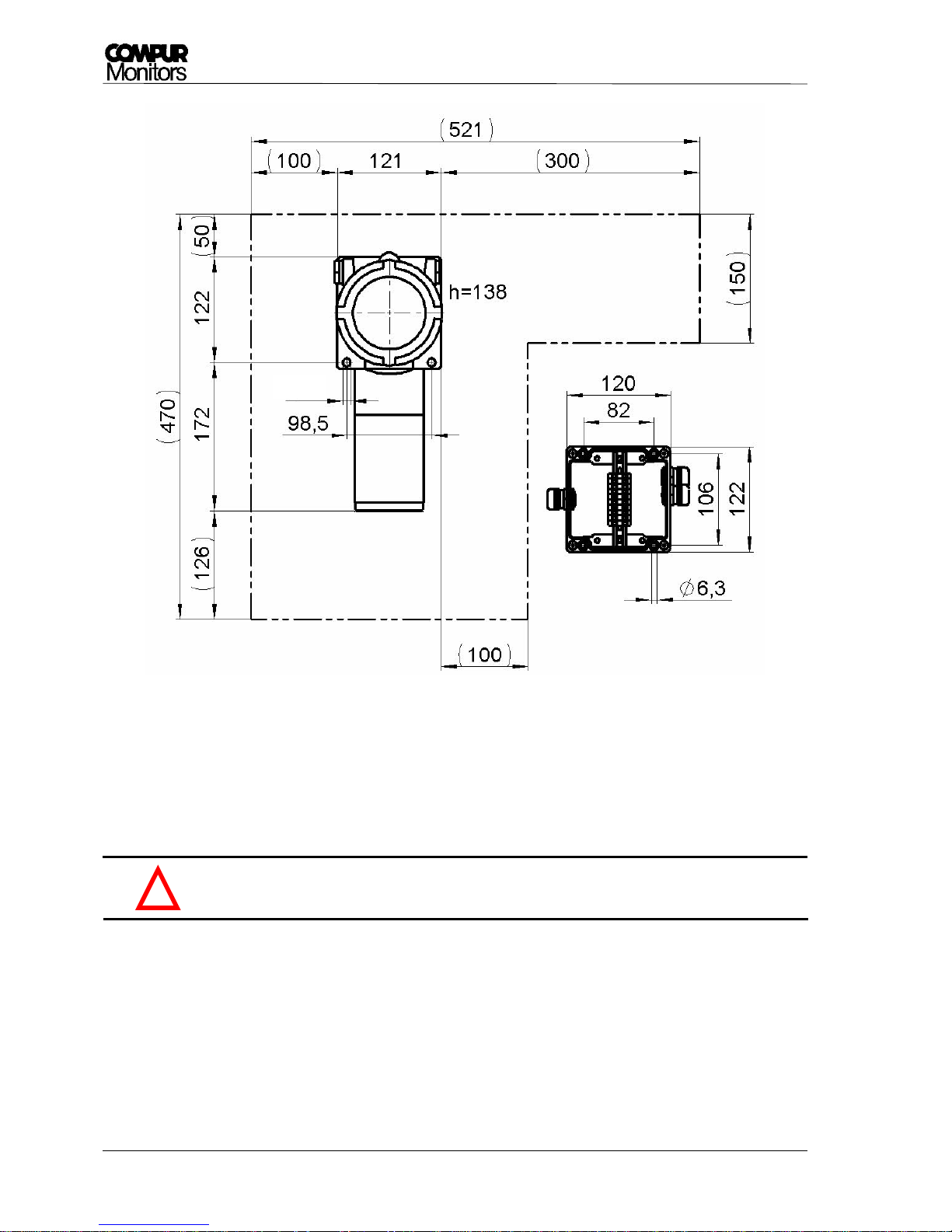
inclusive the space needed for easy access in brackets.
Compur Monitors offers an Ex e rated terminal box (art. # 562988) made of varnished cast aluminum.
It has
10 numbered contacts for wiring with Ø 2.5 mm²
an outside grounding terminal for wire Ø 4 mm²
EMC – proof cable glands for cables 6-13 mm
Outer dimensions 122 x 120 x 80
wall mounting with 4 screws M6
Page 8
Statox 560
Page 8 of 66 Issue 2/2017
Picture 2: Statox 560 dimensions in mm and the space needed for safe and easy operation.
Outer dimensions and drill plan of the junction box, article number 562988.
Do not open the blue flame - proof housing!
!
Ø 8,3
Page 9
Statox 560
Issue 2/2017 Page 9 of 66
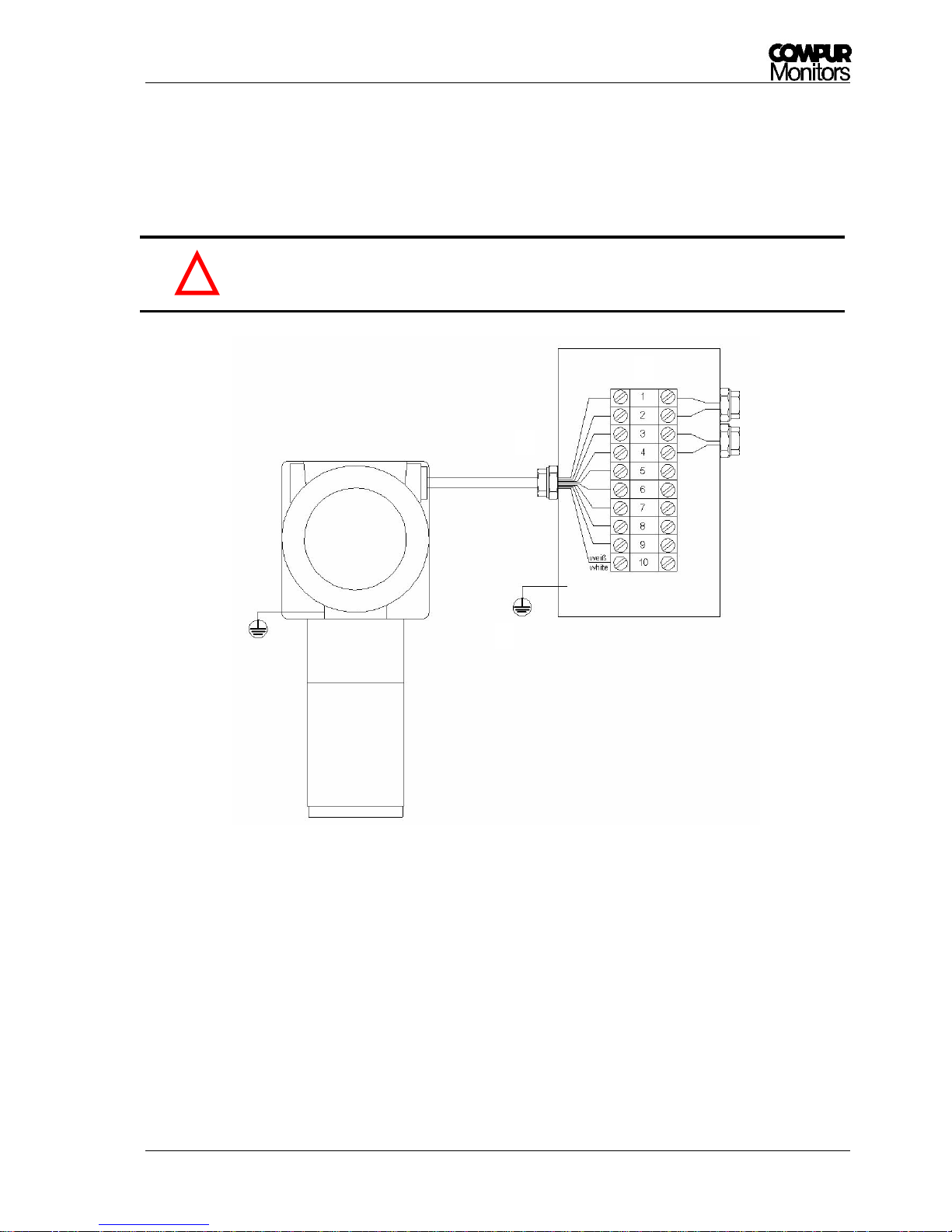
3.3 Statox 560 Cable Tail Version Connection
The cable tail must be connected to a suitable EMC junction box made of metal. When installed in a
hazardous area this must be certified Ex e and have 10 terminals and EMC resistant cable glands.
Statox 560 must be operated with 24 (16-30) VDC. Connecting it to higher voltages or
short circuiting the outputs may destroy it.
Picture 3: Statox 560 cable tail connection
Caution:
A. Connect the grounding contact to the ground of the building, using a cable diameter ≥ 6 mm². Check
your installation for proper grounding.
B. Remove the protective tube from the cable shield and insert the cable through the EMC – proof cable
gland. Remark: the cable shield is not connected to the sensor head housing!
C. Connect the cores in the sequence of their numbers to the terminals, the white core to terminal 10. All
cores must be connected, even if you do not use them all.
A B D C E
!
Page 10
Statox 560
Page 10 of 66 Issue 2/2017
D. Connect the grounding contact of the junction box to the ground of the building. Use a cable with
≥ 4 mm² diameter. Check for proper grounding.
E. The number of outgoing cable glands depends on your application. In order to avoid ground loops,
ground the cable shield only on one side.
Do not try to remove the cable tail from the sensor head. It will destroy it!
Never leave lose cable ends in the terminal box!
Proper grounding is essential for error– free operation!
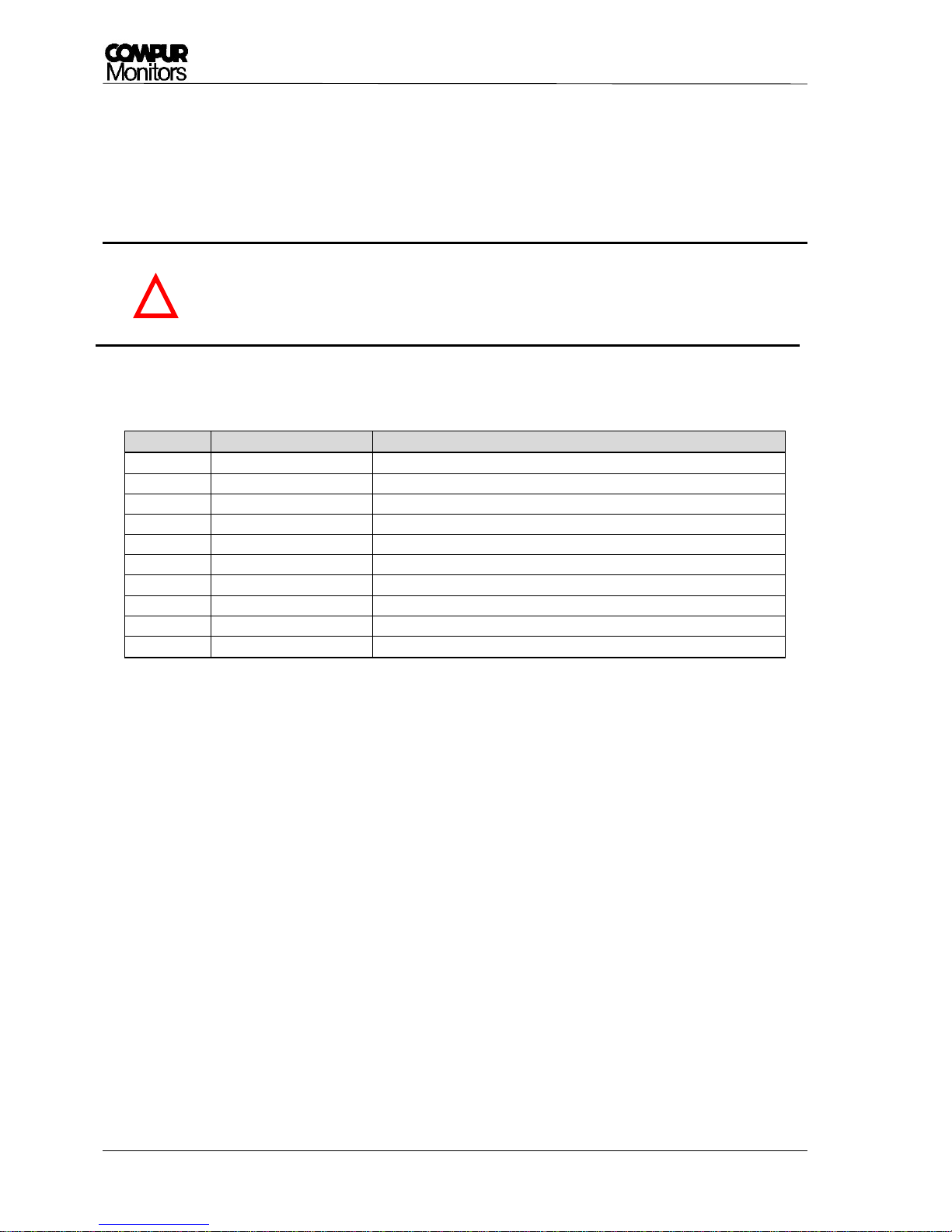
Table 2: Connecting the cable tail
3.4 Statox 560 connecting the eXLink-Plug
The Statox 560 eXLink-Version (7 pole) has a plug installed in the housing. The counterpart must be
installed by the user and can be connected to a junction box if necessary. The eXLink can be connected and
disconnected in hazardous areas without hot work permit.
Wire
Function
Description
1
+24 VDC
+ 24 V power supply (16-30 VDC)
2
0 VDC
Power supply ground
3
I_OUT+
0-22 mA Current output
4
I_OUT-
Current output ground
5
Remote Self-test
Remote self–test trigger
6
GND_R
Common ground for all relays
7
Maintenance Request
Relay output maintenance request (open drain)
8
System Failure
Relay output System failure (open drain)
9
A2
Relay output Alarm 2 (open drain)
wt
A1
Relay output Alarm 1 (open drain)
!
Page 11
Statox 560
Issue 2/2017 Page 11 of 66
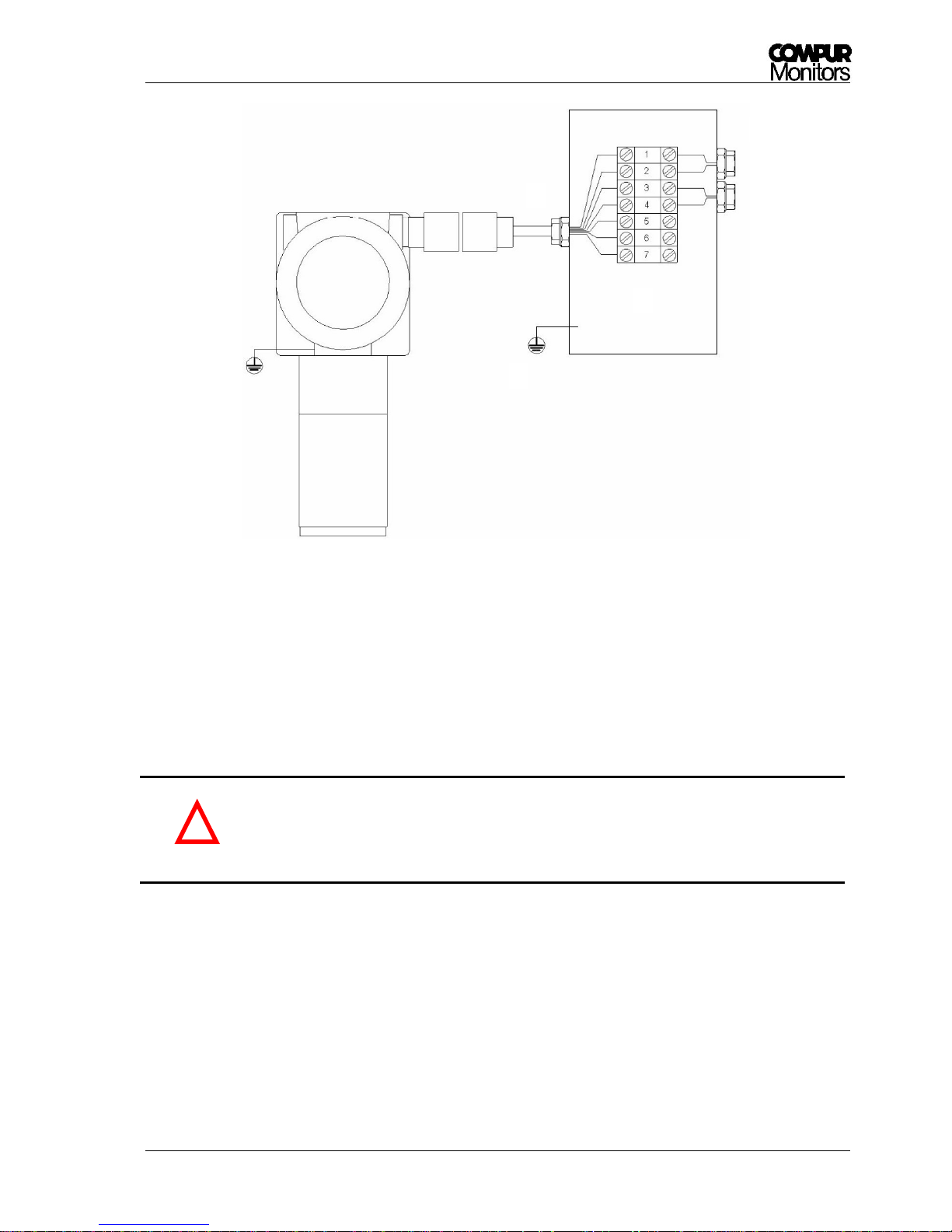
Picture 4: Connection of the eXLink
Please observe points A to E in chapter 3.3, they apply to this application method, too. It is not mandatory
to connect all contacts on the field side.
Do not connect the cable shield to the coupling!
Use only coupling Compur # 805594. Observe its installation instructions.
Take care for correct wiring! Wrong pin assignment may damage the Statox 560!
Do not try to dismount the eXLink from the sensor head. This is a potted joint.
Loosening it will destroy Ex d rating of the housing!
!
A D B C E
Page 12
Statox 560
Page 12 of 66 Issue 2/2017
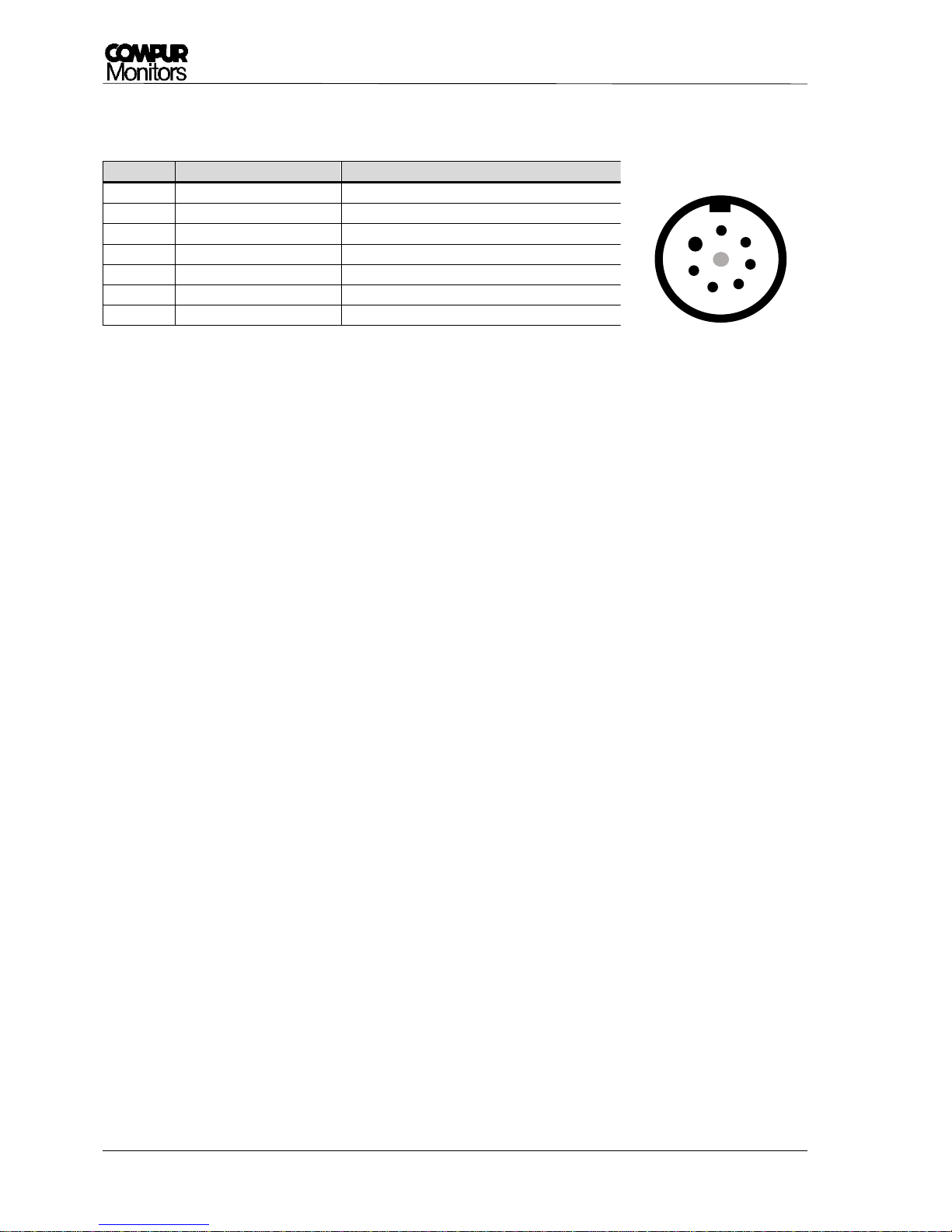
Pin assignment:
Table 3: Pin assignment Statox 560 eXLink-plug
Contact
Function
Description
1
+24 VDC
+ 24 V Power supply (16-30 VDC)
2
0 VDC
Power supply ground
3
I_OUT+
0-22 mA Current output
4
I_OUT-
Current output ground
5
Remote Self-test
Remote self-test trigger
6
GND_R
Common ground for relays
7
Maintenance Request
Relay maintenance request (open drain)
Picture 5: Pin assignment
Statox 560 eXLink-plug
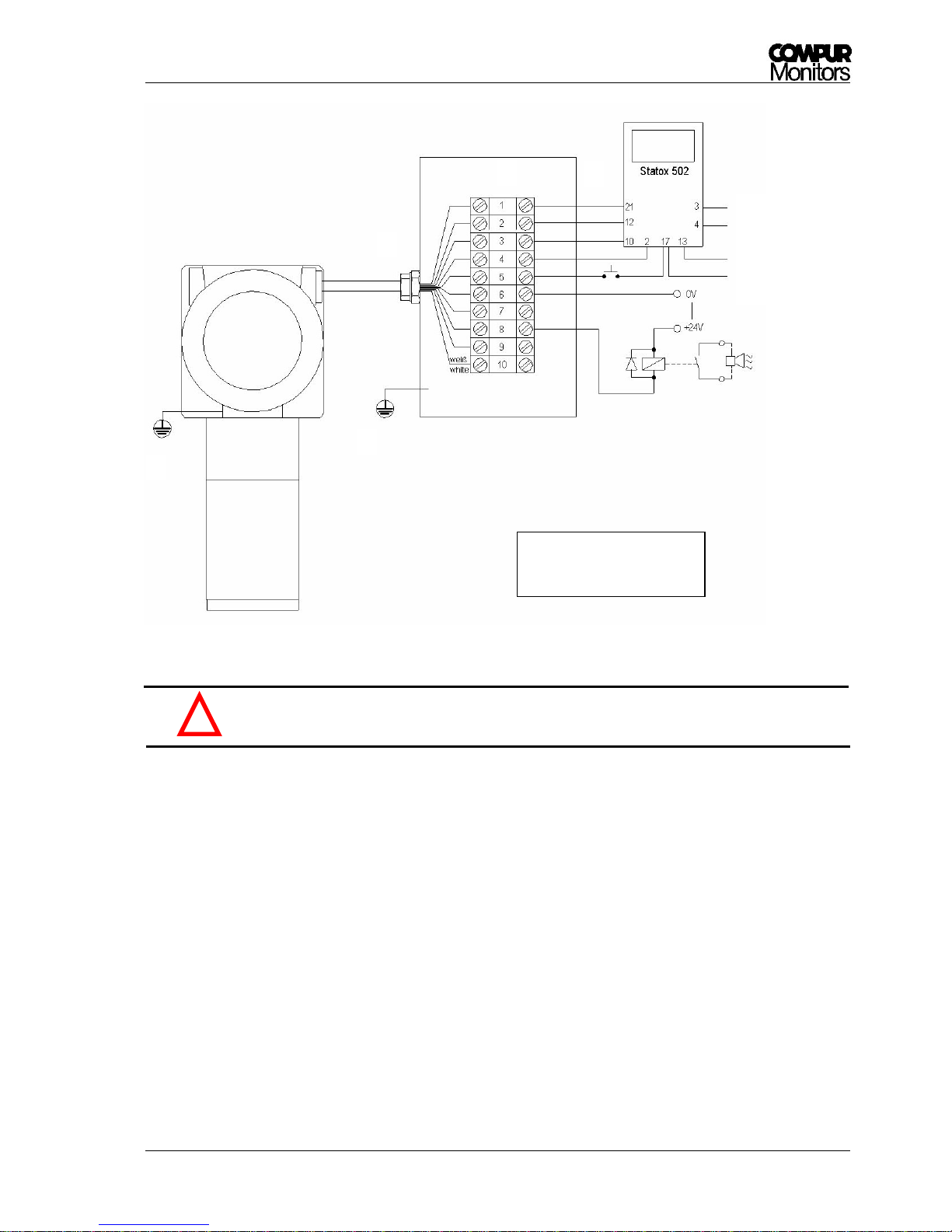
3.5 Connecting Statox 560 to a Statox 502 Control Module
Here is the procedure how to connect a Statox 560 sensor head to a Statox 502 Control Module (Article
number 557000):
First select the appropriate program of the Statox 502 Control Module. Observe the installation
instructions and the program listing of the 502 Control Module!
Make sure not to exceed the maximum cable length (see chapter 3.1).
Use two separate wires to connect the ground on pin 2 and the ground on pin 4 to the Statox 502
Control Module.
A Statox 502 Control Module can be programmed to operate as a common alarm module.
Connect the cable shield to one side only to avoid ground loops!
1 2 3
6
4
5
7
Page 13
Statox 560
Issue 2/2017 Page 13 of 66
Picture 6: Connect the Statox 560 to a Statox 502 Control Module
Wrong pin assignment may destroy the Statox 560 or the Statox 502!
3.6 Connecting the Remote Self-test
Pin No. 5 can be used as remote self-test trigger. It has the same function as the automatic or manually
initiated self-test started with the magnetic pin. Therefore the wire number 5 must be connected to ground
via a non - latching pushbutton (see Picture 6). By pressing the button, the signal will be connected to ground
and the self-test is starting.
Output 0-22mA
GND
Power +24V
Power 0V
Read and observe point
A to E in chapter 3.3!
D A B
C
E
!
Page 14
Statox 560
Page 14 of 66 Issue 2/2017
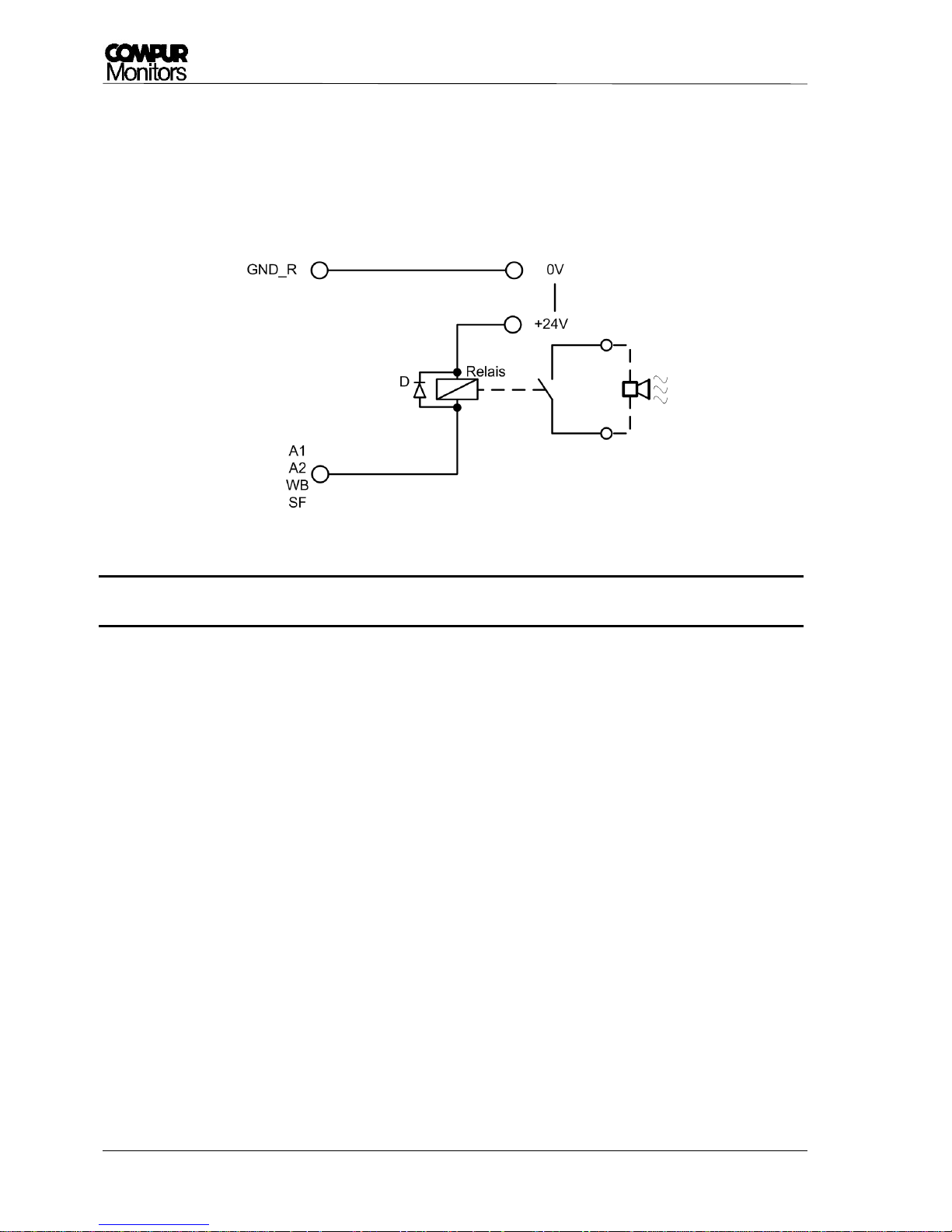
3.7 Connection to the Open-Drain switching outputs
The four switching outputs are Open-Drain-signals. The output can be connected to external relays
operated with max. 30 V DC with a max. current of 2.5 A. Connecting the alarm relays is optional.
Pin 6 - GND_R is the common ground for all alarm relays.
Picture 7: How to connect an alarm relay
It is mandatory to connect a freewheel diode to the relay (see Picture 7 - D).
3.8 Stand-alone operation
If you want to run the Statox 560 in stand-alone mode (only switching outputs are connected) you have to
short pin number 3 and 4 (see Picture 6) directly in the junction box. This way an ammeter is simulated and
an error code 2 massage is avoided.
!
Page 15
Statox 560
Issue 2/2017 Page 15 of 66
4 Product characteristics
4.1 Housing
The upper part of Statox 560 is an Ex d certified housing with window. This part is sealed and may not be
opened by the user. A repair is only possible at Compur Monitors.
The Ex d housing must not be opened by other than Compur Monitors personnel or trained
and certified personnel of Compur Monitors representatives!
No warranty on sensor heads which have been opened by unauthorized personnel!
The lower part of the Statox 560 (stainless steel) is intrinsically safe. It can be opened without hot-work
permit and without disconnecting the sensor head power supply. In order to change the sensor module,
unscrew the protection cylinder counter clockwise (see Chapter 5.3.4).
4.2
Keys
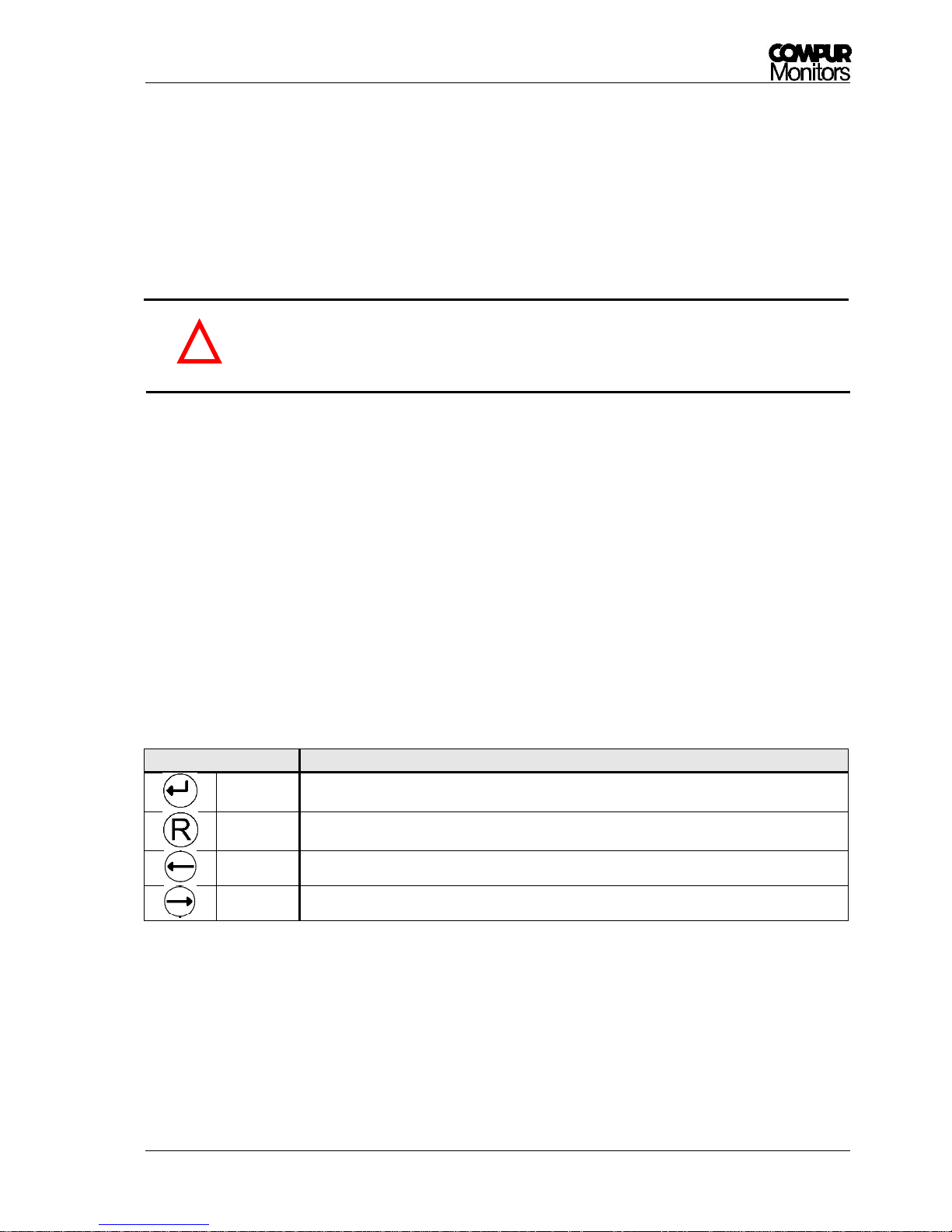
Statox 560 can be operated through the window with a magnetic pin. The magnetic pin activates hall
sensors inside the sensor head. Just hold the slim part of the pin next to the key. The individual keys have
the following functions:
Keys
Function
Enter
Confirm entries.
Reset
Delete false settings. Step back to the recent menu. Reset alarms.
Left
Navigates left in the menu, reduces a set value, and accesses the service menu.
Right
Navigates right in the menu, increases a set value, and accesses the info - menu.
!
Page 16
Statox 560
Page 16 of 66 Issue 2/2017
4.3 LEDs
4 LEDs signalize the actual system status of Statox 560:
Name
Color
Function
ON
Green
Power supply:
„ON“ : Power is on.
„Off“:Power is too low or off.
A1
Yellow
Alarm relay A1 is activated, alarm threshold A1 has been exceeded.
A2
Yellow
Alarm relay A2 is activated, alarm threshold A2 has been exceeded.
S
Red
System status:
„OFF“: System operating.
„ON“: System failure or system inactive.
„Flashing steadily“: Service mode.
„Periodic double - flash“: Maintenance request.
4.4 Display
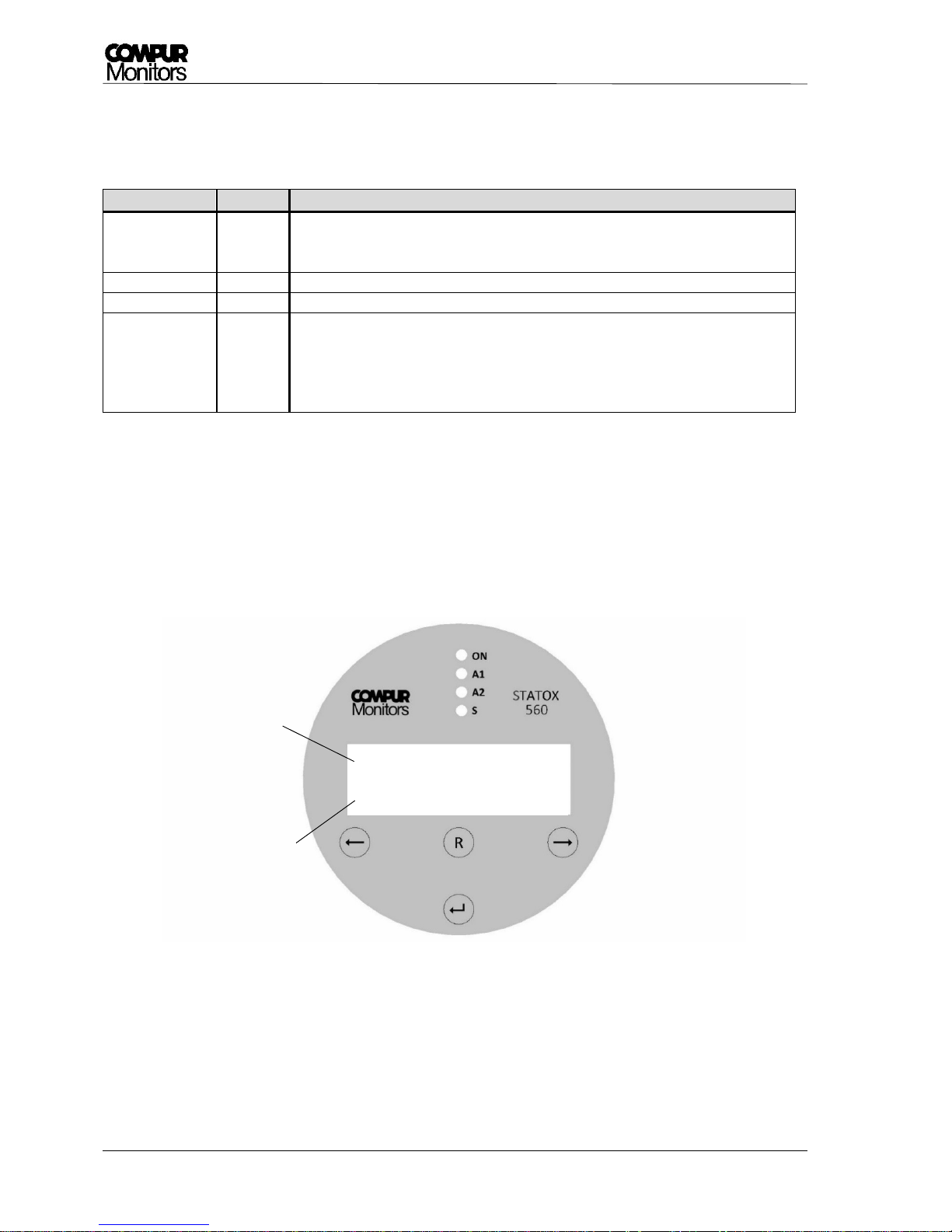
The display is lighted. It shows the target gas, the concentration and the unit. If the concentration is out of
range, the full-scale value is flashing.
Picture 8: Statox 560 Front view
Gas
Measured value in
ppm (parts per million)
COCl2
0.84 ppm
Page 17
Statox 560
Issue 2/2017 Page 17 of 66
4.5 Sensor module
The plug-and-play sensor module reduces the maintenance labor in the field to a minimum. After removing
the protection cylinder, you can unplug the sensor module. It can be removed without deactivating the
sensor head (see Chapter 5.3.4). After inserting a new sensor module, it communicates all parameters
inclusive calibration data to the sensor head.
The sensor module includes the specific sensor and a generator cell, producing the appropriate gas for the
self-test. To change the individual components you have to open the module.
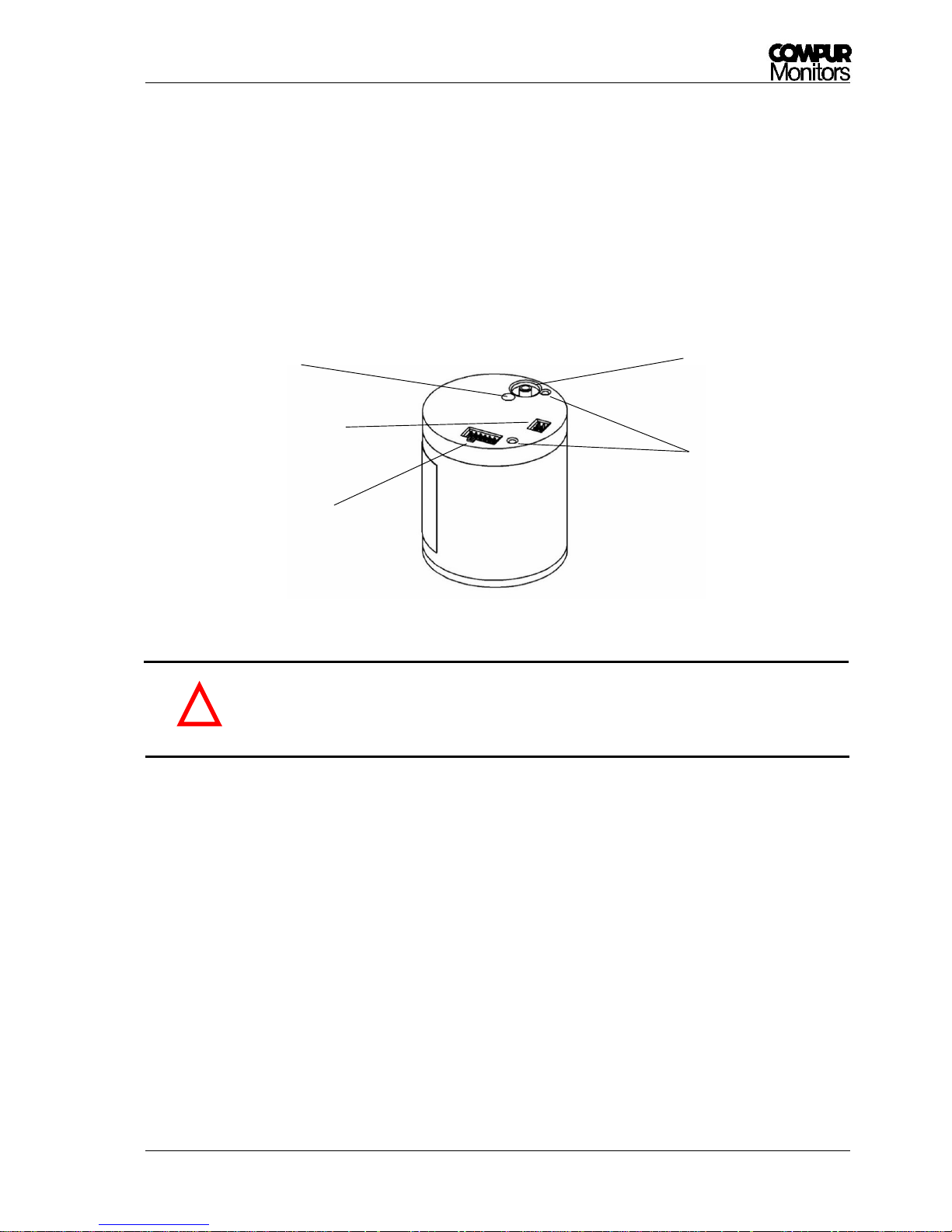
Picture 9: Sensor module
The sensor module parts are sensitive to electrostatic discharge. Observe the handling
precautions for ESD sensitive material. Electrostatic discharge may destroy the sensor
memory!
5 Getting started and menu navigation
Before you connect the Statox 560 to power, check for correct wiring to avoid any damage of the system!
After connecting to power, the current firmware number, date and time will be displayed for min. 5 sec each.
In case there is no sensor module connected, the display will alternatingly show „No Sensor“. You may now
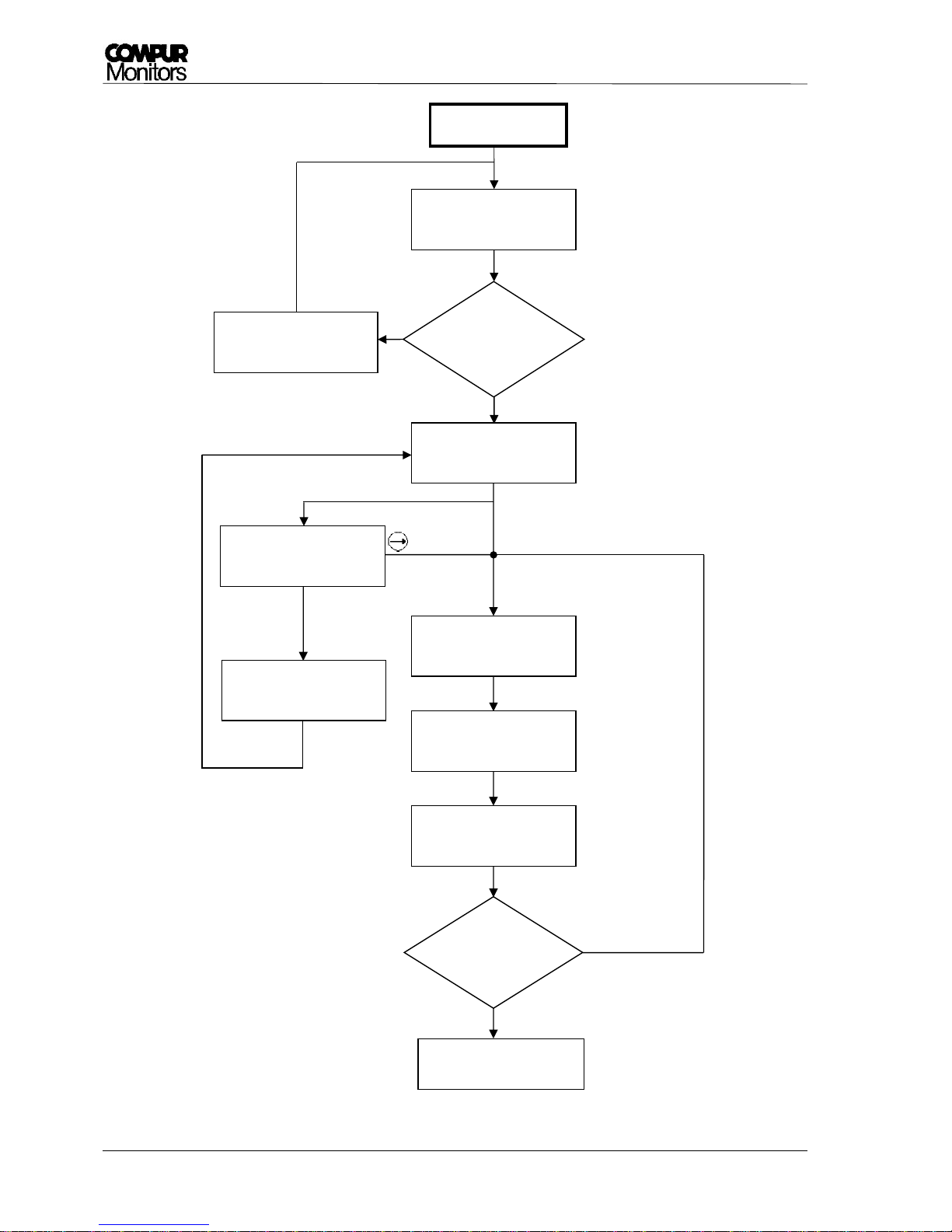
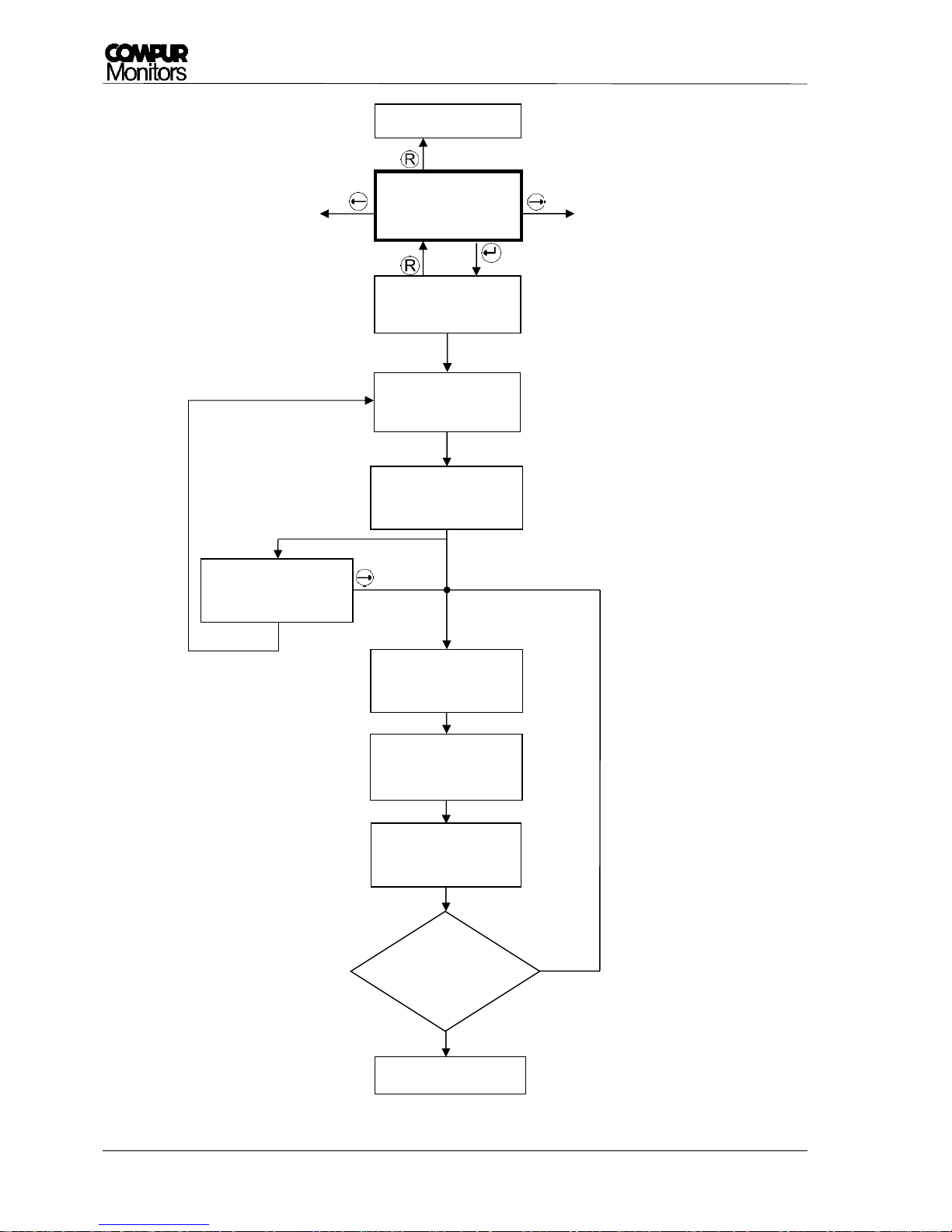
connect the sensor module. Schematics of the start-up see Picture 11.
generator connection
(only COCl2)
pump intake
Sensor plug (without
short circuit bridge)
!
Drill holes for
guiding pins
Top screw
Page 18
Statox 560
Page 18 of 66 Issue 2/2017
5.1 Start - Up, Connecting the Sensor Module
1. Remove the yellow protective cap and unscrew counterclockwise the protection stainless steel
cylinder. Keep the protective cap! It might be useful to protect the sensor head from pollution
when leaving it without sensor module.
2. Take the Sensor Module out of the package. If there is a short circuit bridge (applicable for 2
electrode sensors) remove it. Check for eventual damage!
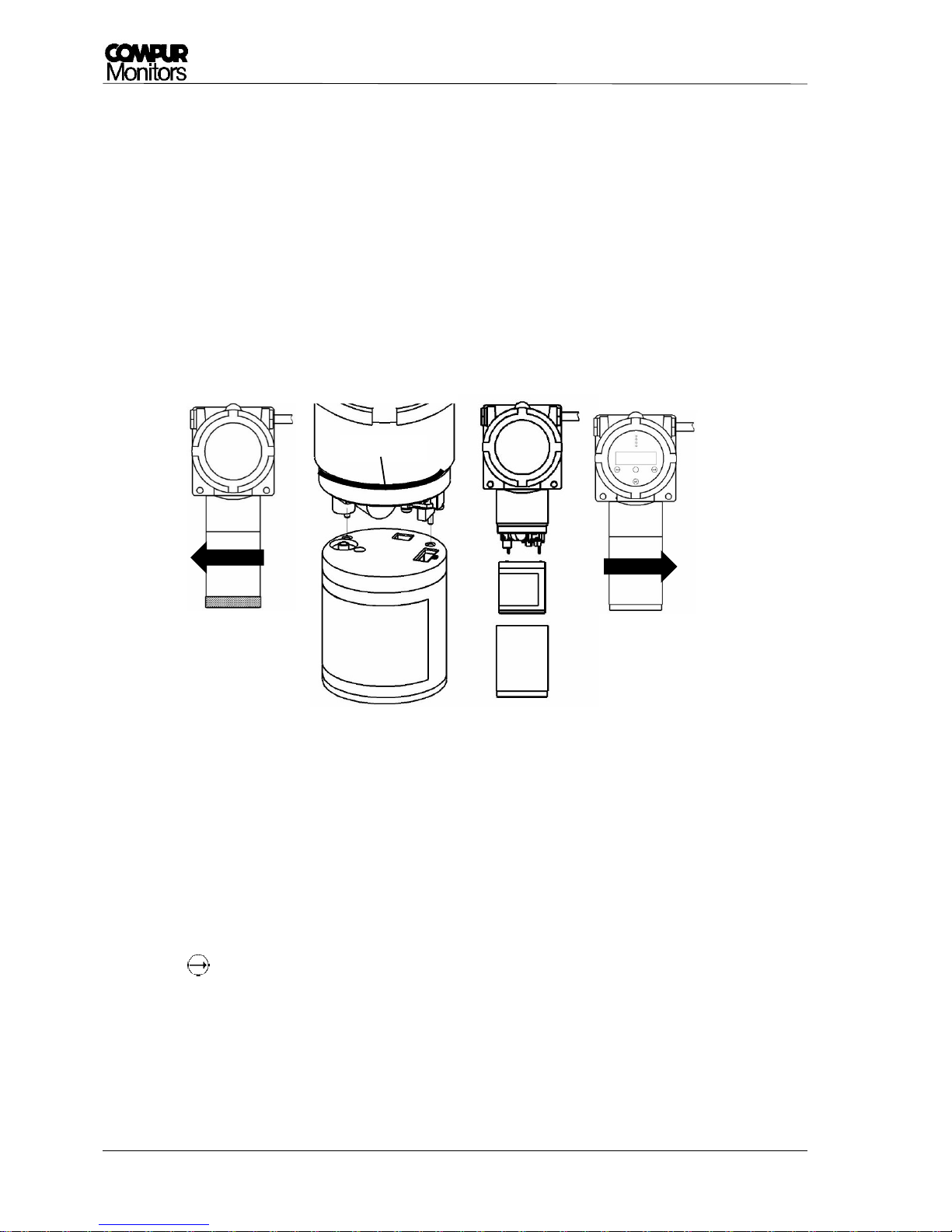
3. Insert the guiding pins into the relevant drill holes to connect the sensor module by pushing it
carefully upward (see Picture 10).
Picture 10: Connecting the sensor module
4. Now fingertight fasten the protective cylinder. The sealing ring must be clean!
5. The sensor head will now detect the sensor module. The display shows „Loading Parameter“, while
all operation – and calibration parameters are loaded. In case these cannot be read, see chapter
6.2.
6. The Statox 560 will give you the warning „Change of sensor type!“, in case it has been operated
with a different sensor module before. If you really want to change the gas or range, confirm
with . This is intended to prevent the user from connecting a wrong sensor module. If you don’t
want to work with the plugged module you can easily remove the module by pulling it down. Now
you can use the desired sensor module.
7. During the warm-up the display shows alternatingly the menus gas/measuring range/parameter
version and serial number/best before date (week/year). This procedure can take some minutes,
especially with 3-electrode-sensors.
Sealing ring
Page 19
Statox 560
Issue 2/2017 Page 19 of 66
8. After the warm-up, the Statox 560 goes into the measuring mode. Allow 60 minutes for
stabilization and acclimatization, then proceed a zero adjustment (see chapter 5.3.3) to improve
the accuracy.
The following settings must be done after the start-up:
Set the real time clock (see chapter 5.3.11)
Set the self-test parameters (see chapter 0)
Set the alarm relays (see Chapter 5.3.10)
Change the sensor module only in the menu Change Sensor, see Chapter 5.3.4! In order to
avoid a data loss in the sensor memory.
!
!
Page 20
Statox 560
Page 20 of 66 Issue 2/2017
Picture 11: Schematics warm-up
yes
yes
Measuring mode
Firmware 01.02
2016-06-16 10:33
Sensor
detected?
NO
SENSOR
Loading
Parameter
COCL2 50,0 ppm
Version 02.3.01
Sensor No. 19718
b. b.: w 3/2016
Warm-up
Please wait
Warm up
finished?
Power On
no
Change of sensor
type! → OK
no
remove sensor
module
Change Sensor
Replace (flashing)
connect sensor
module
Page 21

Statox 560
Issue 2/2017 Page 21 of 66
5.2 Menus
5.2.1 General
The Statox 560 is operated via 4 buttons at the sight glass. These are activated by a magnetic pin, by
holding it shortly onto the glass over the relevant button. The Statox 560 menu hast two levels:
Info Menu: This menu is accessible without password with the button. Here you can access system
information, initiate a prooftest or replace the sensor module. While navigating in this menu, the
sensor head remains in the measuring mode. All measuring and alarm functions remain active. In this
menu no parameters can be changed or set!
Service Menu: The service menu is accessible with the button. After entering the password (see
chapter 5.2.2) the senor head is in the service mode. The LED „S“ is flashing. Depending on your setting,
the output signal is set to 2 or 4 mA. The alarm relays are inhibited. Now you can set parameters or
settings.
General Timeout: If no button is pushed during 5 min. the senor head returns to
the measuring mode. Exceptions see sub – menu descriptions.
When the symbol ✱ appears on right upper side of the display, internal diagnostics
are made. During this time, the buttons are not active and there is no display
update!
!
Page 22
Statox 560
Page 22 of 66 Issue 2/2017
5.2.2 Accessing the Service Menu
Calibration and changes of the parameters can only be done in the service menu.
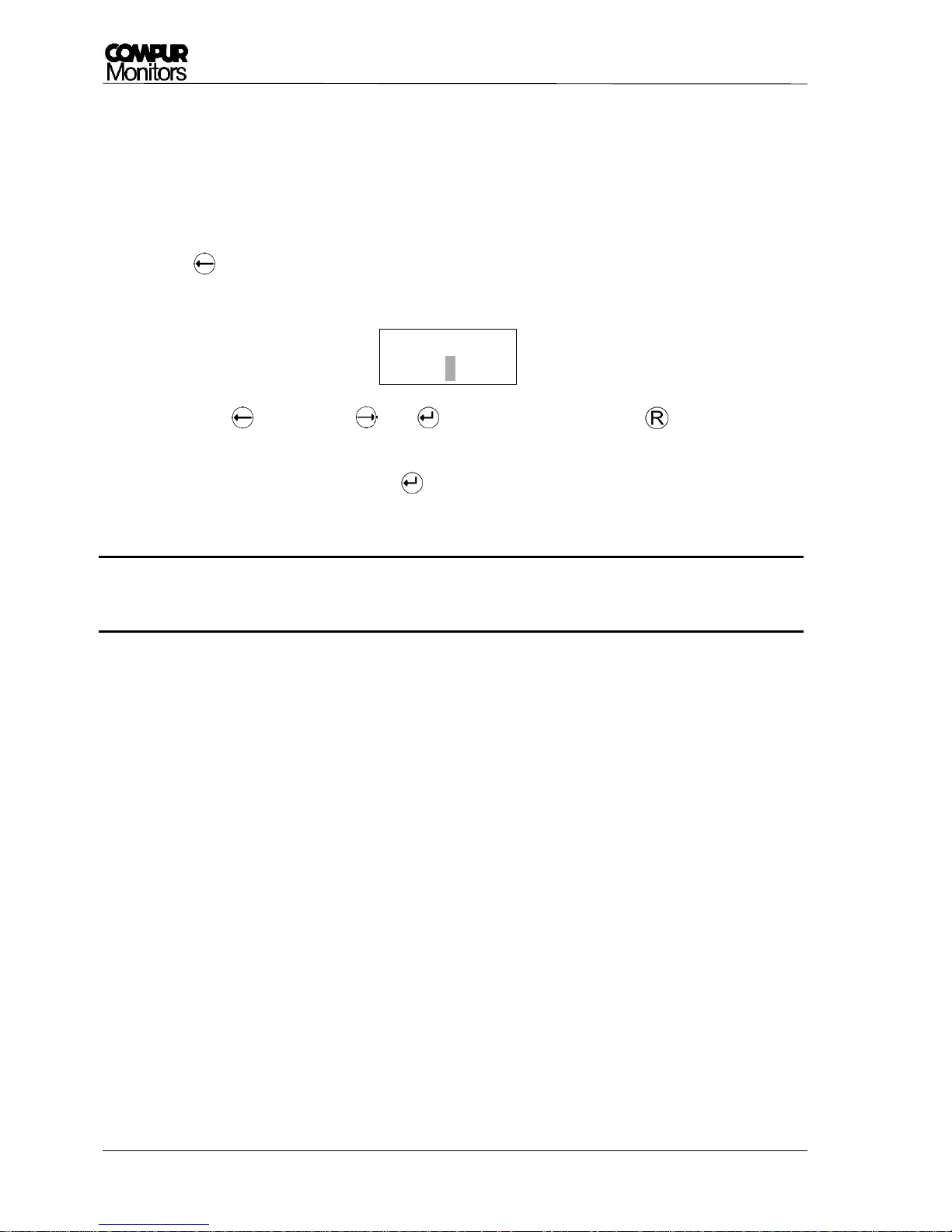
The password is: 1994 (not changeable)
Procedure:
1. Push now the password is requested.
2. The active digit is flashing:
Lower with , increase with . Use to move on the next digit, use to get back to the
recent digit.
3. Enter the password and confirm with .
4. The correct password brings you into the service menu. Any false entry stays for correction.
During the service menu no measured values are transmitted, no alarms are generated,
existing alarms are inhibited.
5.3 Menu overview
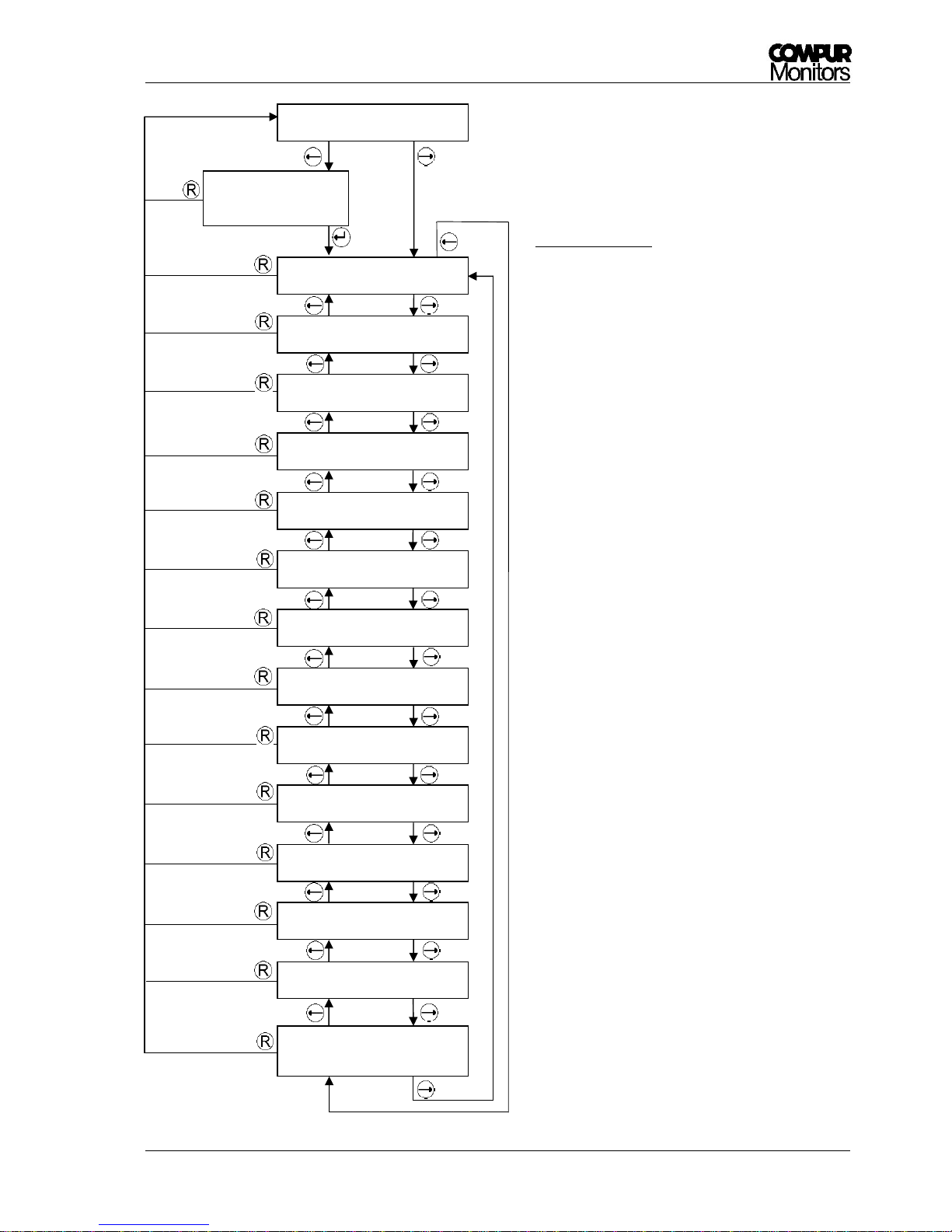
These schematics give an overview of the main menu of the Statox 560 and a short description. Details of
the sub – menus start from chapter 5.3.1.
!
Service
CODE=0000
Page 23
Statox 560
Issue 2/2017 Page 23 of 66
Picture 12: Main menu
Measuring mode
Service
Code = 1994
Prooftest
Selftest
Calibration
Change Sensor
Errors Info
6 - 16
Alarm History
Sensor Info
Temperature
20,3° C
Firmware
01.01
Alarm Relays
Real Time Clock
2016-06-16 08:32
Service Output
2 mA
Function Test
Maintenance
Request
Prooftest start
Self - test start, set self - test schedule
Sensor calibration
Sensor module replacement
Error Code info
Alarm history
Sub menu sensor info
Display the current temperature
Display the current Firmware
Sub menu alarm settings
Time and date settings
Setting of the analog output during service
Test of the alarms, display and mA-output
Maintenance request settings
Short description:
Page 24
Statox 560
Page 24 of 66 Issue 2/2017
5.3.1 Prooftest
A prooftest checks the sensor head response to gas without triggering an alarm. It can be activated
without entering the password - protected service menu. During the prooftest the sensor head is in the
service mode, i. e. the output signal is on the preset value and the alarms are inhibited.
The display shows the actual concentration.
To perform a prooftest you need calibration adapter art. # 562984, an inert gas tube (e.g. art.# 556710)
and test gas with a concentration within the measuring range, ideally close to the alarm threshold.
1. Check that the O-Ring sits correctly in the calibration adapter. Push the calibration adapter onto the
protection cylinder by slightly turning it. The side marked with “Front” points toward the user.
2. Connect the gas tube at the bottom side to it (compare Picture in Chapter 5.3.3).
3. Enter the menu „Prooftest“ and start the prooftest by pushing . Now open gas valve. Flow: ca.
30 l/h (500 ml/min). The display shows the actual measured value. Depending the age of the sensor
and the gas to be measured, it may take a few minutes until the measured value has stabilized.
4. Switch the gas off and remove the calibration adapter.
5. Wait for the measured value to return to zero before returning to main menu by pushing . Do
not rush – you might otherwise create a false alarm!
Picture 13: Schematics Prooftest
The timeout during the prooftest is increased to 30min!
After finishing the prooftest the senor head returns to the recent status. If you start the
prooftest out of the service – menu, the sensor head will remain in the service mode.
Prooftest
Measuring mode
Prooftest
10.9 ppm
!
Page 25

Statox 560
Issue 2/2017 Page 25 of 66
5.3.2 Self-test
The Statox 560 performs an automatic self – test with gas every 24 h. The sensor module includes a gas
generator cell, generating a small concentration of the gas to be measured. This give you a reliable
information, if the sensor head is working properly. Please note the following:
1. The self-test schedule is adjustable (see chapter 5.3.2.3). It always starts at the same time except:
a) When temperature is out of specifications, the test is cancelled.
b) If there is gas in the atmosphere, the test is skipped to maintain the measuring function. You will
find the respective limit in chapter 11.
c) If the service or info menu is active, the test will be postponed until service is completed.
d) In case of system failure, the test is canceled.
2. In case the self-test has been skipped three time in a row for reason a) or b), you will get a maintenance
request alarm.
3. During the self-test the Statox 560 is in the service mode.
4. After the self-test the test result is displayed and will be saved. The recent 5 tests can be shown on the
display (see Chapter 0).
5. A non – passed self-test generates a maintenance request alarm.
6. A passed self – test will automatically reset a self-test induced maintenance alarm (self-healing).
7. The self-test can be triggered manually (see chapter 0), either directly at the sensor head or by a
remote self-test button (see chapter 3.6). ). A manually triggered self-test is always additional to the
scheduled test, but its functionality is the same.
8. The remote self-test cannot be triggered if the info meu or the service menu is active or the symbol ✱
is on the display (internal diagnosis is running).
Test procedure:
A small amount of test gas is generated and pumped in front of the sensor. The signal generated by this gas
must reach a minimum level within a maximum time. After purging the sensor with ambient air, the signal
must return to zero within a certain time limit. The sensor head returns to the measuring mode.
More details are included in the sesnsor-specific data in chapter 11.
Page 26
Statox 560
Page 26 of 66 Issue 2/2017
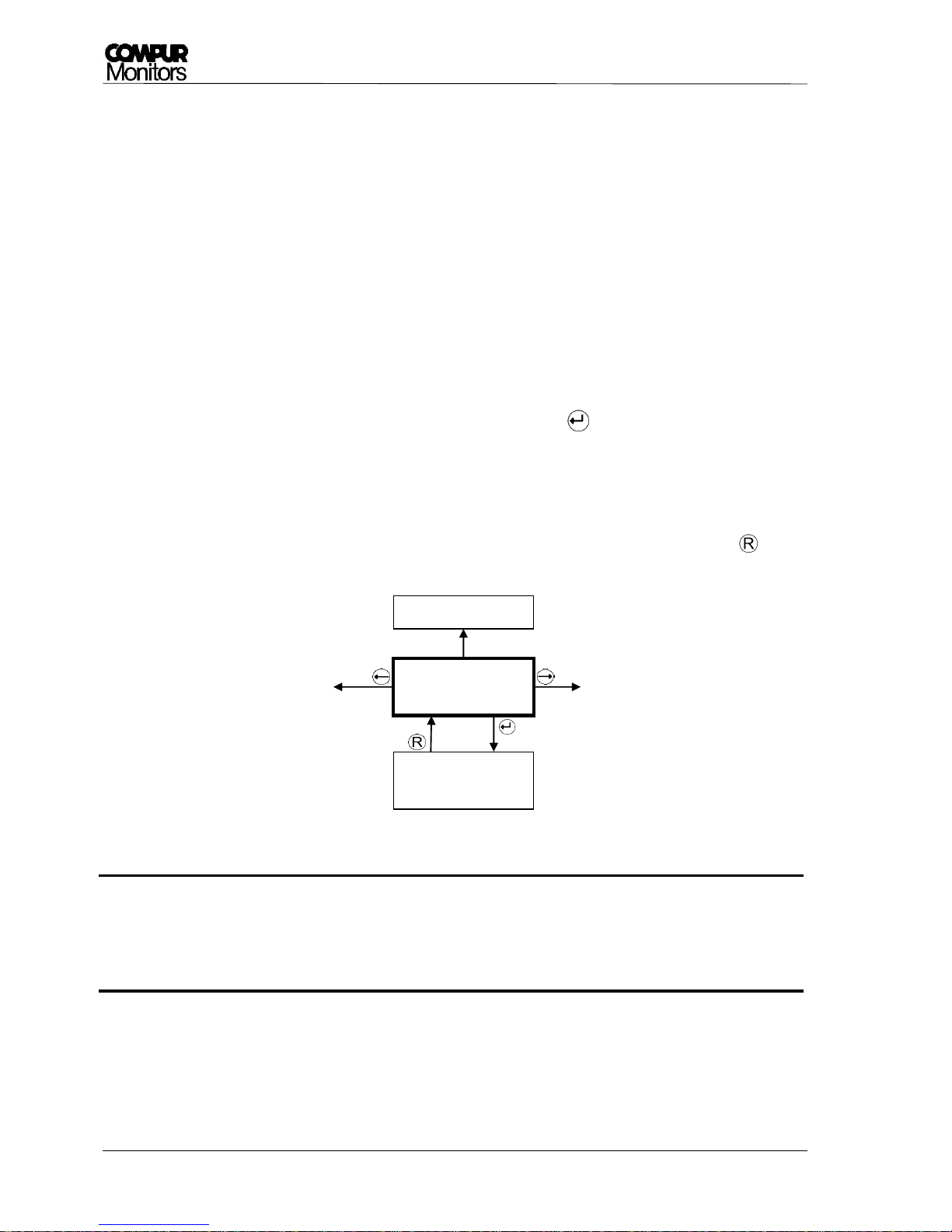
The Self – Test Menu:
The self – test menu includes 4 sub menus.
Picture 14: Submenu of the self-test menu
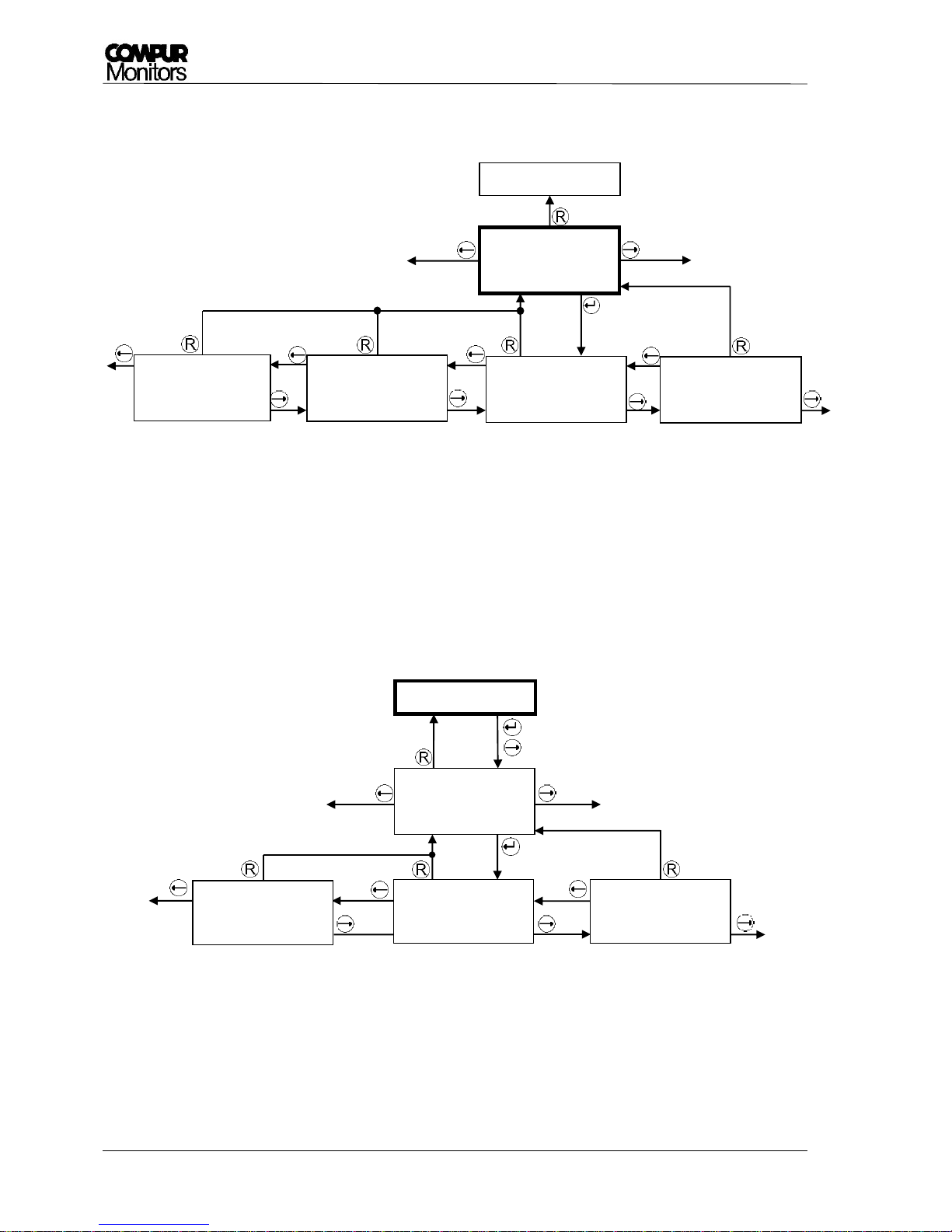
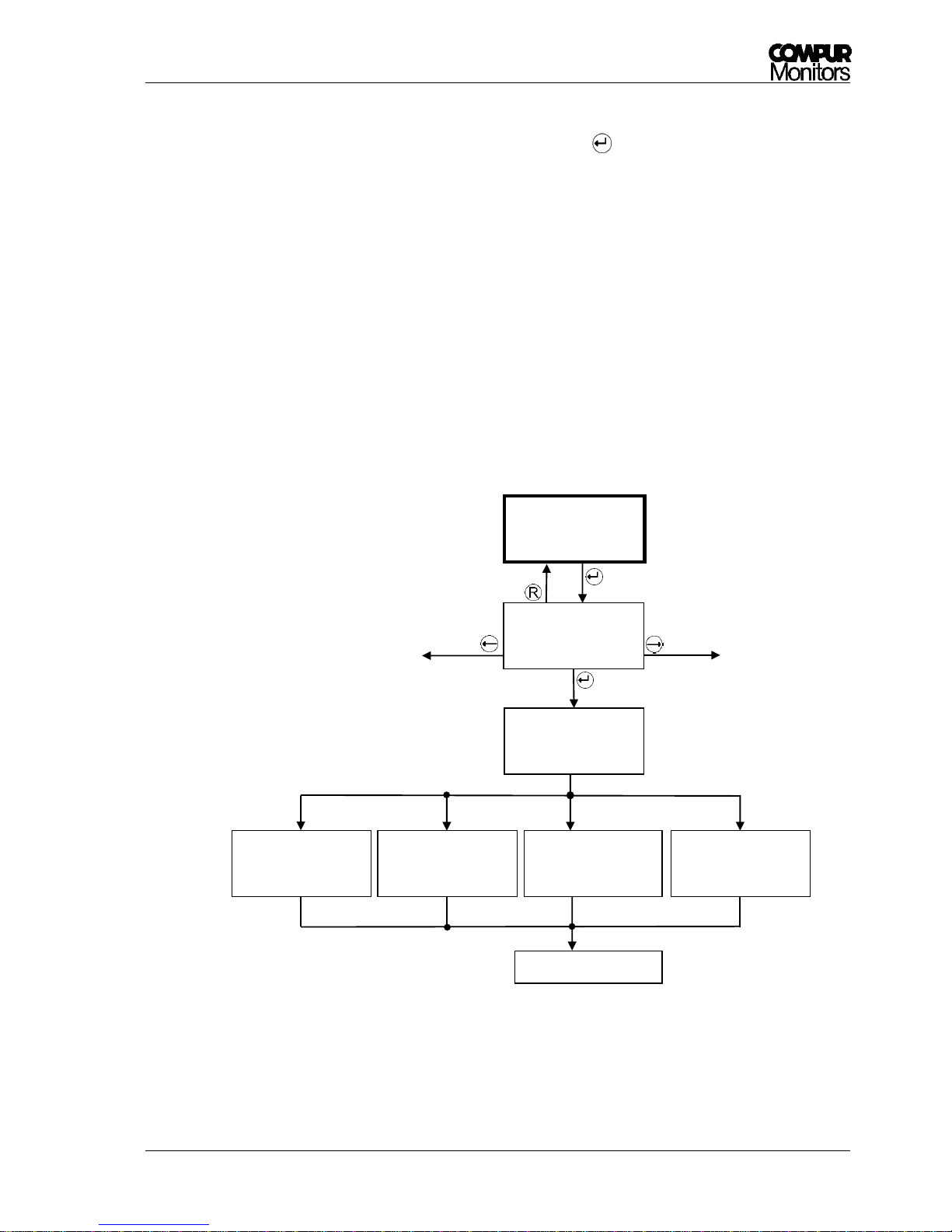
5.3.2.1 Submneu Self-Test - Info
In this menu you can read the time and result of the most recent 5 tests. The listing is arranged
chronologically with ST1 as the most recent self-test. If there were no tests before, the display shows „no
data“.
Picture 15: Submenu "Selftest - Info"
Measuring mode
Selftest
Selftest
Manual Start
Selftest ON
Start time 08:00
Selftest
Info
Selftest
Monitoring OFF
Selftest
Selftest
Info
ST 1 passed
2016-04-30 08:00
ST 2 Error 19
2016-04-29 08:00
ST 5 no data
Page 27
Statox 560
Issue 2/2017 Page 27 of 66
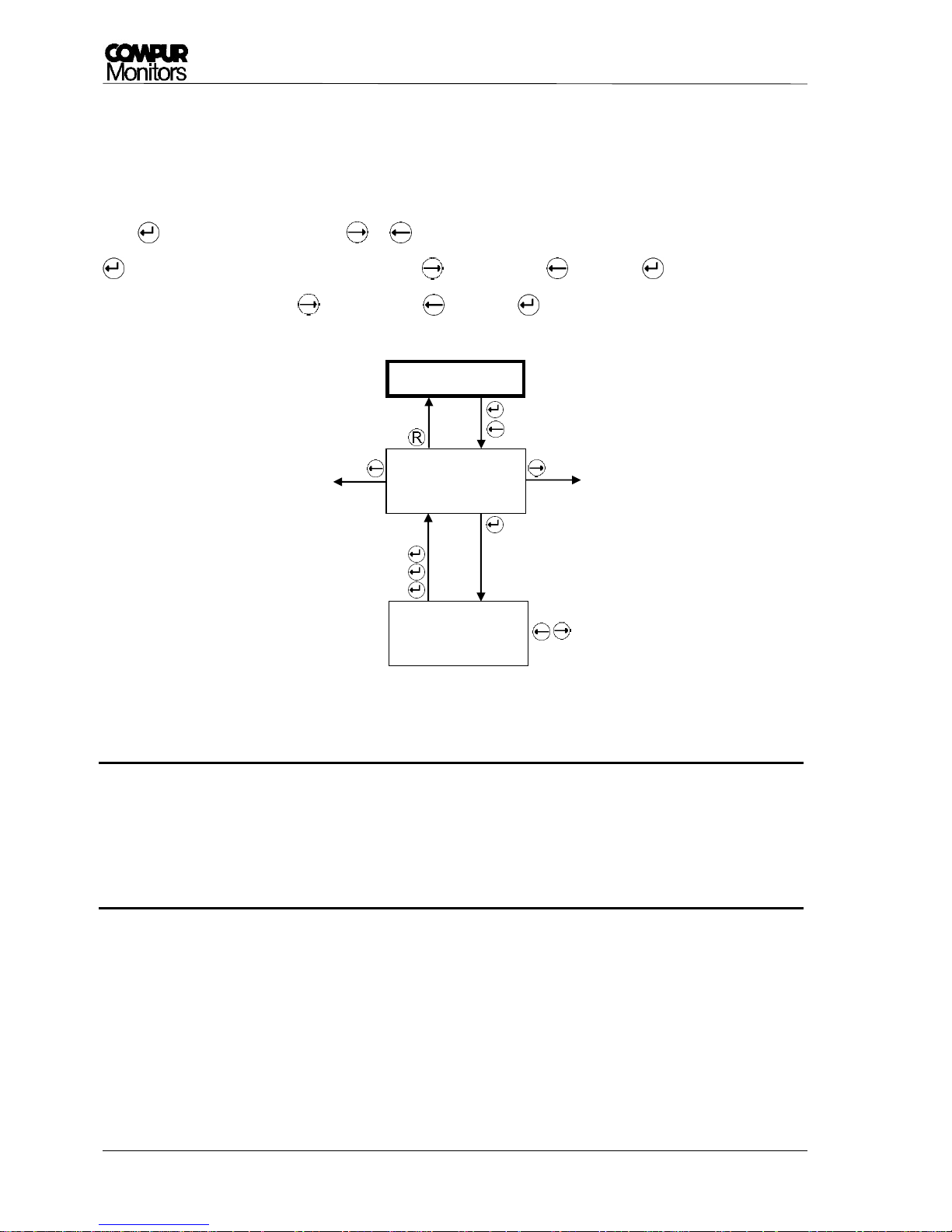
5.3.2.2 Submenu Self-test - Manual Start
In this menu you can manually trigger a self –test. Just confirm with to start. Temperature and sensor
signal will be checked.
If temperature is out of specifications, the test will not start. The display shows „Temp. out of
selftest range“ for 5 seconds and then the sensor head returns into the measuring mode.
If the sensor signal exceeds a fixed limit, the test will not start. The display shows „Zero out of
selftest range“ for 5 seconds and the sensor head returns into the measuring mode. Gas detection
has always priority before testing. If you are sure, there is no gas present, adjust zero (see chapter
5.3.3).
During the self-test the sensor head is in the service mode. When it has passed the test the display
shows „Selftest passed“ for 5 seconds and the senor head goes back into the measuring mode. If it
does not pass the relevant error code (see chapter 6.2) is displayed for 5 seconds before the sensor
head goes back into the measuring mode.
Picture 16: Submenu "Selftest - Manual Start"
Zero out of
selftest range
Selftest
Selftest
Manual Start
Selftest
running
Selftest
passed
Measuring mode
Selftest
Error 18-22
Temp. out of
selftest range
Page 28
Statox 560
Page 28 of 66 Issue 2/2017
5.3.2.3 Submenu Self-test – Start time
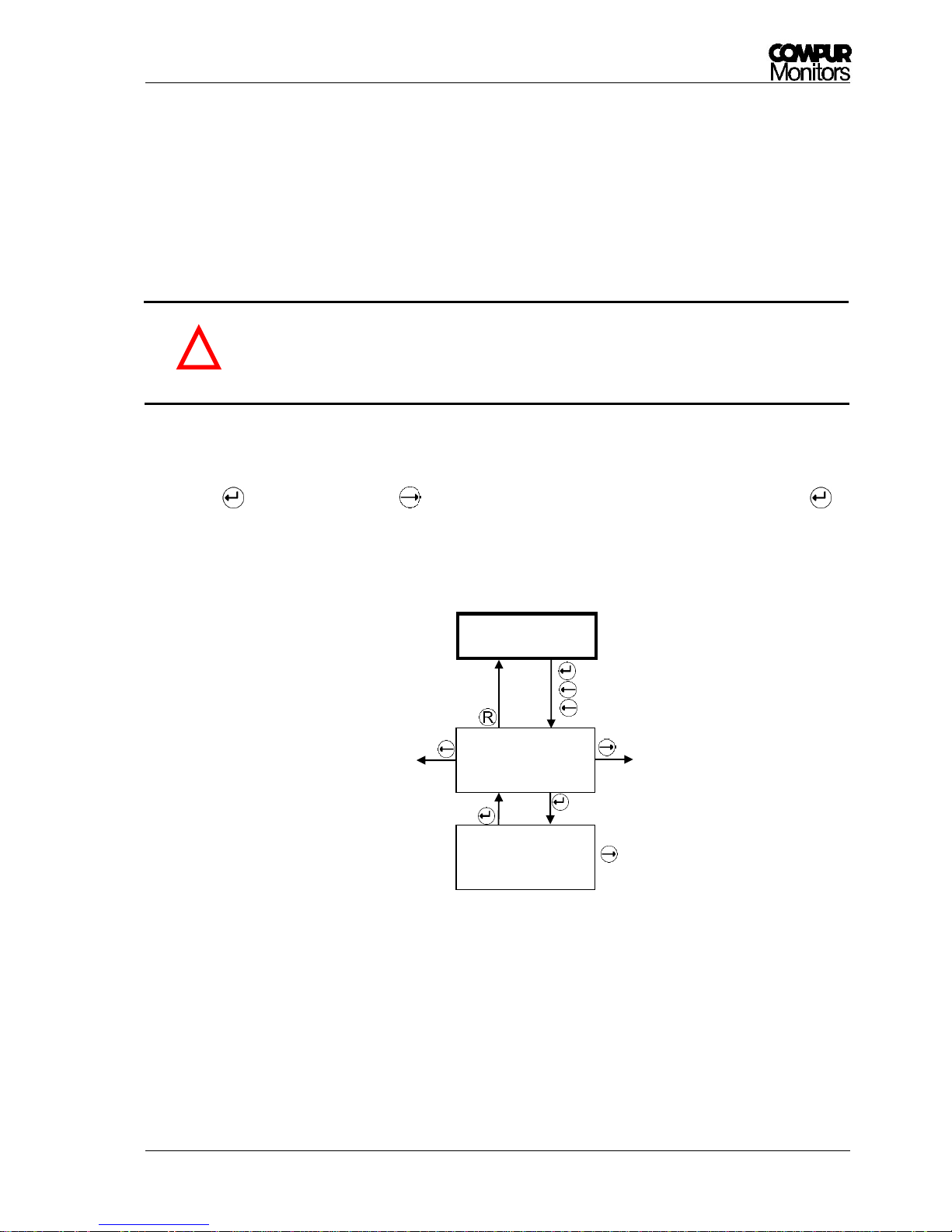
Here is how to schedule the self-test. Access only in the service menu. Once entering this menu, you must
finish it completely. The factory setting for the self-test start time is 8:00 a.m.
Procedure:
Push , „ON“ is now flashing, with or you can change the value to “OFF” and saves the value with
. Now the hour digit is flashing. Increase with , decrease with , save with . Now the minute
digit is flashing. Increase with , decrease with , save with .
Picture 17: Submenu Self-test - Start Time
If operated as a SIS according to IEC 61508 (functional safety), the self – test must be
activated.
Schedule the self – test to time, when a short – term non active detector is the most
acceptable. Do not schedule all sensor heads to the same time.
Selftest
Selftest ON
Start time 08:00
Selftest ON
Start time 08:00
!
Page 29
Statox 560
Issue 2/2017 Page 29 of 66
5.3.2.4 Submenu Self-test - Monitoring
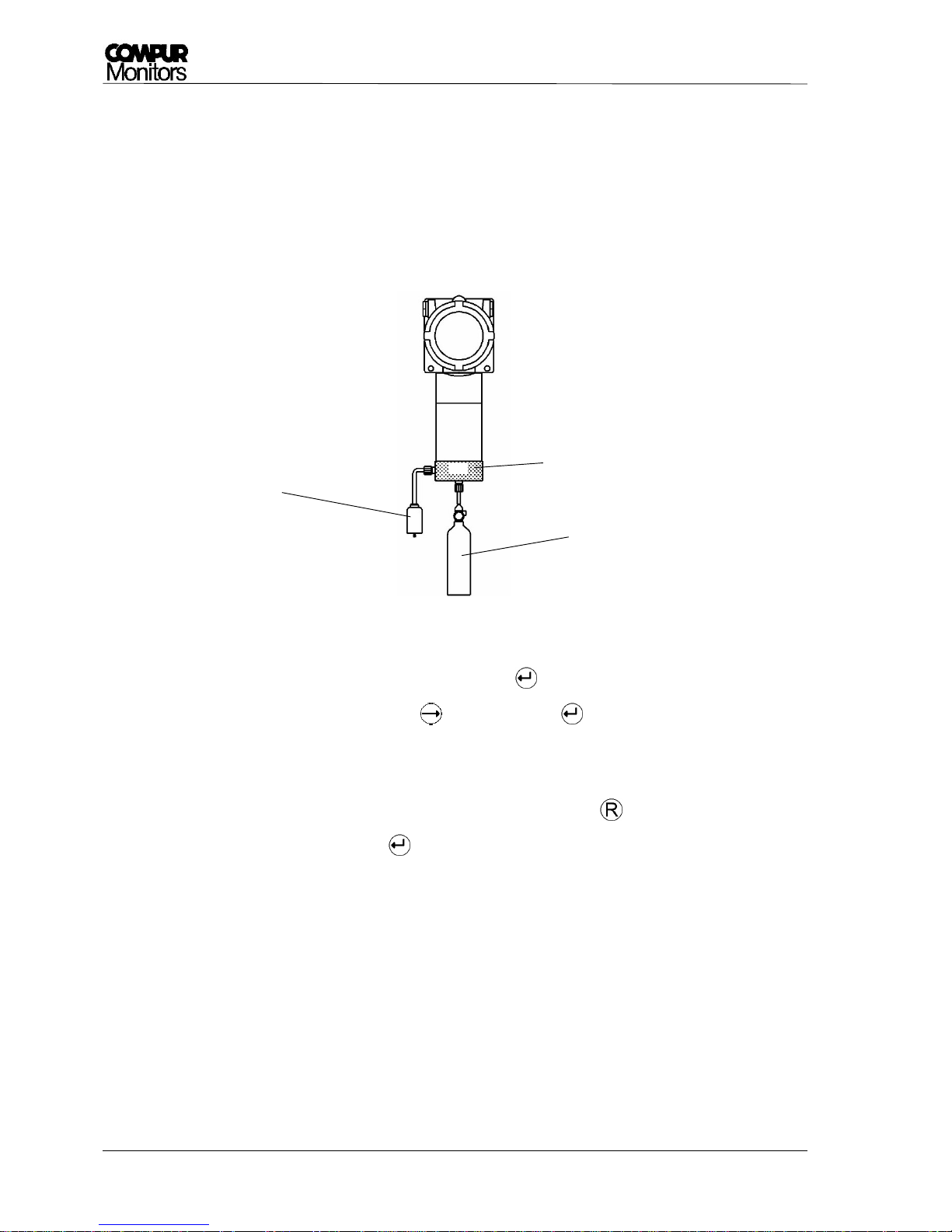
The menu „Selftest - Monitoring“ activates the output signal during the self-test. This allows to record the
test process and response curve.
The ex – works setting is OFF. This can only be changed in the service menu!
When „Monitoring ON“ is active, the SF-open collector output is passive. This way the
system status is clearly defined: SF plus signal = self-test in progress. See chapter 6.1 -
system states.
Procedure:
By pushing „OFF“ is flashing, with it can be change in „ON“ and the value can be saved with .
The new setting is active after returning to measuring mode.
Picture 18: Submenu "Selftest - Monitoring off"
Selftest
Selftest
Monitoring OFF
Selftest
Monitoring OFF
!
Page 30
Statox 560
Page 30 of 66 Issue 2/2017
5.3.3 Calibration
The menu „Calibration“ can be accessed in the password - protected service menu. Before starting a gas
calibration wait until the sensor head and the sensor module have the same temperature!
You need a Statox 560 calibration adapter art.# 562984, an inert gas tube (i.e. art. # 556710) and span gas
within the specified concentration range (see Chapter 11). If you are not sure, if you are working in clean
atmosphere, use synthetic air for zeroing.
Picture 19: Calibration with gas
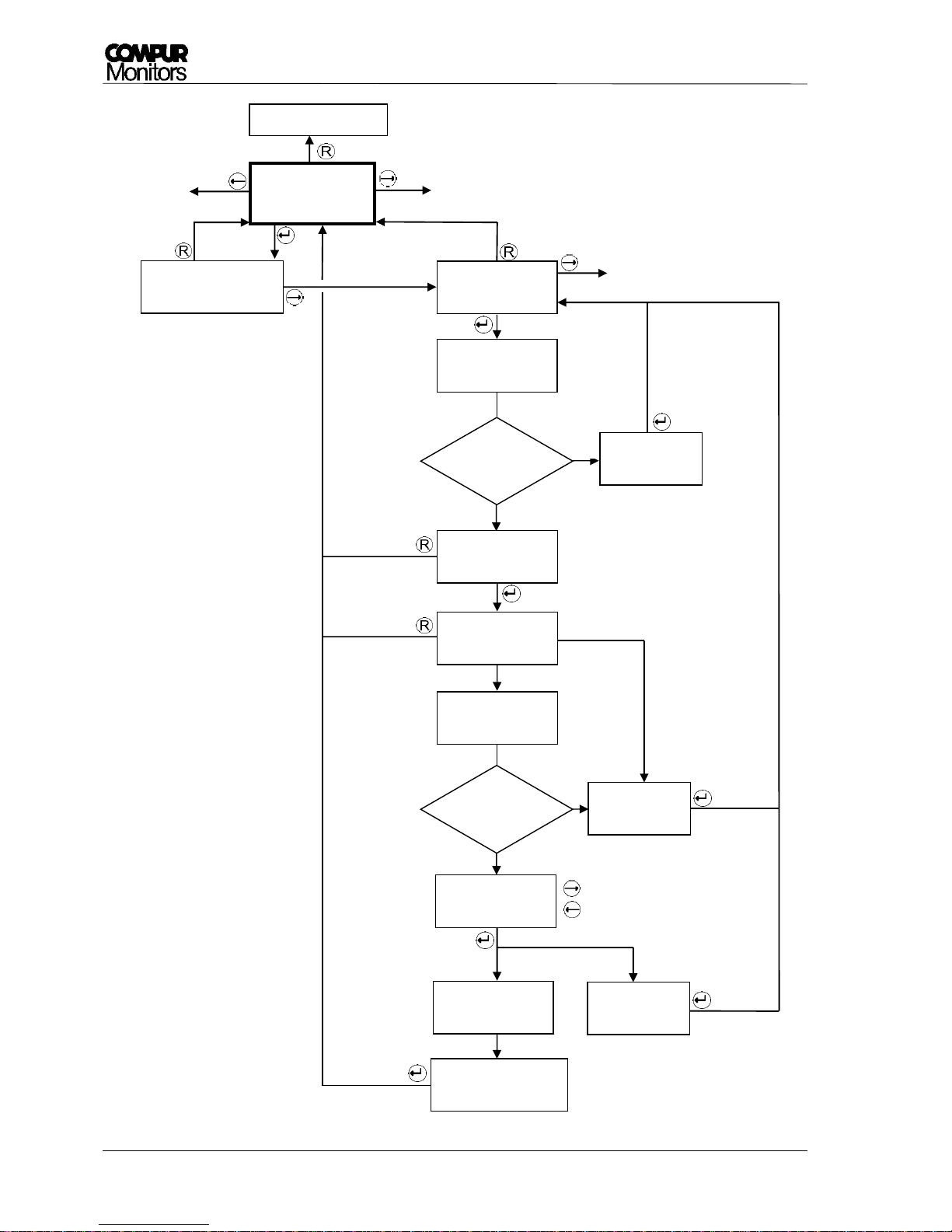
Procedure (see Picture 20):
1. Enter the service menu and select „Calibration“. After the last valid calibration is shown.
2. Enter the menu „Calibration Start“ with and confirm with . The timeout is now 30 minutes!
3. The display shows „Zeroing Please wait“ until zero is stable.
4. After zero has stabilized, the display shows „Zero found - Apply span gas“. You may now stop the
calibration procedure, if you only wanted to adjust zero by pushing . If you want to continue
with a gas calibration, confirm with . The display now shows „Apply span gas“.
5. Check that the O-Ring sits correctly in the calibration adapter. Push the gas adapter onto
the protective cylinder by slightly turning it. The side marked with “Front” points toward the user.
Connect the gas tube at the bottom side. Switch the gas on. Flow should be around
30 l/h (500 ml/min).
6. You may connect an active carbon filter to the calibration adapter exhaust, if you want to avoid
span gas getting into the environment. This filter must not create a dynamic pressure. This would
compromise accuracy!
7. As soon as the sensor head detects gas, the display shows „Gas is on“.
Calibration dapter
Span gas
Optional active
carbon filter
Front
Page 31

Statox 560
Issue 2/2017 Page 31 of 66
8. When the sensor head has found a plateau, the sensor head requires to enter the span gas
concentration in ppm. The display shows the last used concentration, change with the arrow
buttons and confirm with .
9. After saving the concentration the display shows „Calibration done“ and the actual concentration
in the gas adapter. Switch the gas off and remove the calibration adapter.
10. Let the measured value drop to zero before going back with and into the measuring mode,
in order to avoid false alarms.
In case an error occurred during calibration, the relevant error code will be displayed. Potential errors
see Chapter 6.2!
If zero or span adjustment fails, the sensor head continues with the old parameters. The
display will show ZERO ADJUSTMENT FAILED or CALIBRATION FAILED alternatingly with
the measured value until a valid zero or span adjustment has been performed.
!
Page 32
Statox 560
Page 32 of 66 Issue 2/2017
Picture 20: Schematics Calibration
yes
ja
Calibration
Measuring mode
Calibration Info
2016-04-30 18:15
Zeroing
Please wait
no
Calibration
Start
Zeroing
Error 5 (6)
Zero
found?
Zero found
Apply span gas
Apply span gas
Gas
detected
Displays the last valid
calibration.
no
Gas is on
Please wait
Value
found?
Calibration
Error 3
Span gas
xxx ppm
Calibration
Error 7
Calibration done
0,08 ppm
→ increase
← reduce
Saving data
Please wait
No gas detected
Page 33
Statox 560
Issue 2/2017 Page 33 of 66
5.3.4 Change Sensor – Sensor Module / Sensor / Generator Cell Replacement
5.3.4.1 Sensor module replacement
In menu „Change Sensor“ you can replace the sensor module. In this menu the sensor head is in the
service mode, the timeout deactivated. Thus you will not create an alarm when removing the sensor
module.
Do not remove the sensor module during the measuring mode! You will create an alarm
and probably damage the module!
Caution: EMC - sensitive parts!
Always be properly grounded when touching the sensor module.
Use a wrist strap connected to a properly grounded work surface and use properly
grounded tools and equipment. Wear conductive clothing and shoes.
Avoid touching pins, leads and circuitry.
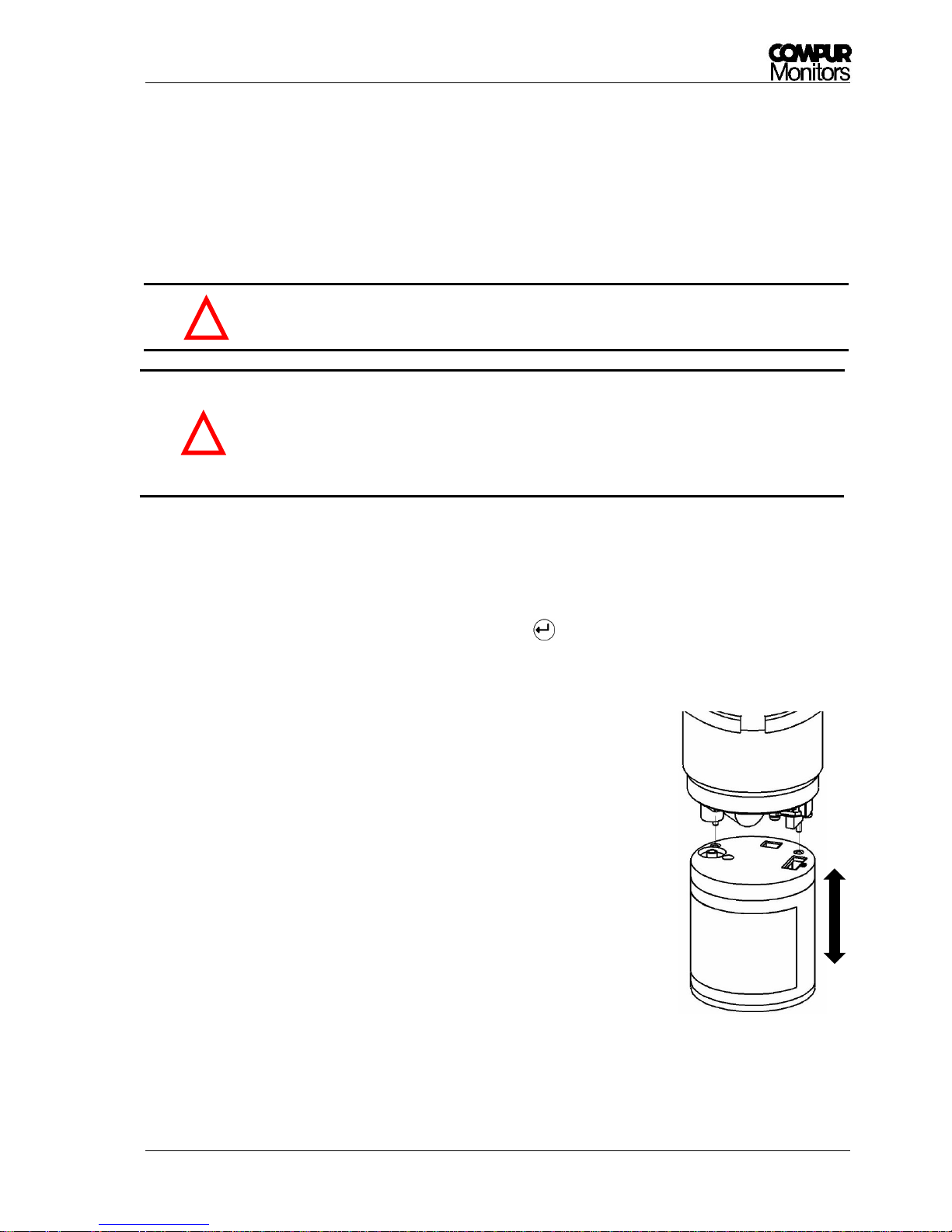
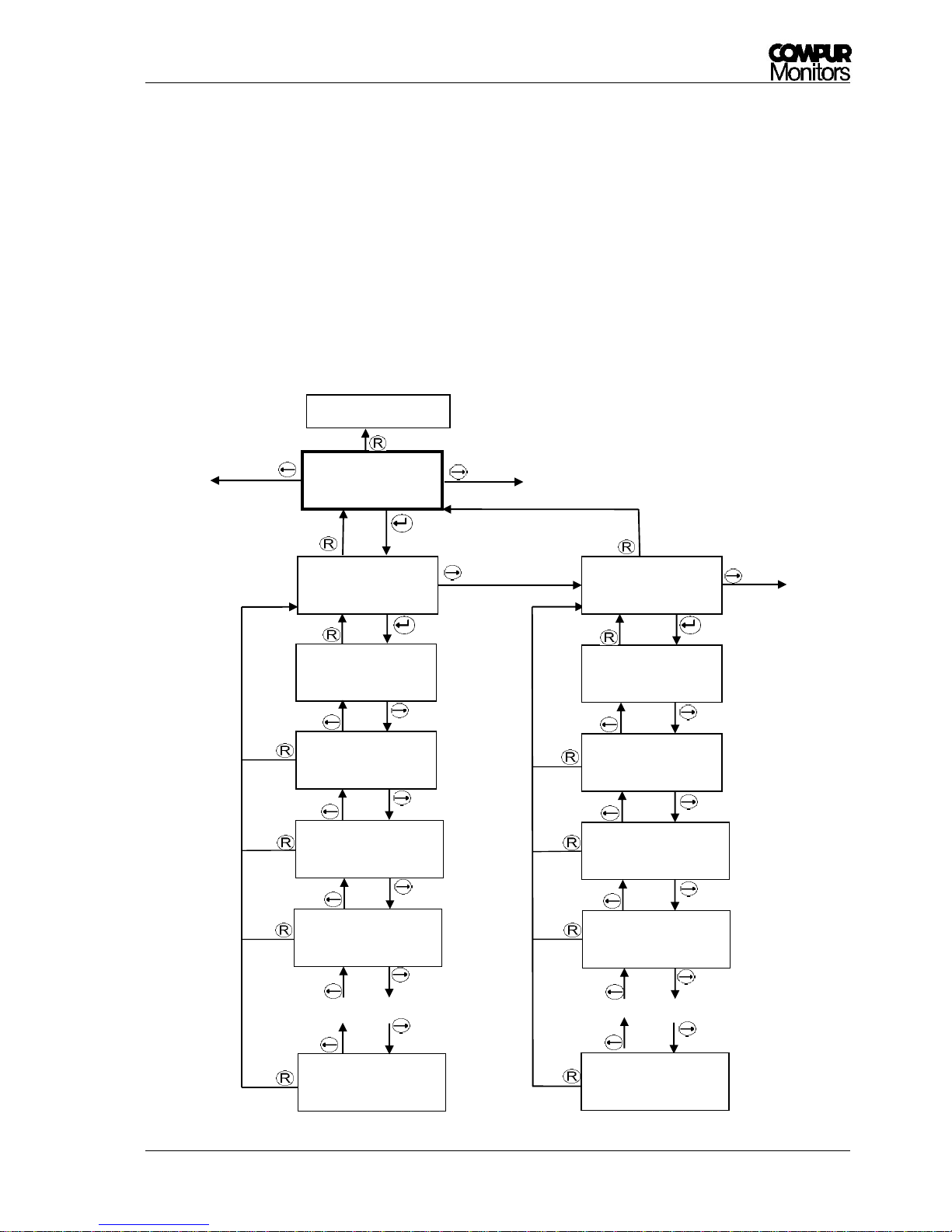
Procedure (see Picture 24):
1. Enter the menu „Change Sensor“ and confirm with . The display shows „Change Sensor -
Replace“. Now the measuring head is in the service mode.
2. Remove the protection cylinder counterclockwise.
3. Pull the sensor module downwards to remove it. The display now
shows „Replace” flashing.
4. Take the new sensor module out of the packaging and remove the
shortening bridge as far as applicable. Check for mechanical damage!
5. Align the guiding pins with the relevant holes and plug the sensor
module in.
6. Fasten the protection cylinder fingertight. Check if the sealing washer
is clean.
7. The sensor head will now read the sensor module parameters, while
the display shows „Loading Parameter“. If these are not legible, you
will get an error message (see chapter 6.2).
!
Picture 21: Changing the
sensor modules
!
Page 34
Statox 560
Page 34 of 66 Issue 2/2017
8. If the measuring head has operated with a different sensor type, you get the message „Change of
sensor type!“. If you really want to change, confirm with . This is intended to prevent the user
from connecting a wrong sensor module. If you don’t want to work with the plugged module you
can easily remove the module by pulling it down. Now you can use the desired sensor module.
9. During the warm-up period the display shows alternatingly the gas / measuring range / parameter
version and serial number of the sensor / best before date in the format ww/yy. The warm-up may
take a few minutes.
10. When the warm-up is completed, the measuring head goes into the measuring mode. Allow some
time to stabilize (1 hour), then perform a zero adjustment for maximum accuracy (see chapter
5.3.3).
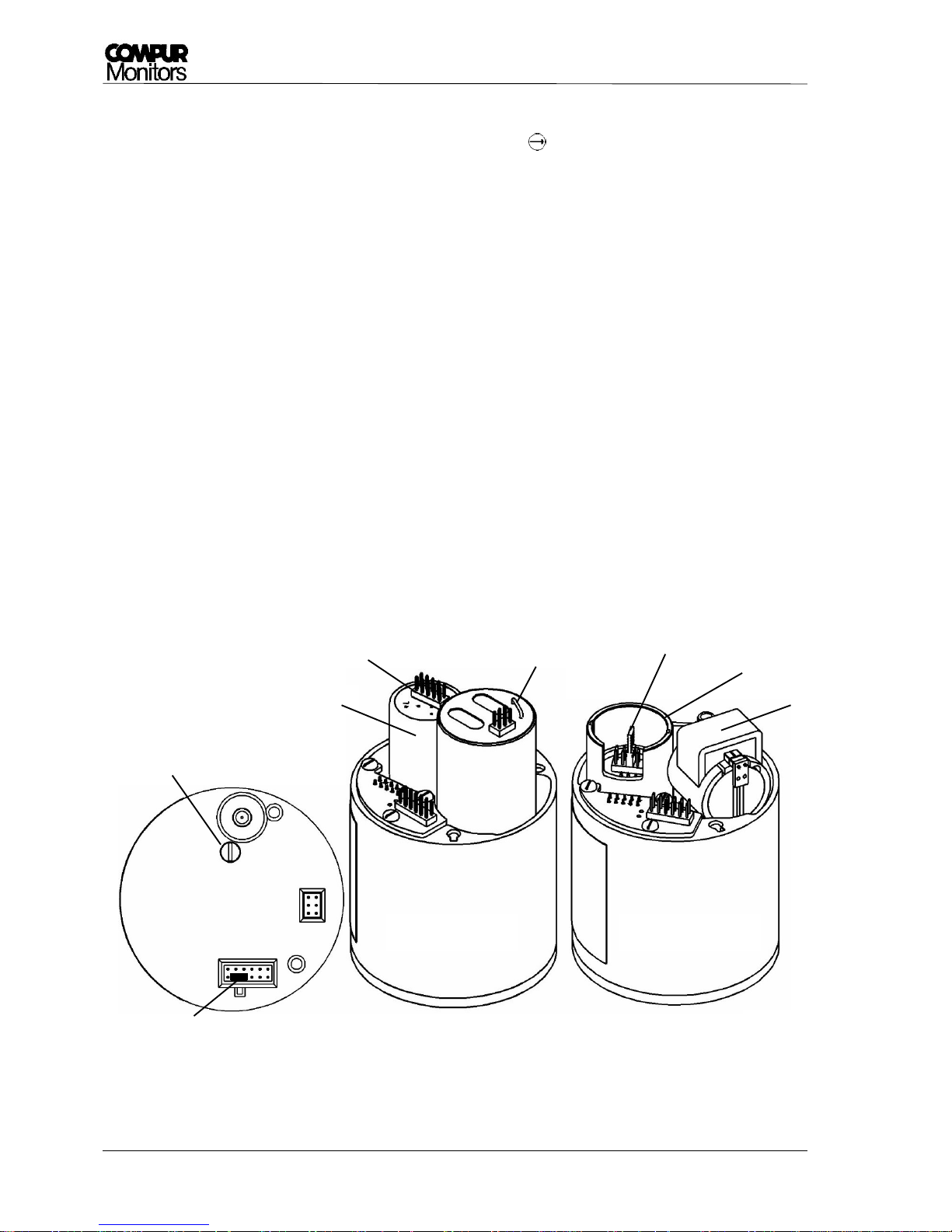
5.3.4.2 Sensor and Generator Cell replacement:
Instead of replacing the entire sensor module, you can also replace the generator cell or the sensor.
Remove the sensor module cover. Observe the procedures required when handling EMC sensitive
parts. Check the sensor module type plate for the relevant article numbers.
Picture 22: Sensor module - and different versions
Screw
Sensor
Generator cell
Generator cell
Sensor
Handle
Remove short circuit bridge
Position for the short
circuit bridge
COCl2 Version
Standard Version
1
Pin 1
Page 35
Statox 560
Issue 2/2017 Page 35 of 66
Sensor replacement:
Unplug the old sensor. Extract and remove the short circuit bridge of the new sensor if there is any. Plug
the new sensor, the position of the sensor plug is remote to the module PCB (connect the red wire of the
flat ribbon cable to pin 1). Check for correct positioning! The flat ribbon cable should sink between sensor
and PCB.
Standard Generator Cell Replacement:
Remove the generator cell by pulling it upwards from its seat. Unplug it. Remove both protective caps from
the new generator cell. Plug it in with the cable looking downwards. Push until the stop.
COCl2 Generator Cell Replacement:
Remove the generator cell by pulling its handle upward with a screw driver. Remove the protective cap
form the new generator cell. Take care not to damage the O-Ring. Insert the new cell with the O – Ring
downwards. Turn the cell until the coding latches and push it downwards until the stop.
Close the sensor module. Make sure the top is well – aligned and no wires are jammed. Do not tighten the
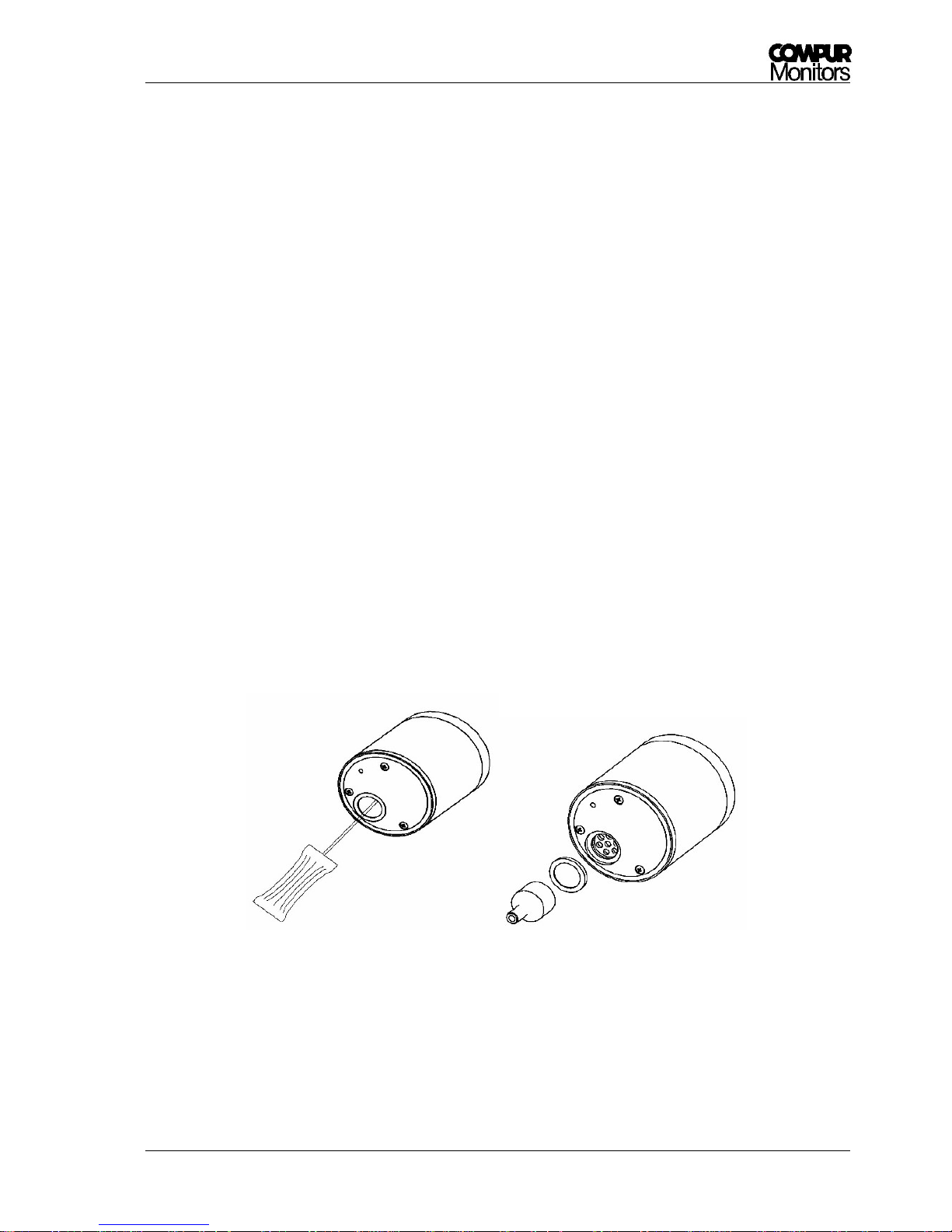
screw too hard.
The spare sensor comes with a fresh dust – and splash guard filter. Remove the old filter carefully with a
screw driver, insert the new filter and press it until it latches. You may use the handle of the magnetic pin
as a tool to do that.
Picture 23: Replacement of the dust and splash guard
Page 36
Statox 560
Page 36 of 66 Issue 2/2017
Picture 24: Schematics Change Sensor
Loading
Parameter
COCL2 50,0 ppm
Version 02.3.01
Sensor No. 19718
b. b.: w 43/2016
Warm-up
Please wait
Warm-up
finished?
Measuring mode
no
yes
Change Sensor
Measuring mode
Change Sensor
Replace
Change Sensor
Replace (flashing)
Unscrew the protection cylinder,
unplug the sensor module
Plug the sensor module
Unplug the
sensor module
Change of sensor
type! →OK
Page 37
Statox 560
Issue 2/2017 Page 37 of 66
5.3.5 Errors Info
In menu „ERRORS INFO“ you can check for recently occurred errors. It has no sub – menus. A listing of
potential error codes you will find in chapter 6.2.
5.3.6 Alarm History
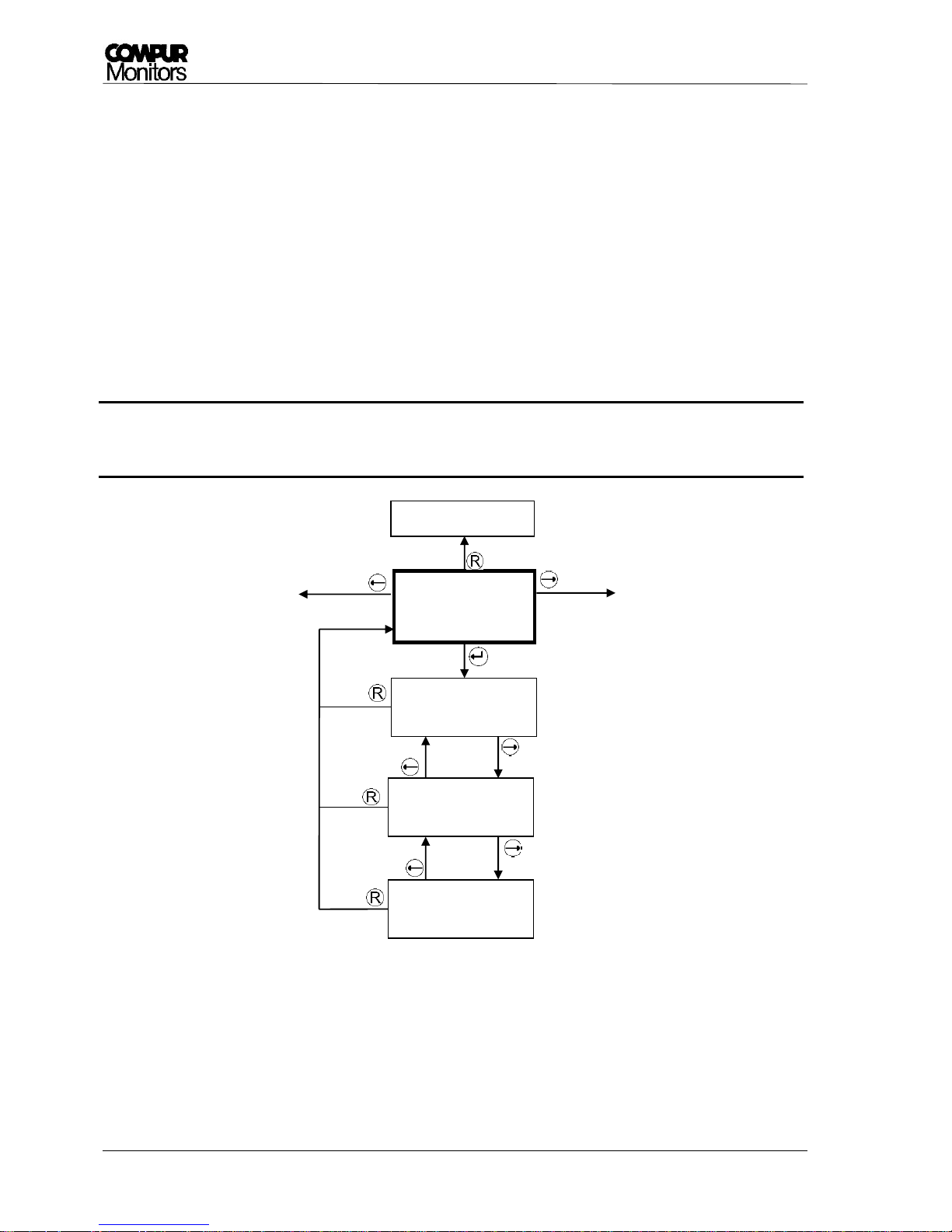
In menu „ALARM HISTORY“ you can check the recent 3 concentration alarms A1 and A2. You can read in
each case the alarm start time, concentration maximum and the alarm end time.
The latest alarm is shown first. If a new alarm occurs, the oldest alarm is deleted.
If no alarm has occurred the reading is „no data“. In order to achieve a correct recording it is essential that
the system has been set to the correct local time (see chapter 5.3.11).
Picture 25: Schematics alarm history
Measuring mode
Alarm History
Alarm 1 History
Latest 3 alarms
Alarm 2 History
Latest 3 alarms
Alarm 1/1 Start
2015-04-12 18:22
Alarm 1/1 Max.
26.4 ppm
Alarm 2/1 Start
2015-04-12 18:24
Alarm 1/1 End
2015-04-12 18:26
Alarm 1/2 Start
2015-04-08 08:45
Alarm 2/1 Max.
26.4 ppm
Alarm 2/1 End
2015-04-12 18:25
Alarm 2/2 Start
2015-04-08 08:45
Alarm 1/3 End
2015-02-28 11:45
Alarm 2/3 End
no data
Page 38
Statox 560
Page 38 of 66 Issue 2/2017
5.3.7 Sensor Info
The menu „SENSOR INFO“ gives you information about the following parameters:
Gas, measuring range and parameter set of the sensor
Serial number and best before date of the sensor (best before format calendar week / year)
Internal calibration factor F (this parameter is for internal use only) of the sensor and its total exposure
to gas.
Total exposure is the product concentration * time.
Example: exposure to 10 ppm during 2 hours = 20 ppm * h.
If the best – before date has been exceeded, it is essential to replace the sensor or to
perform a gas calibration.
Picture 26: Schematics sensor info
Sensor Info
Measuring mode
COCl2 1,00 ppm
Version 02.1.01
Sensor No. 19718
b. b.: w 43/2016
Dose: 180 ppmh
F = 0.2764
!
Page 39

Statox 560
Issue 2/2017 Page 39 of 66
5.3.8 Temperature
In this menu you can read the measuring head temperature in °C. There are no further functions.
5.3.9 Firmware
This menu provides information of the measuring head firmware version. There are no further functions.
5.3.10 Alarm Relays
In this menu you can program the alarm relays for A1, A2 and MR. Access for changes in the setting is
only in the service menu possible. The following parameters are user programmable:
Concentration alarms A1 and A2 can be set to be latching („hold“) or to reset automatically („reset“).
The open collector outputs A1, A2 und MR (Maintenance Request) can be set to be „active“ or
„passive“ in case of an alarm.
The alarm thresholds A1 and A2 can be set within a specified range (see chapter 11). A2 cannot be
set lower than A1+1 unit. If you adjust A1 higher, than A2 will automatically be set to A1 + 1 unit.
Additional information:
As soon as an alarm threshold is exceeded, the respective LED goes on and the output is activated.
See chapter 6.1!
Alarms can only be reset, when the alarm threshold is no longer exceeded. Reset latching alarms
with the reset button .
The programmed alarm thresholds will not be changed by a sensor replacement, as far as the same
sensor type is used. If you change the sensor type, the ex – works settings of the sensor module
will apply. These can be changed to user – specific values.
Page 40
Statox 560
Page 40 of 66 Issue 2/2017
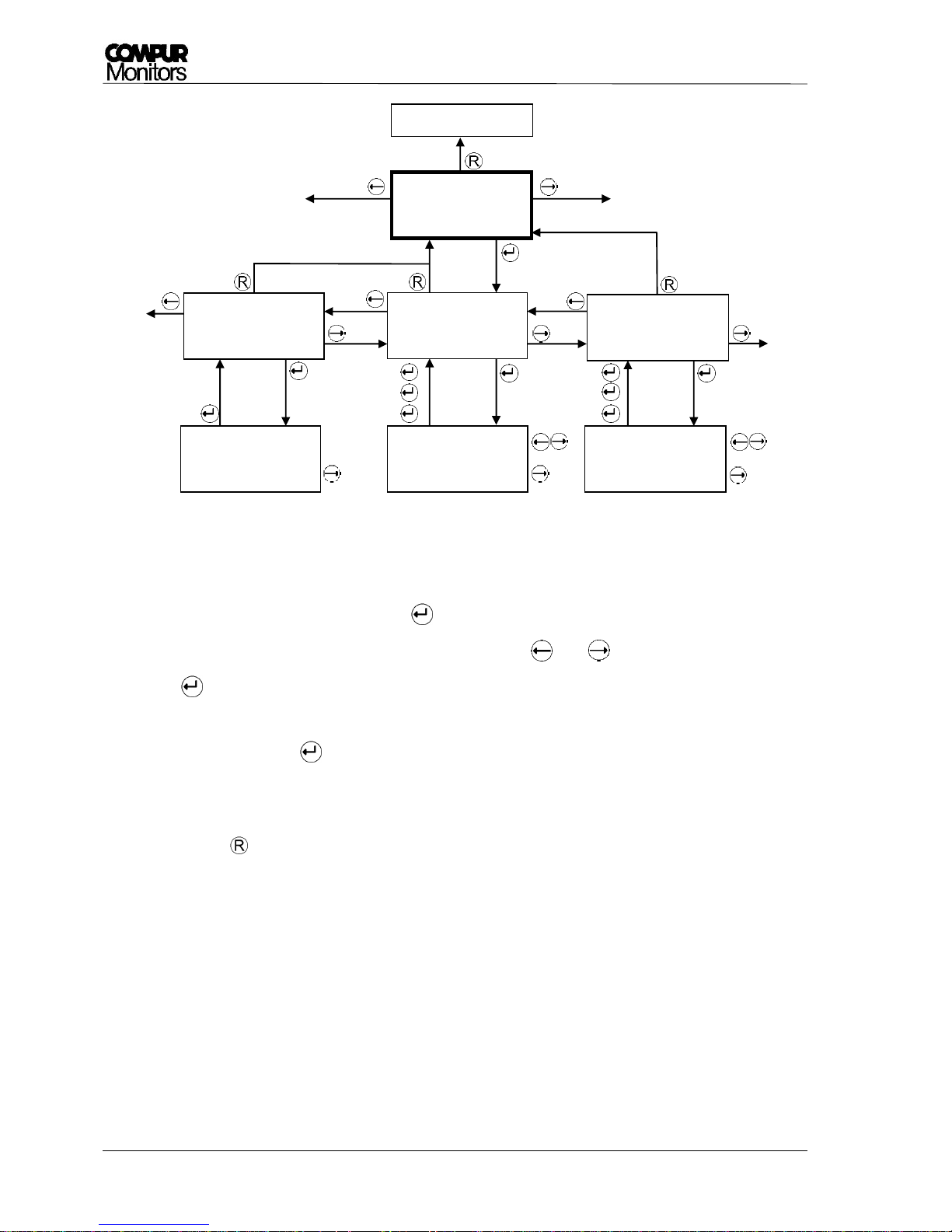
Picture 27: Schematics alarm relays
Procedure:
1. Select an output and confirm with .
2. The first parameter flashes and can be changed with and . Confirm your setting with
.
3. Now the next parameter starts flashing. Change with the arrow buttons showed in Picture 27
and confirm with .
4. After having set the last parameter, the program returns to the selection menu. You may now
read and check your settings.
5. Button brings you back to the main menu.
Measuring mode
Alarm Relays
Alarm1: 10.0 ppm
reset / active
Alarm Relay MR
Alarm = active
Alarm2: 20.0 pm
reset / active
Alarm Relay SR
Alarm = active
Alarm1: 10.0 ppm
reset / active
Alarm2: 20.0 ppm
reset / active
Page 41
Statox 560
Issue 2/2017 Page 41 of 66
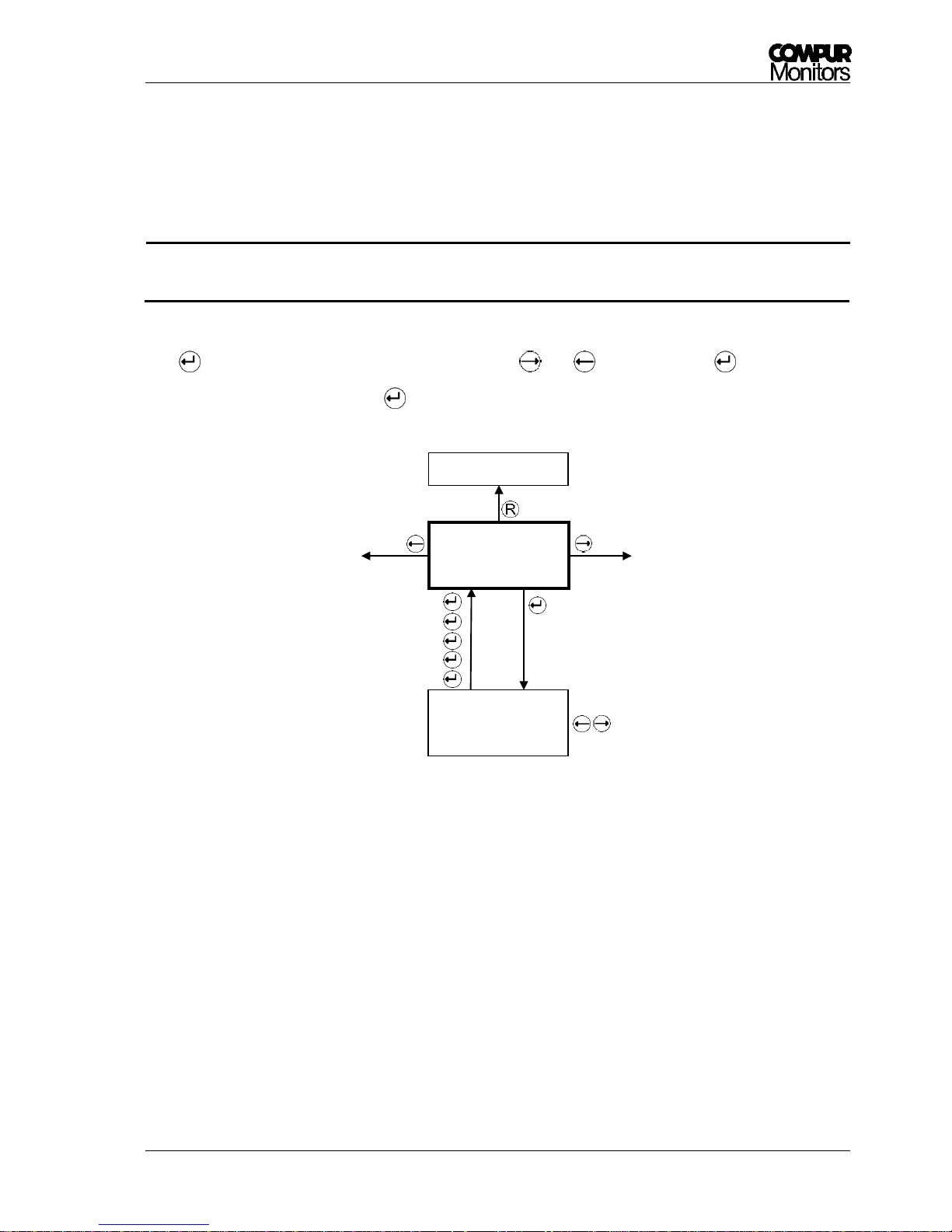
5.3.11 Real Time Clock
The clock is ex-works set to central European time CET. If necessary set to local time. The clock is battery
buffered. Settings must be done in the service menu.
Only a correct setting of the local time makes sure you get a correct alarm history.
Procedure:
Push , now the year is flashing. Change the value with and and confirm with . Set month, day,
hour and minute accordingly. A final brings you back to the main menu.
Picture 28: Schematics real time clock
Real Time Clock
2016-04-30 15:30
Measuring mode
Real Time Clock
2016-04-30 15:30
!
Page 42
Statox 560
Page 42 of 66 Issue 2/2017
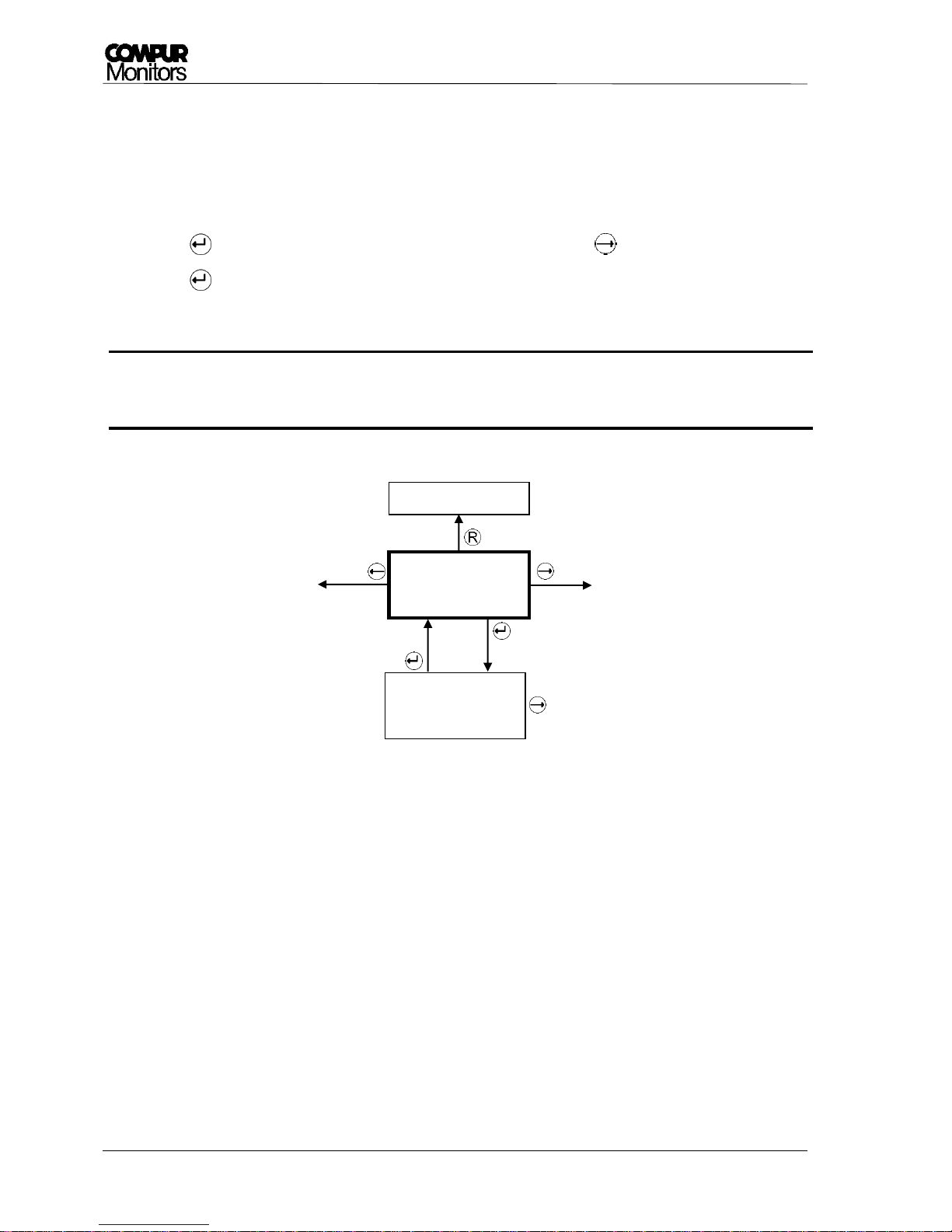
5.3.12 Service Output
In menu „Service Output“ you can set the analog output to 2 or 4 mA during service. Ex – works setting is 2
mA. The setting must be done in the service menu.
Procedure:
Push . The actually set output is flashing. Change the value with .
Push to save your setting and return to the main menu.
If you operate the measuring head as a SIS according to EN 50402 or IEC 61508 (functional
safety) this output must be set to 2 mA.
Picture 29: Schematics service output
Service Output
2 mA
Measuring mode
Service Output
2 mA
!
Page 43

Statox 560
Issue 2/2017 Page 43 of 66
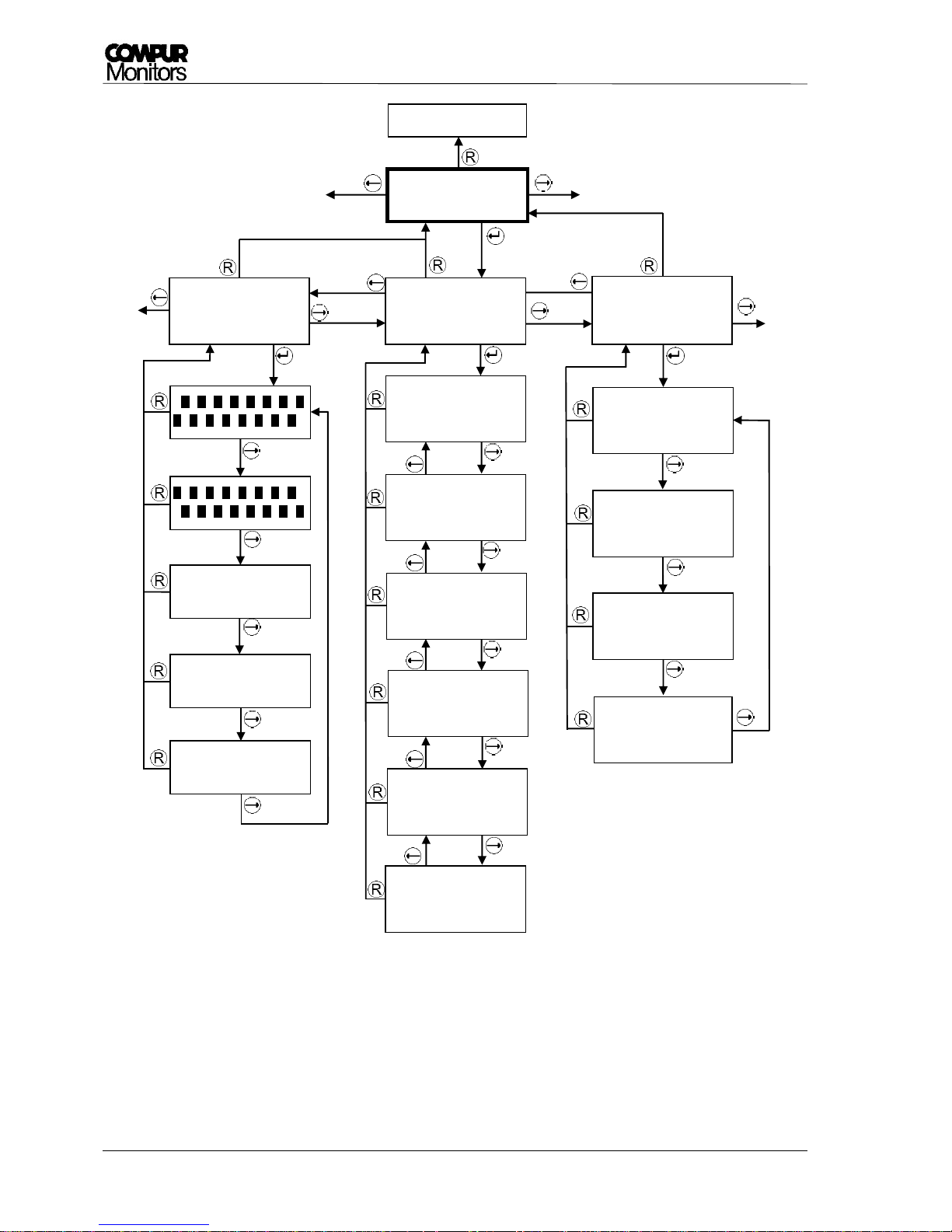
5.3.13 Function Test
In Menu „Function Test“ you can test the function of the display, the analog output and the alarm outputs.
Access only in the service mode. In this menu a timeout of 30 minutes is valid.
Function Test - Display:
You can display a checkerboard pattern, an inverted checkerboard pattern and 3 displays showing all
possible fonts. Step forward with , return to the superior menu with .
Function Test - mA Output:
In this menu you can simulate 0, 2, 4, 12, 20 und 22 mA analog output.
Step forward with , back with . Return to the superior menu with .
Function Test - Alarms:
In this menu you can test the alarm1, alarm2, system failure and maintenance request alarm outputs and
LEDs in the set configuration. Step forward with . Return to the superior menu with .
Definition of the analog outputs associated with alarms:
Alarm 1 = 6 mA
Alarm 2 = 10 mA
SF = 0 mA
MR (Maintenance request) = 4 mA.
Page 44
Statox 560
Page 44 of 66 Issue 2/2017
Picture 30: Schematics Function Test
Measuring mode
Function Test
Function Test
mA Output
Function Test
Display
Function Test
Alarms
Function Test
Output = 0 mA
Function Test
System Failure
Function Test
Alarm 1
Function Test
Alarm 2
Function Test
Maintenance Req.
Function Test
Output = 2 mA
Function Test
Output = 4 mA
Function Test
Output = 12 mA
Function Test
Output = 20 mA
mmmmmmmmmmmmmmmm
mmmmmmmmmmmmmmmm
mmmmmmmmmmmmmmmm
mmmmmmmmmmmmmmmm
ABCDEFGHIJKLMNOP
QRSTUVWXYZ
abcdefghijklmnop
qrstuvwxyz
0123456789
.,;:%-+!°
Function Test
Output = 22 mA
Page 45
Statox 560
Issue 2/2017 Page 45 of 66
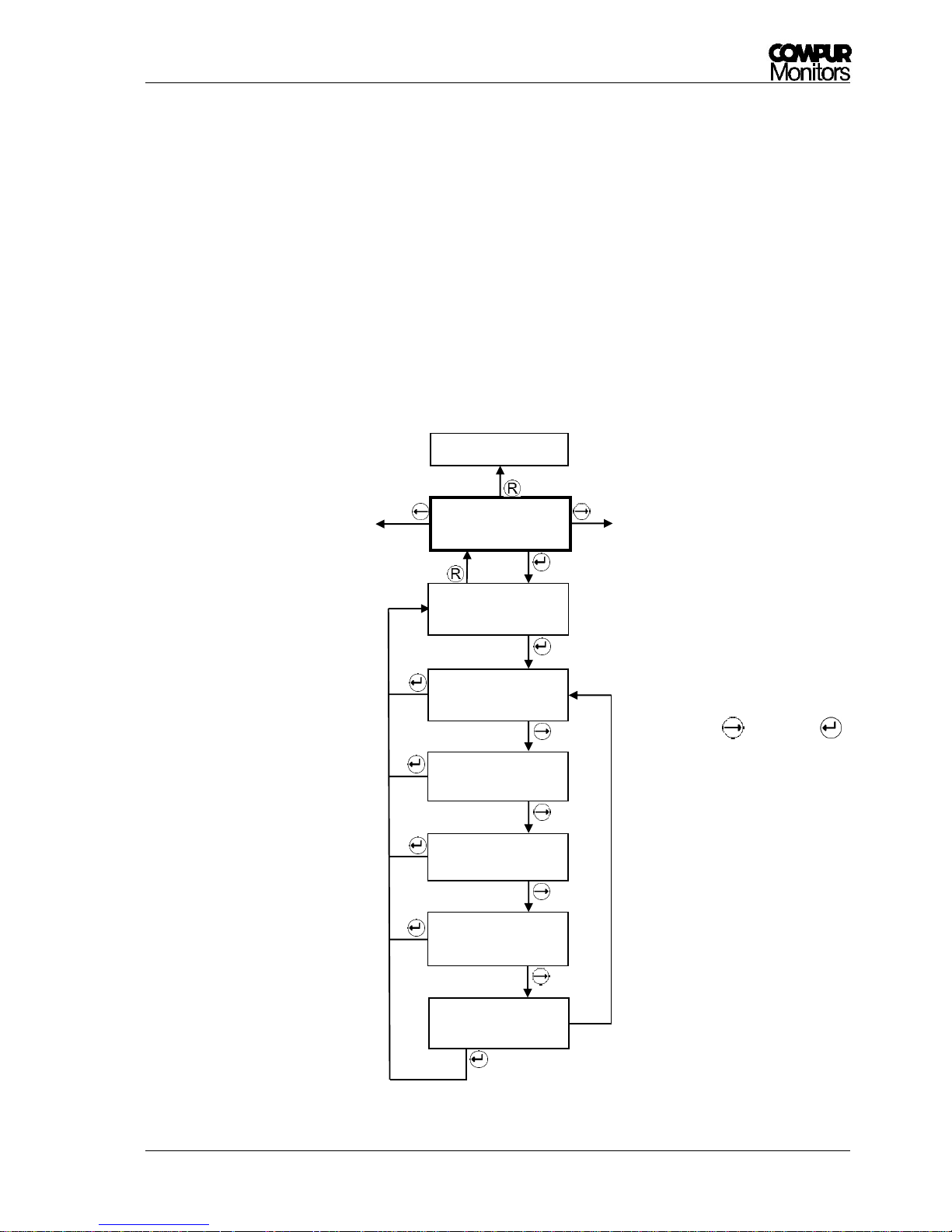
5.3.14 Maintenance Request
In menu „Maintenance Request“ you can program whether maintenance request shall be signalized on the
analog output. Ex – works setting is „NO“.
Access the service menu to change settings!
Possible alternative settings:
Maintenance request = system failure = permanent 0 mA.
Maintenance request = 1 hourly drop to 1, 2 or 3 mA for 5 seconds pulse. These pulses start 10 s after
the last self-test and end when the reason for the maintenance request has disappeared. This pulse is
only generated in the measuring mode.
Picture 31: Submenu Maintenance Request
Measuring mode
MR via mA-Out:
NO
MR via mA-Out:
YES 2 mA pulse
MR via mA-Out:
YES 0 mA
MR via mA-Out:
YES 1 mA pulse
MR via mA-Out:
YES 3 mA pulse
Maintenance
Request
Signalization MR
via mA-Out : NO
Actual setting
The selected setting is flashing.
Change with . Safe with . In the
superior menu your new setting will
be displayed.
Page 46
Statox 560
Page 46 of 66 Issue 2/2017
6 System Status and Error Messages
If the display is dark and green LED off, the power supply voltage is off, too low or its polarity is wrong. If
none of this is the case, it could be a broken fuse.
Replacement of the fuse must be done by Compur Monitors!
6.1 System Status
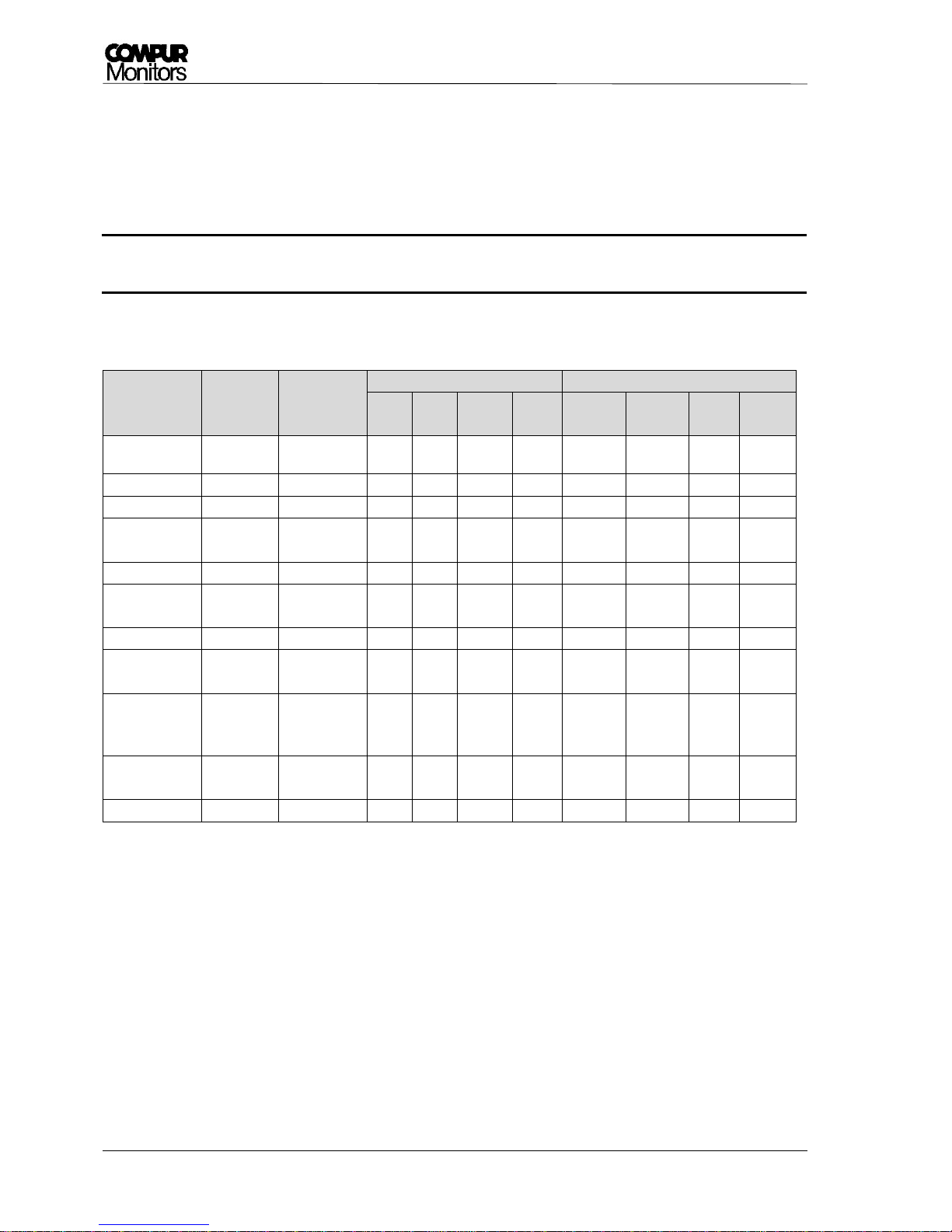
System status
Analog
output
Display
LEDs
switching outputs 4)
A1
yellow
A2
yellow
SF
red
ON
green
A1 3)
A2 3)
WB 3)
SF
Measuring mode
4 - 20 mA
Measured value
8)
OFF
OFF
OFF
ON
passive
passive
passive
active
Alarm 1 2)
4 - 20 mA
Measured value
ON
OFF
OFF
ON
active
passive
passive
active
Alarm 2 2)
4 - 20 mA
Measured value
ON
ON
OFF
ON
active
active
passive
active
Out of range
22 mA
Full scale value
flashing
ON
ON
OFF
ON
active
active
passive
active
System failure
0 mA
Error code
OFF
OFF
ON
ON
passive
passive
passive
passive
Maintenance
request
4-20 mA 6)
Measured value
OFF
OFF
flashing
5)
ON
passive
passive
active
active
Self-test
2 / 4 mA 1)
Self - test
OFF
OFF
flashing
ON
passive
passive
passive
active
Self-test
Monitoring
4-20 mA 7)
Self - test
OFF
OFF
flashing
ON
passive
passive
passive
passive
Service-Mode
(password
protected)
2 / 4 mA 1)
Service menu
OFF
OFF
flashing
ON
passive
passive
passive
active
Info - Mode
(no password)
4-20 mA
Service menu
OFF
OFF
OFF
ON
passive
passive
passive
active
Power off
0 mA - OFF
OFF
OFF
OFF
passive
passive
passive
passive
1. Program in menu Service Output (see chapter 5.3.12).
2. If an alarm has been set to AUTO RESET, the actual status is displayed. If it has been set to HOLD, the last alarm status will
stay. To delete a latching alarm press the Reset- Button.
3. Ex works setting. To change see chapter 5.3.10.
4. Alarm output active means the open collector output is current fed. The SF output is always active in order to detect a
potential power outage.
5. Periodic double flash every 5 seconds.
6. Ex works setting. Procedure to change see chapter 5.3.14.
7. No ex works setting, programming procedure see chapter 5.3.2.4. The SF Relay is passive in this mode, to differentiate
from the 4-20 mA in the measuring mode.
8. The measured value alternates with the message „Zero adjustment failed“ or „Calibration failed” in case any of these
procedures has failed.
!
Page 47
Statox 560
Issue 2/2017 Page 47 of 66
6.2 Error messages
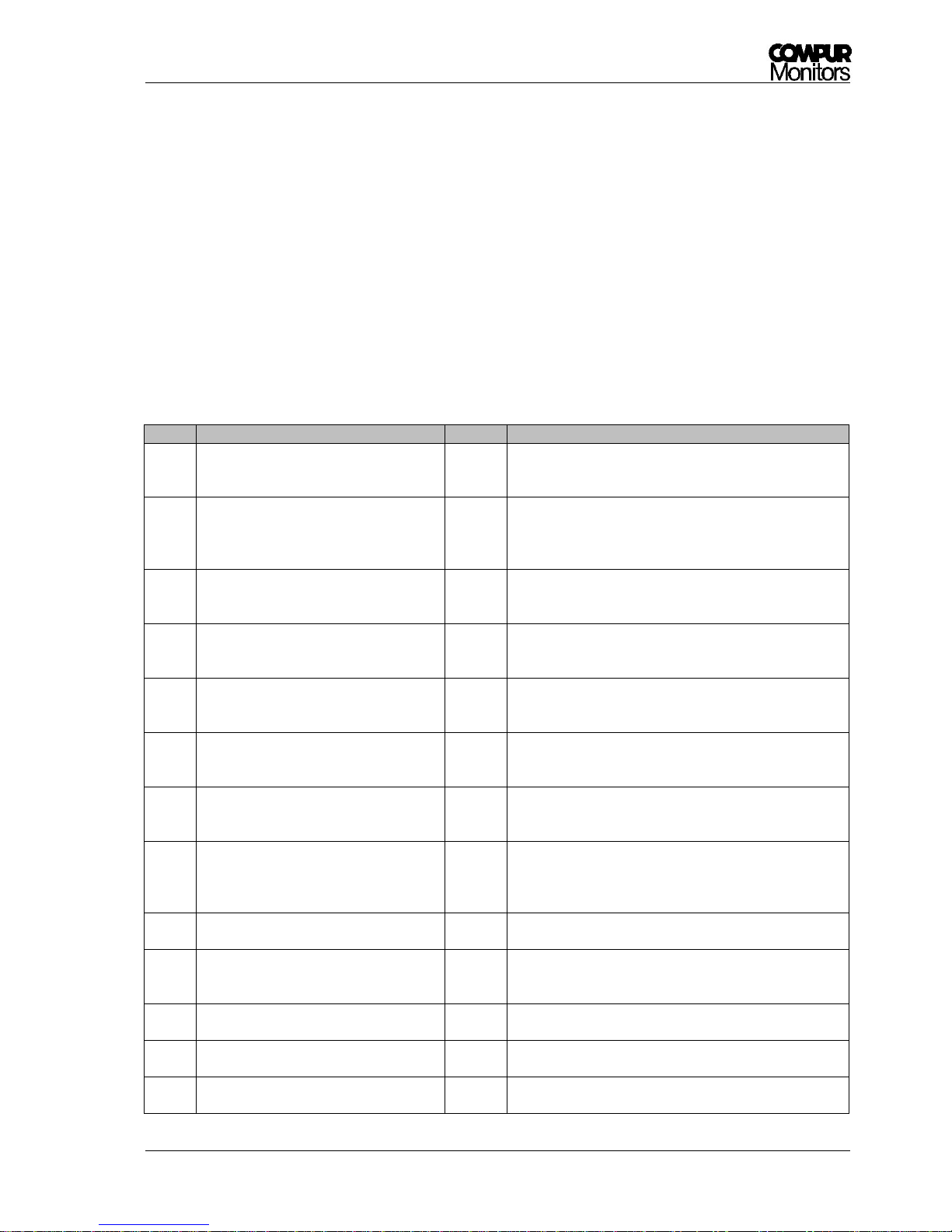
The Statox 560 internal diagnosis differentiates between “System failure” (SF) and “Maintenance
Request” (MR).
A system failure is a fatal dysfunction. The system is unable to operate. Except power outage these errors
are shown on the display.
A maintenance request may be caused by operating errors or short – term problems during self-test or
calibration. These error messages mostly are displayed only for a short time. An error history can be read in
menu “Errors Info“. A maintenance request which has been caused by a non - successful self-test will
automatically be deleted by a successful self-test (self-healing).
Error
Meaning / Reason
Rating
Correction
1
The internal sensor diagnosis
(heartbeat) has detected a sensor
problem.
SF
Push RESET to delete.
In case of recurrence replace the sensor.
2
4-20 mA output error. No cable
connected, cable interrupture, bad
contact.
SF
Check connections, delete with RESET.
If operated as Stand-Alone-Unit, short-circuit analog
output.
If necessary call your Compur representative.
3
No plateau found during calibration.
(no gas, unstable gas concentration,
sensor out of specifications)
MR
Recalibrate or replace sensor. In the meantime the
sensor head will operate with the old calibration
parameters.
4
Negative signal in measuring mode.
Zeroing has failed or new sensor needs
time to stabilize.
MR
Adjust zero. Check for interferent gases.
Eventually replace sensor.
5
When zeroing the permissible sensor
current was too high.
Eventually gas present during zeroing.
MR
Adjust zero. If necessary use synthetic air. Check for
interferent gases. Eventually replace sensor. Sensor
head operates with the old zero parameter.
6
When zeroing no stable signal was
found.
MR
Adjust zero. If necessary use synthetic air. Check for
interferent gases. Eventually replace sensor. Sensor
head operates with the old zero parameter.
7
Sensor signal too high or too low during
calibration.
Used the correct gas?
MR
Check gas concentration, use gas within specifications.
If necessary replace sensor.
8
Temperature out of specifications or
thermo – sensor defective.
SF
Wait for temperature to return to the specified range.
Then RESET.
If the problem persists call your Compur
representative.
9
Serial Peripheral Interface (SPI)-failure
SF
Delete with RESET, if the problem persists call your
Compur representative.
10
Sensor FRAM – problem, parameters of
sensor cannot be read.
SF
Delete with RESET, if the problem persists replace
sensor or check polarity inversion of the sensor. If the
problem persists call your Compur representative.
11
Amplifier error.
SF
Delete with RESET. if the problem persists call your
Compur representative.
12
Potentiostat error.
SF
Delete with RESET, if the problem persists call your
Compur representative.
13
Failure in the internal supply voltage of
the measuring computer.
SF
Delete with RESET, if the problem persists call your
Compur representative.
Page 48
Statox 560
Page 48 of 66 Issue 2/2017
Error
Meaning / Reason
Rating
Correction
14
Pump failure during measuring mode.
SF
Delete with RESET, if the problem persists call your
Compur representative.
15
Hardware problem
SF
Delete with RESET, if the problem persists call your
Compur representative.
16
The self-test has been cancelled three
times because gas was present.
MR
Check for plausibility, eventually expose sensor to
synthetic air. Adjust zero. If problem persists, replace
sensor. If necessary select a more suitable self-test
schedule.
This error disappears after a successful self-test.
17
The self-test has been cancelled three
times because temperature was out of
range.
MR
Check for plausibility, if necessary select a more
suitable self-test schedule.
This error disappears after a successful self-test.
18
Self-test signal too low. Sensor,
generator cell or pump defective.
MR
Restart self-test. This error disappears after a
successful self-test. Calibrate sensor. If necessary
replace the pump or the gas generator.
19
Sensor signal too high after self-test.
Sensor too slow.
MR
Restart self-test.
This error disappears after a successful self-test.
If necessary replace sensor.
20
Pump problem during self-test.
Pump polluted or defective.
MR
Restart self-test.
This error disappears after a successful self-test.
If necessary replace pump.
21
Generator current too high. Generator
cell defective or hardware problem.
MR
Replace generator cell. If problem persists, call your
local Compur representative.
This error disappears after a successful self-test.
22
Generator current too low. Generator
cell defective or hardware problem.
MR
Replace generator cell. If problem persists, call your
local Compur representative.
This error disappears after a successful self-test.
23
Generator activated during measuring
mode.
SF
Delete with RESET. If problem persists, call your local
Compur representative.
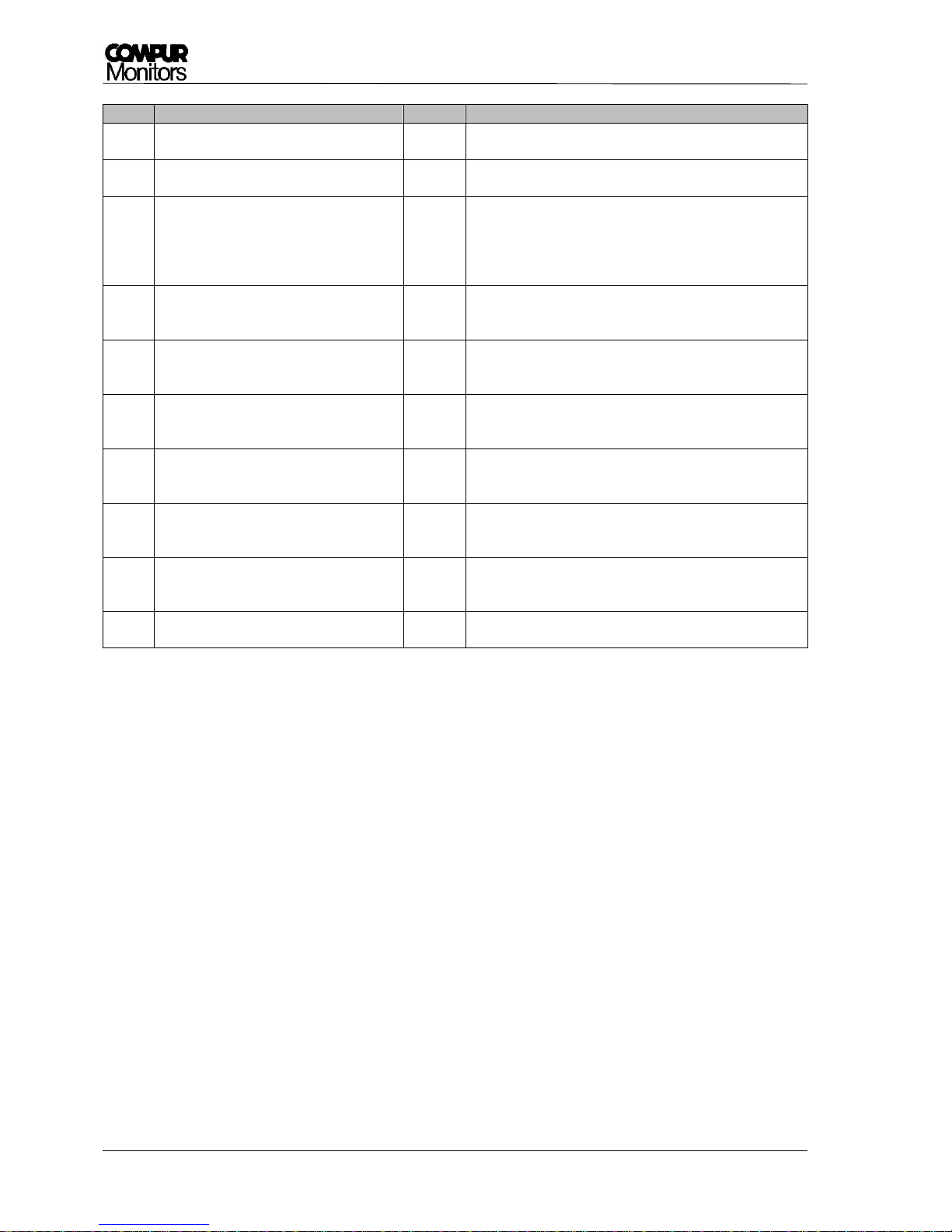
Table 4: Error codes, assessment and corrective action
Page 49

Statox 560
Issue 2/2017 Page 49 of 66
7 Maintenance and Cleaning
7.1 Routine treatment
Perform visual inspection on a regular schedule. In particular check the washer between flange and
protection cylinder for its condition.
Check regularly for pollution, especially the area of the gas entry.
Clean the Statox 560 with a humid cloth. Do not use any detergent, solvent, or water jet.
If the Statox 560 is operated as a SIS requiring functional safety, a regular prooftest is mandatory.
Check the real time clock in regular time intervals and adjust clock time when necessary (see chapter
5.3.11).
7.2 Replacing the pump
For the exchange of the pump you have to remove the sensor module. Open the Change Sensor menu and
then do steps 1 to 3 (see chapter 5.3.4.1).
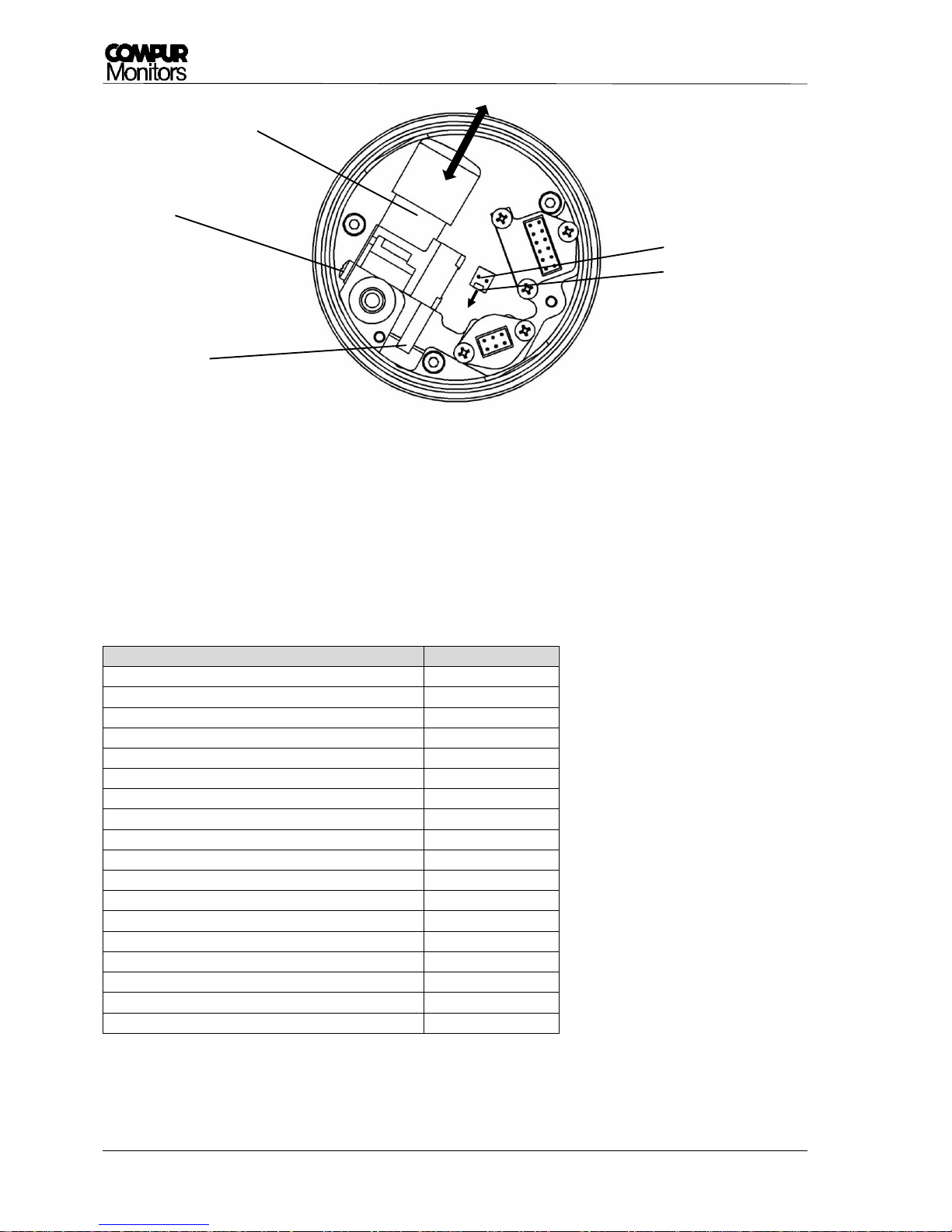
Procedure (see Picture 32):
Release the pump plug by pushing down the safety bar and pulling the plug at the same time.
Loosen the pump screw by one turn counterclockwise and pull out the pump.
When connecting the new pump, the free pump nozzle must be plugged into the narrow opening and
the retaining plate must be lead under the pump screw. Shift the pump to the stop and tighten the screw.
Connect the pump plug.
Mount the sensor module. See menu item Change Sensor, chapter 5.3.4.1, from point 5.
Leave the filter at the pump input! It protects against pollution and regulates the pump
flow.
!
Page 50
Statox 560
Page 50 of 66 Issue 2/2017
Picture 32: Replacing the pump - View from below
8 Accessories and spare parts
Name
article number
Ex e junction Box (10 conductors)
562988
eXLink coupling 6+1 wire
805594
Statox 502 Control Module
557000
Statox 560 calibration adapter
562984
1 meter gas hose 4 x 1
556710
Statox 560 pump
562982
Statox 560 magnetic pen
512277
Sensor module COCl2 0.5 ppm
562920
Sensor module COCl2 1 ppm
562922
Sensor module COCl2 50 ppm
562924
Sensor module Cl2 5 ppm
562910
Sensor module Cl2 10 ppm
562912
Sensor module HCN 20 ppm
562930
Sensor module HCN 50 ppm
562932
Sensor module HCN 100 ppm
562934
Sensor module H2S 100 ppm
562928
Sensor module CO 300 ppm
562916
pump screw
pump plug
safety bar
pump
pump filter
Page 51

Statox 560
Issue 2/2017 Page 51 of 66
9 Functional Safety
This Chapter provides all information required to operate the Statox 560 as a Safety Instrumented System
(SIS) rated SIL 2.
The intended use of the Statox 560 is in the responsibility of the customer.
9.1 Safety Functions
Safety Function 1 (SF1)
The Statox 560 including gas sensor detects a toxic gas. The concentration is monitored at the analog
output as current in the range 0 - 22 mA. Two open collector outputs monitor the system status
maintenance request (MR) and system failure (SF). The system status is also monitored at the analog
output with:
0 mA = System failure
2 mA = service mode
4 mA = 0% of the measuring range
20 mA = 100% of the measuring range
22 mA = over range
Safety Function 2 (SF2)
The Statox 560 including gas sensor detects a toxic gas. It monitors exceedings of the programmed alarm
thresholds at the open collector outputs A1 and A2. The two open collector outputs maintenance request
(MR) and system failure (SF) are for maintenance request and system failure warnings.
9.2 Diagnostic Time and Measuring Cycle
The maximum internal fault detection time is 24 hours. Within this period hardware and sensor failures will
be detected, and the sensor head will go into safe mode if necessary.
The measuring cycle is 1 second. The output current, the display and the open collector outputs are updated
in the same time interval.
Page 52

Statox 560
Page 52 of 66 Issue 2/2017
9.3 Installation and Parameter Settings
The following procedures are mandatory to be performed in order to achieve a valid data
base with regards to failure rates and SFF!
The automatic self-test must be activated (see chapter 5.3.2).
The system failure and the maintenance request output (see chapter 3.7) must be connected to an
external alarm device each (e.g. horn, flashlight, flashing LED).
The signal current during the service mode must be set to 2 mA (see chapter 5.3.12), in order to have
a clear differentiation from the measuring mode.
The outputs A1 and A2 must be set to „passive“ (see chapter 5.3.10), in order to detect a potential
cable rupture (only requested for safety function 2).
Ambient conditions must be within specifications (see chapter 10).
9.4 Schedule Maintenance
The following maintenance work must be done on a regular schedule in order to maintain accurate gas
detection:
Observe the prooftest intervals. Additionally to the prooftest (see chapter 5.3.1), perform a
functional test (see chapter 5.3.13) in the same interval.
When the sensor best before has been exceeded, either replace the sensor or perform a prooftest
or a gas calibration.
In harsh environment, where a poisoning, pollution or other damage of the sensor is likely, shorten
the prooftest interval.
If you receive corresponding error messages (see chapter 6.2), replace the sensor or perform a gas
calibration.
Observe the cleaning and maintenance recommendations in chapter 7.
9.5 Repair and Spare Parts
The Ex d housing and the electronics do not include any customer serviceable parts. Use only original spare
parts and consumables.
!
Page 53
Statox 560
Issue 2/2017 Page 53 of 66
9.6 Failure Rates and Safe Failure Fraction
The following data have been assessed for Statox 560 system (basemodule Statox 560 inclusive sensor) in a
FMEDA-Hardware-Assessment, performed by company SGS-TÜV Saar GmbH (Report # K1TK0001):
Safety function 1 (SF1)
Instrument
Sensor type
λs [FIT]
λdu [FIT]
λdd [FIT]
SFF [%]
Statox 560
Cl2
536.68
118.45
3732.86
97.30
HCN
593.14
182.17
1778.68
92.87
COCl2
581.43
168.55
4391.01
96.72
Safety function 2 (SF2)
Instrument
Sensor type
λs [FIT]
λdu [FIT]
λdd [FIT]
SFF [%]
Statox 560
Cl2
497.49
138.61
3625.48
96.75
HCN
553.95
202.33
1671.30
91.67
COCl2
542.24
188.71
4283.63
96.24
FIT: Failures in Time (10-9 failures per hour) SFF: Safe Failure Fraction
Table 5: Failure rates and SFF in different configurations
9.7 Average Probability of Failure on Demand
Statox 560 has been designed to operate in the low demand mode.
Table 6 shows the PFD
avg
values of both safety functions in the specified prooftest intervals.
Formula: PFD
avg
= 0.5 * T
Proof * λdu
. Presuming that the repair times are significantly lower than the prooftest
intervals.
The PFD values are significantly lower than the values required to comply with SIL 2 (10-2 – 10-3).
Table 6: PFD
avg
- Values for different configurations
PFD
avg
Prooftest interval
6 Months
12 Months
SF1
SF2
SF1
SF2
Statox 560
with sensor
type
Cl2
-
-
5.19*10-4
6.07*10-4
HCN
-
-
7.98*10-4
8.86*10-4
COCl2
3.69*10-4
4.13*10-4
-
-
PFD
avg
: Average Probability of Dangerous Failure on Demand
Page 54
Statox 560
Page 54 of 66 Issue 2/2017
9.8 Classification of the Safety Integrity Level (SIL)
According to standard IEC 61508-2:2010 the Statox 560 is classified as a type B part system (complex
element). As specified in standard IEC 61508-2:2010 table 3, with a hardware failure tolerance (HFT) = 0 and
a SFF of > 90 % the Statox 560 complies with the requirements for a SIL2 rating in both safety functions (see
Table 7).
SIL Classification
Prooftest interval
SF1
SF2
6 Months
12 Months
6 Months
12 Months
Statox 560 with
sensor type
Cl2
-
SIL 2
-
SIL 2
HCN
-
SIL 2
-
SIL 2
COCl2
SIL 2 - SIL 2
-
Table 7: Safety Integrity Levels for different Configurations
9.9
Livetime
The sensor head livetime without sensor is estimated to be 10 years. The calculated failure rates are valid
within this lifetime period.
Page 55

Statox 560
Issue 2/2017 Page 55 of 66
10 General Technical Data
Product name: Statox 560
Type: 5377
Manufacturer: COMPUR Monitors GmbH & Co. KG, Weissenseestr. 101,
D-81539 Munich
Power supply: 24 (16-30) VDC
Power consumption: max. 2.7 W (8.7 W for COCl2) at input voltage ≤ 26 VDC
Operating temperature: -30°C to +60°C
Storage temperature: -30°C to +60°C
Pressure: 700 to 1300 hPa
Humidity: 0% to 99% r. H. (non condensing)
Application: II 2G
Explosion protection: Ex d ib IIC T4 Gb (at Um = 30 VDC for all connections)
EC type examination certificate: BVS 16 ATEX E 065 X (X: the measuring function according Annex II, point
1.5.5 of directive 2014/34/EU is not part of the EC type examination certificate.)
Protection class EN60529: IP 66 (gas intake IP54)
Display: 2 x 16 signs, illuminated
Housing: Cast aluminum epoxide varnish / stainless steel
Connections: 10-core cable tail (1 m) or 7-pin eXLink plug
Open-Drain-outputs: 2 x alarm, 1 x system failure, 1 x maintenance request
Characteristic values max. 30 VDC / 2.5 A
SF-Open-Drain- output: In normal operation active (conductive)
Analog output: 0 mA in case of system failure
2 or 4 mA in the service mode, programmable
4 - 20 mA in the measuring mode
22 mA when full scale is exceeded
max. burdon: 450 Ohm
EMC: EN 61000-6-4:2007 + A1:2011 / EN 50270:2015 (type 2)
Functional safety: SIL 2 compliant according to IEC 61508:2010
Automatic self-test: every 24 hours, time is selectable
Weight: ca. 4800 g
Dimensions: 121 x 294 x 138 mm (W x H x D)
Page 56

Statox 560
Page 56 of 66 Issue 2/2017
11 Sensor-specific data
11.1 Statox 560 Sensor Module COCl2 0.5 ppm 562920
Sensor type Electrochemical 3-electrode sensor
Measuring range / resolution 0.00 to 0.50 ppm COCl
2
Detection limit 1) 0.02 ppm
Temperature range −20 to +50 °C, short term -30 to +60 °C
Pressure range 700 – 1100 hPa
Humidity range 10-99% r.H. (non-condensing)
Response time t90 at 0.3 ppm
1) 2)
< 200 s
Response time t20 at 0.3 ppm
1) 2)
< 20 s
Warm-up time: ready for operation in 1) < 15 min
ready to calibrate after < 60 min
Accuracy 1) < ± 10% of measured value or ± 0.01 ppm (higher value applicable)
Long-term zero drift < ± 0.01 ppm / month
Zero drift (-20 to +50 °C) < ± 0.02 ppm
Zero point change by abrupt change in humidity 1) < ± 0.04 ppm (temporary)
Loss of sensitivity 1) < 15 % in 12 months
Span gas 0.30 – 0.50 ppm COCl2
Adjustment range of alarm thresholds A1 = 0.10 - 0.49 ppm; A2>A1
Default values: A1 = 0.10 ppm; A2 = 0.20 ppm
Test gas for self-test COCl2 , produced pyrolytic
Self-test thresholds Start at c < 0.06 ppm / Test ok: signal ≥ 0.10 ppm within 60 s
Test ok at T < 0°C: signal ≥ 0.05 ppm within 60 s
Temperature range for self-test −10 to +50°C
Warranty sensor / generator cell 12 months / 12 months
Marking of the generator cell II 2G Ex db ib IIC Gb / BVS 16 ATEX E 048U
Cross sensitivities 3) Gas / concentration / display of COCl
2
HCN / 0.6 ppm / 0.7 ppm
H2S / 0.1 ppm / 0.2 ppm
NO2 / 1.5 ppm / -0.07 ppm
CO / 30 ppm / 0 ppm
SO2 / 2 ppm / 0.01 ppm
H2 / 100 ppm / 0 ppm
NH3 / 50 ppm / 0.06 ppm
Cl2 / 0.5 ppm / 0.3 ppm
AsH3 / 0.05 ppm / 0.06 ppm
HCl / 0.6 ppm / 1 ppm
CH4 / 2.19 % / 0 ppm
NO / 100 ppm / -0.1 ppm
ClO2 / 0.1 ppm / -0.06 ppm
N2H4 / 0.05 ppm / 0 ppm
1)
The values are typical values, apply for new sensors and ambient conditions of 20°C, 50% r.H. and 1013 mbar.
2)
The response times were measured with the Statox 560 calibration adapter at 30 l/h.
3)
The above list may be incomplete. The listed values are average values, they might differ from sensor to sensor.
Do not use interference gas for calibration!
Page 57

Statox 560
Issue 2/2017 Page 57 of 66
11.2 Statox 560 Sensor Module COCl2 1 ppm 562922
Sensor type Electrochemical 3-electrode sensor
Measuring range / resolution 0.00 to 1.00 ppm COCl
2
Detection limit 1) 0.02 ppm
Temperature range −20 to +50 °C, short term -30 to +60 °C
Pressure range 700 – 1100 hPa
Humidity range 10-99% r.H. (non-condensing)
Response time t90 at 0.3 ppm
1) 2)
< 200 s
Response time t20 at 0.3 ppm
1) 2)
< 20 s
Warm-up time: ready for operation in 1) < 15 min
ready to calibrate after < 60 min
Accuracy 1) < ± 10% of measured value or ± 0.01 ppm (higher value applicable)
Long-term zero drift < ± 0.01 ppm / month
Zero drift (-20 to +50 °C) < ± 0.02 ppm
Zero point change by abrupt change in humidity
1)
< ± 0.04 ppm (temporary)
Loss of sensitivity 1) < 15 % in 12 months
Span gas 0.30 – 0.60 ppm COCl2
Adjustment range of alarm thresholds A1 = 0.10 - 0.99 ppm; A2>A1
Default values: A1 = 0.10 ppm; A2 = 0.20 ppm
Test gas for self-test COCl2 , produced pyrolytic
Self-test thresholds Start at c < 0.06 ppm / Test ok: signal ≥ 0.10 ppm within 60 s
Test ok at T < 0°C: signal ≥ 0.05 ppm within 60 s
Temperature range for self-test −10 to +50°C
Warranty sensor / generator cell 12 months / 12 months
Marking of the generator cell II 2G Ex db ib IIC Gb / BVS 16 ATEX E 048U
Cross sensitivities 3) Gas / concentration / display of COCl
2
HCN / 0.6 ppm / 0.7 ppm
H2S / 0.1 ppm / 0.2 ppm
NO2 / 1.5 ppm / -0.07 ppm
CO / 30 ppm / 0 ppm
SO2 / 2 ppm / 0.01 ppm
H2 / 100 ppm / 0 ppm
NH3 / 50 ppm / 0.06 ppm
Cl2 / 0.5 ppm / 0.3 ppm
AsH3 / 0.05 ppm / 0.06 ppm
HCl / 0.6 ppm / 1 ppm
CH4 / 2.19 % / 0 ppm
NO / 100 ppm / -0.1 ppm
ClO2 / 0.1 ppm / -0.06 ppm
N2H4 / 0.05 ppm / 0 ppm
1)
The values are typical values, apply for new sensors and ambient conditions of 20°C, 50% r.H. and 1013 mbar.
2)
The response times were measured with the Statox 560 calibration adapter at 30 l/h.
3)
The above list may be incomplete. The listed values are average values, they might differ from sensor to sensor.
Do not use interference gas for calibration!
Page 58

Statox 560
Page 58 of 66 Issue 2/2017
11.3 Statox 560 Sensor Module COCl2 50 ppm 562924
Sensor type Electrochemical 3-electrode sensor
Measuring range / resolution 0 to 50 ppm COCl
2
Detection limit 1) 1 ppm
Temperature range −20 to +50 °C, short term -30 to +60 °C
Pressure range 700 – 1100 hPa
Humidity range 10-99% r.H. (non-condensing)
Response time t90 at 10 ppm
1) 2)
< 100 s
Response time t20 at 10 ppm
1) 2)
< 15 s
Warm-up time: ready for operation in 1) < 15 min
ready to calibrate after < 60 min
Accuracy 1) < ± 10 % of measured value or ± 1 ppm (higher value applicable)
Long-term zero drift < ± 0.1 ppm / month
Zero drift (-20 to +50 °C) < ± 1 ppm
Zero point change by abrupt change in humidity
1)
< ± 1 ppm (temporary)
Loss of sensitivity 1) < 15 % in 12 months
Span gas 5 – 15 ppm COCl2
Adjustment range of alarm thresholds A1 = 5 - 49 ppm; A2>A1
Default values: A1 = 5 ppm; A2 = 10 ppm
Test gas for self-test COCl2 , produced pyrolytic
Self-test thresholds Start at c < 3 ppm / Test ok: signal ≥ 5 ppm within 30 s (30 – 40°C)
signal ≥ 2 ppm within 30 s (10 – 30°C)
signal ≥ 1 ppm within 30 s (0 – 10°C)
Temperature range for self-test 0 to +40°C
Warranty sensor / generator cell 12 months / 12 months
Marking of the generator cell II 2G Ex db ib IIC Gb / BVS 16 ATEX E 048U
Cross sensitivities 3) Gas / concentration / display of COCl
2
HCN / 10 ppm / 14 ppm
H2S / 10 ppm / 20 ppm
NO2 / 5 ppm / - 1 ppm
CO / 30 ppm / 0 ppm
H2 / 100 ppm / 0 ppm
Cl2 / 4 ppm / 1 ppm
HCl / 5 ppm / 4 ppm
CH4 / 2 % Vol / 0 ppm
1)
The values are typical values, apply for new sensors and ambient conditions of 20°C, 50% r.H. and 1013 mbar.
2)
The response times were measured with the Statox 560 calibration adapter at 30 l/h.
3)
The above list may be incomplete. The listed values are average values, they might differ from sensor to sensor.
Do not use interference gas for calibration!
Page 59

Statox 560
Issue 2/2017 Page 59 of 66
11.4 Statox 560 Sensor Module HCN 20 ppm 562930
Sensor type Electrochemical 2-electrode sensor
Measuring range / resolution 0.0 to 20.0 ppm HCN
Detection limit 1) 0.2 ppm
Temperature range −20 to +50 °C, short term -30 to +60 °C
Pressure range 700 – 1100 hPa
Humidity range 10-99% r.H. (non-condensing)
Response time t90 at 1.9 ppm
1) 2)
< 60 s
Response time t20 at 1.9 ppm
1) 2)
< 15 s
Warm-up time: ready for operation in 1) < 2 min
ready to calibrate after < 15 min
Accuracy 1) < ± 10% of measured value or ± 0.2 ppm (higher value applicable)
Long-term zero drift < ± 0.05 ppm / month
Zero drift (-20 to +50 °C) < ± 0.2 ppm
Zero point change by abrupt change in humidity 1) < ± 0.2 ppm (temporary)
Loss of sensitivity 1) < 15 % in 6 months
Span gas 4) 1.9 - 10.0 ppm HCN
Adjustment range of alarm thresholds A1 = 1.9 - 19.9 ppm; A2>A1
Default values: A1 = 1.9 ppm; A2 = 3.8 ppm
Test gas for self-test HCN, produced electrochemically
Self-test thresholds Start at c < 1.0 ppm / Test ok: signal ≥ 1.9 ppm within 60 s
Test ok at T < 0°C: signal ≥ 1.0 ppm within 60 s
Temperature range for self-test −10 to +60°C
Warranty sensor / generator cell 12 months / 12 months
Cross sensitivities 3) Gas / concentration / display of HCN
COCl2 / 0.5 ppm / 0.6 ppm
H2S / 2 ppm / 5.9 ppm
NO2 / 5 ppm / -2.6 ppm
CO / 30 ppm / 0 ppm
SO2 / 2 ppm / 0.01 ppm
H2 / 100 ppm / 0 ppm
NH3 / 150 ppm / 0.1 ppm
Cl2 / 2 ppm / 3.5 ppm
AsH3 / 0.1 ppm / 0.7 ppm
HCl / 6.5 ppm / 5.6 ppm
ClO2 / 0.15 ppm / -0.1 ppm
N2H4 / 0.08 ppm / -0.1 ppm
1)
The values are typical values, apply for new sensors and ambient conditions of 20°C, 50% r.H. and 1013 mbar.
2)
The response times were measured with the Statox 560 calibration adapter at 30 l/h.
3)
The above list may be incomplete. The listed values are average values, they might differ from sensor to sensor.
Do not use interference gas for calibration!
4)
Calibration only from 0 to 50°C!
Page 60

Statox 560
Page 60 of 66 Issue 2/2017
11.5 Statox 560 Sensor Module HCN 100 ppm 562934
Sensor type Electrochemical 2-electrode sensor
Measuring range / resolution 0 to 100 ppm HCN
Detection limit 1) 1 ppm
Temperature range −20 to +50 °C, short term -30 to +60 °C
Pressure range 700 – 1100 hPa
Humidity range 10-99% r.H. (non-condensing)
Response time t90 at 10 ppm
1) 2)
< 60 s
Response time t20 at 10 ppm
1) 2)
< 15 s
Warm-up time: ready for operation in 1) < 2 min
ready to calibrate after < 15 min
Accuracy 1) < ± 10% of measured value or ± 1 ppm (higher value applicable)
Long-term zero drift < ± 0.2 ppm / month
Zero drift (-20 to +50 °C) < ± 1 ppm
Zero point change by abrupt change in humidity 1) < ± 1 ppm (temporary)
Loss of sensitivity 1) < 15 % in 6 months
Span gas 4) 10 - 90 ppm HCN
Adjustment range of alarm thresholds A1 = 10 - 99 ppm; A2>A1
Default values: A1 = 10 ppm; A2 = 20 ppm
Test gas for self-test HCN, produced electrochemically
Self-test thresholds Start at c < 5 ppm / Test ok: signal ≥ 10 ppm within 100 s
Test ok at T < 0°C: signal ≥ 5 ppm within 100 s
Temperature range for self-test −10 to +60°C
Warranty sensor / generator cell 12 months / 12 months
Cross sensitivities 3) Gas / concentration / display of HCN
COCl2 / 10 ppm / 15 ppm
H2S / 5 ppm / 17 ppm
NO2 / 5 ppm / -6 ppm
CO / 30 ppm / 0 ppm
SO2 / 2 ppm / < 1 ppm
H2 / 100 ppm / 0 ppm
NH3 / 150 ppm / < 1 ppm
Cl2 / 2 ppm / 2 ppm
AsH3 / 0.2 ppm / 1 ppm
HCl / 30 ppm / 46 ppm
ClO2 / 0.15 ppm / < -1 ppm
N2H4 / 0.08 ppm / < -1 ppm
1)
The values are typical values, apply for new sensors and ambient conditions of 20°C, 50% r.H. and 1013 mbar.
2)
The response times were measured with the Statox 560 calibration adapter at 30 l/h.
3)
The above list may be incomplete. The listed values are average values, they might differ from sensor to sensor.
Do not use interference gas for calibration!
4)
Calibration only from 0 to 50°C!
Page 61

Statox 560
Issue 2/2017 Page 61 of 66
11.6 Statox 560 Sensor Module Cl2 5 ppm 562910
Sensor type Electrochemical 2-electrode sensor
Measuring range / resolution 0.00 to 5.00 ppm Cl
2
Detection limit 1) 0.03 ppm
Temperature range −20 to +50 °C, short term -30 to +60 °C
Pressure range 700 – 1100 hPa
Humidity range 10-99 % r.H. (non-condensing)
Response time t90 at 2 ppm
1) 2)
< 200 s
Response time t20 at 2 ppm
1) 2)
< 15 s
Warm-up time: ready for operation in 1) < 2 min
ready to calibrate after < 15 min
Accuracy 1) < ± 10% of measured value or ± 0.05 ppm (higher value applicable)
Long-term zero drift < ± 0.01 ppm / month
Zero drift (-20 to +50 °C) < ± 0.1 ppm
Zero point change by abrupt change in humidity
1)
< ± 0.2 ppm (temporary)
Loss of sensitivity 1) < 15 % in 6 months
Span gas 2.00 - 5.00 ppm Cl
2
Adjustment range of alarm thresholds A1 = 0.50 - 4.99 ppm; A2>A1
Default values: A1=0.50 ppm; A2 = 1.00 ppm
Test gas for self-test Cl2, produced electrochemically
Self-test thresholds Start at c < 0.25 ppm / Test ok: signal ≥ 0.50 ppm within 60 s
Temperature range for self-test −20 to +60°C
Warranty sensor / generator cell 12 months / 12 months
Cross sensitivities 3) Gas / concentration / display of Cl2
HCN / 10 ppm / 0 ppm
H2S / 5 ppm / -0.02 ppm
NO2 / 2 ppm / 0.01 ppm
CO / 600 ppm / 0.01 ppm
SO2 / 2 ppm / 0.4 ppm
H2 / 2 % / 0 ppm
NH3 / 50 ppm / 0 ppm
COCl2 / 0.5 ppm / 0 ppm
HCl / 10 ppm / 0.01 ppm
CH4 / 2 % / 0 ppm
1)
The values are typical values, apply for new sensors and ambient conditions of 20°C, 50% r.H. and 1013 mbar.
2)
The response times were measured with the Statox 560 calibration adapter at 30 l/h.
3)
The above list may be incomplete. The listed values are average values, they might differ from sensor to sensor.
Do not use interference gas for calibration!
Page 62

Statox 560
Page 62 of 66 Issue 2/2017
11.7 Statox 560 Sensor Module Cl2 10 ppm 562912
Sensor type Electrochemical 2-electrode sensor
Measuring range / resolution 0.0 to 10.0 ppm Cl
2
Detection limit 1) 0.2 ppm
Temperature range −20 to +50 °C, short term -30 to +60 °C
Pressure range 700 – 1100 hPa
Humidity range 10-99 % r.H. (non-condensing)
Response time t90 at 2 ppm
1) 2)
< 200 s
Response time t20 at 2 ppm
1) 2)
< 15 s
Warm-up time: ready for operation in 1) < 2 min
ready to calibrate after < 15 min
Accuracy 1) < ± 10% of measured value or ± 0.1 ppm (higher value applicable)
Long-term zero drift < ± 0.01 ppm / month
Zero drift (-20 to +50 °C) < ± 0.3 ppm
Zero point change by abrupt change in humidity
1)
< ± 0.2 ppm (temporary)
Loss of sensitivity 1) < 15 % in 6 months
Span gas 4.0 - 6.0 ppm Cl
2
Adjustment range of alarm thresholds A1 = 1.0 - 9.9 ppm; A2>A1
Default values: A1= 1.0 ppm; A2 = 2.0 ppm
Test gas for self-test Cl2, produced electrochemically
Self-test thresholds Start at c < 0.5 ppm / Test ok: signal ≥ 1.0 ppm within 60 s
Temperature range for self-test −20 to +60°C
Warranty sensor / generator cell 12 months / 12 months
Cross sensitivities 3) Gas / concentration / display of Cl2
HCN / 10 ppm / 0 ppm
H2S / 5 ppm / < -0.1 ppm
NO2 / 2 ppm / < 0.1 ppm
CO / 600 ppm / < 0.1 ppm
SO2 / 2 ppm / 0.4 ppm
H2 / 2 % / 0 ppm
NH3 / 50 ppm / 0 ppm
COCl2 / 0.5 ppm / 0 ppm
HCl / 10 ppm / < 0.1 ppm
CH4 / 2 % / 0 ppm
1)
The values are typical values, apply for new sensors and ambient conditions of 20°C, 50% r.H. and 1013 mbar.
2)
The response times were measured with the Statox 560 calibration adapter at 30 l/h.
3)
The above list may be incomplete. The listed values are average values, they might differ from sensor to sensor.
Do not use interference gas for calibration!
Page 63

Statox 560
Issue 2/2017 Page 63 of 66
11.8 Statox 560 Sensor Module H2S 100 ppm 562928
Sensor type Electrochemical 2-electrode sensor
Measuring range / resolution 0 to 100 ppm H2S
Detection limit 1) 1 ppm
Temperature range −20 to +50 °C, short term -30 to +60 °C
Pressure range 700 – 1100 hPa
Humidity range 10-99% r.H. (non-condensing)
Response time t90 at 10 ppm
1) 2)
< 60 s
Response time t20 at 10 ppm
1) 2)
< 10 s
Warm-up time: ready for operation in 1) < 2 min
ready to calibrate after < 15 min
Accuracy 1) < ± 10% of measured value or ± 1 ppm (higher value applicable)
Long-term zero drift < ± 0.2 ppm / month
Zero drift (-20 to +50 °C) < ± 1 ppm
Zero point change by abrupt change in humidity 1) < ± 1 ppm (temporary)
Loss of sensitivity 1) < 15 % in 6 months
Span gas 10 - 100 ppm H2S
Adjustment range of alarm thresholds A1 = 10 - 99 ppm; A2>A1
Default values: A1 = 10 ppm; A2 = 20 ppm
Test gas for self-test H2S, produced electrochemically
Self-test thresholds Start at c < 5 ppm / Test ok: signal ≥ 10 ppm within 40 s
Temperature range for self-test −20 to +60°C
Warranty sensor / generator cell 12 months / 12 months
Cross sensitivities 3) Gas / concentration / display of H2S
COCl2 / 3 ppm / 1 ppm
HCN / 10 ppm / 2 ppm
NO2 / 5 ppm / -2 ppm
CO / 50 ppm / 0 ppm
SO2 / 10 ppm / 0 ppm
H2 / 100 ppm / 0 ppm
NH3 / 50 ppm / 0 ppm
Cl2 / 4 ppm / 1 ppm
HCl / 5 ppm / 1 ppm
1)
The values are typical values, apply for new sensors and ambient conditions of 20°C, 50% r.H. and 1013 mbar.
2)
The response times were measured with the Statox 560 calibration adapter at 30 l/h.
3)
The above list may be incomplete. The listed values are average values, they might differ from sensor to sensor.
Do not use interference gas for calibration!
Page 64

Statox 560
Page 64 of 66 Issue 2/2017
11.9 Statox 560 Sensor Module CO 300 ppm 562916
Sensor type Electrochemical 3-electrode sensor
Measuring range / resolution 0 to 300 ppm CO
Detection limit 1) 2 ppm
Temperature range −20 to +40 °C, short term -30 to +50 °C
Pressure range 700 – 1100 hPa
Humidity range 10-99% r.H. (non-condensing)
Response time t90 at 30 ppm
1) 2)
< 120 s
Response time t20 at 30 ppm
1) 2)
< 15 s
Warm-up time: ready for operation in 1) < 15 min
ready to calibrate after < 60 min
Accuracy 1) < ± 10% of measured value or ± 3 ppm (higher value applicable)
Long-term zero drift < ± 3 ppm / month
Zero drift (-20 to +40 °C) < ± 5 ppm
Zero point change by abrupt change in humidity 1) < ± 3 ppm (temporary)
Loss of sensitivity 1) < 15 % in 6 months
Span gas 30 - 200 ppm CO
Adjustment range of alarm thresholds A1 = 30 - 299 ppm; A2>A1
Default values: A1 = 30 ppm; A2 = 60 ppm
Test gas for self-test H2, produced electrochemically
Self-test thresholds Start at c < 20 ppm / Test ok: signal ≥ 30 ppm within 100 s
Temperature range for self-test −10 to +40°C
Warranty sensor / generator cell 12 months / 12 months
Cross sensitivities
3) 4)
Gas / concentration / display of CO
COCl2 / 3 ppm / 0 ppm
HCN / 10 ppm / 7 ppm
NO2 / 5 ppm / -3 ppm
H2S / 10 ppm / 0 ppm
Ethylene / 100 ppm / 81 ppm
H2 / 100 ppm / 7 ppm
SO2 / 2 ppm / 1 ppm
NH3 / 50 ppm / 1 ppm
Cl2 / 5 ppm / 0 ppm
HCl / 5 ppm / 8 ppm
CH4 / 2.5 %Vol / 0 ppm
1)
The values are typical values, apply for new sensors and ambient conditions of 20°C, 50% r.H. and 1013 mbar.
2)
The response times were measured with the Statox 560 calibration adapter at 30 l/h.
3)
The above list may be incomplete. The listed values are average values, they might differ from sensor to sensor.
Do not use interference gas for calibration!
4)
Equipped as standard with cross sensitivity filter against H2S, integrated in the dust and splash guard filter, capacity > 500 ppmh
H2S.
Page 65
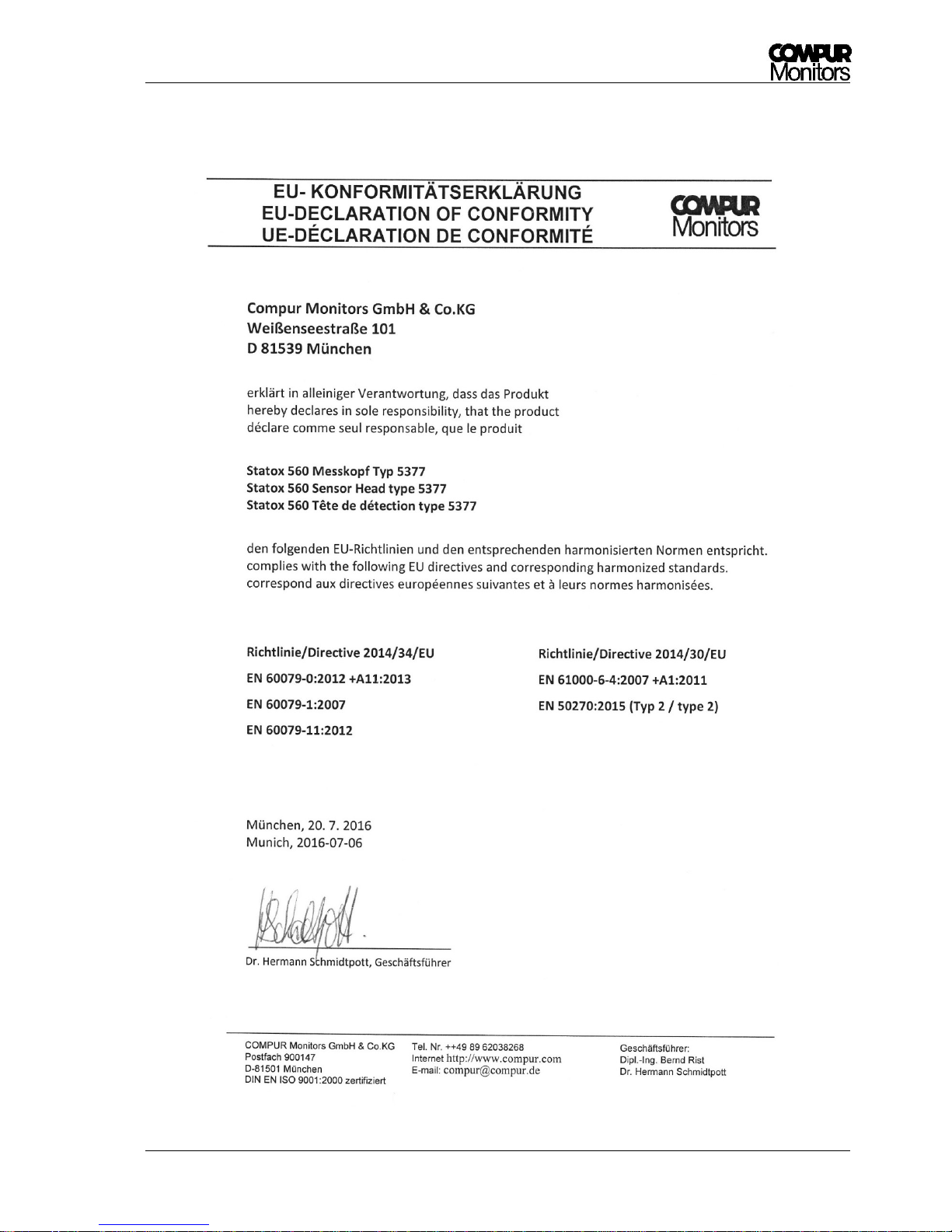
Statox 560
Issue 2/2017 Page 65 of 66
12 Declaration of conformity
Page 66

Statox 560
Ausgabe 1/2016 Seite 66 von 66
Specifications are subject to change without notice, and are provided only for comparison of products. The
conditions under which our products are used, are beyond our control. Therefore, the user must fully test
our products and / or information to determine suitability for any intended use, application, condition or
situation. All information is given without warranty or guarantee. Compur Monitors disclaims any liability,
negligence or otherwise, incurred in connection with the use of the products and information. Any statement
or recommendation not contained herein is unauthorized and shall not bind Compur Monitors. Nothing
herein shall be construed as a recommendation to use any product in conflict with patents covering any
material or device or its use. No licence is implied or in fact granted under the claims of any patent.
Instruments are manufactured by Compur Monitors GmbH & Co. KG, Munich.
The General Conditions of Supply and Service of Compur Monitors GmbH & Co. KG, Munich, are applicable.
Compur Monitors GmbH & Co. KG
Weißenseestraße 101
D-81539 München
Tel. 0049 (0) 89 62038 268
Fax 0049 (0) 89 62038 184
Internet: www.compur.com
E-Mail: [email protected]
5377 000 998 07 04 562991
 Loading...