

Page 1
Luna and Nova
Yokes
Page 2

Luna and N o v a Y o k e s
Doc. Version 1.01 Compulite Systems (2000) 2
Copyright © 2010 Compulite Systems (2000) Ltd. All rights reserved.
This guide is delivered subject to the following conditions and restrictions:
This product or document is protected by copyright and distributed under licenses restricting its use,
copying, distribution and decompilation. No part of this product or document may be reproduced in
any form by any means without the prior express written authorization of Compulite Systems (2000)
Ltd. and its licensors (if any). Information contained herein is subject to change without notice.
Documentation version 1.1 March 2010
Page 3

Doc. Version 1.01 Compulite Systems (2000) 3
Contents
User Guide:............................................................................................................ 1
Luna and Nova Yokes).......................................................................................... 1
Introduction ...................................................................................... 4
Attaching Yoke to Luminaire............................................................. 4
Interface....................................................................................................... 5
Connectors....................................................................................... 5
Control Panel ................................................................................... 6
Operation..................................................................................................... 7
Programming the Yoke..................................................................... 7
Modes
.....................................................................................................................
8
Test Mode.................................................................................................... 8
Technical Specifications .............................................................................. 9
Page 4

Luna and N o v a Y o k e s
Doc. Version 1.01 Compulite Systems (2000) 4
Introduction
Luna and Nova yokes have a self-locking system, last position memorization,
programmable pan and tilt limits, and an internal power supply. They are quiet
and extremely accurate. Luna’s maximum load is 15 kg. Nova’s maximum load
30kg.
Luna and Nova use servo controlled 24 VDC motors with mechanical overload
protection (torque limiter and friction clutch) for both the X and Y axes.
The self-locking mechanism can be overridden manually.
Pan is default enabled for 360 degrees. Tilt is default enabled for 270 degrees.
There are electronic stoppers for pan and tilt, which are manually programmed.
Any time a control key is pressed the yoke's travel is interrupted for
approximately 15 seconds.
Attaching Yoke to Luminaire
Keypresses Results/Comments
1. Attach the adapters on
each Yoke arm to the
fixture using 2 M6
screws.
One of the adapters contains a stopper and the
other contains the clutch.
For the adapter containing the stopper: DO
NOT remove from the potentiometer axis.
Removal from the axis can result in a loss of
orientation and cause serious damage.
For the adapter containing the clutch: DO
NOT remove the 3 bolts that hold this adapter.
Page 5
Luna and N o v a Y o k e s
Doc. Version 1.01 Compulite Systems (2000) 5
Interface
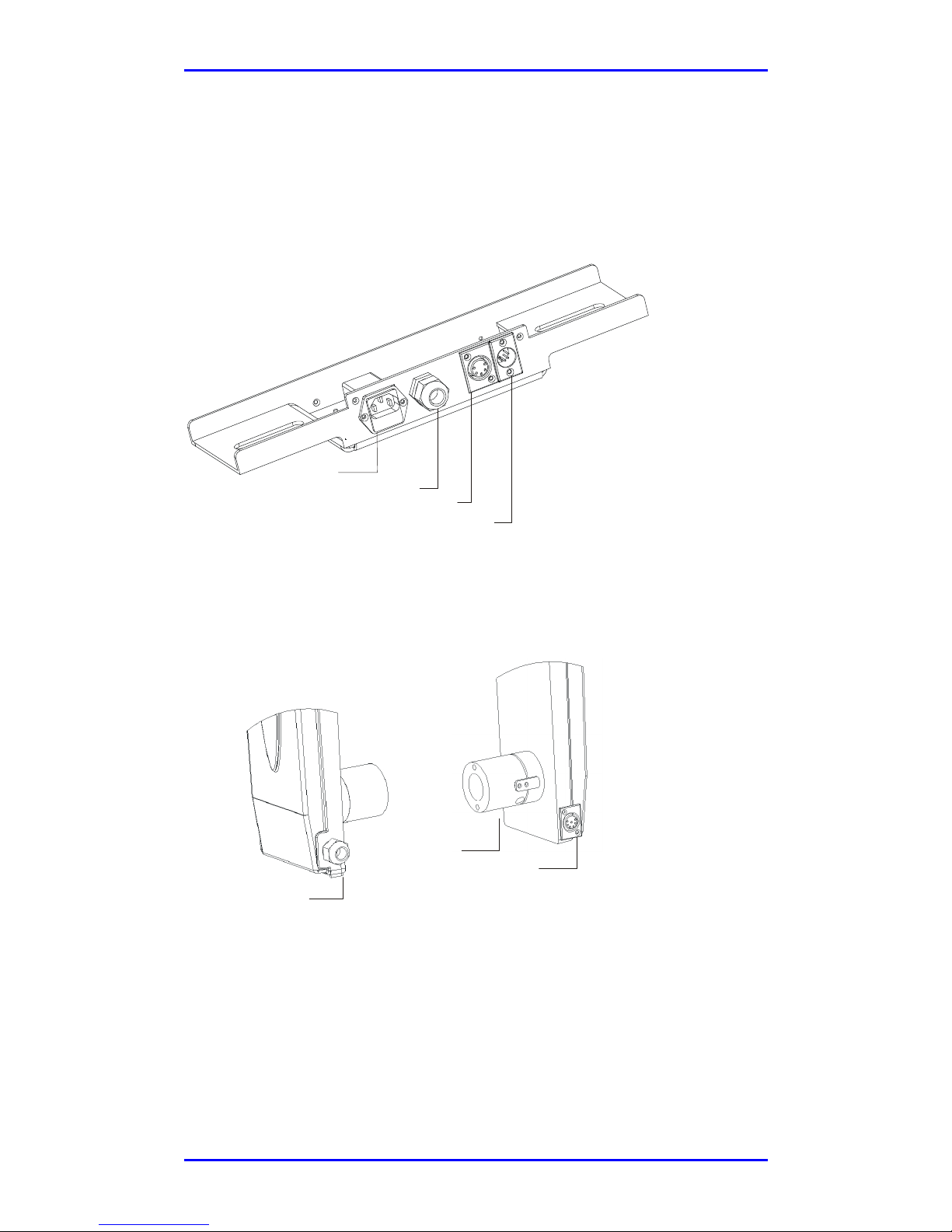
Connectors
Figure 1 Top panel
Figure 2 Connectors on Yoke arms
AC In
Fixture power cable
DMX Thru
DMX In
Fixture AC cable
Focus (option)
Scroller (option)
Page 6
Luna and N o v a Y o k e s
Doc. Version 1.01 Compulite Systems (2000) 6
Control Panel
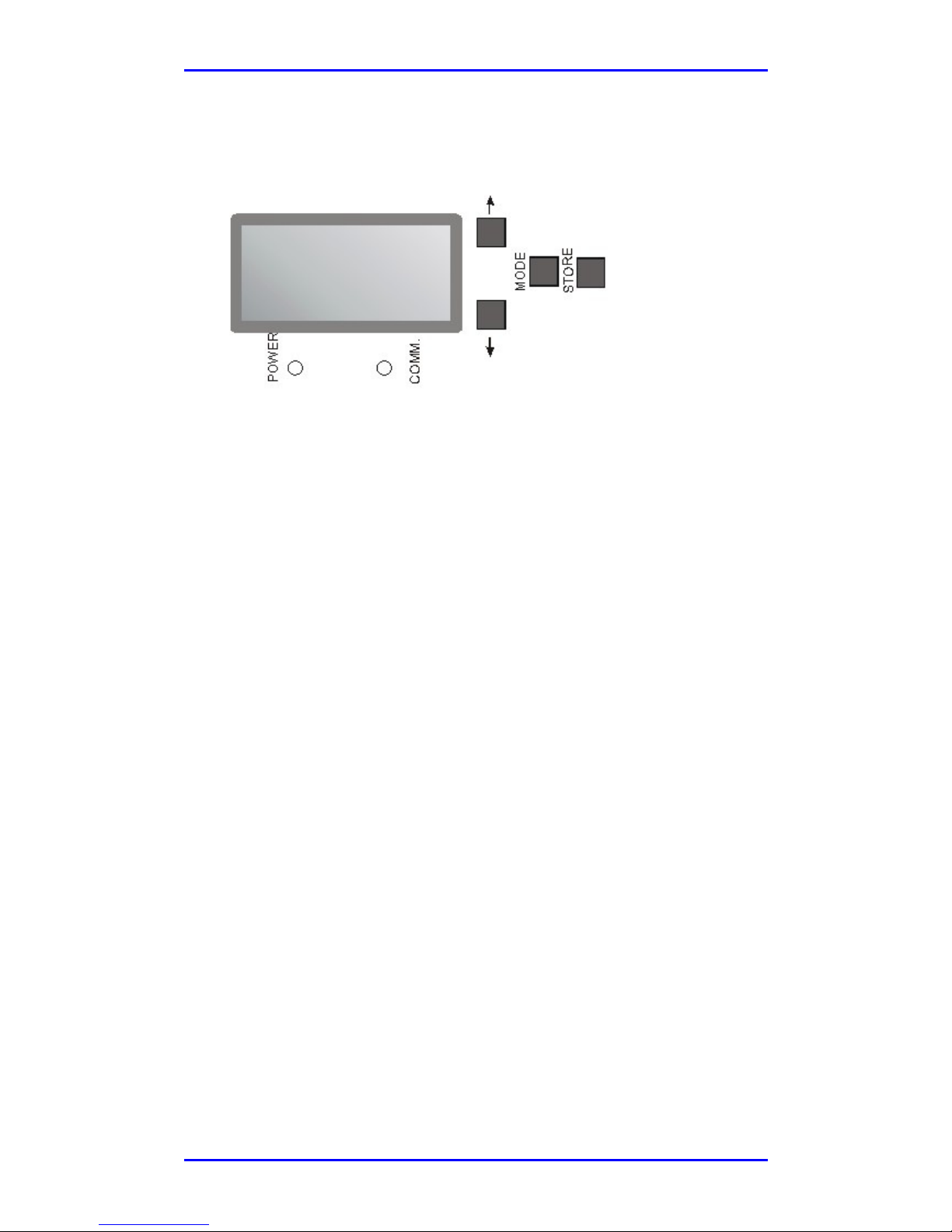
Figure 3 Display, LEDs, and Control Keys
Display
Luna and Nova are equipped with LED Smart displays. The display can be
inverted for orientation according to the yoke’s physical rigging, whether hanging
or standing.
There are two display modes: bright and dim. During programming the display is
bright. During routine function the display is dimmed and shows the yoke's name.
The display automatically returns to the yoke name after displaying a mode.
LEDs
There are 2 LEDs on the control panel.
The green Communications LED shows the communication status. LED On
indicates DMX receiving. If the LED is off there is no DMX signal present.
When the red Power LED is on the unit is receiving power. When off the unit is
not connected.
Page 7

Luna and N o v a Y o k e s
Doc. Version 1.01 Compulite Systems (2000) 7
Operation
Programming the Yoke
Keypresses Results/Comments
2. Press MODE as many
times as necessary until
the feature is displayed
3. Use the arrow keys to
assign a value
A single press advances the value by 1 unit or
toggles the assignment. A sustained press
advances quickly.
4. Press STORE
The display flashes.
5. Press STORE again
The value is stored.
Note
Pressing any key at any time stops yoke travel and disrupts DMX communication
for 15 seconds. At the end of the 15 second period, DMX communication is
resumed. The display dims.
Page 8

Luna and N o v a Y o k e s
Doc. Version 1.01 Compulite Systems (2000) 8
Modes
Mode Display Purpose
DMX address
D###
Set the yoke's DMX address
Velocity control
FAST or
SLOW
Determine the movement speed. Use
Slow for the most accurate positioning.
Resolution
8-b or 16-b
Choose 8-bit or 16-bit resolution.
Mode
COM or TEST
COM is the usual operational mode.
TEST puts the yoke through its Test
routine.
Horizontal start
point
XL##
Define the start point for pan. *
Horizontal end
point
XH##
Define the end point for pan. *
Vertical start
point
YL##
Define the start point for tilt. *
Vertical end point
YH##
Define the end point for tilt. *
Focus start point
FL##
Define the beginning of the focus path.
**
Focus end point
FH##
Define the end of the focus path. **
Display
orientation
⇓⇓⇓⇓ or
⇑⇑⇑⇑
Adjust the display according to the
physical placement of the yoke –
hanging or standing.
*Each press on an arrow key increases or decreases the value by approximately 4
degrees.
**Each press on an arrow key initiates 1 turn of the motor. From 0 – FL there are 25
turns.
Test Mode
Test can be initiated when the Yoke is at rest or when it is moving. Travel stops
when any key is pressed.
There is a default wait of 5 seconds from the time Test mode is selected and
initiation of the test to give the operator time to get clear of the yoke.
The test lasts for 10 minutes or until any button is pressed.
Keypresses Results/Comments
1. Press MODE until
COM is displayed
2. Press any key except
MODE.
The Yoke goes to Test mode.
3. Press any key to exit
Test.
Page 9

Luna and N o v a Y o k e s
Doc. Version 1.01 Compulite Systems (2000) 9
Technical Specifications
Electrical
Standard: Internal power
supply
In: 100 – 240 VAC (autosensing)
Option: External power supply +48 VDC 0.8A/Yoke
Dimensions Luna Nova
Height 624 mm (24.5”) 700 mm (27.5")
Depth 120 mm (5”) 124 mm (5")
Width (can be ordered
in a variety of sizes)
Max. Luminaire width
470 mm – 590mm
(18.5” – 23.3")
280 mm–420 mm
(11” – 16.5")
544 mm – 642 mm
(21.5" – 24.5")
330 mm – 450 mm
(13" – 18")
Weight (w/o
luminaire)
8 kg (17.6 lbs.) 18 kg (39.6 lbs)
Maximum load 15 kg. (33 lbs.) 30 kg (110 lbs.)
Range
Pan
Tilt
360 degrees
270 degrees
Velocity
Fast: Pan Full Range
Tilt Full
Range
Slow: Pan Full Range
Tilt Full
Range
8 seconds
4 seconds
14 seconds
12 seconds
12 seconds
8 seconds
Accuracy
Position resolution
Repeatability
1.5 cm @10 m.
+- 2 cm. @ 10 m.
Signal input DMX 512
DMX Assignment 8 bits 16 bits
Channel 1
Channel 2
Channel 3
Channel 4
Channel 5
Channel 6
pan
tilt
focus/iris
dimmer
pan high
pan low
tilt high
tilt low
focus/iris
dimmer
Page 10

Luna and N o v a Y o k e s
Doc. Version 1.01 Compulite Systems (2000) 10
Connectors
Internal power supply
5 pin standard XLR
Pin 1 – GND
Pin 2 – DMX (-)
Pin 3 – DMX (+)
Pin 4 – Not used
Pin 5 – Not used
External power supply
4 pin XLR daisy chain
Pin 1 – GND
Pin 2 – DMX (-)
Pin 3 – DMX (+)
Pin 4 - +48v
Features:
Switch off the power of
the motor when it hits
some obstacles.
Shut down when it arrives
end position.
Options
Focus or Iris
Color changer connector
 Loading...