

Page 1
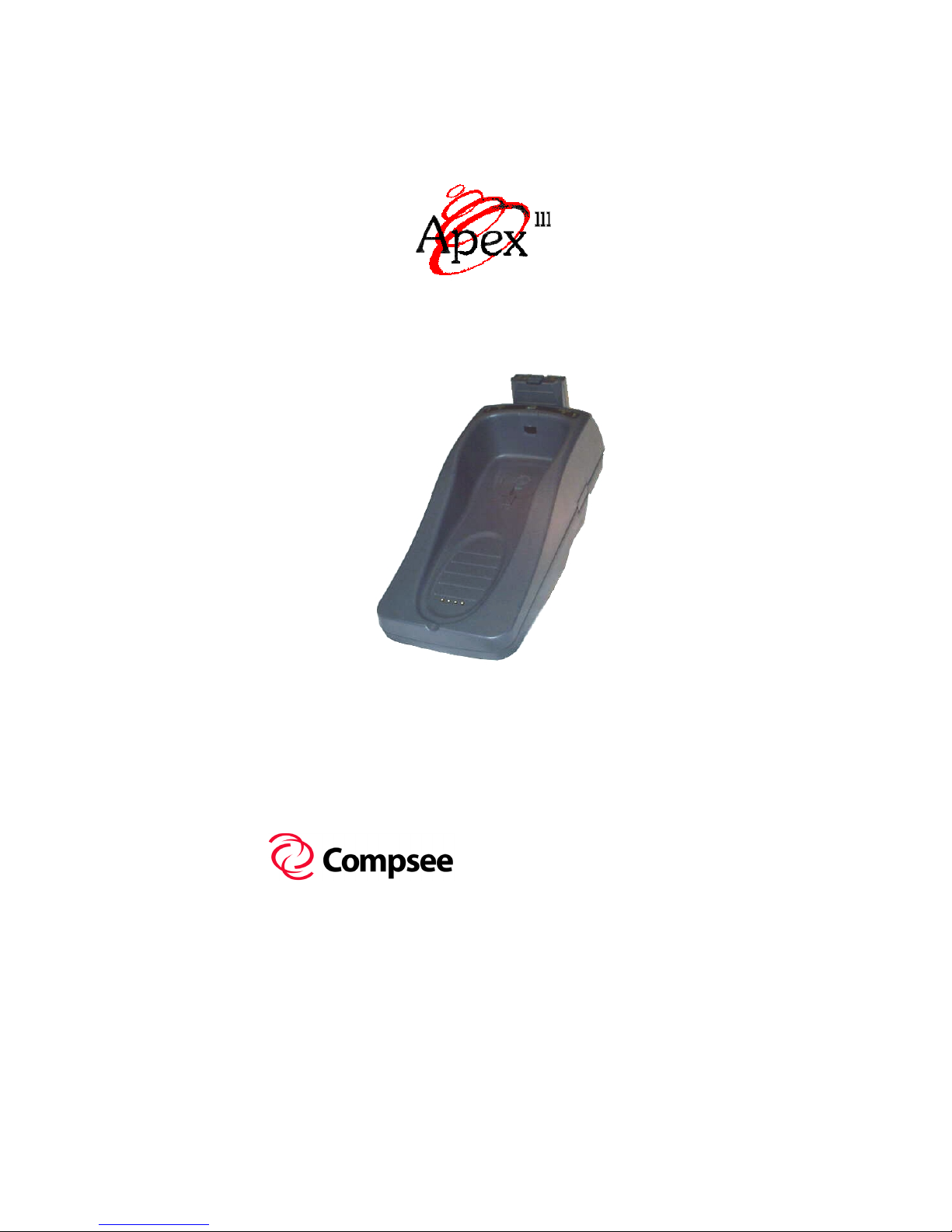
DOCK
USER’S MANUAL
FIRST EDITION
FIRST EDITION
FIRST EDITIONFIRST EDITION
Compsee, Inc.
A Subsidiary of McRae
Industries, Inc.
Page 2

This Page Intentionally Left Blank
Page 3

DOCK
USER’S MANUAL
FIRST EDITION
FIRST EDITION
FIRST EDITIONFIRST EDITION
Compsee, Inc.
A Subsidiary of McRae
Industries, Inc.
Page 4

n
t
f
Copyright Acknowledgments:
All terms and names mentioned within this publication that are known to be
registered trademarks and/or service marks have been appropriately
designated. Due to today's changing corporate environment, Compsee, Inc.
cannot attest to the accuracy of all of this information. Use of a specific
term in this publication should not be regarded as affecting the validity of
any trademark or service mark known to exist.
Compsee
Industries, Inc.
Windows
Corporation.
Adobe
COMPSEE, INC. 2000, All Rights Reserved
All parts of this manual, including illustrations and specifications
are the property of Compsee, Inc. The information contained herei
may not be reproduced in whole or in part for any reason withou
express written authorization from Compsee, Inc.
The material contained in this manual is for informational purposes
only and subject to change without notice.
COMPSEE, INC. and Apex III
Compsee, Inc., Mt. Gilead, NC 27306.
and Apex III are registered trademarks of McRae
and Microsoft are registered trademarks of Microsoft
and Acrobat are registered trademarks of Adobe Systems Inc.
are authorized trademarks o
Manual Number COAM30003, Rev 1.04
Page 5
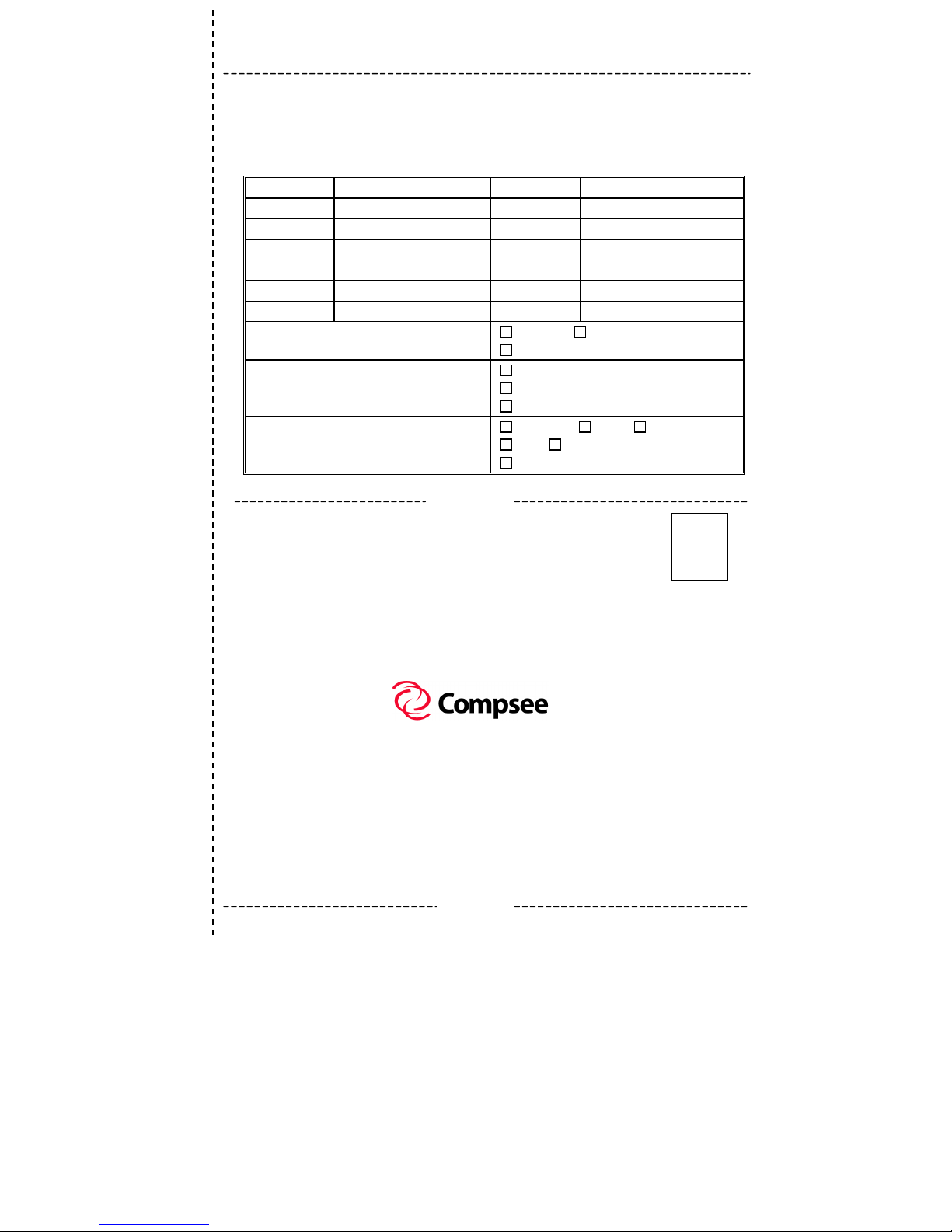
Apex III Product Registration Card
Please complete this form and mail or FAX to :
Model #
Company Name
Address
State
ZIP
FAX
Purchased from
Please check the box that best describes your
company.
What is the size of your company?
What is you r applic ation for the Apex III?
You must register this product to receive product support.
Compsee, Inc.
2500 Port Malabar Blvd. NE
Palm Bay, FL 32905-6065
(321) 723-2895 (FAX)
Serial #
User’s Name
City
Country
Phone
E-mail Address
Date Purchased
Individual
Corporation
Under $1 Million in Sales
Greater than $1 Million, less than $10 Million in sales
Greater than $10 Million in sales
Warehousing
Retail Service
Other (describe)
Reverse Side
Privately-Owned Company
Medical Government
Place
Stamp
Here
2500 Port Malabar Blvd. NE
Palm Bay, FL 32905-6065 U.S.A.
Front Side
Page 6

This Page Intentionally Left Blank
Page 7

Apex III Dock User’s Manual Warranty Information
APEX III DOCK WARRANTY
INFORMATION
Note to Purchaser
This warranty and license contains important information on the
servicing and use of your new Apex III Dock and Power Supply.
Limited Warranty
Compsee, Inc. warrants that for one year from date of purchase, the
Apex III Dock shall be free from significant defects in material and
workmanship and that it will operate satisfactorily under normal
conditions of use and service, as more fully described within this
manual or other product specifications published by Compsee, Inc.
In addition, Compsee, Inc. warrants for a period of one year from
the date of purchase, that the Dock Power Supply (included in Kits
only) shall be free from significant defects in material and
workmanship.
Compsee’s responsibility under this warranty is limited to repair or
replacement of any part of the Dock or Power Supply, which proves
to be defective in normal use and/or service during the prescribed
warranty period. Refer to the Service and Repair section of this
manual for the equipment return procedure.
Warranty Disclaimers
These warranties apply only to Apex III Dock and Power Supply
purchased directly from Compsee, Inc. or from an authorized Value
Added Reseller (VAR) of Compsee products. The warranties are
void if apparent defects were caused by accident, neglect, misuse,
alteration, or unauthorized attempts at adjustment or repair.
Warranty service, as described herein, is the exclusive remedy of
the purchaser against Compsee, Inc. for product defects or any other
claim or liability in connection with the purchase or use of
prescribed Compsee products.
It should be noted that the above warranties only apply to Dock and
Power Supply use
documentation and when purchased directly from Compsee, Inc. or
an authorized agent. Use of either of these products other than
prescribed by this or other Compsee, Inc. documentation will void
the product warranty.
as specified
COAM30003 Rev. 1.04 09/03/01 i
within this or other Compsee, Inc.
Page 8

Apex III Dock User’s Manual Warranty Information
Warranty Note
These warranties are in lieu of any other warranties,
express or implied, including, but NOT limited to, any
implied warranty of merchantability or fitness for a
particular purpose, even though Compsee, Inc. may have
been advised of the intended use of the products being
purchased.
Warranty Limitations
Failure to follow the below operational stipulations when using or
caring for your Apex III Dock will negate the product warranty.
Please review these items thoroughly before using your unit.
Prior to operating the Dock, review the prescribed warranty
limitations. Failure to adhere to the provisions of these
limitations will void the product warranty.
Do NOT attempt to open or disassemble the Apex III Dock or
Power Supply. No user serviceable parts are included in these
units.
ONLY Charge Apex III Battery Packs with an approved
Compsee charging device. Use of any charging device or
Battery Pack other than those approved by Compsee, Inc. can
potentially damage the Apex III Portable Data Collection
Terminal (PDT), Dock, External Charger, Power Supply,
and/or Battery Pack.
Do NOT spray cleaners directly on the unit or use a saturated
cloth for cleaning the unit. Only a lightly damp cloth should be
used for wiping down the unit.
Do NOT clean the Apex III Dock or Power Supply using
alcohol, acetone, mineral spirits or any other petroleum or
alcohol based product. Damage to the unit can occur.
Do NOT leave the Dock or Power Supply in the rain or direct
sunlight or immerse the units in water or any other liquid.
These units are designed for indoor use only.
COAM30003 Rev. 1.04 09/03/01 ii
Page 9

Apex III Dock User’s Manual Warranty Information
Recommended Operational Tips
Failure to heed the following recommendations, while not
Note:
voiding the warranty, may result in degradation to the units
operation:
Do NOT clean the Dock or Battery Pack terminals with soap,
abrasives, or any alcohol or petroleum based solution. Should
the contacts require cleaning due to oxidation or corrosion
buildup, clean gently using a standard pencil eraser. DO NOT
press too hard as contact damage could occur.
Do NOT attempt to operate the Apex III PDT once it has
powered down due to a low battery condition. When the
Battery Pack is exhausted, leave the exhausted Battery Pack in
the Apex III until you can either charge it in place by placing
the Apex III in the Apex III Dock, or swap the Battery Pack
with a charged Battery Pack. Information in volatile memory
(RAM) will be preserved since the Apex III PDT is configured
so that even with an exhausted Battery Pack enough energy is
retained to maintain the information for an extended period of
time. DO NOT leave the unit WITHOUT a Battery Pack for
more than 5 minutes.
Only use the Apex III Dock or Apex III External Charger for
charging Apex III Battery Packs.
Only use Compsee, Inc. approved cables and power supplies to
connect your Apex III Dock or External Charger.
Apex III Battery Packs use Nickel Metal Hydride (NiMH)
composition, they DO NOT succumb to memory (hysteresis)
loss as do Nickel-Cadmium (Ni-Cd) batteries.
Apex III Battery
Packs can therefore be charged while in any state-of-charge
and do not require full discharge prior to charging; however, it
is still recommended that the Battery Pack be fully discharged
periodically to reset the internal gas gauge circuitry
.
COAM30003 Rev. 1.04 09/03/01 iii
Page 10

Apex III Dock User’s Manual Warranty Information
COAM30003 Rev. 1.04 09/03/01 iv
Page 11

Apex III Dock User’s Manual Table Of Contents
TABLE OF CONTENTS
1 APEX III DOCK BASICS ........................................1-1
General User Information.......................................... 1-1
Using This Manual ....................................................1-1
Apex III Dock Characteristics ...................................1-2
Optional Accessories .................................................1-3
2 SAFETY ....................................................................2-1
Standard Safety Guidelines .......................................2-1
Unit Specific Safety Notes ........................................2-2
Battery Pack Safety ...................................................2-3
Product Conformity ...................................................2-4
3 DOCK SETUP AND OPERATION .........................3-1
Apex III Dock Setup..................................................3-1
Initial Setup Procedure......................................... 3-1
Apex III Dock Operation...........................................3-7
Apex III Spare Battery Pack Charging................. 3-7
Installed Apex III PDT Battery Pack Charging ...3-8
Apex III PDT/Battery Pack Notes........................ 3-9
Battery Pack Life.................................................. 3-9
Apex III PDT Communications .........................3-10
4 TECHNICAL INFORMATION ............................... 4-1
Associated Pinouts.....................................................4-1
5 SUPPORT INFORMATION.....................................5-1
Associated Apex III Dock Part Numbers ..................5-1
Technical Support...................................................... 5-1
Service And Repair....................................................5-2
Return Material Authorization (RMA) ................5-3
Specifications ............................................................5-4
User Unit Specific Information .................................5-5
Notes..........................................................................5-6
COAM30003 Rev. 1.04 09/03/01 v
Page 12

Apex III Dock User’s Manual Table Of Contents
COAM30003 Rev. 1.04 09/03/01 vi
Page 13

Apex III Dock User’s Manual 1 Apex III Dock Basics
1 APEX III DOCK BASICS
General User Information
This manual provides information necessary to properly operate and
maintain the Apex III Dock and Power Supply. Contained within
this manual is a description of the unit’s hardware; procedures for
unpacking and verifying the unit’s operating functions; operational
instructions; Battery Pack charging instructions; guidelines for
maintaining the Dock; and other useful information.
Before attempting to understand and operate new equipment, it is
important for the user to gather the available information on the
product. Whether you are a novice or a confident user with the
added advantage of knowing electronics, this manual contains the
information you need to become a proficient user of the
Apex III Dock.
It should be noted that while this manual provides the user with the
required information to operate and maintain the Apex III Dock,
understanding the use and operation of the Apex III PDT will help
the user to more fully comprehend the entire Apex III system
capabilities and the integrated use of all of the Apex III line of
products. It is therefore recommended that any user of the Apex III
Dock also become familiar with the Apex III PDT operation (refer
to the Apex III Portable Data Collection Terminal User’s Manual).
Additionally, the Apex III PDT Technical Reference Manual
provides technical details pertaining to the Apex III PDT’s
configuration and technical operation.
Using This Manual
Typographic conventions followed within this manual:
Bold Type
throughout the manual.
Important points and supplementary information are included
as
Notes
throughout the manual using a
When referring to specific components, their titles or names
will be shown as much as possible in the exact format as they
appear on the parts themselves.
is used for headings and important sections
throughout this manual. Note headings are printed
bold underlined typeface
COAM30003 Rev. 1.04 09/03/01 1-1
.
Page 14

Apex III Dock User’s Manual 1 Apex III Dock Basics
CAUTION
and
WARNING
messages are
provided within this manual, which if not observed could result
in personal injury, equipment damage, or have an adverse
affect on unit operation.
CAUTION
messages are located within boxes with their headings in
.
type
Procedures when specified should be followed in the order
and
WARNING
bold
given unless otherwise noted. Failure to do so may result in
damage or adversely affect the Dock, Power Supply, or
Apex III Battery Pack.
Apex III Dock Characteristics
The Apex III Dock and associated Power Supply are solid-state
electronic devices that have been designed to be used specifically
with the Apex III Battery Packs.
The full-functioned capabilities of your Apex III Dock allow
simultaneous operations including:
The charging of one (1) Apex III Battery Pack.
Charging of the pre-installed Battery Pack within the
Apex III PDT (slip-in charging capability).
Infrared (IR) communications between the Apex III PDT
and the Apex III Dock (RS-232 serial communications
between the Dock and another serial device such as a PC).
WARNING!
ONLY CHARGE APEX III BATTERY PACKS WITH THE
APEX III DOCK OR EXTERNAL CHARGER!
DO NOT attempt to charge any other type battery pack or batteries
other than Apex III Battery Packs with your Apex III Dock or
External Charger. Placing other types of battery packs or batteries
into the battery charging slot could result in personal injury and/or
damage to the unit.
COAM30003 Rev. 1.04 09/03/01 1-2
Page 15

Apex III Dock User’s Manual 1 Apex III Dock Basics
Your Apex III Dock includes the following features:
Fast charging capabilities (2 hours maximum for a fully
depleted Battery Pack –whether the Battery Pack is installed in
the Apex III PDT or removed and placed in the available spare
charging slot)
Light Emitting Diode (LED) indicating lights to inform the
user of the charging progress or state of communication
Table top or wall mounting capability for ease of use and space
saving area locating
Optional Accessories
The following items are available as optional accessories for use
with the Apex III PDT and Dock (refer to the parts section of this
manual for specific part numbers):
Additional Battery Packs (Nickel Metal Hydride - NiMH)
Additional Apex III Docks – Allows additional docking
stations incorporating Infrared (IR) coupling, slip-in charging
capabilities, and an additional charging slot for a spare Apex III
Battery Pack. Capable of being mounted on the wall or desk.
Apex III External Chargers – Allows additional locations for
simultaneous charging of two spare Apex III Battery packs
(refer to the Apex III External Charger User’s Manual for
additional details).
Additional Power Supplies (with or without an AC line cord)
AC Line Cord Set
Vehicle Lighter Adapter – Cigarette lighter adapter cable for
connecting the Dock or External Charger Power supply to a
12 VDC vehicle power source.
Apex III Dock Serial Communications cable (see Associated
Apex III Dock Part Numbers in this manual)
Compsee Product Support CD (additional copies)
Hard Copy (printed) of any Apex III PDT documentation
manual.
COAM30003 Rev. 1.04 09/03/01 1-3
Page 16

Apex III Dock User’s Manual 1 Apex III Dock Basics
COAM30003 Rev. 1.04 09/03/01 1-4
Page 17
Apex III Dock User’s Manual 2 Safety
2 SAFETY
Standard Safety Guidelines
The Apex III Dock has been designed and manufactured to exacting
standards for performance, reliability and safety. This product is
electronic and electrical in nature and should therefore be used in
accordance with the typical electrical safety guidelines listed below:
WARNING!
DO NOT OPERATE THE APEX III DOCK
IN A WET ENVIRONMENT!
DO NOT operate the Apex III Dock in any location that could
result in the unit getting splashed, wet, or immersed in liquid.
Operating the unit in these conditions could result in an Electrical
Shock Hazard and damage to the unit.
WARNING!
DO NOT TAMPER OR OPEN THE UNIT CASE!
DO NOT tamper or operate the Apex III Dock if the case is
perforated, broken, or loosely held together. Use of the product
with the case broken, perforated, or loose could result in an
Electrical Shock Hazard and/or damage to the unit.
CAUTION!
DO NOT CLEAN THE CHARGING TERMINALS
WITH THE UNIT PLUGGED IN!
DO NOT clean the Dock charging terminals with the unit
plugged-in. DO NOT use any type of liquid or solvent to clean the
terminals. ONLY use a standard pencil eraser to clean the terminals
and DO NOT use excessive force. If an eraser will not clean the
terminals, the unit should be repaired or replaced.
COAM30003 Rev. 1.04 09/03/01 2-1
Page 18
Apex III Dock User’s Manual 2 Safety
CAUTION!
ONLY USE COMPSEE APPROVED METHODOLOGY!
DO NOT use any Apex III Dock for uses other than those specified
by Compsee, Inc. Use of controls, adjustments, procedures, or
methodology other than those specifically identified by Compsee,
Inc. is strictly prohibited and will void the product warranty.
Unit Specific Safety Notes
Certain warnings and precautions, in addition to the general safety,
operational, and care instructions in this manual, are provided for
safe operation of this product. These guidelines are listed below
and should be followed as noted for safe and proper operation of the
unit.
WARNING!
DO NOT OPERATE THE APEX III DOCK OR EXTERNAL
CHARGER IN AN EXTERNAL ENVIRONMENT!
DO NOT operate the Apex III Dock or External Charger in any
outside location where they could become exposed to the elements.
The Apex III Dock and External Charger have been designed for
indoor use only!
Operating the units outside, exposed to the
elements could result in an Electrical Shock Hazard and/or
damage to the units.
WARNING!
ONLY OPERATE THE APEX III DOCK
IN CONJUNCTION WITH COMPSEE APPROVED
POWER SUPPLY AND CABLES!
ONLY use Compsee, Inc. approved cables and Power Supplies
with your Apex III products. Use of other charging or connection
materials could result in inferior operation or damage to the unit.
If variations in the cables or power supply are necessary for your
installation, contact Compsee, Inc. and obtain approval for use of
the materials in conjunction with your Apex III equipment.
COAM30003 Rev. 1.04 09/03/01 2-2
Page 19
Apex III Dock User’s Manual 2 Safety
Battery Pack Safety
WARNING!
ONLY CHARGE APEX III BATTERY PACKS!
DO NOT attempt to charge any other type battery pack or batteries
other than Apex III Battery Packs with your Apex III Dock or
Apex III External Charger. Placing other types of battery packs or
batteries into the Dock or External Charger could result in personal
injury and/or damage to the unit.
WARNING!
ONLY USE COMPSEE, INC. APPROVED CHARGERS!
Only charge the Apex III Battery Packs in the Apex III Dock or
the Apex III External Charger. DO NOT use chargers from other
manufacturers. The Battery Pack warranty will be voided and
Battery Pack Damage could occur.
WARNING!
DO NOT SHORT THE APEX III BATTERY PACK TERMINALS!
DO NOT touch more than one Battery Pack terminal at a time with
any electrical conductive material. An electrical short across the
Battery Pack terminals could result in the sudden release of a large
portion of the Battery Pack’s energy causing the Battery Pack to
overheat and leak.
CAUTION!
PROPERLY DISPOSE OF APEX III BATTERY PACKS!
Apex III PDT Battery Packs should be disposed of properly. DO
NOT dispose of the Apex III Battery Pack in a flame or fire. An
explosion may occur. Apex III Battery Packs are approved for
disposal in a class 2 Landfill (normal trash); however, recycling the
Battery Packs reduces the amount of raw materials consumption
necessary to produce new Battery Packs and also reduces the total
landfill usage within your area. We highly recommend that the
Battery Packs be returned to the factory for recycling at the end of
their useful life. Contact Compsee, Inc. for additional information.
COAM30003 Rev. 1.04 09/03/01 2-3
Page 20

Apex III Dock User’s Manual 2 Safety
Product Conformity
No user serviceable parts are included in the manufacture of your
Apex III product.
will void the product warranty
Only Authorized personnel should attempt to repair or replace parts
within this unit. Breaking of the unit seal, tampering, or repair by
unauthorized personnel will void the unit warranty and could result
in personnel injury or permanent damage to the unit.
This equipment has been tested and found to comply with the
limits for a Class B digital device pursuant to Part 15 of the FCC
Rules. These limits are designed to provide reasonable protection
against harmful interference in a residential installation. This
equipment generates, uses, and can radiate radio frequency
energy. If the equipment is not installed and used in accordance
with instructions published in this and other Apex III manuals,
interference with radio communications may result. There is no
guarantee that interference will not occur in a particular
installation. If this equipment does cause harmful interference to
radio or television reception (determined by turning the
equipment ON and OFF), the user is encouraged to try to correct
the interference by one or more of the following measures:
Reorientation or relocation of the receiving antenna
Increasing the separation between the equipment and
affected receiver
Connecting the equipment to an outlet on a different
electrical circuit than that of the affected receiver
Consulting the dealer or an experienced radio/TV technician
for help
Opening of the unit by unauthorized personnel
.
WARNING!
COAM30003 Rev. 1.04 09/03/01 2-4
Page 21
Apex III Dock User’s Manual 3 Dock Setup And Operation
3 DOCK SETUP AND OPERATION
Apex III Dock Setup
The Apex III Dock is a sophisticated electronic device that
automatically maintains the installed Apex III PDT Battery Pack
and a spare Battery Pack in a fully charged state. With it’s
integrated features, the Apex III Dock simultaneously allows a user
or programmer to conduct Infrared (IR) communications between
the Apex III PDT and the Dock (RS-232 serial communications
between the Dock and an IBM compatible PC or other serial
device). Refer to the Apex III PDT User’s Manual and Apex III
PDT Technical Reference Manual for detailed information on
conducting communications.
To ensure proper Dock operation, superior performance, and a long
service life we recommend that you follow the instructions put forth
in this User’s Manual. The following information is a guideline to
be used during initial installation of the unit.
Initial Setup Procedure
1. Remove the Apex III Dock from the packing carton and
inspect the unit to ensure it is good physical condition after
shipping.
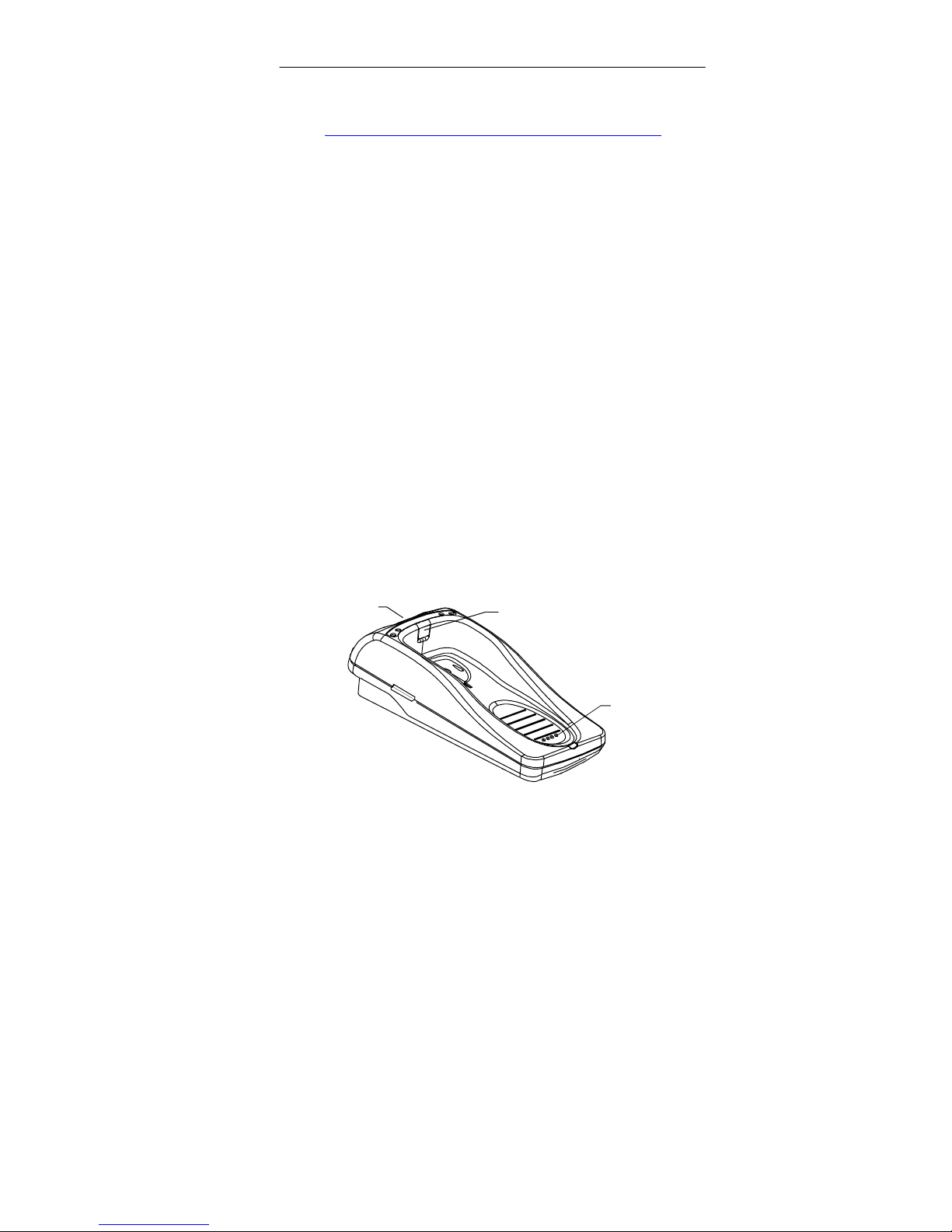
SPARE BATTERY PACK
CHARGING SLOT
IR PORT INTERFACE WINDOW
SLIP-IN BATTERY
PACK CHARGING
TERMINALS
Figure 3-1: Apex III Dock (Frontal View)
COAM30003 Rev. 1.04 09/03/01 3-1
Page 22
Apex III Dock User’s Manual 3 Dock Setup And Operation
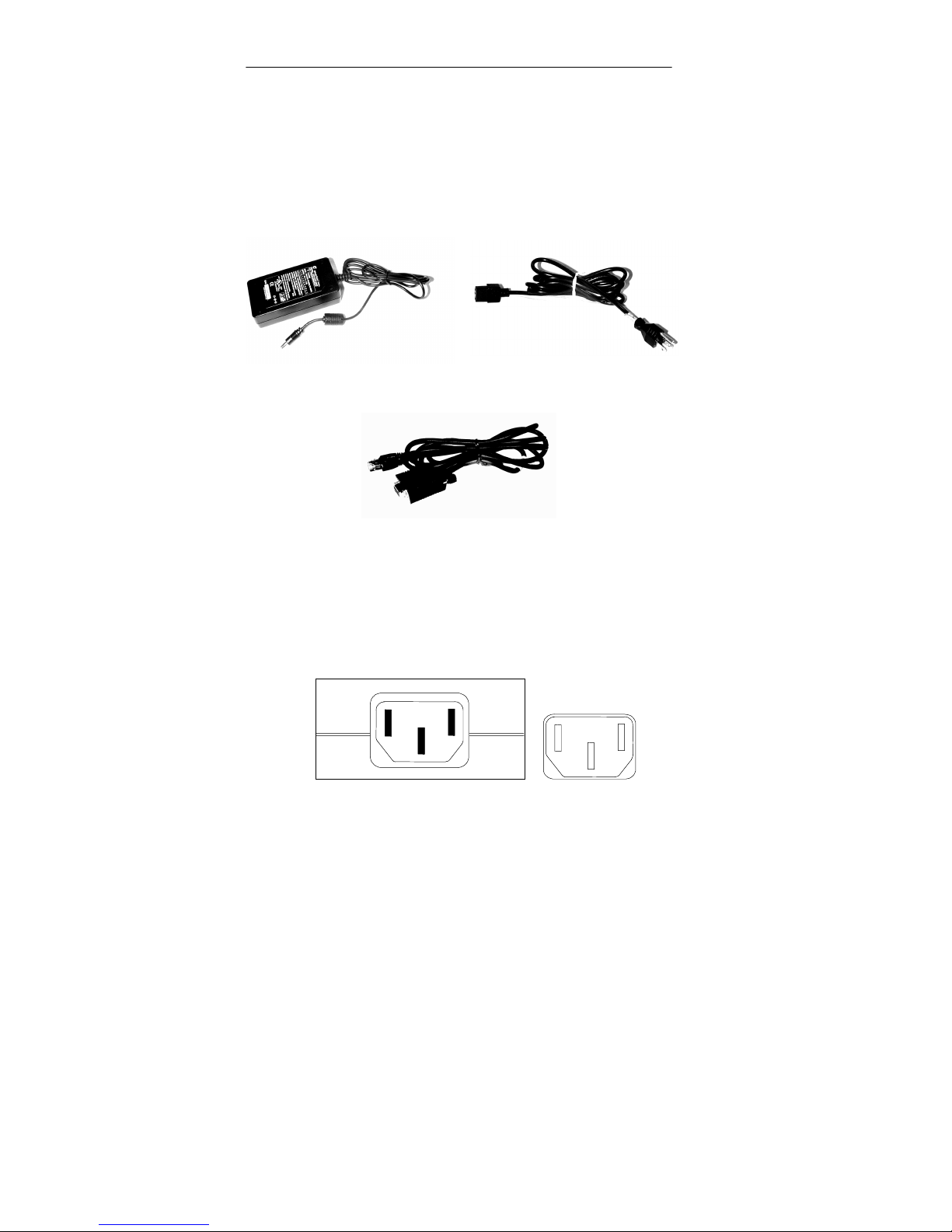
2. If you have ordered a Dock Kit (Kit 1 or 2 – refer to the
Support Section of this manual for part numbers and
description), remove the associated Power Supply,
Communications Cable, and AC Line cable (if applicable)
from the packing container (refer to Figure 3-2, Figure 3-3,
and Figure 3-4).
Figure 3-2: Apex III Dock
Power Supply
Figure 3-3: AC Line Cord (120
VAC Cord Shown)
Figure 3-4: Apex III Dock Communications Cable
(10 Pin Phone Plug To DB-9)
3. Record the unit specific information on the page provided at
the back of this manual (p. 5-5) for future reference before
permanently installing your Apex III Dock.
4. Plug the female end of your AC Line cord into the Power
supply connector (refer to Figure 3-5).
Power Supply - AC Line Cord Connector
Figure 3-5: Power Supply AC Power Connection
AC Line Plug
[Power Supply Side]
COAM30003 Rev. 1.04 09/03/01 3-2
Page 23
Apex III Dock User’s Manual 3 Dock Setup And Operation
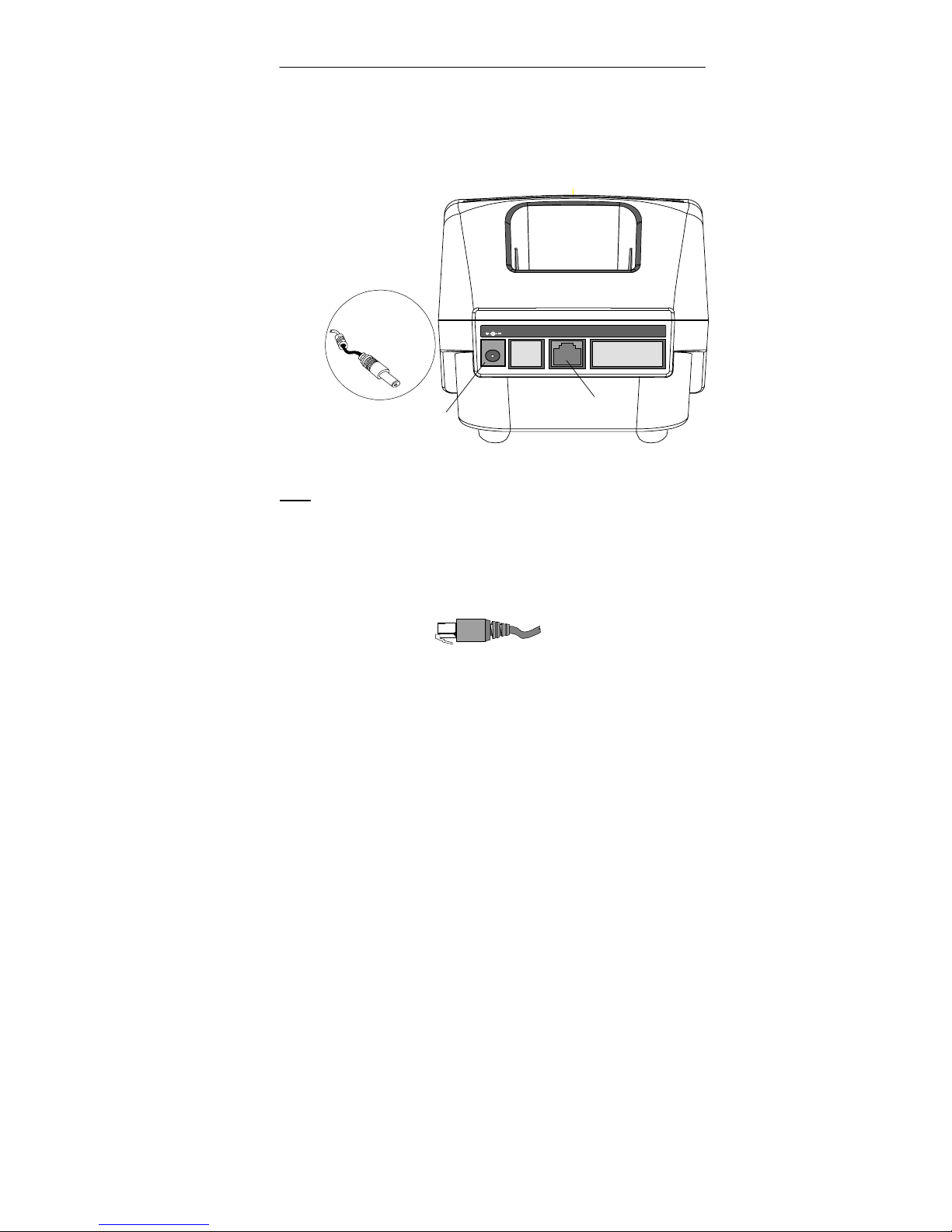
5. Plug the round male Power Supply DC voltage connector
(cable permanently attached to Power Supply) into the DC
voltage connector on the back of the Apex III Dock (refer to
Figure 3-6).
Spare Battery
Pack
Charging Slot
Power Supply
DC Voltage
Connector
Power Supply
DC Voltage
Connector
9VDC 3.5A
PORT 1 PORT 2 PORT 3
Communications
Port (Port 2)
Figure 3-6: Apex III Dock (Rear View)
For a detailed description of the Dock connectors refer to
Note:
the Technical Information section of this manual (p. 4-1)
6. To use the Apex III Dock for communications with the Apex
III PDT, connect the 10 pin Phone Plug of the Compsee serial
communications cable (PN 0227001) to Port 2 on the back of
the Dock (refer to Figure 3-6 and Figure 3-7).
Figure 3-7: Apex III Dock Communications Cable
(10 Pin Phone Type Connector Required)
7. Connect the RS-232 (DB-9) connector on the other end of the
communications cable to the Serial Port on an IBM based PC
or other serial device (refer to your device specific User’s
Manual).
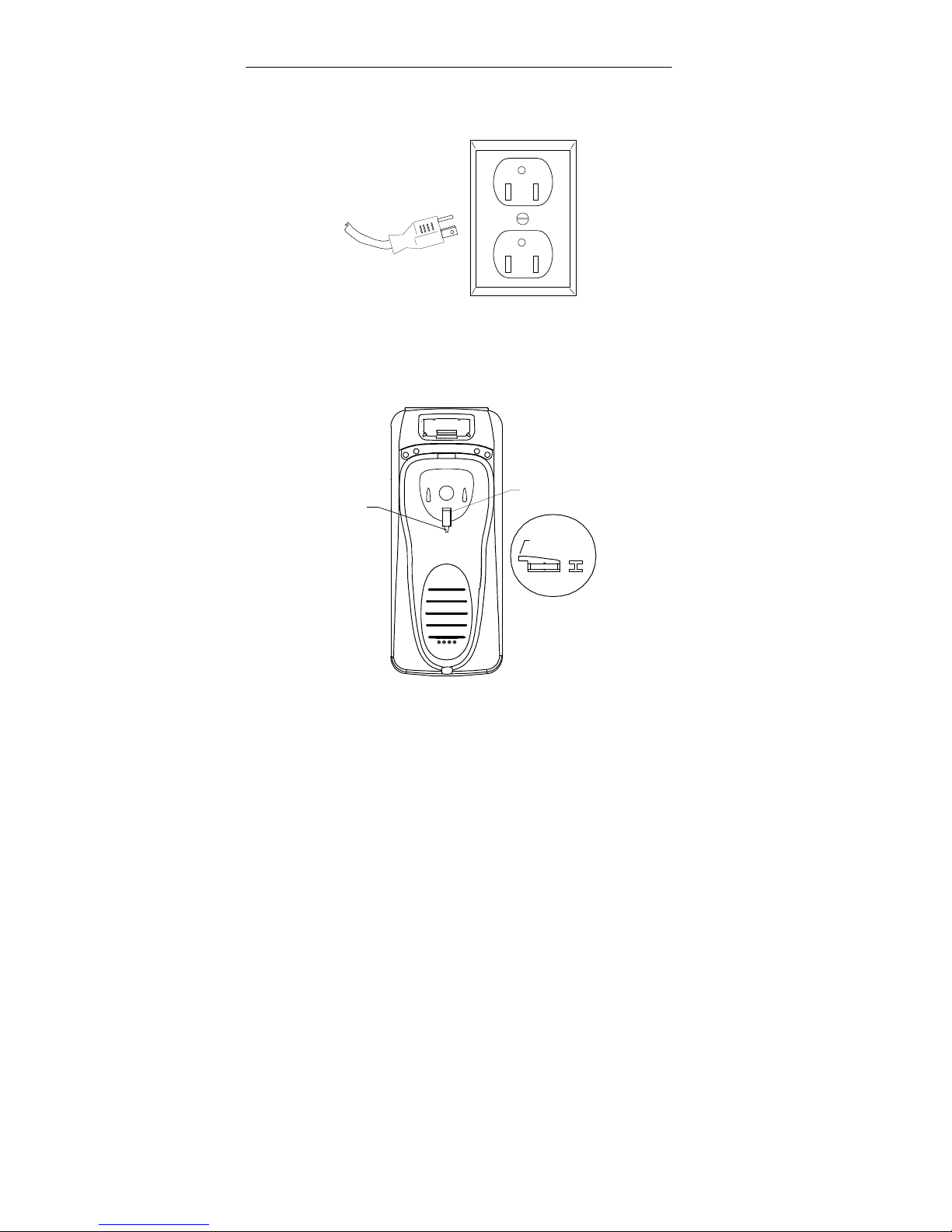
8. Plug the AC Line cord into an AC power receptacle (refer to
Figure 3-8).
COAM30003 Rev. 1.04 09/03/01 3-3
Page 24
Apex III Dock User’s Manual 3 Dock Setup And Operation
AC Receptacle
[Correct Voltage Dependent
On Unit Ordered]
AC Power Cord
Figure 3-8: AC Power Connection
9. If the Apex III Dock is to be mounted in the vertical position
(e.g. on a wall), remove the PDT Mounting Hook from within
the Apex III PDT resting area (refer to Figure 3-9).
PDT
MOUNTING
HOOK
MOUNTING
SLOT
HOOK
HOOK UP FOR
VERTICAL MOUNT
SIDE
END
Figure 3-9: PDT Mounting Hook Location
And Orientation (Top View Of Dock Shown)
10. Flip the PDT Mounting Hook over and re-insert it into the
slot to prevent the Apex III PDT from sliding downward
during vertical mounting of the Dock (refer to Figure 3-9).
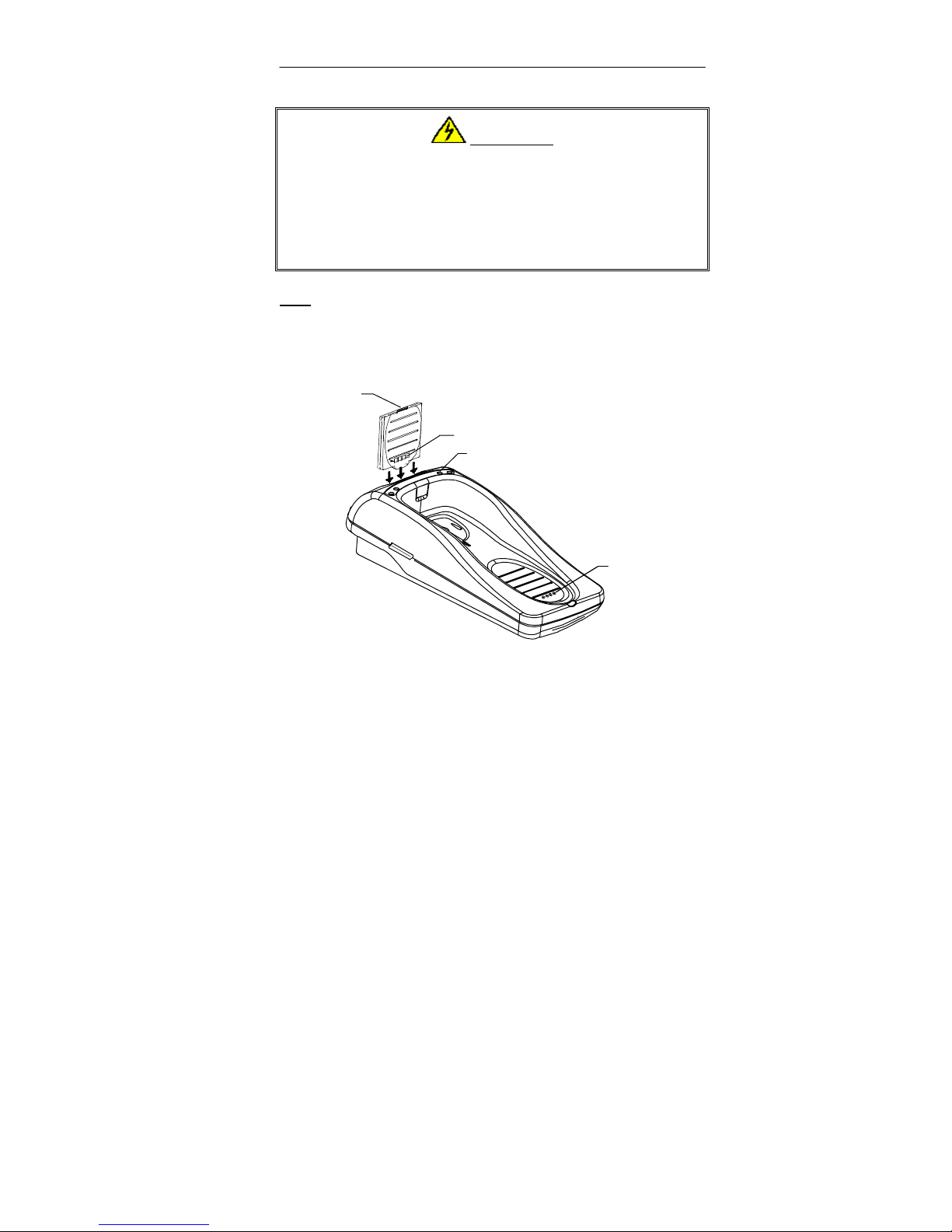
11. To use the Dock spare charging slot, insert an Apex III
Battery Pack into the charging slot on the top rear of the
Apex III Dock (refer to Figure 3-10, Warning, and Note).
COAM30003 Rev. 1.04 09/03/01 3-4
Page 25
Apex III Dock User’s Manual 3 Dock Setup And Operation
WARNING!
ONLY CHARGE APEX III BATTERY PACKS!
DO NOT attempt to charge any type battery pack or batteries other
than Apex III Battery Packs with your Apex III Dock or External
Charger. Placing other types of battery packs or batteries into the
Dock or External Charger could result in personal injury and/or
damage to the unit.
For a proper connection, the Battery Pack must be placed
:
Note
in the charging slot with Release Clip facing upwards and
the four side charging terminals (and ridges) facing
towards the front of the unit.
BATTERY PACK
RELEASE CLIP
CHARGING TERMINALS
SPARE BATTERY PACK
CHARGE LED INDICATOR
APEX III PDT
SLIP-IN BATTERY
PACK CHARGING
TERMINALS
Figure 3-10: Battery Pack Orientation
(Left Side Battery Pack Insertion Shown)
12. To keep the
installed
Apex III PDT Battery Pack fully
charged, simply place the Apex III PDT in the Dock and
allow the unit to move to the foremost position. The Apex III
PDT charging terminals will automatically align with those
on the Dock (refer to Figure 3-10 and Figure 3-11).
COAM30003 Rev. 1.04 09/03/01 3-5
Page 26

Apex III Dock User’s Manual 3 Dock Setup And Operation
Figure 3-11: Apex III At Rest In Dock
(Spare Battery Pack In Charging Slot)
COAM30003 Rev. 1.04 09/03/01 3-6
Page 27

Apex III Dock User’s Manual 3 Dock Setup And Operation
y
Apex III Dock Operation
Before operating your Apex III Dock it is recommended that you
thoroughly read the following detailed operational sequences.
The Apex III Dock and External Charger are equipped with a
quick charge circuit allowing an Apex III Battery Pack to be
full
charged from a full discharge condition within 2 hours.
Apex III Spare Battery Pack Charging
1. Once an Apex III Battery Pack has been inserted into the
Dock charging slot per the previous instructions (p. 3-5), the
charging process will commence immediately and be
controlled automatically by the unit. No additional action is
required by the user, except for Battery Pack removal once
the Battery Pack has been fully charged (the
will glow solid green – see below).
LED
2. Upon initial insertion of a Battery Pack into the unit, the
SPARE Batt LED
indicator light on the top rear of the unit
will flash Red. After a short period of time (less than 15
minutes), the LED will solidly illuminate Red to indicate
that the Battery Pack is being charged in the
SPARE Batt
fast mode
.
3. When the Apex III Dock senses that the Battery Pack charge
state has reached approximately 92% charge, the
Batt LED
will change to solid Green to inform the user that
the unit is charging the Battery Pack in the
SPARE
trickle mode
The trickle charging mode will continue until the Battery
Pack is removed from the charger.
Since the Apex III Battery Packs use state-of-the-art
Note
:
Nickel Metal Hydride (NiMH) composition, they DO NOT
succumb to memory (hysteresis) loss as do NickelCadmium (Ni-Cd) batteries.
Apex III Battery Packs can
therefore be charged while in any state-of-charge and do
not require full discharge prior to charging; however, it is
still recommended that the Battery Pack be fully
discharged periodically to reset the internal gas gauge
circuitry
.
COAM30003 Rev. 1.04 09/03/01 3-7
.
Page 28

Apex III Dock User’s Manual 3 Dock Setup And Operation
4. If your Apex III Portable Data Collection Terminal (PDT) is
ready for another Battery Pack, simply remove the installed
Battery Pack and replace it with a fully charged Battery Pack
from the Dock spare charging slot or the External Charger
(refer to the Apex III PDT/Battery Pack Notes section of this
manual (p. 3-9) for details on when you should change the
Apex III PDT Battery Pack).
5. Place the exhausted Apex III Battery Pack into the Dock
charging slot as described in the Dock Initial Setup section
of this manual (p. 3-5).
Installed Apex III PDT Battery Pack Charging
1. The automatic charging feature of the Apex III Dock will
charge the installed Apex III PDT Battery Pack when the
unit is in the
“At Rest”
minimize Apex III Battery Pack change-out. Refer to the
Apex III PDT User’s Manual for detailed instructions on the
Apex III use and operation.
2. When the Apex III PDT is first placed in the Dock, the
PDT Batt LED
will flash Red. After a short period of time
the LED will illuminate solid Red, indicating that the
installed Apex III Battery Pack is being charged in the
(this should not take more than 15 minutes).
mode
position allowing the user to
fast
3. When the Apex III Dock senses that the installed Apex III
Battery Pack charge state has reached approximately 92%
charge, the
PDT Batt LED
will change to solid Green to
inform the user that the unit is charging the Battery Pack in
the
trickle mode
. The trickle charging mode will continue
until the Battery Pack is removed from the charger.
Since the Apex III Battery Packs use state-of-the-art
Note
:
Nickel Metal Hydride (NiMH) composition, they DO NOT
succumb to memory (hysteresis) loss as do NickelCadmium (Ni-Cd) batteries.
Apex III Battery Packs can
therefore be charged while in any state-of-charge and do
not require full discharge prior to charging; however, it is
still recommended that the Battery Pack be fully
discharged periodically to reset the internal gas gauge
circuitry
.
COAM30003 Rev. 1.04 09/03/01 3-8
Page 29

Apex III Dock User’s Manual 3 Dock Setup And Operation
Apex III PDT/Battery Pack Notes
Refer to the Apex III PDT User’s Manual for additional
Note:
details on the Apex III PDT operation.
1. Do NOT attempt to operate the Apex III PDT once it has
powered down due to a low battery condition. When the
Battery Pack is exhausted, leave the exhausted Battery Pack
in the Apex III PDT until you can either charge it in place by
placing the Apex III in the Apex III Dock, or swap the
Battery Pack with a charged Battery Pack. Information in
volatile memory (RAM) will be preserved. The Apex III
PDT is configured so that even with an exhausted Battery
Pack enough energy is retained to maintain the information
for an extended period of time. DO NOT leave the unit
WITHOUT a Battery Pack for more than 5 minutes.
2. It is recommended that the user place the Apex III PDT in
“Suspend” and change to a fully charged Battery Pack or
recharge the installed Battery Pack after receiving the
“Change Battery”
Pack, pressing the “Suspend” button again will restore the
Apex III PDT to the last operation performed. If unit
operation is continued and the
occurs the Apex III PDT will shutdown and cannot be
restarted. The installed Battery Pack must be replaced with
a fully charged Battery Pack or the installed pack recharged
in the Apex III Dock.
message. After charging the Battery
“Battery Critical”
alarm
Battery Pack Life
Average Battery Pack life expectancy is 400 charge cycles, where a
charge cycle encompasses the period of use to full depletion then
full charge. After the 400 cycle period, the Battery Pack’s
remaining capacity will be approximately 80%.
Avoid interruptions in usage by always keeping a spare Battery
Pack on hand.
Alternate spare Battery Pack use so that all Battery Packs
receive uniform use.
Battery Packs can lose approximately 1.1% of their charge per
day sitting on the shelf. Therefore a fully charged Battery Pack
not kept in the charging slot will require recharging in less than
100 days.
COAM30003 Rev. 1.04 09/03/01 3-9
Page 30

Apex III Dock User’s Manual 3 Dock Setup And Operation
Apex III PDT Communications
The Apex III Dock contains an Infrared (IR) transceiver,
Note:
which converts a RS-232 signal (Rx) to Infrared light
pulses or Infrared light pulses to a RS-232 signal (Tx).
Pulses sent through the Dock IR Window are received by
the Apex III PDT via the built-in IR port. No cable
connection is required between the Apex III and the Dock.
1. Place the Apex III PDT in the Dock in the
position (refer to the Initial Setup section of this manual).
The Compsee Product Support CD packaged with your
:
Note
Apex III PDT includes a copy of a DOS based File
Transfer Utility program
Transfer Utility (WXU) application. The WXU
application is a Windows
[dx.exe]
based File Transfer Utility that
and the Windows
assists users or developers in transferring files to or from
the Apex III PDT. Refer to the Online Help Files included
with both applications for usage information. In addition,
you should become familiar with the communications
parameters discussed within the Apex III PDT Technical
Reference Manual (TRM - also included on the CD in
Adobe
Acrobat format). If your version of the Compsee
Product Support CD does not contain a copy of either of
these utilities or an updated edition of the Apex III-TRM,
contact Compsee, Inc. Technical Support or download a
copy from the Compsee, Inc. website at:
www.compsee.com.
“At Rest”
2. Prepare the Apex III PDT and PC or other serial device
being used for the communications process as described in
the Apex III PDT Technical Reference Manual – included
on the Compsee Product Support CD.
3. Begin the communications process with the Apex III PDT
per the Apex III PDT Technical Reference Manual. Once
the communications process has begun, the appropriate
communications LED on the Apex III Dock (Tx or Rx) will
flash indicating that the communications process is in
progress.
COAM30003 Rev. 1.04 09/03/01 3-10
Page 31

Apex III Dock User’s Manual 3 Dock Setup And Operation
:
Notes
The
¾
transmitting
The
¾
receiving
Tx LED
Rx LED
flashes Green when the Apex III PDT is
to a serial device through the Dock.
flashes Red when the Apex III PDT is
a transmission from a serial device through
the Dock.
The LED flash rate is directly proportional to the rate
¾
of the communications process. The appropriate LED
will flash slower when communicating at 9600 baud
than at 115,200 baud.
Supported baud rates for IR communication are 300,
¾
600, 1200, 2400, 4800, 9600, 19200, 38400, 57600,
and 115200.
When proper communications are in progress, the Dock
¾
LED’s will flash in conjunction with the dual purpose
DECODE and SCAN LED’s on the Apex III PDT (see
Apex III PDT User’s Manual).
4. When the communications process has been completed (or
stopped due to an error) the appropriate LED (Tx or Rx) will
stop flashing.
COAM30003 Rev. 1.04 09/03/01 3-11
Page 32

Apex III Dock User’s Manual 3 Dock Setup And Operation
COAM30003 Rev. 1.04 09/03/01 3-12
Page 33

Apex III Dock User’s Manual 4 Technical Information
4 TECHNICAL INFORMATION
Associated Pinouts
The Apex III Dock comes standard with an onboard RS-232
connector located on the rear of the unit. The connector (designated
Port 2) allows the serial connection from the Dock to the PC to be
made with a 10-pin phone type connection. The connector is
configured as shown in Figure 4-1.
10
Pin # Description
1 Not Used
2 RXD (In)
3 TXD (Out)
4 Not Used
5 GND
6 Not Used
7 Not Used
8 Not Used
9 Not Used
10 Not Used
Figure 4-1: Dock RS-232 Serial
Connector Pinout (Port 2)
1
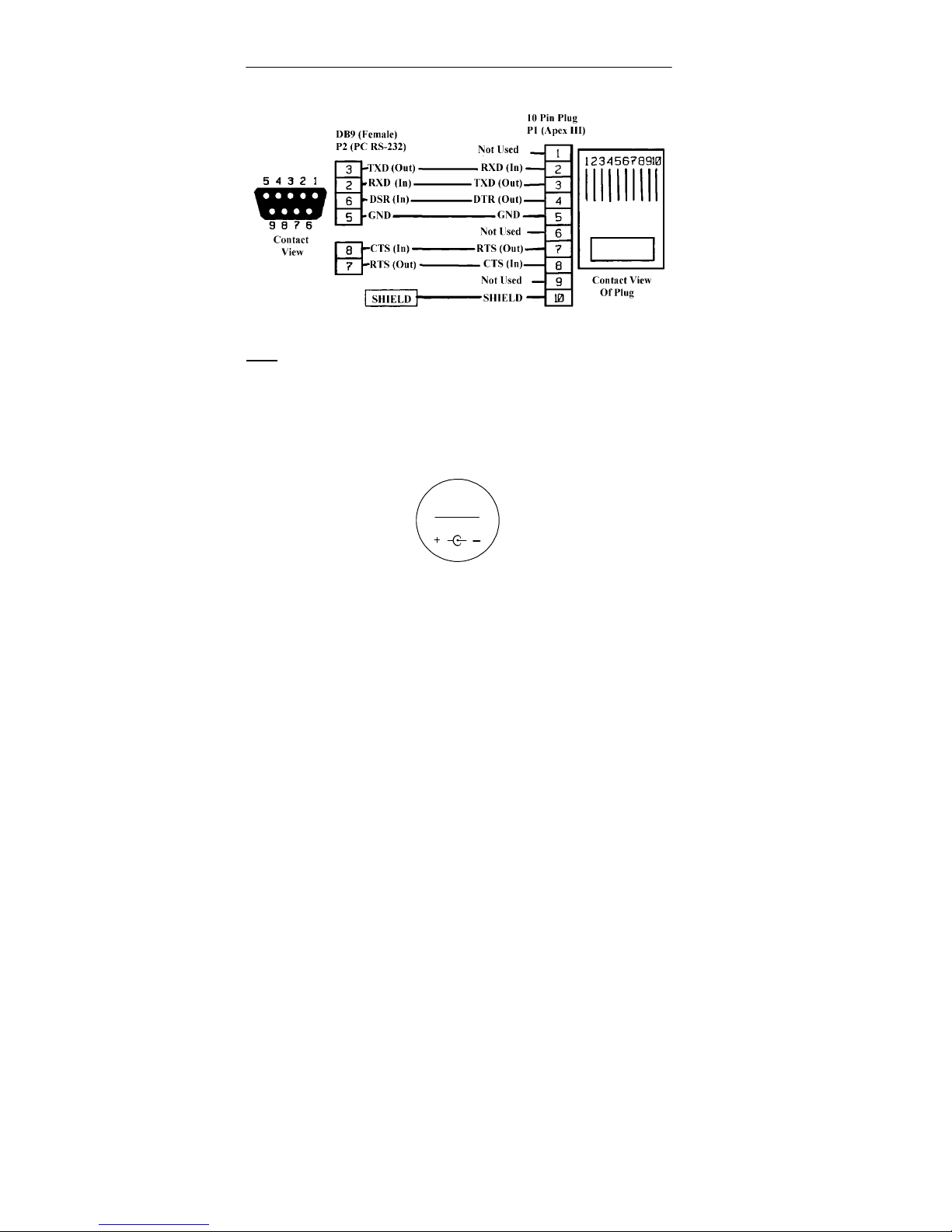
The following pinout (Figure 4-2) illustrates the RS-232 Serial
cable details for the communications cable connecting the Apex III
Dock to the PC or other serial device.
COAM30003 Rev. 1.04 09/03/01 4-1
Page 34
Apex III Dock User’s Manual 4 Technical Information
Figure 4-2: RS-232 To DB9 Cable (PN 0227001)
Additional RS-232 cables are available from Compsee,
Note:
Inc. These cables can be used in conjunction with the
Apex III PDT and Apex III Dock for additional purposes.
Contact Compsee, Inc. for additional information.
Figure 4-3 Illustrates the Dock input power voltage polarity within
the Dock Power Supply connectors.
Voltage
Key
9VDC 3.5A
Figure 4-3: Power Supply Cable
(Dock End) Voltage Key
COAM30003 Rev. 1.04 09/03/01 4-2
Page 35

Apex III Dock User’s Manual 5 Support Information
5 SUPPORT INFORMATION
Associated Apex III Dock Part Numbers
Apex III Associated Part Numbers
No. Description Part Number
1 Cable, Apex II & III to PC RS-232 (DB-9) 0227001
2 Battery Pack, NiMH, 1500 mAh 0214501
3 External Charger (charging unit only) COAA3CHRG
4 External Charger Kit 1 (w/power supply and US
120 VAC cord)
5 External Charger Kit 2 (w/power supply, no AC
line cord)
6 Apex III Dock (docking station only) COAA3DOCK
7 Apex III Dock Kit 1 (w/power supply, serial cable
and US 120 VAC cord)
8 Apex III Dock Kit 2 (w/power supply, serial cable,
no AC line cord)
9 Apex III PDT Dock Hook 0220516
10 Power Supply 9 VDC (no AC line cord) 0212014
11 Cord Set, US, 120 VAC 0212013
Vehicle Lighter Adapter (Cigarette lighter adapter
12
cable for Dock/External Charger Power Supply
13 Apex III Dock User Manual (Hard Copy) COAM30003
Note:
Since the manual printing date, additional Part Numbers may be
available. Call for details or check the Compsee, Inc. website.
COAA3CHRG1
COAA3CHRG2
COAA3DOCK1
COAA3DOCK2
0228510
Technical Support
Technical Support on the Apex III unit is available from Compsee,
Inc. through the following methods:
Website:
Phone: 1 800 768-5248
e-mail:
Before calling, follow these guidelines:
••••
••••
••••
www.compsee.com
Refer to the appropriate sections of this manual to ensure you
have correctly performed the operation in question.
Have the unit Model No. and Serial No. in-hand (located on
the bottom of the unit).
Have a complete description of the problem as well as any
pertinent information on when the problem occurred.
COAM30003 Rev. 1.04 09/03/01 5-1
Page 36

Apex III Dock User’s Manual 5 Support Information
Service And Repair
BEFORE returning any equipment for service please read ALL of
the information within this section. This will preclude shipping
errors or misunderstandings. Thank you!
Compsee provides U.S. service for its bar code products via a
Service Center located at its manufacturing facilities in Mt. Gilead,
North Carolina, USA 27306. Service outside the U.S. is provided
through the use of International Authorized Service Centers. Check
the Compsee Inc. website for the latest Authorized Service Center
listing.
The Apex III Dock carries a Limited 1 Year Warranty from the date
of purchase. The specific warranty language is contained in the
front of this manual.
Factory service is also available on a time and material basis. If
you use this type of service agreement, you will be advised of a
not-to-exceed price for repair when you request a Return Material
Authorization (RMA) for the product (see the following page for
additional RMA information).
COAM30003 Rev. 1.04 09/03/01 5-2
Page 37

Apex III Dock User’s Manual 5 Support Information
Return Material Authorization (RMA)
Products may be returned for repair after obtaining a Return
Material Authorization (RMA) from Compsee Customer Service.
Call one of the following numbers to receive your Return
Authorization
1-321-724-4321 or 1-800-628-3888
Before calling the Compsee Customer Service line you should have
the following information in hand:
The unit Model Number
••••
The unit Serial Number
••••
An accurate description of the problem
••••
Your companies name
••••
When and how you wish to ship the unit
••••
A return address
••••
A contact person’s name and telephone number
••••
This information is necessary for us to complete an RMA for the
product.
Note
: We CANNOT accept materials that are returned
without an RMA number.
The RMA number will ensure that the problem described is
corrected and the unit is repaired and returned in a timely fashion.
Normal Repair time is 10 days from receipt of the equipment.
Shipping costs to Compsee Inc. are to be paid for by the user.
Compsee will pay for the return shipping in the same manner that
the equipment was originally shipped to the repair facility.
COAM30003 Rev. 1.04 09/03/01 5-3
Page 38

Apex III Dock User’s Manual 5 Support Information
Specifications
Physical Dimensions
Length: 11.18 in. (28.4 cm)
Width: 4.50 in. (11.43 cm)
Height: 4.75 in. (12.06 cm)
Weight
Dock: 1.61 lbs.
¾
Dock With Battery Pack: 1.85 lbs.
¾
Dock With Apex III PDT and Battery Pack: 2.99 lbs.
¾
Construction
Industrial, high-strength polycarbonate/ABS-blend plastic, U/L rated
@ 94 VO.
Power Supply/ Battery Pack
Rechargeable 1500 mAh NiMH Battery Pack
Full charge within 2 hours after full discharge
Apex III External Charger/Dock Power Supply
Input: 100 – 240 VAC, 50 – 60 Hz, 70 – 100 VA,
¾
auto-ranging
Output: 9 VDC @ 4.0 A (36 watts maximum)
¾
Dimensions: 4.62 × 2.32 × 1.25 in. (118 × 60 × 32 mm)
¾
Weight w/120 VAC Line Cord: 1.22 lbs.
¾
Operating Temp: 32° F – 122º F (0º C – 50º C)
¾
UL/CE Indoor Use Only
¾
Communications
RS-232/Infrared (IR) Communications
Serial Connection to PC via communications cable PN 0227001
(Included in Dock Kits)
Supported baud rates are 300, 600, 1200, 2400, 4800, 9600,
19200, 38400, 57600, and 115200 baud.
Environmental (External Charger Only)
Operating Temp: 59° F to 104° F (15° C to 40° C)
Storage Temp: −4° F to 158° F (−20° C to 70° C)
Chemical resistant
Regulatory Approvals
FCC (part 15, Class B)
CE
COAM30003 Rev. 1.04 09/03/01 5-4
Page 39

Apex III Dock User’s Manual 5 Support Information
User Unit Specific Information
Record your Apex III Dock and Power Supply Model numbers,
Serial Numbers, and Purchase Date in the space provided below for
future reference:
Dock Model No.
Dock Serial No.
Dock Purchase Date:
Power Supply Model No.
Power Supply Serial No.
Power Supply Purchase Date:
COAM30003 Rev. 1.04 09/03/01 5-5
Page 40

Apex III Dock User’s Manual 5 Support Information
Notes
COAM30003 Rev. 1.04 09/03/01 5-6
Page 41

Apex III Dock User’s Manual 5 Support Information
Notes
COAM30003 Rev. 1.04 09/03/01 5-7
Page 42

Apex III Dock User’s Manual 5 Support Information
COAM30003 Rev. 1.04 09/03/01 5-8
Page 43

This Page Intentionally Left Blank
Page 44

Compsee, Inc.
Contact Information
www.compsee.com
1 (800) 628-3888
Compsee, Inc.
A Subsidiary of McRae
Industries, Inc.
 Loading...