

Page 1
Quick Install Guide
Wireless 54Mbps
Outdoor Access Point
WPP54
Page 2

i
Table of Contents
1: Introduction......................................................................................1
Introduction to WPP54G multi-SSID firmware version.......................... 1
Introduction to WPP54AG multi-SSID firmware version ....................... 2
Introduction to WPP54G non multi-SSID firmware version.................. 3
Introduction to WPP54AG non multi-SSID firmware version ............... 4
Packaging Content.................................................................................. 5
Network Application................................................................................ 6
2: Let’s Get Go ing-Hardware Setu p ................................................7
Overall Setup of Compex WPP54 .......................................................... 8
Method 1: Mounting on the Wall........................................................... 9
Method 2: Mounting on the Pole.........................................................12
3: Access to Web-based Interface................................................15
Method 1: Access to the Web interface with uConfig..................... 15
Method 2: Access to the Web interface manually........................... 19
4: TCP/IP Configuration....................................................................20
For Windows 95 /98 / 98 SE /ME / N T ........................................................... 20
For Windows XP/2 00 0 ............................................................................. 22
5: Panel Views and Descriptions.....................................................25
6: Technical Specificatio ns..............................................................27
WARRANTY REGISTRATION CARD.......................................................33
Page 3

Chapter 1 Introduction
1
1: Introduction
Introduction to WPP54G multi-SSID firmware version
The WPP54AG Wireless-AG 54Mbps XR™ Outdoor Access Point is a highperformance AP designed for enterprise and outdoor users. WPP54AG is
compatible with IEEE 802.11a/b/g and su pports hi gh-speed data transmi ssion of
up to 54Mbps at in both the 2.4GHz and the 5GHz frequency bands . The in-built
Atheros
®
Super-AG technology provides higher throughpu t in the 802.11a 5GHz
band versus 802.11g’s congested 2.4GHz band and the ability to operate i n at
least 19 non-overlapping channels as compared to the 3 non-overlapping
channels on 802.11g standard. This equips WPP54AG with network robustness,
stability and wider network coverage. Housed in a weatherproof casing,
WPP54AG is designed to withstand any outdoor climatic condi tions, making it
the ideal solution for outdoor applications.
Designed with an external SMA connector and the ability to operate in 6
different modes, the WPP54AG can be used for a wide variety of wireless
applications. The i ntegrated WDS (Wireless Distribution System) feature creates
a virtually larger wireless network infrastru ctur e by li nki ng up other access poi nts.
WPP54AG also includes a DHCP server that automa tically assigns IP addresses
to wireless clients. For the ultimate multimedia experience, WPP54AG includes
the WMM™ (QOS) feature which allows media files to be delivered over the
network more efficiently,
Connecting to a wireless LAN without adequate security measures generally
opens up your network to any casual snoopers. To protect your privacy,
WPP54AG is armed with many enhanced wirel ess security features such as Wi-Fi
Protected Access (WPA), MAC Address Filtering, IEEE 802.1x Authentication,
64/128-bit WEP (Wired Equivalent Privacy) and Advanced Encryption Standard
(AES) encryption feature to ensure privacy for the heterogeneous mix of users
within the same wireless LAN, while maintaining full access to the
establishment’s resources.
WPP54AG also incorporates unique features from Compex such as – the Parallel
Broadband feature that allows bandwidth aggregation and fail-over
redundancy capability. It uses Spanning Tree Protocol (STP) that provides the
wireless network with extra redundancy and reliability. The network will autoreconfigure when there are changes to the network connections and the
Pseudo VLAN feature that enables the creation of wireless isolated nodes or
workgroups of wireless clients to increase network privacy in a public access
wireless LAN.
Page 4

Chapter 1 Introduction
2
Introduction to WPP54AG multi-SSID firmware version
The WPP54AG Wireless-AG 54Mbps XR™ Outdoor Access Point is a highperformance AP designed for enterprise and outdoor users. WPP54AG is
compatible with IEEE 802.11a/b/g and su pports hi gh-speed data transmi ssion of
up to 54Mbps at in both the 2.4GHz and the 5GHz frequency bands . The in-built
Atheros
®
Super-AG technology provides higher throughpu t in the 802.11a 5GHz
band versus 802.11g’s congested 2.4GHz band and the ability to operate i n at
least 19 non-overlapping channels as compared to the 3 non-overlapping
channels on 802.11g standard. This equips WPP54AG with network robustness,
stability and wider network coverage. Housed in a weatherproof casing,
WPP54AG is designed to withstand any outdoor climatic condi tions, making it
the ideal solution for outdoor applications.
Designed with an external SMA connector and the ab ility to oper ate in mul tiple
operation modes, the WPP54AG can be used for a wide variety of wireless
applications. For the ultimate multimedia experience, WPP54AG includes the
WMM™ (QOS) feature which allows media files to be delivered over the
network more efficiently,
Connecting to a wireless LAN without adequate security measures generally
opens up your network to any casual snoopers. To protect your privacy,
WPP54AG is armed with many enhanced wirel ess security features such as Wi-Fi
Protected Access (WPA), MAC Address Filtering, IEEE 802.1x Authentication,
64/128-bit WEP (Wired Equivalent Privacy) and Advanced Encryption Standard
(AES) encryption feature to ensure privacy for the heterogeneous mix of users
within the same wireless LAN, while maintaining full access to the
establishment’s resources.
WPP54AG also incorporates unique features from Compex such as – the Parallel
Broadband feature that allows bandwidth aggregation and fail-over
redundancy capability. It uses Spanning Tree Protocol (STP) that provides the
wireless network with extra redundancy and reliability. The network will autoreconfigure when there are changes to the network connections.
Page 5

Chapter 1 Introduction
3
Introduction to WPP54G non multi-SSID firmware version
The WPP54G Wireless-G 54Mbps XR™ Outdoor Access Point is a highperformance AP designed for enterprise and outdoor users. WPP54G is
compatible with IEEE 802.11b/g and supports high-speed data transmission of
up to 54Mbps at in the 2.4GHz frequency bands. This equips WPP54G with
network robustness, stability and wider network coverage. Housed in a
weatherproof casing, WPP54G is designed to withstand any outdoor climatic
conditions, making it the ideal solution for outdoor applications.
Designed with an external SMA connector and the ability to operate in 6
different modes, the WPP54G can be used for a wide variety of wireless
applications. The i ntegrated WDS (Wireless Distribution System) feature creates
a virtually larger wireless network infrastru ctur e by li nki ng up other access poi nts.
WPP54G also includes a DHCP server that automatically assigns IP addresses to
wireless clients. For the ultimate multimedia experience, WPP54G includes the
WMM™ (QOS) feature which allows media files to be delivered over the
network more efficiently,
Connecting to a wireless LAN without adequate security measures generally
opens up your network to any casual snoopers. To protect your privacy,
WPP54G is armed with many enhanced wirel ess security features such as Wi-Fi
Protected Access (WPA), MAC Address Filtering, IEEE 802.1x Authentication,
64/128-bit WEP (Wired Equivalent Privacy) and Advanced Encryption Standard
(AES) encryption feature to ensure privacy for the heterogeneous mix of users
within the same wireless LAN, while maintaining full access to the
establishment’s resources.
WPP54G also incorporates unique features from Compex such as – the Parallel
Broadband feature that allows bandwidth aggregation and fail-over
redundancy capability. It uses Spanning Tree Protocol (STP) that provides the
wireless network with extra redundancy and reliability. The network will autoreconfigure when there are changes to the network connections and the
Pseudo VLAN feature that enables the creation of wireless isolated nodes or
workgroups of wireless clients to increase network privacy in a public access
wireless LAN.
Page 6

Chapter 1 Introduction
4
Introduction to WPP54AG non multi-SSID firmware version
The WPP54AG Wireless-AG 54Mbps XR™ Outdoor Access Point is a highperformance AP designed for enterprise and outdoor users. WPP54AG is
compatible with IEEE 802.11a/b/g and su pports hi gh-speed data transmi ssion of
up to 54Mbps at in both the 2.4GHz and the 5GHz frequency bands . The in-built
Atheros
®
Super-AG technology provides higher throughpu t in the 802.11a 5GHz
band versus 802.11g’s congested 2.4GHz band and the ability to operate i n at
least 19 non-overlapping channels as compared to the 3 non-overlapping
channels on 802.11g standard. This equips WPP54AG with network robustness,
stability and wider network coverage. Housed in a weatherproof casing,
WPP54AG is designed to withstand any outdoor climatic condi tions, making it
the ideal solution for outdoor applications.
Designed with an external SMA connector and the ability to operate in 6
different modes, the WPP54AG can be used for a wide variety of wireless
applications. The i ntegrated WDS (Wireless Distribution System) feature creates
a virtually larger wireless network infrastru ctur e by li nki ng up other access poi nts.
WPP54AG also includes a DHCP server that automa tically assigns IP addresses
to wireless clients. For the ultimate multimedia experience, WPP54AG includes
the WMM™ (QOS) feature which allows media files to be delivered over the
network more efficiently,
Connecting to a wireless LAN without adequate security measures generally
opens up your network to any casual snoopers. To protect your privacy,
WPP54AG is armed with many enhanced wirel ess security features such as Wi-Fi
Protected Access (WPA), MAC Address Filtering, IEEE 802.1x Authentication,
64/128-bit WEP (Wired Equivalent Privacy) and Advanced Encryption Standard
(AES) encryption feature to ensure privacy for the heterogeneous mix of users
within the same wireless LAN, while maintaining full access to the
establishment’s resources.
WPP54AG also incorporates unique features from Compex such as – the Parallel
Broadband feature that allows bandwidth aggregation and fail-over
redundancy capability. It uses Spanning Tree Protocol (STP) that provides the
wireless network with extra redundancy and reliability. The network will autoreconfigure when there are changes to the network connections and the
Pseudo VLAN feature that enables the creation of wireless isolated nodes or
workgroups of wireless clients to increase network privacy in a public access
wireless LAN.
Page 7
Chapter 1 Introduction
5
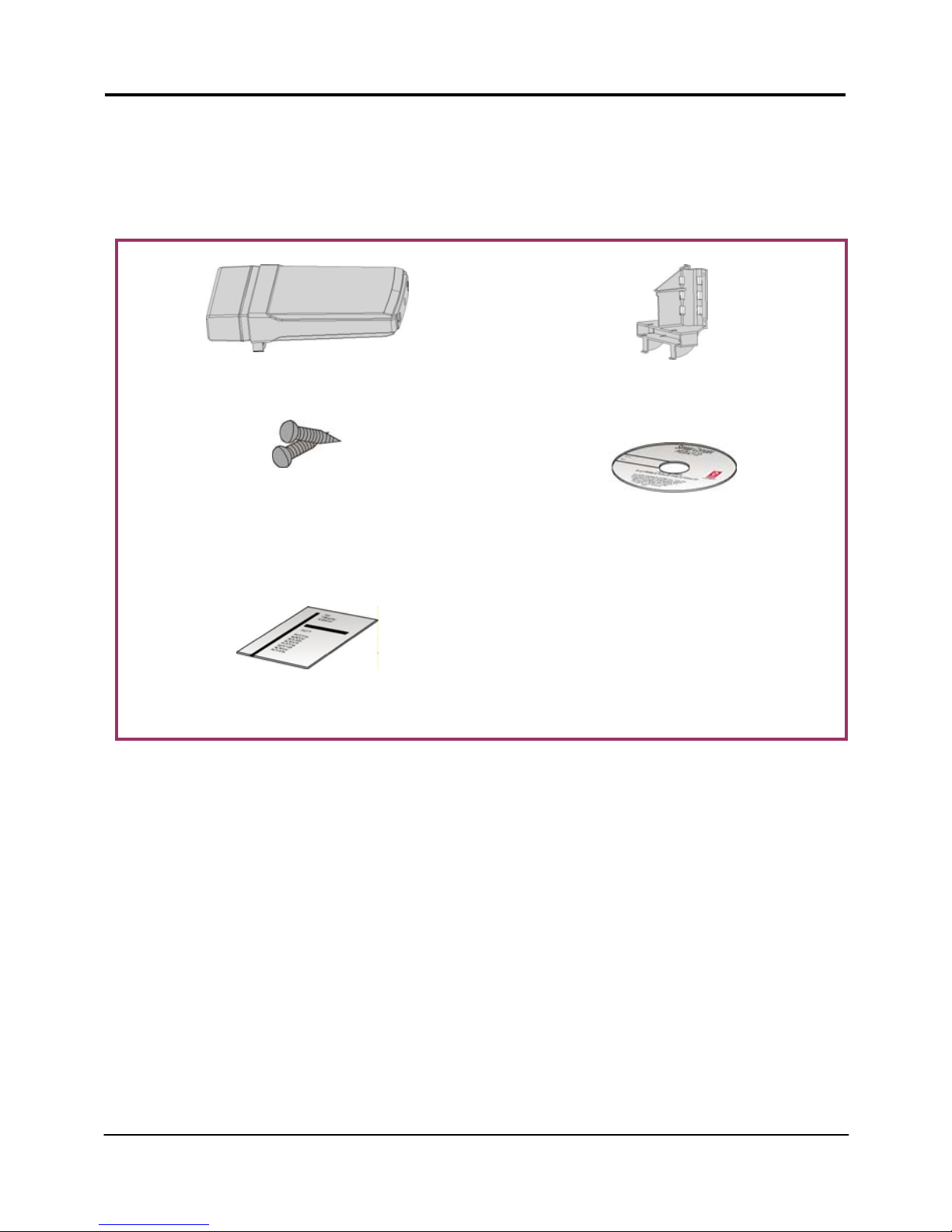
Packaging Content
Actual product appearance may slightly differ depending on the hardware
version.
1 x WPP54 unit
1 x Mounting Bracket
2 x Self-taping Screws 1 x Product CD
1 x Read-Me-First Note
Page 8
Chapter 1 Introduction
6
Network Application
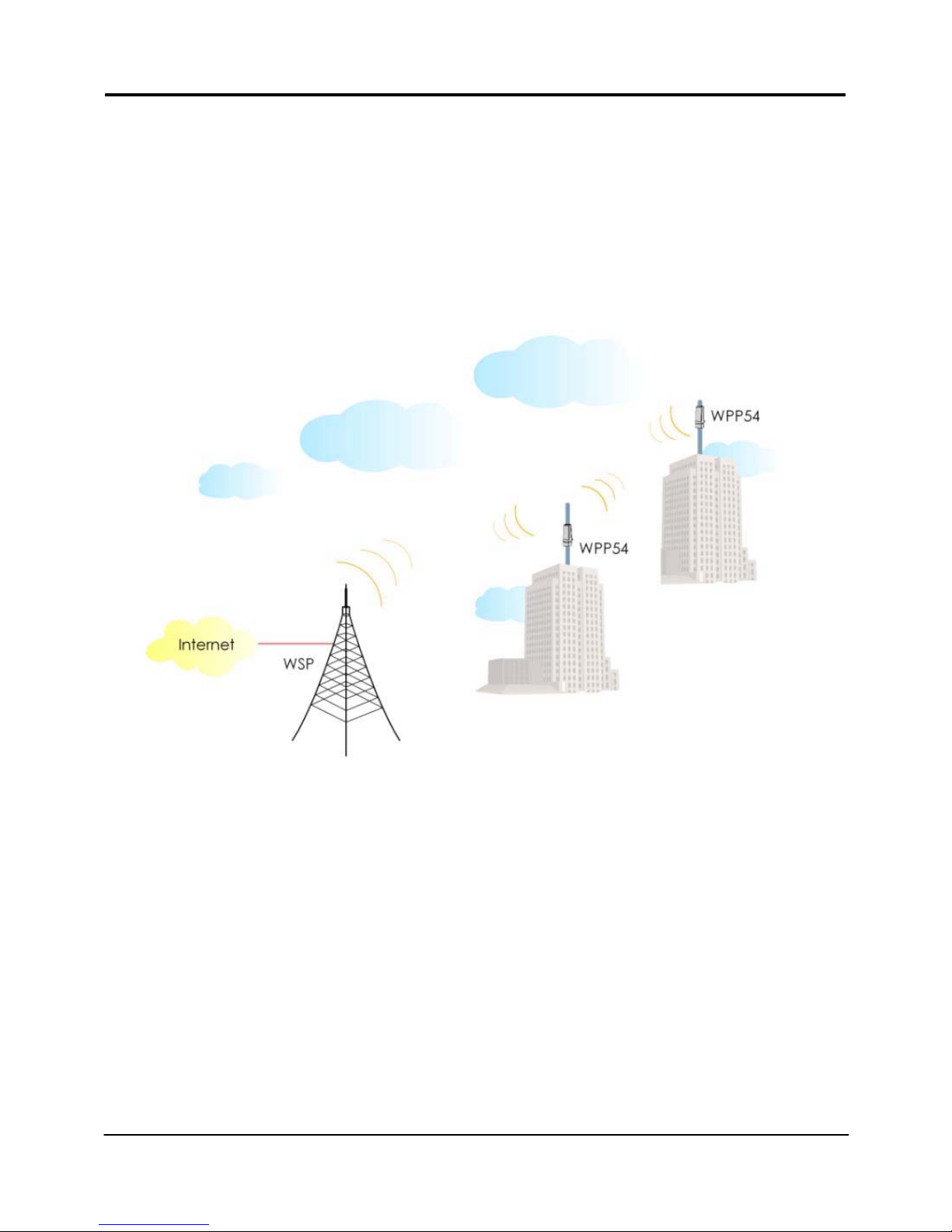
Compex WPP54 allows point-to-point communication between different
buildings. It enables you to bridge wireless clients that are kilometres apart (e.g.
within 100 metres between two buildings) while unifying the networks. In this
scenario, you may configure two Compex WPP54 units to perform transparent
bridging between two buildings.
Page 9

Chapter 2 Let’s Get Going - Hardware Setup
7
2: Let’s Get Going-Hardware Setup
You can install your Compex WPP54 either onto the wall or mount it on a pole.
The two mounting methods will be described as shown below.
Note the following guidelines for choosing the best location for your wireless AP:
Place the AP as close as possible to the area where users will require access
to the WLAN.
Choose an elevated location where trees, buildings and large steel
structures will not obstruct the antenna signals and which offers maximum
line-of-sight propagati on with the users.
Select an appropriate antenna to improve range and/or coverage and
WPP54 also lets you fine-tune parameters such as the transmit power to
achieve the best results.
Page 10
Chapter 2 Let’s Get Going - Hardware Setup
8
Overall Setup of Compex WPP54
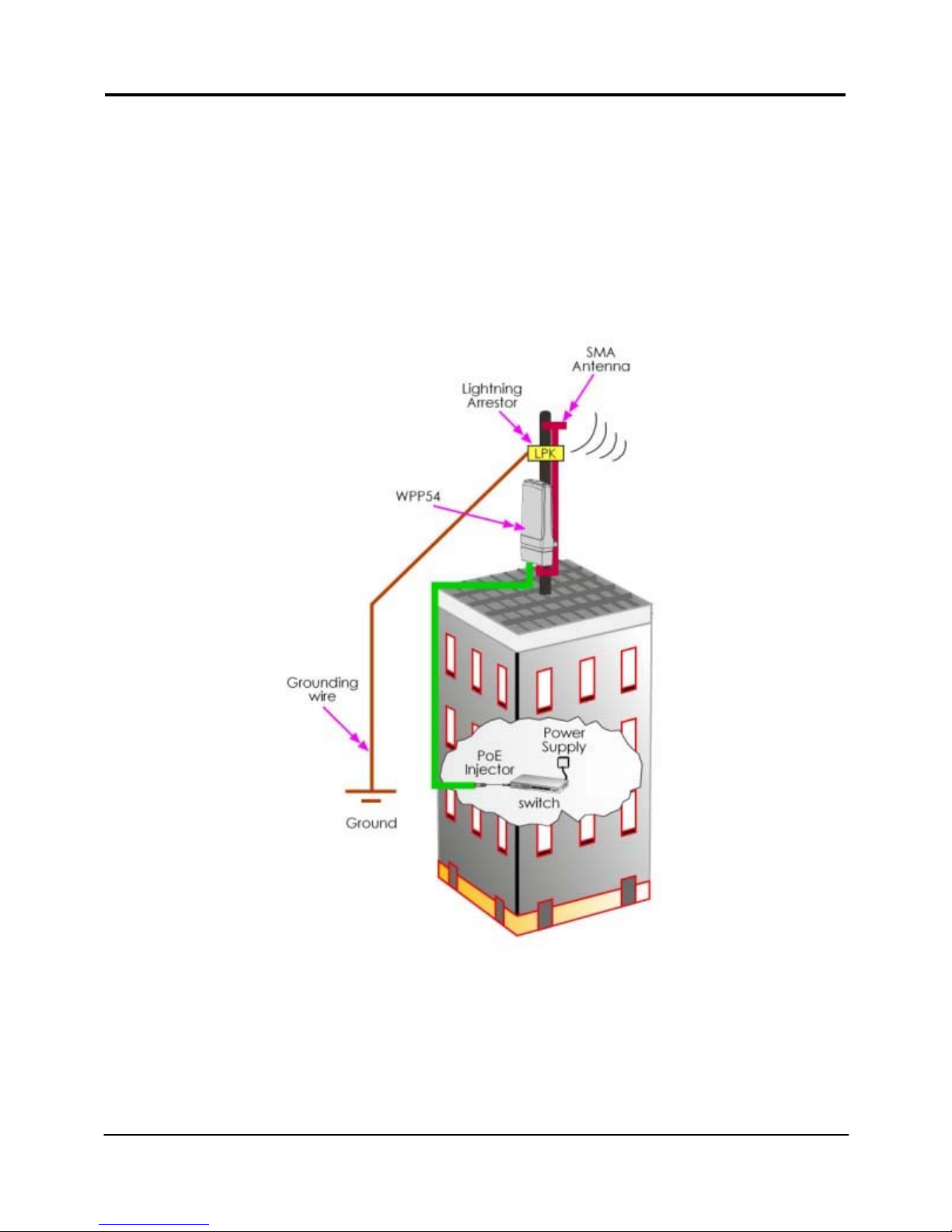
The diagram below shows the ov erall setup of Compex WPP54. You may need
to install a lightning arrestor to protect your outdoor AP from the l ightning.
Please note that you can power up your PoE Injector ONLY AFTER you had
completely connected all the devices. For detail installations, kindly proceed to
the coming up section.
Page 11
Chapter 2 Let’s Get Going - Hardware Setup
9
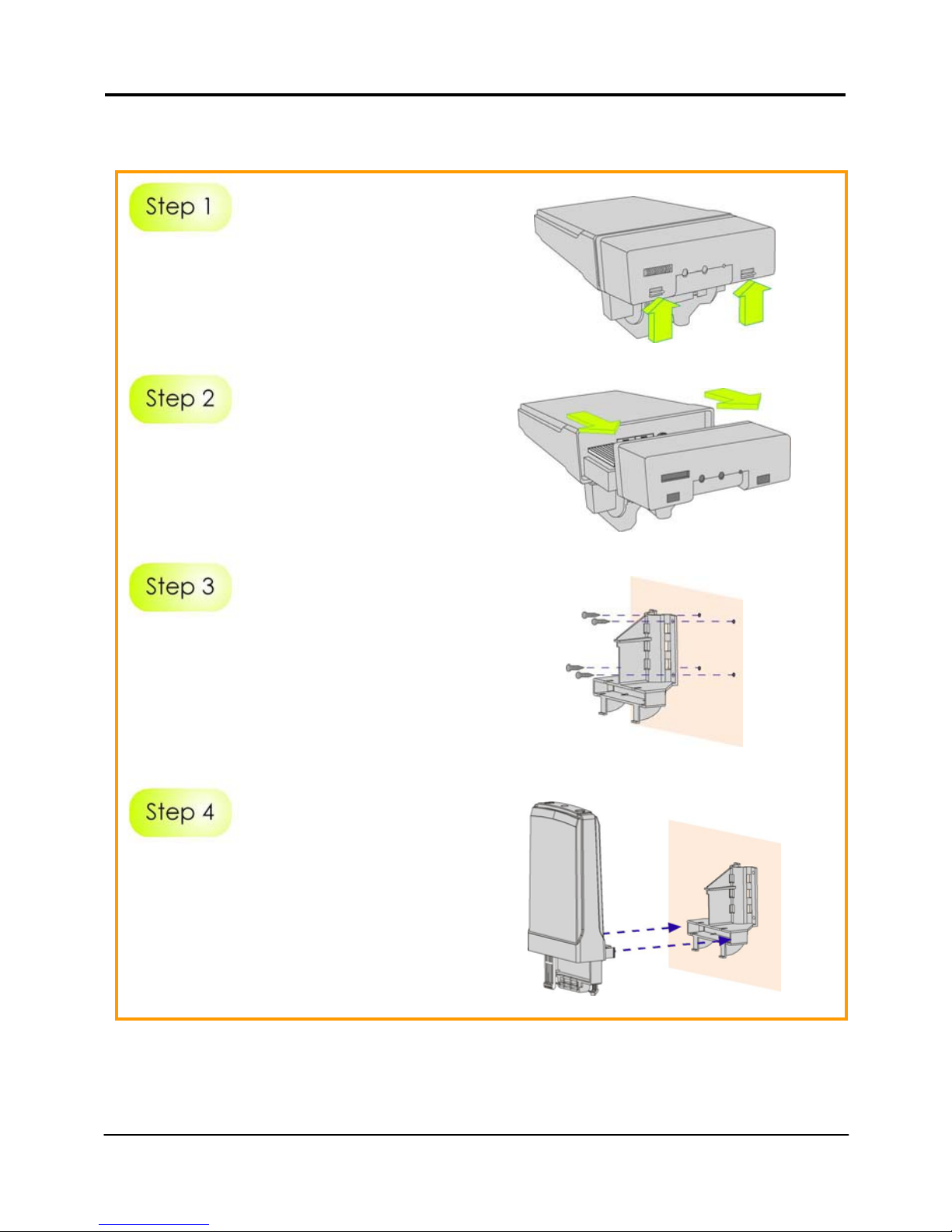
Method 1: Mounting on the Wall
Hold the catches upward as shown
in the figure.
While still holding the catches, push
the Compex WPP54 cover
outwards.
Align the bracket to the wall, Use
the bracket as a guideline, m ake 4
marks and drill 4 holes into the wall.
Next, secure the brackets to the
wall as shown in the figure on the
right.
Align the main unit of Compex
WPP54 with the bracket to attach
them as shown in the figure.
Page 12
Chapter 2 Let’s Get Going - Hardware Setup
10
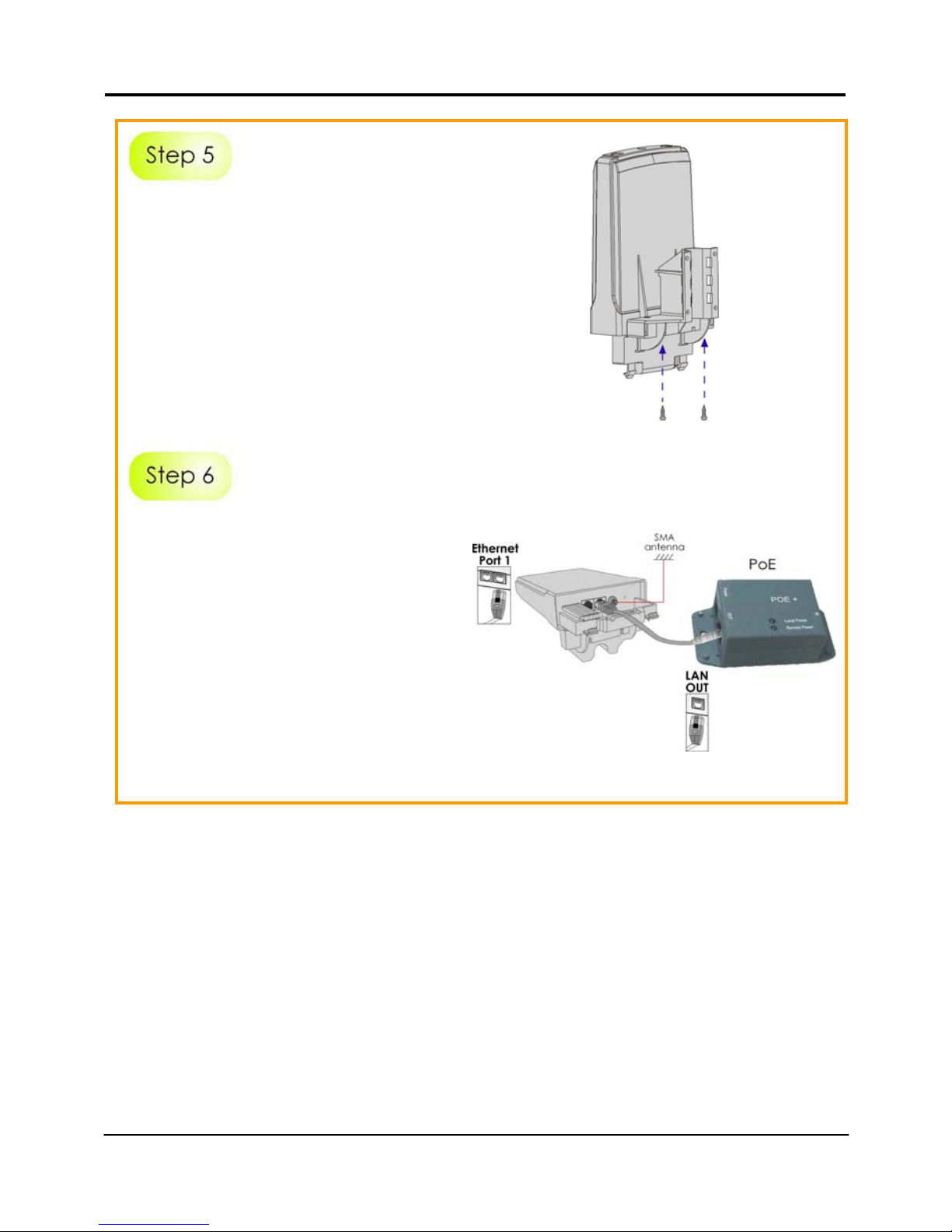
Next, fasten two screws that are
provided in the packaging to
secure the main unit to the
bracket.
Connect one end of an RJ45
Ethernet cable to the LAN OUT port
of the Injector and the other end to
Ethernet Port 1 of Compex WPP54.
Maximum length of the RJ45
Category 5 cable is 100 metres.
Next, connect your SMA antenna
(not provided) to the SMA reverse
connector.
Page 13
Chapter 2 Let’s Get Going - Hardware Setup
11
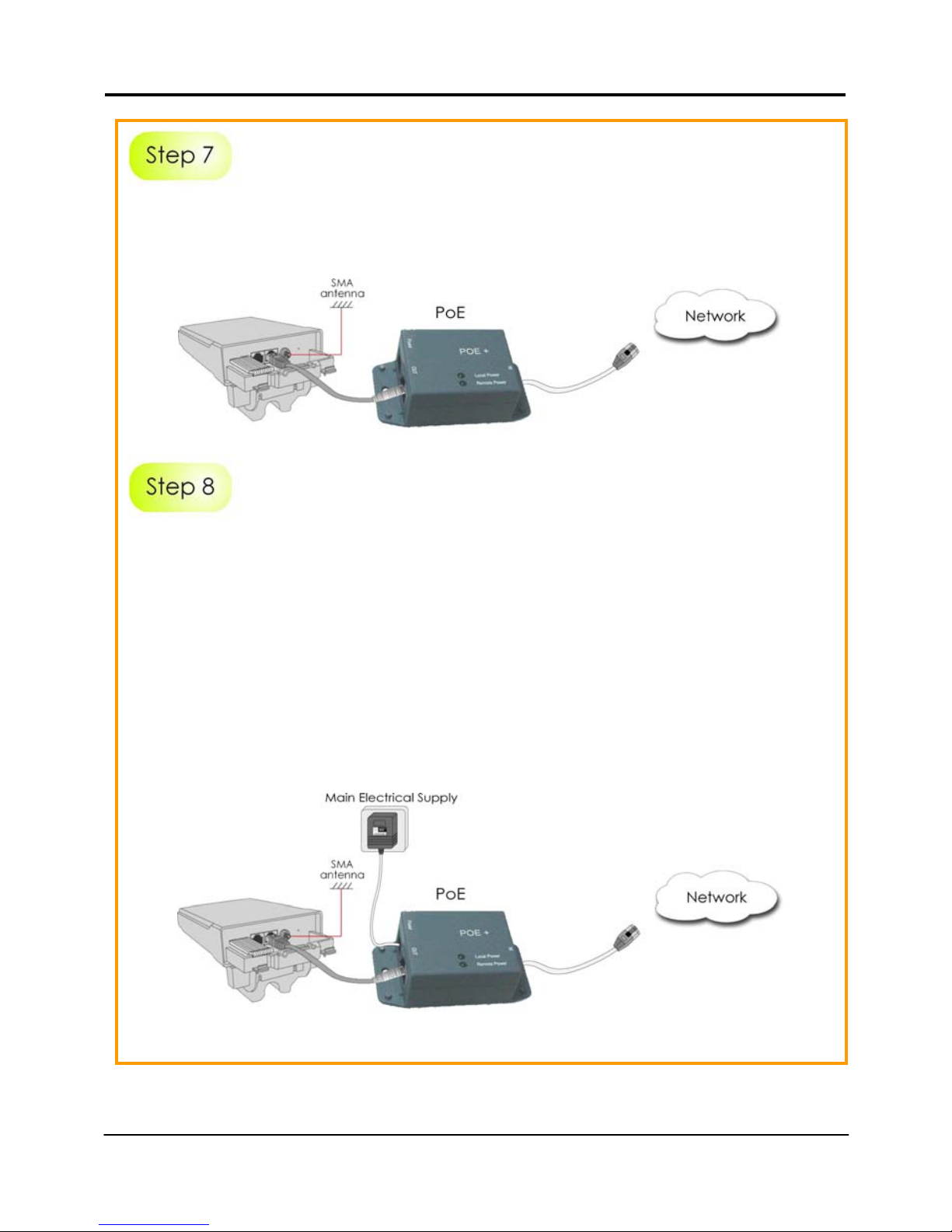
Connect the RJ45 Ethernet cable attached to th e Compex PoE Injector (not
provided) to a network device, such as to a s witch or to the PC you will use to
configure the WPP54.
Connect the power adapter in the Compex PoE kit (not prov ided) to the mai n
electrical supply and the power plug into the socket of the injector.
Now, turn on your power supply. Notice that the POWER LED has lighted up.
This indicates that the WPP54 is receiving power through the Compex PoE
Injector and that connection between Com pex WPP54 and your network has
been established.
Note:
Please use the power adapter in the Compex PoE kit (not provi ded). Using a
power adapter with a different voltage rating will damage this product.
Page 14
Chapter 2 Let’s Get Going - Hardware Setup
12
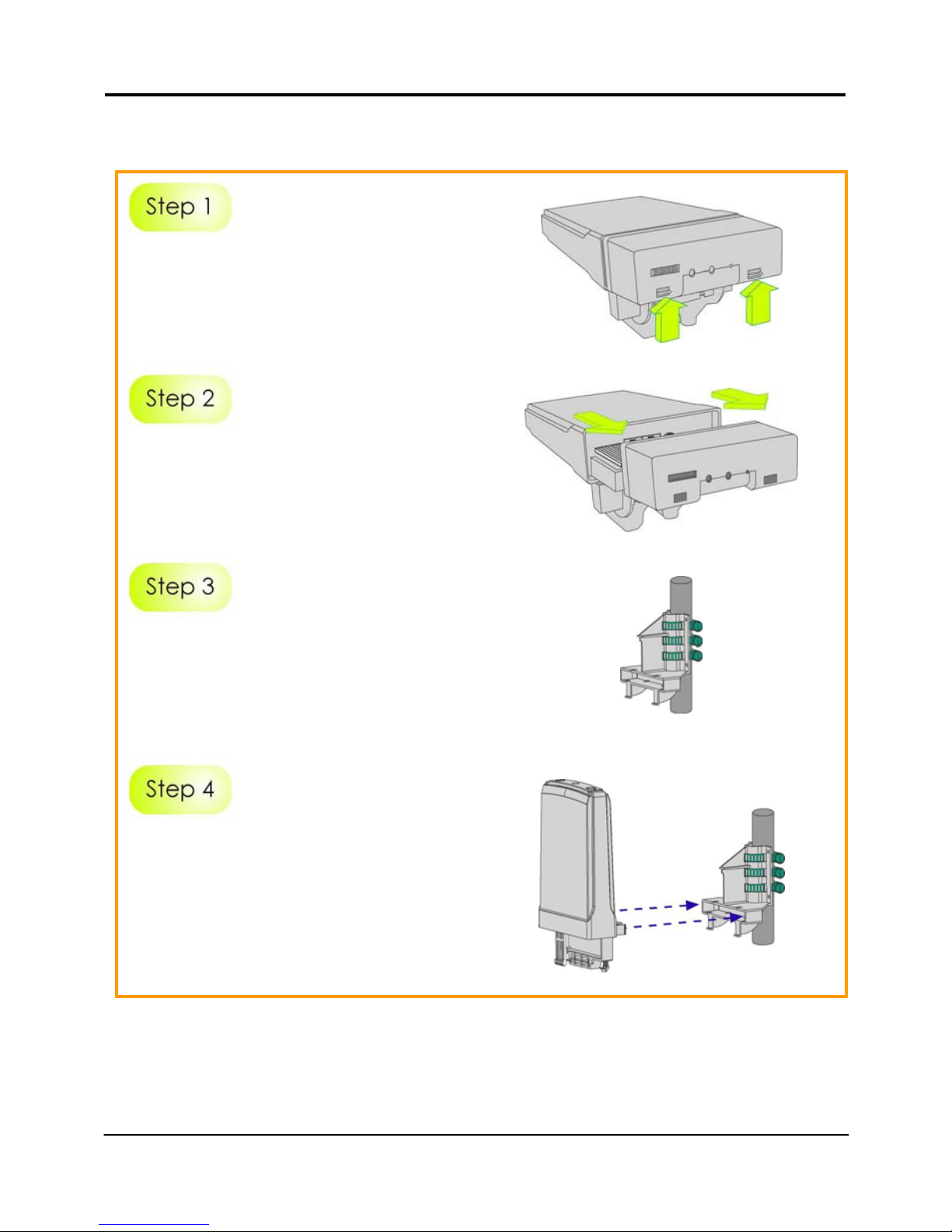
Method 2: Mounting on the Pole
Hold the catches upward as shown
in the figure.
While still holding the catches, push
the Compex WPP54 cover outwards.
Use metal straps (not provided) to
secure the bracket to the pole.
Place the straps through the slots in
the bracket and then around the
pole. Tighten the straps.
Align the main unit of Compex
WPP54 with the bracket to attach
them as shown in the figure.
Page 15
Chapter 2 Let’s Get Going - Hardware Setup
13
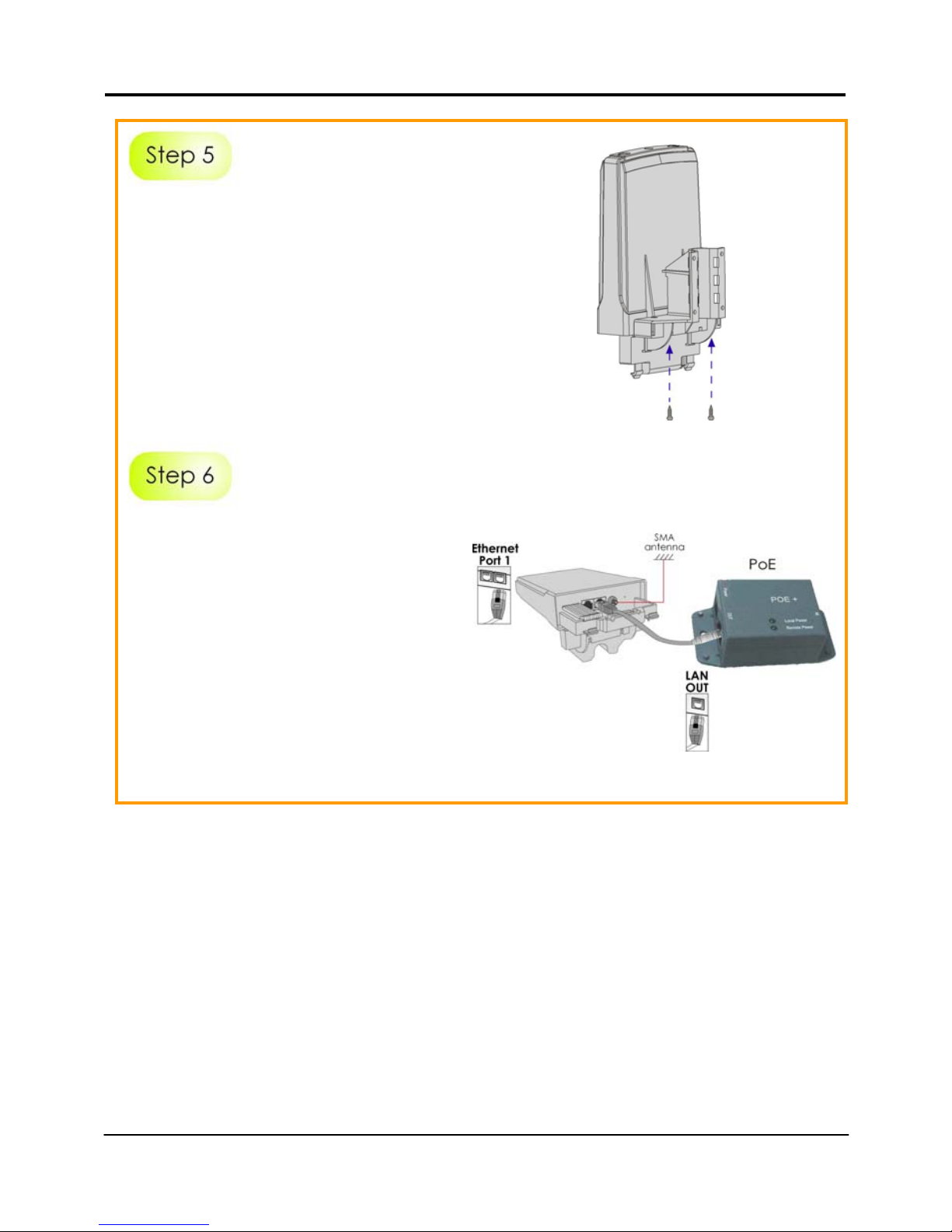
Next, fasten two screws that are
provided in the packaging to secure
both the main unit to the bracket.
Connect one end of an RJ45
Ethernet cable to the LAN OUT port
of the Injector and the other end to
Ethernet Port 1 of Compex WPP54.
Maximum length of the RJ45
Category 5 cable is 100 metres.
Next, connect your SMA antenna
(not provided) to the SMA reverse
connector.
Page 16
Chapter 2 Let’s Get Going - Hardware Setup
14
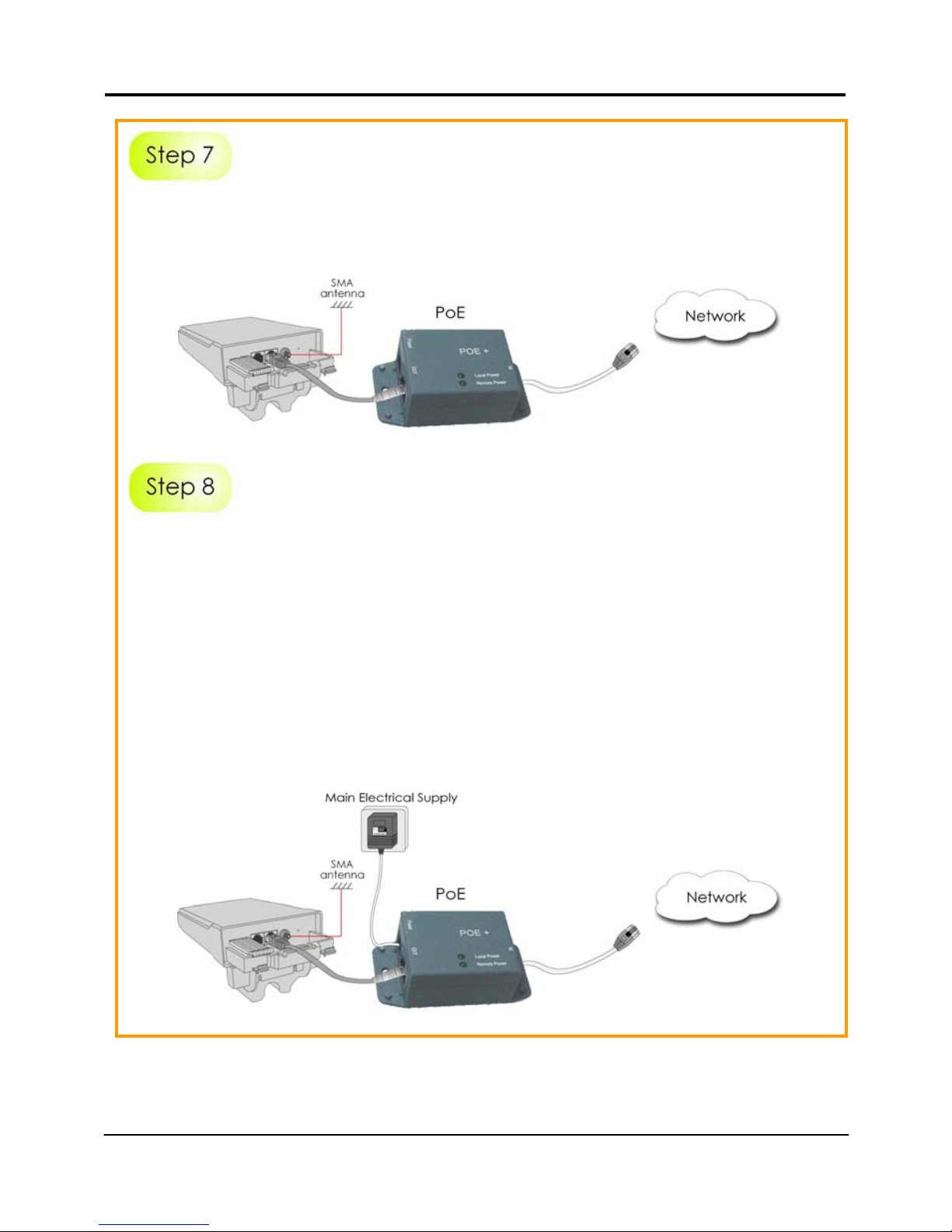
Connect the RJ45 Ethernet cable attached to th e Compex PoE Injector (not
provided) to a network device, such as to a s witch or to the PC you will use to
configure the WPP54.
Connect the power adapter in the Compex PoE kit (not prov ided) to the mai n
electrical supply and the power plug into the socket of the injector.
Now, turn on your power supply. Notice that the POWER LED has lighted up.
This indicates that the WPP54 is receiving power through the Compex PoE
Injector and that connection between Com pex WPP54 and your network has
been established.
Note:
Please use the power adapter in the Compex PoE kit (not provi ded). Using a
power adapter with a different voltage rating will damage this product.
Page 17
Chapter 3 Access to Web-ba sed Interface
15
3: Access to Web-based Interface
Once you have connected WPP54 to the management PC, there are two
methods to access to the web-based Interface of Compex WPP54:
Through our Compex Utility – uConfig
You can access to the web-based interface directly without having to
change the IP address of your PC.
Through the web browser
First, you will need to assign a static IP address to your PC, such as
192.168.168.xxx, where x can be any value from 2 to 254, so that it is in the
same subnet as Compex WPP54.
Method 1: Access to the Web interface with uConfig
Compex has developed a powerful uConfig utility that provides hassle-free
direct access to the web-based configuration page.
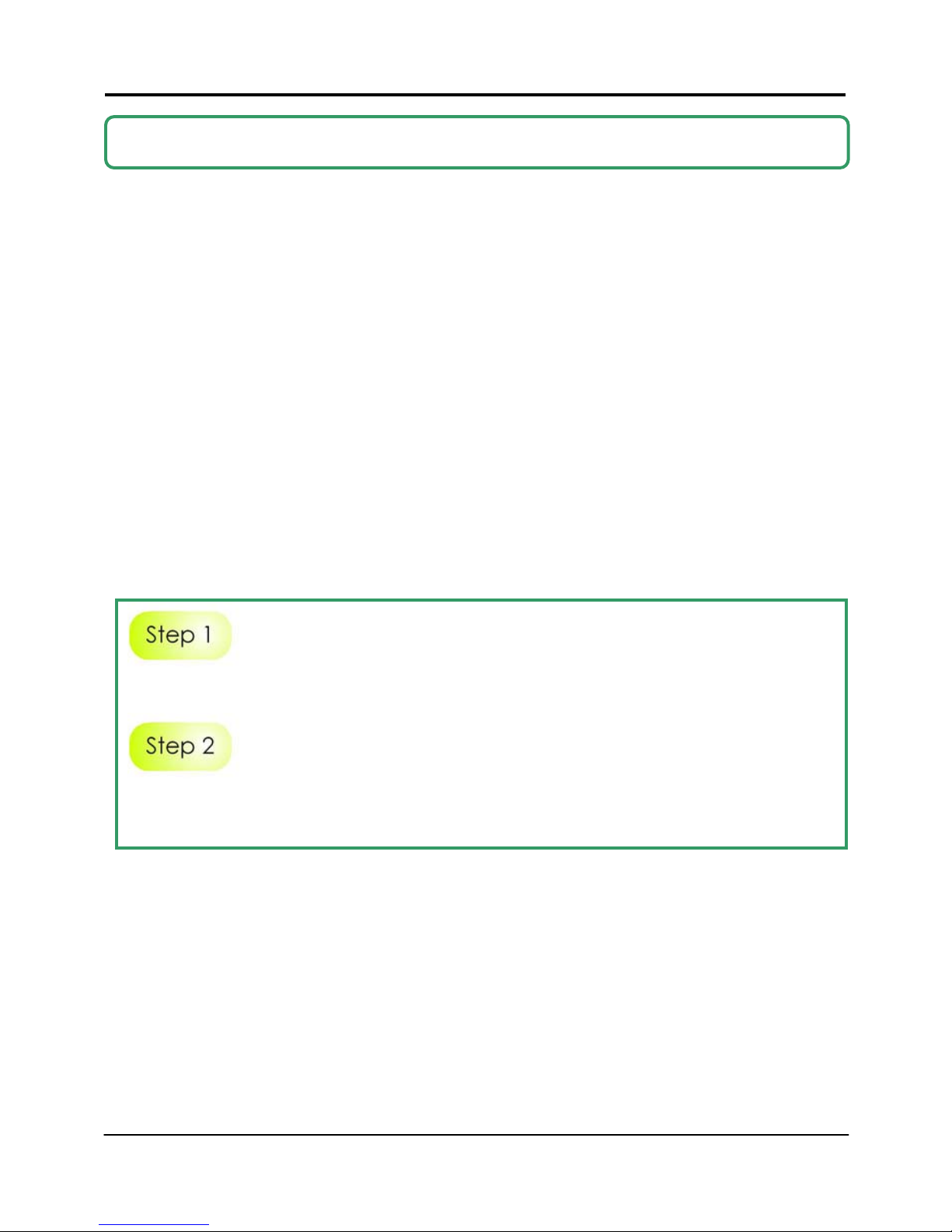
Insert the Product CD i nto your C D-ROM drive.
From the Utilities section, select to install the uConfig utility to your hard disk.
When the utility has been installed, double-click on the uConfig icon.
Page 18
Chapter 3 Access to Web-ba sed Interface
16
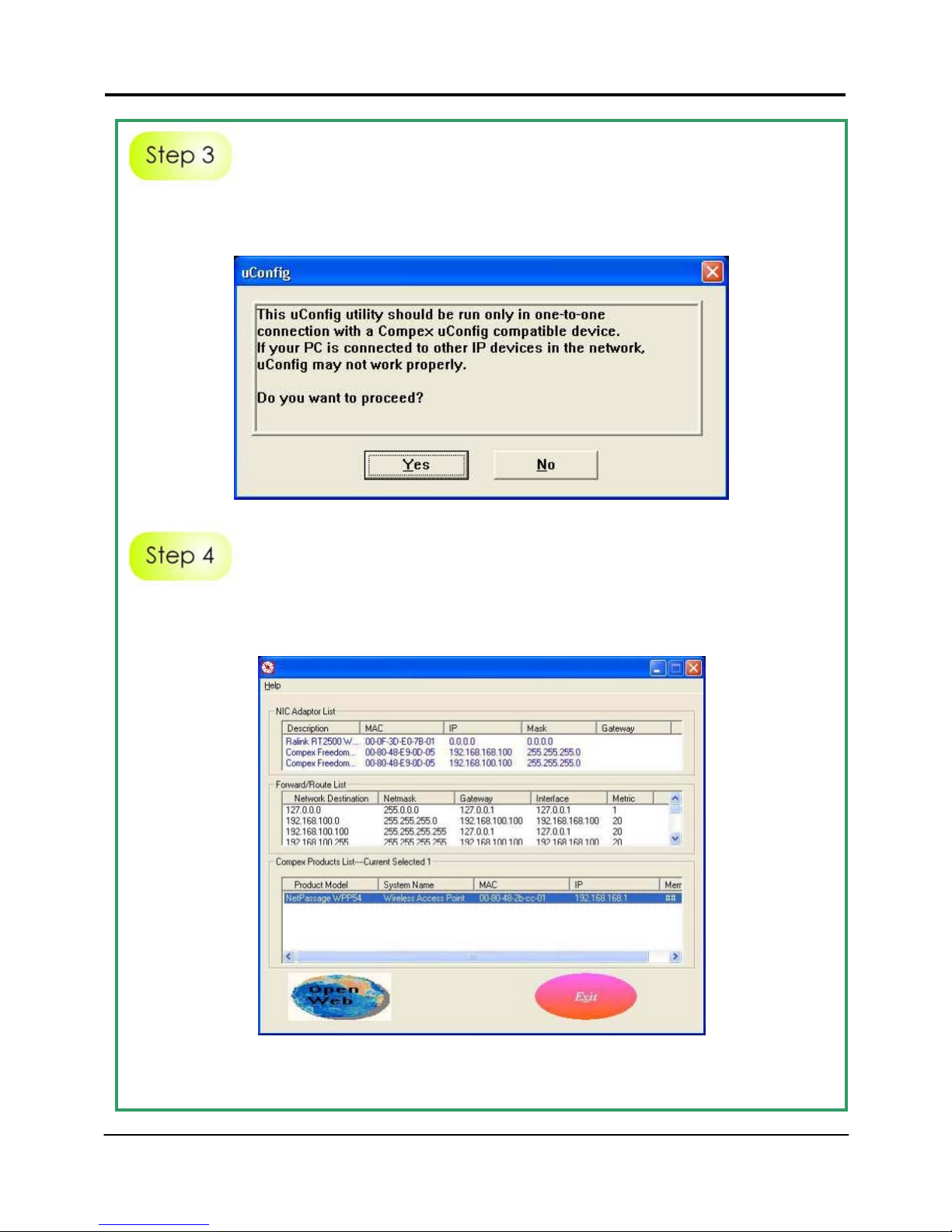
The program will prompt you with the following message. Click on the Yes
button to proceed.
Select Compex WPP54 in the Compex Products List secti on and click on Open
Web button.
Page 19
Chapter 3 Access to Web-ba sed Interface
17
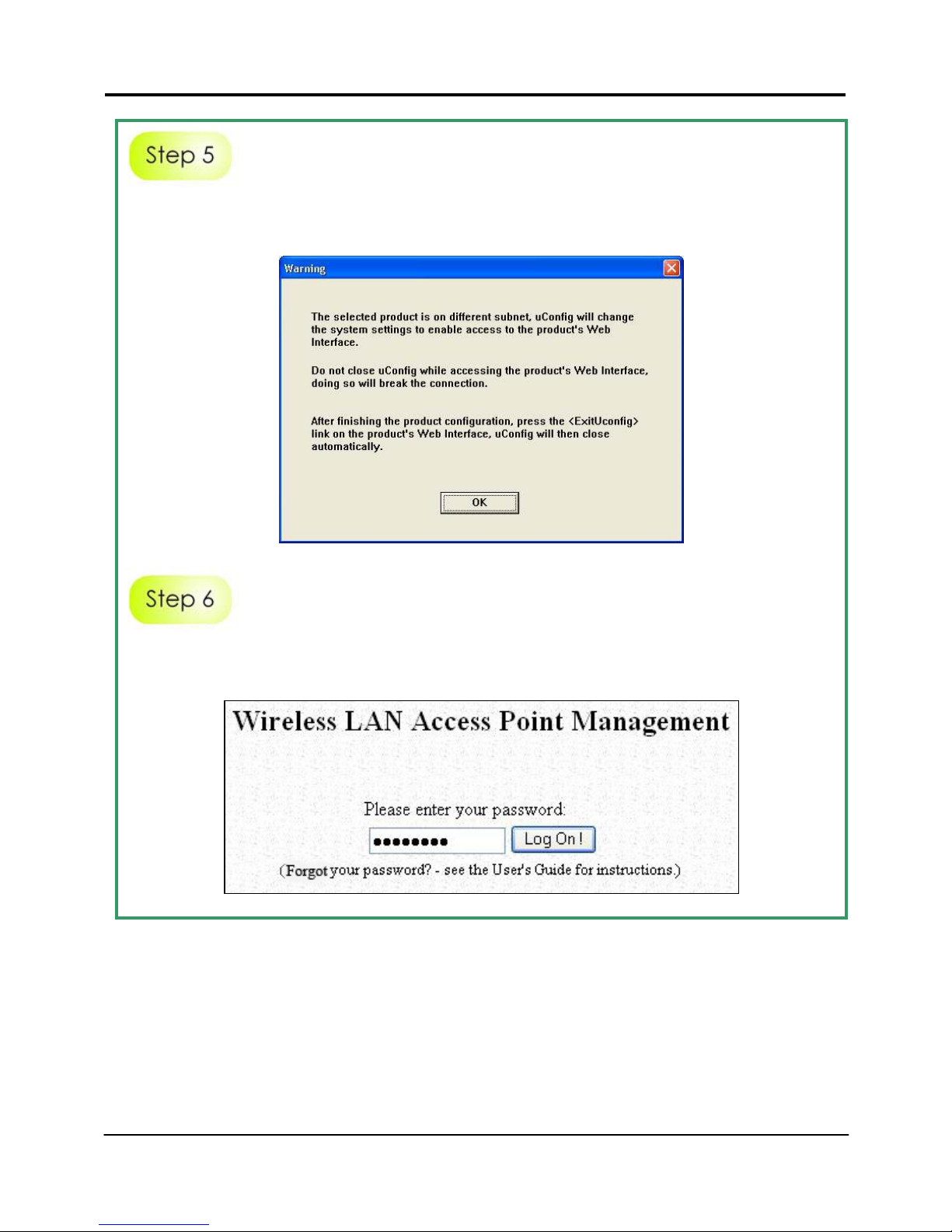
Next, the system will prompt you not to close the uConfig program until you
wish to exit your web-based interface. Click Ok button to proceed.
At the authentication page, click on the Log On! Button to enter the main
configuration page.
Page 20
Chapter 3 Access to Web-ba sed Interface
18
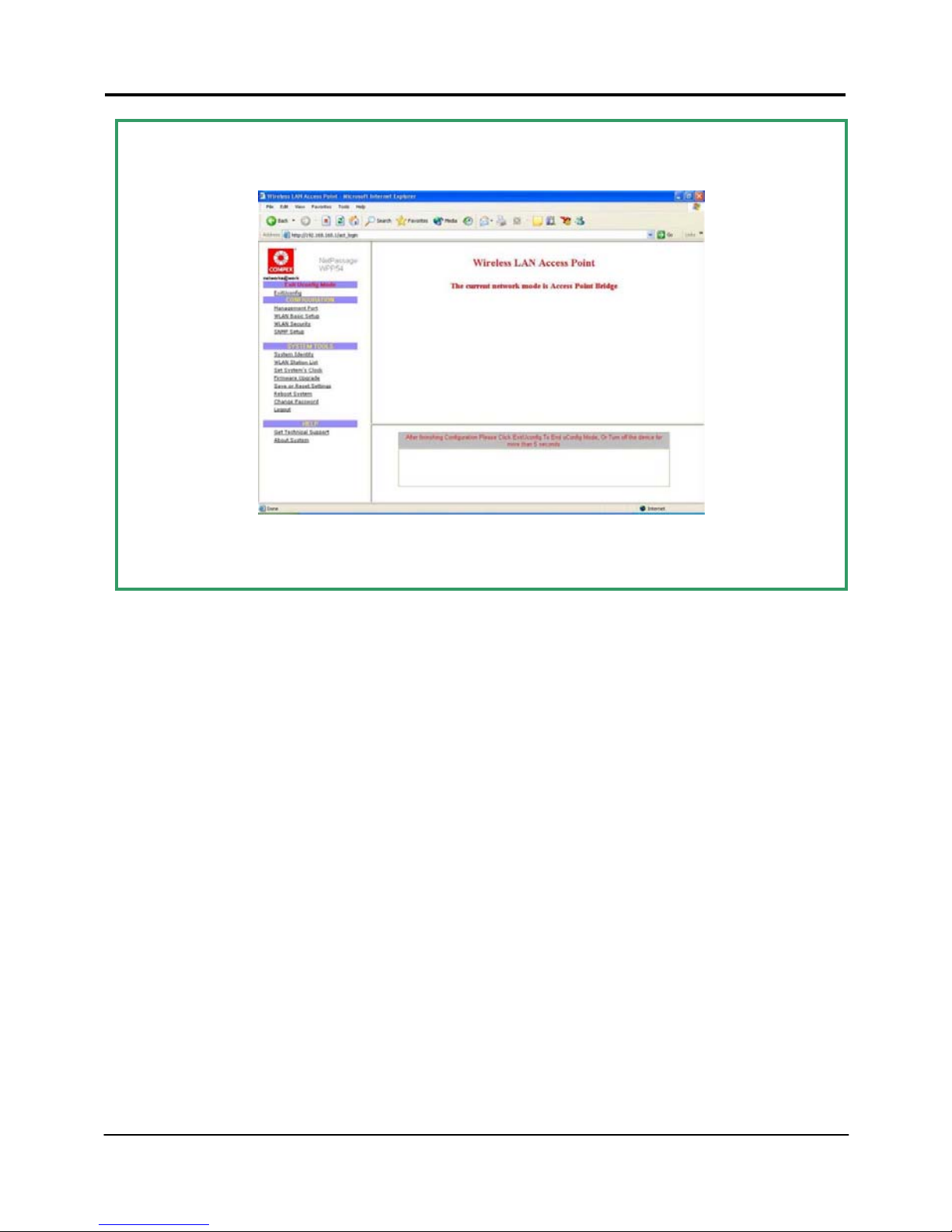
You will then reach the home page of Compex WPP54’s web-based interface.
Note:
For full instructions on how to configure WPP54, please refer to the User’s
Manual provided in the Product CD.
Page 21

Chapter 3 Access to Web-ba sed Interface
19
Method 2: Access to the Web interface manually
You can enter the IP address of the unit manually in the address bar of your
Internet browser. But you will first need to change the IP address of your PC so
that it is in the same subnet as your WPP54.
Note:
For full instructions on how to configure WPP54, please refer to the User’s
Manual provided in the Product CD.
Page 22
Chapter 4 TCP/IP Configuration
20
4: TCP/IP Configuration
Once the hardware has been set up , you need to assign an I P address to your
PC so that it will be in the same subnet as Compex WPP54. By default, Compex
WPP54’s IP address is 192.168.168.1; and its subnet mask is 255.255.255.0. You
need to configure your PC’s IP address to 192.168.168.xxx; and its subnet mask is
255.255.255.0, where xxx can be any number from 2 to 254 excluding 1. Simply
follow the procedures stated below to configure the TCP/IP settings of your PC.
For Windows 95/98/98SE/ME/NT
Please note the following instructions are based on Windows 98.
From your desktop, choose Network Neighborhood icon and select Properties.
Choose the network adapter that you are using, right click and select
Properties.
Page 23
Chapter 4 TCP/IP Configuration
21
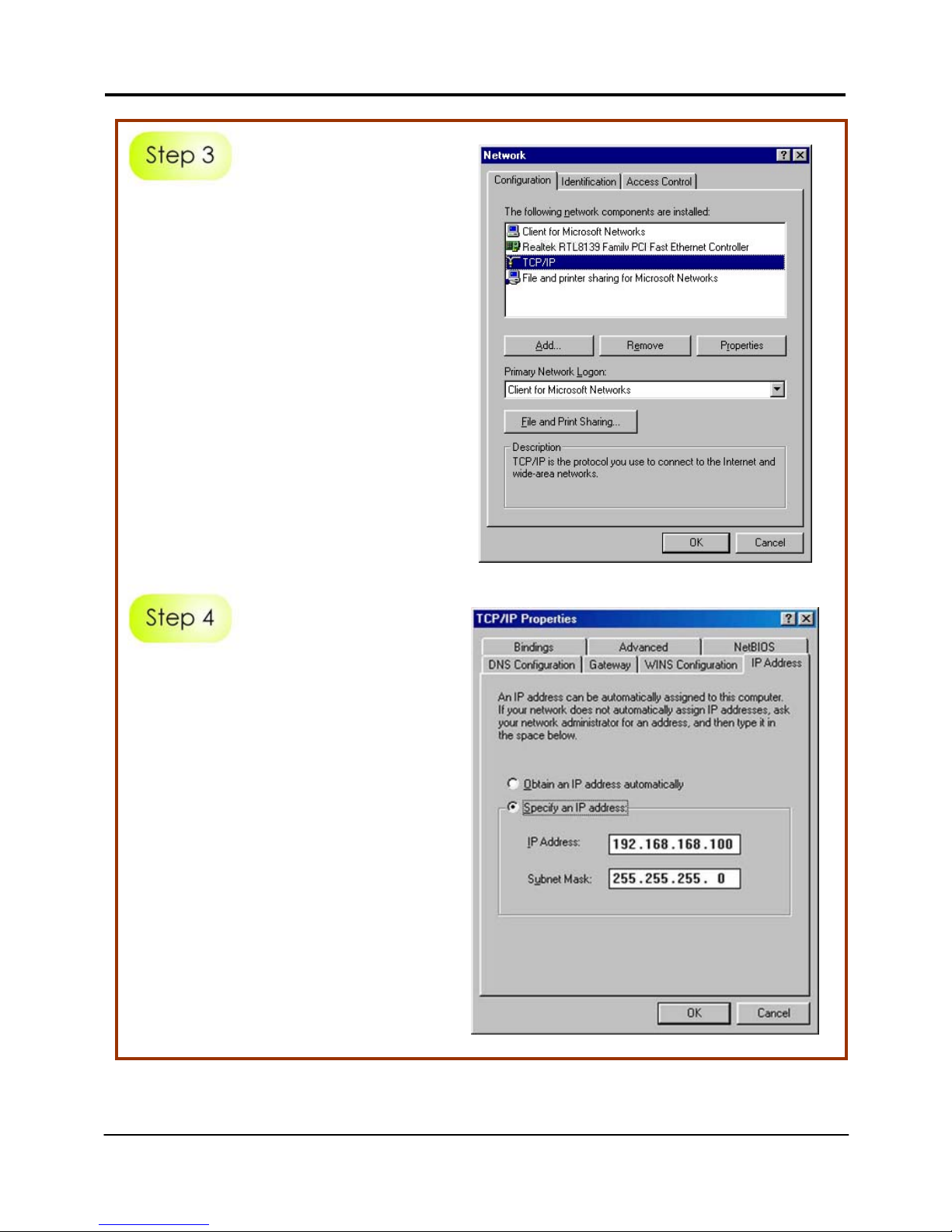
Highlight TCP/IP and click on the
Properties button.
Select the radio button for
Specify an IP address.
Enter the IP Address and Subnet
Mask as 192.168.168.xxx and
255.255.255.0, where xxx can be
any number from 2 to 254,
except for 1. In this example, we
are using 192.168.168.160 as the
static IP Address.
Page 24
Chapter 4 TCP/IP Configuration
22
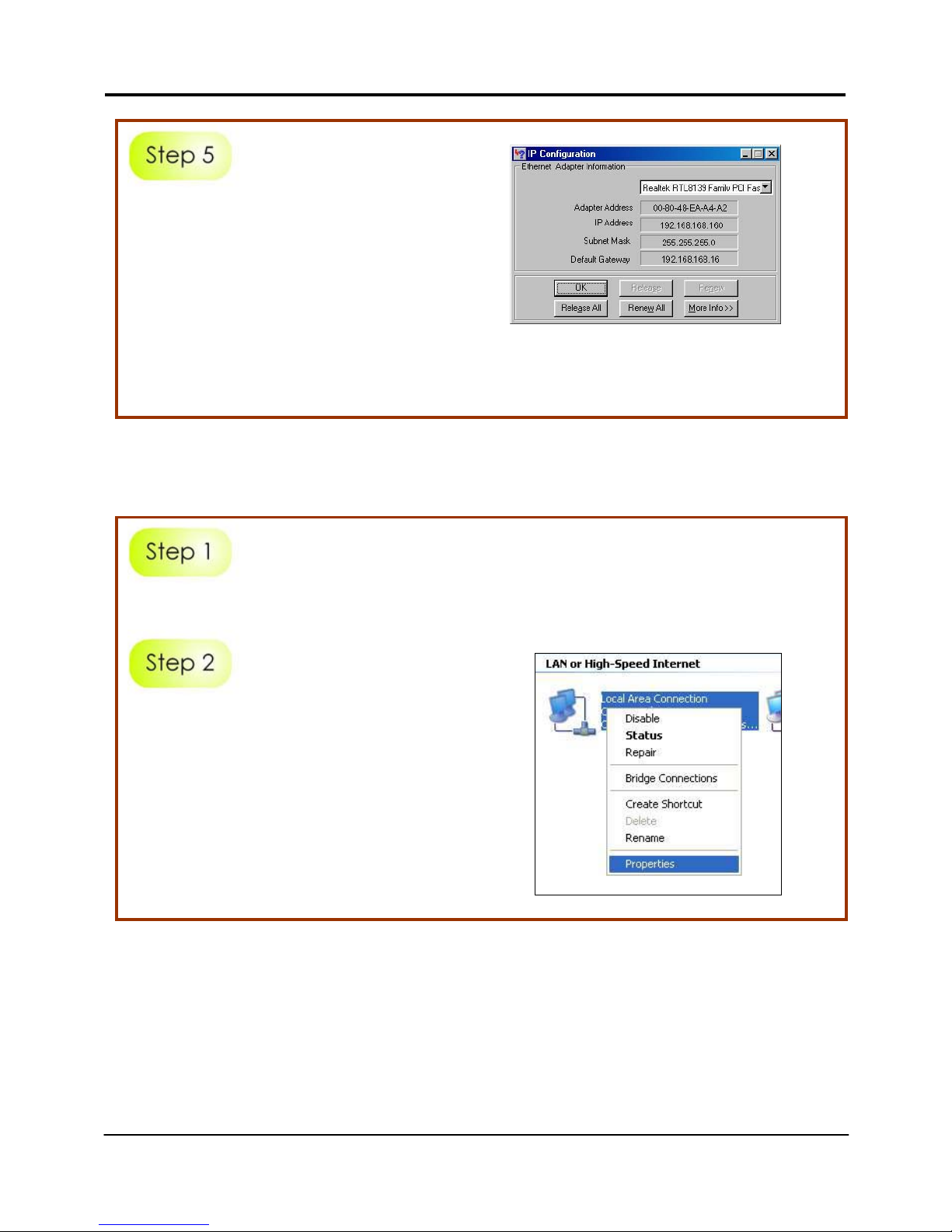
In order to check if the IP address
has been assigned correctly to
your PC, simply go to the Start
menu, select Run, and enter the
command winipcfg.
Select your respective Ethernet
Adapter from the drop down list
and click OK.
For Windows XP/2000
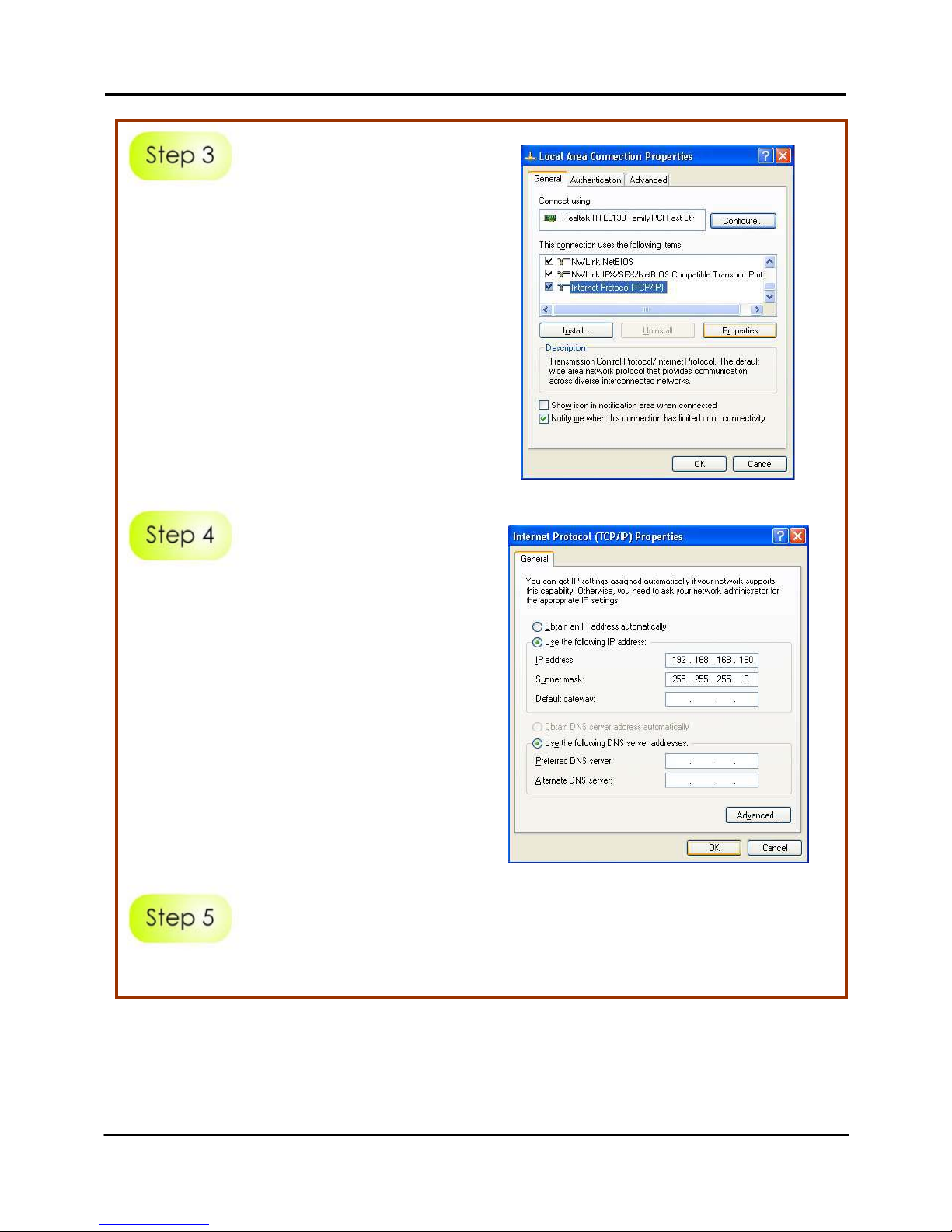
Go to your desktop, click on My Network Places icon and sel ect Properties.
Go to your network adapter icon,
right click and select Properties.
Page 25
Chapter 4 TCP/IP Configuration
23
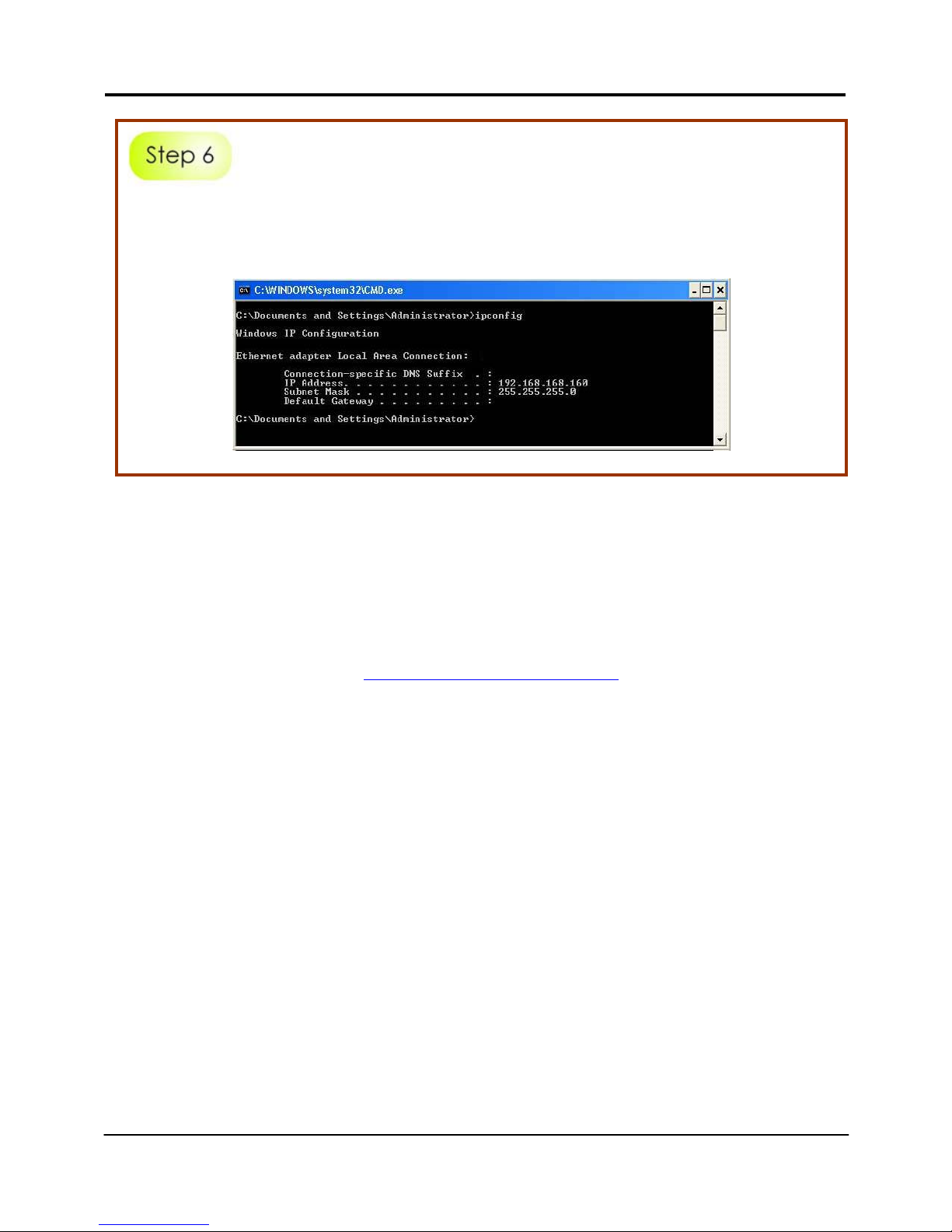
Highlight Internet Protocol (TCP/IP)
and click on Properties button.
Select the radio button for Use the
following IP address. Enter the IP
Address and Subnet Mask as
192.168.168.xxx and 255.255.255.0,
where xxx can be any number from
2 to 254, except for 1. In this
example, we are using
192.168.168.160 as the static IP
Address.
Click on OK to close all windows.
Page 26
Chapter 4 TCP/IP Configuration
24
Next, in order to check if the IP address has been correctly assigned to your
PC, go to Start menu, Accessories, select Command Prompt and type the
command ipconfig/all.
Further Information References
For more details on the WPP54 configuration, please refer to the User’s Manual
in the accompanying Product CD.
This document may become superseded, in which case you may find its latest
version from the website at
http://www.compex.com.sg
Page 27
Chapter 5 Panel Views and Descriptions
25
5: Panel Views and Descriptions
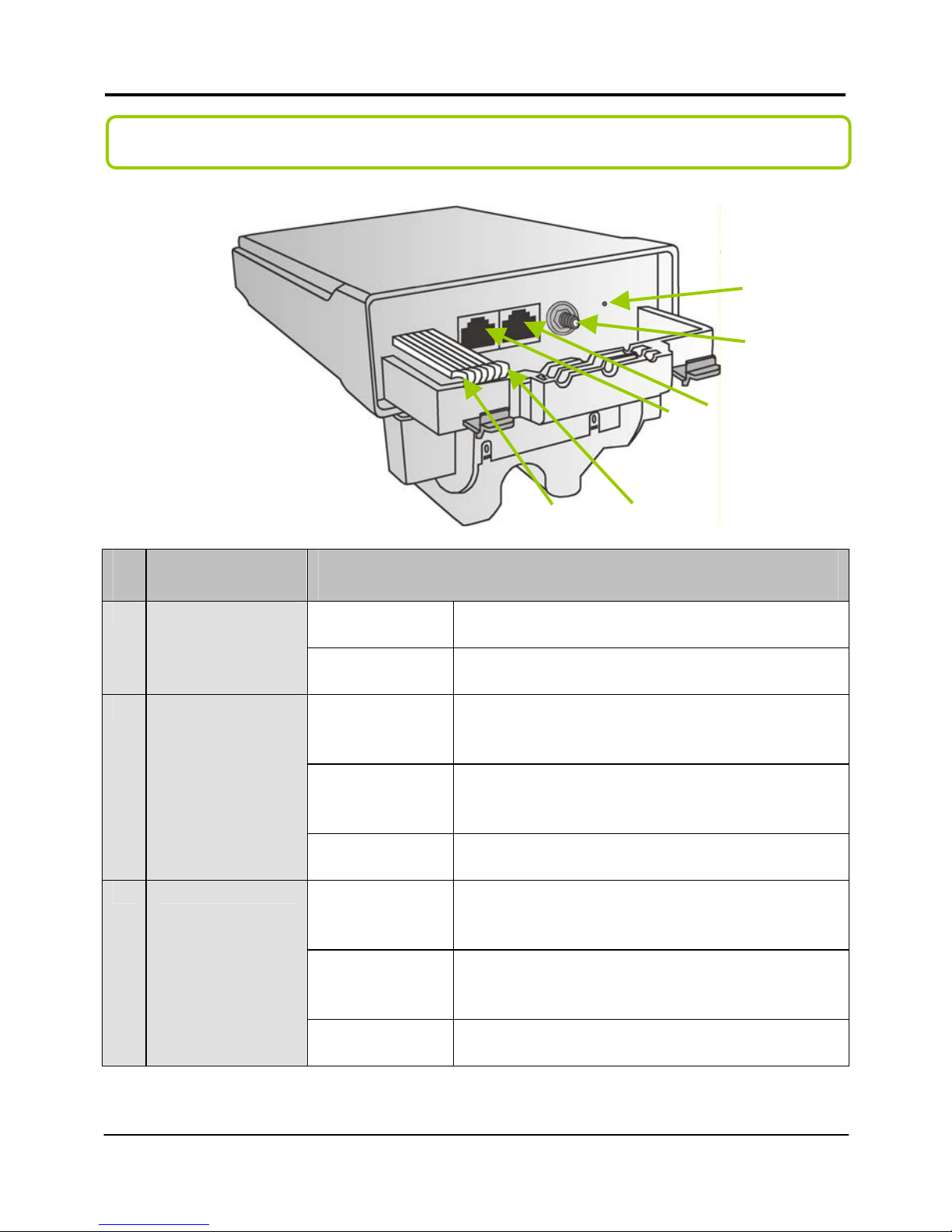
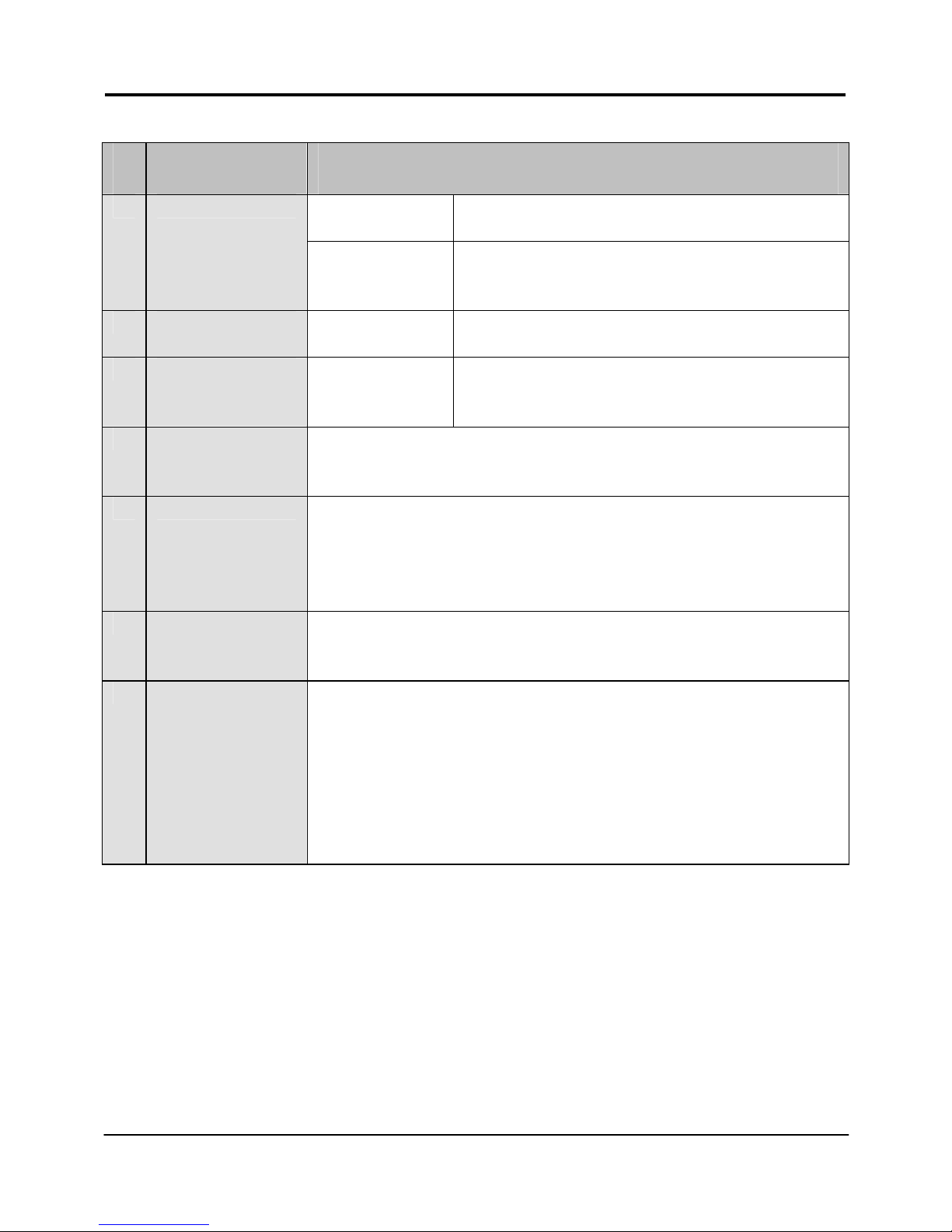
Features Status and Indication
Steady Red Power is supplied to the device.
1 POWER LED
Off No power is supplied to the device.
Steady Red The respective port has successfully
connected to Compex WPP54AG.
Blinking The respective port is transmitting or
receiving data.
2 10 ACT LED
Off No connection is establis hed.
Steady Red The respective port has successfully
connected to Compex WPP54AG.
Blinking Red The respective port is transmitting or
receiving data.
3 100 ACT LED
Off No connection is establis hed.
1 . . . . 6
10
9 8 7
Page 28
Chapter 5 Panel Views and Descriptions
26
Features Status and Indication
Steady Red Wireless interface up and running.
Ready for operation.
4 WLAN LED
Flashing Red Activity is detected in the wireless
network.
5 WAN Conn LED Flashing Red Data transmissi on at WAN connection.
6 DIAG LED Flashing Red It indicates that the firmware is
corrupted.
7 Ethernet Port 2 Connection for computer with NIC (Network Interface
Card) or Ethernet network card.
8 Ethernet Port 1 Connection for computer with NIC (Network Interface
Card) or Ethernet network card.
If using PoE, connect to Port 1.
9 Reverse SMA
connector
Connect to SMA antenna.
10 Reset button To reboot, press once.
To reset password, press and hold the button for 5
seconds before releasing it.
To restore the factory default settings, press and hold the
button for 8 seconds before releasing it.
Page 29
Chapter 6 Technical Specifications
27
6: Technical Specifications
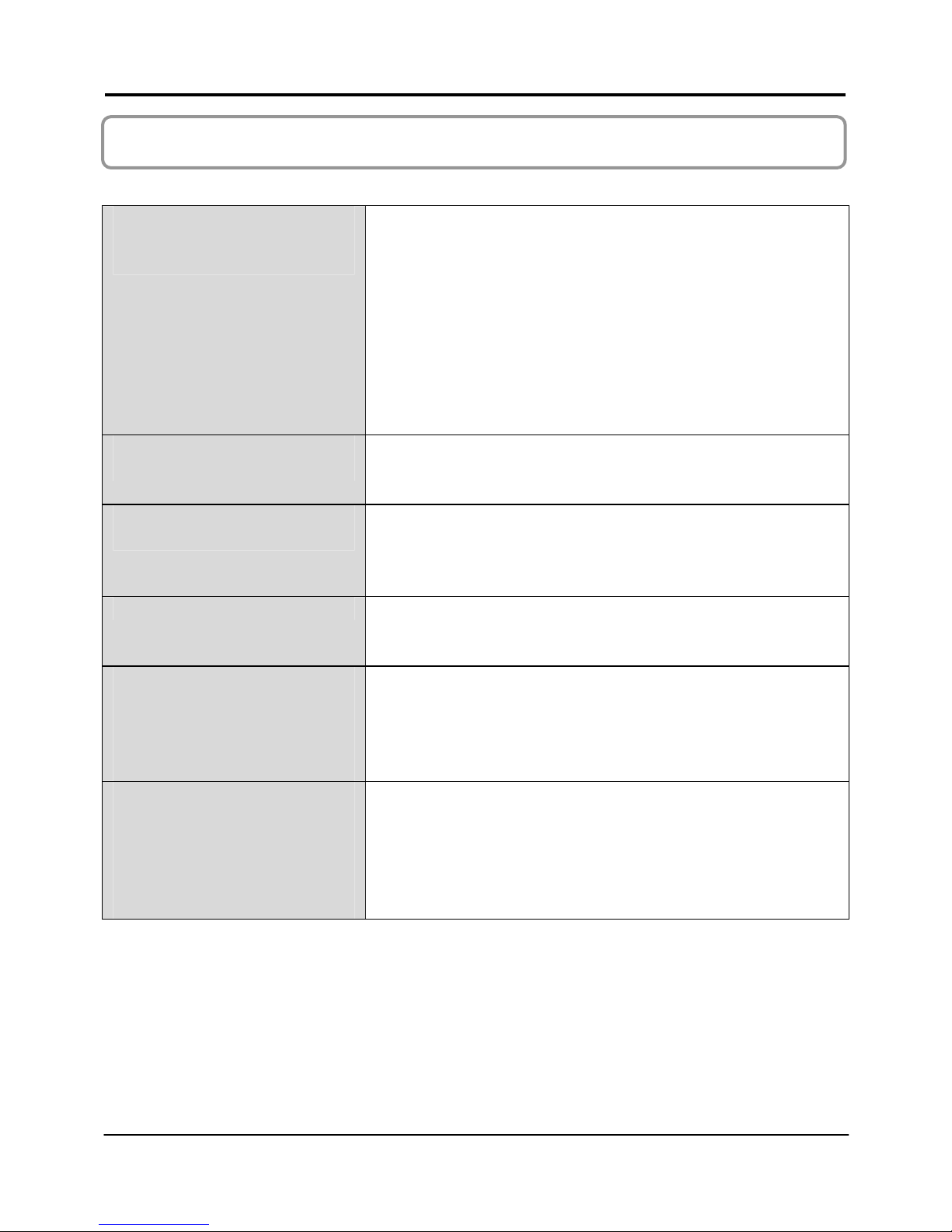
Safety and
Electromagnetic
Conformance
FCC Part 15 SubPart B and SubPart C (for
wireless module)
EN 300 328-2
EMC CE EN 301 489 (EN300 826)
EN 55022 (CISPR 22)/EN 55024 Class B
EN 61000-3-2
EN 61000-3-3
CE EN 60950
EN 301 893
Industrial Standards
(WPP54G)
IEEE 802.11b
IEEE 802.11g
Industrial Standards
(WPP54AG)
IEEE 802.11a
IEEE 802.11b
IEEE 802.11g
Data Rates Network speeds dynamically shift between 1,2,
5.5, 11, 12, 18, 24, 36, 48, 54 Mbps
Frequency Range
(WPP54G)
IEEE 802.11b:
IEEE 802.11g:
2.4 ~ 2.4835 GHz
2.4 ~ 2.497 GHz
Frequency Range
(WPP54AG)
IEEE 802.11a:
IEEE 802.11b:
IEEE 802.11g:
5.180 ~ 5.825 GHz
2.4 ~ 2.4835 GHz
2.4 ~ 2.497 GHz
Page 30
Chapter 6 Technical Specifications
28
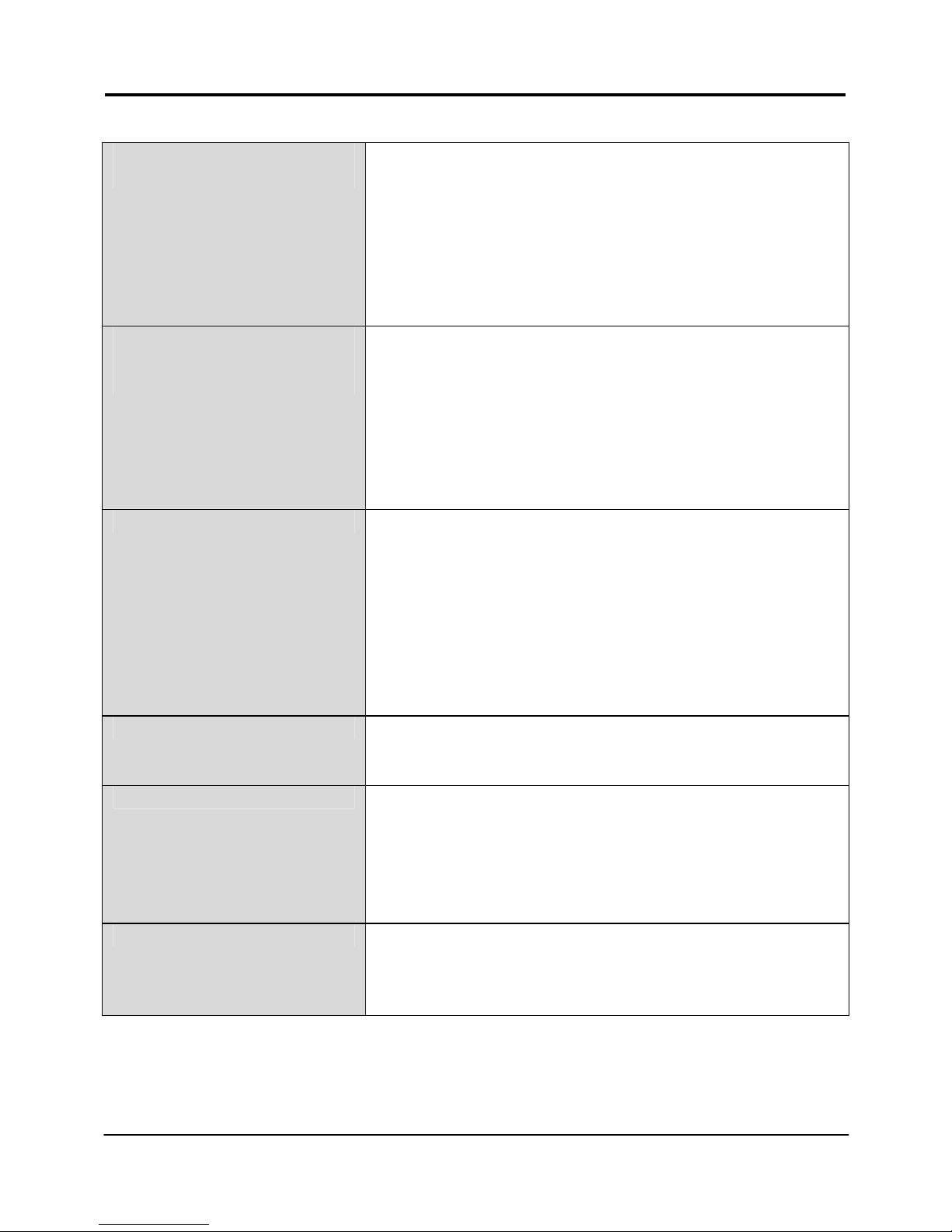
Wireless Operation Modes
(multi-SSID firmware)
Access Point Mode
Client Mode
Wireless Routing Client
Gateway Mode
Wireless Adapter Mode
Transparent Client Mode
• Repeater Mode
Wireless Operation Modes
(non multi-mSSID
firmware)
Access Point
Access Point Client
Point to Poin t
Point to Multiple Point
• Wireless Routing Client
• Gateway
• Wireless Adapter
Security 64 - bit / 128 - bit WEP
WPA-Enterprise, WPA-Personal, WPA2-Enterprise,
WPA2-Personal, WPA-Auto-Enterprise, WPAAuto-Personal
- Per Node
- Per Group
Tagged VLAN
IEEE 802.1x – TLS, TTLS, PEAP, EAP-SIM
Network Interface 2x RJ45 10/100 Mbps auto-negotiating Ethernet
port
Modulation BPSK (Binary Phase Shift Keying)
QPSK (Quadrature Phase Shift Keying)
CCK (Complementary Code Keying)
16 QAM, 64 QAM (Quadrature Amplitude
Modulation)
Radio Technology DSSS (Direct Sequence Spread Spectrum)
OFDM (Orthogonal Frequency Division
Multiplexing)
Page 31
Chapter 6 Technical Specifications
29
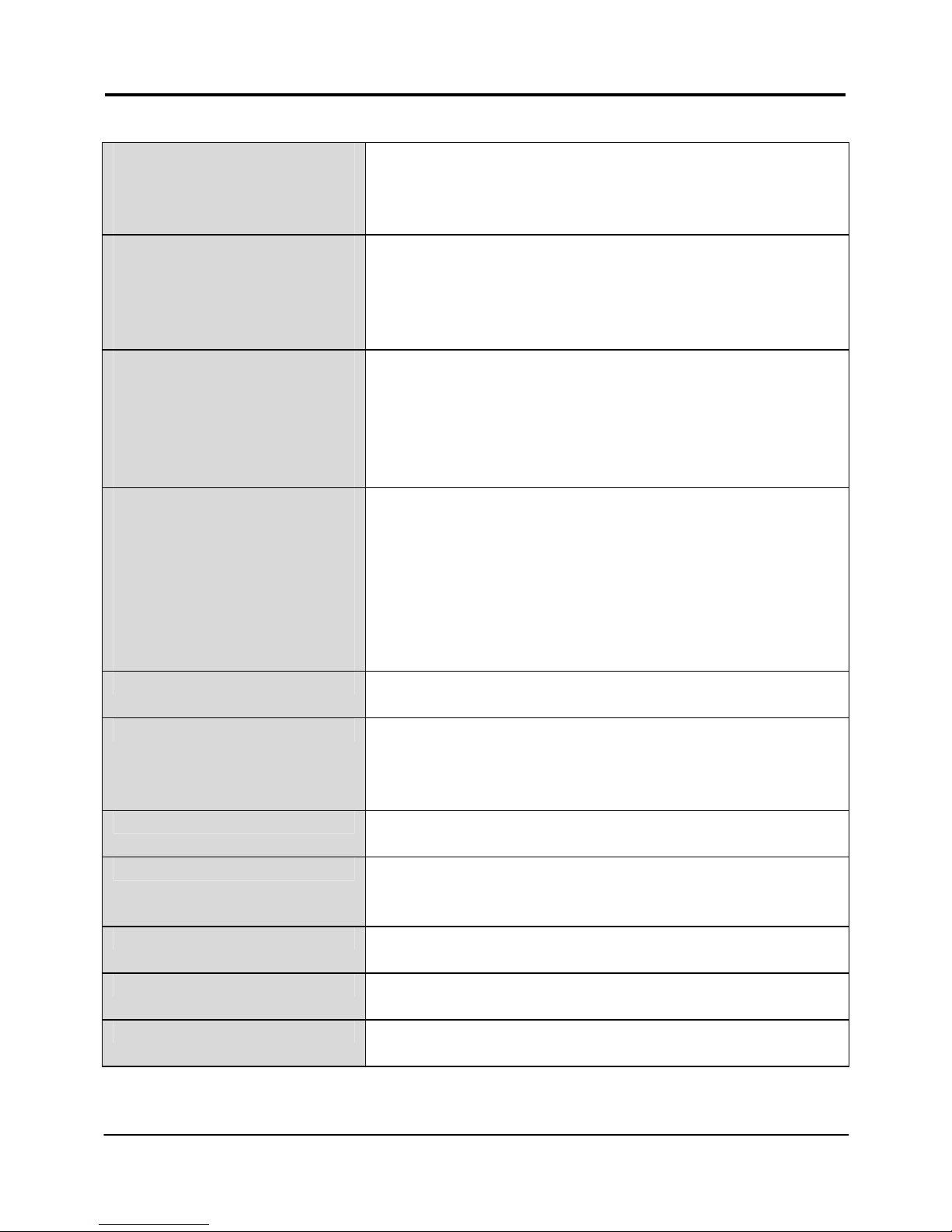
Output Power (WPP54G)
IEEE 802.11b:
IEEE 802.11g:
20 dBm
20 dBm
Output Power (WPP54AG)
IEEE 802.11a:
IEEE 802.11b:
IEEE 802.11g:
18 dBm
20 dBm
20 dBm
Operating Distance
(WPP54G)
IEEE 802.11b:
IEE 802.11g:
300 m (11Mbps outdoor)
30 m (11Mbps)
80 m (11Mbps outdoor)
15 m (11Mbps indoor)
Operating Distance
(WPP54AG)
IEEE 802.11a:
IEEE 802.11b:
IEE 802.11g:
85 m (54Mbps outdoor)
20 m (54Mbps indoor)
300 m (11Mbps outdoor)
30 m (11Mbps)
80 m (11Mbps outdoor)
15 m (11Mbps indoor)
SNMP SNMP (RFC 1157)
MIB II (RFC 1213)
LED Indicators Power
Diagnostic
LAN Link/Acti vity
WLAN Link/Activity
IP Addressing All classful/classless subnets
Management Telnet Command Console
HTTP Web Management
IP Addressing All Classful/Classless Subnets
Built-in DHCP Server Yes
DHCP Reservation By MAC address
Page 32
Chapter 6 Technical Specifications
30
Operating Channels 11 Channels: US and Canada
13 Channels: Europe
14 Channels: Japan
Load Balancing Parallel Broadband (in Gateway mode)
Fail-Over Redundancy Parallel Broadband (in Gateway mode)
Virtual Server IP and Port Forwarding, De-Militarised Zone
IP Packet Filtering Time-based
By TCP Port
By Source IP
IP Routing Static & Dynamic Entry
VPN Client Pass-Through PPTP, IPSec
Configuration Interface Web-based Configuration Menu
Profile Backup & Restore Yes
Firmware Upgrade Yes
Power Requirements:
48V 15W 802.11af PoE
Environment Requirements
Operating Temp:
Storage Temp:
Operating Humidity:
0ºC to 70ºC
-15ºC to 70ºC
5% to 95% RH
Humidity (RH – Relative Humidity)
Page 33

31
Disclaimer: Compex, Inc. provides this guide without warranty of any kind, expressed or
implied, including but not limited to the implied warranties of merchantability and fitness
for a particular purpose. Compex, Inc. may make improvements and/or changes to the
product and/or specifications of the product described in this guide, without prior notice.
Compex, Inc will not be liable for any technical inaccuracies or typographical errors
found in this guide. Changes are periodically made to the information contained herein
and will be incorporated into later versions of the guide. The information contained is
subject to cha nge without prior notice.
Trademark Information: Compex
®
, ReadyLINK® and MicroHub® are registered trademar ks
of Compex, Inc. Microsoft Windows and the Windows logo are the trademarks of
Microsoft Corp. NetWare is the registered trademark of Novell Inc. All other brand and
product names are trademarks or registered trademarks of their respective owners.
Notice: Copyrights
©
2005 by Compex, Inc. All rights reserved. Reproduction, adaptation,
or translation without prior permission of Compex, Inc. is prohibited, except as allowed
under the copyright laws.
Manual Revision by Daniel
Manual Number: M-0486-V1.1C Version 1.1, October 2006
FCC NOTICE: This device has been tested and found to comply with the limits for a Class B
digital dev ice, pursuant to Part 15 of the FCC Rules. These limits are designed to provi de
reasonable protection against harmful interference in a residential installation. This device
generates, uses and can radiate ra dio frequency energy and, if not install ed and used in
accordance with the instructions, may cause harmful interference to radio
communications. However, there is no guarantee that interference will not occur in a
particular installation. If this device does cause harmful interference to radio or television
reception, the user is enc ouraged to try to correct the interf erence by one or more of th e
following measures:
Reorient or relocate the receiving
antenna.
Connect the computer into an
outlet on a circ uit d iff eren t fro m tha t
to which the receiver is connected.
Increase the separation between the
computer and receiver.
Consult the dealer or an experienced
radio / TV technician for help.
Caution: Any changes or modifications not expressly approved by the grantee of this
device could void the user's authority to operate the equipment.
FCC Compliance Statement: This device complies with Part 15 of the FCC Rules. Operation
is subject to the following two co nditions:
(1)
(2)
This device may not cause harmful interference, and
This device must accept any interference received, including interference that
may cause undesired operation.
Products that contain a radio transmitter are labeled with FCC I D and may also carry the
FCC logo.
Caution: Exposure to Radio Frequency Radiation.
To comply with the FCC RF exposure compliance requirements, the following antenna
installation and device operating configurations must be satisfied:
a.
b.
For configurations using the integral antenna, the separation distance between the
antenna(s) and any person’s body (including hands, wrists, feet and ankles) must be
at least 2.5cm (1 inch).
For configurations using an approved external antenna, the separation distance
between the antenna and any person’s body (including hands, wrists, feet and
ankles) must be at least 20cm (8 inch).
Page 34
32
The transmitter shall not be collocated with other transmitters or anten nas.
ICES 003 Statement
This Class B digital apparatus complies with Canadian ICES-003.
DECLARATION OF CONFORMITY: Compex, Inc. declares that the product:
Product Name: Compex Wireless-G 54Mbps Outdoor Access Point
Model No.: WPP54 conforms to the following Product Standards:
This device complies with the Electromagnetic Compatibility Directive (89/336/EEC) issued
by the Commission of the European Community. Compliance with this directive implies
conformity to the following Eu ropean Norms (in brackets are the equivalent in ternational
standards.)
Electromagnetic Interference (Conduction and Radiation)
: EN 55022 (CISPR 22)
Electromagnetic Immunity
: EN 55024 (IEC61000-4-2,3,4,5,6,8,11)
Low Voltage Directive:
EN 60 950: 1992+A1: 1993+A2: 1993+A3: 1995+A4: 1996+A11:1997.
Therefore, this product is in conformity with the following regional standards: FCC Class B:
following the provisions of FCC Part 15 directive; CE Mark: following the provisions of the
EC directive.
DECLARATION OF CONFORMITY: Compex, Inc. declares that:
The wireless cards in this product comply with the R&TTE Directive (1999/5/EC) issued by
the Commission of the European Community. Compliance with this directive implies
conformity to the following European Norms (in brackets are the equivalent international
standards.)
EMC Standards:
FCC Part 15: Subpart B, Subpart C, Subpart E; CE: EN 301 893, EN 300 3282, EN 300 826 (EN 301 489-17)
Therefore, this product is in conformity with the following regional standards: FCC Class B -
following the provisions of FCC Part 15 directive; CE Mark - following the provisions of the
EC directive.
Manufacturer’s Name: Compex, Inc.
Address: 840 Columbia Street, Suite B
Brea, CA 92821, USA
Page 35
33
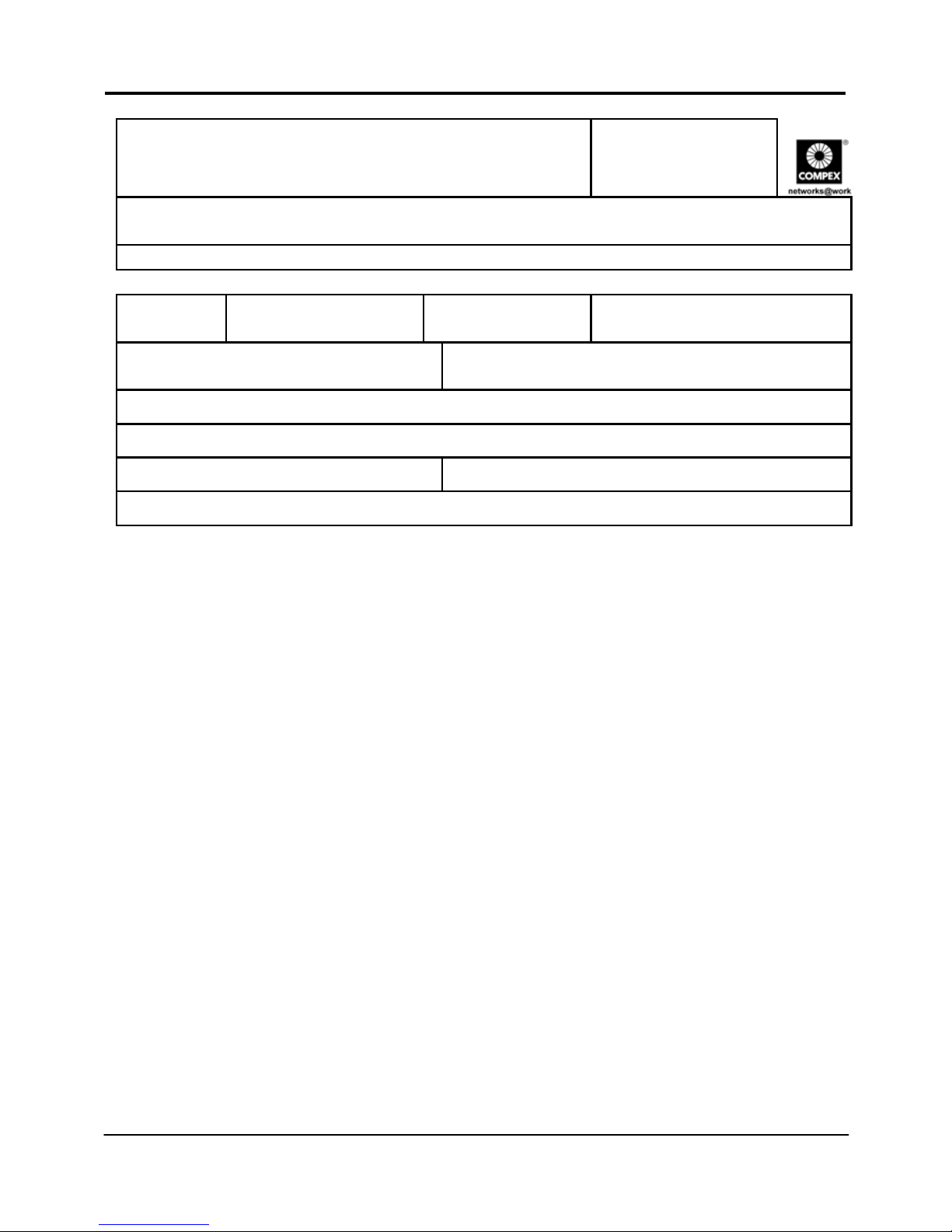
WARRANTY REGISTRATION CARD
Register via the Internet at http:/ /www.cpx.com
or http://www.compex .com.sg
[M-0088-V2.4C]
To activate the warranty, please complete this card and return to Compex
within ninety 90 days from the date of purchase.
Please e-mail this warranty card to [email protected].
Product: Purchase Date: Model: Serial No:
Name: E-mail:
Company:
Address:
Postal/Zip Code: Country:
Phone: ( )
Note:
For purchases within U.S.A and Canada, please fax to Compex, Inc. at
(714) 482 0332
For purchases outside U.S.A and Canada, please fax to Compex Systems Pte
Ltd at (65) 6280-9947
Page 36

Manual Number:
M-0486-V1.1
Version 1.1
October 2006
 Loading...