

Page 1

USER’S MANUAL
WORLD HEADQUARTERS
55 Cabot Court
Hauppauge, NY 11788 USA
TEL: (631) 273-0404 FAX:(631) 273-1638
WWW: http://www.commspecial.com
EMAIL: [email protected]
Communications Specialties Pte Ltd
Serving the Asia Pacific Region
100 Beach Road
#22-09 Shaw Tower
Singapore 189702
TEL: +65 6391 8790 FAX: +65 6396 0138
e-mail : [email protected]
Deuce HD User's Manual
P/N 121509 Rev. E
Copyright 2001
Page 2

TABLE OF CONTENTS
Introduction ______________________________________________________ 2
Installation ________________________________________________________ 3
Operation ________________________________________________________ 4
Output Timing Specifications _________________________________________ 6
Troubleshooting ___________________________________________________ 6
Accessories_______________________________________________________ 7
Rear Connector Pin-outs ____________________________________________ 7
User and Certification Information _____________________________________ 8
Statement of Warranty_______________________________________________ 8
INCLUDED WITH THIS PRODUCT YOU SHOULD HAVE:
1 - Deuce® HD Intelligent Video Scaler
1 - AC power line cord
1 - 12 foot composite video input cable
1 - 12 foot S-Video input cable
1 - User’s Manual
1 - Product Registration card
AVAILABLE OPTIONAL ACCESSORIES:
• 15-pin VGA adapter cables for Deuce HD’s VGA output
• AC line cords for North America, Japan, or Europe
• Rackmounting kits
Deuce is a registered trademark of Communications Specialties, Inc.
Deuce HD User's Manual
Page 1
Page 3

INTRODUCTION
RGBHV RGBS Y-CB-CR
1 Red Red CR
2 Green Green Y
3 Blue Blue CB
4 n/c n/c n/c
5 Ground Gr ound Ground
6 Ground Gr ound Ground
7 Ground Gr ound Ground
8 Ground Gr ound Ground
9 n/c n/c n/c
10 Ground Ground Ground
11 n/c n/c n/c
12 n/c n/c n/c
13 H-Sync out Composite sync n/c
14 V-Sy nc out n/c n/c
15 n/c n/c n/c
Thank you for purchasing Deuce HD, the Intelligent Video Scaler designed especially for use with HDTV and DTV
displays. With Deuce HD, you now have the ability to enjoy high-resolution, film-like images from any standard video
source, including broadcast or cable TV ,video tape, DVD and laser disc. Deuce HD offers a unique automatic motion
compensation feature that will adapt to the specific type of input source image.
When processing NTSC sources, Deuce HD's motion compensation feature automatically selects one of three
different motion compensation techniques: adaptive frame (inverse 3:2 pulldown) for original film material, vertical
temporal and static mesh. (When processing PAL sources, inverse 3:2 pulldown is not applicable.) Because each
technique is set specifically for the type of input image, the result is the clearest, crispest picture quality possible, making
Deuce HD ideal for Home Theater and Professional A/V applications. Packed with other great features such as three
different aspect ratio conversions, Deuce HD is one incredibly versatile scaler. Additional features include Composite,
S-Video and Y-C
power supply and simple, intuitive user-interface round out this sleek, compact unit.
Like all products from Communications Specialties, Deuce HD comes with our continuing commitment to provide
support. In order to assist us in this process, please be sure to mail in your product registration card. This will make
it easier for us to notify you with any new product announcements or other information concerning our product line.
Should you need to contact us for support, our office is open Monday through Friday, from 8:30 AM to 5:00 PM Eastern
Time. We also offer a comprehensive web site for your added convenience. (www.commspecial.com)
component inputs and RGB or Y-CB-CR component outputs, plus an RS-232 remote. An internal
B-CR
Thank you for choosing Deuce HD. As always, we welcome your comments and suggestions.
Customers in the Asia Pacific Region should contact:
Communications Specialties Pte Ltd
Page 2
Communications Specialties, Inc.
55 Cabot Court
Hauppauge, N.Y. 11788 USA
Tel: (631) 273-0404
Fax: (631) 273-1638
Email: [email protected]
www.commspecial.com
100 Beach Road
#22-09 Shaw Tower
Singapore 189702
Tel: +65 6391 8790
Fax: +65 6396 0138
Email: [email protected]
www.commspecial.com
Deuce HD User's Manual
Page 4
Deuce HD User's Manual
Page 3
INSTALLATION
INSTALLATION STEPS:
1. Connect the provided AC power cord into the connector marked Power on the rear of Deuce HD and plug
the other end into an AC outlet. This is an auto-sensing universal input power supply and is compatible with
worldwide standards.
2. Connect a video source to either the COMPOSITE, S-VIDEO or COMPONENT input on the rear panel.
3. Connect a computer monitor, projector or display to the VGA compatible connector on the rear panel.
AVAILABLE OUTPUTS:
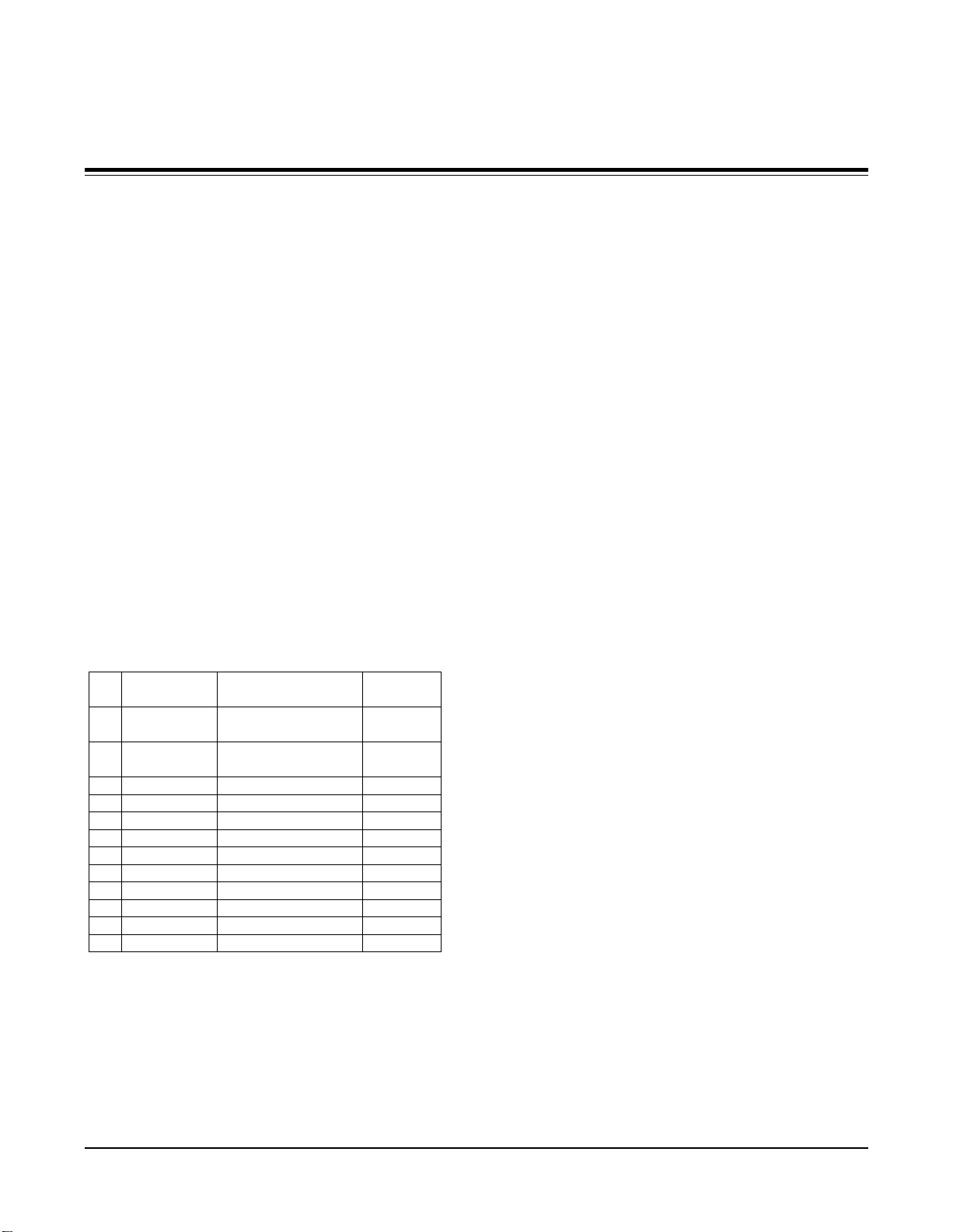
There are three outputs configurations available on the output VGA connector: RGBHV, RGBS and Y-CB-CR. The
rear panel switch next to the output connector selects one of the three output types. The individual signals on the
HD-15 connector are defined on page 7. Rear connector pin-outs for the output configuration are selected by this
switch.
REMOTE CONTROL:
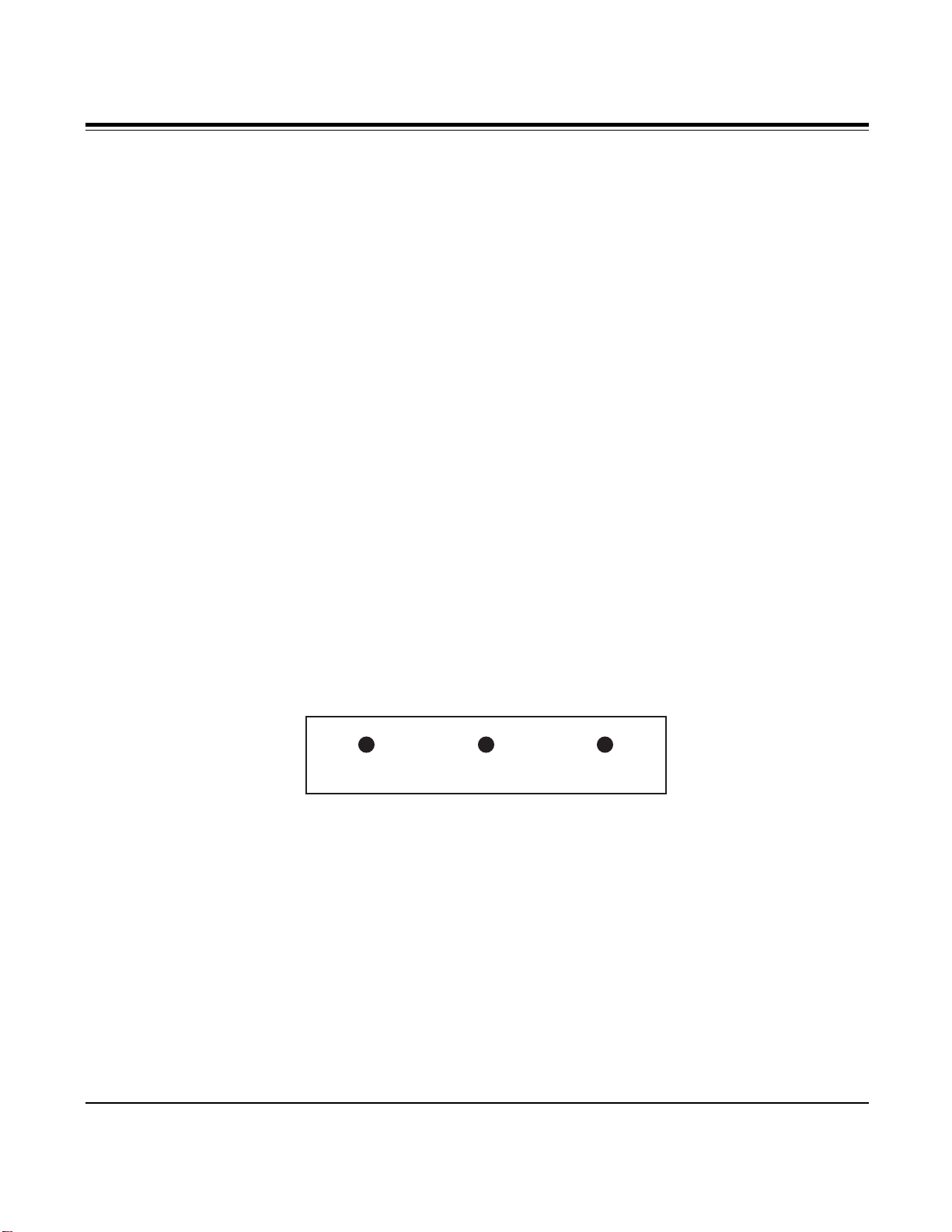
Deuce HD provides for a hard-wired RS-232 remote control connection using a 3-pin Phoenix-type connector on the
rear panel. The baud rate is 9600 baud, no parity, 1 start bit, 1 stop bit. The pin out is as follows:
Please contact the sales department at Communications Specialties or our web site at www.commspecial.com for
detailed specifications on the command structure for this remote control part.
1 - Ground 2 - Receive Data 3 - Transmit Data
1 2 3
Deuce HD provides for a hard-wired RS-232 remote control connection using a 3-pin Phoenix-type connector on the
rear panel. The baud rate is 9600 baud, no parity, 1 start bit, 1 stop bit. The pin out is as follows:
1 2 3
Page 5
OPERATION
Deuce HD is designed to operate properly with any projector or display while requiring minimal set-up and adjustments.
SELECTING AN INPUT:
There are three buttons on the front panel for directly selecting one of the three inputs. The LED that is lit indicates
the active selection. The three input options are:
Video (composite)
S-Video (Y/C)
Y-C
SELECTING AN OUTPUT FORMAT:
Deuce HD provides the five output formats listed below. Pressing the output format button on the front panel will cycle
through the choices. The LED that is on indicates the current output format.
480p
720p
1080p
1280 x 1024
1366 x 768
(component)
B-CR
SELECTING AN ASPECT RATIO:
Deuce HD's unique preset aspect ratio conversion offers the user three choices for changing the input aspect ratio to
the desired output image aspect ratio. It is important to select the appropriate conversion setting in order for the output
image to appear geometrically correct.
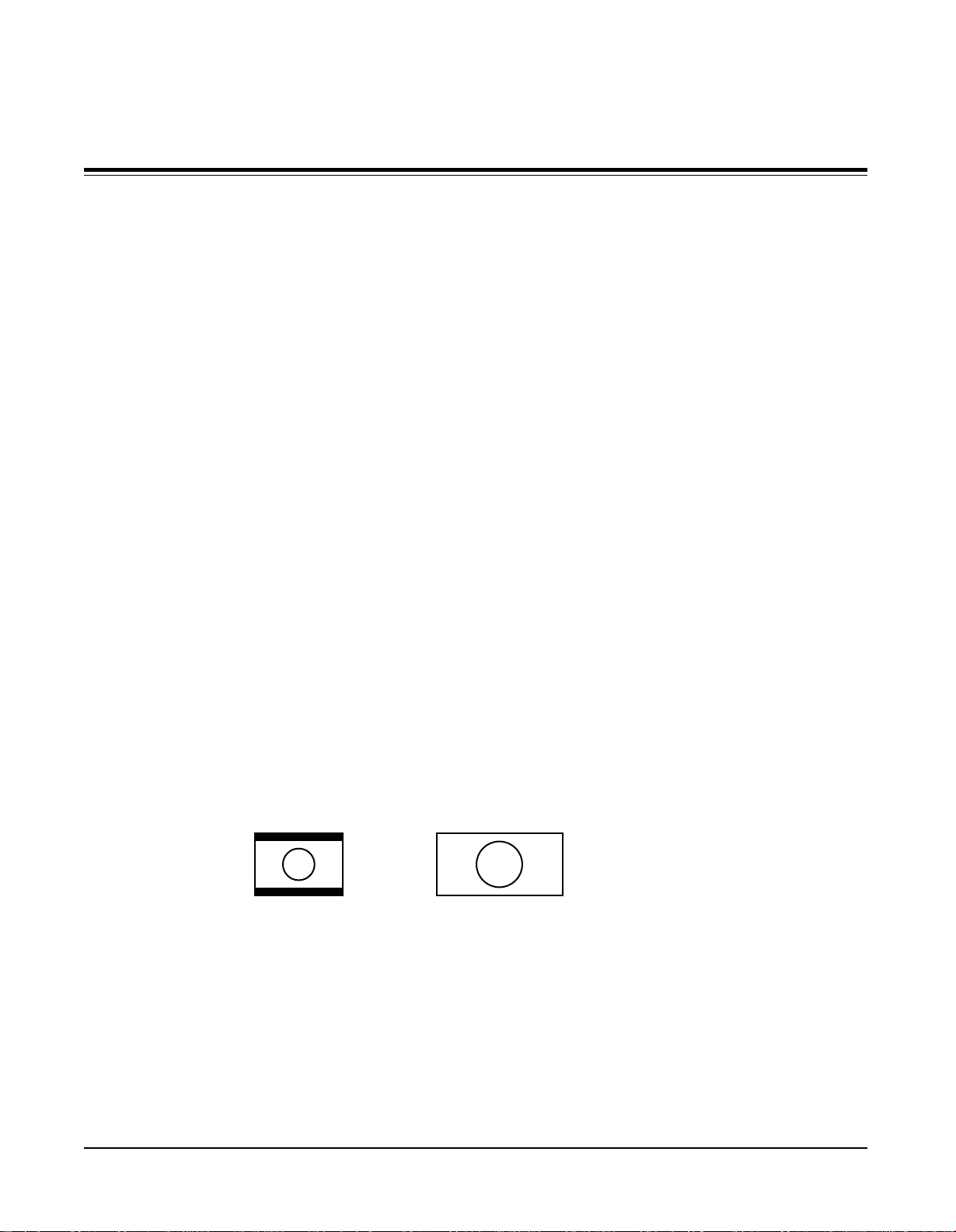
16:9 to 16:9
This conversion scales a 16:9 crop of the input video raster and maps it to the output as a full screen image. It is intended
for displaying original letterbox images as a full screen image on 16:9 displays.
Input:
Letterbox in
4:3 frame
4:3 to Full Screen
This conversion takes the entire input video raster and maps it to the entire output raster. If the output display aspect
ratio is 4:3, the image will appear with the same geometry as shown on the input. If the output display aspect ratio is
16:9, the image will appear to be "stretched" in the horizontal direction. This is useful if the input video source was an
anamorphically compressed DVD, as it will now appear to be geometrically correct on the 16:9 display. Refer to
diagrams on top of page 5.
Output:
Full 16:9 frame
Note: This mode is not available with PAL input to 480p output.
Page 4
Deuce HD User's Manual
Page 6
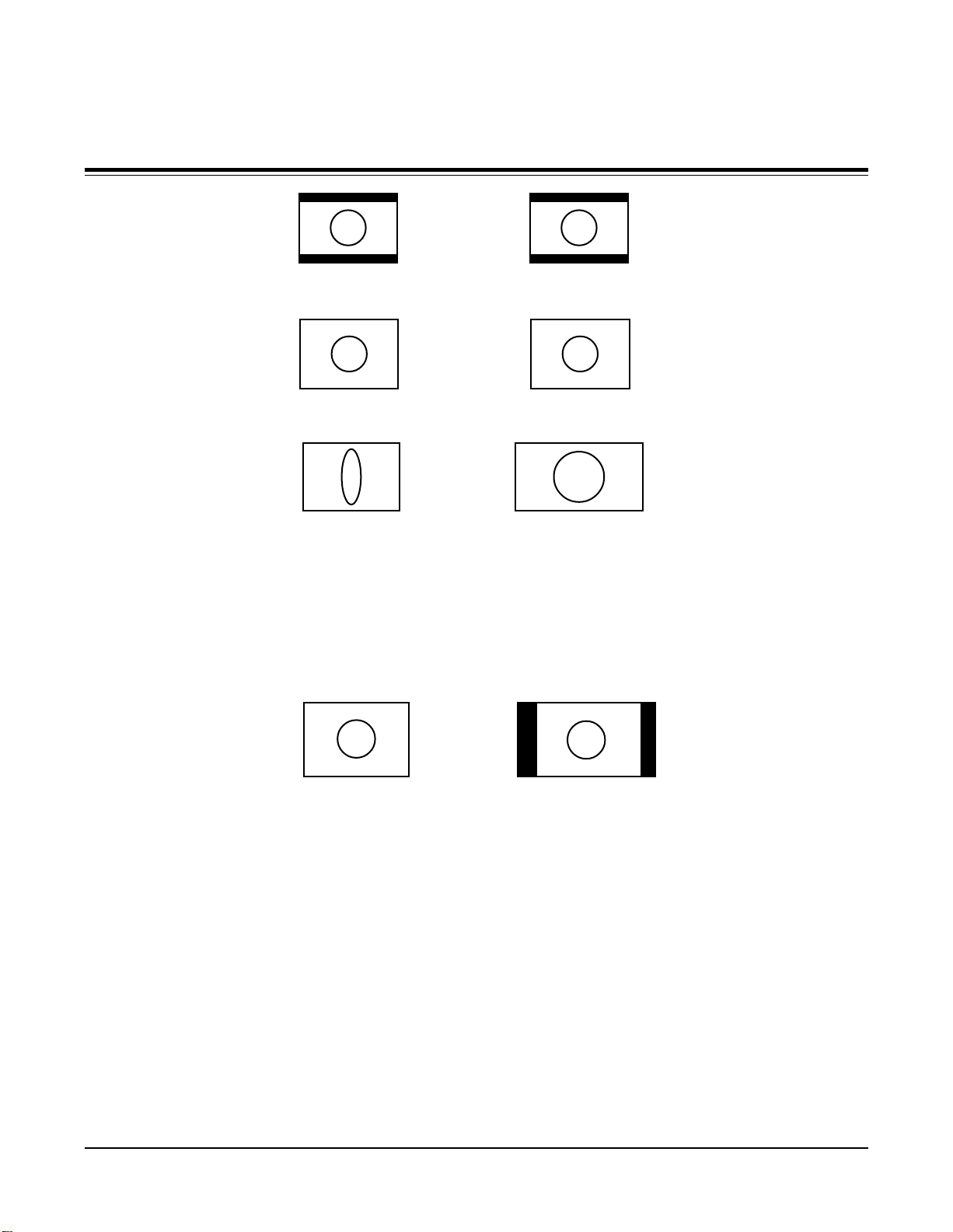
Input:
Letterbox in 4:3 frame
Output:
Letterbox in 4:3 frame
Input:
4:3 video source
Input:
Anamorphically com-
pressed DVD
4:3 to 4:3 in 16:9 Screen
This conversion is intended to display a standard, full screen 4:3 input on a 16:9 display with the correct geometry. Deuce
HD will place the 4:3 image centered in the 16:9 display with black on either side of the active image.
Note: This mode is not available with PAL input to 480p output.
Input:
4:3 video source
MOTION COMPENSATION:
Image fills 4:3 screen
Image is stretched horizontally
4:3 image is centered in 16:9
Output:
Output:
to fill a 16:9 screen
Output:
screen
The automatic motion compensation feature will analyze the input source and choose the appropriate compensation.
Deuce HD will automatically select between inverse 3:2 pulldown (adaptive frame), vertical temporal and static mesh
modes. With a PAL input, inverse 3:2 pulldown is not used.
SPECIAL KEY FUNCTIONS:
There are several functions that can be activated by pressing a combination of keys simultaneously:
Key Panel Lockout: Press the VIDEO and S-VIDEO buttons at the same time to lock out the key panel.
Key Panel Unlock: Press the S-VIDEO and COMPONENT buttons at the same time to unlock the key panel and
allow normal operation.
System Reset: Press the COMPONENT and the OUTPUT FORMAT buttons at the same time to reset the unit and
return all settings to their factory defaults.
Deuce HD User's Manual
Page 5
Page 7
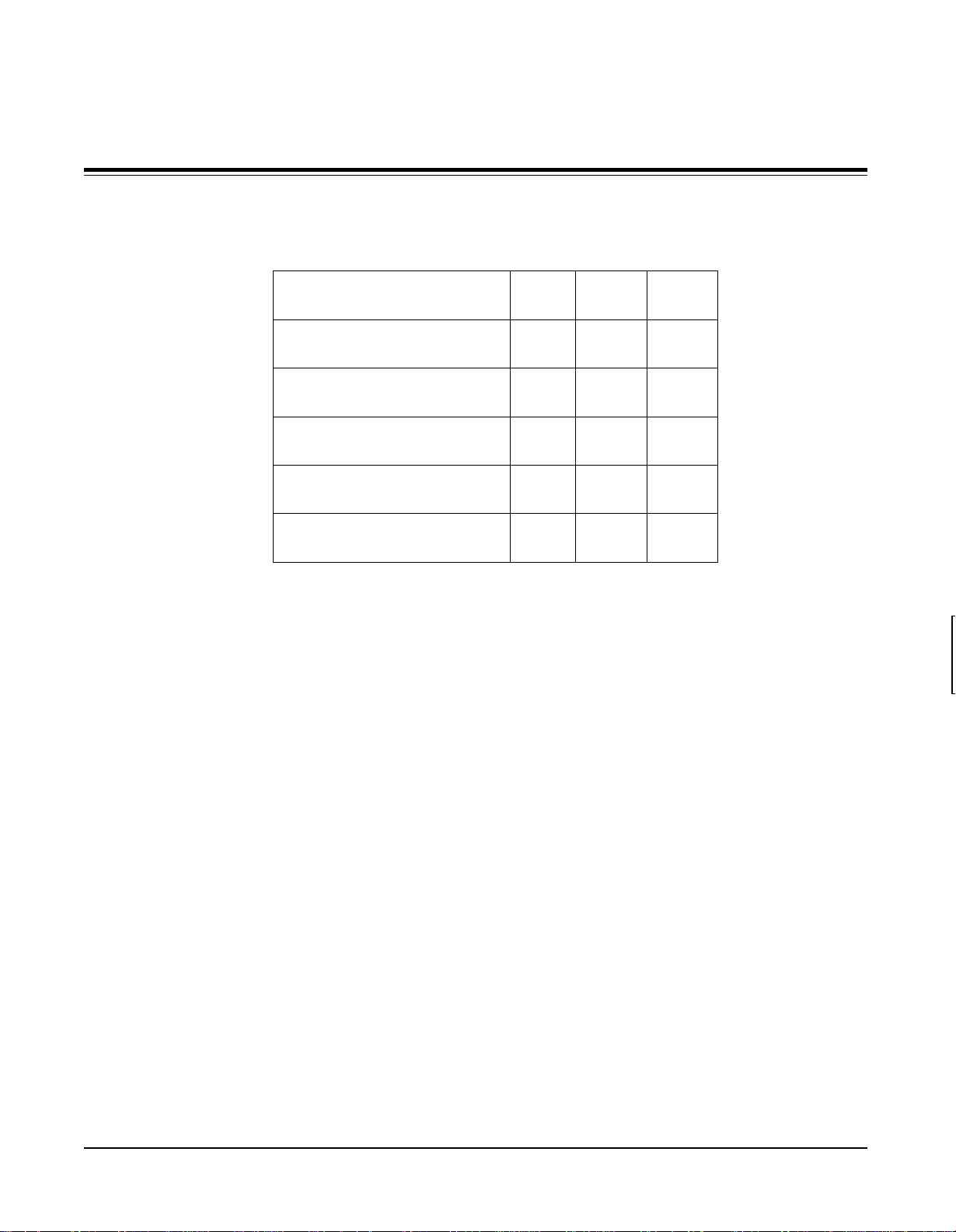
OUTPUT TIMING SPECIFICATIONS
INPUT
OUTPUT FORMAT
TYPE H (kHz) V (Hz)
NTSC
480p
720p
1080p
1280x1024
1366x768
PAL
NTSC
PAL
NTSC
PAL
NTSC
PAL
NTSC
PAL
TROUBLESHOOTING
IF THIS IS YOUR PROBLEM: THEN CHECK TO SEE:
31.5
32.5
44.9
37.5
67.5
56.3
63.9
53.3
47.8
39.9
59.94
50
59.94
50
59.94
50
59.94
50
59.94
50
Nothing works/no video output: Are any of the LEDs lit? Is the Deuce HD plugged into the AC wall outlet?
Is video source connected to the unit and is it putting out a video signal as
viewed on a video monitor?
Is the VCR or video source in the proper mode to output video as
required?
Have you selected the proper input on the unit (COMPOSITE, S-VIDEO
or COMPOENT) for the source selected as the active input?
Is the source of the video ON?
There is Video on the Output If you are using 5 BNC or RCA connectors to the output display, try reversing
Display but it appears out of sync: the H and V sync connectors.
Make sure the display is capable of supporting the resolution you selected on
the front of the unit. Try a lower resolution.
Page 6
Deuce HD User's Manual
Page 8
ACCESSORIES
RGBHV RGBS Y-CB-CR
1 Red Red CR
2 Green Green Y
3 Blue Blue CB
4 n/c n/c n/c
5 Ground Gr ound Ground
6 Ground Gr ound Ground
7 Ground Gr ound Ground
8 Ground Gr ound Ground
9 n/c n/c n/c
10 Ground Ground Ground
11 n/c n/c n/c
12 n/c n/c n/c
13 H-Sync out Composite sync n/c
14 V-Sy nc out n/c n/c
15 n/c n/c n/c
The following accessories are available for Deuce HD. They may be ordered from your dealer or from Communications Specialties.
If you need an accessory that isn’t listed below or have a specific application for which you need assistance, please give us a call.
Item # Description
1240 Single rackmount kit. This kit allows one Deuce HD to be rackmounted.
1241 Double rackmount kit. This kit allows two Deuce HD to be rackmounted.
1119-006 6 ft. VGA extension cable
1119-025 25 ft. VGA 15-pin M/F output extension cable
1119-050 50 ft. VGA 15-pin M/F output extension cable
1119-100 100 ft. VGA 15-pin M/F output extension cable
1206 6 ft. HD-15 male to 5x BNC cable
Custom cable lengths are available. Call for information.
REAR CONNECTOR PIN-OUTS
VGA COMPATIBLE OUTPUT:
(HD-15 CONNECTOR)
S-VIDEO INPUT:
1 Ground
2 Ground
3 Luminance
4 Chrominance
COMPONENT INPUT:
(3 FEMALE RCA CONNECTORS)
Y center Y in
Y outer Ground
center CB in
C
B
C
outer Ground
B
center CR in
C
R
C
outer Ground
R
VIDEO INPUT:
(FEMALE RCA CONNECTOR)
center Composite Video IN
outer ground
RS-232 REMOTE:
1 (left) ground
2 (middle) receive data
3 (right) transmit data
Deuce HD User's Manual
Page 7
Page 9
USER & CERTIFICATION INFORMATION
FCC STATEMENT
UL INFORMATION This product meets requirements for category E4 equipment utilizing the sample,
CE INFORMATION Standards to which conformity is declared: EN 55103-1:1996 EN 55103-2:1997
WARNING: TO REDUCE THE RISK OF FIRE OR ELECTRONIC SHOCK, DO NOT EXPOSE THIS APPLIANCE TO
RAIN OR MOISTURE.
CAUTION
RISK OF ELECTRIC SHOCK.
DO NOT OPEN.
This symbol warns the user of uninsulated
voltage within the unit that can cause
dangerous electronic shocks.
WARNING: This equipment generates, uses and can radiate radio frequency energy and
if not installed and used in accordance with the instruction manual, may cause interference to radio communications. It has been tested and found to comply with the limits for
a Class A computing device pursuant to Subpart B of Part 15 of FCC Rules, which are
designed to provide reasonable protection against such interference when operated in a
commercial environment. Operation of this equipment in a residential area is likely to
cause interference in which case the user, at his own expense, will be required to take
whatever measures may be required to correct the interference.
limits and methods described in AECO Test Report Number STR-19801-1.
CAUTION: TO REDUCE THE RISK OF ELECTRONIC
SHOCK, DO NOT REMOVE COVER. NO USER
SERVICABLE PARTS INSIDE. REFER SERVICING TO
QUALIFIED SERVICE PERSONNEL.
This symbol alerts the user that there are important operating and maintenance instructions in the
literature accompanying this unit.
WARRANTY
Communications Specialties, Inc. (CSI) warrants that for a period of three (3) years after purchase by the Buyer, Deuce HD will
be free from defects in material and workmanship under normal use and service. A Return Material Authorization (RMA) number
must be obtained from CSI before any equipment is returned by the Buyer. All material must be shipped to CSI at the expense and
risk of the Buyer.
CSI’s obligation under this warranty will be limited, at its option, to either the repair or replacement of defective units, including free
materials and labor. In no event shall CSI be responsible for any incidental or consequential damages or loss of profits or goodwill.
CSI shall not be obligated to replace or repair equipment that has been damaged by fire, war, acts of God, or similar causes, or equipment
that has been serviced by unauthorized personnel, altered, improperly installed or abused.
RMA numbers and repairs can be obtained by contacting our sales department or by visiting our web site:
http://www.commspecial.com
Customers in the Asia Pacific Region should contact:
Communications Specialties, Inc.
55 Cabot Court
Hauppauge, N.Y. 11788 USA
Tel: (631) 273-0404
Fax: (631) 273-1638
Email: [email protected]
Please have your serial number (located underneath Deuce HD) available when contacting us.
Communications Specialties Pte Ltd
100 Beach Road
#22-09 Shaw Tower
Singapore 189702
Tel: +65 6391 8790
Fax: +65 6396 0138
Email: [email protected]
Page 8
Deuce HD User's Manual
Page 10

RS-232 REMOTE CONTROL PROTOCOL
WORLD HEADQUARTERS
55 Cabot Court
Hauppauge, NY 11788
TEL: (631) 273-0404 FAX: (631) 273-1638
WWW: http://www.commspecial.com
EMAIL: [email protected]
Communications Specialties Pte Ltd
Serving the Asia Pacific Region
100 Beach Road
#22-09 Shaw Tower
Singapore 189702
TEL: +65 6391 8790 FAX: +65 6396 0138
email: [email protected]
Copyright © 2002 – P/N 121510 Rev. D
Deuce HD RS-232 Protocol
Page 11
Communications Specialties, Inc.
55 Cabot Court
Hauppauge, NY 11788 USA
TEL: (631) 273-0404
FAX: (631) 273-1638
WWW: http://www.commspecial.com
EMAIL: [email protected]
Communications Specialties Pte Ltd
100 Beach Road
#22-09 Shaw Tower
Singapore 189702
TEL: +65 6391 8790
FAX: +65 6396 0138
EMAIL: [email protected]
CONTENTS
Introduction ................................................................................ 2
Operation ................................................................................. 2-3
Remote Command Table ............................................................ 4
INTRODUCTION
Thank you for purchasing Deuce
information regarding the RS-232 Remote Control Protocol for Deuce
HD. For complete operating instructions, please refer to the User’s
Manual that came with your unit.
Should you need to contact us for support, our office is open
Monday through Friday, from 8:30 AM to 5:00 PM Eastern Time.
We also offer a comprehensive web site for your added convenience.
Thank you for choosing Deuce HD. As always, we welcome
your comments and suggestions.
HD. This manual only includes
OPERATION
COMMUNICATION
PARAMETERS
COMMAND FORMATS: All commands are case insensitive. Illegal commands, or com-
n 9600 Baud
n 8 data bits, no parity, 1 stop bit
n Generic TTY
n No flow control
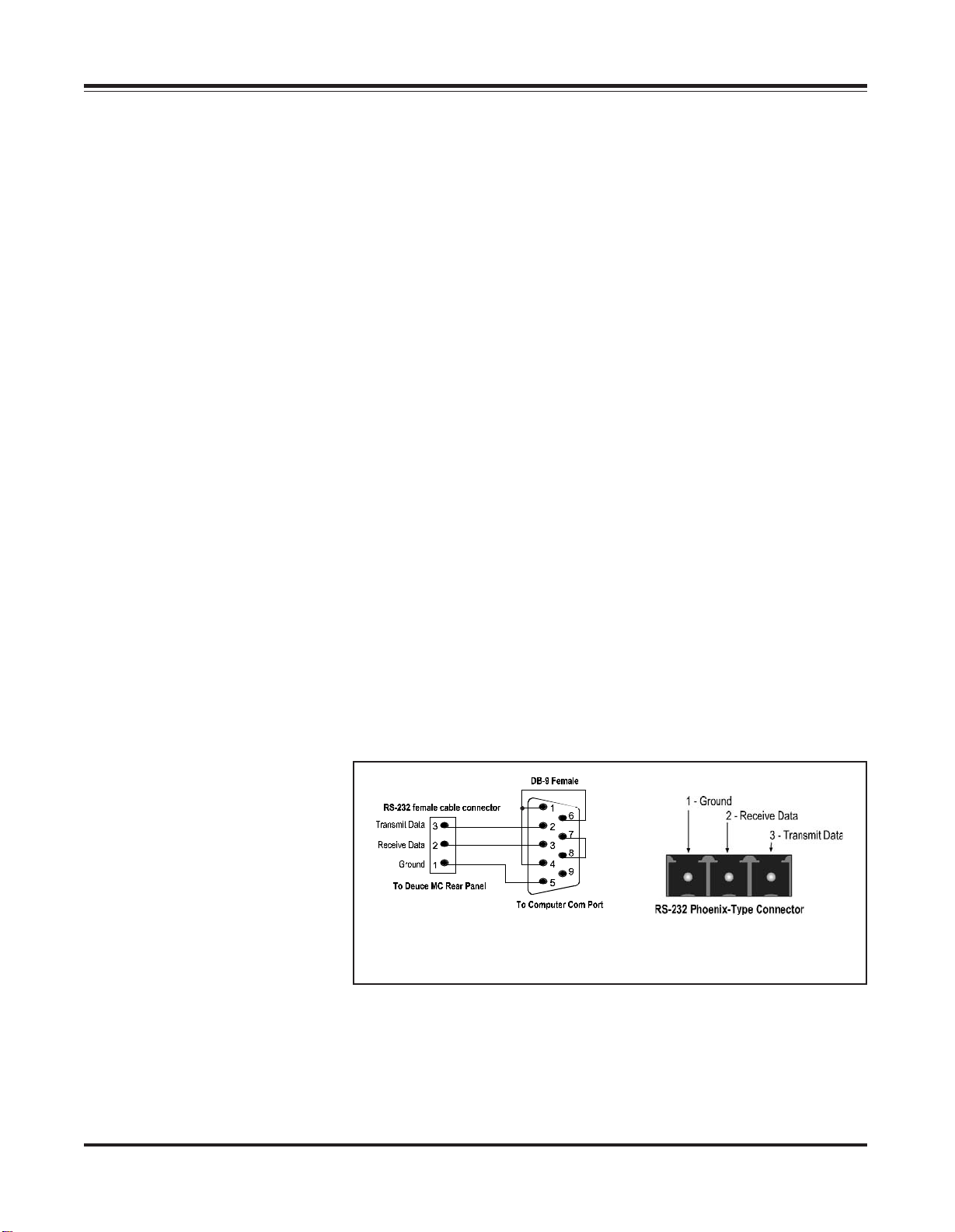
Figure 1. Deuce HD RS-232 Remote
to Computer Cable Connection
mands with illegal parameters, have no effect. In such instances, the
unit will return an error message.
Figure 2. Deuce HD RS-232
Remote Rear Panel Receptacle
Page 2
Please note that a carriage return is a carriage return only and not
a carriage return with a line feed.
Deuce HD RS-232 Protocol
Page 12
COMMAND SYNTAX
TO UNIT:
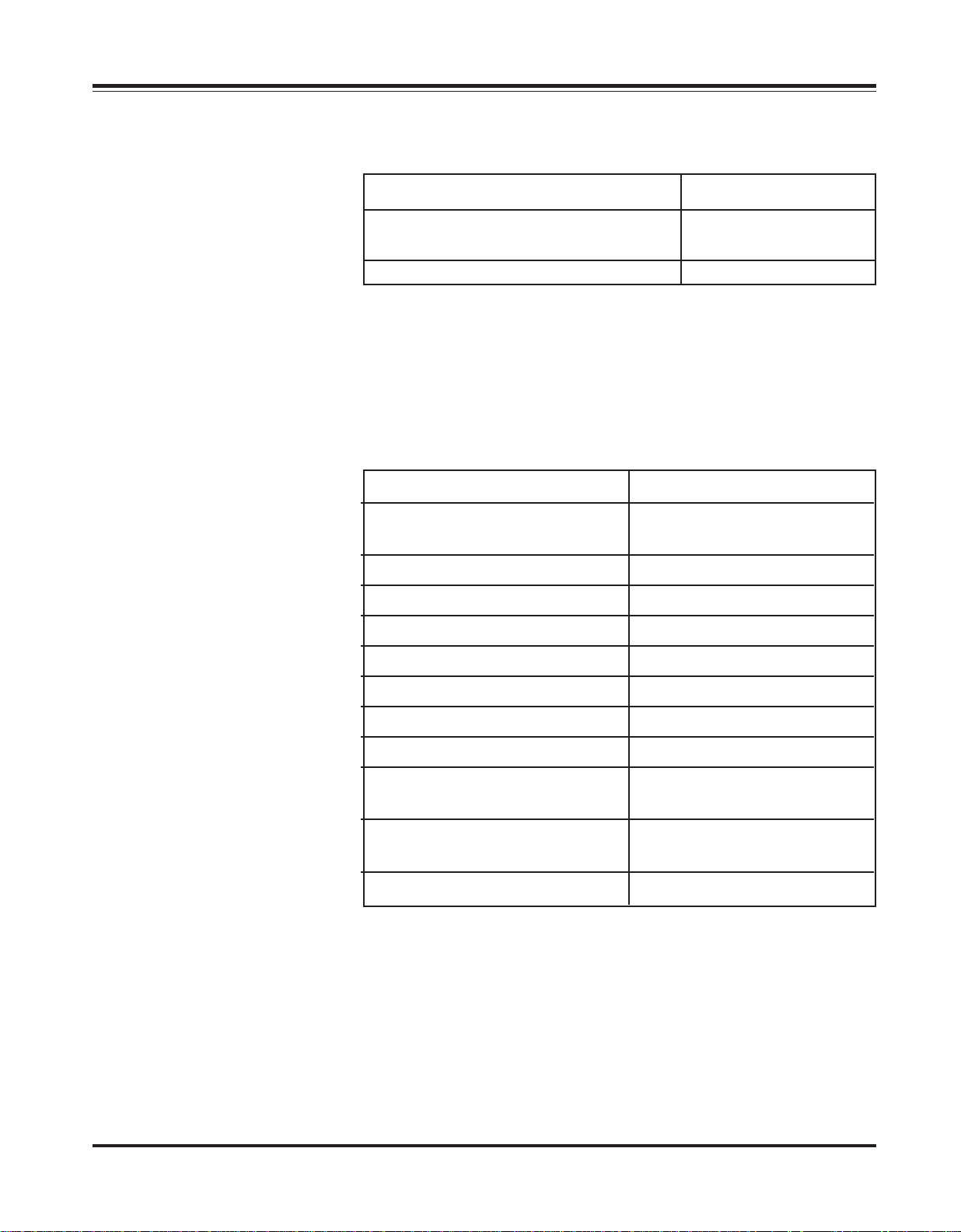
The following table lists the syntax for the user remote protocol
commands.
COMMAND DESCRIPTION SYNTAX
Write Command no parameters xx:,↵
with data xx:,zz↵
Read Command no parameters xx:↵
Where:
↵ = carriage return, no line feed
xx = two letter command
zz = data from 1 to 3 digits in decimal
RESPONSE SYNTAX BACK
FROM UNIT:
The table below lists the possible responses back from the Deuce HD.
RESPONSE DESCRIPTION SYNTAX
Welcome message ↵unit title version compile
date compile time↵>
Hardware Failure ↵Hardware Failure↵>
Good command, no data back ↵>
Good command, data back ↵xx:=zz↵>
Unrecognized 2-letter command ↵E1↵>
Parameter out of range ↵E2↵>
Syntax error ↵E3↵>
Not valid with current state ↵E4↵>
Communication error during ↵E5↵>
reception of command
Timing error -- previous ↵E6↵>
command not yet serviced
Hardware error ↵E7↵>
Where:
↵ = carriage return, no line feed
xx = two letter command
zz = data from 1 to 3 digits in decimal
EXAMPLE COMMAND: To unlock the front panel, send the following: lk:,0↵
The unit will send back: ↵ >
To read whether the front panel is locked, send: lk:↵
The unit will reply with: ↵lk:=0↵>
Deuce HD RS-232 Protocol
Page 3
Page 13
USER REMOTE COMMANDS:
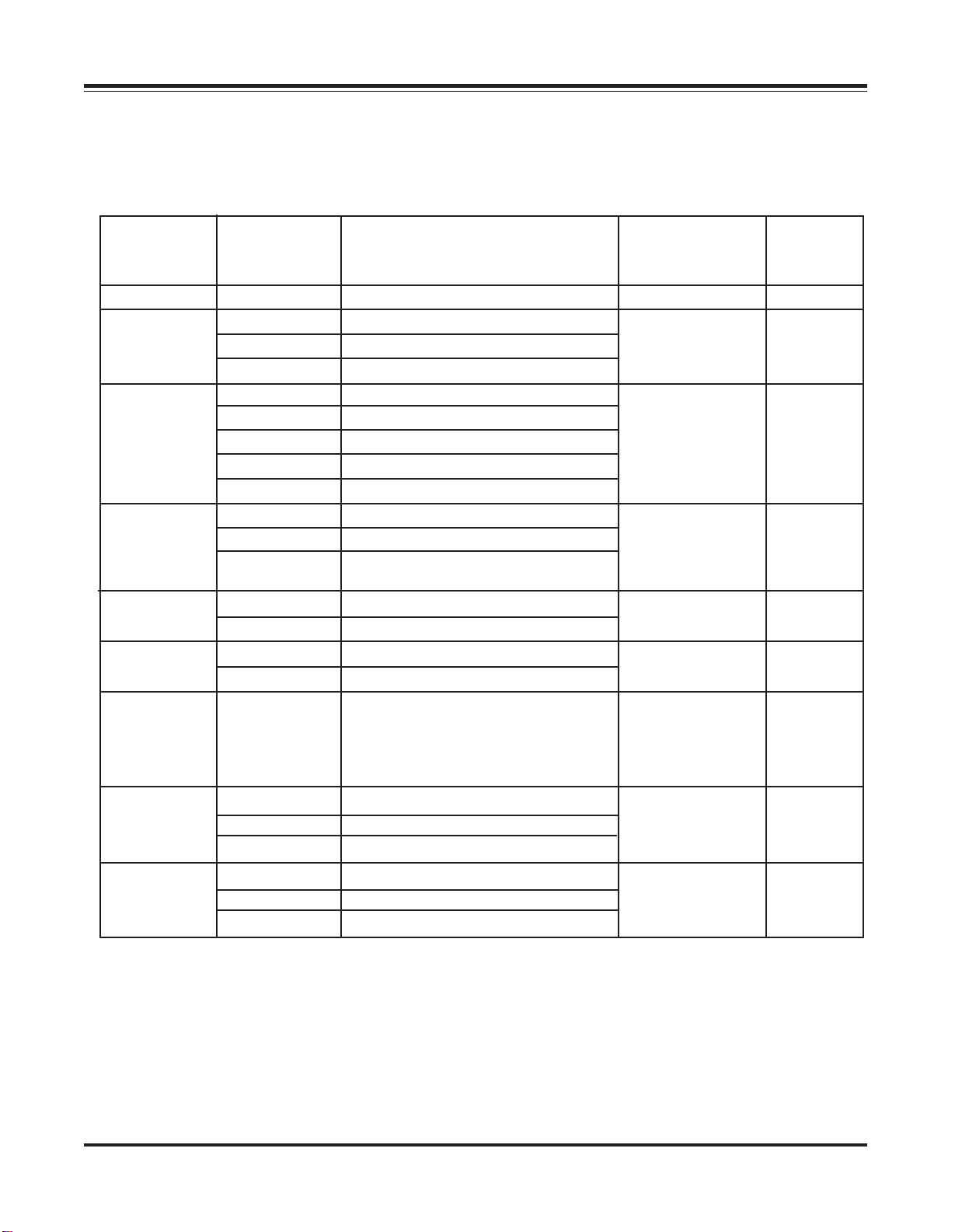
All commands that are available to the Deuce HD user are listed in the
User Command Remote Table, shown below:
User Remote Command Table
Two Letter Factory
Command Available Default
Name Parameter
sr N/A
is 0 Input source Composite Video read and write 0
of 0 Output format 1280 x 1024 read and write 3
ar 0 Aspect Ratio 16:9 to 16:9 display read and write 1
lk 0 Unlock front panel read and write 0
lt 0 LED test mode off read and write 0
vn N/A
ot 0 Output type RGBHV read only -
in 0 Input format NTSC read only -
2
1 Input source S-Video
2 Input source Y-CB-C
1 Output format 1366 x 768
2 Output format 480p
3 Output format 720p
4 Output format 1080p
3
1
3
2
1 Lock front panel
1 LED test mode on
2
1 Output type RGBS
2 Output type Y-CB-C
1 Input format PAL
2 No input signal
1
Description Commands Value
System reset to factory defaults write only -
R
Aspect Ratio 4:3 source to full screen
Aspect Ratio 4:3 source to 4:3 in
16:9 display
Returns unit model name with read only firmware version number, date
and time in the following format:
Deuce HD Version 1.4, Aug 23
2000, 17:27:08
R
1. All numbers are in decimal
2. N/A = not applicable
3. Not available with PAL input to 480p output
Page 4
Deuce HD RS-232 Protocol
 Loading...