

Page 1

OPERATIONS DEPARTMENT USER FORMS 1A
Aspire S User Maintenance Guide
Via Telephone
For use with:
The Aspire S Phone System & Voice Mail
Revision 01B - 08/27/2007
Page 2
Page 3

Table of Contents
Function Keys .................................................Chapter 1
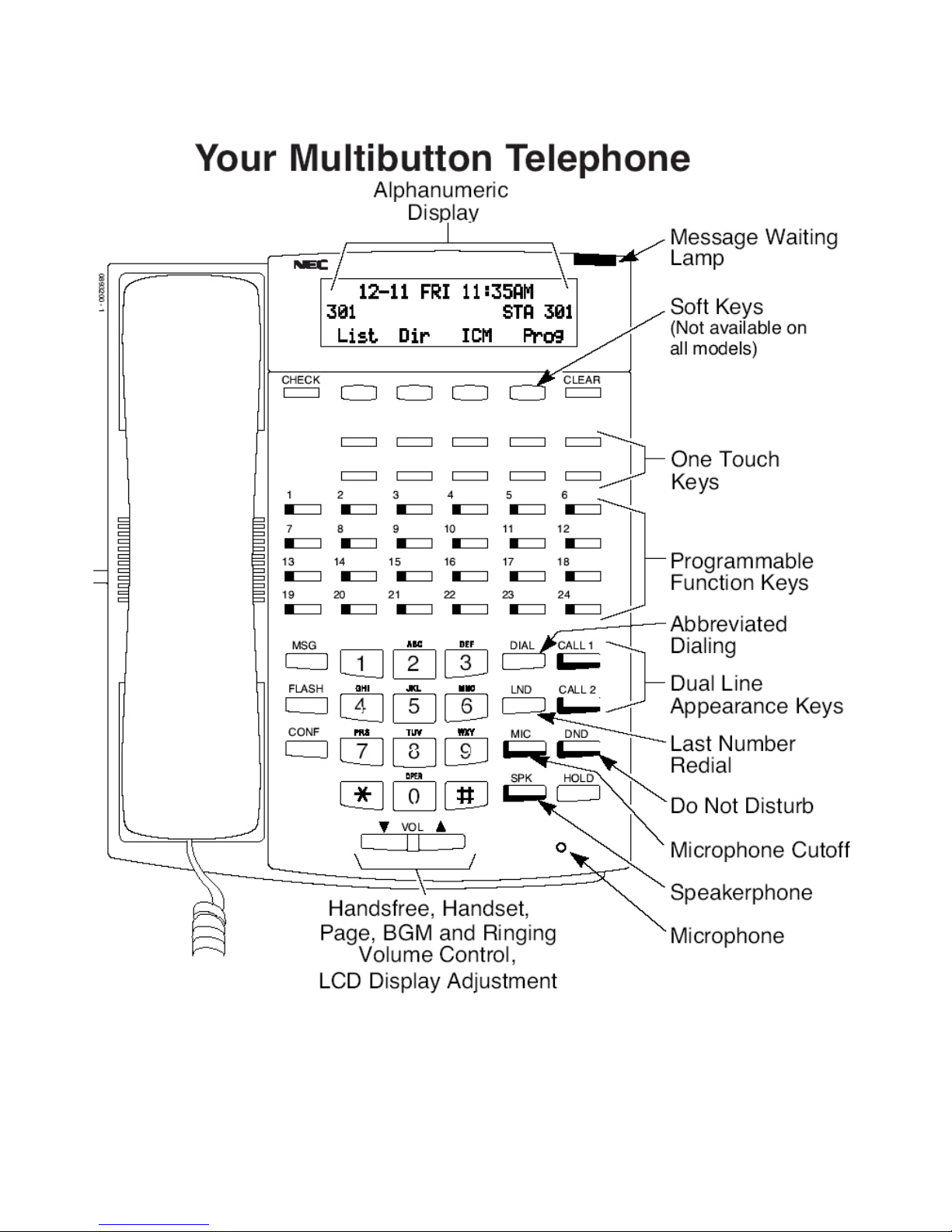
Customize the buttons on your phone.
Greetings ......................................................... Chapter 2
Customize your day, night and holiday greeting.
Holiday Override Schedule ............................ Chapter 3
Activate your override greeting.
Message Notification ...................................... Chapter 4
Configure your voicemail to notify when you’re out of the office.
Name Changing...............................................Chapter 5
Modify the name on your phone display.
Security Codes................................................ Chapter 6
Delete and create mailbox security codes.
Speed Dial........................................................ Chapter 7
Preset and store telephone numbers.
Shut Down.......................................................Chapter 8
Steps on how to power down your telephone system.
Time and Date*................................................Chapter 9
Modify your telephone system time.
Aspire Online Demo:
Page 4
FUNCTION KEYS
1. Leave the handset in the cradle.
Chapter
2. Press the CALL1 key.
3. Dial 8 5 1
4. Press the function key (one of the lighted key s) you want to pr ogram.
5. Select a key code from the chart below:
For this feature: Use this code:
Hotline Keys (Intercom) 01 + ext. number
Headset Key 05
AA/On (Night Mode) 09 + 2
AA/Off (Day Mode) 09 + 1
Microphone Cutoff 40
Voice Mail Key 77 + ext. number
Voice Over Key 48
1
1. Press the Hold key.
2. Press the SPK key to hang up.
Deleting Function Keys
1. Leave the handset in the cradle.
2. Press the CALL1 key.
3. Dial 8 5 1
4. Press the function key (one of the lighted key s) you want to d elete.
5. Press 0 0
6. Press the SPK key to hang up.
- 2 -
Page 5

GREETINGS
RECORDING AUTOMATED ATTENDANT GREETINGS
1. Lift the handset.
2. Dial 6 0 0
3. Enter mailbox number 301.
4. Enter security code, if necessary.
5. Dial “S A” (7 2)
6. Dial “I” (4)
7. Enter mailbox number for the greeting you are recording:
8. Daytime Greeting – use mailbox number 0
9. Nighttime Greeting – use mailbox number 0
10. Holiday Greeting – use mailbox number
11. Dial “R” (7) Follow the system voice prompts.
EXAMPLE:
If you know your parties extension please dial it now, for a directory of extensions,Press 1…”
12. Press the # sign to end recording.
13. After you have recorded the “Instruction” greeting, press # to go to another
Instruction” mailbox.
“
“Thank you for calling ABC Company”
0 1
0 2
2 0 2
Chapter
2
- 3 -
Page 6

HOLIDAY OVERRIDE
Chapter
TURNING ON/OFF HOLIDAY SCHEDULE OVERRIDE
1. Lift the handset.
2. Dial 6 0 0.
3. Enter mailbox number 301.
4. Enter security code, if necessary.
5. Press “S A” (7 2)
6. Press “S O” (7 6)
7. Press “O” (6) to turn the schedule override on or off.
Note: The holiday mailbox number is usually
FOLLOW THE SYSTEM VOICE PROMPTS.
Note: This feature is called Answering Schedule Override and is used to turn o n the holiday greeting.
Remember to turn this feature off after the holiday.
2 0 2.
3
- 4 -
Page 7

MESSAGE NOTIFICATION
1. Lift the handset
2. Press the MSG Key
3. Enter your security code if necessary
4. Press “O P” (6 7)
5. Press “N” (6)
6. Follow the system voice prompts to:
• Hear a summary of the current settings for all of your message notification groups,
press “S” (7)
• To select which of the groups are to be active, press “A” (2)
Chapter
4
• To review or modify the parameters of a group, press “M” (6)
• To set the priority of each group for notification of urgent messages, press “U” (8)
- 5 -
Page 8

NAMES
PHONE SYSTEM DISPLAY
1. Leave the handset in the cradle.
2. Press the CALL1 key.
3. Dial 8 0 0.
4. Enter the extension number.
5. Enter the name using the dial pad keys.
The name can be up to 12 characters long.
Use this keypad digit: For these characters: CONF = To clear an entry
1 1 @ [ . } ^ _ { | } Arrows
Chapter
5
2 A B C a b c 2
3 D E F d e f 3
4 G H I g h i 4
5 J K L j k l 5
6 M N O m n o 6
7 P Q R S p q r s 7
8 T U V t u v 8
9 W X Y Z w x y z 9
0 0 ! “ # $ % & ‘ ( )
* * + , - . / : ; ?
# Accepts an entry if two letters on the same key are needed.
6. Press the HOLD key when you are done programming the name.
7. Press the SPK key to hang up.
- 6 -
Page 9

Chapter
SECURITY CODES
DELETING SECURITY CODES
1. Lift the handset
2. Dial 6 0 0.
3. Enter mailbox number 301.
4. Enter security code, if necessary.
5. Press “S A” (7 2)
6. Press “D S” (3 7)
FOLLOW THE SYSTEM VOICE PROMPTS.
Note: This will delete the security code and a new one may be entered through the mailbox via standard
procedures. (See below)
CHANGING PERSONAL SECURITY CODES
6
1. Lift the handset.
2. Press the MSG Key.
3. Press “O P” (6 7)
4. Press “S” (7)
FOLLOW THE SYSTEM VOICE PROMPTS.
- 7 -
Page 10

SPEED DIAL
PROGRAMMING SYSTEM WIDE SPEED DIAL
1. Leave the handset in the cradle.
2. Press the CALL1 key.
3. Dial 8 5 3
4. Enter the abbreviated dialing bin number (000-999)
5. Dial the telephone number you want to store. (1 + area code if necessary)
6. Press the HOLD key
7. Enter the name using the dial pad keys. The name can be up to 12 characters long.
Use this keypad digit: For these characters:
1 1 @ [ . } ^ _ { | } Arrows
2 A B C a b c 2
Chapter
7
3 D E F d e f 3
4 G H I g h i 4
5 J K L j k l 5
6 M N O m n o 6
7 P Q R S p q r s 7
8 T U V t u v 8
9 W X Y Z w x y z 9
0 0 ! “ # $ % & ‘ ( )
* * + , - . / : ; ?
# Accepts an entry if two letters on the same key are needed.
8. Press the HOLD key when you are done programming the name.
9. Press the SPK key to hang up.
USING SYSTEM WIDE SPEED DIAL
1. DO NOT LIFT THE HANDSET!
2. Press the button under the word Dir on the display.
3. Press the button under the word ABBc on the display
4. Using the dial pad, press the number that corresponds with the first letter of the name you wish to find in
the directory.
5. Using the volume up/down keys, you can scroll through the directory until you reach the name you
desire.
- 8 -
Page 11

SYSTEM SHUT DOWN
VOICE MAIL SYSTEM
Chapter
1. Lift the handset.
2. Dial 6 0 0
3. Enter mailbox number 301.
4. Enter security code, if necessary.
5. Dial “S A” (7 2)
6. Dial “P D” (7 3)
FOLLOW THE SYSTEM VOICE PROMPTS
PHONE SYSTEM
1. Push the power button on the main cabinet on the left ha nd side of the cabin et, located
just underneath the power light.
2. Leave the cabinet off for a few minutes.
8
3. Push the power button on the main cabinet to turn the system back on.
4. Wait several minutes for the system to come back up.
- 9 -
Page 12

TIME & DATE
PHONE SYSTEM
1. Leave the handset in the cradle.
2. Press the CALL1 key.
3. Dial 8 2 8
4. Dial two digits for the hour (24 hour format) e.g., 13=1:00 P.M.
5. Dial two digits for the minutes (00-59).
6. Press the SPK to hang up.
Chapter
9
VOICE MAIL SYSTEM
Time:
1. Lift the handset.
2. Dial 6 0 0
3. Enter the mailbox numbe r 301.
4. Enter security code, if necessary.
5. Press “S A” (7 2)
6. Dial “T I” (8 4) FOLLOW THE SYSTEM VOICE PROMPTS
Date:
1. Lift the handset.
2. Dial 6 0 0.
3. Enter mailbox number 301.
4. Enter security code, if necessary.
5. Dial “S A” (7 2)
6. Dial “D T” (3 8) FOLLOW THE SYSTEM VOICE PROMPTS.
- 10 -
Page 13

Customer Notes
- 11 -
 Loading...