

Page 1
CT-KNX Gateway Protocol
1/2
CTG
-
EIB/NX
CTG
-
KNX/IP
Baudrate:
Port
:
Quickstart
This is a quickstart guide for programming the CTG-KNX/IP or CTG-EIB/NX available at
www.comm-tec.de.
Both devices have the same protocol, but different interfaces.
Notes:
• The CTG-KNX/IP allows only one simultaneous IP connection, this means having
the controller and a software simultaneous connected does not work.
• The gateway has a build in filter table. Only group addresses which are listed in
this filter can pass the gateway, everything else will be deleted!!(see page 2 of
this document)
• The filtertable can’t be retrieved from the gateway.
Communication parameters:
38400 8N1
Use a straight cable (pin 2, 3 & 5)
10002
Frameformat: <STX><command><ETX>
<STX> = 02 hex ( 0x02 )
<ETX> = 03 hex ( 0x03 )
<command> = ASCII commands
Commands:
uppercase W is for Writing
uppercase R is for Reading
Samples:
0x02W10/5/7=10x03 Writes the value 1 to the group address 10/5/7
0x02W1/65/77=1000x03 Writes the value 100 to the group address 10/65/77
0x02R10/5/70x03 Request the value of the group address 10/5/7
Feedback:
Cylic data, confirmation of a send command(only Echo, if it is turned on)
A>10/5/7=1
When doing readrequests:
A@10/5/70=192
When EIB-Bus is busy:
Try to read 3 times
B@01/0/203 You can make a message bus is busy, but it is useless.
-@01/0/203 no answer massive EIB Problems, call the EIB technician
COMM-TEC GMBH SIEMENSSTRASSE 14 TELEFON 07161/30 00-0 WWW.COMM-TEC.DE
D-73066 UHINGEN TELEFAX 07161/30 00-400
Page 2
CT-KNX Gateway Protocol
2/2
a
b
c
Quickstart
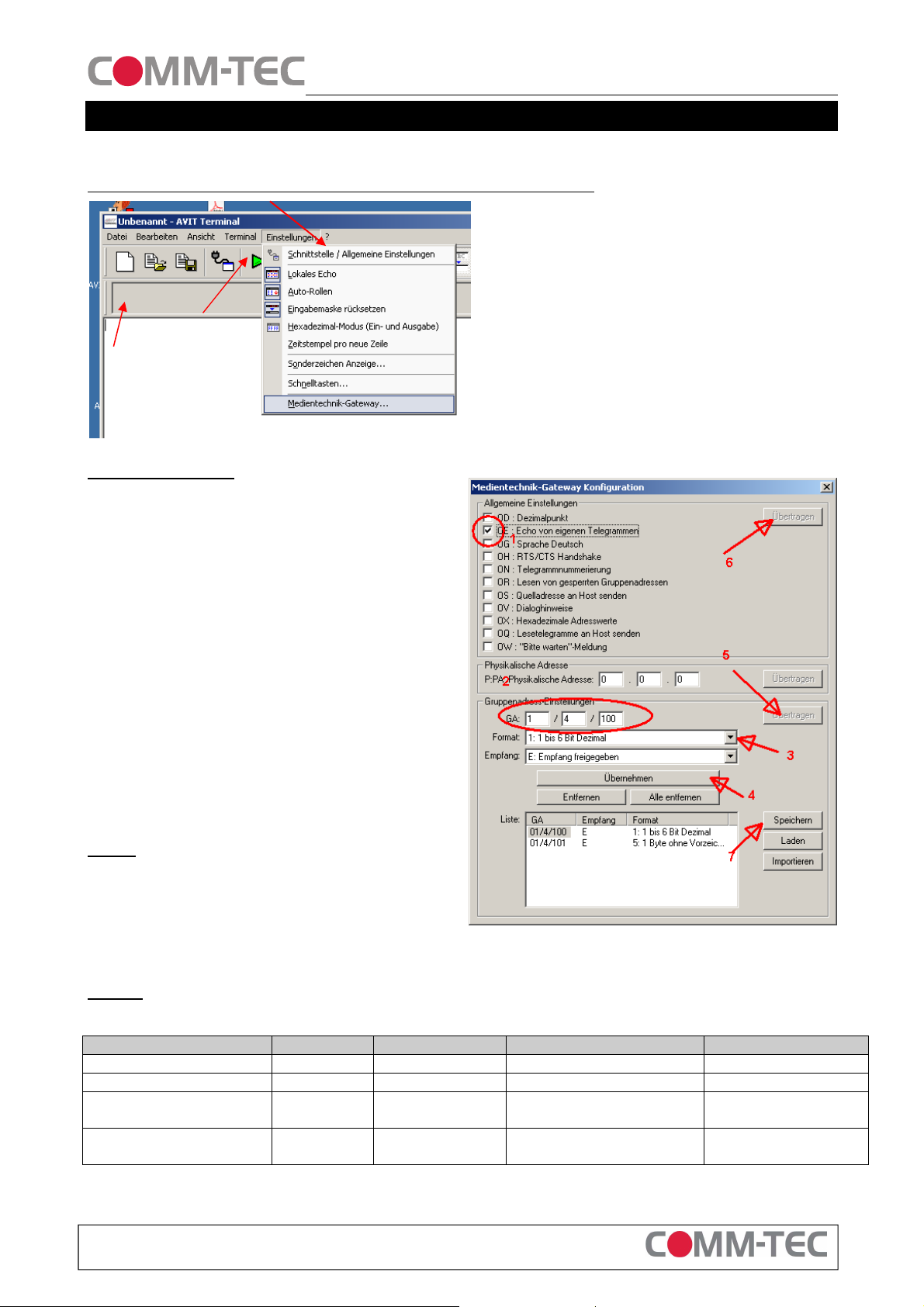
Setting the Filtertable and communication with the gateway
a) First set the Interface parameter
b) Press the Green arrow for connecting to the
Gateway
c) type a ? and <Return> in the text field here. If
you are connected you get a list of commands
from the gateway, which shows everything is
working properly.
d) You can test the commands from the first page
for reading and writing here
Setting the Filtertable
Set the option for Echo (1)
Press the transmitt button (6)
Enter the group adress you want to read or
programm in the fiels (2)
Choose the correct Datatype of the variable(3)
Press the button (4) for accepting your selection
Repeat the last 3 steps until all your needed
adresses are entered
If you have entered all needed adresses send
them to the gateway by pressing button (5)
For later use save the content of the filtertable in
a textsheet (7). This is optional not needed
NOTE:
If your Media control system is reconfiguring the
filtertable by itself. You do not need to manually set
the filtertable.
Sample
What you need from a EIB/KNX programmer to set up your Gateway:
Address Type Description Parameters Read or write
1 / 4 / 100 1 Bit Lamp 1 0 – off 1- on write
1 / 1 / 103 4 Bit Lamp 1 Dimmer write
1 / 4 / 102 1 Byte Lamp 1 get value
absolut
1 / 4 / 101 1 Byte Lamp 1 set value
absolut
0-255 read
0 - 255 write
COMM-TEC GMBH SIEMENSSTRASSE 14 TELEFON 07161/30 00-0 WWW.COMM-TEC.DE
D-73066 UHINGEN TELEFAX 07161/30 00-400
 Loading...