

Page 1
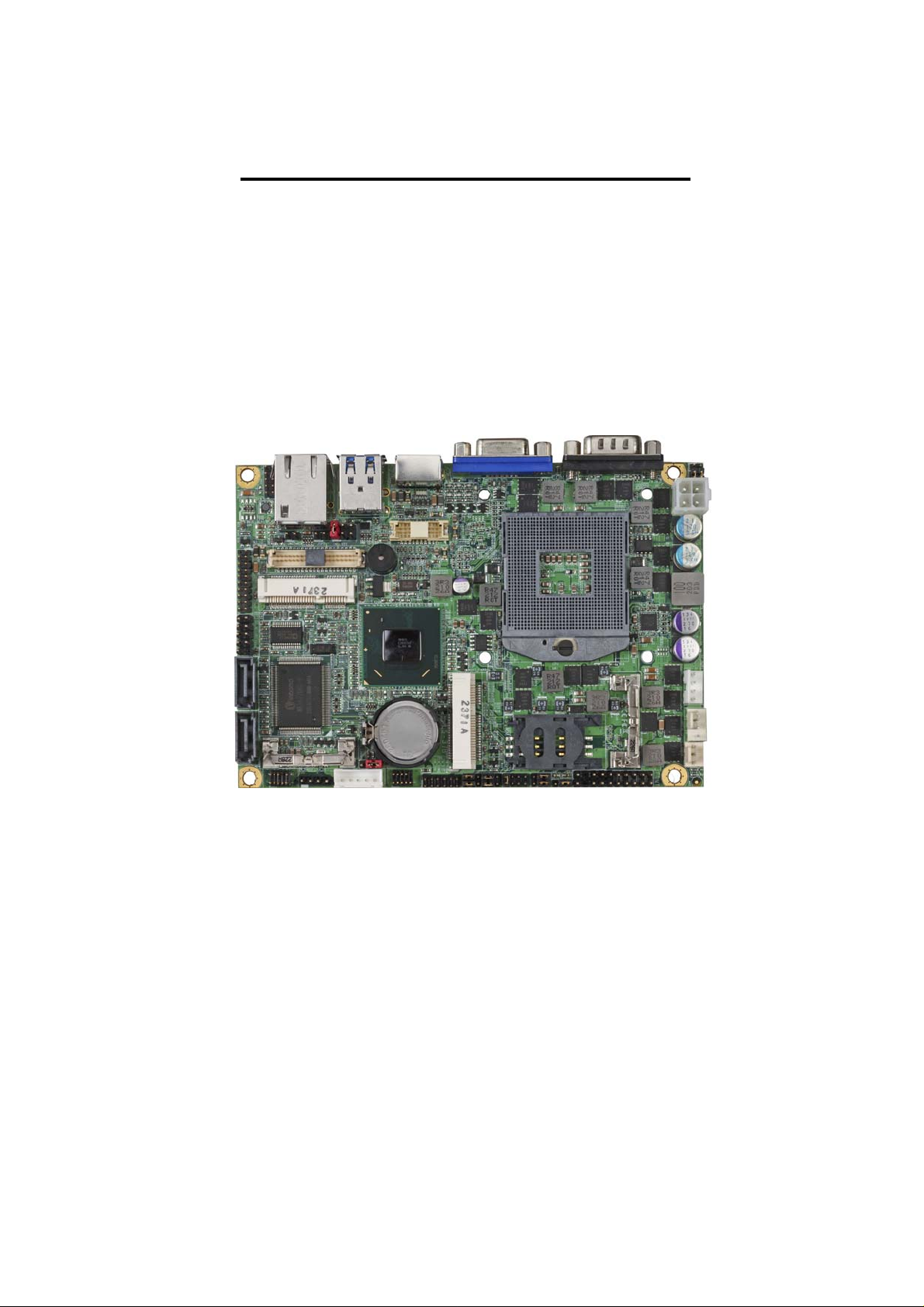
LS-37B
3.5 inch Motherboard
User’s Manual
Edition 1.9
2015/05/20
Page 2

LS-37B User’s Manual
Copyright
Copyright 2012, all rights reserved. This document is copyrighted and all rights are
reserved. The information in this document is subject to change without prior notice to
make improvements to the products.
This document contains proprietary information and protected by copyr ight. No part of
this document may be reproduced, copied, or translated in any form or any means
without prior written permission of the manufacturer.
All trademarks and/or registered trademarks contains in this document are property of
their respective owners.
Disclaimer
The company shall not be liable for any incidental or consequential damages resulting
from the performance or use of this product.
The company does not issue a warranty of any kind, express or implie d, including
without limitation implied warranties of merchantability or fitness for a particular
purpose.
The company has the right to revise the manual or include changes in the
specifications of the product described within it at any time without notice and witho ut
obligation to notify any person of such revision or changes.
Trademark
All trademarks are the property of their respective holders.
Any questions please visit our website at TUhttp://www.commell.com.twUT
-2-
Page 3
LS-37B User’s Manual
(
(
)
(
)
(
)
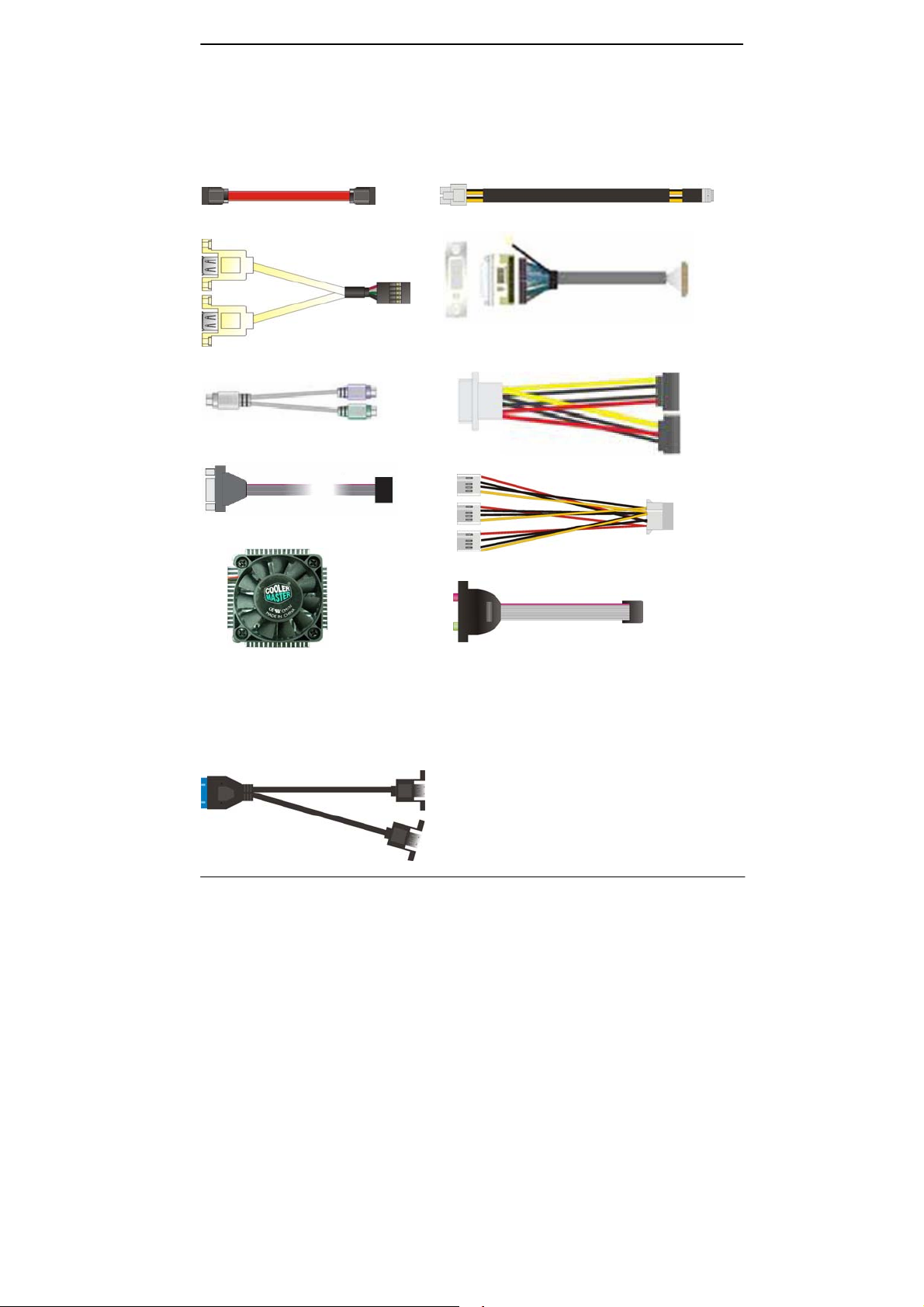
Packing List:
Please check the package content before you starting using the board.
Hardware:
LS-37B 3.5“ Miniboard x 1
Cable Kit:
SATA Cable x 1
(OALSATA3-L)/ (1040529)
USB2.0 Cable x 1
OALUSBA-3)/ (1040173)
PS/2 Keyboard & Mouse Cable x 1
(OALPS2/MKN)/ (1040551)
COM Port Cable x 1
OALES-BKU1NB)/ (1040086
CPU Cooler x 1
(OHS-P-M-H)/ (1190058)
DC Power Cable x 1
(OALDC-A)/ (1040433)
DVI module with bracket x 1
(BADPDVI_A&OALDVI-DF13)
(4120008011 & 1040483)
SATA Power Cable x 1
(OAL4P-2S)/ (1040054)
1 to 3 power output cable x 1
OAL4P-2)/ (1040051
Audio Cable x 1
(OALPJ-HDUNB)/ (1040123)
Printed Matters:
Driver CD (Including User’s Manual) x 1
Optional Cable:
USB3.0 Cable
OALUSB3NB)/ (1040532
-3-
Page 4

LS-37B User’s Manual
Index
Chapter 1 <Introduction>.............................................................6
1.1 <Product Overview>.....................................................................................6
1.2 <Product Specification>................................................................................7
1.3 <Mechanical Drawing>.................................................................................8
1.4 <Block Diagram>..........................................................................................9
Chapter 2 <Hardware Setup>..................................................10
2.1 <Connector Location> ................................................................................10
2.2 <Jumper Location & Reference>................................................................12
2.3 <Connector Reference> .............................................................................13
2.3.1 <Internal Connectors>...............................................................13
2.3.2 <External Connectors> .............................................................13
2.4 <CPU and Memory Setup>.........................................................................14
2.4.1 <CPU Setup>..............................................................................14
2.4.2 <Memory Setup>........................................................................15
2.5 <CMOS & ATX Setup>................................................................................16
2.6 <Serial ATA Interface> ................................................................................17
2.7 <Ethernet Interface>...................................................................................18
2.8 <Onboard Display Interface>......................................................................19
2.8.1 <Analog Display>.......................................................................19
2.8.2 <Digital Display>........................................................................20
2.8.3 <DVI Interface>..........................................................................24
2.9 <Integrated Audio Interface>.......................................................................25
2.10 <USB Interface>.......................................................................................26
2.11 <Serial Port>.............................................................................................28
2.12 <PCIE Mini Card and SIM Interface>........................................................30
2.12.1 <SIM Setup>.............................................................................32
2.13 <GPIO and SMBUS Interface>.................................................................34
2.14 <Power Supply and Fan Interface > .........................................................35
2.14.1 <Power Input>..........................................................................35
-4-
Page 5

LS-37B User’s Manual
2.14.2 <Power Output>.......................................................................35
2.14.3 <Fan connector> .....................................................................36
2.15 <Switch and Indicator>.............................................................................37
Chapter 3 <System Setup>.......................................................38
3.1 <Audio Configuration>................................................................................ 38
3.2 <Display Properties Setting>......................................................................39
3.3 <SATA configuration>.................................................................................41
3.4 <SATA RAID Configuration>....................................................................... 42
Chapter 4 <BIOS Setup>............................................................43
Appendix A <I/O Port Pin Assignment>..........................44
A.1 <Serial ATA Port>.......................................................................................44
A.2 <IrDA Port>................................................................................................44
A.3 <VGA Port>................................................................................................44
A.4 <LAN Port>................................................................................................44
A.5 <LAN LED Port>........................................................................................45
A.6 <LPC Port>................................................................................................45
Appendix B <Flash BIOS>.........................................................46
B.1 <Flash Tool> ..............................................................................................46
B.2 <Flash BIOS Procedure>...........................................................................46
Appendix C <Programming GPIO’s>................................47
Appendix D <Programming Watchdog Timer >........48
Contact Information.......................................................................49
-5-
Page 6

LS-37B User’s Manual
Chapter 1 <Introduction>
1.1 <Product Overview>
LS-37B the 3rd Generation Intel of the 3.5 inch miniboard, supports 3rd Generation Intel®
Core™ i7, Core™ i5, Core™ i3 Mobile Processor and features Intel QM77 chipset,
integrated HD Graphics, DDR3 memory, REALTEK High Definition Audio,
Serial ATA with RAID function for a system and Intel Gigabit LAN.
Intel Ivy Bridge Processor
The 3rd Generation Intel® Core™ processor family mobile is the next generation of
64-bit, multi-core mobile processor built on 22- nanometer process technology. Based
on a new micro-architecture.
New features for Intel QM77 chipset
The board integrates Intel QM77 chipset, supports integrated HD Graphics, built-in high
speed mass storage interface of Serial ATA interface with RAID function, High Definition
Audio with 2 channels surrounding sound.
All in One multimedia solution
Based on Intel QM77 chipset, the board provides high performance onbo ard graphics,
24-bit dual channel LVDS interface, DVI and 2 channels High Definition Audio, to meet
the very requirement of the multimedia application.
Flexible Extension Interface
The board provides two PCIE mini card socket.
-6-
Page 7

LS-37B User’s Manual
1.2 <Product Specification>
General Specification
Form Factor 3.5 inch motherboard
CPU 3rd Generation Intel® Core™ i7, Core™ i5, Core™ i3 Mobile Processor
Package type: rPGA988B
Memory 1 x DDRIII SO-DIMM 1066/1333/1600 MHz up to 8GB
Non-ECC, unbuffered memory supported only
Chipset Intel QM77
Real Time Clock Chipset integrated RTC with onboard lithium battery
Watchdog Timer Generates a system reset with internal timer for 1min/s ~255min/s
Power Management Supports ACPI 3.0 compliant,
Serial ATA Interface 2 x serial ATAIII interface with 600MB/s transfer rate
Support RAID 0, 1and Intel Rapid Storage Technology
VGA Interface Onboard DSUB15 connector for VGA interface
LVDS Interface Onboard 24-bit dual channel LVDS connector with +3.3V/+5V/+12V
supply
DVI Interface Onboard DVI with 20-pin connector
Audio Interface Realtek ALC888 HD Audio
LAN Interface Intel 82579LM Gigabit LAN (Support iAMT8.0)
GPIO interface Onboard programmable 8-bit Digital I/O interface
Extended Interface 2 x PCIE mini card socket,1 x SIM socket
(Optional support mSATA(SATAII) for Mini_Card2)
Internal I/O Port 1 x RS232/422/485, 1 x S M B U S , 1 x GPIO , 2 x USB3.0 p o r ts, 2 x U S B 2 . 0
ports,1 x IrDA, 1 x DVI ,1 x LVDS, 2 x Serial ATAIII, 1 x Front panel Audio and
1 x CDIN
External I/O Port 1 x PS/2, 1 x LAN port, 1 x VGA port, 2 x USB3.0 ports and 1 x RS232
Power Requirement 9~24V full range DC Input
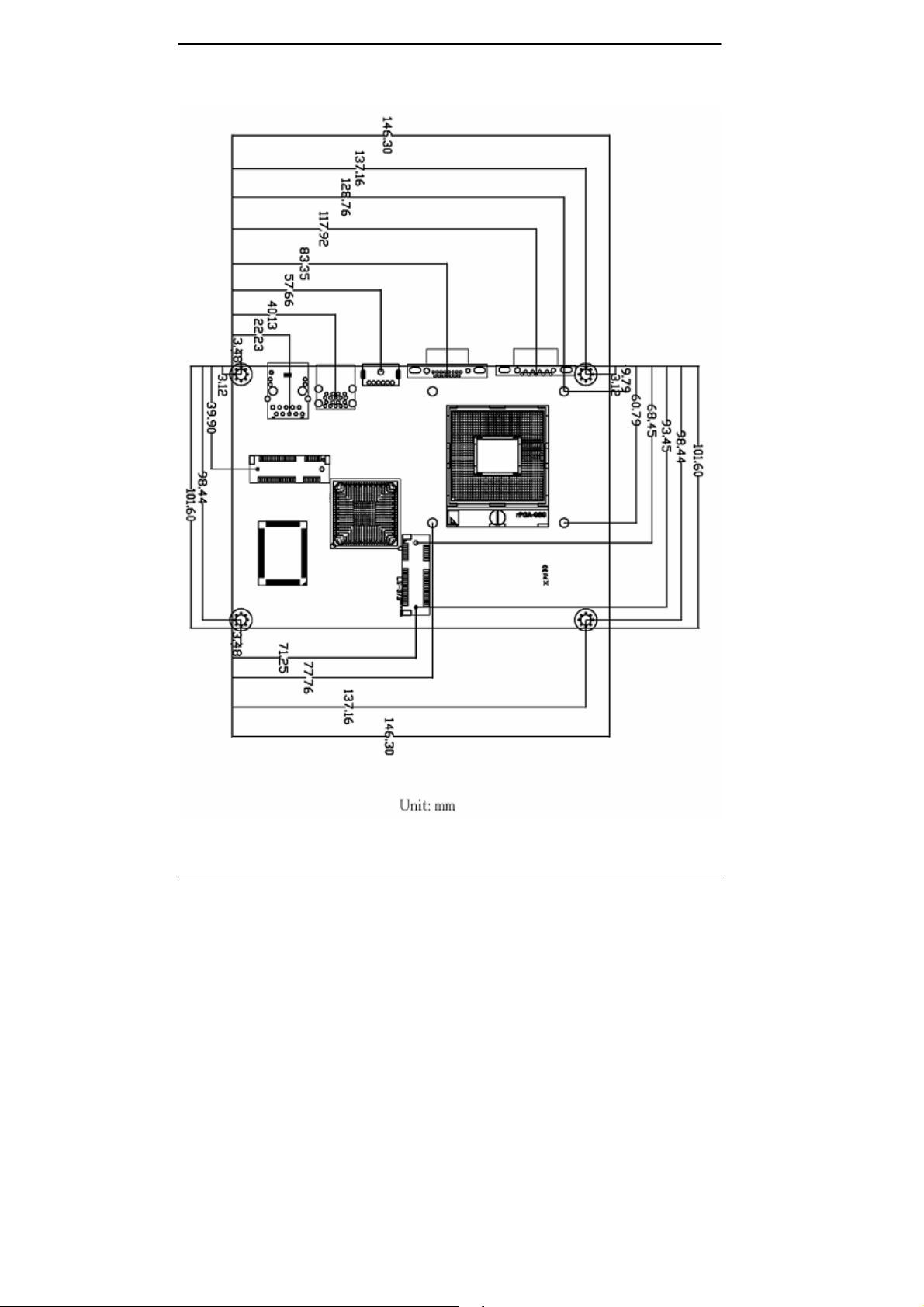
Dimension 146mm x 101mm
Temperature Operating within 0~60 centigrade
Storage within –20~85 centigrade
Ordering Code
LS-37B Intel PGA988B + QM77 Onboard VGA, DVI, LVDS, LAN, USB3.0,
USB2.0, HD Audio, SATAIII, SMBUS, GPIO, SIM
and PCI Express mini card.
LS-37BS Intel PGA988B + QM77 Onboard VGA, DVI, LVDS, LAN, USB3.0,
USB2.0, HD Audio, SATAIII, SMBUS, GPIO, PCI Express mini card and
mSATA.
The specifications may be different as the actual production.
For further product information please visit the website at
TUhttp://www.commell.com.twUT
7-
-
Page 8
LS-37B User’s Manual
1.3 <Mechanical Drawing>
-
8-
Page 9
LS-37B User’s Manual
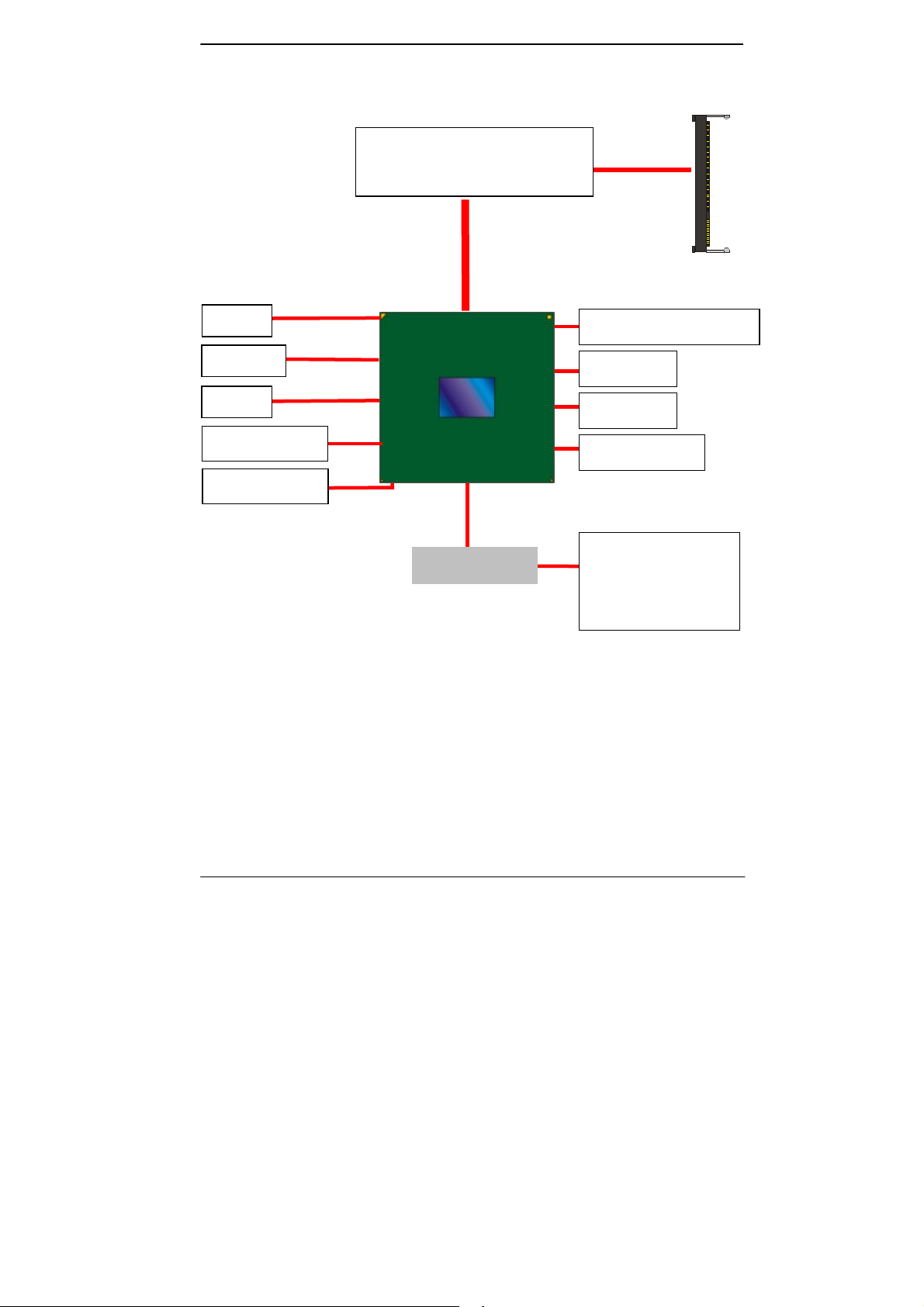
1.4 <Block Diagram>
1 x CRT
1 x LVDS
1 x DVI
2 x Serial ATAIII
ALC888 HD Audio
3rd Generation Intel® Core™ i7,
Core™ i5, Core™ i3
Mobile Processor
1 x 204-pin DDR3
SO-DIMM
1066/1333/1600 MHz
up to 8GB
QM77
IO W83627DHG-P
2 x PCI Express mini card
4 x USB3.0
2 x USB2.0
1 x Intel 82579LM
1 x RS232/422/485
1 x COM & GPIO & IrDA
1 x PS/2
9-
-
Page 10
LS-37B User’s Manual
Chapter 2 <Hardware Setup>
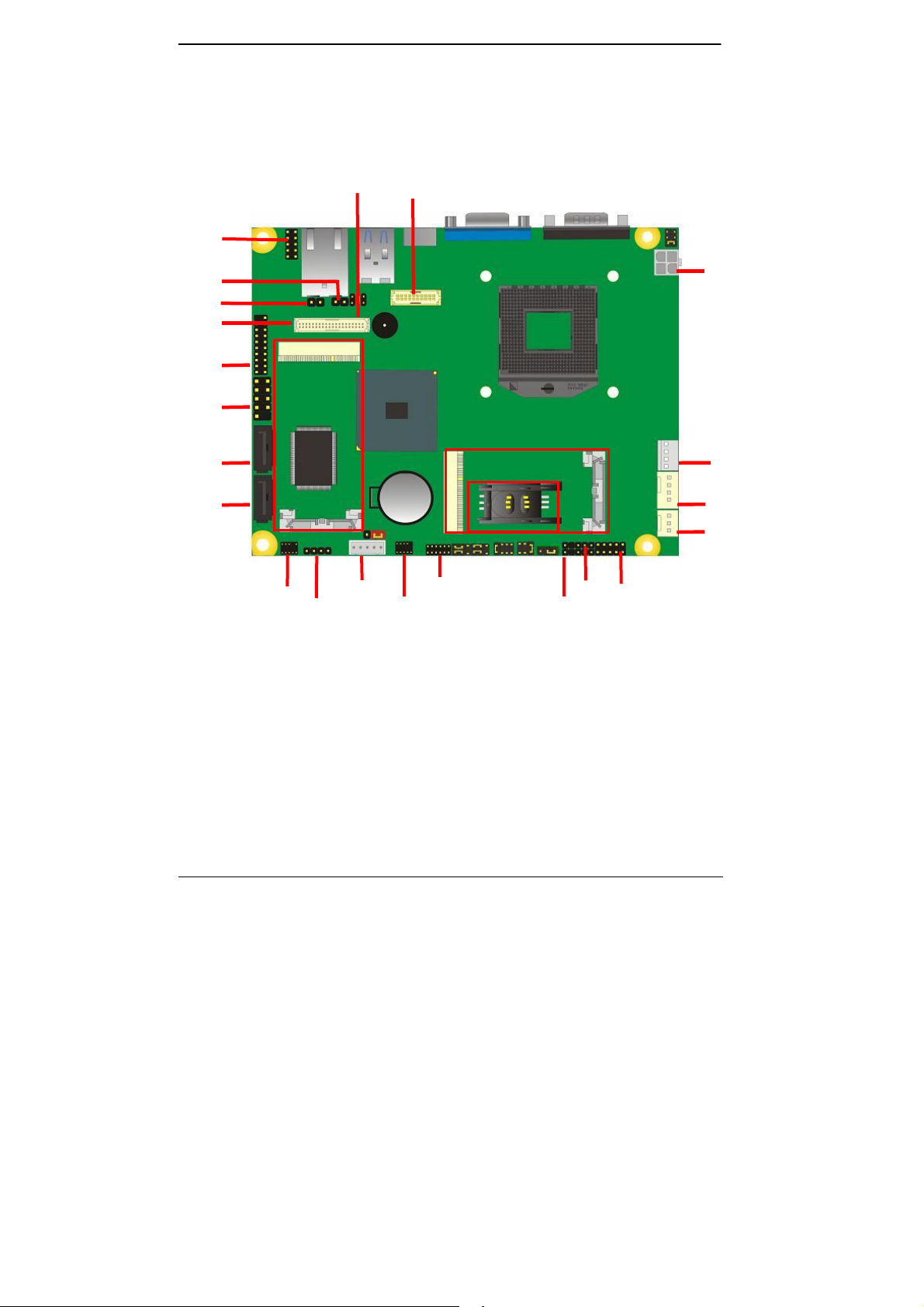
2.1 <Connector Location>
CN_LPC
JACT
JSPD
CN_LVDS
CN_USB3-0
CN_USB1
SATA2
SATA1
CN_LVDS
MINI_CARD1
CN_DVI
DC_IN
MINI_CARD2
DC_OUT
SIMM
CPUFAN
SYSFAN
CN_AUDIO
CN_INV
CD_IN
CN_COM2
CN_DIO
CN_IR JFRNT
CN_SMBUS
10-
-
Page 11
LS-37B User’s Manual
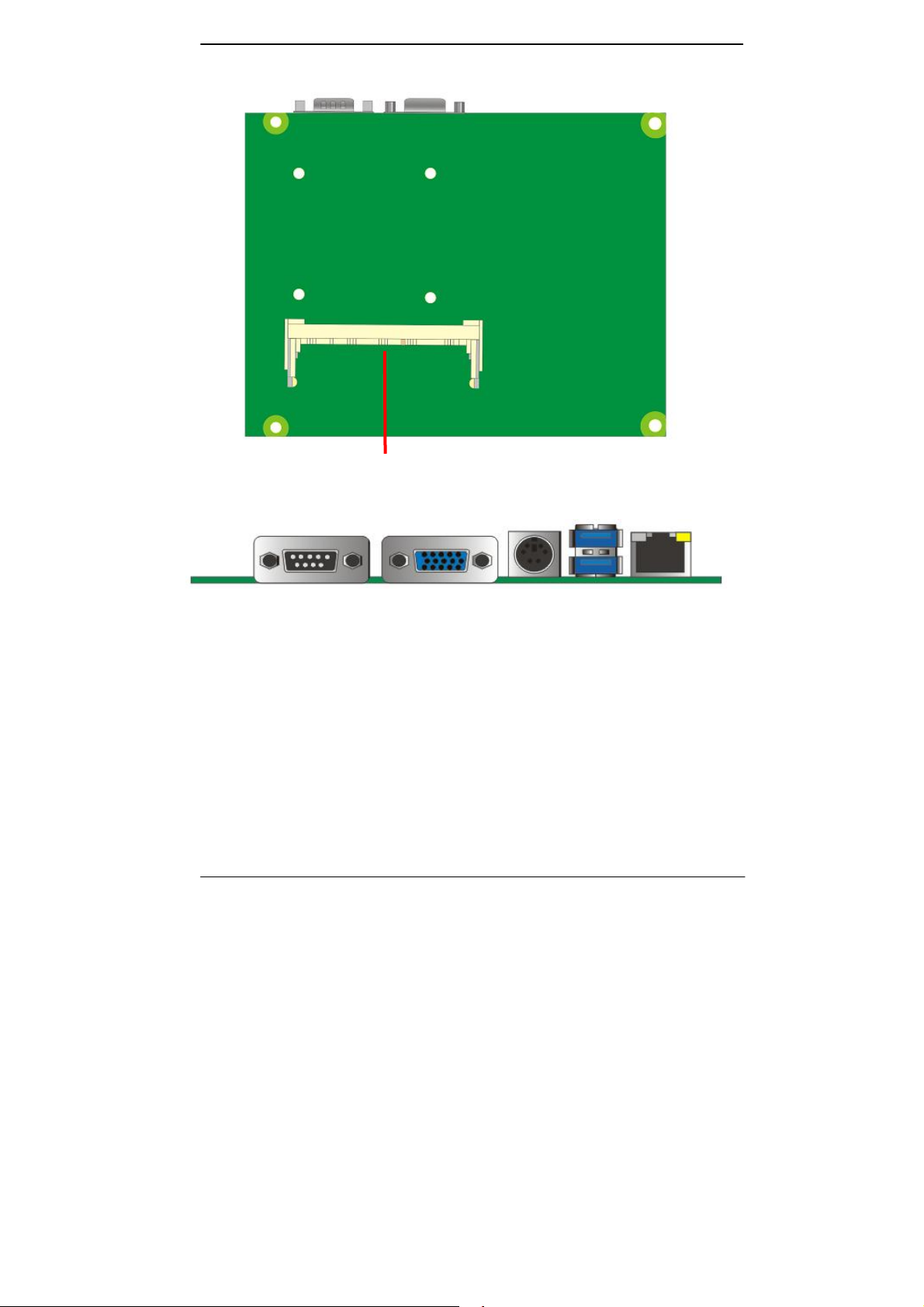
SO-DIMM
CRT COM1
PS2
USB
RJ45
11-
-
Page 12
LS-37B User’s Manual
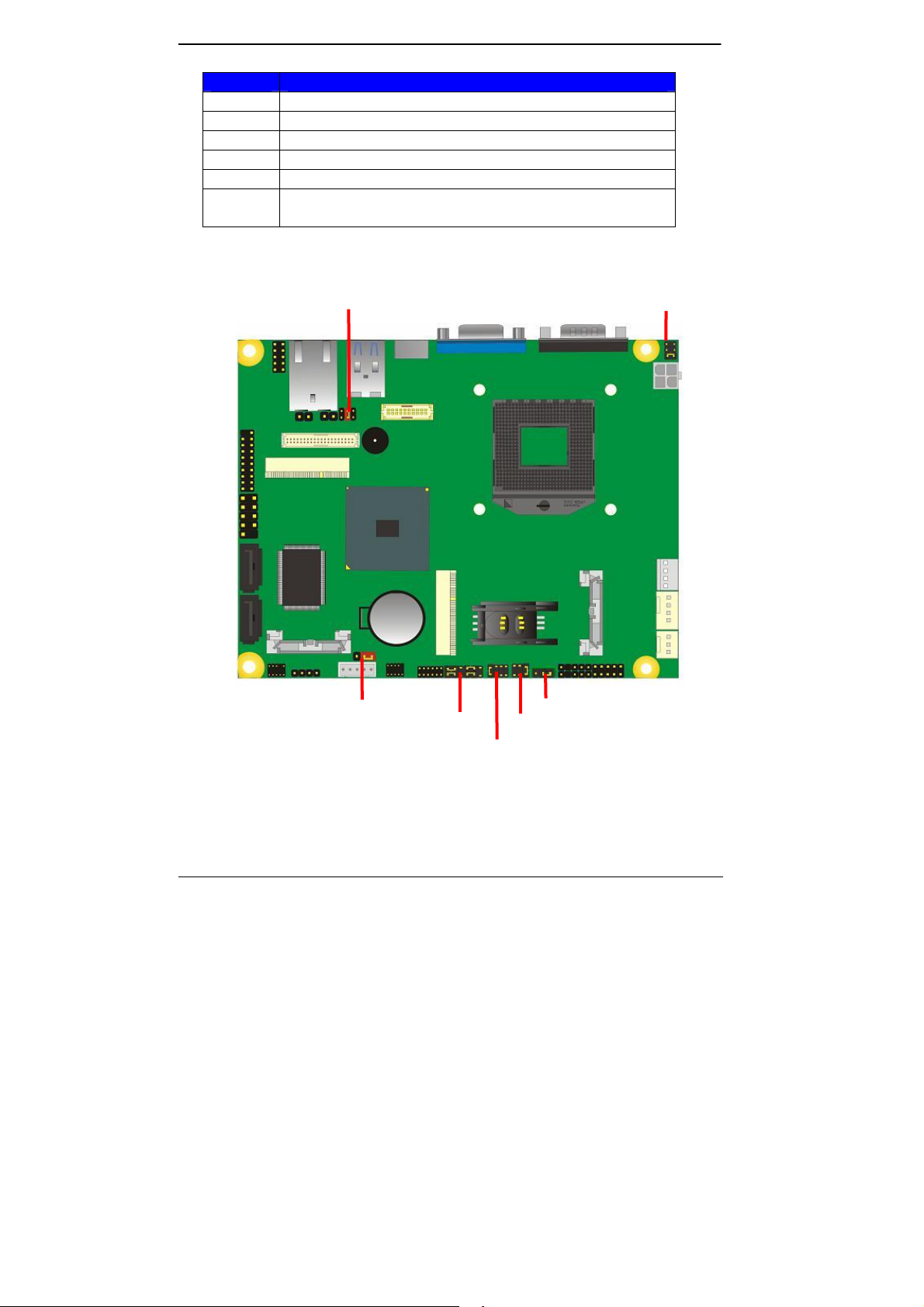
2.2 <Jumper Location & Reference>
Jumper Function
JRTC CMOS Operating/Clear Setting
JVLCD Panel Voltage Setting
JAT Power mode select
JP1 Com1 Voltage Setting (For Pin 9)
JP2 Com2 Voltage Setting (For Pin 9)
JCSEL1
JCSEL2
CN_COM2 RS-232 RS422 RS485 Setting
CN_IR IrDA Setting
JP1 JVLCD
JRTC
JCSEL2 JP2
JAT
JCSEL1
12-
-
Page 13
LS-37B User’s Manual
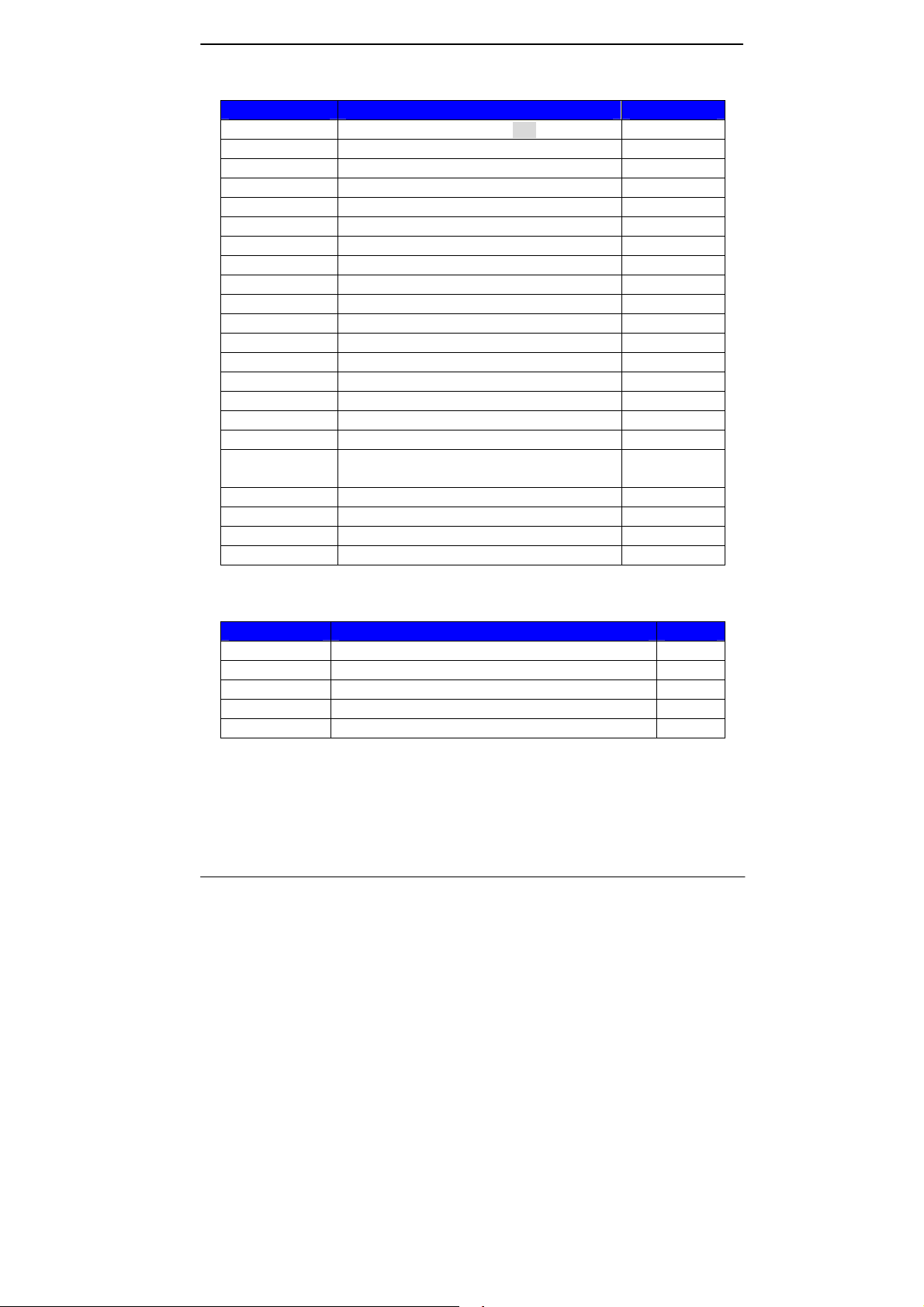
2.3 <Connector Reference>
2.3.1 <Internal Connectors>
Connector Function Remark
CPU Socket rPGA988B for PGA988 CPU
SO-DIMM 204 -pin DDR3 SO-DIMM socket
SATA 1/2 7-pin Serial ATAIII connector
DC_IN DC 9~24V input connector
DC_OUT 4-pin DC output connector
CN_AUDIO 5 x 2-pin audio connector
CD_IN 4-pin CD-ROM audio input connector
CN_DIO 6 x 2-pin digital I/O connector
CN_USB 1/2 5 x 2-pin USB connector
CPUFAN 4-pin CPU cooler fan connector
SYSFAN 3-pin system cooler fan connector
CN_DVI 10 x 2-pin DVI connector
CN_LVDS 20 x 2-pin LVDS connector
CN_INV 5-pin LCD inve rter connector
CN_IR 5-pin IrDA connector
CN_COM2 9-pin RS232/485/422
CN_LPC 5 x 2- pin LPC connector
JFRNT
Mini-PCIE1/2 52-pin Mini-PCIE socket
JAT Power mode select
JSPD LAN Speed LED connector
JACT LAN Activity LED connector
10-pin front panel switch/indicator
connector
2.3.2 <External Connectors>
Connector Function Remark
COM1 DB9 Serial port connector
CRT DB15 VGA connector
PS2 PS/2 keyboard and mouse connector
USB Dual USB 3.0 connector
RJ45 RJ45 LAN connector
13-
-
Page 14
LS-37B User’s Manual
y
2.4 <CPU and Memory Setup>
2.4.1 <CPU Setup>
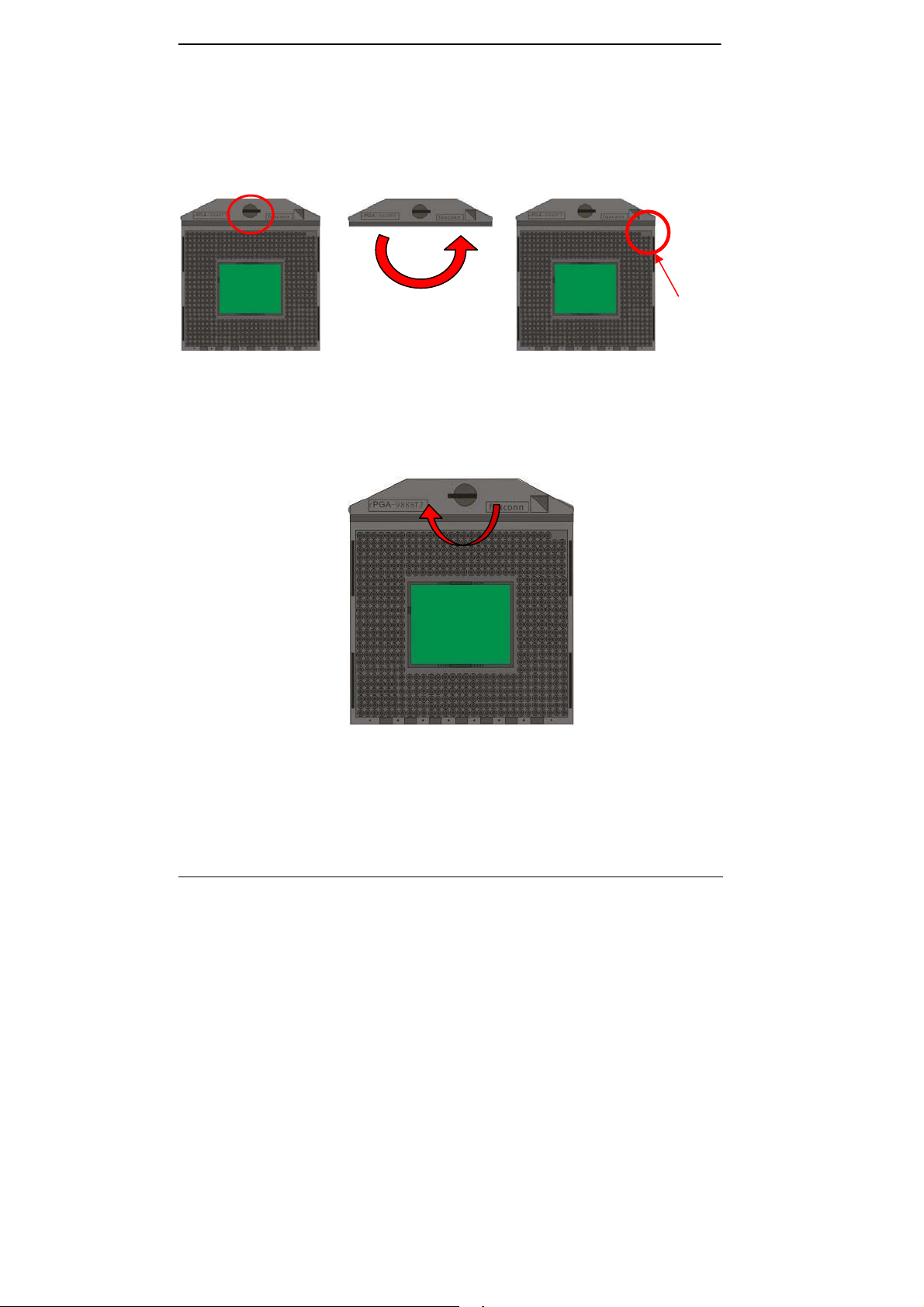
The board comes with the socket rPGA988 for Intel Ivy Bridge Processor, Please
follow the instruction to install the CPU properly.
Unlock wa
1. Use the flat-type screw drive
to unlock the CPU socket
2. Follow the pin direction to install
the processor on the socket
Socket CPU
Check point
Check point
3. Lock the socket
14-
-
Page 15
LS-37B User’s Manual
2.4.2 <Memory Setup>
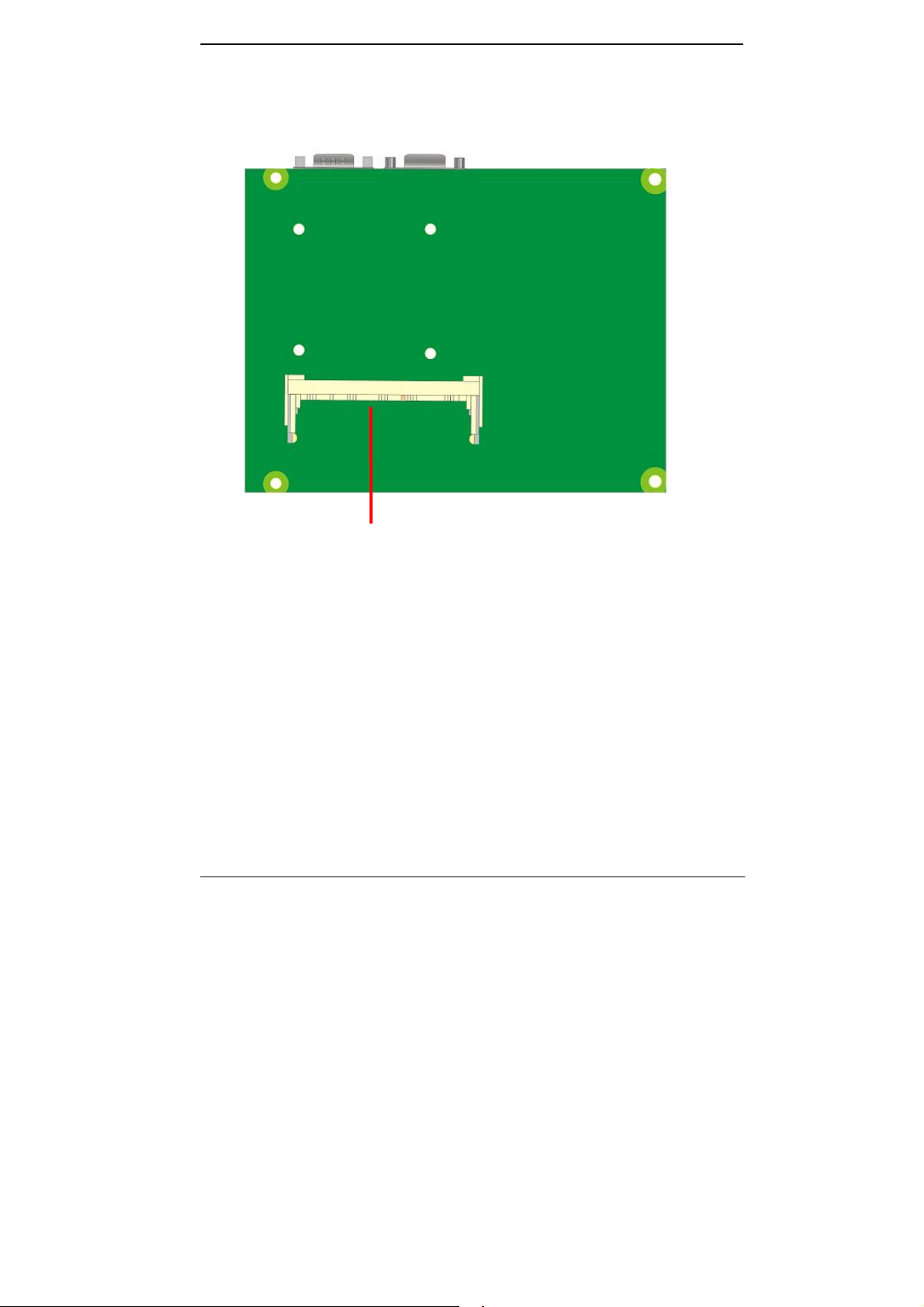
The board provides 204-pin DDR3 SO-DIMM to support 1066/1333/1600MHz DDR3
memory module up to 8GB. Non-ECC, unbuffered memory supported only
SO-DIMM
15-
-
Page 16

LS-37B User’s Manual
2.5 <CMOS & ATX Setup>
The board’s data of CMOS can be setting in BIOS. If the board refuses to boot due
to inappropriate CMOS settings, here is how to proceed to clear (reset) the CMOS
to its default values.
Jumper: JRTC
Type: Onboard 3-pin jumper
JRTC Mode
1-2 Clear CMOS
2-3 Normal Operation
Default setting: 2-3
Jumper: JAT
Type: onboard 3-pin jumper
JAT Mode
1-2 AT Mode
2-3 ATX Mode
Default setting:2-3
1 3
JRTC JAT
16-
-
1 3
Page 17

LS-37B User’s Manual
2.6 <Serial ATA Interface>
LS-37B has Two Serial ATA III(SATA Port1/2) interfaces with RAID function, the transfer
rate of the Serial ATA III can be up to 600MB/s. Please go to http://www.serialata.org/
more about Serial ATA technology information.
1. Supports for up to RAID volumes on a single, two-hard drive RAID array.
2. Supports for two, two-hard drive RAID arrays on any of six Serial ATA ports.
3. Supports for Serial ATA ATAPI devices.
4. Supports for RAID spares and automatic rebuild.
5. Supports on RAID arrays, including NCQ and native hot plug.
For more information please visit Intel’s official website.
For more about the system setup for Serial ATA, please check the chapter of SATA
configuration.
for
SATA2
SATA1
17-
-
Page 18

LS-37B User’s Manual
2.7 <Ethernet Interface>
The board integrates with one Intel 82579LM controllers, The Intel Gigabit Ethernet
supports triple speed of 10/100/1000Base-T, with IEEE802.3 compliance.
Onboard Intel® 82579LM GbE controller support Intel® AMT 8.0 feature on primary LAN
port. The BIOS is ready to support Intel® AMT 8.0 feature. The necessary prerequisite is
your CPU must support Intel® vPro technology, ex. i7-3610QE
For further instruction about the Intel® AMT features and set up, please refer to the
iAMT Setting.pdf.
RJ45 LAN connector
18-
-
Page 19

LS-37B User’s Manual
2.8 <Onboard Display Interface>
Based on Intel Ivy Bridge CPU with built-in HD Graphic, the board provides one DB15
connector on real external I/O port, one 40-pin LVDS interface with 5-pin LCD backlight
inverter connector and provides 20-pin DVI interface.
The board provides dual display function with clone mode and extended desktop mode
for CRT, LCD and DVI.
2.8.1 <Analog Display>
Please connect your CRT or LCD monitor with DB15 male connector to the onboard
DB15 female connector on rear I/O port.
CRT
-
19-
Page 20

LS-37B User’s Manual
2.8.2 <Digital Display>
The board provides one 40-pin LVDS connector for 24-bit single/dual channel panels,
supports up to 2048 x 1536 (UXGA) resolution, with one LCD backlight inverter
connector and one jumper for panel voltage setting.
40
39
CN_LVDS
JVLCD
2
1 5
2
1
6
5 1
CN_INV
Effective patterns of connection: 1-2 / 3-4 / 5-6
2
4
6
1
3
5
Warning: others cause damages
20-
-
Page 21

LS-37B User’s Manual
Connector: CN_INV Connector: JVLCD
Type: 5-pin LVDS Power Header Type: 6-pin Power select Header
Pin Description
1 +12V
2 Reserved (Note)
3 GND
4 GND
5 ENABKL
Note: Reserved for MB internal test
Please treat it as NC.
Connector: CN_LVDS
Type: onboard 40-pin connector for LVDS connector
Connector model:
E&T 3950-B40C-00R or similar (HIROSE DF13-40DP-1.25V compatible)
Pin Signal Pin Signal
2 LCDVCC 1 LCDVCC
4 GND 3 GND
6 ATX0- 5 BTX0-
8 ATX0+ 7 BTX0+
10 GND 9 GND
12 ATX1- 11 BTX114 ATX1+ 13 BTX1+
16 GND 15 GND
18 ATX2- 17 BTX220 ATX2+ 19 BTX2+
22 GND 21 GND
24 ACLK- 23 BTX326 ACLK+ 25 BTX3+
28 GND 27 GND
30 ATX3- 29 BCLK32 ATX3+ 31 BCLK+
34 GND 33 GND
36 DDCPCLK 35 SMBCKL
38 DDCPDATA 37 SMBDATA
40 N/C 39 SPDIFO
Pin Description
1-2 LCDVCC (3.3V)
3-4 LCDVCC (5V)
5-6 LCDVCC (12V)
Default: 1-2
-
21-
Page 22

LS-37B User’s Manual
To setup the LCD, you need the component below:
1. A panel with LVDS interfaces.
2. An inverter for panel’s backlight power.
3. A LCD cable and an inverter cable.
For the cables, please follow the pin assignment of the c onnec tor to make a c able, becaus e
every panel has its own pin assignment, so we do not provide a standard cable; please find
a local cable manufacture to make cables.
LCD Installation Guide:
1. Preparing the LS-37B, LCD panel and the backlight inverter.
2. Please check the datasheet of the panel to see the voltage of the panel, and set
the jumper JVLCD to +12V or +5V or +3.3V.
3. You would need a LVDS type cable.
Panel side
For sample illustrator only
4. To connect all of the devices well.
-
22-
Board side
Page 23

LS-37B User’s Manual
After setup the devices well, you need to select the LCD panel type in the BIOS.
The panel type mapping is list below:
BIOS panel type selection form (BIOS Version:1.0)
Single / Dual channel Single / Dual channel
NO. Output format NO. Output format
1 640 x 480 9 1680 x 1050
2 800 x 600 10 1920 x 1200
3 1024 x 768 11 1440 x 900
4 1280 x 1024 12 1600 x 900
5 1400 x 1050 Reduced Blanki ng 13 800x480
6 1400 x 1050 non-Reduced Blanking 14 1280 x 800
7 1680 x 1200 15 1920 x 1080
8 1366 x 768 16 OEM KEEP(BIOS Ver:1.1)
23-
-
Page 24

LS-37B User’s Manual
2.8.3 <DVI Interface>
Connector: CN_DVI
Connector type:
E&T 3950-B20C-00R or similar (HIROSE DF13-20DP-1.25V compatible)
Pin Number Assignment Pin Number Assignment
1 +5V 2 +3.3V
3 HPD 4 Ground
5 TMDSTX0N 6 TMDSTX0P
7 Ground 8 TMDSTX1N
9 TMDSTX1P 10 Ground
11 TMDSTX2N 12 TMDSTX2P
13 Ground 14 TMDSTXCN
15 TMDSTXCP 16 Ground
17 DVI_DA 18 DVI_SL
19 AUXN 20 AUXP
20
CN_DVI
2
19
1
24-
-
Page 25

LS-37B User’s Manual
2.9 <Integrated Audio Interface>
The board provides the onboard high definition audio with Realtek ALC888
Connector: CN_AUDIO
Type: 10-pin (2 x 5) 1.27mm x 2.54mm-pitch header
Pin Description Pin Description
1 MIC_L 2 Ground
3 MIC_R 4 N/C
5 Speaker_R 6 MIC Detect
7 SENSE 8 N/C
9 Speaker_L 10 Speaker Detect
Connector: CDIN
Type: 4-pin header (pitch = 2.54mm)
Pin Description
1 CD – Left
2 Ground
3 Ground
4 CD – Right
9
1 4
1
2 10
2 10
1 9
CN_AUDIO
14
CD_IN
25-
-
Page 26

LS-37B User’s Manual
2.10 <USB Interface>
LS-37B integrates four USB3.0 ports and two USB2.0 ports.
The specifications of USB3.0 are listed below:
Interface USB3.0
Controller
Transfer Rate Up to 5Gb/s
Voltage 5V
The specifications of USB2.0 are list
Interface USB2.0
Controller
Transfer Rate Up to 480Mb/s
Voltage 5V
Intel®QM77
Intel®QM77
USB
Type: USB3.0
CN_USB3-0
Type: USB3.0
CN_USB1
Type: USB2.0
20 1
11 10
1 2
9 10
26-
-
Page 27

LS-37B User’s Manual
Connector: CN_USB3-0
Type: 20-pin (2 x 10) header (pitch = 2.0mm)
Pin Description Pin Description
1 VCC 20 NC
2 USB3.0_RX0- 19 VCC
3 USB3.0_RX0+ 18 USB3.0_RX14 Ground 17 USB3.0_RX1+
5 USB3.0_TX0- 16 Ground
6 USB3.0_TX0+ 15 USB3.0_TX17 Ground 14 USB3.0_TX1+
8 Data0- 13 Ground
9 Data0+ 12 Data110 NC 11 Data1+
Connector: CN_USB1
Type: 10-pin (2 x 5) header (pitch = 2.54mm)
Pin Description Pin Description
1 VCC 2 VCC
3 Data0- 4 Data15 Data0+ 6 Data1+
7 Ground 8 Ground
9 Ground 10 N/C
27-
-
Page 28

LS-37B User’s Manual
2.11 <Serial Port>
The board supports one RS232 serial port and one jumper selectable RS232/422/485 serial
ports. The jumper JCSEL1 & JCSEL2 can let you configure the communicating modes for
COM2.
Connector: COM1
Type: 9-pin D-sub male connector on bracket for COM1
Connector: COM2
Type: 10-pin (5 x 2) 1.27mm x 2.54mm-pitch header for COM2
Setting RS-232 & RS-422 & RS-485 for COM2
Jumper: JCSEL1,JCSEL2
Type: 12-pin (6 x 2) & 8-pin (4 x 2) for set COM2 mode jumper
COM1
Pin Description Pin Description
1 DCD 2 RXD
3 TXD 4 DTR
5 GND 6 DSR
7 RTS 8 CTS
9 RI 10 N/C
Pin Description Pin Description
1 DCD/422TX-/485- 2 RXD/422TX+/485+
3 TXD/422RX+ 4 DTR/422RX5 GND 6 DSR
7 RTS 8 CTS
9 RI 10 N/C
RS232 RS485 RS422 IrDA
JCSEL1
JCSEL2
Default: RS232
-28-
Page 29

LS-37B User’s Manual
COM1
1 2
5 6
JP1
2 10
2 12
2 8 2 6
1 9 1 7
CN_COM2
JCSEL1 JCSEL2
1 5 1 11
JP2
Jumper: JP1/JP2 (COM1/2)
Type: onboard 6-pin header
Power Mode JP1/2/3/4
Pin 9 with 5V Power 1-2
Pin 9 with 12V Power 3-4
Standard COM port 5-6
Default setting (5-6)
-29-
Page 30

LS-37B User’s Manual
2.12 <PCIE Mini Card and SIM Interface>
The board provides two PCIE mini card sockets and a SIM socket.
MINI_CARD1 is the first Mini-PCIe slot for long size Mini-PCIe cards.
Please be noted that the MPX-SDVOD card must be placed in this slot. The
MPX-SDVOD card will not work if it is placed in other slot.
Please also be noted that this slot is the only slot for MPX-SDVOX card but a
customized BIOS is needed for the MPX-SDVOX card. Please contact Commell for
customized BIOS for your MPX-SDVOX card.
MINI_CARD2 is the second Mini-PCIe slot for long size Mini-PCIe cards.
However, if you are trying to use 3G Mini-PCIe card with a SIM card then place your 3G
Mini-PCIe card in this slot and put your SIM card into the SIM card socket beneath this
MINI_CARD2 support 3G PCIE Mini card with SIM.
MINI_CARD2 slot and option support mSATA.
-30-
Page 31

LS-37B User’s Manual
MINI_CARD1
Connector: SIMM
Type: 6-pin SIM socket
Pin Description Pin Description
1 SIMVCC 2 SIMRST
3 SIMCLK 4 NC
5 GND 6 SIMVPP
7 SIMDATA
MINI_CARD2
SIMM
2
1
7 3
6
5
-31-
Page 32

LS-37B User’s Manual
2.12.1 <SIM Setup>
Step1.
SIM card holder is marked by circle.
Slide the cap toward OPEN direction.
Step 2.
Make sure that the cap is now at the OPEN position.
Step 3.
Flip the cap up for inserting a SIM card into.
-32-
Page 33

LS-37B User’s Manual
Step 4.
Insert a SIM card as shown in the photo.
Be sure that the corner cut is on top and the golden pads are up.
Step 5.
Now, flip down the cap as shown in the photo.
Step 6.
Press down and slide the cap to the CLOSE position.
Be sure that the cap is tightly held with the socket.
-33-
Page 34

LS-37B User’s Manual
2.13 <GPIO and SMBUS Interface>
The board provides a programmable 8-bit digital I/O interface; you can use this general
purpose I/O port for system control like POS or KIOSK.
Connector: CN_DIO
Type: 12-pin (6 x 2) header (pitch = 2.0mm)
Pin Description Pin Description
1 Ground 2 Ground
3 GP10 4 GP14
5 GP11 6 GP15
7 GP12 8 GP16
9 GP13 10 GP17
11 5V 12 12V
Connector: CN_SMBUS
Type: 5-pin header for SMBUS Ports
Pin Description
1 VCC
2 N/C
3 SMBDATA
4 SMBCLK
5 Ground
2 12
1 11
CN_DIO
-34-
1 5
CN_SMBUS
Page 35

LS-37B User’s Manual
2.14 <Power Supply and Fan Interface >
2.14.1 <Power Input>
The board requires DC input with 4-pin header, the input voltage range is from 9V to 24V,
for the input current, please take a reference of the power consumption report on
appendix.
Connector: DC_IN
Type: 4-pin DC power connector
Pin Description Pin Description
1 Ground 2 Ground
3 +9~+24V 4 +9~+24V
2.14.2 <Power Output>
Connector: DC_OUT
Type: 4-pin connector for +5V/+12V output
Pin Description Pin Description Pin Description Pin Description
1 +12V 2 Ground 3 Ground 4 +5V
Note: Maximum output current 12V/3A, 5V/3A
2 4
35-
-
1 3
DC_IN
1
DC_OUT
4
Page 36

LS-37B User’s Manual
2.14.3 <Fan connector>
The board provides one 4-pin fan connectors supporting smart fan for CPU cooler and
one 3-pin cooler fan connectors for system.
Connector: CPUFAN
Type: 4-pin fan wafer connector
Pin Description Pin Description
1 Ground 2 +12V
3 Fan Speed Detection 4 Fan Control
Connector: SYSFAN
Type: 3-pin fan wafer connector
Pin Description Pin Description Pin Description
1 Ground 2 +12V 3 Sense
1
4
1
3
CPUFAN
SYSFAN
36-
-
Page 37

LS-37B User’s Manual
2.15 <Switch and Indicator>
The JFRNT provides front control panel of the board, such as power button, reset and
beeper, etc. Please check well before you connecting the cables on the chassis.
Connector: JFRNT
Type: onboard 10-pin (2 x 5) 2.54-pitch header
Function Signal PIN Signal
Power
Speaker
HDD LED
Power LED
Reset
PWRBT- 1 2 PWRBT+
SPK- 3 4 SPK+
HLED- 5 6 HLED+
PWRLED- 7 8 PWRLED+
Reset+ 9 10 Reset-
-
37-
2 10
1 9
JFRNT
Page 38

LS-37B User’s Manual
Chapter 3 <System Setup>
3.1 <Audio Configuration>
The board integrates Intel® QM77 with REALTEK® ALC888 codec. It can support
2-channel sound under system configuration. Please follow the steps below to setup
your sound system.
1. Install REALTEK HD Audio driver.
2. Lunch the control panel and Sound Effect Manager.
3. Select Speaker Configuration
38-
-
Page 39

LS-37B User’s Manual
3.2 <Display Properties Setting>
Based on Intel QM77 with HD Graphic, the board supports two DACs for display device as
different resolution and color bit.
Please install the Intel Graphic Driver before you starting setup display devices.
1. Click right button on the desktop to lunch display properties
2. Click Advanced button for more specificity setup.
Click Graphics Properties... for
advanced setup
-39-
Page 40

LS-37B User’s Manual
3. This setup options can let you define each device settings.
Click Monitor to setup the CRT
monitor for Resolution and
Refresh Rate
Click Intel® Dual Display
Clone to setup the dual
display mode as same screen
-40-
Page 41

LS-37B User’s Manual
3.3 <SATA configuration>
SA TA Mode:
This option can let you select whether the Serial ATA hard drives would work under normal
IDE mode or RAID mode. The RAID mode need more than one HDD is applied.
-41-
Page 42

LS-37B User’s Manual
3.4 <SATA RAID Configuration>
The board integrates Intel® QM77 PCH with RAID function for Serial ATA drives, and
supports the configurations below:
RAID 0 (Stripping): Two hard drives operating as one drive for optimiz ed data R/W
performance. It needs two unused drives to build this operation.
RAID 1 (Mirroring): Copies the data from first drive to second drive for data security,
and if one drive fails, the system would access the applications to th e workable driv e. It
needs two unused drives or one used and one unused drive to build this operation. The
second drive must be the same or lager size than first one.
If you need to install an operation system on the RAID set, please use the driver disk
attached in the package when it informs you to obtain the RAID drivers.
Please press <CTRL+I> to enter the RAID configuration menu.
You can setup the RAID under operation system for Microsoft® Windows XP SP1 ,
please install the Intel® Application Accelerator Ver.4.5 later to support RAID
configuration with Intel® Matrix Storage Technology.
-42-
Page 43

LS-37B User’s Manual
Chapter 4 <BIOS Setup>
The motherboard uses the Phoenix BIOS for the system configuration. The Phoenix
BIOS in the single board computer is a customized version of the industrial standard
BIOS for IBM PC AT-compatible computers. It supports Intel x86 and compatible CPU
architecture based processors and computers. The BIOS provides critical low-level
support for the system central processing, memory and I/O sub-systems.
The BIOS setup program of the single board computer let the customers modify the basic
configuration setting. The settings are stored in a dedicated battery-backed memory,
NVRAM, retains the information when the power is turned off. If the battery runs out of
the power, then the settings of BIOS will come back to the default setting.
The BIOS section of the manual is subject to change without notice and is provided h ere
for reference purpose only. The settings and configurations of the BIOS are current at
the time of print, and therefore they may not be exactly the same as that displayed on
your screen.
To activate CMOS Setup program, press <DEL> key immediately after you turn on the
system. The following message “Press DEL to enter SETUP” should appear in the lower
left hand corner of your screen. When you enter the CMOS Setup Utility, the Main Menu
will be displayed as Figure 4-1. You can use arrow keys to select your function, press
<Enter> key to accept the selection and enter the sub-menu.
Figure 4-1 CMOS Setup Utility Main Screen
43-
-
Page 44

LS-37B User’s Manual
jump
”
Appendix A <I/O Port Pin Assignment>
A.1 <Serial ATA Port>
Connector: SATA1/2
Type: 7-pin wafer connector
1 2 3 4 5 6 7
GND RSATA_TXP1 RSATA_TXN1 GND RSATA_RXN1 RSATA_RXP1 GND
7 1
A.2 <IrDA Port>
Connector: CN_IR
Type: 5-pin header for SIR Ports
Pin Description
1 VCC
2 N/C
3 IRRX
4 Ground
5 IRTX
A.3 <VGA Port>
Connector: CRT
Type: 15-pin D-sub female connector on bracket
Pin Description Pin Description Pin Description
1 RED 6 Ground 11 N/C
2 GREEN 7 Ground 12 DDCDA
3 BLUE 8 Ground 13 HSYNC
4 N/C 9 N/C 14 VSYNC
5 Ground 10 Ground 15 DDCCLK
JCSEL1 must
1
5
to “SIR
6
1
2
3
4
5
10
11
12
13
14
15
A.4 <LAN Port>
Connector: RJ45
Type: RJ45 connector with LED on bracket
Pin 1 2 3 4 5 6 7 8
Description MI0+ MI0- MI1+ MI2+ MI2- MI1- MI3+ MI3-
-
44-
8 1
Page 45

LS-37B User’s Manual
A.5 <LAN LED Port>
Connector: JSPD1/2
Type: 5-pin header for LAN Speed LED connector
When Lan speed 10/100Mbps
Pin Description
1 LED2 LED+
When Lan speed 1Gbps
Pin Description
1 LED+
2 LED-
Connector: JATC1/2
Type: 5-pin header for LAN Activity LED connector
Pin Description
1 LED2 LED+
A.6 <LPC Port>
Connector: CN_LPC
Type: 10-pin header for LPC Port
Pin Description Pin Description
1 LPC_CLK 2 RESET3 LFRAME- 4 LAD3
5 LAD2 6 LAD1
7 LAD1 8 +3.3V
9 SERIRQ 10 Ground
9
10
1
2
-
45-
Page 46

LS-37B User’s Manual
Appendix B <Flash BIOS>
B.1 <Flash Tool>
The board is based on Phoenix BIOS and can be updated easily by the BIOS auto
flash tool. You can download the tool online at the address below:
http://www.phoenix.com/en/home/
http://www.commell.com.tw/Support/Support_SBC.htm
File name of the tool is “Phlash.exe”, it’s the utility that can write the data into the
BIOS flash ship and update the BIOS.
B.2 <Flash BIOS Procedure>
1. Please make a bootable floppy disk.
2. Get the last .bin files you want to update and copy it into the disk.
3. Copy Phlash.exe to the disk.
4. Power on the system and flash the BIOS.
(Example: C:/Pflash XXX.bin /bbl /cvar /sa)
5. Restart the system.
Any question about the BIOS re-flash please contact your distributors or visit the
web-site at below:
http://www.commell.com.tw/support/support.htm
UT
-
46-
Page 47

LS-37B User’s Manual
Appendix C <Programming GPIO’s>
The GPIO’can be programmed with the MSDOS debug program using
simple IN/OUT commands.The following lines show an example how to
do this.
GPIO0…..GPIO7 bit0……bit7
-o 2 E 87 ;enter configuration
-o 2E 87
-o 2E 07
-o 2F 09 ;enale GPIO function
-o 2E 30
-o 2F 02 ;enable GPIO configuration
-o 2E F0
-o 2F xx ;set GPIO as input/output; set ‘1’ for input,’0’for
output
-o 2E F1
-o 2F xx ;if set GPIO’s as output,in this register its value can
be set
Optional :
-o 2E F2
-o 2F xx ; Data inversion register ; ‘1’ inverts the current valus
of the bits ,’0’ leaves them as they are
-o 2E 30
-o 2F 01 ; active GPIO’s
For further information, please refer to Winbond W83627DHG datasheet.
47-
-
Page 48

LS-37B User’s Manual
Appendix D <Programming Watchdog Timer >
The watchdog timer makes the system auto-reset while it stops to work for a period.
The integrated watchdog timer can be setup as system reset mode by program.
Timeout Value Range
- 1 to 255
- Second or Minute
Program Sample
Watchdog timer setup as system reset with 5 second of timeout
2E, 87
2E, 87
2E, 07
2F, 08 Logical Device 8
2E, 30 Activate
2F, 01
2E, F5 Set as Second*
2F, 00
2E, F6 Set as 5
2F, 05
* Minute: bit 3 = 1; Second: bit 3 = 0
You can select Timer setting in the BIOS, after setting the time options, the system
will reset according to the period of your selection.
48-
-
Page 49

LS-37B User’s Manual
Contact Information
Any advice or comment about our products and service, or
anything we can help you please don’t hesitate to contact with us.
We will do our best to support you for your products, projects and
business.
Taiwan Commate Computer Inc.
19F., No.94, Sec. 1, Xintai 5th Rd., Xizhi Dist., New Taipei
Address
TEL +886-2-26963909
FAX +886-2-26963911
City 22102, Taiwan
Website
E-Mail
Facebook
Twitter https://twitter.com/Taiwan_Commate
TUhttp://www.commell.com.twUT
TUinfo@commell.com.twUT (General Information)
TUtech@commell.com.twUT (Technical Support)
https://www.facebook.com/pages/Taiwan-Commate-Computer-Inc/547993955271899
Commell is a brand name of Taiwan commate computer Inc.
49-
-
 Loading...