

Page 1
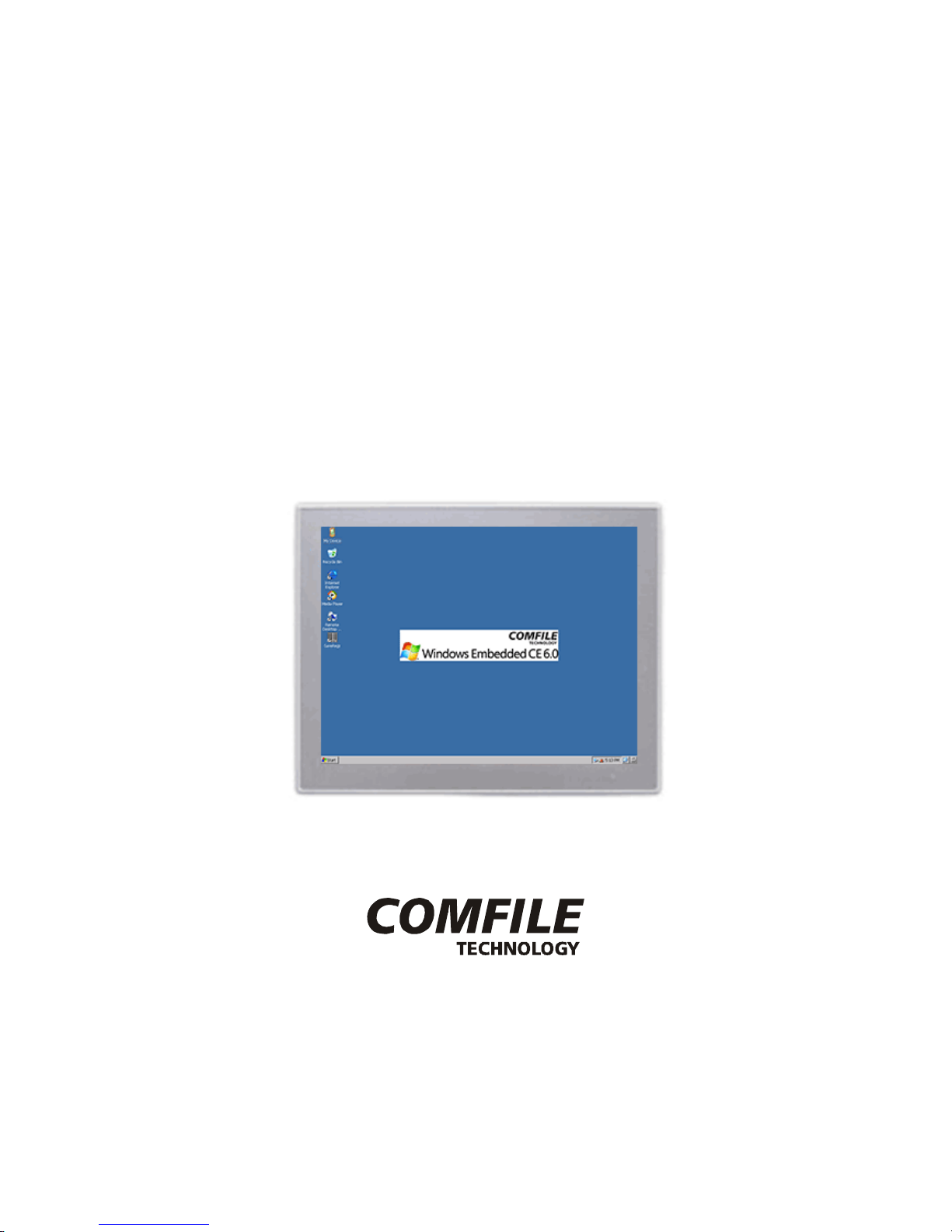
CUWIN V Series
Hardware Manual
CWV-104WR/CWV-150WR
[Version 1.1]
COMFILE Technology, Inc.
Page 2
CUWIN V Series
CWV-104WR/CWV-150WR Hardware Manual
COMFILE Technology, Inc. www.comfile.co.kr • page 2
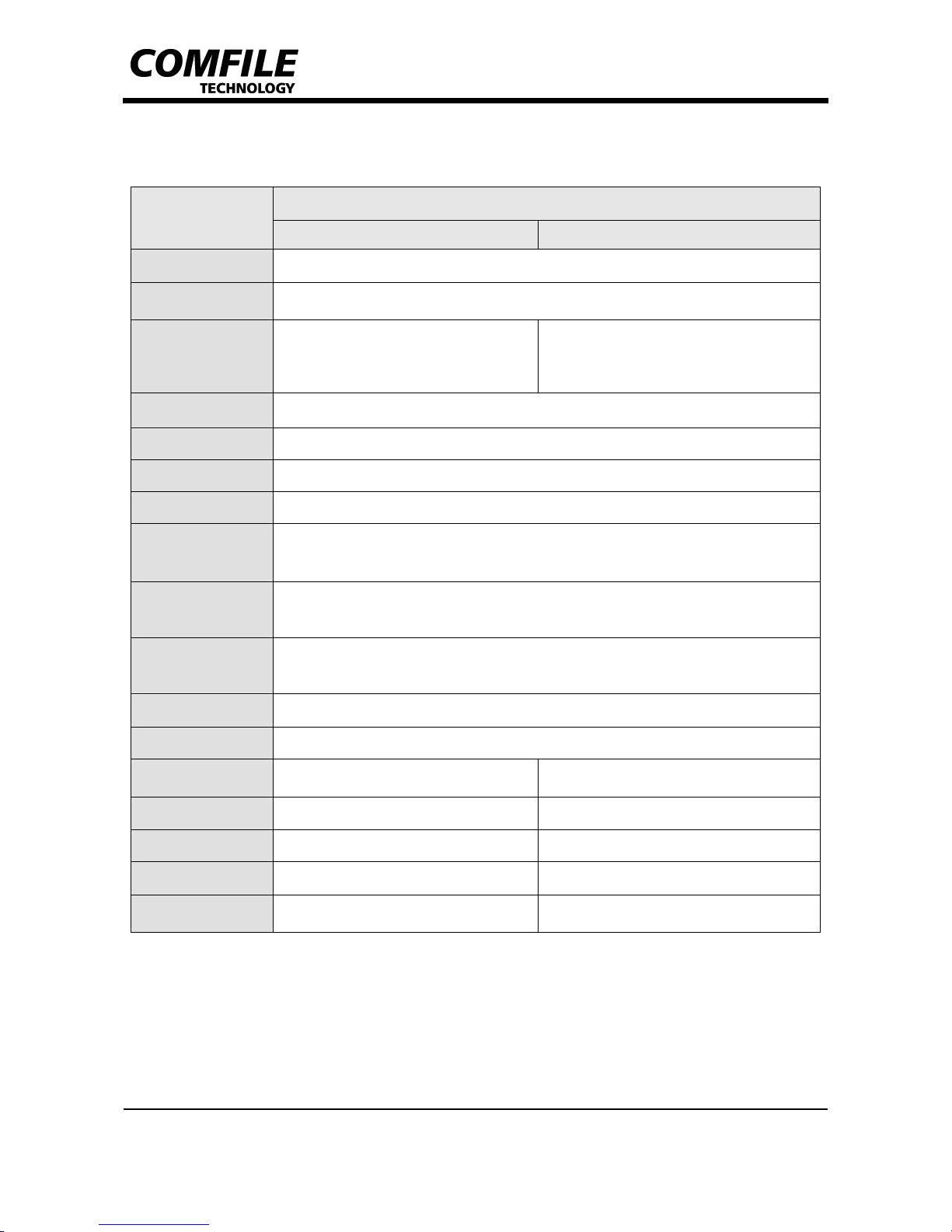
1. Hardware Specification
ITEM
MODEL
CWV-104WR CWV-150WR
MCU
32Bit RISC CPU, ARM Cortex-A8,1GHz
Memory
SDRAM : 256MB
NAND Flash : 256MB
LCD
TFT LCD(262K Color)
10.4 Inch (1024x768)
300cd/m
2
TFT LCD(262K Color)
15 Inch (1024x768)
300cd/m2
Backlight
LED Backlight (ON/OFF switchable)
Ethernet
100Base-T (1Port)
Touch
4 wire resistive panel
RTC
MCU-embedded RTC
(1)
(Battery replaceable)
Audio
<0.8W Micro speaker embedded
Stereo audio output (
φ3.5 Audio Jack)
USB
HOST 1Port
Device 1Port (Support USB Storage/WiFi)
Serial
COM1 (RS232C / RS485 switchable)
COM2 (RS232C)
COM3 (RS232C)
SDCARD
Support external SD CARD(SD/SDHC)
Input Power
DC14V~DC20V
Power
Consumption
< 10Watt (0.7A@14V) < 15Watt (1.0A@14V)
MAX. Current
800mA 1,200mA
Dimension (mm)
280(H)x227(V)x55(D) 376(H)x300(V)x55.2(D)
Weight
2.0Kg 3.7Kg
Operating
Temperature
0℃~70℃ 0℃~60℃
(1)
The accuracy of the RTC depends on circumstances.
Page 3
CUWIN V Series
CWV-104WR/CWV-150WR Hardware Manual
COMFILE Technology, Inc. www.comfile.co.kr • page 3
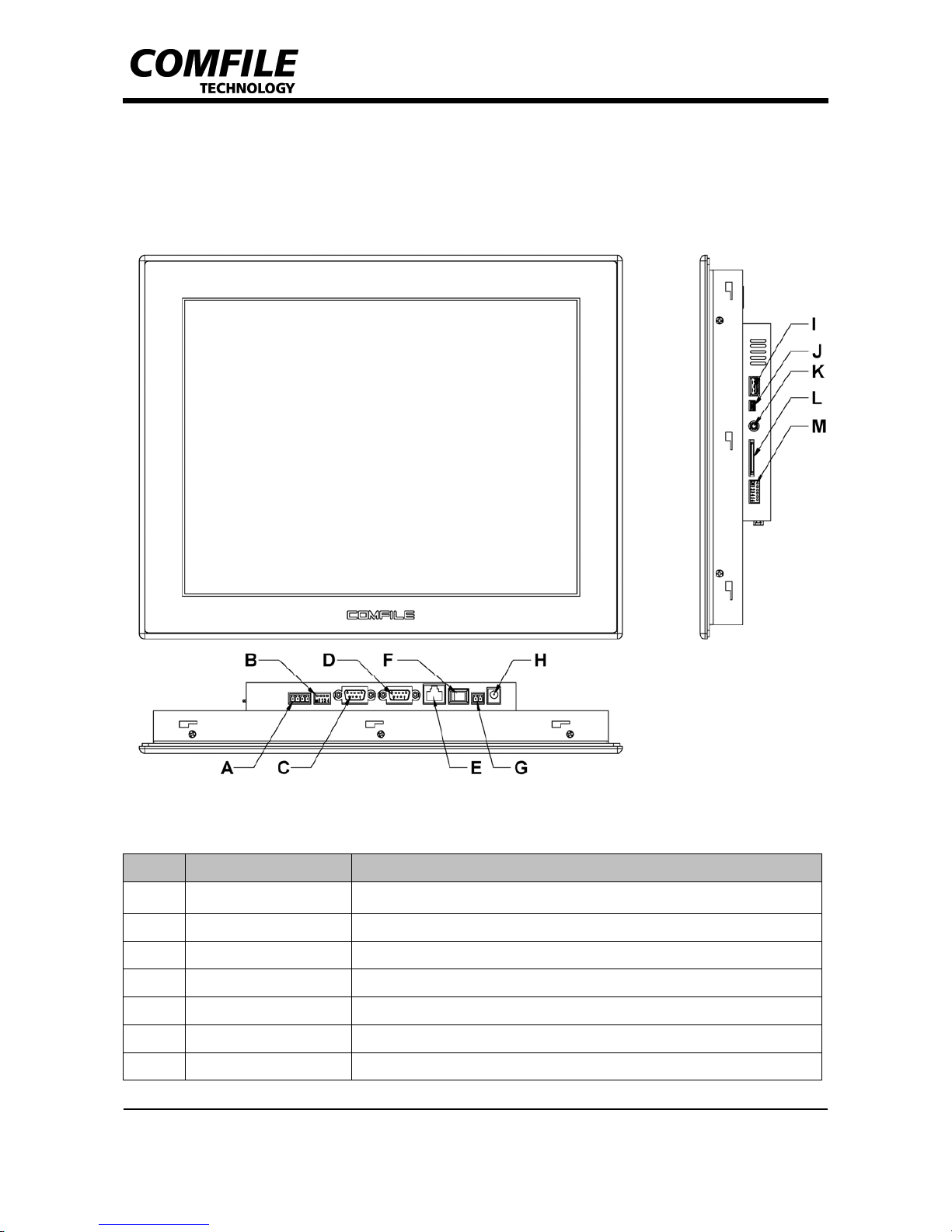
2. External Parts
Name Description
A
COM1_RS485 COM1_RS485 Port (RS485)
B
COM1 Mode Switch DIP Switch for selecting COM1 mode
C
COM1_RS232C COM1_RS232C (RS232C / Female Type D-SUB 9PIN)
D
COM2/COM3 COM2/COM3 (RS232C / Female Type D-SUB 9PIN)
E
Ethernet 10Base-T Ethernet Port (RJ-45)
F
Power S/W Power input ON/OFF
G
Power Input Port Power input port for cables
Page 4
CUWIN V Series
CWV-104WR/CWV-150WR Hardware Manual
COMFILE Technology, Inc. www.comfile.co.kr • page 4
H
Power input DC-Jack φ2.5 DC Power Input Jack for adaptor
I
USB_HOST USB Host Port (USB A Type Connector)
J
USB_DEVICE USB Device Port (USB mini AB Type Connector)
K
Audio Out Stereo Audio Output Port (φ3.5)
L
SD Card Connector SD Card slot
M
Boot Mode S/W DIP Switch for selecting Boot mode
Page 5
CUWIN V Series
CWV-104WR/CWV-150WR Hardware Manual
COMFILE Technology, Inc. www.comfile.co.kr • page 5
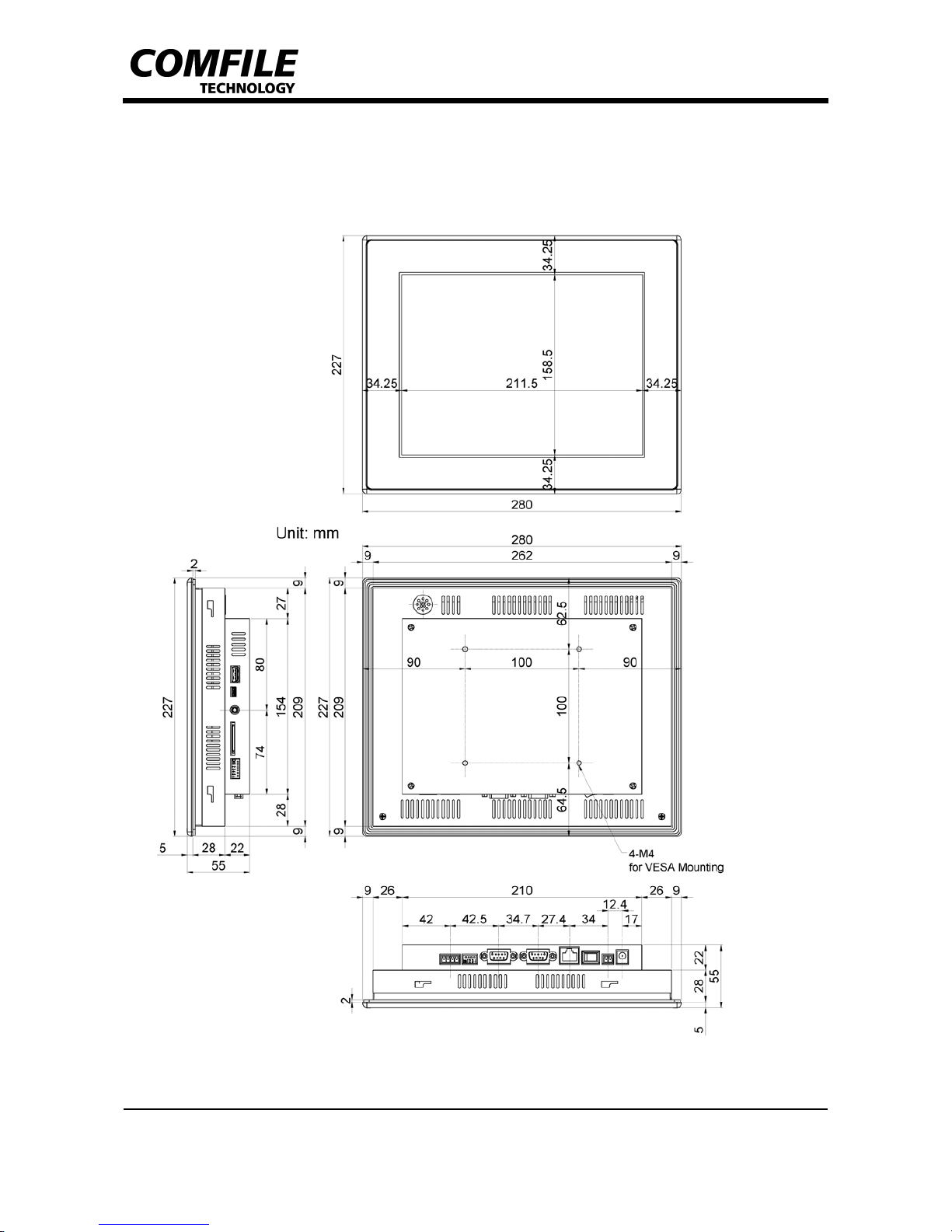
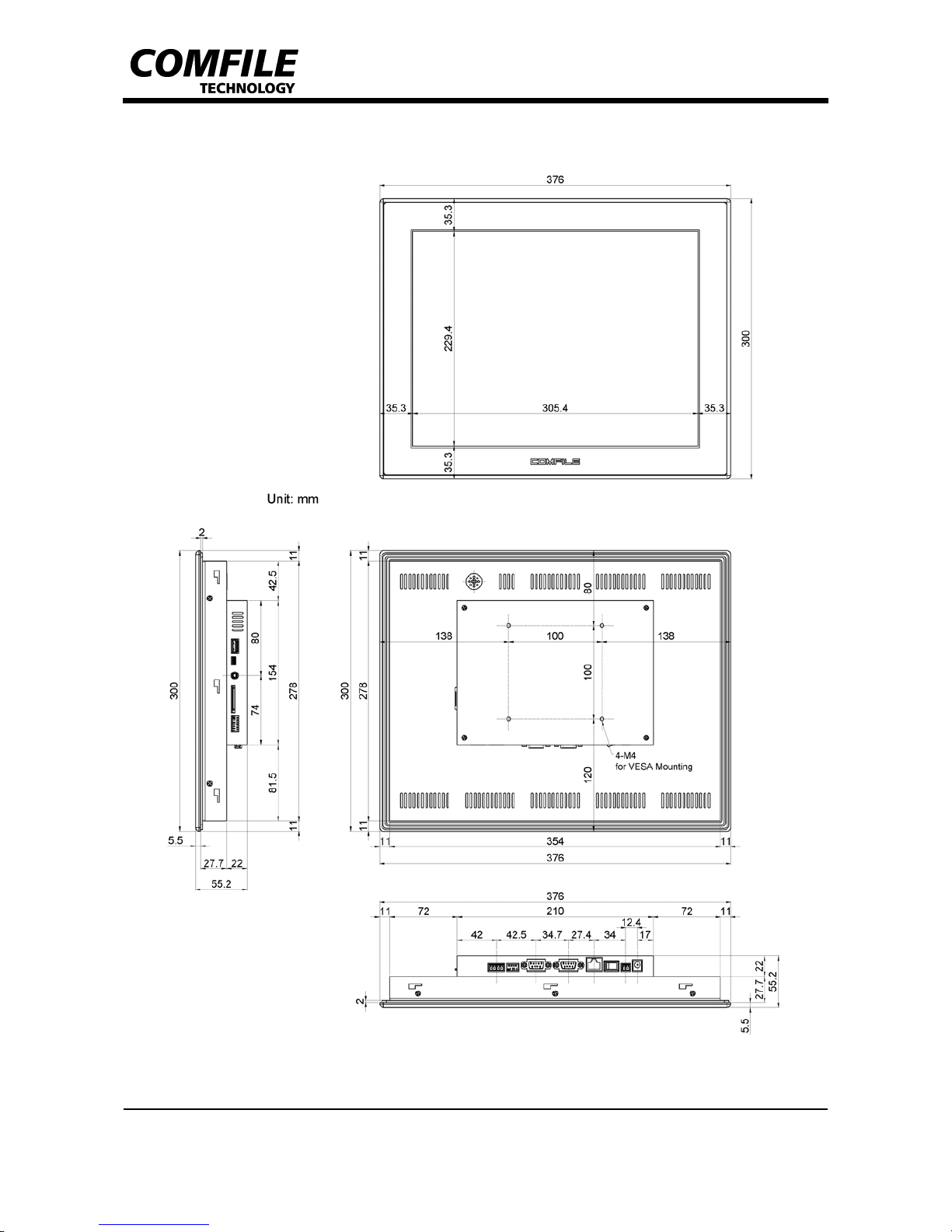
3. Dimensions
[CWV-104WR]
Page 6
CUWIN V Series
CWV-104WR/CWV-150WR Hardware Manual
COMFILE Technology, Inc. www.comfile.co.kr • page 6
[CWV-150WR]
Page 7
CUWIN V Series
CWV-104WR/CWV-150WR Hardware Manual
COMFILE Technology, Inc. www.comfile.co.kr • page 7
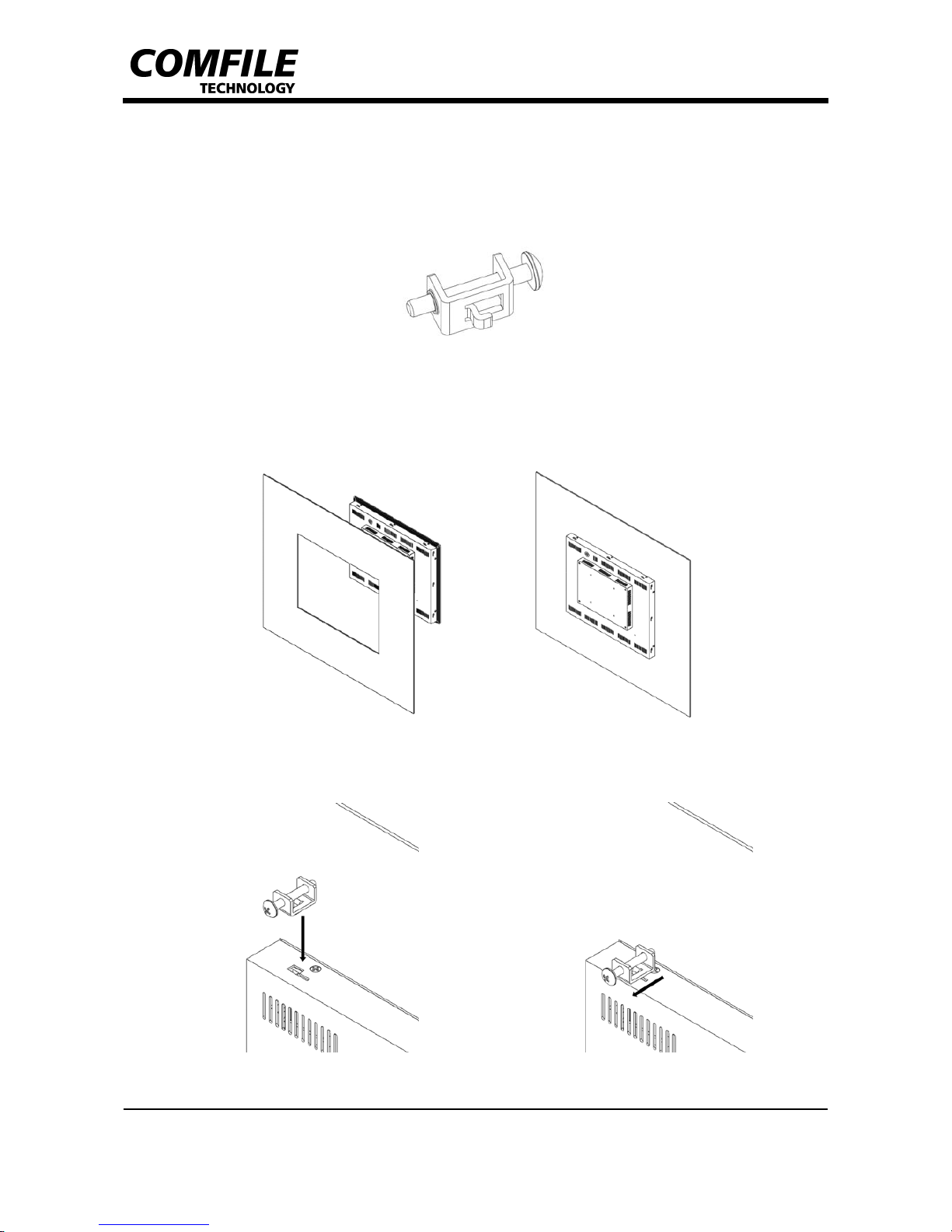
4. Bracket Installation
Panel mounting brackets are supplied to mount the CVW-150WR/CWV-104WR to an upright panel
(upper/lower/left/right 2ea.).
1. Insert the product into the panel’s cutout.
.
2. Insert the bracket’s hook into the product’s bracket mounting slot.
Page 8
CUWIN V Series
CWV-104WR/CWV-150WR Hardware Manual
COMFILE Technology, Inc. www.comfile.co.kr • page 8
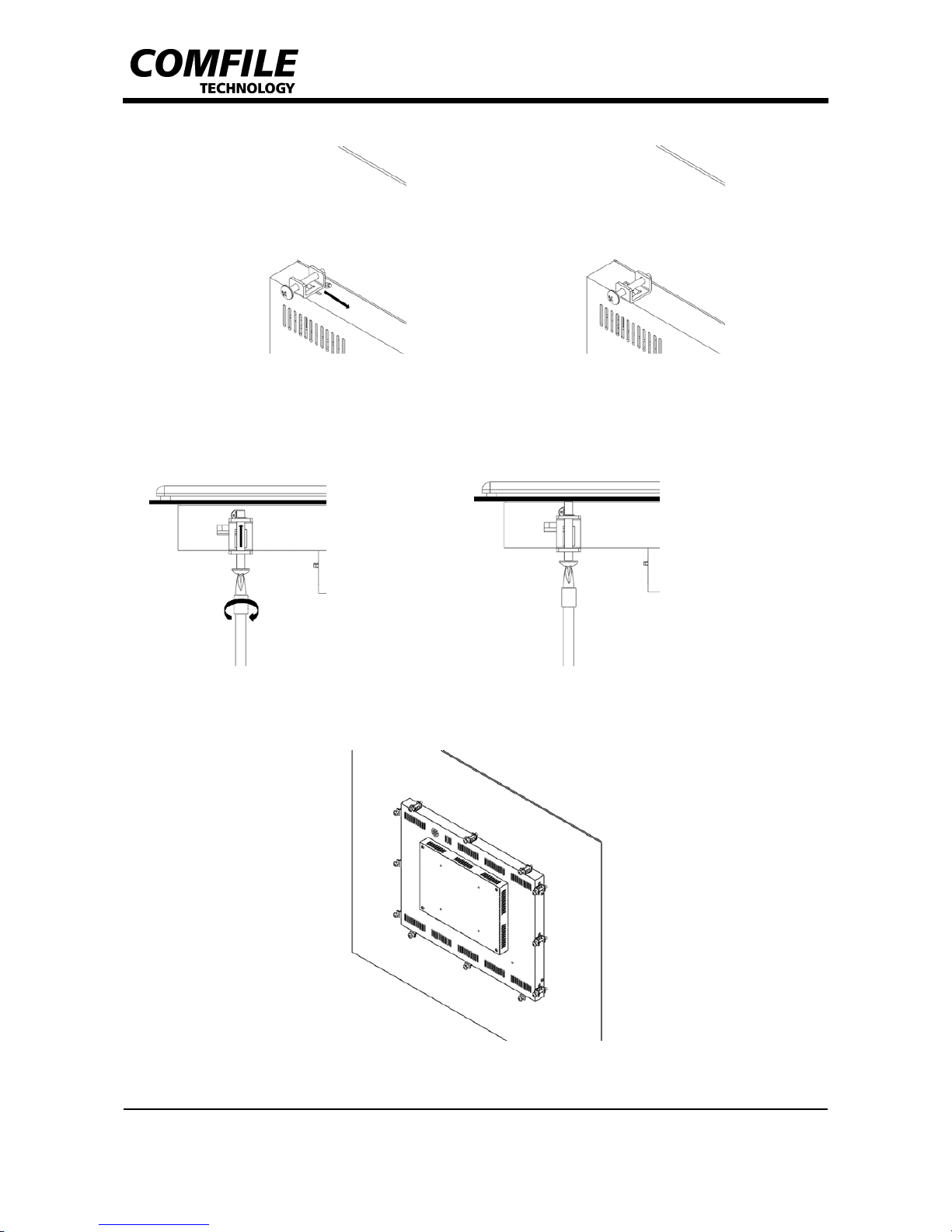
3. Slide it to the side to secure it in place.
4. Fasten the bolts to secure the product to the panel.
(Warning! To avoid damage or deformation, be careful not applying too much torque when fastening
the bolts)
5. Repeat steps 2 ~ 4 until product is mounted as shown in the image below.
- Rear view of CWV-150WR with bracket mounting completed –
Page 9
CUWIN V Series
CWV-104WR/CWV-150WR Hardware Manual
COMFILE Technology, Inc. www.comfile.co.kr • page 9
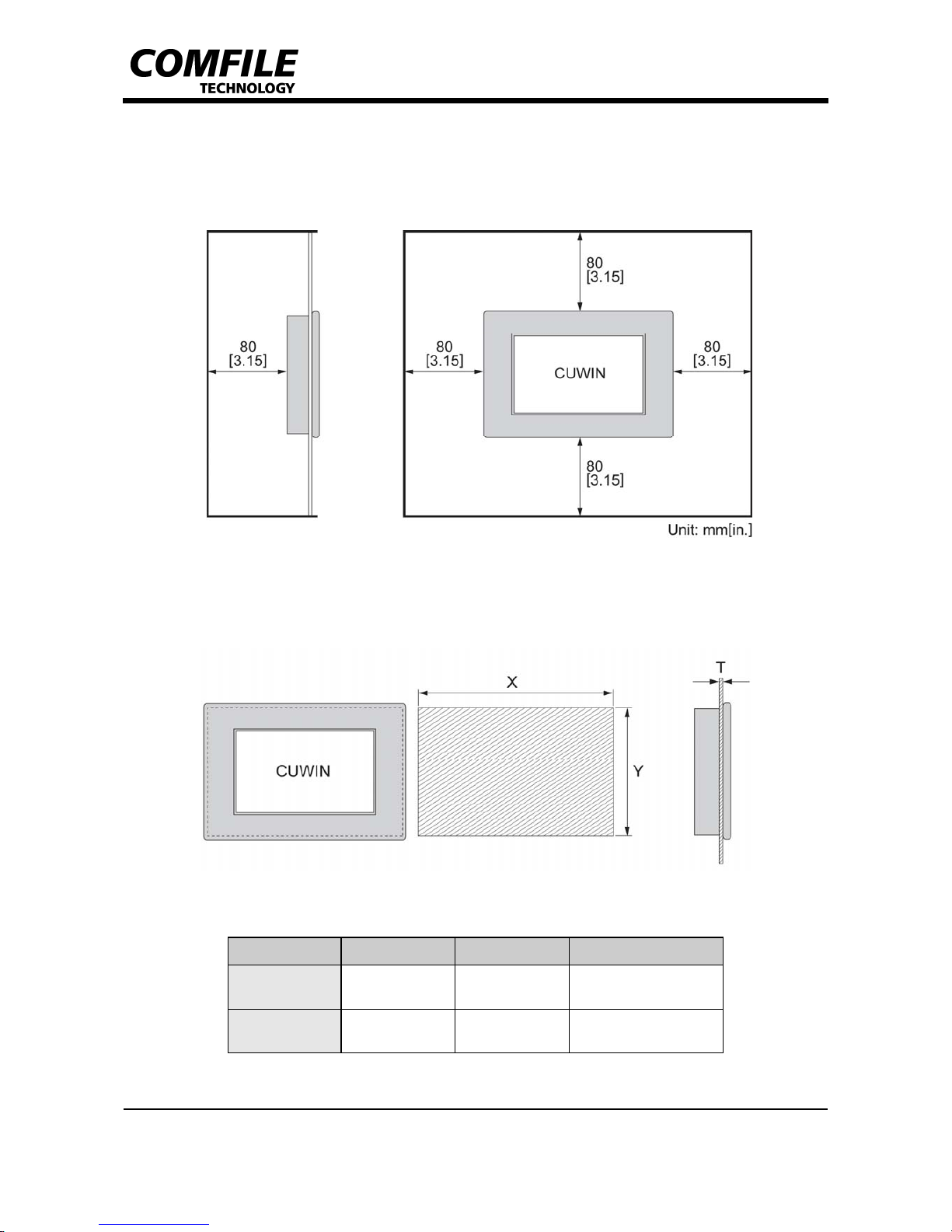
5. PANEL CUTOUT
▌ Installation Requirement
▌ Installation
X: Panel Cutout Width, Y: Panel Cutout Height, T: Panel Thickness
Unit: mm[in.]
Model Name X Y T
CWV-104WR
263
[10.36]
210
[8.27]
1.6 to 6.0
[0.06 to 0.24]
CWV-150WR
355
[13.98]
279
[10.99]
1.6 to 7.0
[0.06 to 0.27]
Page 10
CUWIN V Series
CWV-104WR/CWV-150WR Hardware Manual
COMFILE Technology, Inc. www.comfile.co.kr • page 10
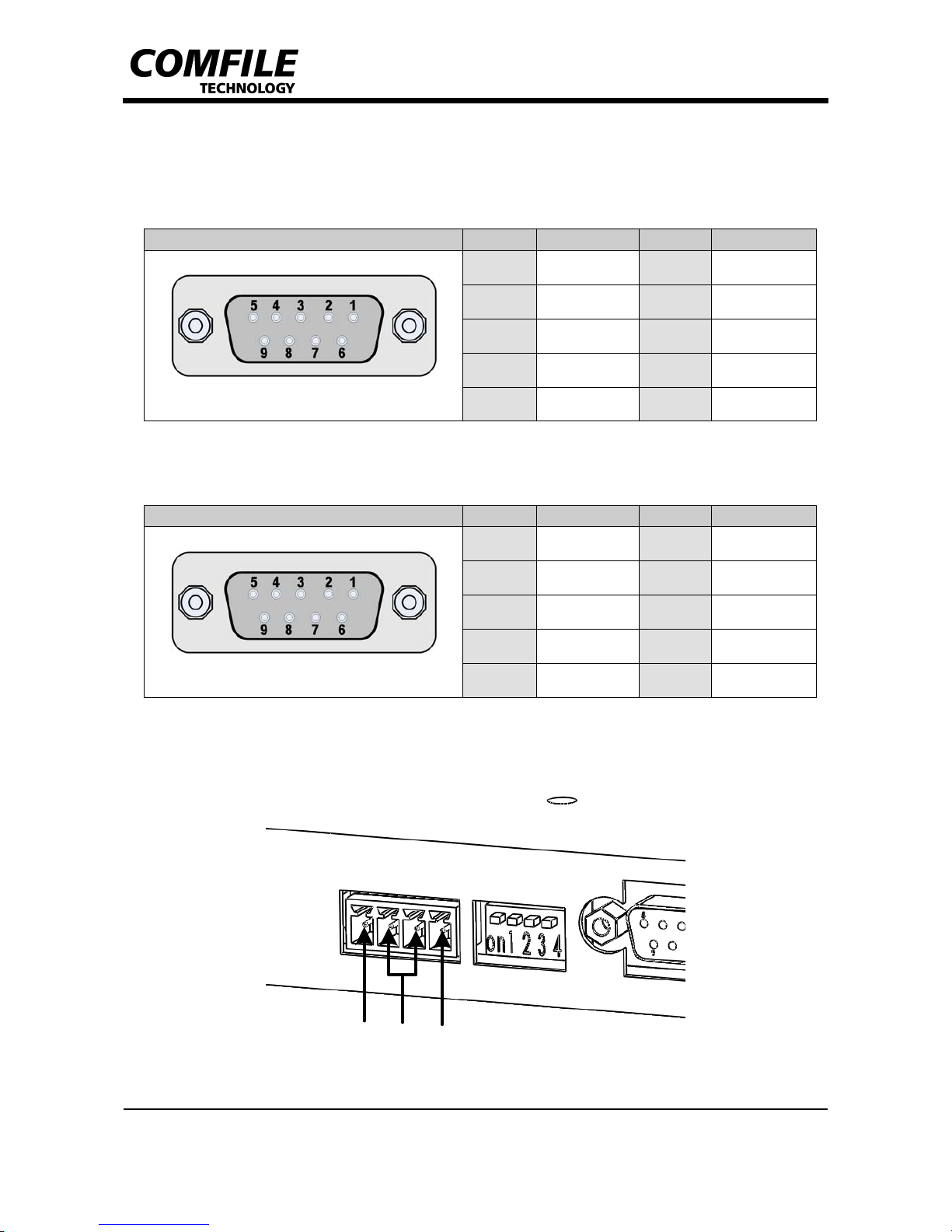
6. Input/Output Connectors
▌ RS232C Input/Output Connector (COM1_RS232C)
▌ RS232C Input/Output Connector (COM2, COM3)
▌ RS485 Input/Output Connector (COM1_RS485)
Connector Type Order Name Order Name
*D-SUB 9Pin Female
1 - 6 -
2 COM1_TXD 7 -
3 COM1_RXD 8 -
4 - 9 -
5 GND - -
Connector Type Order Name Order Name
*D-SUB 9Pin Female
1 COM2_TXD 6 -
2 COM3_TXD 7 -
3 COM3_RXD 8 -
4 COM2_RXD 9 -
5 GND - -
D+D-GND
Page 11
CUWIN V Series
CWV-104WR/CWV-150WR Hardware Manual
COMFILE Technology, Inc. www.comfile.co.kr • page 11
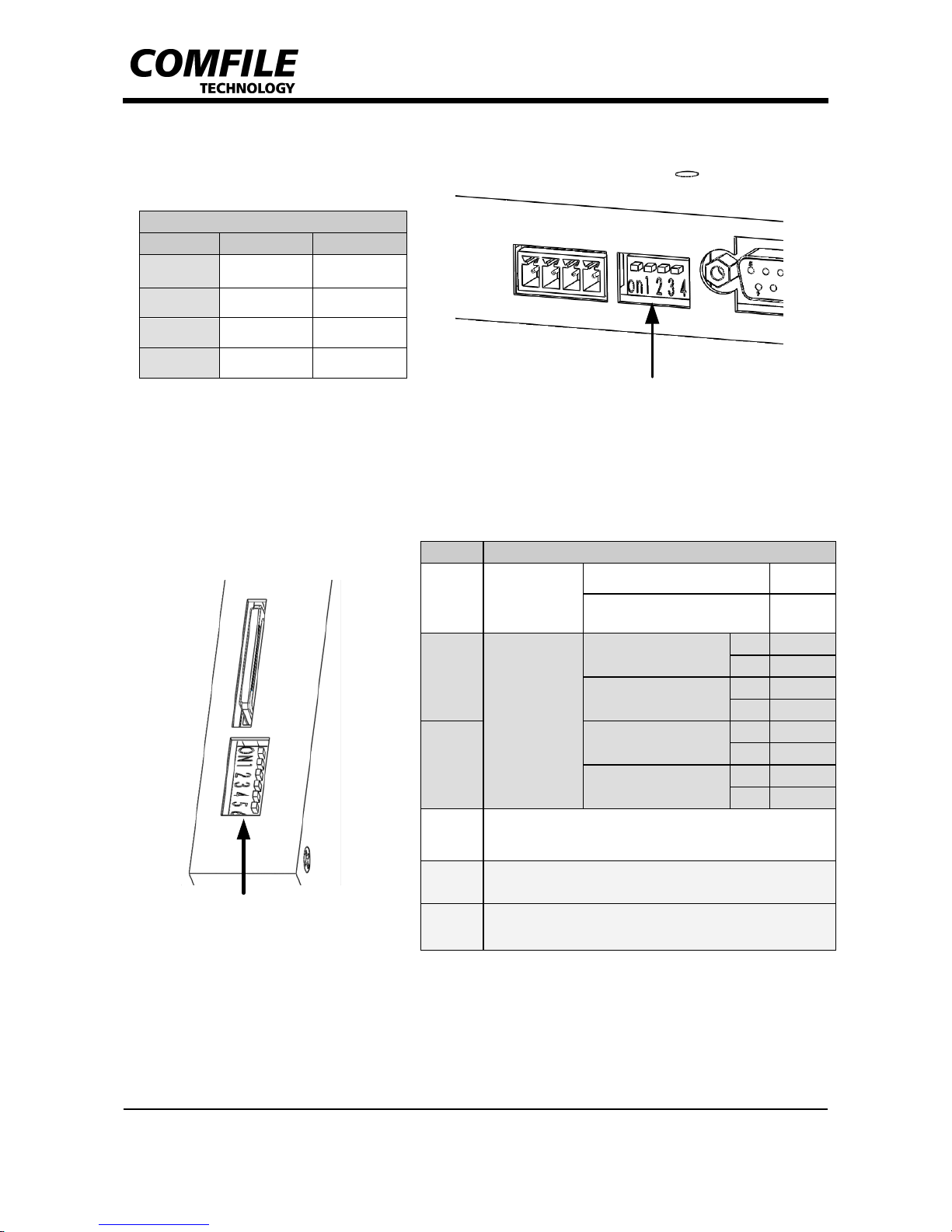
COM1 MODE S/W
▌ COM1 Mode S/W
▌ Boot Mode S/W
*Boot Device Selection S/W must be turned OFF for normal booting.
COM1 Mode Sel.
Order ON OFF
1 RS232C RS485
2 +Bias N.C.
3 -Bias N.C.
4 Ter m R e s. N.C.
Order Setting
1
Boot Device
Selection
- ON
NAND Boot OFF
2
Boot Mode
Reserved
2 ON
3 ON
AutoRun Mode
2 ON
3 OFF
3
Boot Loader Mode
2 OFF
3 ON
Development Mode
2 OFF
3 OFF
4 Reserved
5 Reserved
6 Reserved
Boot Mode S/W
Page 12
CUWIN V Series
CWV-104WR/CWV-150WR Hardware Manual
COMFILE Technology, Inc. www.comfile.co.kr • page 12
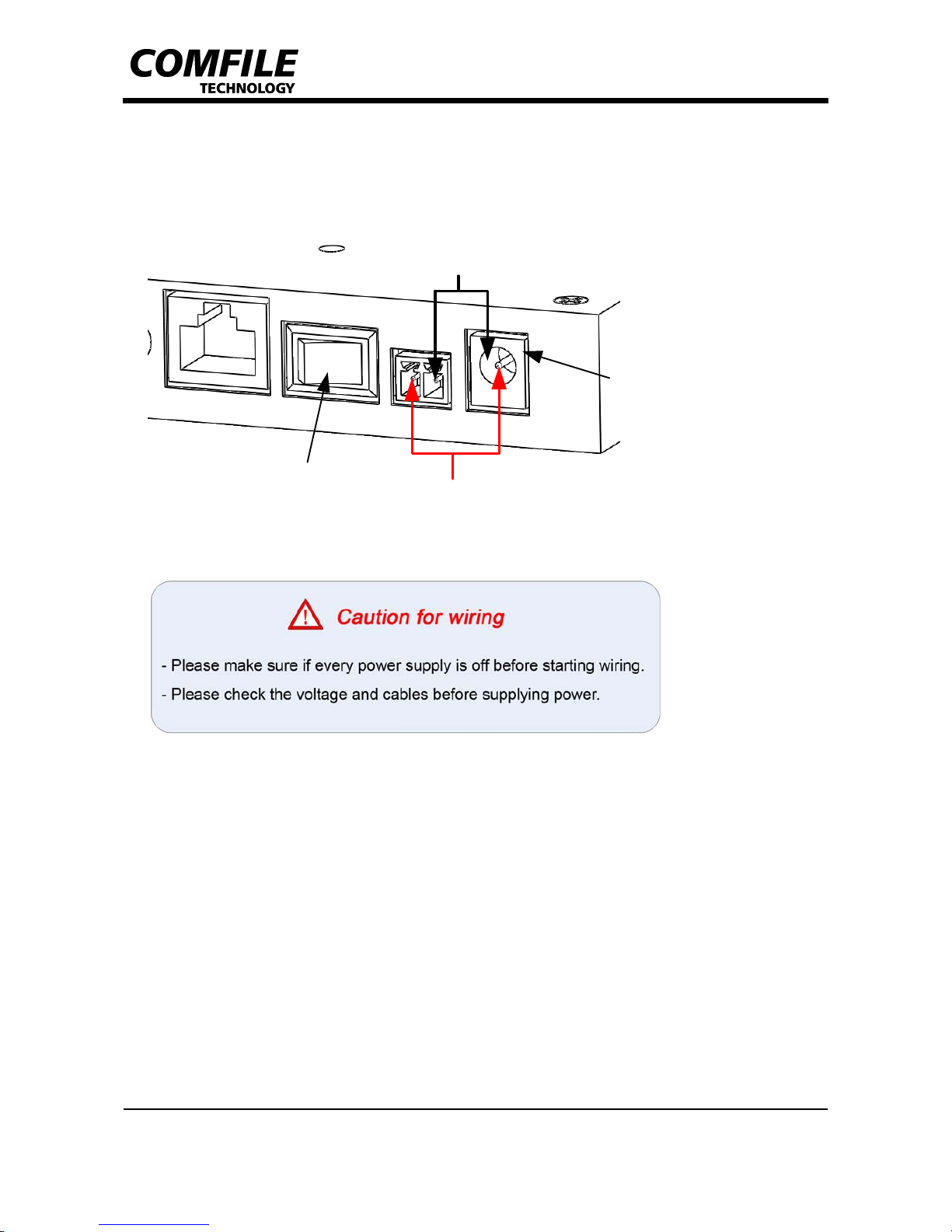
▌ Power Input Connector
ø2.5 Adaptor Jack
DC_IN(+)
GND
Power S/W
Page 13

CUWIN V Series
CWV-104WR/CWV-150WR Hardware Manual
COMFILE Technology, Inc. www.comfile.co.kr • page 13
7. EMI/EMC Certifications
► CWV-104WR: TBD
► CWV-150WR: TBD
Page 14
CUWIN V Series
CWV-104WR/CWV-150WR Hardware Manual
COMFILE Technology, Inc. www.comfile.co.kr • page 14
8. W arranty Policy
▌ Warranty Period
The products are warranted to be free of defects in materials and workmanship for
1 year from the date of purchase.
▌ Warranty Exclusions
The warranty does not cover abrasion and is considered void if the product is
opened by unauthorized person, damaged by abnormal use, heat or humidity, or used
against user manual.
▌ Request of Warranty Repair
If the products have defect(s) during the warranty period, the customer should
inquire at the manufacturer or dispatch the products with the description to the
address the manufacturer provides. If the request is appropriate, the manufacturers
repairs and dispatch it to the customer.
▌ Limitation of Liability
The manufacturer and distributor are not responsible for damages or breakdowns
caused by direct or indirect reasons, and the maximum duty of manufacturer and
distributor are limited to the total amount paid by the customer. The limitations or
exclusions of warranty have priority over any other warranty expressed explicitly,
implicatively, in writing, or orally.
Contact Information
Should you need any additional information or assistance about CUWIN V Series, please
feel free to contact us.
Comfile Technology Inc.
14 Pidgeon Hill Drive, Suite 310, Sterling, VA 20165, U.S.A
Telephone
Toll-Free : (888) 9CUBLOC, (888) 928 2562
Office : (571) 322-5010
Fax : (571) 322-5011
Office Hours: Monday-Friday 9am-5:30pm EST
E-mail
 Loading...