

Page 1
E
urr
E
u
Sistema Cashless - Cashless System
o
o
k
k
e
e
y
y
N
N
E
E
X
X
T
T
IT
EN
Guida Rapida
Quick Guide
Cod. DMCWY00001.3MA
Rev. 1.3 05 - 11 - 2014
Page 2
, il software UNICO ed il software UNICO AUDIT sono stati
progettati e prodotti da RFTECH srl, società del gruppo Comesterogroup specializzata
, UNICO and UNICO AUDIT softwares have been designed and
manufactured by RFTECH srl, the Comesterogroup company specialised in
GUIDA AI SIMBOLI DI QUESTO MANUALE
GUIDE TO THE SYMBOLS IN THE MANUAL
Al f i n e di agev o lare la c o n su l t azio n e de l docu ment o sono stat i ut i l izza t i i s e guen t i si m boli .
The f o ll o w i ng s y mb o l s ar e u se d in t h is m a n ua l i n o r d er t o f a c i lit a t e i t s un d e r st a n d in g .
Informazioni importanti
Important information
Leggere attentamente prima dell’uso
Read carefully before use
Attenzione !
Warning !
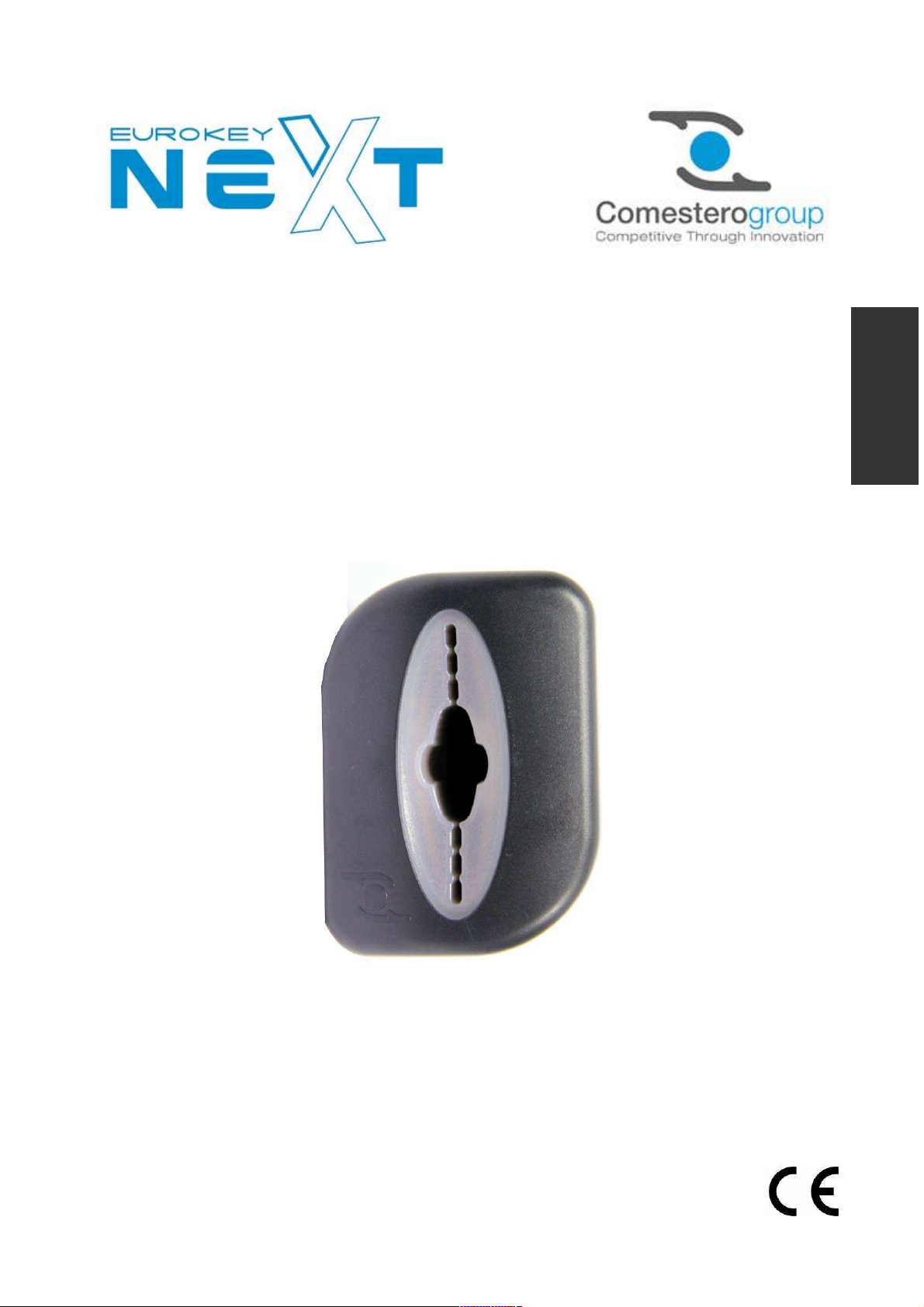
Il prodotto EUROKEY NEXT
nello sviluppo di prodotti cashless con tecnologia Mifare
®
.
EUROKEY NEXT
development of cashless products with Mifare® technology.
Page 3
Page 4
Eurokey NEXT – Quick Guide
Make sure that the distribution line is sized according to the intensity of the
SAFETY INFORMATION
This machine is equipe with safety devices in order to prevent damage due to short
circuits and fire.
These devices must not be bypassed, removed or disable for any
reasons., If the devices must be disabled to carry out maintenance or
servicing, operate on the appliance only when the power supply has
been switched off.
The safety devices have been constructed in compliance with existing
regulations. We recommend the operator to periodically check their
correct operation.
Risks deriving from using the machine
If maintained in good operating conditions and installed correctly (according to the
instructions of this manual), the machine does not pose any danger for the operator.
Electrical hazards
power supply. Operations carried out by a
: direct contacts during connection to the main
qualified technician
.
Hazards during machine installation and setup
Follow the machine installation instructions provided in this manual so that risks for
people and property are minimal.
Electrical hazards
power supply. Operations carried out by a
Caution:
o
current absorbed by the machine
o
Set up the grounding system before connecting the machine and its accessories.
Hazards during machine maintenance
: direct contacts during connection to the main
qualified technician
.
Electrical hazards
cabinet. Operations carried out by a qualified technician.
Caution:
o
Service the machine only after the main power supply has been switched off.
: direct contact with live parts within the electrical
26
Page 5
GENERAL WARRANTY
Read the following carefully in order to understand the general warranty applied
to this product.
The goods are supplied under warranty by our company for a period of 12 months.
The term of guarantee starts from the date of purchase (as indicated on the invoice).
The warranty is exclusively limited to the normal operation of the goods supplied and to
the result of the service provided. Restoration of the goods to their normal operative
state shall be carried out in our factory.
Our company shall not be liable in any way for the operation of goods supplied in
environmental conditions or technical conditions other than those established by our
specifications, usually set forth in the technical documentation. Any liability for direct or
indirect damage not deriving from a malfunction is expressly excluded.
The warranty is void and null if the purchaser is insolvent in paying the established
price.
The warranty does not apply in the following cases:
- tampering with the label showing the serial number of the machine;
- fault or breakage due to transport;
- fault or breakage due to acts of vandalism, natural calamities or wilful damage;
- wrong or bad installation of the product;
- inadequate or unsuitable power supply system;
- carelessness, negligence or lack of skill in using the product;
- operation instructions not followed;
- claims for normal servicing;
- repairs carried out without our authorization.
Any repair or tampering carried out on the supplied goods by parties who are not
authorized by Comesterogroup will render the warranty null and void. Comesterogroup
declares having carefully taken into consideration, to the best of our knowledge and
manufacturing practice, the issue of securing the supplied goods against wilful
tampering with their operation. Comesterogroup shall not be liable in any case for
unlawful conduct or damage arising from the fraudulent use of the supplied goods.
EN
Dear Customer,
thank you for choosing a Comesterogroup product.
By following the instructions of this manual carefully you will be able to appreciate and
be satisfied by its quality. Please before using the machine read the operation and
maintenance instructions carefully, in compliance with the safety provisions, and store
this manual for future reference.
27
Page 6

Eurokey NEXT – Quick Guide
Summary
Summary ................................................................................................ 28
1. Introduction ........................................................................................ 30
2. Presentation of the product .................................................................. 30
2.1 Description and parts list ................................................................. 30
2.2 Accessories.................................................................................... 32
2.2.1 Cables ........................................................................................ 32
2.2.2 Software...................................................................................... 33
2.2.3 Keys, cards, tags ......................................................................... 33
2.2.4 Other Accesory ............................................................................ 34
3. Warnings ............................................................................................ 34
4. Unpacking .......................................................................................... 35
4.1 Reception of packaged product ....................................................... 35
4.2 Handling ........................................................................................ 35
4.3 Product identification ...................................................................... 35
5. Installation and Connections................................................................. 36
5.1 Cashless system installation ............................................................ 36
5.2 Four digit display installation (RM924)............................................... 37
5.3 Card installation.............................................................................. 37
5.3.1 Installing KPM card ...................................................................... 37
5.3.2 Installing KPD card ....................................................................... 38
5.3.3 Installing RM 925 card .................................................................. 38
5.4 Eurokey Next Connections............................................................... 39
6. LED Signals ........................................................................................ 40
7. Programming and data collection.......................................................... 41
7.1 Programming.................................................................................. 41
7.1.1 Safety codes ............................................................................... 41
7.1.2 Programming with UNICO software ............................................... 41
7.1.3 Programming key ......................................................................... 41
7.1.4 Clone Programming Key ............................................................... 42
7.1.5 Firmware update .......................................................................... 42
7.2 Data collection................................................................................ 42
7.2.1 Audit Key .................................................................................... 42
7.2.2 Data collection through IRDA interface........................................... 42
8. Care and maintenance ......................................................................... 43
8.1 External maintenance and cleaning................................................... 43
9. Technical Data .................................................................................... 43
28
Page 7

10.1 Technical Specifications ................................................................ 43
10. Annex ............................................................................................... 44
10.1 Coin mechanism cable .................................................................. 44
10.2 Putting device out of service and waste disposal ............................. 44
EN
29
Page 8
Eurokey NEXT – Quick Guide
1. Introduction
This manual and its annexes provide all information required to handle, install, operate and
dispose of the product including a number of simple indications to carry out basic
maintenance of the equipment. The information contained in this manual can be modified
without prior notice and does not constitute a commitment on behalf of Comesterogroup.
Please, refer to our website www.comesterogroup.it to download the latest version of
this manual.
Comesterogroup cannot be held liable for any claim deriving from using this manual. When
not specified, all references to companies, names, contacts and addresses used in the
examples are purely fictional and have the aim of illustrating the operation of the product. It is
prohibited to reproduce this document, even partially, in any form without express
authorization by Comesterogroup.
These information has been collected and verified with utmost care;
2. Presentation of the product
EuroKey Next is the new cashless device able to manage the EuroKey system keys and
media based on Mifare® technology platform. The aptitude and reliability guaranteed by
Eurokey family brand, meets the high standards of safety in Worldkey range to respond
optimally to the needs of all users. Extremely flexible, EuroKey Next is able to handle both the
communication protocol MDB for applications in the world of automatic distribution, and
protocol EXECUTIVE. The PARALLEL versions will be available soon. A product evolution to
evolve your business: with EuroKey Next you can set promotional campaigns and discounts,
even based to the time slots, for customer loyalty, and increase sales.
Features
- 3 codes Management (operator, lessor, machine).
- Management of maximum loaded on the support.
- Second address MDB management (MDB mode).
- 3 price modes management (EXE mode).
- Direct management of the coin validator and banknote reader (EXE mode).
- Machine number edited by the user.
- Differentiated keys management.
- Black list management.
- Bonus management.
- Time zones management.
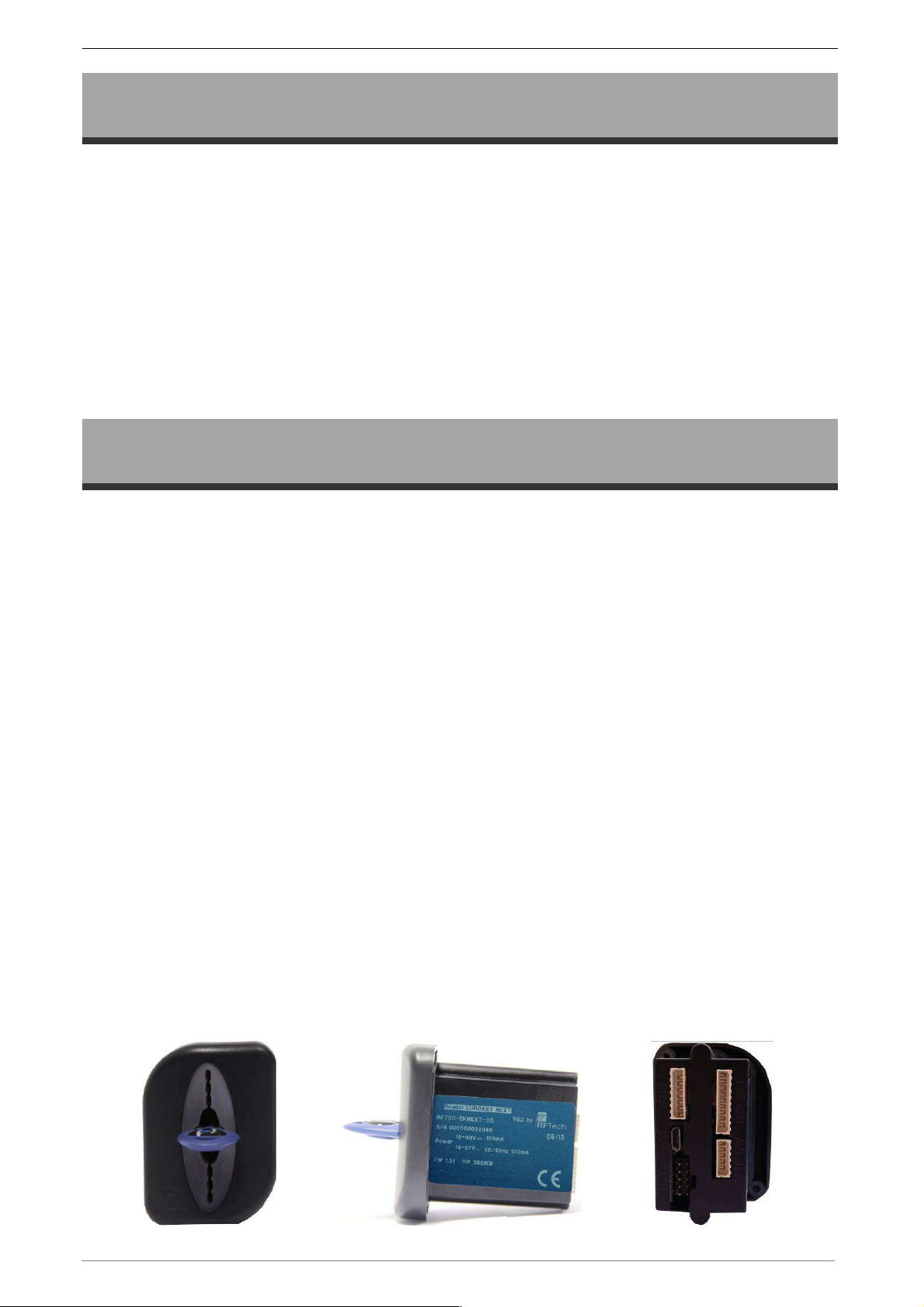
2.1 Description and parts list
Figure 1
30
Page 9
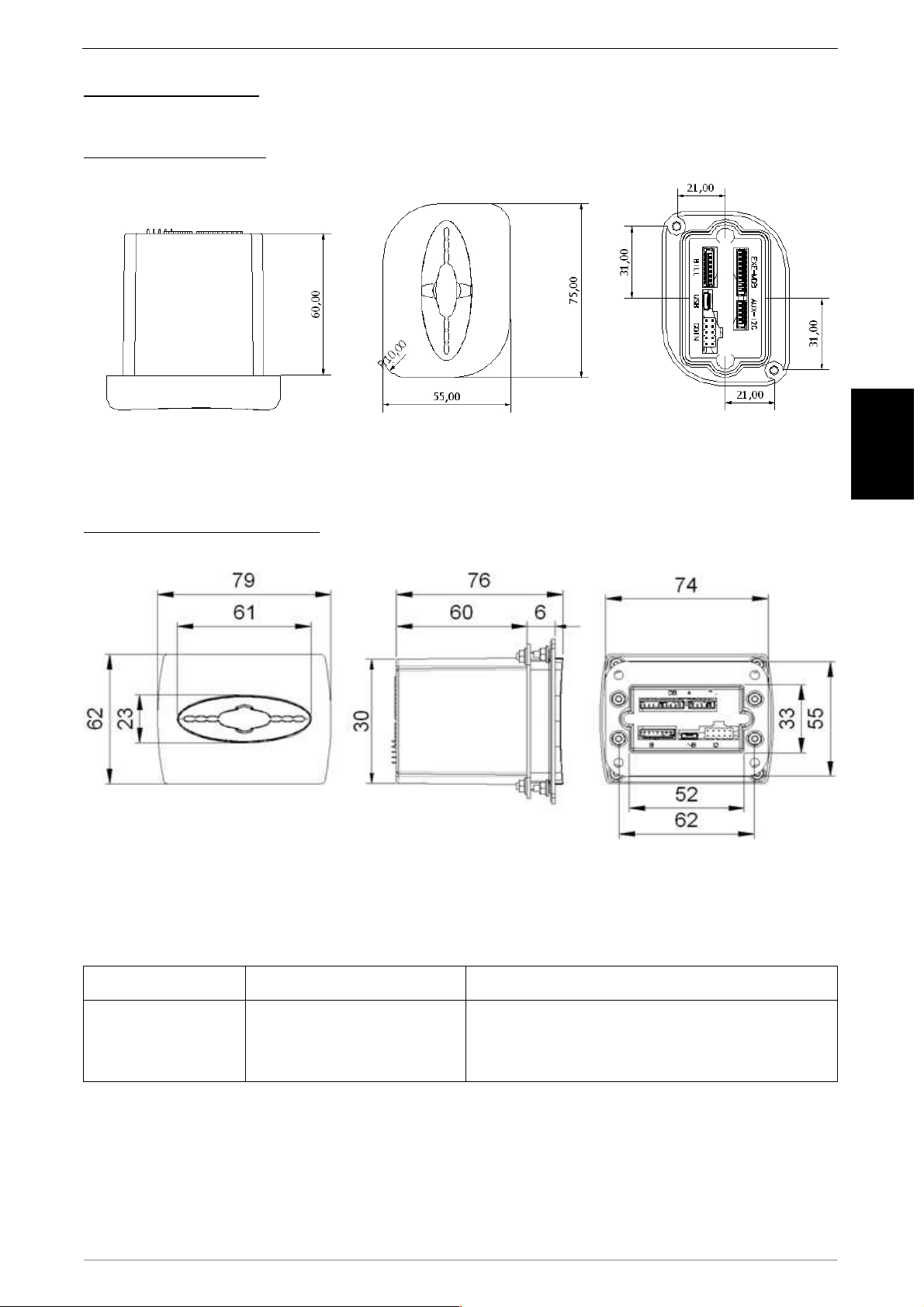
Measures (in mm)
FRONT MOUNTING
Figure 2
*All measures in the pictures are in mm
BACKPLANE MOUNTING
Figure 3
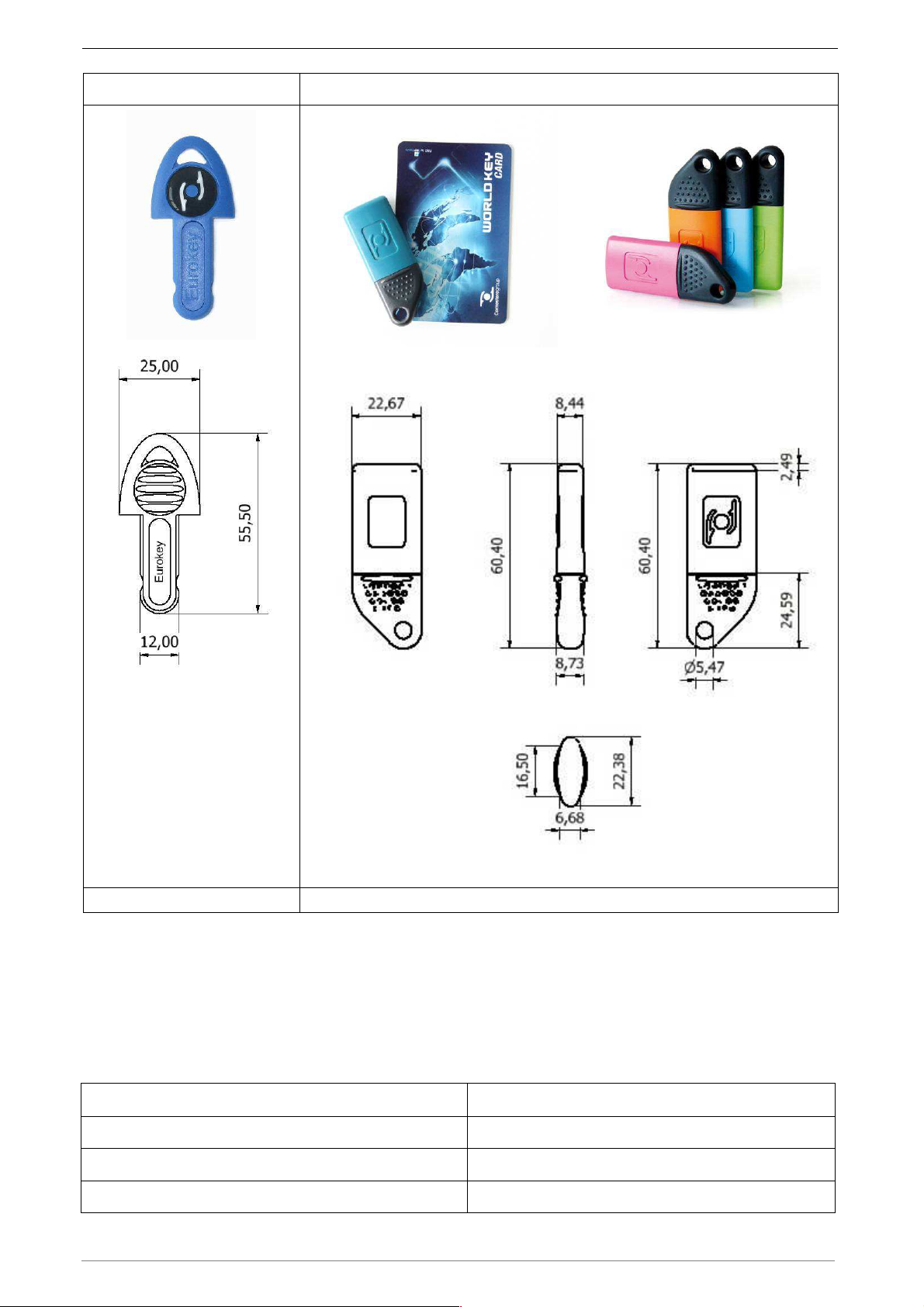
Eurokey Next can manage both Eurokey keys and media Mifare® (keys, card and tag).
EN
EuroKey keys Keys, card and tag Mifare®
Technology
Used
Transponder 125 KHz
Inductive transmission 13,56 MHz, data
and energy ISO 14443-A Mifare®
encrypted
31
Page 10
Eurokey NEXT – Quick Guide
Eurokey key Mifare key and card
Figure 4 Figure 5
2.2 Accessories
2.2.1 Cables
Eurokey NEXT is available in different configuration and therefore is supplied by a
dedicated cable.
Cable type Function
EXECUTIVE cable (Code : C4EK-EXECUTIVE) Link Cable EXECUTIVE.
MDB cable (Code : C4EK--MDB) Link cable MDB.
PARALLEL cable - C version (Code : C4EK--PAR-C) Parallel link cable to RM925 card.
32
Page 11
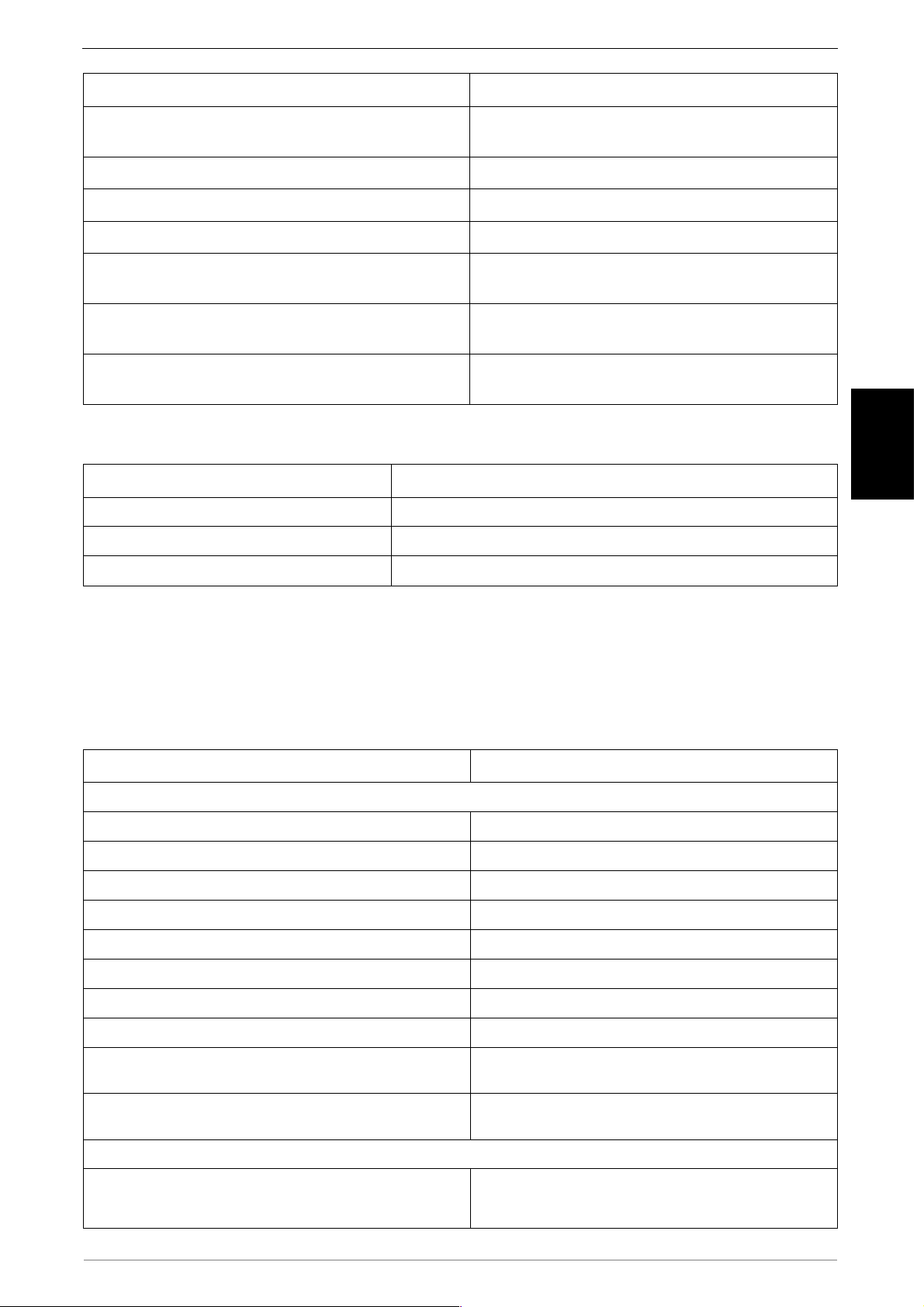
Micro USB wiring to connect to a PC, upgrading
digit and 2 lines LCD
Power source cable from KPD board to EK Next
User card with Comesterogroup standard printing.
Tag with Comesterogroup standard printing.
Cable type Function
Coin mechanism cable (see in the Annex at page 44 in
order to choose the right code and length)
Notes reader cable (Code : CL-CAVO/NV5) Link wiring for notes reader.
Cable for card KPM/KPD (Code : C4EKEY-I2C) Link wiring for KPM card.
Cable for RM924 Display (Code : C4CABDISP5100CM*) Wiring to connect with RM924 four digit display.
Micro USB cable (Code : RFT-MUSB-A-018)
I2C Cable for LCD Display (Code : 1029-40-0007-A)
KPD power source (Code : C4EKEY-ALPAR2P)
Link wiring for coin mechanism.
firmware, collect data audit.
Wiring to connect with 16display and KPM/KPD boards.
system.
2.2.2 Software
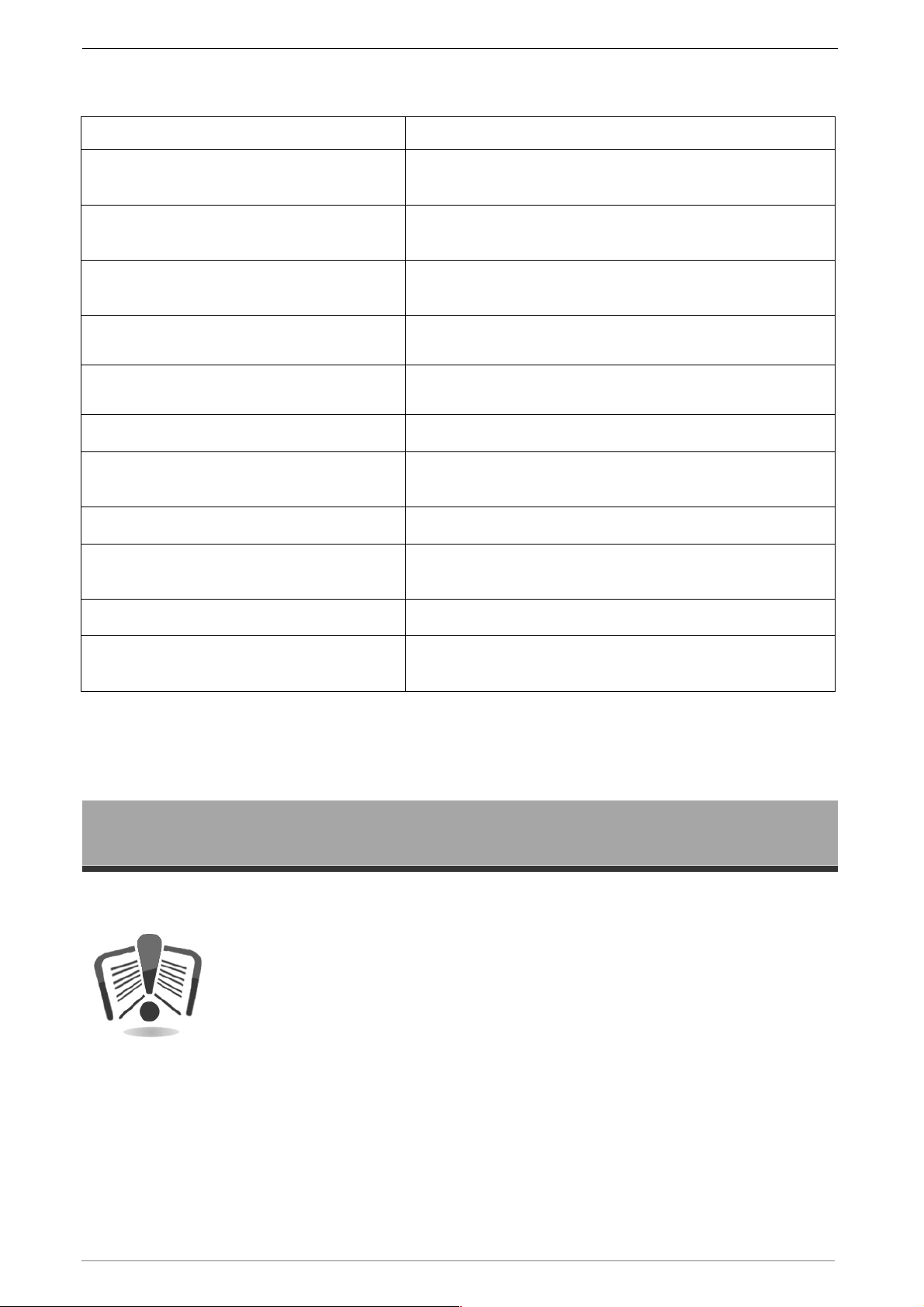
Type of accessory Function
Unico (Code : RFT-UNICO-SW)
Unico Card (Code : RFT-CARDSW)
Unico Audit (Code : RFT-AUDITSW)
Complete configuration and management software
Partial cards management software
Partial audit data management software
EN
2.2.3 Keys, cards, tags
Eurokey NEXT is compatible with Eurokey keys, except for the audit key, while the
programming key can be used only for change codes function. Eurokey NEXT is
compatible with all Mifare keys, included the programming and audit keys.
Accessory type Function
MIFARE keys and cards
Red key (Code : RFT-006-PK)
Yellow key (Code : RFT-006-MA)
Dark blue key (Code : RFT-006-BLU)
Light blue key (Code : RFT-006-AZZURRO)
Orange key (Code : RFT-006-ARANCIO)
Cool white key (Code : RFT-006-GHIACCIO)
Lilac key (Code : RFT-006-LILLA)
White user card (Code : RFT-CARD)
Programming key
Audit key
User key
User key
User key
User key
User key
User card without personalisation
User card (Code : RFT-CARDCO)
User tag (Code : RFT-TAGS)
User key (Code : CL-CHIAVE01)
Customized cards can be supplied on request.
Customized cards can be supplied on request.
EUROKEY KEYS
User key
Other colors available
33
Page 12
Eurokey NEXT – Quick Guide
Credit box to transfer credit from cashless systems coming
to set up the cashless
Practical and compact device able to allow operator to
),
and connection
on the keys in the
2.2.4 Other Accesory
Accessory type Function
Credit box (Code : RFT-CREDIT-BOX)
UHHT (Code : RFT-003)
Easy Pay (Code : RFT-004)
Backplane installation kit
(Code : +KITPIASTRANEXT)
RM924 4 digit display
(Code : RM924/G/TROP-F)
RM925 card (Code : RM925/2/E/TROPI)
KPD card (Code : FSE---KPD-1-C)
KPM card (Code : FSE---KPM-C)
LCD Display (Code : RFT-001-D)
LCD Display (Code : RFT-001-D)
out from other management cards
Portable universal programmer device
system directly or to download audit data by infrared
recharge card, keys and print a receipt on thermal paper
Pratical Kit to install Eurokey Next in backplane
4 digit display
1 service management card
2 services management card (2 outs with relè and 4 inputs
equipped with power transformer
4 services management card (4 outs with relè and 8 inputs)
LCD Display 2 lines/16 digit with assembly kit
with KPM/KPD boards
LCD Display 2 lines/16 digit with assembly kit
Recharging Box
(Code : CL-BOX/RICA-LCDNEXT)
NOTE:
Eurokey Next system can manage maximum of 2 cards KPM or 1 KPM and 1
KPD.
3. Warnings
Read this manual carefully before installation. Knowledge of the
information and instructions of this manual is fundamental to use the
product correctly. Check upon receipt that the package and the
product have not been damaged during transport. Take care with the
electrical connections. Faults due to failure to observe the warnings
provided in this publication are not covered by warranty. Specific
symbols are used in this document to highlight the situations that
require special attention.
Box to recharge (or discharge) credits
desired quantity.
34
Page 13
4. Unpacking
4.1 Reception of packaged product
Check upon receipt that the product has not been damaged during transport. If any
damage is noticed, notify the transporter immediately.
After transport the package must be intact, that is, it must not:
-
Show dents, signs of shocks, deformation or breakages of the container.
-
Show areas that are wet or signs that would point to the fact that the casing has
been exposed to rain, frost or heat.
-
Show signs of tampering.
Check that the content of the package matches the order.
4.2 Handling
In order to prevent any damage to the device, it is recommended to
transport it exclusively inside its original packaging.
EN
We recommend:
o
preserve original packaging for every future transport needed.
o
not to bump the device (even if still in its packaging) exposed to atmospheric
agents.
o
not to drag the device.
4.3 Product identification
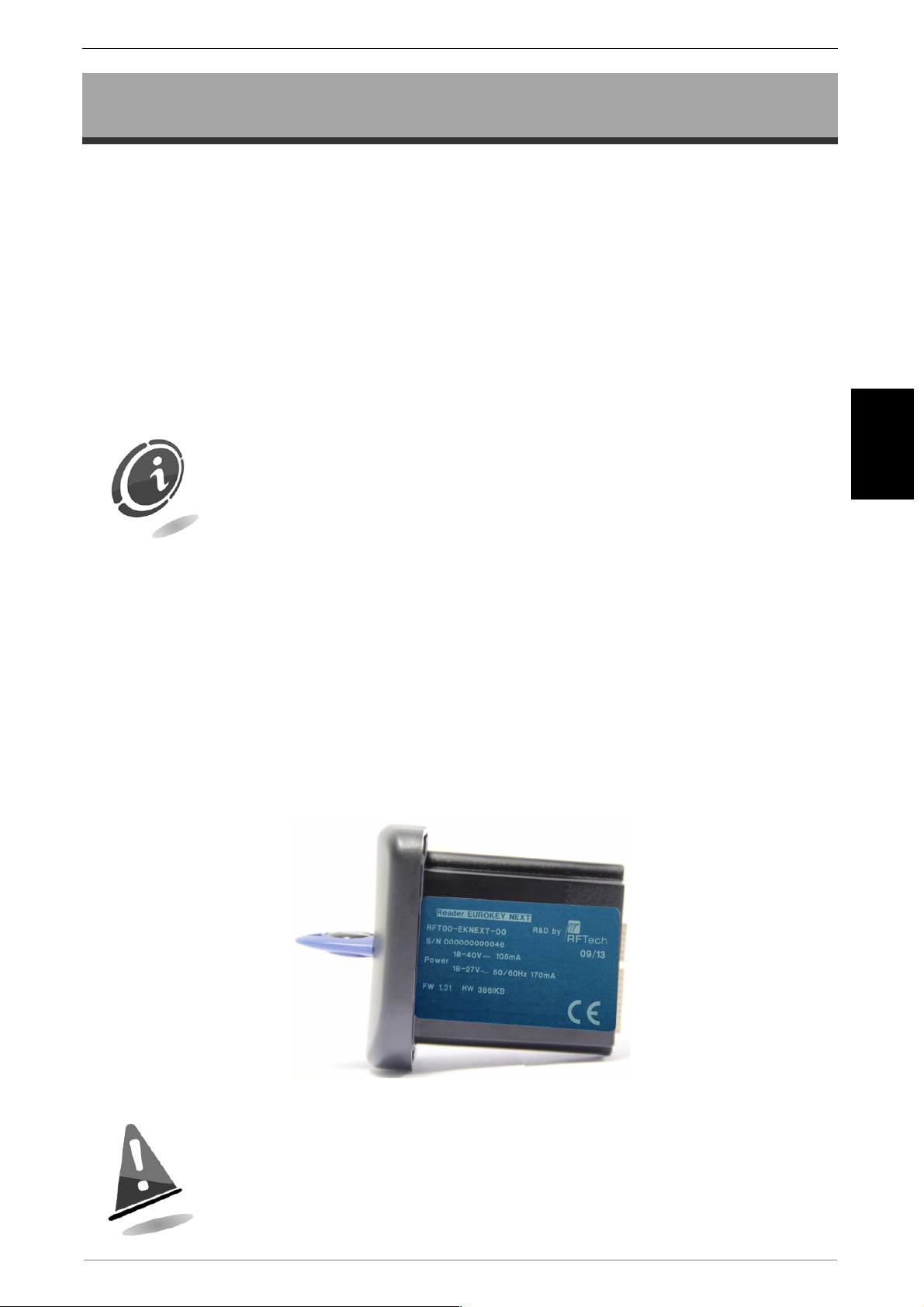
Figure 5 shows the identification label containing the serial number which must always
be provided when requesting assistance, spare parts, repairs or information
concerning operation of the device.
Figure 6
It’s forbidden to remove nameplate putted on the product or
sabotaging data. In case of damage or loss, ask to the constructor a
new nameplate. Remember, the warranty it’s associated only with the
product identification number.
35
Page 14
Eurokey NEXT – Quick Guide
5. Installation and Connections
5.1 Cashless system installation
Cashless system is extremely adaptable and it can be easily installed in front side or
back-box through the appropriate adaptation grill.
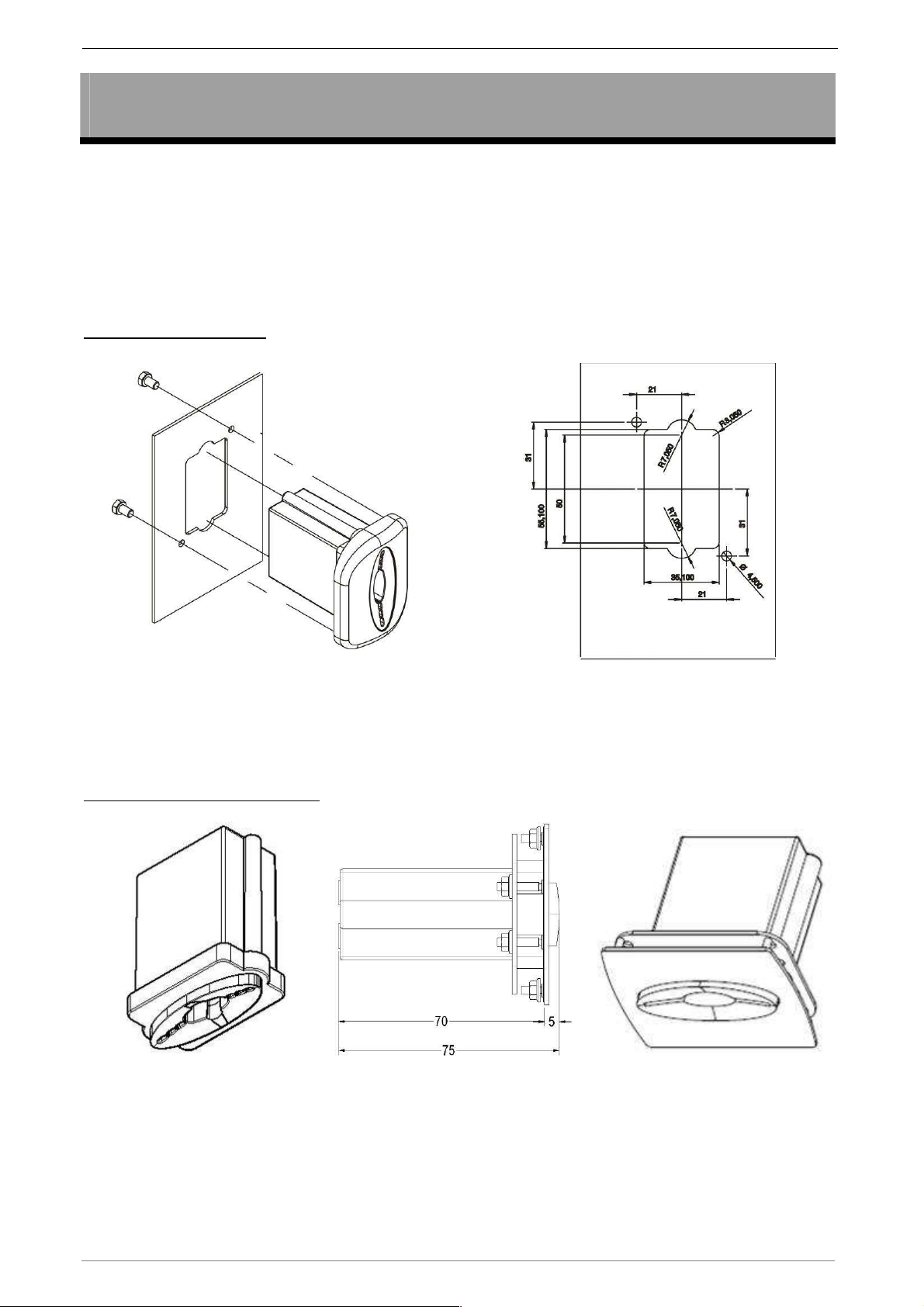
In the pictures below are shown the holes to do on the device based on the choosen
installation mode.
FRONT MOUNTING
Figure 7
Reader with traffic lights signal with 3 led and infrared interface for collecting audit
data.
BACKPLANE MOUNTING
Figure 8
36
Page 15
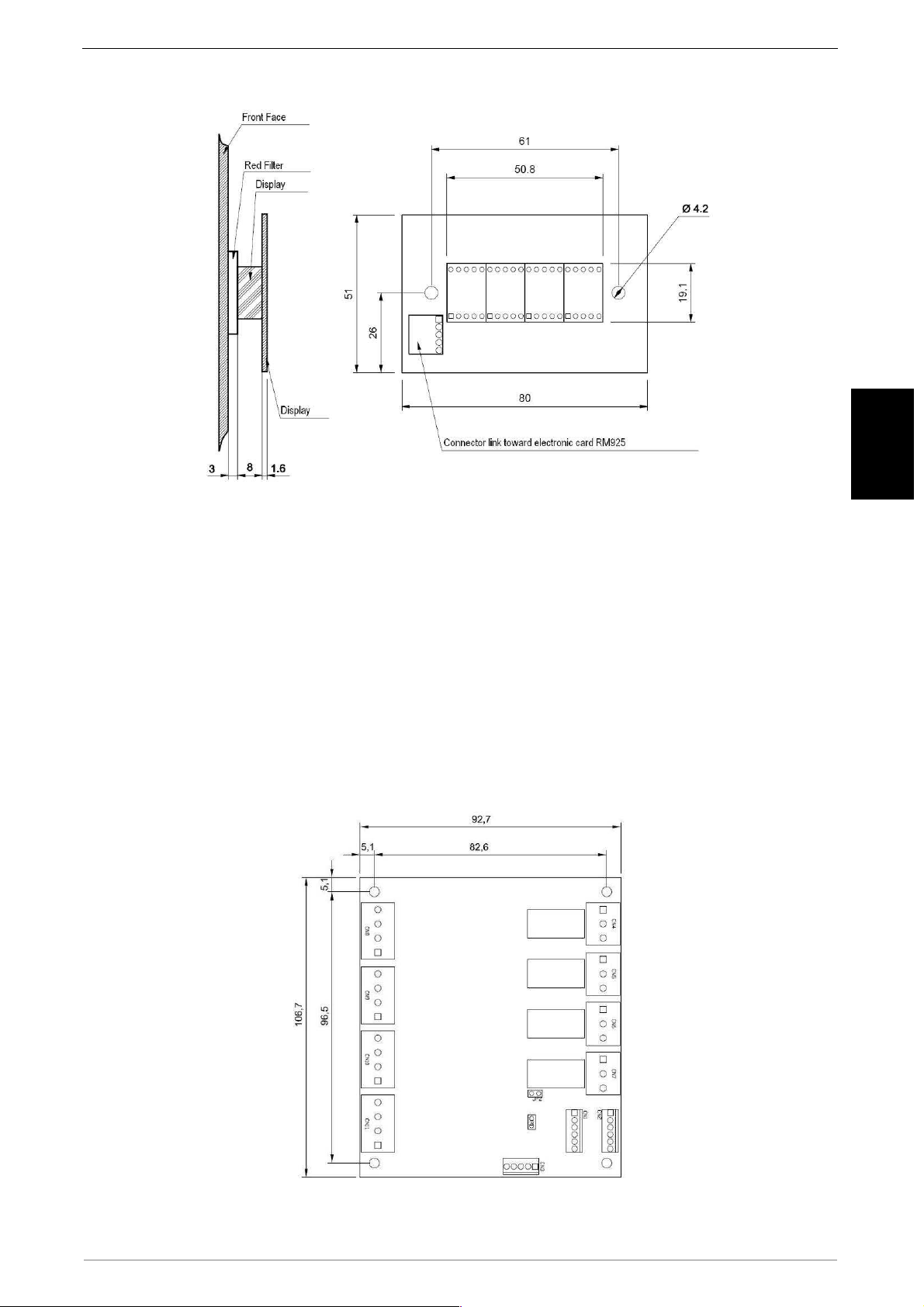
5.2 Four digit display installation (RM924)
EN
Figure 9
5.3 Card installation
o Placed the card correctly, being carefully not to place them directly on metal parts.
o Paying attention to any uncovered cables.; in particular in correspondence of the
parts in high voltage.
o Ensure adequate ventilation system.
5.3.1 Installing KPM card
The KPM card makes it possible to manage up to 4 services simultaneously: 4 relay
outputs for service activation and 8 inputs, of which 4 to choose the service and 4 for
inhibit/busy signal.
Figure 10
37
Page 16
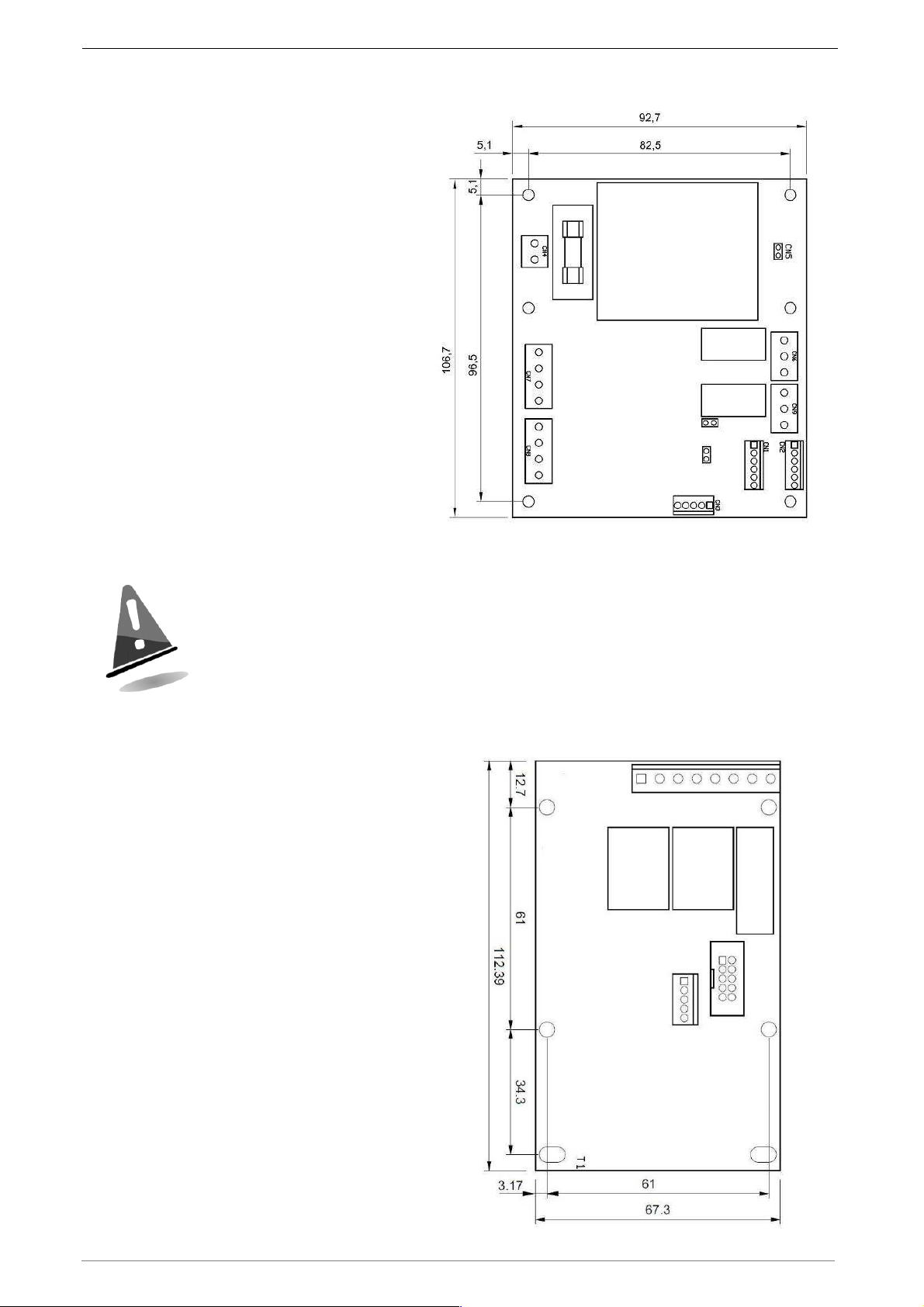
Eurokey NEXT – Quick Guide
5.3.2 Installing KPD card
The KPD card makes it possible to
manage up to 2 services
simultaneously: 2 relay outputs for
service activation and 4 inputs, of
which 2 to choose the service and 2
for inhibit/busy signal. The card is
equipped with a network
transformer.
The specified data of the transformer on the KPD is 230 Vac/24
Vac (15W). The overall consumption of the connected peripherals
must be lower than the limits set by the specified data.
5.3.3 Installing RM 925 card
This card is only provided to
guarantee compatibility with previous
systems and does not allow
connection of any peripheral.
Figure 11
Figure 12
38
Page 17
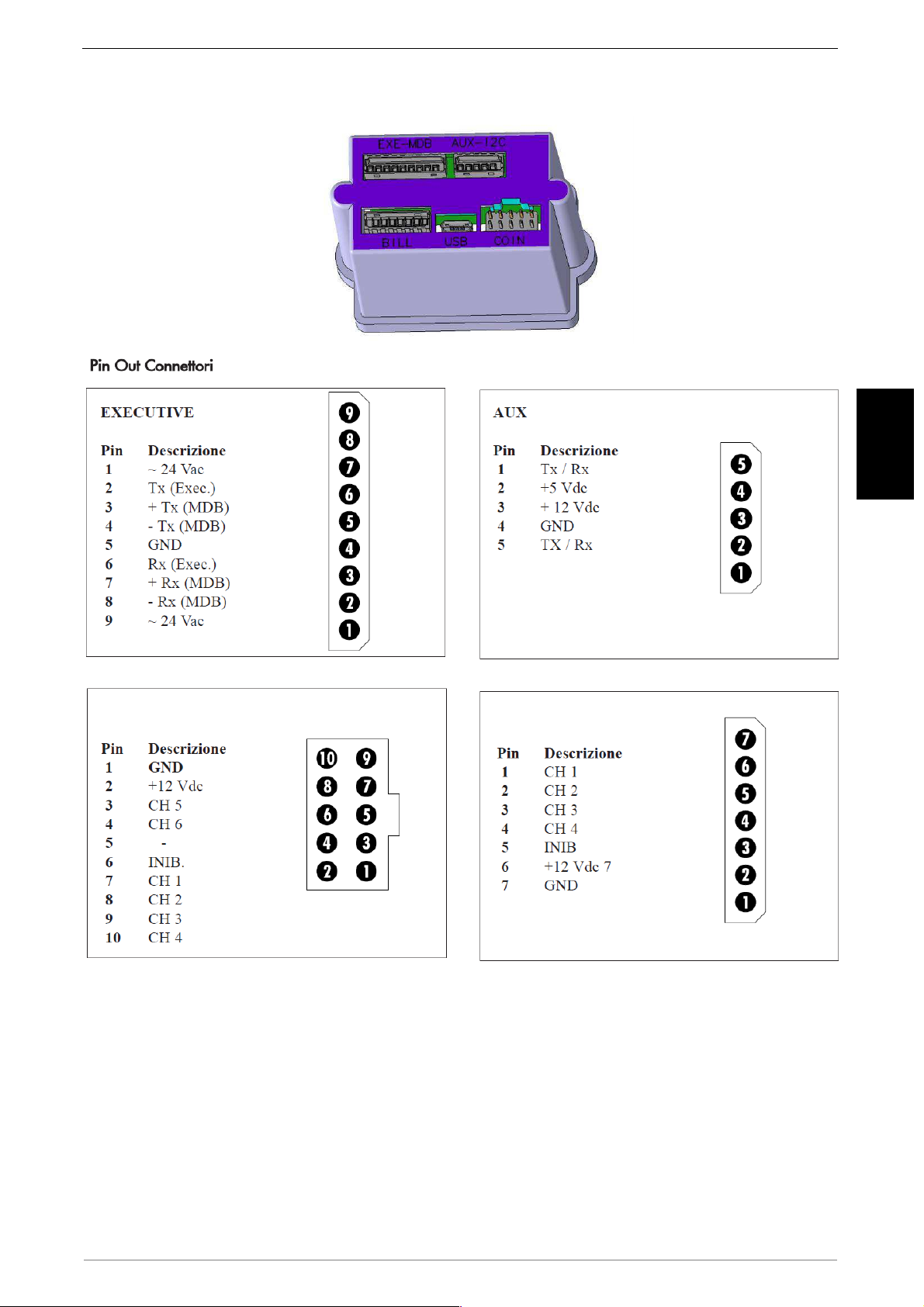
5.4 Eurokey Next Connections
EN
COIN
BILL
39
Page 18
Eurokey NEXT – Quick Guide
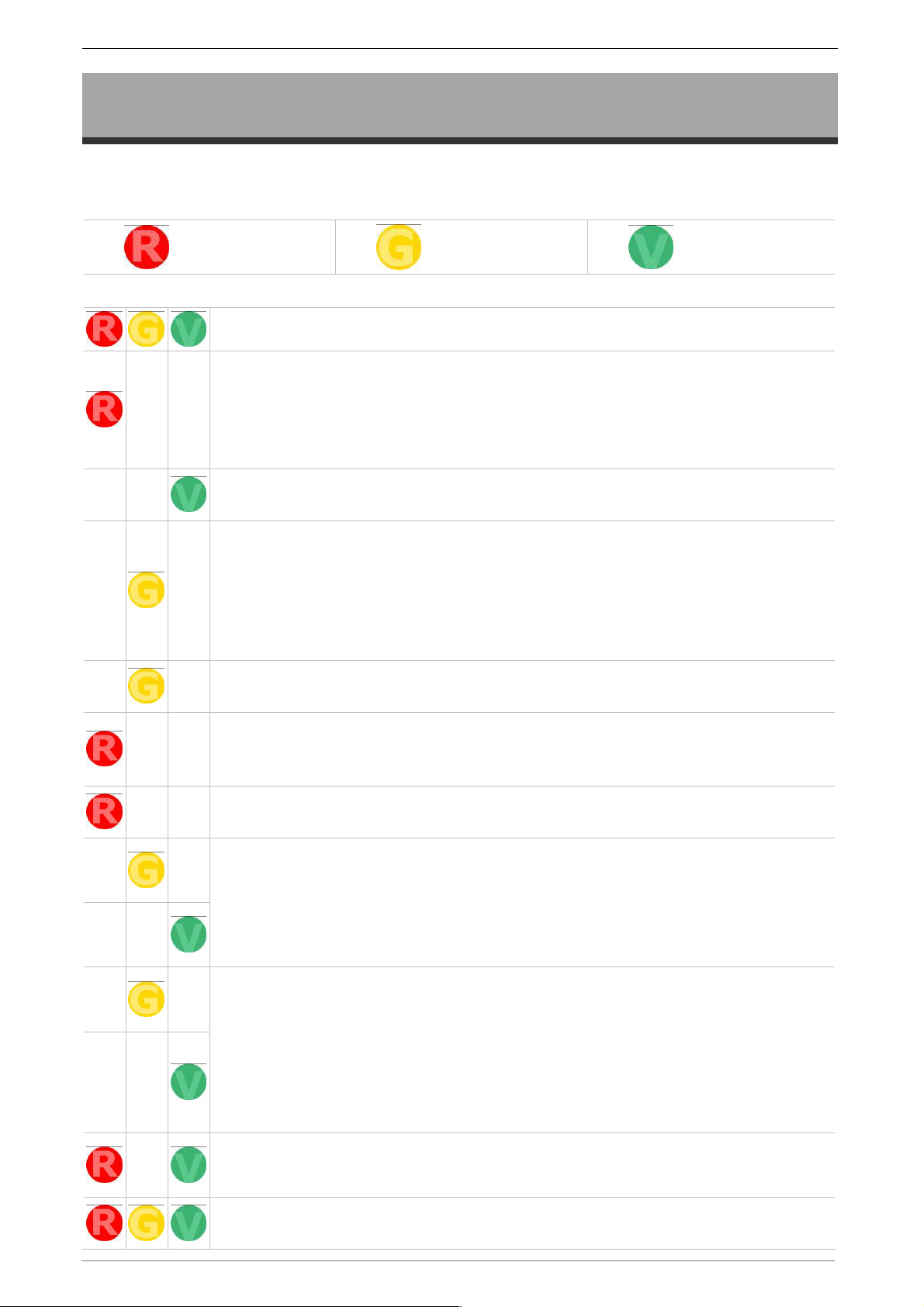
6. LED Signals
Below is a list of the main signals that the
LEDs installed in the reading head.
Red
When the reader is switched on, the Red LED lights up to signal the lack of
protocol. After a few seconds if the protocol programmed on the reader is
the same as that of the vending machine, the green LED comes on.
Otherwise if the red LED stays on, it means that there are protocol
problems.
When the protocol is operating perfectly or there are no configuration errors,
the green LED comes on. Then the reader is ready to accept the key.
When a user key is entered, if the manager code is the same as that
programmed on the reader, the yellow flashing LED (flash every second)
comes on. After a few seconds with the key inserted, the buzzer is activated
to indicate the presence of the key. This function can be eliminated by
lowering the minimum volume of the buzzer by use the UNICO program. ( on
eurokey next there is not the buzzer)
Eurokey NEXT
Yellow
Legenda
device can make using the 3
Green
When a sale is made, the yellow LED stops flashing and becomes fixed for
the entire duration of the sale.
When a user key is inserted with a different manager code or without a user
application loaded (card code = 29), the red flashing LED comes on and the
buzzer signals with an error tone.
When a key audit or a programming key without a user code is inserted, the
red flashing LED (1 s) comes on.
When a key audit or a programming key is inserted and the programming
code is correct, the yellow LED stays on fixed for the entire time during
which the data is being stored in the key.
When the transfer has finished, the yellow LED goes off and the green LED
comes on flashing every second.
The programming key is used when some reader settings need to be
changed without connecting the reader to the UNICO program. When the
key and the correct manager code are entered the yellow LED comes on.
When the programming is finished, the yellow LED goes off and the green
one comes on flashing every second: at this point the key can be removed.
After this operation the reader carries out an autoreset so as to restart with
the new configuration with the red LED on.
When the Red and the Green Leds are turned ON at the same time, this
means a low voltage.
When all the LEDs flash together it means the key must be re-inserted in the
reader.
40
Page 19
7. Programming and data collection
7.1 Programming
To program Eurokey NEXT system you have to use UNICO software, the programming
key and the Clone Programming key. UNICO CARD software, instead, is used to
manage the media (keys and cards).
Eurokey NEXT can be connected to a PC which has UNICO software installed on it by
means of the USB port. The device is also powered through the USB port.
7.1.1 Safety codes
A safety code is required to access device configuration and to read or modify the
entered data. There are 3 configuration levels which can be accessed through 3
different code sto manage different privilege/access levels.
EN
1. Administrator code
allows access to all machines in all rentals managed by him.
2. Rental code
administrator.
3. Access code:
by a single administrator.
When leaving the factory, all codes of each device consist in a sequence of zeros.
These codes must be modified before activating the devices to prevent tampering or
frauds.
: numerical code which identifies a single area managed by a single
numerical code which identifies a subarea in a single rental managed
The safety codes are necessary to access device configuration. If they
are lost, they cannot be recovered and the device must be reset
completely.
codes and keep them in a safe place.
: numerical code which identifies a single administrator and
It is therefore recommended to write down the safety
7.1.2 Programming with UNICO software
Eurokey and Mifare (keys, cards, tag) can be managed by using UNICO software. For
any further information please, see the specific manual, where you can find the details
you need.
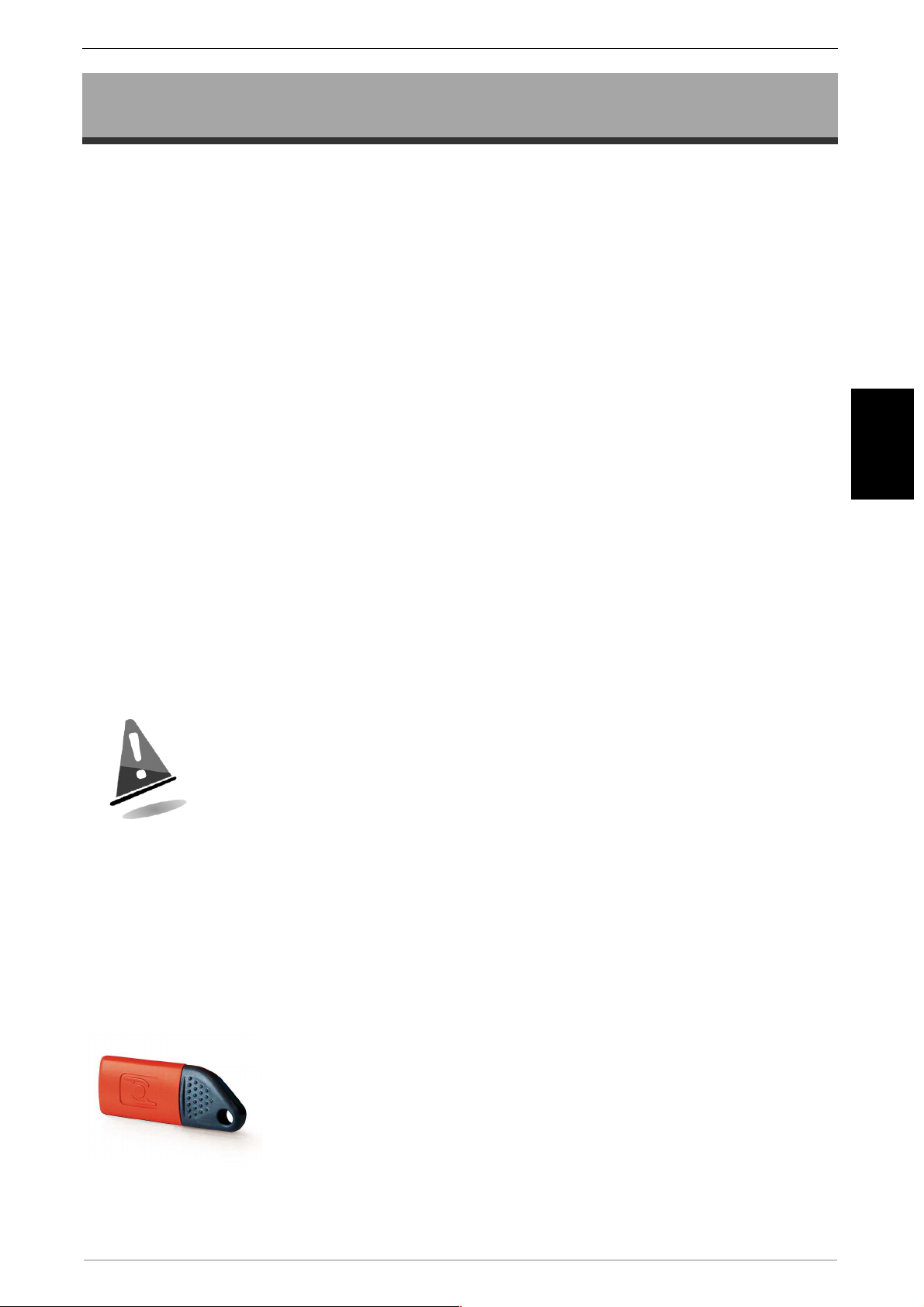
7.1.3 Programming key
The programming key is a special contactless key with an
anthracite coloured cap and a red body. The data on this key is
formatted according to the type of operation requested through
the UNICO program. The subsequent programming of the
system takes place simply and quickly by inserting the key in the
reading head. The presence of the CVS signalling LEDs guides
the user through the exact programming sequence of the device
parameters.
use, please refer to the UNICO software guide.
The key is delivered without the application or the safety codes; for
41
Page 20
Eurokey NEXT – Quick Guide
7.1.4 Clone Programming Key
The Clone programming key is a special contactless key (same colour and storage
capacity as the programming key ), able to clone the present configuration on a device
transferring the configuration onto other devices, without using PC software.
is delivered without applications or safety codes; in order to use, please refer to
the UNICO software guide.
The key
7.1.5 Firmware update
It is possible to update the operating firmware of the Eurokey NEXT using the PC and a
USB connection cable.
7.2 Data collection
In the Eurokey NEXT, data can be collected through following three devices:
Audit Key;
•
MicroUSB with PC and UNICO & UNICO AUDIT software;
•
• IRDA interface using UHHT or other Palm with IrDa interface
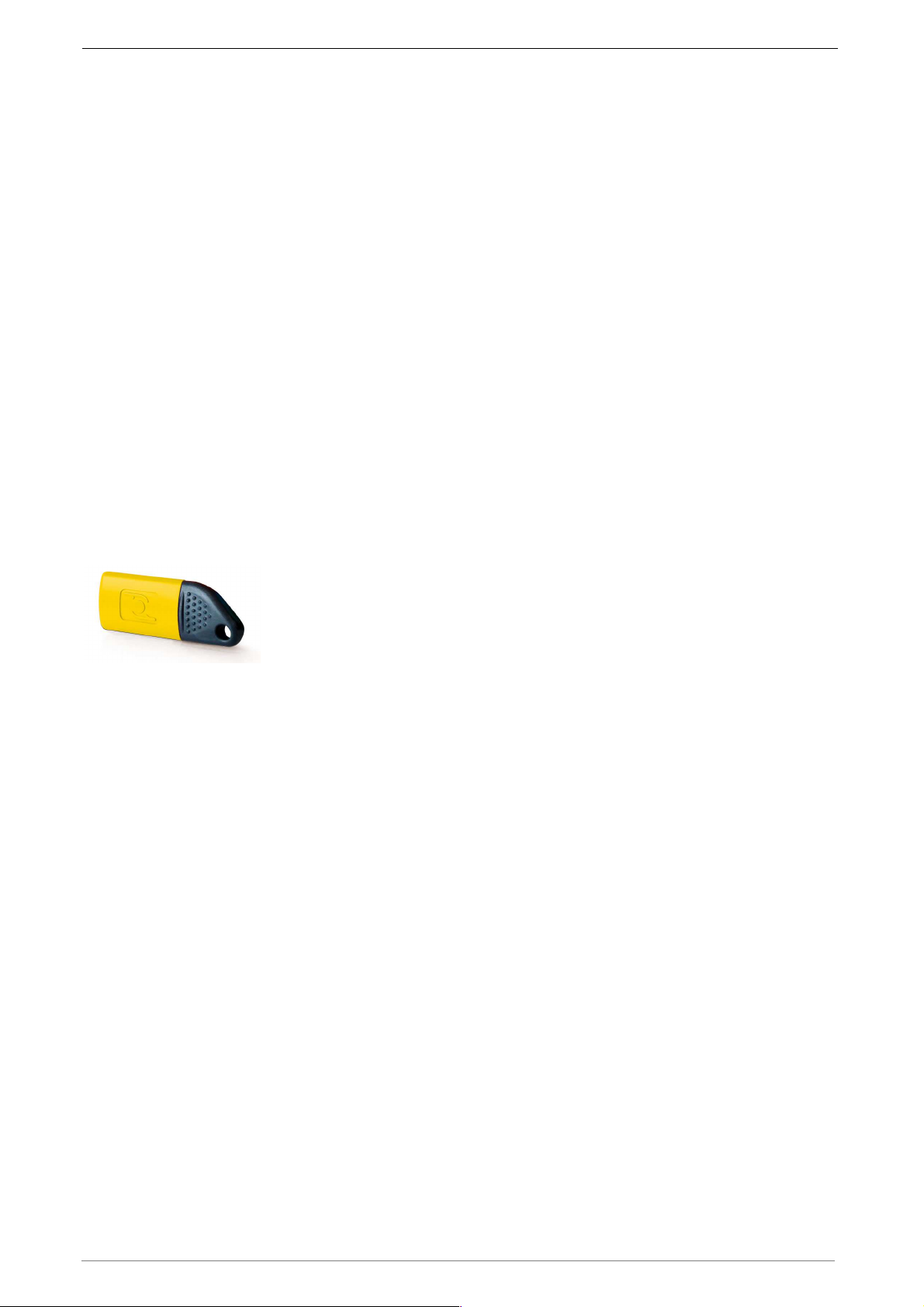
7.2.1 Audit Key
The Audit Key is a special key with an anthracite coloured cap
and a yellow body, with a high storage capacity, able to make up
to 65/70 collections, depending on the quantity of data to be
exported. Subsequently via a PC, the desktop terminal and the
UNICO or UNICO AUDIT software, it is possible to download the
data stored on the key, view it, print it or save it in a .TXT or .XML file for subsequent
processing using special management software. Appropriate formatting of the Audit ->
Audit + Log key also enables the logs recorded inside the reader to be stored during
the data collection stage. In this particular function, the following can be exported for
each key: Machine no. - Key no. date/time - type of operation performed on the key.
With this function enabled, the number of machines from which the audits can be
extracted, decreases.
The key is delivered without application and safety codes. To use it, please refer to the
UNICO software guide.
7.2.2 Data collection through IRDA interface
The IR interface, on Eurokey NEXT, may be used to read audit data in EVA DTS
format with a palm top device that has a display on which to view the data (available as
an option).
To receive data flow sent via infrared, hold the palm top close to the transmitter on the
front of the cashless system and the data will be received either automatically or,
depending on the type of palm top, when you press a button on the device.
The Led on the reader will guide the operator in the correct data acquisition
sequence. Maximum distance for receiving data correctly is about 50 cm max.
42
Page 21
8. Care and maintenance
All the maintenance operations performed on the device must be
completed while the device is unplugged from the power supply.
Follow the warnings carefully so that the machine is always in the best
operating conditions, preventing dangerous situations or situations
which would render the warranty null and void.
8.1 External maintenance and cleaning
Clean the exterior surface of the device: use a damp cloth with water or a mild
detergent solution. Do not use aggressive solvents, detergents or abrasive sponges
that could damage the machine. Do not immerge the device or expose it to direct
sprays of water or of other liquid of any nature. Periodically check the state of the
machine’s surfaces paying special attention to the areas which, in normal operating
conditions or through malice, could be hazardous for the user. Consult
Comesterogroup for further information.
For any faults or malfunctioning please contact Comesterogroup aftersales service at +39 02 95781111.
9. Technical Data
10.1 Technical Specifications
EN
Dimensions (lxhxd) [mm]
Weight [g]
Operating temperature [°C]
Humidity (non-condensed) [%]
Storage temperature [°C] -10 ÷ +60
Power supply [Vac] 18 ÷ 27
Power supply [Vdc] 18 ÷ 40
Max absorbed power [W] 3,2
55 x 75 x 77
90
-10 ÷ +50
85
43
Page 22
Eurokey NEXT – Quick Guide
10. Annex
10.1 Coin mechanism cable
Cable Code Cable Lenght (cm) Cable Code Cable Lenght (cm)
AGCAVO10P10
AGCAVO10P15
AGCAVO10P20
AGCAVO10P30
AGCAVO10P40
AGCAVO10P50
AGCAVO10P60
AGCAVO10P80
10
15
20
30
40
50
60
80
AGCAVO10P100
AGCAVO10P120
AGCAVO10P140
AGCAVO10P150
AGCAVO10P200
AGCAVO10P250
AGCAVO10P1000
100
120
140
150
200
250
1000
10.2 Putting device out of service and waste disposal
At the end of its life the product must be decommissioned and sent to a disposal
centre.
Remove the machine from its installation place, empty all coins and remove the power
cable.
following telephone number: 02/95781111
Contact Comesterogroup to collect the decommissioned machine. Call the
It is mandatory to dispose the machine pursuant to Legislative Decree 25/07/2005 no.
151.
Please read the following information carefully.
Since December 31, 2006, precise criteria have been established with regard to the
Disposal of Waste Electronic and Electrical Equipment (WEEE), with the purpose of
protecting the environment.
These machines fall within the scope of legislative decree 151/2005 annex 1B article 2
section 1, since they are:
7.6 Coin / token machines
10.2 Automatic dispensers of cash or products.
44
Page 23
In brief:
These machines must not be disposed of as normal waste but rather be separately
collected.
Dealers will collect used machines for free, then they will send them to specialised
collection centres so that they can be correctly disassembled and any reusable
material can be recycled.
Collection centres for waste electronic and electrical equipment (WEEE) have been
created. Users can return used machines to their dealers when a new,
equivalent machine is purchased.
These machines or their parts are potentially harmful for the environment and
human health if used incorrectly or if not disposed of pursuant to the present
procedure, due to some substances being present in the electronic
components.
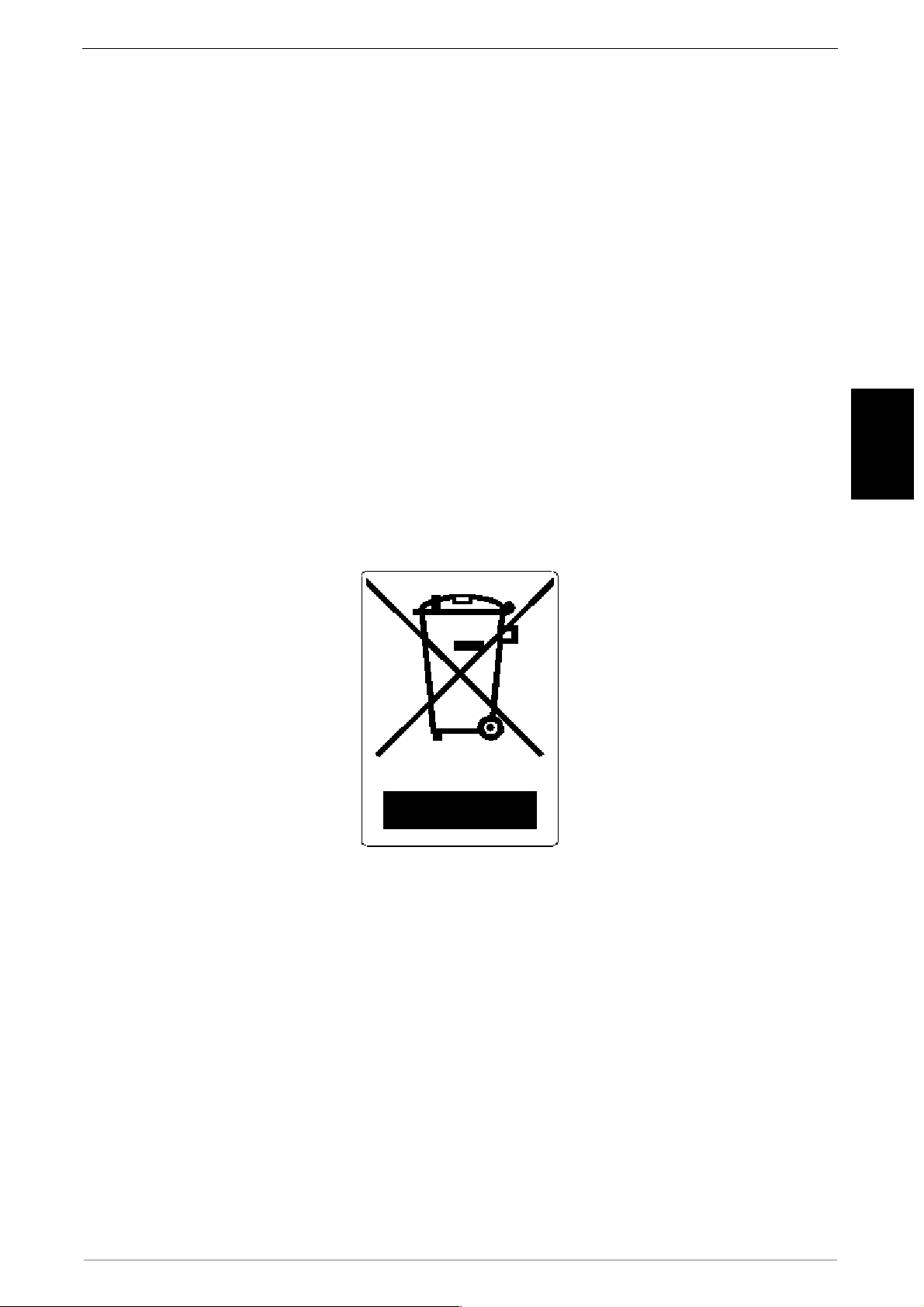
The symbol representing a crossed-out trash bin, well visible on these machines,
means without doubts that the machine has entered the market after August 13,
2005 and that it must collected separately.
EN
The following sanctions are established if this waste is disposed of unlawfully:
10.
Pursuant to article 6, section 1, letter b), a dealer that does not accept the return of
a used electrical or electronic equipment for free will incur a monetary sanction of
Euro 150 to Euro 400 for each device that is not accepted or is accepted for a fee.
11.
A manufacturer that does not organise a separate collection system for professional
WEEE as per article 6 - section 3 and a system for returning and sending, treating
and recycling the WEEE, pursuant to articles 9 - section 1 and 9 - section 1, 11 section 1 and 12, sections 1, 2 and 3, without prejudice to the agreements signed
pursuant to article 12 - section 6, will incur a monetary sanction of Euro 30,000 to
Euro 100,000.
12.
A manufacturer that after August 13, 2005 does not provide the financial guarantee
established by article 11 - section 2 or 12 - section 4 when the electrical or
45
Page 24

Eurokey NEXT – Quick Guide
electronic device enters the market, will incur a monetary sanction of Euro 200 to
Euro 1,000 for each device which enters the market.
13.
A manufacturer that does not provide instructions for the use of WEE pursuant to
article 13- section 1 will incur a monetary sanction of Euro 200 to Euro 5,000. A
manufacturer that, within one year from the launch on the market of any new WEE,
does not provide the instructions pursuant to article 13- section 3 to re-use centres
and treatment and recycling plants will incur a monetary sanction of Euro 5,000 to
Euro 30,000.
14.
A manufacturer that after August 13, 2005 launches on the market WEE without the
identification or symbol set out by article 13 - sections 4 and 5 will incur a monetary
sanction of Euro 200 to Euro 1,000 for each device that enters the market. The
same monetary sanction applies if the identification or symbol is not conforming
with the requirements set out by article 13, sections 4 and 5.
15.
A manufacturer that launches on the market a WEE without being registered with
the Chamber of Commerce pursuant to article 14- section 2 will incur a monetary
sanction of Euro 30,000 to Euro 100,000.
16.
A manufacturer that does not communicate the information established by article
13, sections 4 3 5 to the national register of subjects obliged to dispose of WEEE
within the terms established by article 13, section 8.
17.
With the exceptions set out by article 5 section 2, everyone that after July 1, 2006
launches on the market WEE containing substances listed in article 5, section 1 or
further substances identified pursuant to article 18, section 1, will incur a monetary
sanction of Euro 50 to Euro 500 for each device that enters the market or of Euro
30,000 to Euro 100,000.
46
Page 25
47
Page 26

Comesterogroup S.r.l.
Via Marie Curie 8, 20060 Gessate (MI)
Tel : +39 02 95781111 Fax:+39 02 95 380178
www.comesterogroup.com [email protected]
 Loading...