

Page 1

Executech MODEL
KSU
Page 2

Chapter 1 introduction
TABLE OF CONTENTS
.............................................
l-l
Chapter 2
System
Date
Common Audlble And
Connections
Area Paging Interface
Area
Cassette Tape
Checkout
.....................................................
...............
Station Interface
.
Station PA Port
(Hybrid) Configuratlon
..........................................
..............................
....................................
.....................................
2-S
2-5
Chapter 3 System Programming
Single Line
Reused BLine
Class Of Service Programming
Procedure
Toll Restriction Programming Procedure
Toll Restriction Programming Reference Tables
Procedure
...............................................................
...............................................................
.............................................................
BLF Keyset
............................................................
............................................................
.......................................................
.......................................................
........................................
A
Or A
................................................
.....................................
3.1
.3-t
..3- 3
3
.
3-7
Page 3
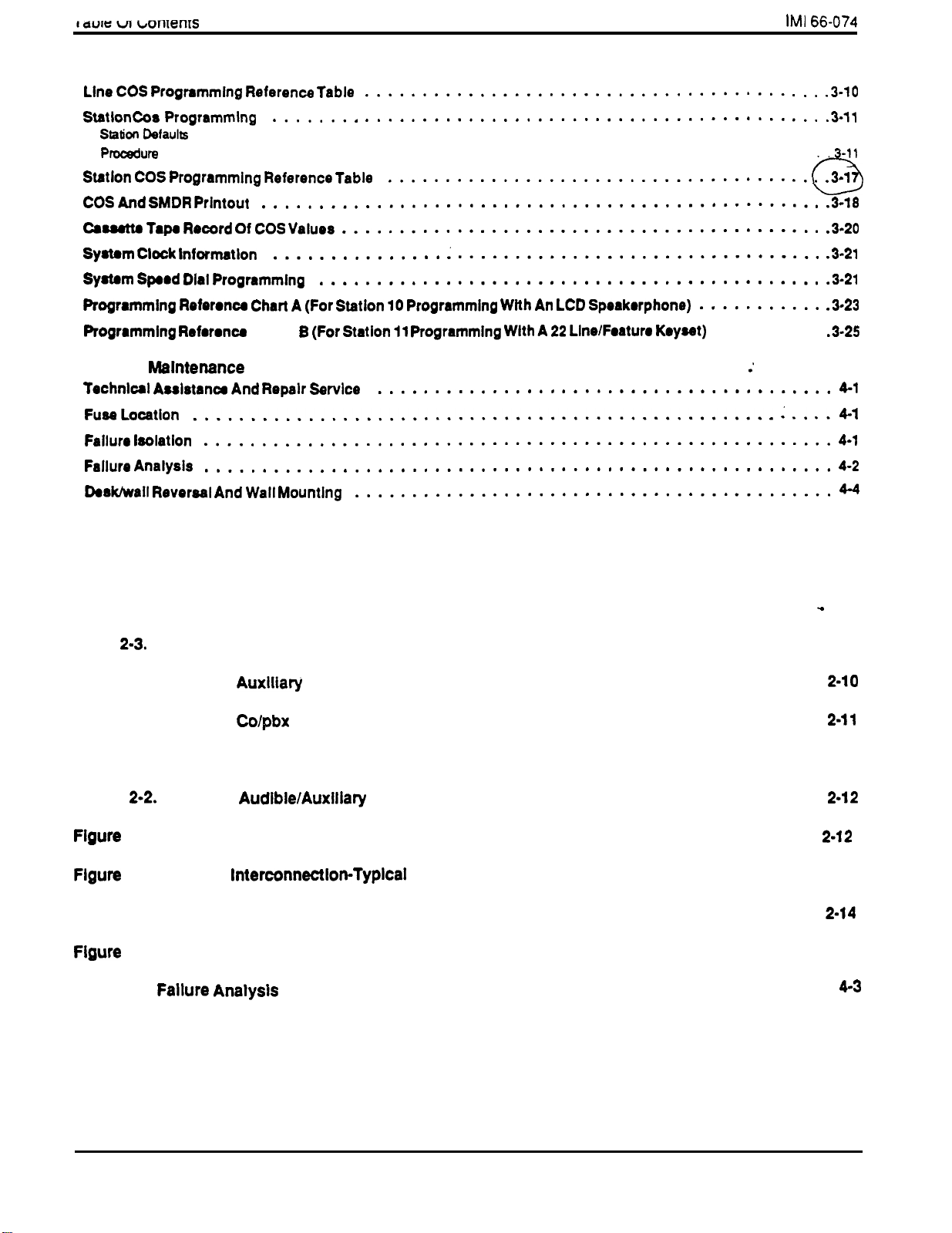
...........................................................
..3-11
Chapter 6
Chart
......................................
.........
......
4-l
TABLES AND ILLUSTRATIONS
Table 2-1. Wlrlng For Station Connector Block J-l . . . . . . . . . . . . . . . . . . . . . . . . . . . . . . 2-7
Table 2-2. Wlrlng For Station Connector Block J-2
Table
Table 2-4. Wlrlng For
Wiring For Station Connector Block J-3
Connector Block J-4
Table 2-5. Wlrlng For Colpbx Connector Block J-5
. . . . . . . . . . . . . . . . . . . . . . . . . . . .
. . . . . . . . . . . . . . . . . . . . . . . . . . . . . 2-9
. . . . . . . . . . . . . . . . . . . . . . . . . . . .
. . . . . . . . . . . . . . . . . . . . . . . . . . .
2-8
Figure 2-1. KSU Mountlng Dlmenslons . . . . . . . . . . . . . . . . . . . . . . . . . . . . . . . . . . . . 2-2
Flgure
Common
Station Interface Wlrlng (Typical Connection) . . . , . , . . .
2-3. PA Connectlons . . . . . . . . . . . . . . . . . . . . . . . . . . . . . . . . . . . . . . . . .
2-4. System
Connections . . . . . . . . . . . . . . . . . . . . . . . . , 2-13
Flgure 2-5. Secure Off-Hook Voice Announce Telephone Connectlons . . . . . . . . . . . . . . . . .
3-l. SMDR Printout Detalls
Figure 4-l.
Flow Chart
.......................................
....................................
Flgure 4-2. Statlon Wall Mounting Details
. . . . . . . . . . . . . . . . . . . . . . . . . . . . . . . . . . 4-5
3-19
iv
Page 4
1
MANUAL SCOPE
This publication contains installation, programming,
and maintenance information for the Model 1432 KSU
electronic key system and associated electronic key
telephone stations.
NOTE: This manual is applicable for model 14328
KSU Rev F and later.
This key system is fully protected, and therefore the
installation does not require the services of an
authorized agent. However, the installation
procedures detailed in this manual should only be
performed by individuals familiar with general
telephone installation procedures.
The end user may perform routine maintenance
procedures, such as the following listed ones, but all
other servicing must be performed by factory
authorized personnel.
l
Place or replace any designation strips on the face
of the telephone stations.
l
Replace the line cord or handset coiled cord.
l
Replace complete stations and station handsets.
The handset is a special Comdial type. Other
handset types will not work properly.
RELATED INFORMATION
01-001, Compliance Requirements To FCC
Rules and Regulations
68 and 15
01-005 Handling Of Electrostatically Sensitive
Components
GCA 40-028,
General Information, Electronic Key
System
GCA 70-l 34, User’s Guide for
GCA
GCA
Guide for Single Line Station
Users Guide for
Station
Console
GCA 70-l 48, User’s Guide for 32.Button DSS/BLF
Console
STATION TYPES
This Key Service Unit supports the operation of the
following stations:
l
22 Line/Feature Keyset
l
Reused
Line Keyset
l
Relocate the station when it is plugged into the
proper system jacks.
l
Single-Line Keyset
l
Console
and
1-l
Page 5

66-074
INSTALLER/USER INFORMATION
REGARDING FCC RULES AND
REGULATIONS
This electronic key system complies with Federal
Communications Commission (FCC) Rules, Part 68. The
FCC registration label on the KSU contains the FCC
registration number, the ringer equivalence number, the
model number, and the serial number or production date of
the system.
Unless a telephone operating company provides and installs
the system, the telephone operating company which
provides the lines must be notified before a connection is
made to them. The lines (telephone numbers) involved, the
FCC registration number, and the ringer equivalence number
must be provided to the telephone company. The FCC
registration number and the ringer equivalence number of
this equipment are provided on the label attached to the
company when final disconnection of this equipment from
the telephone company line occurs.
COMPATIBILITY WITH TELEPHONE
When necessary,
information on the maximum number of telephones or
ringers that can be connected to one line, as well as any
other applicable technical information. The telephone
operating company can temporarily discontinue service and
make changes which could effect the operation of this
equipment. They must, however, provide adequate notice,
in writing, of any future equipment changes that would make
the system incompatible.
Connection of the electronic key system to the telephone
lines must be through a universal service order code
(USOC) outlet jack supplied by the telephone operating
company.
outlet, ask the telephone company business off ice to install
one. The correct outlet jack for this system is either a type
or type
the
telephone operating company provides
the installation siie does not have the proper
NETWORK
PARTY LINES AND COIN LINES
Local telephone company regulations may not permit
connections to party lines and coin lines by anyone except
the telephone operating company.
TROUBLESHOOTING
a service problem
trouble is in the on-site system or in the telephone
first try to determine if the
equipment. Disconnect all equipment not owned by the
tf this corrects the problem, the faulty equipment must not be
reconnected to the telephone line until the problem has been
corrected. Any trouble that causes improper operation of the
telephone network may require the telephone company to
discontinue service to the trouble site after they notify the
user of the reason.
REPAIR AUTHORIZATION
FCC regulations do not permit repair of customer owned
equipment by anyone except the manufacturer, their
authorized agent, or others who might be authortzed by the
FCC. However, routine repairs can be made according to
the maintenance instructions in this publication, provided
that all FCC restriiions are obeyed.
RADIO FREQUENCY INTERFERENCE
The electronic key system contains incidental radio
frequency generating circuitry and, if
properly, may cause interference to radio and television
reception. This equipment has been tested and found to
comply with the limits for a Class A computing device
pursuant to Subpart J of Part 15 of FCC Rules. These limits
are designed to provide reasonable protection against such
interference when operated in a commercial environment.
Operation of this equipment in a residential may cause
interference to radio and television reception; in which case
the user is encouraged to take whatever measures may be
required to correct the interference.
cause interference to radio or television reception, which can
is encouraged lo
more of the following measures: Reorient the television or
radio’s receiving antenna, and/or relocate the KSU, the
individual telephone stations, and the radio or TV with
respect to each other.
the manufacturer or an experienced radio/television
technician for additional suggestions. The user may find the
following booklet prepared by the Federal Communications’
Commission helpful: ‘How to identify and Resolve Radio-TV
Interference Problems.” This booklet is available from the
Government Printing Office, Washington DC. 20402. Stock
No.
RINGER EQUIVALENCE NUMBER
The REN of each line is 0.48. The FCC requires the
installer to determine the total REN for each line, and record
it at the equipment.
company.
installed and used
this equipment does
determined by turning the equipment off and on, the user
to correct the interference by one or
necessary, the user should consult
1-2
Page 6
MOUNTING CONSIDERATIONS
The KSU cabinet should be attached vertically to
any sturdy, flat, surface. It may be vertically rack
mounted if desired.
The KSU must be located within six (6) feet of a
proper electricaloutlet. The KSU power supply
requires a dedicated 117VAC 15 AMP circuit, with a
third-wire ground, supplied to a standard (NEMA
electrical outlet.
The distance between the KSU and the
as per
FCC requirements. A nominal distance of 7 feet is
recommended.
The mounting location must be secure and dry and
have adequate ventilation. The temperature range
of the location must be within 32-l 22 degrees F
(O-50
degrees C).
If the mounting surface is damp or if it is concrete or
masonry material, a backboard must be attached to
the mounting surface to be used for KSU mounting.
Suitable mounting backboards are available
commercially or can be constructed out of
plywood cut to size.
Tools and hardware required for mounting the KSU
cabinet include:
l
Fasteners -wood screws
head), toggle bolts, or wall anchors
l
Screwdriver-to match fasteners
l
Electric drill
l
Connecting tool
if prepared holes are required
for fastening wires to a type-66
connector block.
x l-inch round
l
Crimping tool
for 623-type modular plugs
MOUNTING PROCEDURE
Unpack, and carefully inspect the KSU and
1.
stations for shipping damage. Notify the shipper
immediately of
any
damages found. Verify that the
packages contain all parts and accessories
needed for proper installation and operation.
If a backboard is required at the mounting location,
2.
attach it securely
to
provide a stable KSU
mounting surface.
A full scale mounting template is supplied in the
.
KSU packing box. Hold or tape this template to the
mounting surface, and mark the location of the
mounting holes on the mounting surface as they
are
located on the template. The KSU mounting
dimensions are also shown on
4.
Drill holes
the mounting surface of a proper size
Figure 2-1.
to accommodate the hardware being used. If
necessary, prepare these holes with inserts,
anchors or other attachment devices as dictated by
the type of mounting surface.
Attach the KSU to the mounting surface with four
5.
(4) screws installed through the KSU mounting
flange into
that the
enlargement
allows the m
in the mount.
mounting surface holes. Note
are elongated with an
nd of the hole. This feature
to be partially installed
before the KSU is hung on
them.
Place the
6.
and in keeping with accepted industry and off ice
standards. A telephone station can be wall
mounted if necessary as they are
reversable. Refer to Chapter 4, Maintenance, for
station for wall mounting.
telephone stations as desired
in preparing a
reversable
2-1
Page 7

(APPROX)
LOCATIONS
Figure 2-1. KSU Mountlng Dimensions
SYSTEM WIRI’::
System cabling may be routed
the installation location requires.
practices must be observed and a :
codes must be adhered to. Tables through 2-5
and Figures 2-2 through 2-5 illustrate the system
wiring and connection points.
AC POWER CONNECTION
Employ a dedicated 11
third-wire ground, supplied to a standard electrical
outlet (NEMA 5-15R) for the AC power connection. A
power connection is illustrated in
below.
l
A plug-in
installed between the power cord and the AC outlet.
l
Do not connect the AC power cord until the
installation has been checked.
l
To apply AC power, connect the power cord to the
electrical outlet.
power line surge protector should be
15 AMP circuit, with a
Figure
or visible as
:
engineering
building
shown
C
LINE CONNECTIONS
The KSU interface connection for the TELCO or PBX
lines is a
properly terminated, must be
connector to the demarcation point connector
(typically a 66M-xx connector).
male connector. A
cable,
from the KSU
CABLE CLIPS
The cabinet-mounted 50-pin male connector is
equipped with a retaining clip. This clip is designed to
secure the mated connection once it is made. The clip
does this by snapping into a slot on the cable-mounted
connector when it is pressed together with the
cabinet-mounted connector. This retaining clip must
be pulled back slightly to unsnap it before the
connectors can be separated.
Transient voltage splkes, If Induced onto
CO or
lines, can travel through
the cable and Into the common equipment.
The telephone company offers basic
protection against this
but it Is
usually designed to protect the central
office circuits. While it
also provide
2-2
Page 8
to the common
upon for
total protection.
external overvottage surges do not
To help ensure that
damage the system, recommended
that gas discharge tubes, or
protectlon
and
properly grounded,
be Installed,
In all connected
TELCO Ilnes.
STATION CONNECTIONS
Connections between the KSU
typically via type 66M-xx connector blocks which are
cable connected to the KSU 50-pin male connector.
The maximum distance allowed from the KSU to the
station is 1500 feet using
cable.
If spare conductors exist in the caoles that are run
between the KSU 66M-xx connector block and the
station jacks, It is a good practice to connect them to
earth ground. Doing this may help prevent them from
inducing radio frequency and/or AC interference into
the system.
and
the stations are
gauge, twisted-pair
The polarlty between the Individual wlres
In a
to the data
NOTE: Station ports are programmed for the type of
equipment that is to be connected to them.
Either an LCD Speakerphone must be
connected to station
Line/Feature Keysef must be connected
station port for Class Of Service
programming
REUSING
When the reused 8 Line BLF Keyset is installed at
station port
When
any other station port, the following considerations
must be made:
THE 8 LINE BLF
or 13) must be programmed for BLF 8 Line
equipment.
the reused 8 Line
voice or data palr Is not
clrcults.
or a 22
or 13, the associated adjunct port
BLF Keyset is installed at
l
The station port must be programmed for
BLF Keyset operation. Refer to Chapter 3 for
details.
STATION PAIRING
Station ports are paired for both data and overload
protection as shown below:
DATA PAIRING
24
11 -ADJ 11
12 -ADJ 12
13
14
15
17
18
19
20
21
22
23
26
28
30-31
32-33
34
36-37 22-24
38-39
40-41
25
27
29
35
OVERLOAD PAIRING
10-11
12-13
14-16
15
17
18-20
19-21
23-25 .
26-28
27-29
30-32
31-33
34-36
35
37
38-40
39-41
DSS/BLF CONSOLE CONNECTIONS
The system provides four designated adjunct
(console) ports. The adjunct ports are associated with
companion station ports as follows:
ADJUNCT
10
11
12
13
A DSS/BLF console may also be installed at any
station port that is data paired with a port containing a
companion telephone station. The station port that is
used by the console must be configured for console
operation by COS programming.
When installing a DSSIBLF console at a station port,
connect all four wires (voice pair and data pair) of the,
console cable to the station connector block. The
voice pair connections of the station port to which the
console is connected can also be connected as a PA
Refer to the paragraph in this chapter headed Area
Paging Interface
Illustration shown in
PA
system to the
station connector block. The station port must then be
programmed asa PA port.
PORT
Station PA Port and to the
STATION PORT
10
11
12
13
Flgure 2-3. Wire the Input of the
console voice-pair at the
The data-paired port cannot be connected to any
equipment.
The overload paired port cannot be used for an 8
Line BLF Keyset but can be used for regular
multiline or single-line station installation.
Off-Hook Voice Announce
Wlth Handsfree
The DB32S-xx Adjunct Feature Module can be used
to provide off-hook voice announcing (OHVA) to a
station that is already busy on a call, and allow
subsequent handsfree answerback (HFAB) by the
station user. Two data-paired station ports are
required to provide this feature.
2-3
Answerback
Page 9

66-074
l
Connect a keyset to the first data-paired port.
l
Connect the DB32S Adjunct Feature Module to the
voice pair and data pair of the second data-paired
l
For the feature to be enabled, the port to which the
Adjund Feature Module is connected must be
programmed as a DSS console with call announce.
SECURE OFF-HOOK VOICE ANNOUNCE
TELEPHONE CONNECTIONS
This telephone system supports the Secure Off-Hook
Voice Announce (SOHVA) feature provided by certain
required to provide the SOHVA feature.
NOTE:
non-secure off-hook voice announce
capability is required, it can be provided by the
model DB32S-xu console as described above.
The SOHVA equipped telephones contain a
line jack. Using
twisted-pair
cable, connect the two inside pairs of the line jack to
the first data-paired port and connect the outside pair
to the second data-paired port. Refer to Flgure 2-5 for
an illustration of this wiring.
l
Connect pins 3 and 4 to the voice pair and pins 2
and 5 to data pair of the first data-paired port.
l
Connect pins 1 and 6 to the voice pair of the second
data-paired port.
To enable the SOHVA feature, the following
programming considerations must be taken:
l
The first paired-port must be programmed as a
port.
l
The second paired-port must be programmed as a
DSS console with call announce port.
POWER FAILURE STATION CONNECTIONS
The system provides three tip and ring pairs
connected to lines
and 3 as emergency, power
failure circuits. These power failure pairs are located
as detailed on Table 24 and Figure 24. A power
failure pair is only active during a power failure. An
industry standard, single-line telephone, such as a
type 2500, can be connected to a power failure pair
and used to provide communications capability should
the AC power to the system be interrupted.
A-LEAD CONTROL
DEVICE CONNECTIONS
The KSU can detect an A-lead (A and Al) control
signal when it is applied to lines 7 and 8. An A-lead
control device can be bridge-connected to these lines
via terminal clips on the J-4 station connector block.
Refer to Table 24 and Figure 24 for connection
details.
DATA DEVICE CONNECTlONS
When a serial data printer is used
printout, or a video display terminal (VDT) is used to
perform class of
programming connect the
data device to terminal clips on the J-4 station
connector block.
The distance between the device and the KSU can be
up to 500 feet in a quiet electrical enviroment.
Shielded cable may be required at some sites for
runs. For longer distances, a limited distance modem
must be used to relay the data communications
between the wmmon equipment and the data device.
Refer to Table 2-4 for connection details.
When preparing a cable for connection to a data
device, refer to the manufacturer’s manual for the
equipment being interfaced, and make thefollowing
wiring connections:
l
Wire the KSU RD line (data from device to KSU) to
the device TD (transmit data) output pin.
l
Wire the KSU TD (data to device from KSU) pin to
the device RD (receive data) pin.
l
Wire the KSU SG (signal ground) pin to the device
SG (signal ground) pin.
l
Wire the KSU CTS (clear-to-send status from
device to KSU) pin to the device RTS
(request-to-send) output pin.
NOTE:
requires a positive voltage, with
respect to signal ground, in
required, wire the KSU RTS (request-to-send
status signal from the KSU to the device) pin to
the device DSR (data-set-ready) input pin.
If required, wire the KSU PG (protective ground)
line(s) to the protective ground pin(s) of the device.
The system defaults to
data with no parity at a
baud rate of 1200. Configure the device, per the
instructions,
and baud rate that is set by COS programming.
SMDR and COS
.
to send data.
the data format
2-4
Page 10

SYSTEM GROUNDING
The wmmon equipment cabinet has internal
secondary surge protection on all line ports. In order
for this protection to be effective, the cabinet MUST be
connected to a reliable earth ground such as a metal
water pipe or a building frame ground. The
grounding wire must be of
copper and separate from the three-wire AC line
A ground stud is located on the wmmon equipment
cabinet for this purpose.
or #12 insulated, solid
previously, is disabledas long as station 39 is a PA
station.
If station port 41 is programmed as a PA port, the
Auxiliary Station Interface (station port 17 audible)
contact points are automatically reconfigured as PA
enable terminals. The contact closure now occurs
when PA station port 41 is dialed. The normal
auxiliary station interface function, as discussed
previously, is disabled as long as station port 41 is a
PA station.
COMMON AUDIBLE AND
AUXILIARY STATION INTERFACE
Two sets of relay closure
available at the J-l
bbcks.One set (J-l connections) provides a
dry-contact closure whenever any of the TELCOIPBX
lines, connected to the KSU, ring. The other set (J-2
connections) provides a dry-contact closure whenever
system station port 17 rings. These contact closures
track the ringing pattern in both cases. The contacts
are closed during the ringing period and are open
during the silent period.
A typical connection is illustrated in
to the paragraph headedArea Paging Interfacefor a
discussion for using these terminals in this alternate
paging function.
Do not exceed a 1 amp at
dry-contact
and
J-2 station connector
24 volts
points are
Flgure 2-2.
amp
Refer
at 46 volts) load on these control terminals.
If the load requirements exceed thls Ilmlt,
connect the load through an external slave
relay. DO NOT CONNECT THESE
CONTROL TERMINALS DIRECTLY TO THE
LINE.
AREA PAGING INTERFACE -
STATION PA PORT
Any unused station port can be programmed to be a
PA port instead of a telephone station port (see
Chapter 3 for programming details).
The audio input of an external paging amplifier can be
connected to the audio pair of the station port as
illustrated in
The audio input connection must be isolated with a
600 ohm to 600 ohm audio
Terminate the audio input of the PA system with a 620
ohm (nominal value) resistor.
If station port 39 is programmed as a PA port, the
Common Audible contact points are automatically
reconfigured as PA enable terminals. The contact
closure now occurs when PA station 39 is dialed. The
normal wmmOn audible function, as discussed
Figure 2-3.
matching transformer.
AREA PAGING INTERFACE
A line port can be configured by class of service
programming to be an AUXILIARY port. As an
AUXILIARY port,
voice path to an external device. This is done from
any
select
pulses can be dialed through the ‘auxiliary port as
needed.
If direct access area paging is to be part of the
system, connect the audio input of a paging amplifier
to the line that is programmed to be an AUXILIARY
port. The input impedance of this port is
approximately 600 ohms. A tone select, zone-paging
amplifier can be employed if desired. If used, the
zone-select code must be dialed after the AUXILIARY
port line select key is pressed.
can be used to couple a station
station by pressinq the proper line key to
port.
LINE PORT
tones or dial
KEY SYSTEM/MULTIFUNCTION
(HYBRID) CONFIGURATION
The system can be configured to operate as either a
key system or as a multifunction (hybrid) system.
Configuration is by way of a wire strap placed between
clip terminals 27 and 28 of station connector block J-4.
The KSU is shipped from the factory as a key system’
(KF). To convert operation over to the multifunction
(MF) system, add the strap.
The KF and MF designations are equipment type
Part 68,
Number on the equipment label. The appropriate
registration number must be reported to
company at the time of connection along with other
FCC mandated information. (Refer to Installer/user
Information Regarding FCC Rules And Regulations
found in Chapter 1 of this manual.)
Operationally, the multifunction (hybrid) configuration
enablescertain PBX features which may incur a higher
monthly tariff to thetelephone company. These
features allow dial access to (automaticselection of)
outgoing lines. The specific Executech feature that is
enabled is:
Line Group (Including Dial Access)
and
appear as part of the FCC Registration
the
telephone
2-5
Page 11

MUSIC INTERFACE
If music is to be part of the system, connect a KX
registered music source to the KSU input jack (phono
jack) provided for this purpose,
The impedance of this input is approximately 500
ohms. Level adjustment of the music source may be
necessary. This may be done during system checkout.
CASSETTE TAPE RECORDER INTERFACE
A customer provided, audio cassette, tape recorder
can be connected to the music interface jack. Class of
service programming can be both stored and loaded
via the recorder through this interface. This action is
controlled from station 10 or 11 as detailed in Chapter
3, System Programming.
Page 12

Table 2-1. Wiring For Station Connector Block J-l
SYSTEM INTERCONNECTION FOR KSU J-l
,
l1
STATION
PAIR
2-7
50
Page 13

Table 2-2. Wiring For Station Connector Block J-2
SYSTEM INTERCONNECTION FOR KSU J-2
WIRING
,
, I I VOICE I
,
I
1
t-%-i
l
_-._
Page 14
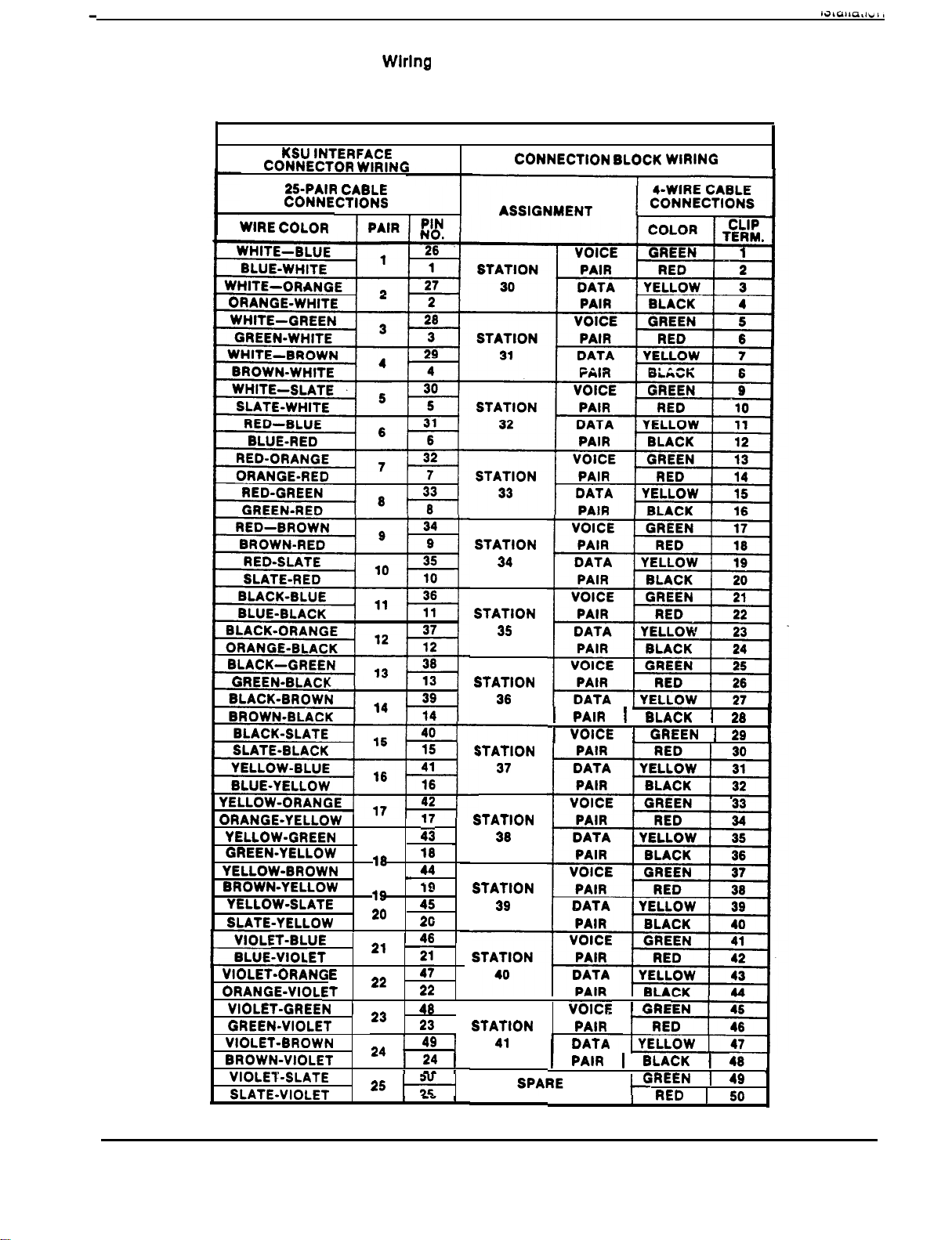
Table 2-3. Wiring For Station Connector Block J-3
SYSTEM INTERCONNECTION FOR KSU J-3
WIRING
N
2-9
--.
Page 15
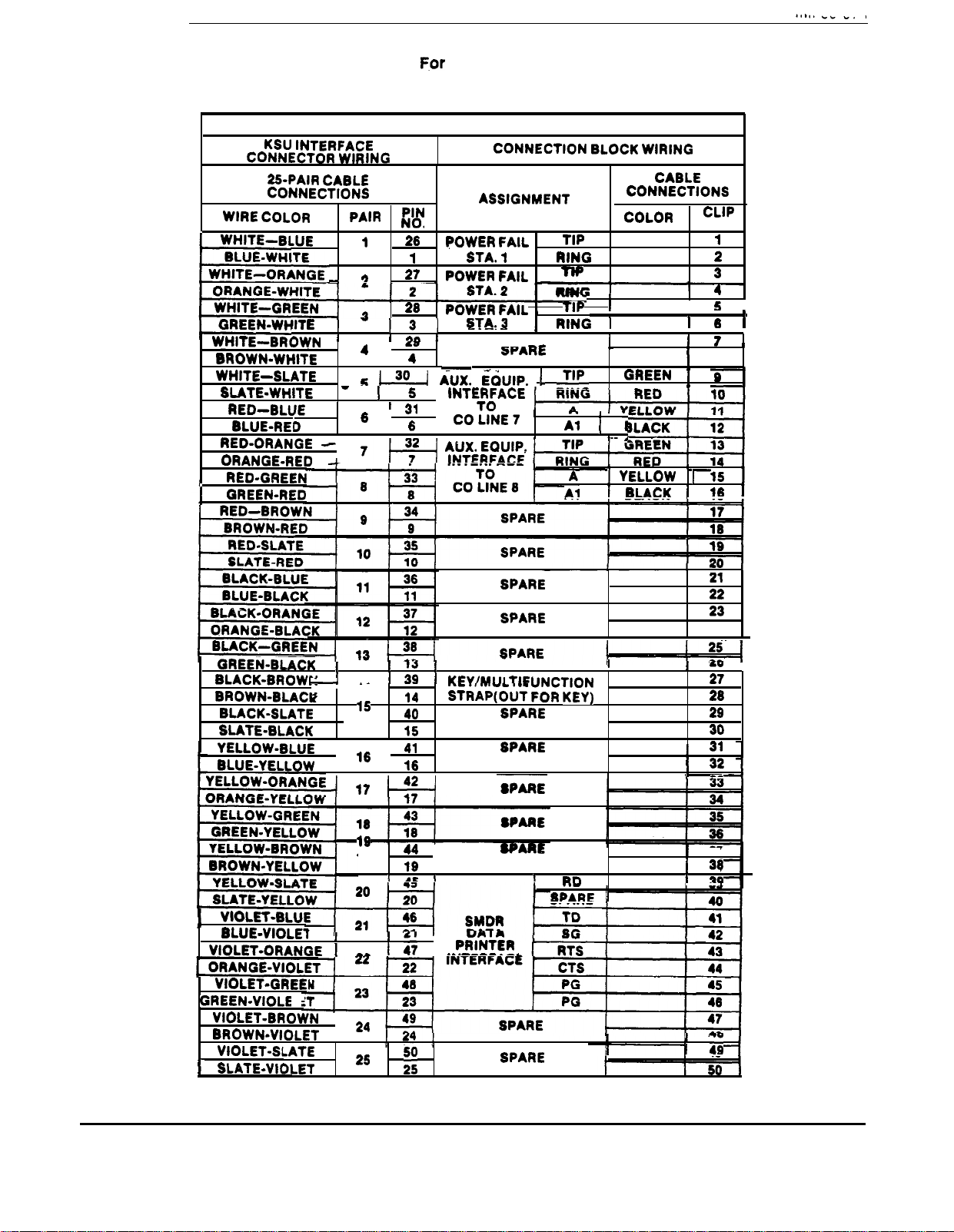
Table 2-4. Wiring
Auxiliary Connector Block J-4
SYSTEM INTERCONNECTION FOR KSU J-4
WIRING
TERM.
I
I
6
24
14
37
2-10
Page 16
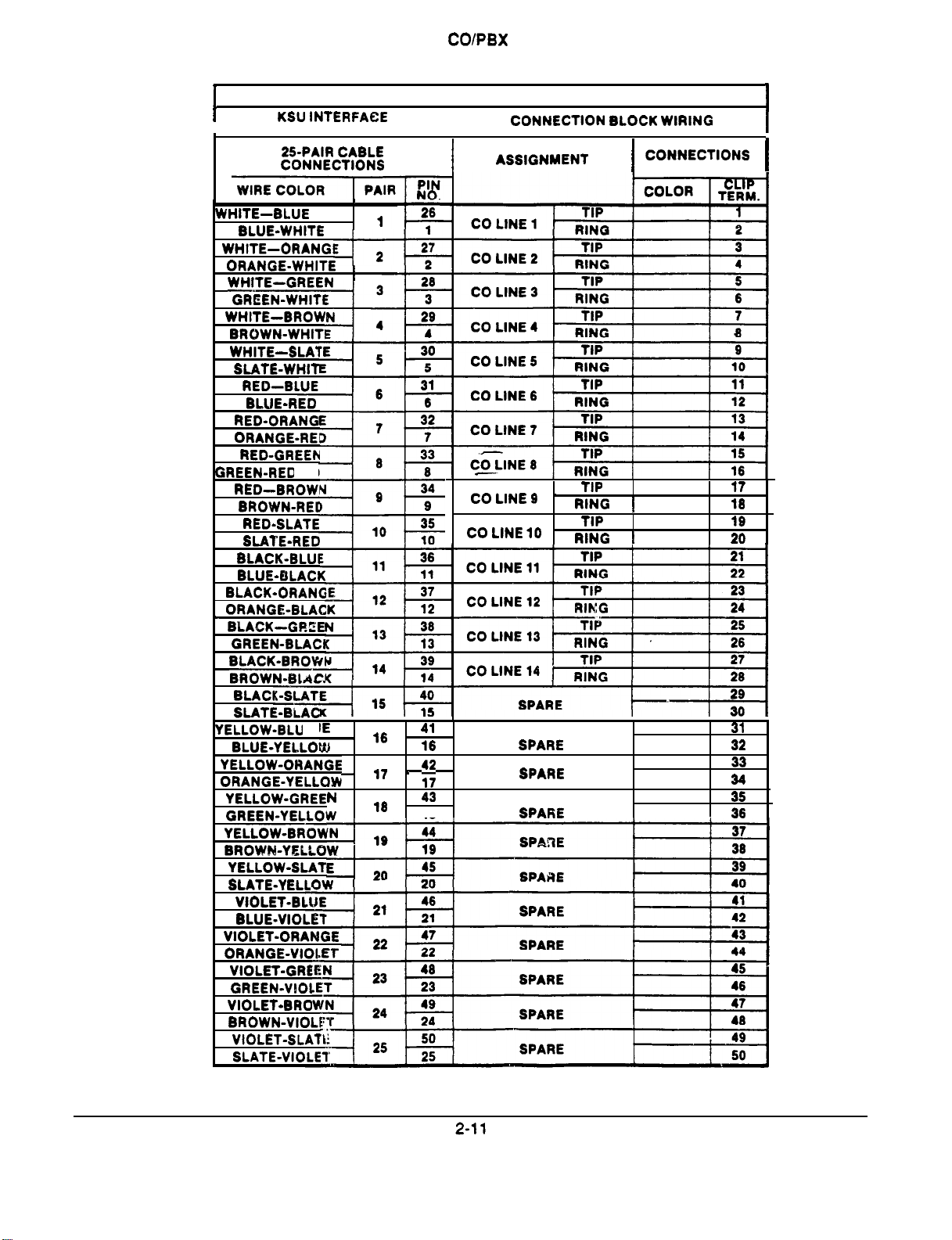
Table 2-5. Wiring For
Connector Block J-5
SYSTEM INTERCONNECTION FOR KSU J-5
I
CONNECTOR WIRING
I
18
Page 17

I
SWITCHING
\ I;,-
CONNECT TO CLIP TERMINALS ON
CONNECTOR BLOCK PER
- 24V
I
4av
MAX
.sA MAX
VOLTAGE CLAMPING DIODE
CHART
RECOMMENDED
OUTPUT AS
REQUIRED BY
RELAY COIL
+
LOW
VOLTAGE
POWER
SUPPLY
,
A
AC
COMMON AUDIBLE
STATION 17 RINGING
Figure 2-2. Common
I
TO KSU STATION
PORT 39OR
IF
ENABLE IS REQUIRED
OR TO ANY UNUSED
STATION PORT IF
ENABLE IS
NOT REQUIRED.
SLAVE
RELAY
CONNECTIONS
J-l CLIPS 49, 50
J-2 CLIPS 49, 50
I
SOURCE
,
DEVICE
.
AC OR DC INPUT
Station Interface Wlrlng (Typical Connectlon)
PA SYSTEM
ENABLE INPUT
FOR PA ENABLING,
CONNECTOR BLOCK
. BLOCK J-l CLIPS 49
. BLOCK J-2 CLIPS 49
Figure 2-3. PA Connectlons
TO
ON
50 FOR STATION PORT 39 PA ENABLE
50 FOR STATION PORT 41 PA ENABLE
2-12
Page 18
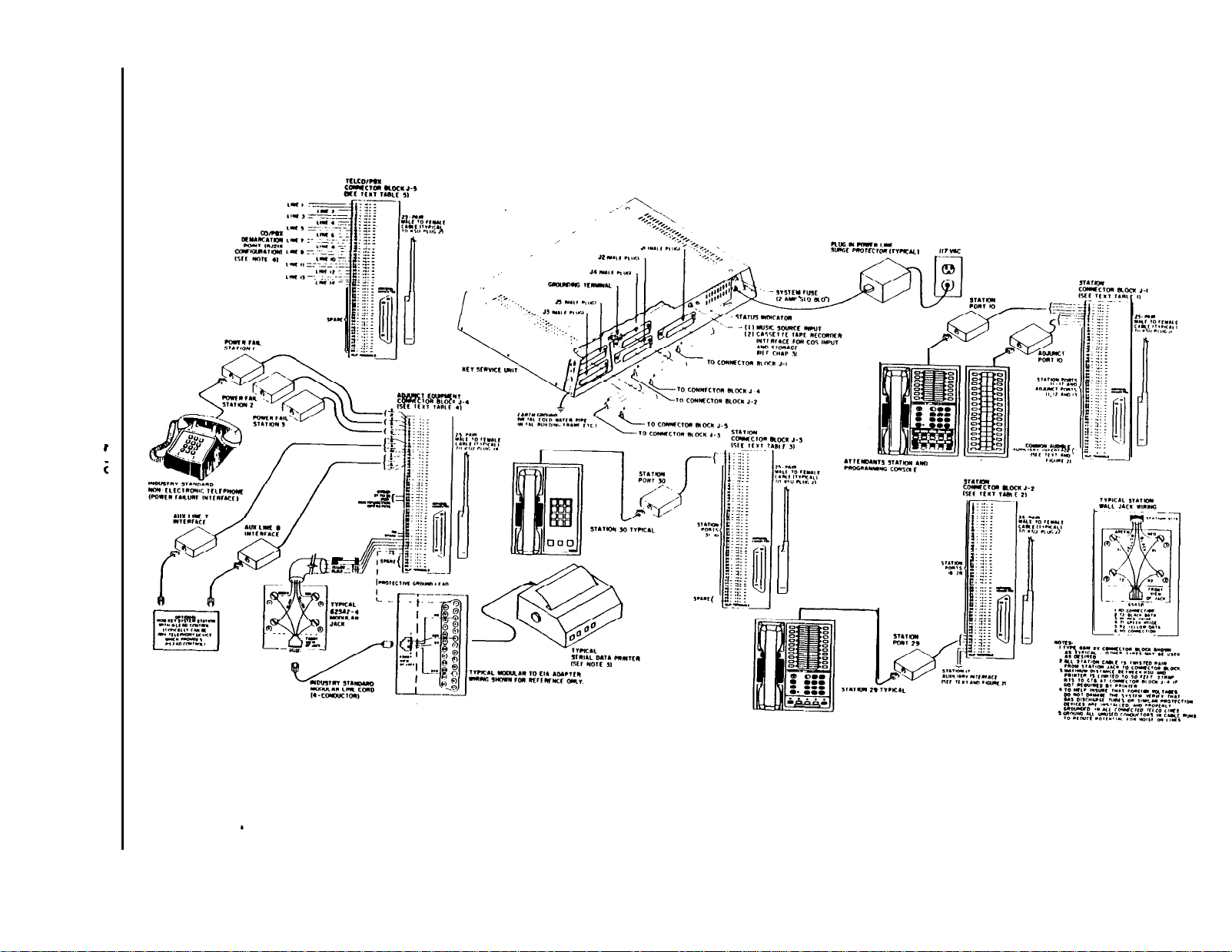
Flgure 2-4. System lnterconnectlon-Typical Connections
Page 19

2-14
Page 20

SYSTEM CHECKOUT
INITIAL CONDITION
The system operating features are set to
conditions at initial power up. These conditions
provide a basic operating system with a known set of
parameters, and the system should be initially
checked out with the
anytime while the system is operating,
conditions can be reset from station port 10 or
the instructions provided in Chapter 3.
CHECK OUT
Check the KSU and telephone installation for proper
operation by performing the following resistance and
voltage measurements.
Make the following resistance measurements at the
station connector blocks under the following conditions:
conditions in place. At
per
2.
KSU AC power cord disconnected from electrical
outlet.
Power interconnection cable connected between
KSU and power supply.
KSU connected to station connector blocks.
Stations wired, and wiring punched down on blocks.
Bridging clips removed from blocks to isolate
stations from KSU.
Measure the resistance of each installed station
and wiring from the station side of the connector
blocks. Resistance values will vary wtth cable
length and station type but should be within the
following limits.
Measure the resistance of the KSU and cables
from the KSU side of the station connector blocks.
Resistance values should be within the following
limits.
MEASURED PAIR
VOICE PAIR
DATA PAIR
MEASURED PAIR
VOICE PAIR
I
DATA PAIR
STATION RESISTANCE IN OHMS
MULTILINE
40-150
0.3
100
3 AND 8
LINE
40-150
40
150
SINGLE
LINE
40-150
0.3
100
KSU RESISTANCE IN OHMS
50
0.3
0.5
CONSOLE
0.3
100
0.3
100
8 LINE BLF
40-150
Page 21

Voltage Check
Make the following voltage measurements at the
station connector blocks under the following conditions:
l
Bridging clips installed
l
AC power connected to the KSU
Measure the voltage across one voice line and one
data line and then across the other voice line and the
other data line for each even and odd station. The
measured voltage must be per the following chart.
Variant readings can indicate a possible wiring,
station, or KSU problem.
General Check
1.
Check the red light emitting diode (LED) system
status indicator. Be sure that it is on steady. If if is
off or flashing, disconnect and reconnect the AC
power plug. If the indicator is still not on steady,
refer to the Failure Analysis Flow Chart found in
Chapter 4.
2.
Refer to the station User’s Guide for operating
the system by exercising the system features from
station
per the system
Chapter 3 until Class Of
10 or 11. Operational parameters are
conditions as detailed in
(COS)
programming is performed.
3. Once the
as
operational, perform the COS
programming.
basic
system is verified
6
Page 22

GENERAL INFORMATION
Class Of Service (COS) programming consists of
the following major categories: General System
COS, Toll Table Entry, Line COS, and Station COS.
Class of service programming can be performed
from either station port 10 or station 11. In addition,
a 32-button DSS/BLF console must be installed in
the adjunct port 10 or 11 respectively.
l
When programmlng from station port 10,
employ an LCD Speakerphone and take note of
the following important condition: The LCD
provide buttons
through B8. In performing the
procedures, whenever a programming step calls
for buttons Bl through B8 to be pressed, first
press the
When shifted, buttons A
represent buttons
performs a shift/no-shift toggle action each time it
is pressed. The associated indicator turns on
(shift) when A A8 = Bl
It Is very Important to return the
burton to shift the A-field buttons.
through A8 will
through B8. The
B8 and off (no-shift)
-A8.
A-field
buttons to their normal, or no-shift, state
after the
action Is taken.
l
When programming from station port 11,
employ a 22 Line/Feature keyset, and perform
the procedures as detailed in this chapter.
Programming overlays are included with each
system for use in identifing the buttons required for
COS programming. One overlay fits over the
buttons of the station installed at station
11 and designates the A-field and B-field buttons.
The other overlay fits over the buttons of the
console Installed at adjunct port 10 or 11 and
designates the C-field buttons. Full size copies of
the programming overlays are included at the end of
this chapter for use if needed.
System and line COS programming do not require
that a sequential process be followed once the base
level program entry mode has been established
except where noted herein. Station COS
programming does follow a sequential process.
10 or
Prior to taking any programming action, determine
the system, line and station COS conditions and all
toll restriction requirements. Record this data on
the programming reference tables included within
the programming procedures.
A set of COS values can be recorded on cassette
tape from a programmed system and later re-loaded
into the same system or into another system. This
method of programming can be employed in lieu of
using the step-by-step programming sequence.
A complete or a partial printed record of the COS
program values can be obtained with a serial data
printer connected to the
KSU. Complete details concerning this procedure
are included at the end of this chapter.
lines of the
SPECIAL PROGRAMMING
REQUIREMENTS
SINGLE-LINE
Several programming steps under COS programming
must be observed for proper operation of a
Single-Line
When the system is strapped for key system
configuration, the Single-Line Keyset is an intercom
only station. It can be configured for private line
only by programming the applicable station port for
the prime line automatic feature. When the port is
programmed with the prime line automatic feature,
the Single-Line Keyset cannot be programmed with
station speed dial numbers.
When the system is strapped for the muttifunction
(hybrid) system configuration, originating outside
with a Single-Line Keyset requires that one or
more lines must be programmed into a line group.
In
order to receive outside calls on a Single-Line
the call must
using a multiline station and transferred to the
single-line station. Otherwise, the Single-Line
the
ringing line preference feature with ringing
enabled on all desired lines. Aftemately it can be
programmed to have the prime line automatic
feature with ringing enabled at the prime line.
be answered
by an attendant
3-1
Page 23

REUSED 8 LINE BLF
Even though an 8 Line BLF Keyset is physically
connected to only one station port, it appears to the
system as two data-paired stations. Special
programming is required to enable proper operation of
a reused 8 Line BLF Keyset.
The station port to which it is connected must be
programmed for a 3 and 8 Line Keyset.
The paired station port must be programmed for an
8 Line BLF Keyset atthough it can not be connected
to
any equipment.
When the 8 Line BLF Keyset is connected to station
port
as
the paired port.
or 13, the respective adjunct port serves
BASE LEVEL
PROGRAM ENTRY MODE
The first step in any COS programming sequence is to
enter the base level programming mode. Once in this
mode, COS can be set as desired.
To enter
1.
2.
3.
4.
base level:
Press the
Press the following buttons in sequence;
Note that the dial tone stops and a
sounds to indicate that the base level programming
mode is entered.
Press the
confirmation that the base level mode is active.
Proceed from this point to program the system,
line, or station COS and the toll restriction tables.
button. The dial tone will sound.
7 4 6.
tone
button. The dial tone will return as a
When connected to station ports 14 through 41, the
paired port is as charted in Chapter 2, Installation,
or Chapter 5, Maintenance.
After COS programming of the station port is
complete, the DSS/BLF buttons of the 8 Line BLF
Program them to contain the intercom dialing
sequence for each station in the system for which
visual indication is desired,
It should be noted that certain features, such as
call-back messaging, are not available with the 8 Line
BLF
CLASS OF SERVICE PROGRAMMING WITH A
OR A
The system will recognize either a C42 through C49
from a 40-button console or a HOLD, 1 through
HOLD, 8 from the keyset as the same programming
buttons. Because of this, it is possible to program with
a 32-button console installed at adjunct port 10 or 11.
The programming buttons C42 through C49 (normally
provided by a 40.button console and not available on
a 32-button console) are relocated to the keyset
follows:
ALTERNATE
CONSOLE
BUTTON
C42
c43
c45
C46
c47
C48
c49
WHEN
IS INSTALLED
HOLD,
HOLD, 2
HOLD, 3
HOLD, 4
HOLD, 5
HOLD, 6
HOLD, 7
HOLD, 8
CONSOLE
as
BUlTON
CONSOLE
1
CLASS OF SERVICE DEFAULT
The system can be defaulted to a standard class of
service per the following procedure. The defautt
conditions are listed at the beginning of each COS
programming procedure and shaded on the
programming reference charts.
1.
Press
2.
Press program button
Speakerphone).
3.
Press keypad button(s) to choose default setting:
1
system defautt
2
line defautt
3
station defautt
4
pulse dialing, all lines
5
tone dialing, all lines
6
button mapping default
#
one
8
two
Cl 0
Cl2
Cl3
1051684
7 4 6
SMDR line
SMDR lines
enable
enable SAVE support
immediate transfer on
immediate transfer off
master default
support
on LCD
Master default action resets all values and
clears all stored memory
Do not perform
thls programming action while the system
Is In use.
4.
Press
MNTR (SPKR on speakerphones) to end.
3-2
Page 24

SYSTEM COS PROGRAMMING PROCEDURE
SYSTEM DEFAULTS
Recall/Flash Time
Intercom
Pause Time
Central Message Desk
Timed Hold Recall Time
Unanswered Call Transfer
Printer Baud
Print
-40 Column
Port Assignments:
All Station Ports= 22 Line/Feature Keyset
All Adjunct Ports
Station And Adjunct Ports 10
1.
Press
active).
2.
Set recall/flash time.
l
Press program button
Speakerphone).
l
Press keypad button for time.
1
80
2
300 msec.
3
500 msec.
4
600 msec.
750 msec.
l
Press S to return to base level.
3.
Set pause time.
l
Press program button 82
Speakerphone).
l
Press keypad button for time.
1 sec.
4
2.0 sec.
5
3.0 sec.
l
Press S to return to base level.
4.
Set timed hold recall time.
2 Seconds
Voice First
1 Second
Rat8
1200 baud,
7 4 6
msec.
Not Assigned
60 Seconds
20 Seconds
Data
(base level entry if not
(Bl , Al,
6
875 msec.
l.Osec.
9
2.0 sec.
0 = 3.0 sec.
A2,
6
5.0 sec.
7
7.5 sec.
8
10.0 sec.
9
15.0 sec.
0
20.0 sec.
Consoles
on LCD
on LCD
8
3
90 sec.
5
180 sec.
360 sec.
9
420 sec.
0
disabled
NOTE: The 0 program selection enables an
hold condition (when set at a station) to place
line in a ho/d condition at one station that
cannot be released at any other station.
l
Press
to return to base level.
5a. Set baud rate of printout.
l
Press program button , A6,
on LCD
Speakerphone).
l
Set baud rate with keypad.
1
110 baud, 7 bits 6
2
150 baud, 7 bits 7
3
300 baud, 7 bits 8
4
600 baud, 7 bits 9
5
1200 baud, 7 bits 0
l
Press
to return to base level.
2400 baud, 7 bits
3600 baud, 7 bits
4800 baud; 7 bits
9600 baud, 7 bits
19200 baud, 7 bits
Set line length of printout.
l
Press program button 85 (Bl,
on LCD
Speakerphone).
l
Press # for one 80 column.
Press
l
Press *to return to base level.
.
two 40 columns.
6. Choose intercom first
l
Press TAP for voice.
Press
l
Press *to return to base level.
7.
Specify central message desk (only one central
.
for tone.
message desk per system allowed).
Press #.
To choose station 10
41, press console button
l
Press program button
Speakerphone).
l
Press keypad button for time.
6
7
2
60 sec.
sec.
A3,
240 sec.
300 sec.
on LCD
To cancel, press #
Press
return to base level.
Page 25

Set recall time for unanswered call transfer.
8.
l
Press program button
(Bl , A7,
on LCD
Speakerphone).
l
Press keypad buttons for time.
sec.
10
1
sec.
20
2
sec.
25
3
sec.
30
4
sec.
45
5
l
Press
Specify station type for each adjunct port.
9.
l
Press console button to identify adjunct port.
to return to base level.
6
7
0
60 sec.
90 sec.
120sec.
180 sec.
240 sec.
adjunct port 11
12
13
l
Press console button to specify equipment type.
C46
C47
BLF
Console
10. Specify station type for each station port.
Press console buttons
station port 10
l
Press console button to specify station type.
C42
Single-Line Keyset (administrative phone)
41.
to identify
Single-Line
8 Line BLF
3 and 8 Line
C49
22 Line/Feature Keyset
Cl 0
Console (40button)
Console (without call
announce)
6
32-Button Console (with call announce)
7
LCD Speakerphone
Press
NOTE:
Press
and repeat steps for each active station
The step 10 action sets station class of service
for specified port
MNTR (SPKR) to
the default conditions for
programmming
mode.
3-4
Page 26

l Shading denotes system
l
Check off values chosen for system being programmed
EASE LEVEL
conditions.
(7 (4
A6
6
FOR COS AND SMOR DATA
8
9
SLF
PORT
UNANSWERED
E&-n”
3-5
Page 27

TOLL RESTRICTION PROGRAMMING
In order for toll restriction to take effect, the following
three-fold process must occur:
One or more toll tables must be entered.
Toll tables must be assigned to all appropriate lines.
Toll tables must be assigned to all appropriate stations
Only the toll table(s) which are entered and assigned
to both a line and a station using that line will involk
any toll restriction. Toll tables 1 and 2 have entries
defauted in them and these tables are assigned to all
lines by default. These tables are not assigned to
stations by default.
TABLE ENTRY PROCEDURE
1.
Determine the types of dialing restrictions which
be imposed on the system. Typically, this
includes access codes which result in toll charges,
and certain local numbers as desired.
2.
If the restricted dialing codes will be imposed
consistently on most or all stations in the system,
list them on one or two tables. If wide variation in
the dialing restrictions is planned, spread the
listing out across several tables.
3.
Strategically group the listings on the tables so that
a list of restrictions can be applied to a particular
station or group of stations.
4.
Designate each table as a DENY table or as an
ALLOW table. The numbers entered in a DENY
table are prevented from being dialed. ALLOW
tables take precedence over DENY tables.
Therefore, an entry in an allow table will provide an
explicit exception to an entry in a DENY table.
Note that the system always permits the dialing of
any number not explicitly denied. Also, system
speed dial numbers will not be toll restricted unless
specified by station COS programming.
can be included in an entry in either a DENY table
or an ALLOW table.
Example A: If 357, 377,387, and 397 dialing is
to be prohibited, list one entry of
on a
DENY table to cover them all.
Example B: Since all area codes typically have
a 1 or a 0 as a middle digit, prevent bng
distance calls to those area codes by entering
6.
Since
and
is important that emergency numbers
in a DENY table.
never be restricted, atways create an allow table
with entries of 911 and 1911 to override any DENY
tables that have been created.
7.
If the system is installed behind a PBX, include an
access code as part of every table entry.
8.
Once these tables are completely filled out, enter
the restriction planning tables on the line, and
station programming reference charts to record the
planned toll restrictions for the system.
TOLL RESTRICTION
PROGRAMMING PROCEDURE
1.
Press
2.
Press program button 84
Speakerphone).
3.
Select table.
l
Console button Cl 0
4.
Select table type.
l
Deny
LCD Speakerphone).
l
Allow
LCD Speakerphone).
7 4 6
.
A4,
C25
table 1
press program button
press program button
on LCD
16.
AS,
A6,
on
Example A:
Provide a simple and broad toll
restriction format by creating a DENY table with
two entries: ENTRY (1)
1 ENTRY (2)
0.
This format prevents all long distance and
operator calls.
Example 8: Prevent the dialing of all numbers
within the (804) area code, while allowing the
dialing of one specific number within that area
code, by entering 1804 in a DENY table and
18049782200 in an ALLOW table.
5.
Enter the
character in place of a particular digit
to condense a range of numbers into one entry.
The # character is a “match-anything” digit, and
5.
Select table entry.
l
Program button Al
6.
Dial number (16 digits maximum).
l
Remember, press
7.
Repeat steps 5 and 6 until all numbers are entered
A4
Entry 1
4
for “match anything” digit.
into tables.
8.9.Repeat steps 3 through 7 until all tables are
programmed
Press
MNTR (SPKR) to exit programming
mode.
3-6
Page 28

TOLL RESTRICTION PROGRAMMING REFERENCE TABLES
RESTRICTION TABLE 1
‘PE ALLOW
I
TABLE ASSIGNMENT LINES
RESTRICTION TABLE 3
TYPE ALLOW
DENY
, , , I I
STATIONS
RESTRICTION
TYPE ALLOW
ENTRY
1
2 3
TABLE ASSIGNMENT- LINES
TYPE ALLOW
ENTRY NUMBER (16 MAXIMUM)
4
6 7 6
RESTRICTION TABLE 4
RESTRICTION TABLE 6
DENY
DENY
TABLE 2
10
STATIONS
11
12
13
14
16
I
I
I
I
I
4
TABLE ASSIGNMENT LINES
TYPE: ALLOW
TABLE ASSIGNMENT. LINES
TABLE ASSIGNMENT. LINES
I
I
I
I
I I
I I I I
RESTRICTION TABLE 7
I
I I I I I
I I I
I I I I ! I
STATIONS
DENY
I
STATIONSSTATIONS
I
I
I I I
I
RESTRICTION TABLE 6
3-7
Page 29

Toll Restriction Tables
continued
RESTRICTION TABLE 9
TYPE ALLOW
NTRY
I
TABLE ASSIGNMENT. LINES
RESTRICTION TABLE 11
TYPE: ALLOW
NTRY
I
1
2
3
4
TABLE ASSIGNMENT. LINES
RESTRICTION TABLE 13
TYPE ALLOW
NTRY
112
DENY
ENTRY NUMBER 116
16
STATIONS
DENY
ENTRY NUMBER 116 MAXIMUMI
STATIONS
DENY
ENTRY NUMBER (16 MAXIMUM)
16
I
TYPE: ALLOW
ENTRY
I
1
2 3 4 5 6
1
I I
TYPE. ALLOW
I
NTRY
TABLE ASSIGNMENT. LINES
TYPE. ALLOW DENY
NTRY
1
RESTRICTION TABLE 10
DENY
ENTRY NUMBER
7
RESTRICTION TABLE 12
DENY
ENTRY NUMBER (16 MAXIMUM)
RESTRICTION TABLE 14
ENTRY NUMBER (16 MAXIMUM)
(4
(6 17
6
STATIONS
MAXIMUM)
11
12
13
14
15 16
TABLE ASSIGNMENT- LINES
RESTRICTION TABLE 15
TYPE: ALLOW
1
3
4
TABLE ASSIGNMENT LINES
DENY
ENTRY NUMBER
STATIONS
7
STATIONS
MAXIMUM)
,
4
TABLE ASSIGNMENT. LINES
TYPE: ALLOW
ENTRY
1
3-8
I
RESTRICTION TABLE 16
DENY
ENTRY NUMBER (16 MAXIMUM)
STATIONS
II II
Page 30

LINE COS PROGRAMMING
LINE
Line Type
Line Groups
Dial Mode
Privacy Status
Toll Tables
Abandoned Hold Timeout
TELCO
None Assigned
DTMF
Private
None Assigned
DEFAULTS
50 Msec.
PROCEDURE
1. PresslTCM+k7466.
2. Choose line to be programmed.
l
Press Al
3. Select line type.
l
Disabled
l
Auxiliary
.
4.
Select line group (hybrid configuration only)
l
None
l
Group 1
l
Group 2 = C35
C41
C34
C46
Line 14.
l
Group 3
l
Group 4
C36
C37
5. Select dialing mode.
l
Pulse/tone
l
Tone only
C26
C27
8. Select privacy mode
l
Private
l
Non-private
7. Assign
l
Clear all assignments
l
Program button Cl 0
8.
Set abandoned hold timeout period.
l
300 msec.
l
50 msec.
9.
Repeat steps 2
10. Press
C28
C29
toll tables.
C33.
8 for each line.
MNTR (SPKR) to exit programming.
tables
3-9
Page 31

Programming
LINE COS PROGRAMMING REFERENCE TABLE
l Shading denotes line
Check off values chosen for lines being programmed
l
LINE PROGRAMMING MODE
PROGRAMMED
FEATURE
conditions.
3
LINE
4
GROUPS
5
MODE
PRIVACY
5
MODE
2
4
LINE NUMBER
5
8
7
12
7
TOLL
RESTRICTION
NUMBERS
! 300MSEC
I I I I
15
I I I
I I I
A-Lea.3 Control Lmer (7 and 8)
2. and 3)
3-10
Page 32

STATION COS PROGRAMMING
STATION DEFAULTS
PA Port
Executive Override
Ringing Line Preference
Personal Ringing Tone
Single Line Keyset Accesses Intercom
Ringing Assignment
Line Access Denied
Toll Tables
Origination Denied
Idle Line Preference
Night Transfer
All-Call Receive
All-Call Originate
Reserved Intercom Link
Zone Page Receive
Zone Page Originate
Message Originate
Automatic Hold
System Speed Dial Toll Restriction = Disabled
Voice Announce Block
Privacy Status
Line/Button Assignment (Button Mapping):
3 And 8 Line
B-Field Buttons: 88
22 Line/feature Keysef
A-Field Buttons: Al
B-Field Buttons: Bl
Disabled
Line/group
And 41
None Assigned
All Lines Ring On Stations 10,
And 41
Private
Disabled
Disabled
None
Tone 1
All Lines Ring on Stations 10,
None
None
None
Enabled
Enabled
None
Disabled
Disabled
Disabled
Disabled
Disabled
Al4
B8
Lines 1
Lines 1
8
14
Locations
4.
Enable PA
l
Press keypad button 1
if desired.
NOTE: If a selected station port is programmed to be
a PA port, per step
do not p&form any
further programming for this selected station
Instead, refurn to step 3
port.
another station port or press
program
MNTR (SPKR)
to end programming.
Block voice announced intercom calls
5.
l
Press keypad button 2.
Enable executive ovenride.
6.
l
Press keypad button 3.
7.
Enable toll table restriction on system speed dial
numbers.
l
Press keypad button 4.
Choose personal ringing tones (22 Line/Feature
8.
Keysets).
l
TONE 1
l
TONE 2
l
TONE 3
l
TONE 4
keypad button 7
keypad button 8
keypad button 9
keypad button 0
PROCEDURE
Perform all steps in sequence.
Skip those steps not required.
1.
2.
Press program button B8
Speakerphone).
3.
Specify station to be programmed, then perform
applicable steps.
l
Press Cl0 for station port 10 to 41
l
If desired, press
following settings.
PA port
Prime line/group
disabled
none
Voice announce block
Executive override
disabled
Message originate = disabled
Automatic hold
disabled
System speed dial toll restriction = disabled
A8,
to default
disabled
on LCD
Set automatic hold.
9.
l
Press keypad button 5.
10. Enable message wait originate.
l
Press keypad button 6.
11. Select prime line, prime group or prime intercom.
HOLD
Al,
group 1.
on LCD Speakerphone)
group 2
on LCD Speakerphone)
group 3
on LCD Speakerphone)
group 4
intercom
3-l 1
Page 33

12. Set ringing line preference.
l
A5,
on LCD Speakerphone)
enabled
l
(Bl,
A4, on LCD Speakerphone)
disabled
l
Press program button C46 (clears previous
settings).
l
Choose lines: Al
Al4
lines 1
19. Assign toll tables to station.
14
13. Select ringing assignments
RINGING
l
Press program button C42 (clears previous
settings).
l
Choose lines:
Al Al4
lines 1
14
DELAYED RINGING
l
Press program button C43 (clears previous
settings).
l
Choose lines:
Al
Al4
lines 1
14
14. Select Night Transfer (ringing)
l
Press program button C44 (clears previous
settings).
l
Choose lines: Al
Al4
lines 1
14
15. Select automatic privacy release.
l
Press program button C45 (clears previous
settings).
l
Choose lines: Al
Al 4
1
14
16. Select access denied.
Press program button C49 (clears previous
assignments).
l
Specify toll tables to be assigned.
Al
Al4
20.
tables 1
table 15
table
16.
intercom link.
14
Press #.
l
Press keypad button 1 7 to reserve link l-7.
l
Press 0
l
Press console key C42 to continue with next
no reserved link.
programming step.
21. Select all-call and/or zone paging.
l
Press #
l
Press TAP to disable all paging assignments (if
desired).
ALL-CALL
l
Press program button A4 to originate.
l
Press program button A8 to receive.
.
l
Press program button C46 (clears previous
settings).
l
Choose lines: Al
Al4
lines 1
14
17. Select call origination denied.
l
Press program button C47 (clears previous
settings).
l
Choose lines:
Al Al4
lines 1
14
18. Select idle line preference.
l
Press console button C42 to continue with next
programming step.
ZONES A,
l
Press
l
Select zones.
l
Al
A3
l
A5
A7
l
Press console button C42 to continue with next
AND C
originate zones A
receive zones A
C
C
programming step.
3-12
Page 34

22. Specify flexible button/function assignment
(non-square configuration)
3 AND 8 LINE KEYSET LINE ASSIGNMENT
a. Press program button 86 (Bl, A6,
Speakerphone).
b. Select button to be programmed.
B8
Speakerphone).
c. Select line:
Press TAP button to disable line appearance.
d. Repeat steps a
go to step 23.
22 LINEIFEATURE KEYSET LINE ASSIGNMENT
a. Press program button B6
Speakerphone).
b. Select button
Speakerphone).
c. Select line:
OR-
Al
A8,
Al Al4
c for’each line assigned, then
on LCD
lines 1
A6,
Al
Al4
Al
Al
A8,
Al4
on LCD
lines 1
14
14
on LCD
on LCD
c. Choose station port to be assigned to key
Cl0
station ports 10
d. Repeat steps b and c for all buttons requiring
DSS assignment.
e. Go to step 23.
Repeat step b to select button for line or
assignment.
22
AND DYNAMIC
LINE
Speakerphone).
b. Select button:
KE YSET
ASSIGNMENT
Al
Al4
41
A6,
on LCD
OR-
(B’i, Al
Speakerphone).
NOTE:
Speakerphone)
c. Press TAP button.
d. Repeat steps b and c for all buttons requiring
(Bl, Al
on LCD
A3,‘Bl on LCD
Dynamic Line Buttons.
Press TAP button to disable line appearance.
d. Repeat steps b and c for each line assigned.
e. Go to step 23.
Repeat step b to select button for DSS nr
22 LINE/FEATURE
a. Press program button
Speakerphone).
b. Select button:
-OR-
(Bl, Al
Speakerphone).
Al
Al4
A8, Bl on LCD
DSS ASSIGNMENT
A6, Bl
on LCD
e. Go-to step 23.
23. Press
station
Press
-OR-
Repeat step b to select button for DSS or line
assignment.
and repeat from step 3 to choose next
for programming.
-OR-
MNTR (SPKR) to end programming.
3-13
Page 35

BLOCK PROGRAMMING
A group of stations can be programmed with the same
COS as a previously programmed station.
1.
1. Press HOLD HOLD.
2. Specify model station port.
l
3. Specify first station port.
l
4. Specify last station port.
l
NOTE: Flexible buttorvfunction assignments for station
10 or 11 cannot be changed by block
programming.
5.
Press
MNTR (SPKR) to end programming.
THROUGH-DIALING
WITH AN OPX BOX
When enabled, this feature inhibits the common
equipment from sending DTMF tones on the CO line ii
the device attached to the OPX Box (such as an
industry-standard model 2500 telephone set) is
capable of this function.
When disabled, this feature allows the KSU to send
DTMF tones on the CO line if the device attached to
the OPX Box (such as a rotary dial telephone set) is
not capable of this function. The system is
to
disable this feature.
To program statlon port to be occupied by OPX
Box,
1.
2.
Select station port for OPX Box use.
l
3. Press C42.
4. Press
5.
Press
6.
Select OPX Box port (same port as selected in
step 2).
7. Choose OPX through-dialing mode.
A8, on LCD Speakerphone)
8.
l
TAP
l
disabled
Press
enabled
A7,
on LCD Speakerphone)
.
MNTR (SPKR) to end programming.
3-14
Page 36

HUNT GROUP PROGRAMMING
Station ports can be assigned to intercom hunt
groups. When a station assigned to a hunt group is
busy, a call to it will ring at
group. Typical hunt groups operate as follows:
TERMINAL
Assume that a terminal hunt group is formed as
follows:
Station port 013 is linked to station port 014
Station port 014 is linked to station
Station port 015 is linked to station
If station port 013 and 014 are busy when an intercom
call
is
directed to station
station port 015 because it is the first idle
group. If
station port 016. If port 016 is also busy, the call will
sound a busy tone at the calling station.
In the above example, the group is open-ended or
terminal. A call will be routed down the group from the
busy station port. If
without encountering an idle station, it will stop.
is also busy, the call will ring at
reaches the end of the group
the next idle station in the
HUNTING
015
016.
013, that call will ring at
in the
HUNT GROUP GUIDE
In forming intercom hunt groups, the following guide
lines apply:
A minimum of two stations ports can form one hunt group.
A maximum of sixteen station ports can be placed in one
hunt group.
Multiple hunt groups can be formed.
The call forwarding feature is disabled for all but the fast
station port assigned to a hunt group.
The maximum number of hunt groups that can be formed
is determined by the number of stations available and the
sixteen station per
A station port can have only one other station port added
to it but it can be added to the end of
station ports.
hunt group that it is added to. See example 1 (page
4-1
A station port can be the first or intermediate port in only
one hunt group. See examples 2 and 3 (page 4-15).
In
this case, it adds to the
any
number of
in each
A particular station can be linked at the end of more
than one hunt group so long as the sixteen station
ports per group are not exceeded. For instance, a
second terminal hunt group could be formed along
with the example shown above:
Station port 020 is linked to station port 021
Station port 021 is linked to station port 022
Station port 022 is linked to station port 016.
Thus, station port 016 would serve in both terminal
hunt groups afthough the groups are independent
otherwise. Other terminal hunt groups could also be
formed with station port 016 as the last station in the
group.
CIRCULAR HUNTING
A hunt group can be made circular by linking the last
port in the group with the first port in the group. From
the first example given above, a circular hunt group
could be formed as follows:
Station port 013 is linked
Station port 014 is linked to station port 015
Station port 015 is linked to station port 016
Station port 016 is linked to station port 013.
In a circular hunt group, a call will search around the
group until it encounters an idle station port or until all
stations in the group, up to a maximum of sixteen, are
searched.
to
station port 014
PROGRAMMING
To program two station ports Into a hunt group,
1.
Press
2.
Press
Choose first station port in link:
3.
l
Cl0
4.
Press 88 (Bl, A8, on LCD Speakerphone).
5.
Choose second station
l
Press TAP.
6.
7.
Press
Press
7 4 6
(81, A8,
C41
station port 10
on LCD Speakerphone)..
41.
in link:
and repeat steps 2
OR-
6 for next hunt group.
MNTR (SPKR) to end.
To add addttlonal atatlon ports to a hunt group (16
maxlmum) or to
the
station to the flrat to
form a circular group,
1. PresslTCM+++7466.
2.
Press 88
3.
Select last station porl in link:
l ClO-C41 =stationportlO-41.
4. Press 88
(Bl,
on LCD Speakerphone).
A8, on LCD Speakerphone).
3-15
Page 37

5. Choose next station port in link. (Choose first
station port in link if circular link is desired.)
l
Cl0
C41
6.
Press TAP.
7.
Press
ports
Press
MNTR (SPKR) to
station port 10
and repeat steps 2
are
linked as desired.
41.
6 until all station
end.
To clear a hunt group link,
1.
2. Press B8
3.
Select station port to be unlinked.
l
4.
Press 88
5.
Press
A8, on LCD Speakerphone).
(Bl,
MNTR
on LCD Speakerphone).
(SPKR) to end.
EXAMPLE 1
(proper link)
017
016
EXAMPLE 2
(proper links)
018
016
017
015 014
016
EXAMPLE 3
(improper link)
016
017
018
019
018 017 016
3-16
Page 38

STATION COS PROGRAMMING REFERENCE TABLE
(Copy this page as required for additional reference sheets)
l Shading denotes station default conditions.
l Check off or enter values chosen for stations
programmed
then press Al through A8
STATION PROGRAMMING MODE (B8)
represent
Speakerphones.
STATION ID
SYSTEM COS CHART,
r
Page 39

COS
SMDR PRINTOUT
COS PRINTOUT
When a data printer is connected to the system, it can
be commanded, from the programming station, to print
the class of service (COS) programming configuration.
Partial or complete printouts can be obtained. When
the printer is being used to obtain a COS printout, the
Station Message Detail ecording (SMDR) function is
temporarily halted. SMDR data collection is continued
by the system during a COS printout operation;
however, if more than two calls are logged for any one
line, call records may be lost.
1.
Press program button
2.
Speakerphone).
3. Choose desired data printout. Printing begins
immediately after choice is made.
l
A4, on LCD Speakerphone)
data
l
on LCD Speakerphone) = System
COS data
(Bl, A6,
on
All COS
LCD
l
A6, on LCD Speakerphone)
Line
data
l
A7, on LCD Speakerphone)
Toll
Table data
l
B8
A8, on LCD Speakerphone)
All station
COS data
l
Cl0 C41
4.
If desired, stop printout by pressing
on LCD Speakerphone).
5.
Press
COS data for
station 10
MNTR (SPKR) to end.
41
, A3,
SMDR PRINTOUT
The SMDR printout data is provided automatically as it
is generated. No intervention is required to obtain the
printout. The data is formatted as shown in
3-1.
One 80.column printout is provided.
Figure
3-18
Page 40

STATION NUMBER
LINE NUMBER
MONTH/DAY/YEAR
INITIATE TIME-HOUR : MINUTE
(24 HOUR REAL TIME CLOCK)
CALL DURATION TIME-MINUTES. TENTHS
(NO ANSWER, PRINTS “NOANS”)
40 COLUMN
PRINTOUT
LINES
(SEE NOTE 2
1
2
NOTES
1.2.CARRIAGE RETURN AND LINE FEED IMMEDIATELY
FOLLOW LAST PRINTED CHARACTER ON EACH LINE.
ALSO SEE NOTE 2
ILLUSTRATED PRINTOUT IS 40 COLUMN,
FORMAT. ON 80 COLUMN ONE-UNE PRINTOUT
FORMAT, CARRIAGE RETURN AND LINE FEED
CHARACTERS AT END OF LINE 1 ARE REPLACED BY
TWO SPACES FOLLOWED BY ENTIRE CONTENTS OF
LINE 2.
MINIMUM
OR NO RECORDING OCCURS.
DIALED DIGITS-UP TO MAXIMUM OF 32
(ACCOUNT CODES ARE ISOLATED BY l OR
P
UNANSWERED INCOMING CALL
ANSWERED INCOMING CALL
ANSWERED
(WITH CALLER ID ADDED BY
STATION DURING CALL)
OUTGOING
OUTGOING CALL
(WITH ACCOUNT CODES)
AC POWER FAILURE AND
RESTORATION
INCOMING CALL
CALL (LOCAL)
ANSWER TIME-MINUTES. TENTHS
(INCOMING CALLS
-, IF GREATER THAN 9.9, PRINTS
RETURN
RETURN
SYMBOLS
EXAMPLES
I
.
16
24
16 2
24 2
. .
1
1
1
“1234
9782200
l *
NOANS 0.6
1.6 0.2
1.2
2.0
17:ol
0.2
Flgure
Printout
Page 41

TAPE RECORD OF COS VALUES
GENERAL INFORMATION
Connect the audio cassette tape recorder
microphone connector to the music interface jack on
the side of the KSU.
Do not perform any other programming action while
the tape system is active.
Program the baud rate of the tape data to be either
100 or 50 baud as desired. (See System COS for
programming details.)
if the system includes a data printer, appropriate
response and error messages will be printed during
the recording and loading of COS data.
When COS data is sent from the KSU to an audio
cassette tape recorder for recording, a lead-in tone
is sent prior to the data. During play-back, this
lead-in tone alerts the system to receive the class of
service data.
When playing back the stored class of service data,
the tape must be started during the lead-in tone.
service data.
To insure a successful load, comparison, or
verification of recorded class of service data, always
start the tape during the lead-in tone. The following
precautions will insure that this is done.
Before playing back pre-recorded class of service
data, perform the following actions:
Rewind the tape to the beginning.
Disconnect the cable connecting the recorder
KSU.
Set the play-back volume for approximately one-half of
maximum.
Play the tape and listen to the lead-in tone. Verify that
is not distorted.
Rewind the tap to the point where the lead-in tone
begins.
Connect the cable between the KSU and the tape
recorder.
and the
If
l
Program the system to accept pre-recorded class of
service data.
l
Start the
first heard).
If the bad is unsuccessful, repeat the bad procedure
two-thirds of maximum.
tape (from the point where the lead-in tone
the play-back volume set for approximately
was
RECORDING COS DATA TO TAPE
To record currently stored COS program values on
cassette tape
Install blank cassette tape, and prepare recorder
1.
for recording.
Cause recorder to begin recording blank cassette
2.
tape from beginning.
Press
3.
Press
4.
Speakerphone) to start recording process. COS
recording requires approximately 12 minutes.
Programming station will ring when recording is
complete.
To abort recording procedure (if requlred),
1.
Press
2.
Speakerphone).
LOADING COS DATA FROM TAPE
To load previously recorded COS program values
Into system to replace current program values,
proceed as follows:
Install pre-recorded cassette tape, and prepare
recorder for playback.
2.
Press ITCM
3.
4.
Start tape playback. COS loading requires
approximately 10 minutes. Programming station
will ring when loading is complete.
To abort playback procedure (If requlred),
2.
Press
Speakerphone).
use,
4 6
88
,
HOLD HOLD
88
A8,
A8,
on LCD
on LCD
to load COS features,
on LCD
.
3-20
Page 42

SYSTEM CLOCK INFORMATION
All clock setting and adjustment must be performed
‘rom station
1.
Press
2.
Dial the clock date with the keypad.
Hours must be expressed in 24-hour format
Values less that 10 must be expressed as Ox
Date sequence
MINUTE in two-character format.
For Example: 9004010244
3.
If the SMDR printer is installed and operating, the
clock date will be printed as per the following
example:
4.
Reset the minutes setting, if necessary, as follows:
(bbial the new minutes digits, and press the #
button.
new clock date printing will occur.
or
then dial
16:00
step 1.
11.
THE CLOCK
YEAR, MONTH, DAY, HOUR,
5.
To obtain a printing of the current clock date, press
Printing will occur automatically once
each 24-hour period in the following format:
MOIDYNR
(current date and
hours)
POWER INTERRUPTION
The system clock will continue to run for at least 30
minutes after AC power has been removed from the
system. If power is restored within the 30-minute
backup period, the following printing sequence will
occur:
l
LAST VALID CLOCK
of power outage) MOIDYNR
power return)
If power is not restored within the backup period, the
following printing sequence will occur when the power
is restored.
l
CLOCK NOT VALID
date) The clock will begin running from the default
date. It must be reset to the current date per the
instructions above.
12/01/86
HR:MN (time
(time of
(default clock
SYSTEM SPEED DIAL PROGRAMMING
Fifty (50) system speed dial numbers can be stored
from station port 10 or 11 for use at all stations in the
system. System speed dial numbers will not be toll
restricted unless specified by station COS
programming. A chart is provided on page 4-21 to be
used for recording the stored numbers
1. Press
2. Press
3.
Dial storage location (10
4.
Choose line or group preselection (multifunction
(hybrid) system only).
l
Dial 1
l
Press a line button for tine.
l
Dial 0
59)
group.
group or line preselection.
NOTE: The button-to-line assignment is per
programming arrangement. Refer to the
station COS programming reference chart for
the button-to-line assignment of the
programming station.
5. Dial speed dial number (up to 32 digits).
l
Dial 1
l
If required, press HOLD to store pause.
l
If required, press TAP to store hookflash.
6.
Press TFtANSlCONF and repeat steps 3
0,
and
as required.
5 for
each number.
OR-
Press MNTR (SPKR) to end procedure.
3-21
Page 43

SYSTEM SPEED DIAL INDEX
OHD
01
03
04
06 36
07
08
09
17
13
14
15
16
19
20
27
31
37
33
34
37
38
39
41
47
43
44
45
48
49
50
51
57
I
I
3-22
Page 44

Programmlng Reference Chart A (For Station 10 Programmlng With An LCD Speakerphone)
LCD SPEAKERPHONE
HYBRID/KEY
CHART
LlnE
I
I
3-23
Page 45

Program Reference Chart A
LCD SPEAKERPHONE
Continued
(REVISION
PULSE
TDNE
TOLL TABLES:
COS
AND ABOVE)
SELECT
cm
TRANSFER
@ACCESS DENIED
LINE
TOLL
1TCw
TCNE
LINE
LINE:
TO
RINGING LINE PREF.
cos
THESE
LINES
LINKS I -7
1-4
WING
KEY TO BE
LINE KEY
RESERVED LINK
UL
CALL REC.
PRESS
To YODEL
3-24
Page 46

Programmlng Reference Chart B (For Station 11 Programming With A 22 Line/Feature
22 LINE/FEATURE
(REVISION
CHART (SHEET
HYBRlD/KCY
AND ABOVE)
RATE
LEVEL
l ROORAM
3-25
Page 47

Reference Chart B
Contlnued
22 LINE/FEATURE
PROGRAMMING CHART (SHEET
MODEL 14328 HYBRID/KEY SYSTEM
(REVISION
AND
LINE
BROUP:
NONE
NODE:
TOtiE
PRIVACY RLS:
TOLL TABLES
ERASE
- I6
:OPX
RINGING
DENIED
DENIED
SPECIFY:
:
SELECT LINES WITH
LINKS I-7
KEY-$
I
I -16
YIPPING
PRESS KEY TO
IDEPENDENT
DEFINED THEN PRESS
LINE KEY
PORT ID:
10 TO 41
3-26
RESERVED LINK
ALL
CUL
REC.
l-3
I-3 REC.
6
YOOEL 1432 KSU
PR I N TOUT
Page 48

STATION 10 -
l Cut out along border.
l Cut out shaded openings.
l Fit over station faceplate.
LCD SPEAKERPHONE
Al
5x14 OVERLAY A6
FOR 14328
OVERLAY
A2
A4
AS
A6
A7
A9
A12
Al3
Al4
Bl
B2
Page 49

STATION 10
l Cut out along border.
l Cut out shaded openings.
l Fit over station faceplate.
PROGRAMMING OVERLAY
A3
A4
A5
A6
A7
OVERLAY
A9
A12
A13
A14
Page 50

0
a
Page 51

STATION 10
l Cut out along border.
l Cut out shaded openings.
l Fit over station faceplate.
PROGRAMMING OVERLAY
Al
A2
A3
A4
A5
A6
A7
B8
B6
PROGRAMMING
OVERLAY
A0
‘A9.
Al0
All
Al2
Al3
Al4
Al5
B5
Page 52

l Cut out shaded openings
l Fit over station faceplate.
PROGRAMMI
I
C22 C38
Cl9 c35
I
I
C36
I
I
c34 I
OVERLAY. 32 BU
703804-456
C23
I
c22
Cl9 c35
Cl8 c34
I
C36
I
I
TTON
I
c22
I I
Cl9 c35
Cl8 C34
I
I
I
C36
I
Cl7 c33
Cl6 C32
Cl5
I
Cl4
Cl3 c29
Cl2
I
C28
Cl7 c33
I
Cl5
I
I
Cl4
; Cl3 c29
Cl2 C28
i
Page 53

STATION 10
l Cut out along border.
l Cut out shaded openings.
l Fit over station faceplate.
PROGRAMMING OVERLAY
Al
A2
A3
A4
A5
A6
A7
B7
B5
B3
A8
A9
A10
Al 1
Al2
Al3
Al4
B6
Page 54

CONSOLE
l Cut out along border.
l Cut out shaded openings.
l Fit over console faceplate.
EXECUTECH PROGRAMMING OVERLAY
PROGRAMMlNG OVERLAY
703804
C42 C43 C44 C45 C46 C47 C48 C49
C34 C35 C36 C37 C38 C39
C26 C27 C28 C29
Cl8 Cl9
C21
C22 C23 C24
C31 C32 C33
Cl4
C41 .
Cl6 Cl7
Page 55

4
TECHNICAL ASSISTANCE AND REPAIR SERVICE
TECHNICAL ASSISTANCE
Should you experience difficulty with installation,
checkout, or programming, and have made an attempt
to isolate the problem using information provided
herein; or should you encounter problems at a later
date which cannot be resolved by referring to this
manual, call the
They can be reached at l-800-368-8224 between the
hours of 8:00 AM and 8:00 PM Eastern time, Monday
through Friday.
When calling for technical assistance, you should be
at the job site and you
possession, as a minimum, an accurate volt-ohm
meter and a copy of this manual.
REPAIR SERVICE
If your common equipment cabinet or an individual
station needs repair, it may be returned to Comdial.
Comdial will, at their option, either repair the defective
equipment or replace it with a remanufactured unit.
This repair will be done for a fixed charge.
information on this charge, please call or write to the
address given below.
Comdlal Technical Service
staff.
For
Comdial
P.O. Box 7266
Charlottesville, VA 22906
Attention: Repair Department
Telephone: (804) 978-2400
l-800-877-4448
When returning equipment for repair, pack it carefully
to prevent damage. Any damages during shipment
will be the responsibility of thepurchaser. The
equipment should be shipped freight or postage
prepaid. The shipping address is:
Comdial
1180 Seminole Trail
Charlottesville, VA 22901
Attention: Repair Department
FAILURE ISOLATION
WIRING
Refer to the installation check out procedure for
instructions for testing the system wiring for possible
failure.
SYSTEM STATUS INDICATOR
The red LED located near the fuse holder is the
system status indicator. This indicator should turn on
steady when AC power is applied to the KSU. If the
indicator flashes after power up,
a
processor failure. Unplug and reconnect the AC
power to the KSU and observe the LED indication. If it
still shows a flashing indication, refer
STATION SELF TEST
The multiline stations can be
operation per the following instructions.
1.
Disconnect the line cord at the station base.
NOTE: The
during
cord
being
2.
Press and hold the MUTE key, and reconnect the
line cord to the station connector. The station will
automatically perform a self test routine. Release
the MUTE key as soon as the test begins. The
sequence of
3 AND 8 LINE
1
2
3
4
5
22 LINUFEATURE
the t8St
B-Field
sequence
indicator lights
MONITOR indicator lights
All indicators extinguished in
same order as lighted
Ringer sounds (be sure vol. is med. or high)
is as foiiows:
could be indicating
to Figure 4-1.
tested for proper
station line
Or
light is
,
FUSE LOCATION
The KSU is protected against short circuit damage by
a fuse
winding. Fuse FS-1 is a 2 amp, 250V slow-blow type
fuse. The fuse holder is located near the top of the
right side of the KSU cabinet.
fuse with one of the same value and type, otherwise,
equipment damage could result.
4-l
MONITOR indicator lights
B-Field indicators light in
sequence (Bl
HOLD indicator lights
indicator lights
A-Field indicators light in
sequence (Al
All indicators extinguished
Ringer sounds (be sure vol. is med. or high)
A14)
Page 56

3.
Replace any station that does not pass the self
test.
CONSOLE SELF TEST
Test the DSS/BLF Console for proper lamp operation
per the following procedure:
1.
Disconnect the console line cord
2.
Press and hold console key
from the line.
while
reconnecting the line cord plug to the line.
NOTE:
The companion station will
rim8
is being
disabled during
and reconnected.
3.
Release console key ClO, and note that the BLF
indicators will each turn on in sequence beginning
with
the
station 10 indicator. The indicators will
then turn off and the console will become
operational.
PAIRED STATIONS
Station ports 10,
12, and 13 are paired for data
with adjunct ports 10, 11, 12, and 13 respectively.
Station ports 10 through 41 are paired for data and for
protection as shown in Table 3. Adjunct
ports 10, 1 1, 12, and 13 are not overload paired with
any other port.
If erratic light indications or ring signals occur at a
paired station, an open data pair at either station may
be the
A station with an open data line may
work property on a short loop but fail on a long loop.
Test the wiring of stations showing this symptom per
the checkout procedure given in Chapter 2.
If a fault occurs which causes more than 300 ma. of
current to be drawn, the overload paired stations are
disabled by circuit action. Disconnect the disabled
stations and reconnect them one at a time to isolate
the faulty one. Station pairing is per the following
chart:
DATA PAIRING
OVERLOAD PAIRING
12
14
15
18-20
19
22
23
26-28
13
16
17
21
24
25
27
29
30-32
31
33
34-36
35-37
38-40
39-41
FAILURE
KSU AND STATION
Figure
details a failure analysis flow chart to assist
a service technician in isolating a failure in a defective
system. One way to isolate a failure is to substitute a
known good assembly for a suspected one. This is
the recommended failure isolation method to use with
the system. Connecting and disconnecting stations to
the system does not affect the stored station
auto/speed dial memory data. This data is stored in
the KSU memory and not at the individual stations.
Replacing the KSU, however, causes all stored
memory to be lost. This includes all memory dialing
numbers as well as all COS programming data.
4-2
Page 57

ISOLATE
FROM KSU
INPUT
FAILED LINE
DISCONNECT
KSU
FAILURE
LINE
CONNECT
INPUT
LINE TO
UNUSED
PORT ON K$U
ASSIGNMENT)
I
I
NO
FAILED
Figure 4-l. Failure Analysis Flow Chart
Page 58

AND WALL MOUNTING
Line/Feature Ke
CONVERSION
Keyse
REVERSAL
set and Single-Line
, Only)
4. Replace the lower housing. Make sure that all
wires are clear.
WALL
Mount the station directly on the wall using two,
MOUNTING
To
one which can be hung on the wall, follow the
procedure outlined below.
1.
Remove and discard the pull out directory (22
Line/Feature
Remove the lower housing of the station, and
2.
rotate it 180
degrees.
The PWB
Only)
which Is
to static electricity discharge. Be
sure that your body and the workplace are
properly grounded to avold any static
performing the
desk/wall reversal.
Remove the knockouts from the desired mounting
3.
holes as illustrated in
Figure 4-2.
wall jack cover plate.
cover plate, an
If mounted uslng a wall jack
type 8308 wall plate Is
recommended for best results.
1.
If screws
within
for
the
Insure that the housing is converted property for a
2.
wall mounting installation (see above instructions).
Position the keyhole shaped holes in
3.
the station over the
studs. Slide the statbn down until a slight click is
felt.
4.
To remove the station, lift up to unsnap both
screws or studs from the bottom housing, and lift
the station away from the wall.
are used,
of the surface. Refer to Figure 6-l
spacing dimensions.
thread them into the
screws or the cover plate
wall
the bottom of
.
4-4
Page 59

Wall Plate
Or
Screws
Figure 4-2 Statlon’ Wall Mounting Details
(22 Line/Feature
shown
..
. .
Latching Le
Push In
ver
Latch
Pull Out T
0
.
slmllar)
Housing Screws
(4 Places)
Page 60

PUBLICATION INDEX
A
A-Lead Control Device Connections
d Hold Timeout Period
Power Connection
An&Or Zone Paging
AndDynamic Line Button Assignment
Automatic Hold
Automatic Privacy
...................
......................
......................
................
B
...................
Block Programming
BLF Keyret, Reused
Button Mapping
....................
.................
......................
C
Cable Clips
Call Origination Denied
Cassette Tape Recorder Interface
Central Message Desk
Check Out
Common Audible And Auxiliary Station Interface
Common Audible/Auxiliary Station Interface Wring
Compatibility With Telephone Network
Conversion,
COS And SMDR Printout
COS Printout
........................
..................
..................
.........................
Hunting
......................
.................
...................
.................
.......................
...........
.............
...............
.............
..........
......
.............
..........
..........
............
......
....
...........
.2-2
3-12
3-l 2
.2-5
3-l 1
3-12
3-14
3-13
2-15
2-5
2-12
l-2
3-18
3-18
Failure Isolation, System Status Indicator
Failure Isolation,
FCC Rules And Regulations
Flexible Button/Function Assignment
Fuse Location
.......................
..................
.................
.........
...........3-l
G
General Check
General Information
.......................
....................
H
Hunt Group Guide Lines
Hunt Group Programming
I
Idle Line Preference
Condition
Installation
Installation Requirements
Intercom First Signalling Method
Introduction
.........................
.........................
..................
.................
....................
......................
...................
..............
K
(Hybrid) Configuration
KSU Mounting Dimensions
L
Line Assignment, 22
Line Assignment, 3 And 8 Line Keyset
Line Connections
Line COS Programming
Line COS Programming Reference Table
Line Defaults
Line Group
Line Length Of Printout
Loading COS Data From Tape
.....................
........................
.........................
.........................
................
..................
..................
..............
.........
..........
.........
.....
l-2
3
2-18
3-15
3-15
312
2-15
l-2
l-1
.2-5
.2-2
3-13
3-13
.2-2
3-10
.
D
Data
Defaults, Line
Defaults, Station
Defaults, system
DSS Assignment
Dynamic
Connections
.......................
Reversal And Wall Mounting
Console Self Test, Failure Isolation
Button And
......................
.................
.................
.....................
....................
.....................
..............
Assignment
E
PA Port
Executive Ovenide
......................
....................
F
Failure Analysis
Failure Analysis Flow Chart
Isolation
Failure Isolation, Station Self Test
.......................
.................
.......................
DSSBLF Console Self Test
............
..........
........
........
.......
3-11
3-13
4-2
3-11
3-l 1
4-2
4-3
4-l
.4-2
Maintenance
Night
........................
.......................
.....................
Cars&rations .................
......................
(Of Ringing)
................
N
.................
To Telephone Company
0
Off-Hook
Announce With Handsfree Answerback
P
PA Connecoons
Paired Stations
Pause Time
Personal Ringing Tones
Power Failure Station Connections
Power Interruption
......................
......................
........................
..................
.....................
............
............
3-12
3-13
l-2
. .2-3
2-12
.3-3
3-l
3-21
Page 61

Prime
Privacy Mode
Programming, Hunt Group
Programming, Line COS
Programming Procedure, System COS
Programming, System
Programming, System Speed Dial
Programming
Recall Time For
Related Information
Repair Service
Ringing Assignments
Group, Or Intercom
.......................
Reference Chart A
Reference Chart B
COS
...................
Toll Restriction
A 4~Button Or A
Frequency Interference
Unanswered
lima .....................
....................
Authorization
Equivalence Number
tine Preference
.....................
.......................
.....................
...................
..............
................
.................
..........
.............
.............
Table,
System COS
................
............
...............
................
Call Transfer
..............
..................
................
..................
......
Console
........
S
2-7,
...
2-9,
.......
Secure Off-hook Voice Announce Connections
Clock
Single-Line
SMDR
SMDR
Printout Details
Special Programming Requirements
Station
Station Connector Block Wiring
Station COS Prqframming
Station COS Programming Reference Table
station Defaults
Pairing
.....................
....................
......................
..................
............
.....................
....
................
......................
.......................
3-15
.3-3
3-23
3-25
3-11
3-21
. .3-2
l-2
l-2
3-12
2-15
l-2
3-12
3-12
3-21
3-18
3-19
3-l
3-11
3-17
3-l 1
Station Self Test, Failure Isolation
Station Type For Adjunct Port
Station Types
Station Wall Mounting Details
System Checkout
System Clock Information
System COS
System COS PrqramminQ Reference Table
System Grounding
Speed Dial Index
System Speed Diil Prqframming
System Status Indicator
System Wiring
Technical Assistance
Technical Assistance And Repair Service
Terminal Hunting
Through-Dialing
Toll
Toll Restriction
Toll Restriction Programming
Toll Table Entry Procedure
Toll Table
Toll Tables To Station
Troubleshooting
Voltage check
1
W
Wall Mounting, Station
Failure Isolation
zone Paging. An&Or All-call
.......................
.....................
....
.....................
.................
...................
..................
.......................
...........
.....................
An OPX Box
..................
Programming
On System Speed Dial Numbers
....................
...................
.......................
.......................
...................
..................
.............
...............
...............
...............
.................
Procedure
...............
.................
...............
Procedure
................
...............
..........
.......
.............
.......
.........
............
.........
.....
. .
2-15
3-21
.3-5
3-21
.2-2
3-15
3-14
.3-7
1
.3-Q
3-12’
l-2
2-16
.4-l
3-12
 Loading...