

Page 1
Model 0616X
0816X
Electronic Key Systems
This manual applicable for the following key system models:
l 0616X Manufacturing Code
Codes
and Later
J
66-031.04
Page 2
TABLE OF CONTENTS
Table of Contents
INTRODUCTION . . . . . . . . . . . . . . . . . . . . . . . . . . .
MANUAL SCOPERELATEDPUBLICATioN’S
. . . . . . . . . . . . . . . . . .
. . . . . .
REGARDING FCC RULES AND ‘REGULATIONS . . . . . . . . . . . . . . . . . l-l
CHAPTER 2 INSTALLATION
l
l .
. l
. . . .
. . . . . . . . . . . . . .
. . . . . . . .
.
MOUNTING PROCEDURE . . . . . . . . . . . . . . . . . . . . . . .
SYSTEM WIRING . . . . . . . . . . . . . . . . . . . . . . . . . .
CHECKOUT . . . . . . . . . . . . . . . . . . . . . . . . . . . . .2-9
CHAPTER3 SYSTEM PROGRAMMING . . . . . . . . . . . . . . . . . . . . . . . . 3-l
GENERAL INFORMATION
BASE LEVELPROGRAM ENTRY
CLASS OF SERVICE DEFAULT
. . . . . . . . . . . . . . . . . . . .
: : : :
: : : : : :
: : : : : . .
.
PROGRAMMING KEYS
SYSTEM COS
.
: : : :
:
: : :
:
: . .
LINE COS PROGRAMMING PROCEDURE
PROCEDURE . : : :
: : : : : :
: : : :
SMDR AND COS PRINTOUT
SYSTEM SPEED
CHAPTER 4 MAINTENANCE
TECHNICAL ASSISTANCE AND REPAIR SERVICE
PROGRAMMING . . . . . . . . . . . . . . . . . . . 3-12
...
FUSE LOCATION
: : : : : : :
FAILURE ISOLATION. : : : : : : : : : : : : : : : : : :
PAIRED STATIONS
.........................
: :
: : : : : : : : . 3-11
.......
..........................
.......
FAILURE ANALYSIS
.
:
: :
: :
:
:
2-l
Cl
..............................
LIST OF TABLES
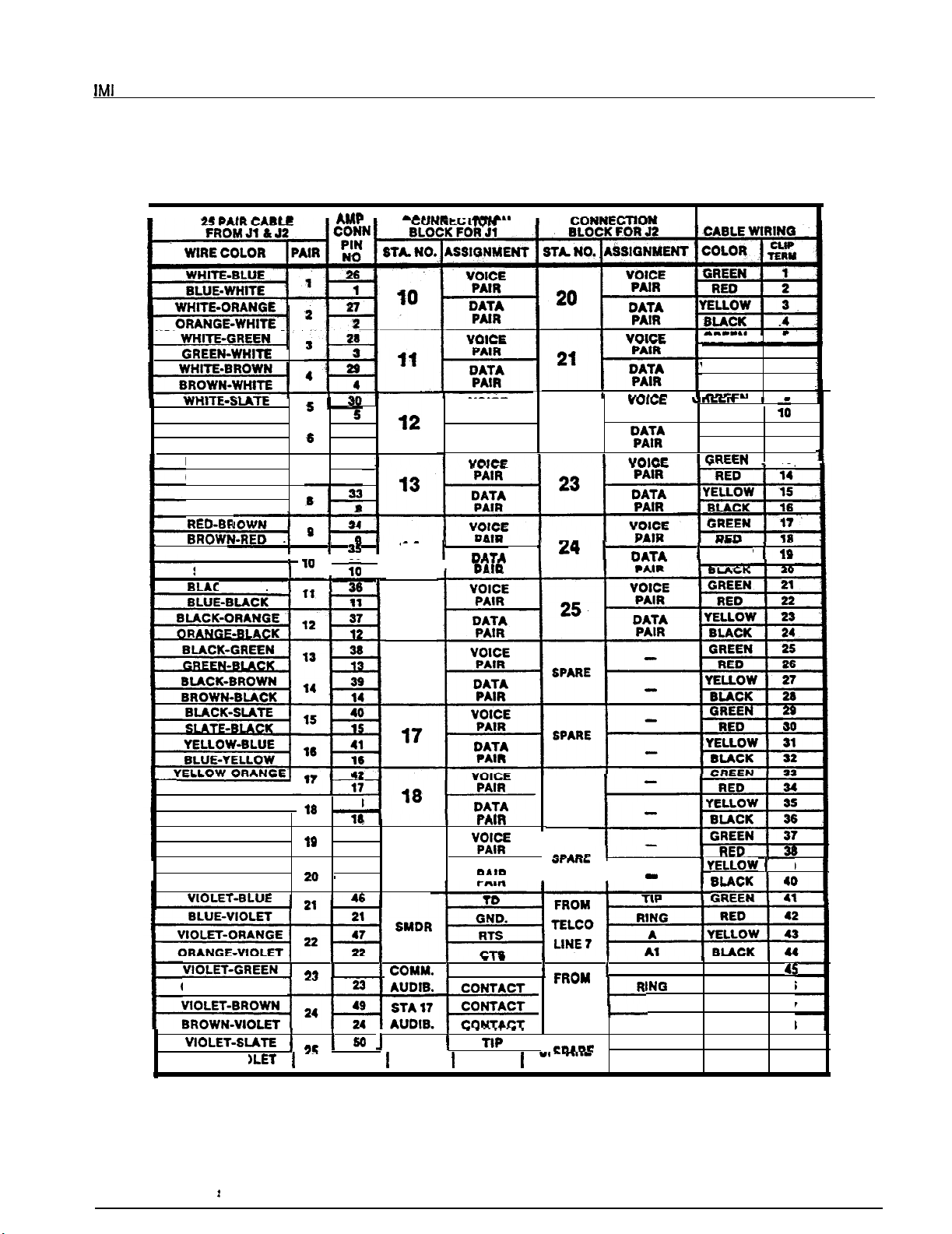
Table 2-l. KSU to Station Wiring
Table 3-l. System COS Programming Reference .
. . . . . . . . . . . . .
. . . . . . . . . . . . . 3-13
Table 3-2. tine COS Programming Reference . . . . . . . . . . . . . . . . .
Table 3-3. Station COS Programming Reference
Table 34. Toll Restriction
. . . . . . . . . . . . . . . .
. . . . . . . . . . . . . . . .
Table 4-1. Station Pairing . . . . . . . . . . . . . . . . . . . . . . . . .4-3
LIST OF ILLUSTRATIONS
Figure 2-l.
Figure 2-2.
Figure 2-3.
Figure 2.4.
Figure
Figure 3-2.
Figure 3-3.
Figure 3-4.
Figure 4-l.
Figure 4-2.
Mounting Dimensions
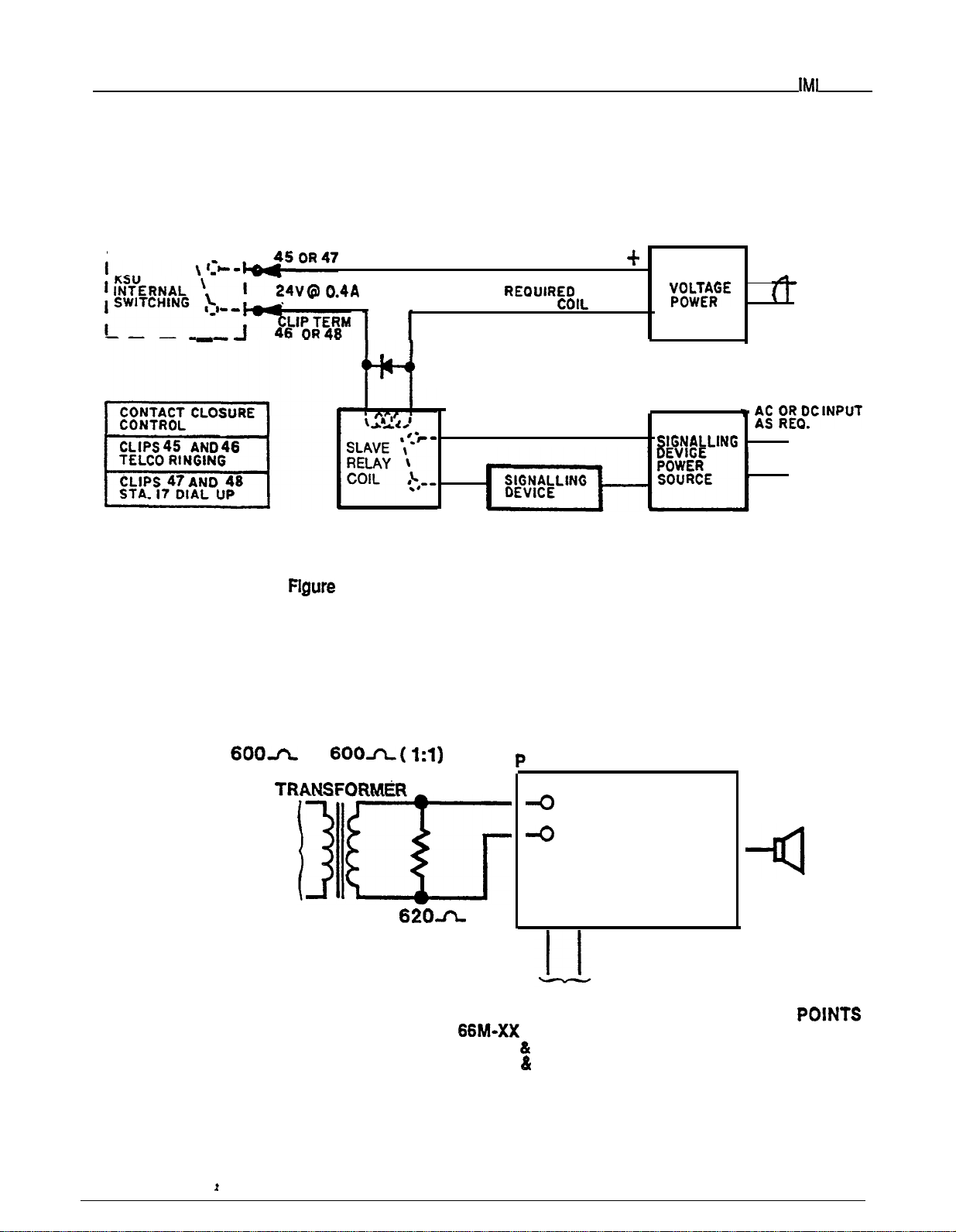
External Signalling
Typical Connection
PA Connections
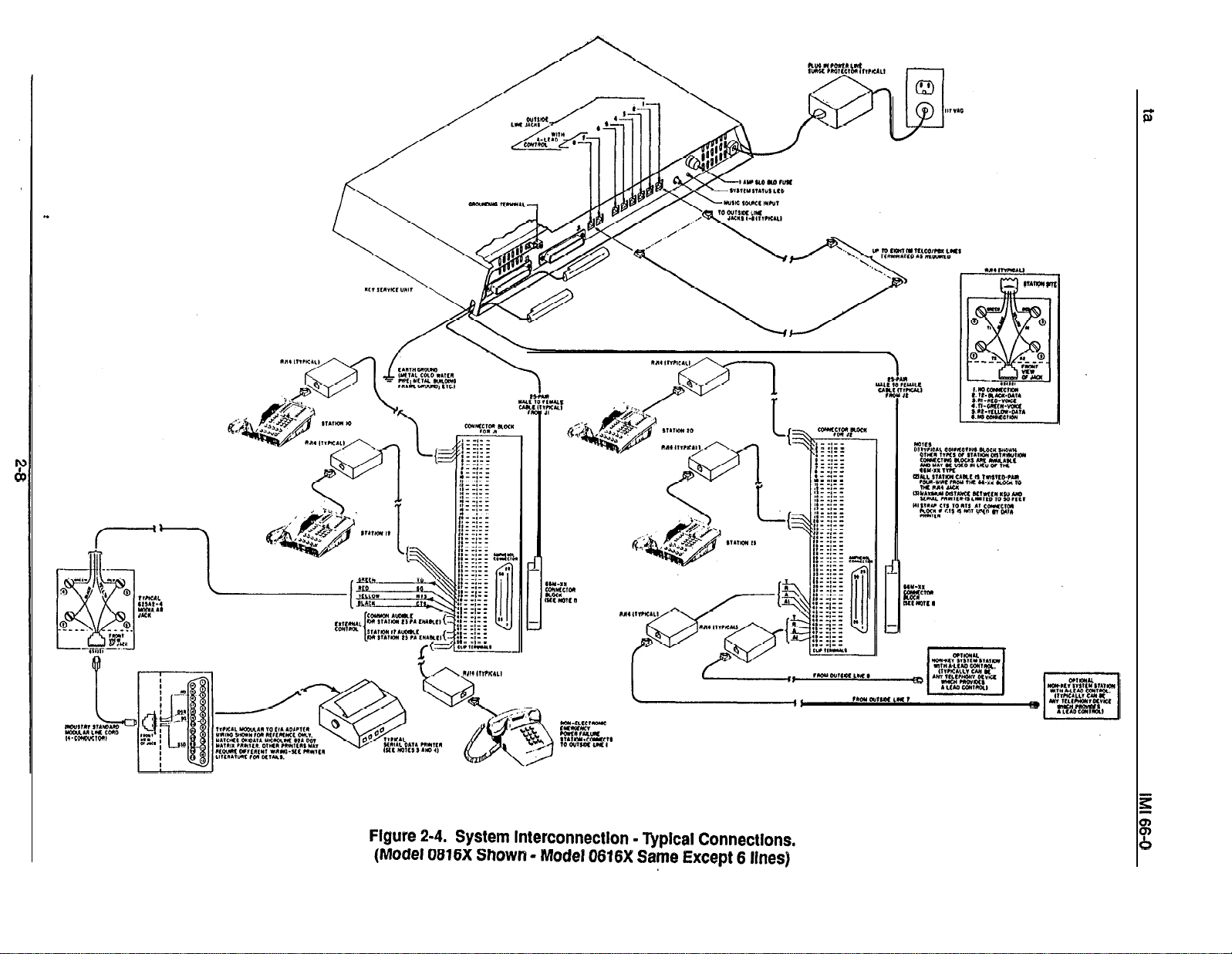
System Interconnection
Station Programming Keys
Station Message Detail Record
Typical COS Printouts
Programming Flow
. :
Failure Analysis Flow Chart
Station Wall Mounting Details
.. ..
...................................................
..............
.
....................
.
......
.....
Format.
.....
................
.3-2
3-l 0
Page 3
CHAPTER 1
INTRODUCTION
Introduction
MANUAL SCOPE
This publication contains installation, programming,
and maintenance information for the following Execu-
Tech electronic key systems and the associated
telephone equipment.
ber, the model number, and the serial number or produc-
tion date of the system.
NOTIFICATION TO TELEPHONE COMPANY
Unless a telephone operating company provides and in-
stalls the system, the telephone operating company
l
Model 0616X
later
l
Model 0816X
This system is fully protected, and therefore the instal-
lation does not require the services of an authorized
agent. However, the installation procedures detailed in
this manual should only be performed by individuals
manufacturing code
all manufacturing codes
which provides the lines must be notified before a connection is made to them. The lines (telephone num
bers) involved, the FCC registration number, and the
ringer equivalence number must be provided to the
telephone company. The FCC registration number and
the ringer equivalence number of this equipment are
provided on the label attached to the KSU.
familiar with general telephone installation procedures.
The end user may perform routine maintenance proce-
dures. such as the following listed ones, but all other
servicing must be performed by factory authorized per-
sonnel
company when final disconnection of this equipment
from the telephone company line occurs.
COMPATIBILITY WlTH TELEPHONE NETWORK
When necessary, the telephone operating company
l
Place or replace any designation strips on the
face of the telephone stations.
l
Replace the line cord or handset coiled cord.
l
Replace complete stations and station handsets.
The handset is a special Comdial type. Other
handset types will not work properly.
provides information on the maximum number of
telephones or ringers that can be connected to one fine,
as well as any other applicable technical information.
The telephone operating company can temporarily discontinue service and make changes which could effect
the operation of this equipment. They must, however,
Relocate the station when it is plugged into the
proper system jacks.
ment changes that would make the system incompatible.
RELATED PUBLICATIONS
01-001, Compliance Requirements To FCC Rules
and Regulations Part 68 and 15
Handling Of Electrostatically Sensitive
Components
GCA 70-011, Station User’s Guide
INSTALLATION REQUIREMENTS
Connection of the electronic key system to the
telephone lines must be through a universal service
order code (USOC)
telephone operating company. If the installation site
does not have the proper outlet, ask the telephone corn
pany business office to install one. The correct outlet
GCA 70-044, Attendant Guide
jack for this system is a type RJ21X.
jack supplied by the
PARTY LINES AND COIN LINES
INSTALLER/USER INFORMATION
Local telephone company regulations may not permit
connections to party lines and win lines by anyone ex-
REGARDING FCC RULES
AND REGULATIONS
cept the telephone operating company.
TROUBLESHOOTING
This electronic key system complies with Federal Communications Commission (FCC) Rules, Part 68.
If a service problem occurs, first try to determine if the
trouble is in the on-site system or in the telephone com-
The FCC registration label on the KSU contains the
pany equipment.
FCC registration number, the ringer equivalence num-
Page 4
Introduction
IM!
66-031
Disconnect all equipment not owned by the telephone
company. If this corrects the problem, the faulty equip-
ment must not be reconnected to the telephone line until
the problem has been corrected. Any
causes improper operation of the telephone network
may require the telephone company to discontinue service to the trouble site after they notify the user of the
reason.
REPAIR
FCC regulations do not permit repairof customer owned
equipment by anyone except the manufacturer, their
the FCC. However, routine repairs can be made according to the maintenance instructions in this publication, provided that all FCC restrictions are obeyed.
RADIO FREQUENCY INTERFERENCE
The electronic key system contains incidental radio fre-
quency generating circuitry and, if not installed and
used properly, may cause interference to radio and
television reception. This equipment has been tested
and found to comply with the limits for a Class A corn
puting device pursuant to Subpart J of Part 15 of FCC
Rules. These limits are designed to provide reasonable
protection against such interference when operated in
a commercial environment.
AUTHORIZATION
that
Operation of this equipment in a residential area may
cause interference to radio and television reception: in
which case the user is encouraged to take whatever
measures may be required to correct the interference.
If this equipment does cause interference to radio or
television reception, which can be determined by tum-
ing the equipment off and on, the user is encouraged to
try to correct the interference by one or more of the following measures: Reorient the television or’ radio’s
receiving antenna, and/or relocate the KSU, the individual telephone stations, and the radio or TV with
respect to each other.
If necessary, the user should consult the manufacturer
or an experienced radio/television technician for addi-
tional suggestions.
booklet prepared by the Federal Communications
mission helpful: “How to Identify and Resolve Radio-N
Interference Problems.” This booklet is available from
the Government Printing Office, Washington DC.
20402. Stock No. 004-000-00345-4.
RINGER
The REN of each line is 0.4B. The FCC requires the installer to
record it at the equipment.
user may find the following
NUMBER
the total REN for each line, and
l-2
Page 5
66-031
installation
CHAPTER 2
INSTALLATION
MOUNTING CONSIDERATIONS
l
The KSU should be attached vertically to any sturdy, flat, surface. It may be vertically rack mounted
if desired.
l
The KSU must be located within six (6) feet of a
proper electrical outlet. The power supply requires
a dedicated 117VAC
AMP circuit, with a third-
wire ground, supplied to a standard (NEMA
electrical outlet.
l The distance between the KSU and the
FCC requirements. A nominal distance of 7 feet is
recommended.
.
The mounting location must be secure and dry and
have adequate ventilation. The temperature range
of the location must be within 32-122 degrees F
50 degrees C), and the relative humidity must be
less than 90 percent non-condensing.
.
If the mounting surface is damp or if it is concrete
or masonry material, a backboard must be attached
to the mounting surface to be used for KSU mounting. Suitable mounting backboards are available
commercially or can be constructed out of
plywood cut to size.
l
Tools and hardware reauired for mountina include:
Fasteners
wood screws
x 1
round
head), toggle bolts, or wall anchors
Screwdriver -to match fasteners
Electric drill
Connecting tool
if prepared holes are required
for fastening wires to a type-
66 connector block.
Crimping tool
for 623-type modular plugs
MOUNTING PROCEDURE
Unpack, and carefully inspect all equipment for
shipping damage. Notify the shipper im-
mediately of any damages found. Verify that
the packages contain all parts and accessories
needed for proper installation and operation.
3.
scale mounting template is supplied in the
packing box. Hold ortape it to the mounting sur-
face, and mark the location of the mounting
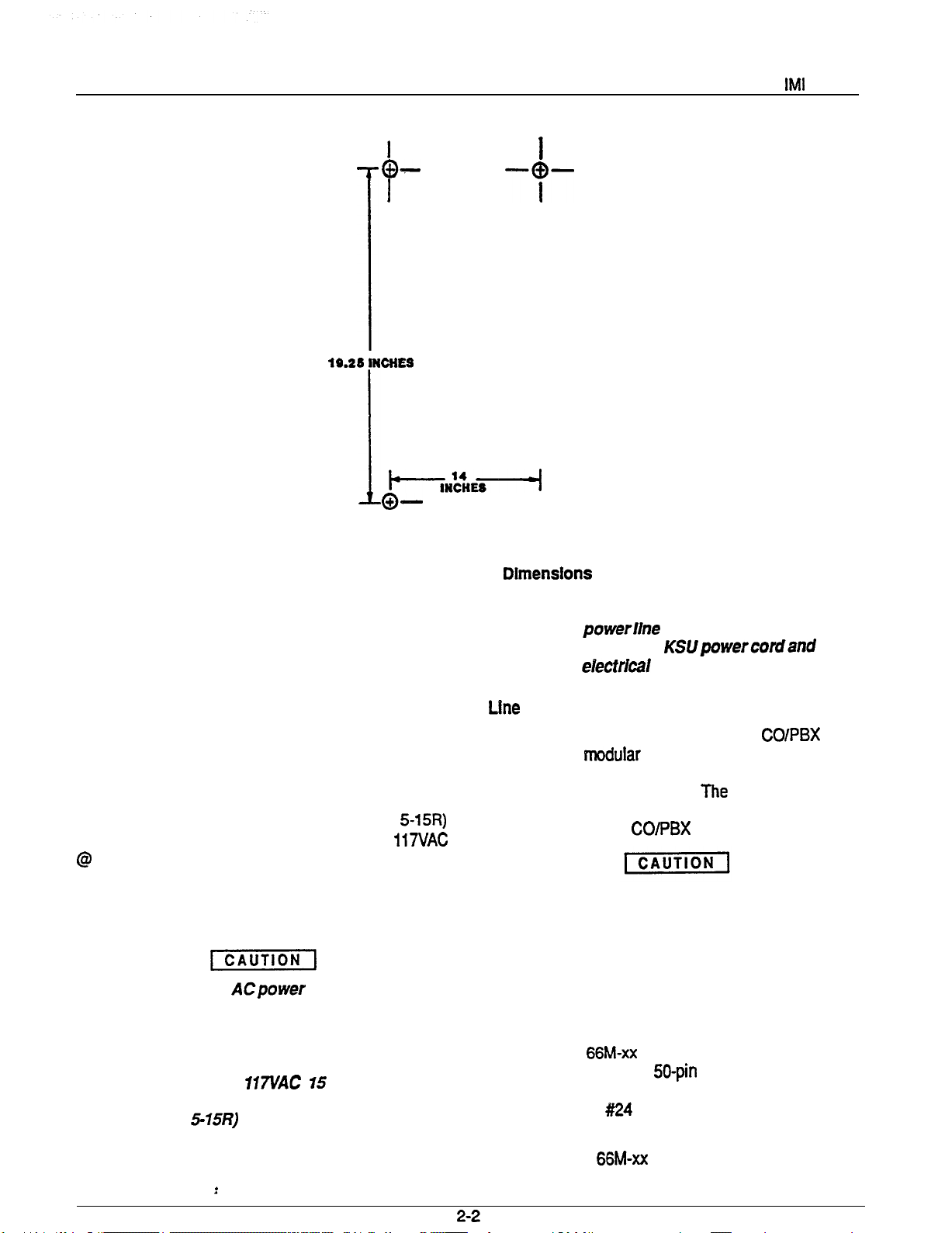
holes on the mounting surface as they are located on the template. The mounting dimensions are shown on Figure 2-l . .
4.
size to accommodate the hardware being used.
If necessary, prepare these holes with inserts,
anchors or other attachment devices as dic-
tated by the type of mounting surface.
Attach the KSU to the mounting surface with
5.
four (4) screws installed through the KSU
mounting flange and into the mounting surface
holes. Note that the flange holes are elongated
with an enlargement at one end. This feature
allows the mounting screws to be partially installed in the mounting surface before the
cabinets are hung on them.
6.
Place the individual telephone stations as
desired and in keeping with accepted industry
and office standards. Currently produced 8
tine Keysets can be wall mounted if necessary
as they are
reversible. Currently
produced keyset models include:
l
l
l
l
l
l
Refer to Chapter 4, Maintenance, for instructions in
preparing a desk/wall reversible station for wall mounting.
Any previously produced keysets which may currently
still be in service can also be wall mounted if necessary.
Use a wall mounting bracket (part number 701032-056)
for this purpose.
2.
If a backboard is required at the mounting loca-
tion, attach it securely to provide a stable
mounting surface for the equipment.
Page 6
Installation
---o--
l
I
Figure 2-1. Mounting
SYSTEM WIRING
System cabling may be routed concealed or visible as
the installation location requires, Good engineering
practices must be observed
codes must be adhered to.
through 2-4 illustrate the system wiring and connection
points for the key system.
AC Power Connection
The AC power is applied to the system by connecting
the AC power cord to the standard (NEMA
electrical outlet which supplies the dedicated 117VAC
The following precautions should be taken to help
prevent damage to the system which could be caused
by an electrical over-voltage condition.
and
all applicable building
Table 2-l and Figures 2-2
l
A plug-in, powerline surge protectof should be
installed between the KSUpowercordand the
AC power eiectrkai outlet.
The KSU interface connections for the COlPBX lines
are individual
connectors and the demarcation point connectors is via
standard modular line cord.
tip/ring loop resistance is 1900 ohms from the KSU
modular jack to the CO/PBX equipment.
To help Insure that foreign voltages, which could
appear on the CO lines, do not damage the system,
verify that gas discharge tubes orsimiiarprotection
devices are installed, and properly grounded, in all
connected CO lines.
l
Do not connect the ACpower cord until the installation has been checked per the SYSTEM
CHECKOUT instructions given at the end of
this Chapter.
l
Employ a dedicated lVL!AC
AMP circuit,
with a third-wire ground, supplied to a stand-
ard (NEMA
electrical outlet for the
AC
power connection.
Statlon Connection
Connections between the KSU and the stations are typically via type 66M-xx connector blocks which are cable
connected to the KSU
maximum distance allowed from the KSU to a station is
1500 feet using #I24 gauge, twisted-pair cable.
If spare conductors exist in the cables that are run between the KSU 66M-xx connector block and the station
jacks. Wiring between the KSU
maximum allowed
male connectors. The
.
Page 7
Installation
jacks, it is a good practice to connect them to earth
ground. Doing this may help prevent them from induc-
ing radio frequency and/or AC interference into the
tern
can be connected to any odd or even station port in the
system per the following guidelines.
The polarity between the individual wires in a particular voice or data pair is not critical; however do
not connect the voice circuits to the data
Cable
Each cabinet-mounted
equipped with a retaining clip. This clip is designed to
secure the matted connection once it is made. The clip
does this by snapping into a slot on the cable-mounted
connector when it is pressed together with the cabinet-
mounted connector. This retaining clip must be pulled
back slightly to un-snap it before the connectors can be
separated.
Console Connection
The optional DSS/BLF console may be installed at any
station port to work in conjunction with a companion station connected to the adjacent port (e.g.; port 10 for station and port 11 for console).
The installed distance limit between the KSU and a con-
sole is the same as that specified for a regular station.
Connect all four wires (voice pair and data pair) of the
console cable to the station connector block.
The voice pair connections of the console can be used
simultaneously to enable a PA port function. Refer to
the paragraph in this chapter headed Area Paging In-
terface
Station PA Port. Per that discussion, wire a PA
male connector is
Power Failure Station Connection
The system provides a tip and ring-pair connected to
line 1 as an emergency power failure circuit. This power
failure pair is available at clip terminals on connector
block J-l as detailed on Table 2-l and Figure 2-4. A
power failure pair is only active durfng a commercial
power failure. An industry standard, single-line
telephone, such as a Comdial model 2500-xx, can be
connected to a power failure pair and used to provide
communications capability until the AC power to the
system is restored.
A-Lead Control Device Connection
The KSU can detect an A-lead
nal when it is applied to lines 7 and 8. An A-lead con-
trol device can be bridge-connected to these lines via
clip terminals on connector block J-2 as detailed on
Table 2-1 and Figure 2-4.
The installed distance between the KSU and the
BLF station must be limited to 1000 feet or less.
The data-line paired station port cannot be used as
a BLF station connection or as a regular station
connection. Data-line pairing is: 1 O-l 1,12-13,
The overload paired station port cannot be used as
a BLF station connection but can be used as a
regular station connection. Overload pairing is: 1
12, 1%13,14-16,15-17, 18-20,19-21,22-24, and
23-25.
A port, paired in either manner with a BLF station,
can be used as a PA port if desired.
AC
(A
and Al) control sig-
connector block clip terminals. Use an audio matching
transformer, as discussed in the referenced paragraph
and Figure 2-3, to provide isolation. If an enable signal
is required with the particular PAequipment being used,
the console and PA equipment connections are limited
to station ports 23 and 25.
The DSS/BLF console port must be programmed as a
before console operation can take place. The console
port must be also programmed as a PA port if a PA
amplifier has been connected to the voice pair as part
of the system.
Busy Lamp Field Stations
An optional keyset is available which is equipped with
a 14 station Busy Lamp Field (BLF). Up to eight BLF
stations can be connected to the system. A BLF station
Data Device Connection
When a serial data printer is used for SMDR and COS
printout, connect it to clip terminals on connector block
J-l as detailed on Table 2-1 and Figure 2-4.
The distance between the device and the KSU can be
up to 500 feet in a quiet electrical environment.
Shielded cable may be required at some sites for long
runs. For longer distances, a limited distance modem
must be used to relay the data communications between the KSU and the data device.
When preparing a cable for connection to a data device,
refer to the manufacturer’s manual for the equipment
being interfaced, and make the following wiring connections:
2-3
Wire the KSU RD line (data from printerto wmmon
equipment) to the device TD (transmit data) output
pin,
Page 8
Installation
Wire the KSU TD (data to device from KSU) pin to
the device RD (receive data) pin.
Wire the KSU SG (signal ground) pin to the device
SG (signal ground) pin.
Wire the KSU CTS (clear-to-send status from
device to KSU) pin to the device FITS (request-to-
send) output pin.
NOTE: The
a
voltage,
Common
Two sets of relay closure drycontact points are available at the J-l station connector block.
l
l
respect to signal ground, in order to send data.
If required, wire the KSU
status signal from the KSU to the device) pin to the
device DSR (data-set-ready) input pin.
If required, wire the KSU PG (protective ground)
tine(s) to the device protective ground pin(s).
Data Format
Configure the data device to match the following data
format and to receive data at the baud rate that is set
by COS programming.
l
l
Baud rate of 110 baud (defautt)
to 300 baud through class of service programming.
(request-to-send
fixed
can be changed
These contact closures track the ringing pattern in both
cases. The contacts are closed during the ringing
period and are
A typical connection is illustrated in Figure 2-2. Refer
to the paragraph headed Area Paging Interface for a
discussion for using these terminals in the
paging function.
Do not exceed a
load on these control terminals.
ments exceed thls
an external slave relay.
CONTROL TERMINALS DIRECTLY TO THE 117VAC
LINE.
System Grounding
and Auxiliary Station interface
One set (J-l connections) provides a dry-contact
closure whenever any of the
connected to the KSU, ring.
The other set provides a dry-contact closure whenever system station 17 rings.
open
during the silent perfod.
amp at 24 volts
If the load
connect the load through
DO NOT CONNECT THESE
lines,
at 48 volts)
It is required that a grounding wire, separate from the
three wire AC line cord, be used. A ground stud is tosulated, solid copper wire between the ground stud and
a reliable earth ground such as a metal cold water pipe
or a building frame ground.
in-
24
Page 9
Installation
Area
Paging
Interface
Station PA Port
A station port can be configured by class of service
programming to be a PA port. As a PA port, it can be
used to couple a station voice path to an external device
(see Chapter 3 for programming details).
The audio input of an external paging amplifier can
be connected to the audio pair of the station port as
illustrated in Figure 2-3.
The audio input connection must be isolated with a
Area Paging Interface - Llne Port
A fine port can be configured by COS programming to
be an AUXILIARY port. As an AUXILIARY port, it can
be used to couple a station voice path to an external
device. This is done from any station with that tine ap-
pearance by pressing the proper line key to select the
AUXILIARY port.
dialed through the AUXILIARY port as needed.
l
600 ohm to 600 ohm audio matching transformer.
Terminate the audio input of the paging amplifier
with a 620 ohm (nominal value) resistor.
l
If station port 23 is programmed as a PA port, the
Common Audible contact points are automatically
reconfigured as PA enable terminals. The contact
closure now occurs when PA station 23 is dialed.
The normal common audible function, as discussed
previously, is disabled as long as station 23 is a PA
station.
A DTMF tone select, zone-paging amplifier can be
employed if desired. If used, the zone-select code must
be dialed after the AUXILIARY port line select key is
pressed.
If station port 25 is programmed as a PA port, the
Auxiliary Station Interface (station 17 audible) con-
tact points are automatically reconfigured as PA
enable terminals. The contact closure now occurs
when PA station 25 is dialed. The normal auxiliary
station interface function, as discussed previously,
is disabled as long as station 25 is a PA station.
If music on hold is to be part of the system, connect a
KX registered music source to the KSU input jack
(phono jack) provided for this purpose. The impedance
of this input is approximately 500 ohms. Level adjust-
ment of the music source may be necessary. This may
be done during system checkout.
The audio input of an external paging amplifier can
be connected to the tip and ring leads of the line
The audio input connection must be isolated with a
600 ohm to 600 ohm audio matching transformer.
Terminate the audio input of the paging amplifier
with a 620 ohm (nominal value) resistor.
2-5
Page 10
Installation
l----1
--
CLIP TERM .
MAX
VOLTAGE CLAMPING DIODE
RECOMMENDED
OUTPUT AS
RELAY
BY
LOW
SUPPLY
2-2. External Signalling-Typical Connection.
AC
.
0
0
TO KSU STATION
PORT 23 OR 25 IF
ENABLE IS REQUIRED
OR TO ANY UNUSED
STATION PORT IF
ENABLE IS
NOT REQUIRED.
TO
AUDIO
A SYSTEM
AUDIO
ENABLE INPUT
QQ
TO KSU EXTERNAL CONTROL CONNECTION
ON
l CLIPS 45
l CLIPS 47
Figure 2-3. PA Connections.
CONNECTOR BLOCK.
46 FOR STATION PORT 23 PA ENABLE
48 FOR STATION PORT 25 PA ENABLE
INPUT
2-6
Page 11
Installation
I
SLATE-WHITE
RED-ORANGE
ORANGE-RED
RED-GREEN
GREEN-RED
RED-SLATE
RED-BLUE
BLUE-RED
SLATE-RED
:K-BLUE
7 7
,
__
Table 2-l.
l
31
6
32
KSU To
I
.
14
I
Station Wring.
I
VOICE
PAIR
DATA
PAIR
_____
22 .
STATION
GREEN 5
RED
YEUDW 7
PAIR
BLACK 6
YEUOW 11
BLACK 12
YEUDW
RED
6
.
l *
15
16
ORANGE-YELLOW1
YELLOW-GREEN ,6
GREEN-YELLOW
YELLOW-BROWN.
BROWN-YELLOW
YELLOW-SLATE
.
SLATE-YELLOW
GREEN-VIOLET
SLATE-VIC RED
--
43
U
19
45
20
48
I 25
19
I
POWER
FAIL
DATA
CONTACT
RING
I
I
,
I
SPARE
TELCO
LINE6
I
I
TIP GREEN
RI
A YELLOW
Al
RED
BLACK
GREEN
29
46
47
46
49
56
2-7
Page 12
Page 13
Installation
CHECKOUT
UNIT
TEST
Check the KSU and telephone installation for proper
operation by performing the following actions.
Resistance
Check
Make the following resistance measurements at the Sta-
tion connector blocks under the following conditions.
l
AC power cord disconnected from electrical outlet.
l
KSU connected to station connector blocks.
l
Stationswired, and wiring punched downon blocks.
l
Bridging clips removed from blocks to isolate sta-
tions from common equipment.
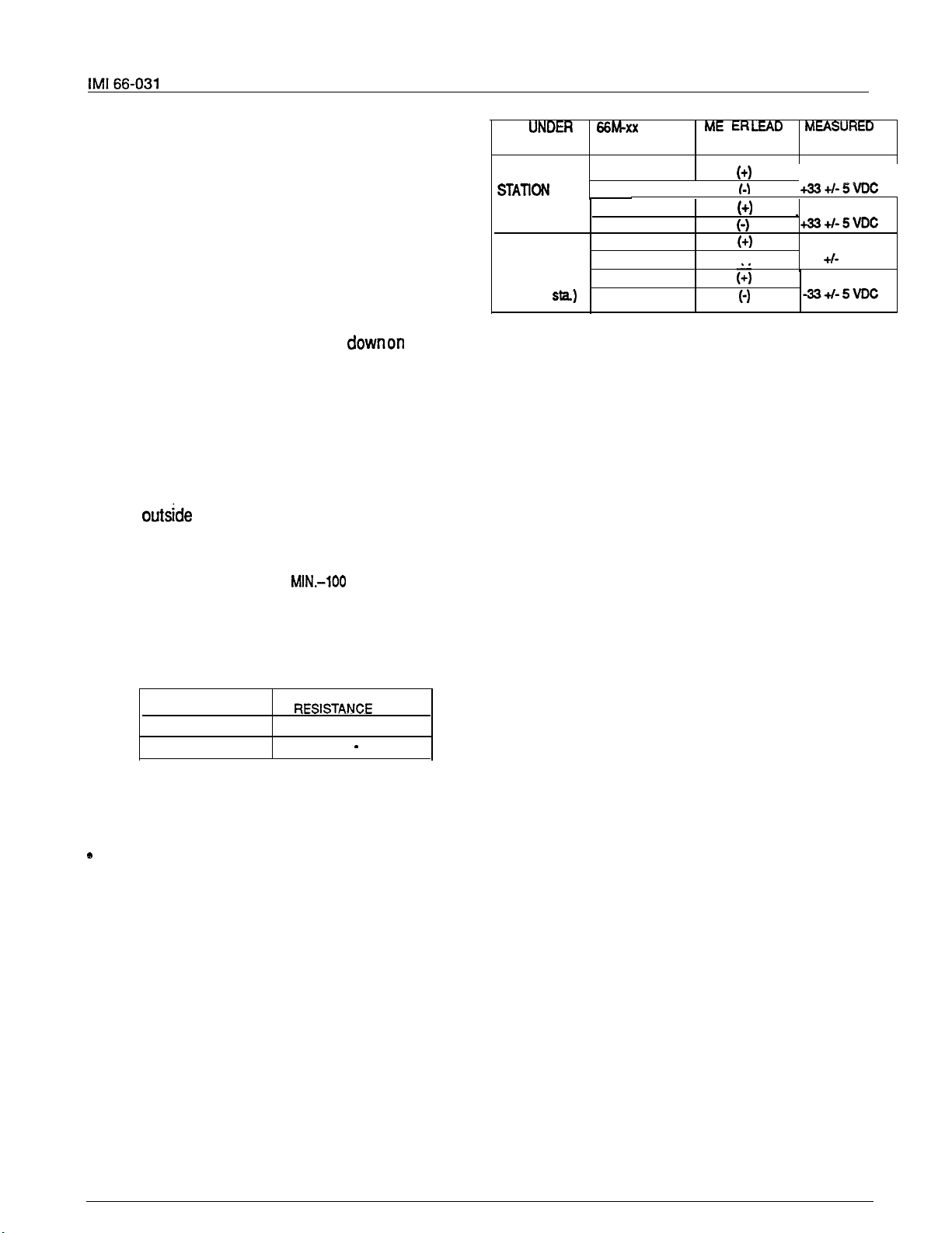
1.
Measure the resistance of each installed sta-
tion
and wiring from the station side of the con-
TYPICAL EVEN
(Repeat for
each even sta.)
TYPICAL ODD
STATION
(Repeat for
each odd
Variant readings can indicate a possible wiring, station,
or common equipment problem.
General Check
1.
nector blocks. Resistance values will vary with
cable length and station type but should be
within the following limits. Readings which are
or station problem.
VOICE PAIR:
DATAPAIR:
2.
Measure the resistance of the KSU and cables
(40 OHMS MIN.-150 OHMS MAX.)
(0.3 OHMS MIN.-100 OHMS MAX.)
2.
from the KSU side of the station connector
blocks. Resistance values should be within the
following limits.
MEASURED KSU
40-50
0.3
0.5
3.
Voltage
MEASURFD PAIR
VOICE PAIR
DATA PAIR
Check
I
CONNECTION POLARITY VOLTAGE
Voice 1
Data 3
voice2
Data 4
Voice
Data
Voice 6
Data 8
I
5
7
LtAD MEASURtD
.
I-) -335VDC
I
Check the red light emitting diode (LED) sys-
tem status indicator.
Be sure that it is on steady. If it is off or flashing, disconnect and reconnect the AC power
plug. If the indicator is still not on steady, refer
to the Failure Analysis Flow Chart found in
Chapter 4.
Refer to the station User’s Guide for operating
information.
Perform a general operational test of the sys-
tem by exercising the systemfeaturesfrom sta-
tion port 10 or 11. Operational parameters are
per the system default conditions as detailed in
Chapter 3 until COS programming is per-
formed.
Once the basic system is verified as operational, perform the COS programming.
Make the following voltage measurements at the station
connector blocks under the following conditions:
Bridging clips installed
l
AC power connected to the common equipment
Measure the voltage across one voice line and one data
line and then across the other voice line and the other
data line for each even and odd station. The measured
voltage must be as follows:
:
2-9
Page 14
CHAPTER 3
SYSTEM PROGRAMMING
GENERAL INFORMATION
Class Of Service (COS) programming consists of
setting the Class Of Service (COS) operating conditions. COS programming is divided into the following three major categories: System COS, tine
COS, and Station COS.
All COS programming commands must originate at
station 10. No COS programming commands can
be accepted from any other station connected to the
system. COS programming causes station 10 to
default to a square condition (line select key 1
selects line
mended that station 10 always remain in a square
conditionto avoid possible programming confusion.
COS programming does not require that a sequential process be followed once the base level
program entry mode has been established except
where noted herein.
The system defaults to preset characteristics when
it is initially powered up or whenever programmed
to do so. If the default characteristics, or any other
previously set characteristics, are satisfactory,
those portions of the programming sequence may
be omitted.
Prior to taking any programming action, record the
system, line and station COS conditions on Table
ter). Also, record all toll restdction requirements on
Table 3-4.
THE PROGRAMMING STEPS MUST BE PER-
FORMED WITH LESS THAN 17 SECONDS OF
DELAY TIME BETWEEN KEYSTROKE OPERA-
TIONS. A delay of longer that 17 seconds causes
the KSU programming mode to time out.
Flgure 3-3 found at the end of this chapter provides
a quick-reference flow diagram of the class of ser-
vice programming requirements.
Programming is the same for both the model 0616X
and 0816X key systems. The only difference be-
tween these two models is the number of lines
which each serves (six or eight).
key 2 selects line 2, etc.). It is recom-
The system can be defaulted to a standard class of
The following system default conditions are set:
BASE LEVEL PROGRAM ENTRY MODE
The first step in a COS programming sequence is to
enter the base level programming mode. Once in
this mode, COS can be set as desired.
entered.
3.
Press
tion that the base level mode is active.
The dial tone will return as a confirma-
CLASS OF SERVICE DEFAULT
service per the following procedure.
1. Press
2.
Press the following keys:
3. Press MONITOR.
All lines are DTMF
Voice signalling attempted first when inter-
com call is made
sec. pause time
2 sec. dial tone recall time
30 sec. recall from hold
All lines private
All lines are CO lines
No toll restriction set
300 msec. held call abandon time
No ringing line preference enabled
No prtme line is chosen
port is disabled
PA port is disabled
No delayed ringing enabled
No access denied
No origination denied
No automatic privacy released
Day and night ringing patterns set as follows:
station 10,
System-wide, all call paging in zone D
Printer port set for 110 baud data rate
Line select keys l-n selects lines l-n
(squared pairing)
7, and 24 all lines
7 4 6
# 0
2. Press the following keys in sequence:
The dial tone stops and a tone burst sounds to in-
:
7 4 6.
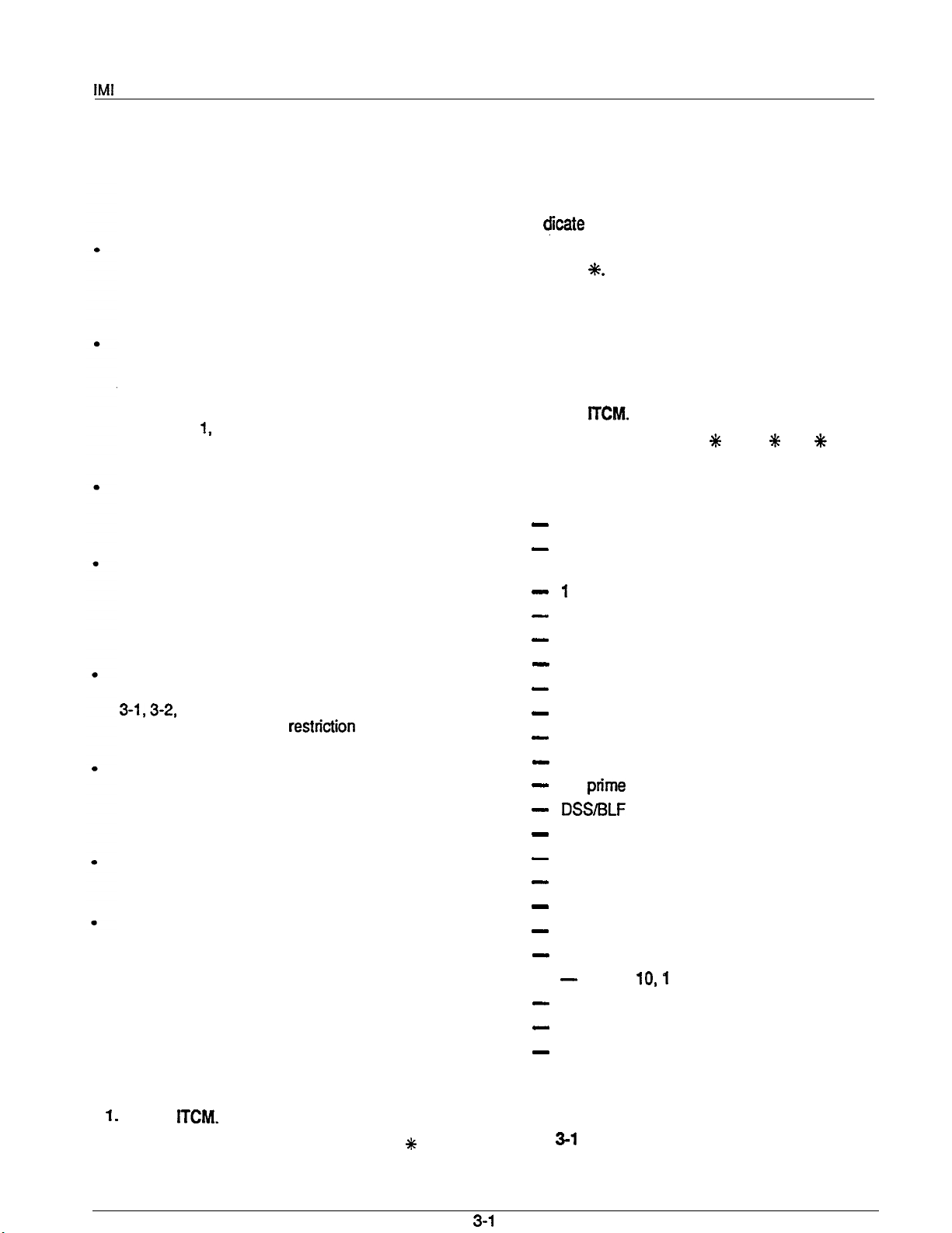
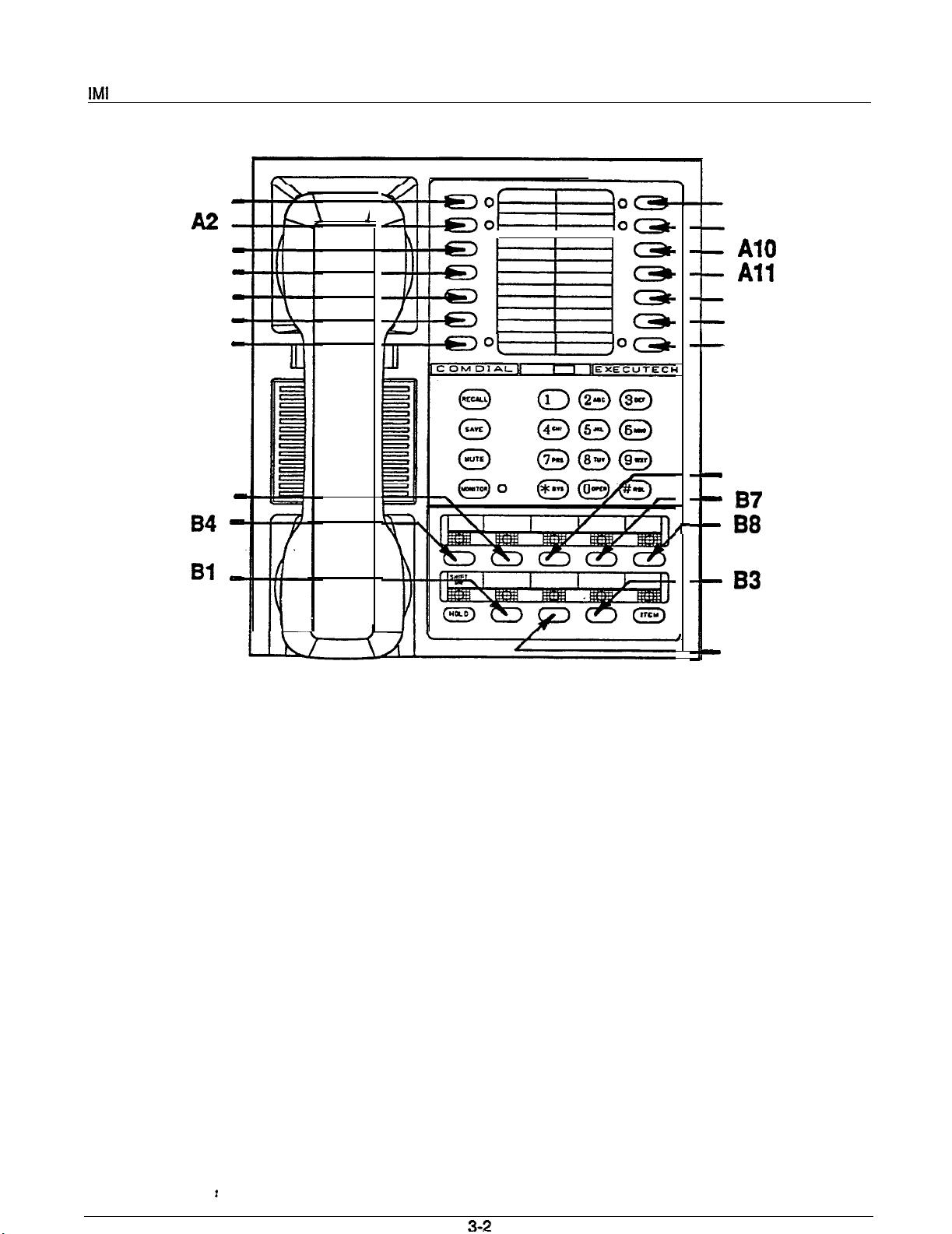
PROGRAMMING KEYS
Figure
out in the following procedures.
illustrates the programming keys called
Page 15
Al -
A3
A4
A5
A6 -
A7 -
B5
0
0 0
0
0
A8
A9
0
0
A12
0
Ad3
Al4
B6
B2
Figure 3-l. Programming Key Layout
Page 16
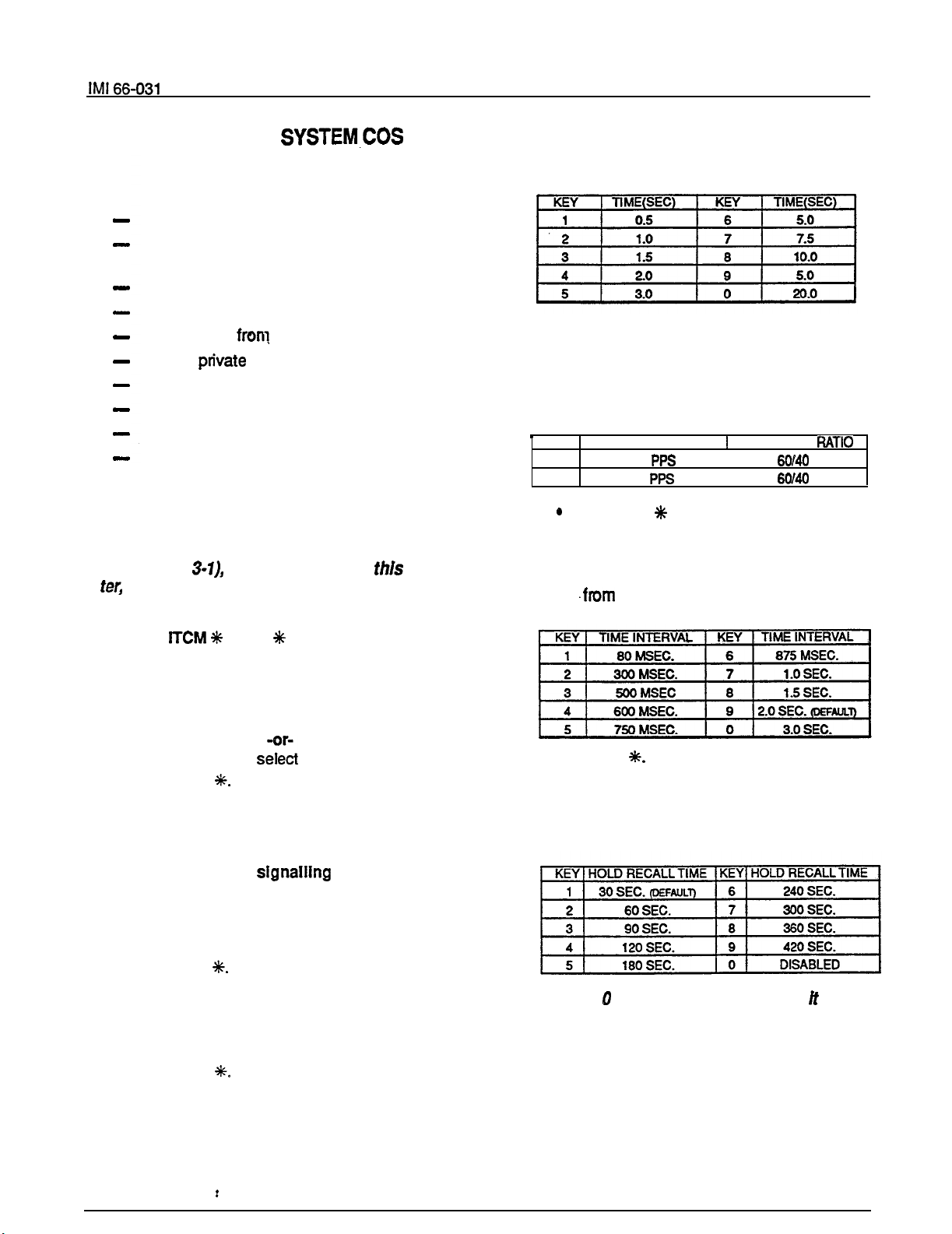
SYSTEM DEFAULTS
All lines are DTMF
Voice signalling attempted first when inter-
com call is made
1 sec. pause time
2 sec. dial tone recall time
30 sec. recall from hold
All lines prfvate
All lines are CO lines
No toll restriction set
Printer port set for 110 baud data rate
2 sec. automatic pause insertion wait time
PROCEDURE
NOTE: Before performing this procedure, turn
to the System COS Programming Reference
Chart (Table
and record all system COS requirements on
it.
locatedat the end of this chap
5. Select pulse dial operatlng characteristics.
l
Press 5. Dial tone will stop.
l
Press keypad key to select operating
characteristic per chart. Tone burst con-
firms selection.
KEY PULSES PER SECOND
1
2
10
20
Press the % key. Dial tone will sound.
6.
Select
flash/dial tone recall time
l
Press 6. Dial tone will stop.
l
Press keypad key to select time interval
BREAK/MAKE
I
interval.
1. Press
2.
Select the
7 4 6
(base level entry)
PULSE/TONE
or TONE ONLY dialing
system default characteristics.
l
Press #. Dial tone will stop.
l
Press 0 to select
l
Press 1 to
l
Press
Dial tone will return.
TONE ONLY.
PULSE/TONE.
NOTE: In addition to setting the dialing mode,
the above action defaults the system, line and
station COS.
3. Select Intercom
first performed
when intercom call is placed.
l
Press Al3 for tone signalling.
-or-
.
Press Al4 for voice signalling.
l Press
4.
Select time interval for programmed pause.
l
Press 4. Dial tone will stop.
l
Press key to select time interval per
chart. Tone burst confirms selection.
l
Press
Dial tone will sound.
l
7.
Press
Select
hold
l
Press 7. Dial tone will stop.
l
Press keypad key to select hold recall in-
Dial tone will sound.
recall
time
interval.
terval from chart.
NOTE: The
program selection makes
possible for an exclusive hold condition, when set
at a station, to place a line on a pennanent hold
thaf cannot be released at any other station.
3-3
Page 17

System Program-
l
Press
Select
toll restriction table entries. Refer to
Dial tone will sound.
programming table (Table 3-4) to preselect entry
requirements.
l
Select table with memory key. The dial
tone will stop when the selection is made.
AlAl
A2A2 22 A6A6
A3A3 33 A7A7
A4A4 44 A8A8
l
Select
11
A5A5 55
mode of table
66
77
88
with keypad key.
Tone burst conforms selection.
l
Select
entry line on table
with memory
key. Action clears any current entry and
causes continuous busy tone to sound.
l
Dial
number for entry line. Press
key
to enter “match anything” digit. Tone
burst sounds after each key is pressed.
NOTE: An entry line can contain a maximum of
16 digits.
When the maximum number of digits
are entered, the system sounds a fast
tone, and steps to the next entrypoint on a table
or to the next table.
If less than sixteen digits are entered on
line, select next entry location with
memory key.
l
Repeat procedure for each desired toll
restriction table.
NOTE: Select an
quired.
This action insures that any previous
line even if no input is re-
entry is cleared. Select a table and then select
each line in the table to clear the table of
entries.
Do not dial any numbers after the entry
line selections.
l Press
9.
Program
10. When the system stores a dialed number for later
the user waits a period of time between digits.
(The length of the stored pause was programmed
in step 4.) To program
11. Press
ming mode.
data speed baud rate
l
Press 3 to set data speed of 300 baud.
for printer port.
-or-
*
Press 0 to set data speed of 110 baud
l Press
l
Press
length of time to
is inserted, proceed as follows:
7 4 6
to enter program-
ming mode.
l Press RECALL..
l
Press keypad key 1 to set wait time to
750 milliseconds.
-or-
*
Press keypad key 2 to set wait time to 2
seconds.
l Press
to exit system COS program-
.
3-4
Page 18

System Programming
LINE COS PROGRAMMING PROCEDURE
LINE DEFAULTS
5.
All lines private
All lines are CO lines
No toll restriction Set
Dialing mode is tone only
300
msec.
held call abandon time
6.
PROCEDURE
NOTE: Before performing this procedure, turn
the Line COS
(Table
located at the end of this chapter,
Reference Chart
and record all line COS requirements on it.
l Press
will sound.
2.
Choose
privacy
l
Press 8. Dial tone will stop. This action
initializes all lines as private. This condi-
tion is also system default value.
l
Press line select key of each line which
is to be non-private.
A tone burst sounds after each selection
for confirmation.
l
Press
Press tine select key (program keys Bl-B6 for
model 0616X or
to be programmed. Dial tone will stop.
7 4 6
status
The dial tone
of each line.
Dial tone will sound.
-B8 for model 0816X) for line
NOTE: Selecting a line forprogramming clears
all assigned toll restriction tables.
7.
8.
NOTE: There are a
programmed on a model 0616X system and a
maximum of eight lines on an 0816X system-
9.
Press memory
keys to assign toll restriction
tables to
KEY
Al
A2
A3 3
A4
TABLE
1
2
4 A8 8
Specify dialing mode per
KEY
A6 6
A6
A7 7
chart
A tone burst will confinn selection.
Press keypad key to restore after hold is aban-
doned.
KEY TIME INTERVAL
8
9
MSEC.
300 MSEC.
Repeat procedure from step 3 for next fine to be
programmed.
of
Press& MONtTOR to exit line COS programming.
Dial tone will sound.
TABLE .
6
with keypad key.
lines
be
4. Specify line type per chart with keypad key. Atone
burst will confirm selection.
3-5
Page 19

STATION COS PROGRAMMING PROCEDURE
System Programming
STATION DEFAULTS
No ringing line preference enabled
No prime line is chosen
DSS/BLF port is disabled
PA port is disabled
No delayed ringing enabled
No access denied
No
denied
No privacy released
Day and night ringing patterns set as follows:
station 10, 17, and 24 all lines
System-wide, all call paging in zone D
tine select keys 1 -n selects lines 1 -n
(squared pairing)
PROCEDURE
NOTE: Before
to the Station COS Programming Reference
Chart (Table 3-3), located at the end of this chap-
ter, and record ail station COS requirements on
1.
Enter the base programming mode:
l
Press ITCM
sound.
2.
Press a two-key sequence on keypad to choose
station port for programming (i. e.,to choose station 11 press 11). Tone burst sounds to confirm
selection. Improper selection results in dial tone.
NOTE: Station port selection defaults the foi-
lowing features:
enable, prime line selection, and ringing line
preference enable. Pius, toil restriction table
assignments are disabled.
3. Configure port as DSS/BLF console
sole port is required).
.
Press RECALL. Tone burst sounds to
confirm selection.
l
Skip this step if DSS/BLF console is not
installed at station port currently being
programmed.
l
If enabled, do not proceed beyond this
step unless port is also to be
programmed as PA port.
4.
Configure port as
PA
Press 9. Tone burst confirms selection.
this procedure, turn
7 4 6
Dial tone will
enable,
port
(if PA port is desired).
port
(if con-
Skip this step if PA port is not desired.
l
Do not proceed beyond this step if PA
port selection
5. Choose prime line or prime
is
made.
Tone
burst confirms selection.
l
Press tine select key for line desired.
-or-
* Press
NOTE: if more than one iine selection key is
pressed, the last one pressed selects the
cep ted prime line.
6. Enable
ringing line preference.
l Press 1.
7. Press memory keys to assign toll restriction
tables to station.
l
At this point, there are no toll restriction
tables assigned.
l
Tone burst confirms each selection.
Skip to step 16 after programming the toll restric-
tion table assignments unless other station COS
programming
l
must be performed.
is recommended that programming steps
8-14 be performed in the order that they
are presented below. In steps 8-14, the
whenever the program selection key is
pressed. This default value is overridden
by the subsequent programming action.
l
During subsequent reprogramming of a
station, any step, controlling a feature
that does not need to be reprogrammed,
can be skipped over thus leaving the current COS condition intact. It is not necessary to return to the base programming
mode to shift from one programming step
to another except when performing step
15. Program step 15, which sets the line
appearance to key assignment, must be
followed by a return to base level
programming (press
8. Program
NOTE: A
direct ringing
assignments.
may be programmed for direct
ringing or delayed ringing but not for both ring-
:
3-6
Page 20

System Programming
features.
delayed rtngtng
dtrect rtngtng
selected, delayed rtngtng wttt
be disabled.
Press 2 for direct tinging.
sounds to confirm.
condition of no ringing enabled
now set on all iines.
Press line select
B6 for 0616X and
each line on which direct ringing
desired. Tone sounds after each selection.
9. Program
10. Choose
11. Program
12.
Set access to
13. Set night ringing status.
delayed ringing
l
Press 3 for delayed tinging. Tone burst
sounds to confirm.
l
Press Iine select key (program keys
B6 for 0616X and
each line on which delayed n’nging is
desired.
l
Tone sounds after each selection. Delay
time is 15 seconds.
access
Press 4. Tone burst sounds. Defauft
condition of access not denied set on all
lines.
l
Press line select key (program keys
B6 for 0616X and
each line on which access is to be
denied.
l
Tone burst sounds after each selection.
call origination denled
l
Press 5. Tone burst sounds. Default
condition of call origination not denied set
on all lines.
l
Press line select key (program keys
B6 for 0616X and
each line on which call origination is to
be denied. Tone burst sounds after each
selection.
privacy release.
l
Press 6. Tone burst sounds. Defauit
condition of no access to privacy release
set on all lines.
l
Press line select key (program keys
B6 for 0616X and Bl -B8 for 0816X) for
each line on which access is to be
denied. Tone burst sounds after each
selection.
l
Press 8. Tone burst sounds. Defauit condition of no night ringing
lines.
Press line select key (program keys
B6 for 0616X and
each line on which night ringing is
desired. Tone burst sounds after each
selection.
setected after
Tone burst
key
(program
-B8 for 0816X)
assignments.
-B8 for 0816X) for
status.
-B8 for 0816X) for
-B8 for 0816X) for
-B8 for 0816X) for
keys
is
status.
be set on all
for
14. Set all-call and zone paglng
capability. Default
value is all-call at all stations in system.
l
Press 1. Tone burst sounds. Clears sta-
tion from paging zones A, B,
l
Press ITCM to clear station from atl-catl
and C.
(if required).
l
To assign reception by zone,
l
Press line select key for zone A
l
Press tine select key 2 (B2) for zone B
l
Press line select key 3 (B3).for zone
l
Press line select key 4 (84) for all-call (if
C.
it was previously cleared).
l
To enable origination by zone,
l
Press line select key 5 (B5) for zone A
.
Press line select key 6 (B6) for zone B
l
Press line select key 7 (B7) for zone C
l
Press line select key 8 (B8) for all-call (if
it was previously cleared).
NOTE:Step
a
15.
to bass level.
Set
appearance to key assignment if cur-
tmmedtapty fottowedby
rent settings are not correct. System default configures line appearance to key assignment so that
ment has tines l-6 assigned to keys Bl-B6 for
model 0616X, and lines l-8 assigned to keys
B8 for model 816X.
l
To re-assign line/key configuration,
l
Press 7. Tone burst sounds.
l
Press Gne key
Tone burst
sounds.
l
Press keypad key
for
number of line
6). Tone burst sounds.
l
Press next line key and keypad key com-
bination. Repeat for each line. All iine
select keys can be programmed to select
same tine if such a condition is desired.
l
To disable line select key and indicator
tight for any lines which are unassigned
to a particular station,
l
Press line select key for unassigned line.
l Press 9.
l
Repeat for each unassigned line.
16. Press % to return to base programming mode.
17. Repeat steps 1 through 16 for each station connected to the system.
18. Press MONITOR to exit programming
mode.
Page 21

SMDR
COS PRINTOUT
SMDR
PRINTOUT
A data printer can be connected to the system to be
To obtain the COS printout,
l
used for printing station message detail recording
(SMDR) information. The SMDR data is provided
automatically as it is generated. No intervention is
required to obtain the printout. The data is formatted as shown in Figure 3-2. Either an 80
column or a 40-column printout line can be
selected through the system COS programming.
l
The COS printout will begin immediately.
COS PRINTOUT
When a data printer is connected to the system to be
used for printing SMDR data, it can be commanded
from station 10 to also print a record of the current
COS configuration. Partial or complete printouts can
be obtained. When the printer is being used to obtain
a COS printout, the SMDR printout is temporarily
halted; however, SMDR data collection is continued
by the system during a COS printout operation. If
more than two calls are logged for any one tine
during the halt, call records may be lost. Typical COS
printouts are shown in Figure 3-3.
To abort printout,
l
To exit COS prfntout mode,
l
Press ITCM
PRINT SYSTEM AND LINE COS PLUS TOLL RESTRICTIONS
7 4 6
(base level if not active)
Press memory key to select type of printout desired.
Press memory key A9.
Press
MONITOR.
3-8
Page 22

STATION NUMBER
I-
MONTH/DAY/YEAR
40 COLUMN
PRINTOUT
LINES
1
2
NOTES
1. CARRIAGE RETURN AND LINE FEED IMMEDIATELY
LAST PRINTED CHARACTER ON EACH
INITIATE TIME-HOUR : MINUTE
(24 HOUR REAL TIME CLOCK)
[CARRIAGE RETURN!
-,
1 I-
J
DIALED DIGITS-UP TO MAXIMUM OF 32
(ACCOUNT CODES ARE ISOLATED BY l OR # SYMBOLS
Flgure
9782200
OUTGOING CALL
(WITH ACCOUNT CODES)
AC POWER FAILURE AND
RESTORATION
24 2
l *
Station Message Detail Record Prlntout Format
Page 23

System Programming
SYSTEM COS
PAUSE TIRE 2.0 SEC
PULSE DIAL 20 PPS
FLASH TIME 720 MSEC
HOLD RECALL 240 SEC
LINE
LINE PRV TYPE PU- HOLD TOLL
RLS LSE.SOMS
1
2
3
4 x
5 x
6
7
8 X
STATION 13
TOLL RESTRICTION
LINE
DELAY RING X
NITE RING
ACCESS DENY
ORIGIN DENY
PRIVACY
AUX
NONE
x
x
P.A. ENABLE
PRIME LINE
12345678
RING X
TABLES
123 6
123 6
123 6
123 6
X
X
123
1
456
456
78
TOLL RESTRICTION TABLES
TABLE
11
2 0
3
4
TABLE 2 ALLOW
1 17034344664
2 17039493113
3 1985
4 1831
TABLE3
1 8313
2 5891
3
4
TABLE 4 DENY
1 91
2 90
TABLE 5 ALLOW
1 91804
2 917034341133
3
4
TABLE6 ALLOW
1 1800
2 91800
1
DENY
ALL CALL
GROUP
BUTTON
LINE NO. 2 3 4 1 6 7 8 5
RECEIVE
ABCD
X
12345678
ORIGIN
ABCD
Figure 3-3. Typical COS Printout
(Model 0616X Shown. Model 0616X same except six lines)
X
3-10
TABLE 7 DENY
11
2 2
3 3
4 91985
TABLE 8 ALLOW
14
2 5
3 6
4 17039491234
Page 24

System Programming
SYSTEM CLOCK INFORMATION
THE CLOCK
1.
Press ITCM, then dial
2.
Dial clock date with keypad keys.
l
Values less than 10 must be dialed as
#.
ox.
l
Hours must be expressed in 24-hour format.
.
Enter: YEAR MONTH DAY HOUR
MINUTE
Example: 8808061530 (August
PM)
3. If SMDR printer is installed and operating, clock
date will be printed as illustrated in following typical example:
01/08/86 16:00
4. Reset minutes setting, if necessary, as follows:
l
Repeat step
l
Dial new digits, and press #.
l
A new clock date printing will occur.
CHECKING THE TIME SETTING
A printing of the current clock date can be obtained
from station 10 whenever needed as follows:
l
Press ITCM and dial
# #.
A clock date printing will automatically occur once
each 24-hour period. This daily, automatic printing
will formatted as follows:
(current date and
hours)
POWER
The system clock will continue to run for at least 30
minutes after AC power has been removed form the
system. If power is restored within the 30-minute
backup period, the following.printing sequence will
occur:
OFF
TIME
iiR:Mti
(time of power outage)
If power is not restored within the backup period, the
following printing sequence will occur when the
power is restored.
CLOCK
The clock will begin running from the default date. It
must be reset to the current date per the instructions
above.
HR:MN (time of poker return)
VALID
(default clock date)
3-l 1
Page 25

66-031
System Programming
SYSTEM SPEED DIAL PROGRAMMING
Ten (10) system speed dial numbers can be stored
from station 10 for use at all stations in the system.
To store speed dial numbers,
l Press
l
Perform the following steps:
l Press SAVE.
l
Press line select key (program keys
l
.
to identify line to be preselected during opera- 3
tion (otherwise system will pick prime line or
last line used).
Dial speed dial number from keypad (up to
31 digits).
Dial 1
l
Press HOLD to store pause if required.
0, #, and
as required.
Press RECALL to store flash if required.
Repeat the preceding steps for each number
to be stored. 9
To end procedure,
l Press MONITOR
SYSTEM SPEED DIAL INDEX
(enter programmed numbers)
1
2
4
5
6
7
3-12
Page 26

System Programming
Table
System COS Programming Reference
PROCEDURE
Note: Circle the record values at right
before performing the procedure given below.
BASE
LEVEL ENTRY
.
.
.
Press 0 for tone dialing
. Press
.
3. FIRST ATEMPTED INTERCOM SIGNALING MODE
Press Al3 for tone signalling.
. Press Al4 for voice signalling
. Press*
. Press4
. Press one key
pulse/tone dialing
FOR PROGRAMMED PAUSE
RECORD
(Shading Denotes Default Value)
Note: Circle the desired value
for the system being programmed.
PULSE/TONE SWITCHABLE
. . . . . . . . .
. . .
. . ..: :..
TONE
SECONDS
0.5
1.5 1 2.0 1 3.0 5.0 7.5 10. 15.
I
KEY 1 1 1 2 1 3 1 4 1 5 1 6 1 7 1 8
SEC.
. Press
5.
PULSE DlAL CHARACTERISTICS
. Press5
. Press
. Press
.
6. HOOKSWITCH FIASHIRECALLTIME INTERVAL
. Press6
KEY
SEC.
. Press one key:
. Press*
7. HOLD RECALL TIME INTERVAL
. Press7
. Press one key:
KEY 1 1
SEC. 30 80 90 120 180 240 300 360 420
. Press
10 PPI and
PPI and
1 1
2 1 3
PPI AND MAKE/BREAK
1.0 1.5 2.0 3.0
4
5
6
7 1 8
9
9
0
SECONDS
90 1120118012401300
0
3-13
Page 27

66-031 System Programming
TOLL RESTRICTION
.
Set system toll restriction requirements per instructions
given on Table 3-4
9. SMDR DATA SPEED BAUD RATE
.
.
Press
. Press1
.
Press
baud
sec.
I
If a timeout occurs during the programming sequence, perform base level entry again
and proceed at any program step.
Record
toll restricbn data on table
Page 28

66-031
System Programming
Table 3-2. Line COS Programmlng Reference
PROCEDURE
the information In the box at right before
performing the pfugram pfucadwes givan below
BASE LEVELENTRY
.
Press ITCM
PRNACY STATLJS
.
Press 6. All line6 private
.
Press keys for non-private.
.
.
. Press*
3. SELECT LINE FOR PROGRAMMING
.
Press 81-88 (model 0816X)
.
Press
4. SPECIFY LINE TYPE
.
5.
ASSIGN TOLL TABLES TO LINE
. Press
746
(model 0616X)
= Auxiliary Line
keys:
RECORD
Check each line number block for rhe fine featwu that is
in the calling number and locaffon status.
NON-PRIVATENON-PRIVATE
I
I
6. DIALING MODE OF LINE
.
Press 6 = pulse/tone
.
Press 7 = ton8
7. ABANDONED HOLD RECALLTIME
.
. Press
8. SELECT NEXT LINE FOR PROGRAMMING
.
Press Bl-B8 (model 0616X)
.
Press
9. END LINE
. Press S MONITOR
NOTE:
a timeout occurs during the
dialing
(model 0616X)
PROGRAMMING
RESTRICTIONRESTRICTION
CALLING NO.CALLING NO.
Change page
Page 29

System Programming
Table 3-3. Statlon COS Programming Reference
(Copy this sheet as required)
PROCEDURE
2.
. Press RECALL
4.
PA PORT
right before
RECORD
Enter lnfotmstion or circle desin?d
INTERCOM NUMBER
(3
below before
. . . .
..:..:c..
. . . . . . . . . . . .
. Press4
. Press6
.
Press Bl-B6 (model D616X)
.
Press
(model 0816X)
(0816X)
(4
Page 30

66-031
PROCEDURE
System Programming
Table 3-3, STATION COS PROGRAMMING REP ERENCE (Continued)
(Copy this sheet as required)
or enter the
14. ALL
.
.
.
Dial
. Dial
Press #
Press keys:
Press keys:
(0616X)
used key and light
at right
ZONE PAGING
to clear allcall.
= receive A. B, C, and all-call
= originate A. B. C and allcall
. Press*
17. PROGRAM NEXT
.
Repeat procedure from step 2
18. END
. Press MONITOR
sequence, perform base level entry again and
proceed at any progmm step.
a timeout occurs during the
3-17
Page 31

Table
Chanae
Toll RestrIctIon ProgrammIng Reference
TABLE ENTRY PROCEDURE
Determine the types of dialing restrictions which
must be imposed on the system.
this includes access codes which result in toll charges,
and certain local numbers as desired.
If the restricted dialing codes will be imposed consistently on most or all stations in the system, list
them on one or two tables. If wide variation in the
dialing restrictions is planned, spread the listing
out across several tables.
3.
Strategically group the listings on the tables so
that a list of restrictions can be applied to a particular station or group of stations.
4.
Designate each table as a DENY table or as an
ALLOW table. The numbers entered in a DENY
table are prevented from being dialed. ALLOW
tables take precedence over DENY tables.
Therefore, an entry in an allow table will provide
an expticit exception to an entry in a DENY table.
Note that the system always permits the dialing of
any number not explicitly denied.
6. Since it is important that emergency numbers
never be restricted, always create an allow table
tables that have been created.
7. If the system is installed behind a PBX, include an
access code as part of every table entry.
8. Once these tables are completely filled out, enter
the restriction pfanning tables on the line, and station programming reference charts to record the
planned toll restrictions for the system.
PROGRAMMING PROCEDURE
1.
Select toll restriction table
KEY
Al
A2 2 A6
A3 3 A7 7
A4 4 A8 8
2.
Select table type
TABLE KEY
1
A5
TABLE
5
6
Example A:
Provide a simple and broad toll
restriction format by creating a DENY table with
two entries: ENTRY (1) = 1 ENTRY (2)
0.
This format prevents all long distance and
operator calls.
Example B: Prevent the dialing of all numbers
within the (804) area code, while allowing the
dialing of one specific number within that area
code, by entering 1804 in a DENY table and
18049782200 in an ALLOW table.
5.
Enter the # character in place of a particular digit
to condense a range of numbers into one entry.
The # character is a “match-anything” digit, and
can be included in an entry in either a DENY table
or an ALLOW table.
Example
A:
If
and 397 dialing
is to be prohibited, list one entry of 3#7 on a
DENY table to cover them all.
Example
B:
Since area codes typically have
a 1 or a 0 as a middle digit, prevent long dis-
tance calls to those area codes by entering
3.
Select entry line
4.
Dial entry number (16 digits max). Press
enter “match anything” digit.
5.
Repeat procedure for each table.
6.
Press
MONITOR.
key to
3-18
Page 32

TOLL RESTRICTION TABLE 1
TYPE: ALLOW DENY
ENTRY
ENTRY NUMBER (16 MAXIMUM)
System Programming
TABLE ASSIGNMENT: LINES
TOLL RESTRICTION TABLE 2
TYPE: ALLOW DENY
ENTRY
ENTRY NUMBER (16 MAXIMUM)
I7
STATIONS
I I I I I I I I
TABLE ASSIGNMENT: LINES
TOLL RESTRICTION TABLE 3
TYPE: ALLOW DENY
ENTRY ENTRY NUMBER (16
TABLE ASSIGNMENT: LINES
STATIONS
STATIONS
MAXIMUM)
I
TOLL RESTRICTION TABLE
TYPE: ALLOW DENY
ENTRY
ENTRY NUMBER (16 MAXIMUM)
I
TABLE ASSIGNMENT: UNES
TOLL
ALLOW DENY
ENTRY
I
TABLE
,
I
I
ENTRY NUMBER (16
5
I
I I
MAXIMUM)
I
I I
I
I I I
TOLL RESTRICTION TABLE
TYPE: ALLOW
ENTRY ENTRY NUMBER
TABLE ASSIGNMENT: LINES
DENY
4
STATIONS
MAXIMUM)
TOLL RESTRICTION TABLE
NPE: ALLOW
ENTRY
I
TABLE ASSIGNMENT: LINES
3-19
8
DENY
ENTRY NUMBER (16 MAXIMUM)
STATIONS
I
Page 33

NG KEY LAYOUT
EXECUTECH MODELS 0616X, 0816X
CLASS OF SERVICE PROGRAMMING
-SYSTEM
AS
616X
SEE
-AT ENTRY T
AS
LINE
STATIONS. BY
RECEIVE.
Flgure
LINES.
TO
EXT.
LINES
616X KEY
A
9
NO
AT
TO
C.
NO
KM
m LINE
m
USES
TO
NO
REMAIN INTACT.
TO
ONLY SPECIFIES
IS
LINE, NO
NO
Programming Flow Dlagram
Page 34

CHAPTER 4
MAINTENANCE
Maintenance
TECHNICAL ASSISTANCE
AND REPAIR SERVICE
right side of the KSU cabinet. Always replace this
fuse with one of the same value
equipment damage could result.
Technlcal Assistance
Should you expen’ence difficulty with installation,
checkout, or programming, and have made an at-
System Status indicator
tempt to isolate the problem using information
provided herein; or should you encounter problems at
a later date which cannot be resolved by referring to
this manual, call the Comdial Technical Service staff.
They can be reached between the hours of 8:00 AM
and 8:00 PM Eastern time, Monday through Friday.
The red LED located near the fuse holder is the sys-
tem status indicator. This indicator should turn on
steady when AC power is applied to the KSU. If the
indicator flashes after power up, it could be indicating
a processor failure. Unplug and reconnect the AC
power to the KSU and observe the LED indication. If
Technical Services: l-800-366-8224
When calling for technical assistance, you should be
at the job site and you should have in your possession, as a minimum, an accurate volt-ohm meter and
it still shows a flashing indication, refer to Figure 4-l.
Station Self Test
Exercise the station self test feature as follows:
a copy of this manual.
Repair Senrlce
If your KSU or an individual station needs repair, it
may be returned to Comdial. Comdial will, at their op
tion, either repair the defective equipment or replace
it with a remanufactured unit. This repair will be done
for a fixed charge. For information on this charge,
please call or write to the address given below.
Comdial
Charlottesville, VA 22906
Attention: Repair Department
Telephone: (804) 978-2400
When returning equipment for repair, pack it carefully
to prevent damage. Any damages during shipment
will be the responsibility of the purchaser. The equip-
ment should be shipped freight or postage prepaid.
The shipping address is:
Comdial
1180 Seminole Trail
Charlottesville, VA 22901
Attention: Repair Department
and type;
FAILURE ISOLATlON
1.
Disconnect the line cord at the station base.
NOTE:
EVEN STATION WILL BE DISABLED DURING
TIME THAT THE
BEING DISCONNECTED OR RECONNECTED.
2.
Press and hold the MUTE key, and reconnect the
line cord to the station connector. The station will
automatically perform a
the MUTE key as soon as the test begins. The
sequence of the test is as follows:
l
The tine select indicators will light in se-
quence from 1 to 8.
l
The intercom select indicator will light.
l
The speaker indicator will light.
l
All indicators will turn off in the same sequence.
l
ringer volume control is set to the
medium or high volume setting.
3.
Replace any station that does not pass the Self
test.
ADJACENT ODD OR
CORD IS
test routine. Release
Be sure that the
FUSE LOCATION
The KSU is protected against short circuit damage by
Test the DSS/BLF Console for proper lamp operation
per the following procedure.
a fuse located in the primary of the AC transformer
winding. The fuse is a 1 amp,
SLO-BLO type
fuse. The fuse holder is located near the top of the
Change page
4-d
1. Disconnect the console line cord plug from the
fne.
Page 35

66-031
Maintenance
Press and hold the station 10 select key while
2.
reconnecting the line cord plug to the line.
IMPORTANTNOTE: THE COMPANION STATtON
WILL BE DISABLED DURING THE
THE CONSOLEIS BEING DISCONNECTED AND
RECONNECTED.
Release the station 10 select key, and note
3.
the BLF indicators will each
beginning with the station 10 indicator. The in-
dicators will then turn off and the console will become operational.
turn
on in sequence
Paired Stations
. .
ne
All stations are even/odd paired on the data lines as
shown in Table 4-l. Station 10 is paired with station
etc. If erratic light indications or ring signals occur
at a paired station, an open data pair at either station
may be the fault. A station with an open data line
may work properly on a short loop but fail on a long
loop. Test the station wiring per the checkout procedure given in Chapter 2.
Overload Paultlg
. .
that
Failure Analysis
Figure 4-l details a failure analysis flow chart to assist a service technician in isolating a failure in a
defective system. One way to isolate a failure is to
substitute a known good assembly for a suspected
one, This is the recommended failure isolation
method to use with the system.
Connecting and disconnecting stations
does not affect the stored station auto/speed dial
memory data. This data is stored in the KSU memory
and not at the individual stations. Replacing the
KSU, however, causes all stored memory to be lost.
This includes all memory dialing numbers as well as
all COS programming data.
Table
Station Pairing
to the
system
All stations are paired as shown in Table 4-l for overload current protection. If a fault occurs which
causes more than 300 ma. of current to be drawn, the
paired stations are disabled by circuit action. Disconnect the disabled stations and reconnect them one at
a time
to
isolate the faulty one.
4-2
Page 36

FAILURE
.
PERFORM
SELF TEST
YES
YES
INPUT FOR FAILED
UNUSED TELCORSX
JACK ON PSX
REPLACE KSU AND
PERFORM
Page 37

Index
66-031
.
A
A-LEAD CONTROLDEVICE CONNECTlON
AC POWER CONNECTION
ACCESS DENIED
ALL CALL PAGING
AREA PAGING INTERFACE
AREA PAGING INTERFACE
BASE LEVEL PROGRAM ENTRY MODE
BUSY LAMP FIELD STATlONS
...................
...............
..................
UNE PORT
STATlON PA PORT . .
..............
............
C
.....................
CALL ORIGINATION DENIED
CHECKOUT
CLASS OF SERVICE DEFAULT
COMMON AUDIBLE AND
CONNECTION, PA
CONNECTION, A-LEAD CONTROL DEVICE
CONNECTION. AC POWER
CONNECTION. UNE
CONNECTION, POWER FAILURE STATIONS
CONNECTION. DATA DEVICE
CONNECTION. DSSIBLF CONSOLE
CONNECTIONS. STA-IION
......................
.................. 26
.................
...................
............
........... 3-l
.........
..............
............
.........
..............
D
DATA LINE PAIRING
DATADEVICE CONNECTION
DATASPEED BAUD RATE
DEFAULT, CLASS OF SERVICE
DEFAULTS, SYSTEM
DEFAULTS, STATION
DELAYED RINGING ASSIGNMENT
WALL MOUNTING, STATlONS
DIALING MODE
DIRECT RINGING ASSIGNMENT
.................
............ 23
..............
...........
.................
................. 38
.........
...........
....................
..........
.........
..............
.....
......
......
.....
....
INDEX
2-3
2-2
3-7
3-7
2-5
2-5
3-4
3-l
2-3
3-7
2-3
2-4
l-l
2-3
2-2
2-2
2-3
2-3
2-3
2-2
3-3
4-2
3-4
3-1
3-3
3-7
4-4
3-3
........... 4-l
E
.................
F
FAILURE ISOLATION
FAILURE ANALYSIS FLOW CHART
FAILURE ANALYSIS
FCC RULES AND REGULATlONS
G
GENERAL CHECK
GENERAL INFORMATlON, PROGRAMMlNG
.................
........
..................
..........
...................
..................
.... 3-l
................
H
HELD CALL ABANDON TlME
I
INDICATOR, SYSTEM STATUS
INSTALLATION
INTERCOM SIGNALUNG MODE
INTERCONNECTION. SYSTEM
INTRODUCTION
....................
...................
.............
.................
.....
............ 4-l
..........
...........
............
K
KSU TO STATlON WlRlNG
..............
L
LINE COS PROGRAMMING REFERENCE
LINE CONNECTIONS
......................
LINE DEFAULTS
LINE COS PROGRAMMING PROCEDURE
MAINTENANCE
MANUAL SCOPE
MOUNTING CONSIDERATIONS
MUSIC ON HOLD
.................
...................
.................... 4-l
................... l-l
..............
..............
...........
...................
N
NIGHTRINGING
...................
......
.....
....
4-l
4-2
l-l
4-l
2-3
3-3
3-3
2-l
3-3
2-7
l-l
3-15
2-2
3-5
2-2
2-l
2-l
2-5
3-7
.
Page 38

66-031
Index
0
OVERLOAD PAIRING
..................
4-2
P
PA CONNECTlON
PAIRED STATIONS
PARTY LINES AND COIN LINES
POWER FAILURE STATION CONNECTION
PRIME LINE/INTERCOM
PRINTOUT, SMDR AND COS
PRIVACY RELEASE
PRIVACY STATUS OF LINE
PROGRAMMED PAUSE
PROGRAMMING REFERENCE, LINE COS
PROGRAMMING REFERENCE,
TOLL RESTRICTION
PROGRAMMING. SYSTEM
PROGRAMMING REFERENCE, STATION COS
PROGRAMMING KEYS
PROGRAMMING REFERENCE,SYSTEM COS
PROGRAMMING, SYSTEM SPEED DlAL
PROGRAMMING FLOW DIAGRAM
PROGRAMMING PROCEDURE, STATION COS . . 3-6
PULSE DlAL CHARACTERISTICS
RADIO FREQUENCY 1NTERFERENCE
RELATED PUBLlCATlONS
REPAIRSERVICE
REPAIR AUTHORlZATlON
RESISTANCE CHECK
RINGER EQUIVALENCE NUMBER
...................
.......................
...................
........... l-l
.....
...............
...............
.............
..................
.............
...............
.....
.................
..............
....
..................
................
.............
...... 512
.........
..........
....... l-2
..............
..............
.........
4-2
2-3
3-8
3-7
3-5
3-3
... 33
3-15
3-18
3-l
...
3-16
3-l
...
3-13
3-21
3-3
1-l
4-1
2-8
l-2
SELF TEST, STATION-
SMDR AND COS PRINTOUT
STATION
STATION COS PROGRAMMING REFERENCE
STATION dONNECTlON
STATION MESSAGE DETAIL
RECORD PRINTOUT FORMAT
STATlON DEFAULTS
STATlON COS PROGRAMMING PROCEDURE . .
STATION WALL MOUNTING DETAILS
SYSTEM COS PROGRAMMING PROCEDURE
SYSTEM STATUS INDICATOR
SYSTEM PROGRAMMING
SYSTEM COS PROGRAMMING REFERENCE
SYSTEM SPEED DIAL PROGRAMMING
SYSTEM CLOCK INFORMATION
SYSTEM INTERCONNECTION
SYSTEM WIRING
SYSTEM GROUNDING
SYSTEM DEFAlJLlS
................ 4-l
...................
.............
.................
...
...............
............
.................
........
. 3-3
............
..............
. 3-13
.......
...........
............
....................
................
.................
3-8
2-2
3-9
3-6
3-6
4-4
4-l
3-l
3-12
3-11
2-7
2-2
24
T
TECHNICALASSISTANCE
TOLL RESTRICTION
PROGRAMMING REFERENCE
TOLL RESTRICTION TABLES
TROUBLESHOOTING
TYPICAL COS PRINTOUT
.............. 4-l
...........
............
................. l-l
..............
3-18
V
VOLTAGE CHECK
...................
2-8
W
WALL MOUNTING DETAILS, STATlON
WIRING, KSU TO STATlON
..............
........ 44
2-6
S
SELF TEST, DSS/BLF CONSOLE
.......... 4-l
ZONE PAGING
....................
3-7
Page 39

Page 40

Page 41

Placing a call
Answering a call.
Placing a call on hold.
Placing intercom calls.
.....................
..................
.............
.............
Answering intercom calls.
Transferring outside calls.
Conference calls
..................
..........
..........
Redialing
Automatic dialing.
Station speed dialing
System speed dialing
Line monitoring.
Recall/Tap.
.........................
.................
..............
..............
...................
.......................
Area paging ......................
All call and zone paging
Direct station selection (DSS)
Night transfer
Do not disturb.
.....................
....................
Pulse/tone switching
Speakerphone operation
BLF station operation
............
.......
..............
...........
..............
12
12
l
I
Page 42

On hook
l Press line key. Listen for dial tone.
l Dial number.
l
handset, when party answers.
Hang up handset to end call.
Off hook
l Lift handset.
l Press line key. (This step is not
necessary if a line has been
assigned to you-a prime line.)
l Listen for dial tone.
l Dial number.
. Hang up handset to end call.
l Press line key. (This step is not
necessary if you have a prime line or
if your phone answers any ringing
line.)
l
Lift handset.
Manual hold
(Any station can retrieve held call.)
l
Press
. To return to call on hold, press
flashing line key.
Exclusive hold
(Only your station can retrieve held
call.)
l Press
Note:
Hold Recall-A call placed on hold will
twice.
Page 43

automatically ring at the station which placed it
on hold after a programmed period of time. If
the call is on exclusive hold, the call will revert
to manual hold after the initial period.
Voice signailing
l Lift handset.
Press
l
l Press a memory key (or dial
extension number). To call system
operator, dial 0.
l Voice announce.
Tone signalling
l
Press
l Press memory key (or dial extension
number).
l Press
l When party answers, lift handset to
talk.
Note:
Some systems may be programmed to
tone signal as the first option. In that case the
first set of instructions applies to tone signaling,
the second to voice signaling.
again.
To answer a voice-signalled intercom
call
l Speak toward the set.
l Lift handset if privacy desired.
To answer a tone-signalled intercom
call
l Lift handset to talk.
Page 44

If the line on which the call appears
is shared by you and the station to
receive the call
l Press(m). (Call is placed on hold
automatically.)
l Press a memory key (or dial
extension number).
l Voice announce the call and line
number.
l Hang up handset.
If station does not share line
appearance
l
automatically.)
. Press a memory key (or dial
extension number).
. Voice announce the call and ask
station to lift handset.
l Press
has the call.)
(Call is placed on hold
(Station immediately
To return to outside call
(busy or no answer)
l Press flashing line key.
Multiline conference
(2 external,
Note: Conference transmission levels are not
compensated and connections of parties must
be supervised by one inside party.
l
Establish first outside call and
l
Establish second outside call.
l Press and hold down line key for
second call.
internal parties)
press
Page 45

l Press line key for first call.
l Release both line keys. (Conference
is established.)
Add-on conference
external, 2 internal parties)
l Establish outside call.
l Press
(outside call placed on
hold).
l Press a memory key (or dial
extension number).
l Ask intercom party to lift his handset,
and to press and hold down the held
line key.
l Press and hold down the line key of
held outside call.
l Release line key when conference is
established.
Page 46

Last number redial
l
dial tone, press shift key and then
(If on line, listening to
Saved number redial
(saving a number just dialed)
l Press(m), during or after the
call.
l Press shift key and
Automatic redial
l When busy tone is heard, press
auto redial
(Station will redial number once a
minute for
l To cancel, press auto redial key
again.
l When ringing tone is heard, lift
handset.
key and hang up.
minutes.)
To program numbers
.
l
l Press desired memory key.
l If a specific line is to be used, press
the line key. (Otherwise, system will
pick prime line or last line used.)
l Dial number sequence to be stored.
(up to 15 digits)
l Press dial pad to store digits
I-O,
l Press
l Press
flash.
Listen for tone.
Tone will stop.
and
to store pause.
to store hookswitch
Page 47

l Repeat the last four steps for each
number to be stored.
l Press
to end programming.
To automatically dial numbers
l Press memory key.
l When party answers, lift handset.
To program numbers
l Follow same steps given for
Automatic Dialing using the dial
keys 1-O as memory locations,
To speed dial numbers
l Press desired dial key 1-O. (If on
line, listening to dial tone, press
shift key and then desired dial key
1-O.)
To program numbers
(Program from station
l
l Press(X). Tone will stop.
l
Press (SAVE).
l Press desired dial key 1-O.
l If a specific line is to be used, press
the line key. (Otherwise, system will
pick prime line or last line used.)
l Dial number sequence to be stored.
(up to 31 digits)
l Press dial pad to store digits l-0,
#and
l Press
l Press
flash.
Listen for tone.
to store pause.
to store hookswitch
Page 48

l Repeat the last four steps for each
number to be stored.
l Press
to end programming.
To dial numbers
then the dial key.
(If on line, listening to dial tone,
press shift key,
then the
desired dial key 1-O.)
r
To activate while on a call
l
Press
l Hang up handset.
Note: If a party places you on hold, you can
monitor until his return, then lift handset.
To cancel
l Lift handset to resume conversation
or press
to disconnect.
l If your system has been configured
for Tap, press
to generate a
timed “Flash” for accessing PBX,
and custom calling
services.
l If your system has been configured
for Recall, press
to discon-
nect, as if you had hung up, and
obtain a new dial tone for another
call.
Note:
System can be configured for Recall or
Tap, but not both.
Page 49

One-button access
(Paging unit connects to Key
Service Unit line port.)
l Press line
l Lift handset. (Dial area code if
dedicated to paging.
required.)
l Make announcement.
Two-button access
(Paging unit connects to Key
Service Unit station port.)
l
Press
l Lift handset.
l Press a memory key (or dial 2-digit
access code).
l Make announcement.
l Make announcement.
One-button intercom calling
(recommended for attendant
answering stations)
To program DSS numbers
l Press
l
l Press memory key (1-14).
Listen for tone.
Tone will stop.
Page 50

l
Press
l Dial station number.
l Repeat last four steps for all
stations.
l Press-.
Voice Signalling DSS
l Lift handset.
l Press memory key (l-l 4)
l Voice announce.
Note: If you are transferring a call, the
outside line is automatically placed on hold
when a memory key is pressed.
Tone Signalling DSS
l Press memory key
l
Press
l When station answers, lift
4).
handset.
To activate
(from station 10 only)
l
l Press
Listen for tone.
Tone will stop.
To cancel
l Repeat the two steps above.
To silence your ringer and appear
busy to intercom calls
l
Press
To cancel
l Press
again.
Page 51

To prevent other party from hearing
l Press and hold down(m).
l Release
to resume two-way
conversation.
If your telephone service is pulse
(rotary) and you must convert to
tone after selecting a line or while
dialing
l
back to pulse dialing when call is
terminated.)
(System will switch
Note:
programmed
during number storage sequence.
switching can be
into memory keys by pressing
Page 52

Placing a call
l Press line key.
Dial number or press memory key.
l When party answers, speak toward
the set.
Answering a call
l Press line key.
l Speak toward the set.
Ending a call
l
Press (~@WQ.
Switching from handset to
speakerphone
l Press
l Hang up handset.
Switching from speaker phone to
handset
l Lift handset.
l Lights
keys
adjacent to memory
indicate station statuses
(dark indicating idle, steady-on
indicating busy).
Note: On Model 824 system you must
program memory keys for DSS operation. (See
DSS programming.)
status of programmed stations.
will then indicate
 Loading...