

Page 1
Operation Manual
Wireless Electronic Door Lock
CM-DL1702
Introduction
Thank you for choosing the COMAX’s Wireless door lock. This lock is a Z-Wave enabled device and is fully
compatible with Z-Wave
Every main powered Z-Wave enabled device acts as a signal repeater and multiple devices result in more possible
transmission routes.
Product Description and Specification
Specification:
Protocol: Z-Wave
Frequency Range:
868.42MHz (EU)
908.42MHz (US)
921.42MHz(AU)
Operating Range: Up to 50M line of sight
Operating Temp.: -10°C to 50°C
Battery: 4pcs x AA Batteries
Operation
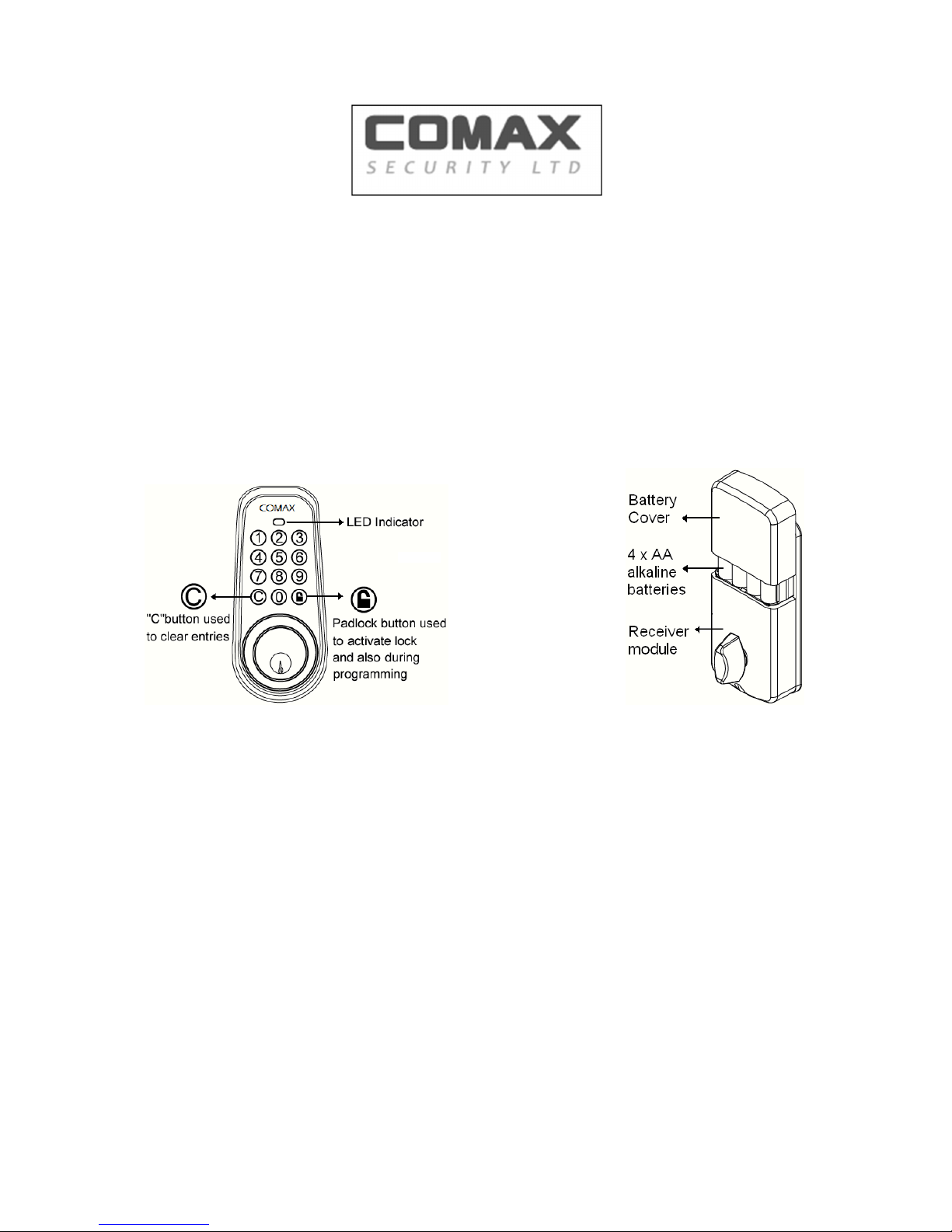
1. Insert the Batteries, make sure of the polarity is as mentioned.
2. For adding to a network: Select the Z-Wave Interface Controller into including mode, and follow the
instruction to add the CM-DL1702 into your controller. The distance between CM-DL1702 and controller is
suggested to be in one meter. Press Keypads © manually turn the Piece from inside. User
shall hear one long beep sound and controller shall indicate device is successfully included into network.
Process will take approximately 2 minutes.
3. For removing from a network: Set up the Z-Wave Interface Controller into exclusion mode, and follow the
instruction to delete the CM-DL1702 from your controller. Press Keypads © manually
Turn Piece from inside to be excluded.
4. For “Association”: the Z-Wave Interface Controller set “Association”, and Follow its instruction to associate
the CM-DL1702 with other device.
Page 2

5. To setup master code, user code, and to delete user code or delete all user code, please follow the Z-Wave
Interface controller s instruction.
6. CM-DL1702 supports the following class command:
COMMAND_CLASS_ASSOCIATION
COMMAND_CLASS_BASIC,
COMMAND_CLASS_BATTERY,
COMMAND_CLASS_DOOR_LOCK
COMMAND_CLASS_DOOR_LOCK_LOGGING
COMMAND_CLASS_USER_CODE,
COMMAND_CLASS_MANUFACTURER_SPECIFIC COMMAND_CLASS_SCHEDULE_ENTRY_LOCK,
COMMAND_CLASS_SECURITY
COMMAND_CLASS_VERSION COMMAND_CLASS_TIME_PAPAMETERS
Operation the deadbolt lock:
1. Press © and enter a valid user code and press unlock button. User shall hear one beeps and lights green.
If code is invalid, user shall hear one beeps and lights red.
2. If user enters invalid code during process, please press © to start over. CM-DL1702 Electronic Deadbolt
Lock supports up to 13 sets of User code. Each number combination can be 4 digits to 10 digits.
3. CM-DL1702 Electronic Deadbolt Lock supports up to 50 Log schedules (year, month, day, time) to Entry
lock for all user in the system.
4. Visual feedback message definitions:
Valid Programming: one long beeps and lights green.
Invalid Programming: one long beeps and lights red.
Lock error: three long beeps and lights red flash.
Low battery warning:
Beeps and lights red flash 5 seconds. Please replace with alkaline batteries.
Warranty terms
Comax Guarantees that every wireless deadbolt door lock is free from physical defects in material and workmanship
under normal use for one year from the date of purchase. If the product proves defective during this one-year warranty
period, Comax will replace it free of charge.
Note:This warranty does not apply to
Damage to units caused by accident, dropping or abuse in handling, or any negligent use.
Units which have been subject to unauthorized repair, taken apart, or otherwise modified
Units not used in accordance with instruction
Damages exceeding the cost of the product
Transit damage, initial installation costs, removal cost, or reinstallation cost.
 Loading...