

Page 1
2012 Colours In Motion All Rights Reserved
Page 2
Page 3
Page 4
Page 5
Page 6
Page 7
Page 8
Page 9
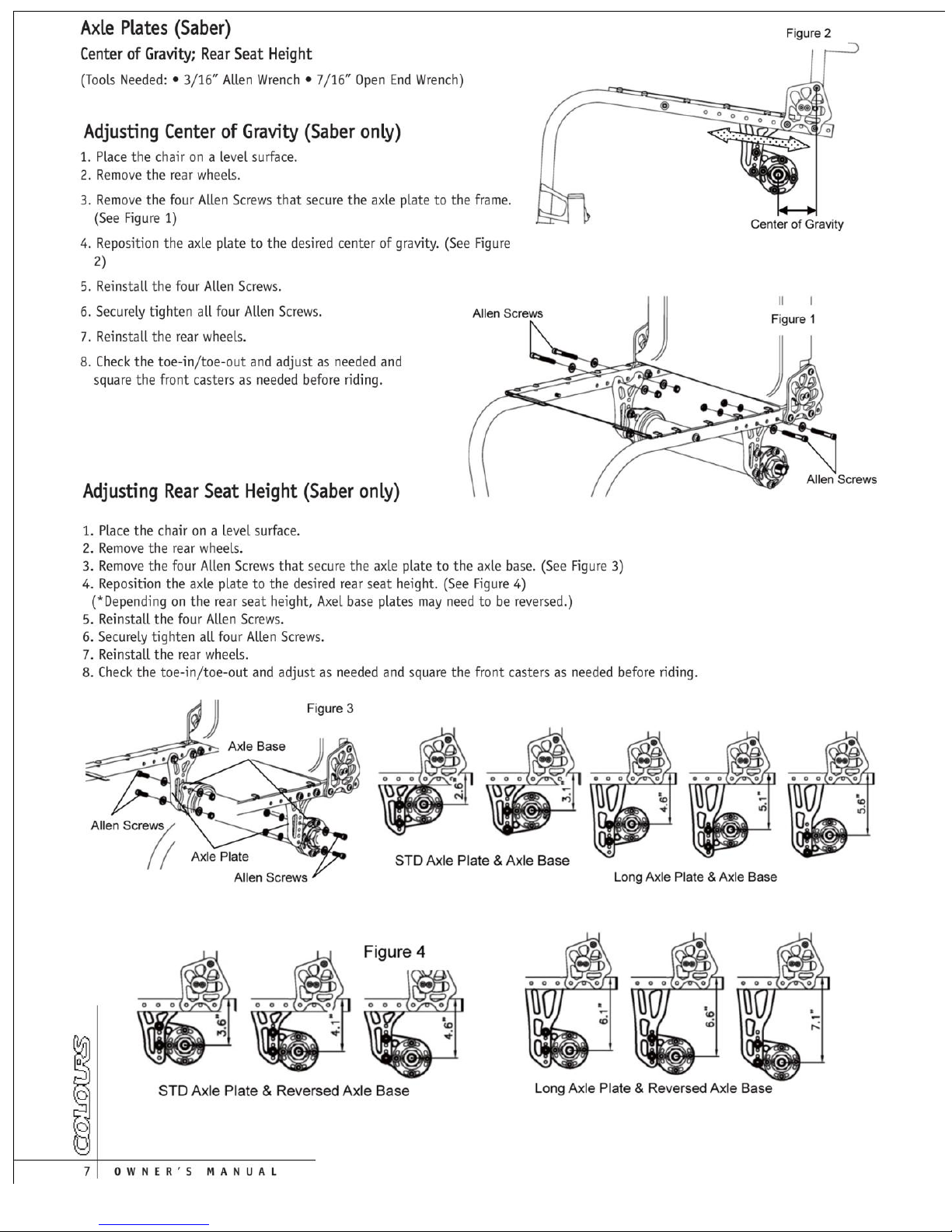
Page 10
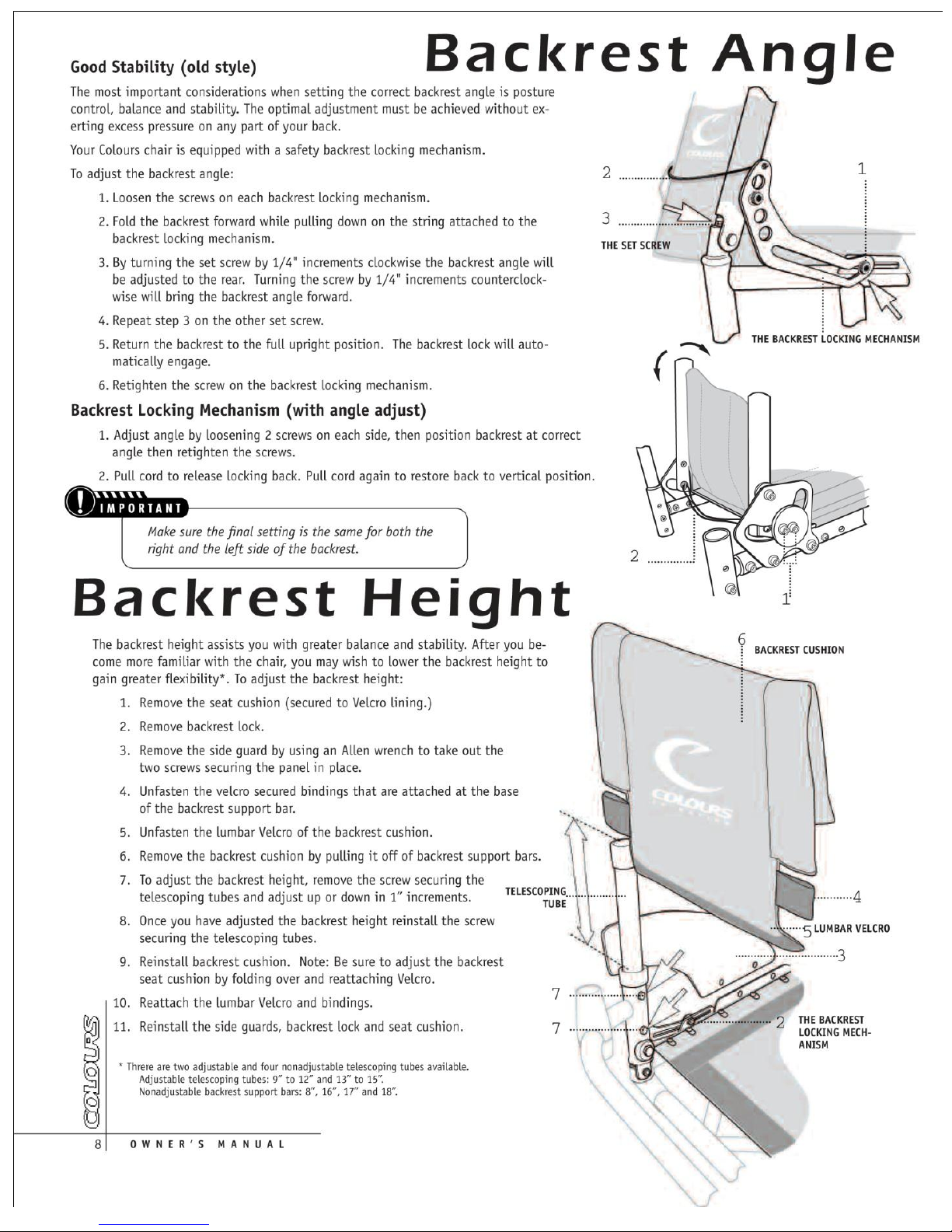
Page 11
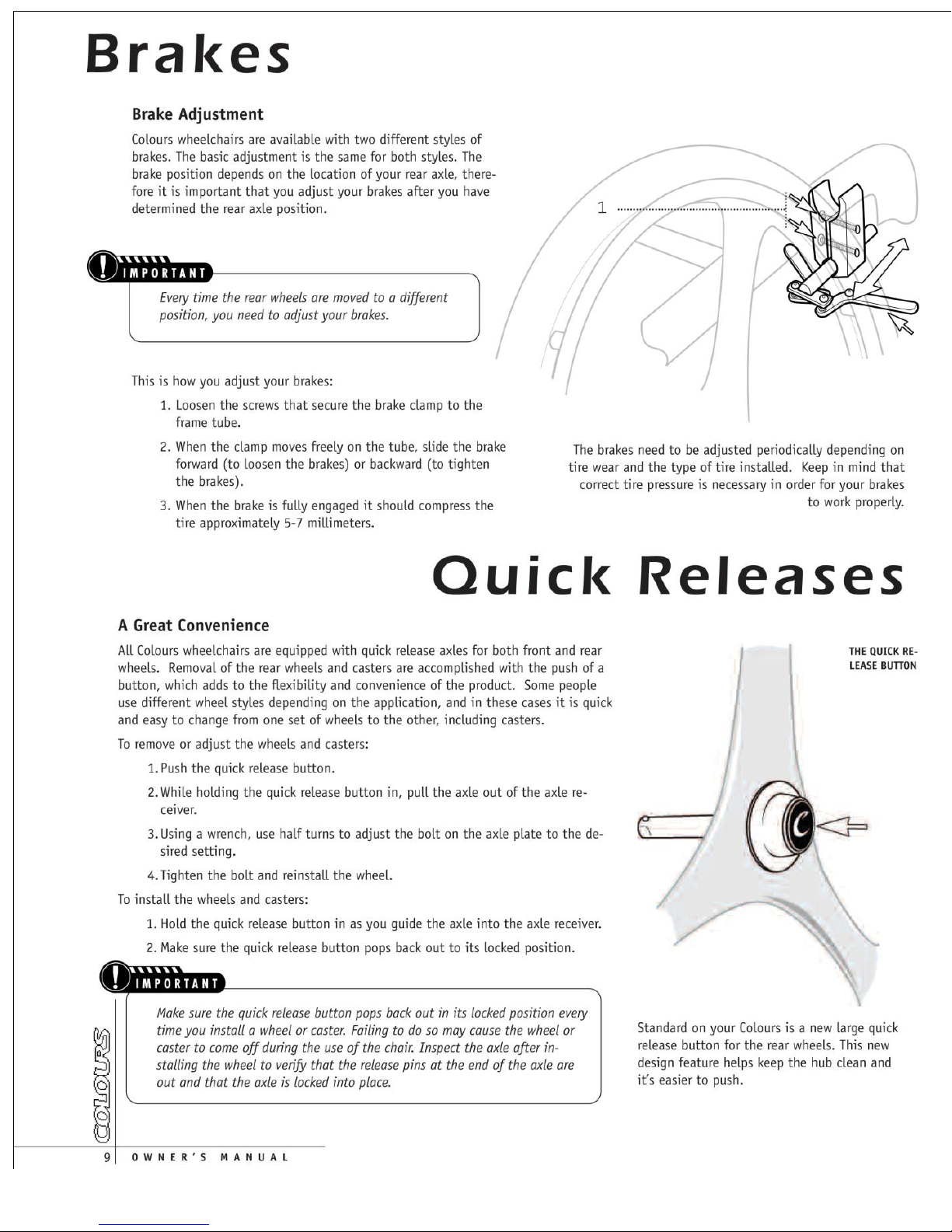
Page 12
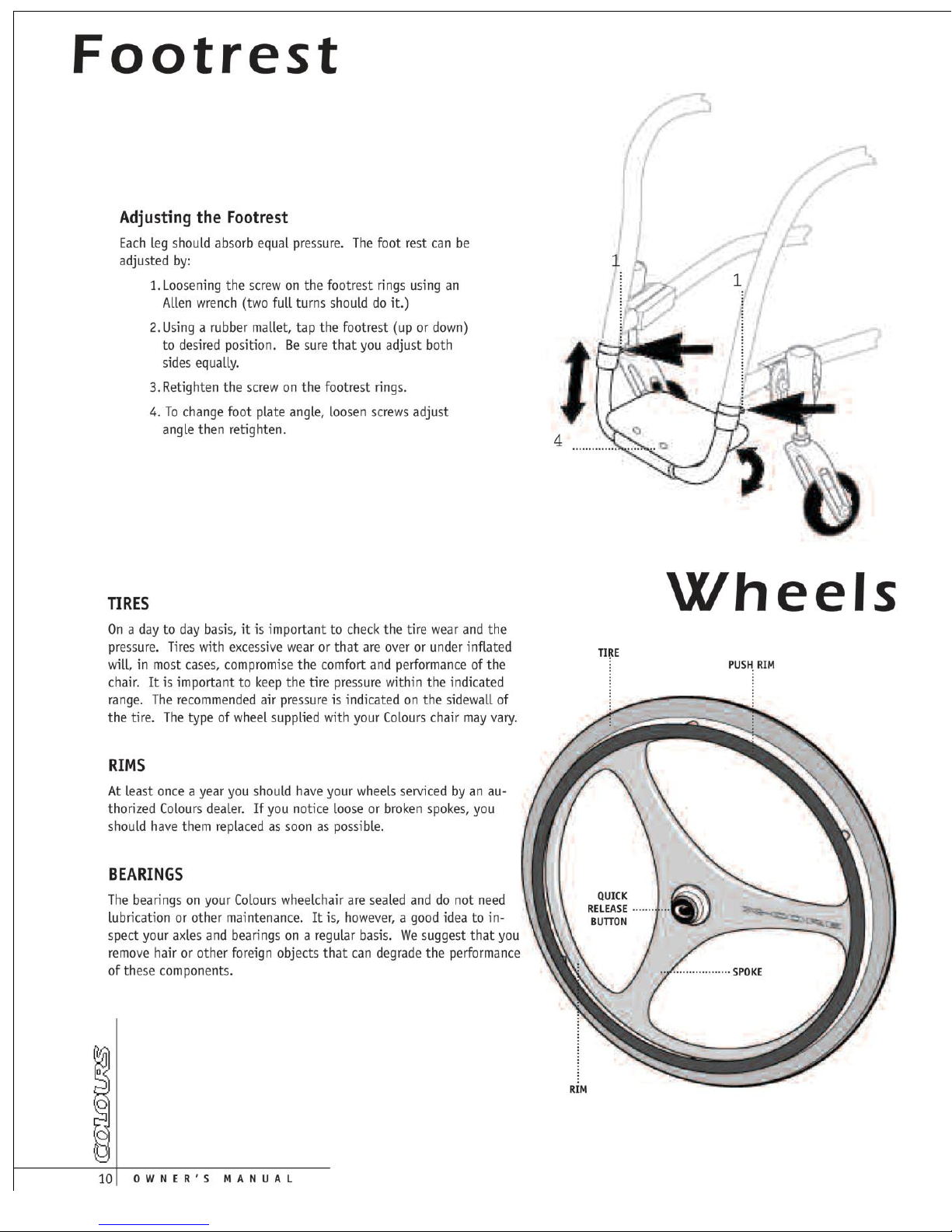
Page 13
Page 14
Page 15
Page 16
Page 17
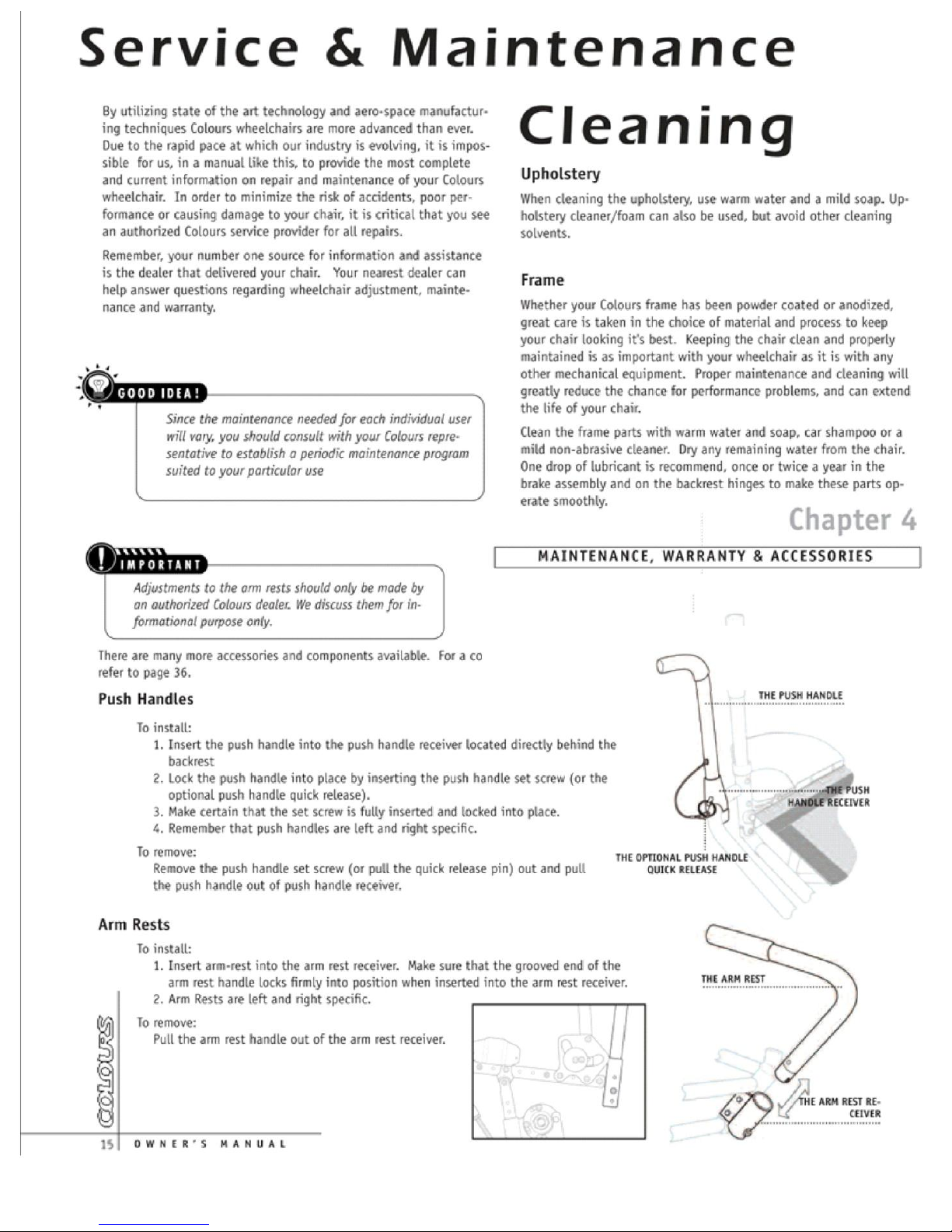
Page 18
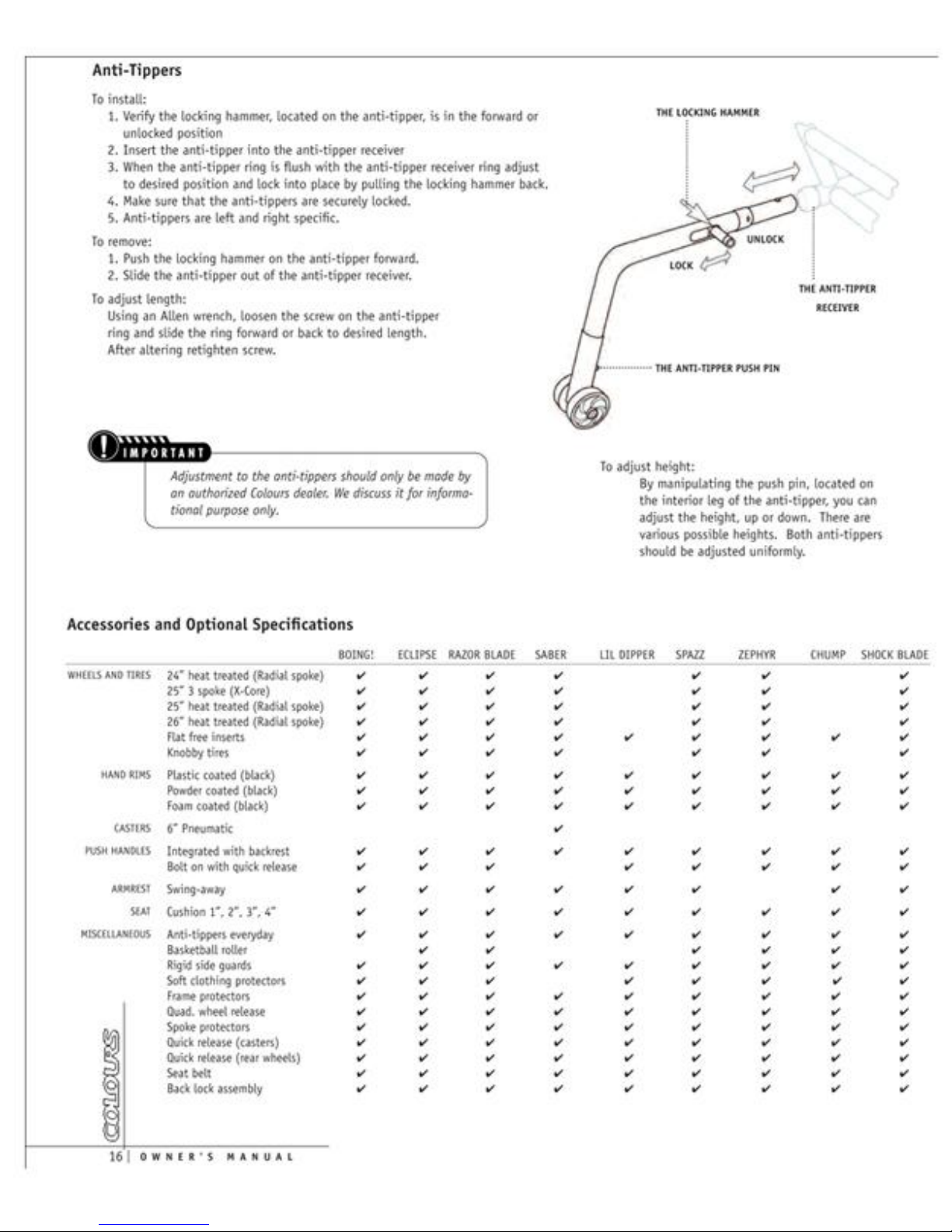
Page 19
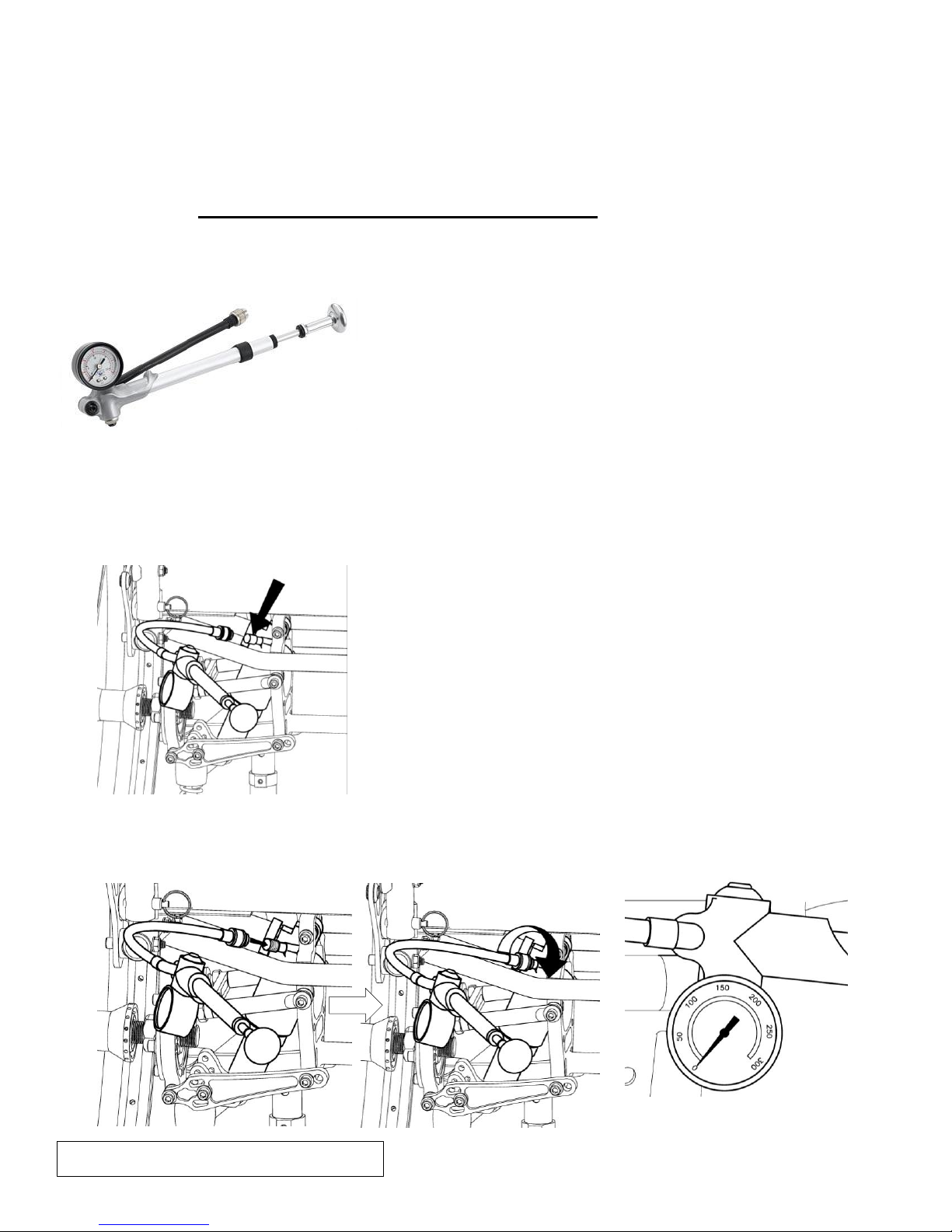
Colours Air Ride System Owner’s Manual
*If the shock has no air pressure, the
gauge will read zero.
17/ OWNER’S MANUAL
▶Air Ride System Maintenance and Air pressure
! To keep your air ride system in optimal working condition,
○
You should check the air pressure at least once a month.
Use the Fox High Pressure Pump, as shown below.
The pump is used to add and release air pressure from your FLOAT SHOCKS
▶To Pressurize Your Shock:
1. Locate and Remove the air valve cap from the shock
2. Thread the pump’s valve chuck onto the shock’s air valve until pressure registers on the pump
gauge. This takes approximately 6 turns - Do not over-tighten pump on air valve as this will
damage the pump chuck seal.
Page 20
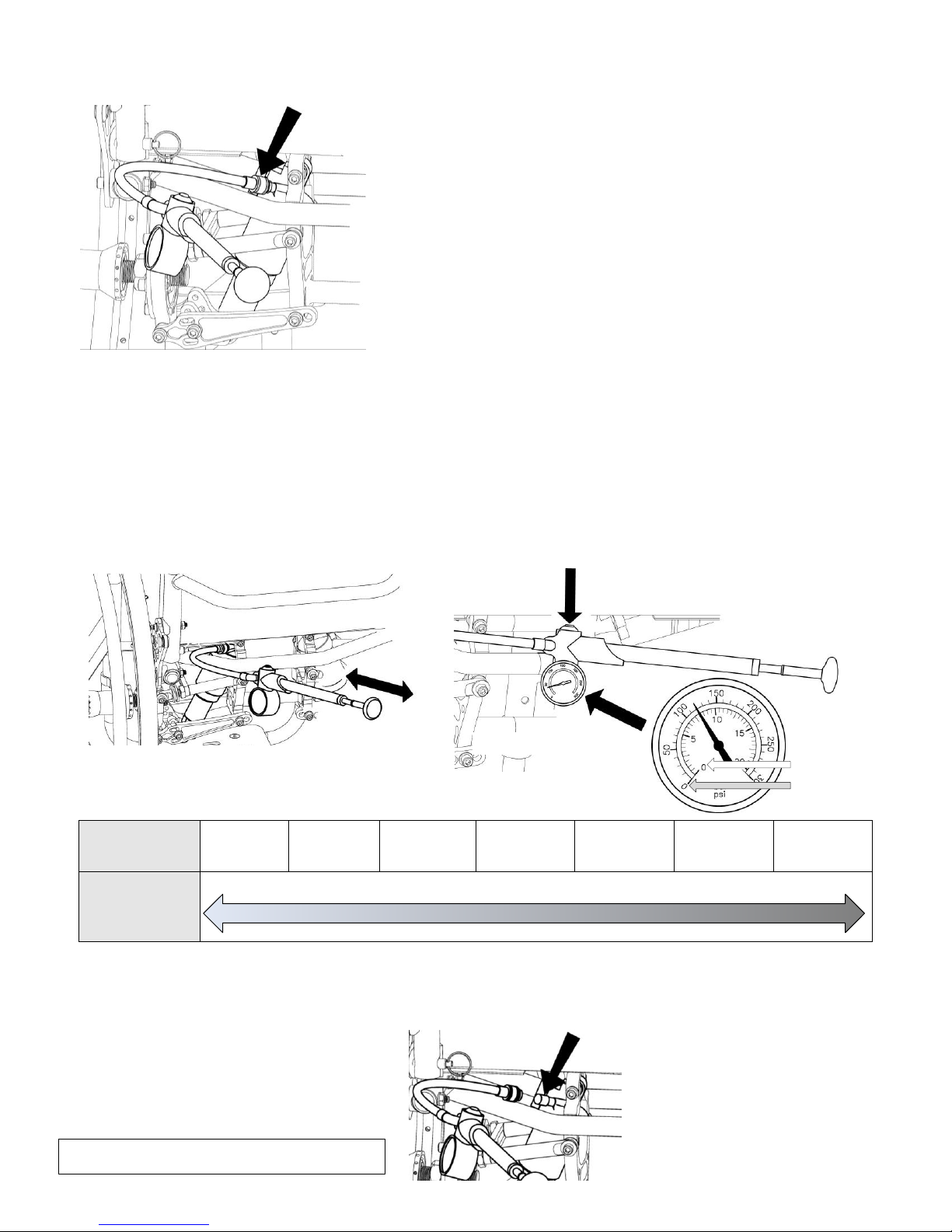
3. Stroke the pump few cycles. The pressure should increase slowly. If pressure increases rapidly
▶Correct Air Pressure
Your Weight
80 lbs
(36 kg)
110 lbs
(50 kg)
140 lbs
(64 kg)
170 lbs
(77 kg)
200 lbs
(90 kg)
230 lbs
(105 kg)
250 lbs
(114 kg)
Air Pressure
50 psi 60psi 70psi 80psi 90psi 100psi 120psi 130 psi 150psi
○
! Maximum Air Pressure : 300 psi
Check the air pressure gage
Use the button to fine tune to the desired pressure
Bar
Psi
18/ OWNER’S MANUAL
check to make sure the Pump is properly fitted and tightened on to the air valve.
4. Pump to the desired pressure setting- Average air pressure range is from 50 to 210psi
You can decrease pressure by pushing the black bleed valve on the shock pump.
Pushing the bleed valve half way down and holding it there will allow pressure to escape from
the pump and shock.
Pushing the bleed valve all the way down and releasing it will allow only a small amount of
pressure to escape (micro adjust).
When unthreading the pump from the air valve fitting, the sound of the air loss is from the pump
hose, not from the shock.
When you attach the pump to the shock, the hose will need to fill with air. This will result in a lower
pressure registering approximately 3 to 4 psi on the gauge.
5. Replace the air valve cap.
Page 21
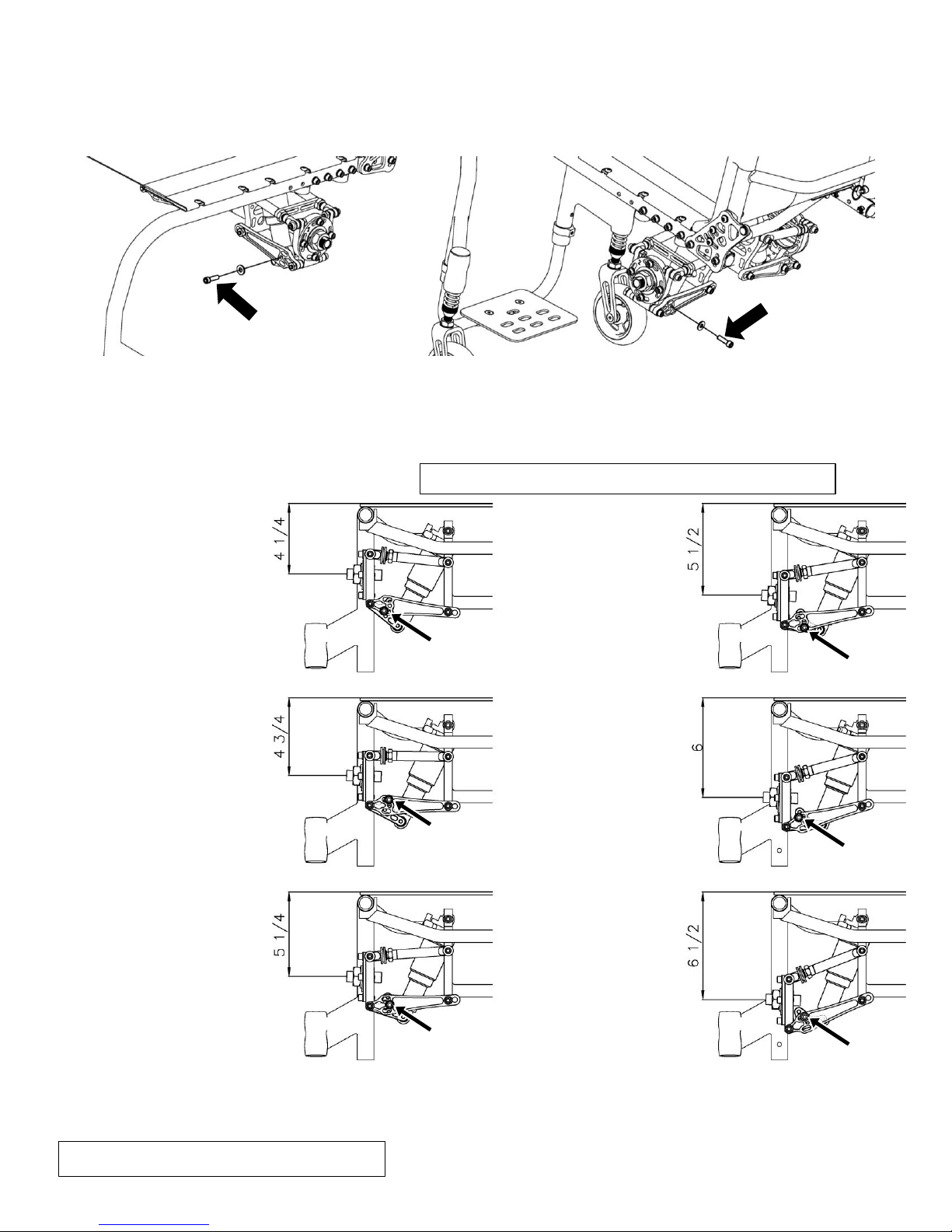
▶To Change Your Rear Seat Height
Position of the Axle Plate and Allen Screws
19/ OWNER’S MANUAL
(Tools Needed: • 3/16” Allen Wrench)
1. Loosen and remove the two Allen Screws and two Washers.
2. Adjusting the height of axle plate.
Reposition the axle plate to the desired height.
Then reinstall the two Allen Screws and two Washers.
`
3. Securely tighten the two Allen Screws and Washers.
*Left and right axle plate must be the same.
Page 22
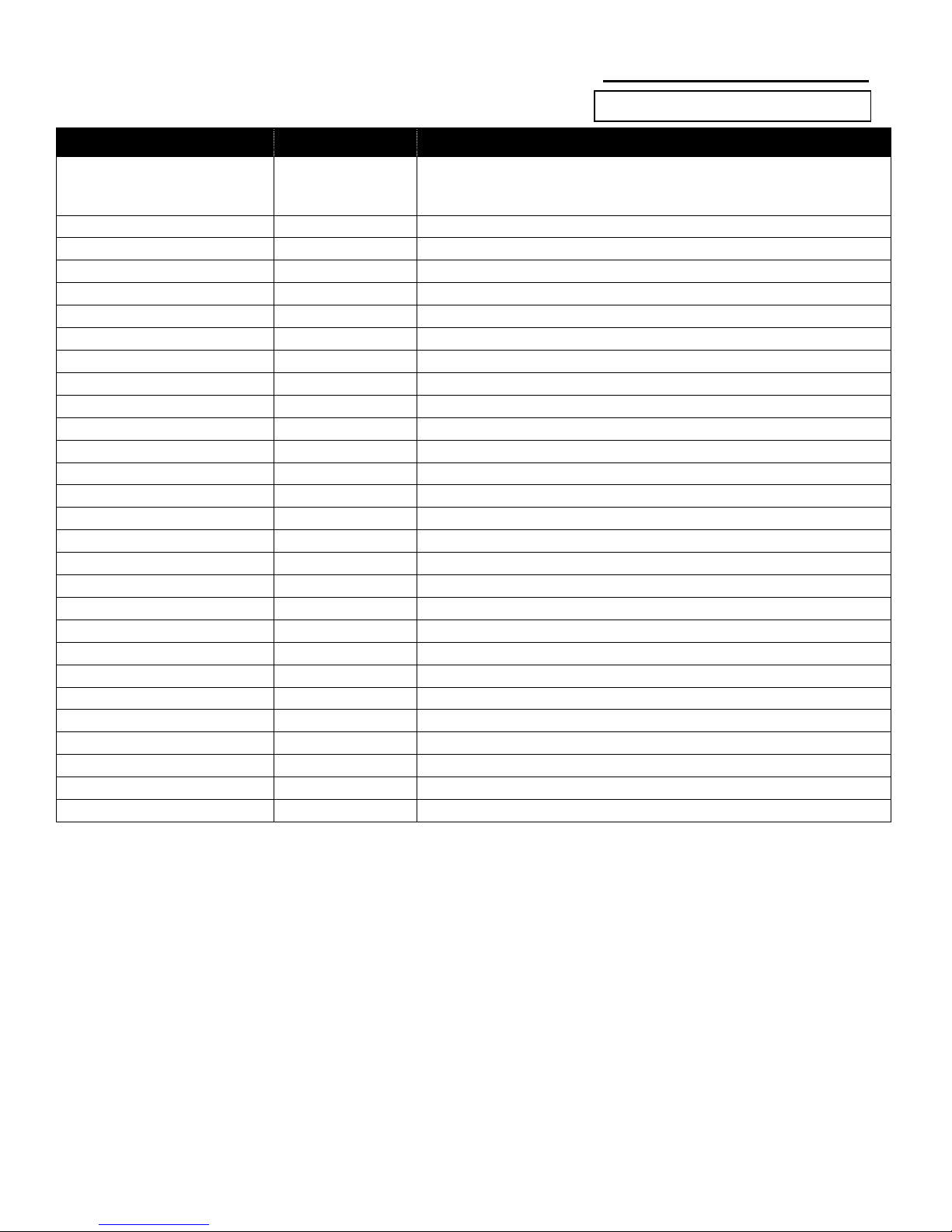
COLOURS WARRANTY POLICY SN:
ITEM
Warranty Period
Description
Main Frame ( Every Day Chair )
Lifetime*
Razor Blade, Shock Blade, Spazz(G,K), Boing, Saber, Zephyr, Trimor
Kripto, Eclipse, Chump(G), Little Dipper, Razor Blade JR, Saber JR,
Other chair (*from ver.9 order form)
Main Frame ( Tennis Chair )
Lifetime*
Xtreme
Main Frame ( Sports Chair )
No Warranty
Hammer, Zephyr Sports, and All contact Sports Chair
Main Frame ( Heavy Duty Chair )
Lifetime*
Air Ride Shock System
5 years
Fox Shock: Per Manufactures Warranty
Boing Shock System
5 years
Back Rest Tube
5 years
Back Rest Bracket
5 years
Axle Tube & Axle Plate
5 years
Wheel Lock
1 year
Caster Fork
1 year
Axle Pins
1 year
Wheels
60 days
STD Wheel, Cross Knot, Heat Treated Wheel, Twister Wheel, Y-360
Wheel with Bite Locking Hub
1 year
Bite Hub Locked Wheel, Y-360 w/Bite Hub Locked
Hand rims
60 days
Foot Plate
60 days
Bearings
60 days
Armrest
60 days
Fabric
30 days
Aluminum Side Guards
30 days
ABS Side Guards
30 days
Front Casters
30 days
Tires & Inner Tubes
No Warranty
Push Handle
No Warranty
OEM Products
-
Per Manufactures Warranty
Custom Parts
1 year
Hardware
1 year
Other Parts
60 days
2013 Colours In Motion All Rights Reserved
*This warranty is valid only for the originally registered owner.
*Colours warrants the main frame and cross brace, if applicable, against any defects in materials and workmanship for the life of the
original purchaser. The expected lifetime is five years.
This warranty does not include any labor or shipping charges incurred in replacement part installation or repair of any such product.
Colours's sole obligation and your exclusive remedy under this warranty shall be limited to such repair and/or replacement. For warranty
service, please contact the dealer from whom you purchased your Colours product. In the event you do not receive satisfactory warranty
service, please write directly to Colours at the address on the back page.
Provide dealer’s name, address, date of purchase, indicate nature of the defect and, if the product is serialized, indicate the serial
number. Do not return products to our factory without our prior consent.
Limitations and Exclusions: The Foregoing warranty shall not apply to serial numbered products. if the Serial number has been removed
or defaced, Products subjected To negligence, accident, improper operation, Maintenance or storage, commercial or Institutional use,
Products modified without Colours’s express written Consent, Including, But Not limited to, Modification through The use of unauthorized
parts or attachments; Products damaged by reason of repairs made to any component Without the specific consent of Colours, or to a
Product damaged by circumstances beyond Colours’s control, and such evaluation will be solely determined by Colours. The warranty
shall not apply to problems arising from normal wear or failure to adhere to these instructions. The foregoing express or implied,
including the implied warranties of merchantability and fitness for a particular purpose, and the sole remedy for violations of any warranty
whatsoever, shall be limited to repair or replacement of the defective product pursuant to the terms contained herein.
The manufacturer shall not be liable for any consequential or incidental damages whatsoever. This warranty shall be extended to comply
with state/provincial laws and requirements.
Page 23
2012 Colours In Motion All Rights Reserved
 Loading...