

Page 1
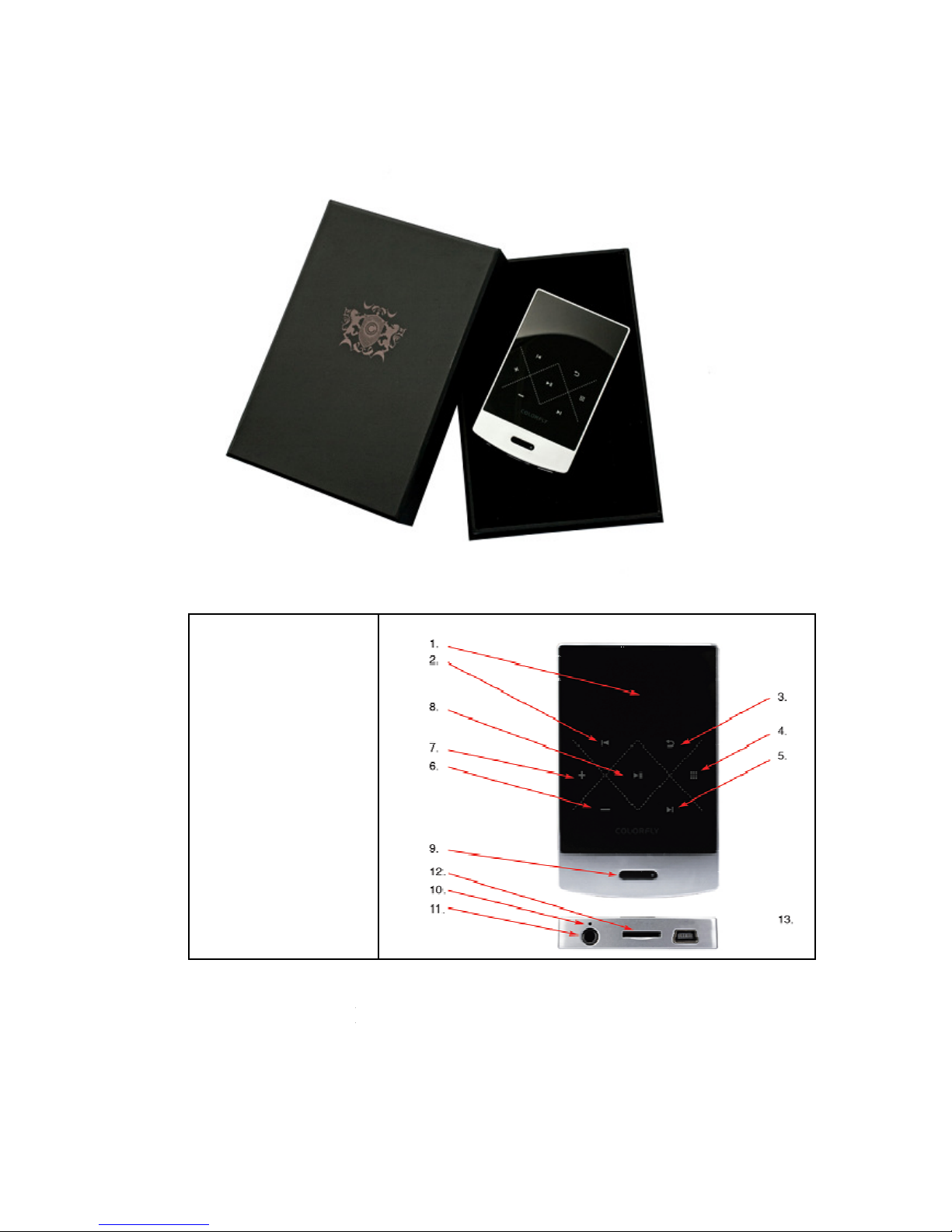
Colorfly C3 Manual
1.) Screen
2.)
Previous / Rewind
3.) Return
4.) Menu
5.) Next / Fast
forward
6.) Volume -
7.) Volume +
8.) Play / Break
9.) Power
10.) System Reset
11.) Headphone
output
12.) TF card slot
13.) Mini USB
Operation of control panel:
Switch on / off:
press and hold power button 9 some seconds
Play / Break:
short push key 8
Open a file / folder:
short push key 8
Confirmation:
short push key 8
Page 2

Next: short push key 5
Reverse: short push key 2
Back to last menu: short press key 3 Return to the previous menu & Return to the
main playing menu during playback
Show Menu: long press key 4 will show the matching menu options
Key lock: briefly press button 9, then successively 7, 8 and 4
Please Note:
The device will auto power on when connect with USB port, after connected by USB, power
on or off operation is invalid, you need to disconnect USB connection then can achieve the
operation
First use & start
Before you start your new device, please make sure that the Colorfly C3 has already been
charged. (To insure longer lifetime of battery you shall charge the device more than 12 hour
before first using.)
To charge the C3 you can use a Micro USB to USB cable. Please plug the USB connector
with your PC or Notebook, the charging starts. Alternatively you can use a power supply
with micro USB port to charge the C3 at voltage level of 5V and power of 800 mA. The
charging time depends on the power of the power supply.
Switching to turn on or off
Please press the button 9 and hold some seconds.
Music files transfer on the C3
Transferring music files is very simple:
Copy from your PC the desired music files easily on the C3. You can add some folder you
want to use as a play list or just copy entire folders. C3 shows the structure of the operating
mode of your folder so that you can choose to play these.
Music playing:
Turn on the player and select either the internal memory or the external memory (TF card)
within the navigation.
Select the folder or file, press the touch key 8.
To return, use the touch key 3, this is always one step back at the menu.
Settings:
The Settings menu can activate it by pressing and holding of the touch key 4.
Here, you can view or change the repeat mode, audio settings, display settings, language and
system information.
Questions and Answers
Item don’t start:
• Charge the C3 on the power supply or on the computer via the USB cable and then try again.
Device does not play music:
• Check if their headphones are plugged correctly in, check the display whether the music is
playing (Monitor shows at top left an arrow or holding icon)
• Check if the music file has a supported format.
Page 3

Device is not detected on your computer:
• You disconnect the USB cable from the computer and try another USB Port
• Restart your computer
• Turn off the C3 completely and start C3 again
The handling of the player to be quite very slow:
• Make a backup of your music files were located on the C3. Format the flash memory again
and transfer back the music files.
No display:
• Please check the settings at the display
• Should your device don’t work at more and any function according to normal working status
were fail, please contact your dealer or our support.
Warranty:
The guarantee period is 12 months. Defects caused by improper handling, external influence
or interference arising in the unit, not covered by the warranty.
Firmware Updates:
Current firmware for the Colorfly C3 you can download at:
http://www.colorfly.eu/download.html
Please read the instruction of Colorfly C4. The firmware update of C3 follow the same rules.
 Loading...