

Page 1
clear
User’s Manual
Cold Therapy System
CTU2C 200228
Page 2

2
Indexes
Indications for Use
Contraindications
Limitations on Special Patient Population
Operation Instructions
Product Specications
Storage and Transportation
Nominal Operating Environment
Power Supply
Warranty
Warnings & Precautions
Cleaning Method
Troubleshooting
..........................................................................................
...........................................................................
............................................................................
.......................................
.....................................................................
.....................................................................
.............................................................
.....................................................
..................................................................................
..................................................................
.............................................................................
...............................................................................
2
3
3
3
7
8
9
9
9
9
11
12
ARCTIC ICE CLEAR
Page 3

INDICATIONS FOR USE
THIS DEVICE CAN BE COLD ENOUGH TO CAUSE SERIOUS INJURY. SERIOUS
ADVERSE REACTIONS AND SAFETY HAZARDS MAY OCCUR DURING USE.
The ARCTIC ICE System is intended to treat post-surgical and acute in
juries to reduce edema, swelling, and pain where cold is indicated.
When to use the ARCTIC ICE
The intended use of the ARCTIC ICE is for the temporary reduction of
swelling and pain after surgery or injury. This is a non- sterile
device for Single patient use to provide localized external applica
tion of cold therapy. This device may not be used for any other purpose.
CONTRAINDICATIONS
When not to use the ARCTIC ICE DO NOT use this device on patients
with Raynaud’s phenomenon or other vasospastic conditions; Buerger’s
disease; cold allergy or hypersensitivity; cryoglobulinemia; paroxys
mal cold hemoglobinuria or other cold agglutinin disorders; pheochro
mocytoma; sickle cell anemia or history of cold injury.
3
LIMITATIONS ON SPECIAL PATIENT POPULATIONS
Limit the use of the ARCTIC ICE with these patients:
Limit the use of this device with patients who are unresponsive, incap
acitated, have altered mental status or altered pain perception. Postsurgical patients under sedation or on analgesics or anesthetics, as
well as patients taking hypnotics, anxiolytics, or antidepressants, must
CTU2C
Page 4
4
LIMITATIONS ON SPECIAL PATIENT POPULATIONS (continued)
be monitored frequently during use of this device. These patients may
not be able to perceive pain, burning, numbness, tingling or decreased
sensation and may be susceptible to injury. Discontinue cold therapy
immediately at the rst sign of cold injury.
OPERATION INSTRUCTIONS
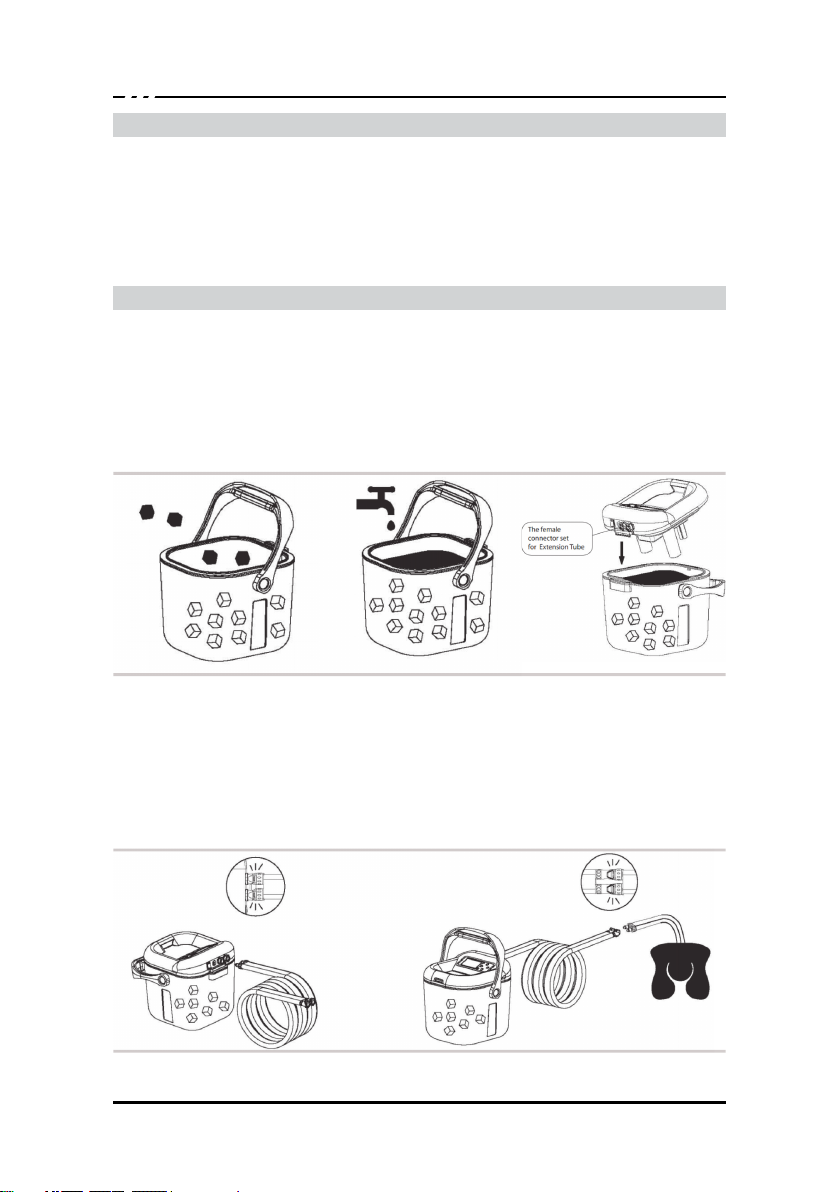
1. Add ice to the ll line inside the device’s transparent ice bucket.
2. Add cold water to the ll line.
3. Place the device lid on the ice bucket, making sure the lip aligns
into the groove. Then press front of the lid down to close and secure.
4. Connect the ARCTIC ICE Pad with the ARCTIC ICE device using
the Extension Tube. To ensure a reliable connection, “snap” or “click” hoses
together into place so that the t is tight and snug. Then connect the therapy
pad to the extension hose. Note: If using an pad other then the one included
you may need to change couplings. A set of blue couplings is provided.
ARCTIC ICE CLEAR
Page 5
OPERATION INSTRUCTIONS (continued)
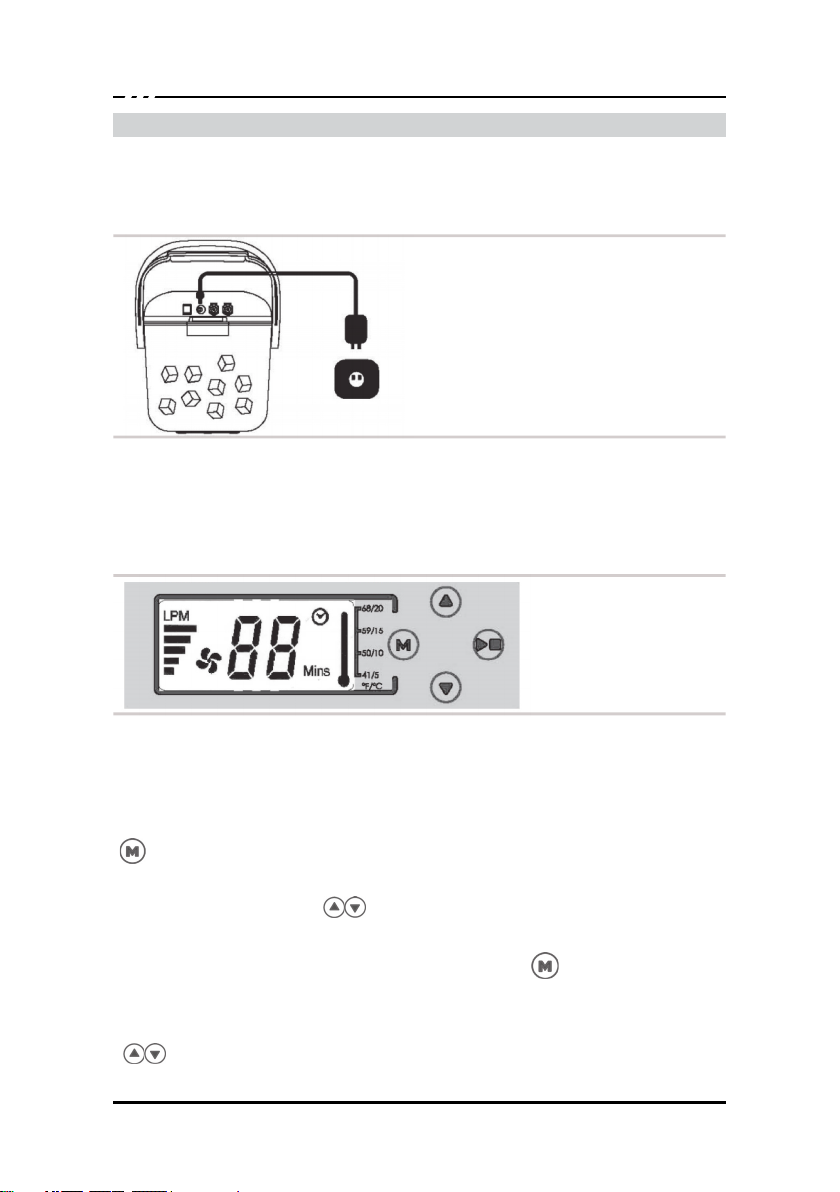
5. Plug power supply into the device power socket, Plug the adapter into
the wall Outlet.
6. Menu setting.
5
(1). Power on the device.
The LCD screen will light up and a short beep will indicate that the dev
ice is ready for setup and use.
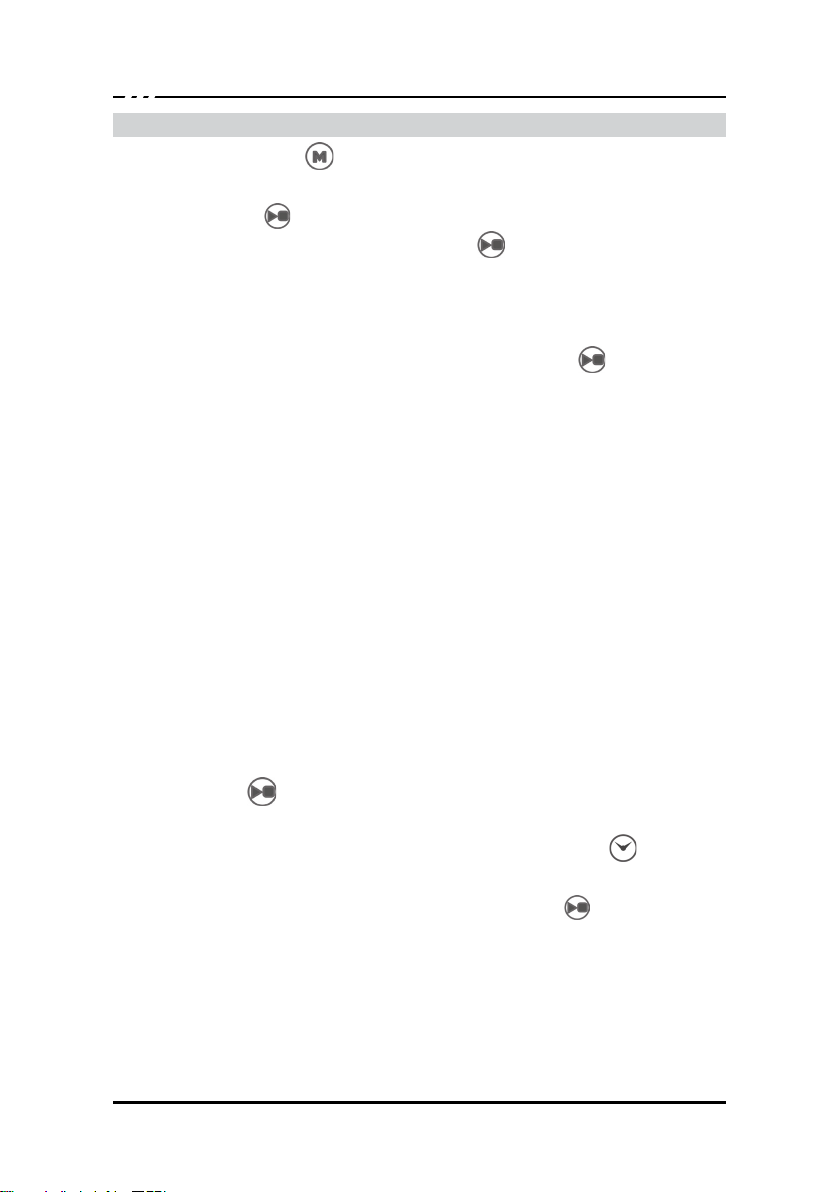
(2).To select or modify device setting, press and hold the “Mode” (M)
) button for two seconds.
(
A. Flow Rate setting: when the “LPM” tag is ashing on the screen,
press the “Up” or “Down” ( ) arrow button to adjust the ow rate
of the treatment;
B. Treatment Time setting: Pressing the “Mode”(M) (
in will transition the setting screen from Flow Rate setting to Treatment
Time setting. When the “Mins” tag is ashing, press the “Up” or “Down”
( ) arrow button to adjust the treatment time desired;
) button aga
CTU2C
Page 6
6
OPERATION INSTRUCTIONS (continued)
C. Press the “Mode”(M) (
can abort device setting at any time during the operation by pressing
the “Start/Pause” (
(3).In standby mode, press the “Start/Pause” (
pump treatment, The screen will display the ow rate selected
and the current temperature estimate inside the ice bucket. The treat
ment timer count down is also shown on the screen.
(4).During the treatment, you can press the “Start/Pause” (
at anytime to pause the treatment.
(5).Regardless of the mode the device is in, the temperature monitori
ng is always eective. Real-time device temperature is displayed on
screen.
NOTE: The information on treatment parameters such as time, velocity
and temperature, are only intended for reference and cannot be
used for measurement or diagnosis purposes.
(6).Alarms: The ARCTIC ICE device has two alarms:
A. Temperature Alarm: when the actual temperature of the treatment
solution has risen above 15°C (59°F), the screen Temperature Alarm will
be on, with the on screen thermometer displaying full bars at the highest
temperature ashing constantly and a repeating 3-beat beep every
15 seconds. The device will not stop the treatment when the Tem
perature Alarm is active. To stop the Temperature Alarm, simply press
the Start/Pause (
B. Treatment Time alarm: When the scheduled treatment time is up,
the Treatment Time alarm will be on, with an alarm clock sign ( )
ashing on the screen and a repeating 3-beat beep every 15 seconds.
To stop the Treatment Time Alarm, press the Start/Pause (
to restart a new therapy session, or simply power o the device from
the back panel of the Control Unit.
(7). Keep pad at the same level position with the machine during use.
(8). After using this device, turn o the power switch and pull the adapt
er out of the outlet. Separate the garment and the extension tubing. Cl
ear the water in the ice bucket to the sink and wipe the device clean.
) button again to exit device setting. You
)button.
) button to start the
) button
) button once
) button
ARCTIC ICE CLEAR
Page 7

PRODUCT SPECIFICATIONS
1.
Dimensions
Device Size: 30cm length x 30cm width x 28cm height (excluding ca
rrying case) / 12” length x 12” width x 11” height (excluding carrying
case)
Ice Bucket Maximum Volume: 6L
2.
Weight
3.1kg / 6.85 lbs
Flow rate
3.
MAX 2L/min
4.
Adapter
AC Input: 100~240 Volts,
AC 50-60Hz, 500mA MAX
Output: 12 VDC 1.0 A.
Adapter Type: Switching Power Adaptor
Adapter Model: UES12LCP-120100SPA
5. Mode
Timed: 30, 45, 60, 90 min
6. Therapy Time
MAX 90 minutes
7. Power
100~240 Volts, AC 50-60Hz, 500mA MAX
7
CTU2C
Page 8

8
STORAGE AND TRANSPORTATION
• Unplug the power supply from the electrical outlet.
• TO AVOID DANGER OF ELECTRICAL SHOCK, DO NOT UNPL
UG THE POWER SUPPLY WITH WET HANDS.
• Disconnect garment from hose.
• Drain the ice bucket and wipe dry.
• Drain the garment by holding so that the hose is hanging downward.
• Press in the buttons at the end of the hose and allow all water to dra
in out of the garment.
Storage & Transportation Temperature Conditions: -25°C ~ 70°C (-13
°F ~ 158°F)
Storage & Transportation Relative Humidity: 10% - 90% noncondensing
Caution
Do not keep in extreme hot or cold temperatures (above 50°C /120°F
or below 0°C/ 33°F).
Do not leave in a hot or freezing car. Do not leave the Control Unit in
direct sunlight. The UV light may damage or discolor the Control Unit.
ARCTIC ICE CLEAR
Page 9
NOMINAL OPERATING ENVIRONMENT
• Ambient Temperature: 4°C ~ 40°C (39°F ~ 104°F)
• Relative Humidity: 15% ~ 90%
• Atmosphere Pressure: 800-1060hPa
•
POWER SUPPLY
Domestic Power Supply: 100~240 Volts, AC 50-60Hz, 500mA MAX
WARRANTY
The manufacturer will repair or replace all or part of the unit and its ac
cessories for material or workmanship defects for a period of 1 year
from the date of sale.
WARNINGS & PRECAUTIONS
WARNINGS: THIS DEVICE CAN BE COLD ENOUGH TO CAUSE SE
RIOUS INJURY. SERIOUS ADVERSE REACTIONS AND SAFETY
HAZARDS MAY OCCUR WHEN USING THIS DEVICE.
WARNING! Read and understand all warnings and Instructions for Use
before using this device.
WARNING! The adapter plug is the only part of the device that is separ
ated from the power supply. The power switch is only for device control.
9
and/or ice into the container.
WARNING: Use of accessories, detachable parts, and materials not
described in the Instructions for Use can create unknown new risks,
hence these should be avoided.
WARNING: Precautions to be taken in the events of changes in the
performance of the system: Read the instructions carefully.
if you encounter any abnormal behavior of the
device, turn o the device and contact your customer support
team.
CTU2C
Page 10
10
WARNING! This device can be cold enough to cause serious injury,
including tissue necrosis. You must be able to check your skin condition
under the cold garment frequently (at least every hour) DO NOT use
this device if you cannot check your skin condition frequently (at least
every hour). Check for increased pain, burning, numbness, tingling,
increased redness, discoloration, itching, increased swelling, blisters,
irritation or other changes in skin condition under the cold garment or
around the treatment area If you experience any of these conditions,
immediately discontinue use of this device and contact your physician.
WARNING! This device is intended only for single patient use.
Secondary use can cause serious injury, including infection.
WARNING! Application of the cold garments directly on the skin may re
sult in serious injury, including tissue necrosis. DO NOT let any part of
the cold garment touch your skin. ALWAYS use with a barrier between
your skin and the cold garment.
WARNING! The barrier between your skin and the cold garment may
develop moisture during use, which may create colder temperatures on
the skin. Temperatures that are too cold may result in serious injury, incl
uding tissue necrosis. ALWAYS check for moisture on the barrier betwe
en your skin and the cold garment. If moisture is present on the barrier,
immediately discontinue use of this device.
WARNING! Poor connections between hoses may cause leaking, which
may result in serious injury, including infection and tissue
necrosis. ALWA
ARCTIC ICE cold therapy unit hose to the cold garment hose.
WARNING! Use of the ARCTIC ICE with wet hands or in a wet Location
may result in electrical shock and serious injury. DO NOT handle
transformer or power cord with wet hands or in a wet location.
WARNING! DO NOT use the ARCTIC ICE
which may result in explosion and serious injury.
WARNING: After using the ARCTIC ICE, please wipe clean. Stay away
from children and pets or pests. Avoid hurting them and pollution
device.
WARNING: When using the ARCTIC ICE, make the extension tube
straight to avoid the strangulation.
WARNI NG: DO NOT attempt any unauthorized alter ation or
YS listen for a “snap” or “click” when connecting the
ARCTIC ICE CLEAR
Page 11
CLEANING METHOD
1. The Ice Bucket can be washed by water.
2. Control unit, Extension Tube and Garment can be rubbed clean by
wet rag.
3. After treatment, the ice water in the tank can be poured directly into
the sink.
TROUBLE SHOOTING
Pump will not turn on
•
Check all electrical connections and make sure the wall plug has po
wer.
Cold Garment will not cool down
•
Make sure trapped air is out of cold garment once power is applied.
•
•
Check all hose connections and make sure cold garment is wrapped
Cold garment pressure is low
11
CTU2C
Page 12

12
TROUBLE SHOOTING (continued)
• Check water level. Add water if necessary.
• Make sure trapped air is out of cold garment.
• Check water level. Add water if necessary.
• Cold garment and hose are wrapped too tightly or the hose is kink
ed. Unwrap and rewrap the cold garment with cold therapy unit runni
ng, making sure water is circulating freely throughout the cold garment
and the hose is not kinked.
• Make sure connection between the cold therapy unit hose and cold
garment hose is properly connected.
Water leak at connector
• Connector between cold therapy unit hose and cold garment hose is
not properly connected. Stop machine, disconnect hose, and reconne
ct hose listening for a “snap” or “click”, and restart the unit.
• Check barrier to ensure it is dry. Replace with dry barrier, if it is wet.
Water leak at cold garment
• Faulty cold garment, replace.
• Check barrier to ensure it is dry. Replace with dry barrier, if it is wet.
Magnetic or Electromagnetic Interference
• Reorient or relocate the device. Increase the separation between
the equipment. Plug the power supply into an outlet on a circuit diere
nt from that to which the Other device(s) are connected.
• Keep clear of the connector ports and power supplier ports to preve
nt accumulation of lint or dust. Avoid prolonged exposure to the device
from direct sun light.
PRODUCT SUPPORT
No product maintenance should be performed by the user.
If your ARCTIC ICE System requires maintenance, please contact
Customer Service.
Expected service life of the equipment: expected service life of parts
and accessories shipped with the equipment when used properly is 1 year.
ARCTIC ICE CLEAR
 Loading...