

Page 1
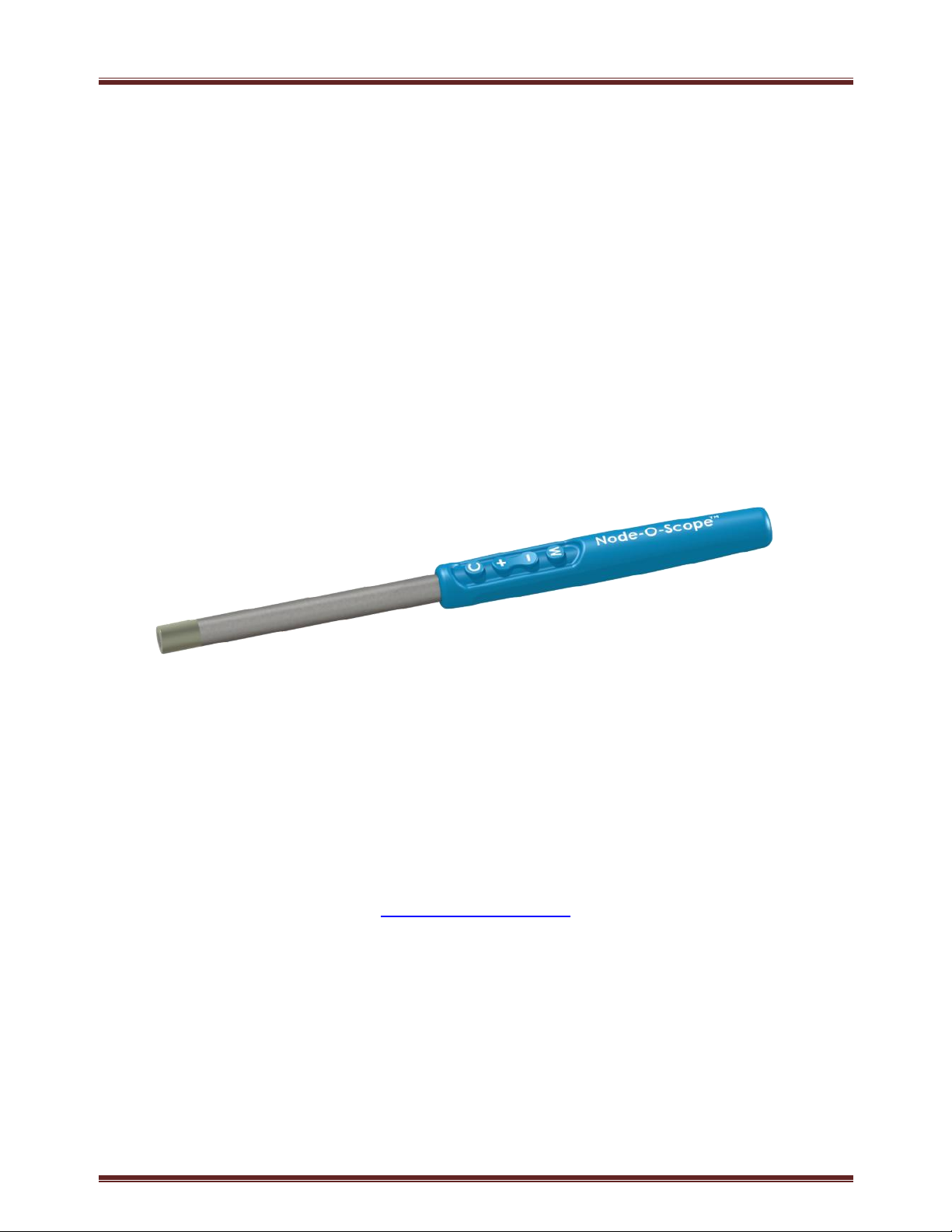
Node-O-Scope System User Manual
Node-O-Scope
TM
User Manual
Cokiya Incorporated
Poway, CA, USA 92064
Phone: 858-775-8596
www.cokiyainc.com
DRAFT 11-18-14
M10 -140613 Page 1
Page 2

Node-O-Scope System User Manual
CONTENTS
1. Introduction ............................................................................................................................................. 3
Description .............................................................................................................................................. 3
Intended Use ........................................................................................................................................... 3
Indications for Use ................................................................................................................................... 3
Manufacture and Distribution .................................................................................................................. 3
Standards ................................................................................................................................................. 4
EMC ..................................................................................................................................................... 4
Biocompatibility ................................................................................................................................... 4
Sterilization .......................................................................................................................................... 4
Regulatory............................................................................................................................................ 4
2. System Overview ..................................................................................................................................... 5
User Feedback Unit .................................................................................................................................. 5
Node-O-ScopeTM Probe ............................................................................................................................ 6
3. Precautions .............................................................................................................................................. 6
General .................................................................................................................................................... 6
User Feedback Unit .................................................................................................................................. 7
Probe ....................................................................................................................................................... 7
4. Using the system ...................................................................................................................................... 8
Setting Up the User Feedback Unit ........................................................................................................... 8
Deploying the Probe................................................................................................................................. 9
Using the Controls ...................................................................................................................................10
In Surgery................................................................................................................................................12
After Surgery ...........................................................................................................................................14
5. Specifications ..........................................................................................................................................15
Node-O-ScopeTM S-10 Probe ....................................................................................................................15
User Feedback Unit .................................................................................................................................16
6. Troubleshooting ......................................................................................................................................16
7. Labeling ..................................................................................................................................................17
8. EMC Declaration .....................................................................................................................................17
M10 -140613 Page 2
Page 3

Node-O-Scope System User Manual
8. FCC Information ......................................................................................................................................18
1. INTRODUCTION
Description
The Node-O-ScopeTM system is designed to detect and quantify Technetium-99m
radiotracer in radio-guided localization medical procedures. A numeric display and
audible signal convey the amount of radiation detected, allowing the user to localize
radiolabeled tissue.
The system is battery-powered, wireless, and portable. It consists of the Node-OScopeTM S10 Gamma Probe and the Node-O-ScopeTM T10 User Feedback Unit.
Intended Use
For the detection and quantification of gamma radiation from Tc-99m radionuclide
in the body or tissues.
Indications for Use
Use in non-imaging procedures to measure relative amounts of Tc-99m radionuclide
absorbed by a particular organ or body region. For transcutaneous, open surgical,
and laparoscopic use.
Manufacture and Distribution
The system is manufactured by Cokiya Incorporated. Please direct all inquiries
about the Node-O-ScopeTM system to Cokiya Incorporated. The following are
trademarks of Cokiya Incorporated: Node-O-ScopeTM system and Node-O-ScopeTM
when used in context with the above.
M10 -140613 Page 3
Page 4

Node-O-Scope System User Manual
Standards
The Cokiya Node-O-ScopeTM system complies with the following standards:
EMC
EN 60601-1-2: Medical Electrical Equipment Collateral Standard,
Electromagnetic Compatibility - Requirements and Tests
FCC Part 15C: Intentional Radiators – FCC ID 2ADNA-S10
Wireless: Bluetooth 4.0BLE
Biocompatibility
ISO 10993 (including ETO residuals): Biological evaluation of medical
devices: cytotoxicity, sensitization, irritation; externally communicating
device; <24hrs exposure
Sterilization
ISO 11135: Validation and routine control of ethylene oxide sterilization
ISO 11737: Tests of sterility
ISO 11138: Biological indicators
Regulatory
FDA Device Classification: Class 1
M10 -140613 Page 4
Page 5
Node-O-Scope System User Manual
2. SYSTEM OVERVIEW
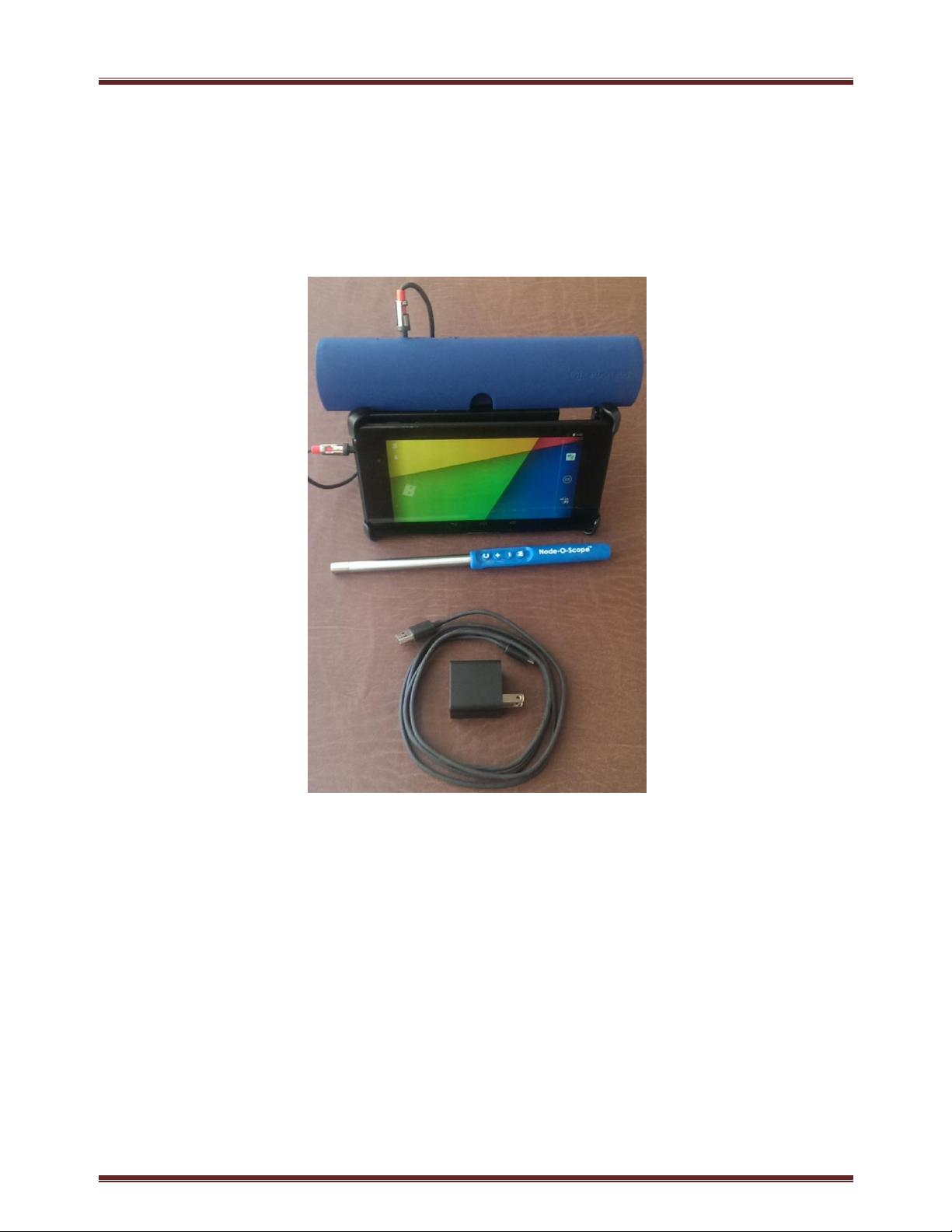
The Node-O-ScopeTM T10 User Feedback Unit is used with the Node-O-ScopeTM S10
Probe. A medical-grade battery charger is provided with the system for recharging.
User Feedback Unit
The User Feedback Unit is comprised of a tablet computer running the Cokiya NodeO-ScopeTM application, a loudspeaker, and an IV pole clamp. It includes a medicalgrade Battery Charger for recharging. It communicates bi-directionally with the
Node-O-ScopeTM Probe over a Bluetooth Low Energy (‘BLE’) wireless link.
The User Feedback Unit provides displays, sound feedback, and redundant controls
for operating the probe.
M10 -140613 Page 5
Page 6

Node-O-Scope System User Manual
The rate of gamma photons entering the Probe is displayed on the User Feedback
Unit in digits and with a log-scale rate-meter. This rate is also represented by the
audio feedback coming from the speaker.
The User Feedback Unit controls are accessed on the touch pad of the display or on
the top of the User Feedback Unit. The ON/OFF control is located on the top left of
the User Feedback Unit.
Node-O-ScopeTM Probe
The wireless Node-O-ScopeTM Probe is battery-powered (4.5V). It is completely
sealed and supplied sterile for a single-patient use in a TyvekTM peel-pouch. The
pouch is designed for sterile handoff. The Probe can also be used in the pouch
without breaking the seal prior to setting up the sterile field.
The Probe detects and quantifies gamma rays (‘counts’) from Tc-99m isotope and
communicates this information to the User Feedback Unit over the wireless link for
user feedback. The Probe keypad provides the user with control of:
activation status,
detection energy window mode*,
audio feedback volume,
count-rate range scaling,
voiced reporting of instantaneous count rate feedback, and
voiced reporting of integrated count rate feedback*.
*see ‘Using the Controls’, Section 4.
3. PRECAUTIONS
General
Federal (USA) law restricts this device to sale and use by, or on the order of,
a physician.
M10 -140613 Page 6
Page 7

Node-O-Scope System User Manual
The output of this system is not a diagnostic measure.
Failure to thoroughly review and adhere to the information contained in
this User Manual may pose a potential hazard to the patient and/or the
user and may void the Warranty.
This system is not designed for use in the presence of an oxygen-enriched
environment or in the presence of a flammable anesthetic mixture with air
or with oxygen or nitrous oxide
User Feedback Unit
Fully charge the User Feedback unit before use of the system.
Do not use the C10 Charger in the operating room.
Probe
Keep the User Feedback unit off when changing the User Feedback.
The User Feedback Unit and Charger are non-sterile. Do not sterilize these
components.
Securely mount the User Feedback to an IV pole.
DO NOT activate the Probe until it is ready to be used. It is designed to be
used immediately after activation.
Keep a spare Probe at the ready in case of a failure or of exceeding its 2-
hour life after activation.
DO NOT reuse the Probe. It can be used on a single patient in a single
surgical procedure only.
DO NOT attempt to re-sterilize the Probe.
DO NOT drop the Probe. It may damage the detector element.
DO NOT strike the Probe tip against a hard surface. It may damage the
detector element.
M10 -140613 Page 7
Page 8
Node-O-Scope System User Manual
Cokiya Logo
Battery Charge Indicator
DO NOT simultaneously use the probe together with an electro-surgery
device. It can disrupt the detector.
DO NOT touch the probe to an energized electro-surgery device. It can
damage the probe.
4. USING THE SYSTEM
Setting Up the User Feedback Unit
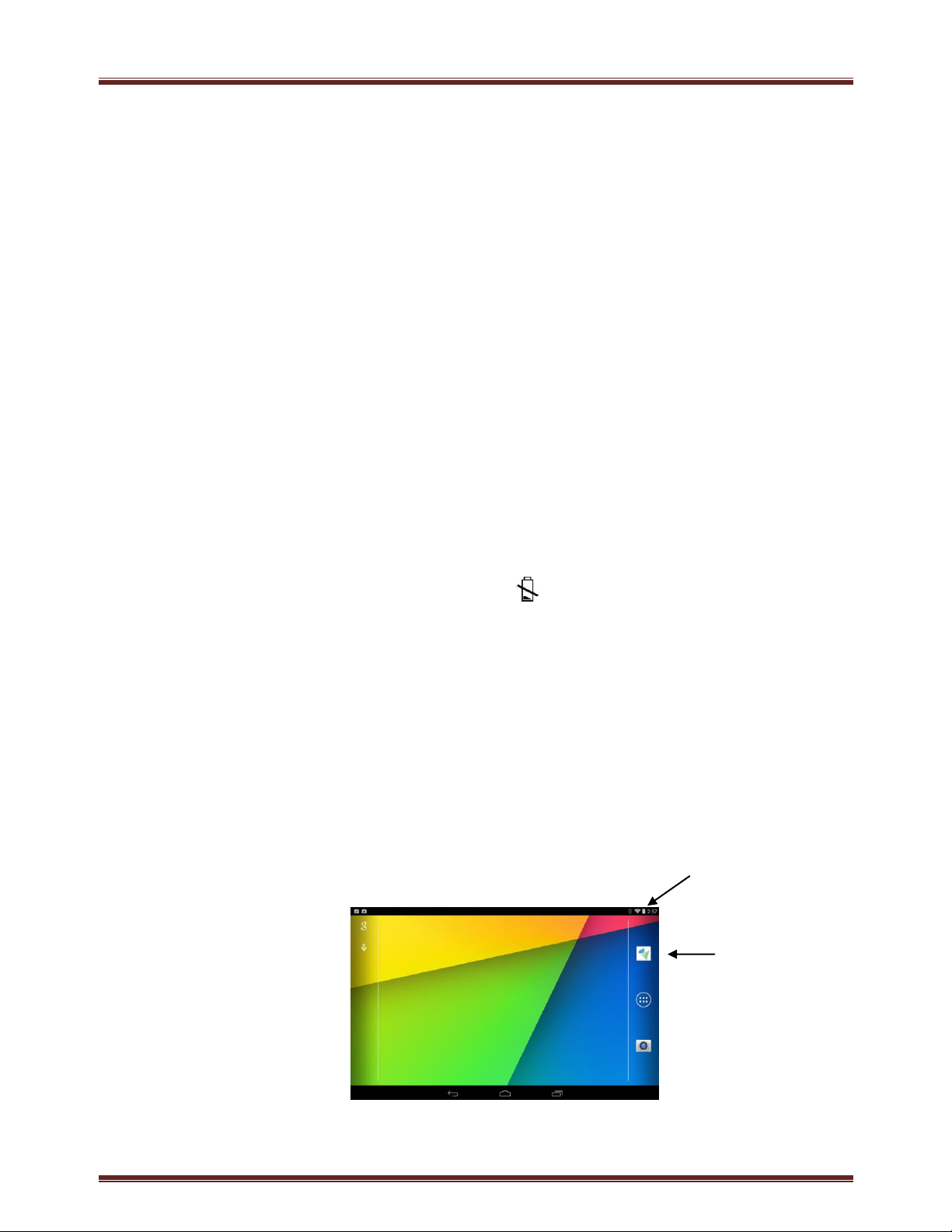
1. Turn on the User Feedback Unit by pressing ON-OFF control switch located on
the Top-left edge of the User Feedback Unit. The ON-OFF switch button is the
smaller, left-most button.
If only the battery-charge ICON appears on the User Feedback Unit
display, the battery is depleted and must be recharged prior to use.
NOTE: A full charge for a discharged User Feedback Unit takes two hours.
2. Verify the User Feedback Unit is at least 50% charged as shown on the battery
charge indicator. If it is not at least 50% charged, plug it into the charger for
at least one hour prior to use.
Caution: Do not use the Charger in the operating room
M10 -140613 Page 8
Page 9
Node-O-Scope System User Manual
3. Launch the Node-O-Scope application by tapping on the Cokiya logo .
‘Waiting for Probe’ will be displayed.
4. Clamp the User Feedback Unit securely to an IV pole in a location that is easily
viewable by the user.
5. The User Feedback Unit is now ready to link with a Node-O-Scope Probe.
Deploying the Probe
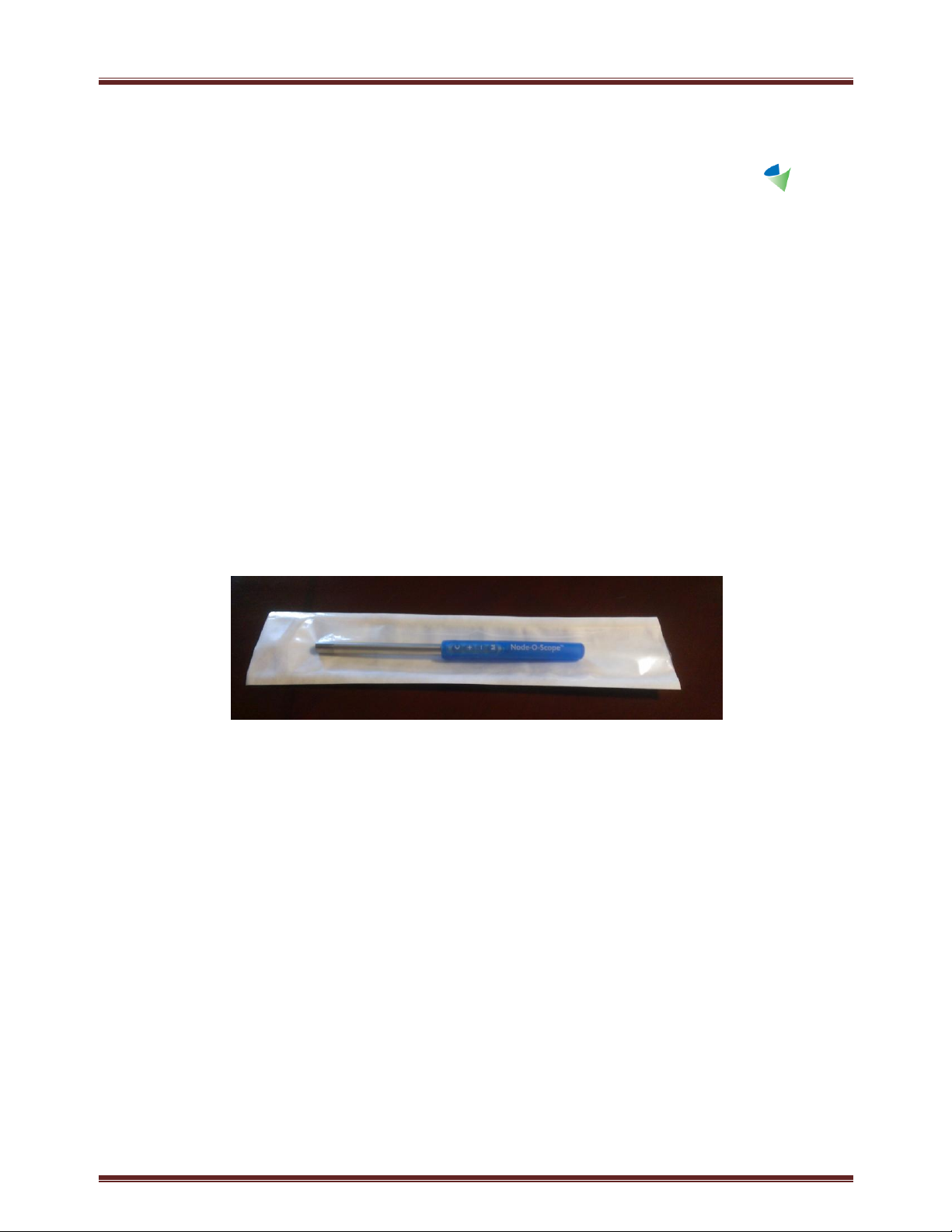
1. Remove the Probe from the sterile peel-pouch, using aseptic technique.
NOTE: The Node-O-Scope Probe can be used preoperatively in its sterile pouch, prior
to sterile deployment. Simply release the tip cover from the detector end of the
probe through the pouch and press through the clear poly film to access the controls.
Use care not to damage the pouch seals, as this could disrupt its sterile barrier.
CAUTION: The Node-O-Scope battery lasts up to 2-hours after any initiation,
including initiation for preoperative use.
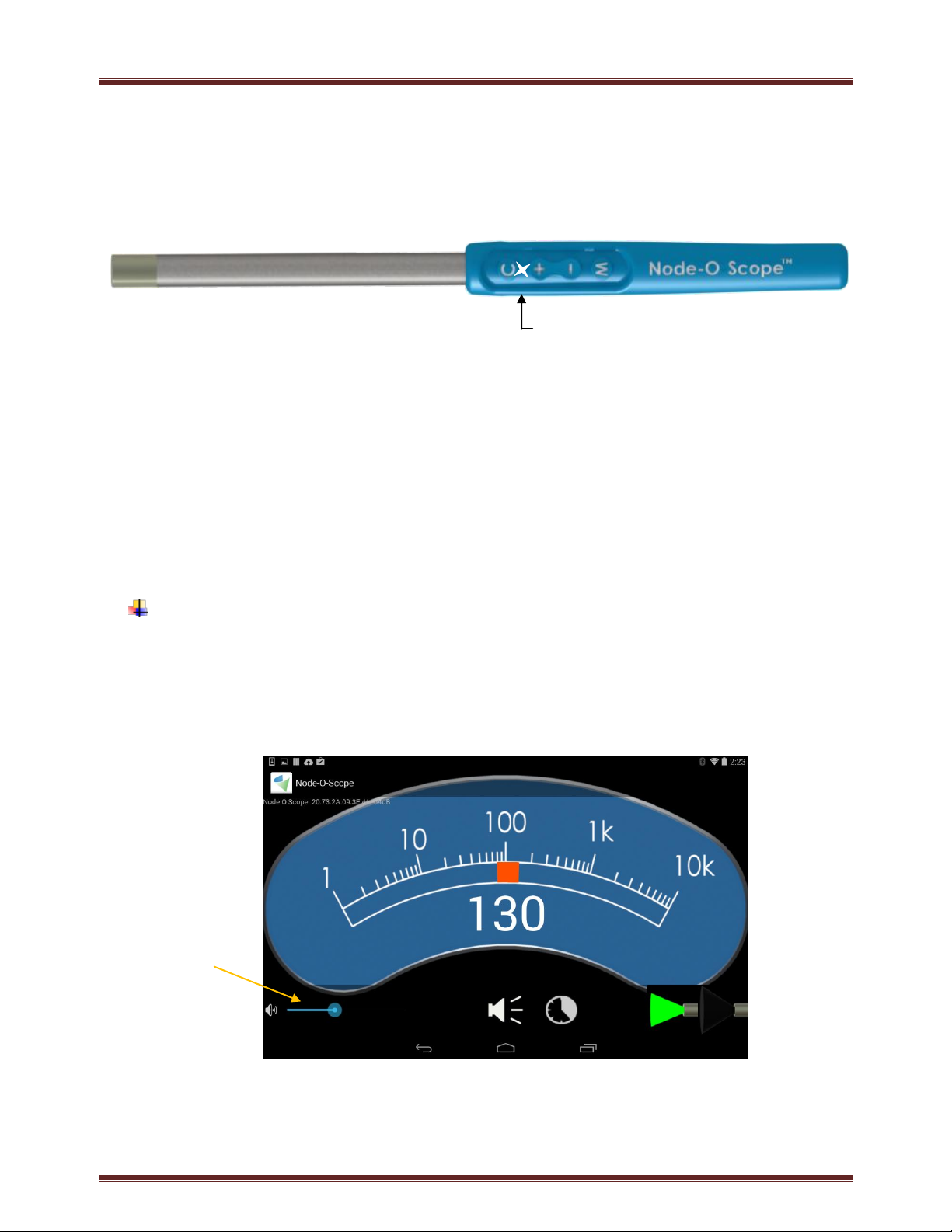
2. Turn on the Probe by pressing down the ‘M’ button until the light on the Probe
keypad flashes. This indicates the Probe has been activated. A greeting will be
M10 -140613 Page 9
Page 10
Node-O-Scope System User Manual
Audio Level Slider
Bar
Flashing light indicates
probe is active
voiced and live Node-O-Scope application starts when the User Feedback Unit
senses the Probe.
NOTE: Whenever a command is recognized, the User Feedback Unit will provide
voiced feedback.
Using the Controls
To adjust the audio feedback volume: Momentarily press on the ‘+’ or ‘-‘
button on the probe. A slider bar on the User Feedback display next to the
speaker icon displays the volume. Alternately, the audio volume can be
adjusted directly from the User Feedback Unit display by pressing and sliding
the audio level bar.
M10 -140613 Page 10
Page 11
Node-O-Scope System User Manual
Muted Audio
Scan Mode
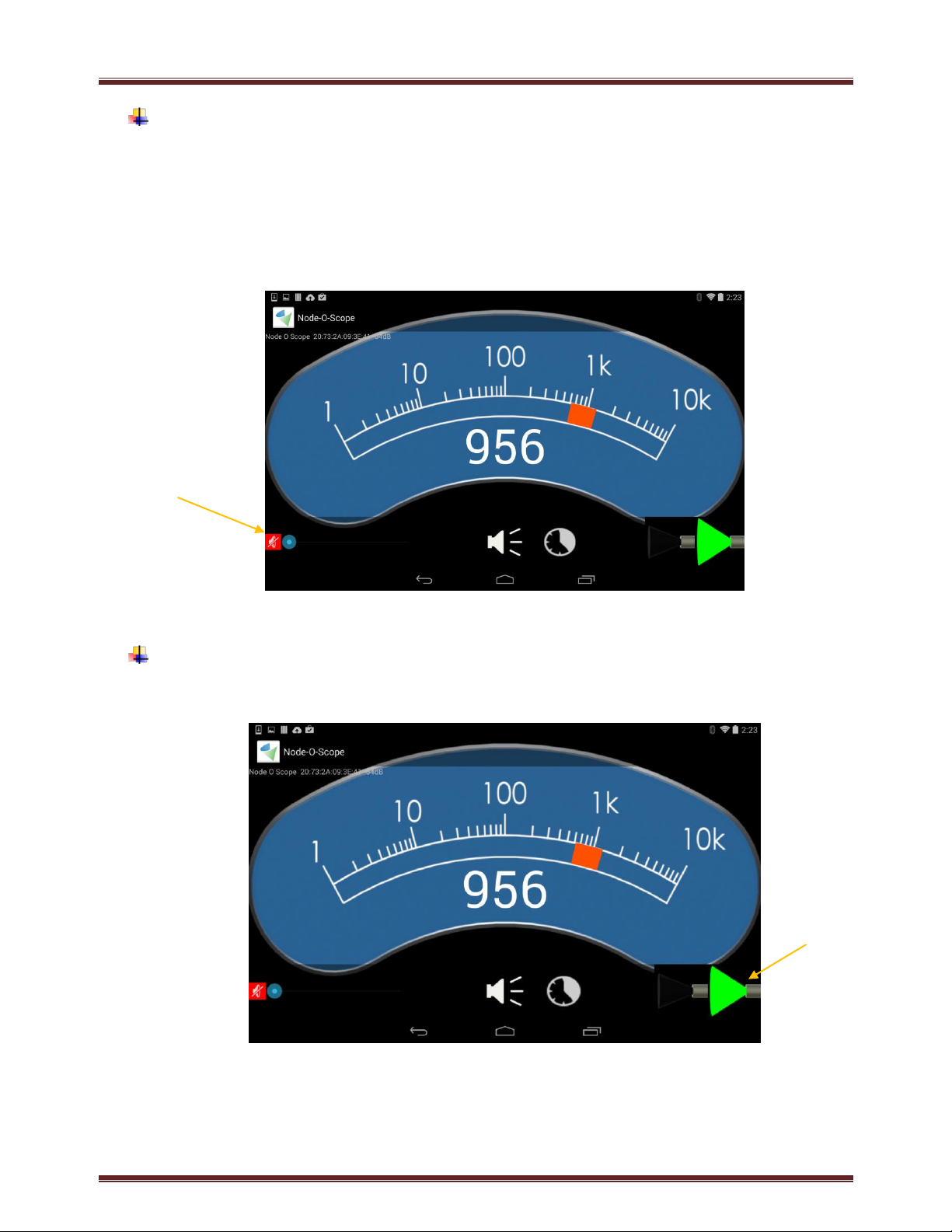
To mute the audio feedback volume: Repeatedly press the ‘-‘ button on the
Probe until the User Feedback voices “Muting Probe.” The audio level slider
bar will be minimized and the speaker icon will be displayed in red.
Alternately, the audio volume can be muted directly from the User Feedback
display by tapping and sliding the audio level bar to the left until the speaker
icon is displayed in red.
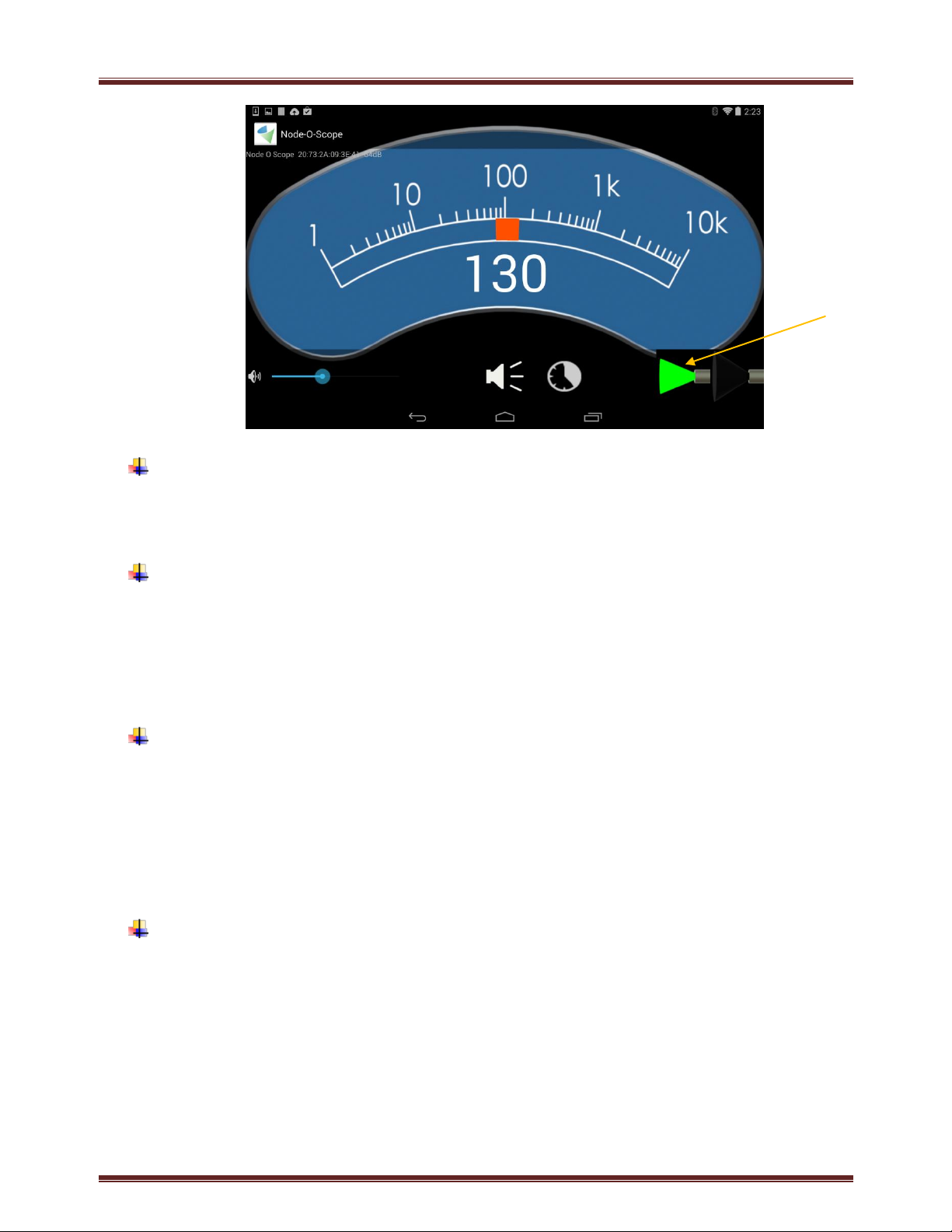
To change the mode of the Probe from ‘Scan’ to ‘Point’: Press the ‘M’ button
on the Probe handle. The selected mode is displayed on User Feedback Unit.
M10 -140613 Page 11
Page 12
Node-O-Scope System User Manual
Point Mode
To request a voiced indication of the instantaneous count rate: Momentarily
press the ‘C’ button on the Probe handle. The User Feedback Unit
continuously displays the instantaneous count rate.
To get a statistically significant count rate: Press and hold the ‘C’ button for
1-2 seconds – at which time “Hold Steady” will be voiced – then a countdown
to “Zero” while the integration completes – and finally the statistically
significant count rate is voiced and momentarily displayed in flashing numbers
on the User Feedback Unit.
To change the audio scale to count range: Press and hold the ‘+’ button for
1-2 seconds – at which time “High Range” will be voiced, and the scale on the
rate-meter will reflect the higher range. Pressing and holding the ‘-’ button
for 1-2 seconds will return to the lower range, and “low Range” will be voiced.
In Surgery
Changing Modes: Two photon energy-resolving modes are available -- ‘Scan’
and ‘Point’.
Scan mode provides higher-sensitivity because it counts more gamma
photons that have been scattered while in transit from their source to the
probe’s detector. This allows the user to survey wider areas more quickly
than Point mode: the relatively higher number of gamma photons that are
detected produce more rapid count-rate feedback information, and Scan
M10 -140613 Page 12
Page 13

Node-O-Scope System User Manual
mode accepts scattered gamma photons with lower energy than Point
mode, and thus could have emanated from a wider region. Scan mode can
be used for surveying larger areas, more quickly, especially when there is
less background or scattered radiation (e.g. from the injection site or from
nearby organs that uptake radiotracer). Scan mode can also be used to
obtain more accurate ex-vivo specimen count rates because of its wider
angle of acceptance for scattered gamma photons that may be emanating
from the specimen.
Point mode provides higher-spatial resolution because it rejects low
energy gamma photons that have been scattered while in transit from
their source to the probe’s detector. This allows the user to more precisely
locate the source of the gamma photons: only those photons that have
been minimally-scattered between their source and the probe’s detector
are counted, so the influence of background and scattered radiation is
reduced. Point mode can be used when searching for hotspots when there
is predominate background or scattered radiation (e.g. from the injection
site or from nearby organs that uptake radiotracer) and when attempting
to more accurately localize small radioactive hotspots.
Changing the audio-to-count rate range
A range of audio feedback is produced in proportion to the range of detected
count rates. An increase in pitch and beat frequency indicates an increase in
detected count rate. Two audio ranges are used to cover the range of counts
rates detectable by the Node-O-Scope system. When the Probe is initialized,
it defaults to the low range, which detects counts up to 3,000 counts per
second. When more than 3,000 counts per second are detected, an off-tone
sound is produced to alert the user that the high range may be needed. High
range detects photons from 2,000 to 10,000 counts per second.
NOTE: The selected range does not affect the digital count display.
Obtaining a statistically significant count rate
The user can initiate the acquisition of a statistically-significant count rate to
improve the accuracy of the count rate reading for an exact target region. The
user must hold the probe perfectly steady during this acquisition. When this
feature is initiated, the Node-O-Scope system will:
M10 -140613 Page 13
Page 14
Node-O-Scope System User Manual
• For count rates greater than or equal to 40 counts per second. The
system will count for 2-10 seconds and return a count rate measurement
with greater than or equal to 95% accuracy with 90% confidence. Very
high count rates will be measured very quickly to very high accuracy (e.g.
1,000CPS target: 2 seconds counting time, 99% accuracy with 90%
confidence).
• For count rates below 40 counts per second. The system will count for 10
seconds and return a count rate measurement that is more accurate than
the instantaneous reading but to less than 95% accuracy with 90%
confidence. Very low count rates will have much lower accuracy (e.g. 5CPS
target: 25% accuracy with 90% confidence).
After Surgery
Or
Dispose of the Probe in an appropriate bio-hazardous waste container.
Close the Node-O-Scope application on the User Feedback Unit:
• Tap the recent applications list icon ,
• Swipe the Node-O-Scope application downward and off the screen
to close the application.
NOTE: The Node-O-Scope application must be closed after use, or before
the next procedure or it will not pair with another Probe.
Hibernate the User Feedback Unit by pushing the ON-OFF button.
Wipe the surfaces of the User Feedback Unit with a damp cloth or disinfectant
wipe if they are soiled. Clean the display screen with a dry cloth to remove
smudges.
Charge the User Feedback.
M10 -140613 Page 14
Page 15

Node-O-Scope System User Manual
5. SPECIFICATIONS
Node-O-ScopeTM S-10 Probe
Overall Dimensions: 17mm X 226mm
Reach: 103mm, Operative Diameter: 10mm
Weight: 70gm
Wireless: Bluetooth Smart
Integrated Tungsten Collimator
Materials: Stainless Steel, Tungsten, Polyurethane, Epoxy (all biocompatible)
Shielding Efficiency: >99.9%
Energy Resolution: 10% FWHM (Tc-99m)
Bi-Modal Selectable Energy Window: 10% in Hi-Res Mode, Open in Hi-Sens Mode
Angular Resolution in Air: 46 degrees FWHM
Spatial Resolution @1cm in Air, Hi-Res Mode: 13mm FWHM
Spatial Resolution @1cm in Air, Hi-Sens Mode: 14mm FWHM
Sensitivity in Air, Hi-Res Mode: 18,000CPS/MBq @1cm; 3,400 /MBq @1cm
Sensitivity in Air, Hi-Sens Mode: 27,000CPS/MBq max; 4,800CPS/MBq @1cm
Probe-Mounted Controls:
• Power-on & Pair
• Mode (Hi-Sens or Hi-Res),
• Count Rate Reporting
• Count Rate Averaging,
• Audio Feedback Range,
• Volume and Mute.
Probe Life: Lesser of (100) Minutes or (1) Procedure
Use Conditions: 10 to 40°C; 30 - 80% relative humidity; 50-70KPa pressure
Storage Conditions -15 to 50°C; 0 - 80% relative humidity; 50 – 70KPa pressure
M10 -140613 Page 15
Page 16

Node-O-Scope System User Manual
User Feedback Unit T10
Nexus Android Tablet; OS 4.4 KitKat
Maintenance free, no calibration
Use Conditions: 10 to 40°C; 30 - 80% relative humidity
Storage Conditions -15 to 50°C ; 0 - 80% relative humidity
6. TROUBLESHOOTING
Symptom: radiation count rate greater than zero even when no radiation present
after contacting radioactive tissue
Resolution: decontaminate probe tip of radioactive material using sterile process
Symptom: spurious radiation counts during in conjunction with energizing
electrocautery device
Resolution: move electrocautery device cable away from probe tip
M10 -140613 Page 16
Page 17
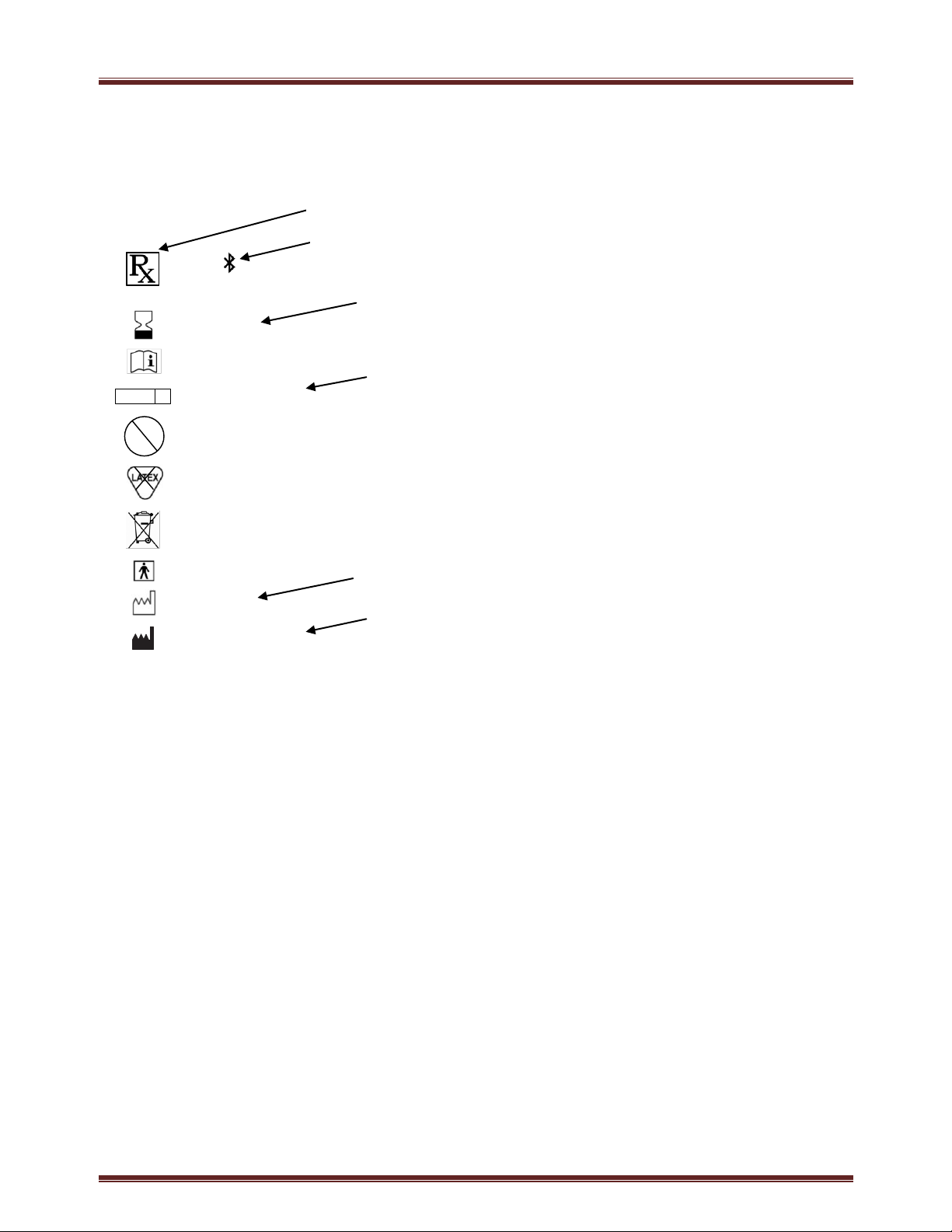
Node-O-Scope System User Manual
Cokiya Inc.
830 Challenger Ste 140
Brea, CA 92821
Contents sterile unless
package is damaged.
Single use only.
Do not resterilize
State of CA only: alkaline
battery, do not dispose
in municipal waste
Consult Instructions for
Use
Contains FCC ID:
2ADNA-S10
Type BF applied part
Only
YYYY-MM-DD
YYYY-MM-DD
Not made with
natural rubber latex
STERILE EO
2
STERILIZE
Caution: Federal law restricts this device to sale by or on the order of a licensed
healthcare practitioner
BluetoothTM SIG Listing Certificate D022868
Sterilized by Ethylene Oxide
Use-by Date
Manufacturer
7. LABELING
8. EMC DECLARATION
This product has been tested and verified to ensure that there are no issues or
concerns regarding reciprocal interference. This includes EMI, EMC and RF. It has
been certified and tested by 3rd party testing facilities. List of standards is as
follows:
Medical Electrical Equipment - Part 1: General Requirements For Safety -
Collateral Standard: Electromagnetic Compatibility - Requirements and Tests –
EN 60601-1-2:2004
CFR 47, Part 15, Section 15.247 (b): Effective Isotropic Radiated Power (EIRP)
CFR 47, Part 15, Section 15.247 (d): Spurious Emissions
M10 -140613 Page 17
Page 18

Node-O-Scope System User Manual
8. FCC INFORMATION
This device complies with part 15 of the FCC Rules. Operation is subject to the
following two conditions: (1) This device may not cause harmful interference, and
(2) this device must accept any interference received, including interference that
may cause undesired operation.
This equipment has been tested and found to comply with the limits for a Class A
digital device, pursuant to part 15 of the FCC Rules. These limits are designed to
provide reasonable protection against harmful interference when the equipment is
operated in a commercial environment. This equipment generates, uses, and can
radiate radio frequency energy and, if not installed and used in accordance with
the instruction manual, may cause harmful interference to radio communications.
Operation of this equipment in a residential area is likely to cause harmful
interference in which case the user will be required to correct the interference at
his own expense.
Caution: changes or modifications not expressly approved by Cokiya Inc. could void
the user's authority to operate the equipment.
M10 -140613 Page 18
 Loading...