

Page 1
1
Vantage
Canadian Bill Acceptor
Quick
Start
Guide
Page 2
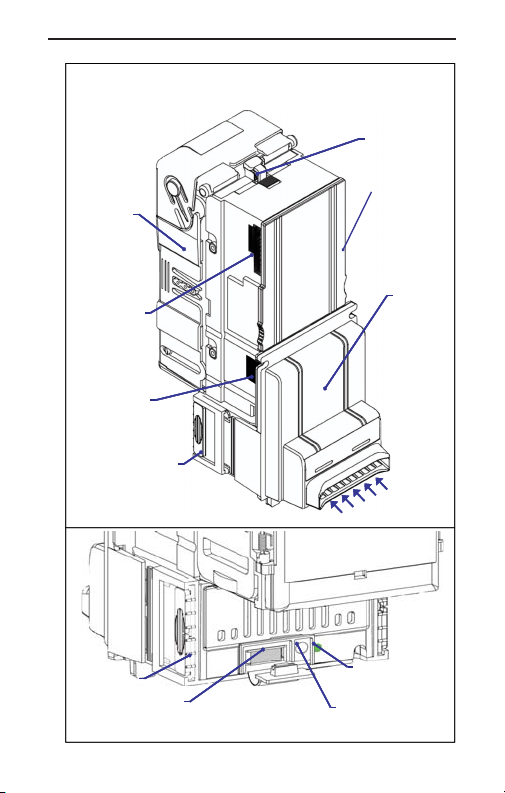
Vantage
Vantage
Vantage
Vantage
Cashbox
Cashbox
Harness
Harness
Connection
Connection
(n on -M DB )
(n on -M DB )
Harness
Harness
Connection
Connection
(M D B)
(M D B)
Quick
Quick
Release
Release
Bezel Tab
Bezel Tab
Quick
Quick
Release
Release
Bezel Tab
Bezel Tab
Data
Data
Port
Port
™
Components
™
Components
™
™
Components
Components
Service Mode
Service Mode
Button
Button
2
Cashbox
Cashbox
Release
Release
Option
Switches
(on side)
Inlet
Inlet
Bezel
Bezel
Bill Inlet LEDs
Bill Inlet LEDs
Diagnostic
Diagnostic
LED
Page 3
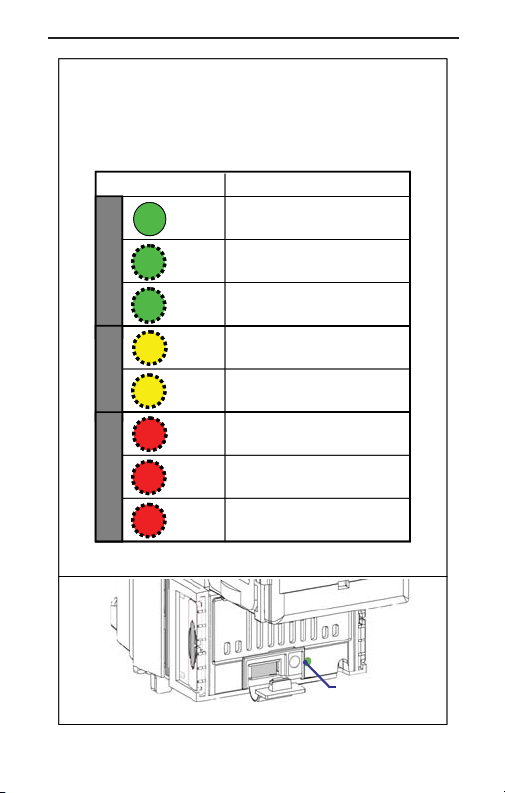
Diagnostic
Diagnostic
Diagnostic
Diagnostic
Flash Codes
Flash Codes
Flash Codes
Flash Codes
Flash Code Validator Status
Flash Code Validator Status
(s olid)
(s olid )
GRN
GRN
GRN
GRN
GRN
GRN
GRN
GRN
x 1
x 1
GRN
GRN
GRN
GRN
x 2
x 2
OperationalWarningOut of Service
OperationalWarningOut of Service
YEL
YEL
x 1
x 1
YEL
YEL
x 2
x 2
RED
RED
RED
RED
x 1
x 1
RED
RED
RED
RED
x 2
x 2
RED
RED
RED
RED
x 3
x 3
Sales Mod e / O K
Sa le s M od e / O K
C ou po n Te ac h
C ou po n Te ac h
Service Mode
Se rvice M od e
C le an U nit
C le an U nit
Se rvice U nit
Se rvice U nit
C ash bo x F u ll
C ash bo x F u ll
C le ar B ill P ath
C le ar B ill P ath
O ut o f S ervice
O ut o f S ervice
Diagnostic
Diagnostic
LED
3
Page 4
Configuration Settings
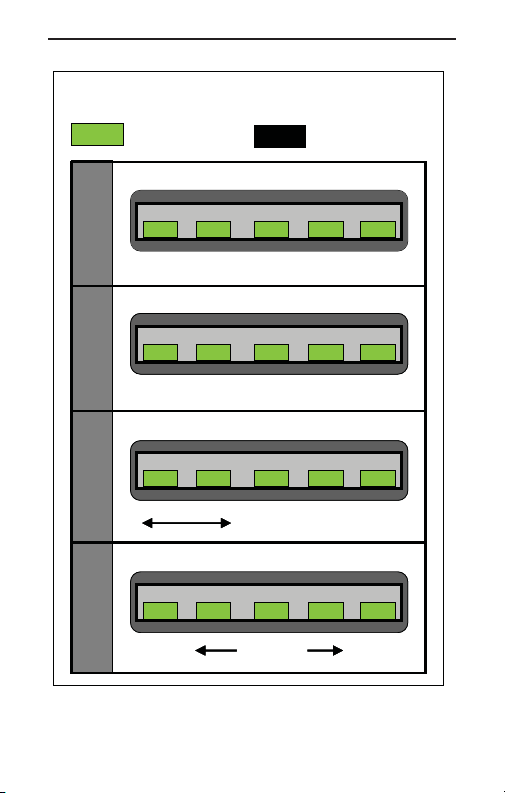
Configuration Settings
Configuration Settings
Configuration Settings
Inlet LED On:
Inlet LED On:
ON
ON
Option Enabled
Option Enabled
Bill Acceptance
Bill Acceptance
Bill Inlet LEDs
Bill Inlet LEDs
Page 1Page 2
Page 1Page 2
Coupons / Security / Bezel Lights
Coupons / Security / Bezel Lights
Coupons
Coupons
Bill Acceptance / Orientation
Bill Acceptance / Orientation
Page 3
Page 3
Level 3 Security
Level 3 Security
Page 4
Page 4
Security
Security
$10 $20 $50
$5
$1 $5 $10 $20
$1 $5 $10 $20
Bill Inlet LEDs
Bill Inlet LEDs
High
High
Impulse
Impulse
Security
Security
Bill Inlet LEDs
Bill Inlet LEDs
1-Way
1-Way
2-Way
2-Way
4-Way
(b o th )
4-Way
(b o th )
Bill Inlet LEDs
Bill Inlet LEDs
Level 3
Level 3
Reserved
Reserved
Inlet LED Off:
Inlet LED Off:
OFF
OFF
Option Disabled
Option Disabled
Smart
Smart
Bezel™
Bezel™
$50 $100
$50 $100
100
Page 1
Page 1
(Flash x1)
(Flash x1)
Page 2
Page 2
(Flash x2)
(Flash x2)
Page 3
Page 3
(Flash x3)
(Flash x3)
Page 4
Page 4
(Flash x4)
(Flash x4)
4
Page 5
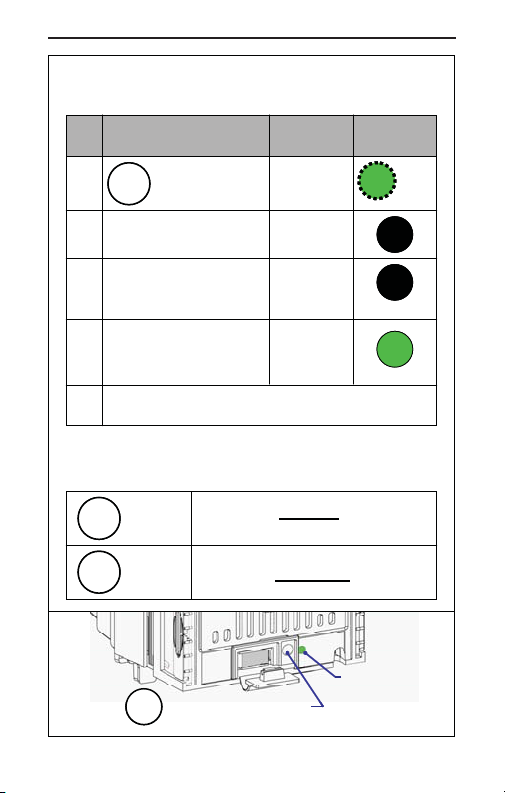
To Configure Options
To Configure Options
Diagnostic
Mode
#
#
1.
1.
2.
2.
3.
3.
4.
4.
5.
5.
Options Navigation
Options Navigation
SERV
SERV
SERV
SERV
Action
Action
Press and release
SERV
SERV
button, Diagnostic
LED flashe s.
R e mo ve
R e mo ve
Low er H ou sin g
Low er H ou sin g
Se t O pt ions A s
Se t O pt ions A s
D e sire d
(see Options
D e sire d
(see Options
Navigation below)
Navigation below)
R e -insta ll L ow er
R e -insta ll L ow er
H o usin g. In let LE D s
H o usin g. In let LE D s
flash 5 tim es c onfirm in g
flash 5 tim es c onfirm in g
optio n s a re s ave d .
optio n s a re s ave d .
Tes t U nit to E ns ure P ro p e r S etup.
Tes t U nit to E ns ure P ro p e r S etup.
Pre ss
Pre ss
onc e
onc e
H o ld fo r
H o ld fo r
next Pa ge
next Pa ge
SERV
SERV
Sc rolls t o next set of op tion s
Sc rolls t o next set of op tion s
Sc rolls t o next Page of op tio ns.
Sc rolls t o next Page of op tio ns.
Service Mode Button
Service Mode Button
Mode
Se r v ice
Se r v ice
C o n fig
C o n fig
C o n fig
C o n fig
Sa le s or
Sa le s or
R e ad y
R e ad y
wit h in cu rre nt P ag e.
wit h in cu rre nt P ag e.
Diagnostic
Light
Light
GRN
GRN
x 2
x 2
OFF
OFF
OFF
OFF
GRN
GRN
Diagnostic
Diagnostic
Indicator LED
Indicator LED
5
Page 6
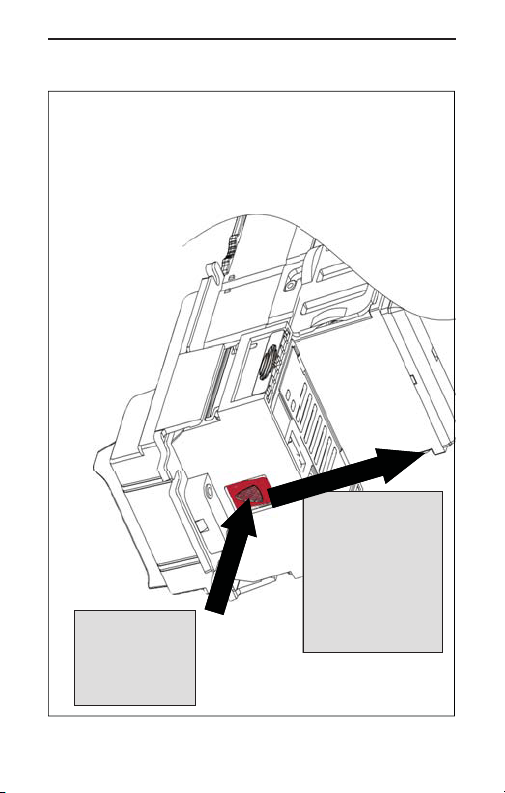
Lower Housing
Lower Housing
Lower Housing
Lower Housing
Removal
Removal
Removal
Removal
2. Push
2. Push
Depressed
Depressed
Button to
Button to
Back to
Back to
Remove
Remove
Lower
1. Depress
Button
Firmly to
Release
Lower
Housing.
Housing.
6
Page 7
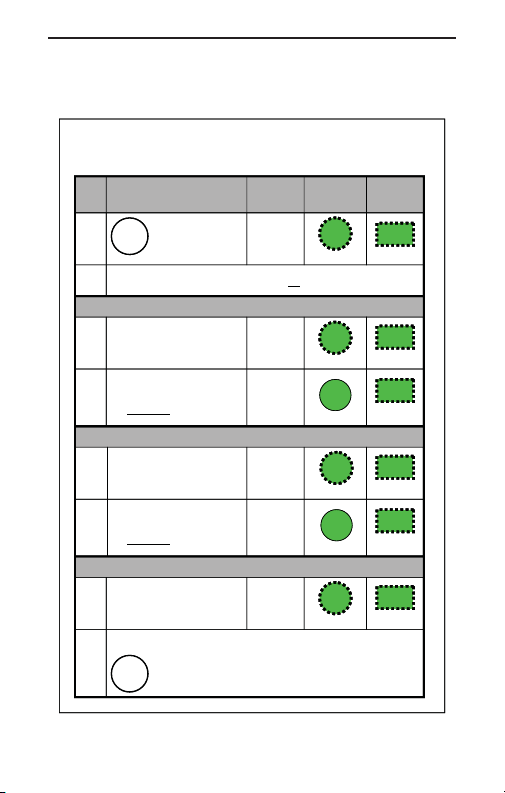
Add / Remove Coupons
Add / Remove Coupons
Diagnostic
#
#
1.
1.
2.
2.
3a.
3a.
4a.
4a.
3b.
3b.
4b.
4b.
3c.
3c.
4c.
4c.
Action Mode
Action Mode
H old bu tton unt il
H old bu tton unt il
SERV
SERV
D iag nos tic LE D
D iag nos tic LE D
fla sh es.
fla sh es.
In sert C ou po n t o be Added o r R em ov ed .
In sert C ou po n t o be Added o r R em ov ed .
C oupon a ccep ted
C oupon a ccep ted
and re turn ed .
and re turn ed .
A uto ma tica lly ret urn s t o
A uto ma tica lly ret urn s t o
S ale s M od e. C ou po n
S ale s M od e. C ou po n
ad dit ion co mp let e.
ad dit ion co mp let e.
REMOVE Coupon
REMOVE Coupon
C oupon d isa ble d
C oupon d isa ble d
and re turn ed .
and re turn ed .
A uto ma tica lly ret urn s t o
A uto ma tica lly ret urn s t o
S ale s M od e. C ou po n
S ale s M od e. C ou po n
re mo va l co mp let e.
re mo va l co mp let e.
C o u pon NOT Recog n ized
C o u pon NOT Recog n ized
C oupon retu rne d.
C oupon retu rne d.
In let L ED s f las h a t
In let L ED s f las h a t
origi nal r ate .
origi nal r ate .
In sert a no the r c oup on (s ee S tep 2 a bo ve)
In sert a no the r c oup on (s ee S tep 2 a bo ve)
H old bu tto n to ret urn to Sa les Mo de
H old bu tto n to ret urn to Sa les Mo de
SERV
SERV
re tur ns aut om atic all y a fter 40 se cs of in ac tivity ).
re tur ns aut om atic all y a fter 40 se cs of in ac tivity ).
C o upon
C o upon
Teach
Teach
ADD Coupon
ADD Coupon
C o upon
C o upon
Teach
Teach
Sa le s
Sa le s
C o upon
C o upon
Teach
Teach
Sa le s
Sa le s
C o upon
C o upon
Teach
Teach
OR
OR
Diagnostic
Light
Light
GRN
GRN
(flash)
(flash)
GRN
GRN
(fast rate)
(fast rate)
GRN
GRN
(s olid )
(s olid )
GRN
GRN
(fast rate)
(fast rate)
GRN
GRN
GRN
GRN
(flash)
(flash)
Bill Inlet
Bill Inlet
LEDs
LEDs
GRN
GRN
(flash)
(flash)
GRN
GRN
(fast rate)
(fast rate)
GRN
GRN
(cycle)
(cycle)
GRN
GRN
(fast rate)
(fast rate)
GRN
GRN
(cycle)
(cycle)
GRN
GRN
(flash)
(flash)
(n ote un it
(n ote un it
7
Page 8
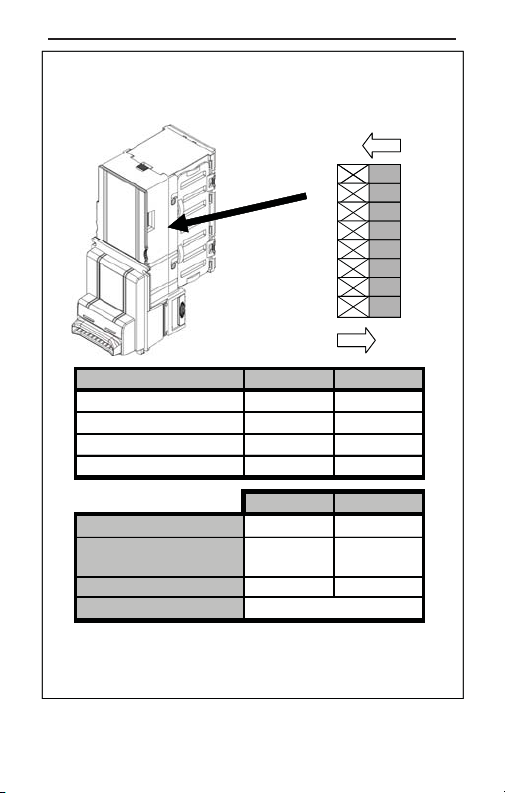
Option / Dip Switch Settings
$
$
Option / Dip Switch Settings
Option / Dip Switch Settings
Option / Dip Switch Settings
Note: There are no switches on MDB only models.
Note: There are no switches on MDB only models.
ON
ON
ON
ON
1 2 3 4 5 6 7 8
1 2 3 4 5 6 7 8
OFF
OFF
OFF
OFF
Pulse Timing Switch 1 Switch 2
Pulse Timing Switch 1 Switch 2
50 / 50mS
50 / 50mS
150 / 150mS
150 / 150mS
Custom
Custom
(Credit Line)
Parallel
Parallel
Switch 3
Switch 3
Switch 4
Switch 4
Switch 5
Switch 5
Switches 6 - 8
Switches 6 - 8
Note:
1. "Custom" has a default setting of 200 / 200mS
2. Power must be reset for switch settings to take effect.
(Credit Line)
O N O N
O N O N
O N O F F
O N O F F
O F F O N
O F F O N
O F F O FF
O F F O FF
ON OFF
ON OFF
4 P uls e / $1 P uls e /
4 P uls e / $1 P uls e /
Alw ays
Alw ays
En a b led
En a b led
Se ria l
Se ria l
Reserved
Reserved
H o s t
H o s t
En a b led
En a b led
Pu ls e
Pu ls e
8
Page 9
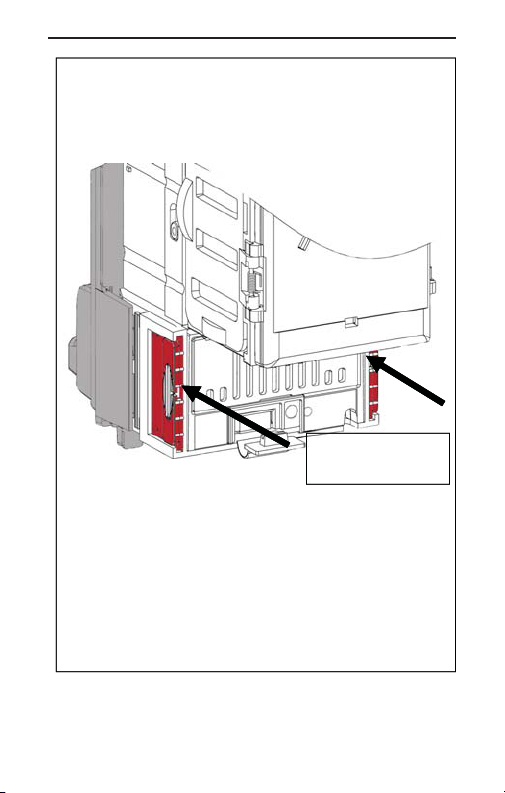
Quick Release
Quick Release
Quick Release
Quick Release
Bezel Operation
Bezel Operation
Bezel Operation
Bezel Operation
Push Firmly to
Push Firmly to
Push Firmly to
Push Firmly to
Release Bezel
Release Bezel
Release Bezel
Release Bezel
1. Pu s h f irm ly on Q uick R e lease T ab s u s in g a
1. Pu s h f irm ly on Q uick R e lease T ab s u s in g a
screw driv e r tip . Ta b s w ill m ove tow a rds
screw driv e r tip . Ta b s w ill m ove tow a rds
bez e l an d latch .
bez e l an d latch .
2. O n ce bo th tab s a r e latche d , the b ill
2. O n ce bo th tab s a r e latche d , the b ill
acc e p tor w ill s e pa ra te fro m th e beze l.
acc e p tor w ill s e pa ra te fro m th e beze l.
3. To rea ttac h , pu s h bill ac c ep tor bo d y fir m ly
3. To rea ttac h , pu s h bill ac c ep tor bo d y fir m ly
onto be z e l u n til it lo cks.
onto be z e l u n til it lo cks.
9
Page 10
™
Smart
Smart
Smart
Smart
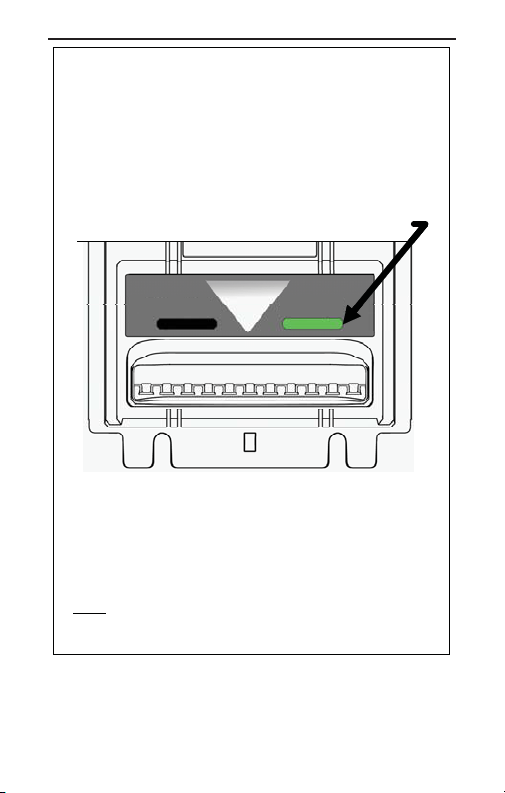
Communicates to Customer Which
Communicates to Customer Which
Bills Are Accepted
Bills Are Accepted
Fea ture not a v a ila b le o n a ll m o d els .
Fea ture not a v a ila b le o n a ll m o d els .
Denotes acceptance of both $5 and $10 bills.
Bezel
Bezel
Bezel
Bezel
™
$5 only
• $5 & $10 Is Lit When
•
and change can be made for them.
• $5 Only Is Lit When:
•
be made for $5 bills.
Note: For correct operation, make sure $5 and $10
bills are enabled (see Configuration Settings).
For more information on the Vantage™,
please see the Operation and Service Manual,
available at www.coinco.com
$5 & $10
: Both bills accepted
Change can only
10
Page 11

Notes
11
Page 12

12
For technical support on this or any
other Coinco product,
contact your nearest Coinco
Coinco Publication # 929027
Offi ce/Service Center.
email: [email protected]
www.coinco.com
 Loading...