

Page 1
Quick Start Guide
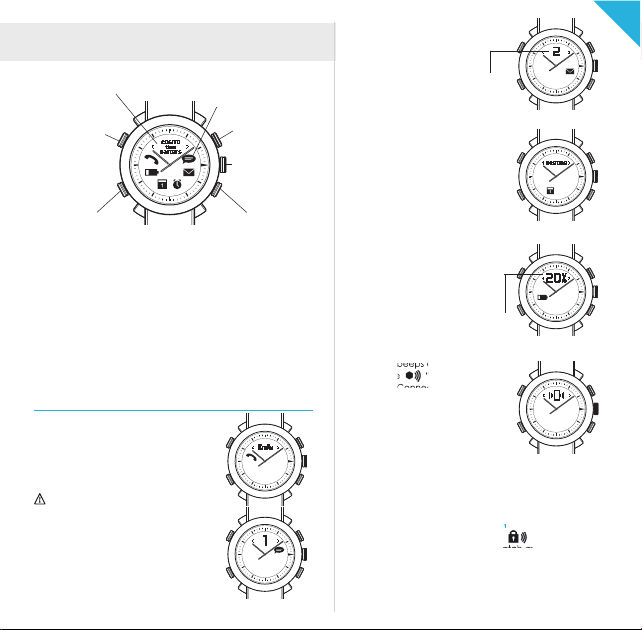
DISPLAY
POWER
Power on/off
> 3 sec
NOTIFICATIONS
icon and vibrate
with optional beeps
COMMAND
SET TIME
Pull 1/2 way and
turn to set the time
Incoming email alerts
number of alerts
Calendar and Reminder alerts
Alerts you when there are
upcoming events or reminders.
EN
PAGE RIGHTPAGE LEFT
DISPLAY
Tap PAGE LEFT or PAGE RIGHT to view additional information
from display. Tap PAGE LEFT and PAGE RIGHT together to see
the time. Display supports Latin characters only
LIGHT
Tap upper left (POWER) button once.
PAIRING
When the watch is OFF, press POWER & COMMAND
buttons until 1st beep (approx. 3 sec) and all icons will
blink every 2 sec.
SOFT RESET
Press the 4 buttons together for 3 sec until you see all ALERT
icons blinking and the watch turns off.
NOTIFICATIONS
Incoming Call, Missed Call notifications
Caller ID will be displayed during
incoming calls. Phone numbers will be
displayed if it has not been stored as
contact in your phone book.
Caller ID supports Latin characters
only.
TEXT and social media app alerts
Supports SMS, MMS and social media
posts on Facebook and message
notification from Skype, Line,
WhatsApp, WeChat, Instagram and
more...
.
Low or Critical battery alerts
The display shows the battery
percentage and the Low or Critical
battery icons.
actual
percentage of
phone battery
To find the COGITO watch
The watch beeps and blinks when
tapping the “find my watch”
icon in the Connected Watch App.
To find your phone
For iOS7 users:
Your device beeps when tapping
the COMMAND button. Please
refer to the settings in the Connected Watch App.
For Android users:
Press COMMAND and PAGE LEFT buttons together and your
device beeps.
To activate out of range notification
After tapping the out of range icon , the watch beeps
and blinks when your phone and watch are apart from each
other. Range for the Bluetooth is about 10-20 meter,
distance are varies based on the devices and environment.
Page 2

Step 1: Download the Connected Watch App
For iOS users:
Search for the “Connected Watch” App in the App Store.
Compatible with iOS 7 devices that support Bluetooth®
Smart technology such as the iPhone 5s, iPhone 5c, iPhone
5, iPhone 4s, iPad mini, iPad (3rd and 4th generation), and
iPod touch (5th generation).
For Android users:
Download the “Connected Watch” App from Google Play.
The app is available for selected Android 4.3 and Android
4.4 devices that support Bluetooth® Smart technology.
Currently compatible with Samsung Galaxy S3, S4, S4 Mini,
S4 Active, Note 2, Note 3, HTC One and Nexus 5, etc.
Visit www.cogitowatch.com for the latest compatibility list.
Contact [email protected] if Google Play is not
supported in your country.
Step 2: Pair and connect the COGITO watch with your mobile
phone or tablet
1. Set the watch into PAIRING mode by pressing together
the POWER & COMMAND buttons until 1st beep
(approx. 3 sec) and all icons will blink every 2 sec.
2. For iOS7 users:
Open your device Bluetooth settings and select “COGITO”
in the device list. Press “PAIR” when prompted.
For Android users:
Open the Connected Watch App and tap the Device List
icon at the bottom left. The app will search for your watch
accordingly. Select “COGITO” in the device list and
connect.
Step 3: Customize your notifications settings.
Tap the Notifications Settings icon at the top right of the
Connected Watch App (iOS7 and Android) and select
which notifications you wish to receive on your COGITO
watch.
To acknowledge a notification:
Press the COMMAND button or check the notification on
your mobile phone or tablet.
To mute/unmute your watch:
Press the COMMAND button for 5 sec to mute the watch.
Press another 5 sec to unmute the watch and you will hear
a beep sound.
COMMAND
Mute the watch Unmute the watch
To take photos using your COGITO watch:
Tap the Camera icon in the Connected Watch App,
this will trigger the camera interface of the app. Press the
COMMAND button to take photos remotely.
Enable the email notifications on your iOS notification center
For iOS device user: If you want to receive email notifcations
Step 1 : Go to iOS “Settings”, and
tap “Notification Center”
Step 3: Select the alert style, sound etc. Then, enable “Show in
Notification Center” to allow your device to communicate with
your watch.
*Now you are ready to enjoy the connected experience with
the Connected Watch App. If you are having trouble with other
app notification, please check the iOS notification center by
following this 3 steps.
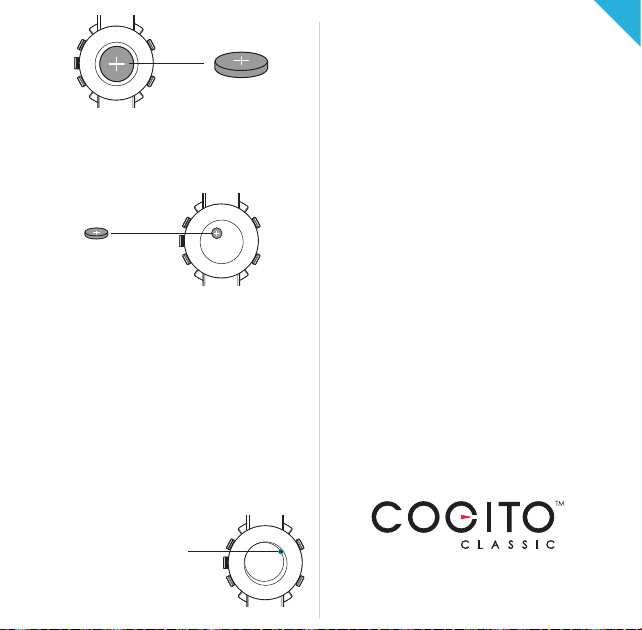
Replacing the connected system battery:
Battery cover
(Open to insert /
replace the battery)
Step 2 : Tap “Mail” to configure
the settings.
C
T
I
D
Q
0
D
0
I
2
C
•
C
I
C
F
•
:
7
C
2
T
O
S
3
I
0
S
G
4
0
E
I
R
3
T
D
O
A
R
C
w
E
-
T
C
:
a
A
l
t
D
c
e
W
0
h
d
0
.
c
M
o
2
T
o
M
A
m
0
1
P
o
2
w
3
0
e
2
r
e
X
R
a
d
A
C
n
i
V
:
b
h
I
y
E
e
C
R
p
C
y
n
H
O
t
i
O
N
y
d
r
N
U
e
e
l
t
E
Y
t
C
b
a
d
T
B
D
m
e
E
V
e
s
I
C
s
i
E
L
d
t
g
s
n
A
•
•
E
A
n
S
g
U
i
n
n
i
e
e
d
r
e
1
4
8
0
8
1
8
.
8
8
8
8
EN
Page 3
model CR2032
1. Open the back case of the watch to remove the old
battery.
2. Replace with a new battery.
3. Carefully replace the back case of the watch, ensuring
that the o-rin g is correctl y seated (for a water tight seal).
Replacing the watch movement battery:
model SR621SW
1. Open the back case of the watch and remove the
CR2032 cell button battery.
2. Remove the protective sticker and carefully set it aside.
3. Remove analog system battery located beneath
the protected sticker. (model SR621SW, battery life
up to 3 years**)
4. Carefully put back the protective sticker.
5. Insert the CR2032 battery and carefully replace the back
case of the watch ensuring that the o-ring is correctly
seated (for a water tight seal).
** Battery life may vary depending on the volume of
notification, brand and condition of the battery.
Caution ad vised by certi fication: Dan ger of explosi on if the batt ery is
incorrectl y replaced. Re place only wi th the same or equivalent ty pe.
Hard reset
If your watch gets into unrecoverable
state, a hard reset might be necessary.
1. Open the back case of the
watch and remove the battery.
2. Replace the battery.
3. Apply a hard reset by touching
the metal parts for a second.
4. Carefully replace the backcase
of the watch, ensuring that the
o-ring is correctly se ated (for a
water tig ht seal).
One year limited warranty
Re gist er your pr odu ct by set ting -up a CONNECTEDEVICE
account in the Connected Watch App. Keep your original
receipt as proof of purchase.
To k eep you r watch in goo d condi tion an d to a void
void ing the warran ty:
• Do not expose the watch to excessive pressure, impact,
dust, open flames or extreme temperatures.
• Operating temperature: -20 to +55C. (-4 to +131F)
• Always ensure the back case and o-ring is correctly in
pla ce and the wat ch is ti ghtly se aled bef ore exp osin g
the watc h to any moistu re o r liquid .
• Do not attempt to repair or modify the watch yourself.
Service and maintenance should be performed by
authorized technicians.
• 10 ATM/100 M of water resistance means that your
watch can be worn for most indoor or outdoor activities,
including most water sports. Suitable for recreational
surfing, swimming, snorkeling, sailing and water sports.
NOT suitable for diving.
• Avoid s ubmergi ng the watch f or an extended
pe riod of time.
• To maintain water resistance, do not press any buttons or
pull out the crown while under water.
• Keep the fr ont glass away from s harp or hard objects to
preven t scratche s.
• Exposure to high or low temperatures or frequent
successive alerts may shorten battery life.
• Keep the watch, accessories and any small parts out of
the reach of children.
EN
For support, please email us at
For more information about the watch and
Connected Watch App, visit cogitowatch.com
Thank you for supporting COGITO™
 Loading...