

Page 1
Quick Start Guide
Pairing: When the watch is OFF, press COMMAND + POWER
buttons until 1st beep (approx. 3 sec) and all icons will
blink every 2 sec.
Reset the watch: Press and hold the COMMAND + POWER +
PAGE LEFT + PAGE RIGHT buttons until you see the ALERT icon
on the CONNECTED Display and then the watch turns off.
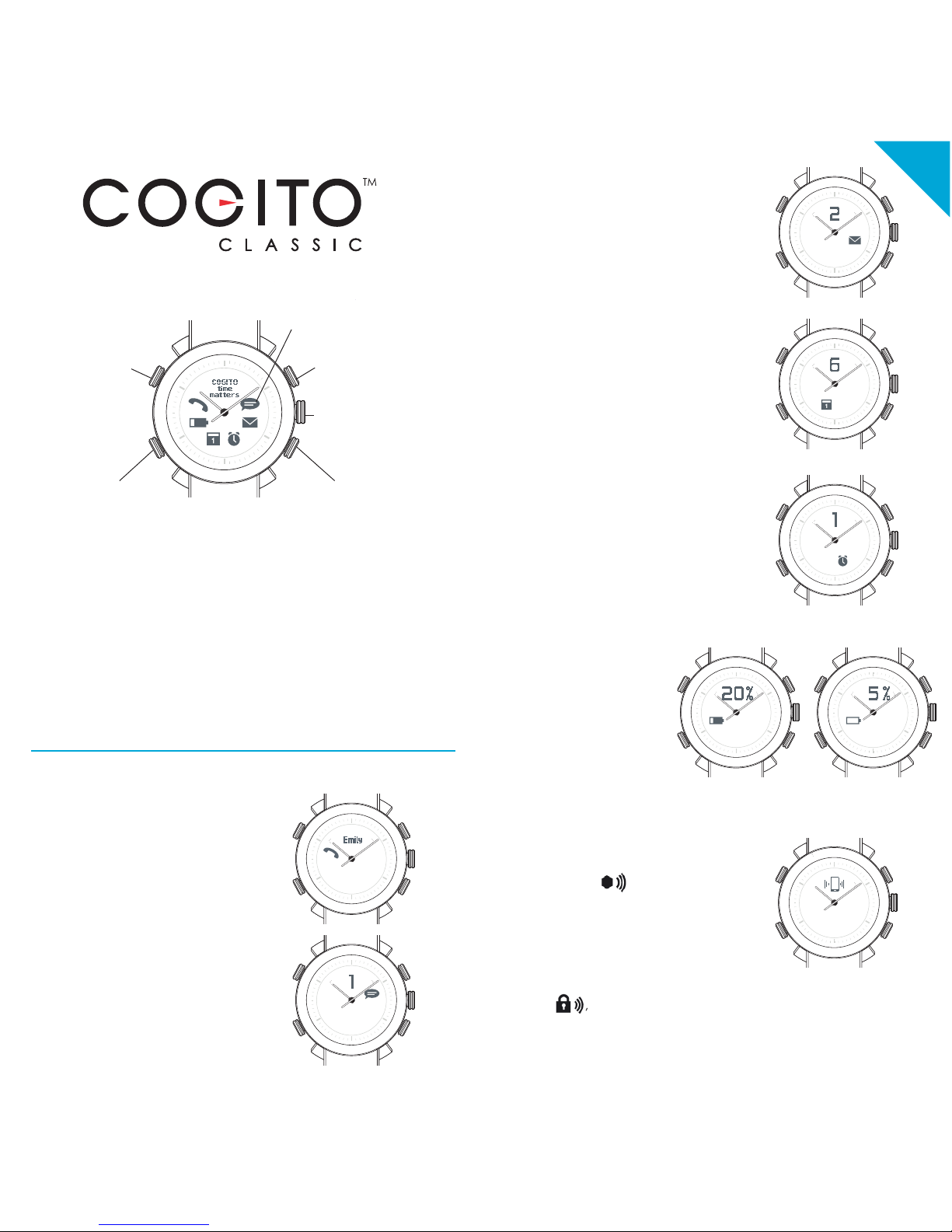
Incoming Call, Missed Call notification:
EN
COMMAND
POWER
NOTIFICATIONS
PAGE RIGHTPAGE LEFT
SET TIME
Pull 1/2 way and
turn to set the time
Blink and vibrate with
optional beeps
Power on/off
> 3 sec
NOTIFICATIONS
Tap PAGE LEFT or PAGE RIGHT to view
additional information
Tap PAGE LEFT and PAGE LEFT
together to see the time again
LIGHT
Tap any button
Caller ID (iOS only at this moment)
will be displayed during incoming
calls. Call numbers will be display if
the number is not stored in your
phone book.
Caller ID support Latin characters
only.
TEXT and social media app alerts:
Support SMS, MMS and social
media posts on Facebook, Twitter
and message notification from
WhatsApp, WeChat, Skype and
more...
Email alerts:
Inbound email alerts.
Calendar and Reminder alerts:
Alerts you when there are
upcoming events or reminders.
Low and Critical battery alerts:
The CONNECTED
display shows the
battery percentage
and the Low and
Critical battery icons
blinks respectively.
To find the COGITO watch:
The watch beeps and blinks
when tapping the find my
watch icon
in the CONNECTED WATCH
app.
After tapping the out of range
icon , the watch beeps
and blinks when your phone
and watch are apart from
each other.
To activate out of range notification:
Alarms:
Alerts you when you have alarms.
This function is currently supported
by Android only.
Page 2
Step 3: Customize your COGITO watch’s notification
settings.
Tap the Notification Settings icon at the top right of the
CONNECTED WATCH app (iOS7 and Android) and select
which notifications do you wish to receive on your
COGITO watch.
To acknowledge the notification:
Press the COMMAND button or check the notification on
your mobile phone or tablet.
Step 1: Download the CONNECTED WATCH app
For iOS users: Search for the “CONNECTED WATCH”
app in the App Store.
Compatible with iOS 7 devices that support Bluetooth®
Smart technology such as the iPhone 5s, iPhone 5c,
iPhone 5, iPhone 4s, iPad mini, iPad (3rd and 4th
generation), and iPod touch (5th generation).
For Android users: Download the “CONNECTED WATCH”
app from the Google Play.
The app is available for selected Android 4.3 and
Android 4.4 devices that support Bluetooth® Smart
technology. Currently compatible with Samsung Galaxy
S3, S4, S4 Mini, S4 Active, Note 2, Note 3, HTC One,
Nexus 5, etc.
Visit www.cogitowatch.com for the latest compatibility list.
Contact [email protected] if App Store or
Google Play is not supported in your country.
Step 2: Pair and connect the COGITO watch with your
mobile phone or tablet
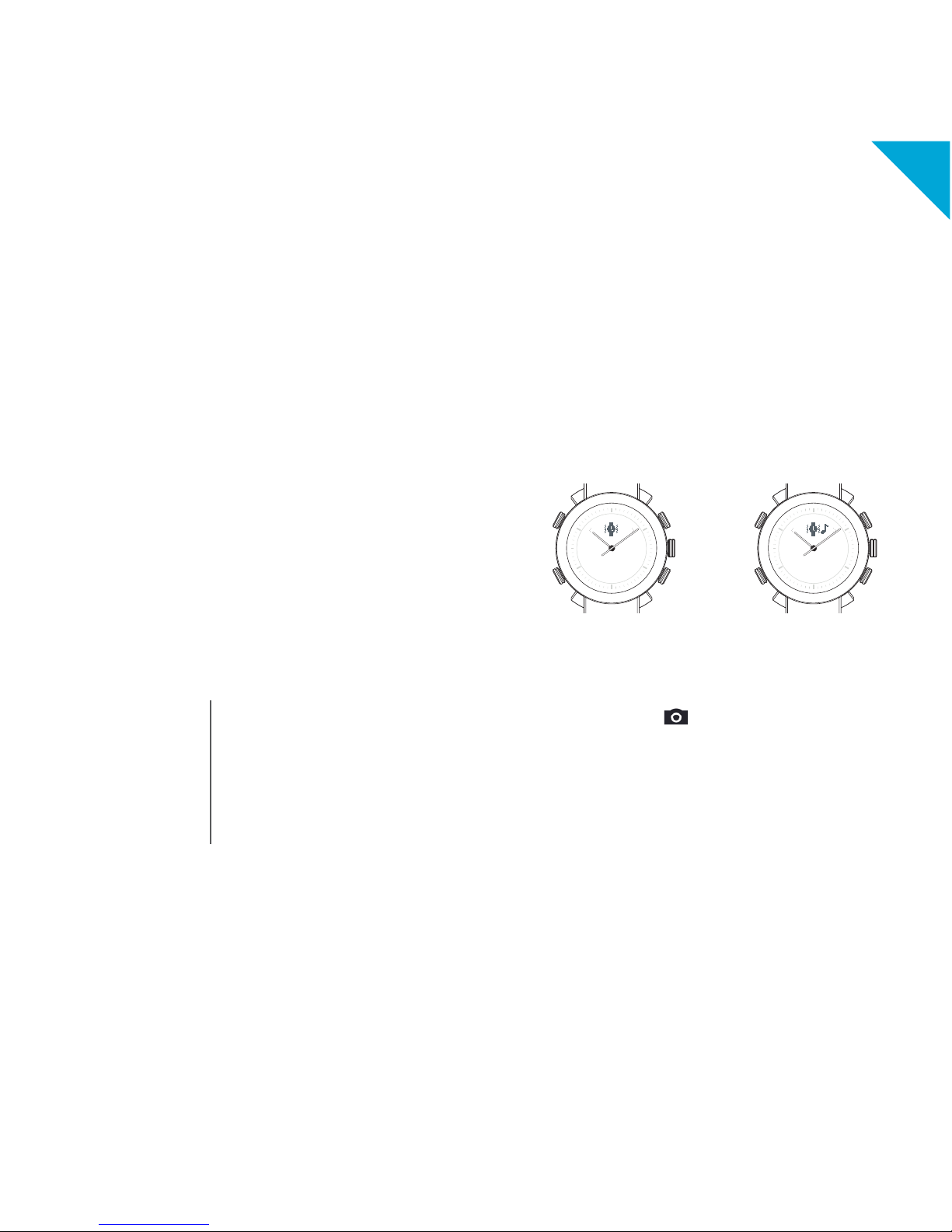
To mute/unmute your watch:
Press the COMMAND button for 5 sec to mute the watch.
Press another 5 sec to unmute the watch and you will hear
a beep sound.
Mute the watch Unmute the watch
EN
1. Set the watch into PAIRING mode by pressing the
COMMAND + POWER until 1st beep (approx. 3 sec)
and all icons will blink every 2 sec.
For iOS7 user:
Open your Bluetooth
settings and select
“COGITO” in
the device list. Press
“PAIR” when
prompted.
For Android user:
Open the CONNECTED
WATCH app and tap the
Device List icon at the bottom
left. The app will search for
your watch accordingly.
Select “COGITO” in the
device list to connect.
2.
To take photos using your COGITO watch:
Tap the Camera icon in the CONNECTED WATCH
app, this will trigger the camera interface of the app.
Press the COMMAND button you can take photos remotely.
Page 3
For support, please email us at
For more information about the watch and
CONNECTED WATCH app, visit cogitowatch.com
Thank you for supporting COGITO™
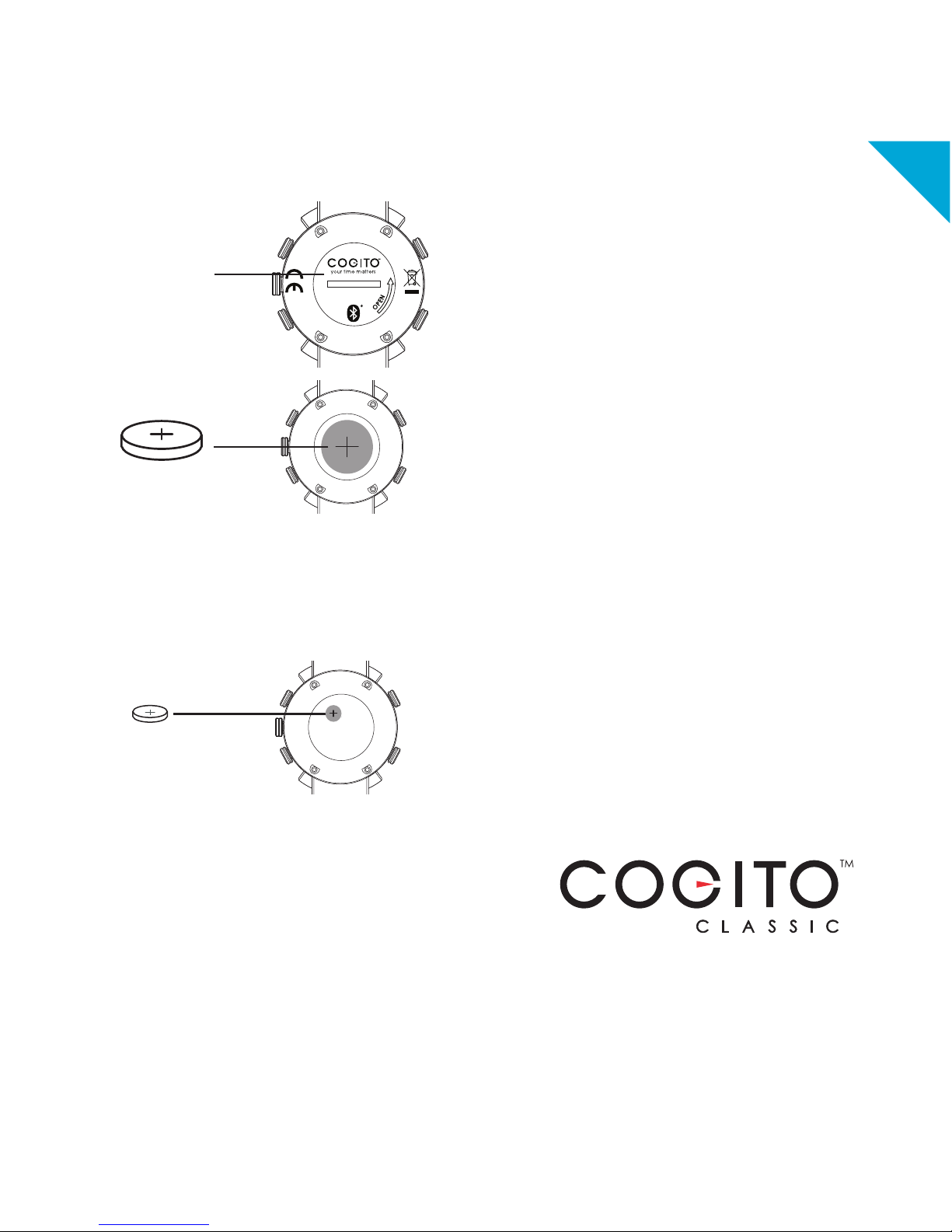
1. Open the back case of the watch to remove
the old battery.
2. Now replace with new battery.
3. Carefully replace the back case of the watch,
ensuring that the o-ring is correctly seated (for a
water tight seal).
One year free limited warranty
Register your product by setting-up a
CONNECTEDEVICE account in the CONNECTED
WATCH app. You will need to keep your original
receipt as proof of purchase.
To keep your watch in good condition and to
avoid voiding the warranty:
• Do not expose the watch to excessive pressure,
impact, dust, open flames or extreme temperatures.
• Operating temperature: -20 to +55C. (-4 to +131F)
• Always ensure the back case and o-ring is correctly
in place and the watch is tightly sealed before
exposing the watch to any moisture or liquid.
• Do not attempt to repair or modify the watch
yourself. Service and maintenance should be
performed by authorized technicians.
• 10 ATM/100 M of water resistance means that your
watch can be worn for most indoor or outdoor
activities, including most water sports. Do not wear it
while bathing, snorkeling or scuba diving.
• Avoid submerging the watch for an extended
period of time.
• To maintain water resistance, do not press any
buttons or pull out the crown while under water.
• Keep the front glass away from sharp or hard
objects to prevent scratches.
• Exposure to high or low temperatures or frequent
successive alerts may shorten battery life.
• Keep the watch, accessories and any small parts
out of the reach of children.
EN
Replacing the connected system battery:
2
0
0
D
C
-
A
3
4
3
7
:
C
I
•
2
0
0
D
C
T
I
Q
D
I
C
C
F
•
2
0
0
D
C
:
l
e
d
o
M
1
0
A
T
M
W
A
T
E
R
R
E
S
I
S
T
C
O
G
I
T
O
w
a
t
c
h
.
c
o
m
2
3
0
2
R
C
:
e
p
y
t
y
r
e
t
t
a
B
d
t
L
E
C
I
V
E
D
T
C
E
N
N
O
C
y
b
d
e
r
e
w
o
P
a
n
i
h
C
n
i
d
e
l
b
m
e
s
s
A
•
A
S
U
n
i
d
e
r
e
e
n
i
g
n
E
•
n
g
i
s
e
d
Y
U
O
H
R
E
I
V
A
X
8
8
8
8
8
8
8
.
1
0
4
1
Battery cover
(Open to insert/
replace the battery)
model CR2032
model SR626SW
Replacing the analog movement battery:
1. Open the back case of the watch and remove the
CR2032 cell button battery.
2. Remove the protective sticker and carefully set it
aside.
3. Remove analog system battery located beneath
the protected sticker. (model SR626SW, battery life
lasts up to 3 years**)
4. Carefully return the protective sticker.
5. Insert the CR2032 connected system battery and
carefully return the back case of the watch ensuring
that the o-ring is correctly seated (for a water tight
seal).
** Battery life may vary depending on the volume of
the notification, brand and condition of battery.
Page 4
FCC/ Industry Canada Notice
This device complies with Part 15 of the FCC rules. Operation is subject to the following two conditions: (1) This
device may not cause harmful interference. (2) This device must accept any interference received, including
interference that may cause undesired operation.
Caution: Changes or modifications to this Bluetooth® device not expressly approved by the party responsible for
compliance could void the user’s authority to operate it.
Certification and Safety approvals
This product is CE marked according to the provisions of the R&TTE Directive (99/5/EC). We declare that this
product is in compliance with the essential requirements and other relevant provisions of Directive 1999/5/EC.
For further information, please refer to website.
Bluetooth® is a trademark owned by Bluetooth SIG, Inc. and is used by the manufacturer under license.
EN Note on environmental protection:
After the implementation of the European Directive 2002/96/EU in the national legal system, the following applies:
Electrical and electronic devices may not be disposed of with domestic waste. Consumers are obliged by law to
return electrical and electronic devices at the end of their service lives to the public collecting points set up for this
purpose or point of sale. Details to this are defined by the national law of the respective country. This symbol on the
product, the instruction manual or the package indicates that a product is subject to these regulations. By
recycling, reusing the materials or other forms of utilizing old devices, you are making an important contribution to
protecting our environment.
IC Statement
This device complies with Industry Canada licence-exempt RSS standard(s). Operation is subject to the following two
conditions: (1) this device may not cause interference, and (2) this device must accept any interference, including interference
that may cause undesired operation of the device.
Le présent appareil est conforme aux CNR d’Industrie Canada applicables aux appareils radio exempts de licence.
L’exploitation est autorisée aux deux conditions suivantes: (1) l’appareil
ne doit pas produire de brouillage, et (2) l’utilisateur de l’appareil doit accepter tout brouillage radioélectrique subi, même si le
brouillage est susceptible d’en compromettre le fonctionnement.
NCC
本產品符合低功率電波輻射性電機管理辦法 第十二條、第十四條等條文規定:
1. 經型式認證合格之低功率射頻電機,非經許可,公司、商號或使用者均不得擅自變更頻率、加大功率或變更原設計之特性及功能。
2. 低功率射頻電機之使用不得影響飛航安全及干擾合法通信;經發現有干擾現象時,應立即停用,並改善至無干擾時方得繼續使用。
前項合法通信,指依電信法規定作業之無線電通信。低功率射頻電機須忍受合法通信或工業、科學及醫療用電波輻射性電機設備之干
擾。
Company name : CONNECTEDEVICE Ltd -8/F, Tai Yip Building, 141 Thomson Rd, Wan Chai, HongKong
Page 5
DE
FR
ES
DU
Fin
IT
Page 6
FCC/ Industry Canada Notice
This device complies with Part 15 of the FCC rules. Operation is subject to the following two conditions: (1) This
device may not cause harmful interference. (2) This device must accept any interference received, including
interference that may cause undesired operation.
Caution: Changes or modifications to this Bluetooth® device not expressly approved by the party responsible for
compliance could void the user’s authority to operate it.
Certification and Safety approvals
This product is CE marked according to the provisions of the R&TTE Directive (99/5/EC). We declare that this
product is in compliance with the essential requirements and other relevant provisions of Directive 1999/5/EC.
For further information, please refer to website.
Bluetooth® is a trademark owned by Bluetooth SIG, Inc. and is used by the manufacturer under license.
EN Note on environmental protection:
After the implementation of the European Directive 2002/96/EU in the national legal system, the following applies:
Electrical and electronic devices may not be disposed of with domestic waste. Consumers are obliged by law to
return electrical and electronic devices at the end of their service lives to the public collecting points set up for this
purpose or point of sale. Details to this are defined by the national law of the respective country. This symbol on the
product, the instruction manual or the package indicates that a product is subject to these regulations. By
recycling, reusing the materials or other forms of utilizing old devices, you are making an important contribution to
protecting our environment.
IC Statement
This device complies with Industry Canada licence-exempt RSS standard(s). Operation is subject to the following two
conditions: (1) this device may not cause interference, and (2) this device must accept any interference, including interference
that may cause undesired operation of the device.
Le présent appareil est conforme aux CNR d’Industrie Canada applicables aux appareils radio exempts de licence.
L’exploitation est autorisée aux deux conditions suivantes: (1) l’appareil
ne doit pas produire de brouillage, et (2) l’utilisateur de l’appareil doit accepter tout brouillage radioélectrique subi, même si le
brouillage est susceptible d’en compromettre le fonctionnement.
NCC
本產品符合低功率電波輻射性電機管理辦法 第十二條、第十四條等條文規定:
1. 經型式認證合格之低功率射頻電機,非經許可,公司、商號或使用者均不得擅自變更頻率、加大功率或變更原設計之特性及功能。
2. 低功率射頻電機之使用不得影響飛航安全及干擾合法通信;經發現有干擾現象時,應立即停用,並改善至無干擾時方得繼續使用。
前項合法通信,指依電信法規定作業之無線電通信。低功率射頻電機須忍受合法通信或工業、科學及醫療用電波輻射性電機設備之干
擾。
Company name : CONNECTEDEVICE Ltd -8/F, Tai Yip Building, 141 Thomson Rd, Wan Chai, HongKong
Page 7
DE
FR
ES
DU
Fin
IT
 Loading...