

Page 1
TroubleshootingUsing Your Remote Control
If the remote control does not work:
• Make sure the batteries are inserted correctly.
• Make sure your remote can “see” the front of the
Digital Adapter (or the front of the Remote Control
Infrared IR Extender).
• If you are using the Remote Control Infrared IR
Extender, make sure it is connected rmly to the
Digital Adapter.
If there is no light illuminated on the front of the
Digital Adapter:
• Make sure the power cord is attached to the Digital
Adapter and plugged into a live electrical outlet.
If there is no picture on the TV and the light on
the Digital Adapter is blinking:
• Make sure that you have followed the activation
process for the digital Adapter, on the back of this
document.
• Wait approximately 24 hours. If the light is still
blinking, call Cogeco at 1-877-776-6636.
If there is no picture on the TV and the light on
the Digital Adapter is solid:
• Make sure the TV and Digital Adapter are both set to
the same channel (both 3, or both 4).
• Try switching the TV and Digital Adapter to the other
channel (3 or 4).
• If you’re also connected to a VCR, make sure the
VCR is turned on.
• Make sure the Digital Adapter is connected directly
to the cable outlet in your wall.
• Make sure all the cables are rmly connected.
If the audio is in a language you don’t expect
to hear:
• You may have accidently changed it to an alternate
language option. Press the “LANG” button on your
remote control one or two times.
If you need additional support,
you can reach us at 1-877-776-6636.
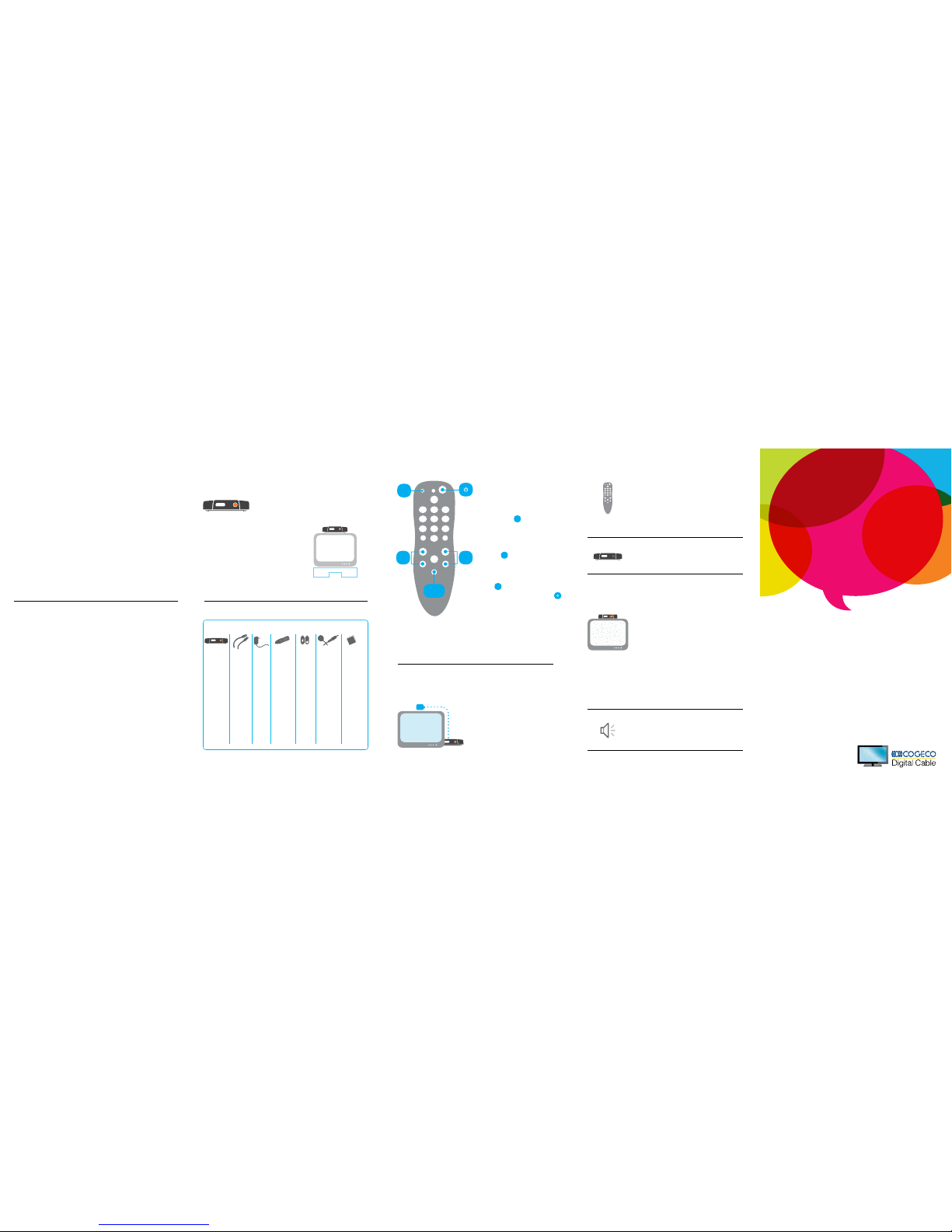
SET
LANG
CH
+
/
-
VOL
+
/
-
To program the remote to control your
TV’s power and volume, do the following:
1. Turn on your TV.
2. Press and hold “Set” until the red
light on the remote blinks twice.
Release “Set.”
3. Enter 9 - 9 - 1. The red light on the
remote will blink twice.
4. Point the remote at the TV and press
“CH +” one or more times until the TV
turns off.
Note: You may need to press “CH +” numerous times.
5. Press “Set” once to lock in the code.
The red light on the remote will blink
twice.
6. Press Power to turn your TV on on.
If you need more help, please refer to the
programming guide included with the remote.
To control the volume, press and hold
the volume up “Vol +” or volume down
button “Vol -”. To change the channel,
press the channel up “CH +” or channel
down “CH -” button, or press the channel
number and enter.
SET
CH
+
SET
Using the Remote Control
Signal Receiver
Digital Adapter
A Digital Adapter will allow
you to receive the channels
you currently have. It will not
provide Cogeco On Demand
programming or our On Screen
Channel Guide.
Every TV will need one device
Digital Adapter
What you need to know
Cogeco is upgrading the TV service in your area to bring you the
enhanced viewing experience of Digital TV on all your TV channels.
This means you will now have access to the full experience of
Digital service, including an improved High Denition channel offering.
In order to deliver a high quality Digital television service, high
denition channels, access to Cogeco On Demand plus allow us
to deliver faster Internet speeds and other future services, we are
progressively phasing out our Analogue tier channels and moving
these to Digital.
What you need to do
When the switch to Digital is complete, the Analogue Value Pack
you currently receive will no longer be available. To continue to
receive all of your current channels, including specialty channels,
you’ll need a Digital Adapter for each TV in your house. Otherwise
you will only receive a basic channel package that reduces the
number of channels you can access.
Your new Digital Adapter will allow you to keep all your channels
without interruption.
If you want to hide the Digital Adapter
behind the TV, or if the Digital Adapter
will not reach the front of the TV, you
can hide it and use the Remote Control
Infrared IR Extender. Plug the smaller
end of the Remote Control Infrared IR
Extender into the “IR In” port on the
back of the Digital Adapter. Position
the other end of the Remote Control
Infrared IR Extender where it can be
seen from the front of the TV.
What’s included in this Install Kit?
Digital
Adapter
You’ll be
connecting
the Digital
Adapter
to the cable
wall outlet and
to your TV
(or TV and
VCR).
Note:
Each TV will
need to be
connected to a
Digital Adapter
or a Digital
Receiver,
but not both.
3-Foot
Coax Cable
Power
Cord
2 AA
Batteries
Remote
Control
Infrared IR
Extender
If you prefer to
hide the
Digital Adapter
behind your
TV, you will
need to
connect this
to your Digital
Adapter so
your new
remote
control
can send
signals to it.
Adhesive
Fasteners
Use these if
you want to
stick the Digital
Adapter to
your TV.
Note:
Please be
careful. We
can’t be
responsible for
any damage
done to any
surface you
stick these to.
Remote
Control
In order to
operate
the Digital
Adapter you
must use the
remote control
included with
this kit.
Programming
instructions
for the remote
control are
included in
this guide.
Happy
50th!
:)
Yay!
We’re
here to
help you!
Digital
Adapter
Easy Setup
Guide
Page 2
 Loading...