

Page 1
User Guide
Thank you for purchasing the Go-tcha
Ranger for Pokémon Go!
Enjoy Pokémon GO on the move without
looking at your smartphone!
Go-tcha Ranger is fully rechargeable
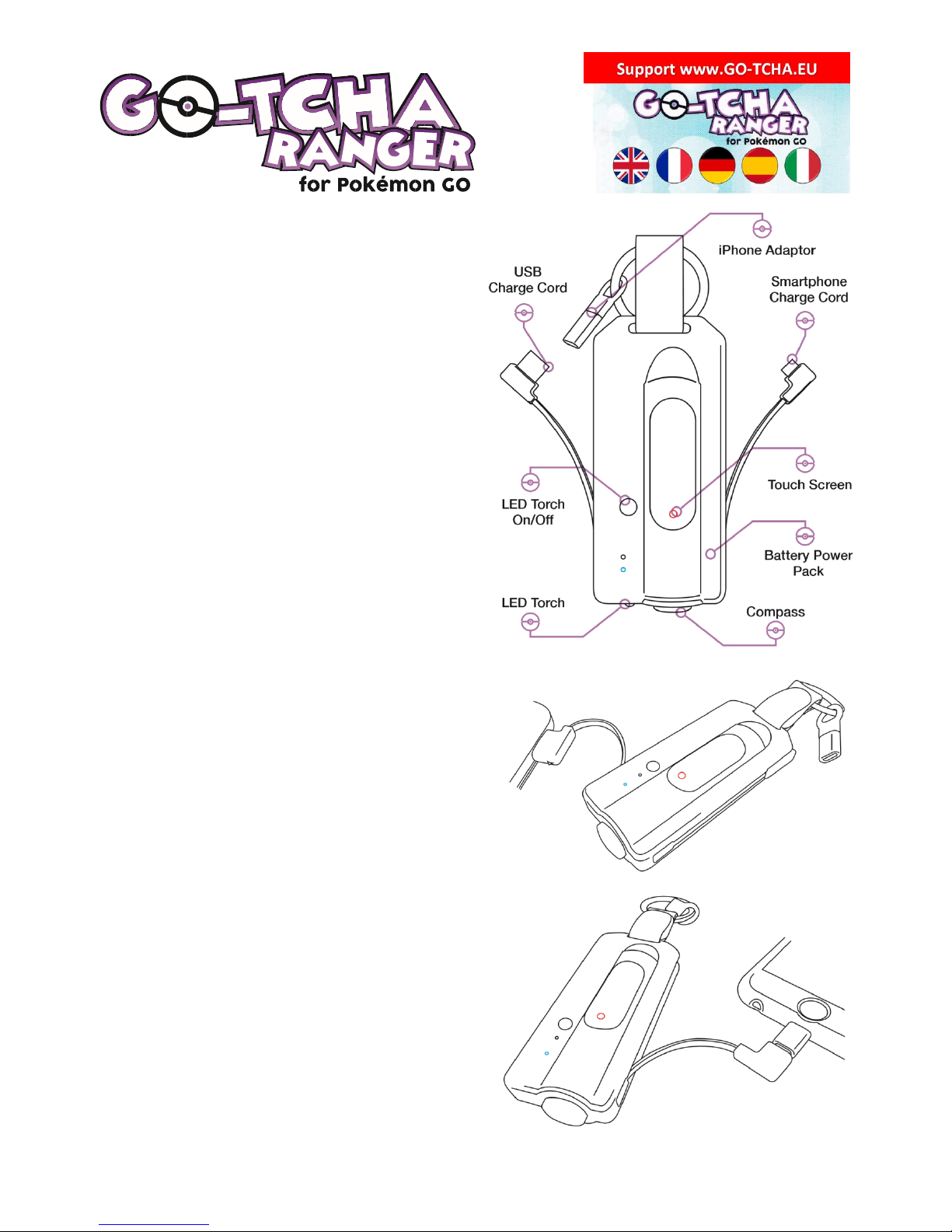
• Ease out the integral charger cable and
connect to a suitable USB port.
• The Blue charge LED will flash to
indicate that Go-tcha Ranger is charging.
• The Blue LED will become static once
the unit is fully charged.
Go-tcha Ranger can also be used to give your
smartphone a boost of extra power if required.
Ease out the phone charger cable and connect
to your smartphone, using the iPhone adapter if
required. The phone charge LED will indicate
that your smartphone is connected.
Go-tcha Ranger also features a handy compass
and LED torch. Press and hold the Torch button
for 3 seconds to turn on – simply double click
the button to turn the torch off.
Connecting Your Go-tcha Ranger
To connect your Go-tcha Ranger to the
Pokémon App:
1. Open the Pokémon GO App
2. Touch the Main Menu
3. Touch Settings
4. Touch ‘Pokémon GO Plus’
5. Press the button on the Go-tcha to make
it discoverable to the Pokémon Go App
Touch your ‘Pokémon GO Plus’ under
Available Devices list to connect.
Page 2
Using Your Go-tcha Ranger- Manual Catch
To connect your Go-tcha Ranger to the Pokémon App:
1. Go-tcha will vibrate and animate the screen to show a new/duplicate Pokémon is near
2. Press the Go-tcha button/screen to catch the Pokémon
3. Go-tcha will vibrate and animate the screen to show a successful/unsuccessful catch
4. Go-tcha will vibrate and animate the screen to show when a Pokéstop is in range
5. Press the Go-tcha button to retrieve items from a Pokéstop
6. Go-tcha will vibrate and animate the screen to show it has successfully/unsuccessfully
collected the items and how many items it has collected.
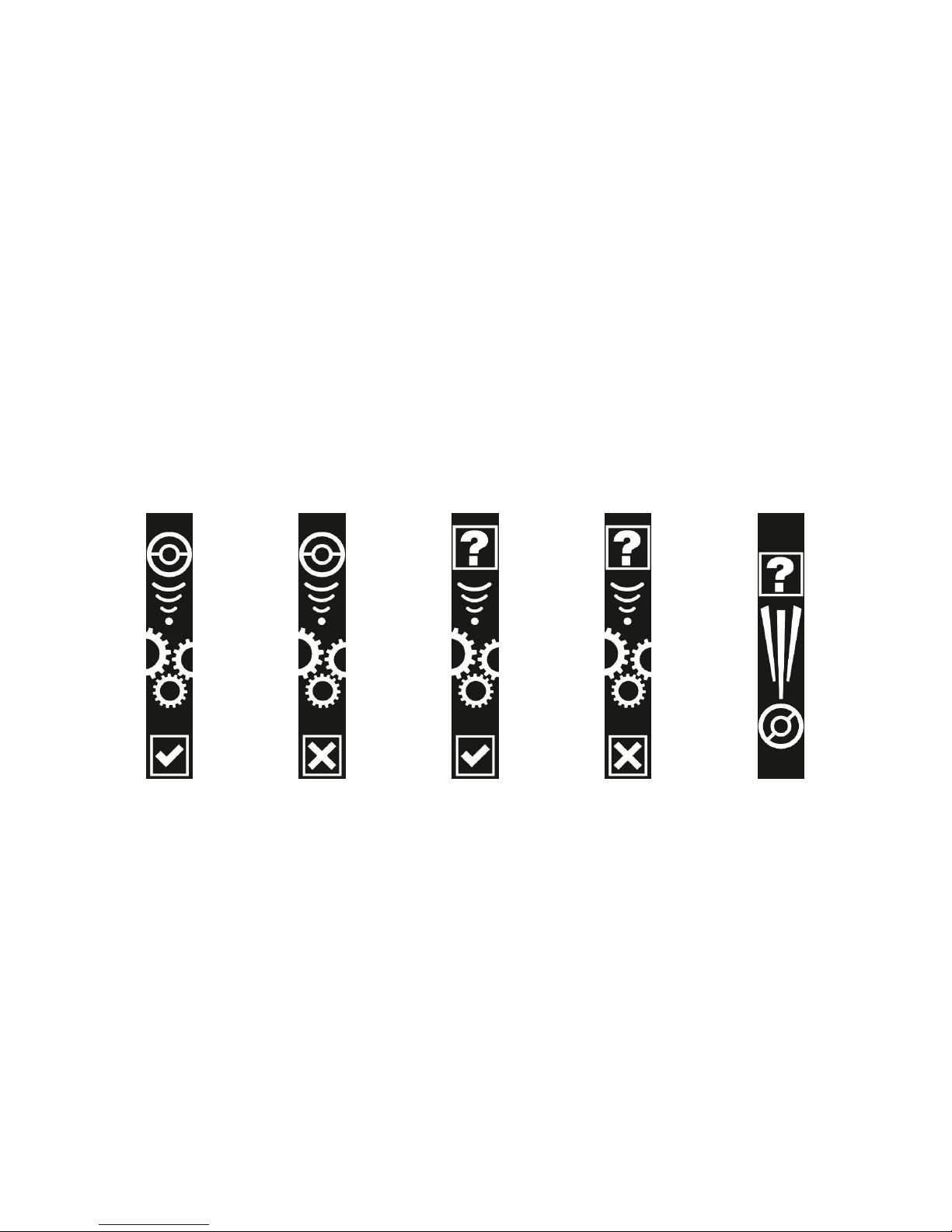
See ‘Go-tcha Ranger Screens’ below for a complete guide to the screen animation alerts.
Using Your Go-tcha Ranger - Auto Catch
To turn the ‘Auto-catch’ function on, press the the Go-tcha button until ‘Auto-catch ON’ is selected.
If you have Auto Catch on:
1. Go-tcha will vibrate and animate the screen to show a successful/unsuccessful catch.
2. Go-tcha will vibrate and animate the screen to show it has successfully/unsuccessfully
collected the items and how many items it has collected at a Pokéstop.
To turn ‘Auto-catch’ off, press and hold the Go-tcha button until ‘Auto-catch OFF’ is selected.
Go-tcha Screens - Catching/Caught Pokémon
Auto-catch
ON
Auto-catch
OFF
Auto-catch new
Pokémon ONLY
ON
Auto-catch new
Pokémon ONLY
OFF
New Pokémon
discovered
Page 3
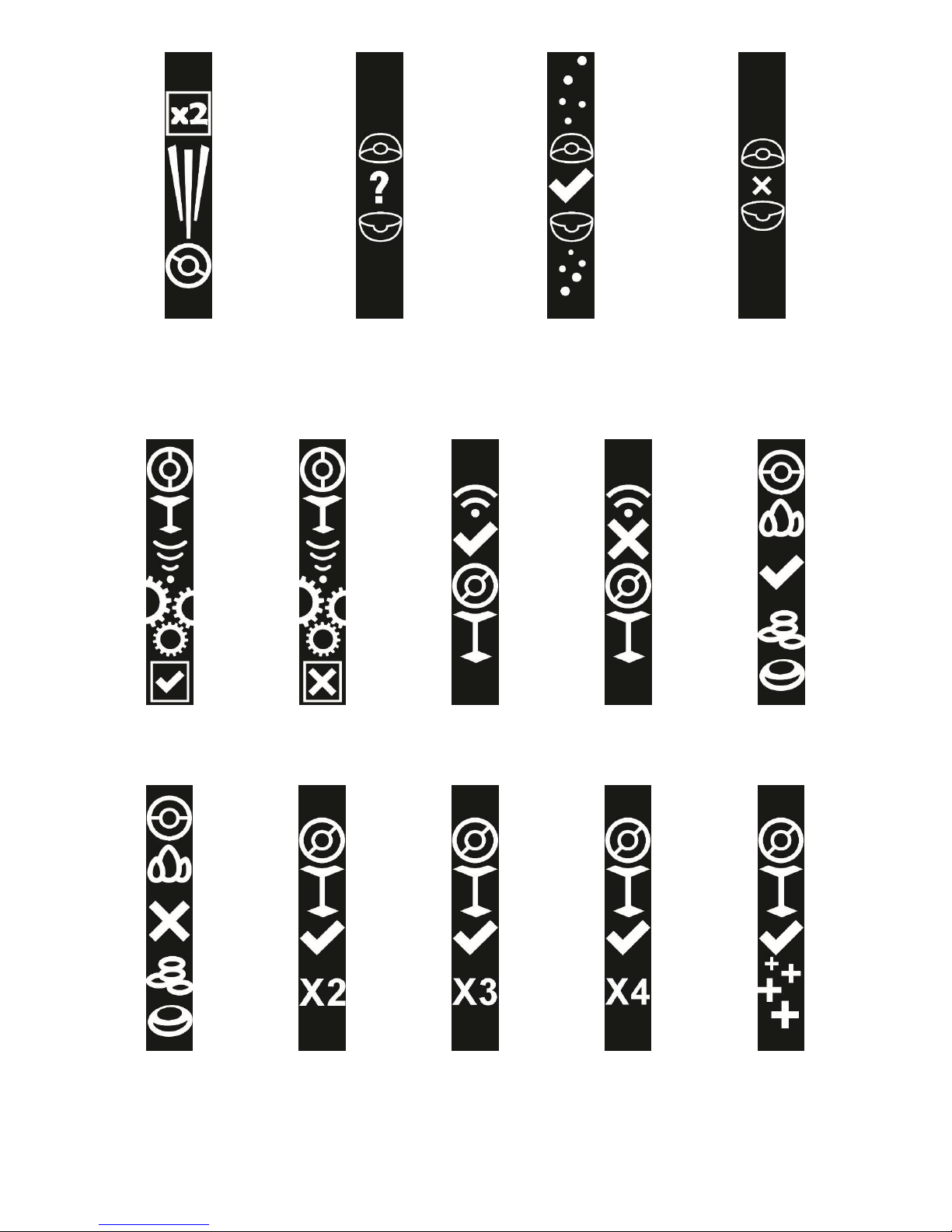
Duplicate Pokémon
found
Waiting
Pokémon caught
Pokémon not caught
Go-Tcha Screens – Pokéstops
Auto-collect
Pokéstop ON
Auto-collect
Pokéstop OFF
Pokéstop in
range
Pokéstop not in
range
Pokéstop items
collected
Pokéstop items
not collected
x2 Pokéstop
items collected
x3 Pokéstop
items collected
x4 Pokéstop
items collected
5+ Pokéstop
items collected
Page 4
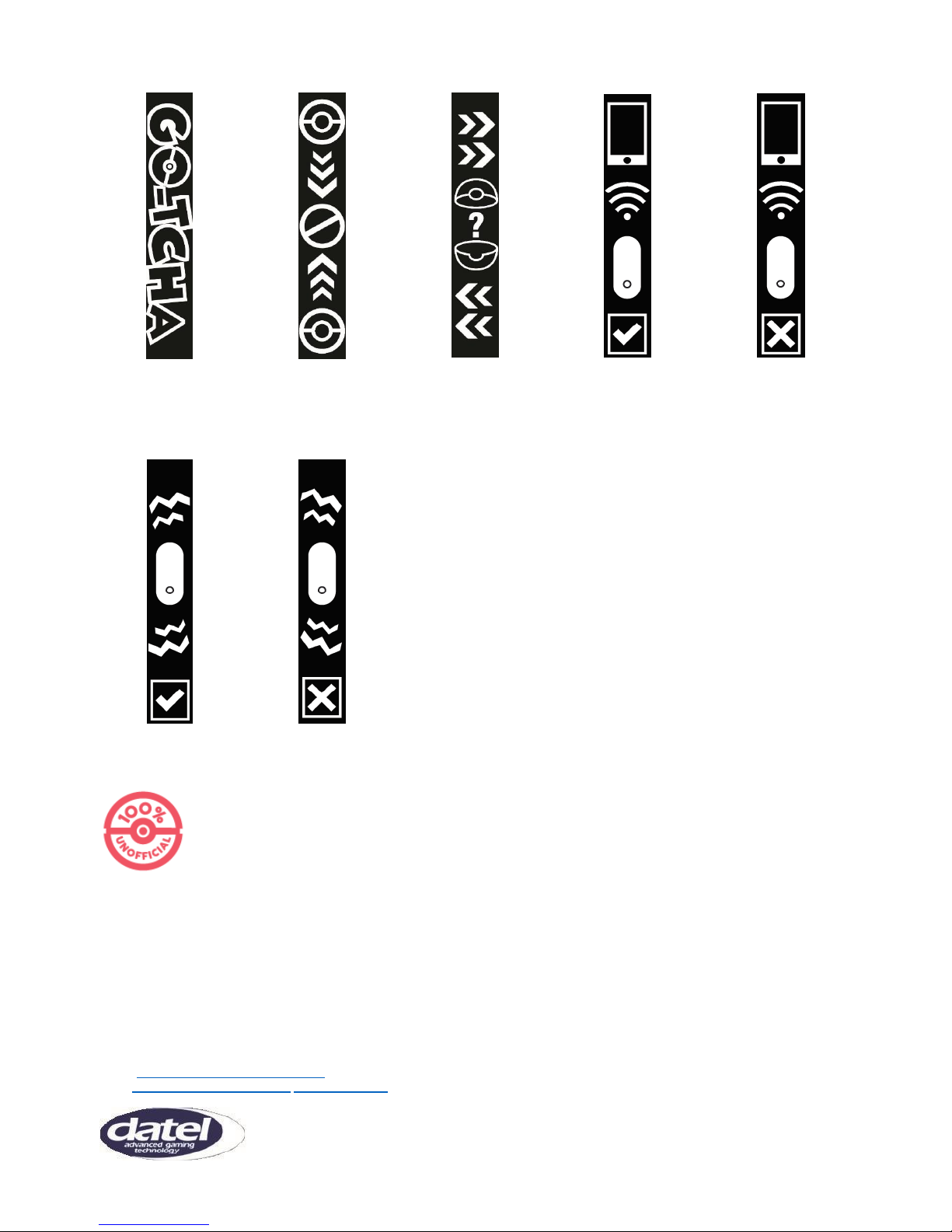
Go-Tcha Screens – Other alters
Go-Tcha intro
screen
Out of
Pokéballs
Open journal to
see escaped
Pokémon
Device is paired
Device not
paired
Vibration alerts
ON
Vibration alerts
OFF
THIS PRODUCT IS NOT SPONSORED, ENDORSED, OR APPROVED BY THE POKÉMON COMPANY OR NIANTIC.
Device requires Bluetooth low-energy compatible smartphone with Pokémon GO app installed. Compatible with iPhone®
5 / 5c / 5s / SE / 6 / 6s /6 Plus / 6s Plus / 7 / 7 Plus devices with iOS Ver. 8–11 installed. Compatible with Android devices
with 2 GB RAM or more, Bluetooth Smart (Bluetooth Ver. 4.0 or higher) capability, and Android Ver. 4.4–8.0 installed.
Technical Support
Before contacting Datel’s customer service department, please ensure that you have read through and understood the information in this
manual/guide. If you contact support, please ensure that you have information on when and where you purchased this product to hand.
Datel Customer Services Europe
Customers Services, Datel Ltd,
Stafford Road,
Stone,
Staffordshire
ST15 0DG.
UNITED KINGDOM
© 2018 Datel Ltd. PowerSaves is a trademark of Datel Ltd. Pokémon is a trademark or registered Trademark of the POKÉMON COMPANY. All
other trademarks are the property of their respective owners. Go-tcha for Pokémon Go is a 100% unofficial product and is NOT sponsored,
endorsed or approved by NINTENDO, nor any games developer or publisher.
 Loading...