

Page 1
User Manual
cocos-MEGA MP3-Player
Brief User Manual of
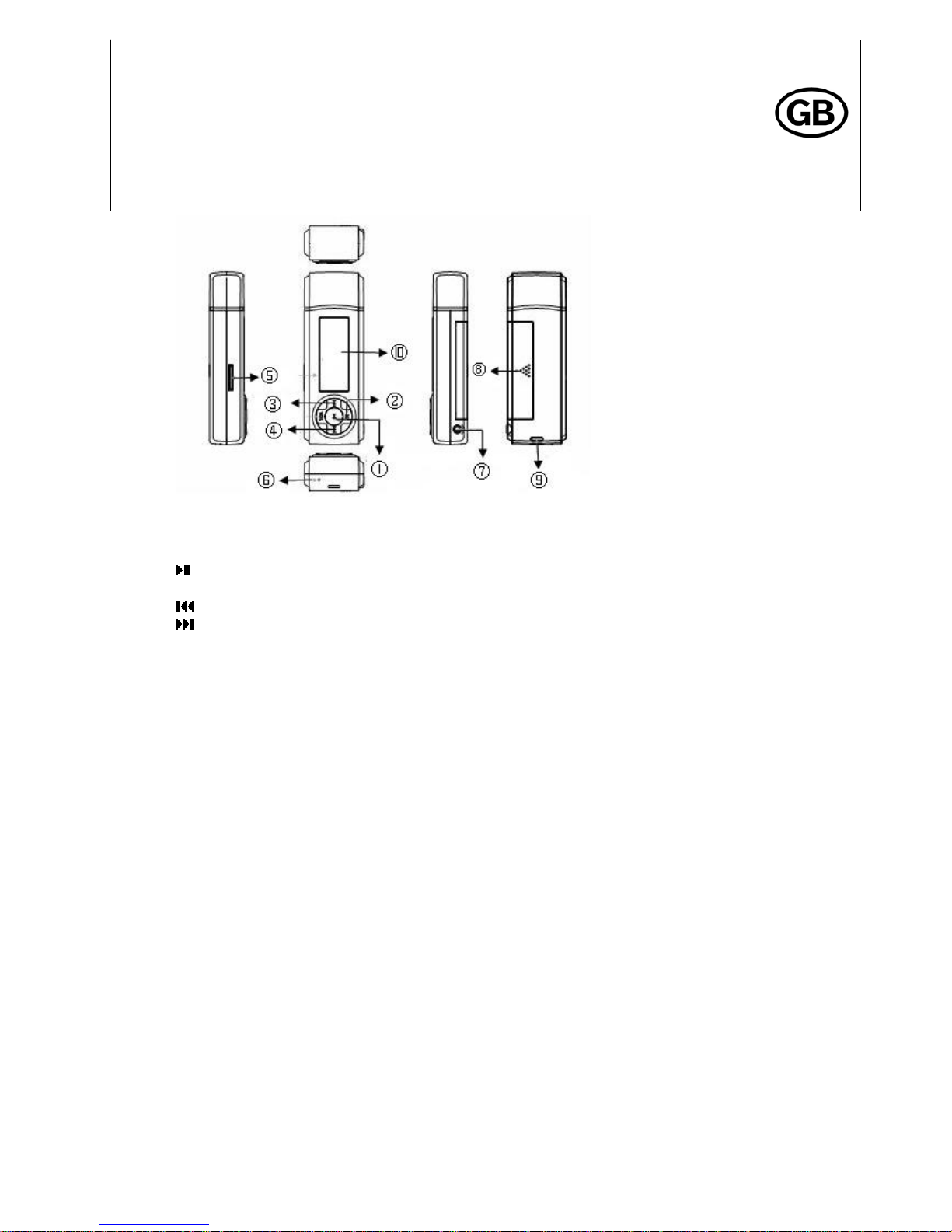
• Keys
I
Play-button: Play/Pause
2 M-button: Menu/A-B Replay
3
Previous-button: Back/Skip Backward
4
Next-button: Next/Skip Forward
5 TF card slot
6 MIC (microphone)
7 Earphone plug
8 Battery cover
9 Lanyard loop
10 Display
VOL-button (opposite M-button): Adjust the volume
• Basic Operation
Play-button: Play/Pause
a. Long press to turn the player on; then short press twice to start music playback.
b. Short press to pause the music during playback; short press again to continue music playback.
c. Long press to turn the player off during pause or playback status.
Note: The player will be turned off automatically to save power, when there is no operation for more than 2 minutes.
Next-button: Next/Skip forward
a. Short press to select the next title.
b. Long press to skip forward.
Previous-button: Back/Skip backward
a. Short press to select the previous title.
b. Long press to skip backward.
cocos-promotions gmbh | talheimer straße 32-d | 74223 flein, germany | phone 0049 (0) 7131/649 38-0 | fax 0049 (0) 7131/649 38-19
www.cocos-promotions.de | www.cocos-promotions.com | www.usb-sticks.de
Page 2

VOL-button: Adjust the volume
First, press the VOL-button; then press
to increase the volume or press to decrease the volume.
Note: Long press
or to increase or decrease the volume continuously.
M-button: Menu/A-B Replay
a. During playback status, short press the M-button to choose the starting point ‘A’ of the A-B Replay. A- will be displayed
on the screen. Then short press the M-button again to choose the ending point ‘B’ of the A-B Replay. A-B will be
displayed on the screen.
Now, only the chosen segment between starting point ‘A’ and ending point ‘B’ will be played repeatedly.
b. Short press the M-button to cancel the A-B Replay; A-B will disappear from the screen.
c. Long press the M-button to go back to the main menu.
TF Card slot
Insert a TF card in slot on the side of the device.
Note: Don’t insert the TF Card or take the TF Card out while the device is turned on.
• Insert Alkaline Battery
On the back side of the product, please open the battery cover as indicated by the arrow and insert an AAA-size alkaline
battery or take one out.
Note: If you do not use the device for a longer time, please take the battery out.
• Main menu basic operation
Press the Previous- or Next-button to switch between the different items of the main menu. Short press the M-button to
enter the desired menu. Short press the M-button again to exit any menu.
1.1 Play Music
Short press the Play-button or the M-button to enter this menu. Press the Play-button to play a title. Press the
Play-button again to pause the playback. Press the Play-button one more time to continue the playback.
1.2 Voice
Short press the Play-button or the M-button to enter this menu. Press the Play-button to play your recorded files. Press
the Play-button again to pause the playback. Press the Play-button one more time to continue the playback.
1.3 Record
Short press the M-button to enter the recording menu. Recording will start automatically right away. Press the Play-
button to pause the recording. Press the Play-button again to continue recording. In order to stop and save the recording,
short press the M-button. To listen to your recording, please refer to item1.2 above.
1.4 FM Radio (only for certain models)
Enter to listen to the radio.
cocos-promotions gmbh | talheimer straße 32-d | 74223 flein, germany | phone 0049 (0) 7131/649 38-0 | fax 0049 (0) 7131/649 38-19
www.cocos-promotions.de | www.cocos-promotions.com | www.usb-sticks.de
2
Page 3

1.5 Setting
Short press the M-button to enter this menu. Press the Previous- or Next-button to switch between the submenus. Short
press the M-button to enter your desired submenu.
Choose one of the following submenus:
Equalizer, Play Mode, Contrast, Backlight, Power Set, Record Set, Language, Exit
Press the Previous- or Next-button to switch between the different options of the chosen submenu. Short press the M-
button to save your desired setting and to return to the submenu-surface.
You can choose between the following options:
Equalizer: Normal, Pop, Rock, Classical, Jazz, Bass, Exit
Play Mode: Normal, Repeat one, Repeat all, Shuffle repeat (random), Dir (folder) normal, Dir (folder) all normal, Dir
shuffle (folder random) repeat
Contrast: Choose your desired contrast-level by pressing Previous- or Next-button.
Backlight: Reset, 5 S, 10 S, Always on
(choose, how long the backlight should stay on)
Power Set: Disable, 2 min, 10 min, 30 min
(determine, when the player should be turned off automatically, when there is no operation)
Record Set: 32 Kbps, 44 Kbps, 64 Kbps, 88 Kbps
Language: English, Chinese (Trad), Chinese (Simp), German, Spanish, Italian, Korean, Japanese, French
Exit: exit the current surface
1.6 Info
Short press the M-button to enter this menu. Displayed are the total memory capacity and the capacity used, plus current
software-version. Short press the M-button again, to exit this menu.
1.7 Folder
Short press the M-button to enter this menu. Scan the saved music files. Short press the M-button again to exit the
menu.
1.8 Storage
Short press the M-button to enter this menu. Choose between the following options:
Micro SD (TF), Internal, Exit
If you have inserted a TF Card in the slot, short press the M-button twice to scan the files saved on the card.
1.9 Exit
Exit the main menu.
cocos-promotions gmbh | talheimer straße 32-d | 74223 flein, germany | phone 0049 (0) 7131/649 38-0 | fax 0049 (0) 7131/649 38-19
www.cocos-promotions.de | www.cocos-promotions.com | www.usb-sticks.de
3
Page 4

• Technical Details
Display LCD display
Interface USB 2.0 high speed
Capacities 512 mb – 4 gb
Supported formats MP3 / WMA / WAV
MP3 bit rate 5kbps ~ 320kbps
Power supply 1× AAA alkaline battery - can play up to 10 hours continously
Operating current 45mA
Static current 20mA
Languages English, Chinese (Trad), Chinese (Simp), German, Spanish, Italian,
Korean, Japanese, French
Signal-to-noise ratio (SNR) >85dB
Frequency range 20HZ ~ 20KHZ
Card Use SD/MMC-card to extend the original memory
Operating temperature 0° ~ 40° 20%~90%
Storage temperature -20° ~ +55° 20%~95%
Certification CE/FCC/ROHS
MTBF (mean time between failures) Above 10000 h
cocos-promotions gmbh | talheimer straße 32-d | 74223 flein, germany | phone 0049 (0) 7131/649 38-0 | fax 0049 (0) 7131/649 38-19
www.cocos-promotions.de | www.cocos-promotions.com | www.usb-sticks.de
4
 Loading...