

Page 1
MODEL:CD-RA195
CDPLAYERwithDUALALARMCLOCKRADIO
&2.4GHzCALLERIDCORDLESSTELEPHONE
CDPLAYER
TopLoadingCDPlayer
ProgrammableTrackMemory
BigFullDigitalLEDDisplay
Play/Pause,Search,RepeatFunctions
CLOCKRADIO
AM/FMStereoRadio
BigLEDDigitalFreauencyDisplay
DualAlarmFunction
SnoozeFunction
Built-inNightLight
CALLERIDTELEPHONE
40MemoryCallerID
3-LanguageOperation
One-touchCallBackfromCallerID
COBYCustomerServiceDepartment
Monday-Friday8:00AM-11:00PMEST,1-800-681-2629or718-416-3197
Monday-Friday6:30PM-11:00PMEST,1-800-727-3592
Saturday-Sunday9:00AM-11:00PMEST,1-800-727-3592
OPERATINGGUIDE
Page 2

TABLEOFCONTENTS
ImportantSafetyInstructions...........2-3
FCCRegulations..............................3-4
BatteryCautionaryInstructions..........5
CD-RA195PartsChecklist..................6
NameofParts...................................7-8
Operation(Base).............................9-12
Operation.............................................9
BatteryInstruction................................9
DesdorTableTopUse...........................10
WallMount..........................................10
Warning..............................................10
TimeSetting........................................11
AlarmSetting......................................11
WaketoMusicorBuzzerFunction.........11
SleepSetting.......................................11
RadioOperation..................................12
CDOperation.........................................,......12
LocationofControlsandFeatures....13-14
(Telephone)
BatteryInstallation...........................15
BatteryDuration
WhentheBatteryNeedsCharging
WhentoPurchaseNewBatteryPack
HeadsetandBasicDisplays...............16
TheHeadsetJack
Belt-Clip
BasicDisplays
BasicOperation..........................16-17
MakingCalls
ReceivingCalls
Redialing
AdditionalOptions
Settings.............................................17
HandsetSettings
ChangingtheLanguage
TurningtheFirstRingOnorOff
.................................15
........15
...15
...............................16
............................................16
....................................16
.......................................16
...................................16
...........................................17
..............................17
.................................17
.......................18
.............18
SettingtheTimeandDate
SettingtheAreaCode
AdjustingtheContrast
SettingthePBXNumber
TurningPBXModeOnorOff
ChangingthePauseTime
DeletingMessageWaitingIndication
TurningAutoAnswerOnorOff
DisablingtheRingforPrivateCalls
DisablingtheRingforUnavailableCalls
SpeedDialling......................................20-23
StoringPhoneNumbers
LetterTable
ViewingthePhoneBook
MakingCallsfromPhoneBook
DeletingaStoredNumber.
EditingaStoredNumber.
Priority(VIP)Calls
Blocked(REJ)Calls
CallerID.......................................23-24
WhenYouReceiveaCall.
ViewingtheCallerIDList
CallerIDDisplays
CallerIDwithCallWaitingService
StoringCallerIDRecords
DeletingCallerIDRecords.
ToDeleteaSingeRecord
ToDeleteAllRecord............................25
ReturningCallerIDCalls.....................25
MessageWaitingandOtherFeatures..25-26
NewCallLight
UsingtheHandsetFinder(PAGE)
Out-of-RangeWarning
ChannelChanging
CareMaintenanceand
Troubleshooting..........................26-27
Glossary/Warranty........................27-28
........................................21
....................................25
....................18
.....................18-19
.........................19
......................19
.................19
..........................19
.....19-20
.............20
......20
......20
.................20-21
......................21
........21-22
...................22
.....................22
..............................22
.......................22-23
....................23
.....................23
..........................23-24
.......24
...................24
.................24
...............24-25
....25-26
........................26
.............................26
IMPORTANTSAFETYINSTRUCTIONS
Thissymbolistoalertyoutoimportantoperatingorservicinginstructionsthat
mayappearintheuser'smanual.Alwaysfollowbasicsafetyprecautionswhen
usingthisproducttoreducetheriskofinjury,fire,orelectricalshock.
Whenusingthisproduct,basicsafetyprecautionsshouldalwaysbefollowedtoreduce
theriskoffire,electricshockAndinjurytopersons,includingthefollowing:
1.Readandunderstandallinstructions.
2.Followallwarningsandinstructionsmarkedontheproduct.
3.Useonlywithclass2powersourceDC12V800mA.
4.Unplugthisproductfromthewalloutletbeforecleaning.Donotuseliquidcleanersoraerosol
cleaners.Useadampclothforcleaning.
5.Donotusethisproductnearwater;forexample,nearabathtub,washbowl,kitchensinkor
laundrytub,inawetbasementornearaswimmingpool.
6.Donotplacethisproductonanunstablecart,stand,ortable.Theproductmayfall,causing
seriousdamagetotheproduct.
7.Slotsandopeningsinthecabinetbackorbottomareprovidedforventilation.Toprotectitfrom
overheating,theseopeningsmustnotbeblockedorcovered.Theopeningsshouldneverbe
blockedbyplacingtheproductonthebed,sofa,rug,orothersimilarsur-face.Thisproduct
shouldneverbeplacednearoroveraradiatororheatregister.Thisproductshouldnotbe
placedinanenclosedenvironmentunlessproperventilationisprovided.
8.Donotallowanythingtorestonthepowercord.Donotlocatethisproductwherethecordwill
beabusedbyanimalsorpersonswalkingonit.
9.Donotoverloadwalloutletsandextensioncordsasthiscanresultinriskoffireorelectrical
shock.
10.Neverpushobjectsofanykindintothisproductthroughcabinetslotsastheymaytouch
dangerousvoltagepointsorshortoutpartsthatcouldresultinariskoffireorelectricalshock.
Neverspillliquidofanykindontheproduct.
11.Toreducetheriskofelectricalshock,donotdisassemblethisproduct.Insteadtakeittoa
qualifiedservicepersonwhenserviceorrepairworkisrequired.Openingorremovingcovers
mayexposeyoutodangerousvoltagesorotherrisks.Incorrectre-assemblycancause
electricalshockwhentheapplianceissubsequentlyused.
12.Unplugallcordsandreferservicingtoqualifiedservicepersonnelunderthefollowing
conditions:
A.Whenthepowersupplycordorplugisdamagedorfrayed.
B.Ifliquidhasbeenspilledintotheproduct.
C.Iftheproducthasbeenexposedtorainorwater.
D.Iftheproductdoesnotoperatenormallybyfollowingtheoperatinginstructions.Adjustonly
thosecontrolscoveredintheoperatinginstructions.Improperadjustmentofothercontrolsmay
resultindamageandrequireworkbyaqualifiedtechniciantorestoretheproducttonormal
operation.
13.Avoidusingatelephone(otherthanacordlesstype)duringanelectricalstorm.Theremaybe
aremoteriskofelectricshockfromlightning.
14.Donotuseatelephonetoreportagasleakinthevicinityoftheleak.
IFYOURPRODUCTUTILIZESBATTERIES,THEFOLLOWINGADDITIONALPRECAUTIONS
SHOULDBEOBSERVED:
1.Useonlythetypeandsizeofbatteriesspecifiedintheusersmanual.
2.Donotdisposeofthebatteriesinafire.Thecellsmayexplode.Checkwithlocalcodesfor
possiblespecialdisposalinstructions.
3.Donotopenormutilatethebatteries.Releasedelectrolyteiscorrosiveandmaycausedamage
totheeyesorskin.Itmaybetoxicifswallowed.
4.Exercisecareinhandlingbatteriesinordernottoshortthebatterywithconductingmaterials
suchasrings,braceletsandkeys.Thebatteryorconductormayoverheatandcauseburns.
5.Donotattempttorechargethebatterieswithoridentifiedforusewiththisproduct.The
batteriesmayleakcorrosiveelectrolyteorexplode.
6.Donotattempttorejuvenatethebatteriesprovidedwithoridentifiedforusewiththisproductby
heatingthem.Suddenreleaseofthebatteryelectrolytemayoccurcausingburnsorirritationto
eyesorskin.
7.Whenreplacingbatteries,allbatteriesshouldbereplacedatthesametime.Mixingfreshand
dischargedbatteriescouldincreaseinternalcellpressureandrupturethedischargedbatteries.
1
2
Page 3

IMPORTANTSAFETYINSTRUCTIONS
8.Wheninsertingthebatteriesintothisproduct,theproperpolarityordirectionmustbeobserved.
Reverseinsertionofbatteriescancausecharging,whichmayresultinleakageorexplosion.
9.Removethebatteriesfromthisproductiftheproductwillnotbeusedforalongperiodoftime
(severalmonthsormore)sinceduringthistimethebatteriescouldleak,damagingtheproduct.
10.Discard"dead"batteriesassoonaspossiblesincetheyaremorelikelytoleakinaproduct.
11.Donotstorethisproduct,orthebatteriesprovidedwithorforidentifiedusewiththisproduct,
inhightemperatureareas.
12.Ifyourproductusesarechargeablebattery,chargethebattery(ies)onlyinaccordancewith
theinstructionsandlimitationspecifiedintheUserManual.
WARNING: Handlingthecordsonthisproductwillexposeyoutolead,achemicalknownto
theStateofCaliforniatocause[cancer,and]birthdefectsorotherreproductiveharm.
Washhandsafterhandling.
SAVETHESEINSTRUCTIONS
FCCREGULATIONS
WARNING:
malfunctionandmightinvalidatethetelephone'swarrantyandvoidyourFCCauthorizationto
operateit.Ifthetroubleisharmingthetelephonelines,thetelephonecompanymightaskyouto
disconnectthetelephoneuntilyouhaveresolvedtheproblem.
CAUTION: AnychangesormodificationsnotexpresslyapprovedbyCobyElectronicsCo.,Ltd.
willvoidtheuser'sauthoritytooperatethisdevice.
AsitcomplieswithPart68oftheFCCrules,yourunithasbeenregisteredwiththeFCC.TheFCC
requiresustoprovideyouwiththefollowinginformation:
a)ThisequipmentcomplieswithPart68oftheFCCrulesandtherequirementsadoptedbythe
ACTA.Onthebottomofthisequipmentisalabelthatcontains,amongotherinformation,a
productidentifierintheformatUS:AAAEQ##TXXXX.Ifrequested,thisnumbermustbeprovided
tothetelephonecompany.
b)AnapplicablecertificationjacksUniversalServiceOrderCodes(USOC)fortheequipmentis
provided(i.e.,RJ11C)inthepackagingwitheachpieceofapprovedterminalequipment.
C)Aplugandjackusedtoconnectthisequipmenttothepremiseswiringandtelephonenetwork
mustcomplywiththeapplicableFCCPart68rulesandrequirementsadoptedbytheACTA.A
complianttelephonecordandmodularplugisprovidedwiththisproduct.Itisdesignedtobe
connectedtoacompatiblemodularjackthatisalsocompliant.Seeinstallationinstructionsfor
details.
D)TheRENisusedtodeterminethenumberofdevicesthatmaybeconnectedtoatelephoneline.
ExcessiveRENsonatelephonelinemayresultinthedevicesnotringinginresponsetoan
incomingcall.Inmostbutnotallareas,thesumofRENsshouldnotexceedfive(5.0).Tobe
certainofthenumberofdevicesthatmaybeconnectedtoaline,asdeterminedbythetotalRENs,
contactthelocalproductispartoftheproductidentifierthathastheformatUS:AAAEQ##TXXXX.
Thedigitsrepresentedby##aretheRENwithoutadecimalpoint(e.g.,03isaRENof0.3).For
earlierproducts,theRENisseparatelyshownonthelabel.
e)Ifthisequipment(CD-RA195)causesharmtothetelephonenetwork,thetelephonecompany
willnotifyyouinadvancethattemporarydiscontinuanceofservicemayberequired.Butif
advancenoticeisn'tpractical,thetelephonecompanywillnotifythecustomerassoonaspossible.
Also,youwillbeadvisedofyourrighttofileacomplaintwiththeFCCifyoubelieveitisnecessary.
f)Thetelephonecompanymaymakechangesinitsfacilities,equipment,operationsorprocedures
thatcouldaffecttheoperationoftheequipment.Ifthishappensthetelephonecompanywill
provideadvancenoticeinorderforyoutomakenecessarymodificationstomaintainuninterrupted
service.
g)Shouldyouexperiencetroublewiththisequipment,pleasecontact
CORP.customerservicedept,56-65RustStreetMaspeth,N.Y.11378orcall
718-416-3197forrepairorwarrantyinformation.Iftheequipmentiscausingharmtothetelephone
network,thetelephonecompanymayrequestthatyoudisconnecttheequipmentuntiltheproblem
isresolved.
Modifyingortamperingwiththetelephone'sinternalcomponentscancausea
COBYELECTRONICS
1-800-681-2629,1-
FCCREGULATIONS
h)Pleasefollowinstructionsforrepairingifany(e.g.batteryreplacementsection);otherwisedonot
alternateorrepairanypartsofdeviceexceptspecified.
i)Connectiontopartylineserviceissubjecttostatetariffs.Contactthestatepublicutility
commission,publicservicecommissionorcorporationcommissionforinformation.
j)NOTICE:Ifyourhomehasspeciallywiredalarmequipmentconnectedtothetelephoneline,
ensuretheinstallationofthisCD-RA195doesnotdisableyouralarmequipment.Ifyouhave
questionsaboutwhatwilldisablealarmequipment,consultyourtelephonecompanyoraqualified
installer.
k)Thisequipmentishearingaidcompatible.
NOTICE:Accordingtotelephonecompanyreports,ACelectricalsurges,typicallyresultingfrom
lightningstrikes,areverydestructivetotelephoneequipmentconnectedtoACpowersources.To
minimizedamagefromthesetypesofsurges,asurgearrestorisrecommended.
INTERFERENCEINFORMATION:PART15OFFCCRULES
ThisdevicecomplieswithPart15oftheFCCRules.Operationissubjecttothefollowingtwo
conditions:(1)thisdevicemaynotcauseharmfulinterference,and(2)thisdevicemustaccept
anyinterferencereceived,includinginterferencethatmaycauseundesiredoperation.Privacyof
communicationsmaynotbeensuredwhenusingthisphone.
Sometelephoneequipmentgeneratesandusesradiofrequencyenergywhichifnotproperly
installed,maycauseinterferencetoradioandtelevisionreception.
ThisunithasbeentestedandfoundtocomplywiththelimitsforaClassBDigitaldevicein
accordancewiththespecificationsinPart15oftheFCCrules.Thesespecificationsaredesigned
toprovidereasonableprotectionagainstsuchinterferenceinaresidentialinstallation.However,
thereisnoguaranteethatinterferencewillnotoccurinaparticularinstallation.
Ifthisequipmentdoescauseinterferencetoradioortelevisionreception,whenit'sinuse,theuser
isencouragedtotrytocorrecttheinterferencebyoneormoreofthefollowingmeasures:
A.Whereitcanbedonesafely,reorienttheradioorTVreceivingantenna.
B.Totheextentpossible,relocatethetelevision,radio,orotherreceiverwithrespectTothe
telephoneequipment.
C.IfyourtelephoneproductrunsonACpower,plugyourproductintoanACoutletthat'snoton
thesamecircuitastheoneusedbytheradioortelevision.
3
4
Page 4
BATTERYCAUTIONARYINSTRUCTIONS
BATTERIES:CAUTION
Toreducetheriskoffireorinjurytopersons,readandfollowtheseinstructions:
Forthecordlesshandset,useonly3.6V600mAhNickelCadmium(Ni-Cd),cordlesstelephone
"
batterypack(included).
"
Donotdisposeofthebatteriesinafire.Thecellsmayexplode.Checkwithlocalcodesfor
possiblespecialdisposalinstructions.
Donotopenormutilatethebatteries.Releasedelectrolyteiscorrosiveandmaycausedamage
"
totheeyesorskin.Itmaybetoxicifswallowed.
Exercisecareinhandlingbatteriesinordernottoshortthebatterywithconductingmaterials
"
suchasrings,bracelets,andkeys.Thebatteryorconductormayoverheatandcauseburns.
Donotattempttorejuvenatethebatteriesidentifiedforusewiththisproductbyheatingthem.
"
Suddenreleaseofthebatteryelectrolytemayoccurcausingburnsorirritationtoeyesorskin.
Wheninsertingbatteriesintothisproduct,theproperpolarityordirectionmustbeobserved.
"
Reverseinsertionofbatteriescancausecharging,andthatmayresultinleakageorexplosion.
"
Removethebatteriesfromthisproductiftheproductwillnotbeusedforalongperiodoftime
(severalmonthsormore)sinceduringthistimethebatterycouldleakintheProduct.
Donotstorethisproduct,orthebatteriesidentifiedforusewiththisproduct,inhightemperature
"
areas.Batteriesthatarestoredinafreezerorrefrigeratorforthepurposeofextendingshelflife
shouldbeprotectedfromcondensationduringstorageanddefrosting
Batteriesshouldbestabilizedatroomtemperaturepriortouseaftercoldstorage.
HANDSET
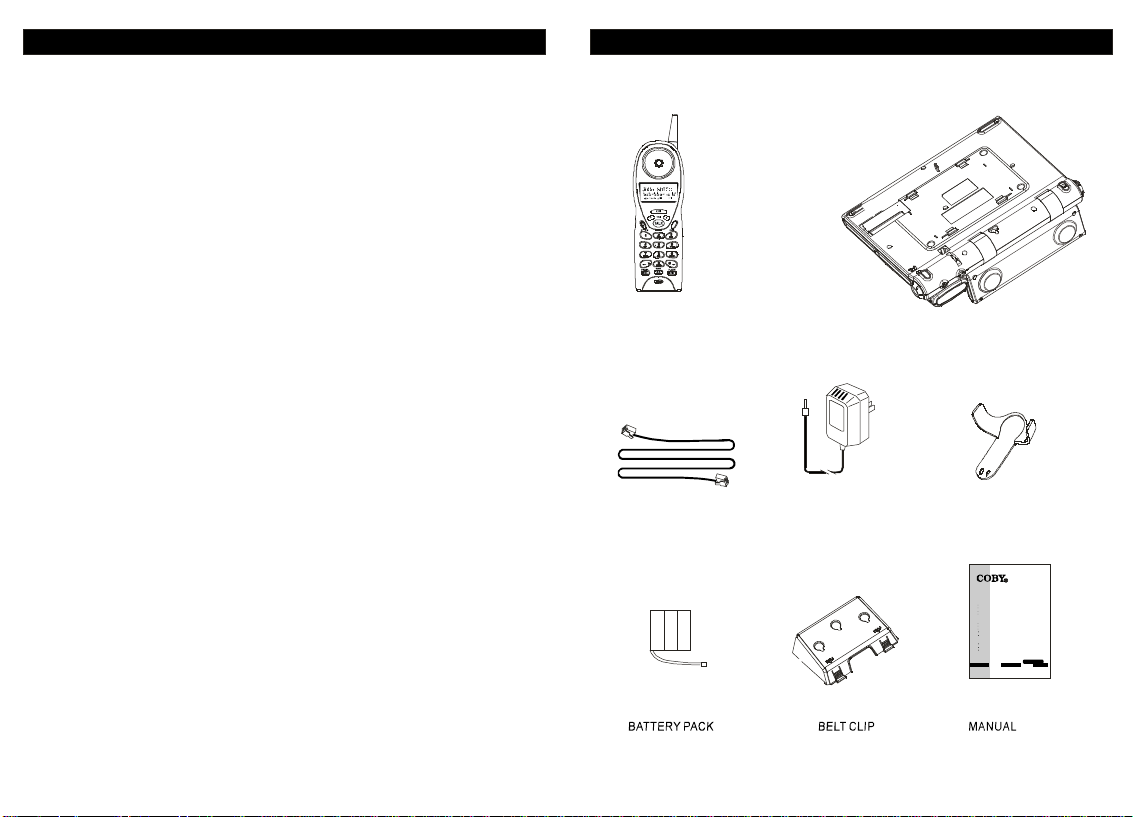
CD-RA195PARTSCHECKLIST
BASE
LONGTELEPHONELINECORD
ACADAPTOR
65
BELTCLIP
MODEL:CD-RA195
CDPLAYERwithDUALALARMCLOCKRADIO
&2.4GHzCALLERIDCORDLESSTELEPHONE
CDPLAYER
TopLoadingCDPlayer
ProgrammableTrackMemory
BigFullDigitalLEDDisplay
Play/Pause,Search,RepeatFunctions
CLOCKRADIO
AM/FMStereoRadio
BigLEDDigitalFreauencyDisplay
DualAlarmFunction
SnoozeFunction
Built-inNightLight
CALLERIDTELEPHONE
40MemoryCallerID
3-LanguageOperation
One-touchCallBackfromCallerID
COBYCustomerServiceDepartment
Monday-Friday8:00AM-11:00PMEST,1-800-681-2629or718-416-3197
Monday-Friday6:30PM-11:00PMEST,1-800-727-3592
Saturday-Sunday9:00AM-11:00PMEST,1-800-727-3592
OPERATINGGUIDE
Page 5
NAMEOFPARTSNAMEOFPARTS
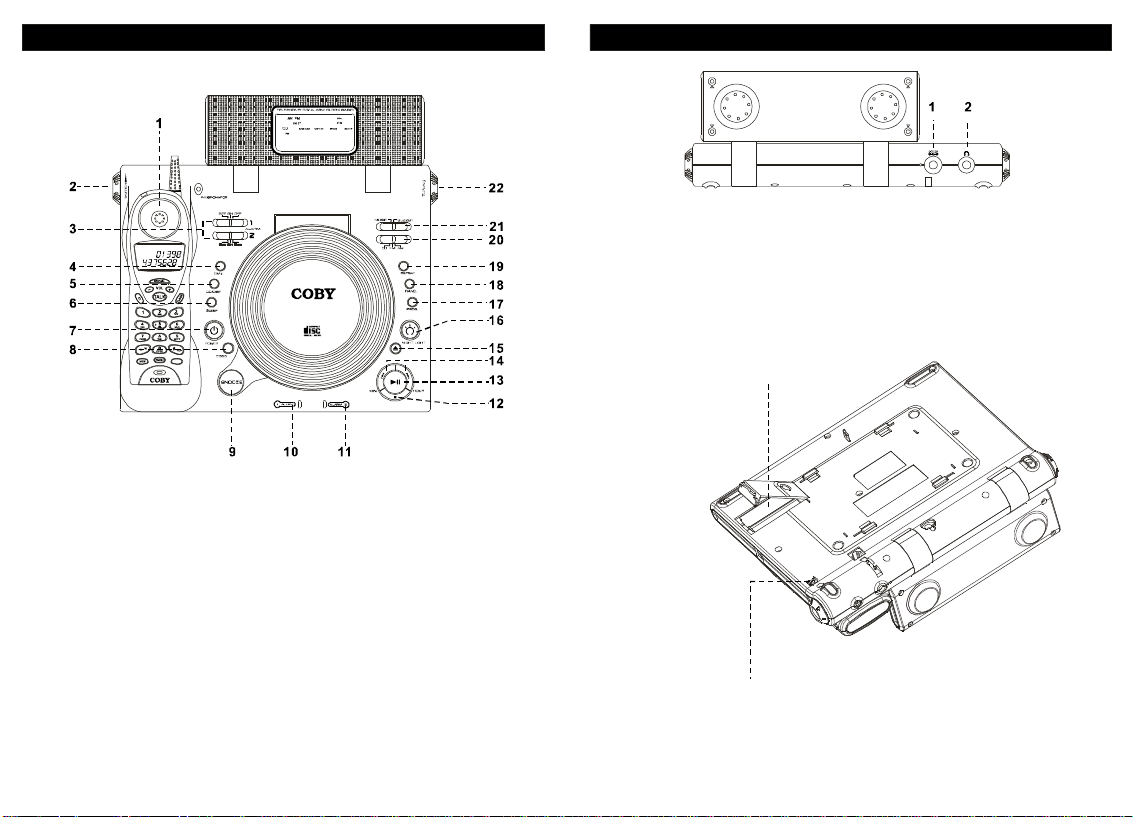
1.DCjack
2.Headphpnejack
BatteryCompartment
1.Handset
2.VOLUMEControI
3.AlarmSETONOFF
4.Time
5.CD/Displav
6.SLEEP
7.POWER
8.DBBSSwitch
9.SNOOZEControl
10.ALARMllndicator
11.ALARM2lndicator
12.STOP
13.Plav/Pause
14.Minute/Rew
Hour/F.F
15.OPEN/CLOSE
7
16.NlGHTLight
17.PROG
18.RANDOM
19.REPEAT
20.CD/FM/AMSwitch
21.Music/BuzzerSwit
22.TUNINGControl
Tone/PulseSelector
8
Page 6
Opration
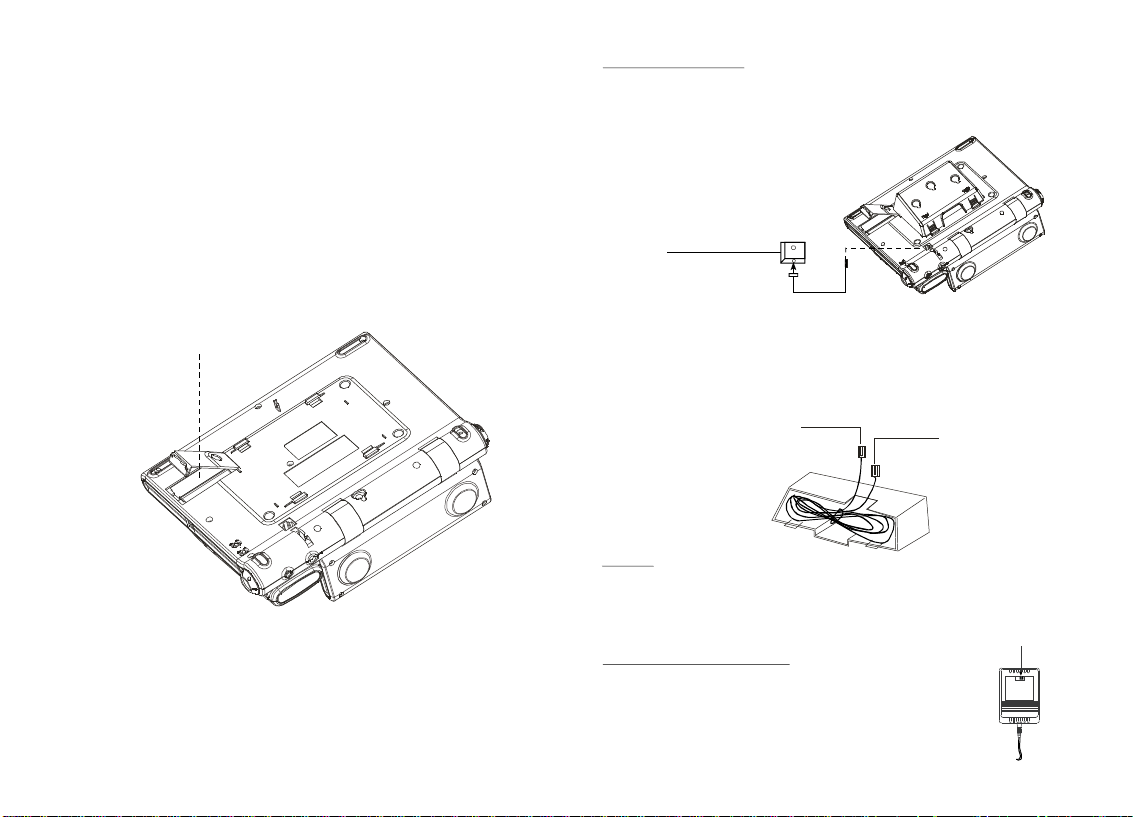
BeforeconnectingtothepowersuppIyJensurethattheratedvoItageofthisunit
matchesyourIocalvoItage
Batterylnstallation
1.Openthecoverofthebatterycompartmentandinstallthe9Vtypebatteries.
2.ConnectthecoiledcordtothehandsetandtheteIephonebase.
3.ConnecttheteIephonewiretothetelephonebaseandtheteIephonewalljack.
Replacebatteryeverysixmonthsforthebestperformance.
RemovethebaneryifyouwillnotbeusingthisunitforaIongtime.
.
BatteryCompartment
DeskorTabIeTopUse
1Connectthemodularjackonthehandsetwiththecoiledcord
..
2ConnectmoduIarjackonthephoneandthejackonthewallwiththe
.
straightcord
.
ModularJackforSingleLine
WallMount
PlasticWallmountadaptormustbeused(availableinpackage).
Thisadaptorsnapsintobaseofphone.Extralengthofstraightphonecordis
placedinadaptorcompartment.
6-7"plugsintoback
ofphonebase
Warning
Donotdisconnectthecordsfromthetelephonewithoutfirstdisconnectingthe
3"plugsinto
walljack
cordfromthewallline.
Thevoltageselectswith
CautiononACAdapter
Youcanpushthevoltagesdelectgswitchtoselecttheinput
voltage110vor220v,andyoumustpushtheswithto
correspondinglocationaccordingtolocalstandard.
109
110V220V
Page 7

TimeSettlng
(1).SettingthehourWhiIedepressingthebuttonpressbuttontoa
adjustthehouruntildesiredhourisdisplayedreleesebothbuttons
(2).SettingtheminuteWhiledepressingthebuttonpressbutton
toadjUSttheminuteuntlldesiredminuteisdisplayedReleasebothbuttons
AlarmSetting(DUalalarm)
(1).Slidealarmswitchtoposition.
(2).Pressandbuttonsuntildesiredtimeisdisplayed
(3).Slidealarmswitchtopositiontoactivatethealarm
(4).TheaIarmindicatorliqhtwillbeturnedon
(5).TodeactiVatethealarmfunctionslidealarmswitchtoposition
NOTlCEoffWakeuptoMUSic
otherwisethealarmfunctionwillnotbeactivated
WaketoMUSicorBuzzerFunction
(1).SelecttheMUSicorBuzzer
(2).SelectCD,FMorAMandadjustthevolumetodesiredlevel
(3).SetdesiredaIarm(seeAlarmsettingsection)hourandminute
(4).Toturnoffthemusicorbuzzer,pressbutton
Snoozefunction
Pressingwillturnoffthebuzzerormusictemporarily
Approximately6minuteslater,thebuzzeroralarmwilllturnonagain.To
deactivatethealarmfunction,slidetheswitchtoposition.
Sleepsetting
(1).SeIectdesiredmusicsources,CD,FMorAm
(2).Pressbuttonuntildesiredtimeisdisplayed(90,60or30Minutes).
(3).WaituntiltheSLEEPindicatorlightstops(sleepfunctionactivated)
(4).Todeactivatethefunction,pressbutton
hourminute
:
Snooze
SLEEP
:,
:,
,..
Set
on
MakesuretoturnthepowerforOperation
.
SLEEPPOWER
TlMEhour
..
TIMEMINUTE
.
.
,
.
off
.
.
POWER
.
.
Alarmoff
.
.
RadioOperation
(1).SelectAMorFMusingSIideswitchonside.
(2).Pressbuttontoturntheradioon.
(3).Adjusttherotaryvolumecontroltothedesiredvolumeleve.
(4).Turntheknobtothefrequencyofthedesiredstation.
(5).Toturntheradiooffpressbutton.
POWER
TUNlNG
POWER
CDOperation
(1).OpentheCDdoorsIowlyandinsertCDintotheCDcompartment.
(2).SlidefunctionseIectortoposition
(3).PressbuttontoenableCDfunction
PLAY/PAUSE
(1).PressbuttontostartCDplayingTheLEDwilldisplaythe
trackbeinqplayedandafter3secondstheLEDdisplaywillbebacktoclock
mode
(2).PressbuttontocheckthecurrentCDtrack.
(3).PressSTOPbuttontostopCDplay.
REPEAT
(1).Press
blink)
(2).Pressbuttontwicetorepeatalltracks(TherepeatLEDwillbeon).
RANDOM
(1).Atstoopmodepressbuttontoactivatethefunction.
(2).PressPLAY/PAUSEbuttontostartrandomplayingmode.
PROGRAM
(1)PressbuttonatstopmodeTheLEDwilldisplayp01andthe
programLEDwillblink
(2).Pressorbuttonstoselectthedesiredtrack
numberPresstoconfirmthetrack.ThenLEDwilldisplayp02.
(3).Repeatthisprocessupto20tracksPresstostartproqram
pIaymode.
(4).TocanceltheprogrampIaymode,pressatanytime.
POWER
PLAY/PAUSE
.
.
,
CDDlSPLAY
REPEAT
REPEAT
,
PROGRAM
..
HOUR/FFMlNUTE/REW
PROGRAM
.
CD
.
.
.
buttononcetorepeatsingletrack(TherepeatLEDwill
RANDOM
.
PLAY/PAUSE
.
STOP
1211
Page 8
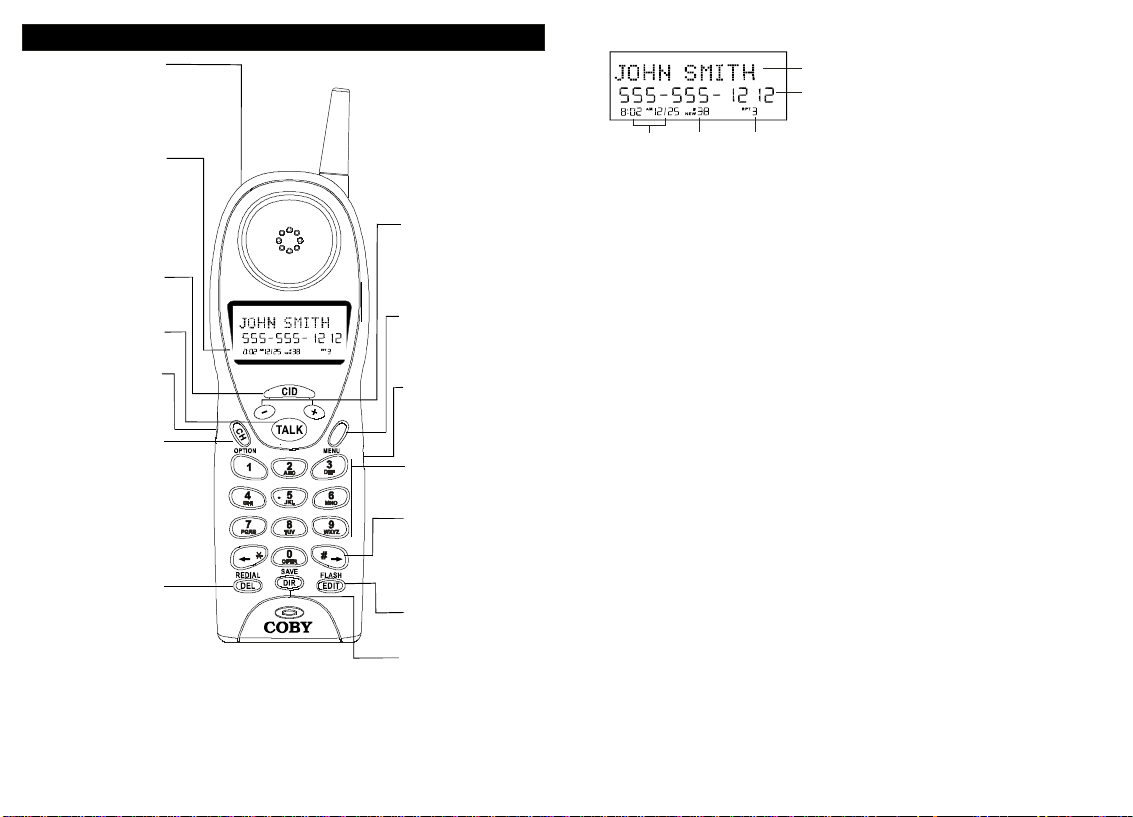
LOCATIONOFCONTROLSANDFEATURES(Telephone)
Newcallmsg.waitingled
indicator
TheLCDisbacklitunderthe
followingconditions:
1.Whilereceivinganincoming
call(duringringing).
2.For20seconds,whenthe
handsetispickedupfromthe
cradle.
3.For20seconds,whenany
buttonispressedinanymode.
TheLCDbacklightgoesoff
*
immediatelyafterthehandset
isplacedonthebase.
Thekeyisusedtoreview
CallerIDinformationstoredin
memory.
Thekeyisusedtoaccessthe
telephonelineorendacall.
Allowsusingaheadsetfor
hands-freeconvenience.
Whenpressedthekey,will
scanupto40channelsand
selecttheclearestoneto
providethebestpossible
reception.
Thekeyisalsousedtochange
the7/10/11digitdialingmode
duringcallerIDcall-back.
Whenthephoneisidleoroffhook,pressthekeytoredial
thelastnumberdialed.When
viewingoreditingmenusand
logs,thekeyisusedtoerase
digitsonthedisplayandsingle
ormultipleentriesfromthe
phonebookandCallerID
directories.
Handset
Intalkmode,pressthekeys,
thatletyouscrollthrough
menusandlogs,andadjust
thehandsetvolume,toselect
thevolumelevel(HI,MID,
LOW).
Thekeyisusedtotemporarily
mutethehandsetmicrophone.
Thiskeyisalsousedto
accesstheprogrammable
functionsofyourphone.
SwitchtoONtoengagethe
ringerontheHANDSET.Set
switchtoOFFtodisengage
theringerontheHANDSET.
Numerickeysareusedinthe
conventionalmannerfor
dialing.
Usedtoviewtherightpartof
thedisplayandmovethe
cursorrightwhenediting.
Thekeyisusedtoaccess
telephonecompanyservices,
likecallWaiting.Itisalsoused
tocreateandeditphonebook
entries.
Usethekeytoprogramand
retrievethenumbersinthe
speeddialdirectory.Thekeyis
alsousedtosavenumbersinto
thephonebookandother
settings.
LCDDisplay
NameCharacterField
NumberField
Date/Time
orEntry
Display
Number
NameCharacterField
NumberField
whenviewingthephonebo
Date/TimeDisplay
idle.
NEWIconNEW
hasbeenreceived.ThenumberofnewcallerIDcallsislistednexttotheicon.
Call/EntryNumber
sign.Thisnumberindicatestheplaceinthelist,suchasthe38thcallerIDcallorthe7th
settinginthemenu.
RPTCounterRPT
CallerIDnumberhascalledmorethanonetimesinceCallerIDmemoryhaslastbeen
reviewed.Nexttotheiconisacounterthatindicateshowmanytimesthatcallerhas
calledsincethelastreview.
Thenumberfieldwilldisplaynumberswhendialing,viewingCallerID,and
Wheninidlemode,thecalliconwillflashslowlywhenanewCallerIDcall
WhenviewingcallerIDentries,theiconindicatesthatthesame
RPTNewlcon
Displayscaller'snameandoperationalmenus.
ok.
ShowsthedateandtimeofCallerIDcallsorcurrentdate&timewhen
Wheninanyofthemenus,anumberislistedhere,nexttothe
RPT
#
1413
Page 9
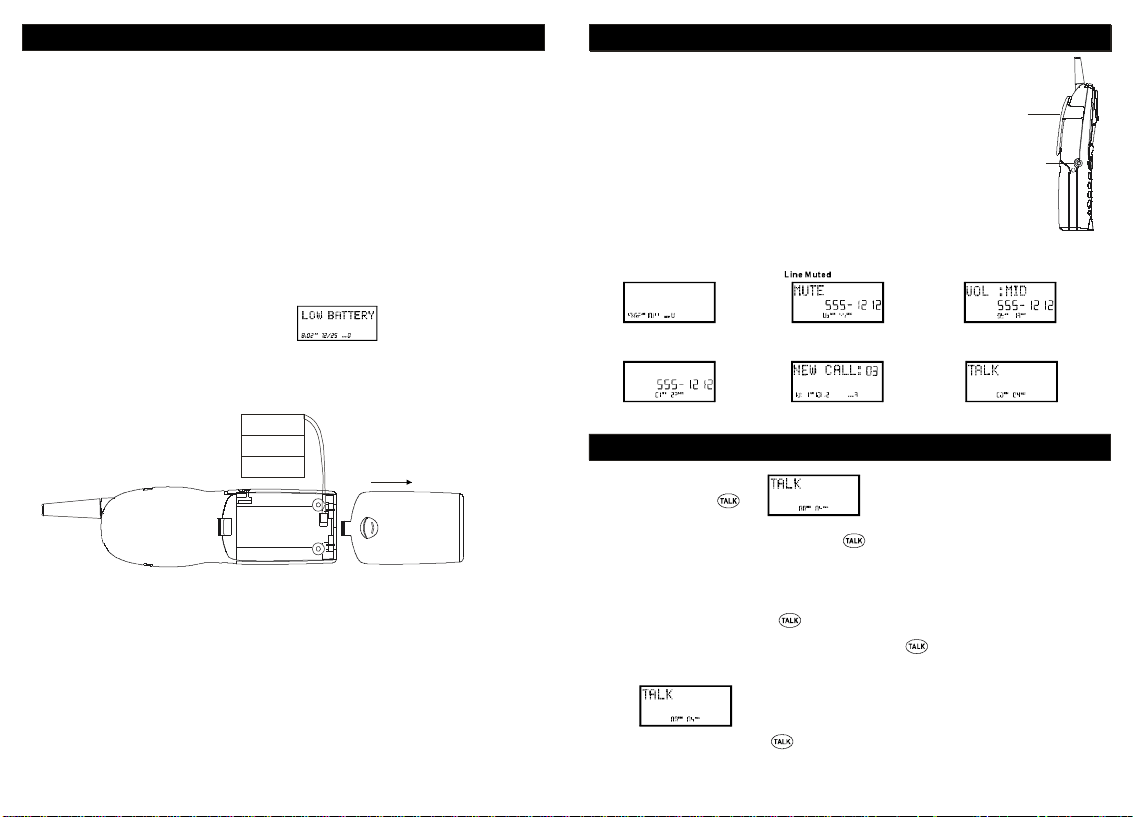
BATTERYINSTALLATION
Toinstallthe3.6V600mAhcordlesshandsetbatterypack:
1.Slideopenthebatterycompartmentdooronthebackofthehandset.
2.Plugthebatteryconnectorintothe2-pinconnectorinthebattery
compartment,andtheninsertthebattery.
3.Closethebatterycompartmentdoor.
4.Placethehandsetonthebaseunitcradle.
5.OnceyouhaveinstalledthebatterypackandplacedThehandsetonthe
baseyouwillhearatoneindicatingThehandsethasconnectedwiththe
baseandwillsuccessfullycharge.
6.Chargethebatterypackforatleast12hoursbeforeusing
IMPORTANT:
thehandsetthefirsttime.
7.TheLEDonthebaseilluminateswhenthehandsetisproperly
CHARGE
makingcontactwiththechargeterminals.
BatteryDuration
Afullychargedbatterylastsforapproximately:
5hourswhenyouusethehandsetcontinuously(talktime).
·
5dayswhenthehandsetisnotinuse(standby).
·
WhentheBatteryNeedsCharging
Thedisplaywillshow
·
WhentoPurchaseaNewBatterypack
Ifthebatterylastsonlyafewminutesevenafterafullcharge,theusablelifeofthebattery
hasexpiredandneedstobereplaced.Replacementbatteriescanbepurchaseinevery
supermarketoryoucancontactCOBYELECTRONICSCORP.customerservicedeptfor
informationabouthowtoorderanewbatter
"LOWBATTERY".
,
y.
HANDSETANDBASICDISPLAYS
TheHeadsetJack
Theheadsetjackislocatedonthesideofthehandsetandisa
standard2.5mmplug.Simplyplugtheheadsetintothejackandthe
headsetwillbeactive.
Note: Whentheheadsetispluggedintothetelephone,the
microphoneandearpieceonthehandsetarenotactive.
Belt-Clip
Besuretoremovethebelt-clipfillercappriortoinstallingBelt-clip.
Installthebelt-clipasshown.
Toremovethebelt-clip,squeezethereleaseatthetopoftheclip
whereitattachestothephone,andgentlyPulltheclipupandoutof
thehandset.
BasicDisplays
HeadsetIdle
HANDSETANDBASICDISPLAYS
BeltClip
HEADSETJack
VolumeControl
Off-hookCallTimer NewCIDReceived
BASICOPERATION
MakingCalls
1.Pickupthehandsetfrom
thebaseandpress.
2.Waituntilyouhearadialtone,andthendialthenumberYouwishtodial.
3.Whenyouarefinishedtalking,pressthekeyorplacetheunitbackintothebaseto
endthecall.
Note:TheINUSECHARGElightonthebasewillilluminatewhenthelineisactive.
ReceivingCalls
Whenyouhearthephonering:
1.Ifthehandsetisinthebase,liftthehandsetfromthebase.Thehandsetwillturnon.
Thereisnoneedtopushthekeyiftheunitisonthebasewhenthecallcomesin.
Thisauto-answerfeaturecanbeprogrammedoff(seehandsetsettingspage13).
2.Ifthehandsetisoffthebase,youwillneedtopresstoanswerthecall.Thedisplay
willshowthecallerIDinformationafterthefirstring.
3.Whenyouarefinished,pushorplacethehandsetbackonthebase.
15 16
Page 10
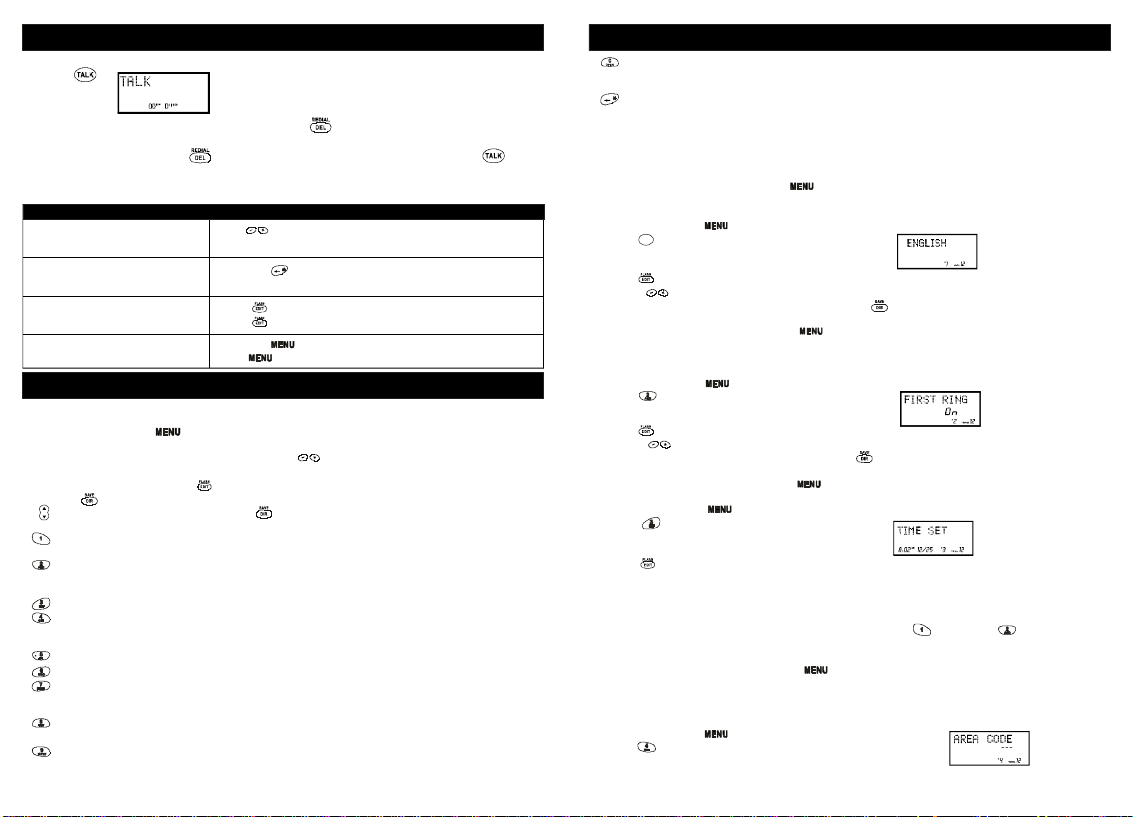
BASICOPERATION
Redialing
1.Press
2.Waituntilyouhearadialtone,andthenpresstoredialthenumberlastdialed(up
to32digits).
Note:
AdditionalOptions
To:
Adjustthevolumeintheearpiece
Switchtotemporarytonedialing
Receiveacallwaitingcall
Muteacall
.
Youcanalsopressfirsttodisplaythenumberandthenpresstodial
thenumberdisplayed.
DoThis:
Pressduringacalluntilthedesiredvolumelevelis
reached.
Pressthekeyafterthephoneisinuse.Thephonewill
remainintonedialingmodeforthedurationofthecall.
Presstogotothenewcaller.
Pressagaintogobacktotheoriginalcaller.
Pressthekey.
Presstocontinuespeakingtothecaller.
SETTINGS
HandsetSettings
Youcanchangethesettingonthehandsetintheoptionsmenu.Accesstheoptionsmenuby
pressingandholdingthekeyuntilisdisplayed.
Thereare12settingsintheoptionsmenuwhichcanbechanged.Youcanscrollthroughthe
optionmenuinthelistedorderbypressingthekey.Settingswhichhavealistednumber
canbereacheddirectlybypressingthatnumberonthekeypad.
Toeditmostsettings,pressthekey,usethekeystotogglebetweenthesettingoptions,and
thenpresstosavechanges.Youcancontinueprogrammingoptionsbyusingthedialpadkeys
orthekeystogotoanewsetting.Presstoexittheoptionsmenu.
KeyFunction
Language:
French,andSpanish.
FirstRingOn/Off:
informationhasbeendisplayed.Particularlyusefulwhenusingthepriorityandblockedcall
featuresortheprivateandunavailableringsettings.
TimeSet:
AreaCode:
easeofcallbackandotherfeatures.(donotprogramifyoulo-digittocallnumberinyour
area.)
Contrast:
PBXNumber:
PBXModeOn/Off:
isdialed.When"On",automaticallydialsthePBXnumberandapause,beforeanyspeed
dialorcallerIDcallbacknumber.Defaultsettingis"Off".
PauseTime:
programmedpausesinyourspeeddialnumbersorafteryourPBXnumberisdialed.
MSGWaitingDelete:
Changethelanguagethatappearsonthedisplay.ChoosebetweenEnglish,
TurnthefirstringofthephoneoffsothatitdoesnotRinguntilcallerID
Changethetimeanddate.
Allowstheprogrammingofahomeareacodewhere7-digitdialingisusedfor
Providedtoadjustthedisplaybackgroundlighterordarker.
NumberusedtoaccessPBXdialingoptions.Thedefaultsettingis"9".
Determinesifthe"PBXNumber"isusedbeforeanout-goingnumber
Allowsyoutoadjustthenumberofsecondsthatapauselastssuchasduring
"ENGLISH"
Clearsanycurrentmessagewaitingindication.
SETTINGS
AutoAnswerOn/Off:
gooff-hookwhenthehandsetispickedupfromthebasewhilethephoneisringing.
PrivateRingOn/Off:
theircallerID.Pleasenotethatthephonewillringonceevenwhensetto"Off"unlessfirst
Ringisprogrammed"Off"aswell.
UnavailableRingOn/Off:
isunavailable.Pleasenotethatthephonewillringonceevenwhensetto"Off"unlessFirst
Ringisprogrammed"Off"aswell.
Note:
Atanytimeduringoptionsprogrammingyoucanquitandthesettingsthatyouhave
changedwillbesaved.Presstoquitorlettheoptionsprogrammingtimeoutbynot
pressinganykeysfor20seconds.
ChangingtheLanguage
1.Pressandholdthekey.
1
2.Presstogotothelanguageprogrammingoption.
3.Presstochangethesetting.willbeginflashing.
4.Usethekeystotogglebetween,,and.
5.Whenthesettingyoudesireisdisplayed,presstosavethesetting.Adoublebeepwill
soundtoconfirmthesettinghasbeensaved.
6.Continuewithprogrammingorpresstoreturntotheidlescreen.
TurningtheFirstRingOnorOff
YoucanturnoffthefirstringofthephonesothatitdoesnotringuntilcallerIDinformationhas
beendisplayed.
1.Pressandholdthekeytoenterthemenu.
2.Presstogotothefirstringprogrammingoption.
3.Presstochangethesetting.""willbeginflashing.
4.UsethekeystotogglebetweenOnandOff.
5.Whenthesettingyoudesireisdisplayed,presstosavethesetting.Adoublebeepwillsound
toconfirmthesettinghasbeensaved.
6.Continuewithprogrammingorpresstoreturntotheidlescreen.
SettingtheTimeandDate
1.Pressandholdthekeytoenterthemenu.
2.Presstogotothetimesetprogrammingoption.
3.Presstochangethesetting.Themonthwillbeginflashing.
4.Usethedialpadtoenterthemonthintwo-digitformat.Thedatewillbeginflashing.
5.Usethedialpadtoenterthedateintwo-digitformat.Thehourwillbeginflashing.
6.Usethedialpadtoenterthehourintwo-digitformat.Theminuteswillbeginflashing.
7.Usethedialpadtoentertheminutesintwo-digitformat.andbeginflashing.
8.Usethedialpadtochoosebetweenand,Whereisandis.
9.Whenthefinalsettingisprogrammed,thetimeanddateareautomaticallysaved.Adouble
beepwillsoundandyouarereturnedtotheoptionsmenu.
10.Continuewithprogrammingorpresstoreturntotheidlescreen.
SettingtheAreaCode
AreacodeprogrammingisusedforcallerIDcallbackpurposes.Itallowspeoplewhodialonly7
digitsforlocalnumbertoavoidextraworkwhendialingfromcallerIDmemories.DONOTusethe
AREACODEprogrammingifyouarerequiredtodial10digits(555-555-1212)locally.
1.Pressandholdthekey.
2.Presstogototheareacodeprogrammingoption.
Turnsonandoffthefeaturewhichmakesthephoneautomatically
Turnsonandofftheringforallcallswherethecallerhasblocked
TurnsonandofftheringforallcallswherecallerIDinformation
ENGLISH
""
ENGLISHESPANOLFRANCAIS
On
AMPMAMPM
AMPM
1817
Page 11
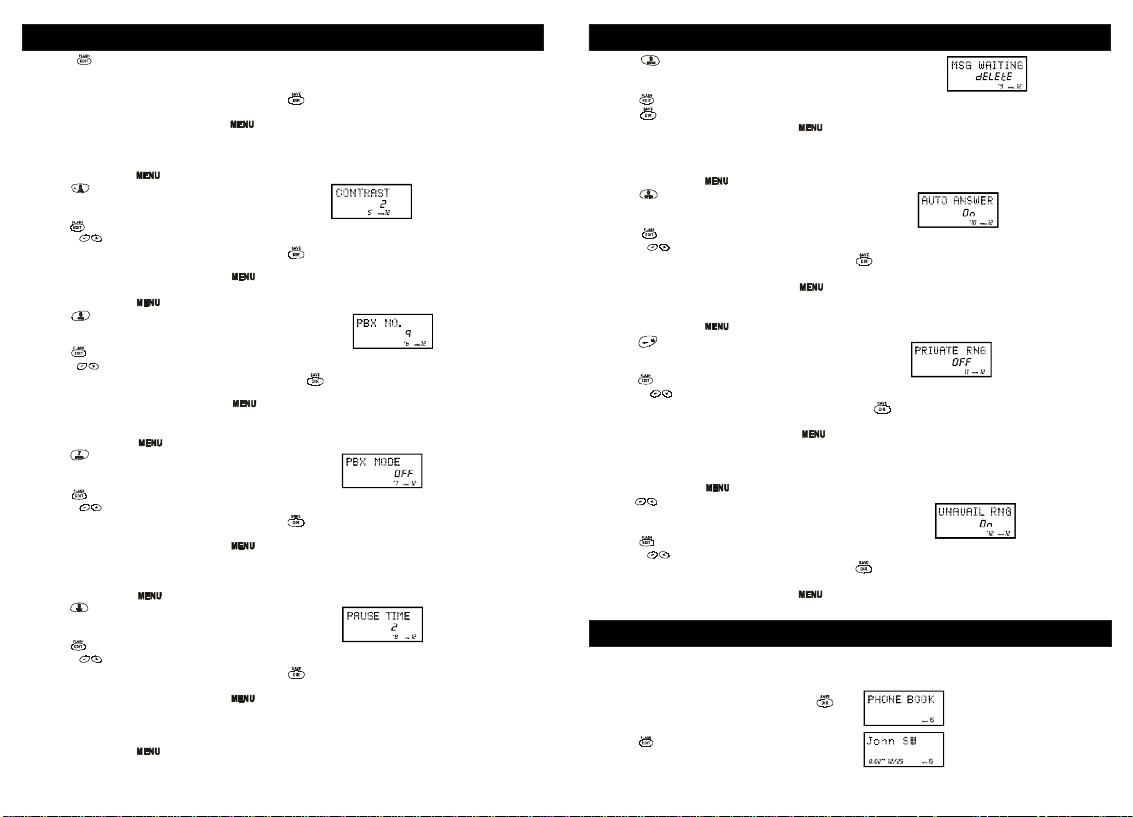
SETTINGS
3.Presstochangethesetting."---"willbegin
flashing.
4.Usethedialpadtoenterthethreedigitareacodethatyourphonenumberbeginswith.
5.Whenthesettingyoudesireisdisplayed,presstosavethesetting.Adoublebeepwillsound
toconfirmthesettinghasbeensaved.
6.Continuewithprogrammingorpresstoreturntotheidlescreen.
AdjustingtheContrast
Thecontrastisoptimizedforviewingandwillprobablynotneedtobechangedfromthedefault
setting.Itwilladjustthedisplaybackgroundlighterordarker.
1.Pressandholdthekeytoenterthemenu.
2.Presstogotothecontrastprogrammingoption.
3.Presstochangethesetting."2"willbeginflashing.
4.Usethekeystotogglebetweenthethreelevelsofcontrast.
5.Whenthesettingyoudesireisdisplayed,presstosavethesetting.Adoublebeepwillsound
toconfirmthesettinghasbeensaved.
6.Continuewithprogrammingorpresstoreturntotheidlescreen.
SettingthePBXNumber
1.Pressandholdthekey.
2.PresstogotothePBXnumberprogrammingoption.
3.Presstochangethesetting.
4.UsethekeystocustomizethedigittomatchyourPBXsystem.
5.Whenthesettingyoudesireisdisplayed,presstosavethesetting.Adoublebeepwill
soundtoconfirmthesettinghasbeensaved.
6.Continuewithprogrammingorpresstoreturntotheidlescreen.
:ThenumberprogrammedhereisnotactiveunlessPBXmodeisOn.
Note
TurningPBXModeOnorOff
1.Pressandholdthekey.
2.PresstogotothePBXmodeprogrammingoption.
3.Presstochangethesetting.willflash.
4.UsethekeystotogglebetweenOnandOff.
5.Whenthesettingyoudesireisdisplayed,presstosavethesetting.Adoublebeepwillsound
toconfirmthesettinghasbeensaved.
6.Continuewithprogrammingorpresstoreturntotheidlescreen.
YoudonotneedPBXmodeunlessyouneedtodialAspecificsingledigitnumberbefore
Note:
eachoutgoingcall.
ChangingthePauseTime
1.Pressandholdthekeytoenterthemenu.
2.Presstogotothepausetimeprogrammingoption.
3.Presstochangethesetting.2willbeginflashing.
4.Usethekeystoselectthedesireddiallingdelay.
5.Whenthesettingyoudesireisdisplayed,presstosavethesetting.Adoublebeepwillsound
toconfirmthesettinghasbeensaved.
6.Continuewithprogrammingorpresstoreturntotheidlescreen.
DeletingMessageWaitingIndication
Clearsanycurrentmessagewaitingindication.Seepagormoreinformationabout
messagewaiting.
1.Pressandholdthekeytoenterthemenu.
On
""
e18-19f
SETTINGS
2.Presstogotothemessagewaitingprogrammingoption.
3.Presstoresetthemessagewaitingindication.""willbeginflashing.
4.Presstodeletetheindication.Adoublebeepwillsoundtoconfirm.
5.Continuewithprogrammingorpresstoreturntotheidlescreen.
TurningAutoAnswerOnorOff
Turnonandofftheautoanswerfeature.Whenon,thephonewillautomaticallyansweran
incomingcallifthehandsetisinthebase.
1.Pressandholdthekeytoenterthemenu.
2.Presstogototheautoanswerprogrammingoption.
3.Presstochangethesetting."n"willflash.
4.UsethekeystotogglebetweenOnandOff.
5.Whenthesettingyoudesireisdisplayed,presstosavethesetting.Adoublebeepwillsound
toconfirmthesettinghasbeensaved.
6.Continuewithprogrammingorpresstoreturntotheidlescreen.
DisablingtheRingforPrivateCalls
TurnstheringeronandoffforallcallswherethecallerhasblockedtheircallerID.
1.Pressandholdthekeytoenterthemenu.
2.Presstogototheprivateringprogrammingoption.
3.Presstochangethesetting."n"willflash.
4.UsethekeystotogglebetweenOnandOff.
5.Whenthesettingyoudesireisdisplayed,presstosavethesetting.Adoublebeepwill
soundtoconfirmthesettinghasbeensaved.
6.Continuewithprogrammingorpresstoreturntotheidlescreen.
Note:
ThephonewillringoncewhensettoOffunlessFirstRingisalsosettoOff.
DisablingtheRingforUnavailableCalls
TurnstheringeronandoffforallcallswherecallerIDinformationisunavailable.
1.Pressandholdthekeytoenterthemenu.
2.Presstogototheunavailableringprogrammingoption.
3.Presstochangethesetting."n"willbeginFlashing.
4.UsethekeystotogglebetweenOnandOff.
5.Whenthesettingyoudesireisdisplayed,presstosavethesetting.Adoublebeepwillsound
toconfirmthesettinghasbeensaved.
6.Continuewithprogrammingorpresstoreturntotheidlescreen.
ThephonewillringoncewhensettoOffunlessFirstRingisalsosettoOff.
O
O
O
DELETE
""""
""""
”Note:
SPEEDDIALING
TheCT-P9050willstoreupto20speeddialnumbersintheorderthattheyareprogrammed.No
duplicatenumberscanbestored.
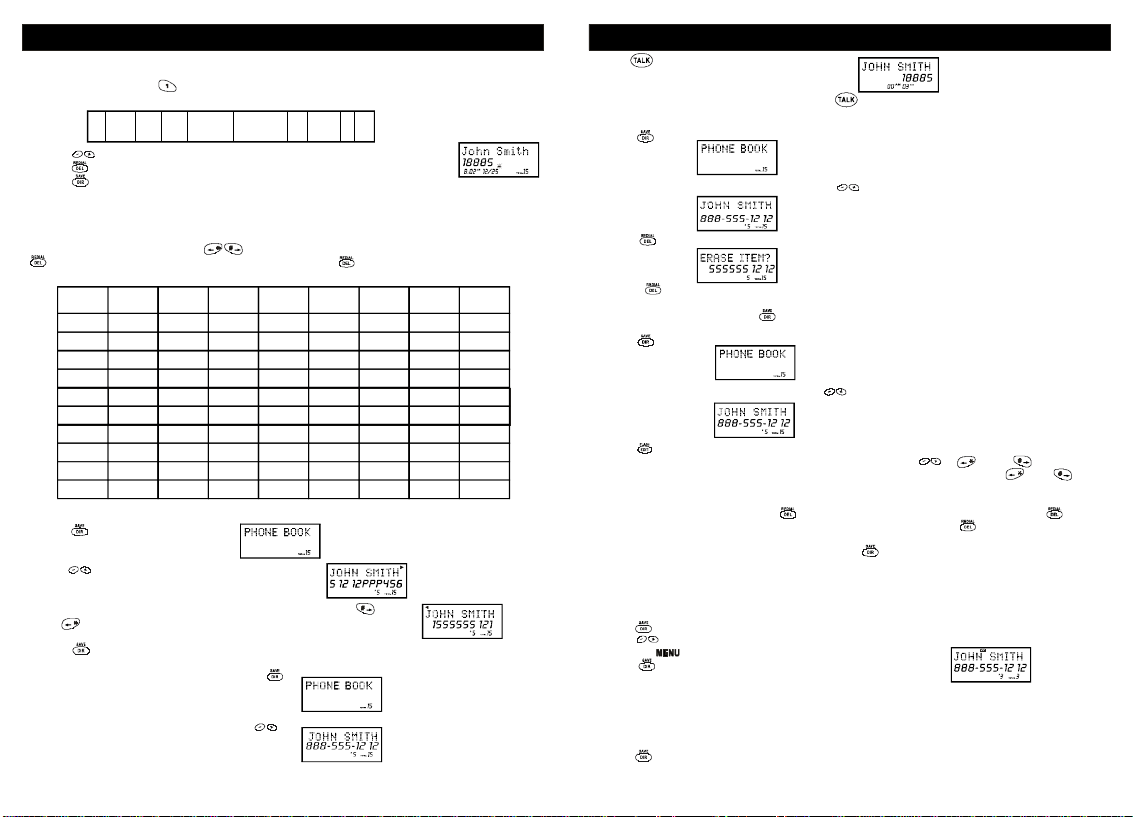
StoringPhoneNumbers
1.Withthehandsetintheidlestate,press.
2.Presstocreateanewphonebookentry.
2019
Page 12
SPEEDDIALING
3.Enterthenameyouwishtostoreusingthedialpadtoentertheletters(upto15letters).See
thefollowinglettertableforhowtoprogramthelettersusingthenumberpad.Toaddaspace
betweenwords,push.
Fordialthissequence:
Example:JOHNSMITH
4.Press,anddialthenumberyouwishtostore(upto16digits).
Presstoinsertadialingpauseintothenumber.
5.Presswhenfinishedtostorethenumbertomemory.
Note:
"MEMORYFULL."
dialnumbers.
Note:
pressingandholdingthe.Todeleteaflashingcharacter,pressthe
LetterTable
ViewingthePhoneBook
1.Presstoenterthephonebook.
2.Presstolocatethenumberyouwishtoview.
3.Ifthenameornumberismorethan11characters,pressthe
Andbuttontoviewtherestofthedisplay(asindicatedbythe
arrowsinthetoplineofthedisplay).
4.Presstoexitthephonebook,orletthephonebooktimeout.
MakingCallsFromthePhoneBook
1.Tomakeacallfromthephonebook,press.
2.Locatethenumberyouwishtodialusing.
666
5
446617777 6444844
JOHNspace S MITH
IftherearenomemorylocationsleftinthespeeddialdirectorytheCT-P9050willdisplay
Ifyoumis-typeenteringthephonenumber,youcanmovethroughthenumberandedititby
Key;todeleteaflashingnumber,pressandholdthekey.
Tocontinuewithmemoryprogramming,youmustdeleteoreditexistingspeed
1st
2nd
3rd
4th
Key
Press
Press
Press
1
Space
A
2
3DEF3DEF3
4GHI4GHI4
5JKL5JKL5
6
MN
7P
8TUV8TUV8
9WXYZ9WXY
000000000
,
&
BC2ABC2
O6
Q
R7P
5th
Press
Press
()
S
MN
6th
Press
*
7th
Press
Press
.
O6
Q
8th
1
R
SPEEDDIALING
3.Push.Thedisplaywillshowthedirectory
Name,andbegindialingthenumber.
4.Whenyouarefinishedwithyourcall,press,orplacethehandsetbackonthebase.
Note: Besuretocheckthatthelineisnotinusebyanotherextension.
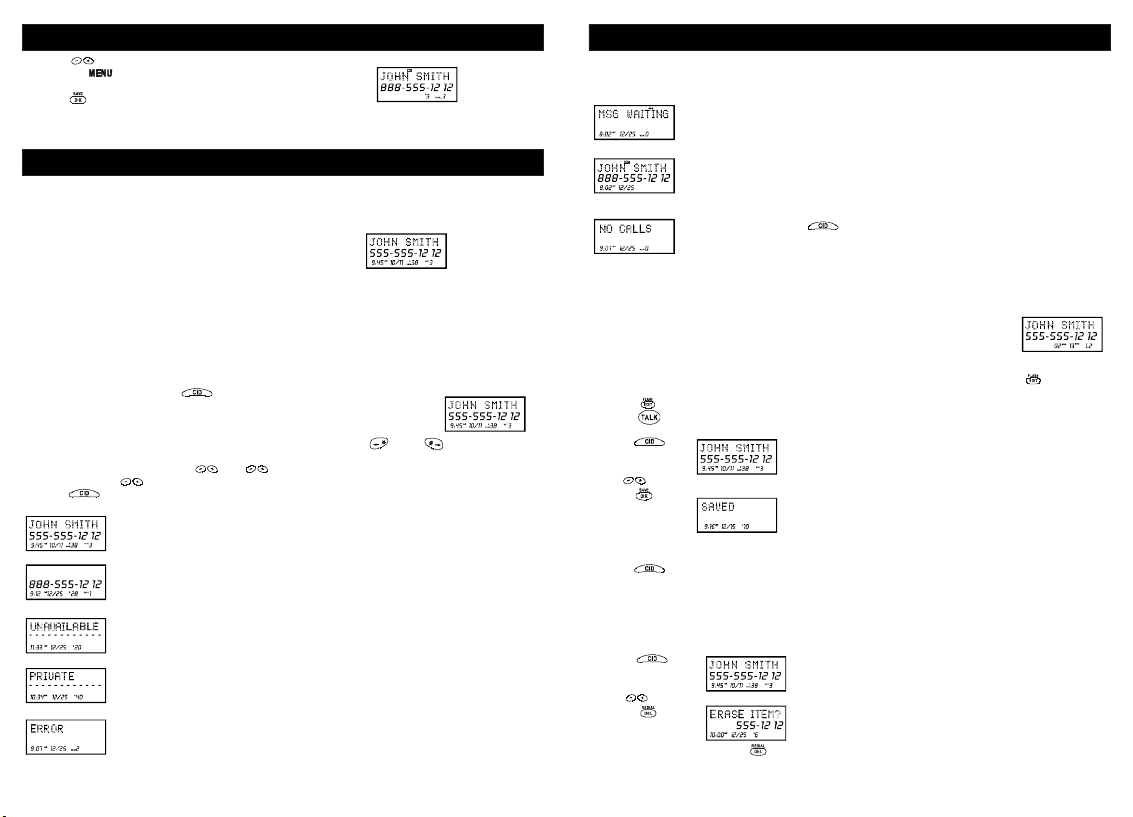
DeletingaStoredNumber
1.Press.
2.Locatethenumberyouwishtodeleteusing.
3.Press.Thedisplaywillshow
4.Presstodeletethephonebookmemory.Thedisplaywillbrieflyshowand
returntothepreviousphonebookentry.
5.Whenyouarefinishedpress.
EditingaStoredNumber
1.Press.
2.Locatethenumberyouwishtoeditusing.
3.Press.Theentrywilldisplaywithaflashingpromptoverthefirstcharacter.
4.Movethecursortothesectionyouwishtoeditusingthe,,Andkeys.When
movingthroughthenumberfield,itwillbenecessarytopressandholdtheandkeys
formorethanoneseconduntilthecursormoves,sincejustpressingthementersa*or#into
thedialingsequence.Anydialpadkeypressedwillbeinsertedinfrontofthecursor.
5.Todeleteacharacter,pressthekey.Todeleteanumber,pressandholdthekeyfor
morethanoneseconduntilthenumberisdeleted,sinceifthekeyisjustpressed,it
insertsapauseinthedialingsequence.
6.Whenthenumberiseditedasyoudesire,presstostoretheeditedentry.
Priority(VIP)Calls
Youcanassignstorednumbersaspreferredcalls.Whenanincomingcallismatchedtoastored
numberdesignatedas"VIP",thephonewillgenerateaspecialringersoundafterthefirstring
(callerIDinformationmustbereceivedfirst).
Tomarkaphonebookentryaspreferred:
1.Press.
2.Presstogothedesiredentry.
3.Pressthebuttononce.TheLCDwillshowthe"VIP"icon.
4.Presstoexitthephonebook.
Blocked(REJ)Calls
Ifyoudonotwanttohavethephoneringwhenaspecificnumbercalls,youcanstorethatnumber
inthephonebookandassigneditasblocked.Whenanincomingcallismatchedtoastored
numberdesignatedas"REJ",thephonewillnotringafterthefirstring(callerIDinformationmust
bereceivedfirst).
Tomarkaphonebookentryasblocked:
1.Press.
"ERASEITEM?"
"ERASED"
2221
Page 13
SPEEDDIALING
2.Presstogotheentrytobeblocked.
3.Pressthebuttontwice.TheLCDwillshowthe"REJ"icon.
4.Presstoexitthephonebook.
Note:priorityandBlockedcallswillonlyworkiftheincomingcall'snumberexactlymatchesthe
onethatisstoredinmemory.
CALLERID
Note:
Whenanerrorisreceived,noneofthedatafromthiscallissavedin
memory.
Displayshowswhenavoicemailmessagehasbeenreceivedandisstoredby
messagewaitingserviceprovidedbythephonecompany.
CALLERID
CallerIDallowsthecaller'snameandphonenumbertobeshownonthedisplaybeforeyou
answerthecall.InordertousethisfeatureyoumustfirstsubscribetoCallerIDservicewithyour
telephonecompany.
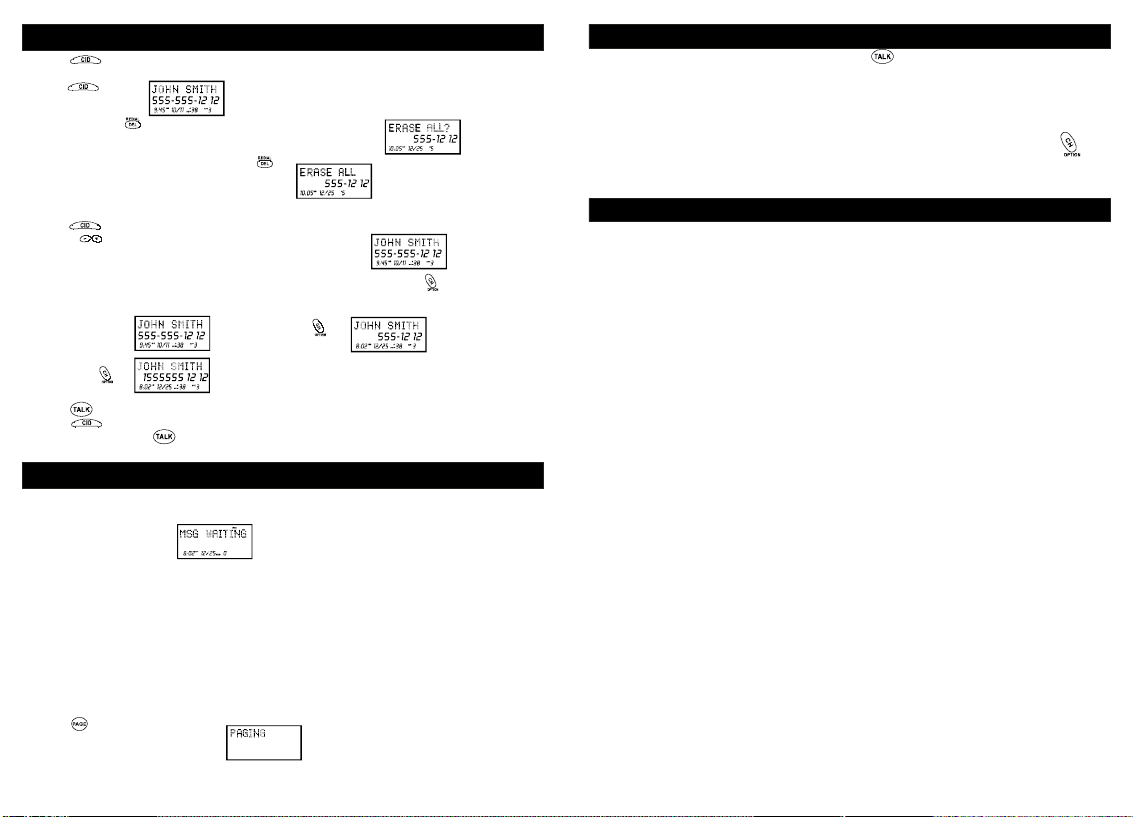
WhenYouReceiveaCall
1.Whenthetelephonerings,thecaller'snameandphone
numberappearsonthedisplay.
2.ThenewCallerIDrecordincludesthenameandnumberofthecallerandthetimeanddatethe
recordisreceived.TheNewCalllightwillflashtoindicatethatyouhaveanewCallerIDcall
storedinmemory.
WhentheCallerIDinformationisreceived,itisstoredinmemorysothatthisinformation
Note:
canberecalledforlateruse.Upto40CallerIDcallscanbestored.
ViewingtheCallerIDList
Thisphoneautomaticallystoresthelast40callsreceived.Ifacallisreceivedfromthesame
numbermorethanoncesincetherecordswerelastviewed,nonewentryismade,buttherepeat
callicon("")andthenumberofrepeatcallsisdisplayed.
RPT
1.Withthehandsetidlepress.
2.Anyunviewed(new)callswillbedisplayedfirst.Themostrecentcallwill
bedisplayed.Theinformationonthecallwillbedisplayedwiththename,
number,date,andtimethatthecallwasreceived.
3.Ifthenameornumberismorethan11characters,presstheandbuttontoviewthe
restofthedisplay.
4.Toscrolltothenextcall,press.Thewillgothroughthecallsfromthelastcallreceived
tothefirst.Thewillallowyoutoviewthecallsfromthefirstcallreceivedtothelast.
5.Presstofinish.
CallerIDDisplays
Displayshowsnameandnumber,timeanddateofthecall.
Displayshowsnumber-onlyservice.
""willbedisplayedwhenCallerIDinformationisnotavailable.
UNAVAILABLE
ThiscallwasmadefromatelephonecompanythatdoesnotofferCallerID
services(includinginternationalcalls).
""willbeshownwhenacallisreceivedfromablockednumber.For
PRIVATE
privacyreasons,somestatesallowcallerstheoptiontopreventtheirtelephone
datafrombeingdisplayedontheotherparty'sCallerIDdisplay.
DisplayshowswhentheCallerIDinformationwasreceivedincorrectlyoronly
partofthedatawasreceived.
Displayshowswhentheincomingcallisaprioritycall.
ThisisdisplayedwhenispressedandthereisnocallerIDdatastored.
CallerIDwithCallWaitingService
Inordertousethe"CallWaitingCallerID"serviceyoumustsubscribetoatelephonecompany
thatoffersCallerIDservicecombinedwith"callwaiting"service.
Whenanewcallcomesinwhileyouaretalking,youwillhearanotification
beepfromthehandsetandthevolumeismomentarilymuted.Thenewcaller's
nameandphonenumber,ifavailable,appearsonthedisplay.Onceflashhas
beenpressed,aninthelowerrighthandcornerindicatesthecallwaiting
callerIDcallersoyoucankeeptrackofwhoyouaretalkingto.
1.Whenyoureceivea"callwaiting"callandyouwanttoconnectthecall,press.Theactive
callwillbeplacedonholdandthenewcallwillbeactive.
2.Presstoalternatebetweencalls.
3.Presstoendthecallorplacethehandsetbackonthebase.
StoringCallerIDRecords
1.Press.
2.Usetoscrolltothecallrecordyouwishtostoreintothephonebook.
3.Press.
4.Ifyouwishtoeditthenewlystorednumber,edititinthephonebook(page15,"Editinga
StoredNumber").
5.PresstoexittheCallerIDlog.
Whennumbersarestoredintothephonebook,a1isinsertedinfrontofthenumber.Ifyou
Note:
mustdiala10-digitnumberforlocalcalls,youmusteditthenumberToexcludethatdigittodial
outcorrectly.
DeletingCallerIDRecords
WhenviewingtheCallerIDinformationyoucandeleteasinglecallrecordorallthecallrecords.
ToDeleteaSingleRecord
1.Press.
2.Usetoscrolltothecallrecordyouwishtodelete.
3.Press.
4.Todeletetherecordpress.
"L2"
""
2423
Page 14
CALLERID
5.PresstoexittheCallerIDlog.
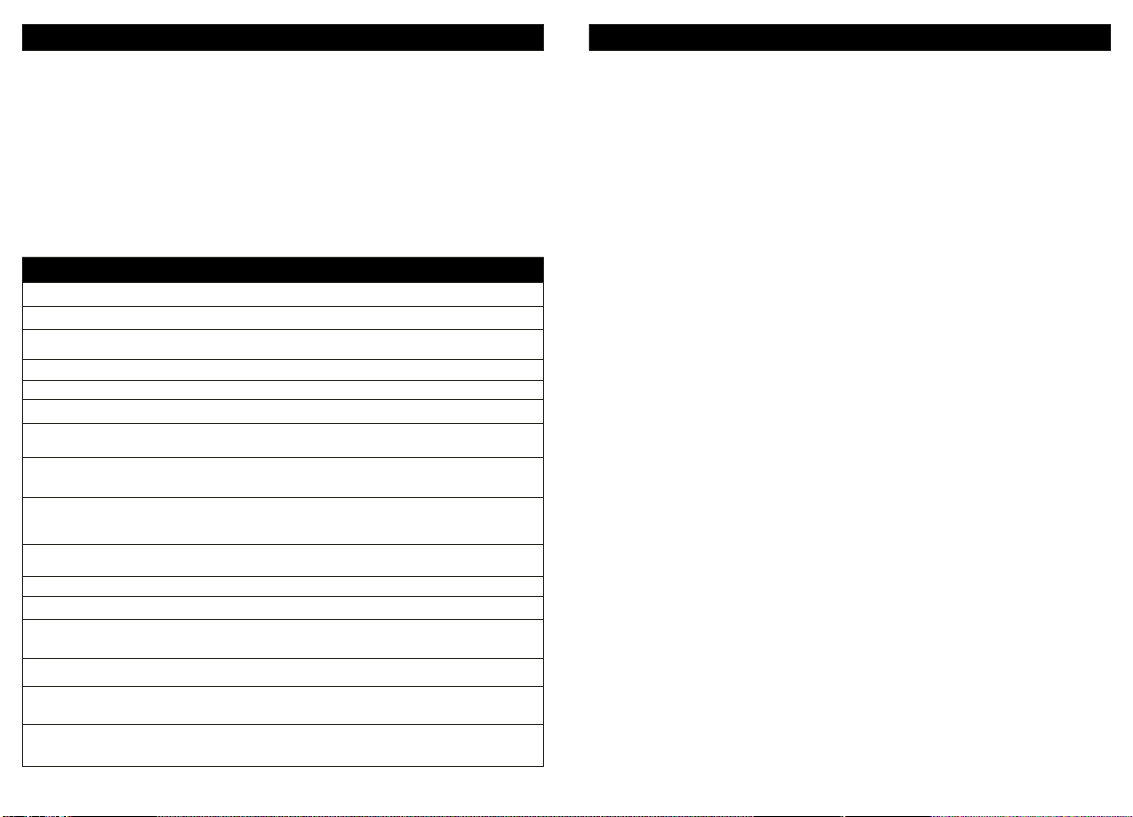
ToDeleteAllRecords
1.Press.
2.Pressandhold.Thedisplaywillshow
3.TodeletealltheCallerIDrecordspress.
ReturningCallerIDCalls
YoucanreturncallsbyusingtheCallerIDcallbackfeature.
1.Press.
2.Usethetoscrolltothecallrecordyouwishtocallback.
3.Ifthenumberdisplayedisnotcorrect(needing7,10,11digits),usethekeytotogglethe
numbertodisplaythecorrectnumberofdigitstobedialed.
Press
4.Presstodialoutthedisplayednumber.
5.Presstocanceldialing.
6.Toendthecall,pressorplacethehandsetbackinthebase.
"ERASEALL?"
Press
MESSAGEWAITINGANDOTHERFEATURES
Ifyousubscribetovoicemailfromthetelephonecompanyandiftherearevoicemessagesthat
havebeenleftinyourvoicemailbox,thedisplaywillshow(seenotebelow).
Thisfunctionrequiresvoicemailsubscriptionfromthelocaltelephonecompany.
Note:
Furthermore,thelocalphonecompanymustprovideatypeofvoicemailsignalingcalledFSK
(FrequencyShiftKey)Notalltelephonecompanieshavethevisualmessagewaitingfeature
available.Pleasecontactyourlocaltelephonecompanytocheckifthisisavailableinyourarea.
Ifyouwishtodeletethe"MessageWaiting"message,deleteitasdescribedinthehandset
Tip:
settingssectionDeletingtheMessageWaitingIndication(seepage12-13).
NewCallLight:
phoneisringing,theNewCalllightwillflashaccordingly.
!
ForCallerID,theNewCalllightwillflashtoindicatethatyouhaveanewCallerIDcallstoredin
memory.
!
WhenyouhaveavoicemessagewaitingtheNewCalllightwillalsoflash.
UsingtheHandsetFinder(PAGE)
1.Pressonthebase.
WhenyoureceiveaCallerIDmessage,voicemailmessage,orwhenthe
MSGWAITING
""
Ifthehandsetiswithinrange,it
willbeepfor20seconds.
""
2.Placethehandsetbackintothebaseorpressthekeyonthehandsettostopthepage/find
feature.
Out-of-RangeWarning:
displaywillshow"Reverseyourdirectiontore-establishconnectionwiththebase
orthecallwillbedropped.Whenthebasedetectsthatthehandsethasbeenoutofrangefor20
continuoussecondsitwillreleasetheengagedline.Ifyoutrytoaccessthelinewhenthehandset
isoutofrangeofthebase,thedisplaywillshow
ChannelChanging:
key.TheCD-RA195willscanupto40channelsandselecttheclearestonetoprovidethebest
possiblereception.Ifthecurrentchannelistheclearestavailablechannel,itwillkeepyouonthat
channel.
Ifyouventuretoofarfromthebase,thehandsetwillbeepandthe
OUTRANGE"
Ifyouareexperiencinginterferenceduringatelephonecall,pressthe
.
"TRYAGAIN".
”
CAREMAINTENANCEANDTROUBLESHOOTING
YourCD-RA195telephonehasbeendesignedtogive90daysoftrouble-freeservice.Itisa
sensitiveelectronicinstrument.Toassureitslongevity,pleasereadthefollowingmaintenance
instructions.
1.KeeptheCD-RA195awayfromheatashightemperaturescanshortenthelifeoftheelectrical
componentsanddistortormeltitsplasticparts.
2.TheCD-RA195shouldbekeptfreeofdustandmoisture.Ifitgetswet,wipeitdryimmediately.
Liquidscancontainmineralsthatcancorrodeelectroniccircuits.
3.HandleyourCD-RA195gentlyandcarefully.Droppingitcancauseseriousdamagetocircuitry,
ortheplasticcase,whichmayresultinmalfunction.
4.Donotuseanytypeofchemicaloranyabrasivepowdertocleanthecabinet.Useonlymild
detergentsonasoft,dampclothtocleantheCD-RA195telephone.
5.TheCD-RA195hasbuilt-insurgeprotectioncircuitsthatmeetorexceedFCCrequirements.
However,anincidentsuchasalightningstrikeatornearthetelephonelines,couldcause
seriousdamage.
6.IftheCD-RA195isinstalledinanareawithfrequentorsevereelectricalstorms,itissuggested
thatthetelephonebedisconnectedduringthesestormsorthatadditionalsurgesuppression
equipmentbeaddedtotheinstallation.
7.Inthecaseoftroublewiththetelephone,donotattempttorepairthetelephoneyourself.Itis
theresponsibilityofusersrequiringservicetoreporttheneedforservicetoourService
Department.Theywillmakethenecessaryarrangementsforrepairorreplacement.
8.IfyoushouldhaveanyquestionsabouttheoperationofyourCD-RA195telephone,youmay
MESSAGEWAITINGANDOTHERFEATURES
contactCOBYELECTRONICSCORP.customerservicedeptfortechnicalassistance
9.Pleaseregisteryourproductonlineat
Nodialtone/phonewillnotdialout:
CheckthattheACpoweradapterispluggedintoaworkingACpoweroutlet.
Checkalltelephonecordconnectionsortryanotherwalljack.
Doabasicresetofthephone:Disconnectthephonefromthewallandremovethebattery.Leave
for30minutesandthenre-installasinstructedbythemanual.
Can'theartheringsignal:
Checktheringervolumecontrols;atthelowestleveltheringmaynotbeheard.
Whileonacall,youhearanothercallonthelineorexperienceradiofrequency
interference.
Switchchannelstoaclearchannel.
Checkthewiringforbadconnections.
Donotusethisphonewithin20feetofaworkingmicrowave.Themicrowaveproduces
frequenciesinthisrangewhichmaycauseinterference.Thisinterferenceisnormalforall5.8GHz
phonesandshouldnotbeconsideredaproductdefect.
Thecaller'snameand/orphonenumberdoesnotappearonthedisplay.
MakesureyouhavesubscribedtoCallerIDservicefromyourlocaltelephonecompanyandthat
servicehasbeenactivated.
www.coby.com
2625
.
Page 15
CAREMAINTENANCEANDTROUBLESHOOTING
CallerIDservicemaynotworkwhenthephoneisconnectedtoaPrivateBranchExchange(PBX).
ThecallerhasrequestedthattheirphonenumberbesuppressedfromCallerIDservice,orcaller
IDserviceisnotavailableintheirarea.orwillappearonthedisplay.
YouansweredthecallbeforeCallerIDdatawasdisplayed,whichusuallyoccursafterthefirstring.
NewCall/MessageWaitingIndicatordoesn'tworkproperly.
Makesureyouhavesubscribedtovoicemailcompatiblewith"FSK"typesignaling(checkwith
yourlocalphonecompany).VerifythatboththeOnandOffsignalsareactivated.Ifyourvoice
mailproductfromthelocalphonecompanydoesnotsupport"FSK"signaling,youmayusethis
featureasaNewCallIndicatoronly.
Can'treceiveormakephonecalls.
Checktobesurethephoneissettothecorrecttypeofservice,eitherToneorPulse.
"Private""Unavailable"
GLOSSARY
UsefulFeatureandTerms
Calendar/Clock
CallerID
companytosubscribetoCallerIDService.
CallerIDLog-CallTimer
DialfromDisplay
Display
batteryindicator,CallerIDinformationandcalltimer.
Flash
callwaiting.
MessageWaitingIndicator
box.RequiresFSKsignalingbyphonecompany.Contactyourlocaltelephonecompanyto
subscribetoVoiceMailService.
Mute
--Preventsthepartyontheotherendofthelinefromhearinglocalconversationwhilestill
allowingthatpartytobeheard.
NewCallsIndicator
Redial
SpeedDialing
withthetwotouchspeeddialbutton.(20entries)
Tone/PulseOption
VolumeLevelControl
conversation.
FSKtypeSignaling
sentbythetelephonecompanywitharingingsignalorwithout.
--Visualdisplayofdateandtime.
--Enablesuserstoviewnameandnumberofcallers.Contactyourlocaltelephone
Storesupto40CallerIDentries.
--Allowstimingofphoneconversations.
--One-buttondialingfromtheCallerIDlog.
--TheLiquidCrystalDisplay(LCD)showsclockandcalendar,numberdialed,low
--Asignalsentbythephonetothelocaltelephonecompanysupportingservicessuchas
--Avisualindicatorthattherearenewmessagesinyourvoicemail
--Avisualindicatorthatnewcallshavebeenreceived.
--Performssinglebuttondialingoflastnumberdialed.
--Allowsprogrammingoffrequentlydialednumberssothattheycanbedialed
--Enablesyoutoswitchfrompulse(rotary)totonedialing.
--Permitsvolumeadjustmentofthehandsetandheadsetduringa
--Asignalusedtoturnonandoffthemessagewaitingindicator,canbe
WARRANTY
FULL90DAYSLIMITEDWARRANTY
COBYELECTRONICSCORP.(COBY)warrantsthisproducttotheoriginalpurchaserto
befreefromdefectsinmaterialorworkmanshipundernormalusefor90DAYSfromthe
dateoforiginalpurchase.COBYagreesatouroptionunderthiswarranty,torepairor
replaceitwithaneworreconditionedproductatnoadditionalcharge.Ourwarranty,of
course,doesnotcoveranyproductwhichhasbeensubjecttoneglect,unreasonableuse,
accident,violationofoperatinginstructions,oranyproductthathasbeenrepairedor
modifiedbyanunauthorizedserviceagent
.
Toobtainfactoryservice,returnthisunitfreight-prepaidtotheaddressshownbelow
withinthedurationofthiswarranty.Enclose$6.00foreachitemintheformofmoneyorder
madepayabletoCOBYELECTRONICSCORP.tocoverthecostofpostageandhandling.
Also,includeacopyofthesalesreceipttoshowtheproofofpurchaseandadetailed
descriptionoftheproblem.Theunit(s)mustbepackagedinsuchawayastoreasonably
protectitfrompossibleshippingdamage.Forfurtherinformationwriteto:
COBYELECTRONICSCORP.
CustomerServiceDept.
56-65RustStreet
Maspeth,N.Y.11378
Coby'sliabilityunderanylegaltheoryforanylossordamageinanywayrelatedtothis
productshallinnoeventexceedthesalespriceofthisproduct.InnoeventshallCOBYbe
liableforanyincidentalorconsequentialdamagesresultingfromtheuseof,orinabilityto
usethisproduct.Repairorreplacementasprovidedunderthiswarrantyistheexclusive
remedyoftheconsumer.
Excepttotheextentprohibitedbylaw,noexpressorimpliedwarrantyofmerchantability
orfitnessforaparticularpurposeonthisproductshallnotextendbeyondtheperiodofthis
warranty.Somestatesprohibittheexclusionorlimitationofincidentialorconsequential
damages,sothattheabovelimitationsorexclusionmaynotapplytoyou.Thiswarranty
givesyouspecificrights,andyoumayalsohaveotherrightswhichmayvaryfromstateto
state.
2827
 Loading...