

Page 1
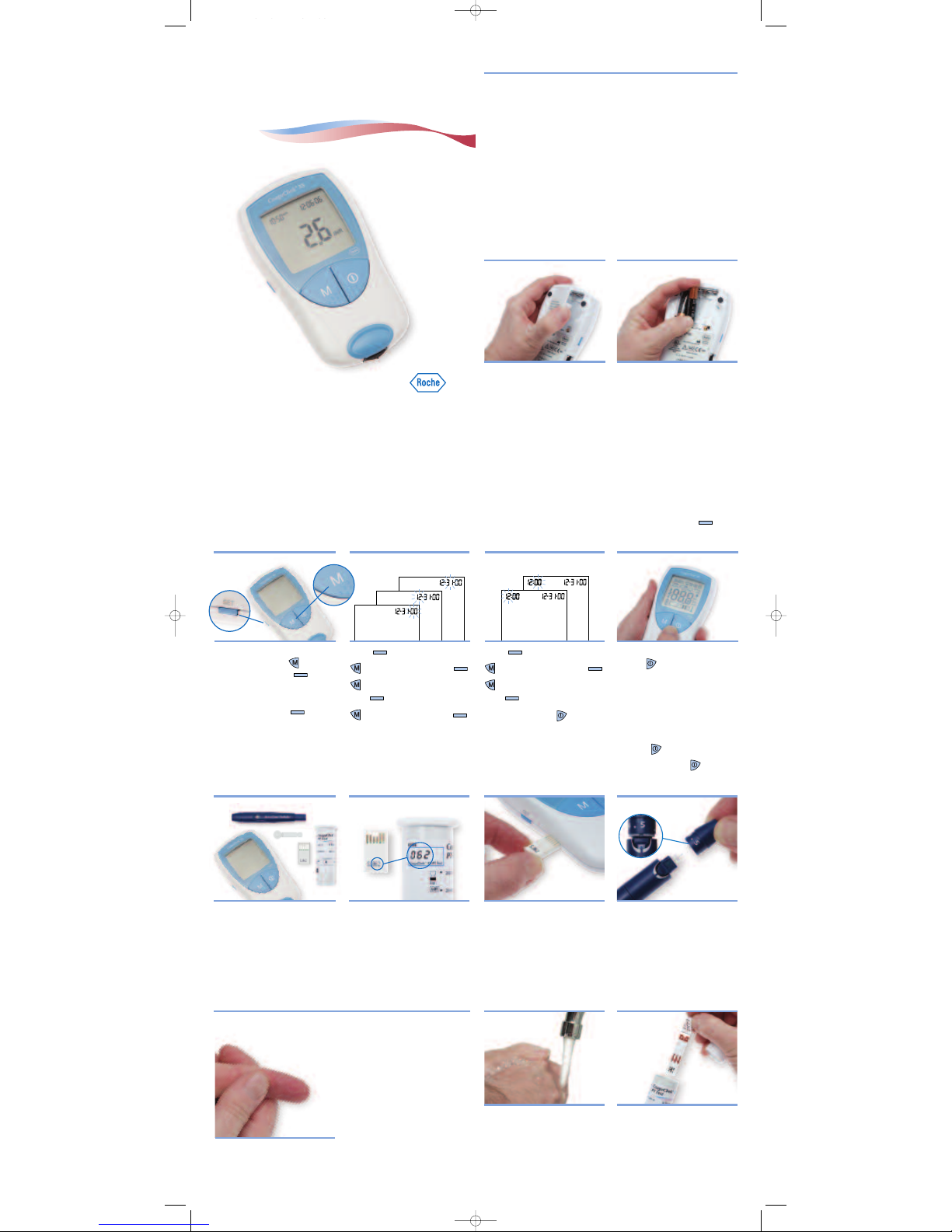
CoaguChek®XS
System
INSTALLING BATTERIES & SETUP
▼
GETTING STARTED
▼
SETTING DATE AND TIME
▼
PREPARING FOR A TEST
▼
TESTING
▼
Open the battery compartment
o
n the back of the meter.
Insert 4 AAA batteries
a
ccording to the diagram
inside the battery
compartment.
1
. Open Compartment 2. Insert Batteries
1. Start Setup 2. Set Date 3. Set Time 4. Check Display
• CoaguChek XS Meter
• Container of test strips
• Test strip code chip
• ACCU-CHEK
®
Softclix lancet
device and white lancet
The code number on the test
strip container and the code
chip must match.
Each box of test strips comes with
a matching code chip. Every time
you open a new box of test strips,
you must replace the code chip.
Make sure the meter is off.
With the code number facing
up, insert the code chip into
the code chip slot until it
snaps into place.
Pull off the cap of the lancet
device. Insert a new white
lancet. Twist off the lancet’s
protective cap. Put the cap
back on the lancet device.
Line up the notches for the
cap to fit.
Before continuing, review
these tips for getting a good
blood drop.
Increasing the blood flow in
your finger will help you get a
good drop of blood:
• Warm your hand. Hold it
under your arm, use a hand
warmer, and/or wash with
warm water.
• Let your arm hang by your side.
• Massage your finger from
its base.
Use these techniques until your
fingertip has good color.
To set the date and time, you’ll
use these buttons: to
change a setting or (SET)
to accept a setting.
If the meter is not already in
Setup mode, press .
The date format flashes in the
upper right corner.
Press . The hour flashes.
to change the hour then .
to change the minutes
then .
Turn the meter off
.
Press and hold the ON-OFF
button .
Make sure all the letters,
numbers, and symbols on
the display appear correctly.
See The Meter’s Display section
in the User Manual to see the
full display.
Release .
Turn the meter off
.
Wash your hands in warm,
soapy water.
Make sure your fingertip is
thoroughly dry.
Take a test strip out of the
container.
Close the container tightly.
You have 10 minutes to use a
test strip once you remove it
from the container.
1. Wash Hands 2. Get Ready
Press . The year flashes.
to change the year then .
to change the month
then .
to change the day then .
The time format flashes in the
upper left corner.
Follow these steps to get started using the meter:
1. Watch the CoaguChek XS System Training DVD. It will help you
get comfortable with the CoaguChek XS Meter and the testing
p
rocedure.
2. Read the ACCU-CHEK
®
Softclix lancet device package insert.
3. With this CoaguChek XS System Getting Started guide by the
meter, follow the steps to perform your first test.
Then, as necessary, refer to the User Manual or Package Insert:
The CoaguChek XS System User Manual is a comprehensive guide
to the meter and test strips. It is designed to provide answers to
y
our questions about the meter’s operation and use. Also, see the
test strip package insert for more information.
Right after you insert the batteries, you’ll need to set the
d
ate and time.
T
he date and time settings are important. Each time you run a
test, the meter compares its date with the test strip’s expiration
date. If the test strip is expired, the meter displays an error
m
essage and prevents you from running a test.
Whenever you put batteries in the meter, it automatically goes to
Setup mode (where you set the date and time). You can also go
t
o Setup mode at any time by pressing the SET button ( ).
Getting Started
1. Gather Items 2. Match Code 3. Insert Code Chip 4. Prepare Lancet Device
THE PANEL BELOW IS TH E FR ONT C OVER.
270034 34685 CoagXS GSG 2G 2/28/07 11:36 AM Page 1
Page 2
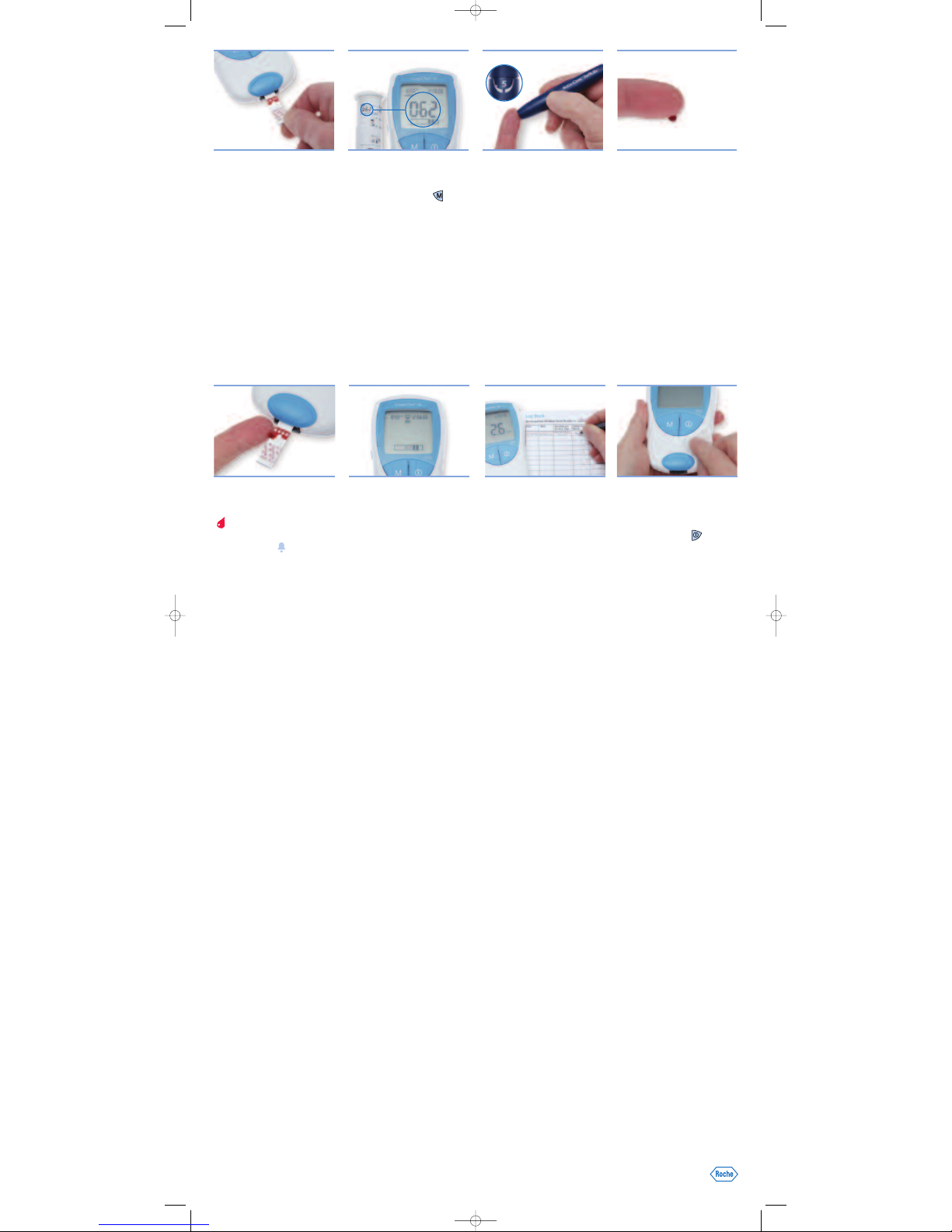
Slide the test strip into the
test strip guide in the
d
irection of the arrows until
it stops.
The meter turns on.
T
he code number of the inserted
code chip flashes on the display.
Confirm that the number
displayed matches the
n
umber on the test strip
container, then press .
If the numbers are different, first
make sure that the correct code
c
hip is inserted. If the numbers
still don’t match, c all the Roche
Diagnostics Technical Service
C
enter at 1-800-428-4674.
An hourglass appears as the
m
eter warms up. When the meter
is warmed up, a flashing test strip
and blood drop appear and the
m
eter begins a countdown.
Y
ou have 120 seconds to run
the test.
Set the penetration
depth to 5.
Press the plunger. A yellow
d
ot appears in the release
button.
M
assage your finger until you
see increased color in your
fingertip.
Keeping your hand down,
p
ress the tip of the lancet
device firmly against the side
of your fingertip. Press the
r
elease button.
Gently squeeze from the base of
the finger to develop a hanging
d
rop of blood.
A
fter sticking your fingertip,
you have 15 seconds to apply
the blood to the side of the
t
est strip.
3. Insert Test Strip 4. Match Code 5. Collect Sample 6. Get a Good Blood Drop
F
ind the target area on the
test strip. Dose the test strip
from the side.
I
t’s important to hold the
blood drop to the test strip until
you hear a beep.
Y
ou’ll see the hourglass when
the blood test begins. Then,
pull your finger away from the
t
est strip.
Remember to apply only one
drop of blood—don’t add
m
ore. Do not touch or remove
the test strip when a test is in
progress.
The result appears in about
1 minute.
R
ecord the result on the
CoaguChek XS System
Prothrombin Time Self-Testing
L
og Book.
Call your doctor with the test
result.
N
ote: If during testing the
meter displays an error message,
refer to the Error Messages
section of the User Manual for
what to do next.
R
emove the lancet from the
lancet device. Place the used test
strip and lancet in a puncturep
roof container with a lid.
Turn the meter off.
If the meter is dirty, wipe it clean
w
ith a lint-free tissue and an
approved cleaning solution.
Note: See Cleaning the Meter in
the User Manual for more
information.
7
. Apply Sample Until
Meter Beeps
8
. Record Result 9. Clean Up
ACCU-CHEK, COAGUCHEK, and SOFTCLIXare trademarks ofRoche. © 2007 RocheDiagnostics. Allrights reserved. 04999037001-0207
If you have questions,
call Roche Diagnostics
Technical Service Center at
1-800-428-4674, 24 hours
a day, 7 days a week,
365 days a year.
270034 34685 CoagXS GSG 2G 2/28/07 11:36 AM Page 2
 Loading...