

Page 1
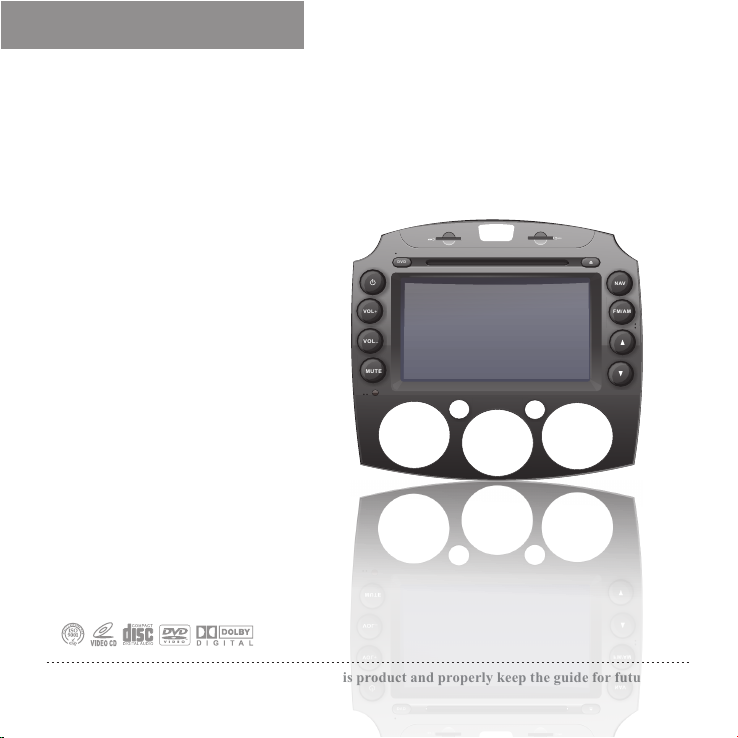
Quick Guide
卡仕达
Car DVD/TV/Radio/Bluetooth/GPS
No.CA109-R
DVD
VOL+
VOL
-
MUTE
1
0
Please read this guide carefully before using this product and properly keep the guide for future use.
GPS
NAV
FM/AM
2
3
4
Page 2

★★★★
The copyright of this manual is reserved by our company. All rights are reserved.
This manual may not be copied, reproduced or translated in whole or in part without the
express written permission by our company.
Our company reserves the right to improve the product, and its hardware and
software.
This manual is an operating guide, but not the warranty of the product. Our company
doesn't guarantee the contents included in this manual.
Since we adhere to the strategy of sustainable development, printing error in the
manual, incompliance with latest materials, software upgrade, and product improvement
may be performed at any time. The product is subject to change without further notice,
and revision will be directly edited to the manual of new edition.
Our company reserves the right of final interpretation for the manual.
Copyright
Page 3

Precauti o n s
To ensure the traffic safety and avoid contravening the traffic regulations, do not
watch any program or operate the system during driving.
For safety and correct operation of the product, the product shall be installed by
professional. Do not disassemble or repair the system by yourself to avoid an
accident or damage to the system.
To avoid electric shock, damage and fire resulting from short-circuit, do not place
the product in water or places where are wet.
Since the screen of the product adopts precision electronic structure, do not hit the
TFT display to avoid damage to the product.
Since the reverse monitoring function is only used as auxiliary reverse function,
we take no responsibility for any accident that occurs during reverse.
Tire pressure monitoring system can monitor the pressure and temperature of the
tire, and helps to reduce the risk of tire burst. However, tire burst may still occur.
Under normal tire pressure or temperature, tire burst can be caused by wear of tire
and the perfection degree. Therefore, the monitoring data of the system is only for
reference, and you should check the tire status in time.
1
Page 4

NOTE
In order to use the product correctly and safely, please read this manual carefully.
Specification and design due to technical improvement are subject to variation
without notice!
Please read this manual carefully before using this product and properly keep the
manual for future use.
Remark: the above symbol indicates that this product hasn't any harmful
materials or elements, it is environmentally friendly and recyclable, and
shouldn't be littered at random.
Trademark
Licence:
①Manufactured under license from Dolby Laboratories;
②“Dolby” and the “double-D” symbol are trademarks of Dolby Laboratories.
2
Page 5

Brief Introduction
Thank you for purchasing our high-quality car electronic product. This system is a multifunctional car AV entertainment system with a brand-new GUI, which is designed for Mazda
2. It combines DVD player, radio, bluetooth communication,navigation system, browser,
multimedia,iPod player (externally plugged) and audio poweramplifier together. The system
adopts built-in slot-loading car DVD chip, which can play discs in format of DVD, VCD,
CD,
MP3, WMA, MPEG4, JPEG.In addition, the system adopts high-sensitive FM and AM
digital tuner making you master the world's trends and financial information at any time and
any place while you are in your car; with 8” extra-clear digital TFT LCD, your vision can
be extremely broadend and it is always kept in the best performance; with outlay USB
port,when there is USB,audio and pictures can be viewed and played;with optional
reverse radar, reve rs e came ra , tire pr esssure mo nitor in g, navig at ion, AV and ot he r
interfaces for auxiliary functions,you can use these products to realize more functions. The
structural dimensions of the system conform to the installation dimensions of ISO TWO DIN.
Car electronic product is specially designed, fully intelligent, humanized, and featuring
GUI operation; featuring OSD menu, various functions can be realized through function keys
on the panel and touch screen, thus realizing perfect HMI and meeting your requirements of
comfort. If your cell phone is a Bluetooth cell phone, you can answer your call through the
system without picking up your phone; with double zone functions, people at rear row can be
satisfied.
To correctly install and use the system, please read this manual carefully.
3
Page 6

Product Functions
Built-in Functions:
Built-in radio,DVD player,bluetooth hand-free,
navigation,USB port,display and high power
amplifier.
Radio Receiving:
With high sensitive AM/FM receiving, it could
prestore 30 stations received.
DVD Player:
It could play discs in formats of DVD/VCD/CD/
MP3/WMA/JPEG/MPEG4 with touching completely.
Bluetooth Hand-free:
It supports Bluetooth hand-free communication
and plays bluetooth music(cellphone supported
is required).
Touch Screen:
It is convenient to operate the host unit.
Display:
Wide and new digital LCD with extra clear and
high definition.
SD Card Port 1:
It is used to read data of multimedia.
SD Card Port 2:
It is used to read data of map and
update for software and map.
Multimedia Function(support USB playing):
s files
It support to play in format of WMV/
MP3/MP4/MPG/AVI/WMA/RMVB ,and it
shows the lyric while playing.
Navigation Function:
An intelligent system capable of intellectually
optimizes the best driving route according to
the user's destination and guides the driver
smoothly to the destination with displaying
high-precision graphical of both the road names
and signs and playing phonic traffic identifications.
Analog TV Function:
It supports the analog TV function and
searching programs to play
Browse Function:
It supports browsing the internet when it is
connected with external 3G moduele
4
Page 7

Optional Function
AV Function:
It supports AV input from the external equipment.
iPod Play:
It supports playing music from iPod by the
switching wire.
Music Navigation:
When there is no voice navigation indication,
y ou c a n e n j o y m us i c a n d v i de o
normally, thus being happy and relaxed in your
trip!
Reversing Display(Optional):
You can observe the reversing condition when
you are reversing by connecting the reversing
camera.
Reversing Radar(Optional):
Connecting with the reversing radar, the distance
detected by the radar is displayed on the TFT LCD,
then we can view reversing situations more directly.
The Steering- Wheel controling Function:
It supports the original steering-wheel
controling function.
Tire Pressure Monitoring System(Optional):
With tire pressure monitoring function.
Following are other functions:
Dynamic Graphical Interface:
User interface designed with graphical fully,
which makes it more directly and hunman
friendly.
Language Settings Menu:
Chinese / English / Russian Portuguese can be
selected as language to display on the screen.
Audio Output Port:
It has 5.1 channel audio output port, which
is compatible with the outside amplifier.
EQ Modes:
It has Standard/Pop/Rock/Classic/Jazz/
Custom mode.
Tone Modes:
It features Treble/Mid /Bass/Cen/Mega Bass
adjustment.
Display system:
Auto PAL/NTSC/SECAM,with widely
application and highly compatible.
Black Screen:
The function is specially designed for
preventing intensive light glaring and
hindering of normal driving at night.
Auto Memory:
All the a djusted pa ramet ers can b e
memorized and restored automatically.
5
Page 8
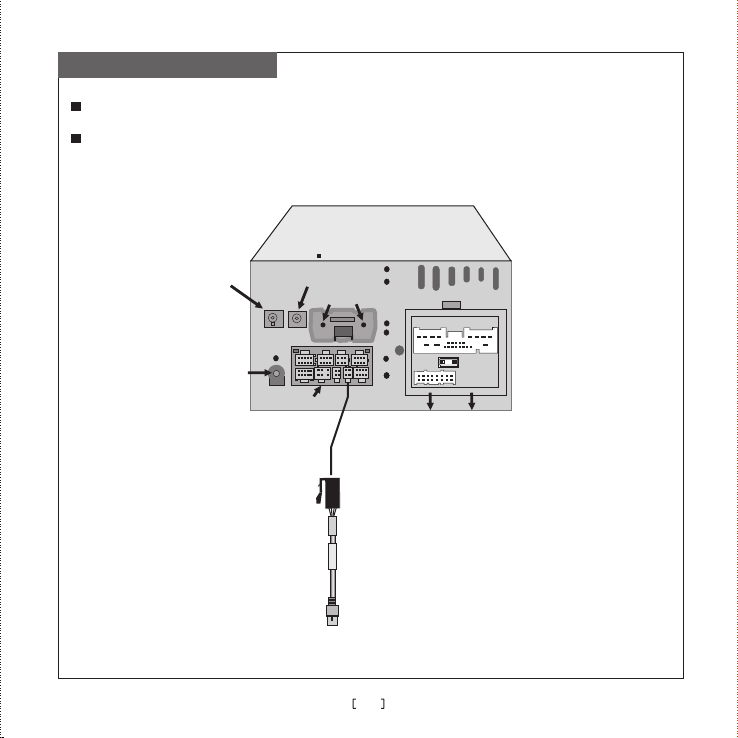
Connection Diagram
To make the system functions the best, please connect the wires strictly according to the
connection diagram.
To prevent from short-circuit, please cover the insulation casing of audio and video when they
have not been used.
Host Unit
Ante nna Int erfac e of
the b uilt- in navi gatio n
Ant enna in terfa ce
of Ra dio
Res erved
Ant enna In terfa ce of TV
Multi-functional
compound interface
USB port
FUSE
Connected to Power
loudspeaker wire of the original car
USB
6
Page 9
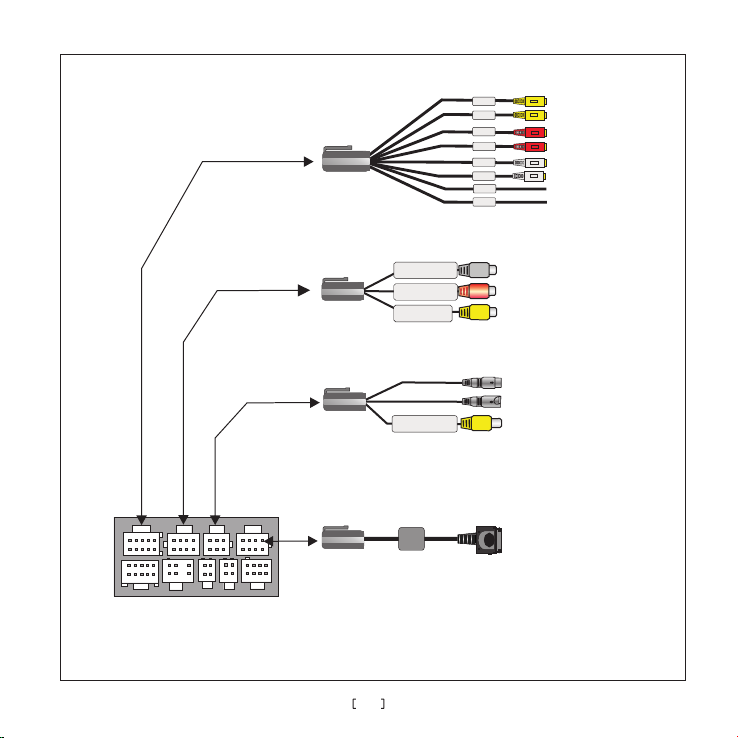
Mul ti-fu nctio n compo und int erfac e
A
V
out
put wire
(optional)
AV
input wire A
Camera Radar wire
(optional
)
iPod adaptor (optional)
L- IN
Left channel audio input
R- IN
Right
channel audio input
V- IN
V
ideo input
V- IN
V
ideo input
Yello
Yello
Red
Red
White
White
Green
Brown
White
Left channel audio input
Right
Red
V
ideo input
Yellow
(Male radar)
Connected to radar
(Female lens)
Connected to camer
(Optional)
Yellow
Connected to camera
Connected to iPod
RE AR -VO 1
RE AR -VO 2
RE AR -R0 1
RE AR -R0 2
RE AR -L0 1
RE AR -LO 2
RE AR -BU S2
RE AR -BU S1
channel audio input
a
7
Page 10
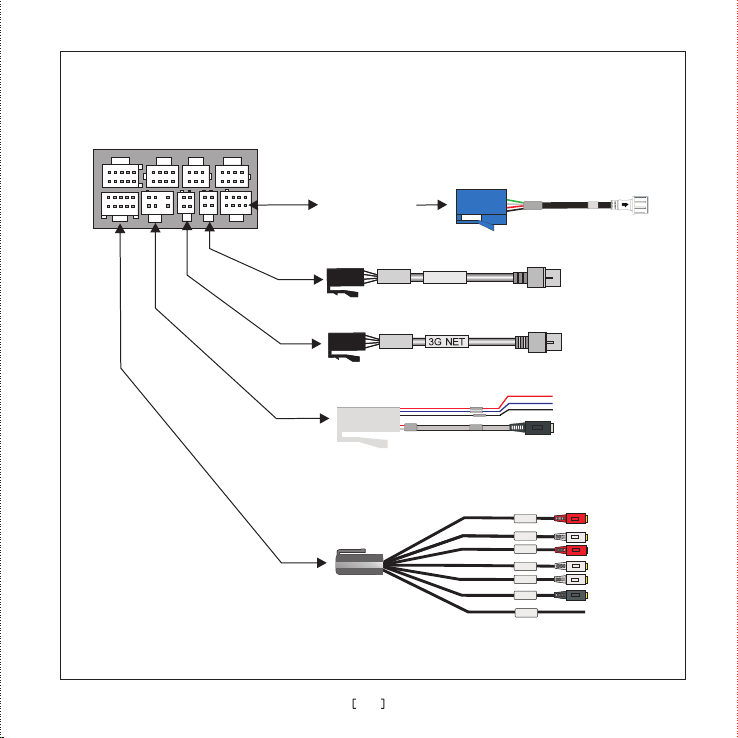
Multi-function compound interface
Tire pressure detection
(optional)
USB
USB
Tire pressure module
USB interface
USB cable used for internet(3G modem support is required )
3G NET interface
Reversing hand-brake wire (
External microphone wire(optional)
Output interface connected
with wire(optional)
)standard
ANT- C
BACK
BRAK E
MIC
Red
White
Red
White
White
Black
Brown
8
FR- OUT
FL- OUT
SR- OUT
SL- OUT
C-O UT
SW- OUT
AMP -C
Page 11
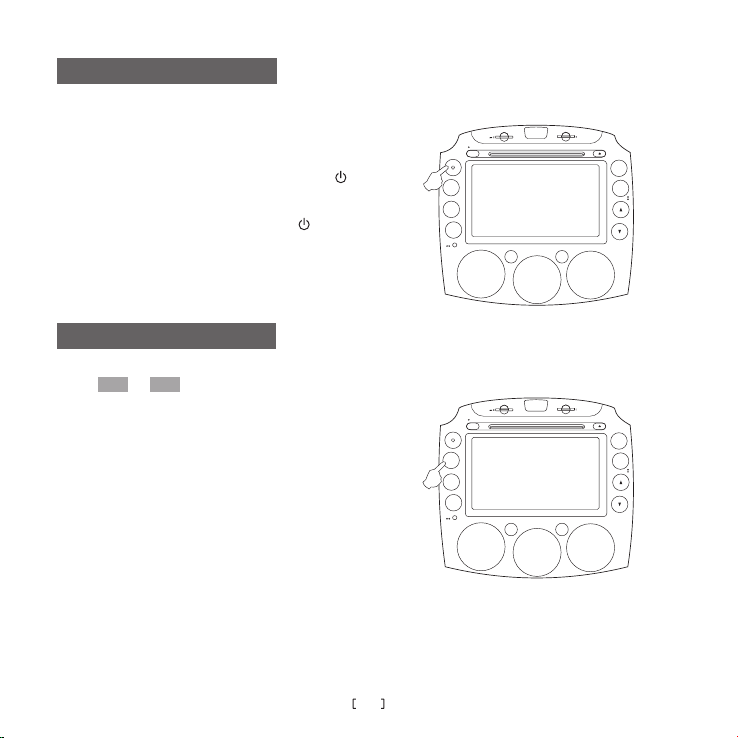
Turn On/Off
Insert/pull out the car key
to turn on/off
the system.
When the system is in standby state
, press “ ”
on the panel to turn on the host.
When the system is on
panel to enter the standby mode
, press and hold “ ”on the
.
Volume Adjustment
VOL- VOL+
Press / to adjust the volume.
DVD
VOL+
VOL
-
MUTE
DVD
VOL+
VOL
-
MUTE
GPS
NAV
FM/AM
GPS
NAV
FM/AM
9
Page 12
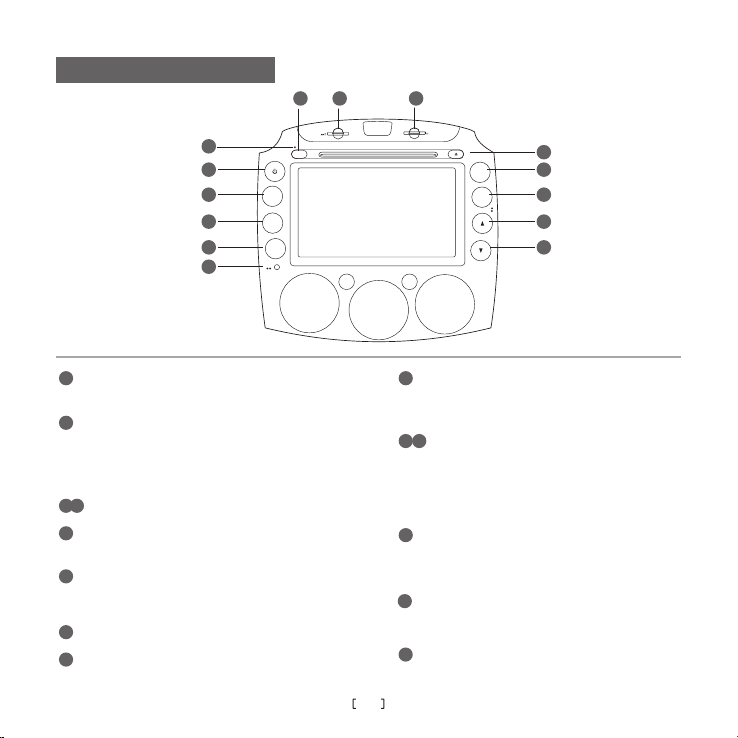
Descriptions of Buttons
1
2
3
4
5
6
12
13 14
GPS
DVD
VOL+
VOL
-
MUTE
NAV
FM/AM
7
8
9
10
11
1
Insert the hole and press the button inside ,then
the system will be reset to the factory defaults.
When it is on, press once to enter night mode, press
2
twice to enter black screen mode,long press to enter
standby state,when it is in standby state, press shortly to
turn on the system.
turn up/down the volume.
3
4
Turn on/off volume,and long press to enter
5
the reversing radar interface.
This is the window used for
6
others when using the bluetooth handfree
with
function.
Press to inject/eject at any state
7
Enter/exit from navigation mode,long press to
8
communicating
enter the calibration interface.
10
In other states, press to switch to the radio state;
9
In radio status, press to switch bands between
FM and AM.
In Radio status press shortly to select the next/previous
10 11
station,long press to seek programs for high/low-
frequency band.In DVD/iPod/DISC status, press to
select the next/previous track.
12
In other states,press to switch to DVD state.
In DVD state,press to switch among DVD /
SD/USB state.
13
Connection interface for SD card and host
unit.(for playing multimedia)
14
Connection interface for SD card and host
unit.(for reading data of navigation)
Page 13
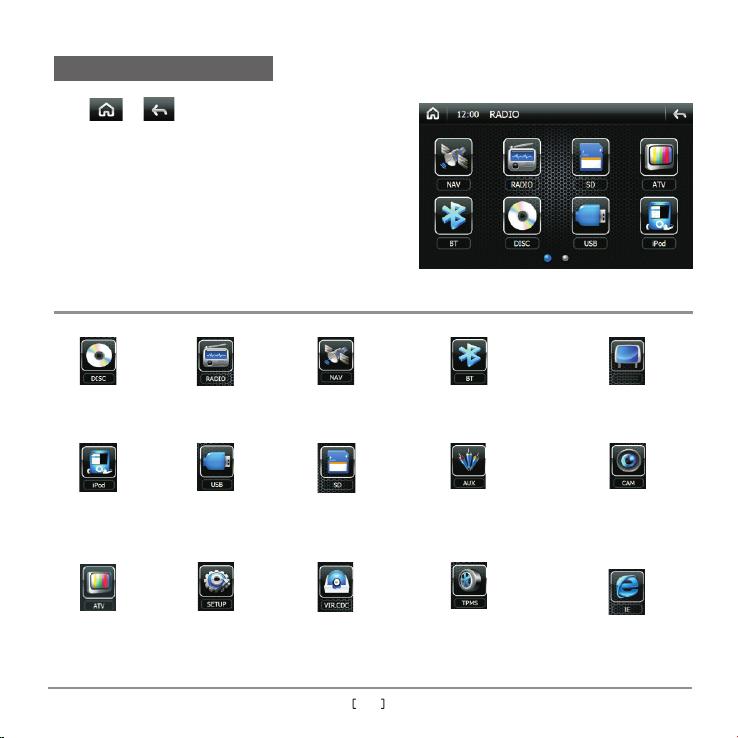
Main Menu
Press or to enter main menu.
As the picture shows , main menu includes
Radio ,SD, USB , Bluetooth ,AUX ,Disc , iPod ,
ATV,Navigation ,AV OUT ,Virtual disk box ,
Camera tire Pressure ,IE and Setting-up, Totally
there are 15 modules.Then touch the icons
directly to enter the corresponding function
operations.
For detailed information of these functions, please refer to “User's Manual”.
(Need phone
support)
Bluetooth hand-free interfaceRadio interface Disc interface
AUX interface CAM interface
(Optional)
iPod interface
USB play interface
Navigation interface
SD interface
AV OUT
AV OUT interface
(Optional)
ATV play interface
Virtual CDC interface
11
(Optional)
TPMS interfaceSetup interface
IE interface
Page 14
Product Specifications
System Parameters
Working voltage
Working current
Standby current
Working temperature
Reservet emperature
Video system
Screen dimensions
Weight
DVD Parameters
Vide o out put
Dis c compa tible
DC 11V-15V
MAX 1 5A
<6mA
- 20℃ 60 ℃~ +
- 30℃ 80 ℃~ +
Auto PAL/NTSC/SECAM
176.64mm(W)×99.36mm(H)
2.9Kg
1±0.2 Vp-p(75Ω )
Diameter 12cmDisc format
DVD/VCD/CD/MP3/WMA/
JPEG/MPEG4
Audio Parameters
Cha nnel im balan ce
Sep arati on
Fre quenc y respo nse
Bass
Tone
Mid
control
Treble
Amplifier Parameters
Test voltage
Max output power
Speaker resistance
≤2dB
≥45dB
20Hz~20KHz( 3dB)±
100Hz±8dB
1KHz±8dB
10KHz±8dB
13.8V
4×10W
4Ω(4-8 could be
Ω
accepted)
12
Page 15
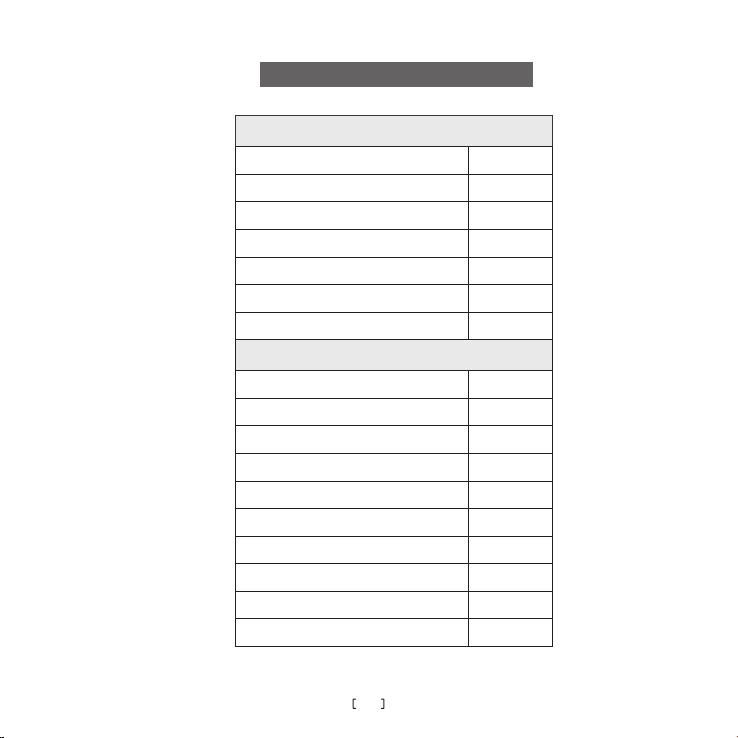
List of Accessories
Standard Accessories
Model
USB switch wire of H port
NAV receiving antenna
Stylus pen
User's manual
Quick guide
Reversing hand-brake wire of F port
Optional Accessories
AV input wire A
5.1 Audio output wire
AV output wire
iPod switch wire
USB wire for internet
Tire pressure monitoring module
Remote control
TV box
External microphone wire
Camera Radar wire
Quantity
1pcs
1pcs
1pcs
1copy
1copy
1pcs
1pcs
1pcs
1pcs
1pcs
1pcs
1set
1pcs
1set
1pcs
1pcs
13
Page 16

FCC STATEMENT
1. This device complies with Part 15 of the FCC Rules. Operation is subject to the
following two conditions:
(1) This device may not cause harmful interference.
(2) This device must accept any interference received, including interference that may
cause undesired operation.
Changes or modifications not expressly approved by the party responsible for compliance
could void the user's authority to operate the equipment.
NOTE: This equipment has been tested and found to comply with the limits for a Class B
digital device, pursuant to Part 15 of the FCC Rules. These limits are designed to provide
reasonable protection against harmful interference in a residential installation.
This equipment generates uses and can radiate radio frequency energy and, if not
installed and used in accordance with the instructions, may cause harmful interference to
radio communications. However, there is no guarantee that interference will not occur in a
particular installation. If this equipment does cause harmful interference to radio or
television reception, which can be determined by turning the equipment off and on, the
user is encouraged to try to correct the interference by one or more of the following
measures:
Reorient or relocate the receiving antenna.
Increase the separation between the equipment and receiver.
Connect the equipment into an outlet on a circuit different from that to which the
receiver is connected.
Consult the dealer or an experienced radio/TV technician for help.
 Loading...