

Page 1
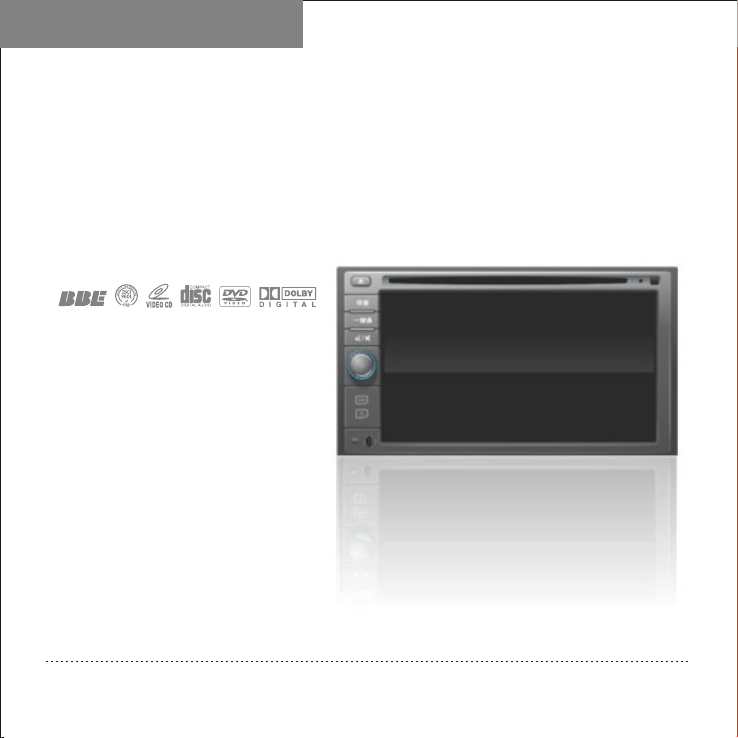
Quick Guide
Car Audio &
Video Entertainment System
No.CA1725G
Please read thi s guide carefully before using thi s product and properly keep the guid e for future use.
Page 2

★★★★
The copyright of this manual is reserved by our company. All rights are reserved.
This manual may not be copied, reproduced or translated in whole or in part without the
express written permission of our company.
Our company reserves the right to improve the product, and its hardware and
software.
This manual is an operating guide, but not the warranty of the product. Our company
doesn't guarantee the contents included in this manual.
Since we adhere to the strategy of sustainable development, printing error in the
manual, incompliance with latest materials, software upgrade, and product improvement
may be performed at any time. The product is subject to change without further notice,
and revision will be directly edited to the manual of new edition.
Our company reserves the right of final interpretation for the manual.
Copyright
Page 3

Pre cautionsPre cautions
To ensure the traffic safety and avoid contravening the traffic regulations, do not
watch any program or operate the system during driving.
For safety and correct operation of the product, the product shall be installed by
professional. Do not disassemble or repair the product by yourself to avoid an
accident or damage to the product.
To avoid electric shock, damage and fire resulting from short-circuit, do not place
the product in water or places where are wet.
Since the screen of the product adopts precision electronic structure, do not knock
the TFT display to avoid damage to the product.
As for car backing, this system works simply as an assistant tool. Our company is
not responsible for any potential car backing accidents.
Tire pressure monitoring system can monitor the pressure and temperature of the
tire, and helps to reduce the risk of tire burst. However, tire burst may still occur.
Under normal tire pressure or temperature, tire burst can be caused by wear of tire
and the perfection degree. Therefore, the monitoring data of the system is only for
reference, and you should check the tire status in time.
1
Page 4
NOTE
In order to use the product correctly and safely, please read this manual carefully.
Specification and design due to technical improvement are subject to variation
without notice!
Please read this manual carefully before using this product and properly keep the
manual for future use.
Remark: The above symbol indicates that this product hasn't any harmful
material or elements, it is environmental and recyclable, and shouldn't be littered
at random.
Trademark
Licence:
①Manufactured under license from Dolby Laboratories;
② Dolby and the “double-D” symbol are trademarks of Dolby Laboratories.“ ”
2
Page 5

Brief Introduction
Thank you for purchasing our high-quality car electronic product. This system is a multi-
function car AV entertainment system with a brand-new GUI, which is designed for .
combines DVD player, radio, bluetooth communication, navigation, TV (optional), iPod player
(externally plugged) and audio power amplifier together. The system
adopts dedicated slot-loading car DVD chip, which can play DVD, VCD, MP3, WMA,
MPEG4, JPEG, etc. In addition, the system adopts high-sensitivity FM and AM digital tuner
making you master the world's trends and financial information at any time and any place
while you are in your car; with extra-clear TFT LCD, which can adjust brightness of the
screen automatically according to the light intensity of outside. The screen
adjusted. Not only wide angle view,
With optional reverse radar, reverse camera, disc changer, , AV and other interfaces for
auxiliary functions (reverse radar, reserve camera, disc changer, etc., you can use these
functions to realize more functions. The structural dimensions of the system conform to the
installation dimensions of ISO TWO DIN.
Car electronic product is specially designed, fully intelligent, humanized, and featuring
GUI operation; featuring OSD menu, various functions can be realized through function keys
on the panel and touch screen, thus realizing perfect HMI and meeting your requirements of
comfort. If your cell phone is a bluetooth cell phone, you can answer your call through the
system without picking up your phone; with double zone functions, people at rear row can be
satisfied.
To correctly install and use the system, please read this manual carefully to understand
operations of common functions quickly.
,CDC disc box(optional)
7’
but also offering a best visual status all the time as well.
NAV
NAV,
IX35 It
angle can be
3
Page 6
Product Functions
Product Functions
Built-in Functions:
Built-in RADIO, DVD player, TV (if the host
unit has a built-in TV module) navigation,
Bluetooth hand-free,display and high power
amplifier.(external navigation box is optional).
DVD Player:
It could play DVD/VCD/CD/MP3/WMA/
JPEG/MPEG4 disc.
Radio Receiving:
High sensitive AM/FM receiving, could
store 30 stations.
Display Screen:
Bluetooth Hand-free:
Supports Bluetooth hand-free communication
and bluetooth play function.
SD Card Port
Connected to the NAV map data card
for reading the map data(The port is
connected with SD card for reading
multimedia data when using external
NAV.
Virtual CDC Function
It supports virtual CDC function, could store the
songs of CD in the unit in format of MP3. It
could store 5 pieces of CD and 60 songs or so.
USB Port:
It support USB 2.0 and able to play
MP3,WMA audio and skim picture.
Optional Function
Ipod play function; TV receiving(with
our transferring)AV function(one of two).
iPod Play:
It supports music and video from iPod.
4
Page 7
Navigation Function(Optional):
An intelligent system capable of intellectually
optimizing the best driving route according
to the user's destination and guiding the
driver smoothly to high-precision graphical
display of both the road names of the whole
and phonic playing of traffic identification
and signs.
Navigation AV and Music Navigation:
Wh en th er e is no v oi ce navigation
indication, you can enjoy the music and
watch video normally, thus being happy and
relaxed in your trip!
Handwriting for Navigation:
During navigation state, you can enter
character by handwriting through the touch
screen, thus operating conveniently and
quickly.
Car Backing Display(Optional):
You can observe the backing condition
when you are backing the car by connecting
the car backing camera.
Car Backing Sensor(Optional):
Connect with the car backing radar, the
distance detected by sensor is displayed on
the TFT high definition LCD, so we can
view car-backing status more directly.
Tire Pressure Monitoring System(Optional):
With tire pressure monitoring function.
The following is the other function:
Double Zone Functions:
Separately controls double zon e pl ay
function operations for satisfying various
requirements.
5
Page 8
6
Page 9
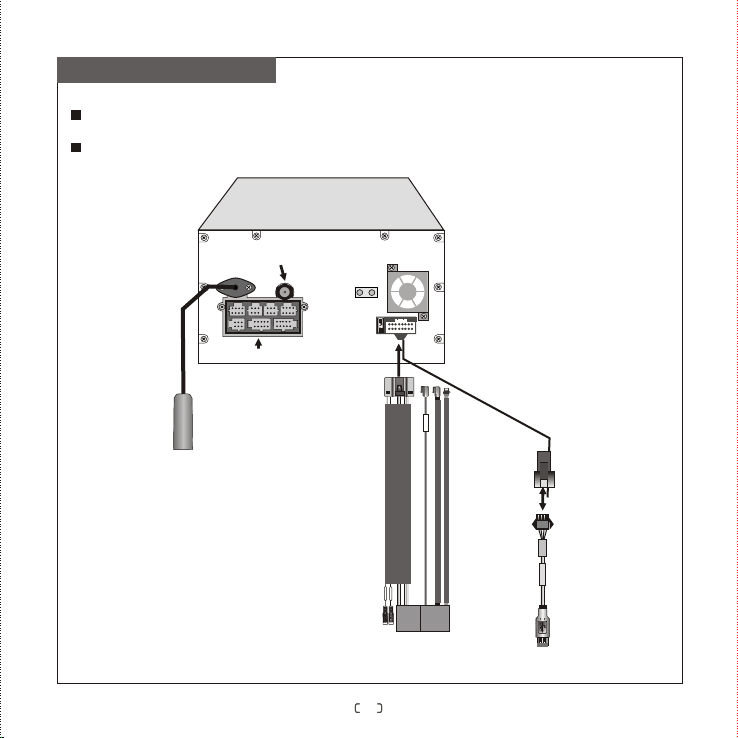
Connection Diagram
To make the system functions the most perfect, please be strict to connect the wires according
to the connection diagram.
To prevent from short-circuit, please cover the insulation casing of audio and video when they
have not been used.
Host unit
Bui lt -in N AV ante nna int erfac e
GPS-ANT
Mul ti-f uncti on inte rface
Con nect to r adio an tenna
TV-ANT
AUX
BACK
BRAKE
Con nect to t he orig inal ca r power o utlet
USB I nterf ace
USB
USB t ransf er cabl e
USB i nterf ace
7
Page 10
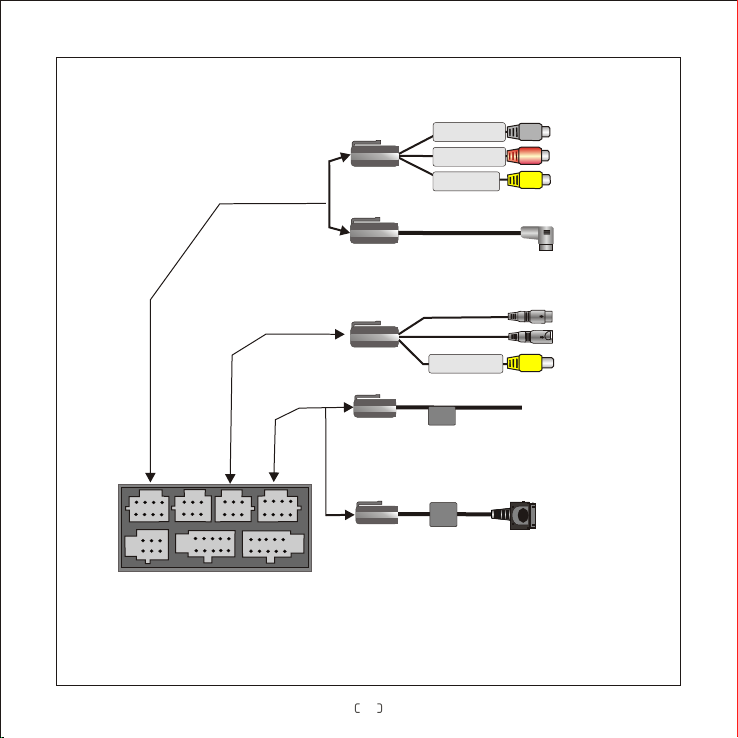
AV inp
1 o
ou
t
Us
el
e
s i
s
f
buil
t in
C
a
m /r
er
a e
Multi -fu nction com pou nd inte rfa ce
f
a
2
dar w
u
T
V
wi
r
T
V
i
r c
(
A f
1 ou
iPod a
A
ce
( i
o
p
onnec
s
s
ory
t
of 2
da
t
o
o
pter
n lt e
a
)
ing wi
ca
me
(
op
L
e
ft ch
i
gh
c
r
e
r
a
/r
a
V
AUX
tion
L- IN
a
n
R- IN
t
c
ha
V- IN
Vid
e
(
a b x
c
d
a
r)
V- IN
ide
o
White
n
e
l
a
u
d
io
i
n
p t
u
nn l
o
Red
e u uR
a
d
i
o
i
n
p
t
Yellow
in
p
ut
c
e
ss
ory
of
T
V
Yellow
in
put
IX
al)
Le
Righ
o )t
C
C
3
5 p w
o
接i d
ft c
h
a
n
t
e a
c
h
V
id
e
o
C nne
o
c d
(Male radar)
nn c
(Female lens)
o
n
n
ect
(Optional)
o
n
n
e
c
e
r
Po连
ne
n
n
in
te
e
d ca
te
d t
s
peake
l a
l u
pu
to T
u
t ad
o rCo e ted
t
o
o
dio
i
n
p
u
t
dio
in
p
uta
t
Vb
x
o
a
r
mer
a
c
a
mer
a
r w
ir
e
8
Page 11
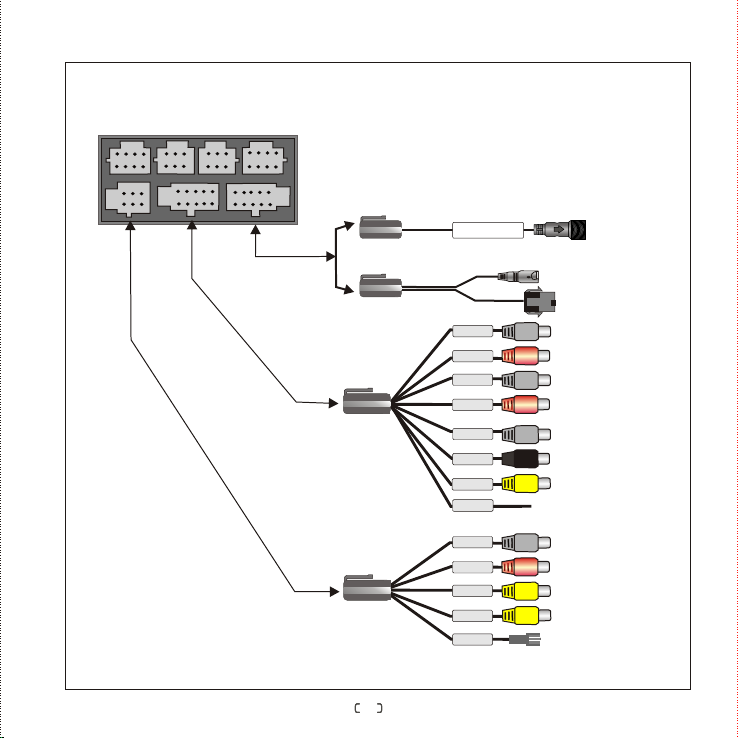
Multi-function compound interface
1
out
Connected to tire pressure monitoring module(optional)
TPMS tire pressure
monitoring system
N
A
V tr
a
nsfe
r
rin
g
w
ir
e
(
opti
on
a
o
f
2
l)
C
nne
ct
e to
d
e
xte
r
na
n
a
v g
l o
i
a
t
i
on
mo
d
ule
FL- OUT
5.
1 c
ha
nn
e
l a
ud
i
o
u
t
p
A
o
u
t
wire
o
u
t
p
u
t
reV
wi
FR- OUT
RL- OUT
RR- OUT
C-O UT
SW- OUT
SPDI F
AMP- C
L-O UT
R-O UT
V1- OUT
V2- OUT
KEY- CON
White
Red
White
Red
White
Black
Yellow
White
Red
Yellow
Yellow
o
n
t f a
le t
c
h
n
ne a
l
u
dio
ou
t
p
utFr
F
r nt
o r
i
g
h c nn di
t
ha e
l
a
u
o
tp
o
u
u
t
R a
r le t
f a l u
c
h
n
ne a
dio
ou
t
pe
u
t
R a
r righ
t
c a
h e
n
n l
a tp
u
dio
o
u
u
te
C
e
n r
t
e
h
c a
n
ne a io
l
u
d o
u
t
p
u
t
Sub
w
o
ofe
r
a
u
d o
i
tp
o
u
u
t
Dig
i
ta
l
a tp
udio
o
u
u
t
Ext
e n
r
a
l
mp
a
li
f
i
e
r
po
w
e
r
c
o
ntr
o
l
w
i
re
L
e
f
t
c
ha
nn
e
l
a
u
d
i
o out
p
ut
R
gh l
t
c
h
a
n
n
e a
u
d
io
out
pui
t
V
i
d
e
o
o
u
tp
u
t port
1
Vide
o u
o
t
put
p
o
rt
2
D
a
t
a
c
o
n
t
r l w
o
ir
e
9
Page 12
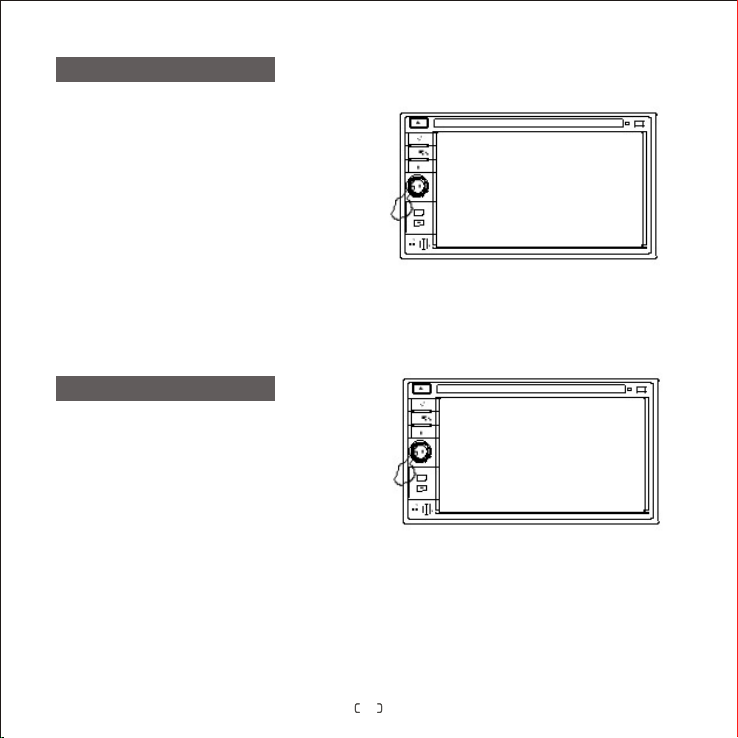
Turn on/off
Insert or pull out the car key to turn on or
off the system.
When the system is in standby state, press
the left knob on the panel to turn on the
system.
When the system is on, press and hold the
left knob on the panel to enter standby
state.
Volume Adjustment
Rotate the left knob on panel to adjust
volume.
10
Page 13
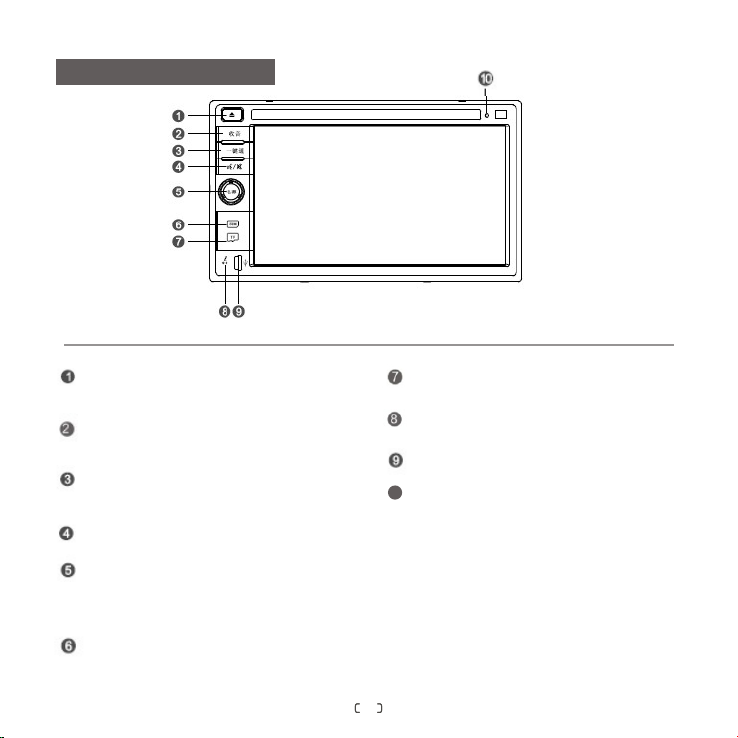
Descriptions of Buttons
12
In radio state, press it to scan radio station search;
in DVD state, to switch channel
(need disc support).
Press the button to switch to the radio mode
11
in any state; in Radio status, press this button
to switch among FM1/FM2/FM3 /AM in turn.
Tur n on/ of f GPS
5
Turn on/off volume.
When it is on, press it once to enter night
6
mode, and press it again to enter Black
Screen mode, then press it the third time to
return normal mode.
SIM m od e
press it
9
SD ca rd and th e host co nnect or (for t he read ing
gui de map) .
7
Blu etoot h hands -free v oice co mmuni catio n
fun ction f or the wi ndow.
8
USB m ode
Reset a nd fa ctr oy sett ing s
10
11
Page 14
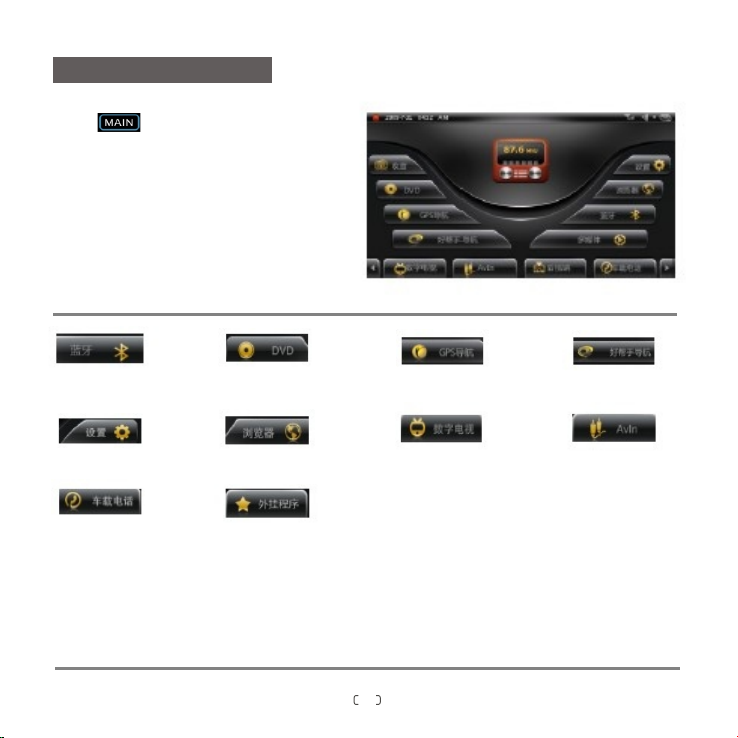
Main Menu
Touc h to ente r main menu
As the figure shows, main menu includes
Bluetooth, VIR.CDC, TV, Radio, DVD,
XM/CDC, iPod, AV, Navigation, Restart
NAV, TPMS, CAM, rear and Setup function
modules, through which corresponding
function operation can be enter directly.
For detailed information of these functions, please refer to “User's Manual”.
Bluetooth
hand-free interface
In stall
CAR Phone
DVD play interface
Int er net e xpl orer
Exter na l devic es
GPS
TV
Coagent GPS
AV interface
12
Page 15
Product Specifications
System Parameters
Working voltage
Working current
Standby current
Working temperature
Reserve temperature
Video system
Screen dimensions
Weight
DVD Parameters
Vide o out put
Dis c compa tible
DC 11V-15V
MAX 1 5A
<6mA
- 20 - 60 ℃℃
- 30 - 80 ℃℃
Auto PAL/NTSC
137.43mm(W)×77.36mm(H)
2.6Kg
1±0.2 Vp-p(75Ω )
Diameter 12cmDisc format
DVD/VCD/CD/MP3/WMA/
JPEG/MPEG4
Audio Parameters
Cha nnel im balan ce
Sep arati on
Fre quenc y respo nse
Bass
Tone
Mid
control
Treble
Amplifier Parameters
Test voltage
Max output power
Speaker resistance
≤2dB
≥45dB
20Hz~20KHz( 3dB)±
100Hz±8dB
1KHz±8dB
10KHz±8dB
13.8V
4×10W
4Ω(4-8 could be
Ω
accepted)
13
Page 16
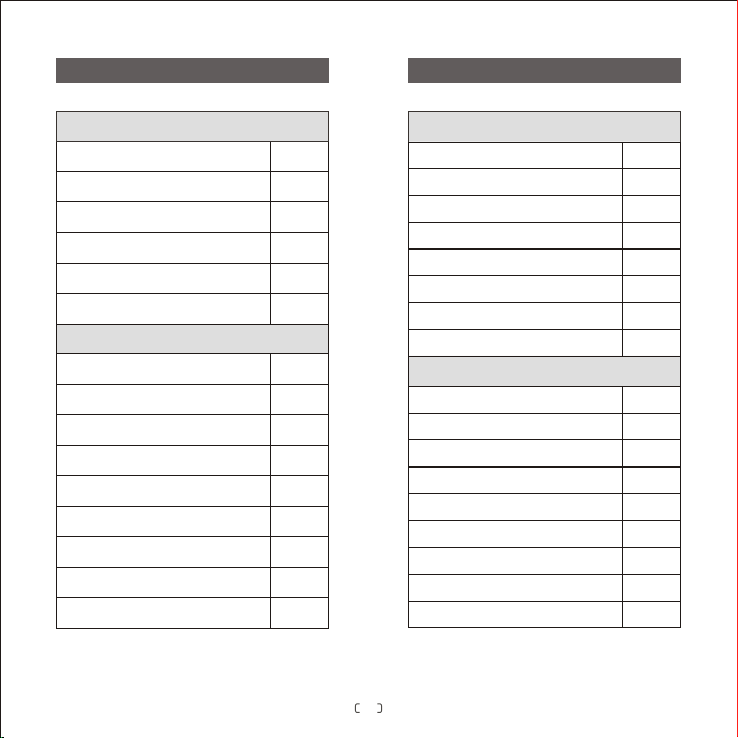
Packing List Without Bulit-in NAV Module Packing List With Bulit-in NAV Module
Standard Accessories
Model
Power loudspeaker wire
AV output wire
USB transferring wire
User's manual
Quick guide
Qty.
1pcs
1pcs
1pcs
1copy
1copy
Optional Accessories
AV input wire A
AV input wire B
5.1 AV output wire
iPod adapter
External TV box
Tire pressure monitoring wire
Steering wheel connecting wire
External navigation box
Remote control
1pcs
1pcs
1pcs
1pcs
1set
1pcs
1pcs
1set
1pcs
Standard Accessories
Model
Power loudspeaker wire
AV output wire
USB transferring wire
User's manual
Quick guide
NAV receiving antenna
Writing pen
Qty.
1pcs
1pcs
1pcs
1copy
1copy
1pcs
1pcs
Optional Accessories
AV input wire A
AV input wire B
5.1 AV output wire
iPod adapter
External TV box
Tire pressure monitoring wire
Steering wheel connecting wire
NAV map card
Remote control
1pcs
1pcs
1pcs
1pcs
1set
1pcs
1pcs
1pcs
1pcs
14
Page 17
 Loading...