

Page 1
SHENZHEN CNCOTE TECHNOLOGY CO., LTD
Website: www.cncote.com Attn: Jack Foo,
Skype, cncote01, whatsapp, 008613480148499, email, [email protected]
Vehicle GPS tracker
Model: CE-02
(GPS+GSM+SMS/GPRS)
User Manual
(Version 2.1)
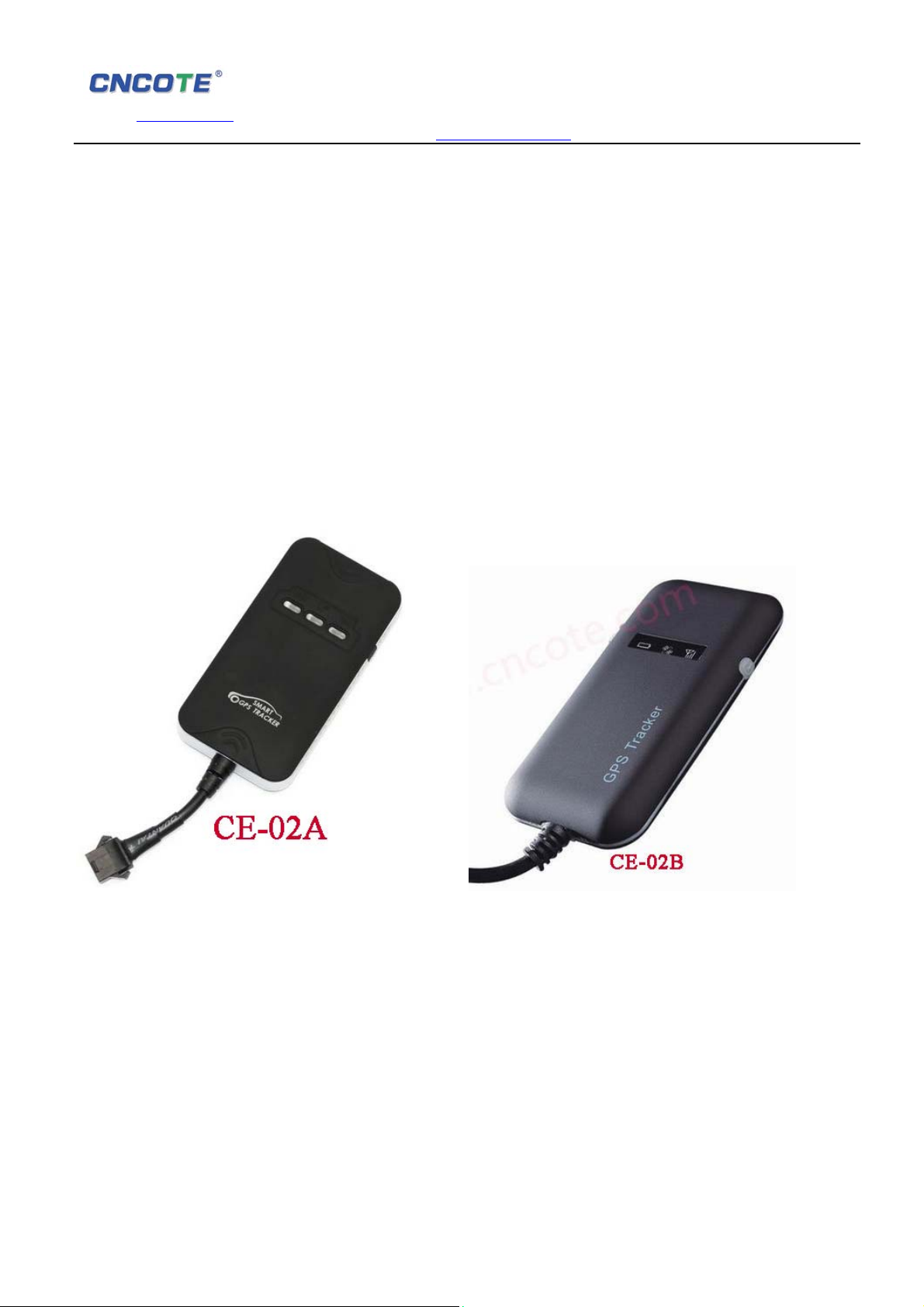
(Two version appearance: CE-02A and CE-02B )
Please read this manual carefully before attempting installation and online activation. Pictures
are for indication and illustration purposes only.
1、Accessories:
1) GPS Host
2) Power cable
3) User manual
1.1、Optional accessories
Page 2
SHENZHEN CNCOTE TECHNOLOGY CO., LTD
Website: www.cncote.com Attn: Jack Foo,
Skype, cncote01, whatsapp, 008613480148499, email, [email protected]
1) Relay
2) Li-Battery(Built-in)
2、Specifications:
● GSM 850/900/1800/1900
● GPRS: CLASS12,TCP/IP
● Wide for voltage input range::9.5 – 39VDC
● Working currency:20mA@12V
● GPS Location accuracy:10m(2DRMS)
● Working environment temperature:-20~70degrees
● Working environment Humidity:20% - 80% RH
● Unit size:90(L)×45(W)×13.8(H)
● Weight:40g
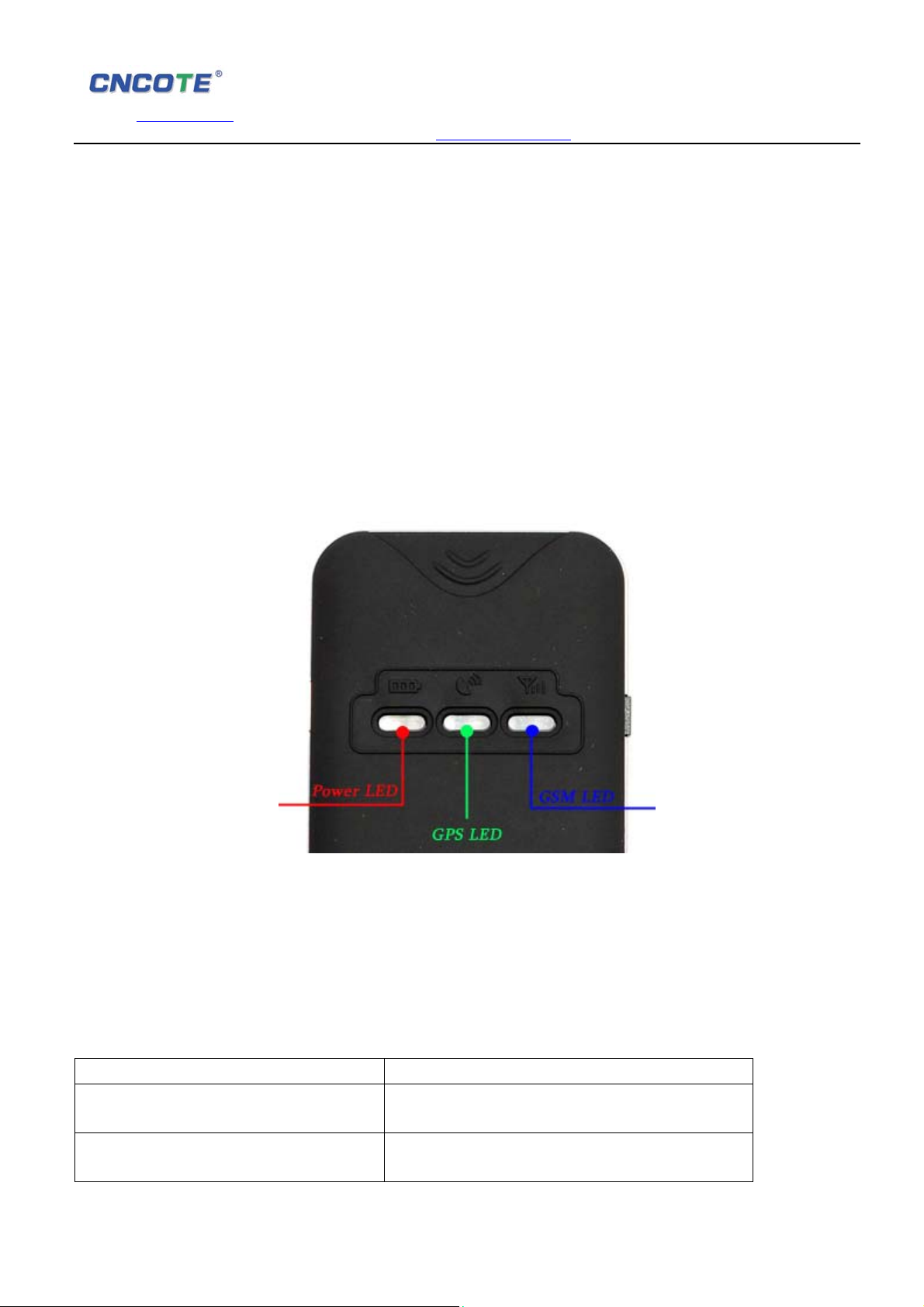
3: Indicating Led Light
(photo 2)
Remarks: For more security reason after installation,when simcard had been arleady inserted,
the device will be auto shut off all 3 indicating lights in about 1 minute. Please switch on the
white rubber button on the right side to power on the 3 indicating lights.More specified details as
below ,switch off again the same button, all lights will be turned off.And the lights will keep
repeating on & off by switching the same button on & off again.
3.1 Red Led-( Power status indicator)
Led Status Meaning
Quick Flashing Working normally (working by backup car
battery)
Slow Flashing Working normally (working under battery of
device) the device will change to work by own
Page 3
SHENZHEN CNCOTE TECHNOLOGY CO., LTD
Website: www.cncote.com Attn: Jack Foo,
Skype, cncote01, whatsapp, 008613480148499, email, [email protected]
battery while backup battery had been cut
down. And it will alarm.
bright status: Device Error
3.2 Blue Led Light-( GSM status indicator)
Led Status Meaning
Quick Flashing Working normally, Uploading GPRS data to
platform server.
Slow Flashing Working normally, Receive GSM signal normally
Continuously in bright status No GSM signal
3.3 Green Led Light – (GPS status Indicator)
Led Status Meaning
Flashing Working normally. GPS located.
Continuously in bright state Searching GPS signal
4、Features:
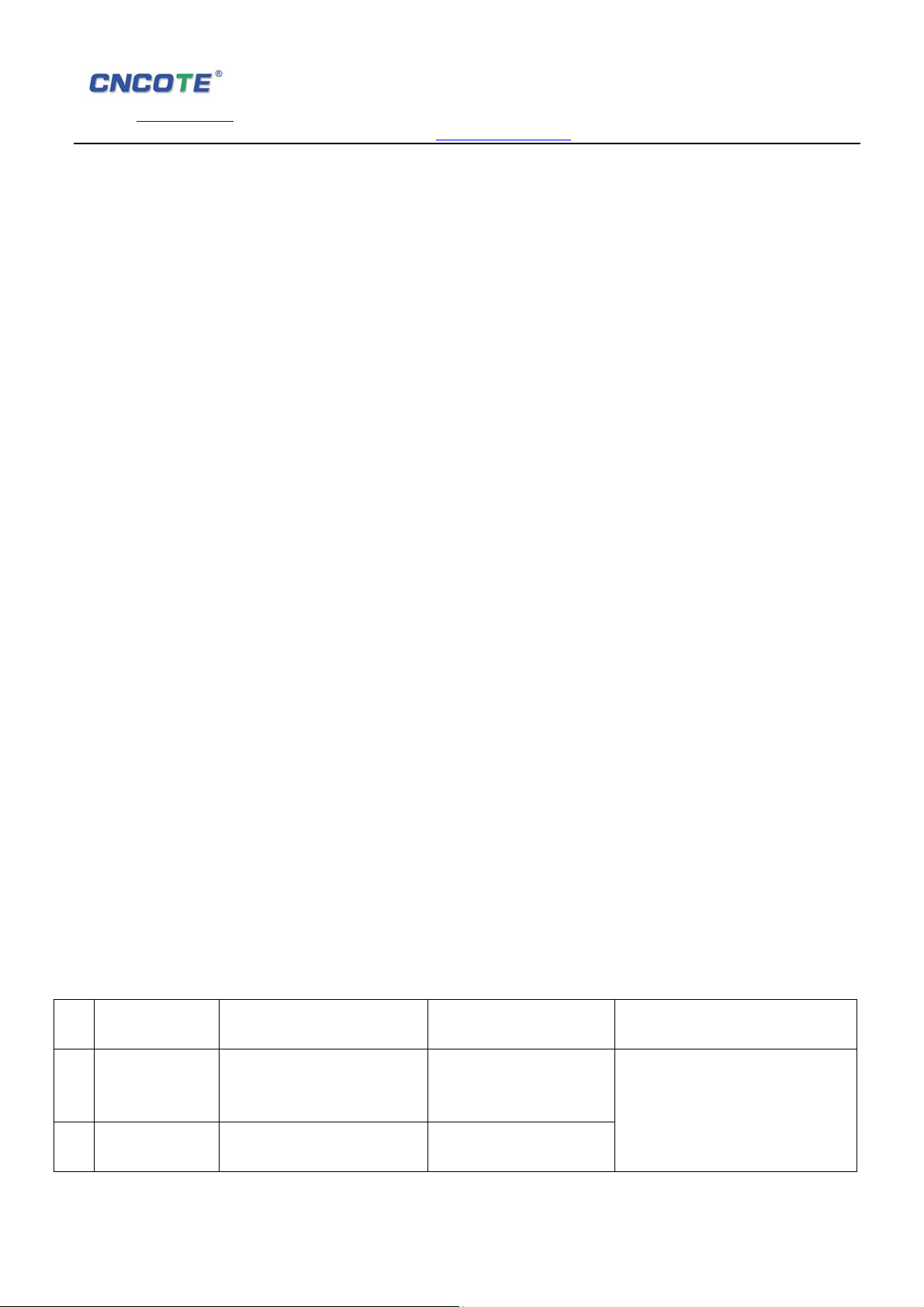
No Features Description CE-02A CE-02B
Via GPS positioning,User can track the
GPS positioning
1
Playback
2
Routes
Setting function
3
via SMS
ACC ignition
4
alarm Get alarm when car ACC on Support Support
Vibration Alarm
5
Over speed
Alarm
6
Cut engine
7
Main power off
8
alarm
vehicle location ,speed and routes through
phone or computer. Support Support
Can check the vehicle’s routes and speed in
recent 2 months. Support Support
Setting function of device via SMS and check
location via SMS. Support Support
After setting, Device will send message and
call user if theft shock the car or drive the
car away. Support Support
When speed is over than the set speed,
device will send message to user. Support Support
User can cut engine via sending message to
device. Vehicle will be shut down and theft
can’t drive car away.( For safety considering,
it will not cut engine while speed is above
20km/h) Optional Optional
When the device is disconnect with the car
battery, the device will send alarm to user. Support Support
Page 4
SHENZHEN CNCOTE TECHNOLOGY CO., LTD
Website: www.cncote.com Attn: Jack Foo,
Skype, cncote01, whatsapp, 008613480148499, email, [email protected]
9
Static state
drifting
protection
Most of device with static state drifting in the
market,our device has applied new tech
which can protect this problem nicely. Support Support
5、Method of Installation
5.1、 Preparation before installation
5.1.1 Open the packing box to check whether the type of device is correct and whether the
accessories are included, or else please contact your distributor.
5.1.2 Choose SIM card: each device needs to insert a GSM SIM card.
Please refer to the distributor’s suggestions to choose the SIM card.
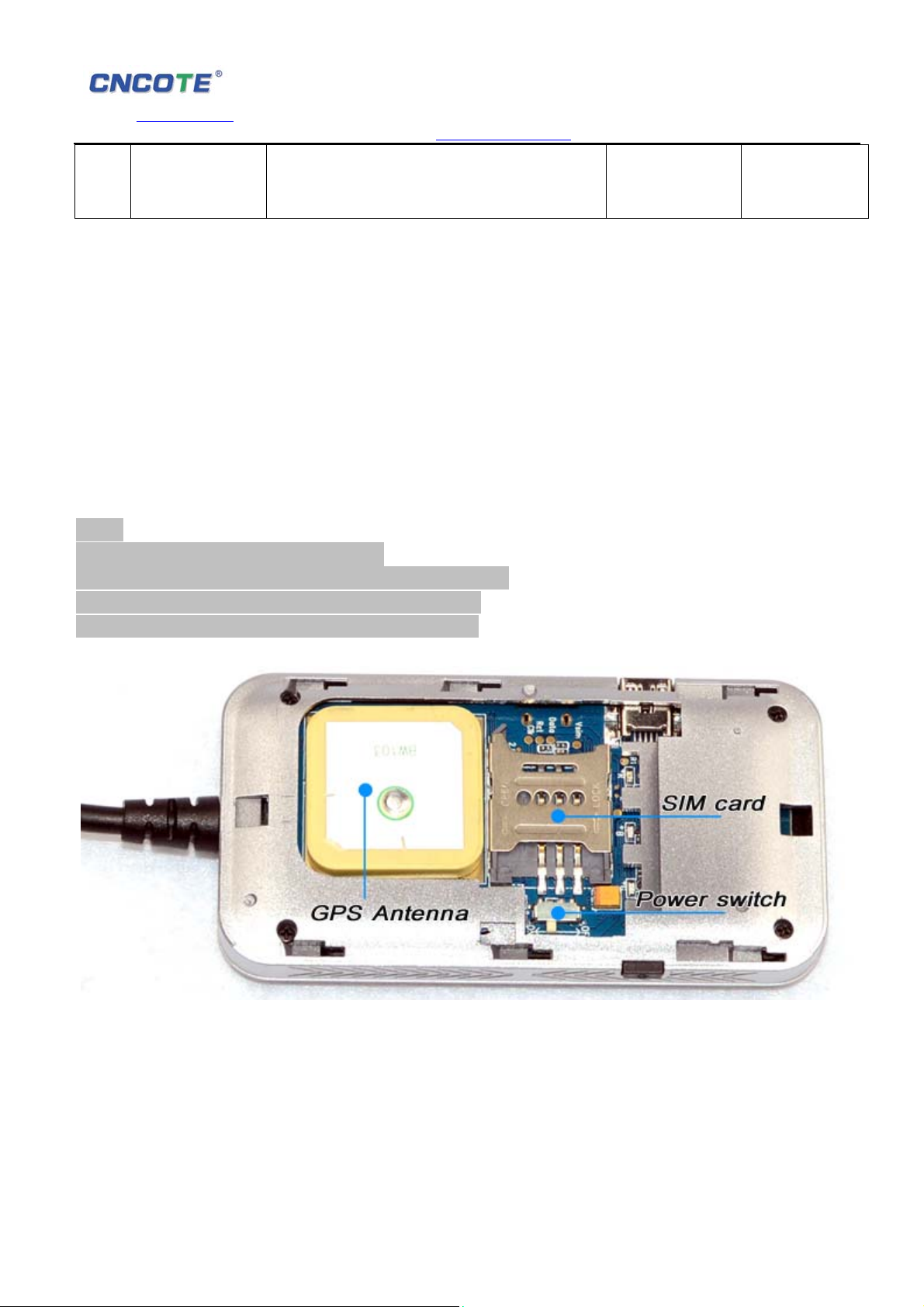
5.1.3 Installing SIM card. (please refer below picture)
Note:
Please use GSM network SIM card;
Power off before installing or removing the SIM card.
The SIM card used should be enabled for GPRS.
Ensure the SIM card can send and receive SMS.
(photo 3)
5.2、 Installation
The device installation is covert. Please refer installation to an auto electrical contractor.
Page 5
SHENZHEN CNCOTE TECHNOLOGY CO., LTD
Website: www.cncote.com Attn: Jack Foo,
Skype, cncote01, whatsapp, 008613480148499, email, [email protected]
5.2.1 To prevent theft of the device, it should be installed as covertly as possible. Covertly
installation is suggested.
5.2.2 Avoid placing the device close to higher power electrical devices, such as reversing
radar, anti-theft device or other vehicle communication equipment;
5.2.3 The device should be fixed into position with cable ties or wide double-side tape.
5.2.4 The device has built-in GSM antenna and GPS antenna. During installation, please
make sure the receiving side face is up, with no metal object above the device to
interfere with GPS reception. The following places are suggested for installation:
-shelter in the decorated board below the front windshield;
-shelter around the front instrument panel (non-metallic material face);
-in the decorated board below back windshield;
Notice: if the windshield is pasted with metal thermal-protective coating or heating coating,
It may affect the receiving signal. In this case, please change the installation place.
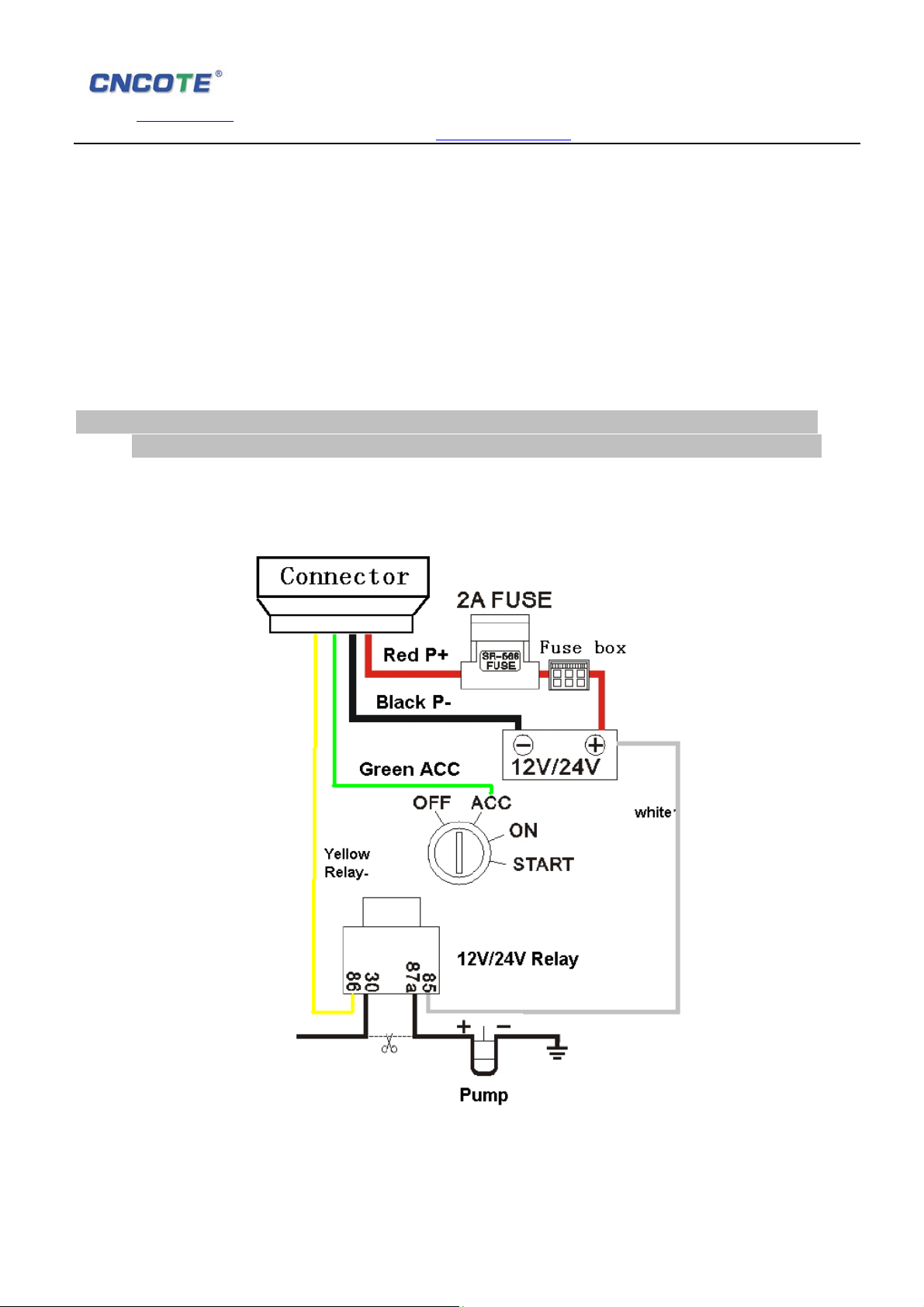
5.3 Device wiring diagram:
(photo 4)
Page 6
SHENZHEN CNCOTE TECHNOLOGY CO., LTD
Website: www.cncote.com Attn: Jack Foo,
Skype, cncote01, whatsapp, 008613480148499, email, [email protected]
5.4 Operation of device:
5.4.1 Open top cover firstly, Note top cover hasn’t fixed with screws in factory
5.4.2 Please press power switch on the up position (Powered off) Please refer picture 3.
5.4.3 Insert SIM card to the card slot and close well.
5.4.4 Please press power switch on the down position (Powered on). Please refer picture 3.
5.4.5 Please close the top cover and fix it with 4 screws.
5.4.6 Connect the power code with the interface of device.
5.4.7 Please require professional technical to connect wires and install in the car properly.
6、Cautions of device wiring
6.1、Power code wiring:
The standard voltage is 9.5V-39.9VDC. Please use the power line which provided by the
manufacturer. The red line is the positive. The black line is the negative. The negative
should earth alone or link iron during installing. Do not connect it to other ground wire. And
please make sure the device is powered on status. (Power switch on down position)
Red Led light will flashing while device installed correctly, GSM blue led light and GPS
Green led light will flashing around 1 minutes later after getting signal.
6.2、Cut Engine wiring:
1,This device support 12V relay, please make sure install correctly of the power code wiring,
or it can’t cut engine.
2, For safety, the device will cut engine via speed is less than 20km per hour
3, Please use the device in a valid way, or you will be responsible for any invalid activities.
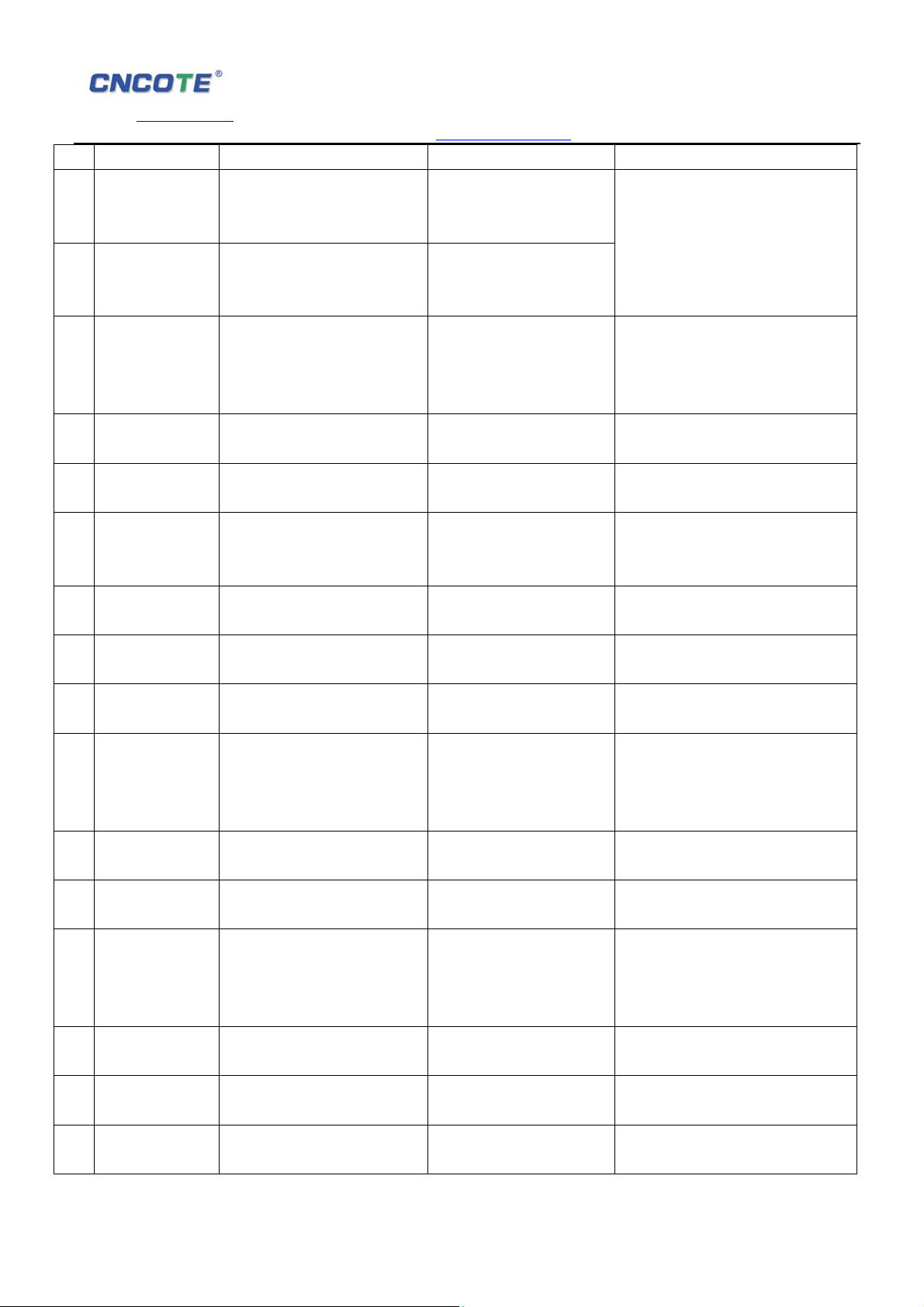
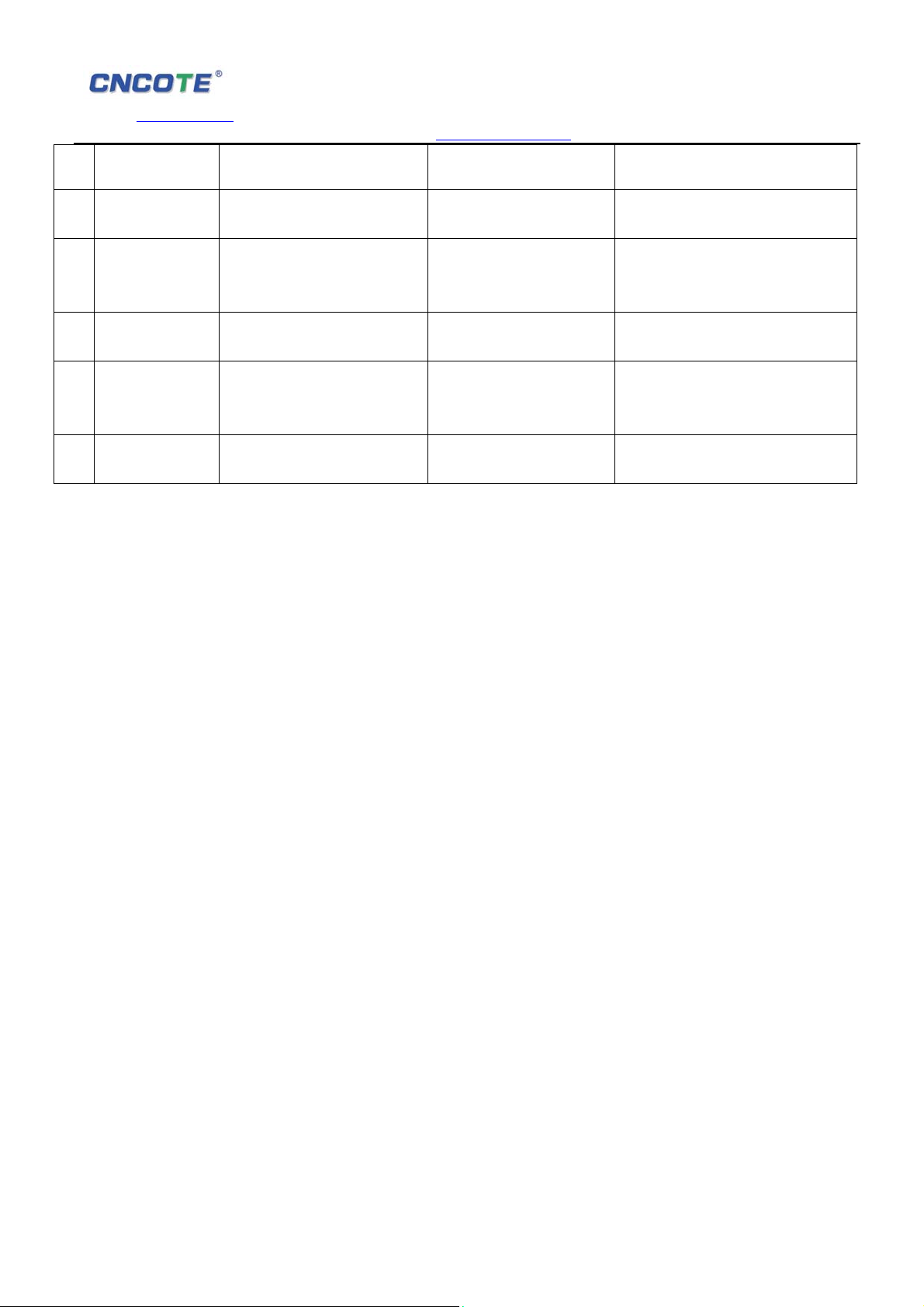
7、Message command:
User can set different kinds of function commands via sending message, including check
position, cut engine, etc., Below commands and punctuation marks must be putted under
English status. All commands will get auto replies according to the message sent.
Note: device with initial password 6666
No Features Message sent
Add
administrator No
1 #6666#AAD#1#Cell No#
1
Add
2
administrator No #6666#AAD#2#Cell No#
Replies
ADD admin account 1 ok!
ADD admin account 2 ok!
Remarks
For example:
#6666#AAD#1#13412345678#
Page 7
SHENZHEN CNCOTE TECHNOLOGY CO., LTD
Website: www.cncote.com Attn: Jack Foo,
Skype, cncote01, whatsapp, 008613480148499, email, [email protected]
2
Delete
Administrator No
1 #6666#DAD#1#
3
Delete
Administrator No
2 #6666#DAD#2#
4
View
Administrator &
Authorized
officer numbers #6666#VA#
5
6 Setting password #6666#CP#new password#
Restore
7
password #6666#RP#
Getting Location
of longitude and
latitude #6666#GL#
8
Setting IP
9
address of server #6666#IP#IP Address#Port#
Setting Domain
10
name of server
Checking IP
11
Address #6666#IP?#
Checking IP
address after
analyzing
domain #6666#WZ?#
12
13 Cut engine #6666#CF#
14
15
16 Start engine #6666#OF#
17
Set Over speed
18
Alarm #6666#SOSA#120#
#6666#WZ#Domain
dame#Port#
Delete admin account 1
OK!
Delete admin account 2
OK!
Display 2 administrators
number and 3 authorized
numbers
change password ok!
reset password OK!
Reply with google links of
longitude and latitude
#6666#IP#119.145.40.64#
9891#OK!
#6666#WZ#www.cncote.n
et#9891#OK!
The IP is:
119.145.40.64:9891
The IP(WZ) is:
119.145.40.64:9891
Start to cut fule,When
speed < 20 ,OK !
Fuel cut has already been
completed,OK!
Speeding now is > 20, So
don't Cut Fuel, Pls wait till
speed is<20 and try again !
Start to open fuel, OK!
Open fuel has already
been completed,OK!
Set Over speed alarm,OK!
For example: #6666#DAD#1#
#6666#DAD#2#
For example:#6666#VA#
For example:#6666#CP#1234#,
New password is 1234
For example:#6666#RP# Restore
password to factory standard.
For example:#6666#GL#, will get
the current longitude and latitude of
device.
For example:
#6666#IP#119.145.40.64#9891#
For example:#6666#WZ#
www.cncote.net #9891#,
For example:#6666#IP?#
For example:#6666#WZ?#
For example:#6666#CF# ,only
apply for administrator
Means engine cut down
Means speed is >20km/hour,For
safety considering, it will not cut
engine, Please try again until speed
is <20
For example:#6666#OF# ,Start
engine only apply for administrator.
Means engine started
For example:#6666#SOSA#120#,
It will alarm while speed more than
Page 8
SHENZHEN CNCOTE TECHNOLOGY CO., LTD
Website: www.cncote.com Attn: Jack Foo,
Skype, cncote01, whatsapp, 008613480148499, email, [email protected]
120km/hour
Cancel speed
19
Alarm #6666#COSA#
Active vibration
20
alarm #6666#SSA#levels#
Cancel vibration
22
alarm #6666#CSA#
23 Re-start device #6666#Reset#
Restore factory
24
setting except IP #6666#Factory#
Close over Speed Alarm,
OK!
Set alarm level, ok! For example, #6666#SSA#1#, here
Close vibration alarm, ok!
Start Reset System, OK!
resume factory
parameter,OK!
For example:#6666##COSA#。Over
speed alarm cancelled.
1 is most fexible; 2 is standard level;
3 is lowest level.
For example:#6666#RESET#,
Device will be re-started in
8-18senconds.
Restore settings to factory standard
except IP and port datas.
8、Logging on platform to track devices via Internet.
Platform Web domain:
If you are registered user arleady, you can logging in platform directly, or please contact with
your distributor to open an account for you.
Please contact your distributor and get the platform user manual.
Please enter your user name and password to logging in.
9、Trouble shooting
9.1. After installing it in the first time, if device can not get connected with platform server, at this
time it is “logged off” status in platform.
Please check the installation of device:
1) Check whether the connection of power-line is correct, please do not connect it with the car
control line.
2) Check whether SIM card is installed correctly, please refer to the installation manual;
3) Check whether the power switch is toggled to “ON”, the switch is near USB connector.
4) Check the LEDs’ status. In normal working status, the red LED is in flashing; green LED and
blue LED are both in solid bright or flashing.
5) Check whether GPS is located, if not, please drive to the open areas for positioning.
9.2 If it is “offline” status in platform:
First of all, check the three LEDs’ status. If it is not convenient to check that,please check the
SIM card status :
2、Call the SIM card number of the device to check whether you can get through;
3、Check whether the vehicle is in no GSM area, such as basement;
4、Check the GSM/GPS disconnection area, whether it is all disconnected or few of them
disconnected, to make sure whether it is the fault of operator’s internet.
5、Check whether your SIM card charge is overdue;
Page 9
SHENZHEN CNCOTE TECHNOLOGY CO., LTD
Website: www.cncote.com Attn: Jack Foo,
Skype, cncote01, whatsapp, 008613480148499, email, [email protected]
6、Check whether the SIM card supports GPRS;
7、Check the parameter setup, whether the device IMEI number, GPRS sending interval is
correct;
9.3 If the device’ GPS function is normal, but can not locate for a long time, please check
whether the installation setup of device is correct:
1) Please make sure the GPS antenna face is up;
2) Please make sure there is no electromagnetic wave- absorbent object (metal) above the
device, especially the thermal-protective coating on the windshield, it may affect the GPS
reception of the device;
9.4 If GPS can not receive the signals normally (there is high building around to interfere with
GPS reception), please drive to the open areas for positioning. Generally, it needs 1-3minutes
to receive the first coordinates.
9.5 If GSM can not receive the signals normally, please check whether SIM card is installed
correctly or there is no GSM signal at the location you are, such as basement parking, please
drive to a place covered by GSM signal reception.
9.6 When cellphone with special number receives tele- cutoff alarm sms, please make sure
whether it is illegal wire cutoff, or the FUSE on power line is blown. If the FUSE in it is blown,
please contact your distributor to exchange with the same model FUSE, after the internal
trouble is shoot, it can be power on to work again.
Special statement:
1. Specifications of this product subject to change without further notice.
2. Any change about the appearance and color is subject to the real object.
3. Warranty card applies to the product with the IMEI number listed below.
4. Please keep this card safely for after-sale service, as well as your receipt.
5. Refer to the table below for the warranty reference.
This card is the basic certificate for warranty, please fill it carefully and keep it safely.
Warranty card of GPS Vehicle tracker
Name Phone number
Address
model IMEI number
Date Invoice number
Sales unit name
Page 10
SHENZHEN CNCOTE TECHNOLOGY CO., LTD
Website: www.cncote.com Attn: Jack Foo,
Skype, cncote01, whatsapp, 008613480148499, email, [email protected]
Sales unit address
Sales unit
phone number
1. Main engine is guaranteed for one year for non-human
damage since the date of purchase.
2. The situations listed below are not in the scope of warranty,
the user has to pay maintenance cost:
(1)exceed the warranty period;
(2)disassemble or maintain without authorization;
(3)immersion, break or burn of circuit board;
(4)damages from improper installation, use, maintenance or
storage;
(5)damages of shell, lens or internal antenna;
(6)IMEI number is torn or faded;
(7)warranty certificate is inconsistent with product model, or
the certificate is altered;
(8)the damages due to force majeure
 Loading...