

Page 1
CSV-1565 QUICK INSTALLATION GUIDE
黑色外壳 印字冷灰8C
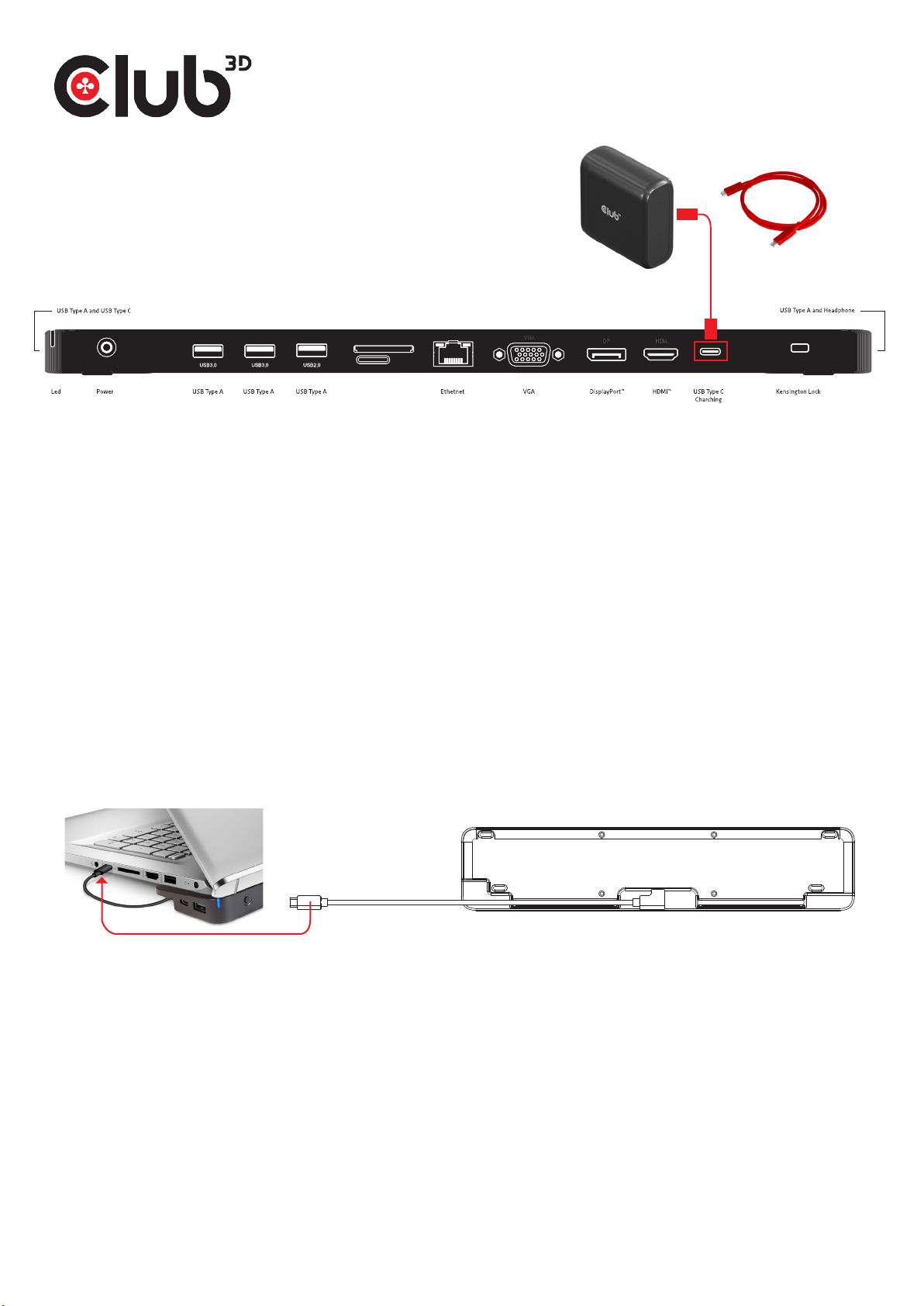
RED cable
USB type C for charging
SD
Thank you for purchasing our CSV-1565 Product.
After unpacking the product, please make sure you have all the items provided and checked for any
damages. In case of any missing/damaged parts please inform your supplier immediately.
You should have :
• CSV-1565 Docking Station
• PowerSupply Input: 100/240VAC. Output: 100Watt
• 2x USB Type C cable: 1x connection to Host 27cm / 0.886ft, 1x RED cable USB type C for charging to PowerSupply 1 m / 3.28 ft
• QR code for download Quick Install Guide
Please make sure your Host System has the latest drivers updates installed.
On our website www.Club-3d.com you can find whether you need drivers under the product code : CSV-1565 Downloads on our
website.
• Designed for DP 1.4 Alternate Mode supported Type-C and Thunderbolt 3 Hosts (PC, Laptop, Mobile Phones etc).
• Supports Output through MST up to 3 displays
• Your Host System has the latest drivers updates installed
• Your Host System supports DisplayPort Alt Mode
• Follow the QIG installation step
Cable USB type C
1. Please connect the black USB type-C cable clicked onto the Dock and connect, the angled connector, to the Dock at that side of
the Dock, connect the other side of that cable to the USB Gen1 Type-C port of your NoteBook/Host system.
2. Connect your preferred Display(s) to the designated connector(s) and power on your Display unit(s) , peripherals, ethernet
and/or sound devices
3. Connect the RED USB Type-C cable in the Power Charger into the USB Type-C connector and the other side to the Marked
‘RED’ USB Type-C connector on the Dock.
4. Now Plug the Power Charger in a wall socket and switch the Dock ON, the BLUE indicator should be lit !
No need to connect your Host system to the Power Charger, our Dock will Dynamically Charge your Host system(provided your
host system needs max.85Watt).
Warning Safe Usage: Only to be used at altitude 2000 meters/6562 feet and below.
You’re ready to start working and enjoy the full benefits of our Dock.
For any Questions please check our forum section on our website www.club-3d.com
Disclaimer: While w e endeavour t o provide t he most acc urate, up-t o-date inf ormatio n available , the conten t on this docu ment may be ou t of date or inc lude omissi ons, inacc uracies or o ther erro rs.
Produ cts might o btain a cer tificati on during th eir lifetim e. This doe sn’t chang e or alter the p roduct sp ecificat ions and/or per forman ce in any way. Clu b 3D will prov ide the updat ed inform ation on
their we bsite ww w.club-3d .com at her dis cretion . Therefo re Club 3D doe s not accept a ny right s claimed on th e content o f this docume nt. Pleas e refer to a fu ll overvi ew of our Leg acy Terms and
Condit ions on ww w.club-3d. com. All oth er brand name s are trade marks or re gister ed tradema rks and are t he proper ty of their r espect ive owner s. All cont ent is subjec t to change w ithout pr ior notice .
CSV-1565 QIG Apr.2023
 Loading...