

Page 1

Tolearnabout
Dothis
ConsultingFAQ
Goto
http://www.cloudminds.com/
Finding your serial number
or IMEI
You can find your serial number or International
Mobile Equipment Identity (IMEI) on the
packaging materials. Or, on the phone, choose
Settings > About phone > Status.
Obtaining warranty service
First follow the advice in this guide. Then check
hotlines and repair centres information through
http://www.cloudminds.com/
Viewing legal information
On the phone, go to Settings > About phone >
Legal information.
Introduction
This device is a 4G LTE Mobile phone.It has
5.7inch QHD Screen,Qualcomm MSM8996 and
4GB RAM/32GB ROM. enabling you with highspeed data access through LTE wireless
broadband data network and Wi-Fi connectivity
anywhere.enable you to get in touch with others
easily everywhere at anytime and listen to the
music,watch video.
Manufacturer
CloudMinds (Shenzhen) Holdings Co., Ltd.
Address
Room 201 Building A No.1 Qian hai shengang
Corporation Zone Qian hai Road 1st Shenzhen
(Stay by Shenzhen Qianhai Commerce
Secretariat Co., Ltd )
Note:
Thisisauser
H
Refertothe following resourcesto get moreFAQ,
information.
elp
manual
forCloudMinds A1-901
1
software,andservice
TableofConten
Safetyanduse
Radiowaves
Lic
ences
Generalinf
1 Your
2 PowerKey
3 Text
4 Call,CalllogandCon
5
Messaging
6 Calendar,Clock,andCalculator
7 Gettingconnected
.................................................................................................5
.....................................................................................................9
.............................................................................................................12
orma
tion
.......................................................................................13
mobile
1.1
1.2 Getting
1.3 Home
3.1 Usingthe
3.2 Text
4.1
4.2 Call
4.3 Con
5.1 Messaging
5.2
6.1
6.2 Clock
6.3
7.1
7.2 Brow
...............................................................................................15
Keys
andconnectors...................................................................15
started
scr
een
..................................................................................................
input
...................................................................................................29
onscreenkeyboard
editing
....................................................................................30
Call
..................................................................................................31
log
............................................................................................37
tacts
.........................................................................................
andEmail
Email
Calendar
Calculator
Connecting
......................................................................................44
................................................................................................
.........................................................................................51
...............................................................................................53
.......................................................................................56
...................................................................................57
totheint
ser
..........................................................................................59
ts
.............................................................................21
.................................................................................22
....................................................29
tacts
....................................................................31
..............................................................................44
...........................................................51
ernet
........................................................57
2
.28
38
49
Page 2

7.3
Connecting
7.4
Connecting
7.5
Sharing
7.6
Connecting
7.7
Connecting
8 Multimedia
8.1
Camera.................................................................................................72
8.2 Gallery
8.3 Music
9 Others
9.1
Files
9.2
SoundRecorder
9.3
Compass
9.4
Boost
toaBluetoothdevice.................................................66
toacomputervia
yourphone'smobiledataconnection
tovirtualprivatenetw
with
devices
applica
tions
..................................................................................................75
....................................................................................................78
............................................................................................................
.......................................................................................................80
....................................................................................................81
..................................................................................80
..............................................................................................80
USB
...............................................67
orks
throughNFC
.......................................................................
............................68
........................................69
........................................70
3
72
80
10Settings
11Makingthemostofyour
12Acc
13Warranty
14
Troubleshooting
15Specifications
to ensurecompliancewith RFexposurerequirements.
........................................................................................................
10.1
Wireless&networks
10.2
Device
10.3
10.4 System
11.1
11.2
essories
..................................................................................................86
Personal
...............................................................................................91
................................................................................................
SmartSuite
Upgrade
............................................................................................
...............................................................................................
....................................................................................................
...........................................................................................
PROTECT
Topreventpossiblehearing
levelsforlongperiods.
near
yourearwhilethe
.........................................................................82
phone
.......................................................
.........................................................................................
.....................................................................................
Thisproductmeetsapplicablenational
W/kg.Thespecific
page
10ofthisuserguide.
Whencarryingtheproductor
body,eitheruseanapproved
orotherwisemaintaina
Notethattheproduct
not
making
YOUR
HEARING
maximumSARvalues
using
accessory
distance
of10mmfromthebody
may
aphonecall.
Exercise
cautionwhenholdingyourdevice
loudspeaker
4
betransmittingevenifyouare
damage,
isinuse.
81
...
95
99
.99
101
103
104
106
112
SAR
limitsof1.6
canbefoundon
itwhilewornon your
suchasaholster
donotlistenathighvolume
Page 3

Safetyanduse
Werecommendthatyoureadthischaptercarefullybeforeusingyourphone.
Themanufacturerdisclaimsanyliabilityfor damage,whichmayresultasa
consequenceofimproperuseorusecontraryto theinstructionscontained herein.
•
TRAFFIC SAFETY:
Giventhatstudiesshowthatusingaphonewhiledrivinga vehicleconstitutes a
realrisk,evenwhenthehands-freekitisused(carkit,
torefrainfrom usingtheirphonewhenthevehicleisnotparked�
Whendriving,donotuseyourphoneandheadsettolistentomusicortothe
radio.Usinga
Whenswitchedon,yourphoneemits
withthe
ensure
-Do not placeyour phoneon top of the dashboardor within anairbag
deploymentarea;
-Checkwithyourcardealerorthecarmanufacturertomakesurethatthe
dashboardisadequately
•
CONDITIONS OF
Youareadvisedto switchoff thephonefromtimeto timeto optimiseits performance.
S
witch
S
witch
areas.
interferewithotherelectricalorelectronicdevices,orequipmentusingradio
fr
equency.
S
witch
all
signs
orinanypotentially
Whenthephoneisswitchedon,itshouldbekeptatleast15cmfromany
medicaldevicesuchasa
Inparticularwhenusingthephone,youshould holditagainsttheearonthe
oppositesidetothe
headsetcanbe
vehicle’s
electronic
thatthereisnoproblem:
thephoneoffbeforeboardinganaircraft.
thephoneoffwhenyouarein health
Aswithmanyothertypesofequipment nowinregularuse,phonescan
thephone offwhen youarenear
andinstructionspostedinafueldepot,petrolstation,or
dangerous
systems
shielded
USE:
explosive
atmosphere.
pacemaker,
device,ifany.
andforbiddenin
electromagnetic
such
fromphoneRFenergy.
ahearingaid,oraninsulinpump,etc..
headset���),driversare requested
some
areas.
asABS
wavesthatcanint
anti-lock
brakesorairbags.
carefacilities,
gasorflammable
exceptin designated
chemical
5
erfere
liquids.Strictly
plant,
To
obey
Toavoid
hearingimpairment,
Alsomove
the
the
Donotletchildrenusethephoneand/orplaywiththephoneandacc
withoutsupervision.
If your phonehasaremovablecover,
substances
Ifyourphoneisaunibody
Ifyou
phone
createan
Alwayshandle
Donotallowyourphonetobeexposedto
conditions(moisture,humidity,rain,infiltrationof
manufacturer’srecommendedoperatingtemperaturerangeis0°C (32°F) to
+60°C (140°F),operatinghumidityrangeis5%~95%.
Atover60°C (140°F) thelegibilityofthephone’sdisplay maybeimpaired,
thoughthisistemporaryandnotserious.
Donot
Donotdrop,
Donot
anyinjury.
Donotpaint
Use
CloudMinds (Shenzhen) Holdings Co., Ltd
CloudMinds (Shenzhen) Holdings Co., Ltd
caused
Remember
informationstoredonyourphone.
Some
orwhen
apersonneverhadapreviousseizureorblackout.
or
blackouts,
yourdoctorbefore
featureonyour phone.
phoneaway
amplified
volumemight
thatcouldcreatean
disassemble
maydamage
allergic
your
open,dismantle,
throw,orbendyourphone.
use
thephoneifthe
it.
onlybatt
eries,
bytheuseofother
tomakebackupcopiesorkeepawritten recordofall
people
may
playing
video
orifyouhaveafamily historyofsuch
pickupthe
call
fromyour
causehearing
device,
yourphonethewarrantywillnot
thebatt
ery,and
reaction.
phone
with
careand keep
or attemptto
battery
chargers,
chargers
sufferepileptic
games.Theseseizuresorblackoutsmayoccureven
playing
video
before holdingyour phonetoyour
ear
while
using
the
damage.
allergic
reaction.
the
back
coverandbattery arenotremovable.
maycauseleakageofsubstances
adverse
repair
glassscreenisdamaged, cracked,
and
accessories
orbatteries.
seizuresorblackouts
games
"hands-free" mode
note that your phonemaycontain
apply.Disassembling
itin
acleanand
dust-freeplace.
weatherorenvironmental
liquids,
dust,
your phoneyour
iscompatiblewithyourphone
Ifyou
onyour
6
self
which
arerecommended
disclaim any
when
exposed
haveexperiencedseizur
occurrences, please
phoneorenablinga
essories
the
thatcould
seaair,et
c.).
.
orbrokentoavoid
liabilityfordamage
toflashing
flashing-lights
ear
because
The
by
model.
importan
lights,
es
consult
.
t
if
Page 4

Parentsshouldmonitortheirchildren’suseofvideogamesorotherfeatures
thatincorporateflashinglightsonthephones.Allpersonsshoulddiscontinue use
andconsultadoctorifanyofthefollowingsymptomsoccur:convulsion, eye or
muscletwitching, lossof awareness,involuntary movements,or
disorientation.
safetyprecautions:
-Donot
-
Take
-
Play
-
Play
-Ifyour
for
-If youcontinueto
the
Whenyou
inyourhands,arms,
instructionstoavoidproblemssuchastendinitis,carpaltunnelsyndrome,
other
•
PRIVACY:
Pleasenotethatyoumustrespectthelawsandregulationsinforceinyour
jurisdictionorotherjurisdiction(s)whereyouwilluseyourphoneregarding
takingphotographsandrecordingsoundswithyour
lawsandregulations,itmaybestrictlyforbiddentotakephotographsand/or
torecordthevoicesofotherpeopleoranyoftheirpersonalattributes,and
r
epr
privacy�Itistheuser'ssoleresponsibilitytoensurethatpriorauthorisation
hasbeenobtained,ifnecessary, inordertorecordprivateorconfidential
conversationsortakeaphotographofanotherperson;themanufacturer,the
sellerorvendorofyourphone(includingtheoperator)disclaimanyliability
whichmayresultfromimproperuseofthe
•BA
Followingairregulation,thebatteryofyourproductisnot charged. Please
chargeitfir
Fora
Observethefollowingprecautions:
-Donotattempttoopenthebattery(due
-Donotpuncture,
Tolimit the
playoruseaflashing-lights
aminimumofa15-minute
inaroom inwhichalllightsareon;
atthefarthest
hands,
several
game
musculoskeletal
oduc
TTERY:
non-unibodyde
distancepossible
wrists,or
see
armsbecome
have
adoctor.
onyour
shoulders,
disorders.
hoursbefore
and
playgames
eordistributethem,asthismaybec
st.
vice:
disassemble,orcause
likelihoodofsuchsymptoms,
featureifyou
break
playing
again;
sore
hands,
phone,
neck,orotherpartsofyour
are
hourly;
fromthescreen;
tiredorsorewhile
you
tiredor needsleep;
playing,
wrists, or
mayexperienceoccasional
totheriskoftoxicfumesand
ashortcircuitinabattery;
onsideredt
phone�
arms
duringor after
body.
phone�Pursuanttosuch
obeaninv
pleasetake
stopandrest
discomfort
Followthe
asionof
burns);
thefollo
wing
playing,
stop
or
7
-Donotburnor
t
emperaturesabove60°C(140°F).
Batt
regulations.Onlyusethebatteryforthepurposeforwhichitwasdesigned.
Never
Holdings Co., Ltd
Fora
Observethefollowingprecautions:
-Donotattempttoeject,
-Donotpuncture,
-Donotburnordisposeofyourphoneinhouseholdrubbishorstoreitat
temperatureabove60°C(140°F).
Phoneandbatterymustbedisposedofin
environmentalregulations.
Fora unibodydevice:
Observethefollowingprecautions:
-Donotattempttoopenthe
-Donotattempttoeject,
-Donotpuncturethe
-Donotburnordisposeofyourphoneinhouseholdrubbishorstoreitat
temperatureabove60°C(140°F).
Phone
locallyapplicable
Theywillthenberecycled,preventing
environment,sothattheircomponentscanbereused.
InEuropeanUnioncoun
These
All productswiththissignmustbebroughttothesecollectionpoints.
dispose
ofausedbatteryinhouseholdrubbishorstoreitat
eries
mustbedisposed
usedamagedbatt
.and/oritsaffiliates.
non-unibody
andbatteryasaunibodydevicemustbe
This symbolonyourphone, thebatt
thattheseproductsmustbetakentocollectionpointsattheendof theirlife:
-Municipalwaste
ofequipment;
-Collectionbinsatpointsofsale.
collectionpointsare
ofin
accordance
eriesorthose
devicewitha non-removablebattery:
replace
disassemble,orcause
back
environmentalregulations.
oropenthebattery;
back
cover;
replace,
oropenbattery;
coverofyourphone;
disposal
tries:
accessible
with
locallyapplicable
not
recommendedbyCloudMinds (Shenzhen)
ashortcircuitinthebattery;
accordance
disposed
ery,andthe
centreswithspecificbinsfortheseitems
substances
freeofcharge.
8
environmental
withlocallyapplicable
ofin
accordance
accessories
beingdisposedofinthe
with
means
Page 5

Innon-EuropeanUnionjurisdictions:
MaximumSARforthismodelandconditionsunderwhichitwas
recorded
Head SAR
0.4686W
/kg
Body SAR
1.0730W/kg
Itemsofequipmentwiththissymbolarenottobethrownintoordinarybins
yourjurisdictionoryourregionhassuitablerecyclingandcollectionfacilities;
instead
theyaretobetakentocollectionpointsforthem toberecycled.
CAUTION:
TYPE.DISPOSEOFUSEDBATTERIESACCORDING
•
Mainspoweredchargerswilloperatewithin thetemperaturerangeof:0°C
(32°F)
Thechargersdesigned
technologyequipmentand officeequipment
theecodesign directive
specifications,achargeryoupurchasedinonejurisdictionmaynotworkin
another
RISKOFEXPLOSIONIFBATTERYISREPLACEDBYANINC
CHAR
GERS:
to40°C(104°F).
jurisdiction.
foryour
phone
meetthe
standard
2009/125/EC.
Theyshouldbeusedforthispurpose
Dueto different applicableelectrical
TOTHEINSTRUCTIONS.
forsafetyofinforma
use.
Theyarealsocompliant
only.
ORRE
if
CT
tion
Radiowaves
Proofofcompliancewith internationalstandards
Directive
2014/53/EU
beputonthemarket.Theprotectionofthehealthandsafetyfortheuserand
anyotherpersonisan
THISDEVICE
RADIOWAVES.
Yourphoneisaradiotransmitterand
thelimitsforexposuretoradiowaves(r
recommended byinternational
anindependentscientific
margindesigned toassure
Theradiowaveexposure
Specific
AbsorptionRate,orSAR.
MEETS
(RED)
isrequiredofallphonemodelsbeforetheycan
essential
requirementofthese
INTERNATIONALGUIDELINESFOR
receiver.
adio
frequencyelectromagnetic
organisation (ICNIRP)
thesafetyofall
guidelines
guidelines.
persons,regardlessofage
useaunitof
The
SAR
limitformobile
9
(ICNIRP)
orwith European
standards
or thisdirective.
EXPOSURE
Itisdesignednottoexceed
Theguidelinesweredevelopedby
andincludea
measur
ementknownasthe
devices
fields
substantial
andhealth.
is2W/kg.
)
safety
with
TO
Tests
for
SAR
transmittingatitshighestcertifiedpowerlevelinalltestedfrequencybands.
Thehighest
Duringuse,theactual
valuesstatedabove.Thisis
minimiseinterferenceonthenetwork,theoperatingpowerofyourphoneis
automaticallydecreased
thepoweroutputofthephone,thelowerits
Body-worn
Tomeet
bepositionedatleastthis
If youarenot
isfreeofanymetalandthatitpositionsthephonetheindicated
fromthe
Organisations suchas
Administration
exposure
headandbodyduringphone
Yourphoneisequippedwith abuilt-in antenna.Foroptimaloperation,you
shouldavoidtouchingitor
Asmobile
than
guidelines
accessory
positionsthephoneatleast5mm
areconductedusing
SARvalues
SAR
SAR
testing hasbeencarriedoutata
RFexposureguidelines
using anapprovedaccessoryensure
body.
have
theycoulduseahands-freedevicetokeepthephoneawayfromthe
devices
against
statedthatif
offera
your
ear.Insuchcircumstances
when
used
ensurethatwhateverproductisusedisfreeofanymetalandthat
witha
standard
operatingpositionswiththedevice
underthe
ICNIRPguidelines
valuesforthisphoneareusuallywellbelowthe
because,
for
purposes
whenfullpowerisnotneededforthecall.Thelower
duringbody-wornoperation,thephoneshould
distanceaway
degrading
range
headsetor
fromthe
theWorldHealth
peopleareconcernedand
calls,
orreducetheamountoftimespentonthe phone.
it.
offunctions,they
USB
away
fromthe
forthisdevicemodelare:
ofsystemefficiencyandto
SAR
value.
body.
thatwhateverproductisused
Organisation
canbeusedinpositions
the
phone
willbecompliantwiththe
data
cable.
Ifyouare
body.
10
separationdistance
distance
away
andtheUSFoodandDrug
wantto
reduce
using
another
their
it
of5mm.
o
ther
Page 6
BE
BG
CZ
DK
DE
EE IE
EL ES
FR
HR IT
CY
LV
LT
LU HU MT
NL
AT
PL
PT
RO SI
SK FI SE
UK
Please
noteby
using
thedevice
some
ofyour
personal
data
maindevice.
data,nottosharewithitwithanyunauthoriseddevicesorthirdpartydevices
connectedtoyours.ForproductswithWi-Fifeatures,onlyconnecttotrusted WiFinetworks.Alsowhenusingyourproductasahotspot(whereavailable
ensure
access
locationsincludingaSIMcard,memorycard,andbuilt-in
removeor
yourproduct.
sources
access
andnetworkresources.
Notethatanydatashared withCloudMinds (Shenzhen) Holdings Co.,
Ltd.isstoredin accordancewith applicabledataprotection legislation.For
thesepurposes CloudMinds (Shenzhen) Holdings Co., Ltd. implementsand
maintainsappropriate technical and
measures
unauthorisedorunlawfulprocessingandaccidentallossordestructionof
damage
securitythatisappropriate
-Thetechnical
-Thecostsfor
-The
-Thesensitivityofthe
Youcanaccess,re
intoyouruseraccount,visitingyouruserprofileorbycontactingusdirectly
Should
provideuswith
Itis
under
yourown
responsibility
yournetwork
toyourphone.Yourproductcanstorepersonalinformationinvarious
only.Some
toprivateinformation
tosuchpersonaldatawherebythe
risks
involvedwiththe
yourequireustoeditordelete your
security.Theseprecautions
clear
all
personal
Choose
your
appscanimpactyourproduct’sperformanceand/orhave
toprotectallpersonaldata,for
possibilitiesav
implementing
personal
view,
evidence
informationbeforeyou
apps
andupdates
including
having
regardto
ailable;
the
measur
processing
dataprocessed.
and
edityour
ofyouridentitybefore wecanactonyourrequest.
toprotectyourownpersonal
care
account
example,
measures
es;
ofthe
personaldata,
personal
informationat
maybeshared
willhelppreventunauthorised
memory.
recycle,
fully,andinstallfromtrusted
details,calldata,
against
shallprovidealevelo
and;
any
personal
with
),
Besureto
return,or giveaway
locationdetails,
organisational
or
f
timebylogging
.
data,wemay
11
ask
the
youto
Lic
ences
microSD
Logoisatrademark.
TheBluetoothwordmarkand
SIG,
TheAndroidrobotisreproducedormodifiedfromworkcreatedand
GoogleandusedaccordingtotermsdescribedintheCreativeCommons3.0
Attribution
>About phone>Legalinf
Youhave
purchased
org/)
programmes
otheropensource programslicensedundertheGNUGeneralPublicLicence
and
Apache
Wewillprovideyouwithacompletecopyofthecorrespondingsourcecodes
uponrequestwithinaperiodofthree
byCloudMinds (Shenzhen) Holdings Co., Ltd
Weherebypointoutthattheenduserwarrantyforinfringement
limitedtotheEU.
Inc.
TheWi-FiLogoisacertificationmarkoftheWi-FiAlliance.
Thisequipmentmaybeoperated inall
5150-5350MHzbandisrestrictedtoindoor
License(thetextwillshowwhenyoutouchGooglelegalinSettings
Licence.
orma
a productwhich
mtd,
tion
msdosfs,netfilter/ip
logos
areownedbytheBluetoo
European
use
(1)
)
.
uses
theopensource(http://opensource.
tables
andinitrdinobjectcodeand
years
fromthedistributionoftheproduct
12
countries.The
only.
shared
IPR
issolely
th
by
Page 7

If andto theextentthat theProductisexported,takenwith, orusedby endcustomer
orenduseroutsidetheEUanyresponsibility,warranty
indemnificationofmanufacturerand
(including
anyindemnificationinregardtoinfringementIPR).
its
suppliersinregard
or
totheProductexpires
General
information
• Internet address: http://www.cloudminds.com/
•
Hotline:
See
the
"SERVICES"
leafletthatcamewithyourphone
or
gotoour
website.
• Manufacturer: CloudMinds (Shenzhen) Holdings Co., Ltd.
• Address: Room 201 Building A No.1 Qian hai shengang
Corporation Zone Qian hai Road 1st Shenzhen(Stay by
Shenzhen Qianhai Commerce Secretariat Co., Ltd )
•
Electroniclabelingpath:TouchSettings>Regulatory&safety
press
*#07#,youcanfindmoreinformationabout
Onour
website,
can
also
youwillfindourFAQ
contactusby
emailtoask
Protectionagainstthe
YourphoneisidentifiedbyanIMEI (phoneserialnumber)shown onthe
packaging
numberthe firsttimeyouuseyourphonebyentering*#06#andkeepitina
safeplace.Itmaybe requestedby thepoliceoryouroperatorifyourphoneis
st
usingit,evenwitha differentSIMcard.
labelandinthephone’s
olen.Thisnumberallows yourphonetobeblockedpreventingathirdperson from
(FrequentlyAskedQuestions)section.
any
questions
you
(1)
ft
memory.Werecommendthatyou notethe
may
labelling
have.
or
(1)
.
You
13
D
isclaimer
Theremaybe certaindifferencesbetweentheuser
phone’s
operation,
operatorservices.
CloudMinds (Shenzhen) Holdings Co., Ltd.shallnot beheldlegallyresponsible
for such differences,if
shallbebornebytheoperator
includingapplicationsandsoftwareinexecutableorsourcecodeform,which
issubmitted by thirdpartiesfor
AllThirdPartyMaterialsinthisphoneareprovided"as
ofanykind,whetherexpressorimplied.ThepurchaserundertakesthatCloudMinds
(Shenzhen) Holdings Co., Ltd.
complied
manufacturerofmobile
Propertyrights.CloudMinds (Shenzhen) Holdings Co., Ltd.willatno
responsible
inabilityorfailureoftheThirdPartyMaterialstooperateonthisphoneorin
interactionwithanyotherdevice.Tothemaximumextentpermittedbylaw
CloudMinds (Shenzhen) Holdings Co.,
Ltd.
disclaims
butnotlimitedto–tortlaw
theoryof
suchThirdPartyMaterials.Moreover,
areprovidedfreeofchargebyCloudMinds (Shenzhen) Holdings Co.,
Ltd.,maybesubjectto paidupdatesand
(Shenzhen) Holdings Co., Ltd.waivesany
responsibilityregardingsuchadditionalcosts,
purchaser.
Ltd.
shall
ofavailabilityofanyapplication,asitsavailabilitydependsonthecountryand
theoperatorofthe
Ltd.
reserves
timeto
addorremove
innoevent
thepurchaser forany
depending
withallquality
forthe
allliabilityforany
liability,arising
CloudMinds (Shenzhen) Holdings Co.,
notbeheld
responsible
purchaser.
therightatany
shall
CloudMinds (Shenzhen) Holdings Co., Ltd. beheld
onthesoftware
any,
norfortheirpotential
exclusively.
obligations
devices
claims,demands,
actions,
outofthe
forthe lack
Third
PartyMaterials
consequences
release
Thisphonemay containmaterials,
inclusion
incumbentupon
andphonesincomplyingwithIntellectual
underany
use,
bywhatever
CloudMinds (Shenzhen) Holdings Co.,
suits
thepresentThirdPartyMaterials,which
which
fromits
ofsuchremoval.
manual
ofyourphoneorspecific
consequences,
inthisphone("ThirdPartyMaterials").
is",
it
or
means,
upgrades
shall
phones
descriptionandthe
whichresponsibility
without warranty
has
asa
stage
be
,
actions,
andmore
specifically
orattemptstouse,
inthefuture;CloudMinds
beborne
exclusively
withoutpriornotice;
by the
responsible
by
14
–
Page 8
Your
1
1.1
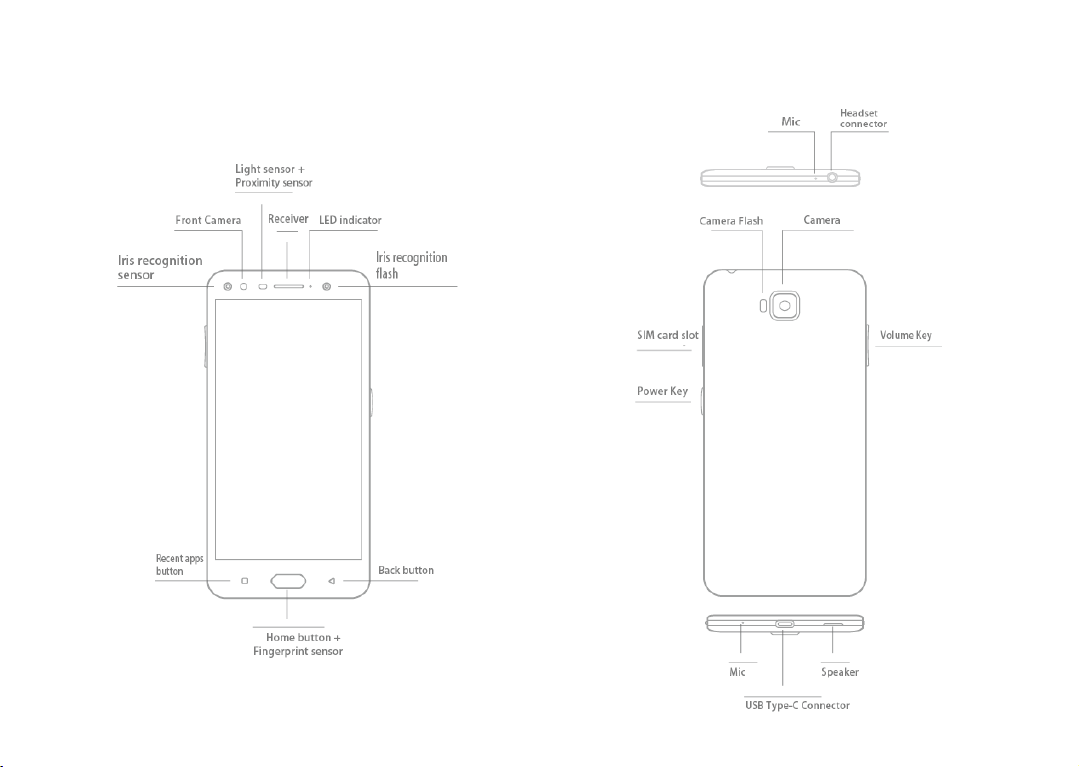
Keysandconnectors
CloudMinds A1
mobile
:
15
16
Page 9

PowerKey
PowerKeysettingsare
available
at:Settings >PowerKey.
IfPowerKeyisenabled,
•
FromHome
•
Press
•
Pressandholdthekeyto takeburstshotswhenyour
screen,press
thekeytoshowweathereff
ect.
thekeytoinstantlytakeaphotowhenyourphone islocked.
phoneislocked.
•
Press
thekeytotriggeraudioeffectwhena
song
or movie
isplaying.
•
Press
thekeyto
•
Press
thekeyfromGalleryMOMENTS tocreatea
•
Pressthekeytotriggerspecialeffectsuchassequence
change
•
You canalsocustomisethe PowerKey function. For
example,
by
pressing
•
Whenphoneislocked
-
press
-double
-long
enhance
voicequalityduringacall.
photo collage.
whenamovieisplaying.
enablescreenshottakingorapplicationrunning
thePowerKeywhenthe
(displayoff):
screen
islocked.
toscreen-on;
press
toinstantshot
press
tocontinuouslyshot.
(800ms);
Recentappsbutton
•
Touch to switch between individualapp activitiesand
documents.
Homebutton
•
Fromanyapplicationorscreen, touchto return to the
Homescreen.
•
Long
press
asgettingdirectionsand restaurantinformation
toturnonGoogleNow.
Youcangethelpsuch
based
on
thecontentdetectedonthescreen.
17 18
Backbutton
•
Touchtogobacktotheprevious
box,options
menu,
theNotification
screen,
panel,
orcloseadialog
etc.
Powerkey
•
Press:
Lockthescreen/Lightupthescreen.
•
Pressandhold:
Poweroff/Restart/Aeroplane
•
Press
andholdthePowerkeyandVolumeupkeytoent
Show
thepopupmenuto selectfrom
mode.
recoverymode.
•
Press
andholdthePowerkeyandVolumedownkeyto
make
ascreenshot.
•
Press
andholdthePowerkeyforatleast10
forcereboot.
Volumekeys
•
Incall
•
In Music/Video/Streaming mode, adjusts the media
mode,adjusts
the
earpiece
or
secondsto
headset volume.
volume.
•
In
generalmode,adjusts
•
Mutestheringtoneofanincomingcall.
•
In
camera
preview
takeaphotoor
theringtonevolume.
mode,press
press
andhold to
Volumeupordown keyto
make
burst shoot.
er
Page 10

1.2
Getting
1.2.1
Insertingor removingtheSIM/microSDcard
YoumustinsertyourSIMcardto
offyour phonebefore insertingorremovingtheSIMcardas
thisphonesupportshotswap.
Chargingthebatt
Youareadvisedto fully chargethe battery
indicatedbyapercentagedisplayedonscreen.Thepercentage
increasesas
started
Settingup
make
phone
calls.
Youdonotneed topower
Yourphone onlysupportsnano-SIM
insertotherSIMtypeslikeminiandmicro
maycausedamage
thephoneischarged.
Toreducepowerconsumptionandenergywastewhenthe
batteryisfully
switch off Wi-Fi,GPS,Bluetooth or background-running
applications
toyourphone.
ery
charged,disconnect
whennotin
use;
your
reducethebacklighttime,etc.
cards.
cards;
( ).
charger
Donotattemptto
otherwisethis
Charging
fromtheplug;
status
1.2.2
Poweringonyour phone
HolddownthePowerkeyuntilthephonepowerson,unlock
your phone
The Home
IfyoudonotknowyourPINcodeorforgetit,contactyournetw
operator.
(Swipe,PIN,PasswordorPatt
screen
isdisplayed.
Besureto
keep
yourPINcodewell.
ern)if
necessary
andconfirm.
ork
19
is
1.2.3
Poweringoffyour phone
Press
andhold thePowerkeyuntiloptions
1.3
Home
scr
Youcan
youloveor
TouchtheHomebuttontoswitchtotheHome
Reversible
Thephonesupportsthereversiblefunction.FromtheHomescreen, touch
toopenthe
>Reversible.Turnon to
een
bring
all
the
items(applica
use
mostfrequentlytoyourHome
scr
een
applications
list,thentouchSettings>Display
enable
tio
ns,
20
appear,select
shortcuts,
thefunction.
folders
screen
scr
een.
Poweroff.
and
widgets
forquickacc
)
ess.
Page 11

1.3.1
Usingthetouchscreen
T
ouch
To
accessanapplication,
touchitwithyourfinger.
Longpress
Toenterthe
example,selectacontactinContacts,longpressthiscontact,an
optionlistwill
Drag
Long
Slide/Swipe
Slide
web
F
lick
Similartoswiping,
P
inch/Spread
Placetwo fingersonthescreensurfaceanddrawthemapart
togetherto
ThephonealsosupportsonefingerzoominginCameraandGallery
Doubletouchthe
available
optionsforanitem,longpresstheitem.For
appear.
press
anitemanddragittoanotherlocation.
thescreentoscrollupanddownthe
pages.
Youcanslidethe
scale
flickingisalighterandquickerstroke.
anelementonthescreen.
screen
screen
tozoom
horizontallytoo.
in/
out.
21 22
applications, images,
and
or
Rotate
Automaticallychange
byturningthephone
1.3.2
Statusbar
Fromthe
Statusbar,
andnotificationinformation(on
Dragdownthe
theQuicksettingspanel.
Touch and draguptocloseit.Whentherearenotifications,youcan
touchthemto
Notificationpanel
Whentherearenotifications,touchanddragdownthe
opentheNotificationpaneltoreadmoredetailedinformation.
.
the
screen
Status
access
sideways
you
notifications.
tohaveabetter
can
viewbothphone
bartoviewnotificationsand
orientationfromportraitto
theleft
side).
screen
view.
status (on
dragagaintoenter
Status
theright
landscape
side)
barto
Page 12
Quicksettingspanel
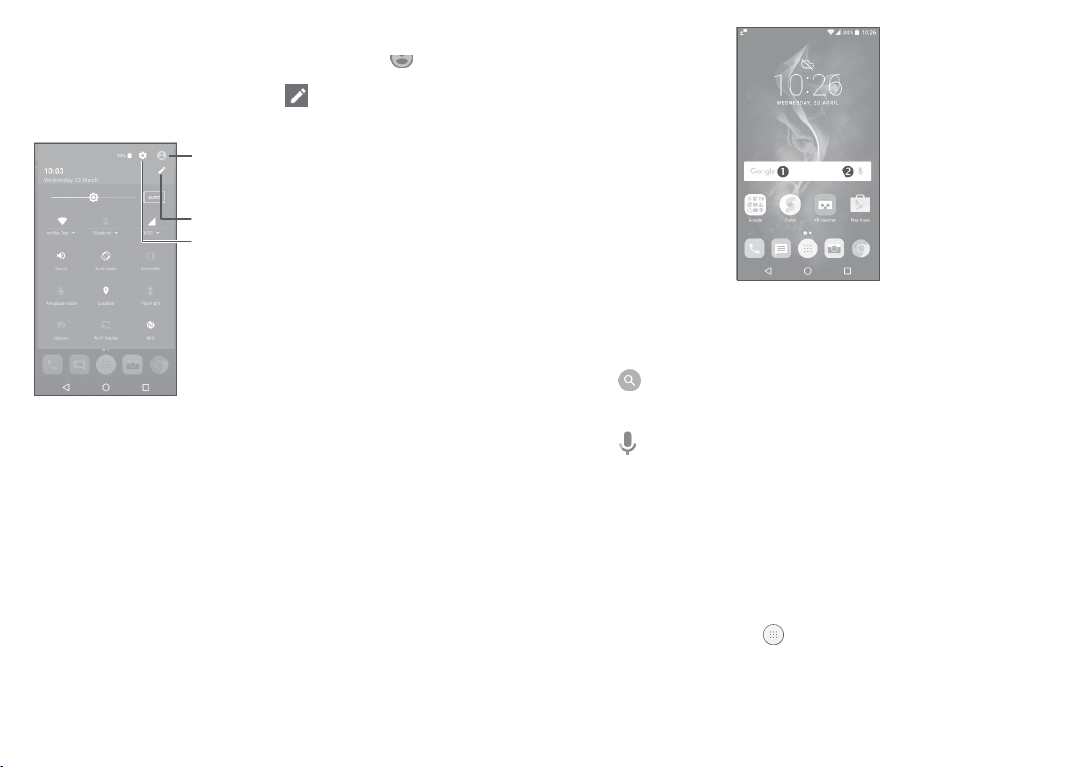
TouchanddragdowntheNotificationpanelortouch toopenthe
Quicksettings panel.Youcanenableordisablefunctionsorchange
modesbytouchingtheicons.Touch to customiseyourQuick
settingspanel.
Enteruser
name,
phone
screen
toeditand
number,andotherinformation.
save
owner's
Customise
Access
settings.
Quicksettingspanel.
Settingstoview thefulllistof
1.3.3
Searchbar
Thephoneprovidesa
informationwithin
Search
applications,
functionwhichcanbeused tolocate
thephoneortheweb.
23
Searchbytext
•
Touchthe
•
Enterthetext/phraseyouwantto
•
Touch onthe
Searchbyvoice
•
Touch fromthe
•
Speak
will
1.3.4
Toprotectyourphoneandpriv
pattern,PINor
Tocreateascreenunlockpatt
•
FromtheHome
touchSettings >Lockscreen>Screenlock>Pattern.
•
Drawyourownpattern.
Search
barfromtheHomescreen.
keyboard
theword/phraseyouwantto
display
foryouto
Search
select
ifyouwantto
barto
displayadialog
from.
Lockingandunlockingyour
password,
screen,
acy,youcanlockthephonewitha
etc.
ern
touch toopenthe
searchfor.
search
screen.
searchfor.Alistof
scr
een
applications
24
ontheweb.
search
list,then
results
Page 13
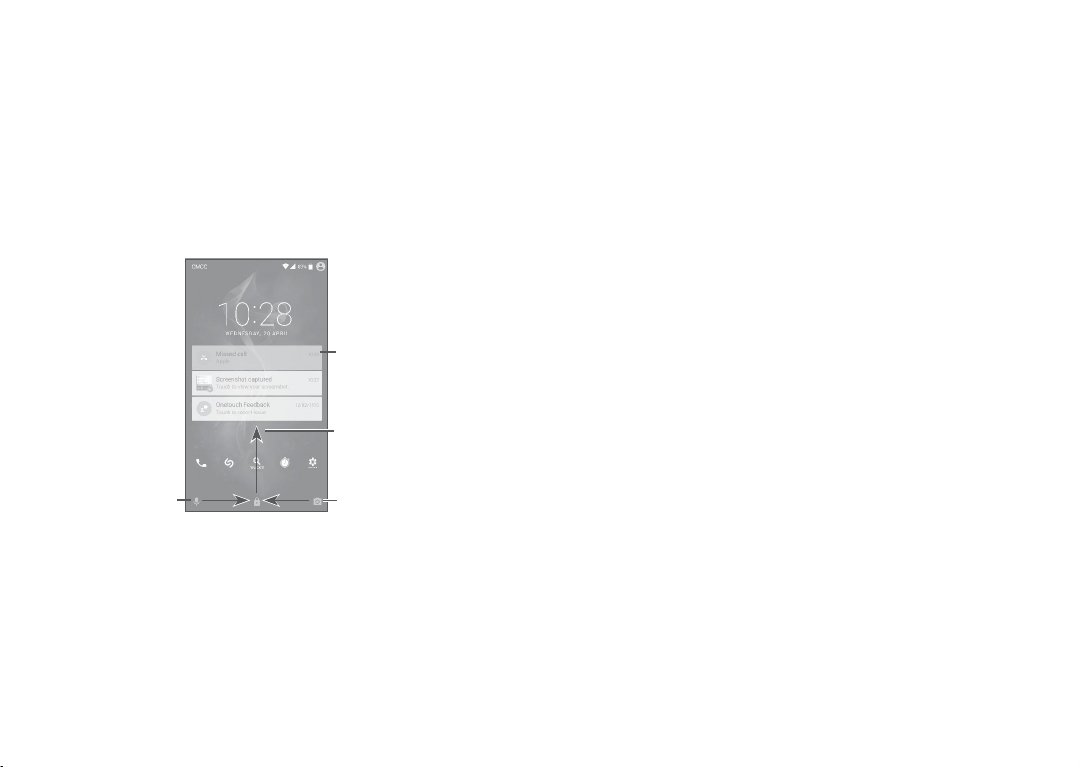
Tolockphone
Press
Tounlockthephone
Press
unlockpatternyouhavecreatedorenteryourPINor
If you
keytolightupthe
the
camera
righttoenterVoicesearch.
scr
een
thePowerkeyoncetolockthescreen.
scr
een
thePowerkeyoncetolightupthescreen,slidetodrawthe
havechosen
screen,
iconlefttoenter
Swipeasthe
thenswipeuptounlockthe
Camera
screenlock,
orswipe theVoice
Swipe
enterVoicesearch
rightto
1.3.5
Personalisingyour Home
Add
Youcanlong
Move
pressaf
mode,
anddragtheitemtoyourpreferredHomescreen.
older,an
scr
application
een
orawidgettoactivatethe
25 26
password,
you
screen,
Doubletouchtoent
thedetailedscreen
Swipe
thescreen
Swipe
enter
etc.
canpress
swipe
search
uptounlock
leftto
Camera
thePo
er
wer
icon
Reposition
Longpressan
YoucanmoveitemsbothontheHome
Holdtheicon ontheleftorrightedgeofthe
toanotherHomescreen.
Remov
Long
aftertheitemturnsred.
Createfolders
Toimprovethe
screenand
oneitemon topof
folder’stitlebartoinputthenewname.
Wallpapercustomisation
Long pressan empty area on the Home
WALLPAPERS tocustomisewallpaper.
1.3.6
Consultwidgets
Longpress
to
display
Touchtheselectedwidgetandslideit to movetoyourpreferred screen.
Consultrecently-usedapplications
Toconsultrecently-used
Touchathumbnailinthewindowtoopentheapplication.
item
e
press
and drag
anitemand
organisation
the
Favourite tray,
drag
another.
ittothe
desired
screen
andtheFavouritetray.
ituptothetopoftheXicon,andrelease
ofshortcutsor
you
To
applications
canadd
renameaf
screen,
themtoafolderbystacking
Widgetsandrecently-usedapplications
theempty
allwidgets.
area
onthe Home
applications,
screen,
thentouch
touchtheRecentapps
position
and
thenrelease.
screen
todragtheitem
ontheHome
older,openitandtouchthe
then to
uch
WIDGETS
button.
Page 14

Touchonethumbnailandslideitright/left ortouchXtoclosean application.
Touch at the bottom of the screento closeallthe running
applications.
1.3.7
Volumeadjustment
Usingthevolumekey
PresstheVolumekeytoadjustthevolume.Toactivatethevibrate
mode,press
Usingthesettingsmenu
FromtheHome
touchSettings>Sound¬ification>Soundtosetthevolumeo
media,
theVolumedownkeyuntilthephonevibrates.
screen,
touch toopentheapplicationslist,then
ringtone,
alarm,
etc.toyourpreference.
27 28
f
PowerKe
2
PowerKeysettingsare
Youcan setthePowerkeyto enablethefollowingfeatureswhilethe
screenisoff:
•
Press
•
Double
YoucansetthePowerkeytoenableoneofthefollowingfea
whilethescreenison:
•
Experience
•
Take
•
Triggeradesired
•
Trigger
•
Enhance
•
Press
•
Triggerspecial effect suchassequencechangewhenamovieis playing;
•
Double
thekeytolightupthescreen;
press
liveweatheranimations;
aninstantscreenshot;
audioeffectwhenasongormovieisplaying;
voicequalityduringacall;
thekeyfrom
press
y
available
at:Settings >PowerKey.
totakeaphoto;orlong
application;
Gallery
Moments tocreateaphotocollage;
totakeaphoto;orlong
press
totakeburst shots.
press
totakeburst shots.
tur
es
Page 15
Text
3
3.1
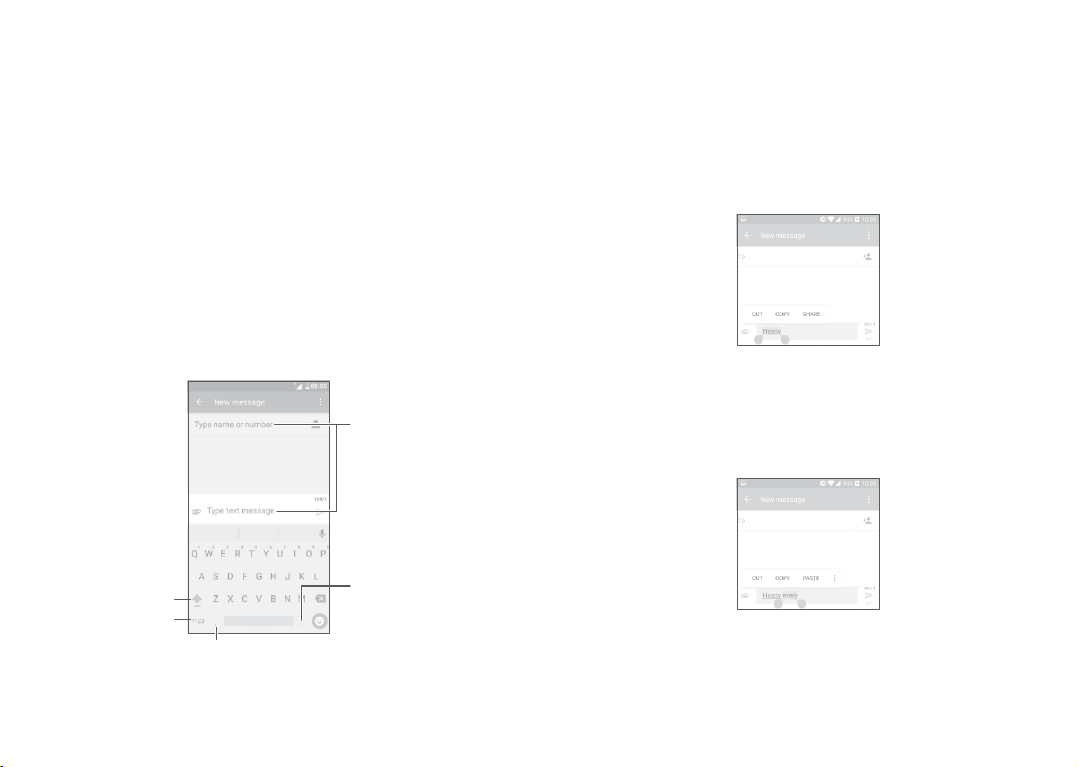
Onscreenkeyboard settings
GotoSettings>Language&
setupanda
Adjusttheonscreenkeyboard orientation
Turnthephone
orientation.Youcanadjustitby
>Display>Auto-rotate
3.1.1
input
Usingtheonscreenkeyboard
seriesofsettings
sideways
Androidkeyboard
input,touchthekeyboardyouwantto
will
become
oruprighttoadjustthe
changing
screen).
Long
to"abc/ABC"
numericke
S
witchbetw
"abc/Abc"
presstoswitch
S
witchbetw
symbol
yboard.
mode;
mode.
een
een
and
Long
press
options.
toshow
29 30
available.
onscreen
thesettings
input
keyboard
(Touch
Entertextor
Long
press
symbols.
Settings
numbers.
toselect
3.2
Textediting
Youcaneditthetextsyouentered.
•
Long
press
ordoubletouchwithinthetextsyouwanttoedit.
•
Dragthetabsto
•
Thefollowing optionswill show:SELECT
SHARE.
Youcanalsoinsertnewtextsifpreferred
•
Touchwhereyouwanttotype,orlongpressablankspace,the
cursorwillblinkandthetabwill
•
Ifyouhavecutorcopiedanytext,touchthetabtoshow
which
allows
change
youto
the
selected
paste
anytextyouhave
texts.
ALL,CUT,COPY and
show.
Dragthetabtomovethe
previously
PASTE
copied.
cur
sor.
Page 16
Call,CalllogandContacts
4
4.1
Call
4.1.1
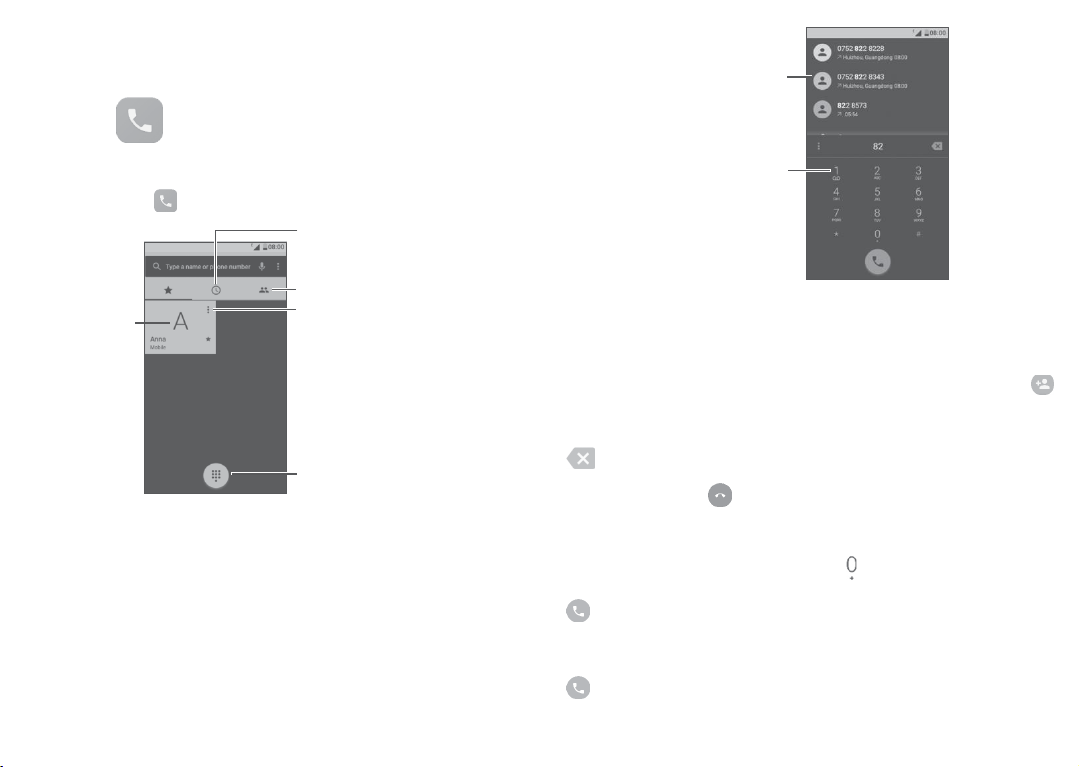
Makingacall
To
makeacall,
touch.
Callthe
previewed
number
31
Calllog
Contacts
Viewthe
contact’sdetailed
formation.Youcanalsoedit,
delete,
share
enda
Show
thecontact,ors
messagetothecontact.
thedialpad
D
ispla
numbers
pressto
email
place
or
touching
coverage,
y
the
call
orselectacontactfromCONTACT
tabs,
thento
tact.
dialthe
32
desired
make
thecall.
emergency
ThisworksevenwithoutaSIM
numberfromthe
numberand touch
suggested
Long
accessvoic
in
Enterthe
dialpadandtouchbattomto
S orRECENTS bysliding
Thenumberyouenteredcan besavedtoContactsbytouching
and
thentouchingCreatenewcon
Ifyou
makeamistake,
.
To
hang
upa
Internationalcall
Todialaninternationalcall,longpress toenter“+”,thenenterthe
internationalcountryprefixfollowedbythefullphonenumberand touch
.
Emergencycall
Ifyourphone hasnetwork
cardandwithouttypingthePINcode.
youcandeletetheincorrectdigitsbytouching
call,
touch.
to
makeanemergencycall.
Page 17
4.1.2
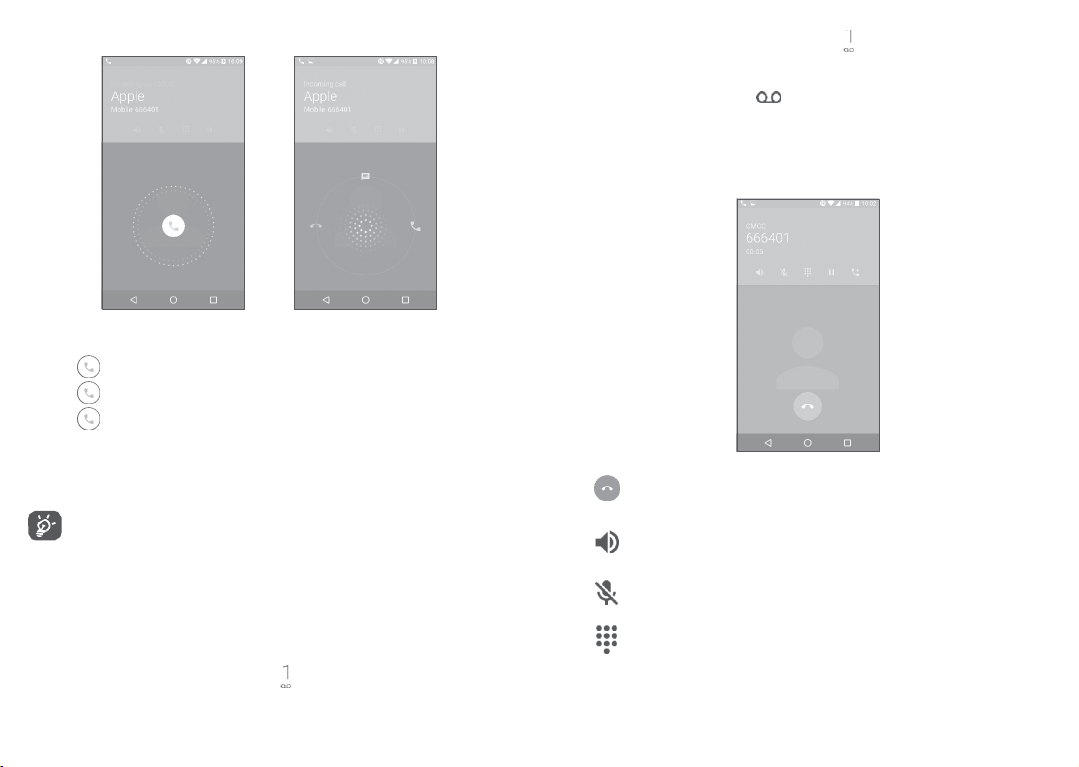
Answeringor rejectingacall
Whenyoureceiveacall:
•
Slide
totherighttoanswer;
•
Slide
tothelefttoreject;
•
Slide
Tomute anincoming
phoneover(when
isactivated).
4.1.3
Yourvoicemailisprovidedbyyournetworktoavoid
workslikean
To
upwardstorejectthecallby
theSettings>Gestures>Turnovertomuteoption
Foryour
convenience,
UI,whichensuresfunctionality,includingnormalcall,even
whenthephoneisheldin
Callingyourvoicemail
answeringmachine
access
your
voicemail,
longpress .
sending
call,press
yourphonefea
theVolumeup/down
reverse(upside-down)
thatyoucanconsultatanytime.
33
apreset
message.
key,
turesauniqueRever
position.
missingcalls.It
orturnthe
sible
To setyour voicemailnumber:Longpress, then touch
NUMBER >Voicemail >Setup>Voicemail
Ifyoureceiveavoicemail,
NotificationpanelandtouchNewvoic
4.1.4
Duringacall
Toadjustthevolumeduringa
call,press
number.
appears
onthe
email.
theVolumeup/downkey.
Statusbar.
Endthecurrentcall.
Touch
oncetoactivate
Touchthisicon
Touchoncetomutethecurrent
tounmutethecall.
Display
thedialpad.
the
speaker
againtodeactivatethe
34
duringthecurrentcall.
call.
speaker.
Touchthisiconagain
ADD
Openthe
Page 18

Touchoncetoholdthecurrent
thecall.
OpenAddcallorStartrecordingoption.
call.
Touchthisicon
again toretrieve
To avoid
the
closetoyourear;anditwillbeunlockedwhenthephoneis
taken
4.1.5
Managing
Withthisphoneyoucan
Swapcalls
Whenyouaccepttwo
twolines.
theothercall.
Conferencecalls
Thecurrentcallwillbeputonholdandyouareabletojoin
Youcansetupaconferencecallasfollows.
•
Place
acalltothefirstparticipantoftheconferencecall.
•
Touch andselectAddcall.
•
Enter the phone number of the personyou want to add to
conferenceandtouch
.
YoucanalsoaddparticipantsfromCalllogorContacts.
•
Touch tostarttheconference.
•
Touch toendtheconferencecalland
(1)
Dependingonyournetwork
screen
away
(1)
accidental
willbe
fromyour
operation ofthetouchscreen
lockedautomatically
ear.
multiplecalls
handle
multiple
calls,
touch
operator.
whenyouputthephone
calls
atthe
,
youcannowswitchbetw
disconnect
35
same
allcallers.
duringacall,
time.
een
4.1.6
Callsettings
Touch fromtheCallscreen,thentouch
optionsareavailable:
Settings.Thefollo
wing
Displayoptions
•
Sortby:Touchtosortthelistbythefirst
•
Nameformat:Touchtochoosewhethertodisplayfirstname
orlast
name
fir
st.
vibrat
e
Soundsand
Touchtosetincomingcallringtone,andmarkthe
name
orlastname.
checkbox
toenable
dialpadtonesorvibrateforcalls.
Quickresponse
Editquick
responses
whichwillbeusedwhen yourejectacallwitha
message.
Callingaccounts
•
Dualcallsettings:
-Voic
email
select
SIM1orSIM2tosetunderoptions.
Service:Opensadialogbox whereyoucanselectyouroperator’s
voicemailservice
Setup: If youare
oranotherservice.
using
your
operat
or’svoicemailservice,
adialogboxwhereyoucanenterthephonenumbertousefor
listening
toand
toinserta
afterthephone
pause
intothe
number.
Sound:Touchtosetthesoundwhenanew
Mark the checkboxto enablevibration when anew
managing
your
voicemail.
number—for
36
You
can
example,toadd
voicemail
entera
comma (,)
apassword
arrives. Vibrate:
voicemail
fir
st,
thisopens
arrives.
Page 19
-FixedDiallingNumbers
Fixeddialling
calls
addedtotheFDNlist.The mostcommonpracticalapplicationo
FDNisforparents torestrictthephonenumberstowhich
children
FDNbyenteringSIMPIN2whichisusuallyacquiredfromyour
service
-Vibrationreminder
Turnon to
-ServiceDiallingNumbers
Youcan
-Turnonvideocalling
Markthe
-GSMcallsettings
Callforwarding:Touch toconfigurehowyourcallsareforwarded
whenyourphoneis
Additionalsettings:TouchCallerIDtouse defaultoperator
settingstodisplayyournumberinoutgoingcalls.MarktheCall
waiting
Callbarring:Touchto configurecallbarringsettings.Markthe
checkboxtoactivatethecallbarringforoutgoingandincoming calls.
4.2
Calllog
Youcan
missedcalls,
number
(FDN)
isa
arerestrictedtoaset ofphone
candial.
For
securityreasons,
providerorSIM
enable
place
acallfromtheSDNlist.
checkboxtoenable
busy,unanswered
check
boxtonotifyyouofnew
access
yourcalllogbytouching fromtheCallscreento view
outgoing
calls
SIMservicemode,
maker.
vibratewhencallconnects.
videocalling.
andincomingcalls.
numbers.These
you’llbepromptedtoenable
orunreachable.
incomingcalls
duringacall.
whereoutgoing
numbersare
37 38
their
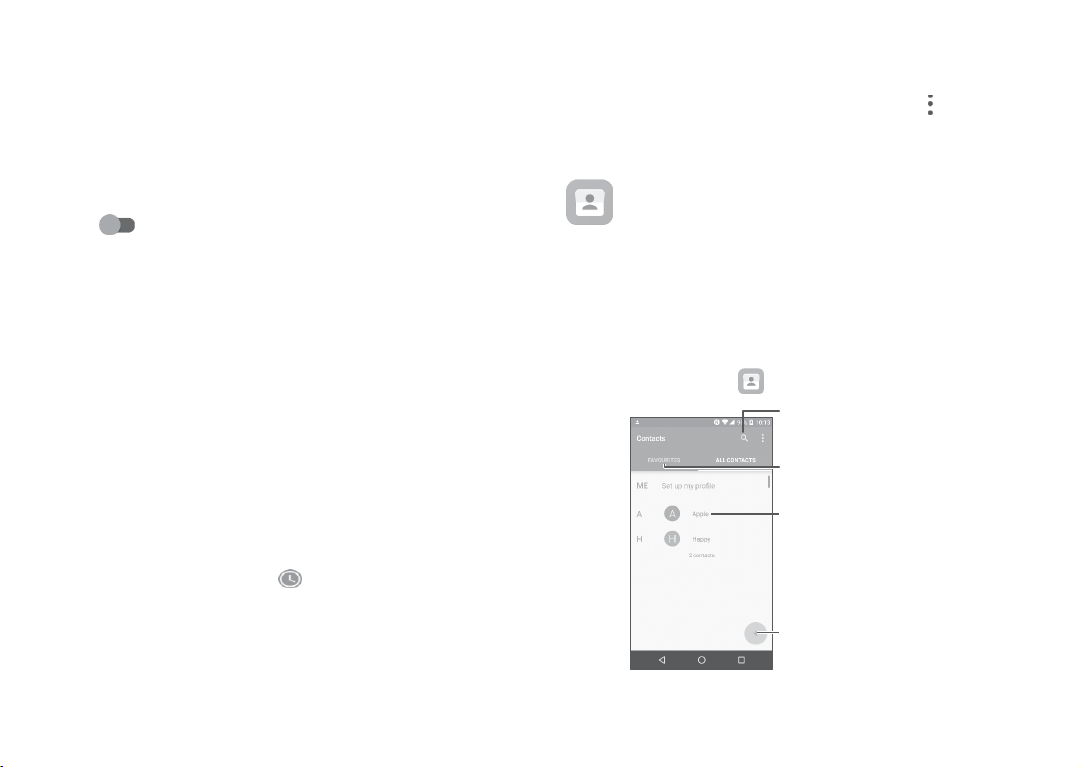
Touchacontactornumbertoviewinformationorfurtheroperations,
youcanlaunchanew
detailedinformationofthe
f
TouchViewfullcallhistorytoviewall
logto
clear
theentirecall
call,
send
call,orclear
memory.
SMS
tothecontactor
thecall.
calllogs.
Touch andClearcall
4.3
Contacts
reach.
Youcanviewandcreatecontactsonyourphoneandsynchronise
themwithyourGmailcontactsorotherapplicationsontheweb
onyourphone.
4.3.1
To
Contacts
Consultyour Con
see
your
contacts,
enables
quickandeasy
tacts
touch.
access
SearchinContacts
Viewyourfavorites
Openthe
Longpresstoselectcontact(s)
todelete
Addnewcontact
Quick
number,view
tothecontactyouwantto
or
contactpanel
Page 20
Deleteacon
Long
andconfirmtodelete.Touch toselectall
andconfirmtodeleteallcontacts.
tact
press
thecontactyouwantto
delete,
Thecontactyouhavedeletedwill
applications
onthe
phone
orwebthenexttimeyousynchronise
yourphone.
then touch
contacts,
also
beremovedfromo
thentouch
ther
Touch todisplaythecontactslistoptionmenu, followingactions
areenabled:
•
Contactsto
Choose
contactsto
display.
display
•
Mergecontacts
•
Import/Export Importorexportcontacts betweenphone,SIM
•
Blockedcontacts Touchtoviewyourblockedcontacts.Youcan
•
Accounts
•
Settings Touch to
Select
duplicatecontactstomerge.
card,microSD
also
unblockthem.
Manage
cardandphone
the
synchronisationsettings
accounts.
change
the
display
ofthesortlistand
storage,
etc.
for
differen
t
contactnames.
4.3.2
Addingacon
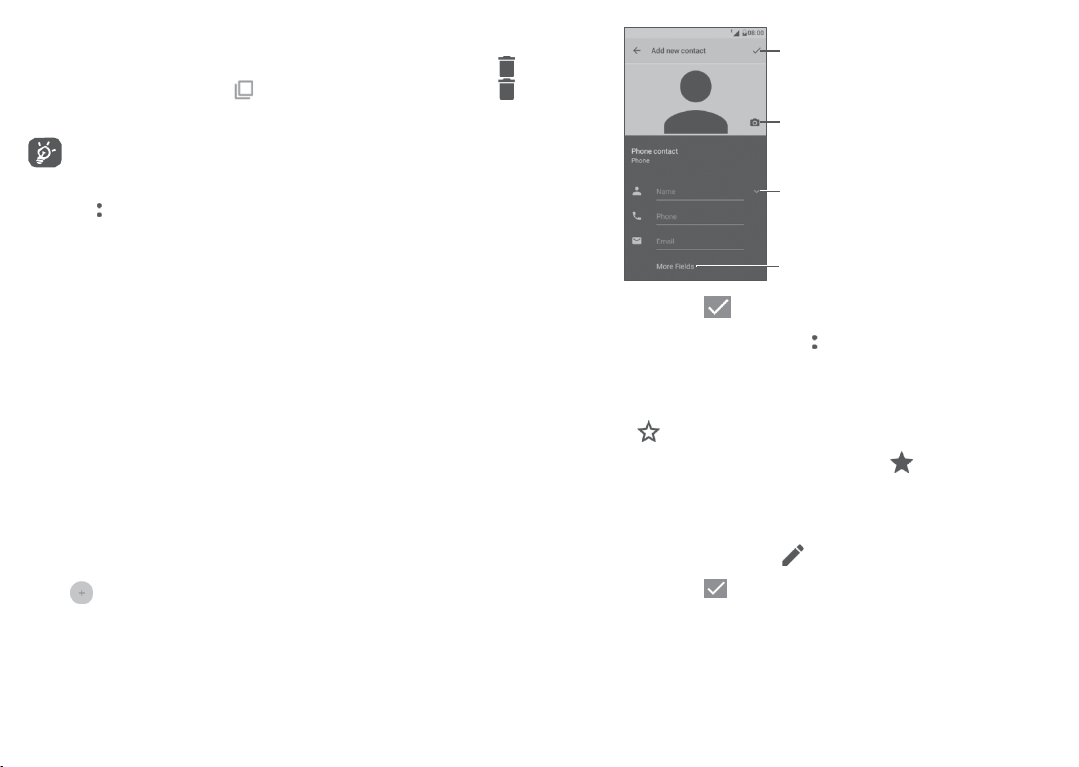
Touch inthecontactlisttocreateanewcontact.
Youarerequiredtoenterthecontact'sname andothercontact information.
By
scrolling
tact
upanddownthe
screen,
youcanmovefrom
39
onefieldto
ano
ther.
When
finished,
icontosave
Select
aphotoforthecontact
Touchtoopen
Touchto
When
finished,
Toexitwithout saving,youcantouch andthentouchDiscard changes.
Addto/Removefrom Favourites
Toaddacontacttofavourites,
thentouch toaddthecontacttofavourites.
To
remove
details
4.3.3
Toeditcontactinformation,touch inthecontact
When
Changea contact’sdefaultphonenumber
(1)
Onlyphonecontactscanbe
touch tosave.
acontactfromfavourites,
screen.
Editingyour con
finished,
touch tosave.
tacts
(1)
you
can
touchacontacttoviewdetails
touch thestar onthecontact
added
toFavourites.
40
touchthe
apictureortake
available
expand
fields
details
labels
screen.
Page 21
You cansetthedefaultphonenumberforacontactwithmorethan
one
number.
Thedefault phonenumber(the numberwhichhaspriority when
making
acallor
contactname.
To
change
and
select
4.3.4
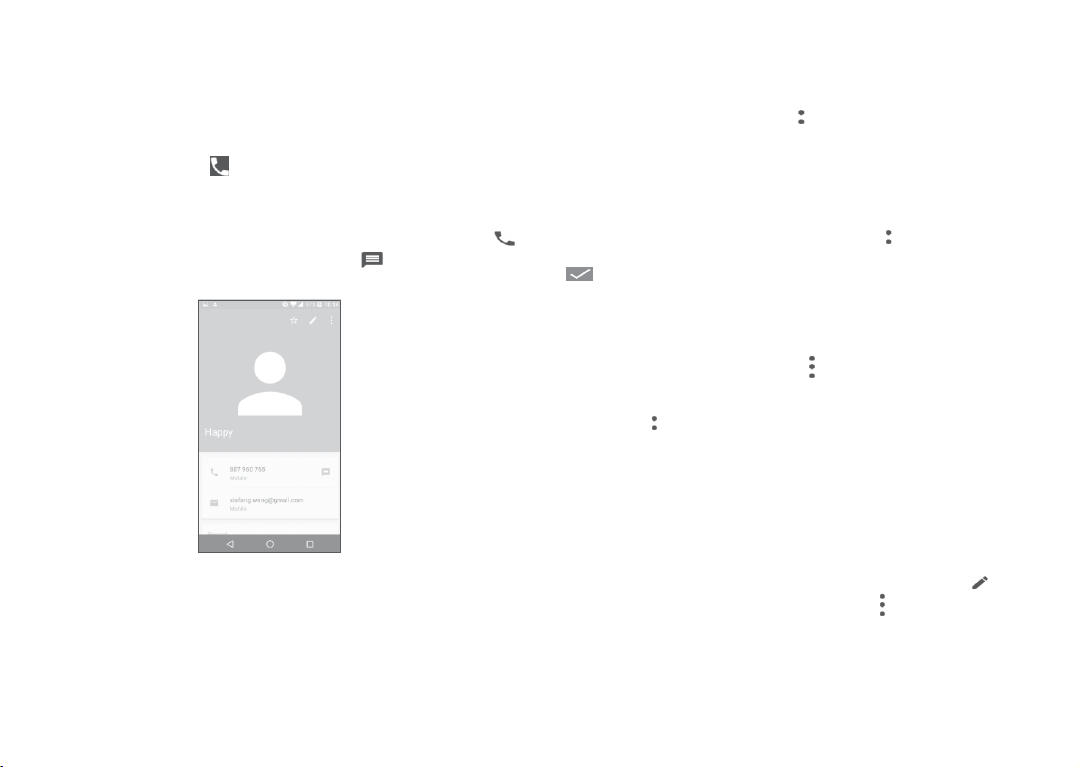
TouchacontacttoopenQuickcontactforAndroid.Youcanthen touch
orthenumberto
sendingamessage)
thedefaultphone
Set
default. Then will
UseQuickcontactforAndroid
makeacall.Tosendamessage,
will
alwaysbedisplayed
number,long
appearahead
underthe
press
thedesired
ofthe
touchtosendamessage.
number
number.
,
Theiconsavailableon the Quick contact paneldependon the
informationyouhaveforthecontactandtheapplications and
accounts
onyourphone.
41
4.3.5
Importing,exportingandsharingcon
This phone
phone,SIMcardandphonestorage.
FromtheContacts
I
mport/Export,thenselectto
accounts,
Youcan
contact'svCardtothemviaBluetooth,
Touchthecontactyouwanttoshare,touch andSharefromthe
contact
4.3.6
Youcanconfigure whichlistofcontacts,foreachaccount,youwan
to
fromcontactslistscreen,thenyoucanchoosewhichcontactsto
Touch andSettingstosortthelistbytouchingFirstnameor
name,aswellasviewingcontact
orLastname
4.3.7
Toavoidduplication,youcanaddanynewcontactinformationto
existing
Touchthecontactwhichyouwanttoaddinformationto,touch
theeditcontact
(1)
SIM
shareasingle
detailsscreen. Select
,
andthen
Displayingcon
display
inthe
first.
Joining/Separatingcon
contactsina
Only
applicable
enables
youtoimportorexportcontactsbetweenyour
screen,
touch toopentheoptions
card,Phone,
select
the
Contacts
import/e
internal
storage,
contactorcontactswithothersby
application
tacts
list.Touch andtouchContactsto display
the
toperformthisaction.
names
tacts
single
action.
screen,
thentouch
forphonecontacts.
again
42
xport
Gmail,
bytouchingFirstname
(1)
tacts
contactsfrom/to your
microSD
number
andtouchJoin.
card,
etc.
youwantto
etc.
menu.
share
sending
andtouch
display.
Touch
Last
fir
t
oenter
the
st
t
Page 22
Atthistime,youarerequiredtoselectthecontactwhoseinf
youwantto joinwith thefirst contact.Theinformationfrom the
secondcontactisaddedtothefirstone,andthesecondcontact
nolongerbe
To
separatecontactinformation,touchthecontactwhoseinf
youwantto
touch
4.3.8
Contacts,
accounts,depending
Toaddan
>Addaccount,
Accounts>Addaccount.
Youarerequiredtoselectthekindofaccountyouareadding,like
Google,Corporate,etc.
Aswithotheraccount
like
Youcanremoveanaccountandall
phone.Touchtheaccountyouwanttodelete,touch andselect
Removeaccount,
Auto-s
Onthe Accounts screen,touch andmarkthe Auto-syncdata
checkbox.
onlinewillbe
displayed
separate,touch toentertheeditcontact
again
andtouch
intheContactslist.
Separate.TouchOKtoconfirm.
Synchronisingcontactsin multipleaccounts
dataorother information
account,
username,password,
ync
When
onthe
touch fromthe
orfromtheHome
setups,
andthenconfirm.
activat
automaticallysynchronised
ed,
applicationsinstalled
screen,
youneedtoenter detailedinformation,
etc.
all
changes
canbesynchronised
onyourphone.
contacts
listandtouch Acc
touch thenSettings>
associated
informationfromthe
toinformation onthe phone
with
eachother.
screen,
orma
tion
will
orma
tion
then
frommultiple
ounts
43
or
Messaging
5
andEmail
5.1 M
Tosenda
5.1.1
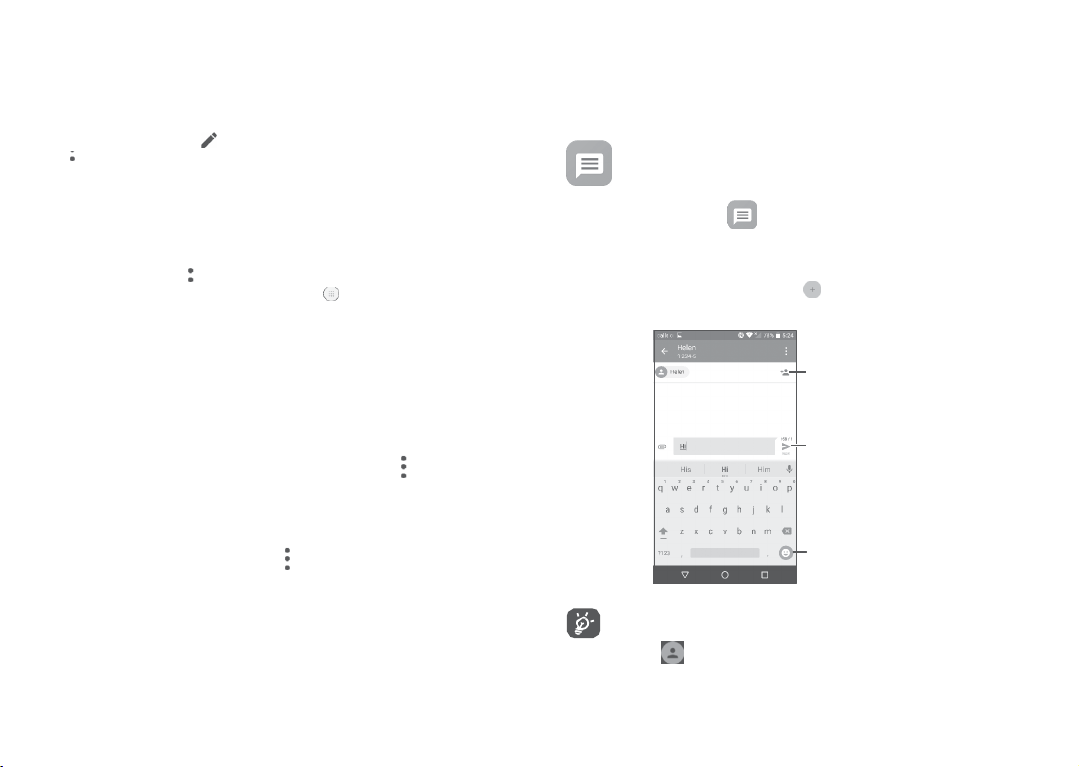
On the messagelist screen,touch to write te
messages.
essaging
Youcancreate,
message,
Writeanewmessage
editandreceive
touch.
SMS
andMMS withthisphone.
Addrecipients
Send
thetextmessage
Insert
44
emoticons
tacts.
For
savedcontacts,
paneltocommunicate
touch toaddthenumbertoyourCon
touch thephototoopenthe Quickcontact
withthecontact.For
xt/
unsaved
multimedia
contacts,
Page 23

Sendingatextmessage
Enterthe
name
orthephonenumberoftherecipientintheTobar
Sendmessagebartoenterthetextofthe
toinsertemoticons.When
AnSMS
message
severalSMS.
youhow
Sendingamultimediamessage
Thereisacounterontherightofthetextboxtoremind
manycharacters
Specific
letters(accented)
This
maycause
MMSenablesyoutosendvideo
slides
and
sounds
finished, t
ofmorethan160characterswillbechargedas
areallowedtobeenteredinonemessage.
multiple
SMS
clips,images,
toother
compatiblemobiles
toadd
message.
ouch
will
alsoincrease
Touch
tosendthetextmessage.
the
tobesenttoyourrecipient.
photos,
anima
ande-mailaddresses.
recipients.
size
oftheSMS.
tions,
or
Touchthe
touch
AnSMSwillbeconvertedtoMMSautomaticallywhenmediafiles
(image,video,audio,slides,etc.)areattachedorsubjectoremail
addresses
Tosendamultimedia
areadded.
message,
entertherecipient'sphonenumberin
theTobar and touchtheSendmessagebar toenterthetextofthe message.
Touch toopentheoptionsmenu,touchAddsubjecttoinserta
Touch toattachapicture,video,audioorcontact..
When
finished,
touch tosendthe
multimedia
message.
subject.
5.1.2
Managemessages
Whenreceivingamessage, willappearonthe
notification.Dragdownthe
touchthenew
message
Messagingapplication
Status
bartoopentheNotificationpanel,
toopenandreadit.Youcanalso
andtouchthe
message
toopen
access
it.
Status
the
barasa
45
Messages
Toucha
•
•
•
•
5.1.3
Onthe
are
displayedas
message
conversation.
toenter the
messagecomposing
Touch tocallthenumber;
Touch to
ifthenumber
Toreplytoa
message,
contact,etc.When
Ifyoulongpressa
save
the
has
beensaved;
numbertocontacts
enterthetext,ortouch toinsertquicktext,
finished,
touch.
message,
copytext,forward,view
to
save
the
message
toSIMcard.
Adjustmessagesettings
message
list
screen,
touch and
screen:
orviewthecontactdetails
thefollowingoptionswillbeavailable:
details ,
selectSe
delete
ttings.
GENERAL
•
SMSenabled Opentheoptions
•
Quicktext Touchtoeditquick
dialog
change
yourdefault
ortouchSMSapp
SMS
app.
responsete
xt.
Storage
•
Deleteold
messages
•
Textmessagelimit Touchto setthemaximumnumberof te
•
Multimedia
messagelimit
Select
to delete old messageswhen the
maximumnumber of stored messages is
reached.
messages
tobe
saved
perconversation.
Touch to set th e maximum number of
multimedia messagesto be savedper
conversation.
46
etc.,
xt
touch
to
Page 24

Notifica
tions
•
Notifications
•
Selectringtone Touch toselectaringtoneasanew
•
Vibrate
WAPmessagesettings
•
WAPmessage
enable
CellBroadcastsettings
•
Cellbroadcast Markthecheckboxtoenable receiptofcell
•
SelectCBringtone TouchtoselectCBringtonewhenreceiving
•
EnableCB
indicator
•
Enablelightup
scr
•
Vibrate
•
Cellbroadcast
LED
een
settings
•
Emergencyalerts Touch to enter emergencyalert setting
Select
todisplay
Status
bar.
message
notificationsinthe
notificationtone.
Select
tohavephonevibrateasanotifica
when
receiving
anewmessage.
Touchto enablereceipt of push
fromnetw
ork.
broadcast
cell
Markthe
messages.
broadcast
messages.
checkboxtoenableCBLED
Mark the checkboxto light up the screen
when
receiving
Select
when
receiving
Touch to select channels and configure
languages.
newcellbroadcast.
tohavephonevibrateasanotifica
anewmessage.
messag
tion
messag
indicator.
tion
includingwhethertoshowthreatsandalert tones.
47 48
es
ADVANCED
Textmessage(SMS)settings
•
e
Deliveryreports
•
Manage
SIM
messag
es
•
SMSServiceCentre Touch to edit or view the servicecentre
•
Validityperiod Touchto selectthe validity period,during
Select
torequestadeliveryreportforeach
text
message
yousend.
Touchto
manage
text
messages
storedinyour
SIMcard.
number.
whichthenetworkproviderwillcontinueto
•
Alphabet
trytosendthemessage.
Touchto
select
the Alphabetmode.
management
•
SMSsignature Markthecheckboxtoenableasignaturefor
the
message
you
send.
•
EditSMSsignature Touchtoedit
SMS
signature.
Multimediamessage(MMS)settings
•
Deliveryreports
•
Readreports
•
Auto-retrieve
Select
torequestadeliveryreportforeach
multimedia message
Select
yousend.
torequestareportonwhethereach
recipienthasreadamultimedia
byyou.
Select
to downloadthe full MMSmessage
message
sent
(includingmessagebody and attachment)
s,
automatically to your
downloadonlytheMMS
phone. Otherwise,
message
header.
Page 25

•
Roamingauto-
retrieve
Select
todownload thefullMMS
messag
(includingmessagebody and attachment
automatically whenroaming.Otherwise,
downloadonlytheMMS
message
headerto
avoidextracharges.
•
Creationmode
•
Maximummessage
Selecttochange
Select
toinputthe
creationmode.
maximummessage
size.
size
•
Priority Touchtosetthe
priority.
5.2
Email
E
mail
ortocreateanew
YoucanalsosetupexternalPOP3orIMAPemailaccountsinyour phone.
email
account.
Tosetupyouremailaccount,touch fromtheHome
Thefirsttimeyousetupyour
selectEmail.
Anemailwizardwillguideyouthroughthestepstosetupanemail account.
•
Entertheemail
•
TouchNext.Iftheaccountyouenteredisnotprovidedbyyour
service
account
can
touchManualsetup todirectlyenterthe
settingsforthe
•
Entertheaccount
•
Toadd anotheremailaccount,youcantouch ontheupperleft
cornerand
address
providerinthe
settingsscreen
email
name
select
Settings.AndthentouchAddaccount.
andpasswordoftheaccountyouwantto setup.
phone,
toenter
accountyouaresettingup.
and
phone,
you
canselecttouseane
screen,
youwillbepromptedtogototheemail
settingsmanually.Alt
displayname
inoutgoingemails.
erna
tiv
incoming
ely,you
andoutgoing
49
e
xisting
then
Tocreateandsendemails
)
•
Touch fromtheInboxscreen.
•
Enterrecipient(s)emailaddress(es)
•
If
necessary,
touchCc/Bcc toaddacopyorablindcarboncopyto
themessage.
•
Enterthesubjectandthecontentofthemessage.
•
Touch toaddanattachment.
•
If youdonotwantto
SavedraftortouchtheBackkeyto
•
Touch tosend.
Ifyoudonotwanttosendorsavethe
then
selectDiscard.
Toadda
signature
the
accountwhereyouwant tocreateormodifythe signature,
touch
Signature
toyour
toedit.
send
themailright
emails,
intheTofield.
away,
you
can
saveacopy.
email,
youcantouch and
touch andselect
50
touch and
Settings,
then
choose
Page 26
Calendar,Clock,and
6
Calculator
6.1
Calendar
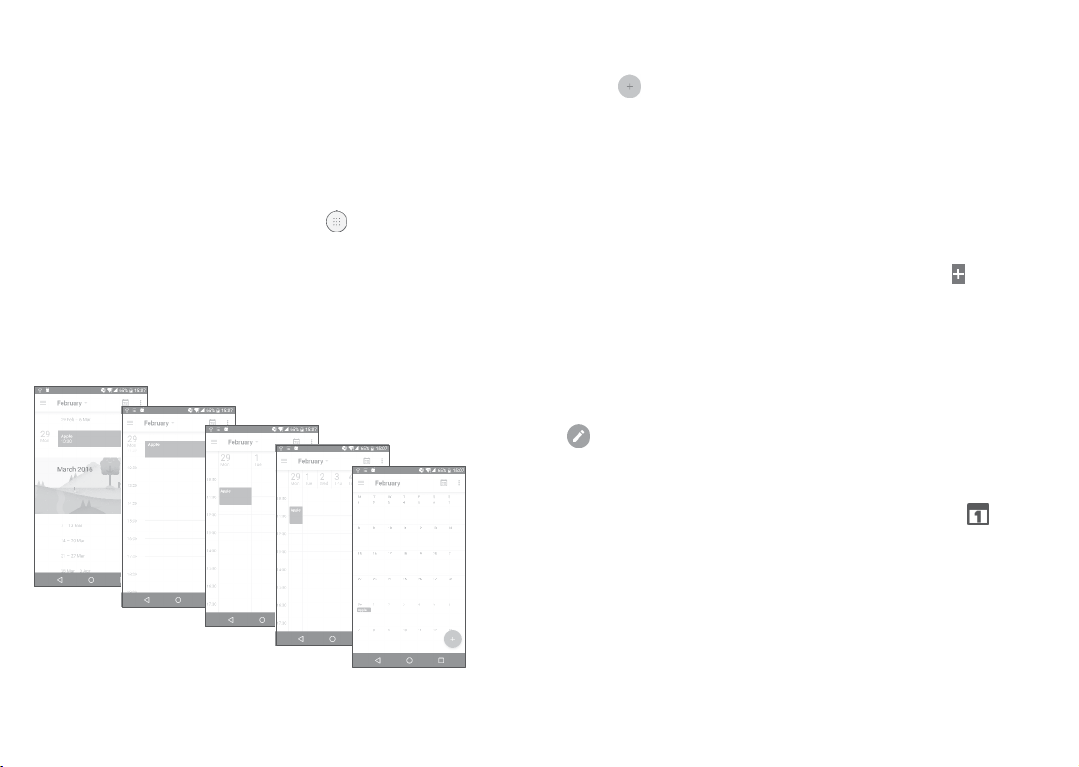
You can use Calendar to keep track of important meetings,
appointments,
Toviewthecalendarandcreateevents,touch fromtheHome
screen,
6.1.1
YoucandisplaytheCalendar bySche
Month.
etc.
thentouchCalendar.
Multimode
view
Schedule
view
dule,Day,3-day,Week,or
Dayview
3-day
view
Week
(1)
Theiconwillvarywithdate.
51
view
6.1.2
Tocreatenewevents
Month
view
Youcanaddnew eventsfromany
•
Touch.
•
Fillinallrequiredinformationforthis new event.Ifitisawhole-day
event,youcanselectAll-day.
•
Invitegueststotheevent.Entertheemail
wanttoinvitewith
aninvitationfrom
•
When
finished,
ToquicklycreateaneventfromtheWeekview
spottoselectatarget
theicontocreatethenew event.
Beforeyoucanaddanevent,youmustaddatleastoneCalendar
accountand
6.1.3
Todeleteoreditaneven
Todeleteoreditanevent,touchtheeventtoenteritsdetailsscreen, touch
toedittheevent,andtouch
6.1.4
Eventreminder
Ifareminderissetforanevent,theupcomingeventicon
appearonthe
Touchanddragdownthe
touchanevent
Touch
theBackbuttonto
andtheNotificationpanel.
commastoseparate.The
Calendar
touchSAVEfromthetopofthescreen.
area
makeacalendar
Status
barasanotificationwhentheremindertime arrives.
name
toview the
keep
Calendar
andEmail.
whichwillthenturn ,andtouch
visible.
t
DELETE
Status
bartoopentheNotificationpanel,
Calendar
the
reminderspending
view.
addresses
todelete.
notificationlist.
52
oftheguests you
guests
willreceive
screens,
touchan empty
inthe
Status
will
bar
Page 27
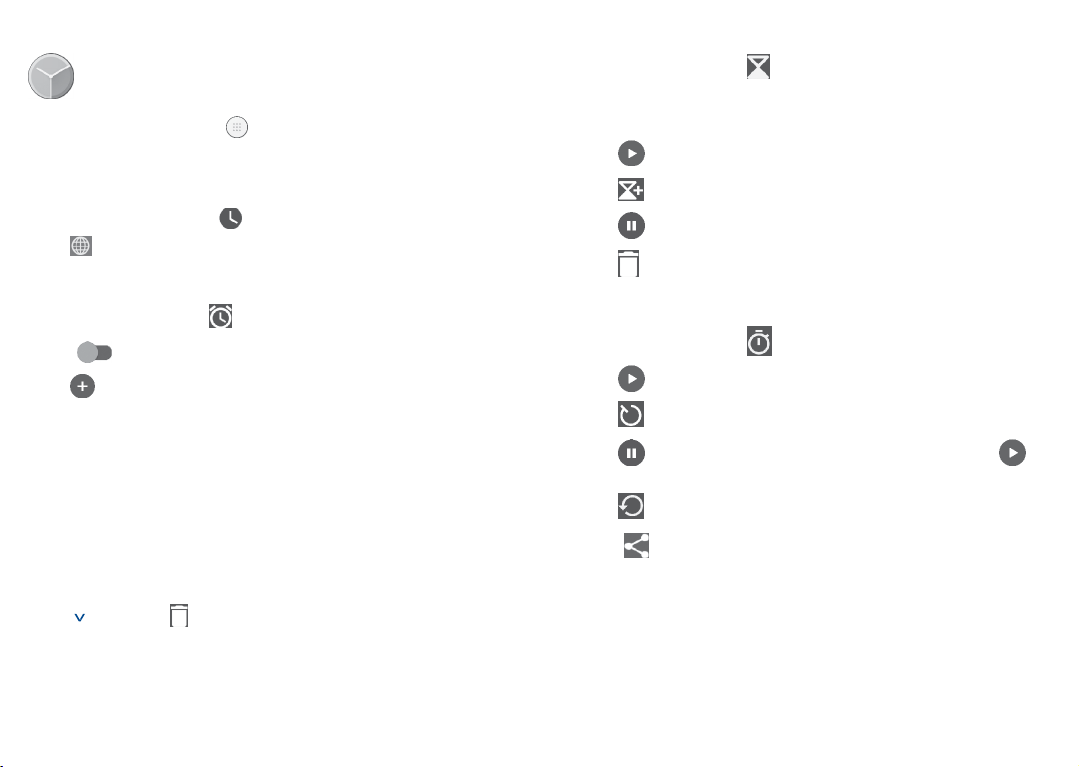
6.2 Clock
Yourmobilephone
has
abuilt-inclock.
Toviewthe currenttime,touch fromthe Home
Clock.
6.2.1
Worldclock
Toview theworld
clock,
touch onthe Timescreen.
Touch toaddatimezone.
6.2.2
Alarm
FromtheTime
Turnon to
Touch toaddanew
•
Time Touchtosetthe
•
Repeat Touchtoselectthe
•
Ringtone Touchto
•
Vibrate
•
Label Touchtoseta
screen,
touch toenter theAlarmscreen.
enable
thealarm.
alarm,
thefollowingoptionswillappear:
alarm
time.
days
whenyouwantthe
select
aringtone forthealarm.
Select
toactivatevibration.
name
forthealarm.
screen,
thentouch
alarmto work.
6.2.3C
ountdown
FromtheTime
•
Enterthetime.Thetime
numbersequence.
•
Touch toactivatecountdown.
•
Touch tosetthecountdowntimeinpanel.
•
Touch to
•
Touch todeletecurrentcountdownlabel.
6.2.4Timer
FromtheTime
•
Touch tostartthetimer.
•
Touch toshowalistofrecords
•
Touch tohaltthetotalandlap
screen,
touch toenter theCountdownscreen.
should
betypedin
deactivatecountdown.
screen,
touch toenter theTimerscreen.
according
times. These
istouched.
•
Touch todeletetherecord.
•
Touch toshare.
second,
minuteandhour
totheupdatedtime.
willonlyrestartafter
Touchacurrently
existingalarm
toenter the
Touch thentouc h todeletethe
selected
53
alarm
editingscreen.
alarm.
54
Page 28
6.2.5
AdjustClocksettings
Touch andthenSettingstoadjustthefollowingoptions:
Clock
•
Style Touchtosettheclockstyletoanalogue
•
Automatic home
clock
Mark the checkboxto enablethe
whentravellinginanareawherethetimeis
or
different,addaclockforhome.
•
Hometime zone TouchtosetHometimezone.
•
ChangeDate&
time
Touchto enableautomaticdata&time,or
change
time
manually.
A
larms
•
Silenceafter Touchtosetatemporaryturnofftimeforan alarm.
•
Snoozelength Touchtosettheduration ofalarms.
•
Alarmvolume Touchtoset
•
Graduallyincrease
volume
•
Volumebuttons Touch to set side Volume up/down key
Touch to select the duration after which the
alarmvolumeincreases,or disablethis function.
behaviours
alarm
when
volume.
alarmsounds:
None,Snooze
orDismiss.
•
Startweekon Touchto
T
imers
•
Timerringtone Touchto
choose
thestartofaweek.
select
thetimerringtone.
55
digital.
function
6.3
Calculator
Tousethe
calculator,touch fromtheHomescreen,thentouch
Calculator.
Therearetwo
Toswitchbetween
•
Swipe
calculation.
Orturnthephonetothe
toopenthescientific
panelsavailable:Basic
panels,select
the
basic
calculationscreentothelefttoopenthescientific
landscape
calculation.
paneland
Advanced
oneofthefollowingtwoways:
orientationfromthe
Thisoptiononly
basic
available
panel.
panel
ifSettings
>Display>Whendeviceisrotated>Rotatescreencontentsison.
Enter anumberand thearithmeticoperationtobeperformed,ent
the
second
number,
deletedigitsonebyone,longpress todeleteallatatime.
thentouch“=”to
display
56
the
result.
Touch
to
er
Page 29

Gettingconnected
7
Toconnectto the internet with thisphone,youcanuseGPRS/
EDGE/3G/4GnetworksorWi-Fi,whicheverismostconvenient.
7.1
Connectingtotheint
7.1.1
GPRS/EDGE/3G/4G
ThefirsttimeyouturnonyourphonewithyourSIMcardinserted,
willautomaticallyconfigureyournetworkservice:
Ifthenetwork isnot connected,youcanturn onmobiledatain
Settings>Data
To
check
>Mobilenetworks>AccessPointNamesorNetwork
Tocreateanewaccesspoint
Anew
phonewiththefollowingsteps:
•
TouchSettings >More>Mobilenetworks>AccessPointNames.
•
Touch toenter therequiredAPNinformation.
•
When
Toactivatedataroaming
•
TouchSettings >More>Mobilenetworks.
•
TouchDataroamingand
roaming
•
Whendataroamingis
withaWi-Ficonnection(refer to“7.1.2Wi-F
usage�
thenetwork
GPRS/EDGE/3G/4G
finished,
touch andtouchSave.
only,Allnetworks.
ernet
connection
disabled,
you
networkconnection
chooseRoamingmodes:Disable,National
youcanstillperformdataexchange
GPRS,
EDGE,3G or4G.
are using,
57 58
touchSettings>More
operators.
canbeadded
i
”).
it
toyour
Tosetpreferrednetworkmode
•
TouchSettings>More>Mobilenetworks >Preferred network
7.1.2Wi-F
Youcanconnecttotheinternetwhenyourphoneiswithinrangeo
a
wireless
SIMcardinserted.
ToturnWi-Fionandconnecttoawirelessnetwork
•
TouchSettings >Wi-Fi.
•
Turnon.
•
OnceWi-Fiisturnedon,detectedWi-Finetworksarelisted.
•
TouchaWi-Finetworktoconnecttoit.Ifthenetworkyouselected
is
(you
touchCONNECT.
Toactivatenotificationwhenanewnetworkisdet
WhenWi-Fiisonandthenetworknotificationis
iconwillappearonthe
available
thenotificationfunctionwhenWi-Fiison:
•
TouchSettings >Wi-Fi.
•
Touch andthenAdvanced.
•
Turnon
ToaddaWi-Finetwork
WhenWi-Fiis
preference.
•
TouchSettings >Wi-Fi..
i
network.Wi-Ficanbe usedonyourphoneevenwithouta
secured,
you arerequiredtoentera
maycontactthenetworkoperatorfor
Status
wirelessnetworkwithin
beside
on,
you
barwheneverthephonedetectsan
range.
Networknotification.
may
addnewWi-Finetworks
password
details).
Thefollowingstepsactivate
orothercredentials
Whenfinished,
ected
activat
ed,
according
theWi-F
toyour
mode.
f
i
Page 30
•
Touch andthenAddnetwork.
•
Enterthe
name
ofthenetwork
•
TouchSAVE.
Toforget aWi-Finetwork
Thefollowing
younolongerwishtouse.
•
TurnonWi-Fi,ifit’snot
•
OntheWi-Fi
•
TouchFORGET inthe
steps
screen,
prevent
andanyrequired
automaticconnections
already
on.
touchthe
dialog
name
thatopens.
ofthe
networkinformation.
tonetworkswhich
savednetw
ork.
7.2 Browser
UsingtheBrow
Tosurfthe
Togotoawebpage
OntheBrowserscreen,touchtheURLbaratthetop,enterthe
address
web,
oftheweb
ser,youcanenjoysurfingtheWeb.
touch fromtheHome
page,
thencon
screen,
firm.
thentouchBrow
59
Search
andgotothisaddress
Delete allcontents
Gotothe
suggested
website
Tosetahomepage
•
ser.
Touch from
>Homepage.
•
Chooseapage
•
IfyouchooseOther,enterthe
as
your
Viewingwebpages
Whenopeningawebsite,youcannavigateonweb
yourfingeronthescreeninanydirectiontolocatetheinf
youwantto
Browserscreentodisplay
ormostvisitedwebsiteasyour
homepage,
touchOKtoconfirm.
view.
option
menu,
homepage.
URL
ofthewebsiteyouwanttoset
pages
60
touchSettings
bysliding
orma
tion
Page 31

Tofindtextonawebpage
•
Touch fromBrowserscreentodisplayoptionmenu,andtouch
Findon
page.
•
Enterthetextor
•
Thefirstwordwithmatching
screen,
•
Touchtheupordownarrowto switchto thepreviousornext
matching
•
When
Furtheroperationsforthetextonawebpage
Youcancopy,
•
Long
press
•
Movetwotabsto
•
Touch toshowfurther
page
ortheweb.
•
When
Toopennewwindow/switchbetweenwindows
Multiple
•
Touch toopenallwindows'thumbnails.
•
Slide
upanddowntoview all
•
Touch toopenanewwindow.
•
Touch and toopenawindowwithoutanytrace.
•
Tocloseawindow,
slideitsideways.
phrase
youwanttofind.
and
subsequentmatches
items.
finished,
youcantouchtheBackkeyto
shareorsearch
thetexttohighlightthete
select
thete
actions,
finished,
touchtheBackkeyto
windows
canbeopenedat
touch onthewindowyouwanttoclose
characters
thetextfromawebpage:
xt.
windows,
willbehighlighted onthe
willbeboxed.
close
xt.
including
share
deactivatethemode.
the
same
timeforyourconvenience.
touchonetoview
the
and
Search
search
61
onthe
it.
bar.
or
Otheroptions:
•
•
•
Bookmarks To
Toadd
•
•
History Toviewyourbrowsing
thecurrent
Torefreshthecurrentpage.
To forwardthe
see
websitepage
the
bookmarks
asa
pages
bookmark.
youhaveopened.
andbrowsing
hist
ory.
hist
ory.
•
Sharepage Tosharethecurrentpagewithyourfriends in
•
Findonpage Toinputcontentsyouwantto find onthe
•
Requestdesktop
sit
e
•
Saveforoffline
reading
•
Exit To
Bytouchingtheiconontheleftofthe
informationaboutthecurrentpage.
various
ways, e.g.
Bluetooth,etc.
currentpage.
To
enable/disable
To
save
thewebpageforoffline
canfinditbytouchingtheMenu
Bookmarks>SAVEDPA
close
alltabsandexit.
62
viaMessaging,Email,
computerversionwebsites.
reading.
You
key,
can
viewmore
then
URL,
GES.
you
Page 32

7.2.1
Managelinks,history,downloads
To
manage
alink,phonenumberoraddressdisplayedonawebpage
•
Link Touchthelinktoopenthewebpage.
Longpressthelinktoopenoptionsfor
operation,likeopeninnewwindow,
share
link,copylink,etc.
•
Phonenumber Touchtocallthephone
•
Address Touchto openGoogleMapsandlocatethe
address.
number.
savelink,
Todownloadawebapplication/viewyour downloads
Before
downloading a
to installwebapplications(TouchSettings>Security,enablethe
Unknownsourcesbyturningon
To
downloadan
Tocanceladownload,
panel,select
Toviewitemsyouhavedownloaded,touch , thentouchthe
applicationDo
7.2.2
Tobookmarkawebpage
•
Opentheweb
•
Touch and.
•
Enterthe
theitemtobe
Managebookmarks
name
web
applica
tion,you
needtoenable
).
item,touchtheitemorthelinkyouwanttodownload.
touchthe
cancelled,
wnlo
ads.
page
youwanttobookmark.
andthelocationif
downloaded
itemfromtheNotifica
andtouch toconfirm.
needed
andtouchOKtoconfirm.
yourphone
63
further
tion
Toopenabookmark
•
Touch andBookmarks.
•
Touchthe
•
Youcanalsolongpresstodisplaytheoptionsscreen,thentouch
Toeditabookmark
•
Touch andBookmarks.
•
Long
•
TouchEdit
•
When
Longpressabookmarkinthebookmarklisttoviewtheseadditional options:
•
Addshortcutto
•
Sharelink To
•
CopylinkURL Tocopythe
•
Deletebookmark Todeleteabookmark.
•
Setashomepage Tosetthis
bookmark
OpenorOpenin new
press
the
bookmark
bookm
ark,andenteryourchanges.
finished,
touchOKtoconfirm.
home
youwanttoopen.
tab.
youwanttoedit.
Toaddabookmarkshortcut to the Home
screen.
share
thebookmark.
bookmark
pageas
64
link.
thehomepage.
Page 33

7.2.3
65
66
Settings
Aseriesofsettingsareavailable
settings,
touch fromtheBrowser
G
eneral
•
Homepage Touchtosethomepage.
•
Setsearchengine Touchto chooseyoursearchengineinthe phone.
•
Formauto-fill
•
Auto-filltext Touchtosetuptexttoauto-fillin webforms.
A
dvanced
•
Privacy&Security
foryour
adjustment.Toaccess
screen,
andtouchSe
ttings.
Turnon tofilloutwebformswith
single
touch.
Touch
toupdatethe
settingsrelated
Browser
a
andsecuritysuchaswhetherto remember your
passwords,enabling"Do not track"
mode,
and
application
•
Accessibility Touchtoadjustthetextsize.
•
Resettodefault TouchtorestoreBrowsertodefaultsettings.
permissions.
toprivacy
7.3
ConnectingtoaBluetoothdevic
Bluetoothisashort-rangewirelesscommunicationtechnology
youcanuseto
for
various
exchange
uses.
data,orconnecttootherBluetoothdevices
ToturnonBluetooth,touchSettings>Bluetooth.
other
availabledevices
ToturnonBluetoo
•
TouchSe
ttings.
•
S
witch
thetoggle toactivatethisfunction.
To
make
yourphonemore
whichis
visible
•
TouchSettings >Bluetooth.
•
Touch and
•
Entera
name,
Topair/connectyour phonewithaBluetoothdevic
To
exchange
datawithanother
will
display
onthescreen.
th
recognisable,
toothers.
rename
yourphone.
andtouchRENAMEtoconfirm.
device,
(1)
e
tha
t
Yourphoneand
youcan
rename
yourphone
e
youneedtoturnBluetoothon and
pairyourphone withtheBluetoothdevicewithwhichyouwan
to
exchange
•
TouchSettings >Bluetooth.
•
Touch andRefresh.
•
Toucha
•
Inthe
•
Ifthepairingis
data.
Bluetooth
dialog
device
youwantto
thatpopsup,touchPAIRtoconfirm.
successful,
yourphone
pair
your
connects
phone
withinthelist.
tothedevice.
t
Page 34

Todisconnect/unpairfrom aBluetoothdevic
•
Touch
•
TouchFORGET toconfirm.
7.4
Witha
yourphoneandacomputer.
Toconnectyour phonetothecomputer
Usethe
toa
forfiletransfer�
Thefirsttimeyouconnectthephonevia
boxpopsup,touchOKtoallow data
andcomputer,otherwise,
TouchUSBforfiletransfer,choosethewayinwhichyouwantto
transfer
Tolocatethe
touchFiles.All
canviewmediafiles
install
beside
the
device
youwantto
Connectingtoacomputervia
USB cable,
USB
cablethat
USB
portonyour
files.By
Beforeusing
Player
11orhigherversion)has
data
applications
you
can
transfer
came
withyourphonetoconnectthephone
computer.You
default,Transferfiles(MTP)isselected.
MTP,make
data
you
you
have
(videos,
onyourphone,etc.
will
youcanuse
surethatthedriver(Windows Media
have
transferredordownloadedtoyourphone,
downloadedisstoredinFileswhereyou
photos,musicand
e
unpair.
USB
media
filesandotherfilesbetween
receive
anotificationof
USB,a debugging
exchange
USB
for
charging
beeninstalled.
more),
betweenyourphone
only.
renamefiles,
67 68
USB
dialogue
7.5
Sharingyourphone'smobiledataconnection
Youcanshareyourphone'smobiledataconnectionwith asingle
computerviaa
atoncebyturningyourphoneintoamobilehotspotorviaBluetooth.
Toshare your phone'sdataconnectionvia
Usethe
toa
USB
•
TouchSettings >More>Tethering&portablehotspot.
•
Turnon
Toshare your phone'sdataconnectionasamobilehotspot
•
TouchSettings >More>Tethering&portablehotspot.
•
Turnon
Toshare your phone’sdataconnectionviaBluetoo
•
Touch ontheQuicksettingspanel.
•
GotoMore>Tethering&portablehotspot.
•
Turnon afterBluetoothtetheringtoactivatethisfunction.
USB
cable
(USB
tethering)orwithuptoeightdevices
Thefunctionsbelowmayincuradditionalnetwork charges
fromyour network
roaming
areas.
USB
cablethatcomewithyourphonetoconnectthephone
portonyourcomputer.
beside
USBtetheringtoactivatethisfunction.
beside
PortableWi-Fihotspotto
operator.
Extrafees
USB
mayalsobecharged
activatethisfunction.
th
in
Page 35

Torenameorsecureyour mobilehotspot
Whenthemobilehotspotis activated,youcanrenameyourphone's
Wi-Finetwork
•
TouchSettings >More>Tethering&portablehotspot.
•
TouchSetupWi-Fihotspotto
network
•
TouchSAVE.
ToplaymediafilesonadevicewiththeWi-FiDisplayfea
Youcanshareyourphone’sdatasuchasmusicandvideofiles
yourTVviaWi-Fi
•
TouchSettings >Display>CastScr
•
To
use
security.
Wi-Fi
(SSID)
and
secure
display.
display,
youmustturnonWi-Fi.
itsWi-Finetw
rename
thenetwork
een.
ork.
SSID
orsetyour
tur
e
with
7.6
Connectingtovirtualprivatenetworks
Virtualprivatenetworks
(VPNs)
allowyou toconnecttotheresources
insideasecuredlocalnetworkfromoutsidethatnetwork.VPNsare
commonlydeployedbycorporations,schools,andotherinstitutions
sothattheir
thatnetwork,orwhenconnectedtoa
Toadda
•
TouchSettings >More>VPNandthentouch.
•
On the screenthat opens,follow your network administrator's
instructionstoconfigure
•
TouchSAVE.
TheVPNis
userscanaccess
VPN
added
tothelistonthe VPNsettingsscreen.
localnetwork
each
componentofthe VPNsettings.
resources
wirelessnetw
whennotinside
ork.
BeforeaddingaVPN,youshouldsetaPINcodeorpassword
foryourphone.
69
Toconnect/disconnectto/from
VPN
ToconnecttoaVPN:
•
TouchSettings >More>
•
TheVPNsyouhaveaddedarelisted.TouchtheVPNyouwantto
connect
with.
•
Inthedialogthat
C
ONNECT.
To
disconnect
•
OpentheNotificationpanelandtouchthenotificationfortheVPN
disc
Toedit/deletea
fromaVPN:
onnection.
VPN
VPN.
opens,
enteranyrequested
credentials
andtouch
ToeditaVPN:
•
TouchSettings >More>
•
The
VPNs
youhave
added
VPN.
are
listed.
Touch
beside
the VPNyou
wanttoedit.
•
Afterediting,touchSAVE.
TodeleteaVPN:
•
Touch
7.7
beside
the VPNyouwanttodelete,thentouchFOR
Connectingwithdevicesthrough
NFC
GET
.
NFC,short for NearFieldCommunication,isashort-rangehigh
frequencywirelesscommunicationtechnologywhich enablesthe
exchangeofdata
4
inches)
distance.
between
devices
overabouta10centimeter(ar
70
ound
Page 36
NFCdevicescanbeusedin
thosecurrentlyusedincreditcardsandelectronicticket
andallowmobilepaymenttoreplaceorsupplementthesesystems.
NFCcanalsobeusedin
contacts, photos,videosorfiles,andenteringmultiplayermobile games.
To
enable
NFC
fun
•
DragdownNotificationpanelandtouch to
•
TouchMoreandturnon
touchtheNFCicontoturniton.
ction:
contactless
social
networking
payment
.
OrdragdownNotificationpaneland
systems,
situations,
accessSe
similarto
smart
car
ds,
suchassharing
ttings.
71
Multimedia
8
applications
8.1
Camera
photosandshootingvideos.
Before
protectivelenscovertoavoiditaffectingyourpicture
Totakea photoorvideo,touch fromtheHomescreenandthen
touchCamera.
Ifthephoneis
Yourmobilephoneisfittedwitha
using
icontothelefttoopenthe
Pinch/spreadtwo
aparttozoom
Viewthephotos
videos
the
locked,press
Opensettings
Touchthe
tosetafocus
fingerstoge
you
have
Take
apicture
cameraorcamcorder,make sure
scr
een
ther
out/in
or
taken
the
Power
camera.
/
camera
anda
camcorder
thatyou
quality.
keyandthenswipethecamera
Turnon/off
nightmode
S
witch
front/backcamera
Select
remove
between
flashmode
Slide
leftorrightto
change
thecamera
modetoManual,
Pano,
Auto, etc.
S
witch
tovideo
recorder
72
fortaking
the
Page 37

Totakeapicture
Thescreen actsasthe
landscape
also
intheviewfinder,touchthe
to
take
thepicturewhichwillbe
longpress totakeburst shots.
viewfinder.
screen
tofocusif
First,positiontheobject
necessary
automaticallysaved.You
Toshootavideo
Touch onthebottomrightofthe
Youcan
also
touch totakeapictureduringvideorecording.
screen
tostartvideorecording.
Touch tostop
recording.
Thevideowillbe
automatically
Furtheroperationswhenviewingapicture/videoyouhave
•
Slide
leftorrighttoview thephotosor
•
Touch thenGmail,Bluetooth,MMS,etctosharethephoto
•
Touch orslidedowntoreturntoCamera.
8.1.1
Modesandsettings
Beforetakingaphoto,slideleftorrightto
videos
youhavetaken.
change
the
camera
Backcamerashootingmode
•
AUTO Automodeisturnedon.
•
PANO Touchtoturnon
shutterbuttontostarttakingpanoramic
movethephonetowardsyourcapture
directionandoverlapthetwo lines.Oncethe
slotsarefilled,thephotowillbeautomatically
saved.
Iftheslotsarenotfullyfilled,touchthe shutter
button
againtosave
73
panorama
thephoto.
and touch
can
saved.
tak
en
or
video.
mode.
function.Touchthe
photo and
or
•
MANUAL Touchto
•
SLO-MO Touchtostartrecordingslowmotionvideos.
•
MICRO-VIDEO
length,or white
Long
press
manually
balanceas
set
your
ISO,
shutter
wish.
tostartrecordingamicrovideo.
Settings
Photo
•
Size Touchto
•
Grid
•
Attentionsound/
seeker
Turnon to
Video
•
Backcamera
video
•
EIS
select
picturesize.
Turnon toenablegrid
into
equal
photosby
partsand
makingitsimpletoalign
helps
view.
Itdividesthe
youtakebett
compositional
er
elementsto the grid,suchasthe horizon
buildings
Touchto
tothelinesinthegrid.
enable
thesound.
select
thevideorecording
quality.
Turnon to enabletheElectronicImage
Stabilization
associated
(EIS)
feature.It
helpsreduce
withthemotionofacameraduring
exposure.
74
speed,
screen
blurring
focal
or
Page 38
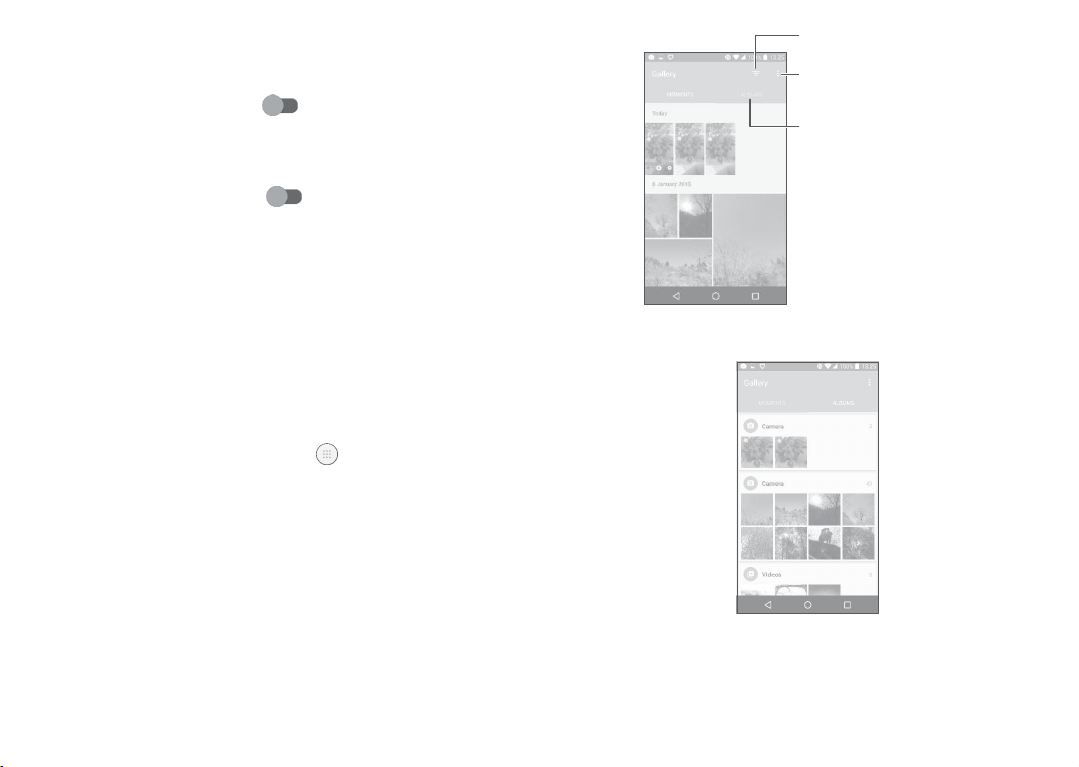
G
eneral
•
Storage TouchtochoosethephoneorSDcardtosave photos.
•
GPStagging
•
Shuttersound
•
AntiBanding
•
Resettofactory
settings
8.2
Gallery
Gallery
actsasa
Inaddition,asetoffurther operationsto picturesandvideosare
available
Toviewthephotosyouhave
thentouchGallery.
media
foryourchoice.
Turnon toactivatethefunctionoftagging
photos
andvideos
availablewhen GPSlocation servicesand
wireless
networkareswitchedon.
Turnon to enableshuttersound
takingaphoto.
Touchtoadjustcamerasettingstoavoid
Touchandconfirmtoresetthe
playerforyoutoview photos andplayvideos.
taken,
withyour
location.Thisoption
when
banding.
camera
settings.
touch fromtheHomescreen,
75
is
Toviewapicture/playavideo
Pictures
andvideosare
•
Touchan
•
Touchthepicture/videotoview or
album.
displayedbyalbums
All picturesor
Select
theitemsshown
inGallery.
Select
photosfor
furtheroperation.
Access
youralbums.
intheGallery.
videos
will
spreadacross
play.
76
thescreen.
Page 39
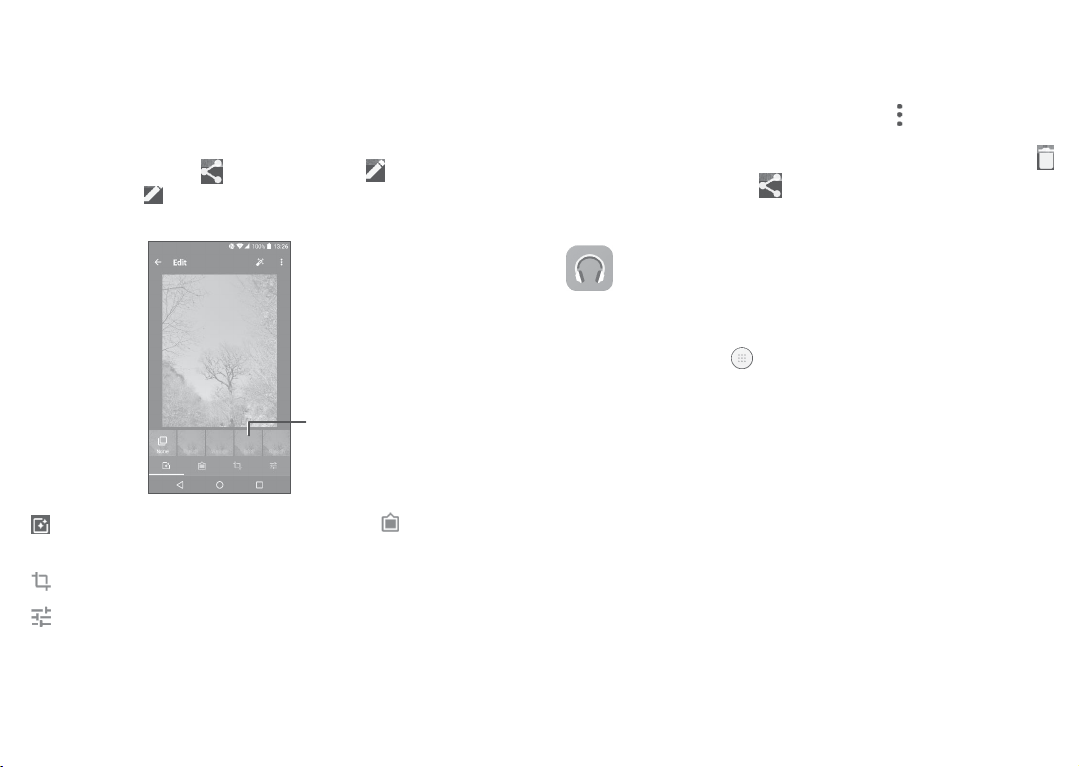
•
Slide
left/right
Workingwithpictures
You
can
withfriends,settingthemasacontact photoorwallpaper,etc.
Locatethepictureyouwanttoworkon,andtouchthepictureinthe full-
screenpicture
thepicture.Touch and
photoorWallpaper.
toview previousornextpictures/videos.
workwithpicturesbyrotating orcroppingthem,
view.
Touch tosharethepicture,or toedit
select
Setas...tosetthepicture asContact
sharing
them
Turn
on/off
Set
effectssuchasPunch,Vintage,B/W,Bleach,etc
Addabor
der.
Crop,Straighten,Rotate,MirrororDrawthepicture.
nightmode
.
Batchoperation
The
Galleryprovides
pictures/videosinbatches.
OnMOMENTS orALBUMS
t
oactivatebatchoperationmode(youcan
picture),
thentouchvideos/picturesyouwanttoworkwith.Touch
t
odelete
selectedfiles.
8.3
Music
phoneor
microSDcard.
bedownloadedfromyourcomputertothephoneusingaUSBcable.
Toplayamusicfile,touch fromtheHomescreen,thentouch
M
usic.
amulti-selectfunction,sothat you
screen ,
Touch to
Musicfilescan
touch andtouchSelectitem
also
long
press
onealbum/
shareselected
Youcanplay
files.
music
filesstoredonyour
can
work
with
Adjustthepicturecolour.
77 78
Page 40
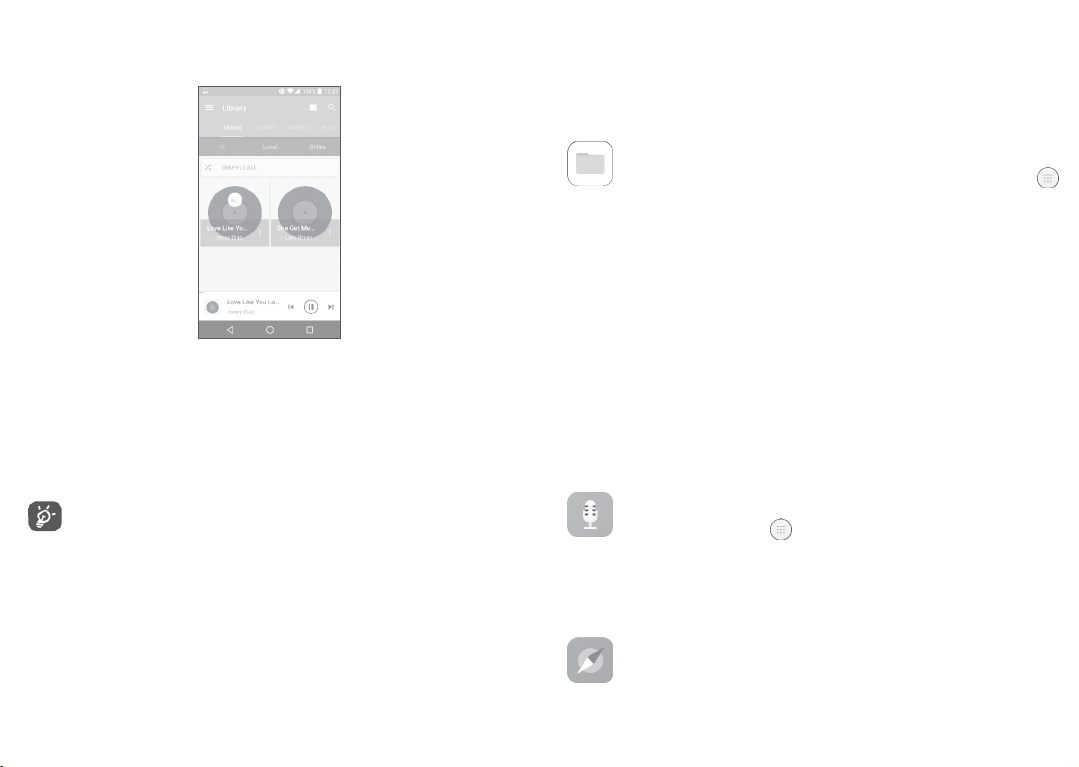
8.3.1
Playing music
Touchasongto
Access
themenu.
Change
Search
forasong.
Access
morefunctions.
Play
orpause.
Play
thenextsong.
While
skipisstill
play.
thesong
playingsongs
available
display.
with
evenifthe
Music,
theoperationof
screen
islocked.
pause,play
or
9
Others
9.1
Files
To
manage
fromtheHome
FilesworkswithbothexternalSDcardandinternalstorage.
Files displaysalldatastoredonthephone,includingapplications,
mediafilesdownloadedfromGooglePlayStore,
locations; videos,picturesoraudiosyouhavecaptured;otherdata
transferredviaBluetooth,
Whenyou downloadan
the
applicationusingFiles,
Filesallowsyoutoperformandisreallyefficientwiththefollo
commonoperations:create
move,copy,
screen,
delete,
play,share,
thefilesinyourphone,touch
thentouchFiles.
YouTubeoro
USBcable,
application
thentouchittoinstallitin yourphone.
(sub)folder,openfolder/file,view,
etc.
etc.
fromPCto
phone,
ther
you canlocate
wing
rename,
9.2
SoundRecorder
Torecordvoice,touch fromtheHome
Recor
der.
SoundRecorder
9.3C
ompass.
allows
youtorecordvoice/soundforseconds/hours.
screen,
thentouchSound
Waveyourphoneinafigure 8motionto
79
have
yourdetailedlocation.
80
Page 41

9.4Boost
Boost
performance.
application.
10
Homescreen,thentouchSe
10.1
Wireless&networks
provides
Youcan
manage
Settings
Togoto
youwiththephone
andoptimiseyourphone byusingthis
storage
andbattery
Settings,
ttings.
touch from the
81
status,
andits
10.1.1Wi-F
Using
wheneveryouareinrangeofa
havetodoistoentertheWi-Fi
toconnectyourphonetothe
Fordetailedinstructionson
10.1.2Bluetoo
Bluetooth
etc.)withinasmallrangewithanotherBluetoothsupporteddevice
(
phone,computer,printer,headset,
Formoreinformation on Bluetooth, refer to “7�3
Bluetoothdevices”.
10.1.3
TouchtochooseSIM
calls
and
i
Wi-Fi you
th
allows
yourphoneto
SIMcar
ds
sendingSMS
can
nowsurftheinternet without
wireless
network.Theonlythingyou
andconfigurean
Wi-Fi,referto“7.1.2Wi-F
exchange
data
carkit,etc.).
connecting
82
tothenetwork,making
1or
SIM
messages.
screen
wirelessnetwork.
using
2for
using
access
i”.
(videos,images,
Connectingto
your
poin
music,
t
SIM
card
Page 42

10.1.4
Datausage
Mobiledata
Ifyoudonotneedtotransmitdataonmobilenetworks,turno
mobile
datatoavoidincurring
operatormobilenetworks,particularlyifyoudonothaveamobile
dataagreement.
Setmobiledatalimit
ByenablingSetmobiledata
be
disabled
data
datauseofyourphone.
10.1.5
TurnonAeroplanemodeswitch to
wirelessconnectionsincluding
10.1.6
Turnon to
Thefunctionallowsdata
device.
10.1.7
Android
ThefunctionallowstotransmitappcontentviaNFC.
whenthe
usage
cycletoviewthestatisticsand
Data
usageismeasured
count
differen
More >Aeroplanemode
More >NFC
enable
More >AndroidBeam
beam
canbeactivatedonlywhenNFCison.
significant
limit,yourmobiledataconnection
specified
limitis
tly.
Wi-Fi,Bluetoothandmore.
byyour
charges
reached.
applications
phone,
simultaneously
NFC.
exchange
whenthephonetouchesanother
fordata
Youcan
andyouroperatormay
ff
use
alsochoose
relatedtothe
disableall
83 84
onlocal
will
a
10.1.8
More >Tethering&portablehotspot
This
function
allows
youto
share
your
via
USB
or
as
phone'smobiledataconnection”).
10.1.9
Amobile
devices
theirhomenetwork,whentheyconnectviaotherwirelessor
networks.Mobile
tokeep
applicationsessions
day,
astheuserconnectsviavariouswirelessnetworks,encounters
gapsincoverage,orsuspends-and-resumes
battery life.A
networktunnelisdisrupted,
out,fail,oreventhecomputingdeviceitself tocrash.
FormoreinformationonVPN,referto
privatenetworks”.
10.1.10
Dataroaming
Ifyoudon’t
disable
Dataroamingtoavoidincurring
Preferrednetworkmode
Youcansetyourpreferrednetworkmode,suchas
aportableWi-Fi
More >
VPN
virtualprivatenetwork(mobile
with
access
tonetwork
VPNs
conventional
resourcesand
are
usedinenvironments
openat all
causingapplicationstodisconnect,
More >Mobilenetworks
need
totransmit
data
phone's
access
point(referto“7�5
VPNormVPN)provides
times,
VPNcan't
onother
operators’mobile
significantroaming
mobiledataconnection
Sharing your
software
whereworkersneed
throughoutthe working
their
devices
survivesuch
topreserve
events
“
7.6
Connectingto
networks,
GSM/W
mobile
applications
wir
ed
because
time
charges.
CDMA,
virtual
LTE
on
the
etc.
Page 43

Enhanced4GLTEmode
Touchtoimprovethe
Show
roaming
Touchto
select
AccessPointNames
Youcan
select
Networkoperators
Youcan
select
10.1.11
Mobileplan
communication
quality.
reminder
whethertoshowareminderunder
roaming
yourpreferrednetworkwiththismenu.
anetwork
operator.
mode.
Touchtosetthemobileplan.
10.1.12
Emergency alerts
Touchtoenteremergencyalertssettings,includewhethertoshow
threatsandalertTone.
85 86
10.2De
10.2.1Gestur
Thefollowing
•
•
•
•
•
vic
e
es
gestures
canbeusedforquickoperations:
TouchlessUIApproachthe
Glovemode
(1)
Turnovertomute
Doubletapscreen
Black
scr
een
(1)
gesture
screen
withyourfingertoshow theeff
Enable
screen
glovemodethenyou
withthingloves.
tomuteringtonesof
oneover.
Turn on to enablethe function
allowsyoutoturnthescreenonoroffbya
doubletap.
Enable
theblack
the blackscreento quicklyaccessan
application.
10.2.2Display
Inthismenu,youcanadjustyourscreen
size,
colourtemperatureofyour
PressPowerkeytwiceforCamera
If
enabled,
Powerkeywithout
youcanquickly
unlocking
screen,
access
Camerabydoublepressingthe
yourphone.
can
touch onthe
Turnon
incomingcalls
screengesture,
byturningtheph
drawalett
brightness,wallpaper,font
etc.
ect.
er
tha
t
on
Page 44

Reversible
Ifactivated,youcanansweracallevenifyourphoneisheldupside down.
MatrixFlip
Ife
•
Thecoverwilllightuptoshowthetime
•
Swipe
•
Thecoverwillshowthe
Case
nabled,
and
thepowerkeyordoubletouchthe
left/right
music
playerorradioison.
toplaytheprevious/nextsongor
name
orphonenumberofanincomingcall.
weatherwhenyoupress
screen
area.
Youcanswipeleft/righttoreject/answerthe
channel
call,
orswipedownto
when the
endacall.
•
Thecover
10.2.3
Func
Touchto
reminds
Lock
shortcuts
customise
youoftheevent details.
scr
een
theapplicationshortcuts
displayed
onyourlock screen.
87 88
W
all
Shuffle
Ifthisfunctionisenabled,differentwallpaperswillbedisplayedon
yourlockscreeneachtimeyoupressthepowerkeytounlock your phone.
Screenlock
Touchtosetyour
yourphonebyslidingthe
pattern,etc.
Makepatternvisible
Thisoption onlydisplayswhenyouselectPatternto unlockyour
Touch to
Automaticallylock
Touchto
Lockscreenmessage
Touchtoinputownerinformationwhichwilldisplayonthelocked screen.
10.2.4
Touchtoadjustcallandnotification
settings.
screen
unlockmethod.For
screen,
enteringa
make
patternvisible.
select
thedurationtolockthephoneafterthe
Sound¬ifica
tion
ringtones,music,
password,
example,
youcanunlock
ordrawinga
screen
isoff.
andotheraudio
phone.
Page 45

•
Sound
•
Headsetmode Markthecheckboxtoenableheadsetmode.
•
Also vibratefor
calls
•
MaxxAudio Touchtosetthesoundeffectformusicand movies.
•
DoNotDisturb Touchto allowalarms,
•
Phoneringtone Touchtosetyourincomingcallringtone.
•
Defaultnotification
Set
volumefor
Ringtones
ifitis
plugged
Turnon to
media,
ringtone,andalarms.
willonlybeheardfromtheheadset
in.
enable
vibrationfor
reminders,
when DoNotdisturbmodeisenabled.
Touchtosetthedefault
sound
fornotifications.
incomingcalls.
calls,etc.
ringtone
•
Mutepoweron&
offringtone
•
Othersounds Touchto setdialpadtones,screenlocking
•
Pulsenotifica
light
•
Whendeviceis
tion
locked
Touchtoenable/disablethepoweron&off
ringtone.
sounds,
touch
sounds
Touchto
enable
anotification.
andvibrateontouch.
light
reminding
when thereis
Youcan configurewhethertoshowall
notificationcontentordon'tshownotifica
tion
atallwhenyourdeviceislocked.
•
Appnotifications Touch to block or set priority for app
•
Notificationaccess Touchtoview thenotificationlisteners.
notifications.
89
10.2.5
PowerKey
PowerKeysettingsare
Youcan setthePowerkeyto enablethefollowingfeatureswhilethe
screenisoff:
•
Press
•
Double
thekeytolightupthescreen;
press
YoucansetthePowerkeytoenableoneofthefollowingfea
whilethescreenison:
•
Experience
•
Take
•
Triggeradesired
•
Trigger
•
Enhance
•
Press
•
Triggerspecial effect suchassequencechangewhenamovieis playing;
•
Double
10.2.6
liveweatheranimations;
aninstantscreenshot;
audioeffectwhenasongormovieisplaying;
voicequalityduringacall;
thekeyfrom
press
Apps
Touchtoviewdetailsaboutthe
to
manage
theirdata
In the App permissions menu of anapplication,you cangrant
permissionsfor theapp,suchasallowingtheappto
Camera,Contacts,Loca
IntheNotificationmenu,youcanconfigurewhethertoblockthe
notificationsfromthis
available
at:Settings >PowerKey.
totakeaphoto;orlong
application;
Gallery
Moments tocreateaphotocollage;
totakeaphoto;orlong
applications
usage
andforcethemtostop.
tion,etc.
app,
hide
sensitive
press
totakeburst shots.
press
totakeburst shots.
installedonyourphone,
content, etc.
90
access
tur
your
es
Page 46

10.2.7
Storage&
Usethesesettingstomonitorthetotaland
10.2.8Battery
USB
available
spaceonyour phone.
Touchanycategoryinthebatterymanagementscreentoviewits
powerconsumption.
Youcanadjustpower
settingsinthe
10.2.9Memory
Touchtoviewthe totalmemoryandthe memory
10.2.10U
sers
Display
use
viathe
screen.
screenbrightnessorscreen
usedbyapplica
timeout
Touchtoaddanaccountforthisphone.
10.3Per
10.3.1Loca
On
Turnon to
sonal
tion
enable
theuseofinformationfromWi-Fiandmobile
networkstodetermineyourapproximatelocation,foruseinGoogle
Maps,
whenyou
asked
whetheryouconsentto
Google’s
Mode
Touchto
•
Highaccuracy:Use
search,andsoon.
locationservice.
select
High
accuracy,
GPS,
share
Battery
Whenyou
yourlocation
saving
select
thisoption,you’re
anonymously
orDeviceonlymode.
Wi-Fiandmobilenetworktodetermine location.
tions.
with
•
Batterysaving:
•
Deviceonly:Use
Recentlocationrequests
Use
Wi-Fitodeterminelocation.
GPS
todeterminelocation.
Thislistshowstherecentlocationrequests.
10.3.2Security
Encryptphone
Requires
each
timeyoupoweriton.
Preventmis-operation
Turnon toprevent
a numericPIN,pattern,orpasswordtodecryptyourphone
(1)
mis-operation
indoubletouchunlockmode.
SetupSIMcardlock
•
TurnonLockSIMcardswitch tolocktheSIMcardwithaPIN
code.
•
TouchChangeSIMPINto
Makepasswordsvisible
Turnon toshow
change
passwords as
thePINcode.
youtype.
Deviceadministrators
Touchtoview or
Unknownsources
deactivatedeviceadministrators.
Turnon
topermitinstallationofapplicationsthatyouobtainfrom
other
locations
Toprotectyourphoneand
fromtrusted
otherthan
sources,
GooglePlayStore.
personal
such
asGooglePlayStore.
data,download
websites,emails,
applications
or
only
Page 47

91
92
Page 48

Trustedcreden
Touchto
Installfrom storage
Touch toinstall
Clearcreden
tials
display
trustedCAcertificates.
encryptedcertificates
tials
frominternal
storageorSD
Touchtoremoveallcertificates.
Screenpinning
Whenthisfunctionis
enabled,
you can
always
keepawindowinview
bytouchingtheOverviewbuttonandthenthepinicon.Inthiscase,
theusercannotgotoanyotherwindoworopenanyotherapp.
Tostoppinningawindowin
Overviewkeystoge
ordrawingyourunlockpattern.
Appswithusageaccess
Touchtodisplay
the
usingfrequency.
10.3.3
Usethe
the
Language
Language
view,
longpressboththeBack and
ther,thenenteringyourscreenunlockpassword
apps
which
cantrack
what
apps
you
are using,
Turnon toallowpermission.
&input
&inputsettingstoselectthe
language
forthete
onyourphoneandforconfiguringtheonscreenkeyboard.Youcan
also
configurevoiceinputsettingsandthepointerspeed.
Language
Touchto
select
the
language
Spellchecker
Turnon to
enable
andtheregionyouwant.
the
system
toshow
suggested
words.
93 94
card.
and
xt
Personaldictionary
Touch
toopenalistofthewords
awordtoeditordeleteit. Touchtheaddbutton
CurrentKeyboard
Touchto
select
adefaultinputmethod.
you’veadded
tothe
dictionary.
(+)
toaddaword.
Touch
Text-to-speechoutput
•
Preferred engine: Touch to choosea Preferred text-to-speech
engine,
touch toshowmore
•
Speechrate:Touchto openadialogwhereyoucanselecthow
quickly
youwantthe
•
Listentoanexample:Touchtoplayabriefsampleofthespeech
synthesizer,
Pointerspeed
Touch
toopena
synthesizer
using
yourcurrentsettings.
dialog
whereyou
choices
for
tospeak.
canchange
each
engine.
thepointer
speed,touch
OKtoconfirm.
10.3.4
Backup&reset
Backupmydata
Turnon
tobackupyourphone’ssettingsandother
s.Ifyoureplaceyourphone,thesettingsanddata
application
you’vebacked
datatoGoogleserver
upwillberes
toredontothenewphoneforthefirsttimeyousigninwithyourGoogleaccou
nt.Ifyoumarkthisoption,awidevarietyofsettingsanddataare
cludingyourWi-F
passwords,bookmarks,
wordsyou’ve
andmostofthe
Ifyouunmarkthisoption,youstop
existingbackups
i
alistofthe
added
tothedictionaryusedbythe
settings
thatyouconfigureinthe
aredeletedfrom
applications
backing
upyour
Google
servers.
you’veinstalled,the
onscreen
settings,
keyboard,
Settings
andany
backed
up,in
application.
Page 49

Backupaccount
Touchtosetyour
Automatic
backup
restore
account.
Turnon torestoreyourbackedupsettingsorotherdatawhenyou
Networksettingsreset
reinstall
anapplication.
Touchtoresetallnetworksettings.
Factorydatareset
Erase
allofyour
personal
datafrominternal phone
storage,
informationaboutyourGoogleaccount,anyotheraccounts,your
systemandapplicationsettings,andanydownloadedapplications.
Resettingthephonedoesnoteraseanysystemsoftwareupdates
you’vedownloaded.
Ifyouresetthephoneinthisway,
same
kindofinformationaswhenyoufirststartedAndroid.
Whenyou
areunable
topoweronyour
performafactorydataresetby
upkeyandthePowerkeyat
10.4System
10.4.1
Date&time
UseDate×ettingsto
you’repromptedtore-enterthe
phone,
thereis
usinghardwarekeys.Press
same
timeuntilthe
customise
screen
yourpreferencesforhowdate
another
theVolume
lightsup.
wayto
andtimearedisplayed.
Automatic date&time
Turnon tousethenetwork-provideddateandtime.
95
including
Automatic time zone
Turnon tousethenetwork-providedtimezone.
Setdate
Touchtoopena
Settime
Touchtoopena
Selecttime zone
Touchtoopena
Use24-hourformat
Turnon to
10.4.2Acc
Use
the
have
installed
T
alkB
ack
Touchto
Captions
Touchtoactivate/deactivate
Magnification gestures
dialog
whereyoucan
dialog
whereyoucan
dialog
whereyoucansetthe
display
thetime
essibility
Accessibilitysettings
onyourphone.
enablespokenfeedback
manually
manually
phone’s
using
the24-hourclockformat.
toconfigure
anyaccessibilityplug-ins
fromyourphone.
captions
forphonescreen.
setthe
setthe
phone’s
phone’s
timezone.
date.
time.
you
Touchtoturnon/off toactivate/deactivatezoomin/out functionby tripletappingthescreen.
96
Page 50

Largetext
Turnon to
Highcontrasttext
Turnon toactivatehighcontrastte
Powerbuttonendscall
Turnon to
Auto-rotate
enlarge
enable
scr
the
screente
Powerbuttonendscall.
een
xt.
xt.
Turnon toactivateautorotate
screen.
Contentonthe
screenorthekeyboardwillbeautomaticallyrot
atedwhenyourotateyour phone.
Speakpasswords
Turnon to
Accessibilityshort
Touchto
Text-to-speechoutput
speakpasswords
cut
enable/disable
whiletyping.
quickactivatingfor
accessibility
features.
Touchtoupdatethesettingsfortext-to-speechoutput,suchasthe
speech
rate.
Longpressdelay
Touchtoadjustthedurationoftouchandhold
enables
yourphonetodiffertouch andtouch &
delay.
This
hold,
which
function
may
avoid
incorrectoperations.
Colourinversion
Turnon toturnoncolourinversion.
97 98
Colourcorrection
Touchtoturnon/offcolourcorrection.
10.4.3
Regulatory&safety
Touchtoview productinformation.
10.4.4
Aboutphone
ThiscontainsinformationrangingfromLegal information,Model
number,Firmwareversion,
Baseband
version,Kernelversion,Build
numbertothoselistedbelow:
U
pdates
Touchto
check
for
system
Experienceimprovement
updates.
If thisfunction isenabled,your deviceperformancedatawill be
collectedforimprovingthequalityand
S
tatus
Thiscontains
number,Network,
the
status
Signal
oftheBattery
strength,etc.
performance
status,
Battery
ofthedevice.
level,
Myphone
Page 51

11
Makingthemostofyour
phone
11.1
SmartSuite
Youcandownloadsoftware upgradesfor free from the website
(
www.cloudminds.com).SmartSuite
•Con
tacts
Allowsyoutobackupcontactentriessothatyoudon'thaveto
worryabout
losing,breaking,
includes:
switchingphonesor
changing
service
99
providers.
•
Messages
Freesyoufrom
your
messages
•
Calendar
AllowsyoutosynceventsfreelybetweenyourphoneandOutlook
andcreateandeditnew eventsfromaPC.
•Photos
Allowsyouto
organise
•
Videos
Allowsyoutoinsertvideo filesfromyourPCfor
uploadthemtoa
painstakingly
are
easilyaccessible
easily
themindifferent
importphotosfromyour
handsetf
inputtingtextonthe
andwell-organised.
albums
forbettermanagement.
older.
100
keypads.
PC
Allo
orthe
playback
f
handsetand
andthen
Page 52

•Music
Allowsyoutoquickly
theultimate
mobileway.
•
Application
Allows
youtoimport
installed
intoyour
•Backup
Allowsyouto
applications,
SupportedOperatingSystems
WindowsXP/
search
Libr
ary,andenjoy
foryourfavouritesinyour
the
easiest
downloadedmobile app licationsandhave
handsetupon synchronisation.
back
thenimportthe
upyour
contacts,messages,calendar,
backup
filestoyourphone.
Vista/Windows
7/Windows8.
digital
jukebox
PC,
manage
inyouro
wn
them
photosand
11.2
Upgrade
You
canuse
the Mobile
Upgrade
toolor
FOTAUpgrade
tooltoupdate
yourphone'ssoftware.
11.2.1
MobileUpgrade
Download Mobile Upgrade from website
(
www.cloudminds.com)andinstallitonyourPC.Launchthetool
andupdateyourphonebyfollowingthestepbystepinstructions (refertothe
UserGuide
willnowhavethelatestsoftware.
providedtogetherwiththe tool).Yourphone’s software
All
personal
informationwillbepermanentlylostfollowingthe
updateprocess.Werecommend youbackupyourpersonal
data
usingSmartSuite
beforeupgrading.
101
11.2.2
FOTAUpgrade
UsetheFOTA(FirmwareOverTheAir)Upgradetooltoupdateyour
phone'ssoftware.To
theHomescreen,thenselectUpdatesortouchSettings>About
phone>Updates.
Touch andthephonewillsearchforthelatestsoftware.Ifyou
wanttoupdatethesystem,touchthe button,andwhenthat’s
finished,touch to completetheupdate.Nowyourphone
thelatestversionofthesoftware.Turnondataconnection
Fibefore
searching
arealsoavailableonceyourestartthephone.Ifyouhavechosen
check,
whenthesystem
popupwhereyoucanchoosetodownloadtheupdateorignore.A
notificationwill
appearinStatus
DuringFOTA
correctupdate
accessUpdates,touchtheApplicationtabfrom
for
updates.
Settings
for
auto-check
discovers
alsoappear
thenewversion,adialog
inthe
Statusbar.
Thenotificationwillalso
bar.
downloadingorupdating,
packages,
do not
toavoiderrorsinlocatingthe
change
your default
102
or
frequency
will
storage
will
location.
have
Wi-
auto-
Page 53

12
103
104
ThelatestgenerationofCloudMinds mobilephonesoffersa
handsfree featurethatallowsyoutousethetelephonefroma
distance,placed
theirconversationsconfidential,anearpieceisalso
as
1.
2.
3.St
Accessories
onatablefor
theheadset.
Charger
USB
cable
ereo
headset
Only use the CloudMindsbatteries,
included
along
example.
withyourdevice.
Forthosewhoprefertokeep
available
chargers,
and acc
known
ess
built-in
ories
W
13
Yourphoneis warranted
mayoccurinconditionsofnormaluseduringthewarrantyperiodo
twelve(12)months
originalinvoice.
Batteries
against
fromthedateof
In
case
use
thereof,youmustimmediatelyinformyourvendorandpresent
yourphonewithyourproofofpurchase.
Ifthedefectisconfirmed, yourphoneorpartthereofwillbeeither
replacedor
areentitledtoaone(1)monthwarrantyforthe
orreplacementmaybecarriedoutusing reconditionedcomponents
offeringequivalentfunctionality.
Thiswarrantycoversthecostofpartsandlaborbutexcludesany
othercosts.
Thiswarrantyshall notapplytodefectstoyourphone
accessory
-
Non-compliance
technicalandsafetystandardsapplicableinthe
whereyourphoneisused;
arranty
(1)
(2)
and
accessories
any defectwhichmayoccurduringthefirstsix (6)months
purchaseas
ofanydefectofyourphonewhichpreventsyoufromnormal
repaired,
asappropriate.
dueto(without
withtheinstructionsforuseor
against
anydefectormalfunctioningwhich
fromthedateofpurchaseasshownonyour
soldwithyourphonearealsowarranted
shownonyouroriginalinvoice.
Repaired
phoneand
same
defect.Repair
any
limitation):
installation,orwith
geographical
f
accessories
and/or
area
(1)
Page 54

-Connectiontoanyequipmentnotsuppliedornot
CloudMinds (Shenzhen) Holdings Co., Ltd.;
-Modificationorrepairperformedbyindividualsnotauthorisedby
CloudMinds (Shenzhen) Holdings Co., Ltd.oritsaffiliatesoryour vendor;
-Modification, adjustmentor alteration of software or hardware
performedby
Holdings Co., Ltd.;
-Inclementwea
orfoods,
corrosion,oxida
Yourphonewillnotbe
havebeenremovedoraltered.
Therearenoexpresswarranties,whetherwritten, oralorimplied,
otherthanthisprintedlimitedwarrantyorthemandatorywarranty
providedbyyourcountryorjurisdiction.
InnoeventshallCloudMinds (Shenzhen) Holdings Co.,
Ltd.oranyofitsaffiliatesbe liable forindirect,incidentalor
damages
butnotlimitedto
damage,loss
canbe
Some
indirect, incidentalor consequentialdamages,or limitation o
thedurationofimpliedwarranties,sotheprecedinglimitations
exclusionsmay
individuals
ther,lightning,fire, humidity,infiltration of liquids
chemical
ofanynature
commercialorfinancialloss
ofdataor
disclaimedbylaw.
countries/states do not allow the exclusionor
notapplytoyou.
not
authorised
products,downloadoffiles,
tion…
repairedincaselabelsorserialnumbers
whatsoever,including
lossofimage
tothefullextentthose
recommended
byCloudMinds (Shenzhen)
crash,
highvoltage,
or
(IMEI)
consequential
damag
by
es
limita
or
tion
105
of
14
Beforecontactingtheservicecenter,herearesomeinstructionsto
helpyoutroubleshoot yourdevice:
•
•
•
•
andcarryoutthefollowingchecks:
Myphonecan't beswitchedonorisfro
•
•
•
f
Myphonehasnotrespondedforseveralminutes
•
Troubleshoo
Tohaveoptimaloperation,fully
Toimprovethephone’sperformance,remove
apps
onyourphone.
Updateyourphone'ssoftwareviatheUpdatesapplication.Oryou
cantouchSettings>About phone>Updatestoupdatesoftware.
ResetyourphoneviaFactorydatareset.
>Backup&reset >Factory datareset,
PHONE.AnothermethodistoholddownthePowerkeyandthe
Volumeupkey atthe
Allyourphonedatawillbelost
fully
back
upyourphonedatabeforeresetting.
Whenthephonecan'tbe
toensuretheminimumbatterypowerneeded.Thenswitchiton again.
Whenthephonefallsintoaloopduringpoweronanimationand
theuserinterfacecan'tbe
keytoenter
issuescaused
Ifneithermethodiseffective,resetthephoneusingthePowerkey and
theVolumeupkey(holdingbothtoge
viatheUpdatesapplication.
Ifyourphonedoesn’t
holdingthePowerkeyuntilitturns offandthenrestartitagain.
Recoverymode.This
bythirdpartyapplications.
same
switched
accessed,
respond,
ting
charge
thebatt
YoucantouchSettings
andthentouch
timewhenyourphoneis poweredoff.
permanently.
on,
eliminates
turnoffyourphoneby
106
Itisstrongly
zen
charge
forat
pressandholdtheVolume down
any
ther)orupdatesoftware
ery.
unnecessary
advisedto
least
20minutes
abnormal
pressing
files
or
RESET
OS booting
and
Page 55

•
Ifyourphonehasaremovablebattery,removethebatteryand
reinsertit,thenrestartthephone.
•
Ifitstilldoesn'twork,resetthephone.
Myphoneturnsoffby
•
Check
that your
and
make
the
•
Check
•
Ifitstilldoesn'twork,resetthephone.
surethatthePowerkeyisnot
screen
isunlocked.
thebattery
itself
screenislocked
charge
level.
whenyou
are
accidentallypressed
not
using
while
yourphone,
Myphonecan't chargeproperly
•
MakesurethatyouareusingtheCloudMindschargerthatcomes
with
thephone.
•
Ifyourphonehasaremovablebattery,
isinsertedproperlyand
beinsertedbefore
•
Makesurethatyourbatteryisnotcompletelydischarged;ifthe
clean
plugging
inthe
makesurethatyourbatt
thebatterycontact ifit’s
charger.
ery
dirty.Itmust
batterypowerhasbeenemptyforalongtime,itmaytakearound
20minutesto
•
Makesurethat
(32°F)
to40°C(104°F)).
•
When
abroad,check
display
thebattery
charging
iscarriedoutundernormalconditions(0°C
charging
indicatoronthe
thatthevoltageinputiscompatible.
screen.
Myphonecan't connecttoanetworkor"Noservice"isdisplayed
•
Try connectingto the network by movingto another physical location.
•
Verifythenetwork
•
Check
withyouroperatorthatyourSIMcardisvalid.
•
Tryconnectingatalatertimeifthenetworkisoverloaded.
Myphonecan't connecttotheint
•
CheckthattheIMEInumber
coverage
withyour
ernet
(press
*#06#)isthe
operator.
same
astheone
printedonyourwarrantycardorbox.
•
Make
sure
thattheinternet
accessservice
ofyour
SIMcardis
available.
107
•
Check
yourphone'sinternetconnectionsettings.
•
Makesurethatyouareina
•
Tryconnectingatalatertimeoranotherlocation.
place
withnetworkcoverage.
Invalid SIMcard
•
Makesurethat the SIMcardhasbeencorrectly inserted(see
"Inserting
•
MakesurethatthechiponyourSIMcardisnotdamaged.
•
Makesurethatthe
Myphonecan't make
•
Makesure thatyouhavedialledavalidnumberandhavetouched
orremovingtheSIMcard").
service
ofyourSIMcardisavailable.
outgoing
calls
Call.
•
Forinternational
•
Makesurethatyourphoneisconnectedto anetwork,andthe
networkisnot
•
Checkyoursubscriptionstatuswithyouroperator(cr
valid,
etc.).
•
Makesurethatyouhavenotbarredoutgoingcalls.
•
Makesurethatyourphoneisnotin
Myphonecan't receive
•
Makesurethatyourphoneisswitchedonandconnectedto a
network
•
Checkyoursubscriptionstatuswithyouroperator(cr
valid,
etc.).
•
Makesurethatyouhavenotforwardedincomingcalls.
•
Makesurethatyouhavenotbarredcertaincalls.
•
Makesurethatyourphoneisnotin
Thecaller’sname/numberdoesn'tappearwhenacallisrec
•
Check
thatyou
•
Your
callermay
calls,check
overloaded
incoming
(check
for
overloadedorunavailable
havesubscribed
have
concealed
thecountryand
orunavailable.
aeroplane
calls
aeroplane
tothis
service
his
nameornumber.
108
area
codes.
mode.
network).
mode.
withyour
edit,
SIMcard
edit,
SIMcard
eived
operator.
Page 56

Ican't findmycon
•
MakesurethatyourSIMcardisnotbroken.
•
MakesurethatyourSIMcardisinsertedpr
•
ImportallcontactsstoredinSIMcardtophone.
Thesoundqualityofthecallsispoor
•
Adjustthe
•
Check
thenetworkstrength.Movetoalocationwithstrongersignal
strength.
•
Makesure
Ican't usethefeaturesdescribedin themanual
•
Checkwith your operator to makesurethat your subscription
includes
•
Makesurethatthisfeature doesn'trequireanCloudMindsaccessory
When Iselectanumberfrommycontacts,thenumbercan'tbe dialled
•
Make
sure
•
Makesurethatyouhaveselectedthecountrycodewhencallingan
international
Ican't addacon
•
MakesurethatyourSIMcardcontactsarenotfull;delete
or
save
Mycallerscan't leavemessagesonmyvoicemail
•
Contactyournetworkoperatorto
Ican't accessmyvoicemail
•
Make
sure
in
"Voicemail
•
Trylaterifthenetworkis
Ican't sendandreceive
•
Check
yourphonememoryasitmightbefull.
tacts
volume
during
acallbypressing
that
therec
eiver,connector orspeakeronyourphoneis
thisservice.
thatyou
have
correctly recordedthe
number
.
tact
thefilestothephone.
thatyour
operat
number"
.
busy.
MMS
checkserviceav
or’svoicemail
109
operly
.
theVolumeup/downkey.
clean.
number
inyourfile.
some
files
ailability
.
numberiscorrectlyentered
•
Contact
yournetwork operatorto
parameters.
•
VerifytheservercentrenumberoryourMMSprofilewith your
•
The
server
centre
maybeswamped.
SIMcardPINlocked
•
Contact your network operator to obtain the PUK (Per
Unblocking
Ican't connectmyphonetomycomputer
•
Install
•
Check
•
OpentheNotificationpaneltocheckifthe
beenactivated.
•
.
Check
•
Checkthatyourcomputermeetstherequirementsfor
installation.
•
Makesurethatyou’re
Ican't downloadnew
•
Makesurethat thereissufficientphonestoragespaceforyour download.
•
Select
•
Check
Thephonecan't bedetectedby othersviaBluetoo
•
MakesurethatBluetoothisturnedonandyourphoneisvisibleto
otherusers.
•
Make
Thebatterydrainstoofast
•
Makesurethatyoufollowthecomplete
minutes
Key)code.
SmartSuite.
thatyour
USB
thatyouhave
the
microSD
your
subscriptionstatus
sure
thatthetwo
).
driver is
marked
using
files
cardasthelocationtostoredownloadedfiles.
phonesare
checkserviceavailabilityand
Try
againlater.
installedproperly
the
USBdebugging
theright
cable
withyour
withinBluetooth’sdetectionrange.
110
SmartSuite
fromthebox.
operator.
charge
.
checkbox.
th
time(minimum
MMS
operator.
sonal
Agenthas
SmartSuite
135
Page 57

Proc
essor
Qualcomm
MSM8996
Platf
orm
Android7X
M
emory
32GBROM+4GBRAM
Dimensions
(LxWxT)
159 X 78 X 8.4 mm
Weight
174g
D
isplay
5.7QHD,2560x1440
Network
GSM: 850/900/1800/1900
UMTS: 850/900/1900/2100
LTE: 1/3/7/8/20/22/28/33/34/38/40/41/42/43
(Band frequency and data speed are
operator dependent.)
GPS
A-GPS,GPS
C
onnectivity
•Bluetooth V4.1
•802.11a/b/g/n/ac (2.4GHz & 5GHz)
• 3.5 mm audio jack
• micro-USB
•
Afterapartial
Waitforatleast20minutesafterremovingthe
exactindication.
•
Adjustthe
•
Extendthe
•
Update news andweather information on manualdemand,
increase
•
Exit
background-runningapplications
extendedperiodsoftime.
•
DeactivateBluetooth,Wi-Fi,or
Thephonebecomeswarmfollowingprolongedcalls,gameplaying,
internetsurfingorrunningother complexapplications
•
Thisheating
data.Endingthe aboveactionswill makeyourphonereturn to
normaltemperature.
AfterFactorydataresetisperformed,Ican'tusemyphone
enteringGoogleaccountcreden
•
Afterresetis
credentials
•
Ifyoudon’trememberyourGoogleaccountcredentials,complete
Google
•
Ifyoustillcannot
centre,but
Thephonedoesn'tringwhenacallormessage
•
MakesurethatDoNotDisturbmode(gotoSettings>Sound&
notification>DoNotDisturb)isnot
•
Press
Iforget somepasswords/codes/keysonphone
•
PerformFactorydatareset.
•
Ifyoustillcannot
centre,but
charge,
thebatterylevelindicatormaynotbeexact.
brightnessofscreenas
emailauto-check
their
auto-check
isanormal
performed,
thatwere usedonthisphone.
accountrecoveryprocedures.
access
remember
theVolumeup/down
access
remember
interval foraslongaspossible.
interval.
GPS
consequence
youmustenterthe
yourphone,applytotheauthorisedrepair
thatitwillnotbe
keyto
yourphone,applytotheauthorisedrepair
thatitwillnotbe
charger
appropriate.
iftheyarenotbeingusedfor
whennotinuse.
ofthe
CPUhandlingexc
tials
originalGoogle
regarded as
activat
adjust
regarded as
111
arriv
ed.
volume.
warrantycase.
es
warrantycase.
toobtainan
essiv
without
account
S
15
or
e
pecifica
tions
112
Page 58

Camera
•
16
megapixelback
camera
•
8
megapixel
frontcamera
Audiosupported
f
ormats
MIDI/MP3/AAC
Videosupported
f
ormats
MP4/3GP/MKV/AVI/WMV
Battery
(1)
•
Rechargeable
Lithium-ionbatt
ery
•
Capacity:308
0mAh
ExpansionSlot
microSD™
memorycard
(AvailabilityofmicroSD
card
depends
on
market)
SpecialFea
tur
es
• GPS
• G-sensor
• Light Sensor
• Proximity Sensor
• E Compass
• Gyro
• Iris recognition sensor
Note:
Specifications
(1)
Theoriginalbatteryhasundergonerigoroussafetyinspectionstomeet
qualificationstandards,
aresubjectto
the
useofnon-originalbatt
change
withoutpriornotice.
eriesmay
113
bedangerous.
114
Page 59

FCC Compliance
This device complies with part 15 of the FCC Rules. Operation is
subject to the following twoconditions:
(1) This device may not cause harmful interference, and
(2) this device must accept any interference received, including
interference that may causeundesired operation.
Caution:
Changes or modifications not expressly approved by the
manufacturer could void theuser's authority to operate he equipment.
NOTE: This equipment has been tested and found to comply with
the limits for a Class B digitaldevice, pursuant to part 15 of the FCC
Rules. These limits are designed to provide reasonableprotection
against harmful interference in a residential installation. This
equipment generates, usesand can radiate radio frequency energy
and, if not installed and used in accordance with theinstructions, may
cause harmful interference to radiocommunications. However, there
is no guarantee that interference will not occur in a
particularinstallation. If thisequipment does cause harmful
interference to radio or television reception, which can bedetermined
by turning the equipment off and on, the user is encouraged to try to
correct theinterference by one or more of the following measures:
-Reorient or relocate the receiving antenna.
-Increase the separation between the equipment and receiver.
-Connect the equipment into an outlet on a circuit different from that
to which the receiver isconnected.
-Consult the dealer or an experienced radio/ TV technician for help.
Health and safety informationRadio Frequency (RF) Energy
This model phone meets the government's requirements for
exposure to radio waves.
This phone is designed and manufactured not to exceed the
emission limits for exposure to radiofrequency (RF)energy set by the
Federal Communications Commission of the U.S. Government:
The exposure standard for wireless mobile phones employs a unit
of measurement known as theSpecificAbsorption Rate, or SAR.
The SAR limit set by the FCC is 1.6W/kg.
The maximum SAR value is obtained at the
values are:1.0730W/Kg.
Tests for SAR are conducted usingstandardoperating positions
accepted by the FCC with the phone transmitting at its
highestcertified power level in all testedfrequency bands. Although
the SAR is determined at the highest certified power level, the
actualSAR level of the phone while operating can be well below
the maximum value. This is becausethe phone is designed to
operate at multiple power levels so as to use only the poser
required toreach the network. In general, the closer you are to a
wireless base station antenna, the lower thepower output.While
there may be differences between the SAR levels of various
phones and atvarious positions, they all meet the government
requirement.The FCC has granted an Equipment59Authorization
for this model phone with all reported SAR levels evaluated as in
compliance withthe FCC RF exposure guidelines. SAR information
on this model phone is on file with the FCCand can be found
under the Display Grant section of http://www.fcc.gov/oet/fccid
after searchingon FCC ID: 2AK9KA1.
Page 60

 Loading...